Speedometer MERCEDES-BENZ E350 2010 W212 Owner's Manual
[x] Cancel search | Manufacturer: MERCEDES-BENZ, Model Year: 2010, Model line: E350, Model: MERCEDES-BENZ E350 2010 W212Pages: 372, PDF Size: 8.55 MB
Page 18 of 372
Safety notes ..................................... 48
Telltale ............................... 29, 52, 307
Seat heating ......................................... 92
Seating capacity ................................ 238
Seats ..................................................... 87
Adjustment ...................................... 87
Drive-dynamic multicontour seat .....91
Easy-entry/exit feature ....................93
Heating ............................................ 92
Memory function .............................. 96
Messages in the multifunction
display ........................................... 293
Split rear seat bench .....................199
Ventilation ....................................... 92
Securing cargo
Cargo tie-down rings ...................... 199
Selective setting
see Key, SmartKey
Selector lever
see Gear selector lever
Self-test
BabySmart™ .................................... 47
OCS (Occupant Classification
System) ........................................... 46
Tele Aid .......................................... 208
Service
see Maintenance
Service, parts .................................... 346
Service and warranty information ..... 20
Service intervals see Maintenance System, Service
indicator message
Service life (tires) .............................. 242
Service menu ..................................... 138
Settings
Factory setting (KEYLESS-GO) .........79
Factory setting (SmartKey) ..............77
Memory function .............................. 96
Menu ............................................. 139
Selective setting (KEYLESS-GO) .......79
Selective setting (SmartKey) ............77
Shelf below rear window, cleaning .. 266
Side impact air bags ........................... 41
Side marker lamps
Cleaning lenses ............................. 262
Messages in the multifunction
display ........................................... 300Sidewall (tires) .................................. 251
SmartKey see Key, SmartKey
SmartKey with KEYLESS-GO
see Key, SmartKey
Snow chains ...................................... 252
Snow tires see Winter tires
Spare wheel ....................................... 353
Mounting ....................................... 323
Storage location ............................ 271
Speedometer ....................................... 28
Speed settings
Cruise control ................................ 147
DISTRONIC PLUS ........................... 155
Resume function ...................148, 156
SRS
Indicator lamp .................................. 29
SRS (Supplemental Restraint System)
Indicator lamp ......................... 36, 308
Messages in the multifunction
display ........................................... 290
Standing water, driving through ...... 257
Starter switch positions
KEYLESS-GO .................................... 86
SmartKey ......................................... 85
Starting difficulties (engine) ............ 110
Starting the engine ........................... 109
Steering column see Multifunction steering wheel,
Adjustment
Steering wheel
see Multifunction steering wheel
Steering wheel gearshift control ..... 122
Stolen Vehicle Recovery Services ... 212
Storage compartments ..................... 201
Storing tires ....................................... 243
Sunroof see Power tilt/sliding sunroof
Sunshade
Rear window .................................. 205
Sun visors .................................. 204, 205
Suspension tuning see AIRMATIC 16Index212_AKB; 2; 41, en-USd2ureepe,Version: 2.11.8.12009-07-17T09:14:21+02:00 - Seite 16
Page 20 of 372
Air pressure ................................... 229
Care and maintenance ...................242
Cleaning ......................................... 243
Direction of rotation, spinning .......241
Important notes on tire inflation
pressure ........................................ 230
Inflation pressure ........................... 231
Information placard .......................237
Inspection ...................................... 242
Labeling ......................................... 245
Load index ............................. 246, 250
Load rating .................................... 250
Messages in the multifunction
display ................................... 284, 304
MOExtended .................................. 353
Ply composition and material
used ............................................... 251
Problems under-/overinflation ......231
Retreads ........................................ 228
Rims and tires (technical data) ......353
Rotation ......................................... 244
Service life ..................................... 242
Sizes .............................................. 353
Snow chains .................................. 252
Speed rating .......................... 247, 251
Storing ........................................... 243
Temperature .......................... 230, 244
Terminology ................................... 249
TIREFIT (tire repair kit) ...................329
Tire Identification Number .............251
Tire pressure loss warning system . 232
TPMS low tire pressure/
malfunction telltale ........................312
Traction ................................. 244, 251
Tread ............................................. 251
Tread depth ........................... 242, 252
Treadwear ...................................... 243
Treadwear indicators .............242, 252
Vehicle maximum load on ..............252
Wear pattern .................................. 244
Winter tires ............................ 252, 353
Tire speed rating ....................... 247, 251
Top tether see Children in the vehicle
Total load limit ................................... 251
Towing
Towing eye bolt .............................. 341
Vehicle ........................................... 340Towing eye bolt ................................. 341
Traction ...................................... 244, 251
Transfer case ..................................... 124
Transmission see Automatic transmission
Transmission fluid level .................... 226
Transmission gear selector lever see Gear selector lever
Transmission positions .................... 118
Traveling abroad ............................... 257
Tread (tires) ....................................... 251
Tread depth (tires) .................... 242, 252
Treadwear .......................................... 243
Treadwear indicators (tires) .... 242, 252
Trip menu ........................................... 129
Trunk
Closing ............................................. 82
Fuse box ........................................ 343
Messages in the multifunction
display ........................................... 293
Opening ........................................... 82
Opening/closing system .................. 83
Tie-down rings ............................... 199
Trunk lid emergency release ............84
Unlocking manually .......................315
Valet locking .................................... 85
Turning off the engine ...................... 113
Turn signals ....................................... 100
Cleaning lenses ............................. 262
Indicator lamps ................................ 29
Messages in the multifunction
display ........................................... 303
Replacing bulbs ............................. 319
U
Uniform Tire Quality Grading
Standards .................................. 243, 252
Units
Selecting speedometer display
mode ............................................. 141
Unleaded gasoline, premium ........... 362
Unlocking the vehicle
KEYLESS-GO .................................... 77
Manually ........................................ 314
SmartKey ......................................... 76
Upholstery, cleaning ......................... 266
Useful features .................................. 203
18Index212_AKB; 2; 41, en-USd2ureepe,Version: 2.11.8.12009-07-17T09:14:21+02:00 - Seite 18
Page 30 of 372
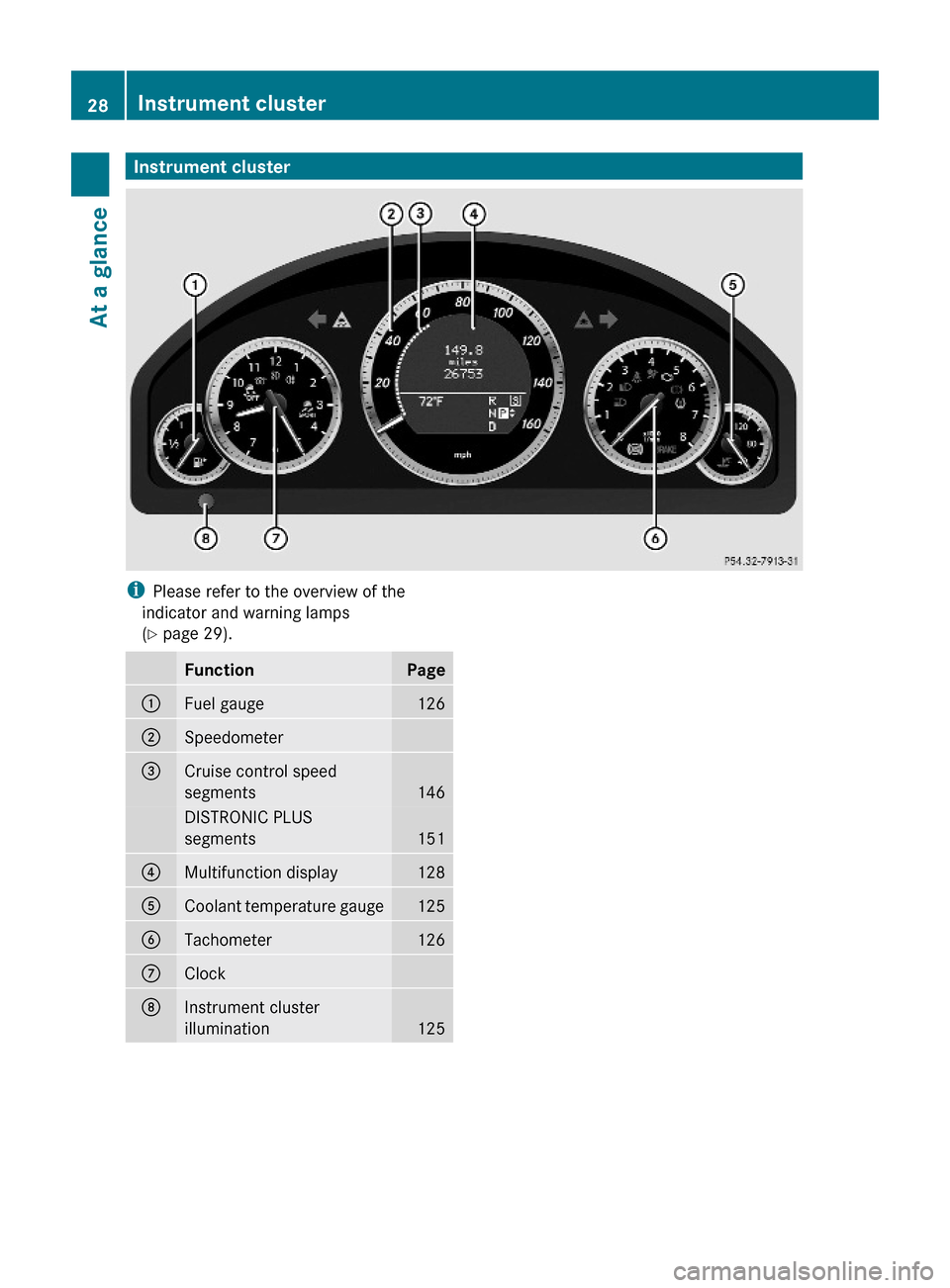
Instrument clusteriPlease refer to the overview of the
indicator and warning lamps
(Y page 29).
FunctionPage:Fuel gauge126;Speedometer =Cruise control speed
segments146
DISTRONIC PLUS
segments151
?Multifunction display128ACoolant temperature gauge125BTachometer 126CClockDInstrument cluster
illumination125
28Instrument clusterAt a glance
212_AKB; 2; 41, en-USd2ureepe,Version: 2.11.8.12009-07-17T09:14:21+02:00 - Seite 28
Page 130 of 372
serve to call up relevant information or to
customize the settings for your vehicle.
It is helpful to think of the menus, and the
functions within each menu, as being
arranged in a circular pattern.
In the Sett. menu, instead of functions, you
will find a number of submenus for calling up
and changing settings. For instructions on
using these submenus, see “Settings menu”
(Y page 139).
The number of menus available in the system
depends on which optional equipment is
installed in your vehicle.
Using the control system
XTo select a menu: Press button =
or ;.
XTo select a submenu: Press button :
or 9.
XTo go to the next higher menu level:
Press button %.
XTo select the standard display: Press
button % repeatedly until the standard
display featuring the odometer and
speedometer appears.
or
XPress and hold button % until the
standard display featuring the trip
odometer and the main odometer appears.
XTo confirm selection: Press button a.XTo confirm display message: Press
button a or %.
The control system saves certain display
messages. Calling up display messages
(Y page 139).
For information about warning and
malfunction messages appearing in the
multifunction display (Y page 272).
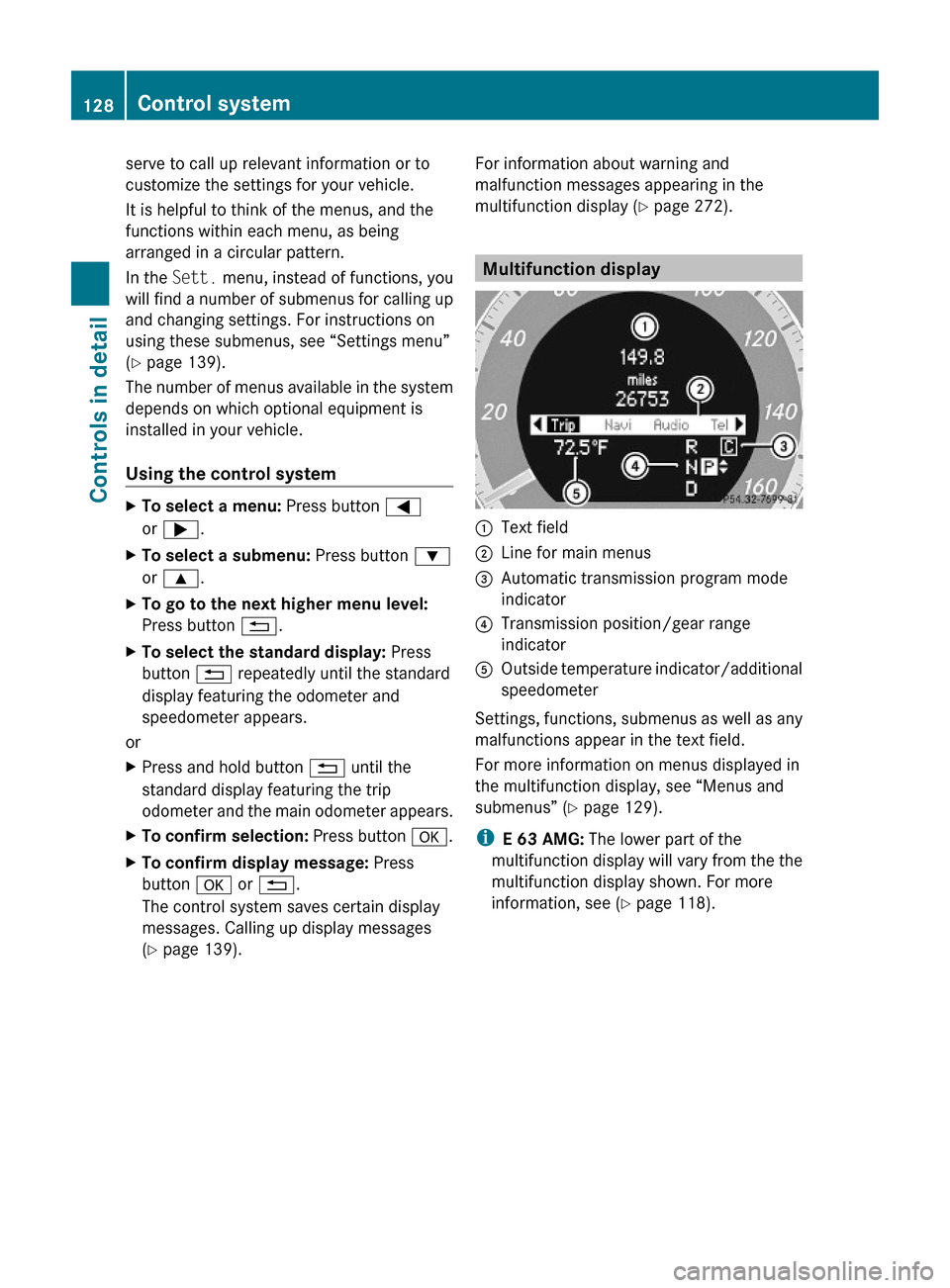
Multifunction display
:Text field;Line for main menus=Automatic transmission program mode
indicator
?Transmission position/gear range
indicator
AOutside temperature indicator/additional
speedometer
Settings, functions, submenus as well as any
malfunctions appear in the text field.
For more information on menus displayed in
the multifunction display, see “Menus and
submenus” (Y page 129).
iE 63 AMG: The lower part of the
multifunction display will vary from the the
multifunction display shown. For more
information, see (Y page 118).
128Control systemControls in detail
212_AKB; 2; 41, en-USd2ureepe,Version: 2.11.8.12009-07-17T09:14:21+02:00 - Seite 128
Page 131 of 372
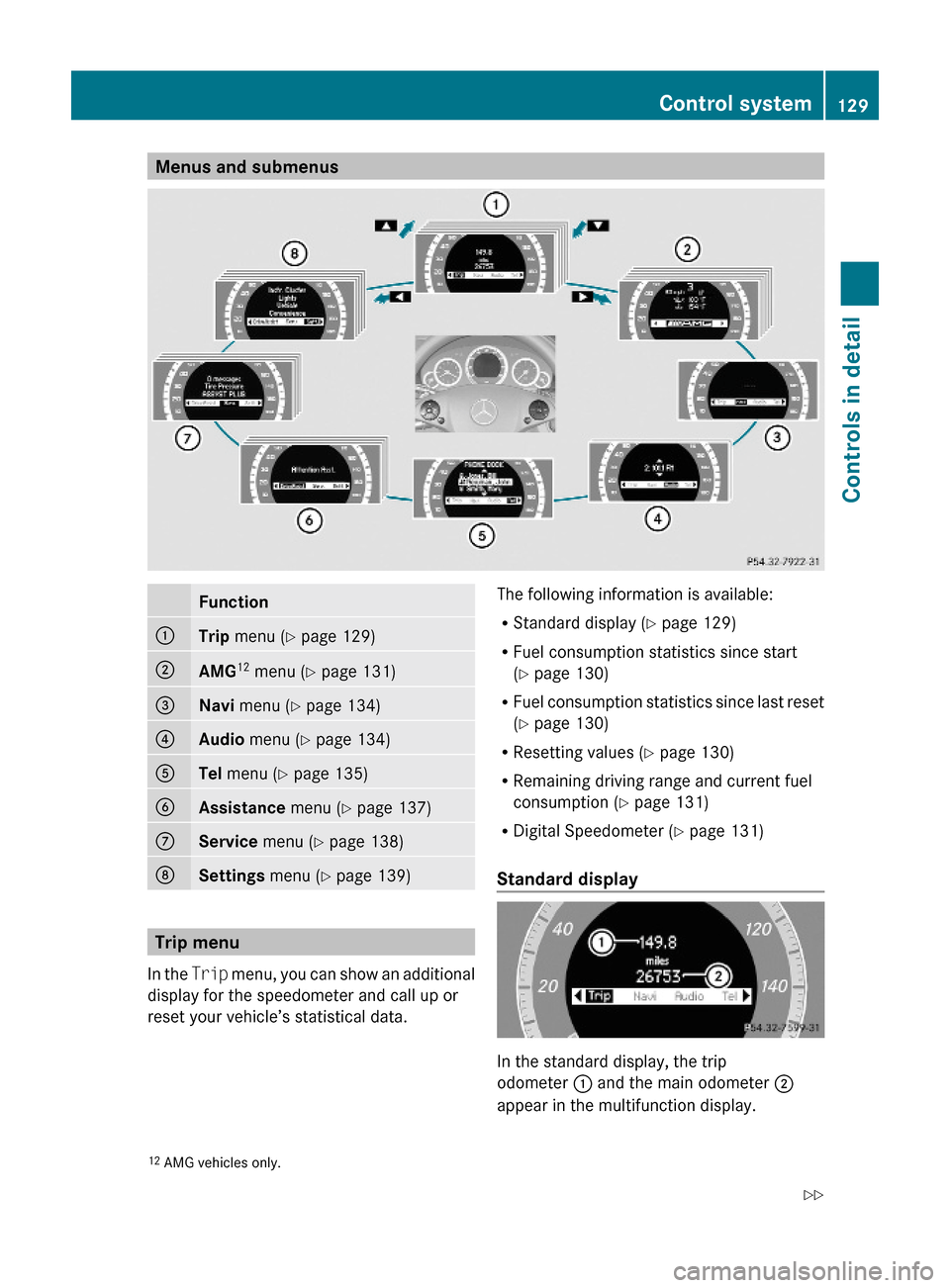
Menus and submenusFunction:Trip menu (Y page 129);AMG12 menu (Y page 131)=Navi menu (Y page 134)?Audio menu (Y page 134)ATel menu (Y page 135)BAssistance menu (Y page 137)CService menu (Y page 138)DSettings menu (Y page 139)
Trip menu
In the Trip menu, you can show an additional
display for the speedometer and call up or
reset your vehicle’s statistical data.
The following information is available:
RStandard display (Y page 129)
RFuel consumption statistics since start
(Y page 130)
RFuel consumption statistics since last reset
(Y page 130)
RResetting values (Y page 130)
RRemaining driving range and current fuel
consumption (Y page 131)
RDigital Speedometer (Y page 131)
Standard display
In the standard display, the trip
odometer : and the main odometer ;
appear in the multifunction display.
12AMG vehicles only.Control system129Controls in detail212_AKB; 2; 41, en-USd2ureepe,Version: 2.11.8.12009-07-17T09:14:21+02:00 - Seite 129Z
Page 133 of 372
XPress button : to select Yes.XPress button a to confirm.
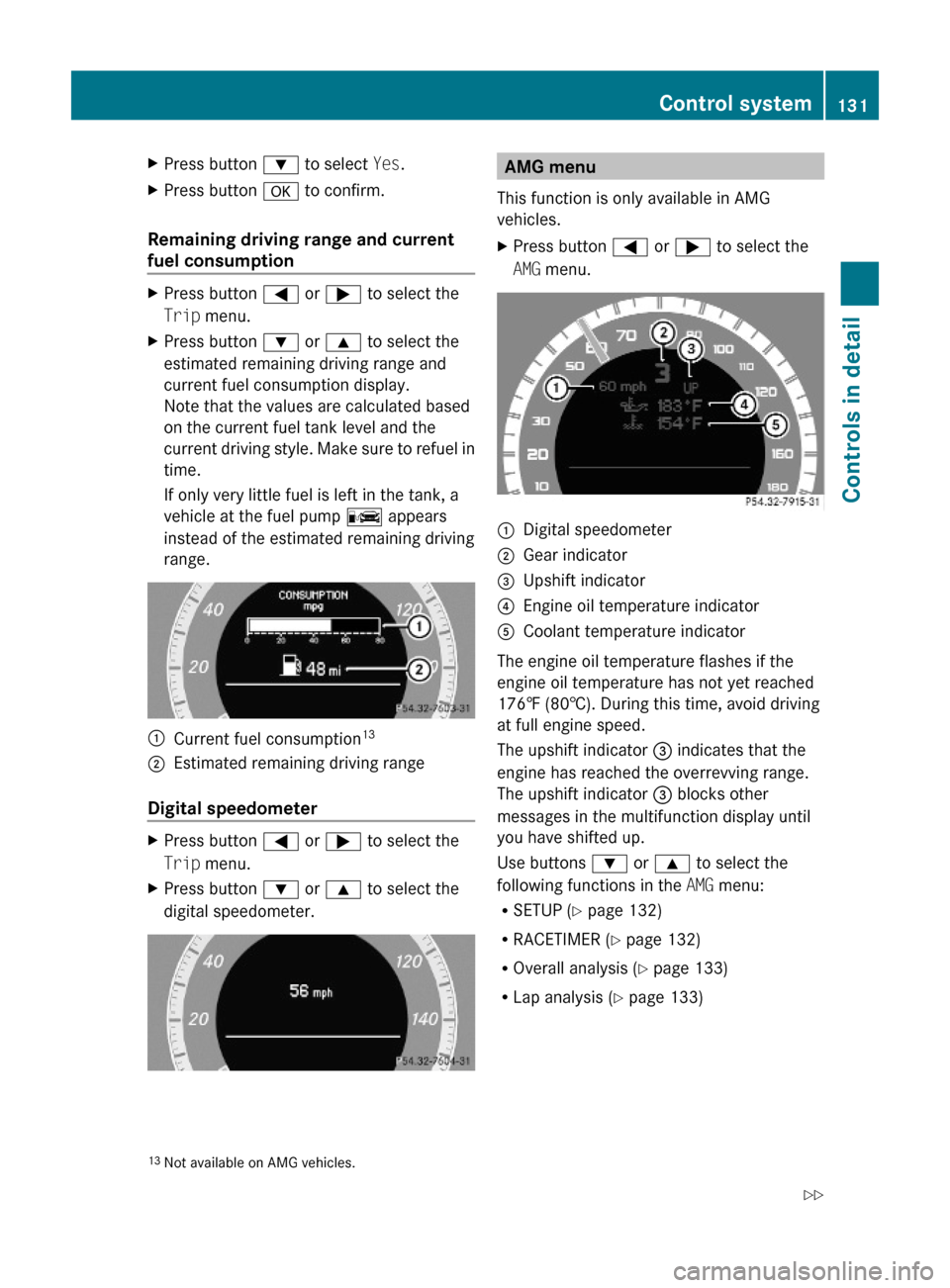
Remaining driving range and current
fuel consumption
XPress button = or ; to select the
Trip menu.
XPress button : or 9 to select the
estimated remaining driving range and
current fuel consumption display.
Note that the values are calculated based
on the current fuel tank level and the
current driving style. Make sure to refuel in
time.
If only very little fuel is left in the tank, a
vehicle at the fuel pump C appears
instead of the estimated remaining driving
range.
:Current fuel consumption13;Estimated remaining driving range
Digital speedometer
XPress button = or ; to select the
Trip menu.
XPress button : or 9 to select the
digital speedometer.AMG menu
This function is only available in AMG
vehicles.
XPress button = or ; to select the
AMG menu.
:Digital speedometer;Gear indicator=Upshift indicator?Engine oil temperature indicatorACoolant temperature indicator
The engine oil temperature flashes if the
engine oil temperature has not yet reached
176‡ (80†). During this time, avoid driving
at full engine speed.
The upshift indicator = indicates that the
engine has reached the overrevving range.
The upshift indicator = blocks other
messages in the multifunction display until
you have shifted up.
Use buttons : or 9 to select the
following functions in the AMG menu:
RSETUP (Y page 132)
RRACETIMER (Y page 132)
ROverall analysis (Y page 133)
RLap analysis (Y page 133)
13Not available on AMG vehicles.Control system131Controls in detail212_AKB; 2; 41, en-USd2ureepe,Version: 2.11.8.12009-07-17T09:14:21+02:00 - Seite 131Z
Page 142 of 372
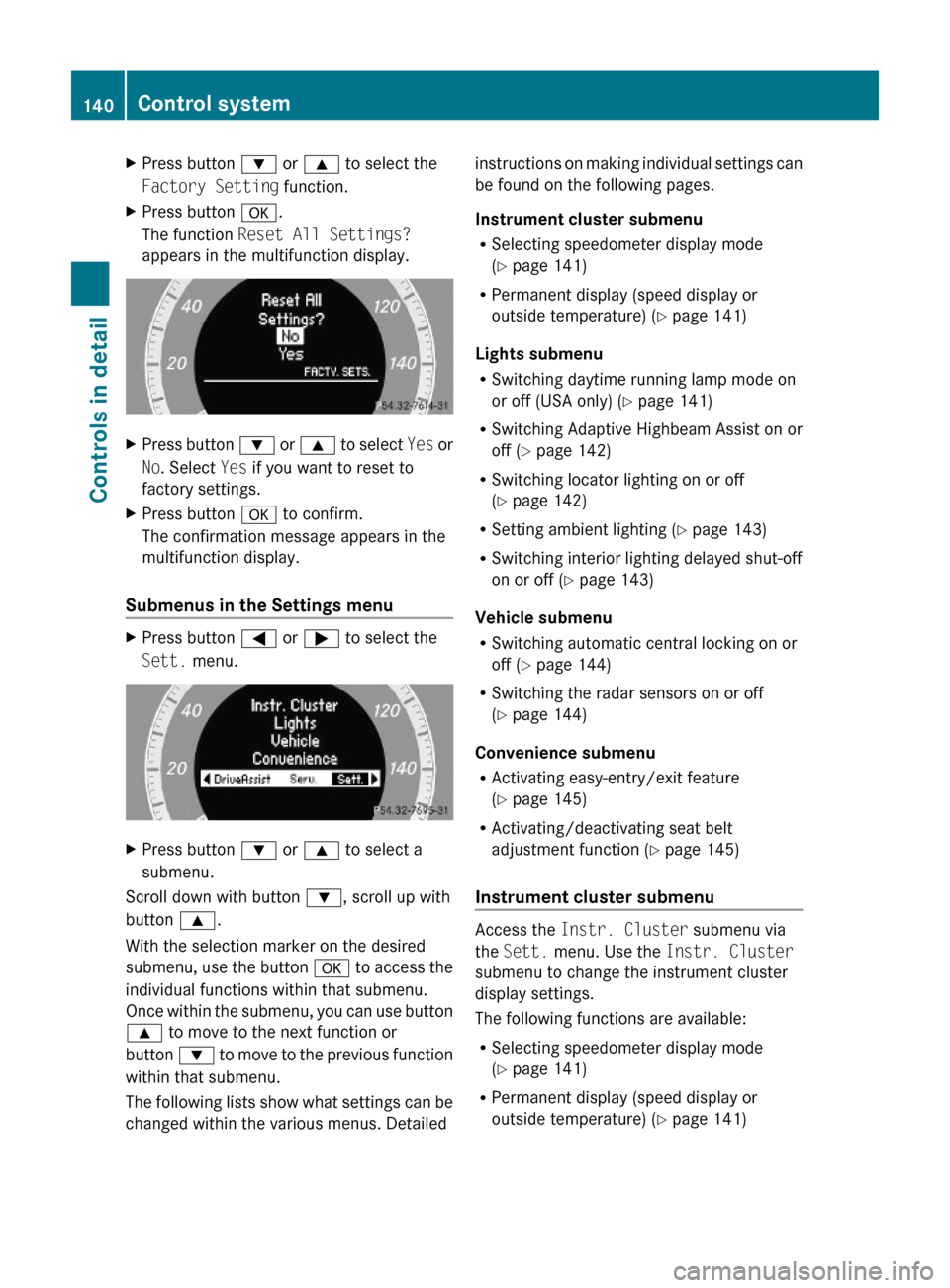
XPress button : or 9 to select the
Factory Setting function.
XPress button a.
The function Reset All Settings?
appears in the multifunction display.
XPress button : or 9 to select Yes or
No. Select Yes if you want to reset to
factory settings.
XPress button a to confirm.
The confirmation message appears in the
multifunction display.
Submenus in the Settings menu
XPress button = or ; to select the
Sett. menu.
XPress button : or 9 to select a
submenu.
Scroll down with button :, scroll up with
button 9.
With the selection marker on the desired
submenu, use the button a to access the
individual functions within that submenu.
Once within the submenu, you can use button
9 to move to the next function or
button : to move to the previous function
within that submenu.
The following lists show what settings can be
changed within the various menus. Detailed
instructions on making individual settings can
be found on the following pages.
Instrument cluster submenu
RSelecting speedometer display mode
(Y page 141)
RPermanent display (speed display or
outside temperature) (Y page 141)
Lights submenu
RSwitching daytime running lamp mode on
or off (USA only) (Y page 141)
RSwitching Adaptive Highbeam Assist on or
off (Y page 142)
RSwitching locator lighting on or off
(Y page 142)
RSetting ambient lighting (Y page 143)
RSwitching interior lighting delayed shut-off
on or off (Y page 143)
Vehicle submenu
RSwitching automatic central locking on or
off (Y page 144)
RSwitching the radar sensors on or off
(Y page 144)
Convenience submenu
RActivating easy-entry/exit feature
(Y page 145)
RActivating/deactivating seat belt
adjustment function (Y page 145)
Instrument cluster submenu
Access the Instr. Cluster submenu via
the Sett. menu. Use the Instr. Cluster
submenu to change the instrument cluster
display settings.
The following functions are available:
RSelecting speedometer display mode
(Y page 141)
RPermanent display (speed display or
outside temperature) (Y page 141)
140Control systemControls in detail
212_AKB; 2; 41, en-USd2ureepe,Version: 2.11.8.12009-07-17T09:14:21+02:00 - Seite 140
Page 143 of 372
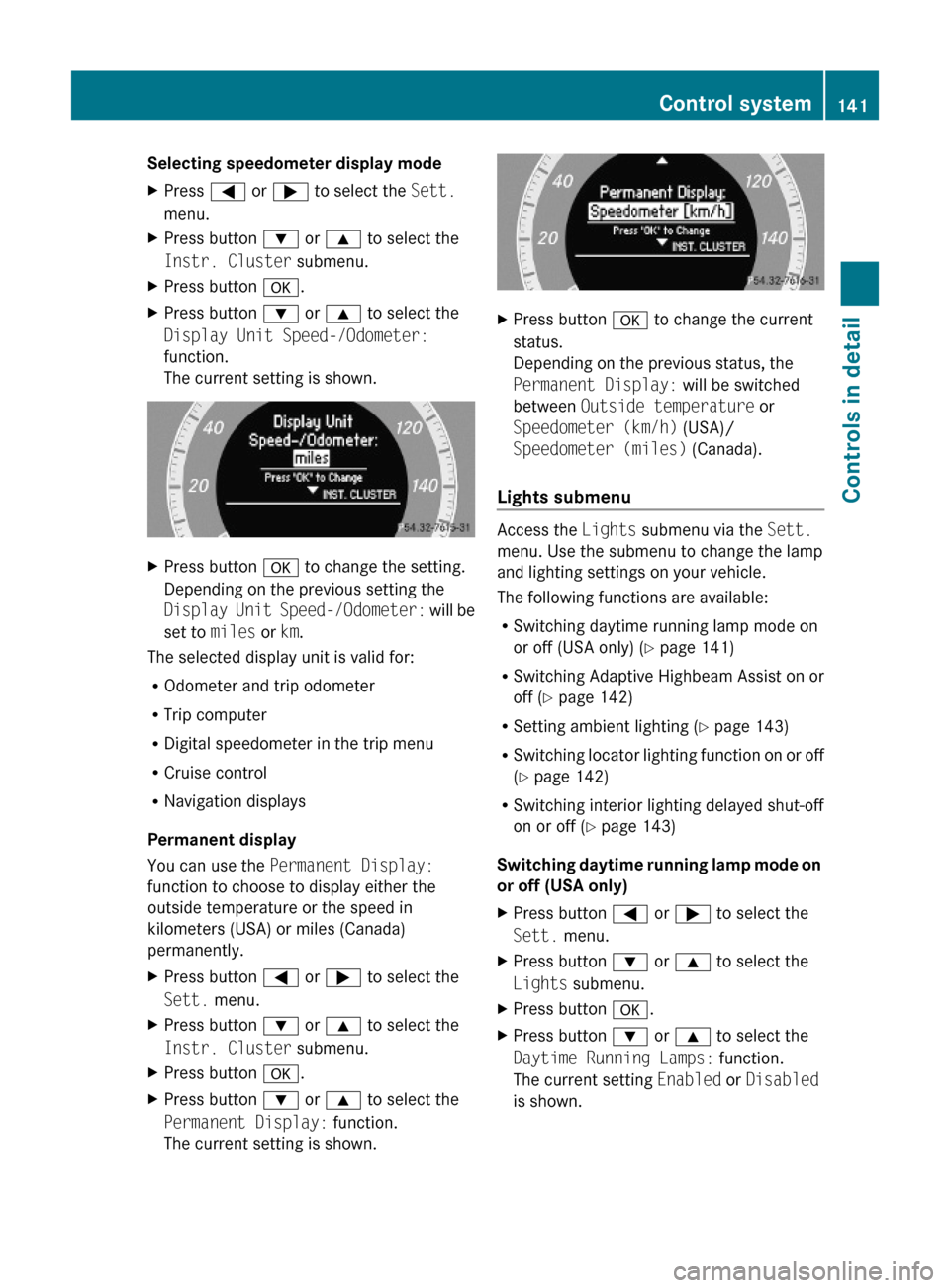
Selecting speedometer display mode XPress = or ; to select the Sett.
menu.
XPress button : or 9 to select the
Instr. Cluster submenu.
XPress button a.XPress button : or 9 to select the
Display Unit Speed-/Odometer:
function.
The current setting is shown.
XPress button a to change the setting.
Depending on the previous setting the
Display Unit Speed-/Odometer: will be
set to miles or km.
The selected display unit is valid for:
ROdometer and trip odometer
RTrip computer
RDigital speedometer in the trip menu
RCruise control
RNavigation displays
Permanent display
You can use the Permanent Display:
function to choose to display either the
outside temperature or the speed in
kilometers (USA) or miles (Canada)
permanently.
XPress button = or ; to select the
Sett. menu.
XPress button : or 9 to select the
Instr. Cluster submenu.
XPress button a.XPress button : or 9 to select the
Permanent Display: function.
The current setting is shown.
XPress button a to change the current
status.
Depending on the previous status, the
Permanent Display: will be switched
between Outside temperature or
Speedometer (km/h) (USA)/
Speedometer (miles) (Canada).
Lights submenu
Access the Lights submenu via the Sett.
menu. Use the submenu to change the lamp
and lighting settings on your vehicle.
The following functions are available:
RSwitching daytime running lamp mode on
or off (USA only) (Y page 141)
RSwitching Adaptive Highbeam Assist on or
off (Y page 142)
RSetting ambient lighting (Y page 143)
RSwitching locator lighting function on or off
(Y page 142)
RSwitching interior lighting delayed shut-off
on or off (Y page 143)
Switching daytime running lamp mode on
or off (USA only)
XPress button = or ; to select the
Sett. menu.
XPress button : or 9 to select the
Lights submenu.
XPress button a.XPress button : or 9 to select the
Daytime Running Lamps: function.
The current setting Enabled or Disabled
is shown.
Control system141Controls in detail212_AKB; 2; 41, en-USd2ureepe,Version: 2.11.8.12009-07-17T09:14:21+02:00 - Seite 141Z
Page 149 of 372
previously set speed and wishes to resume
this particular preset speed.
GWarning!
The cruise control brakes automatically so
that the set speed is not exceeded.
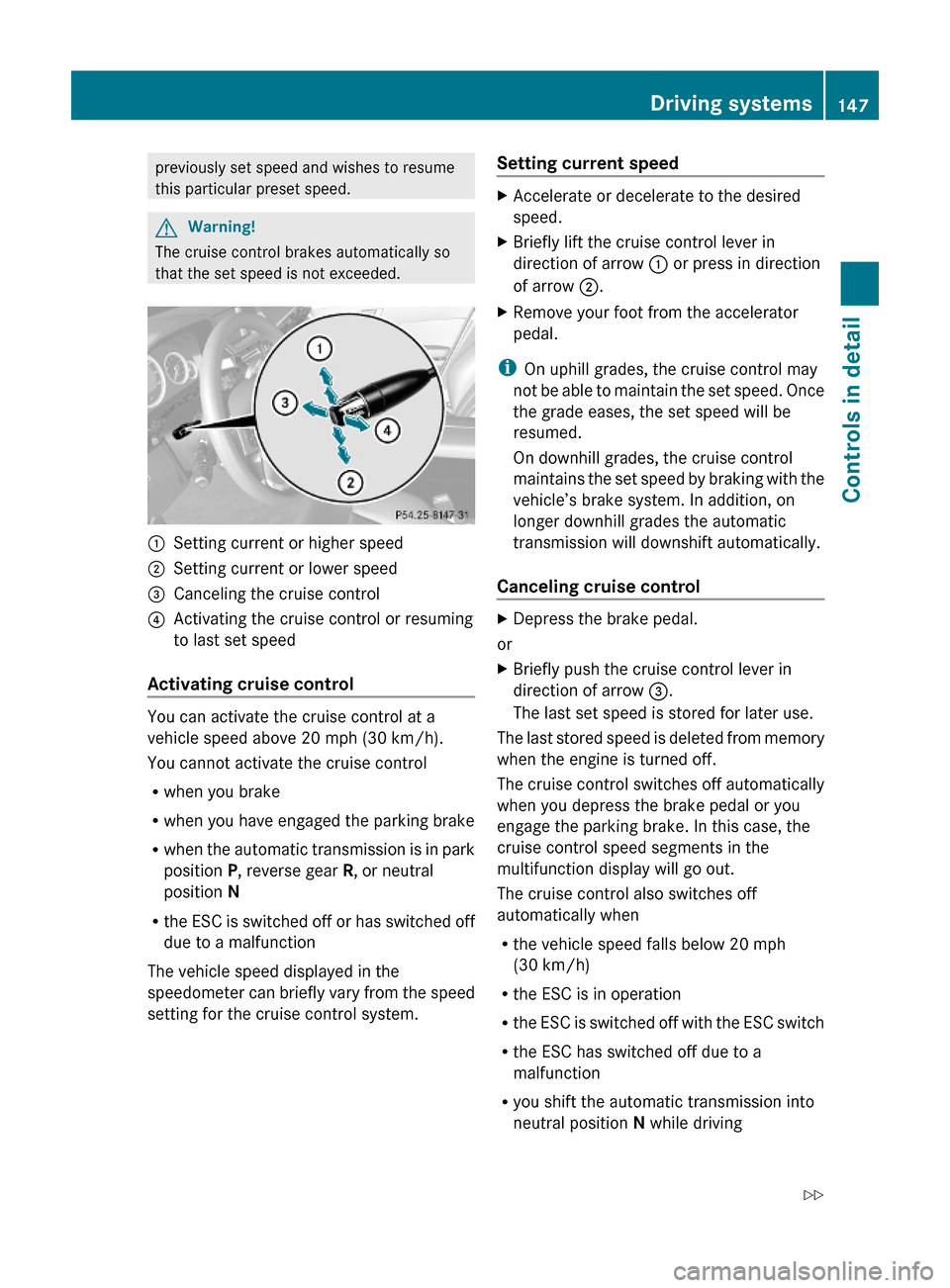
:Setting current or higher speed ;Setting current or lower speed=Canceling the cruise control?Activating the cruise control or resuming
to last set speed
Activating cruise control
You can activate the cruise control at a
vehicle speed above 20 mph (30 km/h).
You cannot activate the cruise control
Rwhen you brake
Rwhen you have engaged the parking brake
Rwhen the automatic transmission is in park
position P, reverse gear R, or neutral
position N
Rthe ESC is switched off or has switched off
due to a malfunction
The vehicle speed displayed in the
speedometer can briefly vary from the speed
setting for the cruise control system.
Setting current speed XAccelerate or decelerate to the desired
speed.
XBriefly lift the cruise control lever in
direction of arrow : or press in direction
of arrow ;.
XRemove your foot from the accelerator
pedal.
iOn uphill grades, the cruise control may
not be able to maintain the set speed. Once
the grade eases, the set speed will be
resumed.
On downhill grades, the cruise control
maintains the set speed by braking with the
vehicle’s brake system. In addition, on
longer downhill grades the automatic
transmission will downshift automatically.
Canceling cruise control
XDepress the brake pedal.
or
XBriefly push the cruise control lever in
direction of arrow =.
The last set speed is stored for later use.
The last stored speed is deleted from memory
when the engine is turned off.
The cruise control switches off automatically
when you depress the brake pedal or you
engage the parking brake. In this case, the
cruise control speed segments in the
multifunction display will go out.
The cruise control also switches off
automatically when
Rthe vehicle speed falls below 20 mph
(30 km/h)
Rthe ESC is in operation
Rthe ESC is switched off with the ESC switch
Rthe ESC has switched off due to a
malfunction
Ryou shift the automatic transmission into
neutral position N while driving
Driving systems147Controls in detail212_AKB; 2; 41, en-USd2ureepe,Version: 2.11.8.12009-07-17T09:14:21+02:00 - Seite 147Z
Page 153 of 372
refer to this section of your Operator’s
Manual when asked.
iUSA only:
This device has been approved by the FCC
as a “Vehicular Radar System”. The radar
sensor is intended for use in an automotive
radar system only. Removal, tampering, or
altering of the device will void any
warranties, and is not permitted by the
FCC. Do not tamper with, alter, or use in
any non-approved way.
Any unauthorized modification to this
device could void the user’s authority to
operate the equipment.
iCanada only:
This device complies with RSS-210 of
Industry Canada. Operation is subject to
the following two conditions:
1.This device may not cause interference,
and
2. this device must accept any
interference received, including
interference that may cause undesired
operation of the device.
Removal, tampering, or altering of the
device will void any warranties, and is not
permitted. Do not tamper with, alter, or use
in any non-approved way.
Any unauthorized modification to this
device could void the user’s authority to
operate the equipment.
DISTRONIC PLUS displays in
multifunction display
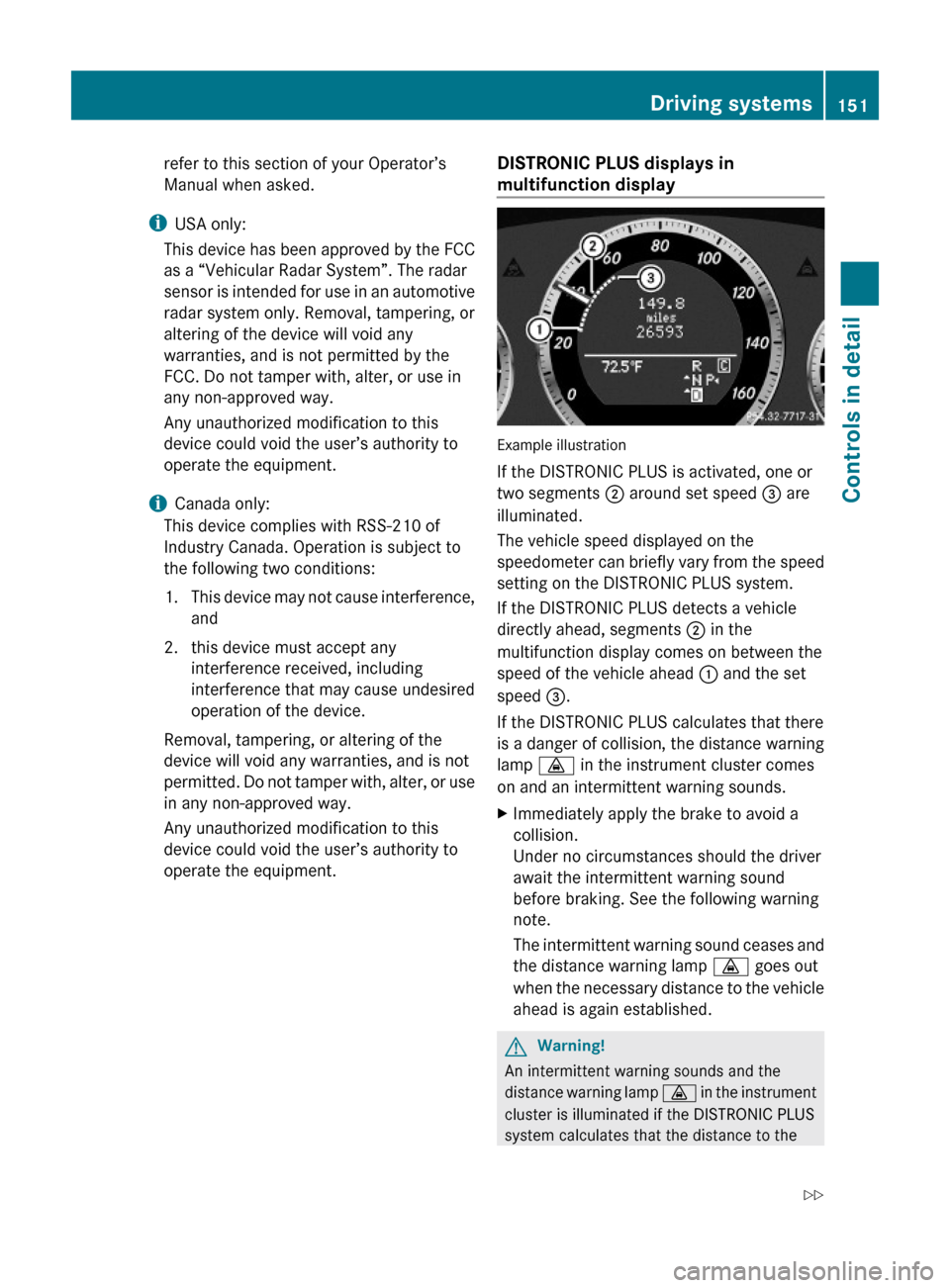
Example illustration
If the DISTRONIC PLUS is activated, one or
two segments ; around set speed = are
illuminated.
The vehicle speed displayed on the
speedometer can briefly vary from the speed
setting on the DISTRONIC PLUS system.
If the DISTRONIC PLUS detects a vehicle
directly ahead, segments ; in the
multifunction display comes on between the
speed of the vehicle ahead : and the set
speed =.
If the DISTRONIC PLUS calculates that there
is a danger of collision, the distance warning
lamp · in the instrument cluster comes
on and an intermittent warning sounds.
XImmediately apply the brake to avoid a
collision.
Under no circumstances should the driver
await the intermittent warning sound
before braking. See the following warning
note.
The intermittent warning sound ceases and
the distance warning lamp · goes out
when the necessary distance to the vehicle
ahead is again established.
GWarning!
An intermittent warning sounds and the
distance warning lamp · in the instrument
cluster is illuminated if the DISTRONIC PLUS
system calculates that the distance to the
Driving systems151Controls in detail212_AKB; 2; 41, en-USd2ureepe,Version: 2.11.8.12009-07-17T09:14:21+02:00 - Seite 151Z