display MERCEDES-BENZ E400 HYBRID 2014 User Guide
[x] Cancel search | Manufacturer: MERCEDES-BENZ, Model Year: 2014, Model line: E400 HYBRID, Model: MERCEDES-BENZ E400 HYBRID 2014Pages: 52, PDF Size: 32.59 MB
Page 26 of 52
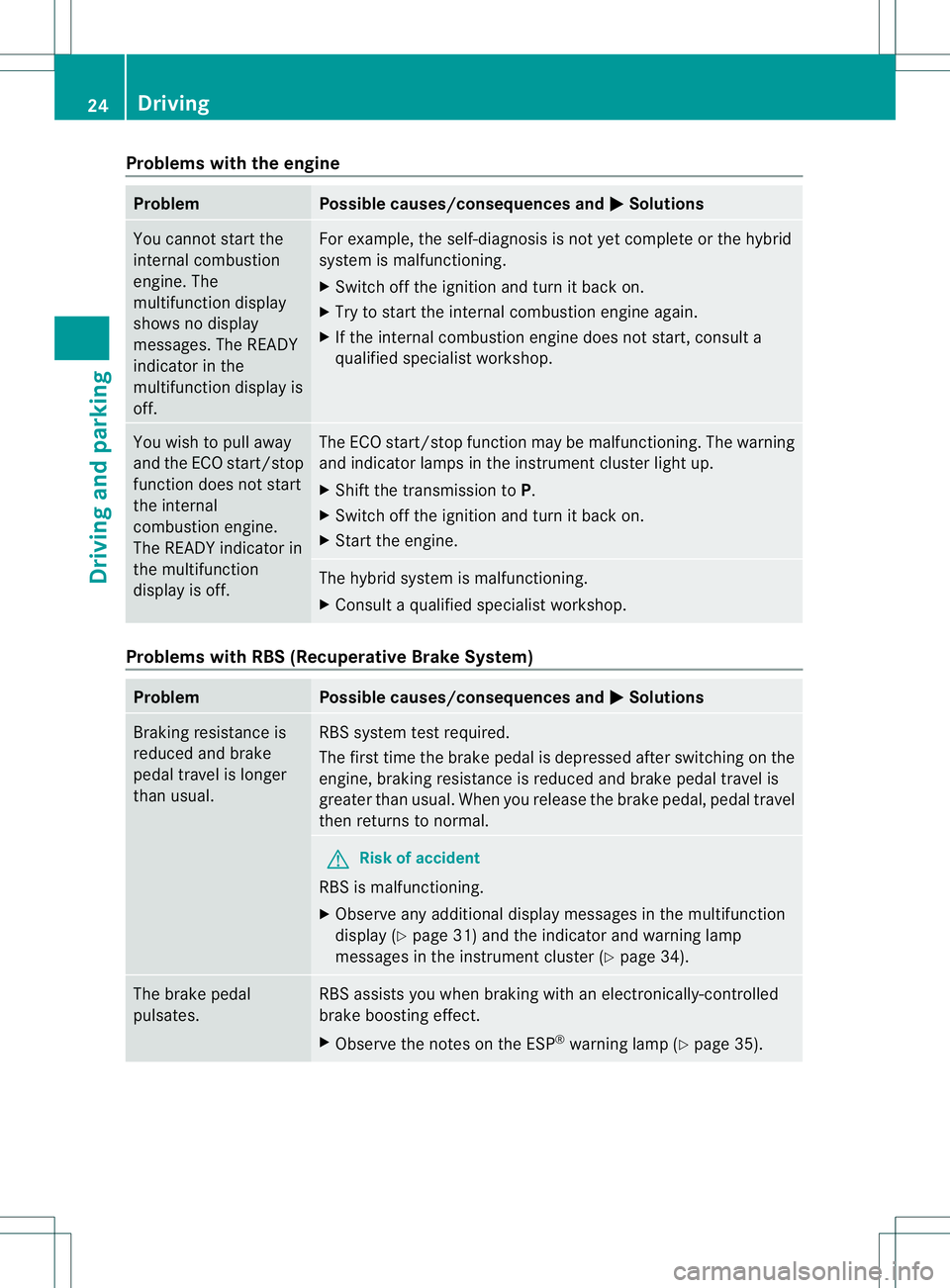
Problems with the engine
Problem Possible causes/consequences and
M Solutions
You cannot start the
internal combustion
engine. The
multifunction display
shows no display
messages. The READY
indicator in the
multifunction display is
off. For example, the self-diagnosis is not yet complete or the hybrid
system is malfunctioning.
X
Switch off the ignition and turn it back on.
X Try to start the internal combustion engine again.
X If the internal combustion engine does not start, consult a
qualified specialist workshop. You wish to pull away
and the ECO start/stop
function does not start
the internal
combustion engine.
The READY indicator in
the multifunction
display is off. The ECO start/stop function may be malfunctioning. The warning
and indicator lamps in the instrumen
tcluster light up.
X Shift the transmission to P.
X Switch off the ignition and turn it back on.
X Start the engine. The hybrid system is malfunctioning.
X
Consult a qualified specialist workshop. Problems with RBS (Recuperative Brake System)
Problem Possible causes/consequences and
M Solutions
Braking resistance is
reduced and brake
pedal travel is longer
than usual. RBS system tes
trequired.
The first time the brake pedal is depressed after switching on the
engine, braking resistance is reduced and brake pedal travel is
greater than usual. When you release the brake pedal, pedal travel
then returns to normal. G
Risk of accident
RBS is malfunctioning.
X Observe any additional display messages in the multifunction
display ( Ypage 31) and the indicator and warning lamp
messages in the instrument cluster (Y page 34).The brake pedal
pulsates. RBS assists you when braking with an electronically-controlled
brake boosting effect.
X
Observe the notes on the ESP ®
warning lamp ( Ypage 35). 24
DrivingDriving and parking
Page 27 of 52
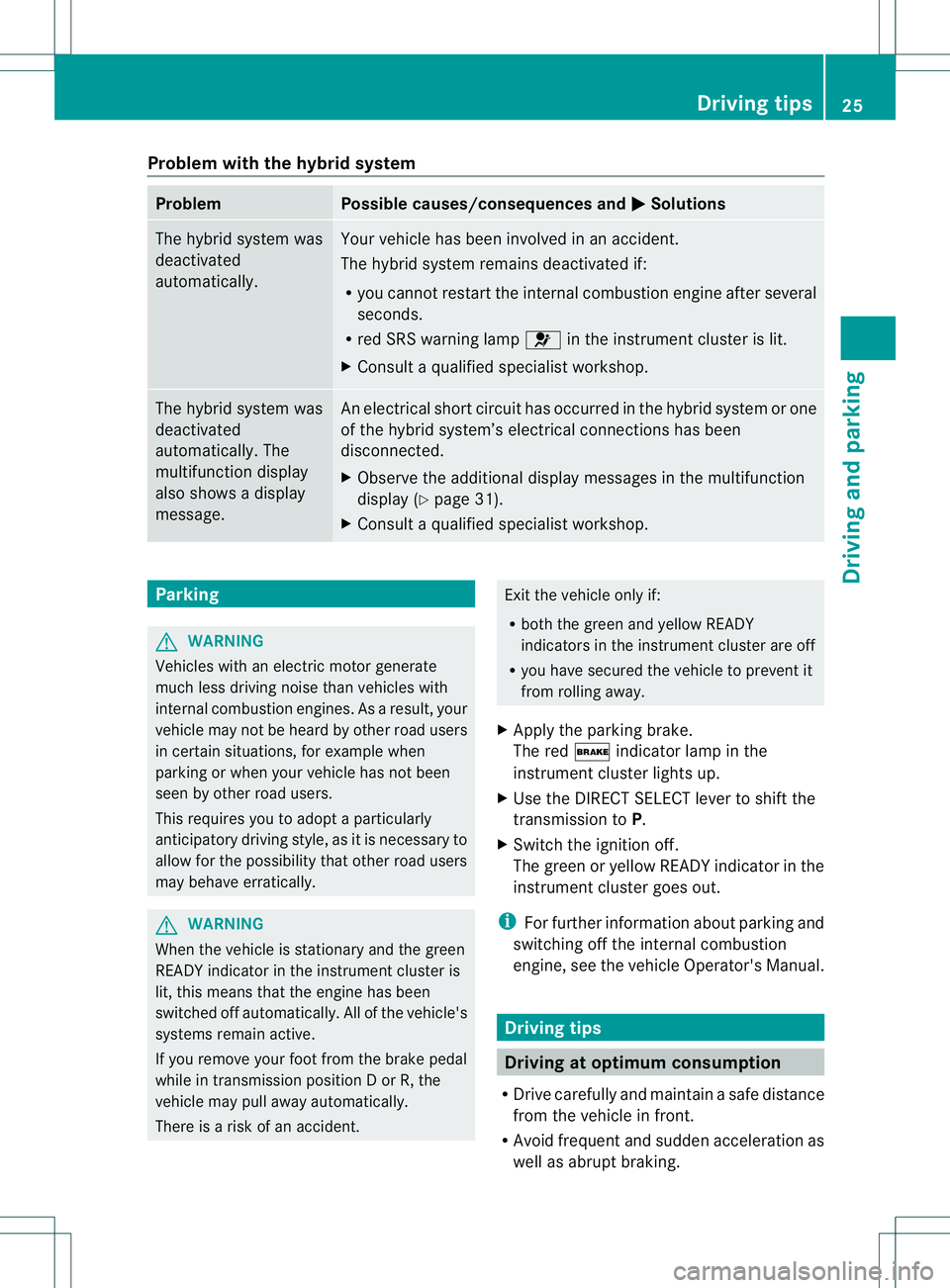
Problem with the hybrid system
Problem Possible causes/consequences and
M Solutions
The hybrid system was
deactivated
automatically. Your vehicle has been involved in an accident.
The hybrid system remains deactivated if:
R
you cannot restart the internal combustion engine after several
seconds.
R red SRS warning lamp 6in the instrument cluster is lit.
X Consult a qualified specialist workshop. The hybrid system was
deactivated
automatically. The
multifunction display
also shows a display
message. An electrical short circuit has occurred in the hybrid system or one
of the hybrid system’s electrical connections has been
disconnected.
X Observe the additional display messages in the multifunction
display (Y page 31).
X Consult a qualified specialist workshop. Parking
G
WARNING
Vehicles with an electric motor generate
much less driving noise than vehicles with
internal combustion engines. As a result, your
vehicle may not be heard by other road users
in certain situations, for example when
parking or when your vehicle has not been
seen by other road users.
This requires you to adopt aparticularly
anticipatory driving style, as it is necessary to
allow for the possibility that other road users
may behave erratically. G
WARNING
When the vehicle is stationary and the green
READY indicator in the instrument cluster is
lit, this means that th eengine has been
switched off automatically. All of the vehicle's
systems remai nactive.
If you remove your foot from the brake pedal
while in transmission position DorR, the
vehicle may pull away automatically.
There is a risk of an accident. Exit the vehicle only if:
R
both the green and yellow READY
indicators in the instrument cluster are off
R you have secured the vehicle to preven tit
from rolling away.
X Apply the parking brake.
The red $indicator lamp in the
instrument cluster lights up.
X Use the DIRECT SELECT lever to shift the
transmission to P.
X Switch the ignition off.
The green or yellow READY indicator in the
instrument cluster goes out.
i For further information about parking and
switching off the internal combustion
engine, see the vehicle Operator's Manual. Driving tips
Driving at optimum consumption
R Drive carefully and maintain a safe distance
from the vehicle in front.
R Avoid frequent and sudden acceleration as
well as abrupt braking. Driving tips
25Driving and parking Z
Page 29 of 52
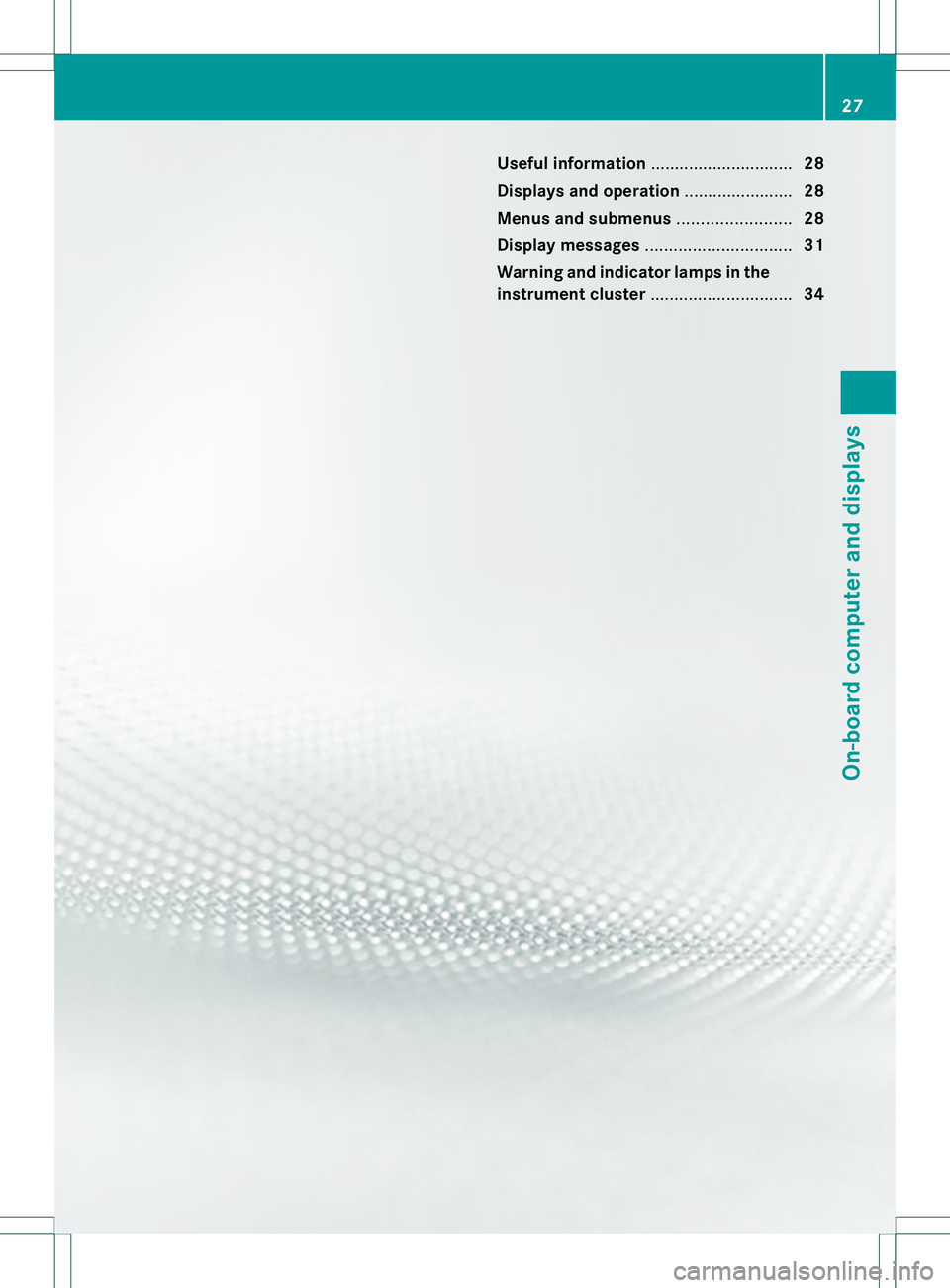
Useful information
..............................28
Displays and operation .......................28
Menus and submenus ........................28
Display messages ............................... 31
Warning and indicator lamps in the
instrument cluster ..............................34 27On-board computer and displays
Page 30 of 52
Useful information
i This Operator's Manual describes all
models and all standard and optional
equipment of your vehicle available at the
time of publication of the Operator's
Manual. Country-specific differences are
possible. Please note that your vehicle may
not be equipped with all features
described. This also applies to safety-
related systems and functions.
i Read the information on qualified
specialist workshops: (Y page 7).Displays and operation
Coolant temperature display
The coolan ttemperature can only be called
up on the on-board computer.
X Press =or; on the steering wheel
to select the Serv. menu.
X Press 9or: to select Coolant .
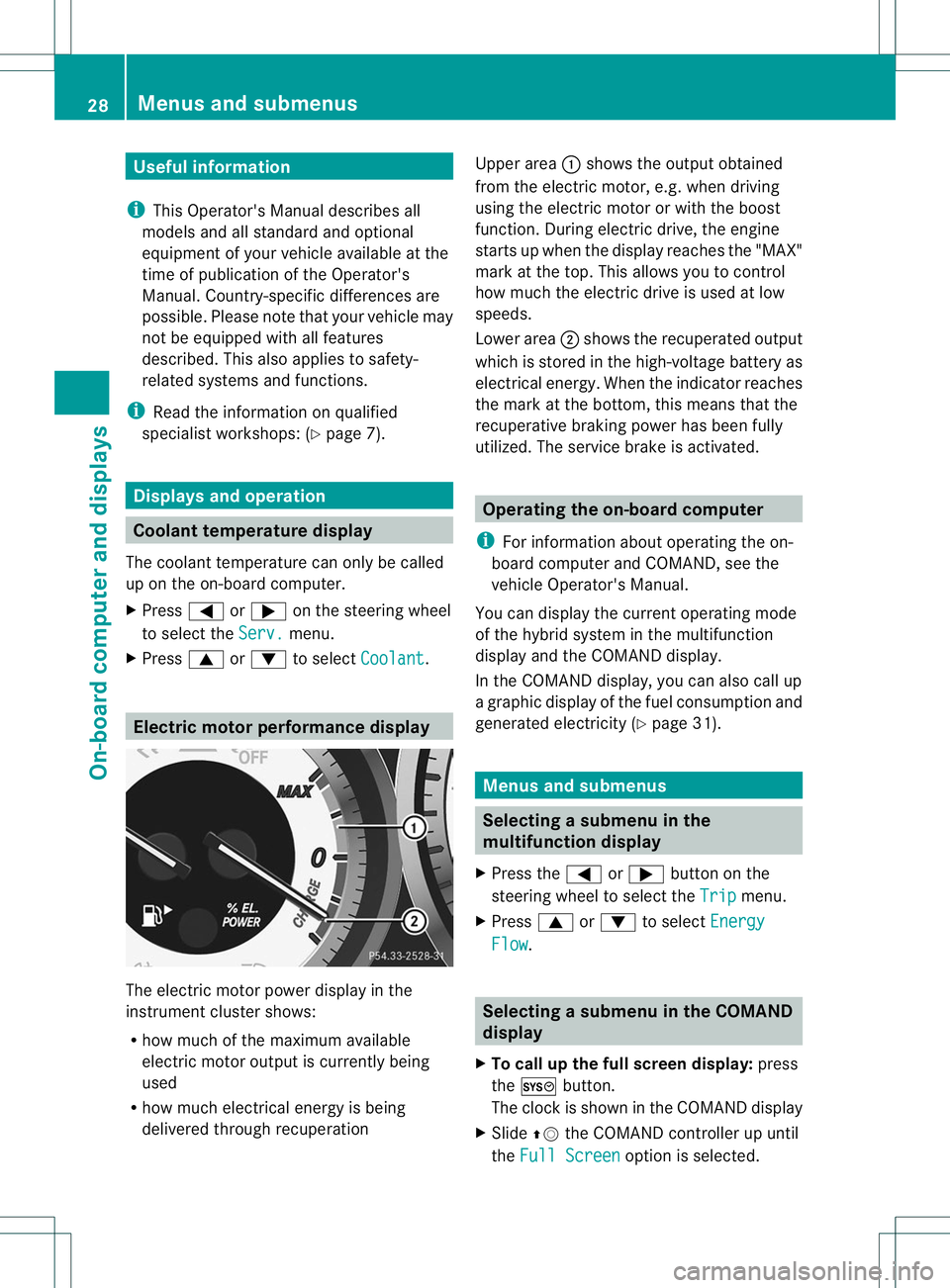
Electric motor performance display
The electric moto
rpower display in the
instrument cluster shows:
R how much of the maximum available
electric motor output is currently being
used
R how much electrical energy is being
delivered through recuperation Upper area
:shows the output obtained
from the electric motor, e.g. when driving
using the electric motor or with the boost
function. During electric drive, the engine
starts up when the display reaches the "MAX"
mark at the top. This allows you to control
how much the electric drive is used at low
speeds.
Lower area ;shows the recuperated output
which is stored in the high-voltage battery as
electrical energy. When the indicator reaches
the mark at the bottom, this means that the
recuperative braking power has been fully
utilized. The service brake is activated. Operating the on-board computer
i For information about operating the on-
board computer and COMAND, see the
vehicle Operator's Manual.
You can display the current operating mode
of the hybrid system in the multifunction
display and the COMAND display.
In the COMAND display, you can also call up
a graphic display of the fuel consumption and
generated electricity (Y page 31). Menus and submenus
Selecting
asubmenu in the
multifunction display
X Press the =or; button on the
steering wheel to select the Trip menu.
X Press 9or: to select Energy Flow .
Selecting
asubmenu in the COMAND
display
X To call up the full screen display: press
the W button.
The clock is show ninthe COMAND display
X Slide ZVthe COMAND controller up until
the Full Screen option is selected.28
Menus and submenusOn-board computer and displays
Page 31 of 52
X
Press Wthe COMAND controller.
The system display is shown as full screen
(without system menu).
X Slide XVY or turn cVdthe COMAND
controller until the desired display appears.
X To exit the full-screen display: pressW
the COMAND controller.
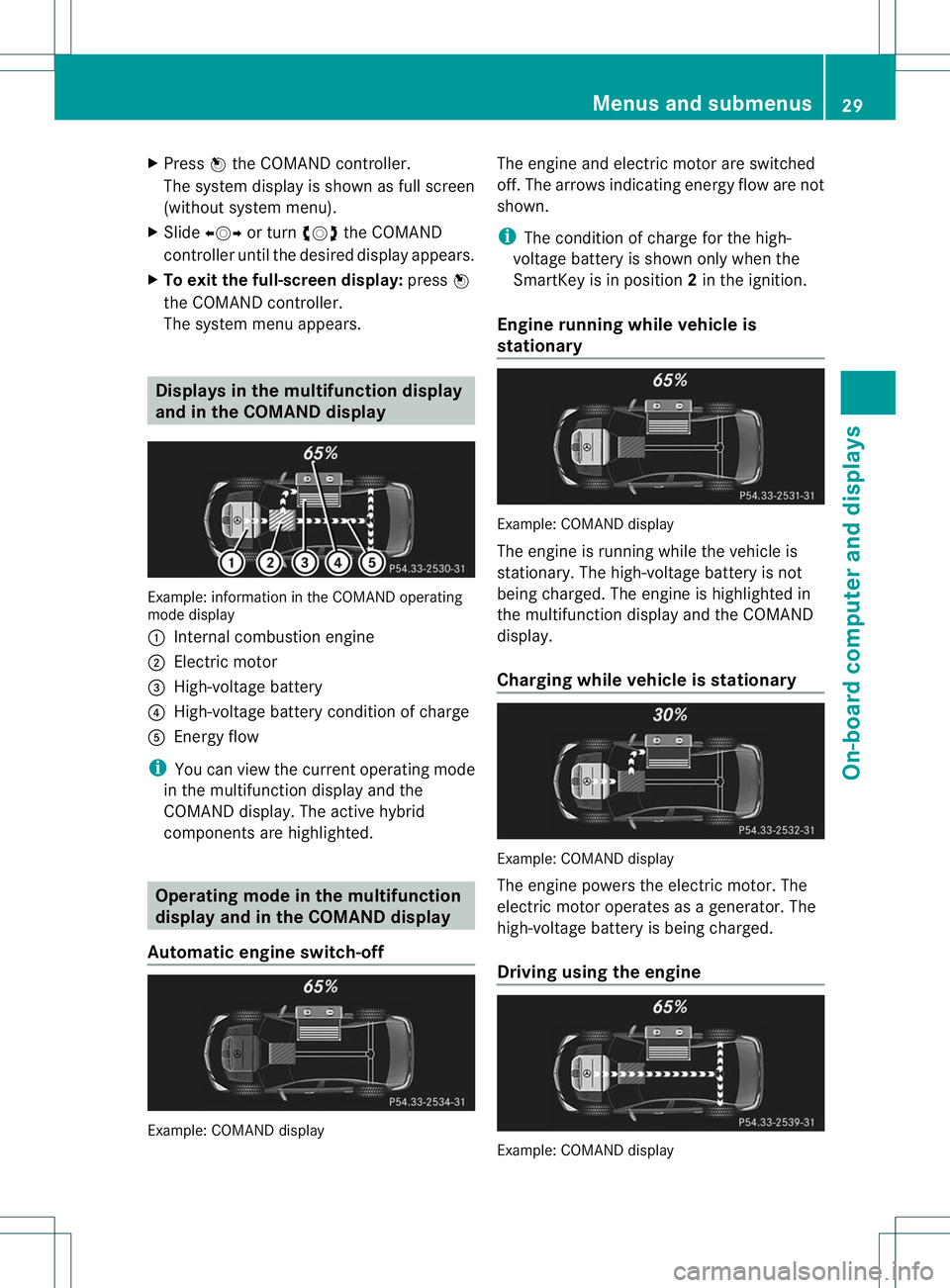
The system menu appears. Displays in the multifunction display
and in the COMAND display Example: information in the COMAND operating
mode display
1 Internal combustion engine
2 Electric motor
3 High-voltage battery
4 High-voltage battery condition of charge
5 Energy flow
i You can view the curren toperating mode
in the multifunction display and the
COMAND display. The active hybrid
components are highlighted. Operating mode in the multifunction
display and in the COMAND display
Automatic engine switch-off Example: COMAND display The engine and electric motor are switched
off. The arrows indicating energy flow are not
shown.
i
The condition of charge for the high-
voltage battery is shown only when the
SmartKey is in position 2in the ignition.
Engine running while vehicle is
stationary Example: COMAND display
The engine is running while the vehicle is
stationary. The high-voltage battery is not
being charged. The engine is highlighted in
the multifunction display and the COMAND
display.
Charging while vehicle is stationary
Example: COMAND display
The engine powers the electric motor. The
electric motor operates as a generator. The
high-voltage battery is being charged.
Driving using the engine
Example: COMAND display Menus and submenus
29On-board computer and displays
Page 32 of 52
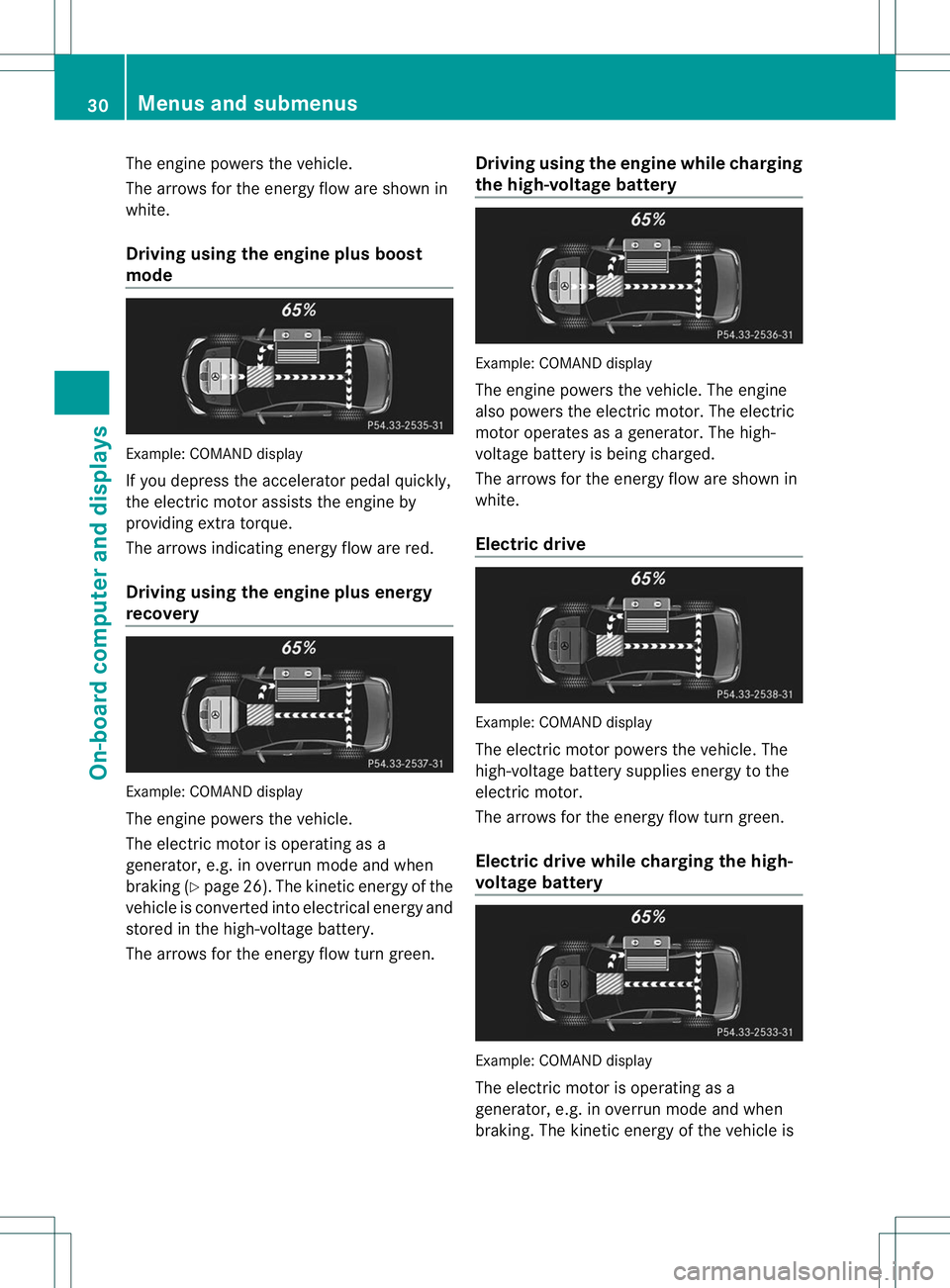
The engine powers the vehicle.
The arrows for the energy flow are shown in
white.
Driving using the engine plus boost
mode
Example: COMAND display
If you depress the accelerator pedal quickly,
the electric motor assists the engine by
providing extra torque.
The arrows indicating energy flow are red.
Driving using the engine plus energy
recovery Example: COMAND display
The engine powers the vehicle.
The electric motor is operating as a
generator, e.g. in overrun mode and when
braking (Y page 26). The kinetic energy of the
vehicle is converted into electrical energy and
stored in the high-voltage battery.
The arrows for the energy flow turn green. Driving using the engine while charging
the high-voltage battery Example: COMAND display
The engine powers the vehicle. The engine
also powers the electric motor
.The electric
motor operates as a generator. The high-
voltage battery is being charged.
The arrows for the energy flow are shown in
white.
Electric drive Example: COMAND display
The electric motor powers the vehicle. The
high-voltage battery supplies energy to the
electric motor.
The arrows for the energy flow turn green.
Electric drive while charging the high-
voltage battery
Example: COMAND display
The electric motor is operating as a
generator, e.g. in overrun mode and when
braking. The kinetic energy of the vehicle is30
Menus and submenusOn-board computer and displays
Page 33 of 52
converted into electrical energy and stored in
the high-voltage battery.
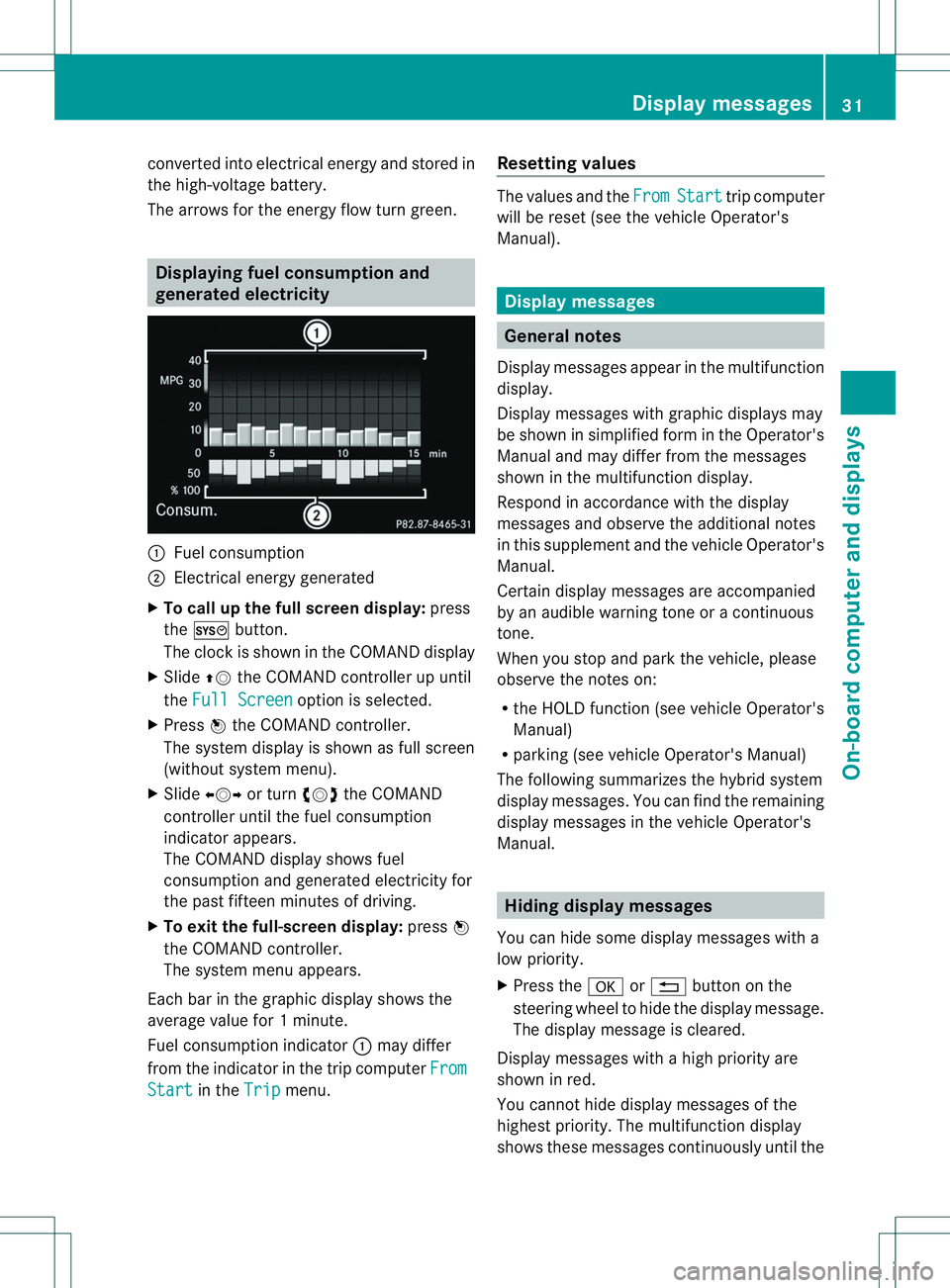
The arrows for the energy flow turn green. Displaying fuel consumption and
generated electricity
1
Fuel consumption
; Electrical energy generated
X To call up the full screen display: press
the W button.
The clock is shown in the COMAND display
X Slide ZVthe COMAND controller up until
the Full Screen option is selected.
X Press Wthe COMAND controller.
The system display is shown as full screen
(without system menu).
X Slide XVY or turn cVdthe COMAND
controlle runtil the fuel consumption
indicator appears.
The COMAND display shows fuel
consumption and generated electricity for
the past fifteen minutes of driving.
X To exit the full-screen display: pressW
the COMAND controller.
The system menu appears.
Each ba rinthe graphic display shows the
average value for 1minute.
Fuel consumption indicator :may differ
fro mt he indicator in the trip computer FromStart in the
Trip menu.Resetting values The values and the
From Start trip computer
will be reset (see the vehicle Operator's
Manual). Display messages
General notes
Display messages appearint he multifunction
display.
Display messages with graphic displays may
be shown in simplified form in the Operator's
Manual and may differ from the messages
shown in the multifunction display.
Respond in accordance with the display
messages and observe the additional notes
in this supplement and the vehicle Operator's
Manual.
Certain display messages are accompanied
by an audible warning tone or a continuous
tone.
When you stop and park the vehicle, please
observe the notes on:
R the HOLD function (see vehicle Operator's
Manual)
R parking (see vehicle Operator's Manual)
The following summarizes the hybrid system
display messages. You can find the remaining
display messages in the vehicle Operator's
Manual. Hiding display messages
You can hide some display messages with a
low priority.
X Press the aor% button on the
steering wheel to hide the display message.
The display message is cleared.
Display messages with a high priority are
shown in red.
You cannot hide display messages of the
highest priority. The multifunction display
shows these messages continuously until the Display messages
31On-board computer and displays
Page 34 of 52
causes for the messages have been
remedied.
Message memory
The on-board compute rsaves certain display
messages in the message memory .You can
call up the display messages:
X Press the =or; button on the
steering wheel to select the Serv. menu.
If there are display messages, the
multifunction display shows 2 Messages ,
for example.
X Press the 9or: button to select the
entry, e.g. 2 Messages .
X Press ato confirm.
X Press the 9or: button to scroll
through the display messages.
When the ignition is switched off, all display
messages are deleted, apart from some high-
priority display messages. Once the causes of
the high-priority display messages have been
rectified, the corresponding display
messages are also deleted. 32
Display messagesOn-board computer and displays
Page 35 of 52
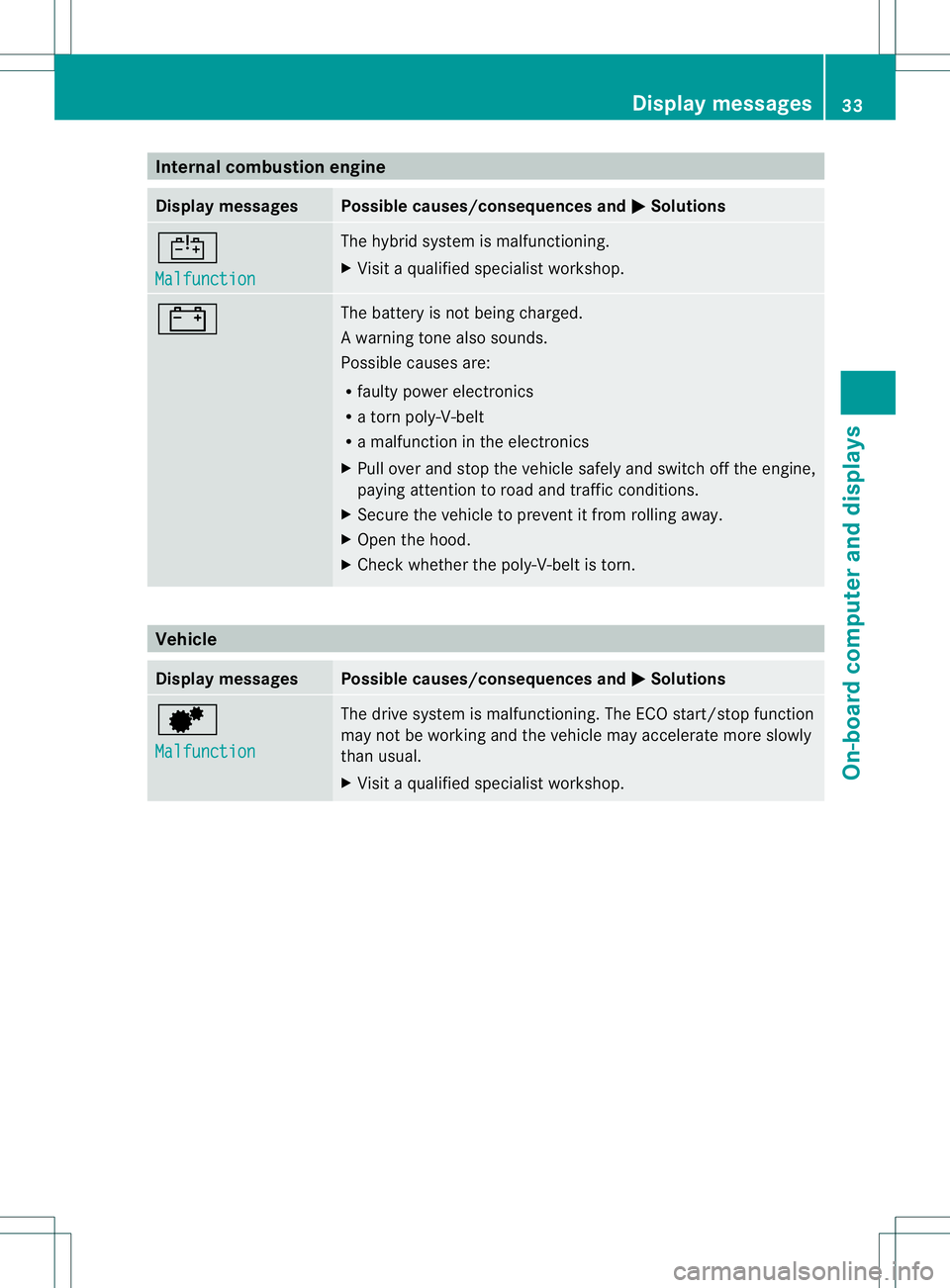
Internal combustion engine
Display messages Possible causes/consequences and
M Solutions
~
Malfunction The hybrid system is malfunctioning.
X
Visit a qualified specialist workshop. # The battery is no
tbeing charged.
Aw arning tone also sounds.
Possible causes are:
R faulty power electronics
R a torn poly-V-belt
R a malfunction in the electronics
X Pull ove rand stop the vehicle safely and switch off the engine,
paying attention to road and traffic conditions.
X Secure the vehicle to prevent it from rolling away.
X Ope nthe hood.
X Check whether the poly-V-belt is torn. Vehicle
Display messages Possible causes/consequences and
M Solutions
d
Malfunction The drive system is malfunctioning. The ECO start/stop function
may not be working and the vehicle may accelerate more slowly
than usual.
X Visit a qualified specialist workshop. Display messages
33On-board computer and displays
Page 36 of 52
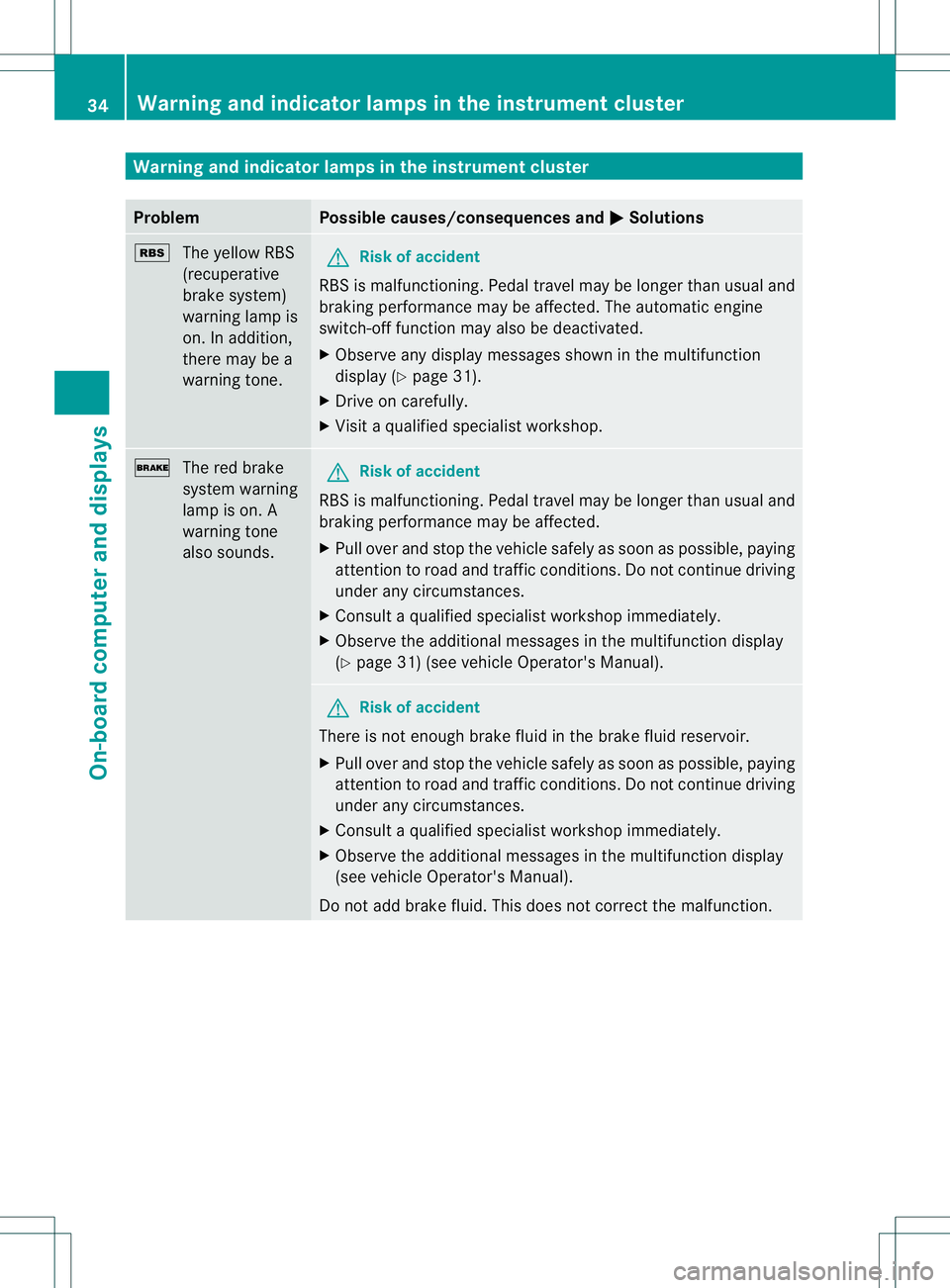
Warning and indicator lamps in the instrument cluster
Problem Possible causes/consequences and
M Solutions
é
The yellow RBS
(recuperative
brake system)
warning lamp is
on. In addition,
there may be a
warning tone. G
Risk of accident
RBS is malfunctioning. Pedal travel may be longe rthan usual and
braking performance may be affected. The automatic engine
switch-off function may also be deactivated.
X Observe any display messages shown in the multifunction
display (Y page 31).
X Drive on carefully.
X Visit a qualified specialist workshop. $
The red brake
system warning
lamp is on. A
warning tone
also sounds. G
Risk of accident
RBS is malfunctioning. Pedal travel may be longer than usual and
braking performance may be affected.
X Pull over and stop the vehicle safely as soon as possible, paying
attention to road and traffic conditions. Do not continue driving
under any circumstances.
X Consult a qualified specialist workshop immediately.
X Observe the additional messages in the multifunction display
(Y page 31) (see vehicle Operator's Manual). G
Risk of accident
There is not enough brake fluid in the brake fluid reservoir.
X Pull over and stop the vehicle safely as soon as possible, paying
attention to road and traffic conditions. Do not continue driving
under any circumstances.
X Consult a qualified specialist workshop immediately.
X Observe the additional messages in the multifunction display
(see vehicle Operator's Manual).
Do not add brake fluid. This does not correct the malfunction. 34
Warning and indicator lamps in the instrument clusterOn-board computer and displays