Memory MERCEDES-BENZ E430 2001 W210 User Guide
[x] Cancel search | Manufacturer: MERCEDES-BENZ, Model Year: 2001, Model line: E430, Model: MERCEDES-BENZ E430 2001 W210Pages: 341, PDF Size: 18.13 MB
Page 103 of 341
100 Multifunction steering wheel, multifunction display
Technical
data Instruments
and controlsOperationDrivingInstrument
cluster displayPractical hints Car care Index
Telephone
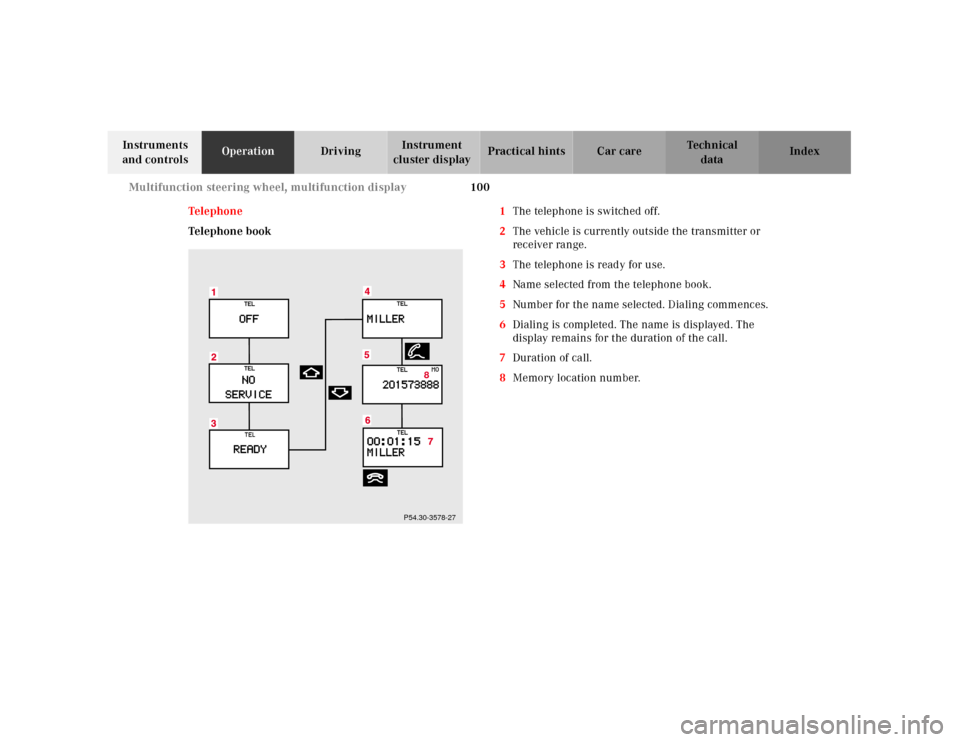
Telephone book1The telephone is switched off.
2The vehicle is currently outside the transmitter or
receiver range.
3The telephone is ready for use.
4Name selected from the telephone book.
5Number for the name selected. Dialing commences.
6Dialing is completed. The name is displayed. The
display remains for the duration of the call.
7Duration of call.
8Memory location number.
8
P54.30-3578-27
Page 105 of 341
102 Multifunction steering wheel, multifunction display
Technical
data Instruments
and controlsOperationDrivingInstrument
cluster displayPractical hints Car care Index
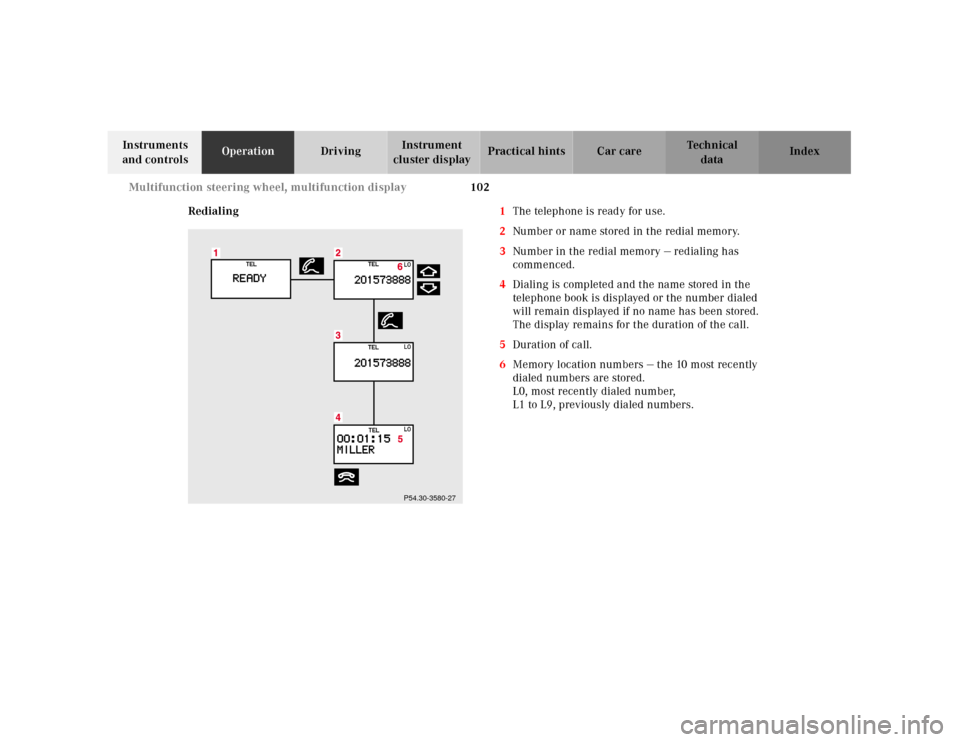
Redialing1The telephone is ready for use.
2Number or name stored in the redial memory.
3Number in the redial memory — redialing has
commenced.
4Dialing is completed and the name stored in the
telephone book is displayed or the number dialed
will remain displayed if no name has been stored.
The display remains for the duration of the call.
5Duration of call.
6Memory location numbers — the 10 most recently
dialed numbers are stored.
L0, most recently dialed number,
L1 to L9, previously dialed numbers.
P54.30-3580-27
Page 106 of 341
103 Multifunction steering wheel, multifunction display
Technical
data Instruments
and controlsOperationDrivingInstrument
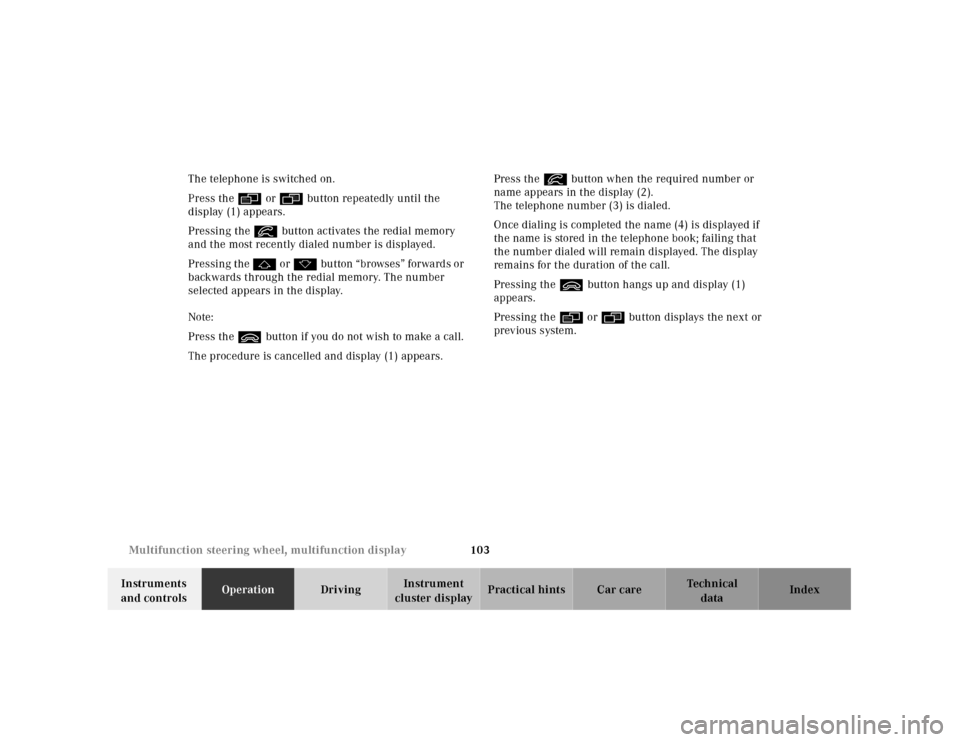
cluster displayPractical hints Car care Index The telephone is switched on.
Press the è or ÿ button repeatedly until the
display (1) appears.
Pressing the í button activates the redial memory
and the most recently dialed number is displayed.
Pressing the j o r k button “browses” forwards or
backwards through the redial memory. The number
selected appears in the display.
Note:
Press the ì button if you do not wish to make a call.
The procedure is cancelled and display (1) appears.Press the í button when the required number or
name appears in the display (2).
The telephone number (3) is dialed.
Once dialing is completed the name (4) is displayed if
the name is stored in the telephone book; failing that
the number dialed will remain displayed. The display
remains for the duration of the call.
Pressing the ì button hangs up and display (1)
appears.
Pressing the è or ÿ button displays the next or
previous system.
Page 110 of 341
107 Multifunction steering wheel, multifunction display
Technical
data Instruments
and controlsOperationDrivingInstrument
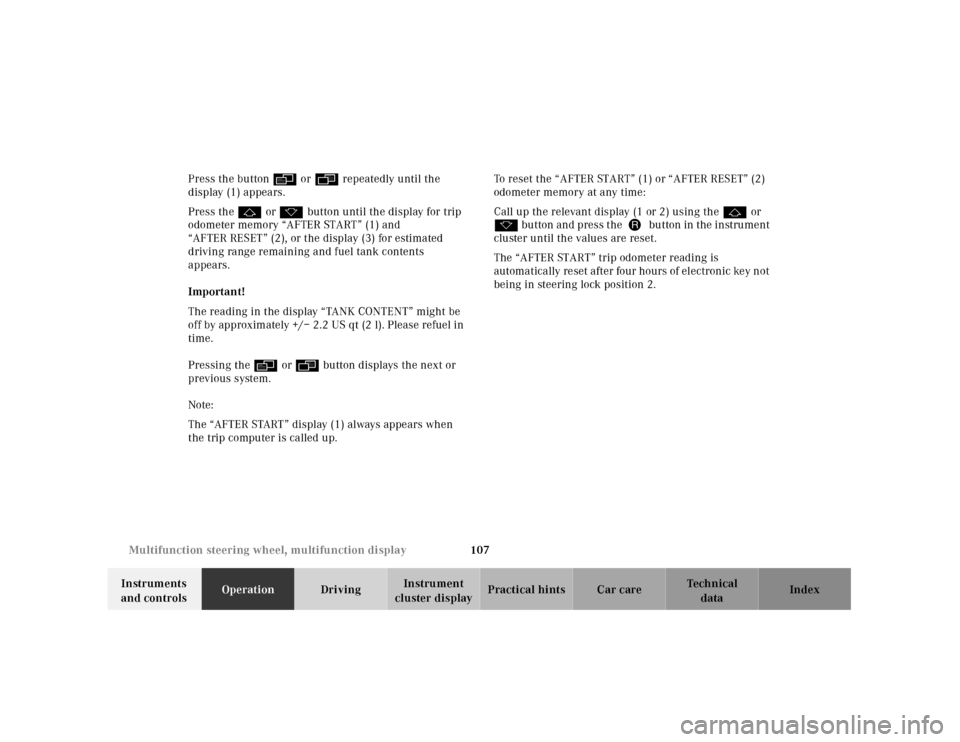
cluster displayPractical hints Car care Index Press the button è or ÿ repeatedly until the
display (1) appears.
Press the j or k button until the display for trip
odometer memory “AFTER START” (1) and
“AFTER RESET” (2), or the display (3) for estimated
driving range remaining and fuel tank contents
appears.
Important!
The reading in the display “TANK CONTENT” might be
off by approximately +/– 2.2 US qt (2 l). Please refuel in
time.
Pressing the è or ÿ button displays the next or
previous system.
Note:
The “AFTER START” display (1) always appears when
the trip computer is called up.To reset the “AFTER START” (1) or “AFTER RESET” (2)
odometer memory at any time:
Call up the relevant display (1 or 2) using the j or
k button and press theJbutton in the instrument
cluster until the values are reset.
The “AFTER START” trip odometer reading is
automatically reset after four hours of electronic key not
being in steering lock position 2.
Page 111 of 341
108 Multifunction steering wheel, multifunction display
Technical
data Instruments
and controlsOperationDrivingInstrument
cluster displayPractical hints Car care Index
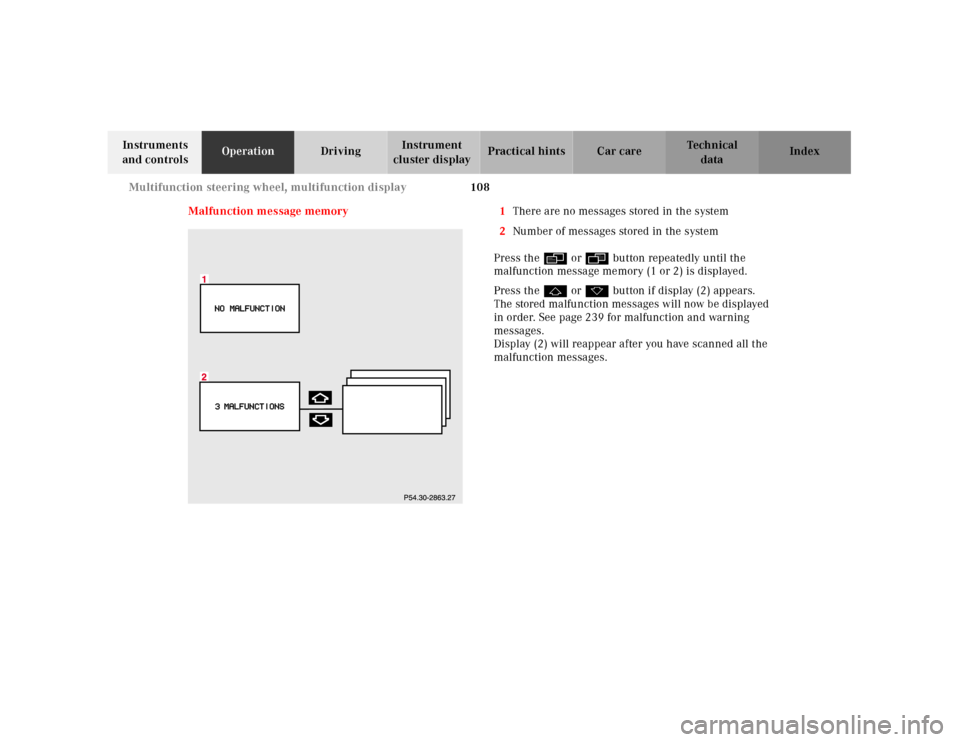
Malfunction message memory 1There are no messages stored in the system
2Number of messages stored in the system
Press the è or ÿ button repeatedly until the
malfunction message memory (1 or 2) is displayed.
Press the j or k button if display (2) appears.
The stored malfunction messages will now be displayed
in order. See page 239 for malfunction and warning
messages.
Display (2) will reappear after you have scanned all the
malfunction messages.
Page 112 of 341
109 Multifunction steering wheel, multifunction display
Technical
data Instruments
and controlsOperationDrivingInstrument
cluster displayPractical hints Car care Index Should any malfunctions be stored while driving, they
will reappear in the display (2) when the electronic key
is in steering lock position 0 or removed from the
steering lock.
Specific malfunctions can be recalled by pressing
buttonJ. Each malfunction or warning message must
be acknowledged by pressing buttonJ. Once all
messages are cancelled the odometer display should
reappear.
Pressing theJbutton in the instrument cluster
immediately switches to the next malfunction message.
The malfunction message memory will be cleared when
the electronic key is turned in the steering lock to
position 1 or 2. Should subsequent malfunctions occur,
they will be displayed in the malfunction message
memory.
Pressing the è or ÿ button displays the next or
previous system.Important!
Malfunctions and warning messages are only indicated
for certain systems and displayed to a low level of detail.
The malfunction and warning messages are simply a
reminder with respect to the operation of certain
systems and do not replace the driver’s responsibility to
maintain the vehicle’s operating safety by having all
required maintenance and safety checks performed on
the vehicle and by bringing the vehicle to an authorized
Mercedes-Benz Center to address the malfunction and
warning messages. See page 239.
Page 114 of 341
111 Multifunction steering wheel, multifunction display
Technical
data Instruments
and controlsOperationDrivingInstrument
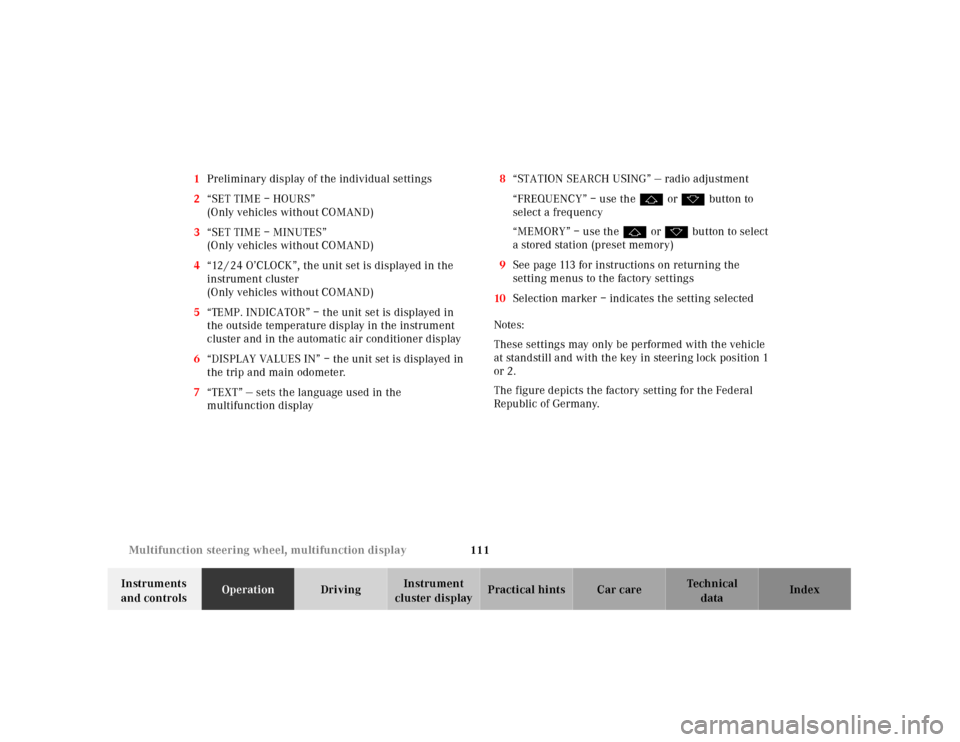
cluster displayPractical hints Car care Index 1Preliminary display of the individual settings
2“SET TIME – HOURS”
(Only vehicles without COMAND)
3“SET TIME – MINUTES”
(Only vehicles without COMAND)
4“12 / 24 O’CLOCK”, the unit set is displayed in the
instrument cluster
(Only vehicles without COMAND)
5“TEMP. INDICATOR” – the unit set is displayed in
the outside temperature display in the instrument
cluster and in the automatic air conditioner display
6“DISPLAY VALUES IN” – the unit set is displayed in
the trip and main odometer.
7“TEXT” — sets the language used in the
multifunction display8“STATION SEARCH USING” — radio adjustment
“FREQUENCY” – use the j or k button to
select a frequency
“MEMORY” – use the j or k button to select
a stored station (preset memory)
9See page 113 for instructions on returning the
setting menus to the factory settings
10Selection marker – indicates the setting selected
Notes:
These settings may only be performed with the vehicle
at standstill and with the key in steering lock position 1
or 2.
The figure depicts the factory setting for the Federal
Republic of Germany.
Page 145 of 341
142 Audio system
Technical
data Instruments
and controlsOperationDrivingInstrument
cluster displayPractical hints Car care Index
Scan tuning
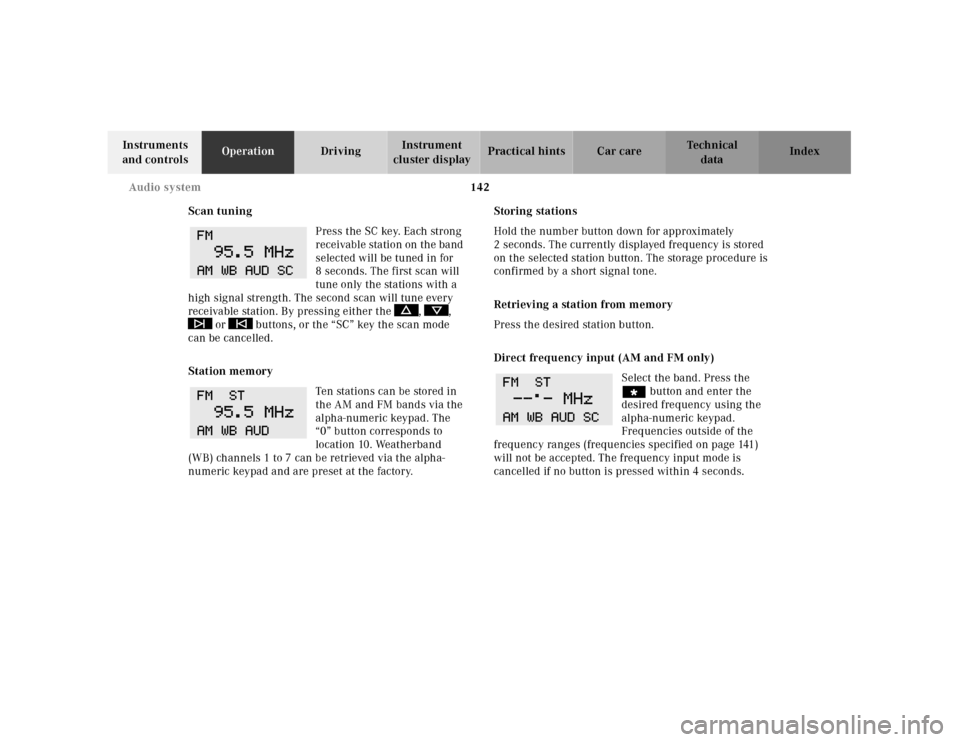
Press the SC key. Each strong
receivable station on the band
selected will be tuned in for
8 seconds. The first scan will
tune only the stations with a
high signal strength. The second scan will tune every
receivable station. By pressing either the , ,
or buttons, or the “SC” key the scan mode
can be cancelled.
Station memory
Ten stations can be stored in
the AM and FM bands via the
alpha-numeric keypad. The
“0” button corresponds to
location 10. Weatherband
(WB) channels 1 to 7 can be retrieved via the alpha-
numeric keypad and are preset at the factory.Storing stations
Hold the number button down for approximately
2 seconds. The currently displayed frequency is stored
on the selected station button. The storage procedure is
confirmed by a short signal tone.
Retrieving a station from memory
Press the desired station button.
Direct frequency input (AM and FM only)
Select the band. Press the
“ button and enter the
desired frequency using the
alpha-numeric keypad.
Frequencies outside of the
frequency ranges (frequencies specified on page 141)
will not be accepted. The frequency input mode is
cancelled if no button is pressed within 4 seconds.
Page 154 of 341

151 Audio system
Technical
data Instruments
and controlsOperationDrivingInstrument
cluster displayPractical hints Car care Index Telephone operation
Various functions of the Mercedes-Benz integrated
cellular telephone
1 can be performed and displayed via
the car radio. Further instructions for operating the car
telephone can be found in the operation guide for the
cellular telephone1.
Switching the telephone on and off
Switching on: Press the
button, “TEL” appears in the
corner of the display.
Switching off: Press and hold
the button until the telephone symbol “TEL” no
longer appears in the display, or press the “PWR” button
on the phone’s keypad.
1 Optional equipment
Entering telephone number and starting dialing
process
Enter the desired telephone
number using the alpha-
numeric keypad. The number
can have up to 32 digits, but
only 13 of these can be
displayed. The dialing process is started by pressing the
SND button. The entered number can be corrected using
the “CLR” key.
Press the CLR key briefly -
and the last digit will be
deleted.
Press the CLR key longer - and
the complete number will be deleted.
Calling up the phone book
The numbers stored in the telephone memory can be
called up via either name or number entries. The
memory contents from the portable phone must be
downloaded and the telephone menu must be selected
in order to call up the phone book. Refer to the
“Memory download” section of the cellular telephone
operation guide for more information.
Page 155 of 341
152 Audio system
Technical
data Instruments
and controlsOperationDrivingInstrument
cluster displayPractical hints Car care Index
Switching between name search and number search
Press ABC key - Name search
Press NUM key - Number search
Searching and selecting phone book entries by name
Press the ABC key. The current name is shown on the
display. The stored entries in alphabetical order can be
selected using the or button. By pressing the
or buttons, the stored entries can be selected
according to alphabetical initial letters (e.g. A-Adam,
B-Brown, M-Miller).
Searching and selecting phone book entries by
number
Press the NUM key. The current number is shown on
the display. The stored entries can be selected in
numerical order using the or button. By
pressing the or buttons, the stored entries
can be selected in increments of 5 (e.g. Entry no. 2,
Entry no. 7, etc.).Placing a call
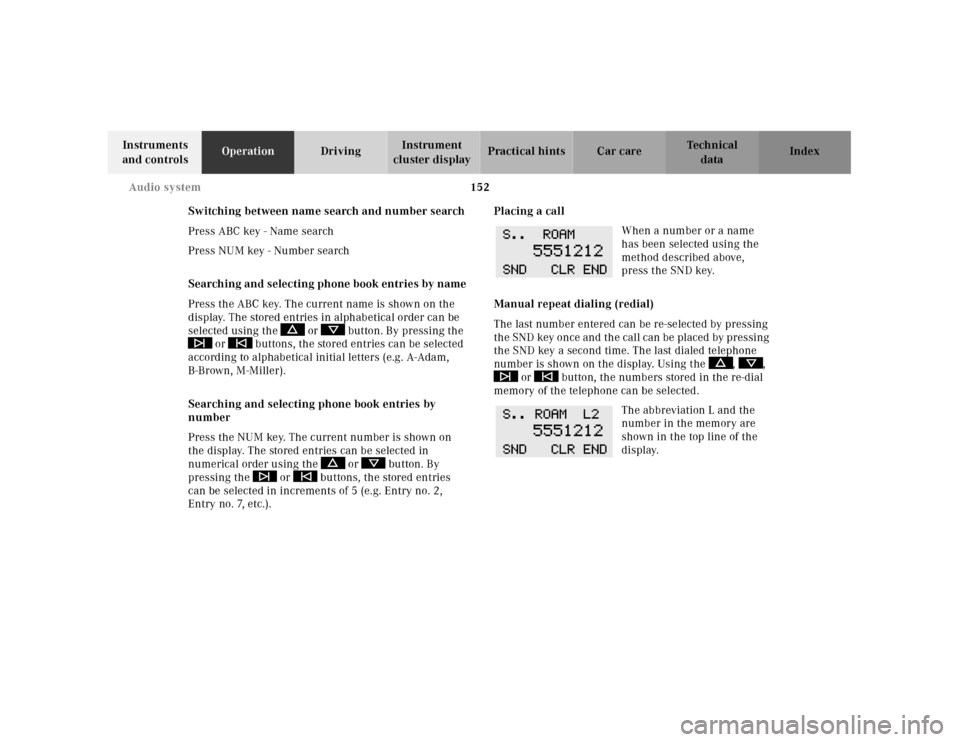
When a number or a name
has been selected using the
method described above,
press the SND key.
Manual repeat dialing (redial)
The last number entered can be re-selected by pressing
th e SND key once and th e cal l can be pl aced by pressing
the SND key a second time. The last dialed telephone
number is shown on the display. Using the , ,
or button, the numbers stored in the re-dial
memory of the telephone can be selected.
The abbreviation L and the
number in the memory are
shown in the top line of the
display.