Windows MERCEDES-BENZ E550 2010 W212 User Guide
[x] Cancel search | Manufacturer: MERCEDES-BENZ, Model Year: 2010, Model line: E550, Model: MERCEDES-BENZ E550 2010 W212Pages: 372, PDF Size: 8.55 MB
Page 108 of 372
The switches for the respective door windows
are located on the front passenger door and
on the rear doors.
i Operating the rear door windows from
the rear is not possible when you activate
the override switch (Y page 60).
GObserve Safety notes, see page 56.GWarning!
When opening or closing the door windows,
make sure there is no danger of anyone being
harmed by the opening/closing procedure.
The door windows are equipped with the
express operation and automatic reversal
function. If in express operation mode a door
window encounters an obstruction that
blocks its path, the automatic reversal
function will stop the door window and open
it slightly.
The door windows operate differently when
the switch is pulled and held. See the “Closing
when a door window is blocked” section in
this chapter for details.
The closing of the door windows can be
immediately halted by releasing the switch or,
if the switch was pulled past the resistance
point and released, by either pressing or
pulling the respective switch.
If a door window encounters an obstruction
that blocks its path in a circumstance where
you are closing the door windows by pressing
and holding button & on the SmartKey or
by touching and holding the sensor surface
(vehicles with KEYLESS-GO) on an outside
door handle, the automatic reversal function
will not operate.
Activate the override switch when children
are riding in the back seats of the vehicle. The
children may otherwise injure themselves,
e.g. by becoming trapped in the door window
opening.
GWarning!
Do not keep any part of your body up against
the window pane when opening a window. The
downward motion of the pane may pull that
part of your body down between the window
pane and the door frame and trap it there. If
there is a risk of entrapment, release the
switch and pull it to close the window.
iYou can also open or close the door
windows using the SmartKey, see
“Summer opening feature” (Y page 107)
and “Convenience closing feature”
(Y page 108).
iAfter switching off the ignition or
removing the SmartKey from the starter
switch, you can operate the door windows
until you open the driver’s or front
passenger door. If no door was opened you
can operate the door windows for up to
5 minutes.
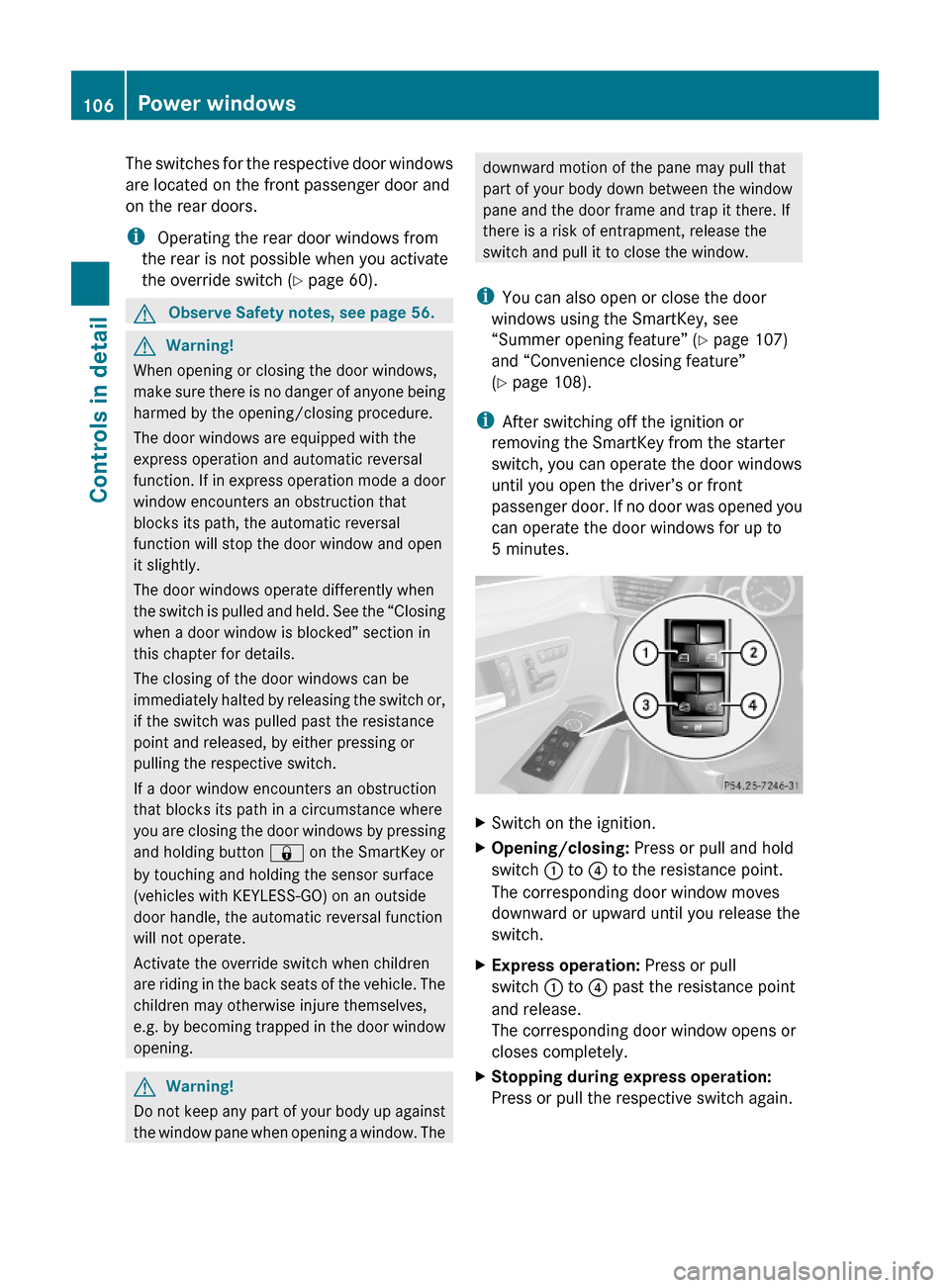
XSwitch on the ignition.XOpening/closing: Press or pull and hold
switch : to ? to the resistance point.
The corresponding door window moves
downward or upward until you release the
switch.
XExpress operation: Press or pull
switch : to ? past the resistance point
and release.
The corresponding door window opens or
closes completely.
XStopping during express operation:
Press or pull the respective switch again.
106Power windowsControls in detail
212_AKB; 2; 41, en-USd2ureepe,Version: 2.11.8.12009-07-17T09:14:21+02:00 - Seite 106
Page 109 of 372
Closing when a door window is blockedGWarning!
Make sure that nobody can become trapped
and be seriously or even fatally injured when
closing a door window with greater force or
without automatic reversal function.
If the upward movement of a door window is
blocked during the closing procedure, the
door window will stop and open slightly.
XImmediately after the door window has
stopped because it was blocked, pull and
hold the respective switch upward until the
door window is fully closed.
The door window closes with greater force.
If the door window is blocked again and opens
slightly:
XImmediately after the door window was
blocked, pull and hold the respective
switch upward until the door window is fully
closed.
The door window closes without automatic
reversal function.GWarning!
Pulling and holding the switch to close the
door window immediately after it had been
blocked two times will cause the door window
to close without any reversal function for as
long as you hold the switch.
Synchronizing door windows
The door windows must be synchronized if
they cannot be fully closed (express
operation).
Each door window must be synchronized
separately.
XClose all doors.XSwitch on the ignition.XPull and hold switch :, ; , = or ?
( Y page 106) until the respective door
window is closed.
The door window opens again slightly.XPull and hold the respective switch once
more immediately until the door window is
closed completely.XHold the respective switch for
approximately 1 second.
The door window is synchronized.
Summer opening feature
When the weather is warm, you can ventilate
the vehicle before driving off by
simultaneously
R opening the door windows
R opening the tilt/sliding sunroof
R opening the panorama roof with power tilt/
sliding panel and roller sunblinds
R switching on the seat ventilation for the
driver’s seat
The summer opening feature can only be
activated via the remote control of the
SmartKey. The SmartKey must be in close
proximity to the driver’s outside door handle.
XAim the transmitter eye of the SmartKey at
the driver’s outside door handle.XPress button % on the SmartKey to
unlock the vehicle.
Keep button % pressed until the door
windows and the tilt/sliding panel of the
panorama roof or the tilt/sliding sunroof
have reached the desired position.
Vehicles with panorama roof with
power tilt/sliding panel: When the roller
sunblinds of the panorama roof with power
tilt/sliding panel are closed, the roller
sunblinds will open first.XPress button % once more until the tilt/
sliding panel of the panorama roof has
reached the desired position.XRelease button % on the SmartKey to
interrupt the opening procedure.Power windows107Controls in detail212_AKB; 2; 41, en-USd2ureepe,Version: 2.11.8.12009-07-17T09:14:21+02:00 - Seite 107Z
Page 110 of 372
Convenience closing feature
When locking the vehicle, you can
simultaneously close
Rthe door windows
Rthe tilt/sliding sunroof
Rthe panorama roof with power tilt/sliding
panel
Afterward, you can extend the roller
sunblinds of the panorama roof with power
tilt/sliding panel.
GWarning!
When closing the door windows and the tilt/
sliding sunroof or panorama roof with power
tilt/sliding panel, make sure there is no
danger of anyone being harmed by the closing
procedure.
If potential danger exists, proceed as follows:
RRelease button & to stop the closing
procedure. To open, press and hold button
%. To continue the closing procedure
after making sure that there is no danger of
anyone being harmed by the closing
procedure, press and hold button &.
Vehicles with KEYLESS-GO:
RRelease the sensor surface on the outside
door handle to stop the closing procedure.
RImmediately pull on the same outside door
handle and hold firmly. The door windows
and the tilt/sliding sunroof or panorama
roof with power tilt/sliding panel will open
for as long as the door handle is held but
the door not opened.
With SmartKey
The SmartKey must be in close proximity to
the driver’s outside door handle.
XAim transmitter eye of the SmartKey at the
driver’s outside door handle.
XPress and hold button & on the
SmartKey until the door windows and the
tilt/sliding sunroof or panorama roof with
power tilt/sliding panel are closed
completely.
XRelease button & on the SmartKey to
interrupt the closing procedure.
XVehicles with panorama roof with
power tilt/sliding panel: Press and hold
button & on the SmartKey once more.
The roller sunblinds extend.
XRelease button & on the SmartKey to
interrupt the extending procedure.
With KEYLESS-GO
The SmartKey with KEYLESS-GO must be
located outside the vehicle within
approximately 3 ft (1 m) of a door.
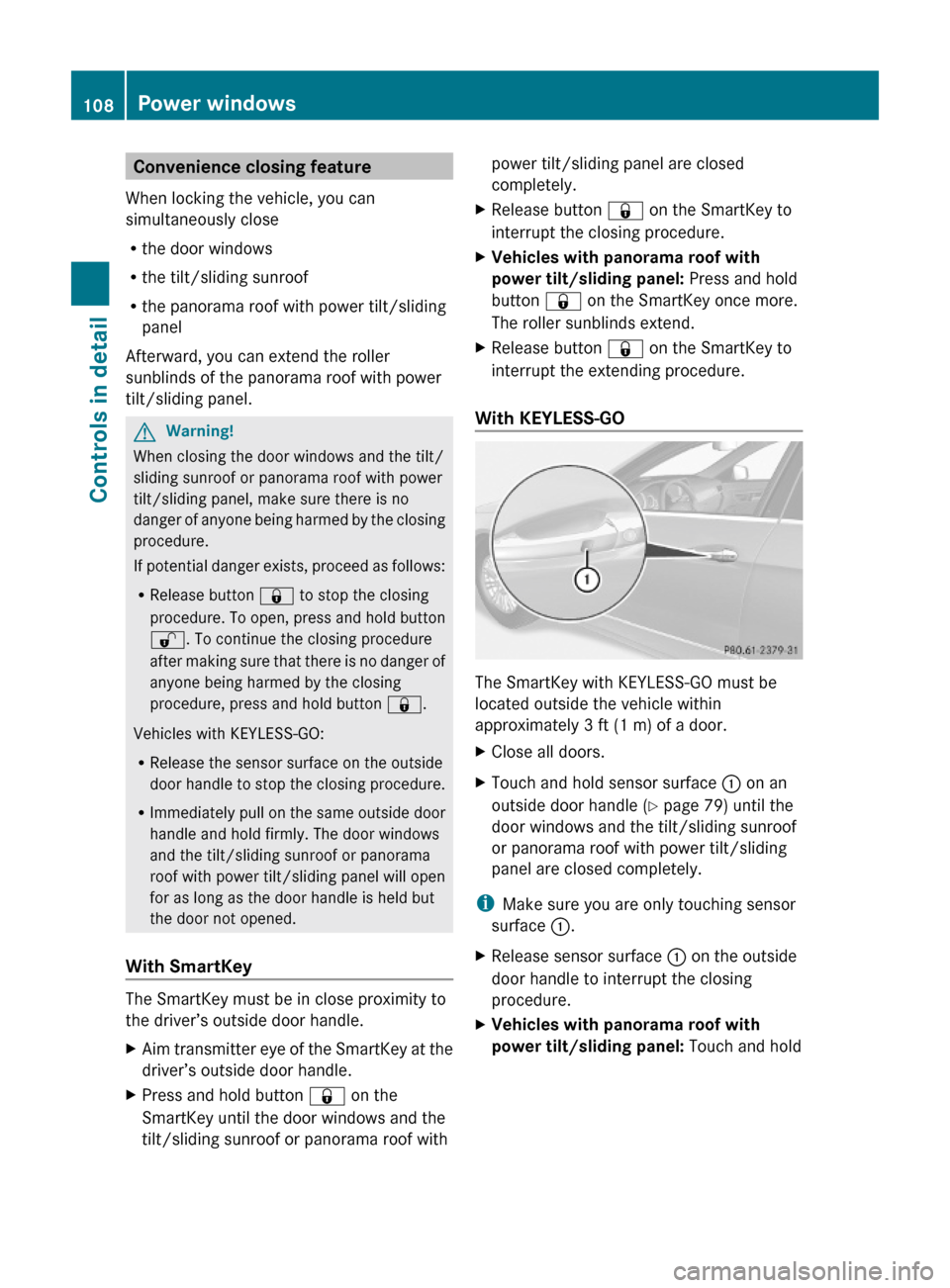
XClose all doors.XTouch and hold sensor surface : on an
outside door handle (Y page 79) until the
door windows and the tilt/sliding sunroof
or panorama roof with power tilt/sliding
panel are closed completely.
iMake sure you are only touching sensor
surface :.
XRelease sensor surface : on the outside
door handle to interrupt the closing
procedure.
XVehicles with panorama roof with
power tilt/sliding panel: Touch and hold
108Power windowsControls in detail
212_AKB; 2; 41, en-USd2ureepe,Version: 2.11.8.12009-07-17T09:14:21+02:00 - Seite 108
Page 183 of 372
Control panels
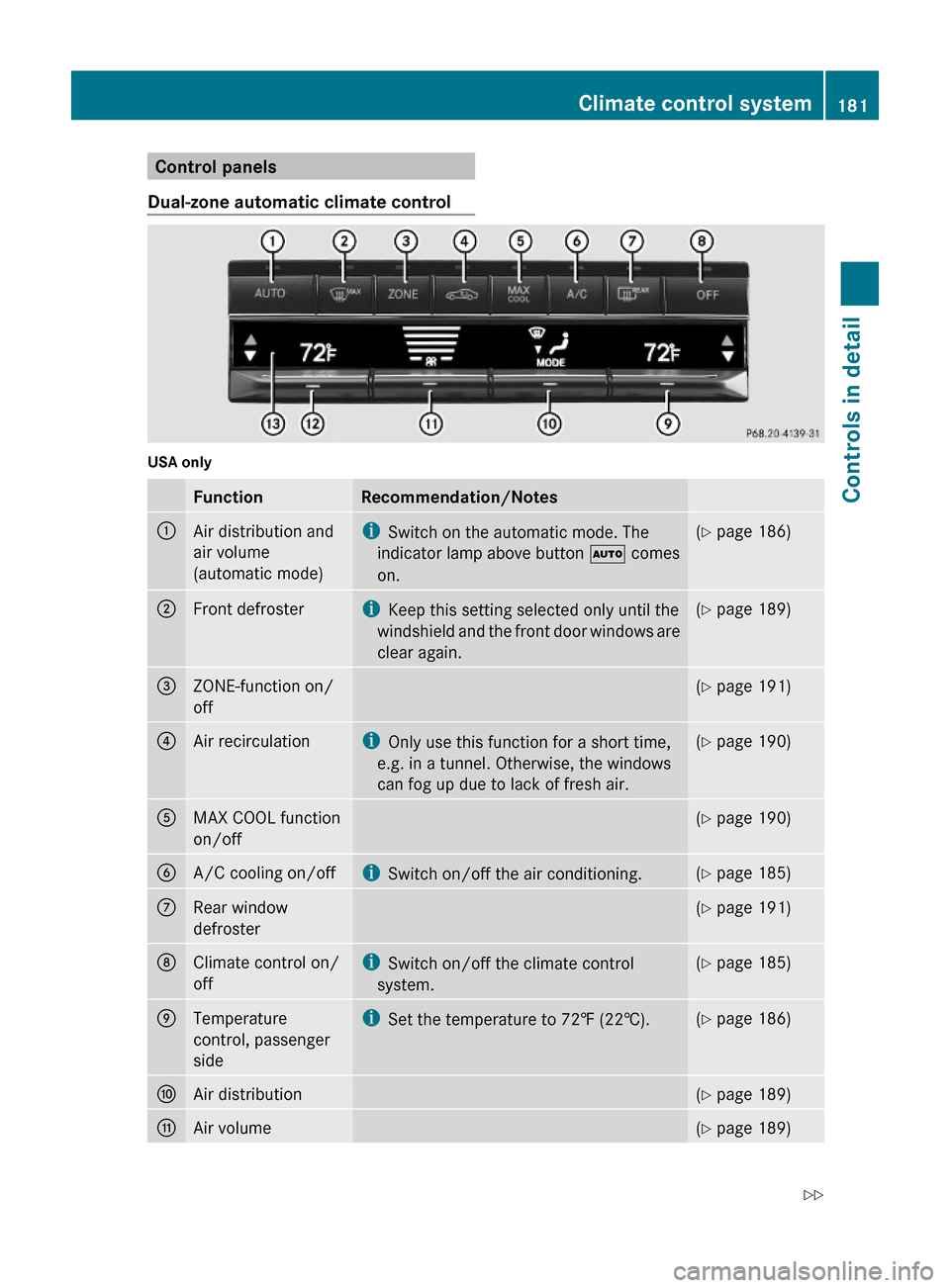
Dual-zone automatic climate control
USA only
FunctionRecommendation/Notes:Air distribution and
air volume
(automatic mode)
iSwitch on the automatic mode. The
indicator lamp above button à comes
on.
(Y page 186);Front defrosteriKeep this setting selected only until the
windshield and the front door windows are
clear again.
(Y page 189)=ZONE-function on/
off
(Y page 191)?Air recirculationiOnly use this function for a short time,
e.g. in a tunnel. Otherwise, the windows
can fog up due to lack of fresh air.
(Y page 190)AMAX COOL function
on/off
(Y page 190)BA/C cooling on/offiSwitch on/off the air conditioning.(Y page 185)CRear window
defroster
(Y page 191)DClimate control on/
off
iSwitch on/off the climate control
system.
(Y page 185)ETemperature
control, passenger
side
iSet the temperature to 72‡ (22†).(Y page 186)FAir distribution(Y page 189)GAir volume(Y page 189)Climate control system181Controls in detail212_AKB; 2; 41, en-USd2ureepe,Version: 2.11.8.12009-07-17T09:14:21+02:00 - Seite 181Z
Page 184 of 372
FunctionRecommendation/NotesHTemperature
control, driver’s side
iSet the temperature to 72‡ (22†).(Y page 186)IDisplay
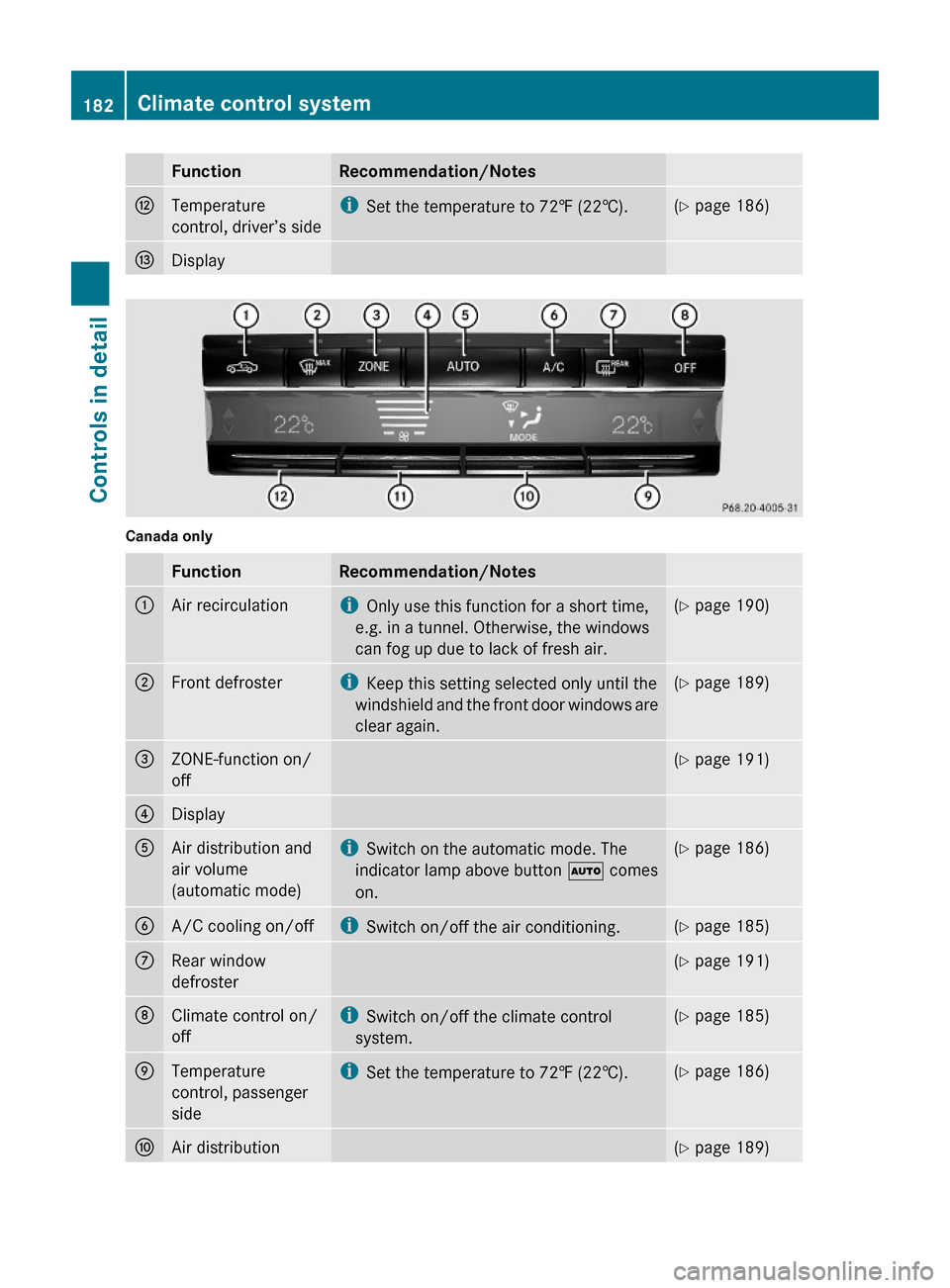
Canada only
FunctionRecommendation/Notes:Air recirculationiOnly use this function for a short time,
e.g. in a tunnel. Otherwise, the windows
can fog up due to lack of fresh air.
(Y page 190);Front defrosteriKeep this setting selected only until the
windshield and the front door windows are
clear again.
(Y page 189)=ZONE-function on/
off
(Y page 191)?DisplayAAir distribution and
air volume
(automatic mode)
iSwitch on the automatic mode. The
indicator lamp above button à comes
on.
(Y page 186)BA/C cooling on/offiSwitch on/off the air conditioning.(Y page 185)CRear window
defroster
(Y page 191)DClimate control on/
off
iSwitch on/off the climate control
system.
(Y page 185)ETemperature
control, passenger
side
iSet the temperature to 72‡ (22†).(Y page 186)FAir distribution(Y page 189)182Climate control systemControls in detail
212_AKB; 2; 41, en-USd2ureepe,Version: 2.11.8.12009-07-17T09:14:21+02:00 - Seite 182
Page 185 of 372
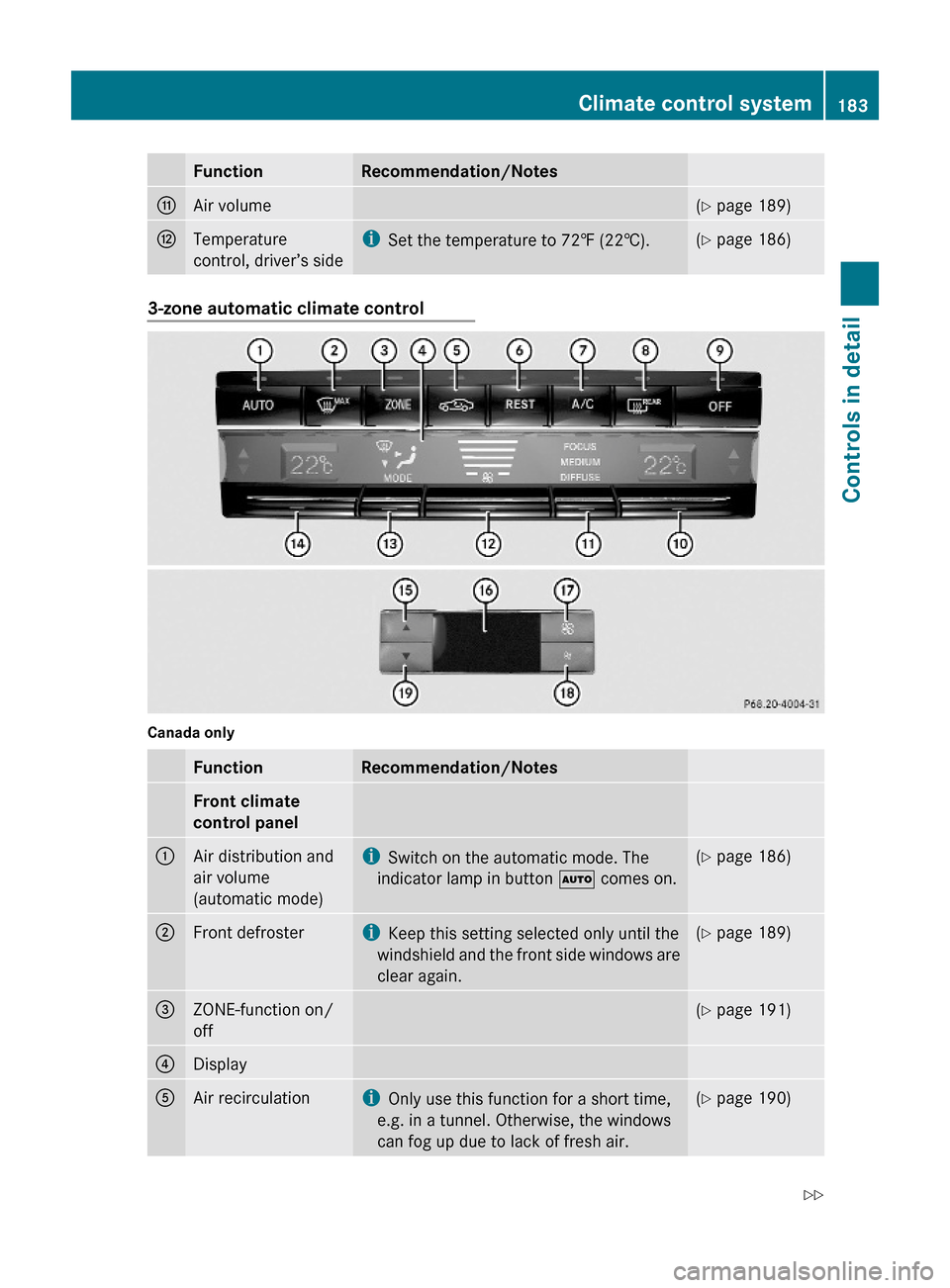
FunctionRecommendation/NotesGAir volume(Y page 189)HTemperature
control, driver’s side
iSet the temperature to 72‡ (22†).(Y page 186)3-zone automatic climate control
Canada only
FunctionRecommendation/NotesFront climate
control panel
:Air distribution and
air volume
(automatic mode)
iSwitch on the automatic mode. The
indicator lamp in button à comes on.
(Y page 186);Front defrosteriKeep this setting selected only until the
windshield and the front side windows are
clear again.
(Y page 189)=ZONE-function on/
off
(Y page 191)?DisplayAAir recirculationiOnly use this function for a short time,
e.g. in a tunnel. Otherwise, the windows
can fog up due to lack of fresh air.
(Y page 190)Climate control system183Controls in detail212_AKB; 2; 41, en-USd2ureepe,Version: 2.11.8.12009-07-17T09:14:21+02:00 - Seite 183Z
Page 187 of 372
It can only function optimally when you are
driving with the windows, the tilt/sliding
sunroof or tilt/sliding panel closed.
Nearly all dust particles, pollutants and odors
are filtered out before outside air enters the
passenger compartment through the air
distribution system.GWarning!
Severe conditions (e.g. strong air pollution)
may require replacement of the filter before
its scheduled replacement interval. A clogged
filter will reduce the air volume to the interior
and the windows could fog up, impairing
visibility and endangering you and others.
Have a clogged filter replaced as soon as
possible at an authorized Mercedes-Benz
Center.
The air conditioning will not engage (no
cooling) if the A/C mode ( Y page 185) is
deactivated.
GWarning!
Follow the recommended settings for heating
and cooling given on the following pages.
Otherwise the windows could fog up,
impairing visibility and endangering you and
others.
XKeep the air intake grille in front of the
windshield free of snow and debris.
Do not obstruct air flow by placing objects on
the air flow-through exhaust slots below the
rear window.
i If the vehicle interior is hot, ventilate the
interior before driving off, see “Summer
opening feature” (Y page 107). The climate
control will then adjust the interior
temperature to the set value much faster.
Deactivating the climate control
systemGWarning!
When the climate control system is
deactivated, the outside air supply and
circulation are also deactivated. Only choose
this setting for a short time. Otherwise the
windows could fog up, impairing visibility and
endangering you and others.
XDeactivating: Press button ^.
The indicator lamp above the button comes
on.XReactivating: Press button ^.
The indicator lamp above the button goes
out. The previous settings are once again
in effect.
or
XPress button Ã.
The indicator lamp above the button comes
on. Air volume and air distribution are
adjusted automatically.
Air conditioning
The air conditioning is operational while the
engine is running and cools the interior air to
the temperature set by the operator. In
addition, the air conditioning dehumidifies
the interior air and helps prevent window
fogging.
GWarning!
If you deactivate the air conditioning, the
vehicle will not be cooled when weather
conditions are warm. The windows can fog up
more quickly. Window fogging may impair
visibility and endanger you and others.
i Condensated water may drip out from
underneath the vehicle. This is normal and
not an indication of a malfunction.
Climate control system185Controls in detail212_AKB; 2; 41, en-USd2ureepe,Version: 2.11.8.12009-07-17T09:14:21+02:00 - Seite 185Z
Page 188 of 372
The air conditioning uses the refrigerant
R134a. This refrigerant is free of CFCs which
are harmful to the ozone layer.
Deactivating
It is possible to deactivate the air
conditioning. The interior air will then no
longer be cooled or dehumidified.
XPress button ¿.
The indicator lamp above the button goes
out.
The cooling function switches off after a
short delay.
Activating
Moist air can fog up the windows. You can
dehumidify the interior air with the air
conditioning.
XPress button ¿.
The indicator lamp above the button comes
on.
Automatic mode
When operating the climate control system in
automatic mode, the interior air temperature,
air volume and air distribution are adjusted
automatically.
In automatic mode, cooling with
dehumidification is switched on. This function
can be switched off if necessary.
GWarning!
If you deactivate the air conditioning, the
vehicle will not be cooled when weather
conditions are warm. The windows can fog up
more quickly. Window fogging may impair
visibility and endanger you and others.
Dual-zone automatic climate controlXSet the desired temperature
( Y page 186).XActivating: Press button Ã.
The indicator lamp above the button comes
on. The air volume and air distribution are
adjusted automatically.XDeactivating: Press rocker switch F or
G (Y page 181).
or
XPress button ¬ or button Ù (USA
only)
The indicator lamp above button à goes
out.
3-zone automatic climate control
XSet the desired temperature
( Y page 186).XActivating: Press button Ã.
The indicator lamp above the button comes
on. The air volume and air distribution are
adjusted automatically.XPress rocker switch G (Y page 183) up or
down and select the desired level.
The automatic air conditioning settings:
FOCUSAir flow high/air distribution via
the center and side air ventsMEDIUMAir flow medium/air distribution
via the center and side air ventsDIFFUSEAir flow low/air distribution via the
center, side and defroster air ventsXDeactivating: Press rocker switch H or
I (Y page 183).
The indicator lamp above button à goes
out.
Setting temperature
Dual-zone automatic climate control
You can adjust the air temperature on each
side of the passenger compartment. You
should raise or lower the temperature setting
186Climate control systemControls in detail
212_AKB; 2; 41, en-USd2ureepe,Version: 2.11.8.12009-07-17T09:14:21+02:00 - Seite 186
Page 191 of 372
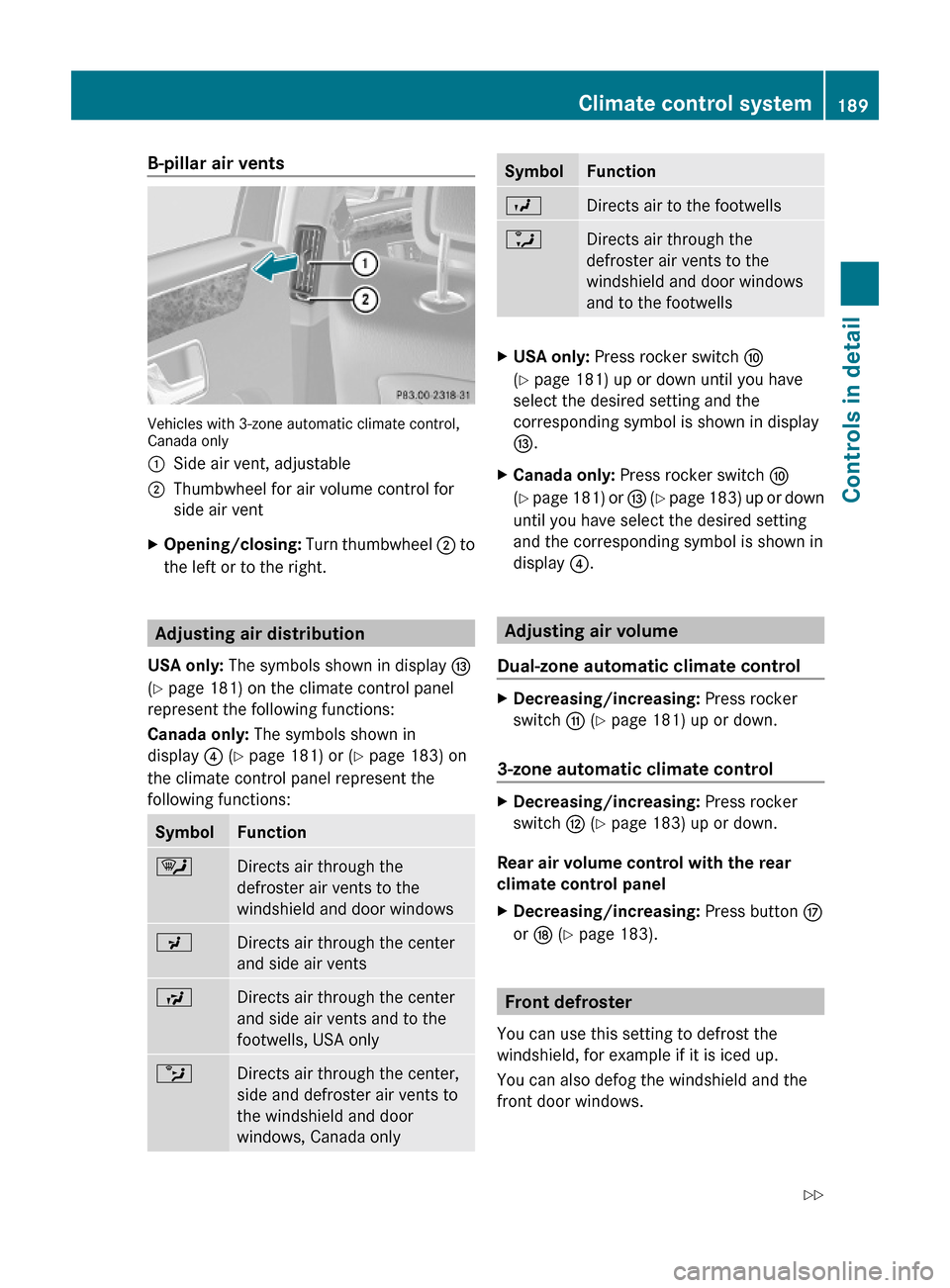
B-pillar air vents
Vehicles with 3-zone automatic climate control,Canada only
:Side air vent, adjustable;Thumbwheel for air volume control for
side air vent
XOpening/closing: Turn thumbwheel ; to
the left or to the right.
Adjusting air distribution
USA only: The symbols shown in display I
(Y page 181) on the climate control panel
represent the following functions:
Canada only: The symbols shown in
display ? (Y page 181) or (Y page 183) on
the climate control panel represent the
following functions:
SymbolFunction¯Directs air through the
defroster air vents to the
windshield and door windows
PDirects air through the center
and side air vents
SDirects air through the center
and side air vents and to the
footwells, USA only
bDirects air through the center,
side and defroster air vents to
the windshield and door
windows, Canada only
SymbolFunctionODirects air to the footwellsaDirects air through the
defroster air vents to the
windshield and door windows
and to the footwells
XUSA only: Press rocker switch F
(Y page 181) up or down until you have
select the desired setting and the
corresponding symbol is shown in display
I.
XCanada only: Press rocker switch F
(Y page 181) or I (Y page 183) up or down
until you have select the desired setting
and the corresponding symbol is shown in
display ?.
Adjusting air volume
Dual-zone automatic climate control
XDecreasing/increasing: Press rocker
switch G (Y page 181) up or down.
3-zone automatic climate control
XDecreasing/increasing: Press rocker
switch H (Y page 183) up or down.
Rear air volume control with the rear
climate control panel
XDecreasing/increasing: Press button M
or N (Y page 183).
Front defroster
You can use this setting to defrost the
windshield, for example if it is iced up.
You can also defog the windshield and the
front door windows.
Climate control system189Controls in detail212_AKB; 2; 41, en-USd2ureepe,Version: 2.11.8.12009-07-17T09:14:21+02:00 - Seite 189Z
Page 192 of 372
iKeep this setting selected only until the
windshield or the front door windows are
clear again.XActivating: Press button ¬.
The indicator lamp above the button comes
on.
The climate control switches to the following
functions automatically:
R cooling on to dehumidify
R most efficient blower speed and heating
power, depending on outside temperature
R air flows onto the windshield and the front
door windows
R the air recirculation mode is switched off
i You can adjust the air volume when the
front defroster is switched on.
XDeactivating: Press button ¬.
The indicator lamp above the button goes
out. The previous settings are once again
in effect. The cooling remains switched on.
The air recirculation remains switched off.
or
XPress button Ã.
The indicator lamp above button ¬ goes
out. Air volume and air distribution are
adjusted automatically.
or
XDual-zone automatic climate control:
Press rocker switch E or H
( Y page 181) up or down.
3-zone automatic climate control: Press
rocker switch F or J (Y page 183) up or
down.
Maximum cooling MAX COOL
MAX COOL is only available in U.S. vehicles.
MAX COOL is only operational when the
engine is running.
You can use this setting to provide the fastest
possible cooling of the vehicle interior (when
windows and tilt/sliding sunroof or tilt/
sliding panel are closed).XActivating: Press button Ù.
The indicator lamp above the button comes
on.
The climate control switches automatically to
the following functions:
R maximum cooling
R maximum blowing power
R the air recirculation mode is switched on
XDeactivating: Press button Ù again.
The indicator lamp above the button goes
out. The previous settings are once again
in effect.
Air recirculation mode
Switch to air recirculation mode to prevent
unpleasant odors from entering the vehicle
from the outside (e. g. before driving through
a tunnel). This setting cuts off the intake of
outside air and recirculates the air in the
passenger compartment.
GWarning!
Fogged windows impair visibility,
endangering you and others. If the windows
begin to fog on the inside, switching off the
air recirculation mode immediately should
clear interior window fogging. If interior
window fogging persists, make sure the air
conditioning is activated, or press button
¬ .
XActivating: Press button g.
The indicator lamp above the button comes
on.
i The air recirculation mode is activated
automatically at high outside
temperatures.
The indicator lamp in button g is not lit
when the air recirculation mode is switched
on automatically.
190Climate control systemControls in detail
212_AKB; 2; 41, en-USd2ureepe,Version: 2.11.8.12009-07-17T09:14:21+02:00 - Seite 190