fuel MERCEDES-BENZ E55AMG 2002 W210 User Guide
[x] Cancel search | Manufacturer: MERCEDES-BENZ, Model Year: 2002, Model line: E55AMG, Model: MERCEDES-BENZ E55AMG 2002 W210Pages: 350, PDF Size: 21.88 MB
Page 39 of 350
36 Central locking system
Technical
data Instruments
and controlsOperationDrivingInstrument
cluster displayPractical hints Car care Index
Automatic central locking
The central locking switch also operates the automatic
central locking.
With the automatic central locking system activated,
the doors and trunk are locked at vehicle speeds of
approximately 9 mph (15 km / h) or more. The fuel filler
flap remains unlocked.
To a c ti va te :
With electronic key in steering lock position 2 hold
upper portion of switch (1) for a minimum of 5 seconds.
To deactivate:
With electronic key in steering lock position 2 hold
lower portion of switch (2) for a minimum of 5 seconds.
Notes:
If doors are unlocked with the central locking switch
after activating the automatic central locking, and
neither door is opened, then the doors remain unlocked
even at vehicle speeds of approximately 9 mph
(15 km / h) or more.If a door is opened from the inside at speeds of
approximately 9 mph (15 km / h) or less with the
automatic central locking activated, the door will again
be automatically locked at speeds of approximately
9 mph (15 km / h) or more.
Important!
When towing the vehicle, or with the vehicle on a
dynamometer test stand, please, note the following:
With the automatic central locking activated and the
electronic key in steering lock position 2, the vehicle
doors will lock if the left front wheel as well as the right
rear wheel spin at vehicle speeds of approximately
9 mph (15 km / h) or more.
To prevent the vehicle door locks from locking,
deactivate the automatic central locking.
Emergency unlocking in case of accident
The doors unlock automatically a short time after a
strong deceleration is detected, such as in a collision
(this is intended to aid rescue and exit).
Driving on rough roads may cause the vehicle to unlock.
If necessary, the vehicle can be locked again with the
central locking switch, see page 35.
W210.book Seite 36 Mittwoch, 30. Mai 2001 11:45 11
Page 40 of 350
37 Central locking system
Technical
data Instruments
and controlsOperationDrivingInstrument
cluster displayPractical hints Car care Index Trunk
When the trunk is separately locked, it remains locked
when centrally unlocking the vehicle.
To deny any unauthorized person access to the trunk,
lock it separately with the mechanical key. Leave only
the electronic key less its mechanical key with the
vehicle.
Notes:
In case of a malfunction in the central locking system
the trunk can be unlocked individually.
To unlock and open the trunk lid, turn mechanical key
to position 1, hold and push to open.
The mechanical key does not operate the central
locking system or antitheft alarm system.
When unlocking the trunk with the mechanical key, the
exterior lamps will flash and the alarm will sound.
To cancel the alarm, insert the electronic key in the
steering lock or press buttonŒ or‹ on the
electronic key.
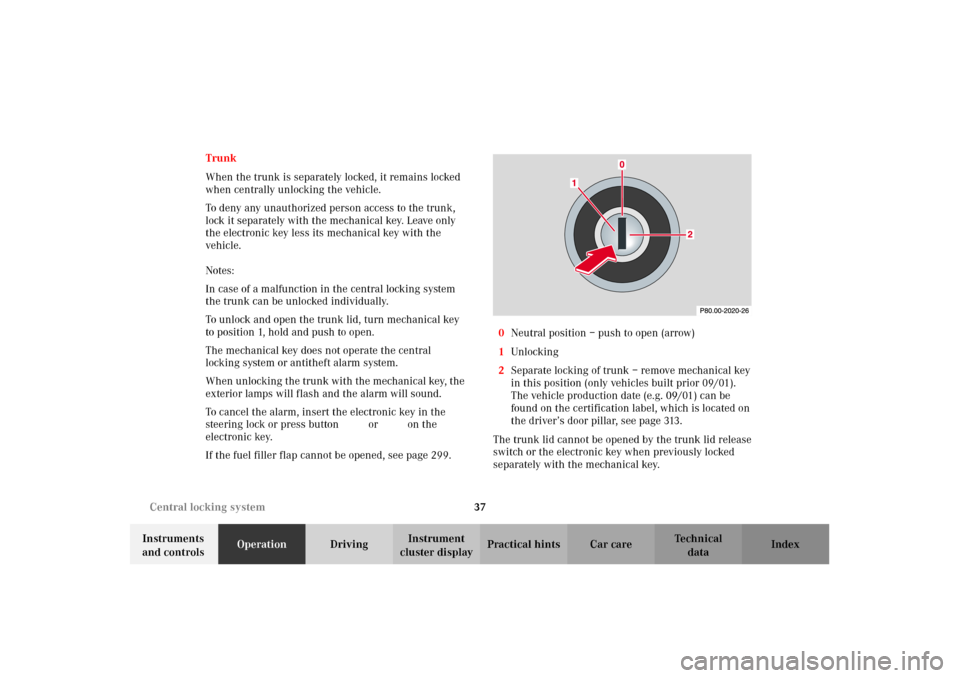
If the fuel filler flap cannot be opened, see page 299.0Neutral position – push to open (arrow)
1Unlocking
2Separate locking of trunk – remove mechanical key
in this position (only vehicles built prior 09/01).
The vehicle production date (e.g. 09/01) can be
found on the certification label, which is located on
the driver’s door pillar, see page 313.
The trunk lid cannot be opened by the trunk lid release
switch or the electronic key when previously locked
separately with the mechanical key.
W210.book Seite 37 Mittwoch, 30. Mai 2001 11:45 11
Page 44 of 350
41 Central locking system
Technical
data Instruments
and controlsOperationDrivingInstrument
cluster displayPractical hints Car care Index Trunk lid emergency release
(vehicles built prior to September 2001)
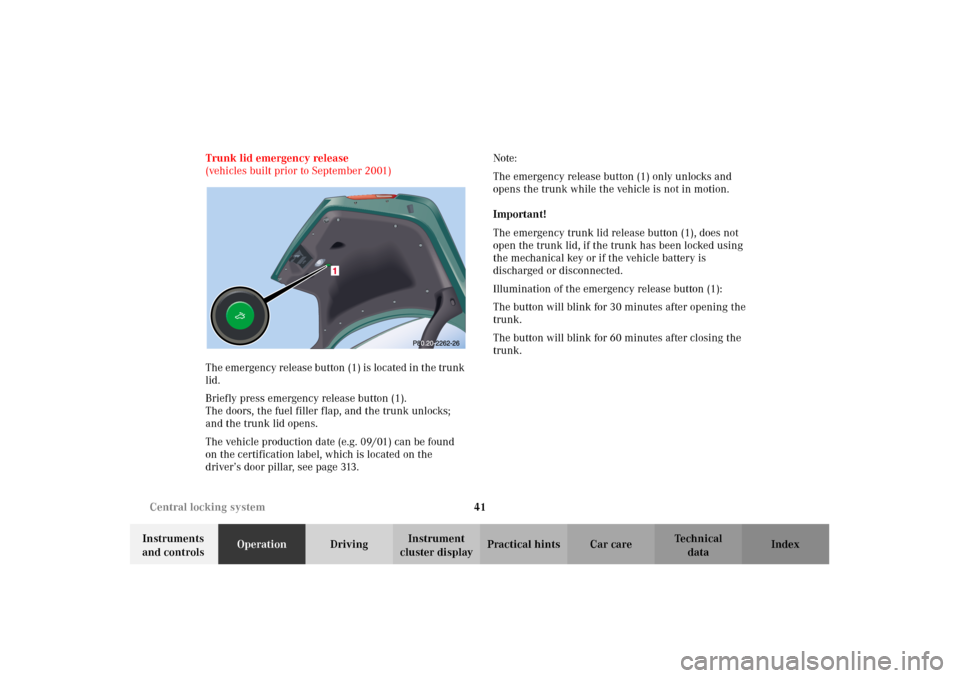
The emergency release button (1) is located in the trunk
lid.
Briefly press emergency release button (1).
The doors, the fuel filler flap, and the trunk unlocks;
and the trunk lid opens.
The vehicle production date (e.g. 09/01) can be found
on the certification label, which is located on the
driver’s door pillar, see page 313.Note:
The emergency release button (1) only unlocks and
opens the trunk while the vehicle is not in motion.
Important!
The emergency trunk lid release button (1), does not
open the trunk lid, if the trunk has been locked using
the mechanical key or if the vehicle battery is
discharged or disconnected.
Illumination of the emergency release button (1):
The button will blink for 30 minutes after opening the
trunk.
The button will blink for 60 minutes after closing the
trunk.
W210.book Seite 41 Mittwoch, 30. Mai 2001 11:45 11
Page 90 of 350
87 Instrument cluster
Technical
data Instruments
and controlsOperationDrivingInstrument
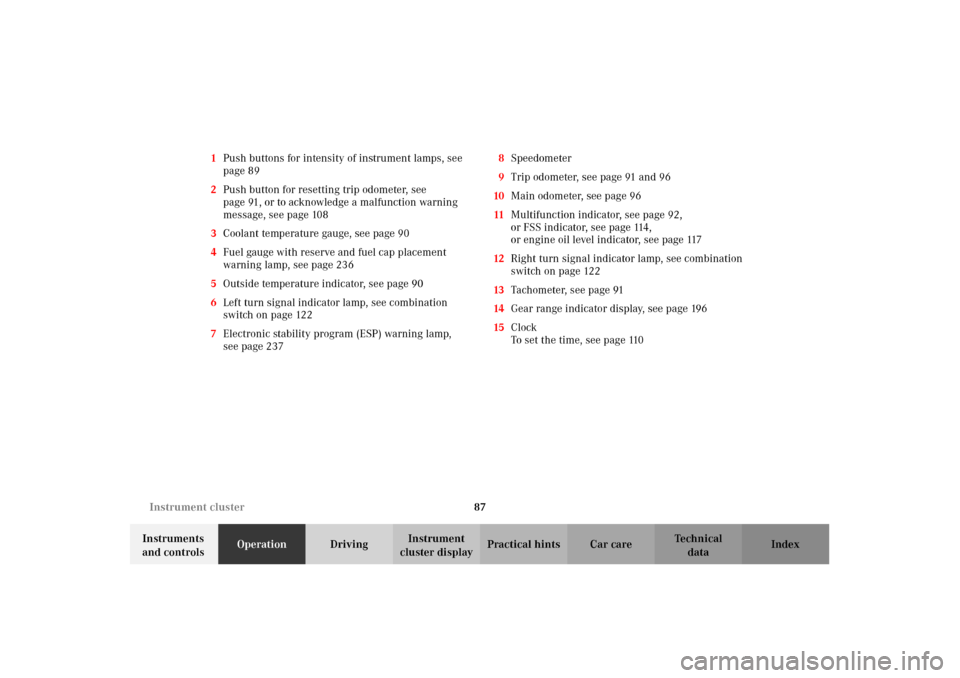
cluster displayPractical hints Car care Index 1Push buttons for intensity of instrument lamps, see
page 89
2Push button for resetting trip odometer, see
page 91, or to acknowledge a malfunction warning
message, see page 108
3Coolant temperature gauge, see page 90
4Fuel gauge with reserve and fuel cap placement
warning lamp, see page 236
5Outside temperature indicator, see page 90
6Left turn signal indicator lamp, see combination
switch on page 122
7Electronic stability program (ESP) warning lamp,
see page 2378Speedometer
9Trip odometer, see page 91 and 96
10Main odometer, see page 96
11Multifunction indicator, see page 92,
or FSS indicator, see page 114,
or engine oil level indicator, see page 117
12Right turn signal indicator lamp, see combination
switch on page 122
13Tachometer, see page 91
14Gear range indicator display, see page 196
15Clock
To set the time, see page 110
W210.book Seite 87 Mittwoch, 30. Mai 2001 11:45 11
Page 91 of 350
88 Instrument cluster
Technical
data Instruments
and controlsOperationDrivingInstrument
cluster displayPractical hints Car care Index
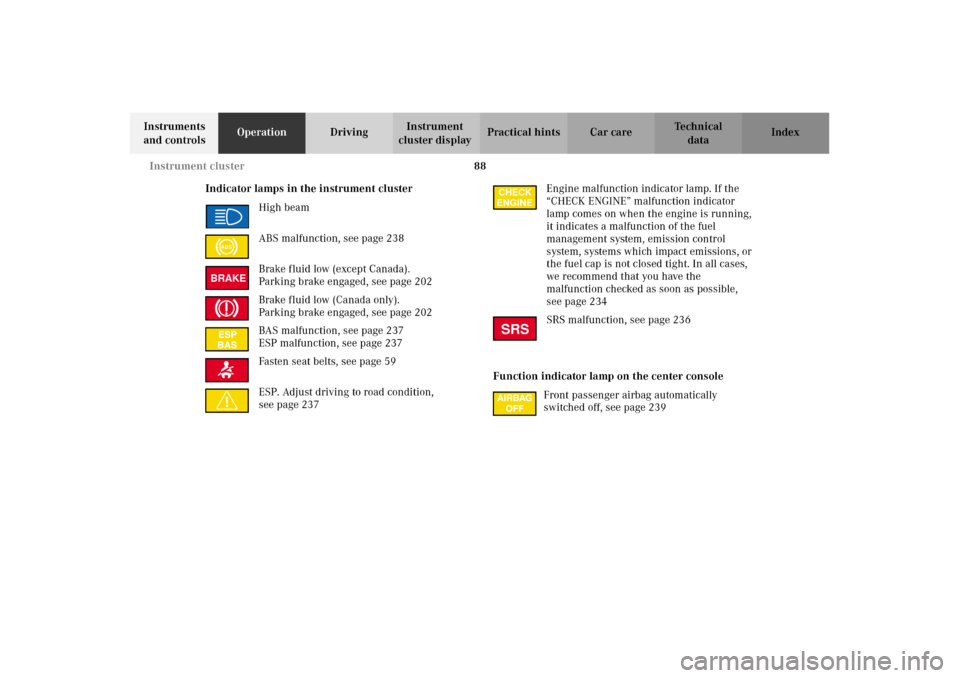
Indicator lamps in the instrument cluster
High beam
ABS malfunction, see page 238
Brake fluid low (except Canada).
Parking brake engaged, see page 202
Brake fluid low (Canada only).
Parking brake engaged, see page 202
BAS malfunction, see page 237
ESP malfunction, see page 237
Fasten seat belts, see page 59
ESP. Adjust driving to road condition,
see page 237Engine malfunction indicator lamp. If the
“CHECK ENGINE” malfunction indicator
lamp comes on when the engine is running,
it indicates a malfunction of the fuel
management system, emission control
system, systems which impact emissions, or
the fuel cap is not closed tight. In all cases,
we recommend that you have the
malfunction checked as soon as possible,
see page 234
SRS malfunction, see page 236
Function indicator lamp on the center console
Front passenger airbag automatically
switched off, see page 239
ABSBRAKE
CHECK
ENGINESRS
W210.book Seite 88 Mittwoch, 30. Mai 2001 11:45 11
Page 94 of 350
91 Instrument cluster
Technical
data Instruments
and controlsOperationDrivingInstrument
cluster displayPractical hints Car care Index Trip odometer (9)
To reset to “0” miles / km:
Activate the instrument cluster if it is not already
activated, see page 89.
Press button è or ÿ on the multifunction
steering wheel repeatedly until the trip odometer
appears if it is not displayed, see page 96.
Press buttonJ(2) on the instrument cluster.Tachometer (13)
The red marking on tachometer denotes excessive
engine speed.
Avoid this engine speed, as it may result in serious
engine damage that is not covered by the
Mercedes-Benz Limited Warranty.
To help protect the engine, the fuel supply is
interrupted if the engine is operated within the red
marking.
W210.book Seite 91 Mittwoch, 30. Mai 2001 11:45 11
Page 96 of 350
93 Multifunction steering wheel, multifunction display
Technical
data Instruments
and controlsOperationDrivingInstrument
cluster displayPractical hints Car care Index Depending on your vehicle’s equipment, you may use
the buttons on the multifunction steering wheel to call
up, control and set the following systems in the
multifunction display:
1Trip odometer and main odometer, see page 96
Vehicle speed, see page 96
Flexible service system (FSS), see page 114
Engine oil level indicator, see page 117
2Audio systems, see page 97
Radio, see page 97
CD player (optional), see page 98
Cassette player, see page 99
3Navigation system (if so equipped), see page 105
4Malfunction message memory, see page 108
5Individual settings, see page 110
6Trip computer, see page 106
After start
After reset
Fuel tank content
7Telephone (if so equipped), see page 100Press the è or ÿ button repeatedly until the
required system is displayed.
Pressing the è button advances the display to the
next system.
Pressing the ÿ button returns the display to the
previous system.
You may call up additional displays within some of
these categories by pressing the j or k button.
Wa r n i n g !
A driver’s attention to the road must always be
his /her primary focus when driving. For your safety and the safety of others, selecting
features through the multifunction steering wheel
should only be done by the driver when traffic and
road conditions permit it to be done safely.
Programming individual settings in the system can
only be made while the vehicle is at standstill.
W210.book Seite 93 Mittwoch, 30. Mai 2001 11:45 11
Page 109 of 350
106 Multifunction steering wheel, multifunction display
Technical
data Instruments
and controlsOperationDrivingInstrument
cluster displayPractical hints Car care Index
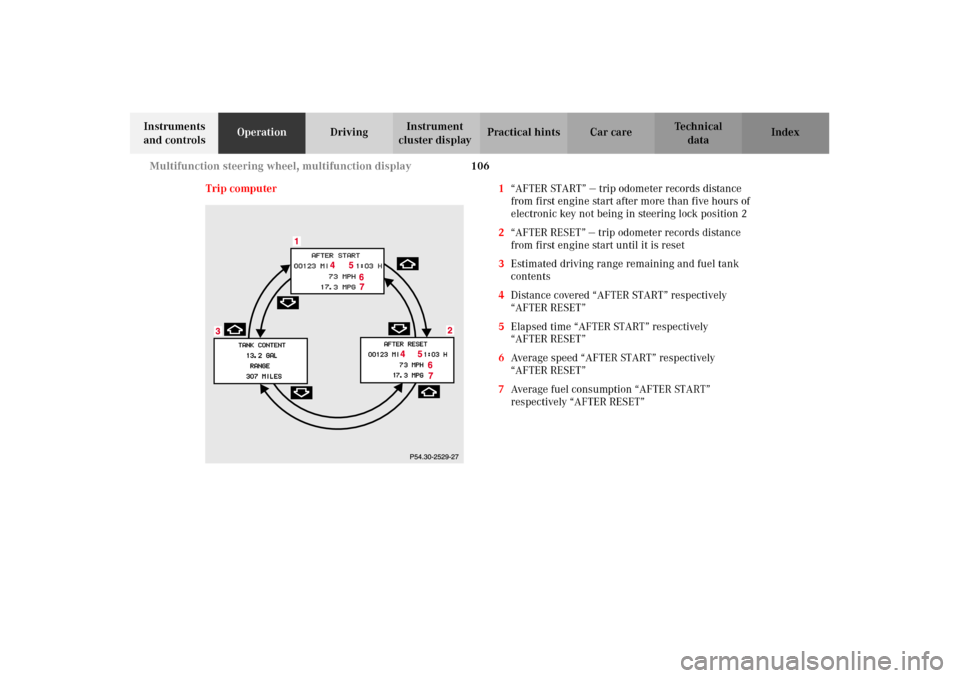
Trip computer 1“AFTER START” — trip odometer records distance
from first engine start after more than five hours of
electronic key not being in steering lock position 2
2“AFTER RESET” — trip odometer records distance
from first engine start until it is reset
3Estimated driving range remaining and fuel tank
contents
4Distance covered “AFTER START” respectively
“AFTER RESET”
5Elapsed time “AFTER START” respectively
“AFTER RESET”
6Average speed “AFTER START” respectively
“AFTER RESET”
7Average fuel consumption “AFTER START”
respectively “AFTER RESET”
W210.book Seite 106 Mittwoch, 30. Mai 2001 11:45 11
Page 110 of 350
107 Multifunction steering wheel, multifunction display
Technical
data Instruments
and controlsOperationDrivingInstrument
cluster displayPractical hints Car care Index Press the button è or ÿ repeatedly until the
display (1) appears.
Press the j or k button until the display for trip
odometer memory “AFTER START” (1) and
“AFTER RESET” (2), or the display (3) for estimated
driving range remaining and fuel tank contents
appears.
Important!
The reading in the display “TANK CONTENT” might be
off by approximately +/– 2.2 US qt (2 l). Please refuel in
time.
Pressing the è or ÿ button displays the next or
previous system.
Note:
The “AFTER START” display (1) always appears when
the trip computer is called up.To reset the “AFTER START” (1) or “AFTER RESET” (2)
odometer memory at any time:
Call up the relevant display (1 or 2) using the j or
k button and pr es s t heJb utton i n t he i nstrumen t
cluster until the values are reset.
The “AFTER START” trip odometer reading is
automatically reset after four hours of electronic key
not being in steering lock position 2.
W210.book Seite 107 Mittwoch, 30. Mai 2001 11:45 11
Page 132 of 350
129 Automatic climate control
Technical
data Instruments
and controlsOperationDrivingInstrument
cluster displayPractical hints Car care Index Basic setting - automatic mode
Press left and right U button for automatic mode.
Simultaneously press both f and g buttons for
temperature setting of 72
°F.
QAir volume and distribution are controlled
automatically.
This setting can be used all year around.
Economy
The function of this setting corresponds to the
automatic mode. However, because the air conditioning
compressor will not engage (fuel savings), it is not
possible to air condition in this setting.
Press S button to activate.
Press S button once again to return to previous
setting.Special settings
(use only for short duration)
Defogging windows
Switch off O button.
Press left and right U buttons.
Press b button repeatedly until air is directed
upward.
STurn wheels (2) to position to open left and right
defroster outlets (5).
Defrosting
Turn wheels (2) to position l to open left and right
defroster outlets (5).
Press P button. Maximum heated and automatically
controlled amount of air is directed to the windshield
and side windows.PPress P button once again to return to previous
setting.
W210.book Seite 129 Mittwoch, 30. Mai 2001 11:45 11