fluid MERCEDES-BENZ E63AMG 2011 W212 Owner's Manual
[x] Cancel search | Manufacturer: MERCEDES-BENZ, Model Year: 2011, Model line: E63AMG, Model: MERCEDES-BENZ E63AMG 2011 W212Pages: 400, PDF Size: 16.3 MB
Page 7 of 400
Ashtray ............................................... 291
Assistance menu (on-board
computer) .......................................... 227
ATA (Anti-Theft Alarm system) Activating/deactivating ...................74
Function ........................................... 74
Switching off the alarm ....................74
ATTENTION ASSIST
Activating/deactivating (on-
board computer) ............................ 228
Display message ............................ 250
Function/notes ............................. 201
Audio menu (on-board computer) .... 225
AUTO lights see Light sensor
Automatic car wash .......................... 314
Automatic lane recognition
system see Lane Keeping Assist ................229
Automatic transmission
DIRECT SELECT lever .....................155
Display message ............................ 258
Driving tips .................................... 157
Emergency running mode ..............162
Kickdown ....................................... 158
Malfunction .................................... 162
Program selector button ................158
Pulling away ................................... 151
Selector lever ................................ 154
Starting .......................................... 151
B
Backrest (display message) ............. 259
Bag hook ............................................ 281
BAS (Brake Assist System) ................. 66
BAS PLUS (Brake Assist System
Plus*) .................................................... 66
Battery Charging ........................................ 340
Checking (SmartKey) .......................80
Display message ............................ 248
Important safety guidelines
(SmartKey) ....................................... 80
Jump-starting ................................. 341
Replacing (SmartKey) ......................80
Safety notes .................................. 338
Belt
see Seat belts
Blind Spot Assist
Activating/deactivating (on-
board computer) ............................ 228
Display message ............................ 252
Function/notes ............................. 205
BlueTEC
AdBlue ®
......................................... 390
Adding AdBlue ®
............................. 167
Bottle holder ...................................... 289
Brake fluid Notes ............................................. 392
Brake fluid level ................................ 312
Brake lamp (display message) ......... 244
Brakes ABS .................................................. 65
BAS .................................................. 66
BAS PLUS ........................................ 66
Brake fluid (notes) .........................392
Display message ............................ 242
High-performance brake system ....174
Important safety notes ..................173
Maintenance .................................. 174
Parking brake ................................ 170
Warning lamp ................................. 263
Breakdown
see Accident (notes)
see Flat tire
Bulb
Infrared light .................................. 127
Bulbs
High-beam headlamps ...................126
Low-beam headlamps ....................126
Overview ........................................ 125
Parking lamps ................................ 126
Standing lamps (front) ...................126
Turn signals (front) ......................... 127
C
CAC (Customer Assistance Center) .........23
California
Important notice for retail
customers and lessees ....................21
Calling up a malfunction
see Display messages
Index5BA 212 USA, CA Edition B 2011; 1; 5, en-USdimargiVersion: 3.0.3.62010-05-20T13:33:46+02:00 - Seite 5
Page 12 of 400
Fuel levelCalling up the range (on-board
computer) ...................................... 220
Fuses
Fuse allocation chart .....................345
Fuse box in the cargo
compartment ................................. 346
Fuse box in the engine
compartment ................................. 346
Fuse box in the trunk .....................346
Notes ............................................. 345
G
Garage door opener Clearing the memory .....................303
Notes ............................................. 300
Opening/closing the garage door ..303
Programming the remote control ...301
Gear indicator (on-board
computer) .......................................... 221
Gear or selector lever (cleaning
guidelines) ......................................... 319
Genuine Mercedes-Benz parts ......... 384
Genuine wood trim and trim strips
(cleaning instructions) ...................... 319
Glove box ........................................... 274
H
Headlamp cleaning system .............. 122
Adding washer fluid .......................312
Notes ............................................. 393
Headlamp mode (daytime driving)
see Daytime running lamps
Headlamps
Cleaning ......................................... 317
Misting up ...................................... 123
Head restraints
Adjusting (angle) ............................ 105
Adjusting (electrically) ...................105
Adjusting (rear) .............................. 105
Installing/removing (rear) ..............106
Luxury ............................................ 105
see NECK-PRO head restraints
Heating
see Climate control
High beam flasher ............................. 122
Hill start assist .................................. 152
HOLD function Display message ............................ 251
Function/notes ............................. 188
Hood
Closing ........................................... 309
Display message ............................ 259
Opening ......................................... 308
Hydroplaning ..................................... 175
I
Immobilizer .......................................... 73
Indicator and warning lamps DISTRONIC PLUS ........................... 270
Insect protection on the radiator .... 309
Instrument cluster Overview .......................................... 28
Submenu (on-board computer) ......229
Warning and indicator lamps ...........29
Instrument cluster lighting ................ 28
Instrument lighting see Instrument cluster lighting
Interior lighting
Automatic control ..........................124
Delayed switch-off (on-board
computer) ...................................... 231
Emergency lighting ........................124
Manual control ............................... 124
Reading lamp ................................. 123
Setting ambient lighting (on-board
computer) ...................................... 230
J
Jack Storage location ............................ 324
Using ............................................. 333
Jump-starting ..................................... 341
K
KEYLESS-GO Button ............................................ 150
Convenience closing feature ............94
Display message ............................ 260
Locking ............................................ 77
10IndexBA 212 USA, CA Edition B 2011; 1; 5, en-USdimargiVersion: 3.0.3.62010-05-20T13:33:46+02:00 - Seite 10
Page 17 of 400
Service interval display .................... 313
Displaying a service message (on-
board computer) ............................ 313
Service menu (on-board computer) . 229
Service products
AdBlue ®
special additives ..............390
Brake fluid ..................................... 392
Capacities ...................................... 387
Coolant (engine) ............................ 392
Engine oil ....................................... 391
Fuel ................................................ 388
Important safety notes ..................386
Notes ............................................. 386
Refrigerant (air-conditioning
system) .......................................... 392
Washer fluid ................................... 393
Settings
Factory (on-board computer) .........233
On-board computer .......................229
SETUP (on-board computer) ............. 221
Shift ranges ....................................... 159
Showing the distance display (on-
board computer) ............................... 227
Side impact air bag ............................. 41
Side marker lamp (display
message) ............................................ 245
Side windows Convenience closing feature ............93
Convenience opening feature ..........93
Important safety information ...........91
Opening/closing .............................. 92
Resetting ......................................... 94
Troubleshooting ............................... 94
Skibag ................................................ 276
Sliding sunroof Important safety information ...........95
Troubleshooting ............................... 99
see Panorama roof with power
tilt/sliding panel
see Tilt/sliding sunroof
SmartKey
Changing the battery .......................80
Changing the programming .............79
Checking the battery .................76, 80
Convenience closing feature ............93
Convenience opening feature ..........93
Display message ............................ 260Important safety notes ....................76
Malfunction ...................................... 82
Starting the engine ........................151
Snow chains ...................................... 176
Socket ................................................ 292
Dashboard ..................................... 293
Rear compartment .........................293
SOS
see mbrace
Spare wheel
Notes/data .................................... 380
Storage location ............................ 325
Stowing .......................................... 326
see Emergency spare wheel
Speedometer
Additional speedometer (on-
board computer) ............................ 220
Segments ...................................... 217
Setting the unit (on-board
computer) ...................................... 229
SPORT handling mode
Activating/deactivating (AMG
vehicles) .......................................... 69
Warning lamp ................................. 266
SRS (Supplemental Restraint
System) Display message ............................ 237
Introduction ..................................... 36
Warning lamp ................................. 267
Warning lamp (function) ................... 36
Standard display (on-board
computer) .......................................... 220
Starting the engine Important safety notes ..................151
Station
see Radio
Steering (display message) .............. 260
Steering wheel Adjusting (electrically) ...................111
Buttons (on-board computer) ......... 217
Cleaning ......................................... 319
Important safety notes ..................111
Memory function (storing
settings) ......................................... 111
Steering wheel heating ..................112
Storing settings (memory
function) ........................................ 115Index15BA 212 USA, CA Edition B 2011; 1; 5, en-USdimargiVersion: 3.0.3.62010-05-20T13:33:46+02:00 - Seite 15
Page 20 of 400
TrunkAutomatic opening ..................... 88, 89
Emergency release ....................90, 91
Locking separately ...........................90
Trunk/tailgate
Important safety guidelines .............86
Trunk lid
Display message ............................ 259
Turn signal (display message) ......... 243
Turn signals ....................................... 120
Type plate see Vehicle identification plate
U
Unlocking Emergency unlocking .......................85
From inside the vehicle (central
unlocking button) ............................. 84
V
Vanity mirror Sun visor ........................................ 290
Vehicle
Data acquisition ............................... 24
Emergency unlocking ................. 85, 86
Equipment ....................................... 20
Exterior view .................................... 26
Individual settings (on-board
computer) ...................................... 229
Loading .......................................... 360
Lowering ........................................ 337
Maintenance .................................... 21
Parking up ..................................... 171
Raising ........................................... 333
Reporting problems .........................23
Towing away .................................. 343
Tow-starting ................................... 343
Transporting .................................. 345
Vehicle data
see Technical data
Vehicle identification number
see VIN
Vehicle identification plate .............. 385
Vehicle level ...................................... 191
Vehicle level (display message) ....... 250
Vehicle tool kit .................................. 324
Video (DVD) ........................................ 226
Video DVD (on-board computer) ...... 226
VIN ...................................................... 385
W
Warning and indicator lamps ABS ................................................ 265
Brakes ........................................... 263
Check Engine ................................. 268
Coolant .......................................... 269
ESP ®
.............................................. 265
ESP ®
OFF ....................................... 266
Fuel tank ........................................ 268
Overview .......................................... 29
PASSENGER AIRBAG OFF
indicator lamp (only Canada) ...........48
PASSENGER AIRBAG OFF
indicator lamp (only USA) ................43
Reserve fuel ................................... 268
Seat belt ........................................ 264
SPORT handling mode ...................266
SRS ................................................ 267
Tire pressure monitor ....................271
Warranty ............................................ 384
Wheel bolt tightening torque ........... 337
Wheel chock ...................................... 332
Wheels Changing/replacing .......................367
Changing a wheel .......................... 331
Checking ........................................ 351
Cleaning ......................................... 315
Guidelines to be observed .............351
Mounting a wheel .......................... 335
Removing a wheel ..........................334
Tightening torque ........................... 337
Wheel size/tire size .......................374
Window curtain air bag
Display message ............................ 237
Operation ......................................... 43
Windows
see Side windows
Windows (cleaning instructions) ..... 316
Windshield Defrosting ...................................... 141
Windshield washer fluid (display
message) ............................................ 260
18IndexBA 212 USA, CA Edition B 2011; 1; 5, en-USdimargiVersion: 3.0.3.62010-05-20T13:33:46+02:00 - Seite 18
Page 21 of 400
Windshield washer systemAdding washer fluid .......................312
Notes ............................................. 393
Windshield wipers
Important safety notes ..................127
Replacing the wiper blades ............129
Switching on/off ........................... 128
Troubleshooting ............................. 130
Winter operation ............................... 176
Radiator cover ............................... 309
Winter tires
M+S tires ....................................... 175
Wiper blades
Cleaning ......................................... 317Index19BA 212 USA, CA Edition B 2011; 1; 5, en-USdimargiVersion: 3.0.3.62010-05-20T13:33:46+02:00 - Seite 19
Page 124 of 400
the headlamp range is set automatically
depending on the distance between the
vehicle and other road users.
if you are driving at speeds above
approximately 35 mph (55 km/h) and no
other road users have been detected:
the high-beam headlamps are switched on
automatically. The K indicator lamp in
the instrument cluster also lights up.
if you are driving at speeds below
approximately 30 mph (45 km/h) and other
road users have been detected or the roads
are illuminated sufficiently:
the high-beam headlamps are switched off
automatically. The K indicator lamp in
the instrument cluster goes out. The _
indicator lamp in the instrument cluster
stays on.
XTo deactivate: move the combination
switch back to its normal position.
The _ indicator lamp in the instrument
cluster goes out.
High-beam flasher
XTo switch on: turn the key in the ignition
lock to position 1 or 2 or start the engine.
XPull the combination switch briefly in the
direction of arrow =.
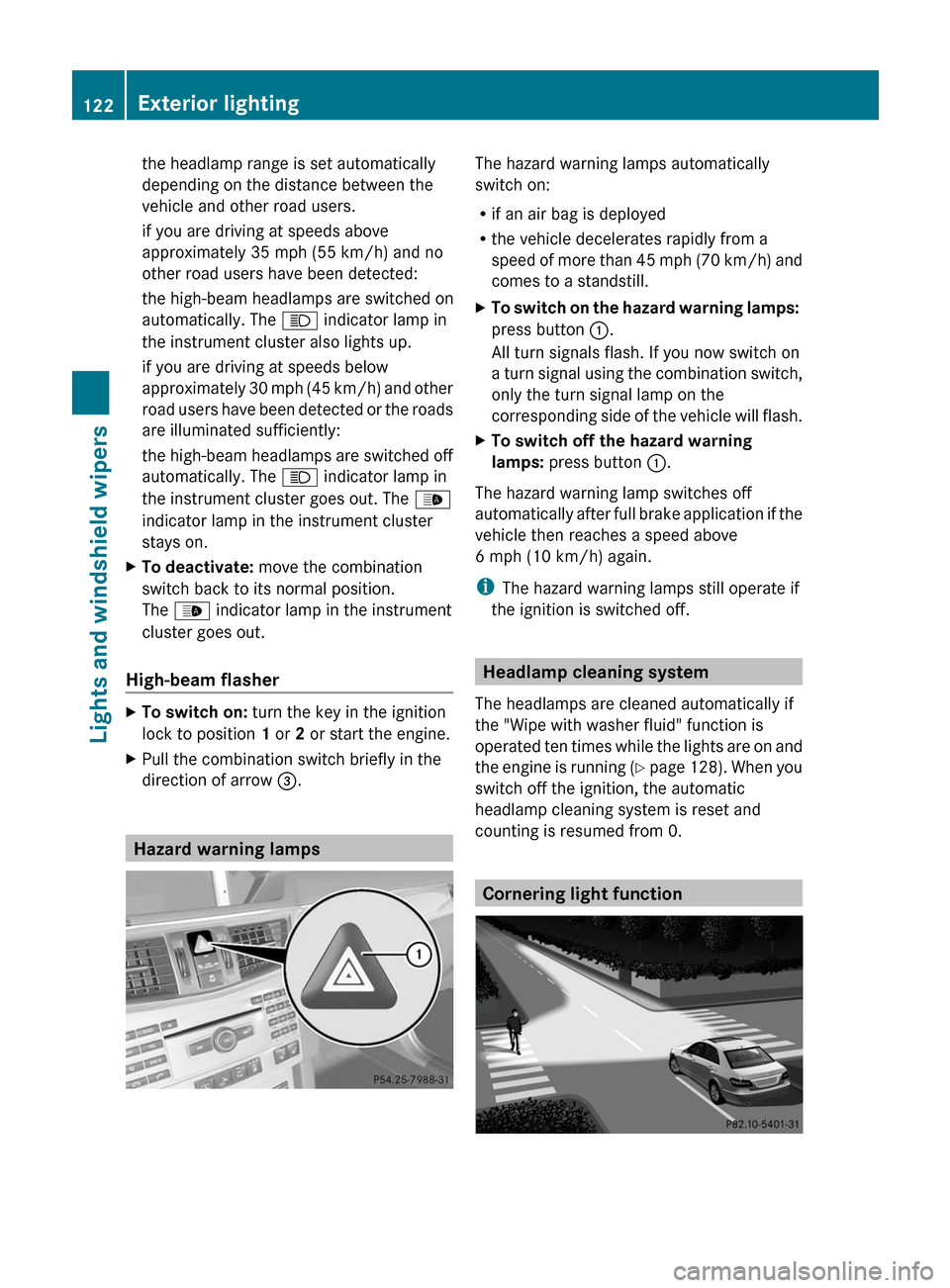
Hazard warning lamps
The hazard warning lamps automatically
switch on:
Rif an air bag is deployed
Rthe vehicle decelerates rapidly from a
speed of more than 45 mph (70 km/h) and
comes to a standstill.
XTo switch on the hazard warning lamps:
press button :.
All turn signals flash. If you now switch on
a turn signal using the combination switch,
only the turn signal lamp on the
corresponding side of the vehicle will flash.
XTo switch off the hazard warning
lamps: press button :.
The hazard warning lamp switches off
automatically after full brake application if the
vehicle then reaches a speed above
6 mph (10 km/h) again.
iThe hazard warning lamps still operate if
the ignition is switched off.
Headlamp cleaning system
The headlamps are cleaned automatically if
the "Wipe with washer fluid" function is
operated ten times while the lights are on and
the engine is running (Y page 128). When you
switch off the ignition, the automatic
headlamp cleaning system is reset and
counting is resumed from 0.
Cornering light function
122Exterior lightingLights and windshield wipers
BA 212 USA, CA Edition B 2011; 1; 5, en-USdimargiVersion: 3.0.3.62010-05-20T13:33:46+02:00 - Seite 122
Page 129 of 400
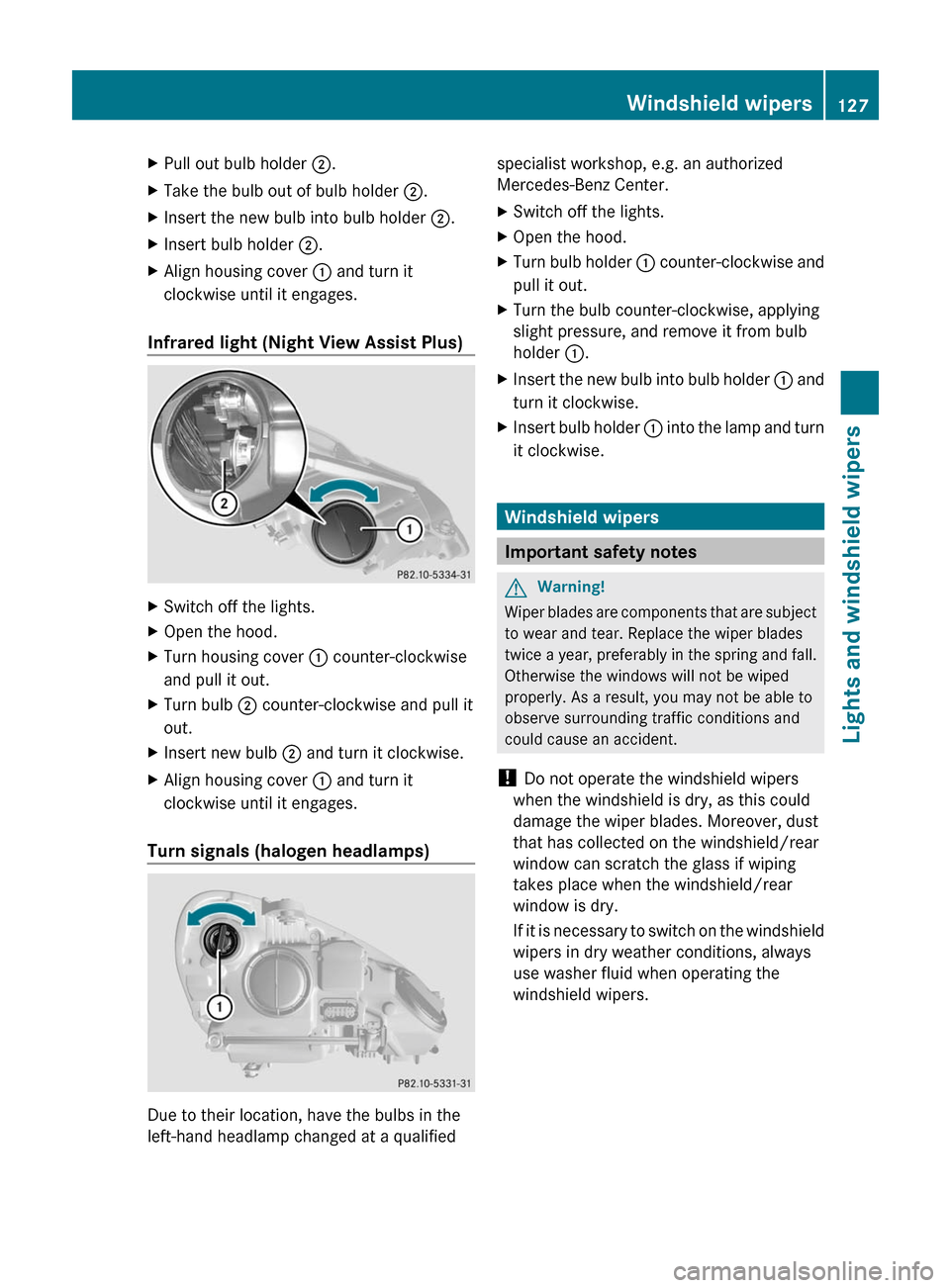
XPull out bulb holder ;.XTake the bulb out of bulb holder ;.XInsert the new bulb into bulb holder ;.XInsert bulb holder ;.XAlign housing cover : and turn it
clockwise until it engages.
Infrared light (Night View Assist Plus)
XSwitch off the lights.XOpen the hood.XTurn housing cover : counter-clockwise
and pull it out.
XTurn bulb ; counter-clockwise and pull it
out.
XInsert new bulb ; and turn it clockwise.XAlign housing cover : and turn it
clockwise until it engages.
Turn signals (halogen headlamps)
Due to their location, have the bulbs in the
left-hand headlamp changed at a qualified
specialist workshop, e.g. an authorized
Mercedes-Benz Center.
XSwitch off the lights.XOpen the hood.XTurn bulb holder : counter-clockwise and
pull it out.
XTurn the bulb counter-clockwise, applying
slight pressure, and remove it from bulb
holder :.
XInsert the new bulb into bulb holder : and
turn it clockwise.
XInsert bulb holder : into the lamp and turn
it clockwise.
Windshield wipers
Important safety notes
GWarning!
Wiper blades are components that are subject
to wear and tear. Replace the wiper blades
twice a year, preferably in the spring and fall.
Otherwise the windows will not be wiped
properly. As a result, you may not be able to
observe surrounding traffic conditions and
could cause an accident.
! Do not operate the windshield wipers
when the windshield is dry, as this could
damage the wiper blades. Moreover, dust
that has collected on the windshield/rear
window can scratch the glass if wiping
takes place when the windshield/rear
window is dry.
If it is necessary to switch on the windshield
wipers in dry weather conditions, always
use washer fluid when operating the
windshield wipers.
Windshield wipers127Lights and windshield wipersBA 212 USA, CA Edition B 2011; 1; 5, en-USdimargiVersion: 3.0.3.62010-05-20T13:33:46+02:00 - Seite 127Z
Page 130 of 400
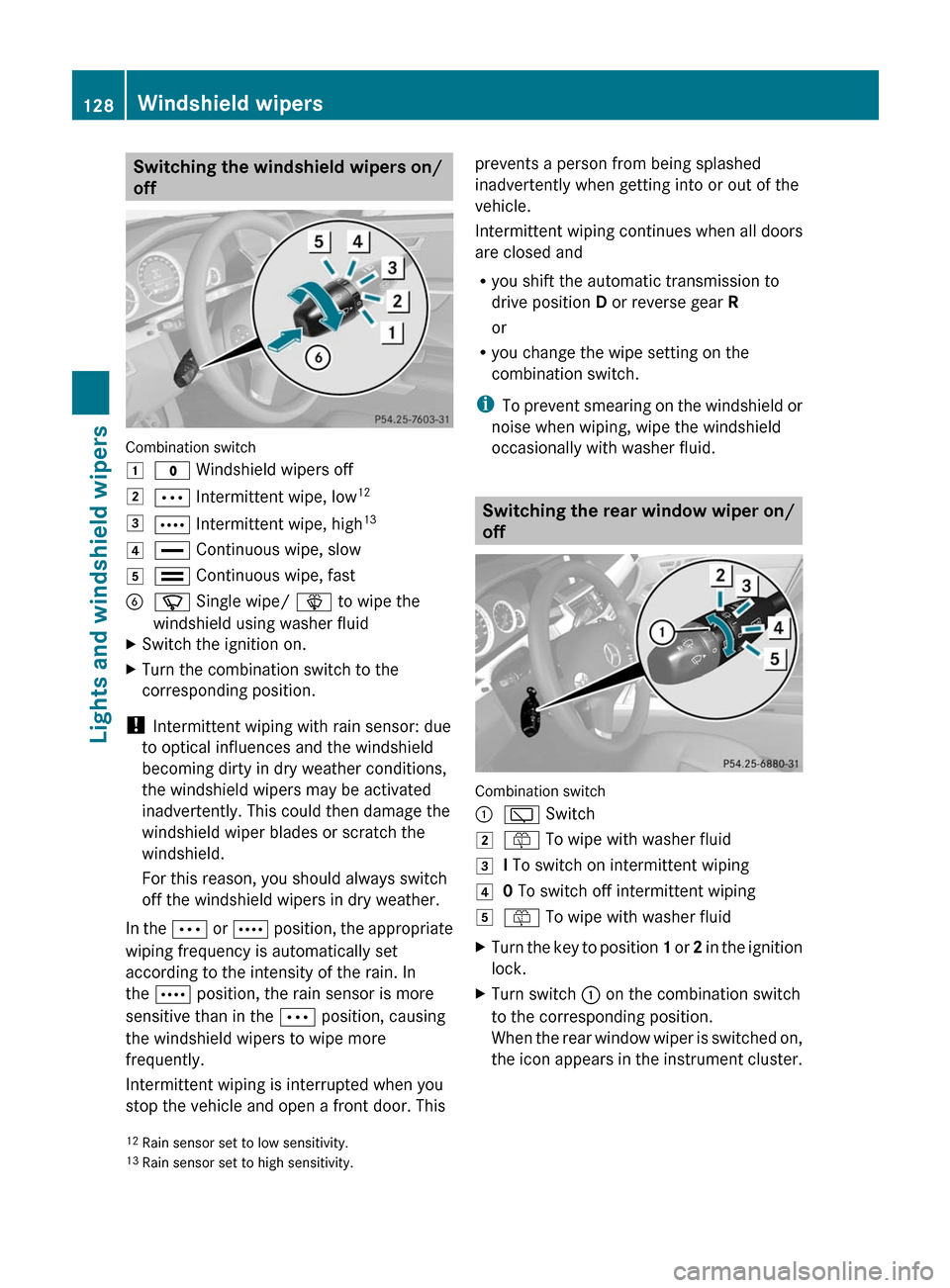
Switching the windshield wipers on/
off
Combination switch
1$ Windshield wipers off2Ä Intermittent wipe, low123Å Intermittent wipe, high134° Continuous wipe, slow5¯ Continuous wipe, fastBí Single wipe/ î to wipe the
windshield using washer fluid
XSwitch the ignition on.XTurn the combination switch to the
corresponding position.
! Intermittent wiping with rain sensor: due
to optical influences and the windshield
becoming dirty in dry weather conditions,
the windshield wipers may be activated
inadvertently. This could then damage the
windshield wiper blades or scratch the
windshield.
For this reason, you should always switch
off the windshield wipers in dry weather.
In the Ä or Å position, the appropriate
wiping frequency is automatically set
according to the intensity of the rain. In
the Å position, the rain sensor is more
sensitive than in the Ä position, causing
the windshield wipers to wipe more
frequently.
Intermittent wiping is interrupted when you
stop the vehicle and open a front door. This
prevents a person from being splashed
inadvertently when getting into or out of the
vehicle.
Intermittent wiping continues when all doors
are closed and
Ryou shift the automatic transmission to
drive position D or reverse gear R
or
Ryou change the wipe setting on the
combination switch.
iTo prevent smearing on the windshield or
noise when wiping, wipe the windshield
occasionally with washer fluid.
Switching the rear window wiper on/
off
Combination switch
:è Switch2ô To wipe with washer fluid3I To switch on intermittent wiping40 To switch off intermittent wiping5ô To wipe with washer fluidXTurn the key to position 1 or 2 in the ignition
lock.
XTurn switch : on the combination switch
to the corresponding position.
When the rear window wiper is switched on,
the icon appears in the instrument cluster.
12Rain sensor set to low sensitivity.13Rain sensor set to high sensitivity.
128Windshield wipersLights and windshield wipers
BA 212 USA, CA Edition B 2011; 1; 5, en-USdimargiVersion: 3.0.3.62010-05-20T13:33:46+02:00 - Seite 128
Page 176 of 400
remove any salt that may have started to
build up on the brake discs and the brake
pads/linings.
R maintain a greater distance to the vehicle
ahead and drive with particular care.
R carefully apply the brakes at the end of a
trip and immediately after commencing a
new trip, so that salt residues are removed
from the brake discs.
Servicing the brakes
! If the red brake warning lamp lights up in
the instrument cluster and you hear a
warning tone while the engine is running,
the brake fluid level may be too low.
Observe additional warning messages in
the multifunction display.
The brake fluid level may be too low due to
brake pad wear or leaking brake lines.
Have the brake system checked
immediately. This work should be carried
out at an authorized Mercedes-Benz
Center.
All checks and maintenance work on the
brake system must be carried out at a
qualified specialist workshop. This work
should be carried out at an authorized
Mercedes-Benz Center.
Only install brake pads and use brake fluid
recommended by Mercedes-Benz.
GWarning
If other than recommended brake pads are
installed, or other than recommended brake
fluid is used, the braking properties of the
vehicle can be degraded to an extent that safe
braking is substantially impaired. This could
result in an accident.
! Vehicles with 4MATIC: a function or
performance test may only be carried out
on a two-axle dynamometer. If you are
planning to have the vehicle tested on such
a dynamometer, contact an authorized
Mercedes-Benz Center to obtain further
information first. Otherwise, the drive train
or the brake system may suffer damage.
! Vehicles with 4MATIC: as the ESP®
system operates automatically, the engine
and the ignition must be switched off
(SmartKey in position 0 or 1 in the ignition
lock or Start/Stop button in position 0 or
1 ) while the parking brake is being tested
on a brake dynamometer.
Braking maneuvers triggered automatically
by ESP ®
may seriously damage the brake
system.
! Vehicles with 4MATIC: as the ESP®
system operates automatically, the engine
and the ignition system must be switched
off (SmartKey in position 0 or 1 in the
ignition lock or Start/Stop button in
position 0 or 1) when:
R testing the parking brake on a brake
dynamometer.
R you intend to have the vehicle towed with
one of the axles raised.
Braking maneuvers triggered automatically
by ESP ®
may seriously damage the brake
system.
If your brake system is only subjected to
moderate loads, you should regularly test
your brake system's function by forcefully
depressing the brake pedal when driving at
high speed. This will give the brake pads
better grip.GWarning
Make sure that you do not endanger other
road users when you apply the brakes.
A description of Brake Assist (BAS) can be
found on ( Y page 66) or of BAS PLUS on
( Y page 66).
AMG high-performance brake system
and ceramic brake system
The high-performance and ceramic brake
system is only installed on the E 63 AMG.
174Driving tipsDriving and parking
BA 212 USA, CA Edition B 2011; 1; 5, en-USdimargiVersion: 3.0.3.62010-05-20T13:33:46+02:00 - Seite 174
Page 218 of 400
Vehicle equipment
i This manual describes all the standard
and optional equipment of your vehicle
which was available at the time of
purchase. Country-specific differences are
possible. Bear in mind that your vehicle
may not feature all functions described
here. This also refers to safety-related
systems and functions.
Important safety notes
You will find an illustration of the instrument
cluster in the "At a glance" section
( Y page 28).
GWarning
A driver's attention to the road and traffic
conditions must always be his/her primary
focus when driving.
For your safety and the safety of others,
selecting features through the multifunction
steering wheel should only be done by the
driver when traffic and road conditions permit
it to be done safely.
Bear in mind that at a speed of just 30 mph
(approximately 50 km/h ), your vehicle is
covering a distance of 44 feet (approximately
14 m) every second.
GWarning!
No messages will be displayed if either the
instrument cluster or the multifunction
display is inoperative.
As a result, you will not be able to see
information about your driving conditions,
such as
R speed
R outside temperature
R warning/indicator lamps
R malfunction/warning messages
R failure of any systems
Driving characteristics may be impaired.
If you must continue to drive, do so with added
caution. Contact an authorized Mercedes-
Benz Center as soon as possible.GWarning
Malfunction and warning messages are only
indicated for certain systems and are
intentionally not very detailed. The
malfunction and warning messages are
simply a reminder with respect to the
operation of certain systems. They do not
replace the owner's and/or driver's
responsibility to maintain the vehicle's
operating safety. Have all required
maintenance and safety checks performed on
the vehicle. Bring the vehicle to an authorized
Mercedes-Benz Center to address the
malfunction and warning messages.
Displays and operation
Coolant temperature gauge
GWarning
Driving when your engine is overheated can
cause some fluids which may have leaked into
the engine compartment to catch fire. You
could be seriously burned.
Steam from an overheated engine can cause
serious burns which can occur just by opening
the engine hood. Stay away from the engine
if you see or hear steam coming from it.
Stop the vehicle in a safe location away from
other traffic. Turn off the engine, get out of the
vehicle and do not stand near the vehicle until
the engine has cooled down.
The coolant temperature gauge is in the
instrument cluster on the right-hand side.
Under normal operating conditions and with
the specified coolant level, the coolant
temperature may rise to 248 ‡ (120 †).
! If the coolant temperature is too high a
display message is shown.
216Displays and operationOn-board computer and displays
BA 212 USA, CA Edition B 2011; 1; 5, en-USdimargiVersion: 3.0.3.62010-05-20T13:33:46+02:00 - Seite 216