engine compartment MERCEDES-BENZ EQC SUV 2019 Owners Manual
[x] Cancel search | Manufacturer: MERCEDES-BENZ, Model Year: 2019, Model line: EQC SUV, Model: MERCEDES-BENZ EQC SUV 2019Pages: 629, PDF Size: 11.02 MB
Page 6 of 629
Operating
the climate control sy stem ......... 15 0 Driving and pa
rking ................................. 15 8
Driving ........................................................ 15 8
DY NA MIC SELECT switch ............................1 69
Tr ansmission .............................................. .173
Fu nction of flex ible all-wheel distribution .... 175
Charging the high-voltage battery ............... 175
Pa rking ...................................................... .189
Driving and driving saf ety sy stems .............. 197
Tr ailer hit ch................................................ 256
Bicycle rack function .................................. 260
Ve hicle towing instructions ........................ .262 Instrument Display and on-board
comp uter.................................................. 263
Instrument display overview ...................... .263
Overview of the buttons on thesteering
wheel ..........................................................2 63
Operating the on-board computer .............. 264
Fu nction of the po wer display ..................... 265
Setting the additional value range .............. 266
Overview of displ ays on the multifunc‐
tion display .................................................2 67Ad
justing the instrument lighting ................2 67
Menus and submenus ................................ 268
Head-up Display .......................................... 274 LINGU
ATRO NIC ......................................... 275
No tes on operating saf ety .......................... .275
Operation ....................................................2 76
Using LINGU ATRO NIC ef fectively ................ 278
Essential voice commands ........................ .279 MBUX multimedia sy
stem ...................... 295
Overview and operation .............................. 295
Sy stem settings .......................................... 329
Fit & Healt hy............................................... 338
Na vigation .................................................. 343
Te lephone .................................................. .391
Online and Internet functions ..................... 427
Media ......................................................... 436
Ra dio .......................................................... 444
TV ............................................................... 447
Sound ......................................................... 455 Main
tenance and care ............................. 459
ASS YST PLUS service inter val display ........ 459
Engine compartment .................................. 460
Cleaning and care ...................................... .463 Breakdown assi
stance ............................ 473
Emergency ................................................. .473
Flat tyre ...................................................... 475
Battery (vehicle) ......................................... 480
To w- starting or towing away ....................... 482
Electrical fuses ........................................... 486 Wheels and tyres
..................................... 490
No tes on noise or unusual handling char‐
acteristics .................................................. .490
No tes on regular lyinspecting wheels and
tyres .......................................................... .490
No tes on snow chains ................................ 490
Ty re pressure .............................................. 491
Wheel change ............................................ .498
Emergency spa rewheel .............................. 508 Contents
3
Page 153 of 629
Overview of climate control sy
stems Note
s on climate control An interior air
filter in combination with the pre‐
fi lter in the engine compartment must alw ays be
used so that the air conditioning sy stem, pollu‐
tion lebutton vel monitoring and the air filtration
wo rkcor rectly. Ma kesure that thefilter is ins tal‐
led cor rectly and thefilter housing in the engine
compartment is closed cor rectly using the cap
and alw ays tightly sealed when in operation. Use
fi lters recommended and appr ovedby
Mercedes-Benz. Alw ays ha veservice workcar‐
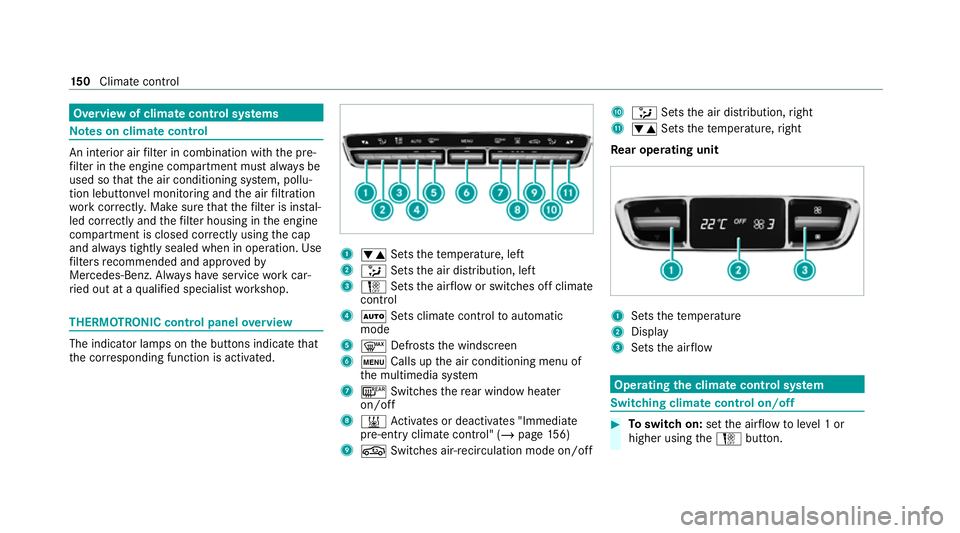
ri ed out at a qualified specialist workshop. THERMOTRONIC control panel
overview The indicator lamps on
the buttons indicate that
th e cor responding function is activated. 1
w Setsthete mp erature, left
2 _ Setsthe air distribution, left
3 H Setsthe air flow or switches off climate
control
4 Ã Sets climate control toautomatic
mode
5 ¬ Defrosts the windscreen
6 t Calls up the air conditioning menu of
th e multimedia sy stem
7 ¤ Switches there ar wind owheater
on/off
8 & Activates or deacti vates "Immediate
pre-entry climate contro l" (/page156)
9 g Switches ai r-re circulation mode on/off A
_ Setsthe air distribution, right
B w Setsthete mp erature, right
Re ar operating unit 1
Sets thete mp erature
2 Display
3 Sets the air flow Operating
the clima tecont rol sy stem Switching clima
tecont rol on/off #
Toswitch on: setthe air flow toleve l 1 or
higher using theH button. 15 0
Climate cont rol
Page 162 of 629
The component parts in
theve hicle's high-
vo ltage on-board elect rical sy stem may be
damaged in an accident, although the dam‐
age is not visible. #
Never car ryout changes on the high-
vo ltage on-board elect rical sy stem. #
Neverto uch co mponent parts in the
high-voltage on-board electrical sy stem. #
After an accident, do not touch any
high-voltage co mponents. #
After an accident, ha vetheve hicle
transpor tedaw ay. #
Have the high-voltage on-board electri‐
cal sy stem checked at a qualified spe‐
cialist workshop. Re
quirements:
R The 6 restra int sy stem warning lamp
lights up in the instrument clus ter,e.g. af ter
an accident.
R The vehicle is badly damaged, e.g. af ter an
accident, and there stra int sy stem compo‐
nents ha venot been trig gered. Operating
the high-voltage disconnect
device
On lydisconnect the drive sy stem manually in
th e abo ve-mentioned situations. #
Switch off the ignition. #
Shift the transmission toposition j. #
Apply the electric parking brake. #
Secure theve hicle against rolling away. #
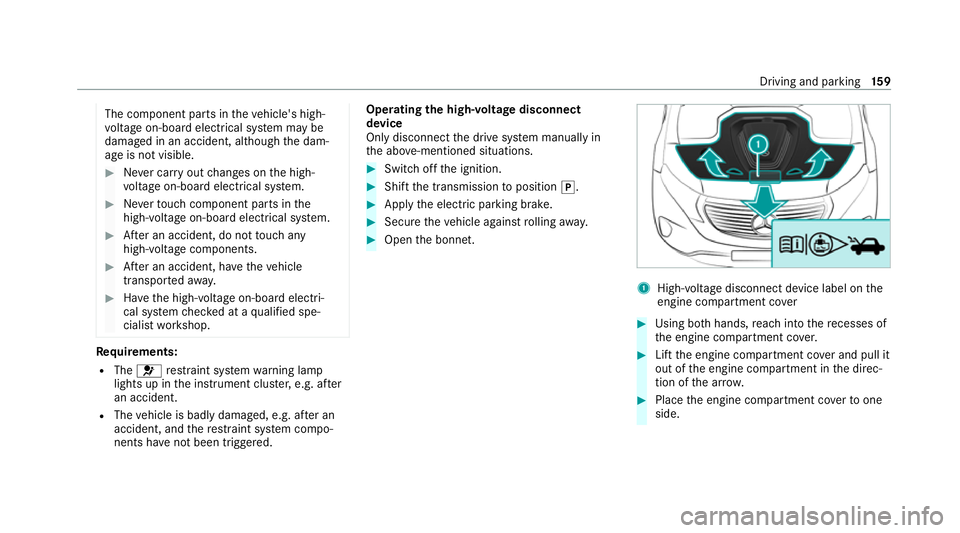
Open the bonn et. 1
High-voltage disconnect device label on the
engine compartment co ver #
Using bo thhands, reach into there cesses of
th e engine compartment co ver. #
Lift the engine compartment co ver and pull it
out of the engine compartment in the direc‐
tion of the ar row. #
Place the engine compartment co verto one
side. Driving and parking
15 9
Page 463 of 629
Engine compa
rtment Opening/closing the bonn
et&
WARNING Risk of accident due todriv‐
ing with the engine bonn etunlo cked
An unloc ked engine bonn etmay open up
when theve hicle is in motion and block your
vie w. #
Never unlock the engine bonn etwhen
driving. #
Before every trip, ensure that the
engine bonn etis loc ked. &
WARNING Risk of accident and inju ry
when opening and closing the engine
bonn et
When opening or closing the engine bonn et,
it may suddenly drop into the end position.
There is a risk of injury for an yone in the
engine bonn et's range of mo vement. #
Only open or close the engine bonn et
when there are no persons in the
engine bonn et's range of mo vement. &
WARNING Danger of bu rns when open‐
ing the bonn et
If yo u open the bonn etwhen the drive sys‐
te m has overheated or during a fire inthe
engine compartment, you could come into
contact with hot gases or other escaping
operating fluids. #
Before opening the bonn et, allow the
ove rheated components tocool down. #
Intheeve nt of a fire inthe engine com‐
partment, keep the bonn etclosed and
call thefire service. &
WARNING Risk of inju rydue tomoving
parts
Cer tain components in the engine compart‐
ment may continue tomo veor suddenly
mo veagain even af terth e ignition has been
switched off, e.g. the cooler fan. Ma
kesure of thefo llowing before per form ing
ta sks in the engine compartmen t: #
Switch the ignition off. #
Neverto uch the danger zone sur round‐
ing moving co mponent parts, e.g. the
ro tation area of thefa n. #
Remo vejewe llery and watches. #
Keep items of clo thing and hair away
from moving parts. &
WARNING Risk of inju ryfrom using the
windscreen wipers while the engine bon‐
net is open
When the engine bonn etis open, and the
windscreen wipers are set in motion, you can
be trapped bythe wiper linkage. #
Alw ays switch off the windscreen wip‐
ers and ignition before opening the
engine bonn et. 460
Maintenance and care
Page 464 of 629
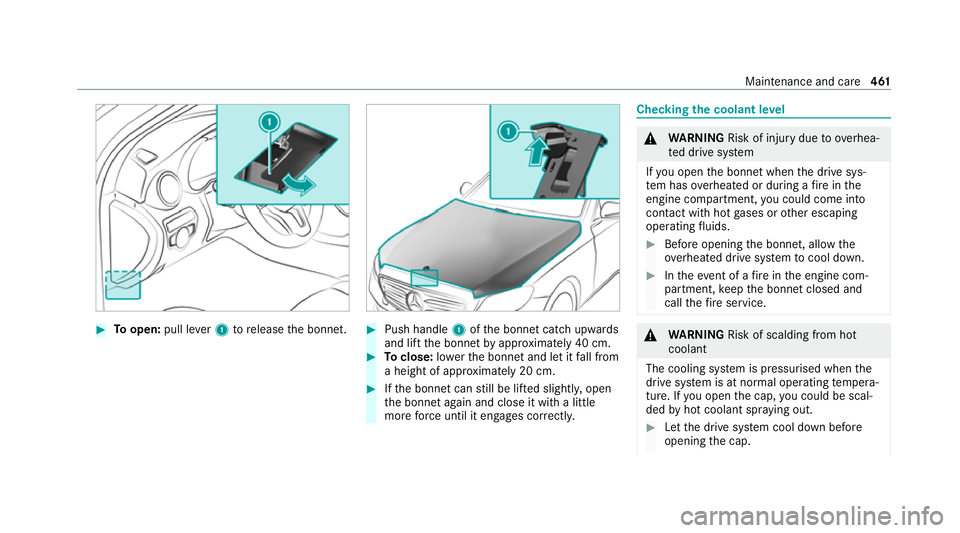
#
Toopen: pull lever1 torelease the bonn et. #
Push handle 1ofthe bonn etcatch up wards
and lift the bonn etby appr oximately 40 cm. #
Toclose: lowe rth e bonn etand let it fall from
a height of appr oximately 20 cm. #
Ifth e bonn etcan still be lif ted slightl y,open
th e bonn etagain and close it with a little
more forc e until it engages cor rectly. Che
cking the coolant le vel &
WARNING Risk of inju rydue to ov erhea‐
te d drive sy stem
If yo u open the bonn etwhen the drive sys‐
te m has overheated or during a fire inthe
engine compartment, you could come into
contact with hot gases or other escaping
operating fluids. #
Before opening the bonn et, allow the
ove rheated drive sy stem tocool down. #
Intheeve nt of a fire inthe engine com‐
partment, keep the bonn etclosed and
call thefire service. &
WARNING Risk of scalding from hot
coolant
The cooling sy stem is pressurised when the
drive sy stem is at normal operating temp era‐
ture. If you open the cap, you could be scal‐
ded byhot coolant spr aying out. #
Let the drive sy stem cool down before
opening the cap. Maintenance and care
461
Page 465 of 629
#
When opening the cap, wear pr otective
gl ove s and saf etygl asses. #
Open the cap slowly torelease pres‐
sure. #
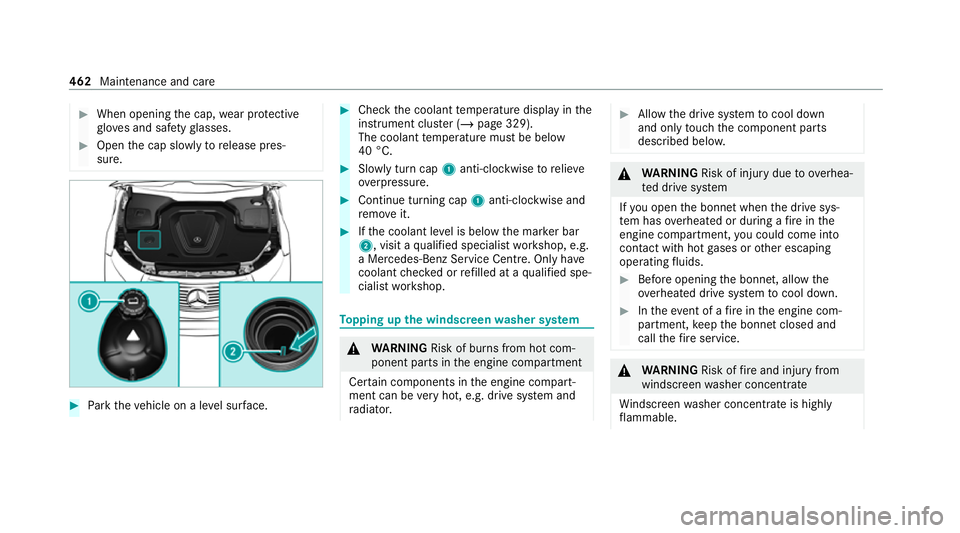
Park theve hicle on a le vel sur face. #
Check the coolant temp erature display in the
instrument clus ter (/ page 329).
The coolant temp erature must be below
40 °C. #
Slowly turn cap 1anti-clockwise torelie ve
ov erpressure. #
Continue turning cap 1anti-clockwise and
re mo veit. #
Ifth e coolant le vel is below the mar ker bar
2, visit a qualified specialist workshop, e.g.
a Mercedes-Benz Service Centre. Only ha ve
coolant checked or refilled at a qualified spe‐
cialist workshop. To
pping up the windsc reen washer sy stem &
WARNING Risk of bu rns from hot com‐
ponent parts in the engine compartment
Cer tain components in the engine compart‐
ment can be very hot, e.g. drive sy stem and
ra diator. #
Allow the drive sy stem tocool down
and only touch the component parts
described belo w. &
WARNING Risk of inju rydue to ov erhea‐
te d drive sy stem
If yo u open the bonn etwhen the drive sys‐
te m has overheated or during a fire inthe
engine compartment, you could come into
contact with hot gases or other escaping
operating fluids. #
Before opening the bonn et, allow the
ove rheated drive sy stem tocool down. #
Intheeve nt of a fire inthe engine com‐
partment, keep the bonn etclosed and
call thefire service. &
WARNING Risk offire and injury from
windsc reen washer concentrate
Wi ndsc reen washer concentrate is highly
fl ammable. 462
Maintenance and care
Page 490 of 629
Blown fuses must be
replaced with fuses of the
same rating, which you can recognise bythe col‐
our and fuse rating. The fuse ratings and fu rther
information tobe obser ved can be found in the
fuse assignment diagram.
Fu se assignment diag ram: onthe fuse box in
th e load compartment (/ page 489).
* NO
TEDama geor malfunctions caused
by moisture Moisture may cause dama
getothe electrical
sy stem or cause it tomalfunction. #
When the fuse box is open, make sure
th at no moisture can enter the fuse
box. #
When closing the fuse box, make sure
th at the seal of the lid is positioned cor‐
re ctly on the fuse box. If
th e newly inser ted fuse also blo ws, ha vethe
cause traced and rectified at a qualified special‐
ist workshop.
Ensure thefo llowing before replacing a fuse:
R The vehicle is secured against rolling away. R
All electrical consumers are switched off.
R The ignition is switched off.
The electrical fuses are located in various fuse
bo xes:
R Fuse box in the engine compartment on the
driver's side (/ page 487)
R Fuse box on the driver's side of the cockpit
(/ page 488)
R Fuse box in the front passenger foot we ll
(/ page 488)
R Fuse box in the load compartment on the
ri ght-hand side of theve hicle, when vie wed
in the direction of tra vel (/ page 489) Opening and closing
the fuse box in the
engine compa rtment Re
quirements:
R A dry clo thand a sc rewdriver are available.
Obse rveth e no tes on electrical fuses
(/ page 486). Opening &
WARNING Risk of inju ryfrom using the
windscreen wipers while the engine bon‐
net is open
When the engine bonn etis open, and the
windscreen wipers are set in motion, you can
be trapped bythe wiper linkage. #
Alw ays switch off the windscreen wip‐
ers and ignition before opening the
engine bonn et. Breakdown assis
tance 487
Page 600 of 629
Fo
r an EQ-optimised route
Overview ............................................. 354
Fr ag rance
see Fragrance sy stem
Fr ag rance sy stem .................................... 15 3
Inserting/removing theflacon ............ .153
Setting ................................................. 15 2
Fr ee software ............................................ 29
Fr equencies
Mobile phone ...................................... .510
Tw o-w ayradio ...................................... 51 0
Fr equency band
Dialling (on-board computer) .............. .271
Fr ont airbag (driver, front passenger) .....37
Fr ont passenger seat
see Seat
Fu el consum ption indicator
Calling up ............................................ .173
Fu nction seat
see Door cont rol panel
Fu ses ........................................................ 486
Before replacing a fuse ........................ 486 Fu
se assignment diagram ...................4 86
Fu se box in the engine compartment .. 487
Fu se box in the front passenger foot‐
we ll ...................................................... 488
Fu se box in the load compartment ...... 489
Fu se box on the dashboard ................. 488
No tes .................................................. 486 G
Garage door opener Cleari ngthe memory ........................... 19 3
Opening or closing the door ................1 92
Programming buttons .......................... 19 0
Ra dio equipment appr oval numbers .... 19 3
Re solving problems ............................. 19 2
Synchronising thero lling code ............ .191
Genera l operating permit number
(EU) ............................................................ 511
Genuine parts ............................................ 17
Global sear ch
Fu nction .............................................. 320
Overview ............................................. 320
Glo vecompa rtment
Locking/unlo cking .............................. .114 H
Handbrake see Electric parking brake
Handling characteristics (unusual) ....... 490
HANDS-FREE ACCESS ................................ 85
Ha ptic accelerator pedal ........................16 9
Hazard warning lights ............................ .136
HD prog rammes
see CI+ module
Head restra int
Fr ont (adjusting mechanically) .............1 03
Re ar (adjusting) .................................. .104
Head-up display ....................................... 273
Ad justing display elements (on-board
compu ter) ............................................ 273
Ad justing the brightness (on-board
computer) ............................................ 273
Fu nction ............................................... 274
Menu (on-board computer) .................. 273
Setting the position (on-board com‐
puter) ................................................... 273
Switching on/off ................................. 274 Index
597
Page 616 of 629
Speedome
ter
Digital .................................................. 269
St anding lights ........................................ 13 4
St art/s top button
Pa rking theve hicle .............................. 189
St arting theve hicle ............................. 16 3
Switching on the po wer supply or
ignition ............................................... .162
St arting assi stance
see Jump -sta rt connection
St arting the engine
see Vehicle
St arting-o ffaid
see Hill Start Assist
St ation
Deleting ............................................... 446
Direct frequency entry ........................ 446
Fr equency fix ....................................... 447
Moving ................................................ 446
Sea rching ............................................ 446
Setting ................................................. 445
St oring ................................................ 446St
ation list
Calling up ............................................ 446
St ation presets
Modifying ............................................ 446
St ation tracking
Setting ................................................. 447
ST EER CONT ROL
Fu nction/no tes ................................... 202
Ste ering wheel ........................................ 263
Ad justing (electrically) ......................... 109
Ad justing (manually) ............................ 108
Buttons ................................................ 263
Ope rating the memory function ........... 111
St eering wheel heater .......................... 11 0
Ste ering wheel heater
Swit ching on/off .................................. 11 0
St ow age areas
see Loading
see Stow age compartment
St ow age comp artment............................ 11 4
Armrest ................................................ 11 4
Centre console .................................... .114
Door ..................................................... 11 4Glo
vebox .............................................1 14
Re ar armrest ........................................ 11 4
Spectacles compa rtment .................... .114
St ow age comp artments
see Loading
see Stow age compartment
St ow age space underneath the load
compa rtment floor .................................. 124
Suggestions ............................................. 314
Calling up ............................................ .315
Con figuring .......................................... 315
Del eting .............................................. .316
Overview ..............................................3 14
Re naming ............................................. 316
Sun visor Operating ............................................ 14 9
Sur round lighting
Switching on/off ................................. 14 0
Sur round View
see 360° Camera
Suspension Air suspension .....................................2 26
Le velre gulation ................................... 226 Index
61 3