boot MERCEDES-BENZ EQC SUV 2021 Owners Manual
[x] Cancel search | Manufacturer: MERCEDES-BENZ, Model Year: 2021, Model line: EQC SUV, Model: MERCEDES-BENZ EQC SUV 2021Pages: 453, PDF Size: 8.68 MB
Page 61 of 453
Fi
tting an ISOFIX or i‑Size child restra int sys‐
te m on the rear seat &
WARNING Risk of accident if there ar
ben chseat, rear seat and seat backrest
are not engaged
The rear ben chseat, rear seat and seat back‐
re st may fold forw ards, even while theve hi‐
cle is in motion.
R As a result, theve hicle occupant will be
pressed into the seat belt with increased
fo rc e. The seat belt will not be able to
pr otect as intended and could cause
additional injur y.
R Objects or loads in the boot or load com‐
partment cann otbe restra ined bythe
seat backrest. #
Make sure that there ar ben chseat, the
re ar seat and the seat backrest are
engaged before everytrip. If
th e left and right seat backrests are not
engaged and loc ked in place, this will be shown on
the multifunction display on the instrument
clus ter.
If th e cent reseat backrest is not engaged and
loc ked in place, there d lock verification indica‐
to r will be visible. &
WARNING Risk of inju ryor death if the
permissible gross mass of thech ild and
ch ild restra int sy stem toget her is excee‐
ded.
To o much load may be placed on the ISOFIX
or i‑Size child restra int sy stems and thech ild
may not be restra ined cor rectly in theeve nt
of an accident, forex ample. #
Ifth ech ild and thech ild restra int sys‐
te m toget her weigh more than 33 kg,
only use an ISOFIX or i‑Size child
re stra int sy stem with which thech ild is
secured with theve hicle seat belt. #
Also secure thech ild restra int sy stem
with theTo pTe ther belt, if available. Alw
ays comply with the information about the
mass of thech ild restra int sy stem:
R inthe manufacturer's ins tallation and operat‐
ing instructions forth ech ild restra int sy stem
used
R on a label on thech ild restra int sy stem, if
present
Re gular lych eck that the permissible gross mass
of thech ild and child restra int sy stem is still
complied with.
When fitting a child restra int sy stem, obser ve
th efo llowing:
O Alw
ays obser vethe cor rect use of the seats
and consider their suitability for attaching a
ch ild restra int sy stem.
ISOFIX child seat securing sy stem
(/ page 56)
or
i‑Size child seat securing sy stem
(/ page 57) 58
Occupant saf ety
Page 66 of 453
L Suitable
for semi-universal child restra int sy stems
according totheta ble in "Recommended child
re stra int sy stems", or if theve hicle and the seat are
lis ted in thech ild restrai nt sy stem manufacturer's
ve hicle model list.
UF Suitable forfo rw ard-facing child restra int sy stems
of the "Universal" category in this we ight categor y. Securing
thech ild restra int sy stem with the
seat belt on there ar seat &
WARNING Risk of accident if there ar
ben chseat, rear seat and seat backrest
are not engaged
The rear ben chseat, rear seat and seat back‐
re st may fold forw ards, even while theve hi‐
cle is in motion.
R As a result, theve hicle occupant will be
pressed into the seat belt with increased
fo rc e. The seat belt will not be able to
pr otect as intended and could cause
additional injur y. R
Objects or loads in the boot or load com‐
partment cann otbe restra ined bythe
seat backrest. #
Make sure that there ar ben chseat, the
re ar seat and the seat backrest are
engaged before everytrip. If
th e left and right seat backrests are not
engaged and loc ked in place, this will be shown
on the multifunction display on the instrument
clus ter.
If th e cent reseat backrest is not engaged and
loc ked in place, there d lock verification indica‐
to r will be visible.
When fitting a belt-secured child restra int
sy stem, obser vethefo llowing:
O Alw
ays comply with the manufacturer's
ins tallation and operating instructions for
th ech ild restra int sy stem used.
O Fo
r a child restra int sy stem in the "Univer‐
sal" or "Semi-Universal" categor y,make
sure that the sy stem has been appr oved for
th eve hicle seat. Obser
vethe no tes under "Suitability of
seats for attaching belt-secu redch ild
re stra int sy stems" (/ page61).
O When using a
weight category 0/0+
baby car seat and a weight category I
re ar wa rd-facing child restra int sy stem
on a rear seat: adjustthe front seat so that
th e seat does not touch thech ild restra int
sy stem.
O When using a
weight category I forw ard-
fa cing child restra int sy stem: remo vethe
head restra int from there spective seat, if
possible.
Af terth ech ild restra int sy stem has been
re mo ved, replace the head restra ints again
immediately and adjust them cor rectly.
O The ba
ckrest of thefo rw ard-facing child
re stra int sy stem must, as far as possible, be
re sting on the seat backrest of there ar
seat.
O If
th e head restra int of thech ild seat cannot
be fully extended when it is ins talled in the
ve hicle, this will result in restrictions on the Occupant saf
ety63
Page 85 of 453
Sy
stem limits
The sy stem may be impaired or may not function
in thefo llowing cases:
R The sensors are dirty, e.g. due toroad salt or
sn ow.
R The kicking mo vement is made using a pros‐
th etic leg.
The tailgate can open or close unin tentional lyin
th efo llowing situations:
R A person's arms or legs are moving in the
sensor de tection range, e.g. when polishing
th eve hicle or picking up objects.
R Objects are mo ved or placed behind theve hi‐
cle, e.g. tensioning stra ps or luggage.
R Clamping stra ps, tarp aulins or other co ver‐
ings are pulled overth e bumper.
R A pr otective mat with a length reaching over
th e boot sill down into the de tection range of
th e sensors is used.
R The pr otective mat is not secured cor rectl y.
R Workis being done on the trailer hitch, trail‐
ers or rear bicycle rack s. Deactivate
the function of theke y (/ page71 )
or do not car rytheke y about your person in
such situations. Limiting
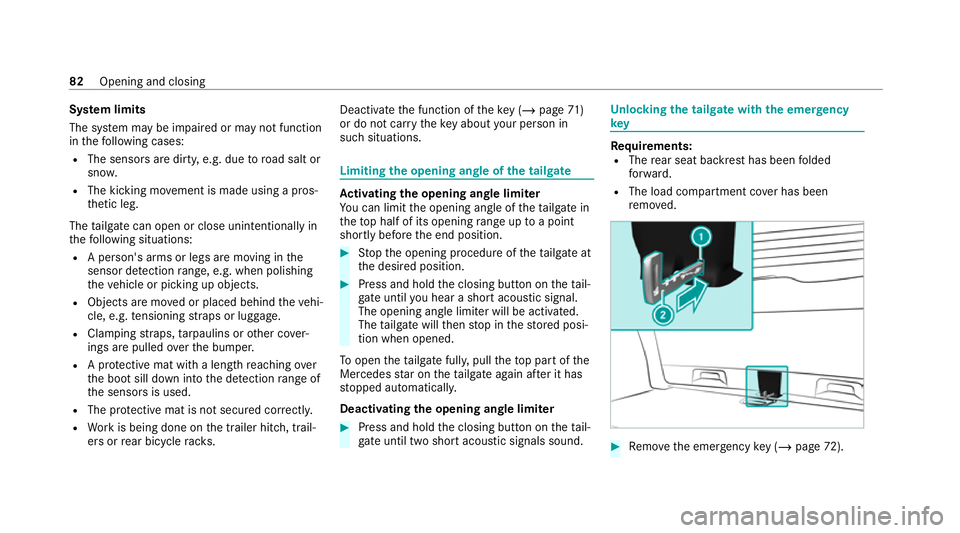
the opening angle of the tailgate Ac
tivating the opening angle limiter
Yo u can limit the opening angle of theta ilgate in
th eto p half of its opening range up toa point
shortly before the end position. #
Stop the opening procedure of theta ilgate at
th e desired position. #
Press and hold the closing button on theta il‐
ga te until you hear a sho rtacoustic signal.
The opening angle limiter will be activated.
The tailgate will then stop in thestored posi‐
tion when opened.
To open theta ilgate full y,pull theto p part of the
Mercedes star on theta ilgate again af ter it has
st opped automaticall y.
Deactivating the opening angle limiter #
Press and hold the closing button on theta il‐
ga te until two sho rtacoustic signals sound. Un
locking the tailgate with the emer gency
key Re
quirements:
R The rear seat backrest has been folded
fo rw ard.
R The load compartment co ver has been
re mo ved. #
Remo vethe emer gency key ( / page 72). 82
Opening and closing
Page 111 of 453
#
Alw ays make sure that the cigar ette
lighter is out of reach of children. #
Never lea vechildren unat tended in the
ve hicle. The driving
characteristics of your vehicle are
dependent on the distribution of the load within
th eve hicle. You should bear thefo llowing in
mind when loading theve hicle:
R neverex ceed the permissible gross mass or
th e permissible axle loads forth eve hicle
(including occupants).
Information can be found on theve hicle iden‐
tification plate (/ page 346).
R the load must not pr otru de abo vethe upper
edge of the seat backrests.
R when transporting objects in the load com‐
partment, alw ays ins tallth e combined lug‐
ga ge cover and net (load compartment co ver
and partitioning net).
R always place the load behind unoccupied
seats if possible. R
secure the load using the tie-down eyes and
distribute the load evenly. St
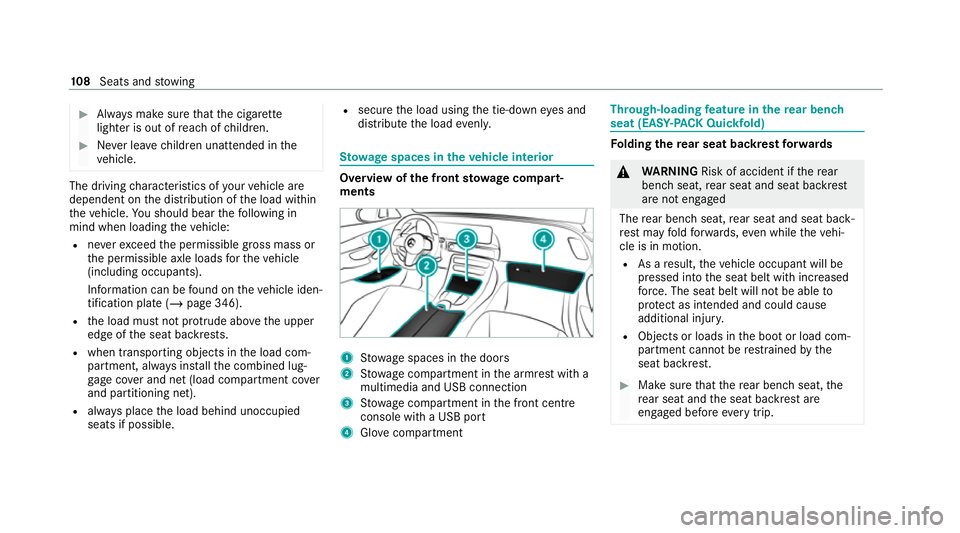
ow age spaces in theve hicle interior Overview of
the front stowage compa rt‐
ments 1
Stow age spaces in the doors
2 Stow age compartment in the armrest with a
multimedia and USB connection
3 Stow age compartment in the front cent re
console wi tha USB port
4 Glovecompa rtment Through-loading
feature in there ar ben ch
seat (EAS Y-PA CK Quickfold) Fo
lding there ar seat backrest forw ards &
WARNING Risk of accident if there ar
ben chseat, rear seat and seat backrest
are not engaged
The rear ben chseat, rear seat and seat back‐
re st may fold forw ards, even while theve hi‐
cle is in motion.
R As a result, theve hicle occupant will be
pressed into the seat belt with increased
fo rc e. The seat belt will not be able to
pr otect as intended and could cause
additional injur y.
R Objects or loads in the boot or load com‐
partment cann otbe restra ined bythe
seat backrest. #
Make sure that there ar ben chseat, the
re ar seat and the seat backrest are
engaged before everytrip. 108
Seats and stowing
Page 123 of 453
Wire
lesscharging of the mobile phone and
connection with theex terior aerial Note
s on wirelessly charging the mobile
phone &
WARNING Risk of inju rydue toobjects
being stowed incor rectly
If objects in theve hicle interior are stowed
incor rectly, they can slide or be thrown
around and hit vehicle occupants. In addi‐
tion, cup holders, open stowage spaces and
mobile phone recep tacles cannot al ways
re tain all objects within.
There is a risk of injur y,particularly in the
ev ent of sudden braking or a sudden change
in direction. #
Alw aysstow objects so that they can‐
not be throw n around in su chsitua‐
tions. #
Alw ays make sure that objects do not
pr otru de from stowage spaces, luggage
nets or stowage nets. #
Close the loc kable stow age spaces
before starting a journe y. #
Alw aysstow and secure heavy, hard,
poin ted, sharp-edged, fragile or bulky
objects in the boot/load compartment. Obser
vethe no tes on loading theve hicle. &
WARNING Risk offire from placing
objects in the mobile phone stowage
compartment
Placing other objects in the mobile phone
stow age compartment could con stitute a fire
hazard. #
Apart from a mobile phone, do not
place any other objects in the mobile
phone stowage compartment, espe‐
cially those made of me tal. *
NO
TEDama getoobjects caused by
placing them in the mobile phone stow‐
age compartment If objects are placed in
the mobile phone
stow age compartment, they may be dam‐
aged byelectromagnetic fields. #
Do not place credit cards, data storage
devices, ski passes or other objects
sensitive toelectromagnetic fields in
th e mobile phone stowage compart‐
ment. *
NO
TEDama getothe mobile phone
stow age compartment caused byliquids If liquids enter
the mobile phone stowage
compartment, the compartment may be
damaged. #
Ensure that no liquids enter the mobile
phone stowage compartment. 12 0
Seats and stowing
Page 169 of 453
Note
s oncharging the high-voltage bat tery
at the mains soc ket (mode 2) &
DANG ER Risk of fata l injury from incor‐
re ctly ins talled component parts
Connecting thech arging cable toa mains
soc ket using inco rrectly ins talled compo‐
nents could cause a fire or an electric shoc k,
fo rex ample. #
Onlyconnect thech arging cable to a
mains soc ketth at:
R Has been proper lyins talled and
R Has been inspected byaqu alified electri‐
cian #
For saf etyre asons, on lyuse thech arg‐
ing cables supplied with theve hicle, or
ch arging cables which ha vebeen
appr ovedfo r use with this vehicle. #
Never use a dama gedch arging cable. #
Do not use:
R Extension cables R
Extension reels
R Multiple soc kets #
Never use soc ket adap ters to connect
th ech arging cable tothe mains soc ket.
The only exception being if the adap ter
has been tested and appr oved bythe
manufacturer forch arging the high-volt‐
age battery of an electric vehicle. #
Obser vethe saf ety no tes in the operat‐
ing instructions forth e soc ket adap ter. Only
thefo llowing charging cables may be used:
R The charging cable supplied with theve hicle.
R Ach arging cable that has been appr oved for
th eve hicle.
The charging process can vary depending on the
po we r supp lyequipment.
Shor terch arging times can be achie ved in the
fo llowing ways:
R Charging at a wallbox.
R Charging at a charging station. When doing so, alw
ays obser vethe local infor‐
mation.
Do not lea vethech arging cable controls hanging
loose from a mains soc ket.
Do not li ftthe controls bythefo llowing compo‐
nent parts:
R The charging cable connec tor.
R The mains plug.
When charging, pr otect thech arging cable con‐
trol element from excessive heat su chas direct
sunlight. Otherwise, thech arging process may
be cancelled.
The charging cable should be stowed and held in
place in the bag pr ovided in the boot/luggage
compartment of theve hicle. 16 6
Driving and pa rking
Page 170 of 453
Note
s oncharging the high-voltage bat tery
at a wallbox or charging station (mode 3) &
DANG ER Risk of fata l injury from incor‐
re ctly ins talled component parts
Connecting thech arging cable tothewa llbox
using incor rectly ins talled components could
cause a fire or an electric shoc k,forex am‐
ple. #
Onlyconnect thech arging cable to a
wa llbox that:
R Has been proper ly installed and
R Has been inspec tedby aqu alified electri‐
cian #
For saf etyre asons, on lyuse charging
cables that ha vebeen tested and
appr ovedby the manufacturer for
ch arging the high-voltage battery in an
electric vehicle. #
Never use dama gedch arging cables. #
Do not connect thech arging cable toan
amplifier. #
Do not extend thech arging cable. #
Do not use adap ters. #
Obser vethe saf ety no tes in the operat‐
ing instructions forth ewa llbox. If
ch arging at a wallbox without pre-in stalled
cable, use the optionally available charging cable
fo rwa llbox and charging station (mode 3). The
ch arging cable is stowed in a bag in the boot/
luggage compartment.
Only use charging cables that ha vebeen tested
and appr ovedby the manufacturer forch arging
th e high-voltage battery in an electric vehicle. &
DANG ER Risk of death due todamaged
component parts
Connecting thech arging cable toach arging
st ation using a damaged component part
could cause a fire or an electric shoc k,for
ex ample. #
Atcharging stations with a pre-ins talled
ch arging cable: R
Visually check thech arging station
fo r obvious faults, such as damage
to the housing or charging cable. #
Atcharging stations without a pre-
ins talled charging cable:
R For saf etyre asons, on lyuse charg‐
ing cables that ha vebeen tested
and appr oved bythe manufacturer
fo rch arging the high-voltage battery
in an electric vehicle.
R Never use dama gedch arging
cables.
R Do not extend thech arging cable.
R Do not use adap ters. #
Alw ays obser vethe saf ety no tes on the
ch arging station. Most
charging stations must be activated before
th ech arging process, e.g. using an RFID card.
Obse rveth e on-site operator's instructions for
th ech arging station.
The amount of ene rgy dispensed forth ech arg‐
ing process, shown bythech arging station, may
be higher than the amount of energy actually Driving and parking
167
Page 278 of 453
&
WARNING Risk of inju rydue toobjects
being stowed incor rectly
If objects in theve hicle interior are stowed
incor rectly, they can slide or be thrown
around and hit vehicle occupants. In addi‐
tion, cup holders, open stowage spaces and
mobile phone recep tacles cannot al ways
re tain all objects within.
There is a risk of injur y,particularly in the
ev ent of sudden braking or a sudden change
in direction. #
Alw aysstow objects so that they can‐
not be throw n around in su chsitua‐
tions. #
Alw ays make sure that objects do not
pr otru de from stowage spaces, luggage
nets or stowage nets. #
Close the loc kable stow age spaces
before starting a journe y. #
Alw aysstow and secure heavy, hard,
poin ted, sharp-edged, fragile or bulky
objects in the boot/load compartment. Obser
vethe additional information on stowing
mobile communications devices cor rectly:
R Loading theve hicle (/ page106)
Blue tooth ®
connection:
The menu view and theav ailable functions in the
te lephone menu are in part dependent on the
Blu etoo th®
profile of the connected mobile
phone. Full functionality is only available if the
mobile phone supports bo thofthefo llowing
Blue tooth ®
profiles:
R PBAP (Phone Book Access Profile)
- The contacts on the mobile phone are
shown automatically on the multimedia
sy stem.
R MAP (Message Access Profile)
- The mobile phone message functions can
be used on the multimedia sy stem.
Ir re spective of this, Blue tooth ®
audio functional‐
ity can byused with any mobile radio unit.
Fo r information on thera nge of functions of the
mobile radio unit tobe connec ted, see the man‐
ufacturer's operating instructions. Ne
twork connection:
The following cases can lead tothe call being
disconnected while theve hicle is in motion:
R You swit chinto a transmission/reception
st ation, in which no communication channel
is free.
R The SIM card used is not compatible with the
network available
R A mobile phone with "Twincard" is logged
into the network with the second SIM card at
th e same time
The multimedia sy stem supports calls in HD
Vo ice ®
for impr oved speech qualit y.Arequ ire‐
ment forth is is that the mobile phone and the
mobile phone network pr ovider of the person
yo u are calling suppo rtHD Voice ®
.
Depending on thequ ality of the connection, the
vo ice quality may fluctuate.
Fu rther information can be obtained from a
Mercedes-Benz service centre or at: https://
www.mercedes-benz.com/connect MBUX multimedia sy
stem 275
Page 423 of 453
No
tes..................................................... 317
Re placing.............................................. 320
St arting assis tance................................ 320
Battery charged
see High-voltage on-board electrical sy stem
Belt see Seat belt
Bicycle rack
Load capacity........................................ 354
Tr ailer operation.................................... 24 4
Blind Spot Assi st
Ac tivating/deactivating......................... 220
Fu nction................................................. 218
Sy stem limitations................................. 218
Blo wer
see Climate control
Boot lid see Tailgate
Brake Assist Sy stem
see BAS (Brake Assi stSystem)
Brake fluid
No tes....................................................3 49Brake
forc e distribution
EBD (Elect ronic Brake forc e Distribu‐
tion).......................................................1 92
Brakes ABS (Anti-lock Braking Sy stem).............1 89
Ac tive Brake Assi st................................ 209
Ad aptive brake lights............................. 194
BA S (Brake Assi stSystem).................... 189
Driving tips............................................ 15 3
EBD (Electronic Brake forc e Distribu‐
tion).......................................................1 92
HOLD function....................................... 19 3
Limited braking ef fect (salt-trea ted
ro ads).................................................... 15 3
New/replaced brake linings/brake
discs...................................................... 15 3
Re cuperation........................................ .149
Ru nning-in no tes.................................... 15 3
Braking assistance see BAS (Brake Assi stSystem)
Breakdown Overview of the help functions................ 14
To w- starting......................................... .324
To wing away.......................................... 321
Tr ansporting theve hicle........................ 322 Wheel
chang e....................................... .337
Breakdown see Flat tyre
Buttons Steering wheel...................................... 250 C
Calls Mercedes me........................................ 279
Camera see 360° Camera
see Reversing camera
Car key
see Key
Car wash
see Care
Car wash (care)......................................... 304
Car-to-X-Communication Displaying hazard warnings.................. .273
Care 360° camera........................................ .307
Air-water duct........................................ 304
Au tomatic car wash...............................3 04420
Index
Page 444 of 453
Service inter
val display
see AS SYST PLUS
Setting a speed see Cruise control
Setting the map scale
see Map
Side airbag................................................... 40
Side impact pr otection............................. 231
Side windo ws
Au tomatic function.................................. 84
Child saf ety lock in there ar.................... .68
Closing using theke y.............................. 85
Co nvenience closing............................... 85
Con venience opening.............................. 85
Opening wi th theke y.............................. .85
Opening/closing..................................... 83
Problem...................................................85
Ra in-closing feature................................ .84
Ro ller sunblin d........................................ 89
Sliding sun roof
Au tomatic features................................. .88
Closin g................................................... .86
Closing using theke y.............................. 85
Opening................................................... 86 Opening wi
th theke y.............................. .85
Problem................................................... 88
Ra in-closing feature................................ .88
Smartphone see Smartphone integration
see Telephone
Sma rtphone integ ration
Overview............................................... 285
Snow chains.............................................. 328
Soc ket (12 V)
Boot/luggage compa rtment.................. 11 8
Fr ont centre console.............................. 11 8
Soc ket (230 V)
Re ar...................................................... .119
Software update System updates.....................................2 64
Sound PRE-SAFE ®
Sound................................... 48
Wheels and tyres...................................3 28
Sound menu Functions overview................................ 297
Spare wheel see Emer gency spa rewheel Specialist
workshop
see Qualified specialist workshop
Specific absor ption rate ............................. 22
Speed Limit Assi st
Fu nction/no tes...................................... 214
Setting................................................... 215
Sy stem limitations................................. 214
Speed limit for winter tyres
Setting................................................... 19 9
St anding lights.......................................... 12 3
St art/s top button
Pa rking theve hicle................................1 81
St arting theve hicle...............................1 52
Switching on the po wer supply or
ignition................................................... 151
St arting
see Vehicle
St arting assi stance
see Jump -sta rt connection
St arting-o ffaid
see Hill Start Assist
ST EER CONT ROL
Fu nction/no tes..................................... 19 2 Index
441