light MERCEDES-BENZ G-CLASS 2011 Manual PDF
[x] Cancel search | Manufacturer: MERCEDES-BENZ, Model Year: 2011, Model line: G-CLASS, Model: MERCEDES-BENZ G-CLASS 2011Pages: 288, PDF Size: 11.6 MB
Page 143 of 288
RDrive slowly and at an even speed through
the water.
R Do not stop and do not switch off the
engine.
! Do not open any of the vehicle's doors
while fording. Otherwise, water could get
into the vehicle interior and damage the
vehicle's electronics and interior
equipment.
R Water offers a high degree of resistance,
and the ground is slippery and in some
cases unstable. Therefore, it is difficult and
dangerous to pull away in the water.
R Ensure that a bow wave does not form as
you drive.
R Clean any mud from the tire tread after
fording.
R Apply the brakes to dry them after fording.
Winter driving
General notes
GWarning
If the vehicle becomes trapped in snow,
ensure that snow is kept away from the
exhaust pipe and from around the vehicle as
long as the engine is running. Otherwise,
poisonous carbon monoxide (CO) may enter
the vehicle, resulting in loss of consciousness
and even death.
To assure sufficient fresh air ventilation, open
a window slightly on the side of the vehicle
not facing the wind.
Have your vehicle winterproofed at a qualified
specialist workshop, e.g. an authorized
Mercedes-Benz Center, at the onset of
winter.
Observe the notes in the "Winter operation"
section ( Y page 248).
Driving with summer tires
Observe the notes in the "Winter operation"
section ( Y page 248).
Slippery road surfaces
GWarning!
The outside temperature indicator is not
designed to serve as an ice-warning device
and is therefore unsuitable for that purpose.
Indicated temperatures just above the
freezing point do not guarantee that the road
surface is free of ice. The road may still be icy,
especially in wooded areas or on bridges.
GWarning!
On slippery road surfaces, never downshift in
order to obtain braking action. This could
result in drive wheel slip and reduced vehicle
control. Your vehicle’s ABS will not prevent
this type of control loss.
Do not engage the transfer case in position
LOW when driving on ice or packed snow. At
speeds below 18 mph (30 km/h) vehicle
steering is adversely affected by the Off-road
ABS.
Drive particularly carefully on slippery road
surfaces. Avoid sudden acceleration, steering
and braking maneuvers. Do not use cruise
control.
If the vehicle threatens to skid or cannot be
stopped when moving at low speed:
XShift the transmission to position N.XTry to bring the vehicle under control using
corrective steering.
i For more information on driving with
snow chains, see ( Y page 248).
GWarning
Make sure that you do not endanger other
road users when you apply the brakes.
Driving tips141Driving and parkingZProCarManuals.com
Page 145 of 288
RCheck the depth of water before fording
rivers and streams.
R When fording, do not stop and do not
switch off the engine.
R Look out for obstacles such as rocks, holes,
tree stumps and furrows.
R Always keep the doors, rear door, windows
and the sliding sunroof closed while the
vehicle is in motion.
R Switch off cruise control.
R Do not stray from marked routes or paths.
R Adapt your speed to the terrain. The
rougher, steeper or more ruts on the
terrain, the slower your speed should be.
R Drive slowly and at an even speed through
the water. Ensure that a bow wave does not
form as you drive.
R On sand, drive quickly to overcome the
rolling resistance. Otherwise, the vehicle
could dig itself into the sand.
R Do not jump with the vehicle as this will
interrupt the vehicle's propulsion.
R Avoid high engine speeds. Drive at
reasonable engine speeds (maximum
3000 rpm).
R Do not shift the automatic transmission to
transmission position N.
R Always check the vehicle for damage after
off-road driving.
i Information about retrofitting special all-
terrain tires is available from any
authorized Mercedes-Benz Center.HEnvironmental note
Protection of the environment is of primary
importance. Treat nature with respect.
Observe all prohibiting signs.
Checklist before driving off-road
XEngine oil level: check the engine oil and
top it up if necessary.
Only then does the engine receive enough
oil when the vehicle is standing on a steep
incline.! If the engine oil warning lamp lights up
while the vehicle is in motion, stop the
vehicle in a safe place as soon as possible.
Check the engine oil level. The engine oil
warning lamp warning must not be ignored.
Continuing the journey while the symbol is
displayed could lead to engine damage.XWheel-changing tool kit: check that the
jack is working and make sure you have the
wheelbrace, a robust tow cable and a
folding spade in the vehicle.XWheels and tires: check the tire tread
depth and tire pressure.XCheck for damage and remove any foreign
objects, e.g. small stones, from the
wheels/tires.XReplace any missing valve caps.XReplace dented or damaged wheels.XCarry a sound spare wheel.
Checklist after driving off-road
GWarning
If you feel a sudden significant vibration or
ride disturbance, or you suspect that possible
damage to your vehicle has occurred, you
should turn on the hazard warning flashers,
carefully slow down, and drive with caution to
an area which is a safe distance from the road.
Inspect the tires and the vehicle underbody
for possible damage. If the vehicle appears
unsafe, have the vehicle towed to the nearest
authorized Mercedes-Benz Center or tire
dealer for repairs.
Driving over rough terrain places greater
demands on your vehicle than driving on
normal roads. After driving off-road, check
the vehicle. This allows you to detect damage
promptly and reduce the risk of an accident
to yourself and other road users.
XShift the transfer case to HIGH
( Y page 126).XDisengage the differential locks
( Y page 129).Driving tips143Driving and parkingZProCarManuals.com
Page 146 of 288
XClean the headlamps and rear lights and
check for damage.XClean the front and rear license plates.XClean the wheels and tires with a water jet
and remove any foreign objects.XClean the wheels, tires, wheel arches and
the vehicle underside with a water jet;
check for any foreign objects and damage.XCheck whether twigs or other parts of
plants have become trapped. These
increase the risk of fire and can damage
fuel pipes, brake hoses or the rubber
bellows of the axle joints and propeller
shafts.XAfter the trip, examine without fail the
entire undercarriage, wheels, tires, brakes,
bodywork structure, steering, chassis and
exhaust system for damage.XAfter driving for extended periods across
sand, mud, gravel, water or in similarly dirty
conditions, have the brake discs, wheels,
brake pads/linings and axle joints checked
and cleaned.XIf you detect strong vibrations after off-road
driving, check for foreign objects in the
wheels and drivetrain and remove any that
you find. Foreign objects can disturb the
balance and cause vibrations.XTest the brakes.
Driving on sand
GWarning!
Do not reduce the tire inflation pressure
before driving through sand. However, if you
do so, remember to correct the tire inflation
pressure before continuing your trip. Driving
with reduced tire inflation pressure increases
the risk of losing control of the vehicle and
rolling over.
Observe the following rules when driving on
sand:
R shift the transfer case to
LOW (Y page 126).
R avoid high engine speeds.
R limit the shift range of the automatic
transmission according to the off-road
conditions.
R drive quickly to overcome the rolling
resistance. Otherwise, the vehicle could dig
itself into the sand.
R drive in the tracks of other vehicles if
possible. Make sure that the ruts are not
too deep, that the sand is firm enough and
that your vehicle has sufficient ground
clearance.
Tire ruts and gravel roads
Observe the following rules when driving
along ruts in off-road terrain or on roads with
loose gravel:
! Check that the ruts are not too deep and
that your vehicle has sufficient clearance.
Otherwise, your vehicle could be damaged
or bottom out and get stuck.
R shift the transfer case to
LOW (Y page 126).
R avoid high engine speeds.
R observe the safety notes (Y page 142) and
the general notes (Y page 142) on off-road
driving.
R restrict the shift range of the automatic
transmission to 1 (Y page 123).
R drive slowly.
R where ruts are too deep, drive with the
wheels of one side on the center grassy
area, if possible.
144Driving tipsDriving and parking
ProCarManuals.com
Page 148 of 288
RAvoid high engine speeds – drive at
appropriate engine speeds (no more than
3000 rpm).
R Use the braking power of the engine when
driving down a slope. Observe the engine
speed, do not overrev the engine.
i Further information on the maximum
engine speed can be found in the
"Tachometer" and "Technical Data"
sections.
R Select a shift range appropriate to the
gradient.
R Before tackling steep downhill gradients,
select shift range 1 (Y page 123).
R Check the brakes after driving off-road for
a long time.GWarning!
Never turn the vehicle around on steep
inclines. The vehicle might roll over. If the
vehicle cannot complete the attempted climb,
back it down in reverse gear.
i Hill start assist will aid you when pulling
away on a hill.
For more information, see "Hill start assist"
( Y page 118).
Maximum gradient-climbing capability
Do not drive at an angle on slopes, inclines or
gradients, but instead follow the direct line of
fall. The maximum gradient-climbing
capability of your vehicle is 80%, which
corresponds to an approach/departure angle
of 38°. Note that the vehicle's gradient-
climbing capability depends on the off-road
conditions.
Accelerate carefully and make sure that the
wheels do not spin when driving on steep
terrain.
i If the load on the front axle is reduced
when pulling away on a steep uphill slope,
the front wheels have a tendency to spin.
4ETS detects this and brakes the wheels
accordingly. The rear wheel torque is
increased, making it easier to drive off.
Brow of hill
When driving on an uphill gradient, reduce
pressure slightly on the accelerator
immediately before reaching the top of the hill
(do not shift the transmission to position N).
Use the vehicle's own impetus to drive over
the top of the hill.
This style of driving prevents:
R the vehicle from lifting off the ground on the
brow of a hill
R loss of traction
R the vehicle from traveling too quickly down
the other side
Driving downhill
R Before tackling steep downhill gradients,
select shift range 1 (Y page 123).
This way you use the engine's braking
effect to reduce the speed. If this is not
sufficient, brake gently. When doing so,
make sure that the vehicle is facing in the
direction of the line of fall.
R Observe the notes on driving in
mountainous terrain ( Y page 146).
R Drive slowly.
R Do not drive at an angle down steep
inclines. Steer into the line of fall and drive
with the front wheels aligned straight.
Otherwise, the vehicle could slip sideways,
tip and rollover.
R Check that the brakes are working normally
after a long downhill stretch.
i The special off-road ABS( Y page 56)
enables accurate, brief and repeated
locking of the front wheels, causing them
to dig into the loose ground. Note that when
the front wheels are fully braked, they slide
easily over the surface of the ground,
making it difficult to steer.
146Driving tipsDriving and parking
ProCarManuals.com
Page 152 of 288
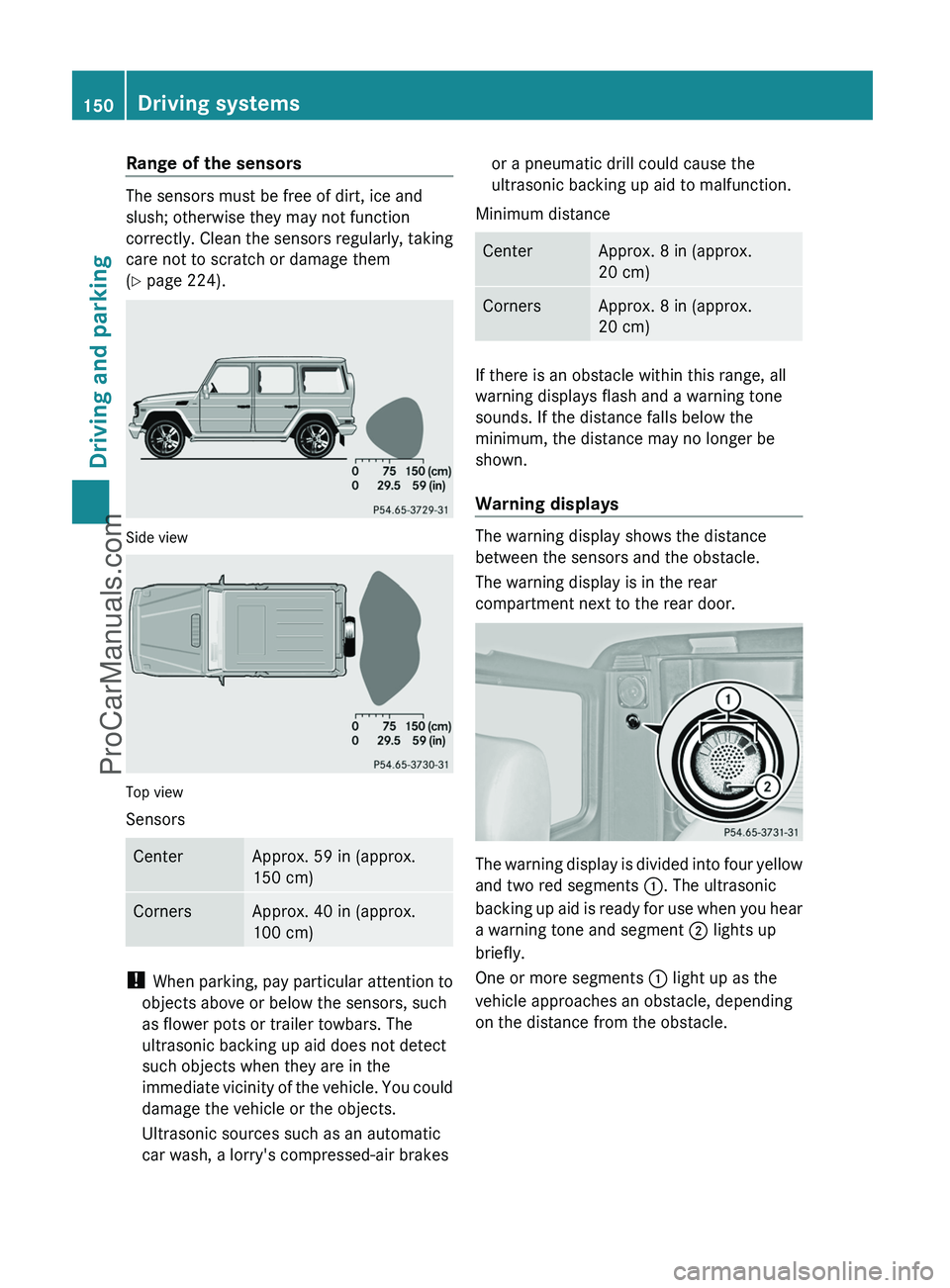
Range of the sensors
The sensors must be free of dirt, ice and
slush; otherwise they may not function
correctly. Clean the sensors regularly, taking
care not to scratch or damage them
( Y page 224).
Side view
Top view
Sensors
CenterApprox. 59 in (approx.
150 cm)CornersApprox. 40 in (approx.
100 cm)
! When parking, pay particular attention to
objects above or below the sensors, such
as flower pots or trailer towbars. The
ultrasonic backing up aid does not detect
such objects when they are in the
immediate vicinity of the vehicle. You could
damage the vehicle or the objects.
Ultrasonic sources such as an automatic
car wash, a lorry's compressed-air brakes
or a pneumatic drill could cause the
ultrasonic backing up aid to malfunction.
Minimum distanceCenterApprox. 8 in (approx.
20 cm)CornersApprox. 8 in (approx.
20 cm)
If there is an obstacle within this range, all
warning displays flash and a warning tone
sounds. If the distance falls below the
minimum, the distance may no longer be
shown.
Warning displays
The warning display shows the distance
between the sensors and the obstacle.
The warning display is in the rear
compartment next to the rear door.
The warning display is divided into four yellow
and two red segments :. The ultrasonic
backing up aid is ready for use when you hear
a warning tone and segment ; lights up
briefly.
One or more segments : light up as the
vehicle approaches an obstacle, depending
on the distance from the obstacle.
150Driving systemsDriving and parking
ProCarManuals.com
Page 154 of 288
Problems with ultrasonic reversing aidProblemPossible causes/consequences and M SolutionsYou hear a warning
signal when backing
up.The ultrasonic backing up aid sensors are dirty or there is
interference.XClean the ultrasonic backing up aid sensors ( Y page 224).XSwitch the ignition back on.The problem may be caused by an external source of radio or
ultrasound waves. The ultrasonic backing up aid has switched off
automatically.XSee if the ultrasonic backing up aid functions in a different
location.You hear a warning
tone when backing up
or you do not hear a
warning tone and none
of the segments light
up.The ultrasonic backing up aid is malfunctioning and has switched
itself off.XHave the ultrasonic backing up aid checked at a qualified
specialist workshop as soon as possible.Rear view camera
Important safety notes
The rear view camera is an optical parking aid.
It shows the area behind your vehicle in the
COMAND display.
GWarning!
Make sure no persons or animals are in or
near the area in which you are parking/
maneuvering. Otherwise, they could be
injured.
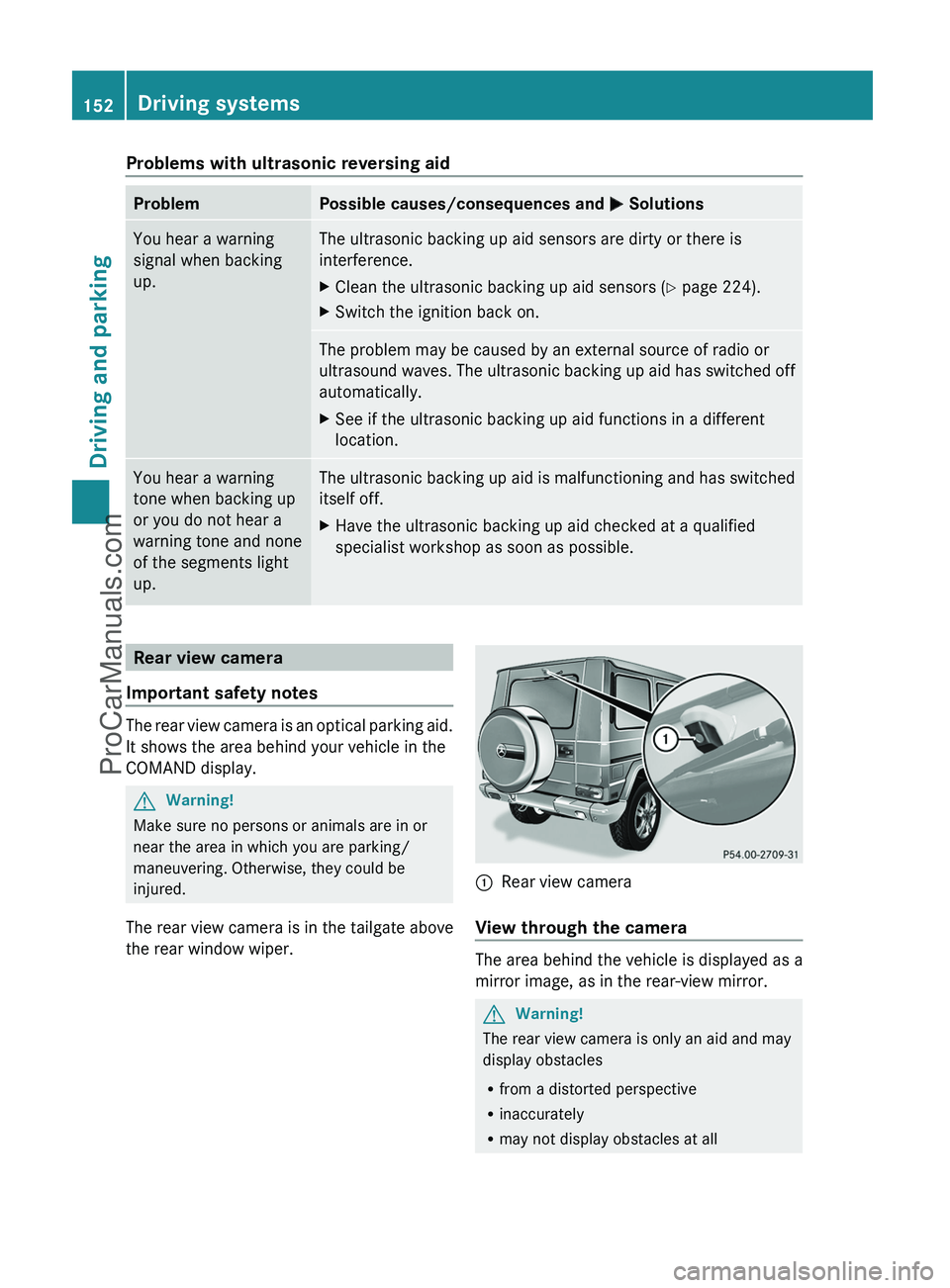
The rear view camera is in the tailgate above
the rear window wiper.
:Rear view camera
View through the camera
The area behind the vehicle is displayed as a
mirror image, as in the rear-view mirror.
GWarning!
The rear view camera is only an aid and may
display obstacles
R from a distorted perspective
R inaccurately
R may not display obstacles at all
152Driving systemsDriving and parking
ProCarManuals.com
Page 155 of 288
The rear view camera does not relieve you of
the responsibility to be cautious. Take care
and pay careful attention. The rear view
camera may not show objects which are
R very close to the rear bumper
R under the rear bumper
R under the spare wheel
R nearby behind the spare wheel
You are responsible for safety at all times and
must continue to pay attention to the
immediate surroundings when parking and
maneuvering. This includes the area behind,
in front of, and beside the vehicle. Otherwise
you could endanger yourself and/or others.GWarning!
The rear view camera either will not function
or will not function to its full capability if
R the tailgate is open
R it is raining very hard, snowing or foggy
R it is night or you are parking/maneuvering
your vehicle in an area where it is very dark
R the camera is exposed to a very bright white
light
R the immediate surroundings are
illuminated with fluorescent light (the
display may flicker)
R there is a sudden change in temperature,
e.g. if you drive into a heated garage from
the cold (lens condensation)
R the camera lens is dirty or covered
R the rear of your vehicle is damaged
In this case, have the position and setting
of the camera checked by a qualified
specialist workshop. Mercedes-Benz
recommends that you contact a Mercedes-
Benz Center for this purpose.
Do not use the rear view camera in these
situations. Otherwise you could injure
yourself or others and/or damage property
including your vehicle while parking/
maneuvering.
Activating the rear view cameraXMake sure that the SmartKey is in
position 2 in the ignition lock.XMake sure that the "rear view camera"
function is selected in COMAND (see the
separate operating instructions for
COMAND).XEngage reverse gear.
The area behind the vehicle is shown in the
COMAND display.Driving systems153Driving and parkingZProCarManuals.com
Page 160 of 288
A&*
Press briefly:
Scrolls back and forth within a menu
In the Audio menu: selects a stored
station, an audio track or a video
scene
In the Telephone menu: switches to
the phone book and selects a name
or a telephone number&*
Press and hold:
In the Audio menu: selects the
previous/next station or selects an
audio track using rapid scrolling
In the Telephone menu: starts rapid
scrolling through the phone book
Multifunction display
To activate the multifunction display:
R switch on the ignition.
R switch on the lights.
R open the door.
R press the reset button on the instrument
cluster.
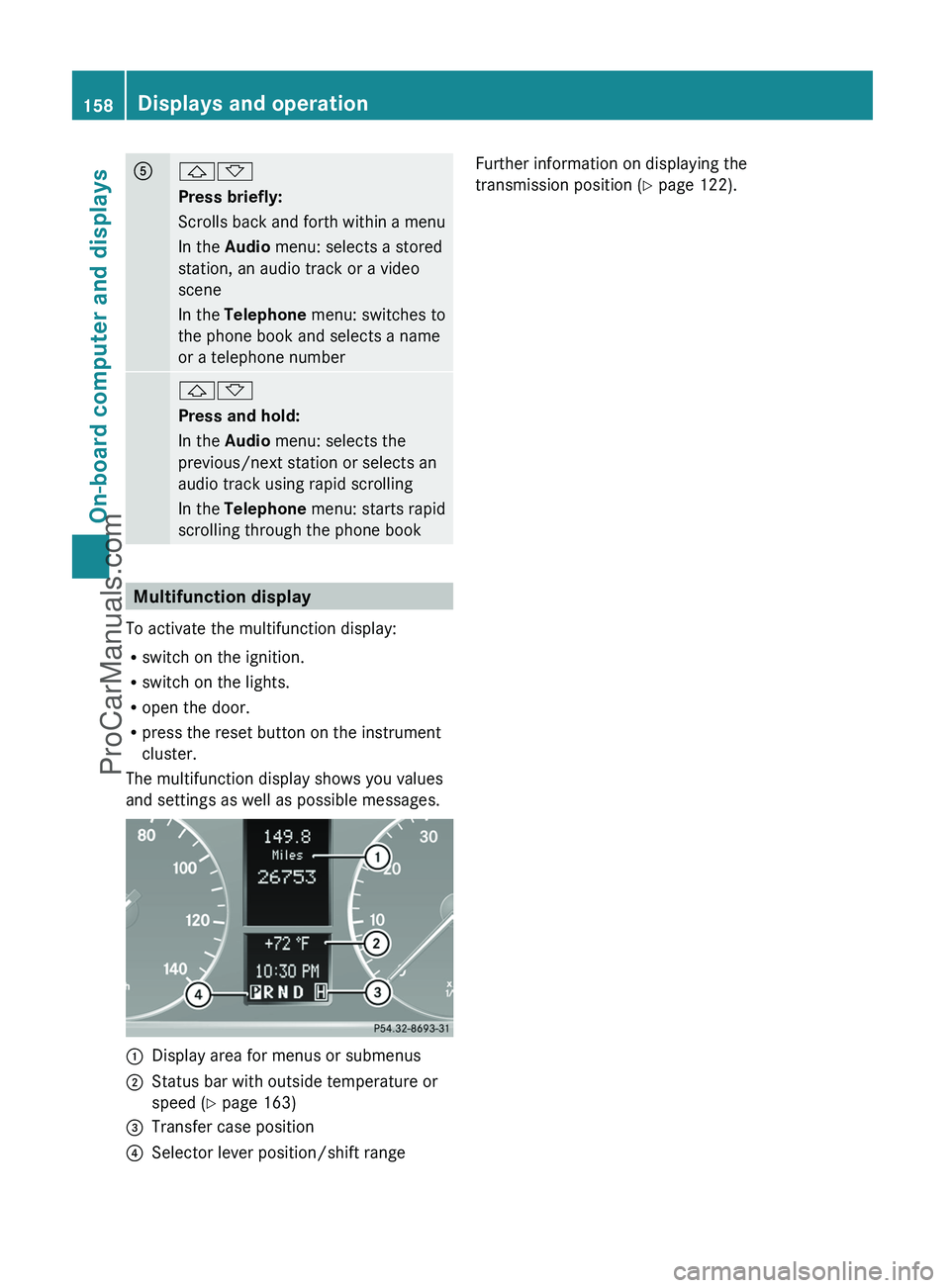
The multifunction display shows you values
and settings as well as possible messages.
:Display area for menus or submenus;Status bar with outside temperature or
speed ( Y page 163)=Transfer case position?Selector lever position/shift rangeFurther information on displaying the
transmission position ( Y page 122).158Displays and operationOn-board computer and displays
ProCarManuals.com
Page 164 of 288
XPress the & or * button to select a
scene.
Navigation menu
Displaying navigation instructions
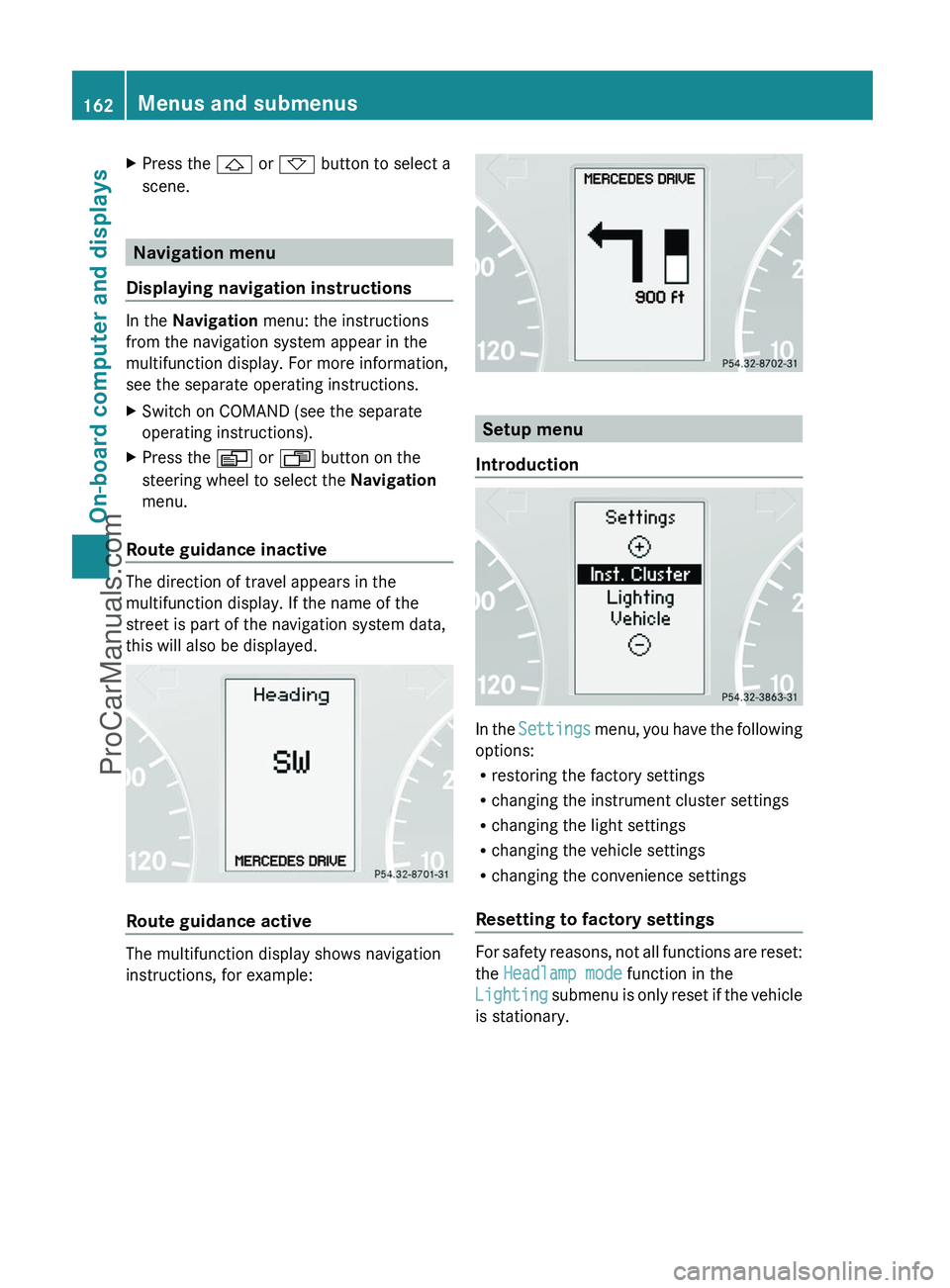
In the Navigation menu: the instructions
from the navigation system appear in the
multifunction display. For more information,
see the separate operating instructions.
XSwitch on COMAND (see the separate
operating instructions).XPress the V or U button on the
steering wheel to select the Navigation
menu.
Route guidance inactive
The direction of travel appears in the
multifunction display. If the name of the
street is part of the navigation system data,
this will also be displayed.
Route guidance active
The multifunction display shows navigation
instructions, for example:
Setup menu
Introduction
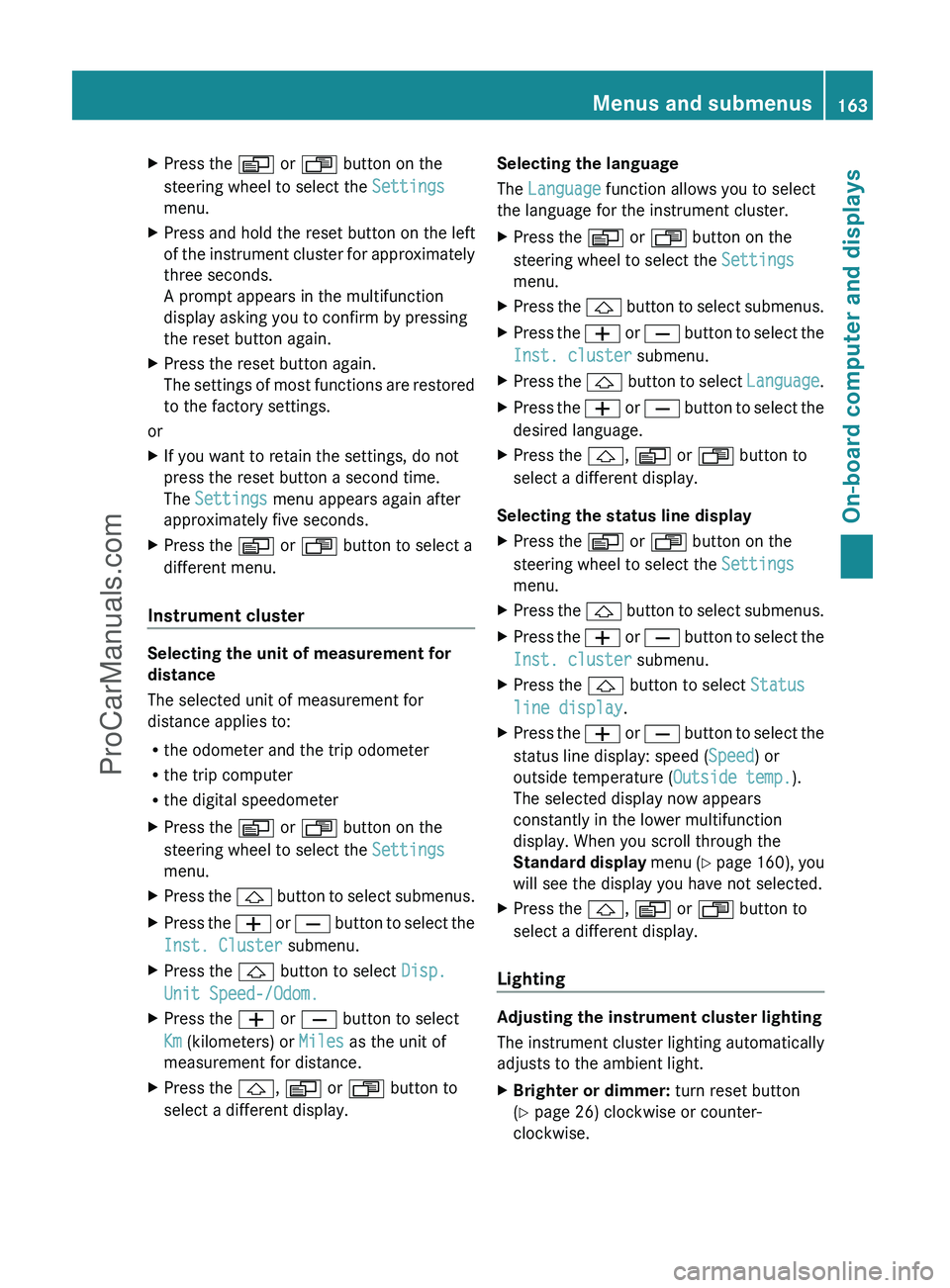
In the Settings menu, you have the following
options:
R restoring the factory settings
R changing the instrument cluster settings
R changing the light settings
R changing the vehicle settings
R changing the convenience settings
Resetting to factory settings
For safety reasons, not all functions are reset:
the Headlamp mode function in the
Lighting submenu is only reset if the vehicle
is stationary.
162Menus and submenusOn-board computer and displays
ProCarManuals.com
Page 165 of 288
XPress the V or U button on the
steering wheel to select the Settings
menu.XPress and hold the reset button on the left
of the instrument cluster for approximately
three seconds.
A prompt appears in the multifunction
display asking you to confirm by pressing
the reset button again.XPress the reset button again.
The settings of most functions are restored
to the factory settings.
or
XIf you want to retain the settings, do not
press the reset button a second time.
The Settings menu appears again after
approximately five seconds.XPress the V or U button to select a
different menu.
Instrument cluster
Selecting the unit of measurement for
distance
The selected unit of measurement for
distance applies to:
R the odometer and the trip odometer
R the trip computer
R the digital speedometer
XPress the V or U button on the
steering wheel to select the Settings
menu.XPress the & button to select submenus.XPress the W or X button to select the
Inst. Cluster submenu.XPress the & button to select Disp.
Unit Speed-/Odom.XPress the W or X button to select
Km (kilometers) or Miles as the unit of
measurement for distance.XPress the &, V or U button to
select a different display.Selecting the language
The Language function allows you to select
the language for the instrument cluster.XPress the V or U button on the
steering wheel to select the Settings
menu.XPress the & button to select submenus.XPress the W or X button to select the
Inst. cluster submenu.XPress the & button to select Language.XPress the W or X button to select the
desired language.XPress the &, V or U button to
select a different display.
Selecting the status line display
XPress the V or U button on the
steering wheel to select the Settings
menu.XPress the & button to select submenus.XPress the W or X button to select the
Inst. cluster submenu.XPress the & button to select Status
line display .XPress the W or X button to select the
status line display: speed ( Speed) or
outside temperature ( Outside temp.).
The selected display now appears
constantly in the lower multifunction
display. When you scroll through the
Standard display menu (Y page 160), you
will see the display you have not selected.XPress the &, V or U button to
select a different display.
Lighting
Adjusting the instrument cluster lighting
The instrument cluster lighting automatically
adjusts to the ambient light.
XBrighter or dimmer: turn reset button
( Y page 26) clockwise or counter-
clockwise.Menus and submenus163On-board computer and displaysZProCarManuals.com