brakes MERCEDES-BENZ G-CLASS 2011 Owners Manual
[x] Cancel search | Manufacturer: MERCEDES-BENZ, Model Year: 2011, Model line: G-CLASS, Model: MERCEDES-BENZ G-CLASS 2011Pages: 288, PDF Size: 11.6 MB
Page 6 of 288
1, 2, 3 ...
115 V socket ...................................... 201
12 V socket ........................................ 200
4ETS (Electronic Traction System) Function/notes ................................ 58
4MATIC (permanent four-wheel
drive) .................................................. 149
A
ABS (Anti-lock Brake System) Display message ............................ 171
ABS (Anti-lock Braking System)
Function/notes ................................ 56
Warning lamp ................................. 185
Accident (notes) ................................ 229
Active service system see Service interval display
Additives
Engine oil ....................................... 279
Adjusting the seat ............................... 78
Air bag PASSENGER AIR BAG
OFF- indicator lamp .......................... 39
Air bags
Front air bag (driver, front
passenger) ....................................... 37
Important safety notes ....................36
Safety guidelines ............................. 35
Window curtain air bag ....................39
Air-conditioning system
see Climate control
Air pressure
see Tire pressure ........................... 249
Air vents ............................................. 113
Important safety notes ..................112
Rear ............................................... 113
Setting the center air vents ...........113
Setting the side air vents ...............113
see Air outlets
Alarm system
see ATA
Anti-lock Braking System
see ABS
Anti-Theft Alarm system
see ATA
Anti-theft system
ATA (Anti-Theft Alarm system) .........59
Tow-away alarm ............................... 60
Ashtray ............................................... 198
ATA (Anti-Theft Alarm system) Activating/deactivating ...................59
Function ........................................... 59
Switching off the alarm ....................59
AUTO lights
Display message ............................ 172
Automatic car wash .......................... 221
Automatic transmission Driving tips .................................... 123
Emergency running mode ..............126
Important safety notes ..................121
Kickdown ....................................... 123
Malfunction .................................... 126
Pulling away ................................... 118
Releasing the parking lock
manually ........................................ 126
Selector lever ................................ 122
B
backup lamp Display message ............................ 174
BAS (Brake Assist System) ................. 56
Battery Charging ........................................ 236
Checking (SmartKey) .......................64
Display message ............................ 176
Important safety guidelines
(SmartKey) ....................................... 64
Jump-starting ................................. 238
Maintenance (vehicle) .................... 235
Replacing (SmartKey) ......................64
Battery (vehicle)
Important safety notes ..................235
Belt
see Seat belts
Brake fluid
Display message ............................ 171
Notes ............................................. 280
Brake fluid level ................................ 219
Brake lamp (display message) ......... 172
Brakes ABS .................................................. 56
BAS .................................................. 56
4IndexProCarManuals.com
Page 17 of 288
Uniform Tire Quality Grading
Standards (definition) ....................267
Unladen weight (definition) ............268
Wear indicator (definition) .............269
Wheel rim (definition) ....................267
Top Tether ............................................ 53
Tow-away alarm .................................. 60
Towing ................................................ 242
Important safety guidelines ...........240
Towing eye
Front .............................................. 240
Rear ............................................... 240
Trailer loads and drawbar
noseweights ...................................... 260
Transfer case Display message ............................ 182
Shift ranges ................................... 126
Transmission position display ......... 122
Transmission positions .................... 122
Transporting the vehicle .................. 241
Traveling uphill Brow of hill ..................................... 146
Trip computer (on-board
computer) .......................................... 166
Trip odometer Calling up ....................................... 160
Turn signal
Display message ............................ 172
Turn signals ......................................... 93
TWR (permissible trailer drawbar
noseweight) (definition) ................... 269
Type identification plate see Vehicle identification plate
U
Ultrasonic backing up aid Function/notes ............................. 149
Malfunction .................................... 152
Range of the sensors .....................150
Warning display ............................. 150
Unlocking
Emergency unlocking .......................68
From inside the vehicle (central
unlocking button) ............................. 67
V
Vanity mirror Sun visor ........................................ 198
Vehicle
Data acquisition ............................... 21
Emergency unlocking .......................68
Equipment ....................................... 17
Individual settings (on-board
computer) ...................................... 162
Loading .......................................... 256
Lowering ........................................ 234
Maintenance .................................... 18
Parking up ..................................... 135
Raising ........................................... 233
Reporting problems .........................20
Towing away .................................. 240
Tow-starting ................................... 240
Transporting .................................. 241
Vehicle dimensions
Technical data ............................... 281
Vehicle identification number
see VIN
Vehicle identification number
(VIN) ................................................... 275
Vehicle identification plate .............. 275
Vehicle tool kit .................................. 229
Vehicle weights Technical data ............................... 281
Ventilation
Setting the air distribution .............109
Setting the airflow .........................110
Video (DVD) ........................................ 161
Video DVD (on-board computer) ...... 161
VIN ...................................................... 275
W
Warning and indicator lamps ABS ................................................ 185
Brakes ........................................... 183
Check Engine ................................. 188
ESP ®
OFF ....................................... 186
Fuel tank ........................................ 188
PASSENGER AIRBAG OFF ................39
Reserve fuel ................................... 188
Seat belt ........................................ 184
Index15ProCarManuals.com
Page 29 of 288
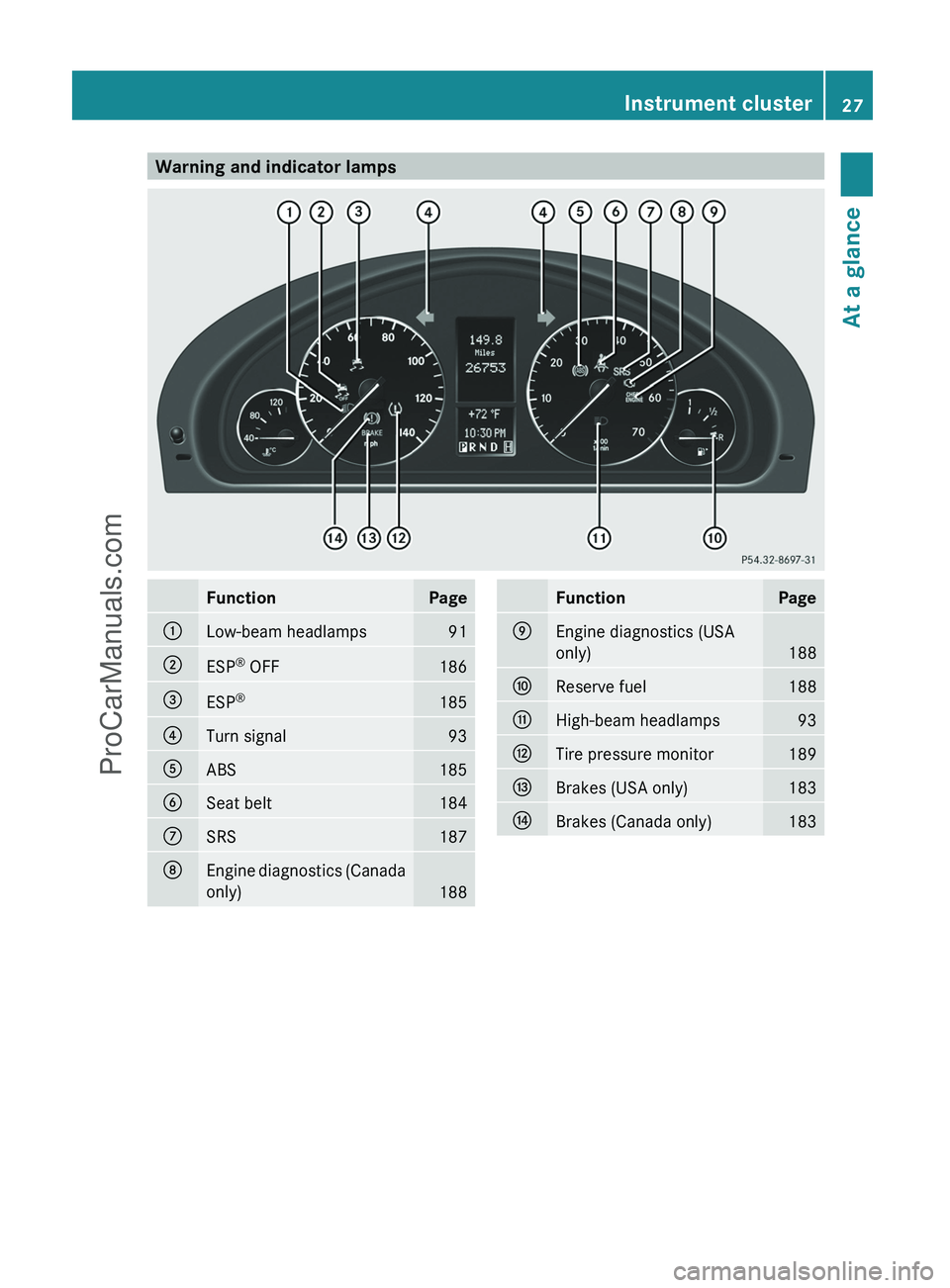
Warning and indicator lampsFunctionPage:Low-beam headlamps91;ESP®
OFF186=ESP ®185?Turn signal93AABS185BSeat belt184CSRS187DEngine diagnostics (Canada
only)
188
FunctionPageEEngine diagnostics (USA
only)
188
FReserve fuel188GHigh-beam headlamps93HTire pressure monitor189IBrakes (USA only)183JBrakes (Canada only)183Instrument cluster27At a glanceProCarManuals.com
Page 57 of 288
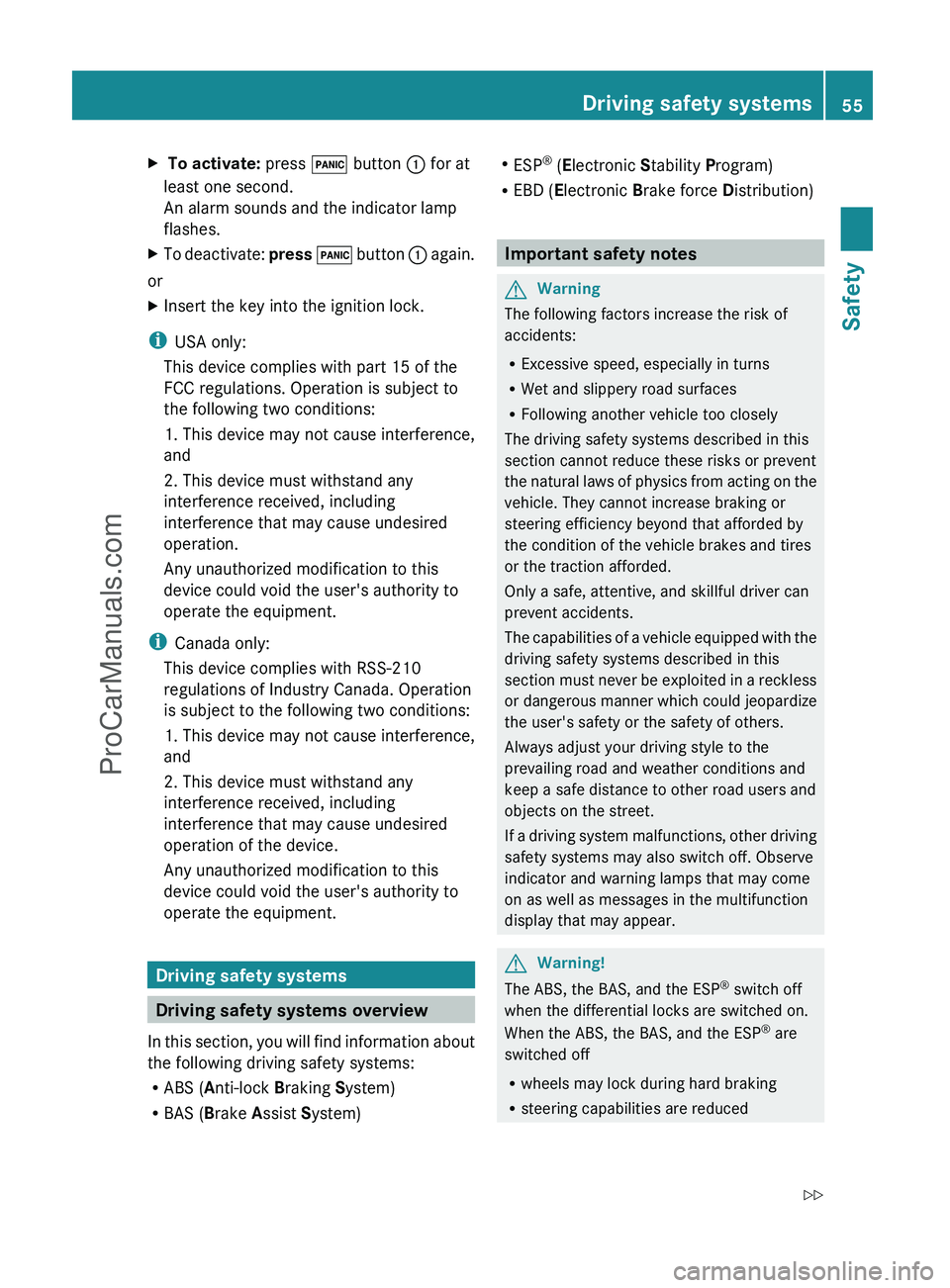
X To activate: press ! button : for at
least one second.
An alarm sounds and the indicator lamp
flashes.XTo deactivate: press ! button : again.
or
XInsert the key into the ignition lock.
i
USA only:
This device complies with part 15 of the
FCC regulations. Operation is subject to
the following two conditions:
1. This device may not cause interference,
and
2. This device must withstand any
interference received, including
interference that may cause undesired
operation.
Any unauthorized modification to this
device could void the user's authority to
operate the equipment.
i Canada only:
This device complies with RSS-210
regulations of Industry Canada. Operation
is subject to the following two conditions:
1. This device may not cause interference,
and
2. This device must withstand any
interference received, including
interference that may cause undesired
operation of the device.
Any unauthorized modification to this
device could void the user's authority to
operate the equipment.
Driving safety systems
Driving safety systems overview
In this section, you will find information about
the following driving safety systems:
R ABS ( Anti-lock Braking System)
R BAS ( Brake Assist System)
R
ESP ®
(E lectronic Stability Program)
R EBD ( Electronic Brake force Distribution)
Important safety notes
GWarning
The following factors increase the risk of
accidents:
R Excessive speed, especially in turns
R Wet and slippery road surfaces
R Following another vehicle too closely
The driving safety systems described in this
section cannot reduce these risks or prevent
the natural laws of physics from acting on the
vehicle. They cannot increase braking or
steering efficiency beyond that afforded by
the condition of the vehicle brakes and tires
or the traction afforded.
Only a safe, attentive, and skillful driver can
prevent accidents.
The capabilities of a vehicle equipped with the
driving safety systems described in this
section must never be exploited in a reckless
or dangerous manner which could jeopardize
the user's safety or the safety of others.
Always adjust your driving style to the
prevailing road and weather conditions and
keep a safe distance to other road users and
objects on the street.
If a driving system malfunctions, other driving
safety systems may also switch off. Observe
indicator and warning lamps that may come
on as well as messages in the multifunction
display that may appear.
GWarning!
The ABS, the BAS, and the ESP ®
switch off
when the differential locks are switched on.
When the ABS, the BAS, and the ESP ®
are
switched off
R wheels may lock during hard braking
R steering capabilities are reduced
Driving safety systems55SafetyZProCarManuals.com
Page 59 of 288
XKeep the brake pedal firmly depressed until
the emergency braking situation is over.
ABS prevents the wheels from locking.
The brakes will function as usual once you
release the brake pedal. BAS is deactivated.
GWarning
If the BAS malfunctions, the brake system still
functions, but without the additional brake
boost available that the BAS would normally
provide in an emergency braking maneuver.
Therefore, the braking distance may increase.
ESP ®
(Electronic Stability Program)
Important safety notes
GWarning
Observe "Important safety notes"
( Y page 55).
ESP ®
monitors driving stability and traction.
Traction is the power transmission between
the tires and the road surface.
If ESP ®
detects that the vehicle is deviating
from the direction desired by the driver, one
or more wheels are braked to stabilize the
vehicle. If necessary, the engine output is also
modified to keep the vehicle on the desired
course within physical limits. ESP ®
assists
the driver when pulling away on wet or
slippery roads. ESP ®
can also stabilize the
vehicle during braking.
If ESP ®
intervenes, the ÷ warning lamp
flashes in the instrument cluster.
GWarning
Under no circumstances should you
deactivate ESP ®
when the ÷ ESP®
warning lamp in the instrument cluster
flashes. Proceed as follows:
R when driving off, apply as little throttle as
possible.
R while driving, ease up on the accelerator
pedal.
R adapt your speed to suit the prevailing road
and weather conditions.
failure to observe these guidelines could
cause the vehicle to skid. ESP ®
cannot
prevent accidents resulting from excessive
speed.
! Switch the ignition off when:
R the parking brake is being tested using a
dynamometer
R the vehicle is being towed with the front/
rear axle raised
Application of the brakes by ESP ®
may
otherwise destroy the brake system.
! Only operate the vehicle for a maximum
of ten seconds on a brake test
dynamometer. Switch off the ignition.
Application of the brakes by ESP ®
may
otherwise destroy the brake system.
! Function or performance tests may only
be performed on a 2-axle dynamometer. If
you wish to operate the vehicle on such a
dynamometer, please consult an
authorized Mercedes-Benz Center
beforehand. You could otherwise damage
the drive train or the brake system.
i Only use wheels with the recommended
tire sizes. Only then will ESP ®
function
properly.
i If differential locks are switched on, ABS,
BAS and ESP ®
switch themselves off
automatically.
Driving safety systems57SafetyZProCarManuals.com
Page 60 of 288
4ETS (Electronic Traction System)GWarning
Observe "Important safety notes"
( Y page 55).
Traction control is part of ESP ®
.
Traction control brakes the drive wheels
individually if they spin. This enables you to
pull away and accelerate on slippery surfaces,
for example if the road surface is slippery on
one side. In addition, more drive torque is
transferred to the wheel or wheels with
traction.
Traction control remains active if you
deactivate ESP ®
.
Traction control is no longer active at speeds
above approximately 37 mph (60 km/h).
Activating/deactivating ESP ®
GWarning!
The ESP
®
should not be switched off during
normal driving other than in the
circumstances described below. Disabling
the system will reduce vehicle stability in
driving maneuvers.
ESP ®
is activated automatically when the
engine is started.
It may be best to deactivate ESP ®
in the
following situations:
R when using snow chains
R in deep snow
R on sand or gravel
GWarning
Switch on ESP ®
immediately if one of the
previously stated conditions is longer met.
Otherwise, ESP ®
cannot stabilize the vehicle
if it begins to lurch or when a wheel spins.
When you deactivate ESP ®
:
R ESP ®
no longer improves driving stability.
R the engine's torque is no longer limited and
the drive wheels can spin. The spinning of
the wheels results in a cutting action, which
provides better grip.
R traction control is still activated.
R ESP ®
still provides support when you
brake.
R and drive over 37 mph (60 km/h), ESP ®
intervenes when the grip limit of a wheel is
reached, even if it is deactivated.
If ESP ®
is deactivated and one or more wheels
start to spin, the ÷ warning lamp in the
instrument cluster flashes. In such situations,
ESP ®
will not stabilize the vehicle.
If you have deactivated ESP ®
, it is
automatically reactivated if you exceed a
speed of 37 mph (60 km/h) or a certain
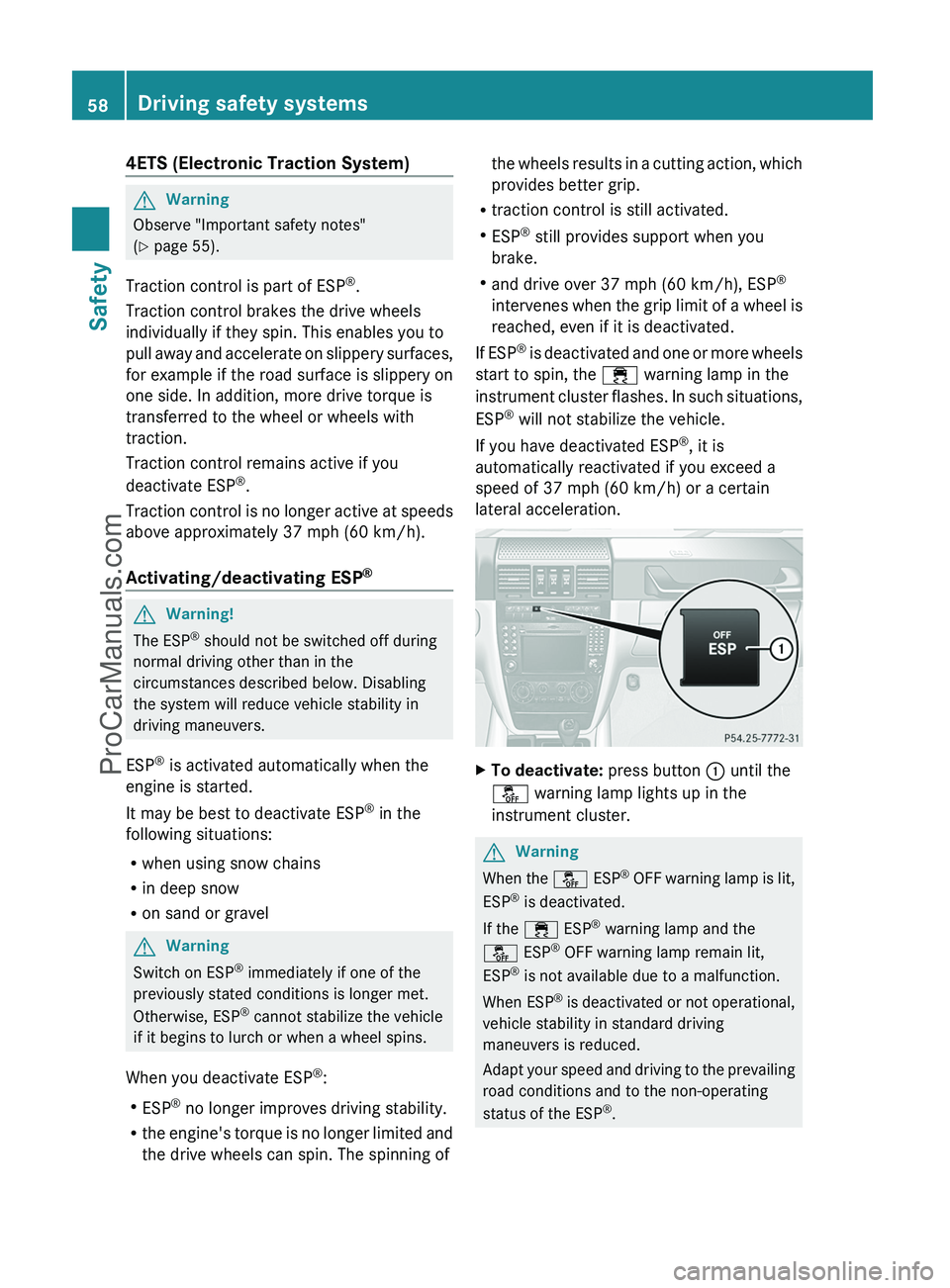
lateral acceleration.XTo deactivate: press button : until the
å warning lamp lights up in the
instrument cluster.GWarning
When the å ESP®
OFF warning lamp is lit,
ESP ®
is deactivated.
If the ÷ ESP®
warning lamp and the
å ESP®
OFF warning lamp remain lit,
ESP ®
is not available due to a malfunction.
When ESP ®
is deactivated or not operational,
vehicle stability in standard driving
maneuvers is reduced.
Adapt your speed and driving to the prevailing
road conditions and to the non-operating
status of the ESP ®
.
58Driving safety systemsSafety
ProCarManuals.com
Page 125 of 288
ANeutral
No power is transmitted from the
engine to the drive wheels.
Releasing the brakes will allow you
to move the vehicle freely, e.g. to
push it or tow it.
Do not shift the transmission to N
while driving. Otherwise, the
automatic transmission could be
damaged.
If ESP ®
is deactivated or faulty:
only shift the transmission to
position N if the vehicle is in danger
of skidding, e.g. on icy roads.
If you want to engage the transfer
case, shift briefly into N
( Y page 126).
! Rolling in neutral N can damage
the drive train.7Drive
The automatic transmission
changes gear automatically. All
forward gears are available.
Changing gears
The automatic transmission shifts to the
individual gears automatically when it is in
transmission position D. This automatic
gearshifting behavior is determined by:
R a shift range restriction, if selected
R the position of the transfer case ( HIGH or
LOW )
R the position of the accelerator pedal
R the road speed
Driving tips
Accelerator pedal position
Your style of driving influences how the
automatic transmission shifts gear:
R little throttle: early upshifts
R more throttle: late upshifts
Kickdown
Use kickdown for maximum acceleration.
XDepress the accelerator pedal beyond the
pressure point.
The transmission shifts to a lower gear
depending on the engine speed.XEase off the accelerator pedal once the
desired speed is reached.
The automatic transmission shifts back up.
Working on the vehicle
GWarning
When working on the vehicle, engage the
parking brake and shift AUTOTRONIC into
park position P. Otherwise the vehicle could
roll away which could result in an accident
and/or serious personal injury.
Shift ranges
Introduction
When the automatic transmission is in
position D, it is possible to restrict or
derestrict the shift range ( Y page 123).
Automatic transmission123Driving and parkingZProCarManuals.com
Page 139 of 288
pedals. You could then no longer brake or
accelerate. This could lead to accidents and
injury.
Rolling with the engine switched offGWarning!
There is no power assistance for the steering
and the brake when the engine is not running.
Steering and braking requires significantly
more effort and you could lose control of the
vehicle and cause an accident as a result.
Do not turn off the engine while the vehicle is
in motion.
Exhaust check
GWarning
Inhalation of exhaust gas is hazardous to your
health. All exhaust gas contains carbon
monoxide (CO), and inhaling it can cause
unconsciousness and possible death.
Do not run the engine in confined areas (such
as a garage) which are not properly ventilated.
If you think that exhaust gas fumes are
entering the vehicle while driving, have the
cause determined and corrected
immediately. If you must drive under these
conditions, drive only with at least one
window fully open at all times.
Certain engine systems are designed to keep
the level of poisonous components in exhaust
fumes within legal limits.
These systems only work at peak efficiency
when they are maintained exactly in
accordance with the manufacturer's
specifications. For this reason, all work on the
engine must be carried out only by qualified
and authorized Mercedes-Benz technicians.
The engine settings must not be changed in
any circumstances. Furthermore, all specific
service work must be carried out at regular
intervals and in accordance with the
Mercedes-Benz service requirements. Details
can be found in the Service Booklet.
Brakes
Important safety notesGWarning!
On slippery road surfaces, never downshift in
order to obtain braking action. This could
result in drive wheel slip and reduced vehicle
control. Your vehicle’s ABS will not prevent
this type of control loss.
Do not engage the transfer case in position
LOW when driving on ice or packed snow. At
speeds below 18 mph (30 km/h) vehicle
steering is adversely affected by the Off-road
ABS.
Downhill gradients
! On long and steep gradients, you must
reduce the load on the brakes by shifting
early to a lower gear. This allows you to take
advantage of the engine braking effect and
helps avoid overheating and excessive
wear of the brakes.
When you take advantage of the engine
braking effect, a drive wheel may not turn
for some time, e.g. on a slippery road
surface. This could cause damage to the
drive train. This type of damage is not
covered by the Mercedes-Benz warranty.
Heavy and light loads
GWarning
Depressing the brake pedal constantly results
in excessive and premature wear to the brake
pads.
It may also cause the brakes to overheat,
seriously impairing their effectiveness. It may
then not be possible to stop the vehicle in
sufficient time to avoid an accident.
If the brakes have been subjected to a heavy
load, do not stop the vehicle immediately, but
drive on for a short while. This allows the
airflow to cool the brakes more quickly.
Driving tips137Driving and parkingZProCarManuals.com
Page 140 of 288
Wet road surfaceGWarning
After driving in heavy rain for some time
without applying the brakes or through water
deep enough to wet brake components, the
first braking action may be somewhat
reduced. You have to depress the brake pedal
more firmly. Maintain a safe distance from
vehicles in front.
After driving on a wet road or having the
vehicle washed, brake firmly while paying
attention to the traffic conditions. This will
warm up the brake discs, thereby drying them
more quickly and protecting them against
corrosion.
GWarning
Make sure that you do not endanger other
road users when you apply the brakes.
Limited braking performance on salt
treated roads
GWarning
The layer of salt on the brake discs and the
brake pads/linings may cause a delay in the
braking effect, resulting in a significantly
longer braking distance, which could lead to
an accident.
To avoid this danger, you should:
R occasionally brake carefully, without
putting other road users at risk, when you
are driving on salted roads. This helps to
remove any salt that may have started to
build up on the brake discs and the brake
pads/linings.
R maintain a greater distance to the vehicle
ahead and drive with particular care.
R carefully apply the brakes at the end of a
trip and immediately after commencing a
new trip, so that salt residues are removed
from the brake discs.
Brake maintenance
! If the brake warning lamp lights up in the
instrument cluster and you hear a warning
tone, even though the parking brake has
been released, the brake fluid level may be
too low. Observe additional warning
messages in the multifunction display.
The brake fluid level may be too low due to
brake pad wear or leaking brake lines.
Have the brake system checked
immediately. This work should be carried
out at an authorized Mercedes-Benz
Center.
All checks and maintenance work on the
brake system must be carried out at a
qualified specialist workshop only. Consult an
authorized Mercedes-Benz Center for this
purpose.
Have the brake pads and the brake fluid
replaced at a qualified specialist workshop,
e.g. an authorized Mercedes-Benz Center.
GWarning
If other than recommended brake pads are
installed, or other than recommended brake
fluid is used, the braking properties of the
vehicle can be degraded to an extent that safe
braking is substantially impaired. This could
result in an accident.
! A function or performance test may only
be carried out on a two-axle dynamometer.
If you are planning to have the vehicle
tested on such a dynamometer, contact an
authorized Mercedes-Benz Center to
obtain further information first. Otherwise,
the drive train or the brake system may
suffer damage.
! As the ESP ®
system operates
automatically, the engine and the ignition
must be switched off (the key must be in
position 0 or 1 in the ignition lock) if the
parking brake is tested on a brake
dynamometer (for a maximum of ten
seconds).
138Driving tipsDriving and parking
ProCarManuals.com
Page 141 of 288
Braking applications triggered
automatically by ESP ®
may otherwise
seriously damage the brake system.
If your brake system is subject only to
moderate loads, you should test the
functionality of your brakes at regular
intervals by pressing firmly on the brake pedal
at high speeds. This improves the grip of the
brake pads.GWarning
Make sure that you do not endanger other
road users when you apply the brakes.
You can find a description of Brake Assist
(BAS) on ( Y page 56).
High-performance brake system for
AMG vehicles
The high-performance brake system is
installed only on the G 55 AMG.
GWarning
New vehicle brake pads and discs, and
replacement brake pads and discs may take
several hundred miles of driving until they
provide optimum braking efficiency. Until that
time, you may need to use increased brake
pedal pressure while braking. Please be aware
of this and adjust your driving and braking
accordingly during this break-in period.
Excessive high-demand braking will cause
correspondingly high brake wear. Please be
attentive to the brake warning lamp in the
instrument cluster and brake condition
messages in the multifunction display.
Especially for high performance driving, it is
important to maintain and have the brake
system checked regularly.
The high-performance brake system is
designed for heavy loads. This may lead to
noise when braking. This will depend on:
R speed
R braking force
R environmental conditions, such as
temperature and humidity
The wear of individual components of the
brake system, such as the brake pads/linings
or brake discs, depends on the individual
driving style and operating conditions.
For this reason, it is impossible to state a
mileage that will be valid under all
circumstances. An aggressive driving style
will lead to high wear. You can obtain further
information about this from your authorized
Mercedes-Benz Center.
Parking brakeGWarning!
While performing this procedure please
assure that the vehicle is stopped before
applying the parking brake. Otherwise the
rear wheels could lock up. You could lose
control of the vehicle and cause an accident.
In addition, the vehicle’s brake lights do not
light up when the parking brake is engaged.
Make sure not to endanger any other road
users when you engage the parking brake.
To maintain the braking effect of the parking
brake between the service intervals, you can
briefly apply the parking brake while driving.
XDrive about 20 mph (30 km/h) on a dry,
even road.XPull the parking brake upwards with the
release button depressed ( Y page 135),
until the vehicle brakes noticeably.XHold the lever in this position for
approximately ten seconds and then push
it all the way down again.
! Do not drive faster than 25 mph
(40 km/h). Otherwise, you could damage
the brakes.
Driving tips139Driving and parkingZProCarManuals.com