clock MERCEDES-BENZ G-Class 2013 W463 Owner's Manual
[x] Cancel search | Manufacturer: MERCEDES-BENZ, Model Year: 2013, Model line: G-Class, Model: MERCEDES-BENZ G-Class 2013 W463Pages: 364, PDF Size: 11.52 MB
Page 78 of 364
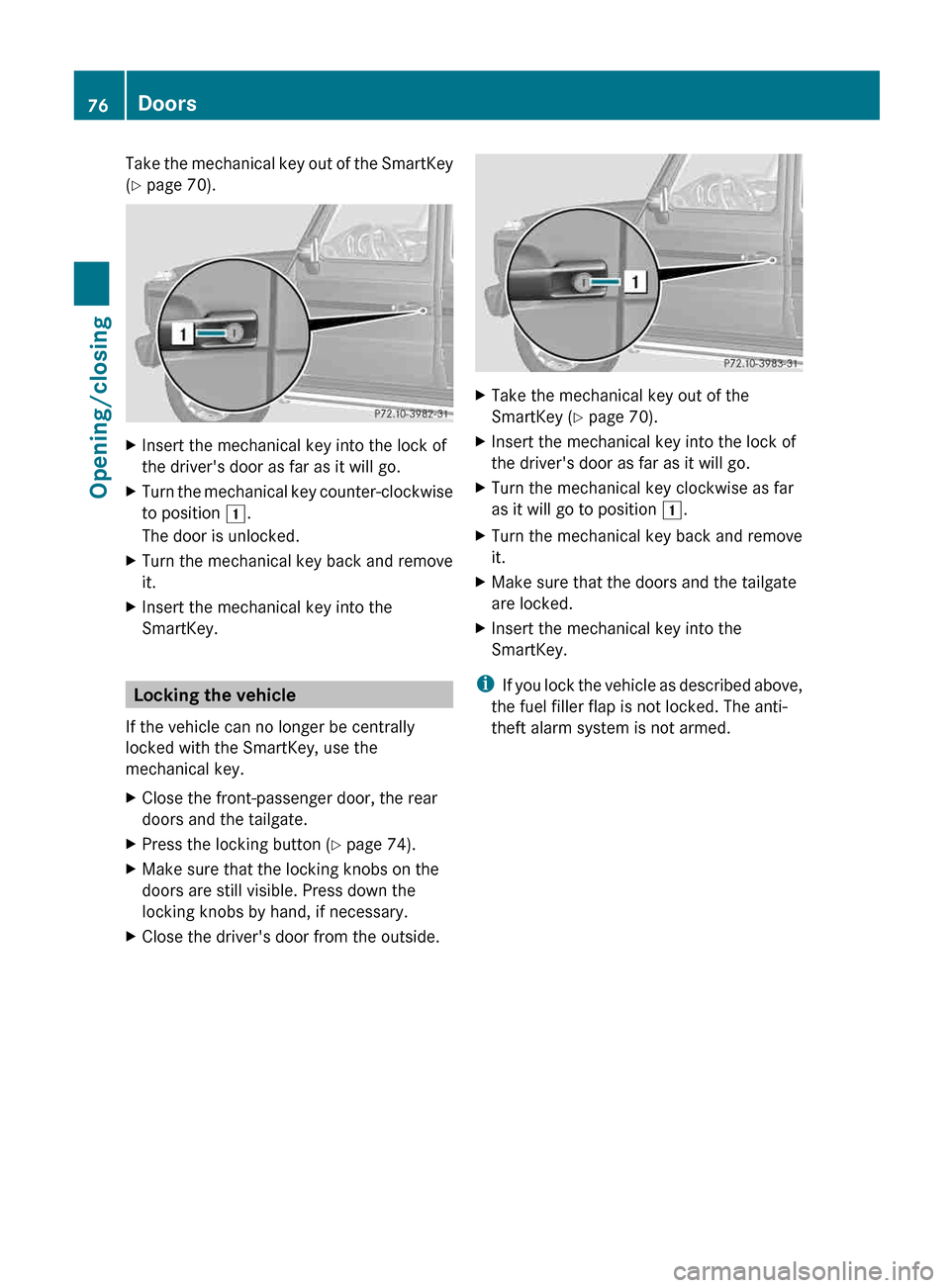
Take the mechanical key out of the SmartKey
(Y page 70).
X
Insert the mechanical key into the lock of
the driver's door as far as it will go.
X Turn the mechanical key counter-clockwise
to position 1.
The door is unlocked.
X Turn the mechanical key back and remove
it.
X Insert the mechanical key into the
SmartKey. Locking the vehicle
If the vehicle can no longer be centrally
locked with the SmartKey, use the
mechanical key.
X Close the front-passenger door, the rear
doors and the tailgate.
X Press the locking button (Y page 74).
X Make sure that the locking knobs on the
doors are still visible. Press down the
locking knobs by hand, if necessary.
X Close the driver's door from the outside. X
Take the mechanical key out of the
SmartKey (Y page 70).
X Insert the mechanical key into the lock of
the driver's door as far as it will go.
X Turn the mechanical key clockwise as far
as it will go to position 1.
X Turn the mechanical key back and remove
it.
X Make sure that the doors and the tailgate
are locked.
X Insert the mechanical key into the
SmartKey.
i If you lock the vehicle as described above,
the fuel filler flap is not locked. The anti-
theft alarm system is not armed. 76
Doors
Opening/closing
Page 82 of 364
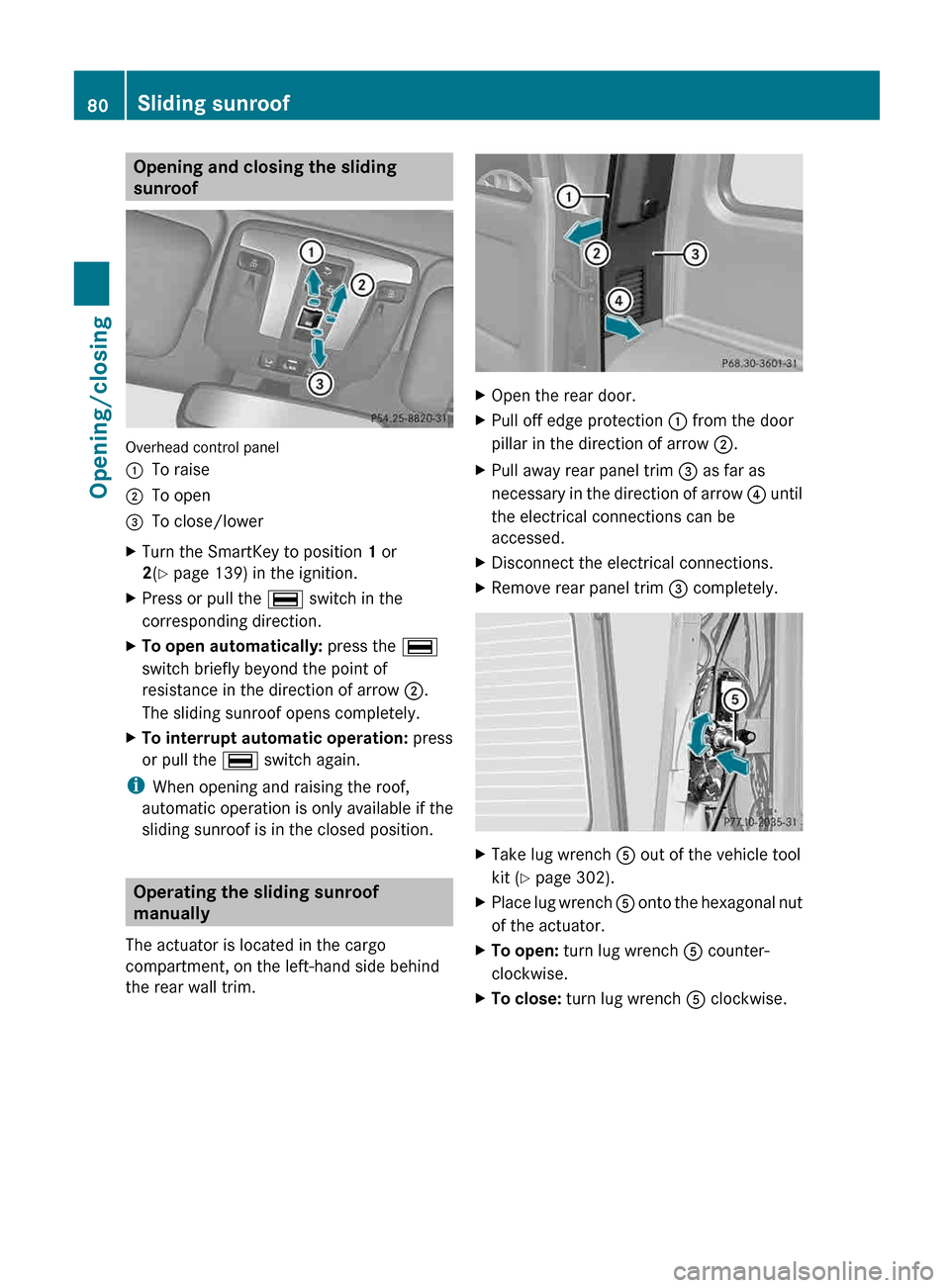
Opening and closing the sliding
sunroof
Overhead control panel
:
To raise
; To open
= To close/lower
X Turn the SmartKey to position 1 or
2(Y page 139) in the ignition.
X Press or pull the ¡ switch in the
corresponding direction.
X To open automatically: press the ¡
switch briefly beyond the point of
resistance in the direction of arrow ;.
The sliding sunroof opens completely.
X To interrupt automatic operation: press
or pull the ¡ switch again.
i When opening and raising the roof,
automatic operation is only available if the
sliding sunroof is in the closed position. Operating the sliding sunroof
manually
The actuator is located in the cargo
compartment, on the left-hand side behind
the rear wall trim. X
Open the rear door.
X Pull off edge protection : from the door
pillar in the direction of arrow ;.
X Pull away rear panel trim = as far as
necessary in the direction of arrow ? until
the electrical connections can be
accessed.
X Disconnect the electrical connections.
X Remove rear panel trim = completely. X
Take lug wrench A out of the vehicle tool
kit ( Y page 302).
X Place lug wrench A
onto the hexagonal nut
of the actuator.
X To open: turn lug wrench A counter-
clockwise.
X To close: turn lug wrench A clockwise.80
Sliding sunroof
Opening/closing
Page 113 of 364
X
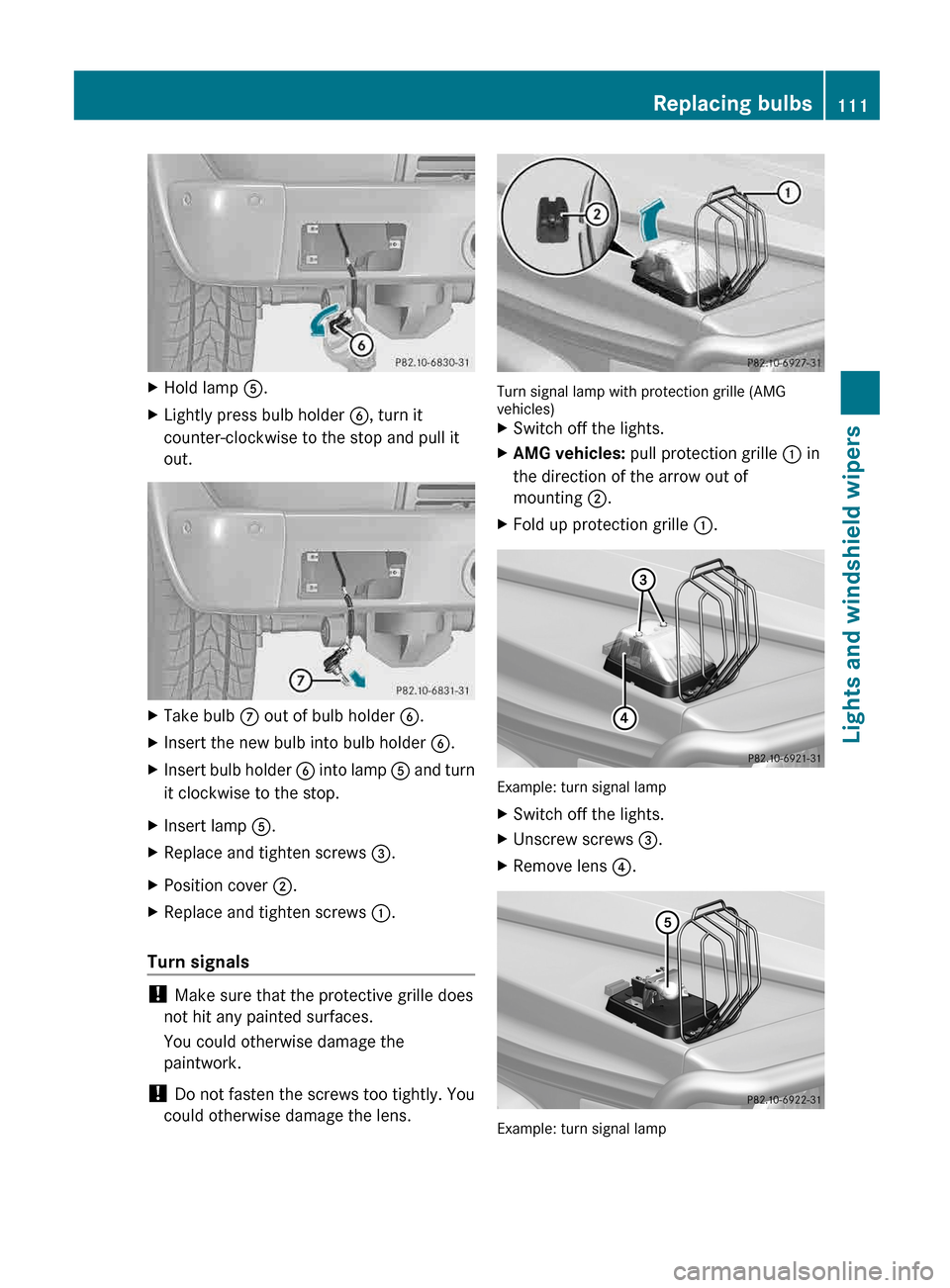
Hold lamp A.
X Lightly press bulb holder B, turn it
counter-clockwise to the stop and pull it
out. X
Take bulb C out of bulb holder B.
X Insert the new bulb into bulb holder B.
X Insert bulb holder B into lamp A and turn
it clockwise to the stop.
X Insert lamp A.
X Replace and tighten screws =.
X Position cover ;.
X Replace and tighten screws :.
Turn signals !
Make sure that the protective grille does
not hit any painted surfaces.
You could otherwise damage the
paintwork.
! Do not fasten the screws too tightly. You
could otherwise damage the lens. Turn signal lamp with protection grille (AMG
vehicles)
X
Switch off the lights.
X AMG vehicles: pull protection grille : in
the direction of the arrow out of
mounting ;.
X Fold up protection grille :. Example: turn signal lamp
X
Switch off the lights.
X Unscrew screws =.
X Remove lens ?. Example: turn signal lamp Replacing bulbs
111
Lights and windshield wipers Z
Page 114 of 364
X
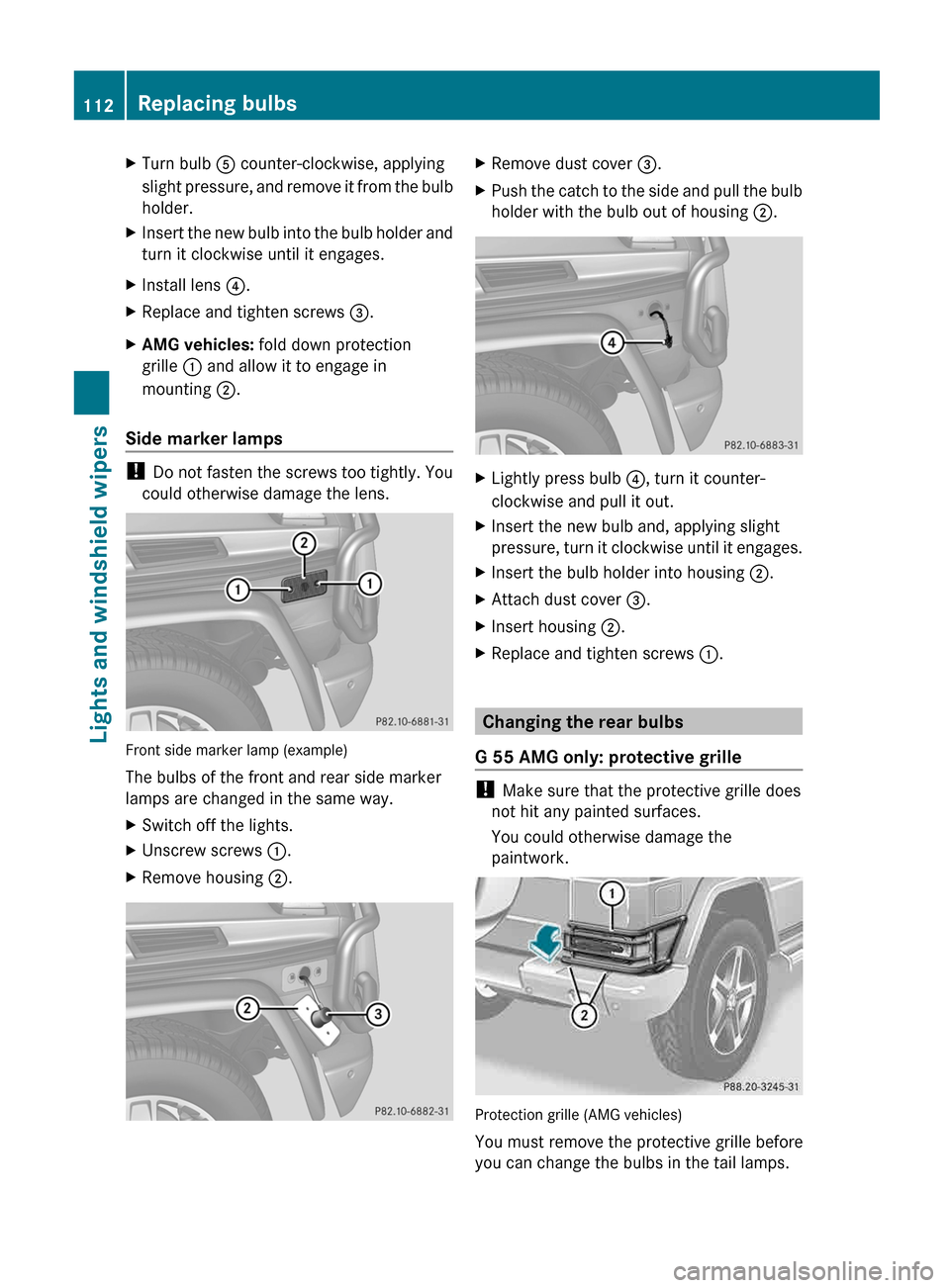
Turn bulb A counter-clockwise, applying
slight pressure, and remove it from the bulb
holder.
X Insert the new bulb into the bulb holder and
turn it clockwise until it engages.
X Install lens ?.
X Replace and tighten screws =.
X AMG vehicles: fold down protection
grille : and allow it to engage in
mounting ;.
Side marker lamps !
Do not fasten the screws too tightly. You
could otherwise damage the lens. Front side marker lamp (example)
The bulbs of the front and rear side marker
lamps are changed in the same way.
X
Switch off the lights.
X Unscrew screws :.
X Remove housing ;. X
Remove dust cover =.
X Push the catch to the side and pull the bulb
holder with the bulb out of housing ;. X
Lightly press bulb ?, turn it counter-
clockwise and pull it out.
X Insert the new bulb and, applying slight
pressure,
turn it clockwise until it engages.
X Insert the bulb holder into housing ;.
X Attach dust cover =.
X Insert housing ;.
X Replace and tighten screws :. Changing the rear bulbs
G 55 AMG only: protective grille !
Make sure that the protective grille does
not hit any painted surfaces.
You could otherwise damage the
paintwork. Protection grille (AMG vehicles)
You must remove the protective grille before
you can change the bulbs in the tail lamps.112
Replacing bulbs
Lights and windshield wipers
Page 115 of 364
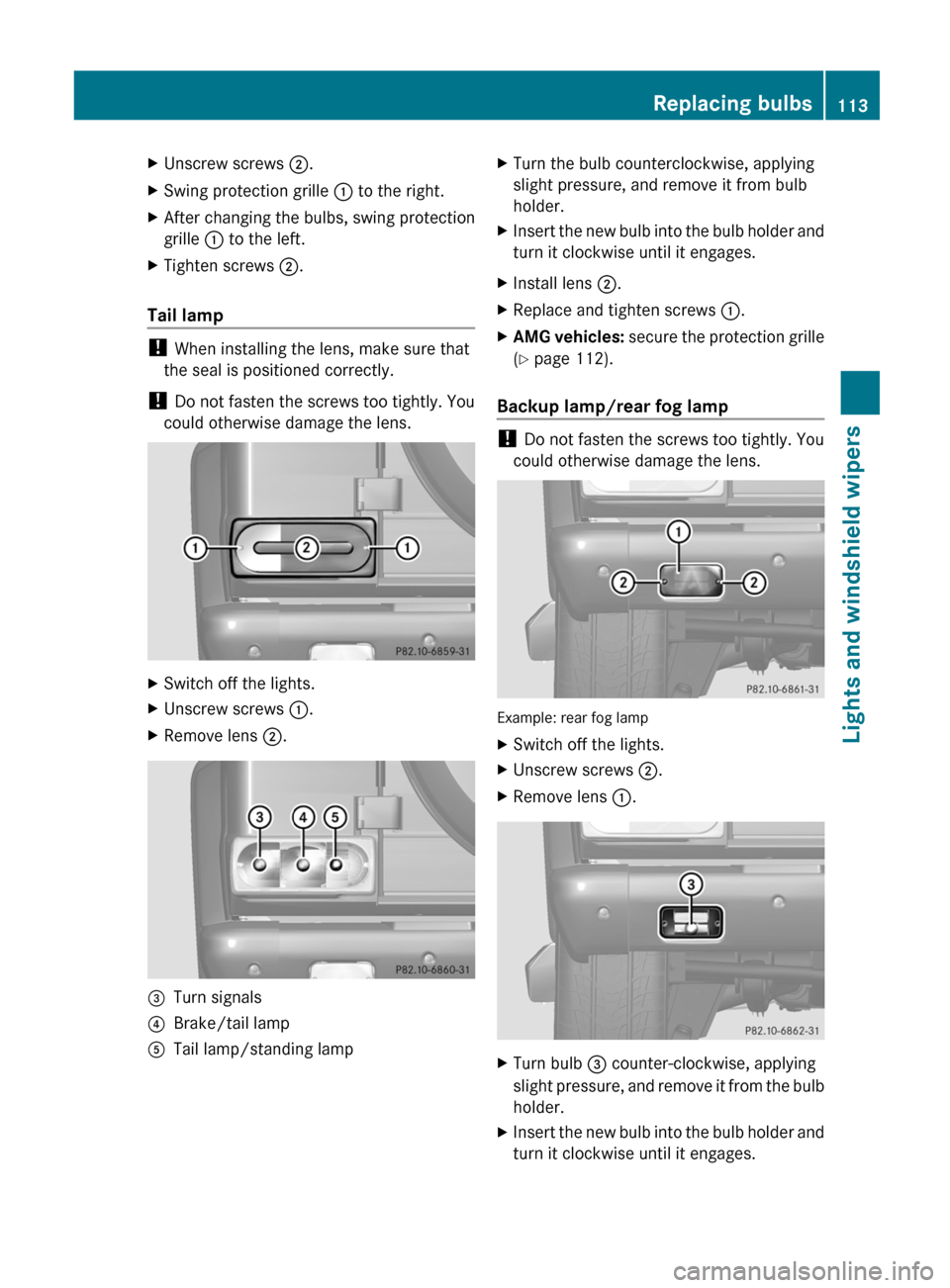
X
Unscrew screws ;.
X Swing protection grille : to the right.
X After changing the bulbs, swing protection
grille : to the left.
X Tighten screws ;.
Tail lamp !
When installing the lens, make sure that
the seal is positioned correctly.
! Do not fasten the screws too tightly. You
could otherwise damage the lens. X
Switch off the lights.
X Unscrew screws :.
X Remove lens ;.=
Turn signals
? Brake/tail lamp
A Tail lamp/standing lamp X
Turn the bulb counterclockwise, applying
slight pressure, and remove it from bulb
holder.
X Insert the new bulb into the bulb holder and
turn it clockwise until it engages.
X Install lens ;.
X Replace and tighten screws :.
X AMG vehicles: secure the protection grille
(Y page 112).
Backup lamp/rear fog lamp !
Do not fasten the screws too tightly. You
could otherwise damage the lens. Example: rear fog lamp
X
Switch off the lights.
X Unscrew screws ;.
X Remove lens :. X
Turn bulb = counter-clockwise, applying
slight
pressure, and remove it from the bulb
holder.
X Insert the new bulb into the bulb holder and
turn it clockwise until it engages. Replacing bulbs
113
Lights and windshield wipers Z
Page 134 of 364
X
Turn the SmartKey to position
2 (Y page 139) in the ignition lock.
X To activate: press the ¬ button.
The indicator lamp in the ¬ button lights
up.
The climate control system switches to the
following functions:
R cooling with air dehumidification (only
with engine running)
R high airflow (depending on the outside
temperature)
R high temperature (depending on the
outside temperature)
R air distribution to the windshield and
front side windows
R air-recirculation mode off
X To deactivate: press the ¬ button.
The
indicator lamp in the ¬ button goes
out. The previously selected settings are
restored. The cooling with air
dehumidification function remains on. Air-
recirculation mode remains deactivated.
or
X Press the à button.
The
indicator lamp in the ¬ button goes
out. Airflow and air distribution are set to
automatic mode.
or
X Turn controls : or B clockwise or
counter-clockwise ( Y page 119).
or
X Press the K or I button. Activating/deactivating MAX COOL
maximum cooling
The MAX COOL function is only available in
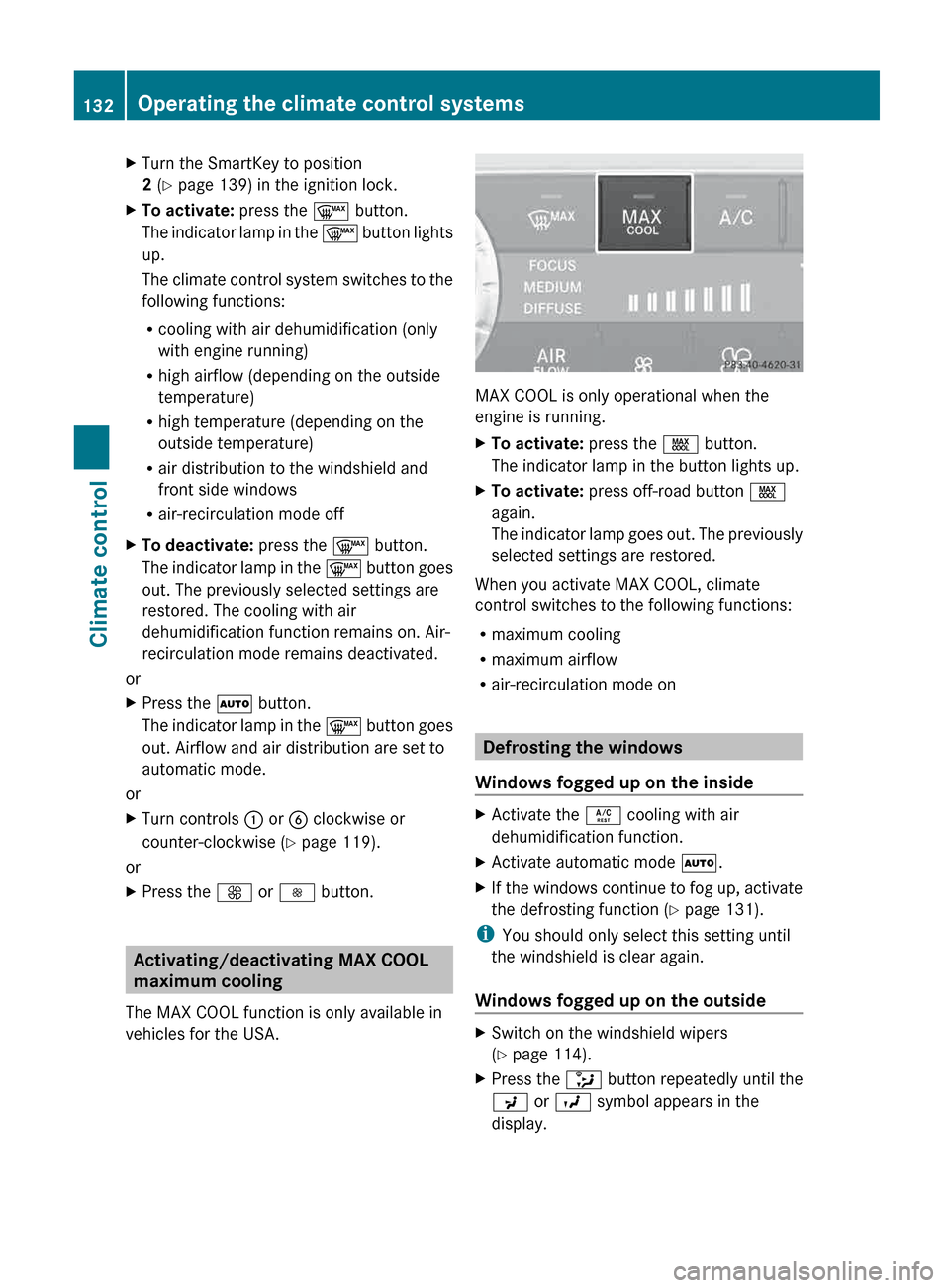
vehicles for the USA. MAX COOL is only operational when the
engine is running.
X
To activate: press the Ù button.
The indicator lamp in the button lights up.
X To activate: press off-road button Ù
again.
The
indicator lamp goes out. The previously
selected settings are restored.
When you activate MAX COOL, climate
control switches to the following functions:
R maximum cooling
R maximum airflow
R air-recirculation mode on Defrosting the windows
Windows fogged up on the inside X
Activate the Á cooling with air
dehumidification function.
X Activate automatic mode Ã.
X If the windows continue to fog up, activate
the defrosting function
(Y page 131).
i You should only select this setting until
the windshield is clear again.
Windows fogged up on the outside X
Switch on the windshield wipers
(Y page 114).
X Press the _ button repeatedly until the
P or O symbol appears in the
display. 132
Operating the climate control systems
Climate control
Page 156 of 364
For further information on fuel and fuel quality
(Y page 350).
Refueling
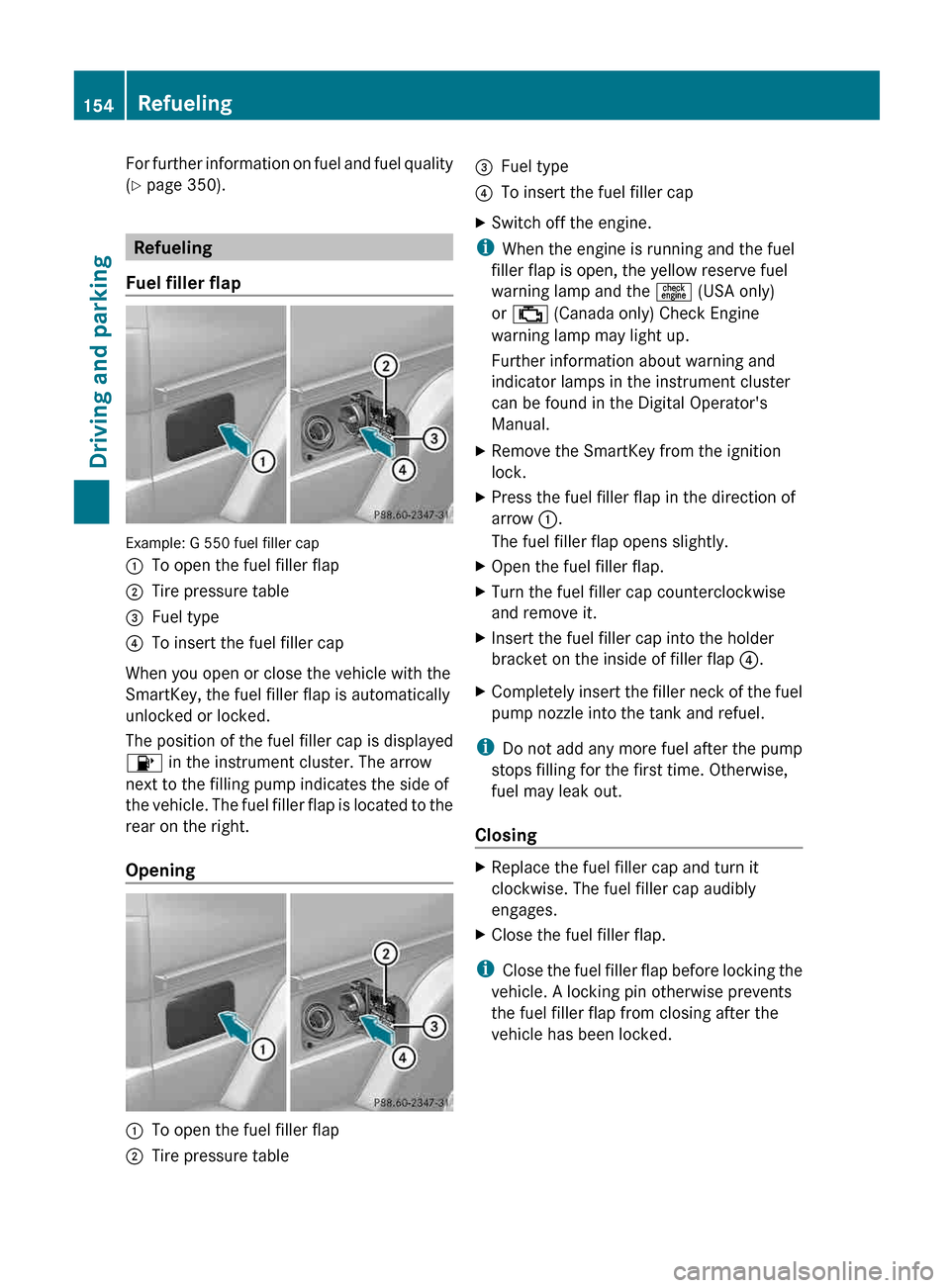
Fuel filler flap Example: G 550 fuel filler cap
:
To open the fuel filler flap
; Tire pressure table
= Fuel type
? To insert the fuel filler cap
When you open or close the vehicle with the
SmartKey, the fuel filler flap is automatically
unlocked or locked.
The position of the fuel filler cap is displayed
8 in the instrument cluster. The arrow
next to the filling pump indicates the side of
the
vehicle. The fuel filler flap is located to the
rear on the right.
Opening :
To open the fuel filler flap
; Tire pressure table =
Fuel type
? To insert the fuel filler cap
X Switch off the engine.
i When the engine is running and the fuel
filler flap is open, the yellow reserve fuel
warning lamp and the = (USA only)
or ; (Canada only) Check Engine
warning lamp may light up.
Further information about warning and
indicator lamps in the instrument cluster
can be found in the Digital Operator's
Manual.
X Remove the SmartKey from the ignition
lock.
X Press the fuel filler flap in the direction of
arrow :.
The fuel filler flap opens slightly.
X Open the fuel filler flap.
X Turn the fuel filler cap counterclockwise
and remove it.
X Insert the fuel filler cap into the holder
bracket on the inside of filler flap ?.
X Completely insert the filler neck of the fuel
pump nozzle into the tank and refuel.
i Do not add any more fuel after the pump
stops filling for the first time. Otherwise,
fuel may leak out.
Closing X
Replace the fuel filler cap and turn it
clockwise. The fuel filler cap audibly
engages.
X Close the fuel filler flap.
i Close
the fuel filler flap before locking the
vehicle. A locking pin otherwise prevents
the fuel filler flap from closing after the
vehicle has been locked. 154
Refueling
Driving and parking
Page 208 of 364
This will use the braking effect of the engine,
so that less braking will be required to
maintain the speed. which relieves the load
on
the brake system and prevents the brakes
from overheating and wearing too quickly. If
you need additional braking, depress the
brake pedal repeatedly rather than
continuously.
Driving tips If the trailer swings from side to side:
X
Do not accelerate.
X Do not counter-steer.
X Brake if necessary.
R Maintain a greater distance from the
vehicle
in front than when driving without a
trailer.
R Avoid braking abruptly. If possible, brake
gently at first to allow the trailer to run on.
Then, increase the braking force rapidly.
R The values given for gradient-climbing
capabilities from a standstill refer to sea
level. When driving in mountainous areas,
note that the power output of the engine,
and consequently the vehicle's gradient-
climbing capability, decrease with
increasing altitude. Trailer power supply
! You can connect accessories with a
maximum
power consumption of 180 W to
the permanent power supply.
You must not charge a trailer battery using
the power supply.
The trailer socket of your vehicle is equipped
at the factory with a permanent power supply.
The permanent power supply is supplied via
trailer socket pin 9.
A qualified specialist workshop can provide
more information about installing the trailer
electrics. Trailer with 7-pin connector
General notes You can make a connection to the 13-pin
socket on the ball coupling using an adapter
or, if necessary, an adapter cable. Both can
be obtained in a qualified specialist
workshop.
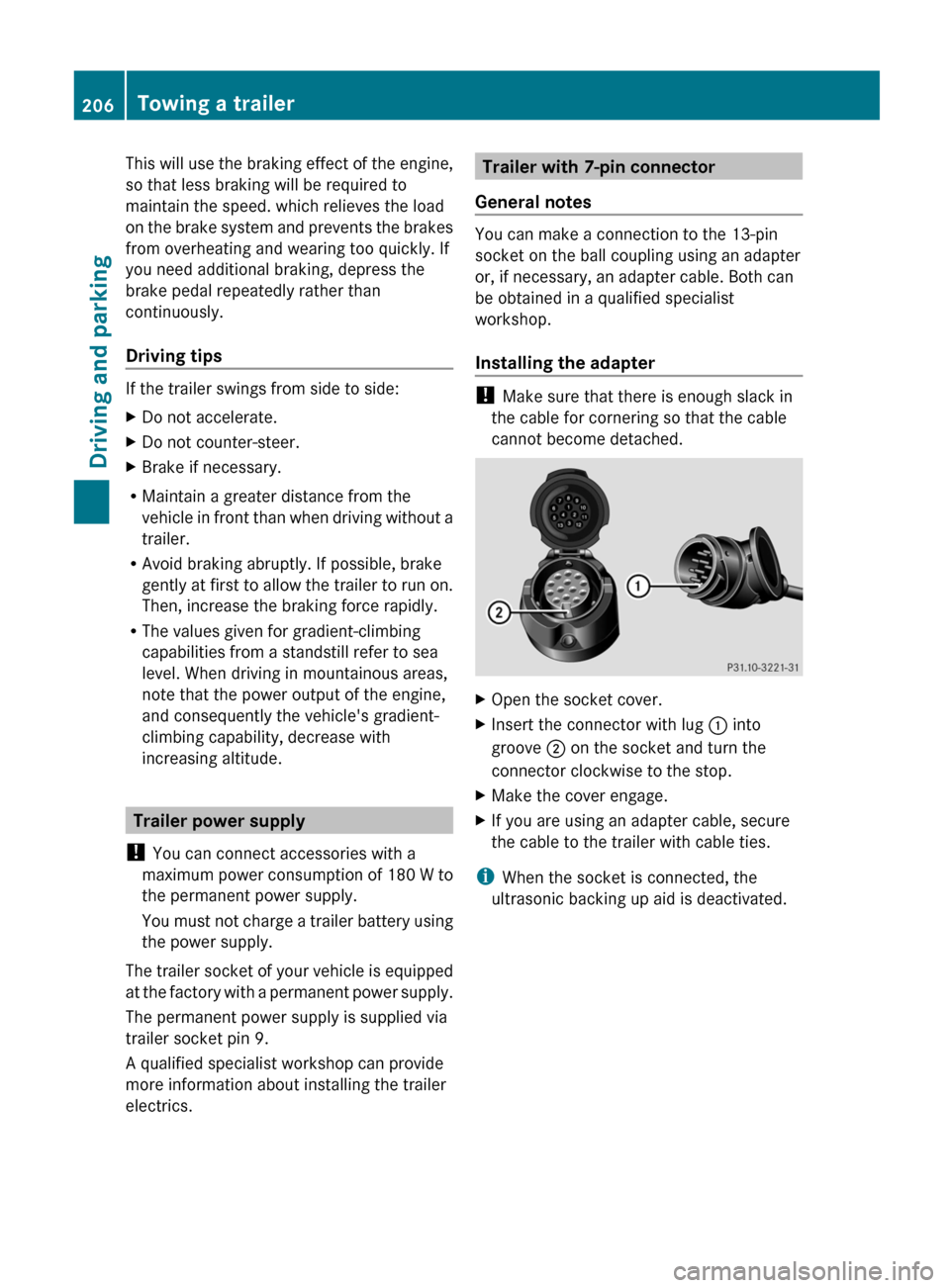
Installing the adapter
!
Make sure that there is enough slack in
the cable for cornering so that the cable
cannot become detached. X
Open the socket cover.
X Insert the connector with lug : into
groove ; on the socket and turn the
connector clockwise to the stop.
X Make the cover engage.
X If you are using an adapter cable, secure
the cable to the trailer with cable ties.
i When the socket is connected, the
ultrasonic backing up aid is deactivated. 206
Towing a trailer
Driving and parking
Page 211 of 364
Displays and operation
Instrument cluster
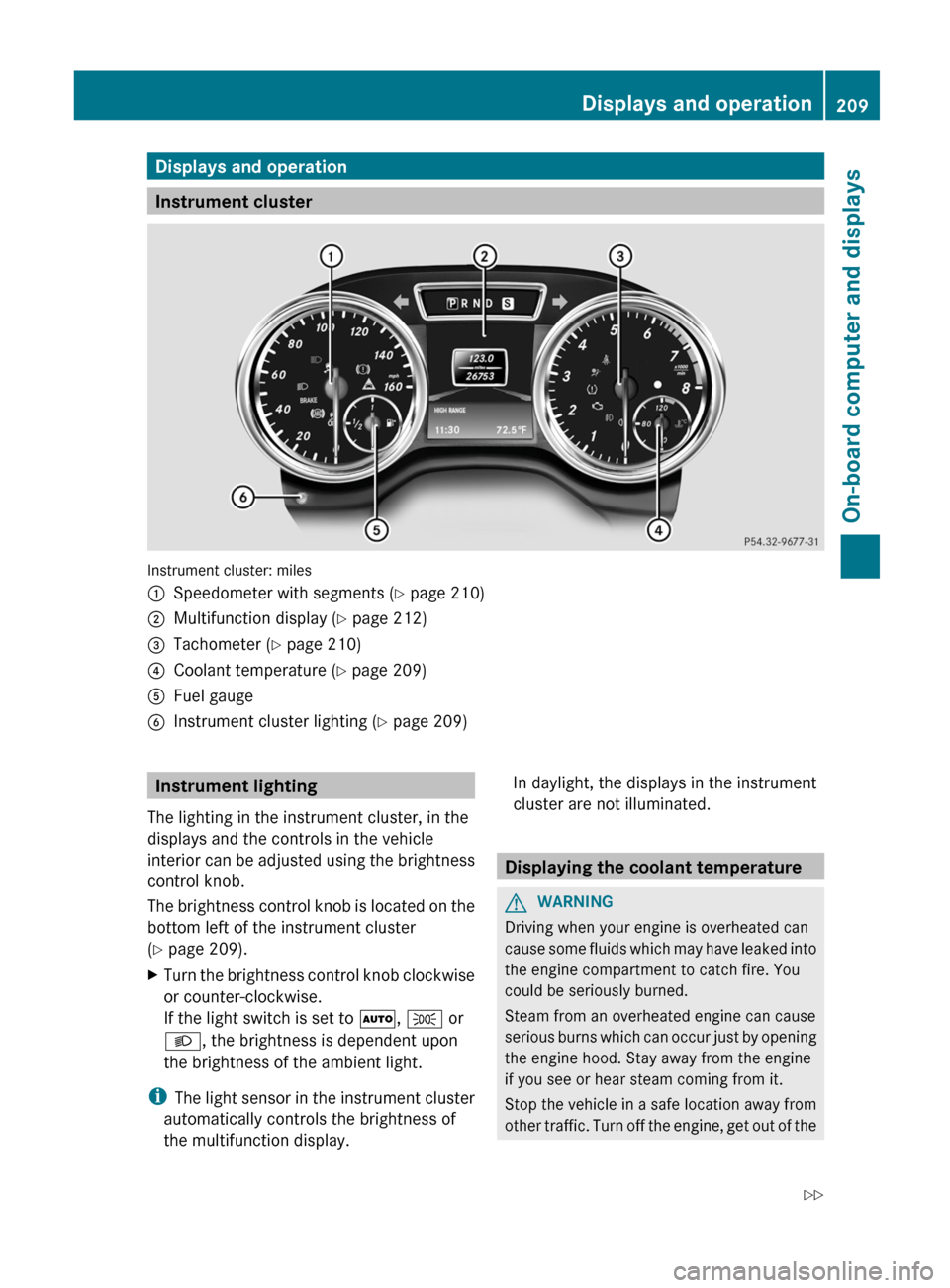
Instrument cluster: miles
:
Speedometer with segments (Y page 210)
; Multifunction display ( Y page 212)
= Tachometer (Y page 210)
? Coolant temperature ( Y page 209)
A Fuel gauge
B Instrument cluster lighting (Y page 209) Instrument lighting
The lighting in the instrument cluster, in the
displays and the controls in the vehicle
interior
can be adjusted using the brightness
control knob.
The brightness control knob is located on the
bottom left of the instrument cluster
(Y page 209).
X Turn the brightness control knob clockwise
or counter-clockwise.
If the light switch is set to Ã, T or
L, the brightness is dependent upon
the brightness of the ambient light.
i The
light sensor in the instrument cluster
automatically controls the brightness of
the multifunction display. In daylight, the displays in the instrument
cluster are not illuminated.
Displaying the coolant temperature
G
WARNING
Driving when your engine is overheated can
cause
some fluids which may have leaked into
the engine compartment to catch fire. You
could be seriously burned.
Steam from an overheated engine can cause
serious burns which can occur just by opening
the engine hood. Stay away from the engine
if you see or hear steam coming from it.
Stop the vehicle in a safe location away from
other traffic. Turn off the engine, get out of the Displays and operation
209
On-board computer and displays
Z
Page 265 of 364
If the rear bench seat is not occupied:
X
Insert the belt tongue on the outer seat
belts into the buckle of opposite seat
belt :.
X Secure the load with sufficiently strong and
wear-resistant tie downs.
X Pad sharp edges for protection. Stowage areas
Stowage space
Important safety notes G
WARNING
To help avoid personal injury during a collision
or sudden maneuver, exercise care when
storing objects in the vehicle. Put luggage or
cargo in the cargo compartment if possible.
Do not pile luggage or cargo higher than the
seat backrests.
Keep compartment lids closed. This will help
to prevent stored objects from being thrown
about and injuring vehicle occupants during
R braking
R vehicle maneuvers
R an accident
Stowage compartments in the front Glove box X
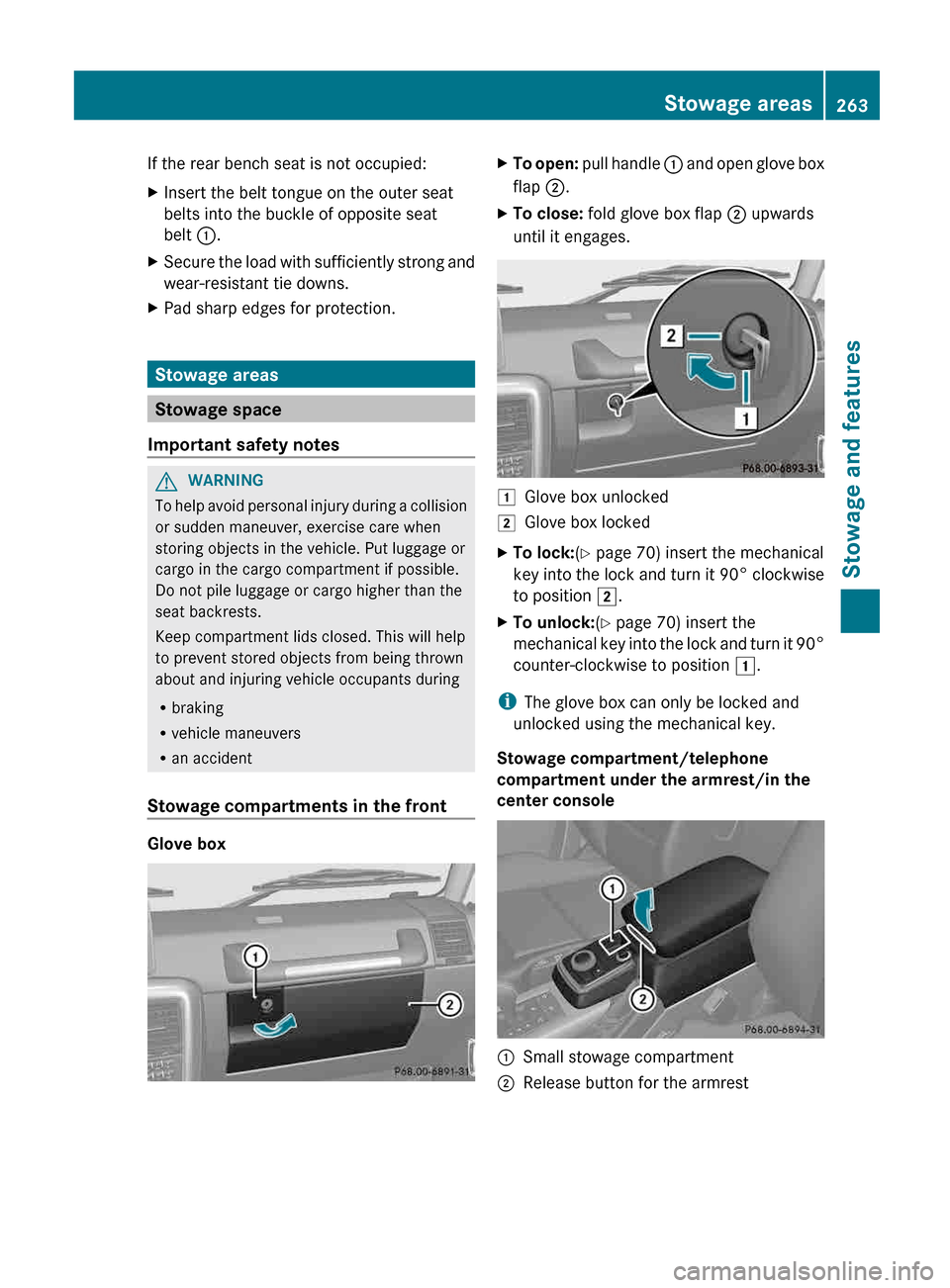
To open: pull handle : and open glove box
flap ;.
X To close: fold glove box flap ; upwards
until it engages. 1
Glove box unlocked
2 Glove box locked
X To lock:(Y page 70) insert the mechanical
key
into the lock and turn it 90° clockwise
to position 2.
X To unlock:(Y page 70) insert the
mechanical
key into the lock and turn it 90°
counter-clockwise to position 1.
i The glove box can only be locked and
unlocked using the mechanical key.
Stowage compartment/telephone
compartment under the armrest/in the
center console :
Small stowage compartment
; Release button for the armrest Stowage areas
263
Stowage and features Z