warning MERCEDES-BENZ G-Class 2016 W463 Owner's Manual
[x] Cancel search | Manufacturer: MERCEDES-BENZ, Model Year: 2016, Model line: G-Class, Model: MERCEDES-BENZ G-Class 2016 W463Pages: 302, PDF Size: 7.04 MB
Page 222 of 302
XPush down the right-hand and left-hand sides
of cargo compartment cover;until it
engages.
XSlide catches :in the direction of the side
trim.
Roof carrier
GWARNING
When you load the roof, the center of gravity
of the vehicle rises and the driving character-
istics change. If you exceed the maximum roof
load, the driving characteristics, as well as
steering and braking, will be greatly impaired.
There is a risk of an accident.
Never exceed the maximum roof load and
adjust your driving style.
The roof is not suited for transporting loads. Do
not use the roof rails or other accessories which
are mounted on the roof.
Features
Cup holder
Important safety notes
GWARNING
If you transport objects in the vehicle interior
and these are not adequately secured, they
could slip or be flung around and thereby
strike vehicle occupants. In addition, cup
holders, open stowage spaces and mobile
phone brackets may not always be able to
hold the objects placed in them in the event of
an accident. There is a risk of injury, particu-
larly in the event of sharp braking or sudden
changes of direction.
RAlways stow objects in such a way that they cannot be tossed about in these or similar
situations.
RAlways make sure that objects do not pro-
trude out of the stowage spaces, luggage
nets or stowage nets.
REnsure that closable stowage spaces are
shut before beginning your journey.
RAlways stow and secure heavy, hard, poin-
ted, sharp-edged, fragile or large objects in
the cargo compartment.
!Only use the cup holders for containers of
the right size and which have lids. The drinks could otherwise spill.
Observe the loading guidelines (
Ypage 214).
Cup holder on the center console
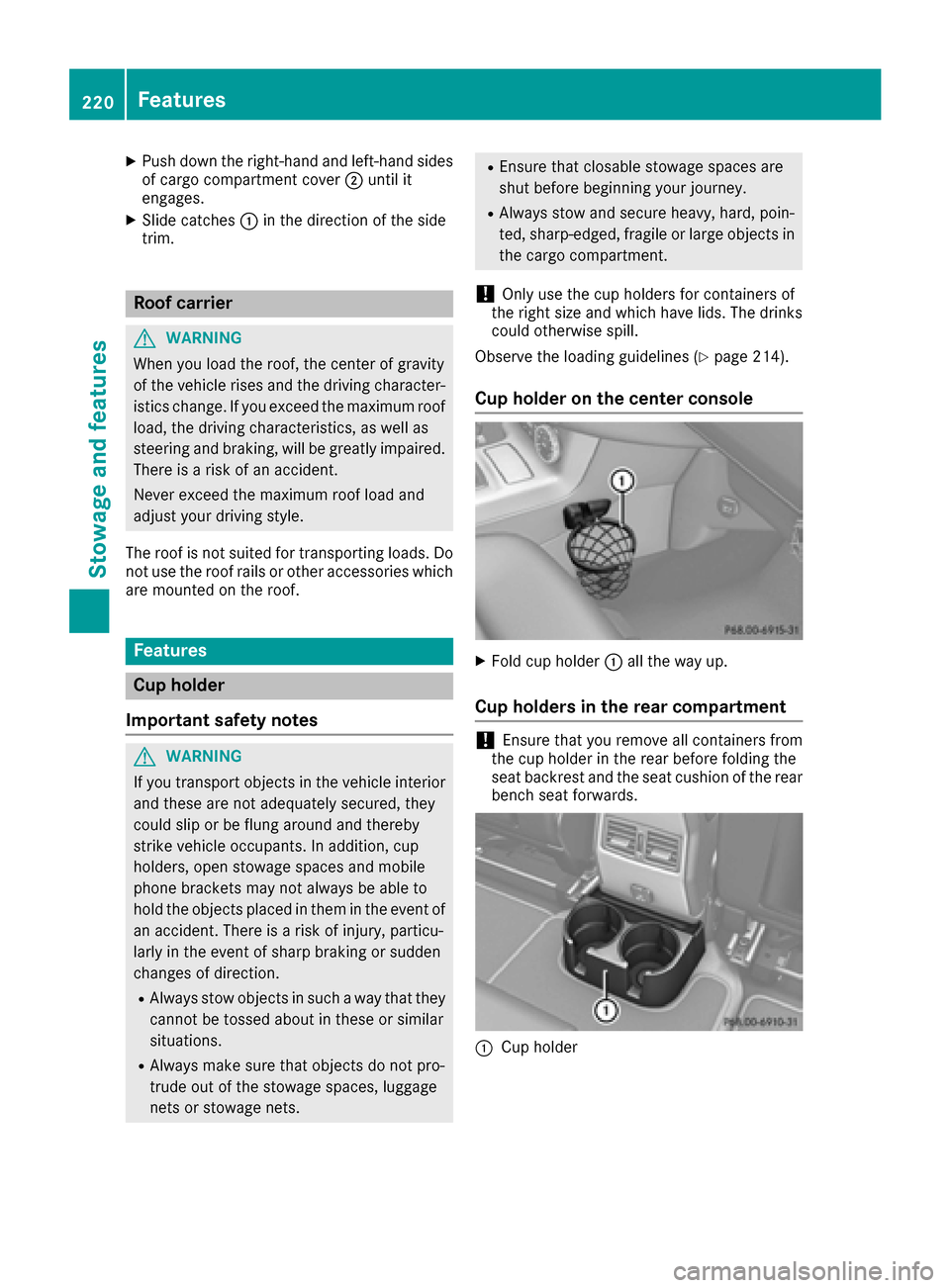
XFold cup holder :all the way up.
Cup holders in the rear compartment
!Ensure that you remove all containers from
the cup holder in the rear before folding the
seat backrest and the seat cushion of the rear
bench seat forwards.
:Cup holder
220Features
Stowage and features
Page 223 of 302
Sun visors
Overview
GWARNING
If the mirror cover of the vanity mirror is folded
up when the vehicle is in motion, you could be
blinded by incident light. There is a risk of an
accident.
Always keep the mirror cover folded down
while driving.
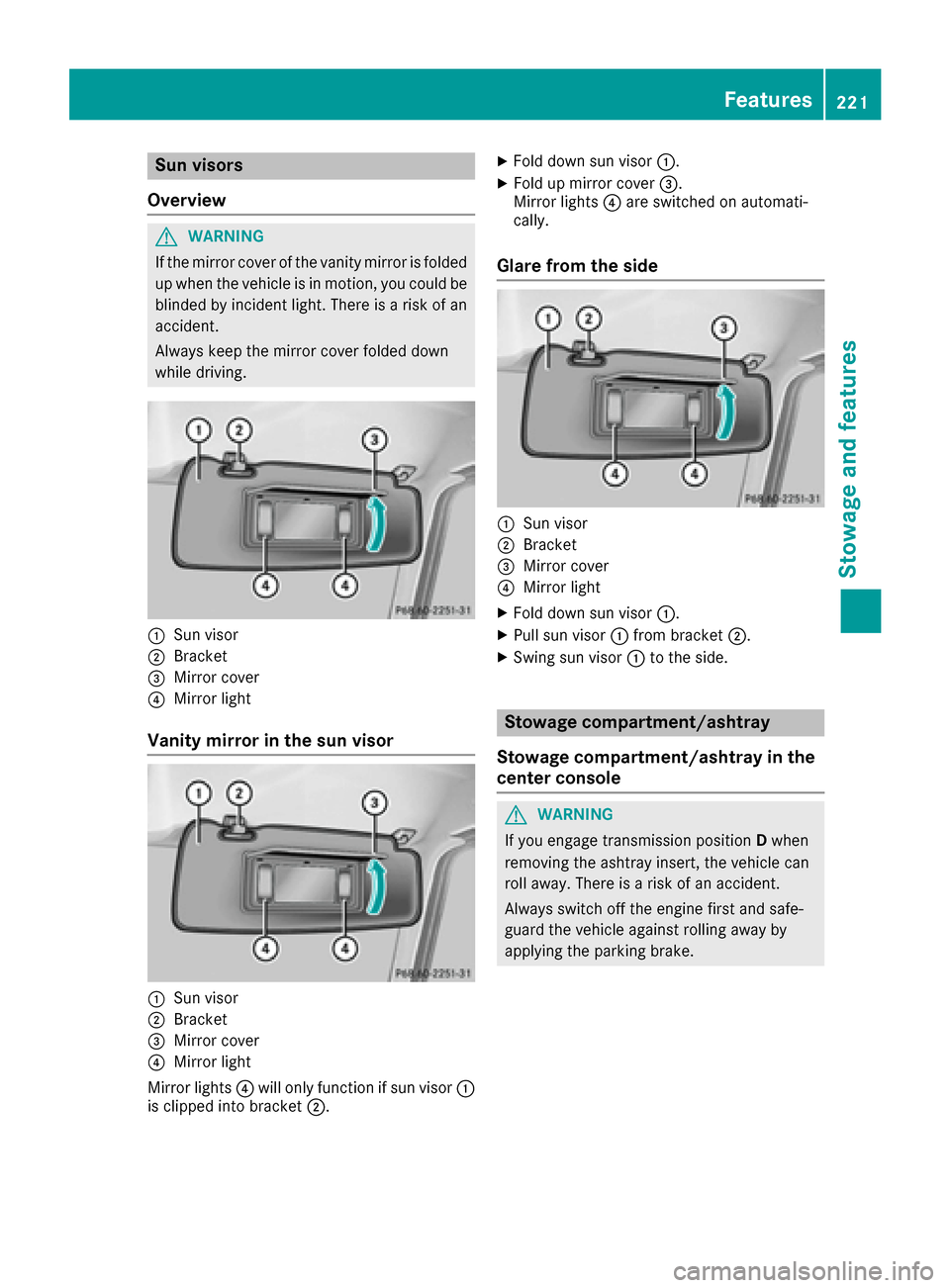
:Sun visor
;Bracket
=Mirror cover
?Mirror light
Vanity mirror in the sun visor
:Sun visor
;Bracket
=Mirror cover
?Mirror light
Mirror lights ?will only function if sun visor :
is clipped into bracket ;.
XFold down sun visor:.
XFold up mirror cover =.
Mirror lights ?are switched on automati-
cally.
Glare from the side
:Sun visor
;Bracket
=Mirror cover
?Mirror light
XFold down sun visor :.
XPull sun visor:from bracket ;.
XSwing sun visor :to the side.
Stowage compartment/ashtray
Stowage compartment/ashtray in the
center console
GWARNING
If you engage transmission position Dwhen
removing the ashtray insert, the vehicle can
roll away. There is a risk of an accident.
Always switch off the engine first and safe-
guard the vehicle against rolling away by
applying the parking brake.
Features221
Stowage and features
Z
Page 224 of 302
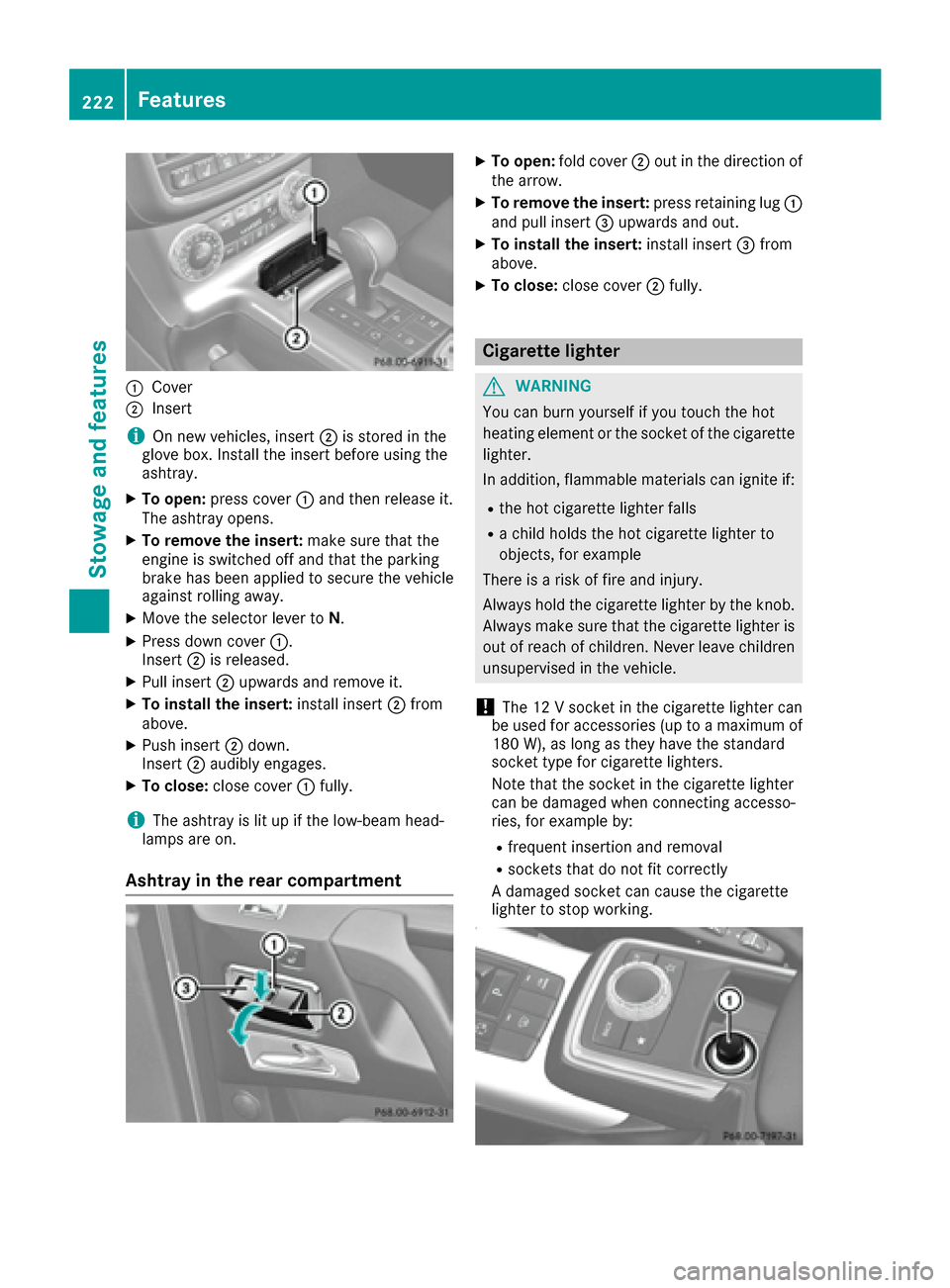
:Cover
;Insert
iOn new veh icles, insert ;isstored inthe
glove box. Install the insert before using the
ashtray.
XTo open: press cover :and then release it.
The ashtray opens.
XTo remove the insert: make sure that the
engine is switched off and that the parking
brake has been appliedto secure the veh icle
against rolling away.
XMove the selector lever to N.
XPress downcover :.
In sert ;isreleased.
XPull insert ;upwards and remove it.
XTo install the insert: install insert;from
above.
XPush insert ;down .
In sert ;audibly engages.
XTo close: close cover :fully.
iThe ashtray is litupifthe low- beam head-
lamps are on.
Ashtray in the rear compartment
XTo open: fold cover ;out in the direction of
the arrow.
XTo remove the insert: press retaining lug :
and pull insert =upwards and out.
XTo install the insert: install insert =from
above.
XTo close: close cover ;fully.
Cigarette lighter
GWARNING
You can burn yourself ifyou touch the hot
heating element or the socket of the cigarette lighter.
In addition, flammable materials can ignite if:
Rthe hot cigarette lighter falls
Ra child holds the hot cigarette lighter to
objects, for example
There isa risk of fire and injury.
Alwa ys hold the cigarette lighter bythe knob.
Alwa ys make sure that the cigarette lighter is
out of reach of children. Never leave ch ildren
unsupervised in the vehicle.
!The 12 V socket inthe cigarette lighter can
be used for accessories (up to a maximum of
180 W), as long as they have the standard
socket type for cigarette lighters.
Note that the socket in the cigarette lighter
can bedamaged when connecting accesso-
ries, for example by:
Rfrequent insertion and removal
Rsockets that do not fit correctly
A damaged socket can cause the cigarette
lighter to stop working.
222Features
Stowage and features
Page 225 of 302
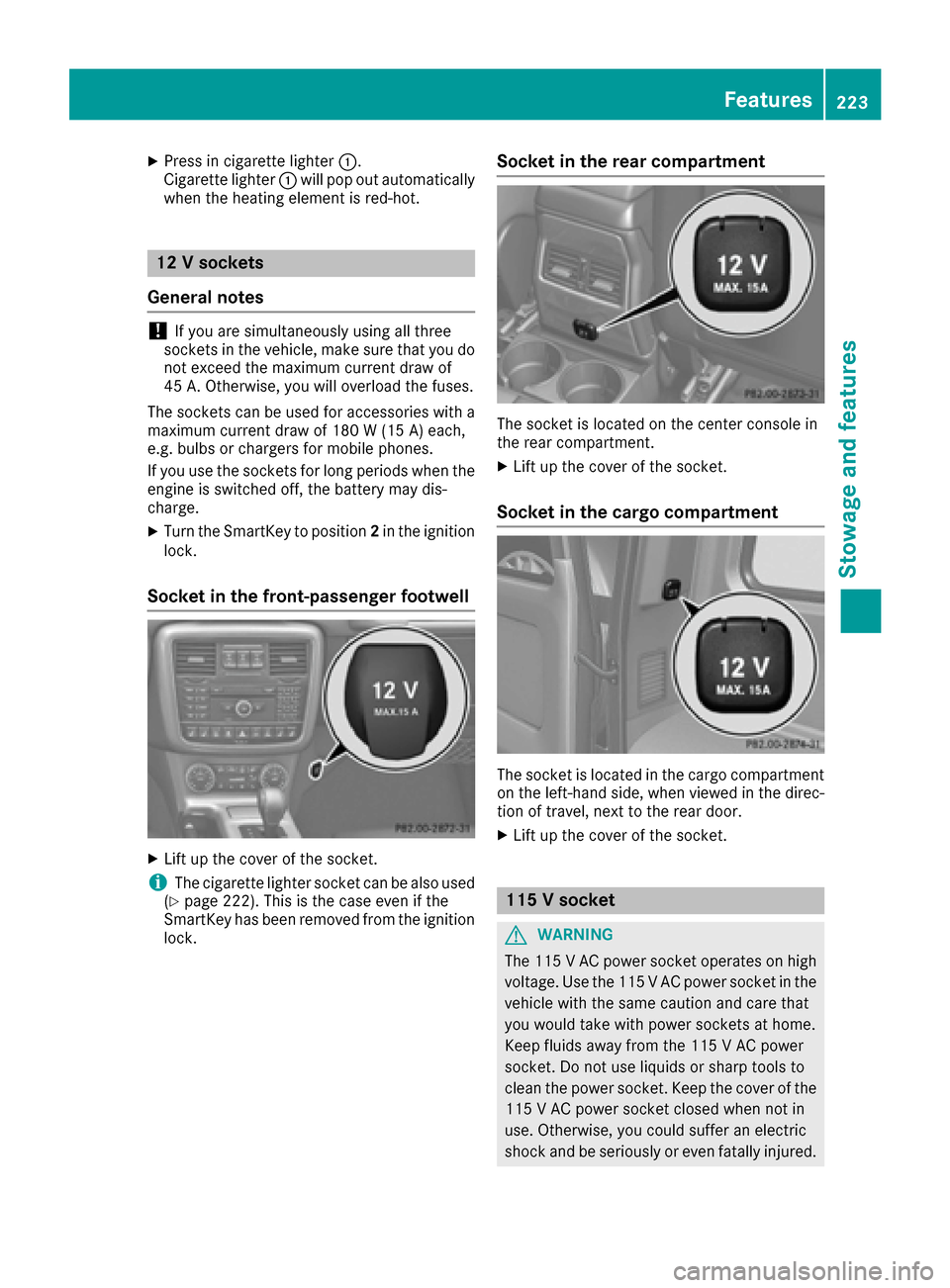
XPress in cigarette lighter:.
Cigarette lighter :will pop out automatically
when the heating element is red-hot.
12 V sockets
General notes
!If you are simultaneously using all three
sockets in the vehicle, make sure that you do
not exceed the maximum current draw of
45 A. Otherwise, you will overload the fuses.
The sockets can be used for accessories with a
maximum current draw of 180 W (15 A) each,
e.g. bulbs or chargers for mobile phones.
If you use the sockets for long periods when the
engine is switched off, the battery may dis-
charge.
XTurn the SmartKey to position 2in the ignition
lock.
Socket in the front-passenger footwell
XLift up the cover of the socket.
iThe cigarette lighter socket can be also used
(Ypage 222). This is the case even if the
SmartKey has been removed from the ignition
lock.
Socket in the rear compartment
The socket is located on the center console in
the rear compartment.
XLift up the cover of the socket.
Socket in the cargo compartment
The socket is located in the cargo compartment
on the left-hand side, when viewed in the direc-
tion of travel, next to the rear door.
XLift up the cover of the socket.
115 V socket
GWARNING
The 115 VAC power socket operates on high
voltage. Use the 115 V AC power socket in the
vehicle with the same caution and care that
you would take with power sockets at home.
Keep fluids away from the 115 V AC power
socket. Do not use liquids or sharp tools to
clean the power socket. Keep the cover of the
115 V AC power socket closed when not in
use. Otherwise, you could suffer an electric
shock and beseriously or even fat allyinjured.
Features223
Stowage and features
Z
Page 226 of 302
GWARNING
Any device that you connect must have a suit-
able plug and meet U.S. standards. Never pull at a cable to disconnect a plug from a 115 V
AC power socket. Never use a damaged con-
nection cable. The 115 V AC power socket
must never be connected to another 115 V AC power source. Do not use a converter with an
earthed plug for the 115 V AC power socket.
This could cause serious injury to you and/or
other people.
GWARNING
If the 115 V AC power socket is damaged or
pulled out of the trim, do not use or touch the
115 VAC power socket. The use of a 115 VAC
power socket that has been damaged or
pulled out of the trim could cause serious
injury to you or others.
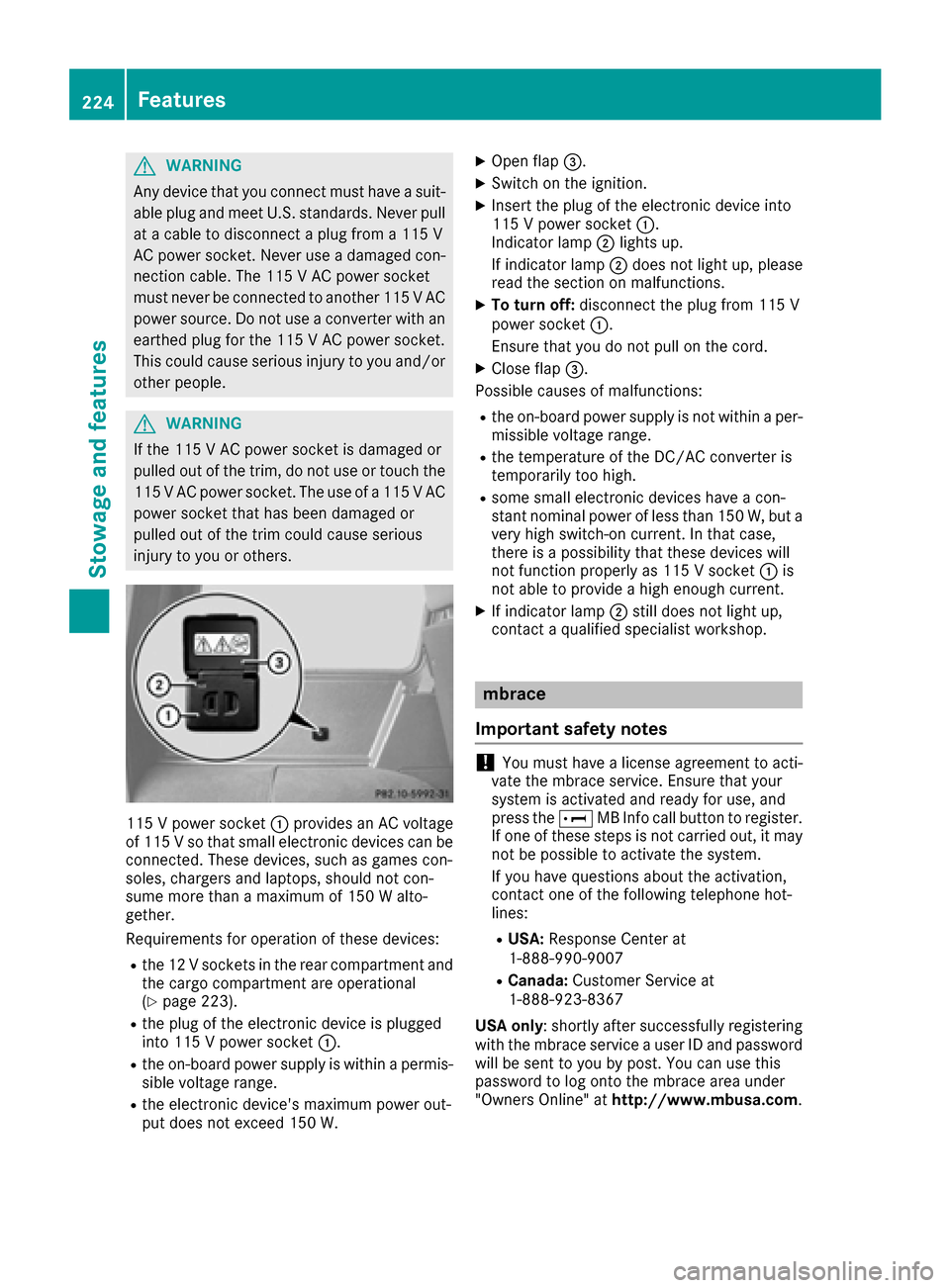
115 V power socket :provides an AC voltage
of 115 Vso that small electronic devices can be
connected. These devices, such as games con-
soles, chargers and laptops, should not con-
sume more than a maximum of 150 W alto-
gether.
Requirements for operation of these devices:
Rthe 12 V sockets in the rear compartment and
the cargo compartment are operational
(
Ypage 223).
Rthe plug of the electronic device is plugged
into 115 V power socket :.
Rthe on-board power supply is within a permis-
sible voltage range.
Rthe electronic device's maximum power out-
put does not exceed 150 W.
XOpen flap =.
XSwitch on the ignition.
XInsert the plug of the electronic device into
115 V power socket :.
Indicator lamp ;lights up.
If indicator lamp ;does not light up, please
read the section on malfunctions.
XTo turn off: disconnect the plug from 115 V
power socket :.
Ensure that you do not pull on the cord.
XClose flap =.
Possible causes of malfunctions:
Rthe on-board power supply is not within a per-
missible voltage range.
Rthe temperature of the DC/AC converter is
temporarily too high.
Rsome small electronic devices have a con-
stant nominal power of less than 150 W, but a
very high switch-on current. In that case,
there is a possibility that these devices will
not function properly as 115 V socket :is
not able to provide a high enough current.
XIf indicator lamp ;still does not light up,
contact a qualified specialist workshop.
mbrace
Important safety notes
!You must have a license agreement to acti-
vate the mbrace service. Ensure that your
system is activated and ready for use, and
press the EMB Info call button to register.
If one of these steps is not carried out, it may not be possible to activate the system.
If you have questions about the activation,
contact one of the following telephone hot-
lines:
RUSA: Response Center at
1-888-990-9007
RCanada: Customer Service at
1-888-923-8367
USA only : shortly after successfully registering
with the mbrace service a user ID and password
will be sent to you by post. You can use this
password to log onto the mbrace area under
"Owners Online" at http://www.mbusa.com.
224Features
Stowage and features
Page 227 of 302
The mbrace system is available if:
Rit has been activated and is operational. Acti-vation requires an available mobile phone net-
work, a valid SIM card and a subscription to a
security service.
Rthe battery is sufficiently charged.
Rthe corresponding mobile phone network is
available for transmitting data to the Cus-
tomer Center.
iDetermining the location of the vehicle on a
map is only possible if there is sufficient GPS
reception and the vehicle position can be for-
warded to the Customer Center.
The mbrace system
To adjust the volume during an mbrace call, pro-
ceed as follows:
XPress the WorX button on the multi-
function steering wheel.
or
XUse the COMAND volume control.
The mbrace system provides three different
services:
RAutomatic and manual emergency call
RRoadside Assistance call
RMB Info call
USA only: you can find more information and a
description of all available features under "Own-
ers Online" at http://www.mbusa.com.
System self-test
GWARNING
A malfunction in the system has been detec-
ted if one of the following conditions occurs:
Rthe indicator lamp in the SOS button does
not light up during the system self-diagno-
sis.
Rthe indicator lamp in the ºRoadside
Assistance button does not light up during
the system self-diagnosis.
Rthe indicator lamp in the Einformation
button does not light up during the system
self-diagnosis.
Rthe indicator lamp in the SOS button, º
Roadside Assistance button or Einfor-
mation button continues to be lit red after
the system self-diagnosis.
RtheTeleAidinoperativeorTeleAid
not activatedmessage appears on the
multifunction display after the system self-
diagnosis.
If a malfunction is indicated as outlined above,
the system may not operate as expected. In
the event of an emergency, assistance must
be summoned by other means.
Have the system checked at the nearest
authorized Mercedes-Benz Center or contact
the following service hotlines:
RUSA: Response Center at
1-888-990-9007
RCanada: Customer Service at
1-888-923-8367
After you have switched on the ignition, the sys- tem carries out a self-diagnosis.
Emergency call
Important safety notes
GWARNING
If the indicator lamp in the SOS button is
flashing continuously and there was no voice
connection to the Response Center estab-
lished, then the mbrace system could not ini- tiate an emergency call (e.g. the relevant cel-
lular phone network is not available).
The message Call Failed
appears in the
multifunction display for approximately
10 seconds.
Should this occur, assistance must be sum-
moned by other means.
!You must have a license agreement to acti-
vate the mbrace service. Ensure that your
system is activated and ready for use, and
press the EMB Info call button to register.
If one of these steps is not carried out, it may
not be possible to activate the system.
Features225
Stowage and features
Z
Page 228 of 302
If you have questions about the activation,
contact one of the following telephone hot-
lines:
RUSA:Response Center at
1-888-990-9007
RCanada: Customer Service at
1-888-923-8367
An emergency call is dialed automatically if an
air bag or Emergency Tensioning Device is trig-
gered.
iAn automatically dialed mbrace emergency
call cannot be canceled.
An emergency call can also be initiated man-
ually.
As soon as the emergency call has been initi-
ated, the indicator lamp in the SOS button
flashes. The Connecting Call
message
appears on the multifunction display.
COMAND is muted.
Once the connection has been made, the Call
Connectedmessage appears in the multifunc-
tion display.
All important information on the emergency is
provided, for example:
Rcurrent location of the vehicle (as determined by the GPS system)
Rvehicle model
Rvehicle color
Rvehicle identification number
A short time after the emergency call is initiated,
a voice connection is automatically established
between the Response Center and the vehicle
occupants. If the vehicle occupants are able to
respond, the Response Center will attempt to
obtain more detailed information on the emer-
gency.
iIf there is no response from the vehicle
occupants, an ambulance is immediately sent
to the vehicle.
Making an emergency call
GWARNING
If you feel at any way in jeopardy when in the
vehicle (e.g. smoke or fire in the vehicle, vehi-
cle in a dangerous road location), please do
not wait for voice contact after you have
pressed the SOS button. Carefully leave the
vehicle and move to a safe location. The
Response Center will automatically contact
local emergency officials with the vehicle's
approximate location if they receive an auto-
matic SOS signal and cannot make voice con- tact with the vehicle occupants.
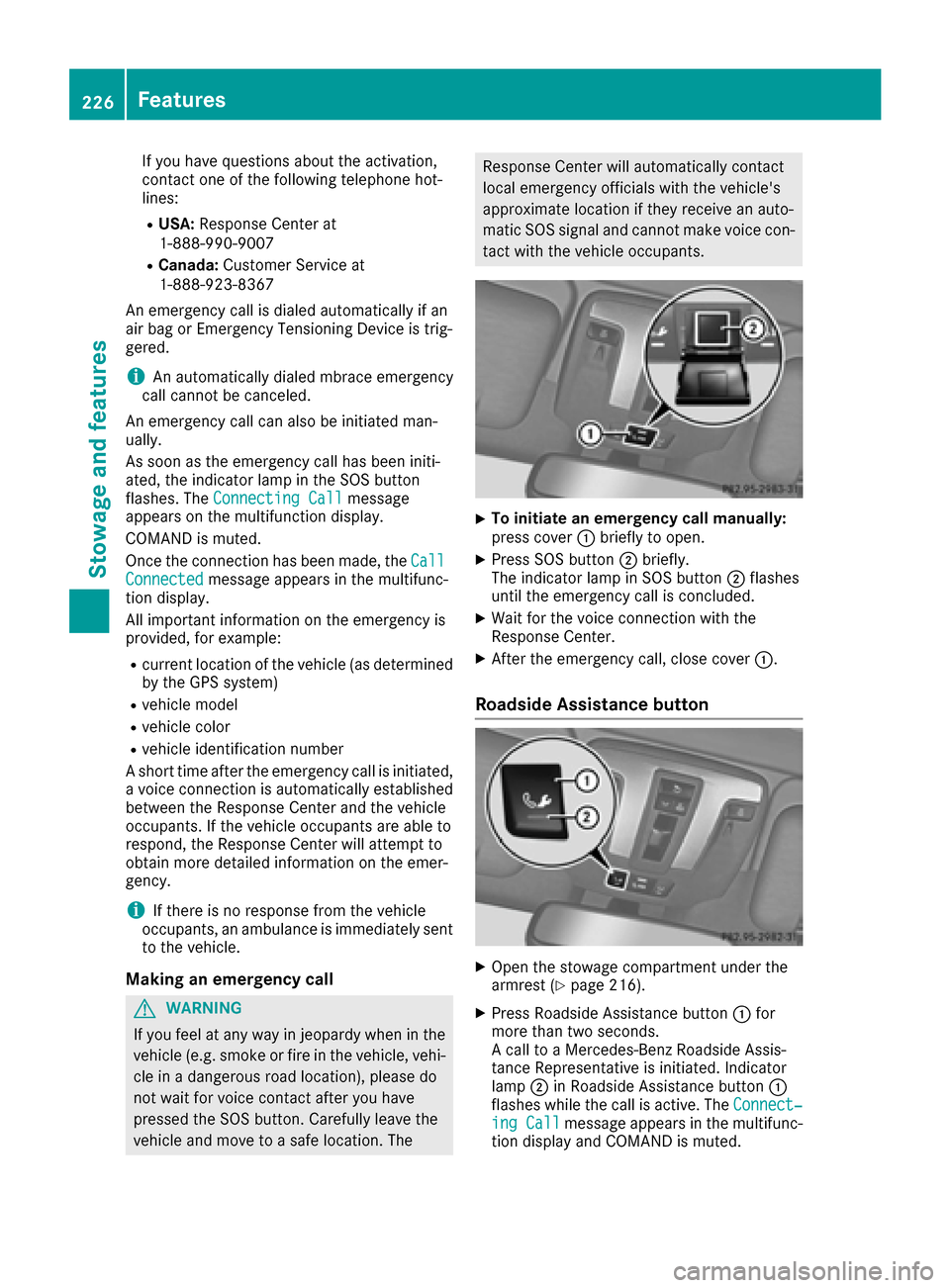
XTo initiate an emergency call manually:
press cover :briefly to open.
XPress SOS button ;briefly.
The indicator lamp in SOS button ;flashes
until the emergency call is concluded.
XWait for the voice connection with the
Response Center.
XAfter the emergency call, close cover :.
Roadside Assistance button
XOpen the stowage compartment under the
armrest (Ypage 216).
XPress Roadside Assistance button:for
more than two seconds.
A call to a Mercedes-Benz Roadside Assis-
tance Representative is initiated. Indicator
lamp ;in Roadside Assistance button :
flashes while the call is active. The Connect‐
ing Callmessage appears in the multifunc-
tion display and COMAND is muted.
226Features
Stowage and features
Page 233 of 302
can specify up to ten areas simultaneously. Dif-
ferent settings are possible for each area.
USA only: these settings can be called up under
"Owners Online" at http://www.mbusa.com.
Alternatively, you can trigger an MB Info call and
inform the customer service representative that
you wish to activate geo fencing.
Currently inactive areas can be activated by text
message.
Triggering the vehicle alarm
With this function, you can trigger the vehicle's
panic alarm via text message. An alarm sounds
and the exterior lighting flashes. Depending on
the setting, the panic alarm lasts five or ten sec-
onds. Afterwards, the alarm switches off.
Brush guard (USA only)
If the brush guard has to be removed, contact a
qualified specialist workshop.
Garage door opener
General notes
You can use the HomeLink®garage door opener
integrated into the rear-view mirror to operate
up to three different gate/garage door opener
systems.
iCertain garage door drives are incompatible
with the integrated garage door opener. If you
have difficulty programing the integrated
garage door opener, contact an authorized
Mercedes-Benz Center. You can also contact the following service hotlines:
RUSA: Mercedes-Benz Customer Assistance
Center at 1-800-FOR-MERCedes
RCanada: Customer Service at
1-800-387-0100
iUSA only:
This device complies with Part 15 of the FCC Rules. Operation is subject to the following
two conditions:
1. This device may not cause harmful inter-
ference, and
2. this device must accept any interference
received, including interference that may
cause undesired operation. Any unauthorized modification to this device
could void the user's authority to operate the
equipment.
iCanada only:
This device complies with RSS-210 of Indus-
try Canada. Operation is subject to the fol-
lowing two conditions:
1. This device may not cause harmful inter-
ference, and
2. this device must accept any interference
received, including interference that may
cause undesired operation.
Any unauthorized mod ifica
tion to this device
could void the user's authority to operate the
equipment.
Important safety notes
GWARNING
When you operate or program the garage door
with the integrated garage door opener, per-
sons in the range of movement of the garage
door can become trapped or struck by the
garage door. There is a risk of injury.
When using the integrated garage door
opener, always make sure that nobody is
within the range of movement of the garage
door.
GWARNING
Combustion engines emit poisonous exhaust
gases such as carbon monoxide. Inhaling
these exhaust gases leads to poisoning. There
is a risk of fatal injury. Therefore never leave
the engine running in enclosed spaces with-
out sufficient ventilation.
When programming a garage door opener, park
the vehicle outside the garage. Do not run the
engine while programming.
Programming the remote control
Programming
Pay attention to the "Important safety notes"
(Ypage 231).
Features231
Stowag ean d features
Z
Page 237 of 302
Useful information
i
This Operator's Manual describes all models
and all standard and optional equipment of
your vehicle available at the time of publica-
tion of the Operator's Manual. Country-spe-
cific differences are possible. Please note
that your vehicle may not be equipped with all
features described. This also applies to
safety-related systems and functions.
iRead the information on qualified specialist
workshops: (Ypage 23).
Engine compartment
Hood
Important safety notes
GWARNING
If the hood is unlatched, it may open up when the vehicle is in motion and block your view.
There is a risk of an accident.
Never unlatch the hood while driving. Before
every trip, ensure that the hood is locked.
GWARNING
Certain components in the engine compart-
ment may be very hot, e.g. the drive system
and radiator. Working in the engine compart-
ment poses a risk of injury.
If possible, let the drive system cool down and only touch the components described in the
following.
GWARNING
Opening the hood when the engine is over-
heated or when there is a fire in the engine
compartment could expose you to hot gases
or other service products. There is a risk of
injury.
Let an overheated engine cool down before
opening the hood. If there is a fire in the
engine compartment, keep the hood closed
and contact the fire department.
GWARNING
The ignition system and the fuel injection sys-
tem work under high voltage. If you touch
components which are under voltage, you
could get an electric shock. There is a risk of
injury.
Never touch components of the ignition sys-
tem or fuel injection system when the ignition
is switched on.
GWARNING
The engine compartment contains moving
components. Certain components, such as
the radiator fan, may continue to run or start
again suddenly when the ignition is off. There is a risk of injury.
If you need to do any work inside the engine
compartment:
Rswitch off the ignition
Rnever reach into the area where there is a
risk of danger from moving components,
such as the fan rotation area
Rremove jewelry and watches
Rkeep items of clothing and hair, for exam-
ple, away from moving parts
GWARNING
When the hood is open and the windshield
wipers are set in motion, you can be injured by
the wiper linkage. There is a risk of injury.
Always switch off the windshield wipers and
the ignition before opening the hood.
!Make sure that the windshield wipers are
not folded away from the windshield. You
could otherwise damage the windshield wip-
ers or the hood.
Do not touch the following when the ignition is
switched on:
Rignition coils
Rspark plug connectors
Rtest socket
Engine compartment235
Maintenance and care
Z
Page 238 of 302
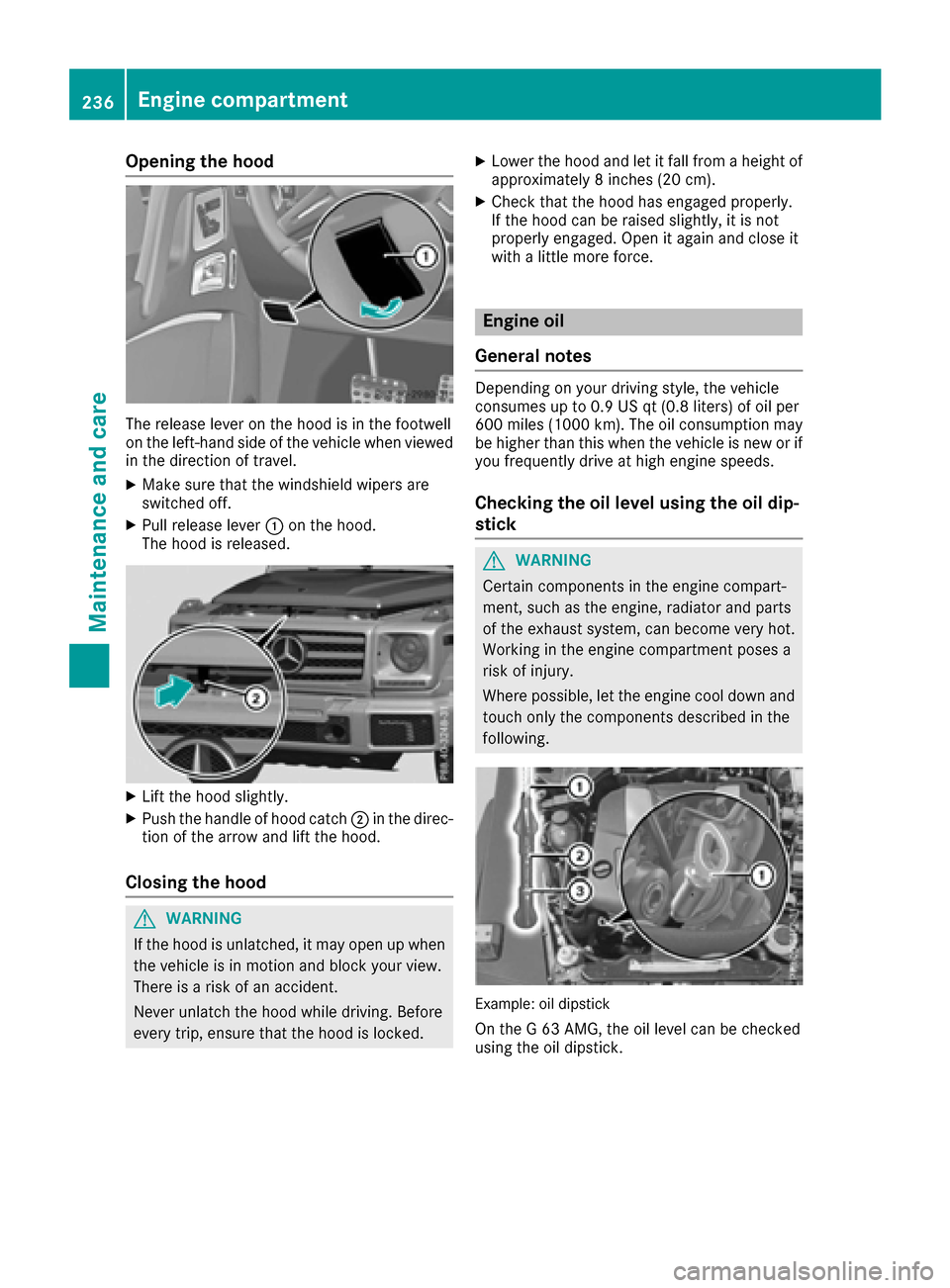
Opening the hood
The release lever on the hood is in the footwell
on the left-hand side of the vehicle when viewed
in the direction of travel.
XMake sure that the windshield wipers are
switched off.
XPull release lever:on the hood.
The hood is released.
XLift the hood slightly.
XPush the handle of hood catch ;in the direc-
tion of the arrow and lift the hood.
Closing the hood
GWARNING
If the hood is unlatched, it may open up when the vehicle is in motion and block your view.
There is a risk of an accident.
Never unlatch the hood while driving. Before
every trip, ensure that the hood is locked.
XLower the hood and let it fall from a height of
approximately 8 inches (20 cm).
XCheck that the hood has engaged properly.
If the hood can be raised slightly, it is not
properly engaged. Open it again and close it
with a little more force.
Engine oil
General notes
Depending on your driving style, the vehicle
consumes up to 0.9 US qt (0.8 liters) of oil per
600 miles (1000 km). The oil consumption may
be higher than this when the vehicle is new or if
you frequently drive at high engine speeds.
Checking the oil level using the oil dip-
stick
GWARNING
Certain components in the engine compart-
ment, such as the engine, radiator and parts
of the exhaust system, can become very hot.
Working in the engine compartment poses a
risk of injury.
Where possible, let the engine cool down and touch only the components described in the
following.
Example: oil dipstick
On the G 63 AMG, the oil level can be checked
using the oil dipstick.
236Engine compartment
Maintenance and care