display MERCEDES-BENZ G-Class 2016 W463 Owner's Guide
[x] Cancel search | Manufacturer: MERCEDES-BENZ, Model Year: 2016, Model line: G-Class, Model: MERCEDES-BENZ G-Class 2016 W463Pages: 302, PDF Size: 7.04 MB
Page 31 of 302
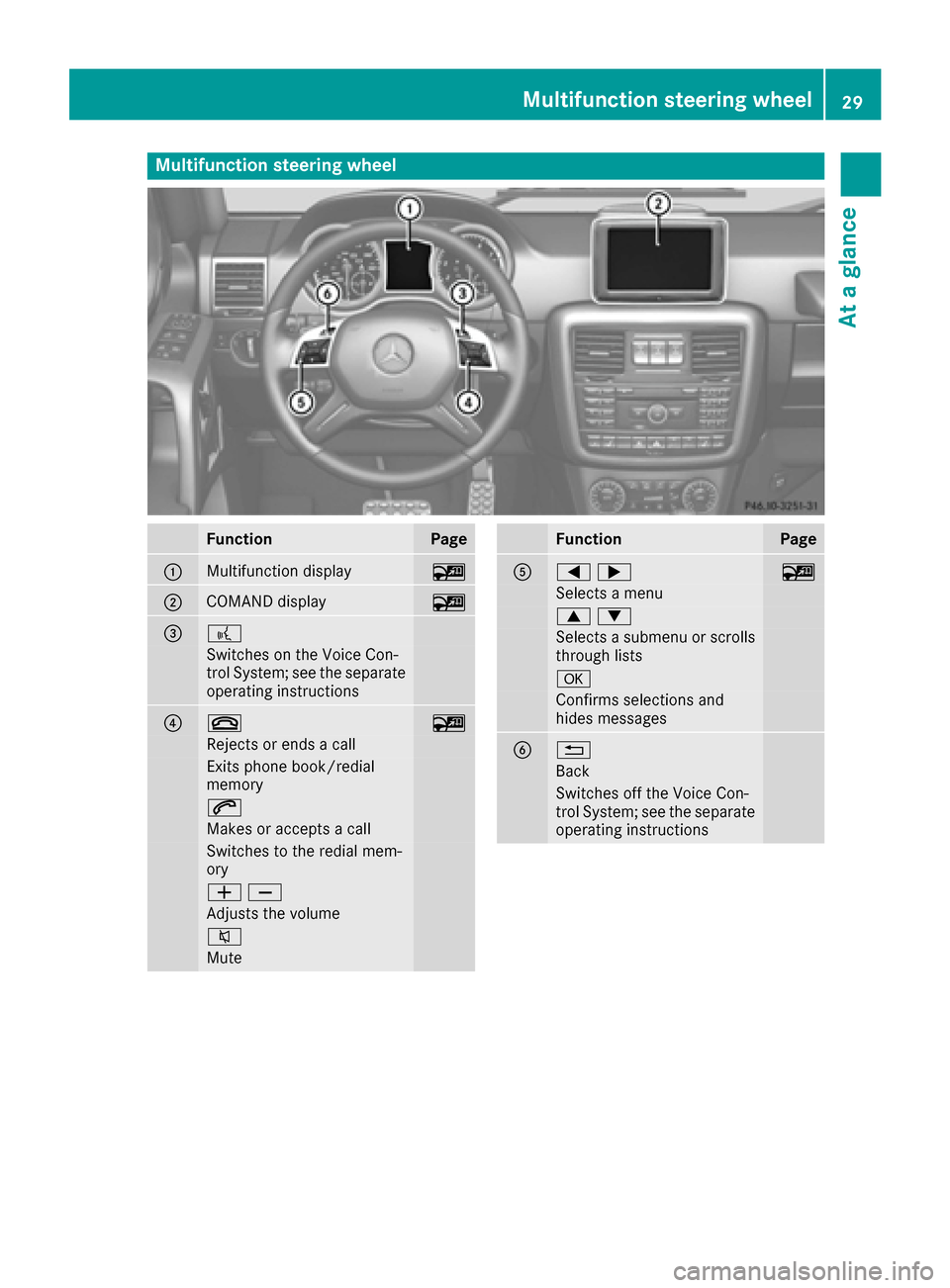
Multifunction steering wheel
FunctionPage
:Multifunction display~
;COMAND display~
=?
Switches on the Voice Con-
trol System; see the separate
operating instructions
?~~
Rejects or ends a call
Exits phone book/redial
memory
6
Makes or accepts a call
Switches to the redial mem-
ory
WX
Adjusts the volume
8
Mute
FunctionPage
A=;~
Selects a menu
9:
Selects a submenu or scrolls
through lists
a
Confirms selections and
hides messages
B%
Back
Switches off the Voice Con-
trol System; see the separate
operating instructions
Multifunction steering wheel29
At a glance
Page 58 of 302
GWARNING
If the ABS malfunctions, other driving systems such as the BAS or the ESP
®are also switched
off. Observe indicator and warning lamps that may come on as well as messages in the mul-
tifunction display that may appear.
If the ABS malfunctions, the wheels may lock
during hard braking, reducing the steering
capability and extending the braking distance.
GWARNING
If ABS is faulty, the wheels could lock when
braking. The steerability and braking charac-
teristics may be severely impaired. Addition-
ally, further driving safety systems are deac-
tivated. There is an increased danger of skid-
ding and accidents.
Drive on carefully. Have ABS checked imme-
diately at a qualified specialist workshop.
ABS regulates brake pressure in such a way that
the wheels do not lock when you brake. This
allows you to continue steering the vehicle when
braking.
Provided that the differential locks are not
active, ABS works from a speed of approx-
imately 5 mph (8 km/h) upwards, regardless of
road-surface conditions. ABS works on slippery
surfaces, even if you only brake gently.
The yellow !ABS warning lamp in the instru-
ment cluster lights up when the ignition is
switched on. It goes out when the engine is run-
ning.
Braking
If ABS intervenes when braking, you will feel a
pulsing in the brake pedal.
XIf ABS intervenes: continue to depress the
brake pedal vigorously until the braking sit-
uation is over.
XTo make a full brake application: depress
the brake pedal with full force.
The pulsating brake pedal can be an indication
of hazardous road conditions, and functions as a
reminder to take extra care while driving.
Off-road ABS
An ESP®system specifically suited to off-road
terrain is activated automatically once the off-
road program is activated.
At speeds below 37 mph (60 km/h), the front
wheels lock cyclically during braking. The dig-
ging-in effect achieved in the process reduces
the stopping distance on off-road terrain. This
limits steering capability.
BAS (Brake Assist System)
i
Observe the "Important safety notes" sec-
tion (Ypage 55).
GWARNING
If BAS is malfunctioning, the braking distance
in an emergency braking situation is
increased. There is a risk of an accident.
In an emergency braking situation, depress
the brake pedal with full force. ABS prevents
the wheels from locking.
BAS operates in emergency braking situations.
If you depress the brake pedal quickly, BAS
automatically boosts the braking force, thus
shortening the stopping distance.
XKeep the brake pedal firmly depressed until
the emergency braking situation is over.
ABS prevents the wheels from locking.
The brakes will function as usual once you
release the brake pedal. BAS is deactivated.
Adaptive brake lights
If you brake sharply from a speed of more than
30 mph (50 km/h) or if braking is assisted by
BAS, the brake lamps flash rapidly. In this way,
traffic traveling behind you is warned in an even
more noticeable manner.
If you brake sharply from a speed of more than
45 mph (70 km/h) to a standstill, the hazard
warning lamps are activated automatically. If
the brakes are applied again, the brake lamps
light up continuously. The hazard warning lamps
are deactivated automatically if you drive faster
than 6 mph (10 km/h). You can also switch off
the hazard warning lamps using the hazard
warning button (
Ypage 89).
56Driving safety systems
Safety
Page 59 of 302
ESP®(Electronic Stability Program)
Important safety notes
iObserve the "Important safety notes" sec-
tion (Ypage 55).
GWARNING
If ESP
®is malfunctioning, ESP®is unable to
stabilize the vehicle. Additionally, further driv-
ing safety systems are deactivated. This
increases the risk of skidding and an accident.
Drive on carefully. Have ESP
®checked at a
qualified specialist workshop.
!Only operate the vehicle for a maximum of
ten seconds on a brake test dynamometer.
Switch off the ignition.
Application of the brakes by ESP
®may oth-
erwise destroy the brake system.
!A function or performance test should only
be carried out on a two-axle dynamometer.
Before you operate the vehicle on such a
dynamometer, please consult a qualified
workshop. You could otherwise damage the
drive train or the brake system.
ESP
®monitors the driving stability and the trac-
tion. Traction is the power transmission
between the tires and the road surface.
ESP
®is deactivated if the åwarning lamp in
the instrument cluster lights up continuously
when the engine is running.
If the ÷ warning lamp and the åwarning
lamp are lit continuously, ESP
®is not available
due to a malfunction.
Observe the information on warning lamps
(
Ypage 207) and display messages which may
be displayed in the instrument cluster
(
Ypage 185).
If ESP®detects that the vehicle is deviating from
the direction desired by the driver, one or more
wheels are braked to stabilize the vehicle. If
necessary, the engine output is also modified to keep the vehicle on the desired course within
physical limits. ESP
®assists the driver when
pulling away on wet or slippery roads. ESP®can
also stabilize the vehicle during braking.
If ESP
®intervenes, the ÷warning lamp
flashes in the instrument cluster. If ESP
®intervenes:
XDo not deactivate ESP®under any circum-
stances.
XOnly depress the accelerator pedal as far as
necessary when pulling away.
XAdapt your driving style to suit the prevailing
road and weather conditions.
iOnly use wheels with the recommended tire
sizes. Only then will ESP®function properly.
iIf differential locks are switched on, ABS,
BAS and ESP®switch off automatically.
4ETS (Electronic Traction System)
Traction control remains active, even if you
deactivate ESP®.
XIf appropriate for the driving conditions,
engage the LOW RANGE off-road gear
(
Ypage 162).
Traction control is part of ESP
®.
Traction control brakes the drive wheels indi-
vidually if they spin. This enables you to pull
away and accelerate on slippery surfaces, for
example if the road surface is slippery on one
side. In addition, more drive torque is transfer-
red to the wheel or wheels with traction.
Traction control remains active, even if you
deactivate ESP
®.
Traction control is no longer active above a
speed of approximately 37 mph (60 km/h).
Traction control brakes the drive wheels indi-
vidually if they spin. This enables you to pull
away and accelerate on slippery surfaces, for
example if the road surface is slippery on one
side. In addition, more drive torque is transfer-
red to the wheel or wheels with traction.
Deactivating/activating ESP®
GWARNING
If you deactivate ESP
®, ESP®no longer sta-
bilizes the vehicle. There is an increased risk
of skidding and an accident.
Only deactivate ESP
®in the situations descri-
bed in the following.
!Avoid spinning the driven wheels for an
extended period with ESP®deactivated. You
could otherwise damage the drivetrain.
Driving safety systems57
Safety
Z
Page 61 of 302
Observe information regarding indicator and
warning lamps (Ypage 206) as well as display
messages (Ypage 186).
EBD monitors and controls the brake pressure
on the rear wheels to improve driving stability
while braking.
ADAPTIVE BRAKE
ADAPTIVE BRAKE provides increased braking
safety. In addition to the braking function,
ADAPTIVE BRAKE also has the HOLD function
(
Ypage 157) and hill start assist (Ypage 114).
Theft deterrent locking system
Immobilizer
XTo activate: remove the SmartKey from the
ignition lock.
XTo deactivate: switch on the ignition.
The immobilizer prevents your vehicle from
being started without the correct SmartKey.
When leaving the vehicle, always take the
SmartKey with you and lock the vehicle. The
engine can be started by anyone with a valid
SmartKey that is left inside the vehicle.
iThe immobilizer is always deactivated when
you start the engine.
In the event that the engine cannot be started
when the starter battery is fully charged, the
immobilizer may be faulty. Contact an author-
ized Mercedes-Benz Center or call
1-800-FOR-MERCedes (in the USA) or
1-800-387-0100 (in Canada).
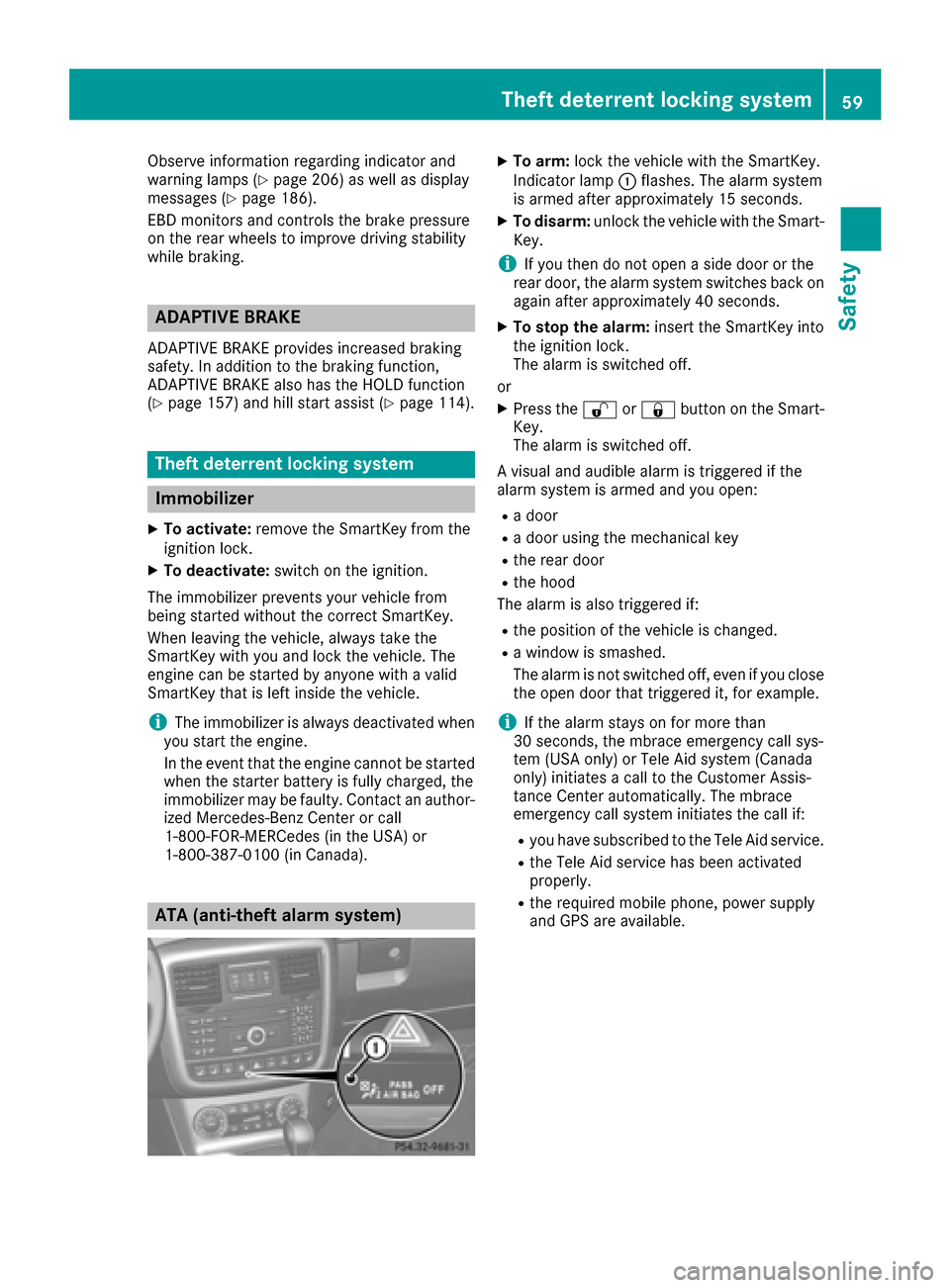
ATA (anti-theft alarm system)
XTo arm: lock the vehicle with the SmartKey.
Indicator lamp :flashes. The alarm system
is armed after approximately 15 seconds.
XTo disarm: unlock the vehicle with the Smart-
Key.
iIf you then do not open a side door or the
rear door, the alarm system switches back on
again after approximately 40 seconds.
XTo stop the alarm: insert the SmartKey into
the ignition lock.
The alarm is switched off.
or
XPress the %or& button on the Smart-
Key.
The alarm is switched off.
A visual and audible alarm is triggered if the
alarm system is armed and you open:
Ra door
Ra door using the mechanical key
Rthe rear door
Rthe hood
The alarm is also triggered if:
Rthe position of the vehicle is changed.
Ra window is smashed.
The alarm is not switched off, even if you close
the open door that triggered it, for example.
iIf the alarm stays on for more than
30 seconds, the mbrace emergency call sys-
tem (USA only) or Tele Aid system (Canada
only) initiates a call to the Customer Assis-
tance Center automatically. The mbrace
emergency call system initiates the call if:
Ryou have subscribed to the Tele Aid service.
Rthe Tele Aid service has been activated
properly.
Rthe required mobile phone, power supply
and GPS are available.
Theft deterrent locking system59
Safety
Z
Page 74 of 302
Useful information
i
This Operator's Manual describes all models
and all standard and optional equipment of
your vehicle available at the time of publica-
tion of the Operator's Manual. Country-spe-
cific differences are possible. Please note
that your vehicle may not be equipped with all
features described. This also applies to
safety-related systems and functions.
iRead the information on qualified specialist
workshops: (Ypage 23).
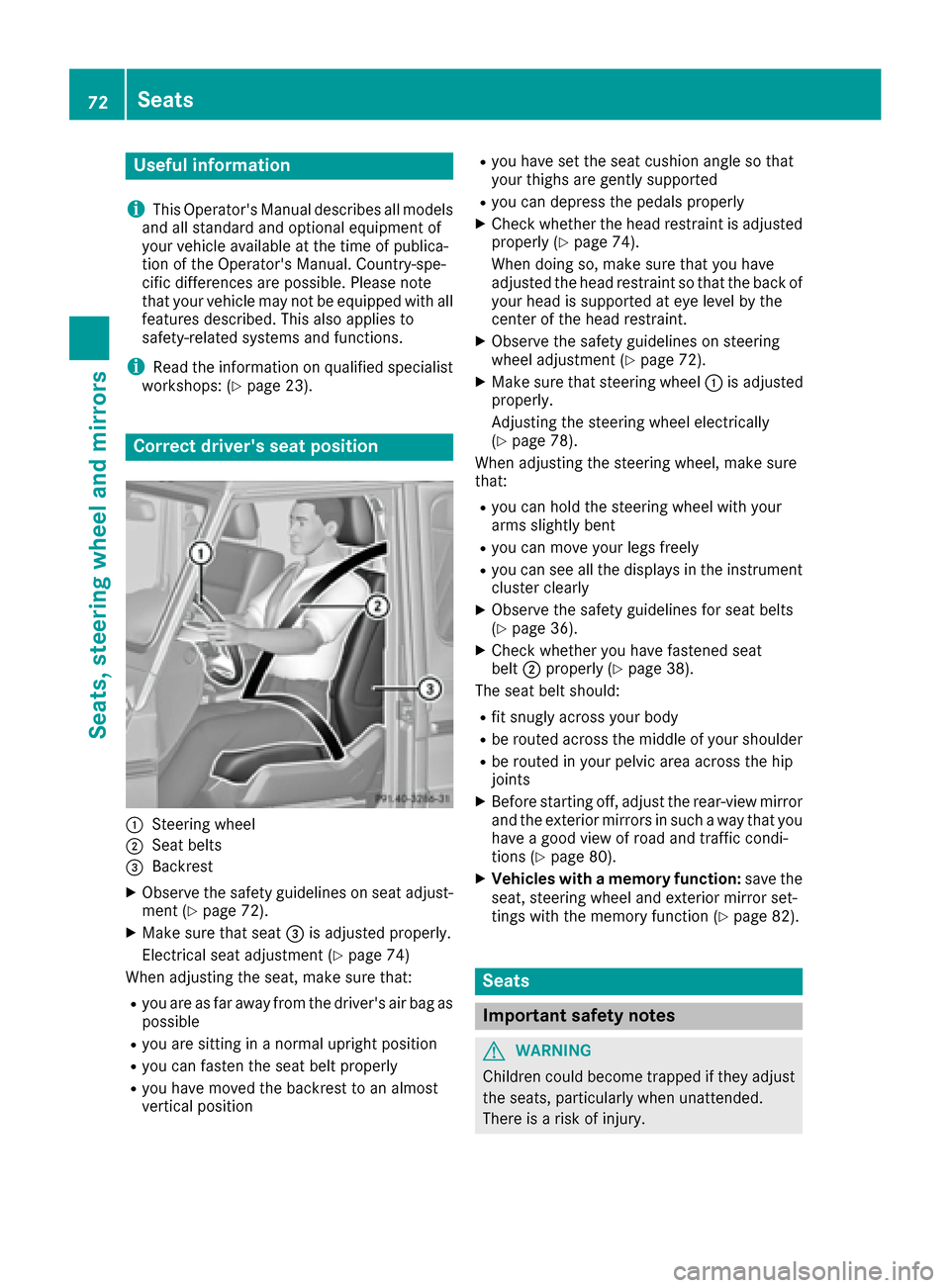
Correct driver's seat position
:Steering wheel
;Seat belts
=Backrest
XObserve the safety guidelines on seat adjust-
ment (Ypage 72).
XMake sure that seat =is adjusted properly.
Electrical seat adjustment (
Ypage 74)
When adjusting the seat, make sure that:
Ryou are as far away from the driver's air bag as
possible
Ryou are sitting in a normal upright position
Ryou can fasten the seat belt properly
Ryou have moved the backrest to an almost
vertical position
Ryou have set the seat cushion angle so that
your thighs are gently supported
Ryou can depress the pedals properly
XCheck whether the head restraint is adjusted
properly (Ypage 74).
When doing so, make sure that you have
adjusted the head restraint so that the back of
your head is supported at eye level by the
center of the head restraint.
XObserve the safety guidelines on steering
wheel adjustment (Ypage 72).
XMake sure that steering wheel :is adjusted
properly.
Adjusting the steering wheel electrically
(
Ypage 78).
When adjusting the steering wheel, make sure
that:
Ryou can hold the steering wheel with your
arms slightly bent
Ryou can move your legs freely
Ryou can see all the displays in the instrument
cluster clearly
XObserve the safety guidelines for seat belts
(Ypage 36).
XCheck whether you have fastened seat
belt ;properly (Ypage 38).
The seat belt should:
Rfit snugly across your body
Rbe routed across the middle of your shoulder
Rbe routed in your pelvic area across the hip
joints
XBefore starting off, adjust the rear-view mirror
and the exterior mirrors in such a way that you
have a good view of road and traffic condi-
tions (
Ypage 80).
XVehicles with a memory function: save the
seat, steering wheel and exterior mirror set-
tings with the memory function (
Ypage 82).
Seats
Important safety notes
GWARNING
Children could become trapped if they adjust
the seats, particularly when unattended.
There is a risk of injury.
72Seats
Seats, steering wheel and mirrors
Page 95 of 302
tube when cold with alcohol or spirit and rub it
off with a lint-free cloth.
Protect bulbs from moisture during operation.
Do not allow bulbs to come into contact with
liquids.
Xenon bulbs
Bulbs and lamps are an important aspect of
vehicle safety. You must therefore make sure
that these function correctly at all times. Have
the headlamp setting checked regularly.
LED modules
You can replace neither Xenon bulbs nor LED
bulbs. Have LED modules replaced at a qualified
specialist workshop.
Bulbs and lamps are an important aspect of
vehicle safety. You must therefore make sure
that these function correctly at all times. Have
the headlamp setting checked regularly.
Before changing bulbs
Have the following bulbs replaced at a qualified
specialist workshop:
RAdditional turn signals in the exterior mirrors
RHigh-mounted brake lamp
RHigh-beam/low-beam headlamps (Xenon
bulbs)
RDaytime running lamps
RParking lamps/standing lamps
RLicense plate lamp
iIndividual segments of the license plate
lamp LEDs may fail without a display message
appearing in the multifunction di splay
. Regu-
larly check the license plate lamp. If neces-
sary, visit a qualified specialist workshop.
You can replace the following bulbs:
RTurn signal lamp (front)
RBrake/tail lamp
RTurn signal lamp (rear)
RTail lamps/standing lamps
RBackup Light
RRear fog lamp
RSide marker lamps
Other bulbs
There are bulbs other than the Xenon bulbs that you cannot replace yourself. Only replace the
bulbs listed (
Ypage 93). Have the bulbs that
you cannot replace yourself replaced at a quali-
fied specialist workshop.
If you require assistance replacing bulbs, con-
sult a qualified specialist workshop. Do not touch the glass tube of new bulbs with
your bare hands. Even minor contamination can
burn into the glass surface and reduce the ser-
vice life of the bulbs. Always use a lint-free cloth
or only touch the base of the bulb when instal-
ling.
Only use bulbs of the correct type.
If the new bulb still does not light up, consult a
qualified specialist workshop.
Bulbs and lamps are an important aspect of
vehicle safety. You must therefore make sure
that these
function co
rrectly at all times. Have
the headlamp setting checked regularly.
Overview: changing bulbs/bulb types
Front bulbs
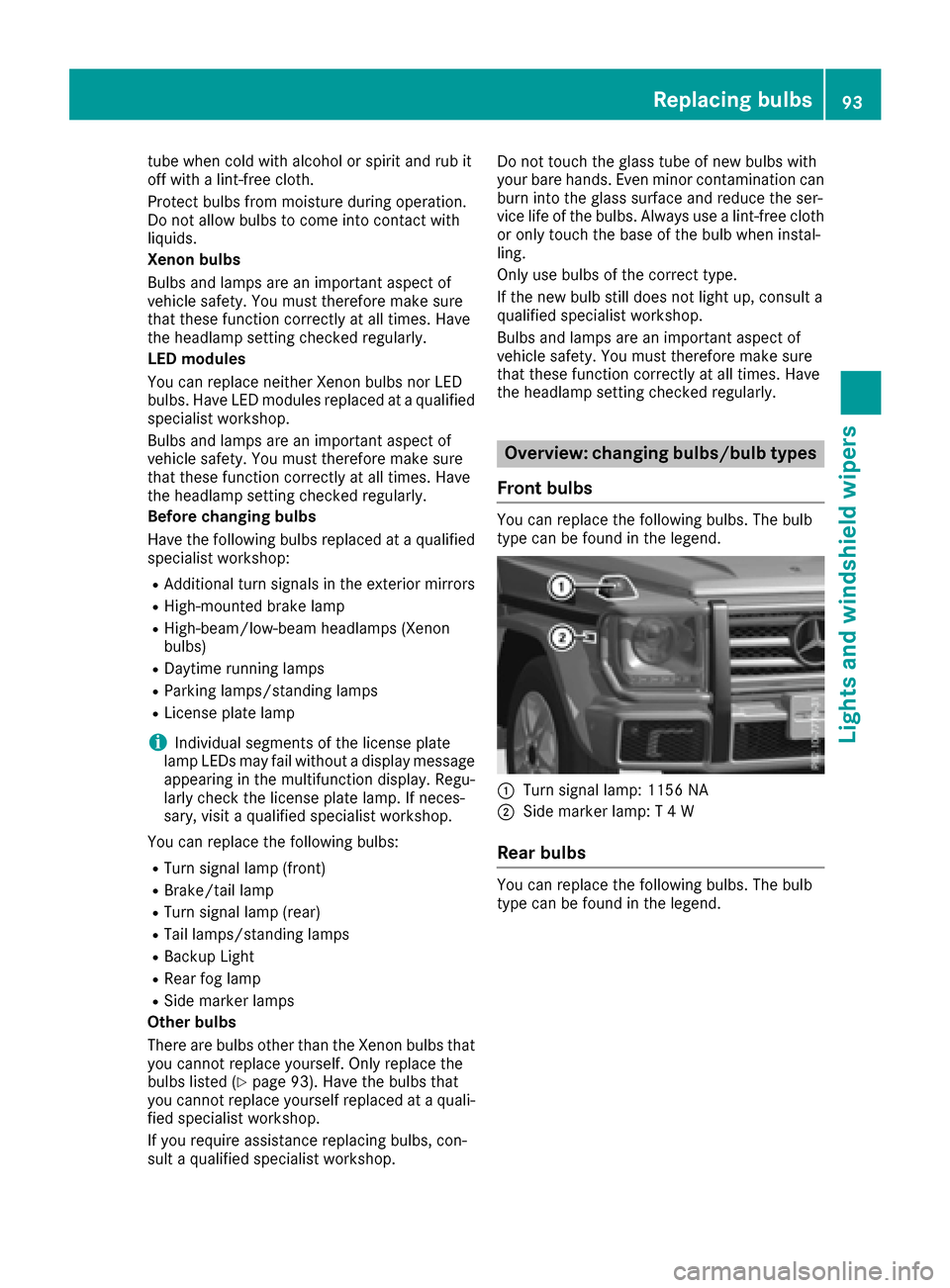
You can replace the following bulbs. The bulb
type can be found in the legend.
:Turn signal lamp: 1156 NA
;Side marker lamp: T 4 W
Rear bulbs
You can replace the following bulbs. The bulb
type can be found in the legend.
Replacing bulbs93
Lights and windshield wiper s
Z
Page 102 of 302
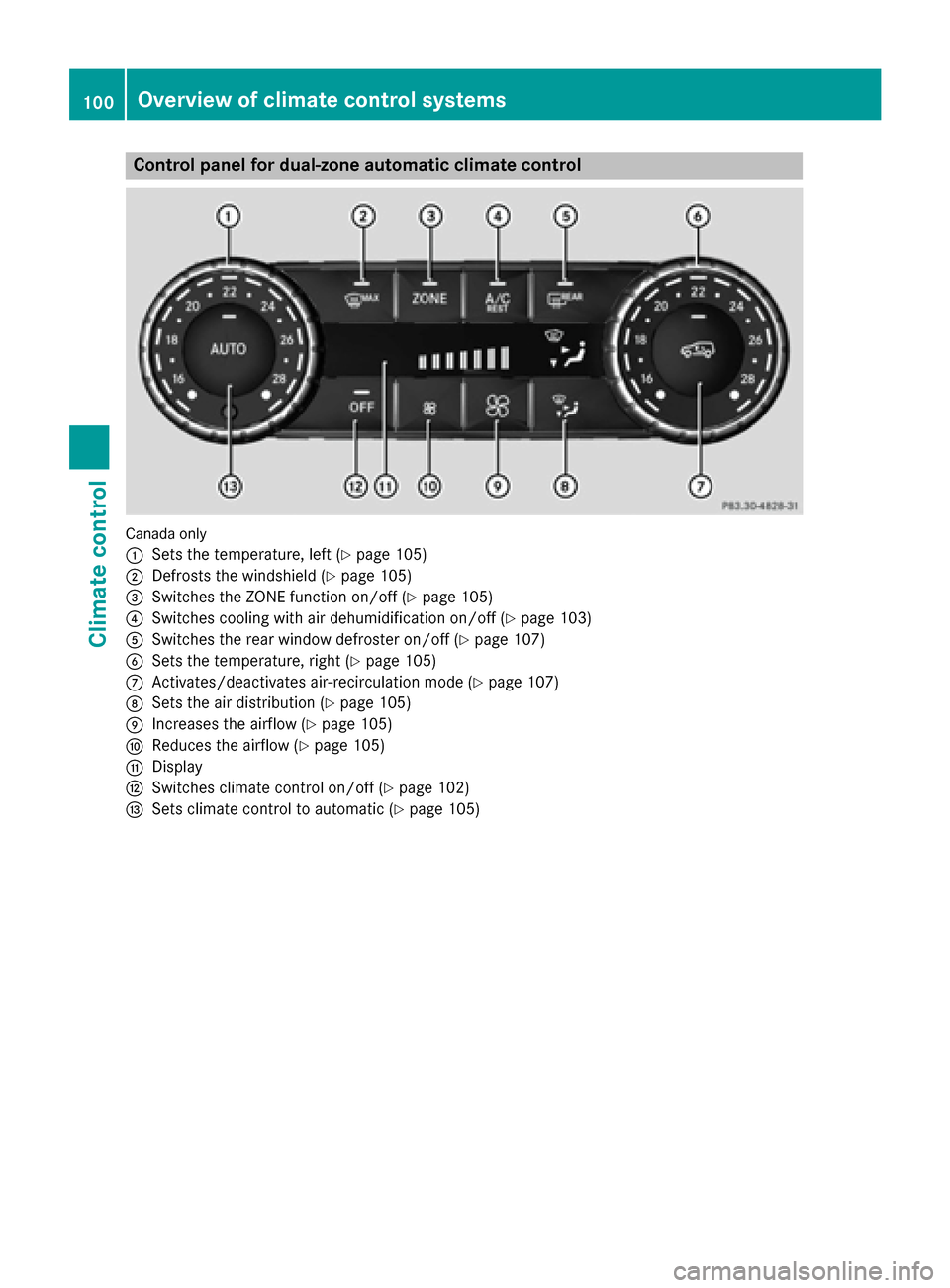
Control panel for dual-zone automatic climate control
Canadaonly
:
Sets the temperature, left (Ypage 105)
;Defrosts the windshield (Ypage 105)
=Switches the ZONE function on/off (Ypage 105)
?Switches cooling with air dehumidification on/off (Ypage 103)
ASwitches the rear window defroster on/off (Ypage 107)
BSets the temperature, right (Ypage 105)
CActivates/deactivates air-recirculation mode (Ypage 107)
DSets the air distribution (Ypage 105)
EIncreases the airflow (Ypage 105)
FReduces the airflow (Ypage 105)
GDisplay
HSwitches climate control on/off (Ypage 102)
ISets climate control to automatic (Ypage 105)
100Overview of climate control systems
Climate control
Page 103 of 302
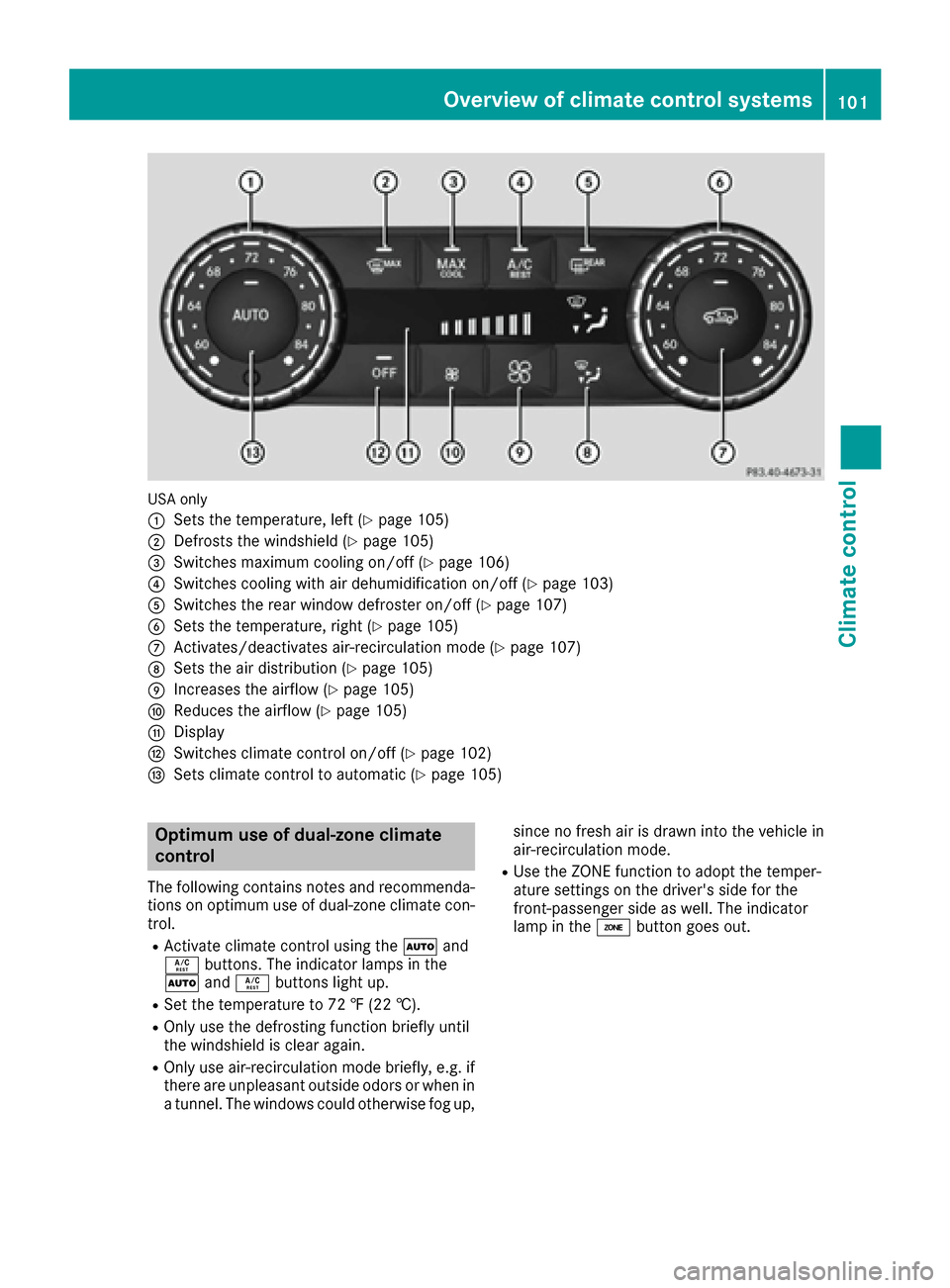
USA only
:
Sets the temperature, left (Ypage 105)
;Defrosts the windshield (Ypage 105)
=Switches maximum cooling on/off (Ypage 106)
?Switches cooling with air dehumidification on/off (Ypage 103)
ASwitches the rear window defroster on/off (Ypage 107)
BSets the temperature, right (Ypage 105)
CActivates/deactivates air-recirculation mode (Ypage 107)
DSets the air distribution (Ypage 105)
EIncreases the airflow (Ypage 105)
FReduces the airflow (Ypage 105)
GDisplay
HSwitches climate control on/off (Ypage 102)
ISets climate control to automatic (Ypage 105)
Optimum use of dual-zone climate
control
The following contains notes and recommenda-
tions on optimum use of dual-zone climate con-
trol.
RActivate climate control using theÃand
Á buttons. The indicator lamps in the
à andÁ buttons light up.
RSet the temperature to 72 ‡ (22 †).
ROnly use the defrosting function briefly until
the windshield is clear again.
ROnly use air-recirculation mode briefly, e.g. if
there are unpleasant outside odors or when in
a tunnel. The windows could otherwise fog up, since no fresh air is drawn into the vehicle in
air-recirculation mode.
RUse the ZONE function to adopt the temper-
ature settings on the driver's side for the
front-passenger side as well. The indicator
lamp in the
ábutton goes out.
Overview of climate control systems101
Climate control
Page 105 of 302
Activating/deactivating cooling with air dehumidification
Gene ral notes
If you deactivat eth e"Cooling wit hair-dehumidification "function ,th eair inside th evehicl ewill no t
be cooled .The air inside th evehicl ewill also no tbe dehumidified. The windows can fog up mor e
quickly. Therefore ,only deactivat eth e"Cooling wit hair-dehumidification "function briefly.
The "Cooling wit hair dehumidification "function is only available when th eengin eis running.
The air inside th evehicl eis cooled and dehumidified according to th etemperature selected.
Condensation may dri pfrom th eunderside of th evehicl ewhen it is in coolin gmode. This is normal
and no t asign that there is amalfunction .
Switching cooling with air dehumidificati onon/off
!If th ecoolin gwit hair dehumidification does no tswitch on ,it is possibl ethat th eclimat econtrol
system has lost coolant.
Hav eth ecoolin gwit hair dehumidification checke dat aqualified specialist workshop .
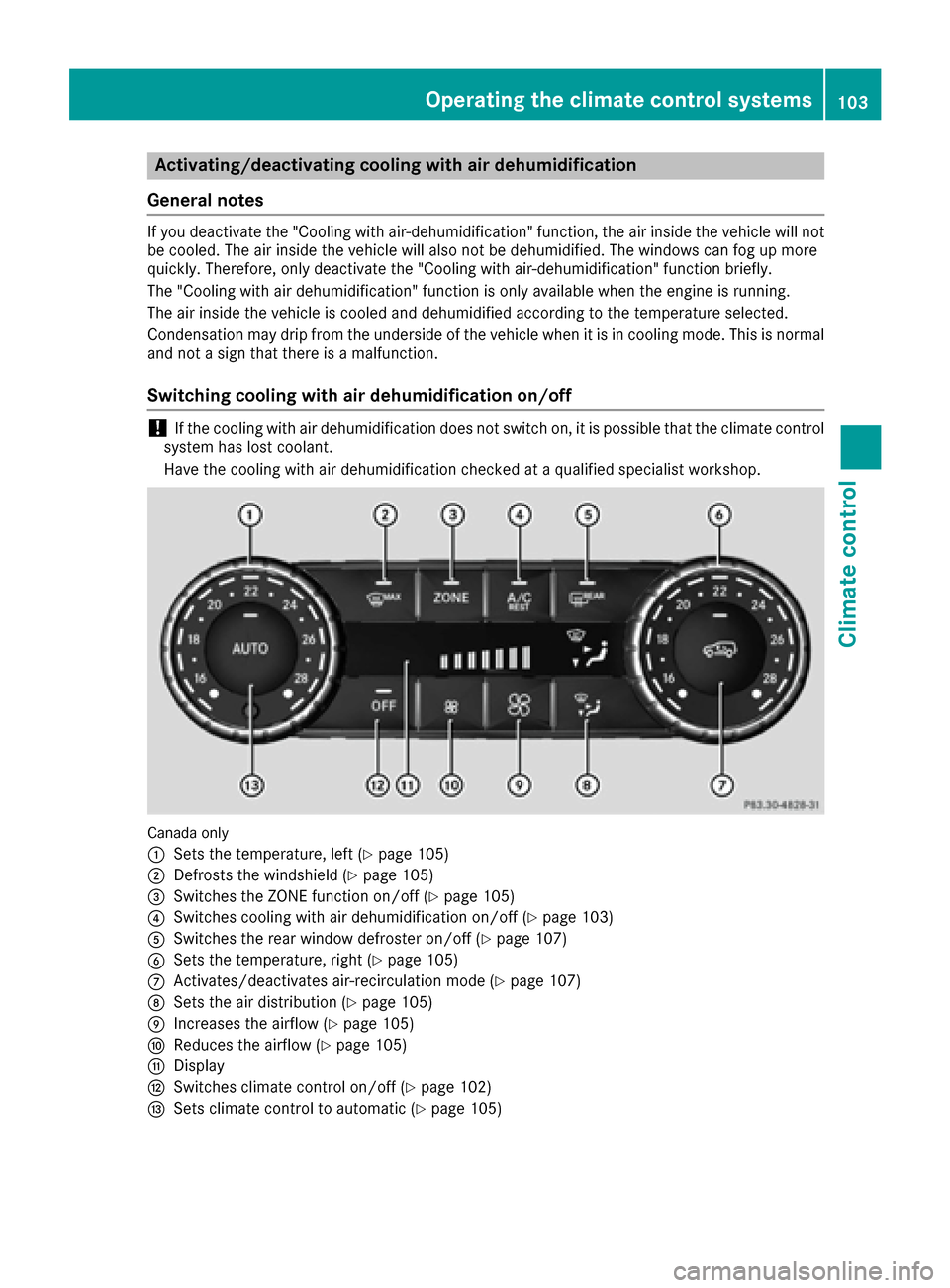
Canada only
:
Sets thetemperature, lef t (Ypage 105)
;Defroststh ewindshield (Ypage 105)
=Switches th eZON Efunction on/off (Ypage 105)
?Switches coolingwit hair dehumidification on/off (Ypage 103)
ASwitches therear window defroste ron/off (Ypage 107)
BSets thetemperature, right (Ypage 105)
CActivates/deactivates air-recirculation mod e (Ypage 107)
DSets theair distribution (Ypage 105)
EIncreasesth eairflow (Ypage 105)
FReduces th eairflow (Ypage 105)
GDisplay
HSwitches climat econtrol on/off (Ypage 102)
ISets climatecontrol to automatic (Ypage 105)
Operating the climate control systems103
Climate control
Z
Page 106 of 302
XTo activate:press theÁbutton.
The indicator lamp in the Ábutton lights up.
XTo deactivate: press theÁbutton.
The indicator lamp in the Ábutton goes out. The "Cooling with air dehumidification" function
has a delayed switch-off feature.
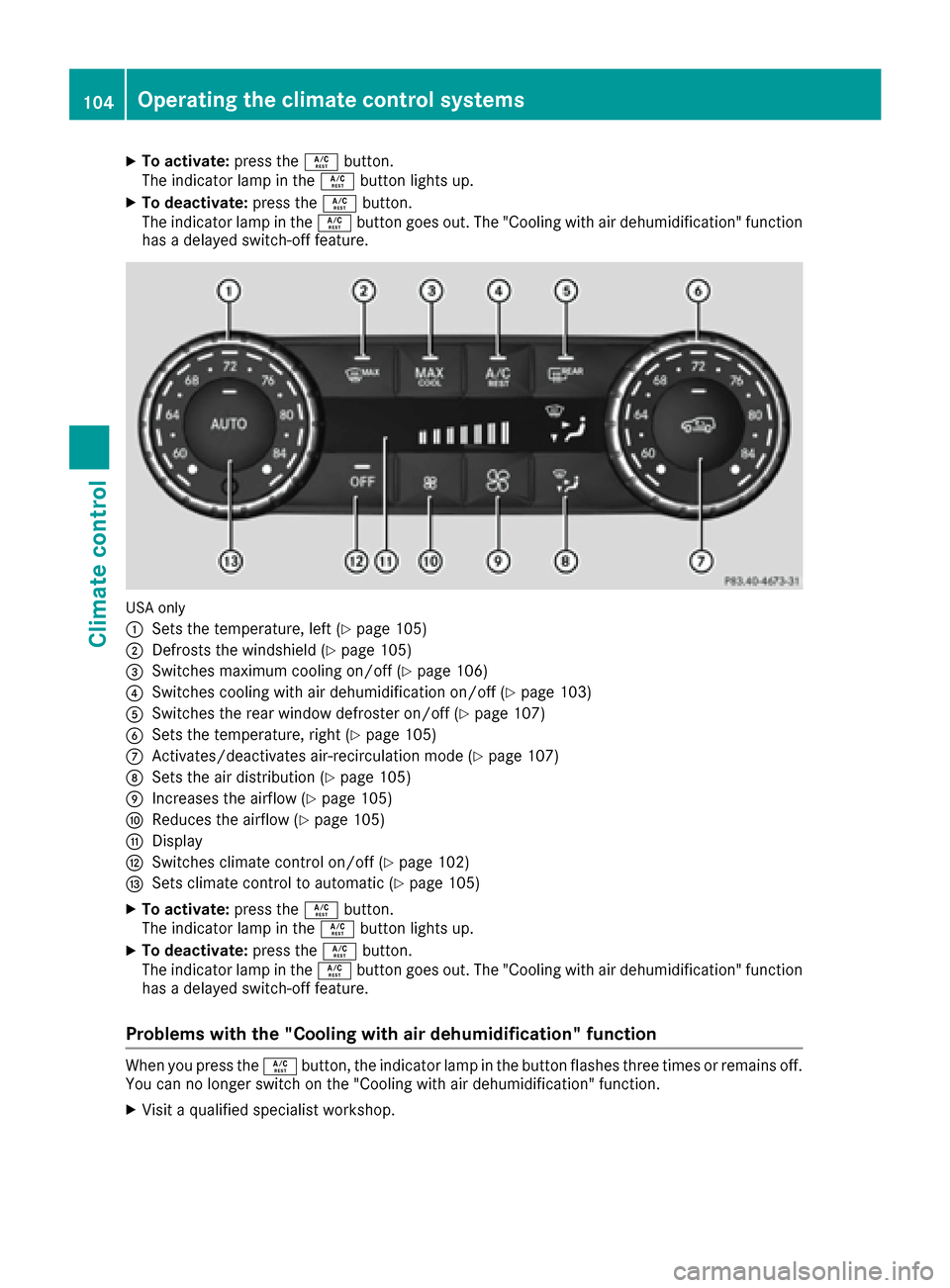
USA only
:
Sets the temperature, left (Ypage 105)
;Defrosts the windshield (Ypage 105)
=Switches maximum cooling on/off (Ypage 106)
?Switches cooling with air dehumidification on/off (Ypage 103)
ASwitches the rear window defroster on/off (Ypage 107)
BSets the temperature, right (Ypage 105)
CActivates/deactivates air-recirculation mode (Ypage 107)
DSets the air distribution (Ypage 105)
EIncreases the airflow (Ypage 105)
FReduces the airflow (Ypage 105)
GDisplay
HSwitches climate control on/off (Ypage 102)
ISets climate control to automatic (Ypage 105)
XTo activate: press theÁbutton.
The indicator lamp in the Ábutton lights up.
XTo deactivate: press theÁbutton.
The indicator lamp in the Ábutton goes out. The "Cooling with air dehumidification" function
has a delayed switch-off feature.
Problems with the "Cooling with air dehumidification" function
When you press the Ábutton, the indicator lamp in the button flashes three times or remains off.
You can no longer switch on the "Cooling with air dehumidification" function.
XVisit a qualified specialist workshop.
104Operating the climate control systems
Climate control