warning lights MERCEDES-BENZ G-Class 2016 W463 Owner's Guide
[x] Cancel search | Manufacturer: MERCEDES-BENZ, Model Year: 2016, Model line: G-Class, Model: MERCEDES-BENZ G-Class 2016 W463Pages: 302, PDF Size: 7.04 MB
Page 140 of 302
The following driving systems are specially
adapted to off-road driving:
R4ETS (Ypage 57)
RTransfer case (Ypage 162)
RDifferential locks (Ypage 162)
Observe the following notes:
Rstop your vehicle and, if necessary, shift the
transfer case to LOW RANGE(Ypage 162)
before driving off-road.
Rin transfer case position LOW RANGEthe
ECO start/stop function is not available
(
Ypage 114).
Rengage the differential locks, if necessary
(Ypage 165).
iABS, 4ETS, ESP®and BAS are deactivated
while the differential locks are engaged. This
allows the front wheels to lock briefly, so that
these can dig into a loose surface. However,
please note that locked wheels skid and can
no longer steer.
RCheck that items of luggage and loads are
stowed safely and are well secured
(
Ypage 219).
RTo avoid damaging the vehicle, make sure
there is always sufficient ground clearance.
RAlways keep the engine running and in gear
when driving on a downhill gradient.
RAlways keep the engine running and in gear
when driving on a slope.
RDrive slowly and evenly, if necessary at a
walking pace.
REnsure that the wheels are in contact with the
ground at all times.
RDrive with extreme care on unfamiliar off-road routes where visibility is poor. For safety rea-
sons, get out of the vehicle first and survey
the off-road route.
RCheck the depth of water before fording rivers
and streams.
RWhen fording, do not stop and do not switch
off the engine.
RLook out for obstacles, such as rocks, holes,
tree stumps and furrows.
RAlways keep the doors, rear door, side win-
dows and the sliding sunroof closed while the
vehicle is in motion.
RSwitch off cruise control.
RDo not stray from marked routes or paths.
RAdapt your speed to the terrain. The rougher,
steeper or more ruts on the terrain, the slower
your speed should be.
RDrive slowly and at an even speed through the
water. Ensure that a bow wave does not form
as you drive.
ROn sand, drive quickly to overcome the rolling resistance. Otherwise the vehicle's wheels
could become st
uck in loose ground.
RDo not jump with the vehicle as this will inter-
rupt the vehicle's propulsion.
RAvoid high engine speeds. Drive at appropri-
ate engine speeds (maximum 3,000 rpm).
RDo not shift the automatic transmission to
transmission position N.
RAlways check the vehicle for damage after off-
road driving.
iInformation about retrofitting special all-ter-
rain tires is available from any qualified spe-
cialist workshop.
iDo not use the HOLD function when driving
off-road, on steep uphill or downhill gradients
or on slippery or loose surfaces. The HOLD
function cannot hold the vehicle on such sur-
faces.
Checklist before driving off-road
!If the engine oil warning lamp lights up while
the vehicle is in motion, stop the vehicle in a
safe place as soon as possible. Check the
engine oil level. The engine oil warning lamp
warning must not be ignored. Continuing the
journey while the symbol is displayed could
lead to engine damage.
XOil level: check the engine oil level and add oil
if necessary.
Only then does the engine receive enough oil when the vehicle is on a steep incline.
XTire-changing tool kit: check that the jack is
working and make sure you have the lug
wrench, a robust tow cable and a folding
spade in the vehicle.
XWheels and tires: check the tire tread depth
and tire pressure.
XCheck for damage and remove any foreign
objects, e.g. small stones, from the wheels/
tires.
XReplace any missing valve caps.
138Driving tips
Driving and parking
Page 148 of 302
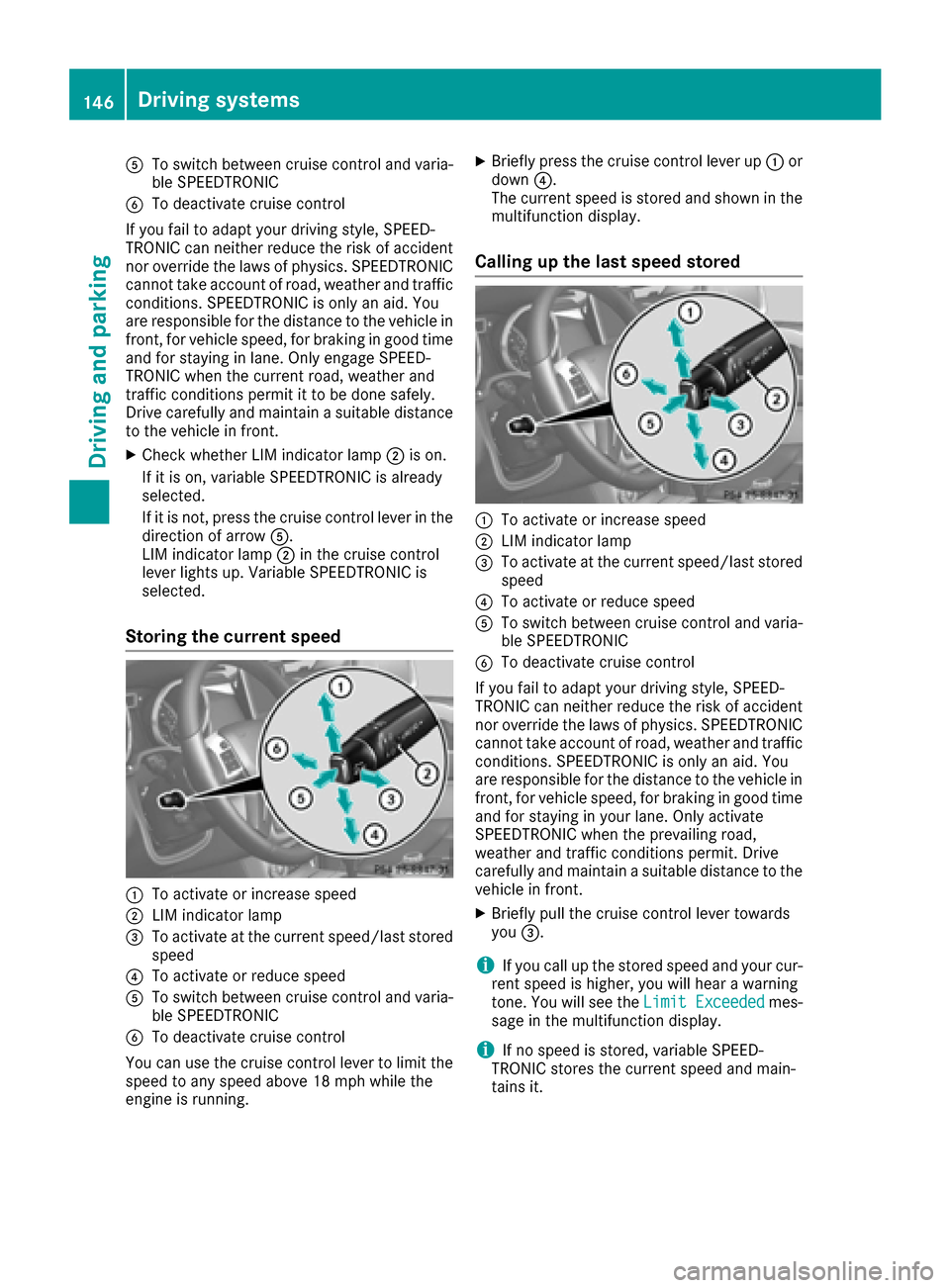
ATo switch between cruise control and varia-
ble SPEEDTRONIC
BTo deactivate cruise control
If you fail to adapt your driving style, SPEED-
TRONIC can neither reduce the risk of accident
nor override the laws of physics. SPEEDTRONIC
cannot take account of road, weather and traffic
conditions. SPEEDTRONIC is only an aid. You
are responsible for the distance to the vehicle in
front, for vehicle speed, for braking in good time
and for staying in lane. Only engage SPEED-
TRONIC when the current road, weather and
traffic conditions permit it to be done safely.
Drive carefully and maintain a suitable distance to the vehicle in front.
XCheck whether LIM indicator lamp ;is on.
If it is on, variable SPEEDTRONIC is already
selected.
If it is not, press the cruise control lever in the
direction of arrow A.
LIM indicator lamp ;in the cruise control
lever lights up. Variable SPEEDTRONIC is
selected.
Storing the current speed
:To activate or increase speed
;LIM indicator lamp
=To activate at the current speed/last stored speed
?To activate or reduce speed
ATo switch between cruise control and varia-
ble SPEEDTRONIC
BTo deactivate cruise control
You can use the cruise control lever to limit the speed to any speed above 18 mph while the
engine is running.
XBriefly press the cruise control lever up :or
down ?.
The current speed is stored and shown in the
multifunction display.
Calling up the last speed stored
:To activate or increase speed
;LIM indicator lamp
=To activate at the current speed/last stored speed
?To activate or reduce speed
ATo switch between cruise control and varia-
ble SPEEDTRONIC
BTo deactivate cruise control
If you fail to adapt your driving style, SPEED-
TRONIC can neither reduce the risk of accident
nor override the laws of physics. SPEEDTRONIC
cannot take account of road, weather and traffic
conditions. SPEEDTRONIC is only an aid. You
are responsible for the distance to the vehicle in
front, for vehicle speed, for braking in good time
and for staying in your lane. Only activate
SPEEDTRONIC when the prevailing road,
weather and traffic conditions permit. Drive
carefully and maintain a suitable distance to the
vehicle in front.
XBriefly pull the cruise control lever towards
you =.
iIf you call up the stored speed and your cur-
rent speed is higher, you will hear a warning
tone. You will see the Limit Exceeded
mes-
sage in the multifunction display.
iIf no speed is stored, variable SPEED-
TRONIC stores the current speed and main-
tains it.
146Driving systems
Driving and parking
Page 155 of 302
XTo increase:turn control=in direction ;.
DISTRONIC PLUS then maintains a greater
distance between your vehicle and the vehicle
in front.
XTo decrease: turn control=in direction :.
DISTRONIC PLUS then maintains a shorter
distance between your vehicle and the vehicle
in front.
iMake sure that you maintain the minimum
distance to the vehicle in front as required by
law. Adjust the distance to the vehicle in front
if necessary.
Deactivating DISTRONIC PLUS
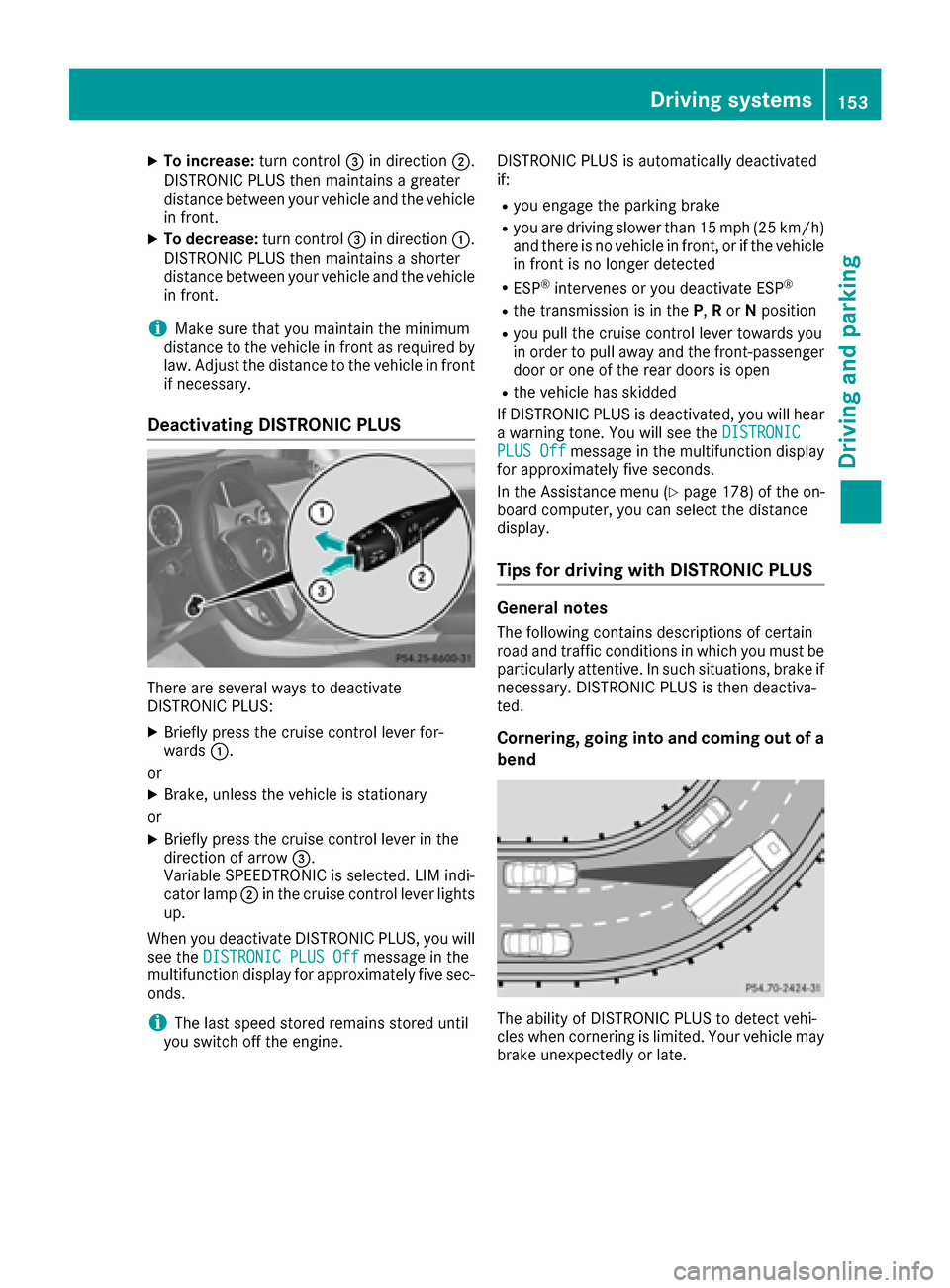
There are several ways to deactivate
DISTRONIC PLUS:
XBriefly press the cruise control lever for-
wards :.
or
XBrake, unless the vehicle is stationary
or
XBriefly press the cruise control lever in the
direction of arrow =.
Variable SPEEDTRONIC is selected. LIM indi-
cator lamp ;in the cruise control lever lights
up.
When you deactivate DISTRONIC PLUS, you will
see the DISTRONIC PLUS Off
message in the
multifunction display for approximately five sec-
onds.
iThe last speed stored remains stored until
you switch off the engine. DISTRONIC PLUS is automatically deactivated
if:
Ryou engage the parking brake
Ryou are driving slower than 15 mph (25 km/h)
and there is no vehicle in front, or if the vehicle
in front is no longer detected
RESP®intervenes or you deactivate ESP®
Rthe transmission is in the
P,Ror Nposition
Ryou pull the cruise control lever towards you
in order to pull away and the front-passenger
door or one of the rear doors is open
Rthe vehicle has skidded
If DISTRONIC PLUS is deactivated, you will hear
a warning tone. You will see the DISTRONIC
PLUS Offmessage in the multifunction display
for approximately five seconds.
In the Assistance menu (
Ypage 178) of the on-
board computer, you can select the distance
display.
Tips for driving with DISTRONIC PLUS
General notes
The following contains descriptions of certain
road and traffic conditions in which you must be particularly attentive. In such situations, brake if
necessary. DISTRONIC PLUS is then deactiva-
ted.
Cornering, going into and coming out of a
bend
The ability of DISTRONIC PLUS to detect vehi-
cles when cornering is limited. Your vehicle may
brake unexpectedly or late.
Driving systems153
Driving an d parking
Z
Page 156 of 302
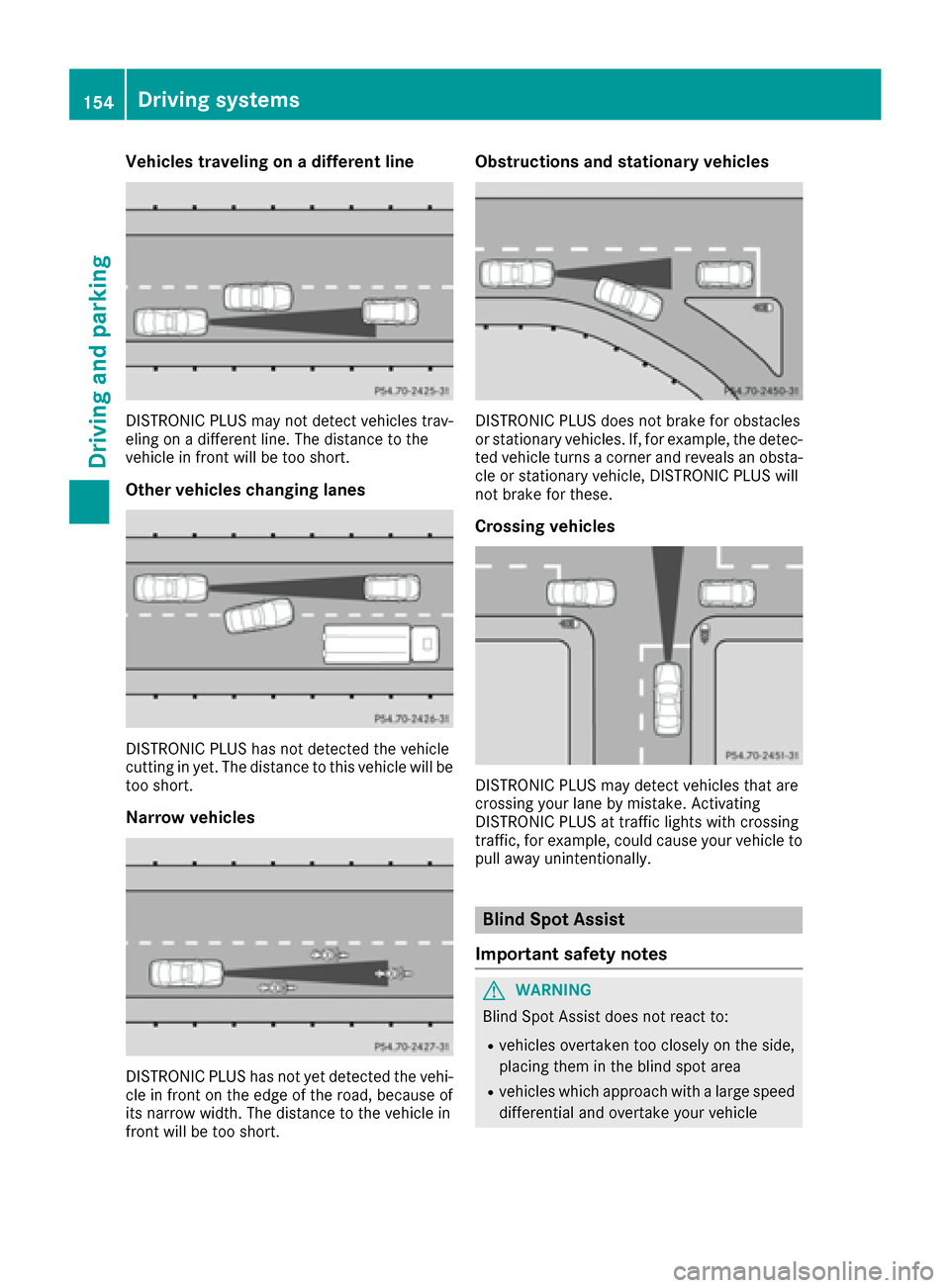
Vehicles traveling on a different line
DISTRONIC PLUS may not detect vehicles trav-
eling on a different line. The distance to the
vehicle in front will be too short.
Other vehicles changing lanes
DISTRONIC PLUS has not detected the vehicle
cutting in yet. The distance to this vehicle will be
too short.
Narrow vehicles
DISTRONIC PLUS has not yet detected the vehi-
cle in front on the edge of the road, because of
its narrow width. The distance to the vehicle in
front will be too short.
Obstructions and stationary vehicles
DISTRONIC PLUS does not brake for obstacles
or stationary vehicles. If, for example, the detec-
ted vehicle turns a corner and reveals an obsta-cle or stationary vehicle, DISTRONIC PLUS will
not brake for these.
Crossing vehicles
DISTRONIC PLUS may detect vehicles that are
crossing your lane by mistake. Activating
DISTRONIC PLUS at traffic lights with crossing
traffic, for example, could cause your vehicle to
pull away unintentionally.
Blind Spot Assist
Important safety notes
GWARNING
Blind Spot Assist does not react to:
Rvehicles overtaken too closely on the side,
placing them in the blind spot area
Rvehicles which approach with a large speed
differential and overtake your vehicle
154Driving systems
Driving and parking
Page 158 of 302
Indicator and warning display
GWARNING
Blind Spot Assist does no treac tto :
Rvehicles overtake nto oclosely on th eside ,
placing them in th eblin dspo tarea
Rvehicles bein govertake nat aspee ddiffer -
ence of mor ethan 7. 5mph (12 km/h)
Rvehicles whic happroac hwit h a larg espee d
differential and overtake your vehicl e
As aresult ,Blind Spot Assist may no tgiv e
warning sin suc hsituations. Ther eis aris kof
an accident.
Always observ eth etraffic condition scare-
fully, and maintai n asafelateral distance.
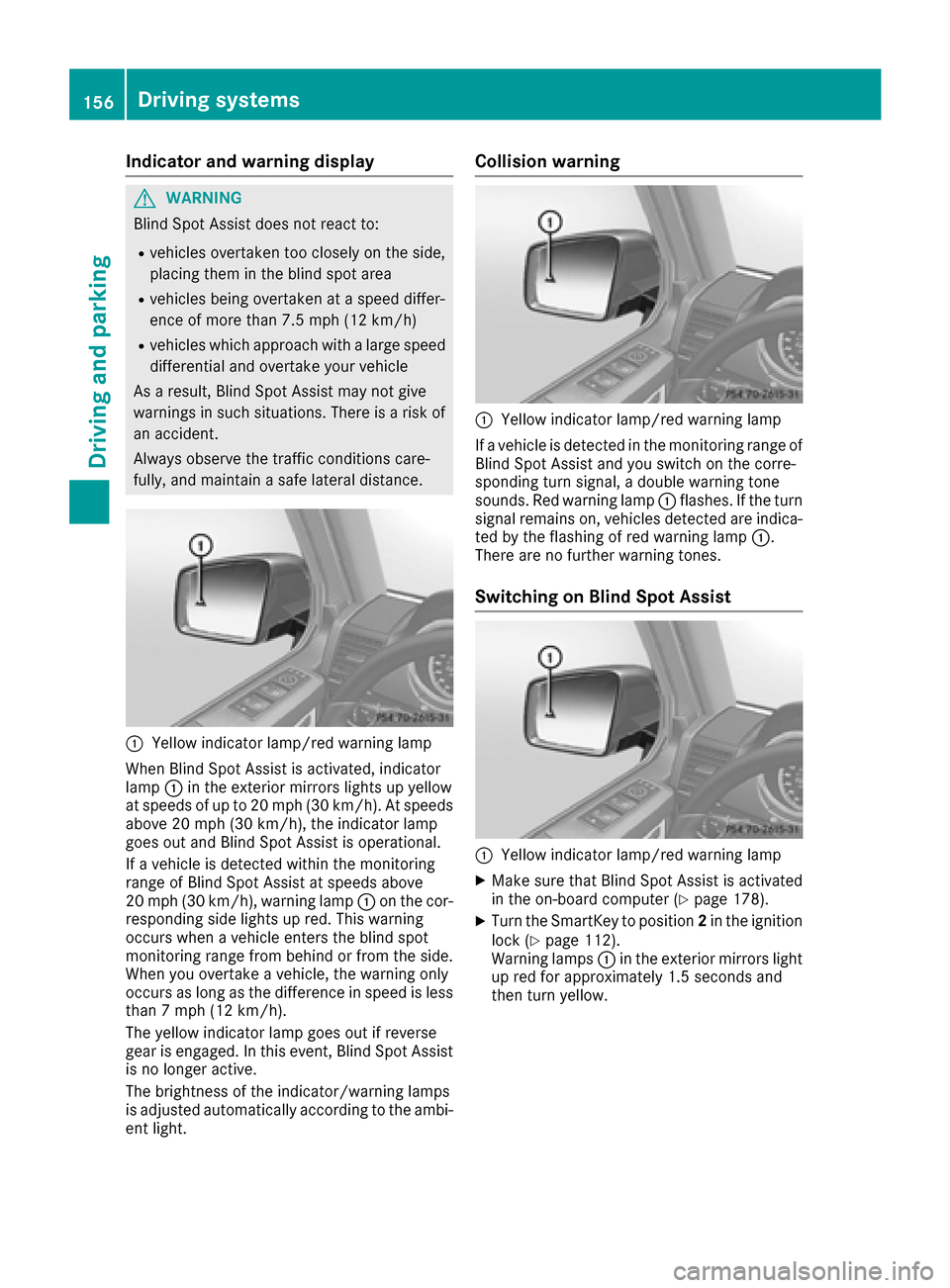
:Yello windicator lamp/red warning lamp
When Blind Spot Assist is activated, indicator
lamp :in th eexterio rmirror slights up yellow
at speeds of up to 20 mph (30 km/h). At speeds
above 20 mph (30 km/h), the indicator lamp
goes out and Blind Spot Assist is operational.
If a vehicle is detected within the monitoring
range of Blind Spot Assist at speeds above
20 mph (30 km/h), warning lamp :on the cor-
responding side lights up red. This warning
occurs when a vehicle enters the blind spot
monitoring range from behind or from the side.
When you overtake a vehicle, the warning only
occurs as long as the difference in speed is less
than 7 mph (12 km/h).
The yellow indicator lamp goes out if reverse
gear is engaged. In this event, Blind Spot Assist
is no longer active.
The brightness of the indicator/warning lamps
is adjusted automatically according to the ambi- ent light.
Collision warning
:Yellow indicator lamp/red warning lamp
If a vehicle is detected in the monitoring range of
Blind Spot Assist and you switch on the corre-
sponding turn signal, a double warning tone
sounds. Red warning lamp :flashes. If the turn
signal remains on, vehicles detected are indica- ted by the flashing of red warning lamp :.
There are no further warning tones.
Switching on Blind Spot Assist
:Yellow indicator lamp/red warning lamp
XMake sure that Blind Spot Assist is activated
in the on-board computer (Ypage 178).
XTurn the SmartKey to position 2in the ignition
lock (Ypage 112).
Warning lamps :in the exterior mirrors light
up red for approximately 1.5 seconds and
then turn yellow.
156Driving systems
Driving and parking
Page 163 of 302
Problems with PARKTRONIC
ProblemPossible causes/consequences andMSolutions
Only the red segments in
the PARKTRONIC warn-
ing displays are lit. You
also hear a warning tone
for approximately two
seconds.
PARKTRONIC is deacti-
vated after a few sec-
onds, and the indicator
lamp in the PARKTRONIC
button lights up.PARKTRONIC has malfunctioned and has switched off.
XIf problems persist, have PARKTRONIC checked at a qualified spe-
cialist workshop.
Only the red segments in
the PARKTRONIC warn-
ing displays are lit.
PARKTRONIC is deacti-
vated after a few sec-
onds.The PARKTRONIC sensors are dirty or there is interference.
XClean the PARKTRONIC sensors (Ypage 244).
XSwitch the ignition back on.
The problem may be caused by an external source of radio or ultra-
sound waves.
XSee if PARKTRONIC functions in a different location.
Rear view camera
Important safety notes
The rear view camera is only an aid. It is not a
replacement for your attention to your immedi-
ate surroundings. You are always responsible
for safe maneuvering and parking. When maneu-
vering or parking, make sure that there are no
persons, animals or objects in the area in which
you are maneuvering.
Under the following circumstances, the rear
view camera will not function, or will function in
a limited manner:
Rthe rear door is open
Rin heavy rain, snow or fog
Rat night or in very dark places
Rif the camera is exposed to very bright light
Rif the area is lit by fluorescent light or LED
lighting (the display may flicker)
Rif there is a sudden change in temperature,
e.g. when driving into a heated garage in win- ter
Rif the camera lens is dirty or obstructed
Rif the rear of your vehicle is damaged. In this
event, have the camera position and setting
checked at a qualified specialist workshop Mercedes-Benz recommends that you use an
authorized Mercedes-Benz Center for this
purpose
Activating/deactivating the rear view
camera
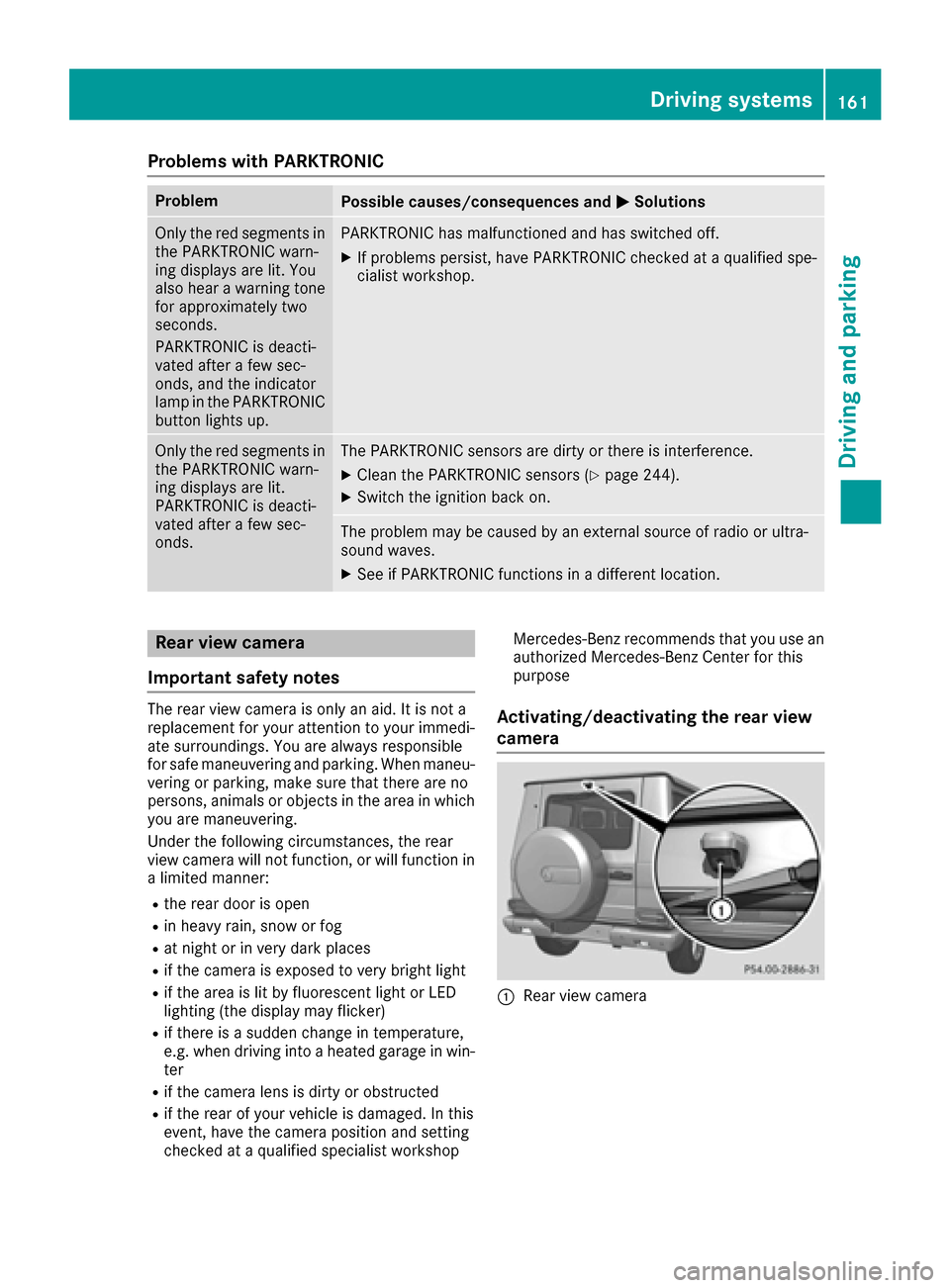
:Rear view camera
Driving systems161
Driving and parking
Z
Page 165 of 302
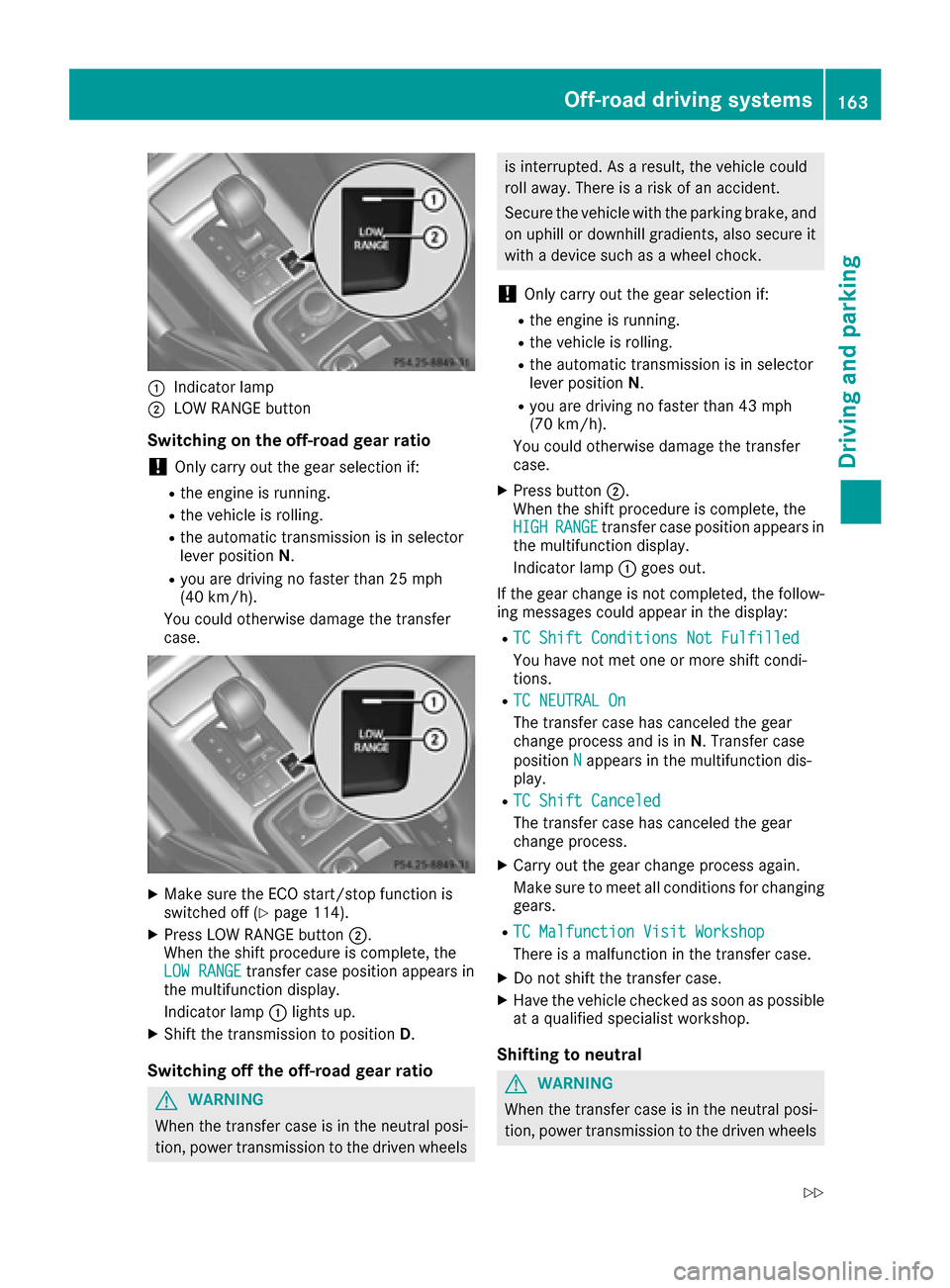
:Indicator lamp
;LOW RANGE button
Switching on the off-road gear ratio
!Only carry out the gear selection if:
Rthe engine is running.
Rthe vehicle is rolling.
Rthe automatic transmission is in selector
lever positionN.
Ryou are driving no faster than 25 mph
(40 km/h).
You could otherwise damage the transfer
case.
XMake sure the ECO start/stop function is
switched off (Ypage 114).
XPress LOW RANGE button ;.
When the shift procedure is complete, the
LOW RANGE
transfer case position appears in
the multifunction display.
Indicator lamp :lights up.
XShift the transmission to position D.
Switching off the off-road gear ratio
GWARNING
When the transfer case is in the neutral posi-
tion, power transmission to the driven wheels
is interrupted. As a result, the vehicle could
roll away. There is a risk of an accident.
Secure the vehicle with the parking brake, and
on uphill or downhill gradients, also secure it
with a device such as a wheel chock.
!Only carry out the gear selection if:
Rthe engine is running.
Rthe vehicle is rolling.
Rthe automatic transmission is in selector
lever position N.
Ryou are driving no faster than 43 mph
(70 km/h).
You could otherwise damage the transfer
case.
XPress button ;.
When the shift procedure is complete, the
HIGH
RANGEtransfer case position appears in
the multifunction display.
Indicator lamp :goes out.
If the gear change is not completed, the follow-
ing messages could appear in the display:
RTC Shift Conditions Not Fulfilled
You have not met one or more shift condi-
tions.
RTC NEUTRAL On
The transfer case has canceled the gear
change process and is in N. Transfer case
position N
appears in the multifunction dis-
play.
RTC Shift Canceled
The transfer case has canceled the gear
change process.
XCarry out the gear change process again.
Make sure to meet all conditions for changing gears.
RTC Malfunction Visit Workshop
There is a malfunction in the transfer case.
XDo not shift the transfer case.
XHave the vehicle checked as soon as possible
at a qualified specialist workshop.
Shifting to neutral
GWARNING
When the transfer case is in the neutral posi-
tion, power transmission to the driven wheels
Off-road driving systems163
Driving and parking
Z
Page 167 of 302
rear wheels rotate at the same speed, regard-
less of their respective torque. Note, engaging
the differential lock greatly impairs the vehicle's
steerability.
Note, it is imperative to use the differential func-
tion when driving on firm road surfaces. Under
no circumstances should the differential be
locked when driving on firm road surfaces. Oth-
erwise, the vehicle may not be steerable and you
could lose control of the vehicle. Therefore, only
engage the differential lock when driving off-
road. You should only engage the differential
lock if activating 4ETS and ESP
®driving systems
and LOW RANGE off-road gear prove to be
insufficient.
Engaging the differential locks
Important safety notes
GWARNING
When differential locks are engaged on a firm,
high-grip surface, the vehicle's steerability is
greatly impaired. In particular, engaging the
differential locks when cornering could lead
to you losing control of the vehicle. There is a risk of an accident.
Disengage the differential locks immediately
on firm surfaces with good grip.
GWARNING
When the differential locks are engaged, ABS, 4ETS, ESP
®and BAS are deactivated. As a
result, the wheels could lock when braking
and the braking distance is increased. There is
a risk of an accident.
Disengage the differential locks immediately
on firm surfaces with good grip.
!Only engage the differential locks when:
Ryou are driving at walking pace.
Rthe driven wheels are not spinning.
Ryou are not driving on a firm road surface.
General notes
The switches are located on the center console.
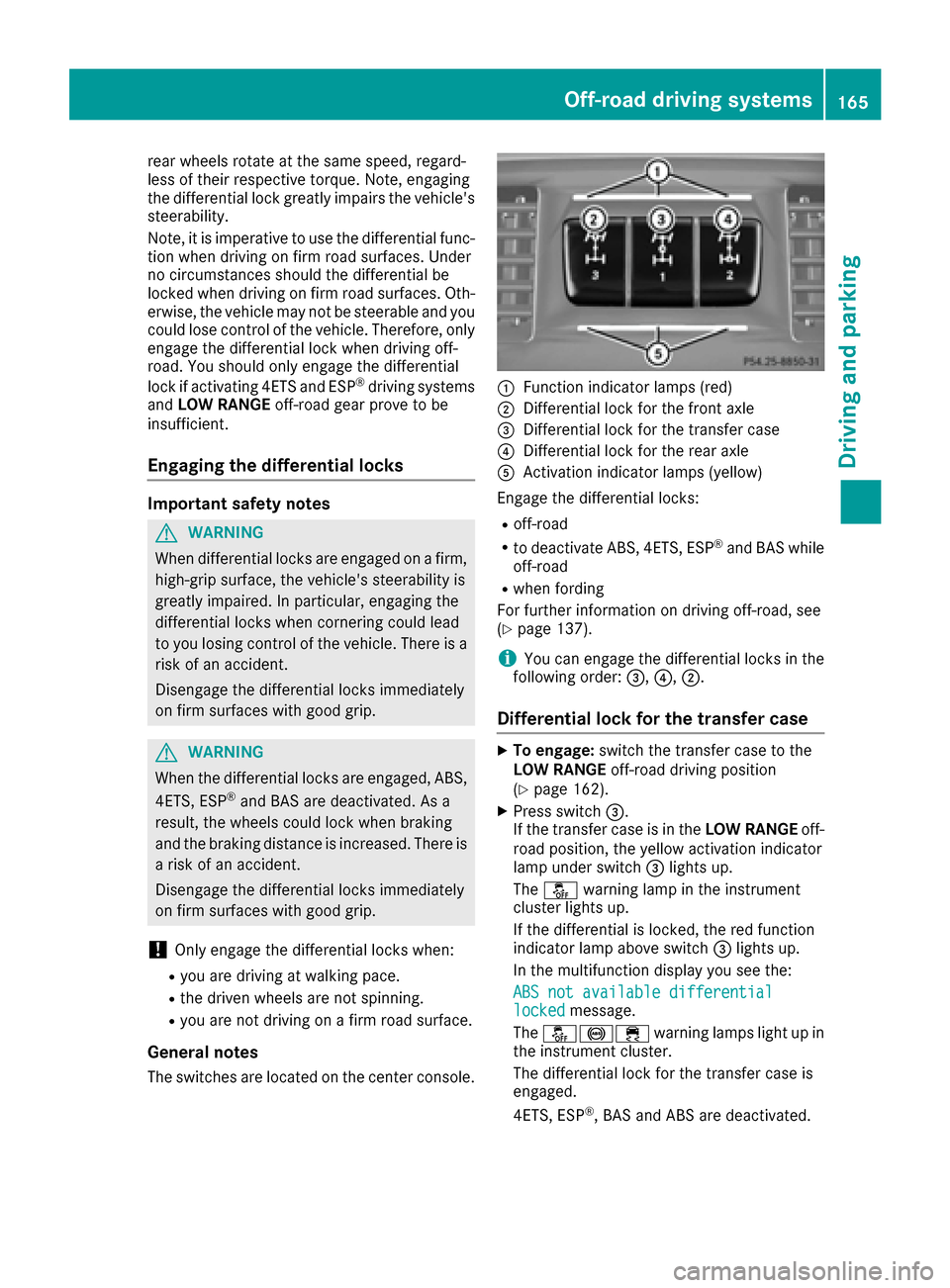
:Function indicator lamps (red)
;Differential lock for the front axle
=Differential lock for the transfer case
?Differential lock for the rear axle
AActivation indicator lamps (yellow)
Engage the differential locks:
Roff-road
Rto deactivate ABS, 4ETS, ESP®and BAS while
off-road
Rwhen fording
For further information on driving off-road, see
(
Ypage 137).
iYou can engage the differential locks in the
following order: =,?,;.
Differential lock for the transfer case
XTo engage: switch the transfer case to the
LOW RANGE off-road driving position
(
Ypage 162).
XPress switch =.
If the transfer case is in the LOW RANGEoff-
road position, the yellow activation indicator
lamp under switch =lights up.
The å warning lamp in the instrument
cluster lights up.
If the differential is locked, the red function
indicator lamp above switch =lights up.
In the multifunction display you see the:
ABS not available differential
lockedmessage.
The å!÷ warning lamps light up in
the instrument cluster.
The differential lock for the transfer case is
engaged.
4ETS, ESP
®, BAS and ABS are deactivated.
Off-road driving systems165
Driving and parking
Z
Page 168 of 302
The vehicle's ability to steer is severely restric-
ted. Drive carefully and accelerate gently for
optimum traction.
iYou can now engage the differential lock for
rear axle ?and the differential lock for front
axle ;as required.
Differential lock for the rear axle
XTo engage: press switch ?.
Yellow activation indicator lamp Alights up
first, followed by red function indicator
lamp :of switch ?.
The differential lock for the rear axle is
engaged.
Differential lock for the front axle
XTo engage: press switch ;.
First, the yellow activation indicator lamp
lights up, followed by the red function indica-
tor lamp.
The differential lock for the front axle is
engaged.
Disengaging the differential locks
You can disengage the differential locks in the
following order: ;,?,=.
XTo simultaneously disengage all differen-
tial locks: press switch =.
Yellow activation indicator lamps Aand red
function indicator lamps :go out.
After approximately three seconds of normal
driving, ABS, 4ETS, ESP
®and BAS are activa-
ted.
The ABS not available differential
lockedmessage disappears in the multifunc-
tion display and the å,!and÷
warning lamps in the instrument cluster go
out.
XShift the transfer case to the HIGH RANGE
on-road position (Ypage 162).
iIf red function indicator lamps :do not go
out when disengaging the differential locks,
stop the vehicle safely as soon as possible, in
accordance with the traffic conditions. Then,
continue driving and the load change can
release the differential lock.
Towing a trailer
Notes on towing a trailer
Important safety notes
GWARNING
If you rest your foot on the brake pedal while
driving, the braking system can overheat. This increases the stopping distance and can even
cause the braking system to fail. There is a
risk of an accident.
Never use the brake pedal as a footrest. Never
depress the brake pedal and the accelerator
pedal at the same time.
GWARNING
When the vehicle/trailer combination begins
to lurch, you could lose control of it. The vehi- cle/trailer combination could even rollover.
There is a risk of an accident.
On no account should you attempt to
straighten up the vehicle/trailer combination
by increasing the speed. Reduce vehicle
speed and do not countersteer. Apply the
brake as necessary.
GWARNING
If you install a ball coupling other than the one
delivered with the vehicle, the trailer tow hitch
and the rear axle may be overloaded. This
applies especially if the ball coupling in ques-
tion is longer or angled differently. This could
seriously impair the driving characteristics
and the trailer can come loose. There is a risk
of an accident.
Only install the ball coupling delivered with
the vehicle or a ball coupling that is designed
to meet your trailer towing requirements. Do
not modify the ball coupling or the trailer tow
hitch.
GWARNING
If the ball coupling is not installed correctly or not secured with the bolt provided and the
corresponding spring cotter, the trailer may
come loose. There is a risk of an accident.
166Towing a trailer
Driving and parking
Page 183 of 302
Convenience
Activating/deactivating the EASY-
ENTRY/EXIT feature
GWARNING
When the EASY-ENTRY/EXIT feature adjusts
the steering wheel, you and other vehicle
occupants – particularly children – could
become trapped. There is a risk of injury.
While the EASY-ENTRY/EXIT feature is mak-
ing adjustments, make sure that no one has
any body parts in the sweep of the steering
wheel.
If somebody becomes trapped:
Rpress one of the memory function position
buttons, or
Rmove the switch for steering wheel adjust-
ment in the opposite direction to that in
which the steering wheel is moving.
The adjustment process is stopped.
XPress the =or; button on the steering
wheel to select the Sett.menu.
XPress the:or9 button to select the
Conveniencesubmenu.
XPress ato confirm.
XPress the :or9 button to select the
Easy Entry/Exitfunction.
If the EasyEntry/Exitfunction is activated,
the vehicle steering wheel appears in red in
the multifunction display.
XPress the abutton to save the setting.
Further information on the EASY-ENTRY/EXIT
feature (
Ypage 79).
Switching the fold-in mirrors when lock-
ing feature on/off
When you activate the Auto.MirrorFoldingfunction, the exterior mirrors are folded in when
the vehicle is locked. If you unlock the vehicle
and then open a door, the exterior mirrors fold
out again.
XPress the=or; button on the steering
wheel to select the Sett.menu.
XPress the:or9 button to select the
Conveniencesubmenu.
XPress ato confirm.
XPress :or9 to select the Auto.Mir‐ror Foldingfunction.
If the Auto. Mirror Foldingfunction is
activated, the vehicle's exterior mirror is dis-
played in red in the multifunction display.
XPress the abutton to save the setting.
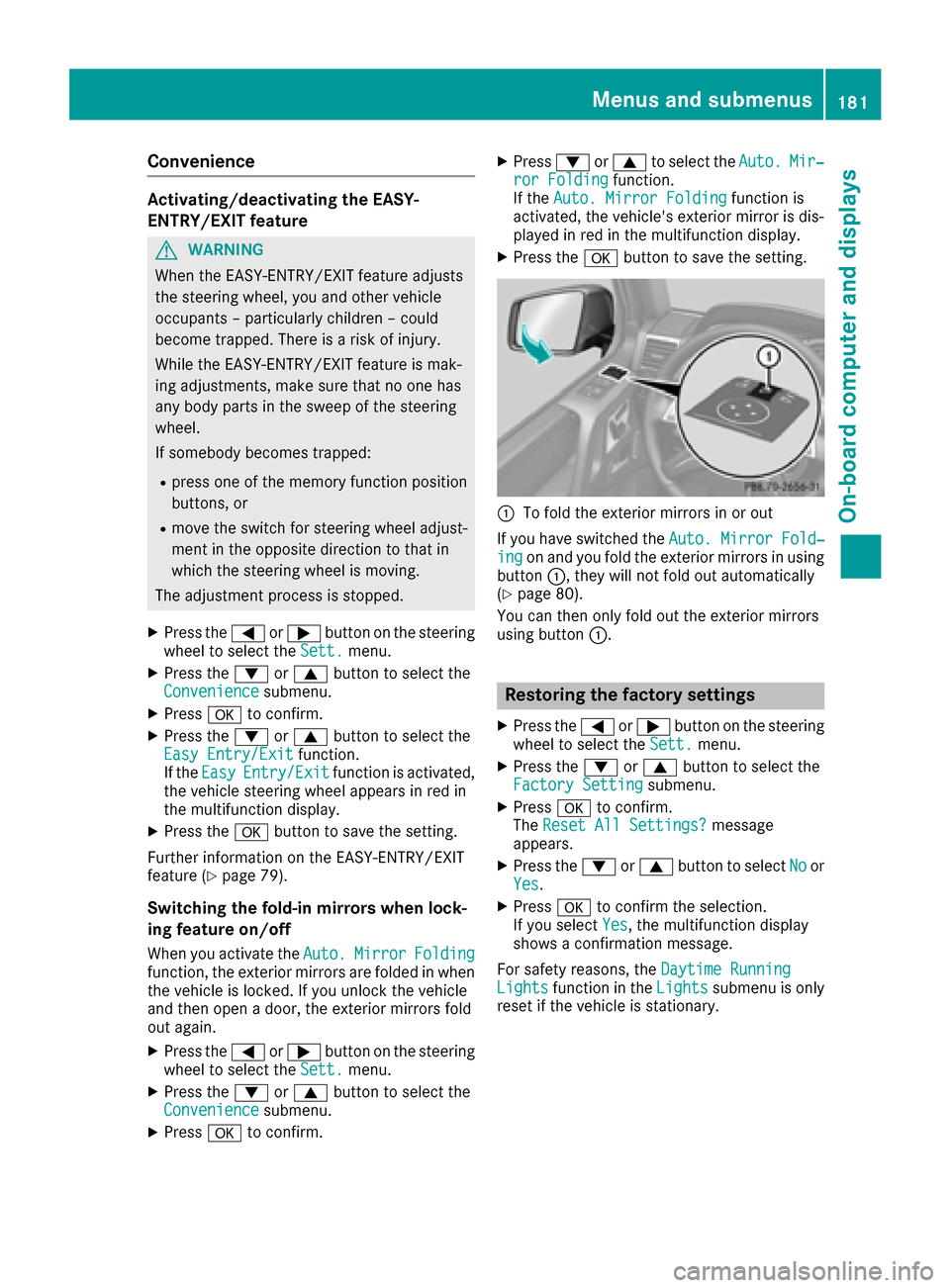
:To fold the exterior mirrors in or out
If you have switched the Auto. Mirror Fold‐
ingon and you fold the exterior mirrors in using
button :, they will not fold out automatically
(
Ypage 80).
You can then only fold out the exterior mirrors
using button :.
Restoring the factory settings
XPress the=or; button on the steering
wheel to select the Sett.menu.
XPress the:or9 button to select the
Factory Settingsubmenu.
XPress ato confirm.
The Reset All Settings?message
appears.
XPress the :or9 button to select Noor
Yes.
XPress ato confirm the selection.
If you select Yes, the multifunction display
shows a confirmation message.
For safety reasons, the Daytime Running
Lightsfunction in theLightssubmenu is only
reset if the vehicle is stationary.
Menus and submenus181
On-board computer and displays
Z