display MERCEDES-BENZ G-Class 2017 W463 User Guide
[x] Cancel search | Manufacturer: MERCEDES-BENZ, Model Year: 2017, Model line: G-Class, Model: MERCEDES-BENZ G-Class 2017 W463Pages: 286, PDF Size: 4.91 MB
Page 17 of 286
Stopping ........................................ 168
Radiato rcover ................................... 226
Radio
Selecting astation ......................... 162
Radio mode
see also Digital Operator's Man-
ual.................................................. 198
Radio-wave reception/transmis-
sion in the vehicle
Declaration of conformity ................ 26
Rear benchs eat
Folding forward .............................. 208
Rear compartment
Setting the ai rvents ...................... 102
Rear door
Closing ............................................. 69
Displa ymessage ............................ 186
Important safety notes .................... 68
Opening ........................................... 68
Rear fog lamp
Displa ymessage ............................ 176
Replacing bulb s............................... 91
Switching on/off. ............................. 86
Rear seat bench
Folding into an upright position ..... 208
Rear vie wcamera
Cleaning instructions ..................... 235
Displa yinthe multimedi asystem .. 143
Function/note s............................. 143
Generaln otes ................................ 143
Switching on/off. .......................... 143
Rear windowd efroster
Problem (malfunction) ................... 100
Switching on/off. .......................... 100
Rear windoww iper
Replacing the wipe rblade ................ 93
Switching on/off. ............................. 93
Rear-vie wmirror
Dipping (automatic) ......................... 83
Refrigerant (air-conditioning sys-
tem)
Important safety notes .................. 280
Refueling
Fuelgauge ....................................... 32
Important safety notes .................. 118
Refueling process .......................... 118
see Fuel Remote control
Programming (garage door
opener) .......................................... 222
Replacing bulbs
Backu plam p.................................... 91
Brake lamp ...................................... 91
Important safety notes .................... 88
Overview of bulb types .................... 89
Rear fog lamp .................................. 91
Tail lamp .......................................... 91
Turn signal (rear) .............................. 91
Turn signals (front) ........................... 90
Reporting safety defects .................... 27
Rescue card ......................................... 28
Re
serve (fuel tank)
see Fuel
Reserve fuel
Displa ymessage ............................ 179
Warning lamp ................................. 194
Residual heat
Switching on/off. .......................... 101
Restrain tsystem
Displa ymessage ............................ 173
Introduction ..................................... 38
Warning lamp ................................. 193
Warning lamp (function) ................... 38
Reversin glamps (display mes-
sage) ................................................... 176
Roadside Assistance (breakdown) .... 25
Roo flinin gand carpets (cleaning
guidelines) ......................................... 237
Route (navigation)
see Route guidance (navigation)
Route guidance
see also Digital Operator's Man-
ual.................................................. 198
Route guidance( navigation) ............ 161
S
Safety
Childre ninthe vehicl e..................... 49
see Occupant safety
Safety system
see Driving safety systems
SD card
Inserting ........................................ 203
Inserting/removing ........................ 203
Index15
Page 18 of 286
Removing....................................... 20 3
SD memory card
seea lsoD igita lOperator's Man-
ua l..................................................1 98
Search&S end
see also Digita lOperator's Man-
ua l..................................................1 98
Seat backrest
Folding back .................................. 207
Seat belts
Adjusting the height ......................... 41
center rear-compartment seat. ........ 42
Cleaning ......................................... 237
Correct usag e.................................. 41
Fastening ......................................... 41
Important safety guideline s............. 40
Introduction ..................................... 39
Releasing ......................................... 43
Warning lamp ................................. 188
Warning lamp (function) ................... 43
Seat heating
Indicato rlam p(malfunction) ............ 79
Seat ventilation
Indicato rlam p(malfunction) ............ 79
Seats
Adjusting (electrically) ..................... 76
Adjusting the 4-wa ylum bars up-
por t.................................................. 78
Adjusting the headr estraint ............ 76
Cleaning the cover. ........................ 236
Correct driver'ss eatposition ........... 74
Important safety notes .................... 74
Overview .......................................... 74
Storing settings (memory func-
tion) ................................................. 83
Switching seath eating on/off......... 78
Switching seatv entilation on/off. ... 79
Selecto rlever
Cleaning ......................................... 236
Sensors (cleaning instructions) ....... 234
Servic einterva ldisplay
Displaying aservice message (on-
board computer) ............................ 231
Servic emenu( on-board com-
puter) .................................................. 164
Servic eproducts
Brake fluid ..................................... 279
Coolant (engine) ............................ 279 Engine oil.
...................................... 278
Fue l................................................ 276
Important safety notes .................. 276
Notes. ............................................ 276
Refrigerant (air-conditioni ng sy
s-
tem) ............................................... 280
Washerf luid ................................... 280
Setting the air distribution ................. 98
Setting the date/time format
see also Digital Operator's Man-
ual.................................................. 198
Setting the language
see also Digital Operator's Man-
ual.................................................. 198
Setting the time
see also Digital Operator's Man-
ual.................................................. 198
Settings
Calling up astoreds etting ............... 84
Factory (on-board computer) ......... 167
On-board compute r....................... 164
SETUP (on-board computer,
Mercedes-AMG vehicles) .................. 168
Shift ranges ....................................... 114
Side impac tair bag ............................. 45
Side marker lamp (display mes-
sage) ................................................... 176
Side windows
Convenience closing feature ............ 70
Convenience opening feature .......... 70
Important safety information ........... 69
Opening/closing .............................. 69
Overview .......................................... 69
Problem (malfunction) ..................... 70
SIRIU Sservices
see also Digital Operator's Man-
ua l.................................................. 198
Sliding sunroof
Important safety notes .................... 71
Opening/closing .............................. 72
Operating manually .......................... 72
Problem (malfunction) ..................... 73
SmartKey
Changing the battery ....................... 65
Changing the programming ............. 64
Checking the battery ....................... 65
Convenience closing feature ............ 70
16Index
Page 19 of 286
Convenience opening feature .......... 70
Display message ............................ 187
Door central locking/unlocking ...... .63
Important safety notes .................... 63
Loss .................................................6 6
Mechanical key ................................ 64
Overview .......................................... 63
Positions (ignition lock) ................. 104
Problem (malfunction) ..................... 66
Starting the engine ........................ 105
SMS
see also Digital Operator's Man-
ual .................................................. 198
Snow chains ...................................... 253
Socket (12 V)
Cargo compartment. ...................... 213
Front-passenger footwell ............... 212
General notes ................................ 212
Rear compartment. ........................213
Sound
Switching on/off ........................... 199
Spare fuses ........................................ 249
Spare wheel
Spare wheel bracket at the rear .... 239
Stainless-steel spare hub cap ........2 39
Special seat beltr etractor.................. 50
Specialist workshop ............................ 27
Speedometer
Digita l............................................ 160
In the Instrument cluster ................. 32
Segments ...................................... 157
Selecting the displayu nit ...............165
Standingl amps
Display message ............................ 176
Switching on/off .............................. 86
Starting the engine
Important safety notes .................. 104
Steering (display message) .............. 187
Steering wheel
Adjusting (electrically). .................... 80
Buttons (on-board computer) ......... 158
Cleaning ..................... .................... 236
Important sa
fety notes .................... 79
Paddle shifters ............................... 114
Steering wheel heating .................... 80
Storing settings (memory func-
tion) ................................................. 83 Steering wheel heating
Indicator lamp (malfunction) ............ 80
Steering wheel paddle shifters ........114
Stopwatch (RACETIMER) ................... 168
Stowage areas ................................... 205
Stowage compartment
Door stowage compartment .......... 206
Stowage compartments
Armrest (under) .............................2 06
Cu ph olders ................................... 210
Glove box ....................................... 205
Important safety information ......... 205
Stowag enet ................................... 206
Stowag epockets ........................... 206
Stowage net ....................................... 206
Summer opening
see Convenience opening feature
Summer tires
In winter ........................................ 253
Sun visor ............................................ 210
Surround lighting (on-board com-
puter) ..................................................1 65
SUV
(Sport Utility Vehicle) ....................... 26
Switchin gair-recirculation mode
on/off ................................................. 101
Switchin gonmedia mode
Via the device lis t.......................... 203
T
Tachometer ........................................ 157
Tail lamp
Replacing bulb s............................... 91
Tail lamps
Displa ymessage ............................ 176
Tank content
Fuelgauge ....................................... 32
Technical data
Capacities ...................................... 276
Drawba rloa d( maximum) ............... 284
Information .................................... 274
Trailer load s................................... 284
Vehicl edata. .................................. 281
Telephone
Accepting acall. ............................ 163
Authorizing amobilephone (con-
necting) ......................................... 202
Index17
Page 21 of 286
Summer tiresinwinter .................. 253
Temperature .................................. 263
TIN (Tire Identification Number)
(definition) ..................................... 269
Tire bead (definition) ...................... 269
Tire pressure (definition) ................ 269
Tire pressures (recommended )...... 268
Tire size (data )............................... 273
Tire size designation, load-bearing
capacity, speed rating .................... 264
Tire tread. ...................................... 252
Tire tread( definition) ..................... 269
Totall oadlim it (definition) ............. 269
Tractio n......................................... 263
Tractio n(definition) ....................... 269
Tread wear ..................................... 263
TWR (permissibl etraile rdrawbar
noseweight) (definition) ................. 269
Uniform Tire Quality Grading
Standard s...................................... 263
Uniform Tire Quality Grading
Standard s(de finition) .................... 267
Wea rindicator (definition) ............. 269
Wheel and tire combination ........... 273
Wheel rim (definition) .................... 268
see Fla ttire
Top Tether ............................................ 52
Tow-starting
Emergency engine starting ............ 248
Important safety notes .................. 246
Towin gatrailer
Axle load ,permissibl e.................... 284
Cleaning the traile rtow hitch ......... 235
Coupling up atraile r...................... 154
Decoupling atraile r....................... 155
Driving tip s.................................... 151
Important safety notes .................. 149
Installing the ball coupling ............. 152
Lights display message .................. 176
Pulling away with atraile r.............. 105
Shift rang e..................................... 113
Trailer load s................................... 284
Trailer tow hitch ............................. 284
Towin gaway
Important safety guideline s........... 246
In the event of malfunctions .......... 248
With both axle
s on the ground ....... 247 Towin
geye
Front .............................................. 247
Rear ............................................... 247
Trafficr eports
see also Digital Operator's Man-
ua l.................................................. 198
Trailer
7-pi nconnecto r............................. 156
Power supply ................................. 156
Trailer coupling
see Towing atrailer
Trailer loads
Technical data ............................... 284
Trailer loads and drawbar nose-
weights ............................................... 155
Trailer tow hitch
Ballposition ................................... 284
Trailer towing
ESP
®................................................ 60
PARKTRONIC ................................. 142
Permissibl etraile rloads and
drawbar noseweights ..................... 155
Transfer case
Generaln otes ................................ 145
Shift rang e..................................... 145
Shifting .......................................... 146
Shifting (general notes). ................. 146
Shifting (important safety notes). .. 146
Shifting to neutral .......................... 147
Switching off the off-road gear
rati o............................................... 146
Switching on the off-road gear
rati o............................................... 146
Transmission
see Automati ctransmission
Transmissio npositions .................... 112
Transporting the vehicle .................. 247
Traveling uphill
Brow of hill ..................................... 130
Trim piece s(clea ning instruc-
tions) .................................................. 236
Trip computer (on-board com-
puter) .................................................. 160
Trip odometer
Calling up ....................................... 160
Resetting (on-board computer) ...... 160
Index19
Page 22 of 286
Turn signalsDisplay message ............................ 176
Replacing bulb s(front) ..................... 90
Switching on/off .............................. 87
TV
Operating (on-boar dcomputer) ..... 163
see Separate operating instructions
Two-way radio
Frequencie s................................... 274
Installation ..................................... 274
Transmission output( maximum) .... 274
TWR (Tongue Weight Rating) (defi-
nition) ................................................. 269
Type identificatio nplate
see Vehicl eide ntificatio nplate
U
Unlocking
Emergency unlocking ....................... 68
From insid ethe vehicl e(central
unlocking button) ............................. 67
US Bd evices
Connecting to the Media Inter-
face ...............................................2 03
V
Vanity mirror
Sun visor. ....................................... 211
Vehicle
Correct use ...................................... 27
Data acquisition ............................... 28
Display message ............................ 186
Equipment ....................................... 24
Individua lsettings .......................... 164
Limited Warranty .............................2 8
Loading .......................................... 260
Locking (in an emergency) ............... 68
Locking (SmartKey) .......................... 63
Lowering ........................................ 272
Maintenance .................................... 25
Operation outsidet he USA/
Canada ............................................ 25
Parking .......................................... 120
Parking for along period. ............... 122
Pulling awa y................................... 105
Raising ........................................... 270
Securing from rolling away ............ 270 Tow-starting ................................... 248
Towing ........................................... 246
Transporting .................................. 247
Unlocking (i
nanemergency) ........... 68
Unlocking (SmartKey). ..................... 63
Vehicl edata. .................................. 281
Vehicl edata ....................................... 281
Vehicl edata (off-road driving)
Approach/departure angle ............ 283
Fording depth ................................ 283
Maximu mgradient climbing abil-
ity .................................................. 283
Vehicl edimensions ........................... 281
Vehicl eemergencyl ocking ................ 68
Vehicl eidentificatio nnumber
see VIN
Vehicl eidentificatio nplate .............. 275
Vehicl etoolkit.................................. 239
Ventilation
Setting the airflow ........................... 98
Video
Operating the DVD ......................... 162
see also Digital Operator's Man-
ual.................................................. 198
VIN
Type plate ...................................... 275W
Warning and indicator lampsABS ................................................ 190
Brakes ........................................... 189
Check Engine ................................. 194
Coolant .......................................... 194
Distance warning ........................... 196
DISTRONIC PLUS. .......................... 196
ESP
®.............................................. 191
ESP®OFF ....................................... 192
Fue ltank ........................................ 194
Generaln otes ................................ 187
Overview .......................................... 32
Parking brake ................................ 193
PASSENGER AIR BAG OFF ............... 39
Reserve fue l................................... 194
Restraint system ............................ 193
Seatb elt. ....................................... 188
Tire pressure monitor .................... 197
Warning triangle ................................ 238
20Index
Page 23 of 286
Warranty.............................................. 24
Washer fluid
Display message ............................ 187
Weather display (COMAND)
see als oDigita lOperator's Man-
ua l.................................................. 198
Wheel and tire combinations
Tires. .............................................. 273
Wheel bol ttightening torque ........... 272
Wheels
Changing awheel .......................... 269
Checking ........................................ 251
Cleaning ......................................... 233
Important safety notes .................. 251
Informatio nondriving .................... 251
Interchanging/changing ................ 269
Mounting anew wheel ...................2 72
Mounting awheel .......................... 270
Removing awheel .......................... 272
Snow chains .................................. 253
Storing ...........................................2 70
Tightening torque. .......................... 272
Wheels ize/tire size ....................... 273
Windowc urtain air bag
Display message ............................ 174
Operation ......................................... 46
Windows
see Side windows
Windshield
Defrosting ........................................ 99
Windshiel dheating .............................9 9
Windshield washe rfluid
see Windshieldw asher system
Windshield washe rsystem
Adding washer flui d....................... 229
Notes. ............................................ 280
Windshiel dwipers
Problem (malfunction) ..................... 94
Rear window wipe r.......................... 93
Replacing the wipe rblade s.............. 93
Switching on/off. ............................. 92
Winter driving
Important safety notes .................. 252
Slippery roads urfaces ................... 126
Snow chains .................................. 253
Winter operation
Overview ........................................ 252
Radiato rcover. .............................. 226 Summer tire
s................................. 253
Winter tires
M+S tire s....................................... 253
Wipe rblades
Cleaning ......................................... 234
Important safety notes .................... 93
Replacing ......................................... 93
Wo
oden trim (cleaning instruc-
tions) .................................................. 236
Index21
Page 34 of 286
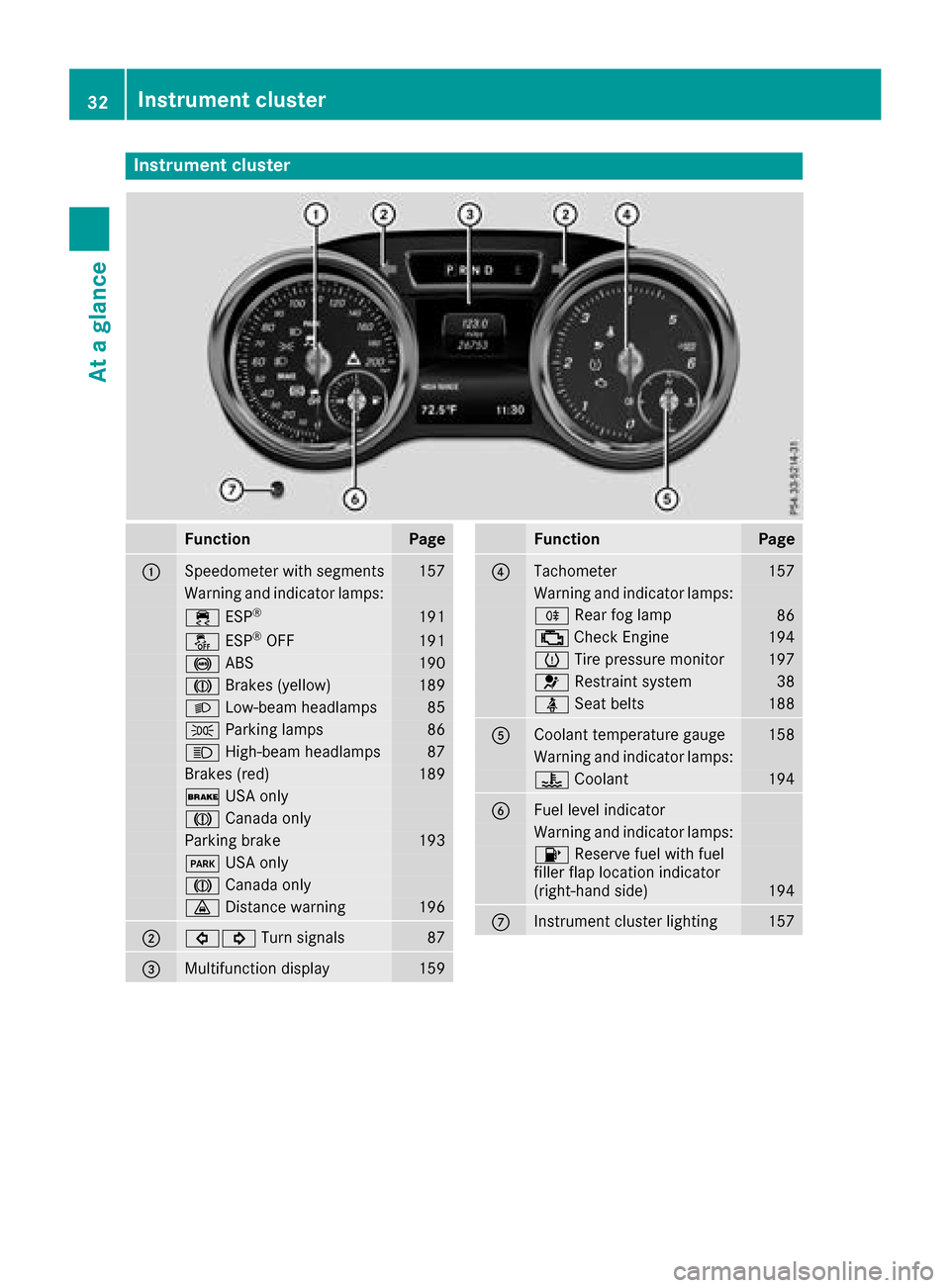
Instrumentcluster
FunctionPag e
:Speedometer wit hsegments157
Warning and indicator lamps:
÷ ESP®19 1
å ESP®OF F191
! ABS190
J Brakes(yellow)18 9
L Low-beam headlamps85
TParking lamp s86
KHigh-beam headlamps87
Brakes(red)18 9
$ USAo nly
J Canad aonly
Parking brak e193
F USAo nly
J Canad aonly
· Distanc ewarning196
;#! Turn signals87
=Multifunction display159
FunctionPag e
?Tachometer157
Warning and indicator lamps:
R Rear fog lamp86
;CheckEngine19 4
h Tirep ressur emonitor197
6 Restrain tsystem38
ü Seat belt s188
ACoolan ttem perature gauge158
Warning and indicator lamps:
? Coolan t194
BFue llevel indicator
Warning and indicator lamps:
8 Reserve fuel wit hfuel
filler flap location indicator
(right-hand side )
194
CInstrumen tcluste rlighting15 7
32Instrumen tcluster
At ag lance
Page 35 of 286
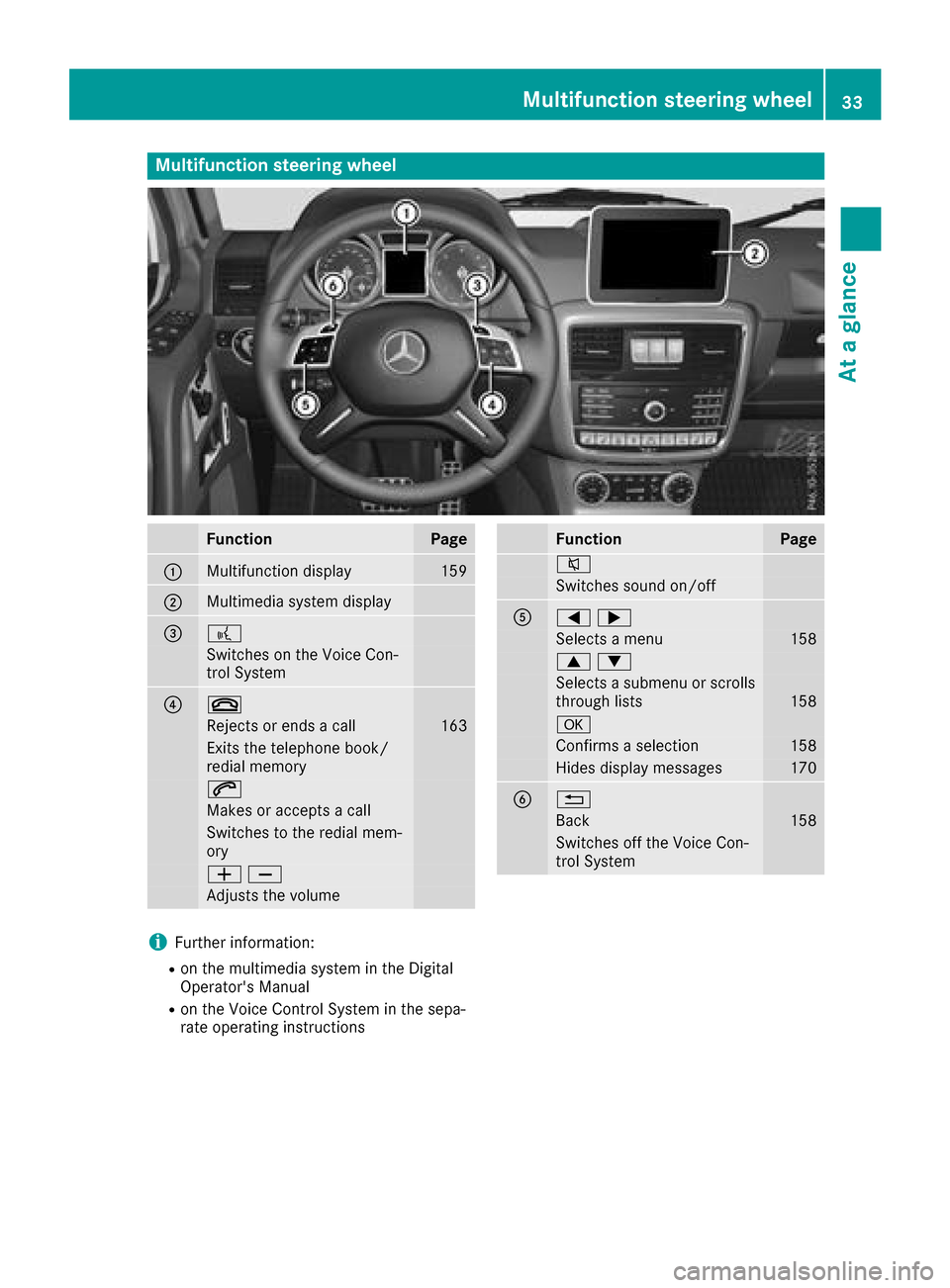
Multifunction steering wheel
FunctionPage
:Multifunction display159
;Multimediasystem display
=?
Switches on the Voice Con-
trol System
?~
Rejects or ends acall163
Exits the telephone book/
redial memory
6
Makes or accepts acall
Switches to the redial mem-
ory
WX
Adjusts the volume
FunctionPage
8
Switchess ound on/off
A=;
Selectsamenu158
9:
Selects asubmenu or scrolls
through lists158
a
Confirm saselection158
Hides display messages170
B%
Back158
Switches off the Voice Con-
trol System
iFurther information:
Ron the multimedi asystem in the Digital
Operator's Manual
Ron the Voice Control System in the sepa-
rate operating instructions
Multifunctions teering wheel33
Atag lance
Page 61 of 286
4ETS (Electronic Traction System)
iObserve the "Important safety notes" sec-
tion (Ypage 57).
4ET Straction contro lispart of ESP
®.
4ET Straction contro lisnolonger activ eabove a
speed of approximately 37 mph (60 km/h).
Traction contro lbrakes the drive wheels indi-
vidually if they spin. This enables you to pull
away and accelerate on slippery surfaces,f or
example if the road surface is slippery on one
side. In addition, more drive torque is transfer-
red to the wheel or wheels with traction.
Traction contro lremains active, even if you
deactivate ESP
®.
Importan tsafetyn otes
iObserve the "Important safety notes" sec-
tion (Ypage 57).
GWARNING
If ESP
®is malfunctioning, ESP®is unable to
stabilize the vehicle. Additionally, further driv-
ing safety systems are deactivated. This
increases the risk of skiddin gand an accident.
Driv eonc arefully. Have ESP
®checked at a
qualified specialist workshop.
!Only operate the vehicle for amaximum of
ten seconds on abrake test dynamometer.
Switc hoff the ignition.
Application of the brakes by ESP
®may oth-
erwise destroy the brake system.
!Af unction or performanc etest should only
be carried out on atwo-axle dynamometer.
Beforey ou operate the vehicle on such a
dynamometer, please consult aqualified
workshop. You could otherwise damage the
drive train or the brake system.
If the å ESP
®OFF warning lamp lights up
continuously, ESP®is deactivated.
If the ÷ ESP®warning lamp lights up contin-
uously, ESP®is not available due to amalfunc-
tion.
Observe the information on warning lamps
(
Ypage 191) and display messages which may
be displayed in the instrument cluster
(
Ypage 171). Only use wheels with the recommended tire
sizes. Only then will ESP
®function properly.
If differential locksa re switched on, ABS, BAS
and ESP
®switc hoff automatically.
Characteristics of ESP®
Genera linformation
If the ÷ ESP®warning lamp goes out before
beginning the journey, ESP®is automatically
active.
If ESP
®intervenes, the ÷ESP®warning lamp
flashes in the instrument cluster.
If ESP
®intervenes:
XDo not deactivate ESP®under any circum-
stances.
XOnly depress the accelerator pedal as far as
necessary when pulling away.
XAdapt your drivings tyle to suit the prevailing
road and weather conditions.
ECO start/stop function
The ECO start/stop function switches the
engin eoff automatically when the vehicle stops
moving. The engin estart sautomatically when
the driver wants to pull away again. ESP
®
remains in its previously selected status, e.g. if
ESP®was deactivated before the engin ewas
automatically switched off.
Deactivating/activating ESP®
Important safetyn otes
iObservethe "Important safety notes" sec-
tion (Ypage 57).
You can select between the following states of
ESP
®:
RESP®is activated.
RESP®is deactivated.
GWARNING
If you deactivate ESP
®,E SP®no longer sta-
bilizes the vehicle. There is an increased risk
of skiddin gand an accident.
Only deactivate ESP
®in the situation sdescri-
bed in the following.
Driving safetys ystems59
Safety
Z
Page 63 of 286
EBD (electronic brakeforce distribu-
tion)
General information
EB Dm onitors and controls th ebrak epressure
on th erear wheels to improve driving stability
while braking.
Important safety notes
iObserv ethe "Important safety notes" sec-
tio n(Ypage 57).
GWARNING
If EB Dism alfunctioning, th erear wheels can
lock, e.g .unde rfull braking .This increases the
risk of skiddinga nd an accident.
You should therefore adapt your driving style
to th edifferenth andlingcharacteristics .Have
th eb rak esystem checked at aqualified spe-
cialist workshop.
Observ einformatio nregardin gindicator and
warning lamps (
Ypage 190) as well as display
messages (Ypage 172).
ADAPTIV EBRAKE
ADAPTIVEB RAKE provide sincreased braking
safety. In addition to th ebraking function,
ADAPTIVEB RAKE also has th eHOLDf unction
(
Ypage 139) and hill start assist(Ypage 127).
Protection against theft
Immobilizer
The immobilizer prevent syour vehicle from
beings tarted without th ecorrec tSma rtKey.
XTo activate: remove theSmartKey from the
ignition lock.
XTo deactivate: switch on theignition.
When leavin gthe vehicle ,always tak ethe
SmartKey with you and lockt hevehicle .The
engine can be started by anyon ewithavalid
SmartKey that is left inside th evehicle.
iThe immobilizer is always deactivate dwhen
you start th eengine. In th
eeven ttha tthe engine canno tbestarted
(yet th evehicle's battery is charged), th esys-
te misn otoperational. Contac tanauthorized
Mercedes-Ben zCenter or call
1-800-FOR-MERCedes (in th eUSA)or
1-800-387-0100 (in Canada).
ATA (anti-thef talarm system)
XTo arm: lockthevehicle with th eSmartKey.
Indicato rlamp :flashes. The alarm system
is armed after approximately 15 seconds.
XTo disarm: unlock thevehicle with th eSma rt-
Key.
iIf you then do no topen aside door or the
rear door,t healarm system switches back on
again after approximately 40 seconds.
Av isual and audible alarm is triggered if the
alarm system is armed and you open:
Rad oor
Rthev ehicle with th emechanical key
Rther ear door
Rtheh ood
The alarm is also triggered if:
Rth ep osition of th evehicle is changed.
Raw indow is smashed.
The alarm is no tswitched off ,even if you close
th eo pen door that triggered it, for example.
XTo stop th ealarm: pressthe % or&
butto nont heSmartKey.
The alarm is stopped.
or
XInsertt heSmartKey int othe ignition lock.
The alarm is stopped.
iIf th ealarm continues for mor ethan
30 seconds, th embrace emergency call sys-
te ma utomaticall ynotifies th eCustomer
Protection against theft61
Safety
Z