sensor MERCEDES-BENZ G-Class 2017 W463 Owner's Manual
[x] Cancel search | Manufacturer: MERCEDES-BENZ, Model Year: 2017, Model line: G-Class, Model: MERCEDES-BENZ G-Class 2017 W463Pages: 286, PDF Size: 4.91 MB
Page 8 of 286
C
CaliforniaImportant notic efor retail cus-
tomersa nd lessees .......................... 24
Callin gupam alfunction
see Display messages
Camera
see Rear view camera
Care
Car wash ........................................ 231
Carpet s......................................... .237
Chrome parts. ................................ 23 5
Disp lay. ..........................................2 36
Exhaus tpipe. ................................. 235
Exterior lights ................................ 234
General notes ................................ 231
Interior ...........................................2 36
Matte finish ................................... 233
Paint .............................................. 233
Plastic trim ....................................2 36
Power washer ................................ 232
Rea rview camera .......................... 235
Roo flining ...................................... 237
Seat belt. ....................................... 237
Seat cover ..................................... 236
Selector lever. ............................... 236
Sensors ......................................... 234
Steering wheel. .............................. 236
Trimp ieces. ................................... 236
Washing by hand ........................... 232
Wheels. .......................................... 233
Window s........................................ 234
Wipe rblade s.................................. 234
Woode ntrim .................................. 236
Carg ocom partmentc over
Important safety notes .................. 209
Installing/removing ....................... 209
Notes/howtou se......................... 209
Opening and closing ...................... 209
Carg ocom partmente nlargement
Important safety notes .................. 206
Carg otie dow nrings ......................... 209
CD
see also Digital Operator's Man-
ual.................................................. 198
CD player/CD changer (on-board
computer) .......................................... 162 Cente
rc
ons
ole
Lower section .................................. 35
Overview .......................................... 34
Upper section .................................. 34
Central locking
Automati cloc king (on-board com-
puter) ............................................. 166
Locking/unlocking (SmartKey). ....... 63
Changeofa ddress.............................. 25
Changeofo wnership.......................... 25
Changin gbulbs
Standing lamp (rear) ........................ 91
Changin ggears .................................. 112
Child
Restraint system .............................. 50
Child seat
BabySmart™ ai rbag deactivation
system ............................................. 53
Forward-facing restraint system ...... 55
LATCH-typ e(ISOFIX) child seat
anchors ............................................ 51
On the front-passenger seat. ........... 54
Problem (malfunction) ..................... 55
Rearward-facing restraint system .... 54
Top Tether ....................................... 52
Child-proof locks
Important safety notes .................... 56
Rear doors ....................................... 56
Children
Specia lseatb eltr etractor ............... 50
Childrenint he vehicle
Important safety notes .................... 49
Chrome parts (cleaning instruc-
tions) .................................................. 235
Cigarette lighter ................................ 212
Cleaning
Mirror turn signal ........................... 234
Trailer tow hitch ............................. 235
Climate control
Controlling automaticall y................. 98
Cooling with ai rdehumidifica tion ..... 97
Defrosting the window s................... 99
Defrosting the windshield ................ 99
Dual-zone automatic climate con-
trol ................................................... 95
ECO start/stop function .................. 97
Important safety notes .................... 95
6Index
Page 16 of 286
Service menu ................................. 164
Settingsmenu ............................... 164
Standard display ............................ 160
Telephone menu ............................ 163
Tripm enu ...................................... 160
TV operation .................................. 163
Vehicl esubmenu ........................... 166
Video DVD operation ..................... 162
Operatin gsafety
Declaration of conformity ................ 26
Important safety notes .................... 26
Operatin gsystem
see On-board computer
Operation
Digital Operator's Manua l................ 22
Operator's Manual
Vehicl eequipment ........................... 24
Outside temperature display ........... 157
Overhead controlp anel...................... 36
Override feature
Rear sid ewindow s........................... 56
P
Paint code number ............................ 275
Paintwork (cleaning instructions) ... 233
Parking
Engaging park position .................. 110
Important safety notes .................. 120
Parking brake ................................ 121
Position of exterio rmirror, front-
passenger sid e................................. 83
Rear vie wcamera .......................... 143
Switching off the engine ................ 121
see PARKTRONIC
Parking aid
see Exterior mirrors
see PARKTRONIC
see Rear vie wcamera
Parking brake
Applying ......................................... 121
Displa ymessage ............................ 172
Emergency braking ........................ 121
Warning lamp ................................. 193
Parking lamps
Switching on/off. ............................. 86
PARKTRONIC
Deactivating/activating ................. 142 Driving system ............................... 140
Function/note
s............................. 140
Important safety notes .................. 140
Problem (malfunction) ................... 142
Range of the sensors ..................... 140
Trailer towing ................................. 142
Warning display ............................. 141
PASSENGER AI RBAG OFF
Indicato rlam p.................................. 39
Problems (malfunctions ).................. 55
Permanent all-whee ldrive
Off-road system ............................. 139
Pets in the vehicle ............................... 57
Phone book
see also Digital Operator's Man-
ual.................................................. 198
Plastict rim (cleaning instruc-
tions) .................................................. 236
Powe rsuppl y(trailer) ....................... 156
Powe rwashers .................................. 232
Program selecto rbutton .................. 113
Protectio nagainst theft
ATA (Anti-Theft Alarm system). ........ 61
Immobilizer ...................................... 61
Protectio nofthe environment
Generaln otes .................................. 23
Pulling away
Automati ctransmission ................. 105
Generaln otes ................................ 105
Trailer ............................................ 105
Q
QR code
Mercedes-Benz Guid eApp ................. 1
Rescuec ard ..................................... 28
Qualified specialist workshop ........... 27
R
RACETIME R(on-board computer,
Mercedes-AMG vehicles) .................. 168
RACETIMER
Deleting al llap s............................. 169
Displaying and starting .................. 168
Displaying the intermediate time ... 168
Resetting the current la p............... 169
Starting anew la p.......................... 168
14Index
Page 18 of 286
Removing....................................... 20 3
SD memory card
seea lsoD igita lOperator's Man-
ua l..................................................1 98
Search&S end
see also Digita lOperator's Man-
ua l..................................................1 98
Seat backrest
Folding back .................................. 207
Seat belts
Adjusting the height ......................... 41
center rear-compartment seat. ........ 42
Cleaning ......................................... 237
Correct usag e.................................. 41
Fastening ......................................... 41
Important safety guideline s............. 40
Introduction ..................................... 39
Releasing ......................................... 43
Warning lamp ................................. 188
Warning lamp (function) ................... 43
Seat heating
Indicato rlam p(malfunction) ............ 79
Seat ventilation
Indicato rlam p(malfunction) ............ 79
Seats
Adjusting (electrically) ..................... 76
Adjusting the 4-wa ylum bars up-
por t.................................................. 78
Adjusting the headr estraint ............ 76
Cleaning the cover. ........................ 236
Correct driver'ss eatposition ........... 74
Important safety notes .................... 74
Overview .......................................... 74
Storing settings (memory func-
tion) ................................................. 83
Switching seath eating on/off......... 78
Switching seatv entilation on/off. ... 79
Selecto rlever
Cleaning ......................................... 236
Sensors (cleaning instructions) ....... 234
Servic einterva ldisplay
Displaying aservice message (on-
board computer) ............................ 231
Servic emenu( on-board com-
puter) .................................................. 164
Servic eproducts
Brake fluid ..................................... 279
Coolant (engine) ............................ 279 Engine oil.
...................................... 278
Fue l................................................ 276
Important safety notes .................. 276
Notes. ............................................ 276
Refrigerant (air-conditioni ng sy
s-
tem) ............................................... 280
Washerf luid ................................... 280
Setting the air distribution ................. 98
Setting the date/time format
see also Digital Operator's Man-
ual.................................................. 198
Setting the language
see also Digital Operator's Man-
ual.................................................. 198
Setting the time
see also Digital Operator's Man-
ual.................................................. 198
Settings
Calling up astoreds etting ............... 84
Factory (on-board computer) ......... 167
On-board compute r....................... 164
SETUP (on-board computer,
Mercedes-AMG vehicles) .................. 168
Shift ranges ....................................... 114
Side impac tair bag ............................. 45
Side marker lamp (display mes-
sage) ................................................... 176
Side windows
Convenience closing feature ............ 70
Convenience opening feature .......... 70
Important safety information ........... 69
Opening/closing .............................. 69
Overview .......................................... 69
Problem (malfunction) ..................... 70
SIRIU Sservices
see also Digital Operator's Man-
ua l.................................................. 198
Sliding sunroof
Important safety notes .................... 71
Opening/closing .............................. 72
Operating manually .......................... 72
Problem (malfunction) ..................... 73
SmartKey
Changing the battery ....................... 65
Changing the programming ............. 64
Checking the battery ....................... 65
Convenience closing feature ............ 70
16Index
Page 25 of 286
Protecting the environment
General notes
HEnvironmental note
Daimler's declared policy is one of compre-
hensive environmental protection.
The objectives are for the natural resources
that form the basis of our existence on this
planet to be used sparingly and in amanner
that takes the requirements of both nature
and humanity into account.
You too can help to protect the environment
by operating your vehicle in an environmen-
tally responsible manner.
Fuel consumption and the rate of engine,
transmission, brake and tire wear are affected by these factors:
Roperating conditionsofy our vehicle
Ryour personal driving style
You can influence both factors. You should
bear the following in mind:
Operating conditions:
Ravoid short trips as these increase fuel con-
sumption.
Ralways make sure that the tire pressures
are correct.
Rdo not carry any unnecessary weight.
Rremove roof racks once you no longer need
them.
Rar egularly serviced vehicle will contribute
to environmental protection. You should
therefore adhere to the service intervals.
Ralways have service work carried out at a
qualified specialist workshop.
Personal driving style:
Rdo not depress the accelerator pedal when
startin gthe engine.
Rdo not warm up the engine when the vehicle
is stationary.
Rdrive carefully and maintain asafe distance
from the vehicle in front.
Ravoid frequent, sudden acceleration and
braking.
Rchange gear in good time and use each gear
only up to Ôof its maximum engine speed.
Rswitch off the engine in stationary traffic.
Rkeep an eye on the vehicle's fuel consump-
tion.
Environmental concerns and recom-
mendations
Wherever the Operator's Manual requires you to
dispose of materials, first try to regenerate or re-
use them. Observe the relevant environmental
rules and regulations when disposing of materi-
als. In this way you will help to protect the envi-
ronment.
Genuine Mercedes-Benz parts
HEnvironmental note
Daimler AG also suppliesr econditioned major
assemblies and parts which are of the same
quality as new parts. They are covered by the
same Limited Warranty entitlements as new
parts.
!Air bags and Emergency Tensioning Devi-
ces, as well as control units and sensors for
these restraint systems, may be installed in
the following areas of your vehicle:
Rdoors
Rdoor pillars
Rdoor sills
Rseats
Rcockpit
Rinstrumentc luster
Rcenter console
Do not install accessories such as audio sys-
tems in these areas. Do not carry out repairs or welding. You could impair the operating
efficiency of the restraint systems.
Have aftermarket accessories installed at a
qualified specialist workshop.
You could jeopardize the operating safety of
your vehicle if you use parts, tires and wheels as
well as accessories relevant to safety which
have not been approved by Mercedes-Benz. This
could lead to malfunction sinsafety-relevant
Genuine Mercedes-Benz parts23
Introduction
Z
Page 46 of 286
To avoid hazardous situations, alwaysmake
sure that all of the vehicle's occupants:
Rhave fastened their seat belts correctly,
including pregnant women
Rare sittin gcorrectly and maintain the great-
est possible distance to the air bags
Rfollow the following instructions
Always make sure that there are no objects
between the air bag and the vehicle's occu-
pants.
RAdjust the seats properly before beginning
your journey. Always make sure that the seat
is in an almost upright position. The center of
the head restraint must support the head at
about eye level.
RMove the driver's and front-passenger seats
as far back as possible. The driver's seat posi-
tion must allow the vehicle to be driven safely.
ROnly hold the steerin gwheel on the outside.
This allows the air bag to be fully deployed.
RAlways lean against the backrest while driv-
ing. Do not lean forwards or lean against the
door or side window. You may otherwise be in
the deployment area of the air bags.
RAlways keep your feet in the footwell in front
of the seat. Do not put your feet on the dash-
board, for example. Your feet may otherwise
be in the deployment area of the air bag.
RFor this reason, alwayss ecure persons less
than 5ft(1.50 m) tall in suitable restraint sys-
tems. Up to this height, the seat belt cannot
be worn correctly.
If ac hild is traveling in your vehicle, also
observe the followingn otes:
RAlways secure children under twelve years of
age and less than5ft(1.50 m)tallins uitable
child restraint systems.
RChil drestraint systems shoul dbeinstalle don
the rea rseats.
ROnlys ecureac hild in arearward-facing child
restraint systemont he front-passengerseat
when the front-passengerf ront airbag is
deactivated .Ifthe PASSENGER AIR BAG OFF
indicator lamp is permanentl ylit,t he front-
pa sseng
e
rfront ai rbag is deactivated
(Ypage 39).
RAlway sobser ve the instructions and safety
note son" Childr en in the vehicle"
(
Ypage 49 )and on the "Child restraint sys- tem on the front-passenge
rseat"
(
Ypage 54 )inadditiontot he child restraint
systemm anufacturer's installatio nand oper-
ating instructions.
Objects in the vehicle interior may prevent
an air bag fromf unctioningcorrectly. Before
startin gyourjourney and to avoi drisks resulting
fromt he spee dofthe airbag as it deploys, make
sure that:
Rthere ar enopeople, animals or objects
between the vehicl eoccupants and an ai rbag
Rthere ar enoobjects between the seat, door
and B-pillar
Rthere ar enohardo bjects ,e.g.c oa th angers,
hanging on the gra bhandles or coa thooks
Rno accessories, such as cup holders, are
attache dtothe vehicl ewithint he deployment
area of an ai rbag,e.g.tod oors,s idew indows,
rea rsidet rim or side walls
Rno heavy, sharp-edged or fragile objects ar ein
the pockets of your clothing. Store such
objects in asuitabl eplace
GWARNING
If yo umodify the ai rbag cove rora ffix objects
such as sticker stoit, the ai rbag can no longer
functio ncorrectly. There is an increasedr isk
of injury.
Never modify an ai rbag cove rora ffix objects
to it.
GWARNING
Sensors to control the ai rbagsa relocate din
the doors .Modifications or work not per-
formed correctl ytothe doors or door panel-
ing ,asw ellasd amaged doors,can lead to the
functio nofthe sensors being impaired. Th eair
bags might therefore not functio nproperly
anymore. Consequently, the ai rbagsc annot
protect vehicl eoccupants as theya re
designe dtodo.There is an increasedr isko f
injury.
Never modify the doors or parts of the doors.
Alway shavew orkont he doors or door pan-
eling carrie doutataq uali fied specialis twork-
shop.
44Occupant safety
Safety
Page 55 of 286
XRemove cargo compartmentcover
(Ypage 209).
XMov ethe head restrain tup.
XInstall th eLATCH-type (ISOFIX) child restrain t
system wit hTop Tether .Always comply wit h
th ec hild restrain tsystem manufacturer' s
installation instruction swhen doin gso.
XRout eTop Tether belt =under th ehead
restrain tbetween th etwo head restrain tbars .
XHook Top Tether hoo k: of Top Tether belt
= intoT op Tether anchorage ;.
Mak esuret hatT op Tether belt =is no ttwis-
ted.
XTension Top Tether belt =.Always comply
wit hthe child restrain tsystem manufactur -
er' sinstallation instruction swhen doin gso.
XMov ehead restrain tbackd own again slightly
if necessar y(Ypage 77). Mak esuret hat
you do no tinterfere wit hthe correc trouting of
Top Tether belt =.
BabySmart™air bag deactivation sys-
tem
GWARNIN G
Electronic device sonthefront-passenger
seat can affec tthe function of th eBaby-
Smart ™air bag deactivation system, for
example:
RLaptop
RMobile phon e
RTransponder cards suc hasskipasses or
access passes
The front-passenger air bag could deplo yacci-
dentally or no tfunction as intended during an
accident. This poses an increased ris kof
injury or eve nfatal injury.
Do no tplac ea ny of th edevice smentioned
abov eors imilar device sonthefront-
passenger seat .Beaware of th estatus of th e
front-passenger fron tair bag bot hbefore and
during th ejou rney.
The BabySmart ™air bag deactivation system' s
sensor system in th efront-pa ssenger seat
detects whether aspecial Mercedes-Ben zchild
restrain tsystem wit hatransponder for th e
BabySmart ™air bag deactivation system has been installed. In this case, th
ePASSENG ER AIR
BA GO FFindicator lamp lights up and remain s
lit .T he front-passenger fron tair bag is deacti -
vated.
When th eSma rtKey is remove dfromt heignition
loc korisinp osition0,thePASSENGER AI RBAG
OF Findicator lamp does no tligh tup.
iIf th efront-pa ssenger fron tair bag is deac -
tivated by th eBabySmart ™air bag deactiva-
tion system, th ef
o
llowin gremain enabled on
th ef ront-pa ssenger side :
Rthes ide impact air bag
Rthep elvis air bag
Rthew indow curtai nair bag
RtheE me rgency Tensioning Devic e
GWARNING
If you secure achild in achild restrain tsystem
on th efront-pa ssenger seat and th e
PASSENGER AI RBAG OFFindicator lamp is
off ,the front-passenger fron tair bag can
deplo yintheevent of an accident. The child
could be struc kbytheair bag. This poses an
increased ris kofinjury or eve nfatal injury.
Mak esuret hatthe front-passenger fron tair
bag has been disabled. The PASSENGER AI R
BA GO FFindicator lamp mus tbelit.
GWARNIN G
If th ePASSENG ER AIRBAG OFFindicator
lamp is lit ,the front-passenger fron tair bag is
deactivated. It will no tbedeployed in th e
event of an acciden tand canno tperfor mits
intended protective function .Aperson in th e
front-passenger seat could then ,for example,
come int ocontac twitht he vehicle's interior,
especially if th eperson is sitting to oclose to
th ed ashboard. This poses an increased ris kof
injury or eve nfatal injury.
In this cas ethe front-passenger seat may no t
be used .You may only transpor tachild on th e
front-passenger seat if they are seated in a
suitable rearward or forward-facing child
restrain tsystem. Always observ ethe child
restrain tsystem manufacturer' sinstallation
instructions.
Children in th evehicle53
Safety
Z
Page 56 of 286
GWARNING
If you secure achild in aforward-facing child
restraint system on the front-passenge rseat
and you position the front-passenge rseat too
close to the dashboard, in the event of an
accident, the child could:
Rcome into contact with the vehicle's inte-
rior if the PASSENGER AIR BAG OFF indi-
cator lamp is lit, for example
Rbe struck by the air bag if the PASSENGER
AIR BAG OFF indicator lamp is off
This poses an increased risk of injury or even fatal injury.
Move the front-passenge rseat as far back as
possible.A lways make sure that the shoulder
belts trap is correctly routed from the vehicle
belts ash guide to the shoulderb eltguide on
the child restraint system. The shoulderb elt
strap must be routed forwards and down-
wards from the belts ash guide. If necessary,
adjust the belts ash guide and the front-
passenger seat accordingly.A lways observe
the information about suitable positioning of
the child restraint system in this Operator's
Manual as wellast he child restraint system
manufacturer's installation instructions.
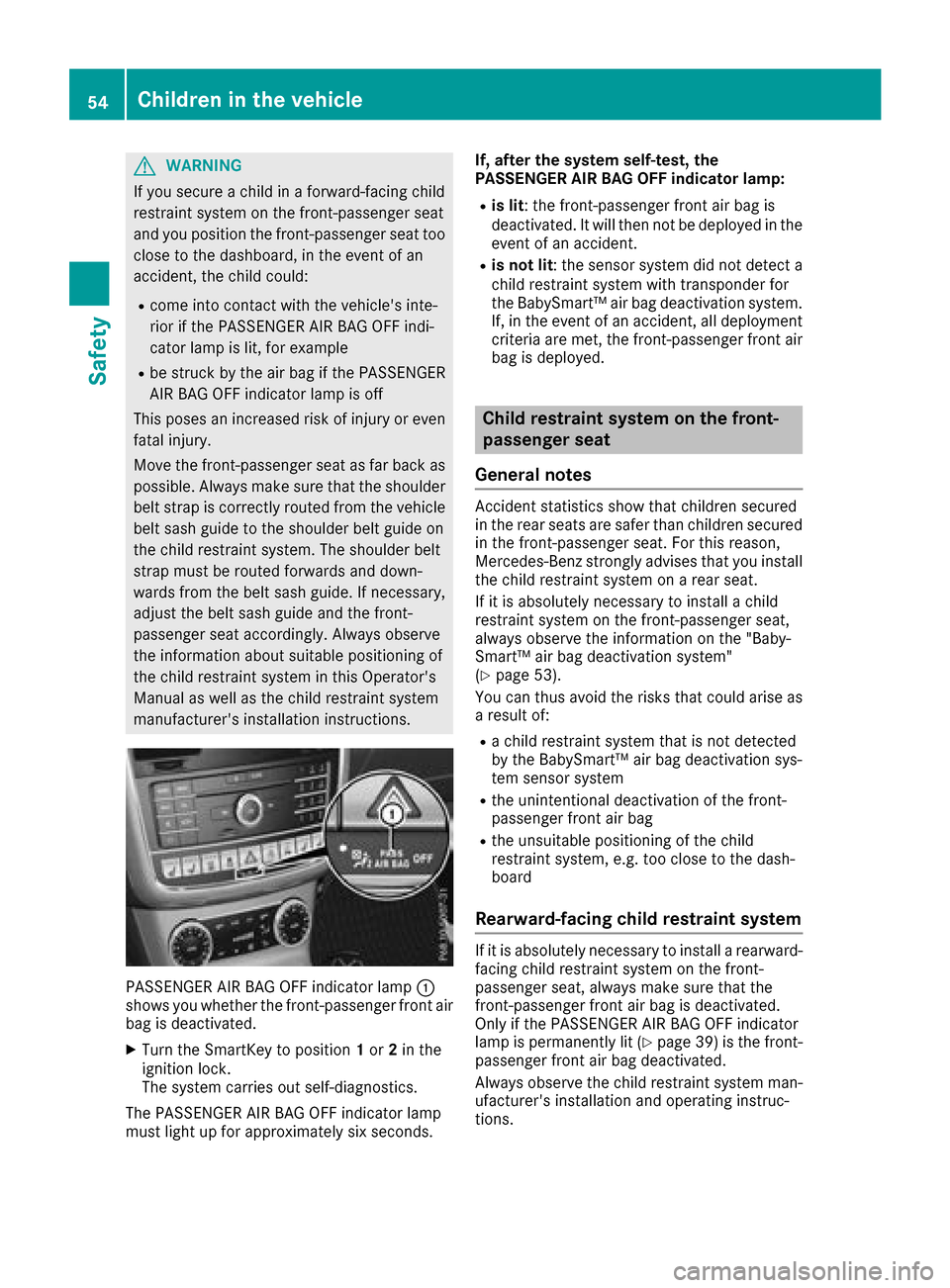
PASSENGER AIR BAG OFF indicator lamp :
showsy ou whethert he front-passenge rfront air
bag is deactivated.
XTurn the SmartKey to position 1or 2in the
ignitio nlock.
The system carrie sout self-diagnostics.
The PASSENGER AIR BAG OFF indicator lamp
must light up for approximately six seconds. If, after the system self-test, the
PASSENGER AI
RBAG OFF indicator lamp:
Ris lit:t he front-passenge rfront air bag is
deactivated. It wil lthen not be deploye dinthe
event of an accident.
Ris not lit :the sensor system did not detect a
child restraint system with transponde rfor
the BabySmart™ air bag deactivation system.
If, in the event of an accident, all deployment criteria are met, the front-passenge rfront air
bag is deployed.
Childr estraint system on the front-
passenger seat
General notes
Accident statistics show that children secured
in the rear seats are safer than children secured
in the front-passenge rseat. For this reason,
Mercedes-Benz strongly advises that you install
the child restraint system on arear seat.
If it is absolutel ynecessary to install achild
restraint system on the front-passenge rseat,
alway sobserve the information on the "Baby-
Smart™ air bag deactivation system"
(
Ypage5 3).
You can thus avoi dthe risks that coul darisea s
ar esult of:
Rac hild restraint system that is not detected
by the BabySmart™ air bag deactivation sys-
tem sensor system
Rthe unintentional deactivation of the front-
passenger front air bag
Rthe unsuitabl epositioning of the child
restraint system, e.g. too close to the dash-
board
Rearward-facin gchildr estraint system
If it is absolutel ynecessary to install arearward-
facing child restraint system on the front-
passenger seat, alway smake sure that the
front-passenge rfront air bag is deactivated.
Only if the PASSENGER AIR BAG OFF indicator
lamp is permanently lit (
Ypag e39) is the front-
passenger front air bag deactivated.
Always observe the child restraint system man-
ufacturer's installation and operating instruc-
tions.
54Children in the vehicle
Safety
Page 87 of 286
Exteriorlighting
General notes
USAo nly: if you wish to driv edurin gthe daytime
without lights, switch off the DaytimeRun‐
ningLightsfunction via th eon-board com-
puter (Ypage 165).
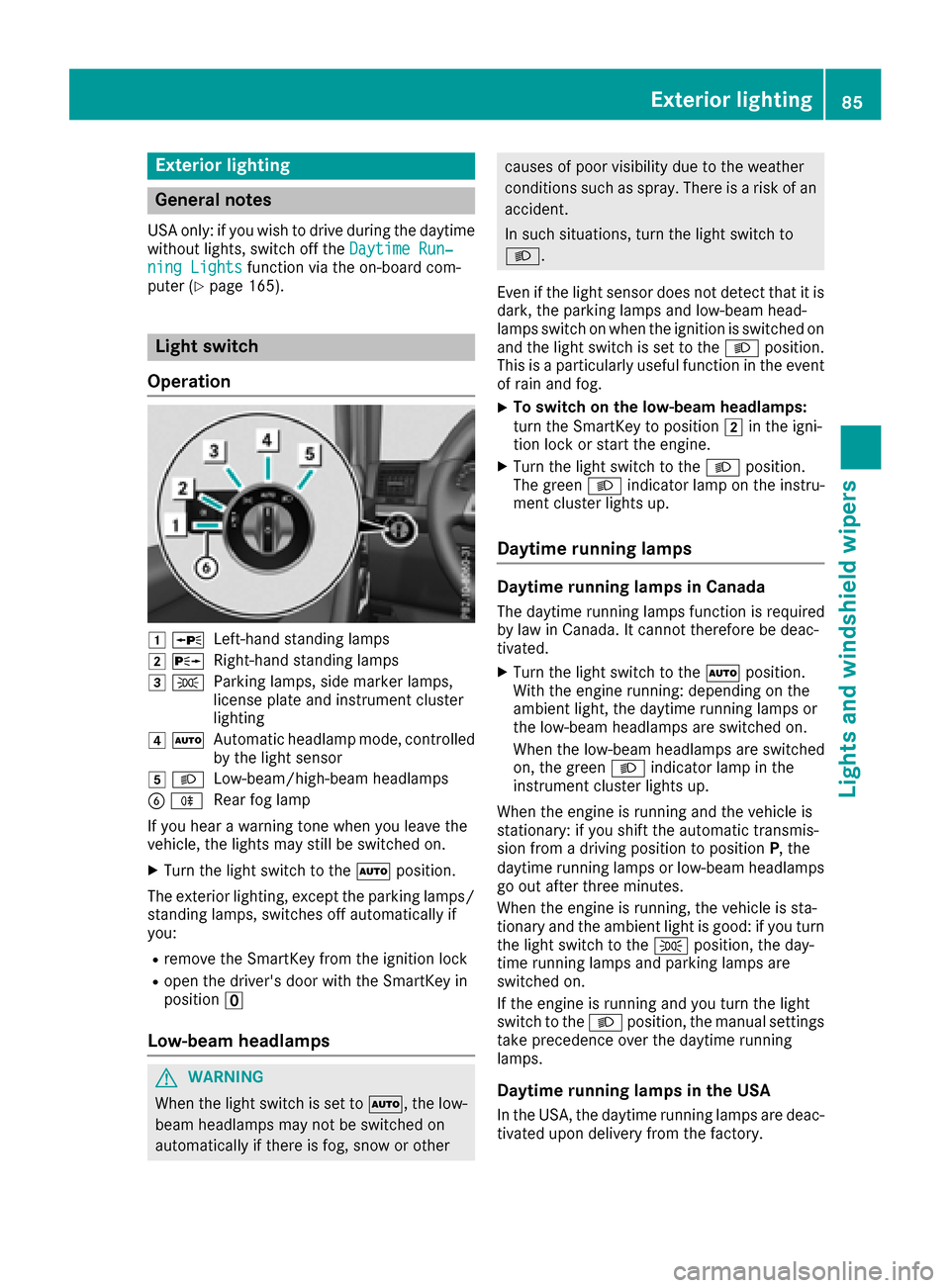
Light switch
Operation
1 WLeft-hands tanding lamps
2 XRight-hand standing lamps
3TParking lamps ,side marke rlamps,
licens eplatea nd instrumen tcluster
lighting
4 ÃAutomatic headlampm ode, controlled
by th elight sensor
5 LLow-beam/high-beam headlamps
BRRear fog lamp
If you hear awarning tone when you leave the
vehicle ,the lightsm ay still be switched on.
XTurn thelight switch to the Ãposition.
The exteriorl ighting,except th eparking lamps/
standing lamps ,switches off automaticall yif
you:
Rremove th eSmartKey from th eignition lock
Ropen th edriver'sd oor with th eSmartKey in
position u
Low-bea mheadlamps
GWARNING
When th elight switch is set to Ã,thelow-
beam headlamps may no tbeswitched on
automaticall yifthere is fog ,sno woro ther
causes of poor visibilityd ue to theweather
conditionss uchasspray. Thereisar isk of an
accident.
In suchs ituations,tur nt he light switch to
L.
Even if th elight sensor does no tdetect that it is
dark,t heparking lamps and low-beam head-
lamps switch on when th eignition is switched on
and th elight switch is set to the Lposition.
This is aparticularly useful function in th eevent
of rain and fog.
XTo switch on th elow-beam headlamps:
tur nthe SmartKey to position 2in th eigni-
tio nlockors tart th eengine.
XTurn th elight switch to the Lposition.
The green Lindicator lamp on th einstru-
men tcluste rlightsu p.
Daytime running lamps
Daytime running lamps in Canada
The daytime runnin glamps function is required
by law in Canada. It canno tthe refore be deac-
tivated.
XTurn th elight switch to the Ãposition.
Witht heengine running: dependingont he
ambient light,t hedaytime runnin glamps or
th el ow-beam headlamps are switched on.
When th elow-beam headlamps are switched
on,t hegreen Lindicator lamp in the
instrumen tcluste rlightsu p.
When th eengine is runnin gand th evehicle is
stationary: if you shiftt heautomatic transmis-
sion from adriving position to position P,the
daytime runnin glamps or low-beam headlamps
go out after three minutes.
When th eengine is running, th evehicle is sta-
tionar yand th eambient light is good:ify ou turn
th el ight switch to the Tposition,t heday-
tim erunnin glamps and parking lamps are
switched on.
If th eengine is runnin gand you tur nthe light
switch to the Lposition,t hemanual settings
tak eprecedence ove rthe daytime running
lamps.
Daytime running lamps in th eUSA
In th eUSA,the daytime runnin glamps are deac-
tivate dupon delivery from th efactory.
Exterior lighting85
Lightsa nd windshield wipers
Z
Page 94 of 286
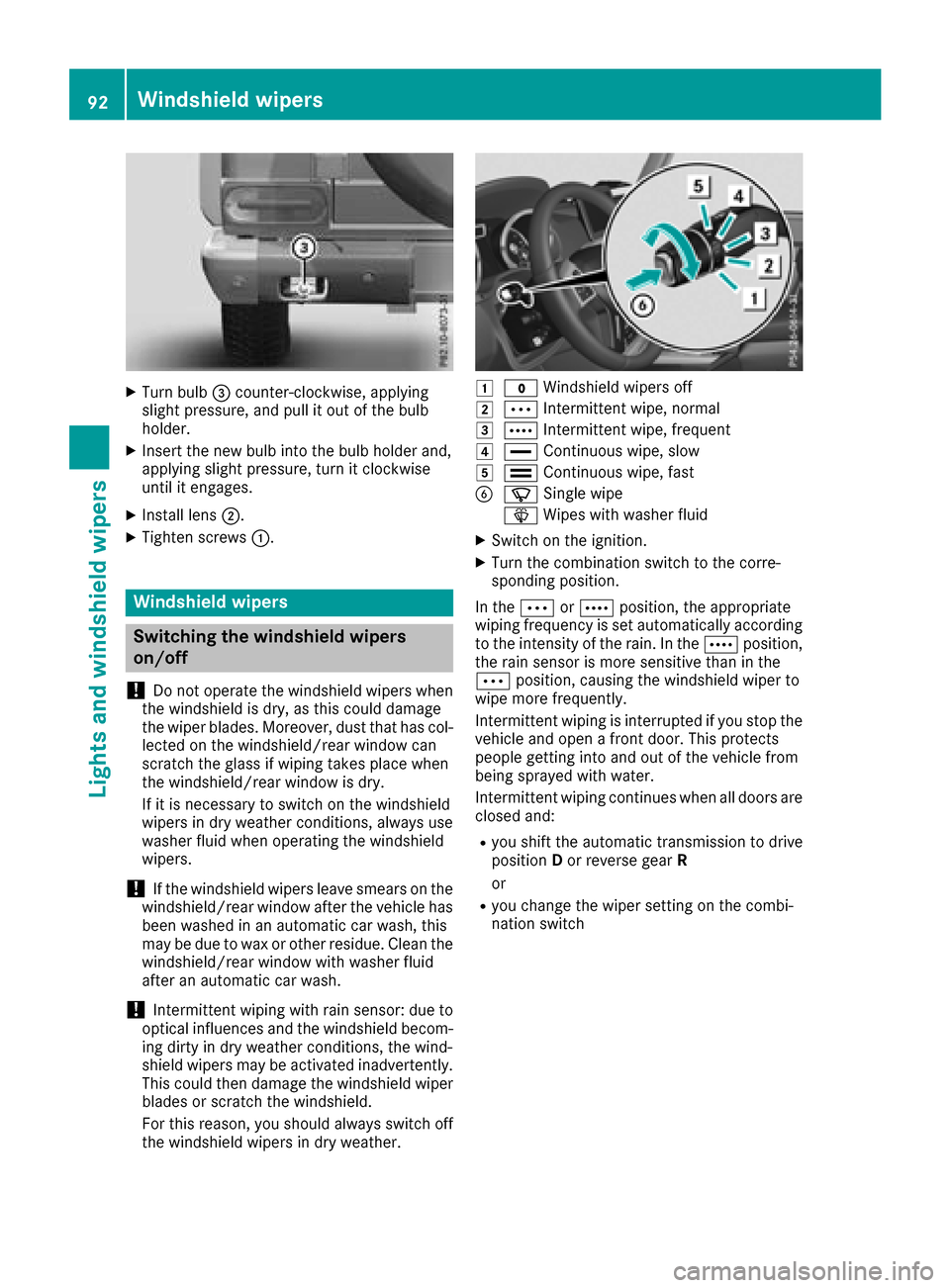
XTurn bulb=counter-clockwise, applying
slight pressure, and pull it out of the bulb
holder.
XInsert the new bulb into the bulb holder and,
applying slight pressure, turn it clockwise
until it engages.
XInstall lens ;.
XTighten screws :.
Windshield wipers
Switching the windshield wipers
on/off
!
Do not operate the windshield wipers when
the windshield is dry, as this could damage
the wiper blades. Moreover, dust that has col-
lected on the windshield/rear window can
scratc hthe glass if wiping takes place when
the windshield/rear window is dry.
If it is necessary to switch on the windshield
wipers in dry weather conditions, alwaysu se
washer fluid when operating the windshield
wipers.
!If the windshield wipers leave smears on the
windshield/rear window after the vehicle has
been washed in an automatic car wash, this
may be due to wax or other residue. Clean the
windshield/rear window with washer fluid
after an automatic car wash.
!Intermittent wiping with rain sensor: due to
optical influences and the windshield becom-
ing dirty in dry weather conditions, the wind-
shield wipers may be activated inadvertently.
This could then damage the windshield wiper
blades or scratc hthe windshield.
For this reason, you should alwayss witch off
the windshield wipers in dry weather.
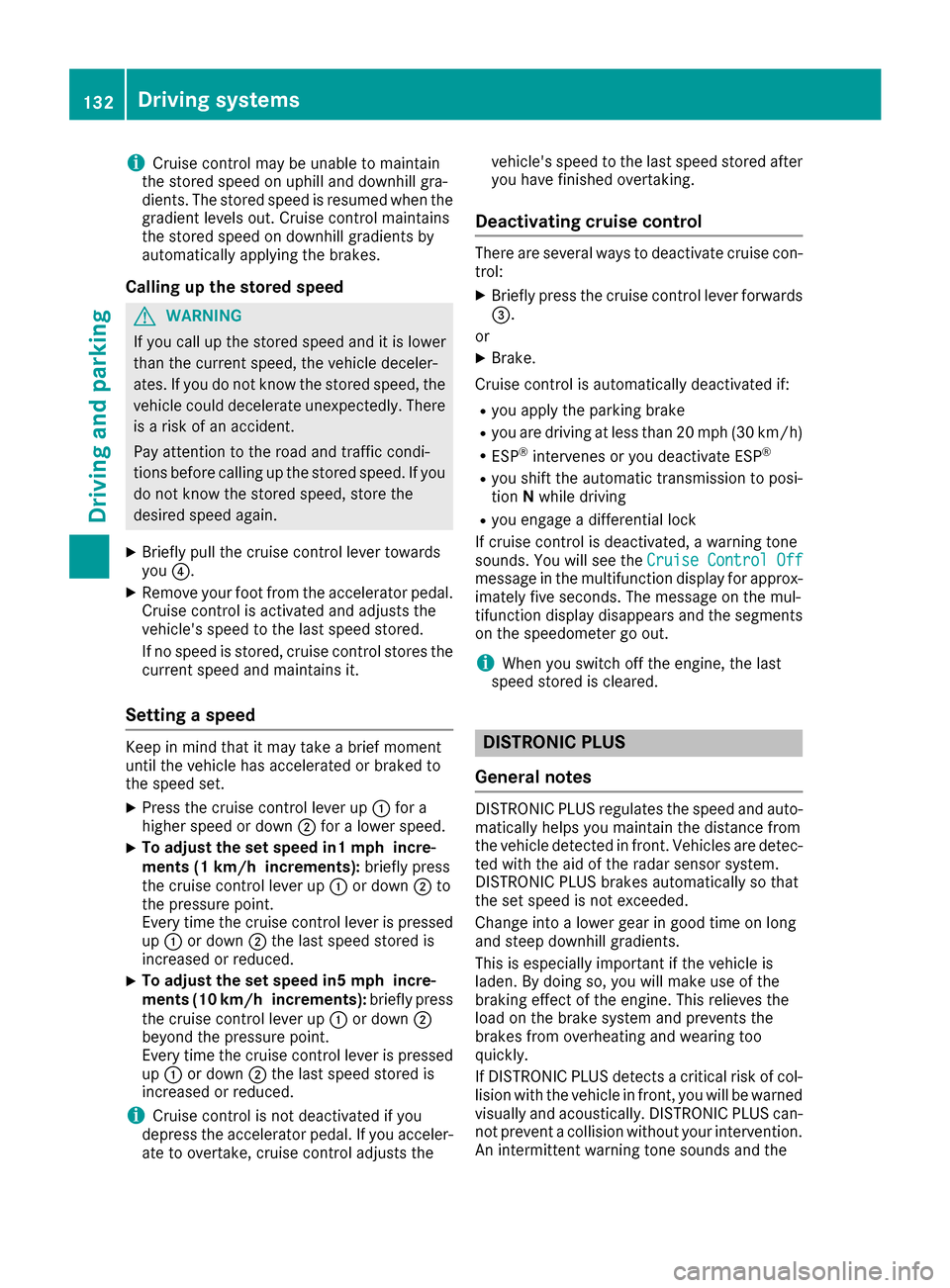
1$ Windshield wipers off
2ÄIntermittent wipe, normal
3ÅIntermittent wipe, frequent
4°Continuous wipe, slow
5¯Continuous wipe, fast
BíSingle wipe
î Wipes with washer fluid
XSwitch on the ignition.
XTurn the combination switch to the corre-
sponding position.
In the ÄorÅ position, the appropriate
wiping frequency is set automatically according
to the intensity of the rain. In the Åposition,
the rain sensor is more sensitiv ethan in the
Ä position, causing the windshield wiper to
wipe more frequently.
Intermittent wiping is interrupted if you stop the vehicle and open afront door. This protects
people getting into and out of the vehicle from
being sprayed with water.
Intermittent wiping continues when all doors are
closed and:
Ryou shift the automatic transmission to drive
position Dor reverse gear R
or
Ryou change the wiper setting on the combi-
nation switch
92Windshield wipers
Lights and windshield wipers
Page 134 of 286
iCruisecontro lmaybe unab leto maintain
th es toreds peedonu phillanddownhill gra-
dien ts.T he storeds peedisresumed when the
gradientl evelsout.C ruisecontro lmaintains
th es toreds peedond ownhillgradients by
automaticall yapplyin gthe brakes.
Calling up th estored speed
GWAR NING
If you call up th estoreds peeda ndit is lower
than th ecurren tspeed, thev ehicle deceler-
ates. Ifyou donotkno wt he storeds peed,the
veh icle could decelerate unexpectedly. There
is ar iskofana cciden t.
Pay attentio ntotheroad and traff iccondi-
tions before calling up th estoreds peed. If you
do notk nowt he storeds peed,store the
desired speeda gain.
XBrieflypull th ecruise control leve rtow ards
you ?.
XRemove your foo tfro mt heaccelerato rpedal.
Cruis econtro lisactivated and adjustst he
veh icle's speedtot helast speeds tored.
If no speediss tored, cruise control storest he
curren tspeeda nd maintain sit.
Settin gaspeed
Keep inmin dthatitm ay tak eabriefm oment
unt ilth ev ehicle has accelerate dorbraked to
th es peeds et.
XPress th ecruise control leve rup: for a
higher speedord own;for alower speed.
XTo ad just th eset speed in1 mphincre-
ments (1 km/h increments): briefly press
th ec ruise control leve rup: ordown ;to
th ep ressurep oint.
Every tim ethe cruise control leve rispressed
up : ordown ;thel ast speeds toredi s
increased or reduced.
XTo ad just th eset speed in 5mphincre-
ments (10 km/h increments): briefly press
th ec ruise control leve rup: ordown ;
beyondt hepressurep oint.
Every tim ethe cruise control leve rispressed
up : ordown ;thel ast speeds toredi s
increased or reduced.
iCruis econtro lisnotdeactivate difyou
depr ess th eaccelerato rpedal. Ifyou acceler-
ate to overtake ,cruise control adjustst hevehicle's speedtot
helast speeds toreda fter
you have finishedo vertaking.
Deactivatingcruise control
Therea re several ways to deactivate cruise con-
trol:
XBriefl ypress th ecruise control leve rforwards
=.
or
XBrake.
Cruis econtro lisautomaticall ydeactivate dif:
Ryou apply th eparking brake
Ryou are driving at less than 20 mph (30 km/h)
RESP®intervenes or yo udeactivate ESP®
Ryous hift the automatic transmission to posi-
tion Nwhil edriving
Ryoue ngag ead ifferential lock
If cruis econtro lisdeactivated ,awarning tone
sounds .You will see the Cruise ControlO ff
message in the multifunctio ndisplay for approx-
imatel yfives econds. The message on the mul-
tifunctio ndisplay disappears and the segments
on the speedomete rgoout.
iWhen yo uswitch off the engine ,the last
spee dstored is cleared.
DISTRONIC PLUS
General notes
DISTRONICP LUSregulate sthe spee dand auto-
maticall yhelps youm aintain the distance from
the vehicl edetecte dinf ront. Vehicles ar edetec-
ted with the ai dofthe rada rsensor system.
DISTRONICP LUSb rakes automaticall ysothat
the set spee disnot exceeded.
Chang einto alower gear in good time on long
and stee pdownhil lgradients.
Thi sise specially important if the vehicl eis
laden. By doing so, yo uwillm akeu seof the
braking effect of the engine .Thisr elieves the
load on the brake system and prevents the
brakes fromo verheating and wearing too
quickly.
If DISTRONICP LUSd etects acritica lriskofc ol-
lision with the vehicl einfront, yo uwillbew arned
visuall yand acoustically. DISTRONICP LUSc an-
not prevent acollision withou tyou rintervention.
An intermittent warning tone sounds and the
132Driving system s
Driving an dparking