lights MERCEDES-BENZ G-CLASS 2018 Service Manual
[x] Cancel search | Manufacturer: MERCEDES-BENZ, Model Year: 2018, Model line: G-CLASS, Model: MERCEDES-BENZ G-CLASS 2018Pages: 294, PDF Size: 4.86 MB
Page 132 of 294
General notes
HEnvironmental note
Protection of the environment is of primary
importance. Treat nature with respect.
Observe all prohibiting signs.
Read this section carefully before driving your
vehicle off-road. Practice by driving over more
gentle off-road terrain first.
Familiarize yourself with the characteristics of
your vehicle and the gear shift operation before
driving through difficult terrain.
The following driving systems are specially
adapted to off-road driving:
R4ETS (Ypage 59)
ROff-road ABS (Ypage 59)
RTransfer case (Ypage 149)
RDifferential locks (Ypage 151)
Observe the following notes:
Rstop the vehicle before you drive off-road and,
if necessary, shift the transfer case to the
LOW RANGE off-road gear (
Ypage 149).
REngage the differential locks if necessary
(Ypage 151).
iABS, 4ETS, ESP®and BAS are deactivated
while the differential locks are engaged. This
allows the front wheels to lock briefly, so that
these can dig into a loose surface. However,
please note that locked wheels skid and can
no longer steer.
RCheck that items of luggage and loads are
stowed safely and are well secured
(
Ypage 214).
RTo avoid damaging the vehicle, make sure
there is always sufficient ground clearance.
RAlways keep the engine running and in gear
when driving on a downhill gradient.
RAlways keep the engine running and in gear
when driving down an incline.
RDrive slowly and evenly, if necessary at a
walking pace.
REnsure that the wheels are in contact with the
ground at all times.
RDrive with extreme care on unfamiliar off-road
routes where visibility is poor. For safety rea-
sons, get out of the vehicle first and survey
the off-road route.
RCheck the depth of water before fording rivers
and streams.
RWatch out for obstacles.
RAlways keep the doors, rear door, side win-
dows and the sliding sunroof closed while the
vehicle is in motion.
RSwitch off cruise control.
RDo not deviate from marked routes.
RAdapt your speed to the terrain. The rougher,
steeper or more ruts on the terrain, the slower
your speed should be.
RDo not jump with the vehicle. as this will inter-
rupt the vehicle's propulsion.
RAvoid high engine speeds. Drive at appropri-
ate engine speeds (maximum 3,000 rpm).
RDo not shift the automatic transmission to
position i.
RAlways check the vehicle for damage after off-
road driving.
Do not use the HOLD function when driving off-
road, on steep uphill or downhill gradients or on slippery or loose surfaces. The HOLD function
cannot hold the vehicle on such surfaces.
You can obtain further information about mount-
ing special all-terrain tires from a qualified spe-
cialist workshop.
Checklist before driving off-road
!If the engine oil warning lamp lights up while
the vehicle is in motion, stop the vehicle in a
safe place as soon as possible. Check the
engine oil level. The engine oil warning lamp
warning must not be ignored. Continuing the
journey while the symbol is displayed could
lead to engine damage.
XEngine oil level: check the engine oil level
and add oil if necessary.
When driving on steep gradients, the engine
oil level must be sufficiently high to ensure a
correct oil supply in the vehicle.
XTire-changing tool kit: check that the jack is
working and make sure you have the lug
wrench, a robust tow cable and a folding
spade in the vehicle.
XWheels and tires: check the tire tread depth
and tire pressure.
XCheck for damage and remove any foreign
objects, e.g. small stones, from the wheels/
tires.
XReplace any missing valve caps.
130Driving tips
Driving and parking
Page 133 of 294
XReplacedente dor damaged wheels. Als o
chec kth espar ewheel.
XRims: dentedor ben trim scan result in aloss
of tire pressur eand damag eth etire bead.
Before driving off-road, chec kth ewheels and
replace them if necessary.
Checklist after driving off-road
!If you detec tdamag eto th evehicl eafter
driving off-road, hav eth evehicl echecke d
immediately at aqualified specialist work-
shop.
Drivin gove rroug hterrain places greate r
demand son your vehicl ethan driving on normal
roads. Afte rdriving off-road, chec kth evehicle.
This allows you to detec tdamag epromptly and
reduce th eris kof an acciden tto yourself and
other road users.
XShift th etransfer cas eto th eon-road position
HIG HRANGE (Ypage 149).
XDisengage th edifferential locks
(Ypage 153).
XClean th eheadlamps and rear lights and
chec kfor damage.
XClean th efron tand rear license plates.
XClean th ewheels and tires wit h awater je t
and remove any foreign objects .
XClean thewheels, whee lhousing sand th e
vehicl eunderside wit h awater jet; chec kfor
any foreign objects and damage.
XChec kwhether twigs or other part sof plants
hav ebecome trapped .These increas eth eris k
of fir eand can damag efuel pipes ,brak e
hoses or th erubber bellows of th eaxl ejoint s
and propelle rshafts .
XAfterth etrip, examin ewithout fail th eentire
undercarriage, wheels, tires ,brakes, body-
wor kstructure, steering ,chassi sand exhaust
system for damage.
XAfte rdriving in sand, mud, gravel, water or
similar dirt yconditions, hav eth efollowin g
checke dand cleaned:
Rbrak edisc s
Rwheels
Rbrak epads
Raxl ejoint s
XIf you notice stron gvibration safter off-road
driving ,chec kfor foreign objects in th e
wheels and driv etrain and ,if necessary, remove them. Foreign objects can disturb th
e
balance and caus evibrations.
XCarr yout abrak etest .
Driving on sand
Observ eth efollowin grule swhen driving on
sand:
RShift th etransfer cas eto th eoff-road driving
position LOW RANGE (Ypage 149).
RAvoid high engin espeeds.
RShift th eautomatic transmission to alow
gear .
RDrive quickly to overcome th erollin gresist -
ance. Otherwise th evehicle's wheels could
become stuck in loos eground .
RDrive in th etrack sof other vehicles if possi-
ble. When doin gso, mak esur ethat:
-th etire rut sare no tto odeep
-th esan dis sufficientl yfir m
-your vehicl ehas sufficien tground clear-
anc e
Tire ruts and gravel roads
!Chec kthat th erut sare no tto odeep and
that your vehicl ehas sufficien tclearance .
Otherwise, your vehicl ecould be damaged or
botto mout and get stuck .
Observ eth efollowin grule swhen driving alon g
rut sin off-road terrain or on road swit hloos e
gravel:
RShift th etransfer cas eto th eoff-road driving
position LOW RANGE (Ypage 149).
RAvoid high engin espeeds.
RObserv eth esafet ynote s (Ypage 129) and
th egeneral note s (Ypage 130) on off-road
driving .
RShift th eautomatic transmission to alow
gear .
RDrive slowly.
RWher erut sare to odeep ,driv ewit hth e
wheels of on eside on th ecenter grassy area,
if possible.
Driving over obstacles
!Obstacles could damag eth efloor of th e
vehicl eor component sof th echassis. As k
passenger sfor guidance when driving ove r
larg eobstacles. The passenger should always
Driving tips131
Driving and parking
Z
Page 137 of 294
load on the brake system and prevents the
brakes from overheating and wearing too
quickly.
If DISTRONIC PLUS detects a critical risk of col-
lision with the vehicle in front, you will be warned
visually and acoustically. DISTRONIC PLUS can-
not prevent a collision without your intervention.
An intermittent warning tone sounds and the
·distance warning lamp in the instrument
cluster lights up. Brake immediately in order to
increase the distance to the vehicle in front or
take evasive action provided it is safe to do so.
DISTRONIC PLUS operates in the speed range
between 0 mph (0 km/h) and 120 mph
(200 km/h).
Do not use DISTRONIC PLUS while driving on
roads with steep gradients.
As DISTRONIC PLUS transmits radar waves, it
can resemble the radar detectors of the respon-
sible authorities. You can refer to the relevant
chapter in the Operator's Manual if questions
are asked about this.
iUSA only: This device has been approved by
the FCC as a "Vehicular Radar System". The
radar sensor is intended for use in an auto-
motive radar system only. Removal, tamper-
ing, or altering of the device will void any war-
ranties, and is not permitted by the FCC. Do
not tamper with, alter, or use in any non-
approved way.
Any unauthorized modification to this device
could void the user's authority to operate the
equipment.
iCanada only: This device complies with
RSS-210 of Industry Canada. Operation is
subject to the following two conditions:
1. This device may not cause interference,
and
2. This device must accept any interference
received, including interference that may
c
ause undesired operation of the device.
Removal, tampering, or altering of the device
will void any warranties, and is not permitted. Do not tamper with, alter, or use in any non-
approved way.
Any unauthorized modification to this device
could void the user's authority to operate the
equipment.
Important safety notes
GWARNING
DISTRONIC PLUS does not react to:
Rpeople or animals
Rstationary obstacles on the road, e.g. stop- ped or parked vehicles
Roncoming and crossing traffic
As a result, DISTRONIC PLUS may neither give
warnings nor intervene in such situations.
There is a risk of an accident.
Always pay careful attention to the traffic sit- uation and be ready to brake.
GWARNING
DISTRONIC PLUS cannot always clearly iden-
tify other road users and complex traffic sit-
uations.
In such cases, DISTRONIC PLUS may:
Rgive an unnecessary warning and then
brake the vehicle
Rneither give a warning nor intervene
Raccelerate or brake unexpectedly
There is a risk of an accident.
Continue to drive carefully and be ready to
brake, in particular when warned to do so by
DISTRONIC PLUS.
GWARNING
DISTRONIC PLUS brakes your vehicle with up to 40% of the maximum braking force. If this
braking force is insufficient, DISTRONIC PLUS
warns you visually and audibly. There is a risk
of an accident.
In such cases, apply the brakes yourself and
try to take evasive action.
If you fail to adapt your driving style, DISTRONIC
PLUS can neither reduce the risk of an accident
nor override the laws of physics. DISTRONIC
PLUS cannot take account of road, weather and
traffic conditions. DISTRONIC PLUS is only an
aid. You are responsible for maintaining a safe
distance to the vehicle in front, for vehicle
speed, for braking in good time and for staying in lane.
Driving systems135
Driving and parking
Z
Page 142 of 294
DISTRONIC PLUS is automatically deactivated
if:
Ryou apply the parking brake
Ryou are driving slower than 15 mph (25 km/h)
and there is no vehicle in front, or if the vehicle
in front is no longer detected
RESP®intervenes or you deactivate ESP®
Rthe automatic transmission is in positionj,
k ori
Ryou pull the cruise control lever towards you
in order to pull away and the front-passenger
door or one of the rear doors is open
Rthe vehicle slips
If DISTRONIC PLUS is deactivated, an intermit-
tent warning tone sounds and the DISTRONIC
PLUSOffmessage appears in the multifunction
display for approximately five seconds.
Tips for driving with DISTRONIC PLUS
Pay particular attention in the following traffic
situations:
RCornering, entering and exiting a bend: the
ability of DISTRONIC PLUS to detect vehicles
when cornering is limited. Your vehicle may
brake unexpectedly or late.
RDriving on a different line: DISTRONIC PLUS
may not detect vehicles which are not driving
in the middle of their lane. The distance to the
vehicle in front will be too short.
ROther vehicles changing lane: DISTRONIC
PLUS has not detected the vehicle cutting in
yet. The distance to this vehicle will be too
short.
RNarrow vehicles: DISTRONIC PLUS does not
detect the vehicle in front on the edge of the
road because of its narrow width. The dis-
tance to the vehicle in front will be too short.
RObstacles and stationary vehicles:
DISTRONIC PLUS does not brake for obsta-
cles or stationary vehicles. If, for example, the detected vehicle turns a corner and reveals an
obstacle or stationary vehicle, DISTRONIC
PLUS will not brake for these.
RCrossing vehicles: DISTRONIC PLUS may mis-
takenly detect vehicles that are crossing your
lane. Activating DISTRONIC PLUS at traffic
lights with crossing traffic, for example, could
cause your vehicle to pull away uninte
ntion-
ally.
In such situations, brake if necessary.
DISTRONIC PLUS is then deactivated.
Blind Spot Assist
General notes
Blind Spot Assist monitors the areas on either
side of the vehicle that are not visible to the
driver with two lateral, rear-facing radar sen-
sors. A warning lamp lights up in the exterior
mirrors and draws your attention to vehicles
detected in the monitored area. If you then
switch on the corresponding turn signal to
change lane, you will also receive an optical and
audible warning.
Blind Spot Assist supports you from a speed of
approximately 20 mph (30 km/h).
Important safety notes
GWARNING
Blind Spot Assist does not react to:
Rvehicles overtaken too closely on the side,
placing them in the blind spot area
Rvehicles which approach with a large speed
differential and overtake your vehicle
As a result, Blind Spot Assist may not give
warnings in such situations. There is a risk of
an accident.
Always observe the traffic conditions care-
fully, and maintain a safe lateral distance.
Blind Spot Assist is only an aid. It may fail to
detect some vehicles and is no substitute for
attentive driving. Always ensure that there is
sufficient distance to the side for other road
users and obstacles.
iUSA only:
This device has been approved by the FCC as
a "Vehicular Radar System". The radar sensor
is intended for use in an automotive radar
system only. Removing, tampering with, or
altering the device will void any warranties,
and is not permitted by the FCC. Do not tam-
per with, alter, or use in any non-approved
way.
Any unauthorized modification to this device
could void the user’s authority to operate the
equipment.
140Driving system s
Driving an d parking
Page 143 of 294
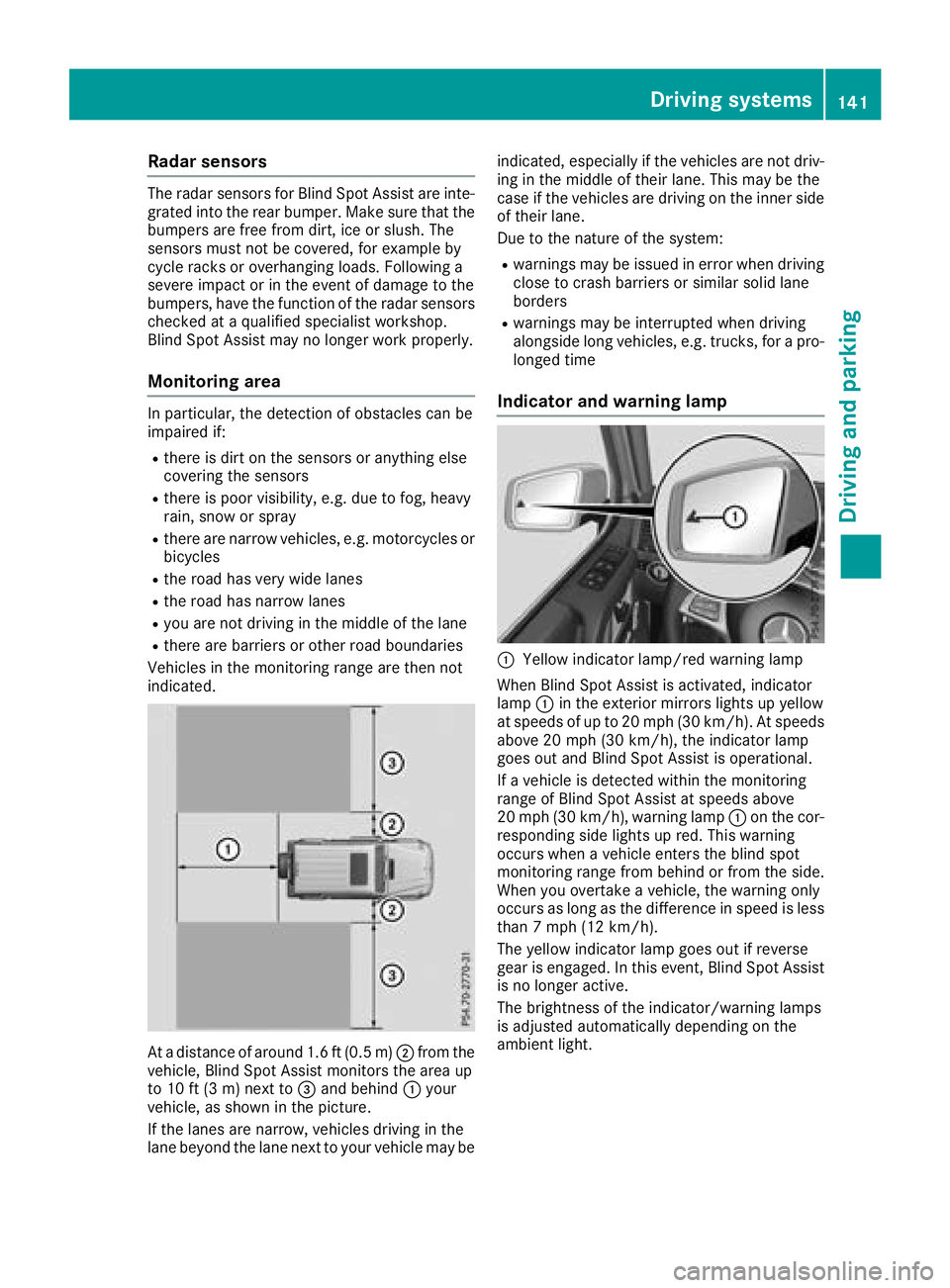
Radar sensors
The radar sensors for Blind Spot Assist are inte-
grated into the rear bumper. Make sure that thebumpers are free from dirt, ice or slush. The
sensors must not be covered, for example by
cycle racks or overhanging loads. Following a
severe impact or in the event of damage to the
bumpers, have the function of the radar sensors
checked at a qualified specialist workshop.
Blind Spot Assist may no longer work properly.
Monitoring area
In particular, the detection of obstacles can be
impaired if:
Rthere is dirt on the sensors or anything else
covering the sensors
Rthere is poor visibility, e.g. due to fog, heavy
rain, snow or spray
Rthere are narrow vehicles, e.g. motorcycles or
bicycles
Rthe road has very wide lanes
Rthe road has narrow lanes
Ryou are not driving in the middle of the lane
Rthere are barriers or other road boundaries
Vehicles in the monitoring range are then not
indicated.
At a distance of around 1.6 ft (0.5 m); from the
vehicle, Blind Spot Assist monitors the area up
to 10 ft (3 m)next to =and behind :your
vehicle, as shown in the picture.
If the lanes are narrow, vehicles driving in the
lane beyond the lane next to your vehicle may be indicated, especially if the vehicles are not driv-
ing in the middle of their lane. This may be the
case if the vehicles are driving on the inner side
of their lane.
Due to the nature of the system:
Rwarnings may be issued in error when driving
close to crash barriers or similar solid lane
borders
Rwarnings may be interrupted when driving
alongside long vehicles, e.g. trucks, for a pro-
longed time
Indicator and warning lamp
:Yellow indicator lamp/red warning lamp
When Blind Spot Assist is activated, indicator
lamp :in the exterior mirrors lights up yellow
at speeds of up to 20 mph (30 km/h). At speeds above 20 mph (30 km/h), the indicator lamp
goes out and Blind Spot Assist is operational.
If a vehicle is detected within the monitoring
range of Blind Spot Assist at speeds above
20 mph (30 km/h), warning lamp :on the cor-
responding side lights up red. This warning
occurs when a vehicle enters the blind spot
monitoring range from behind or from the side.
When you overtake a vehicle, the warning only
occurs as long as the difference in speed is less
than 7 mph (12 km/h).
The yellow indicator lamp goes out if reverse
gear is engaged. In this event, Blind Spot Assist is no longer active.
The brightness of the indicator/warning lamps
is adjusted automatically depending on the
ambient light.
Driving systems141
Driving an d parking
Z
Page 147 of 294
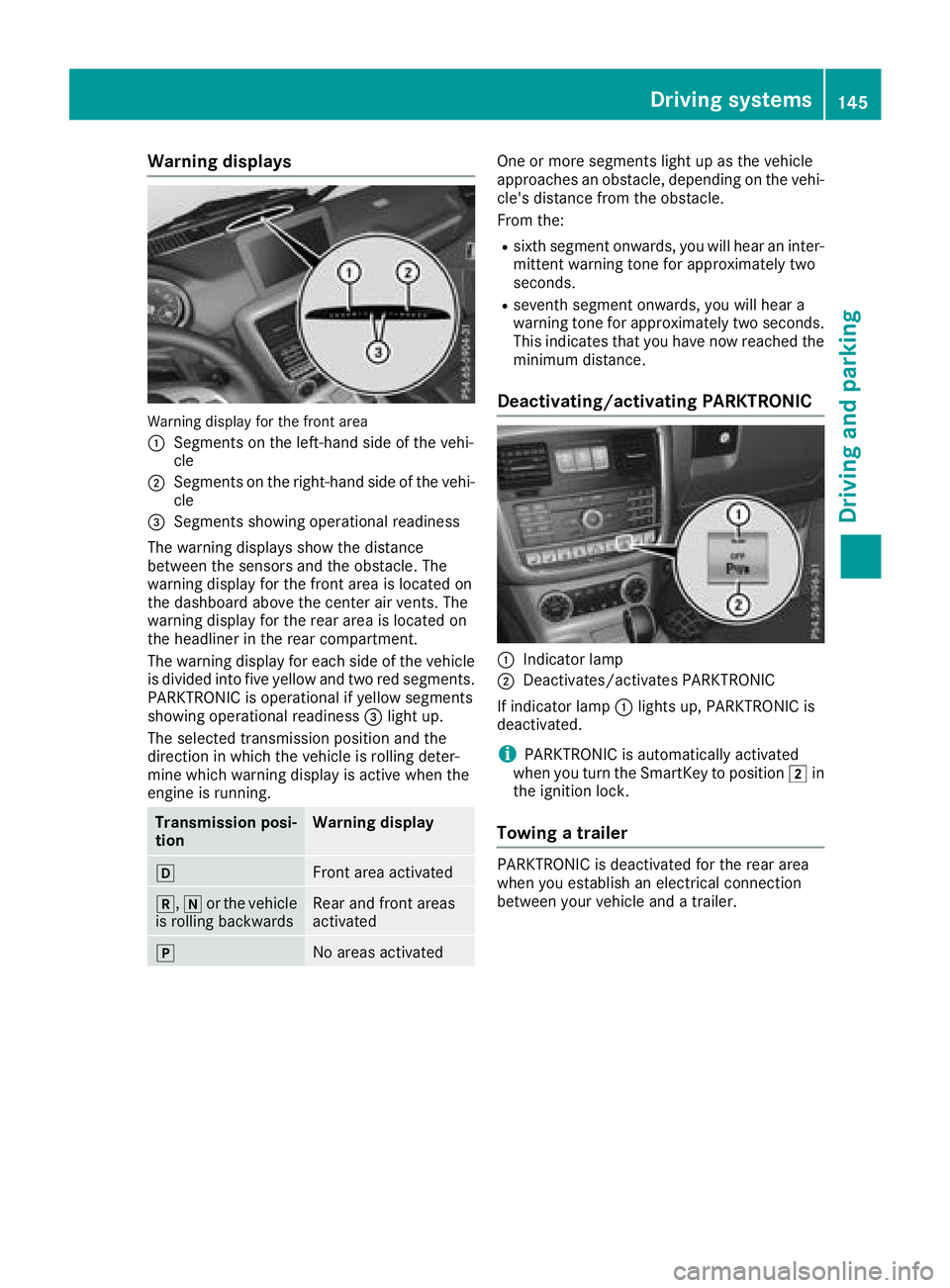
Warning displays
Warning display for the front area
:
Segments on the left-hand side of the vehi-
cle
;Segments on the right-hand side of the vehi-cle
=Segments showing operational readiness
The warning displays show the distance
between the sensors and the obstacle. The
warning display for the front area is located on
the dashboard above the center air vents. The
warning display for the rear area is located on
the headliner in the rear compartment.
The warning display for each side of the vehicle
is divided into five yellow and two red segments.
PARKTRONIC is operational if yellow segments
showing operational readiness =light up.
The selected transmission position and the
direction in which the vehicle is rolling deter-
mine which warning display is active when the
engine is running.
Transmission posi-
tionWarning display
hFront area activated
k, ior the vehicle
is rolling backwardsRear and front areas
activated
jNo areas activated
One or more segments light up as the vehicle
approaches an obstacle, depending on the vehi-
cle's distance from the obstacle.
From the:
Rsixth segment onwards, you will hear an inter-
mittent warning tone for approximately two
seconds.
Rseventh segment onwards, you will hear a
warning tone for approximately two seconds.
This indicates that you have now reached the minimum distance.
Deactivating/activating PARKTRONIC
:Indicator lamp
;Deactivates/activates PARKTRONIC
If indicator lamp :lights up, PARKTRONIC is
deactivated.
iPARKTRONIC is automatically activated
when you turn the SmartKey to position 2in
the ignition lock.
Towing a trailer
PARKTRONIC is deactivated for the rear area
when you establish an electrical connection
between your vehicle and a trailer.
Driving systems145
Driving and parking
Z
Page 148 of 294
Problems with PARKTRONIC
ProblemPossible causes/consequences andMSolutions
Only the red segments in
the PARKTRONIC warn-
ing displays are lit. You
also hear a warning tone
for approximately two
seconds.
PARKTRONIC is deacti-
vated after a few sec-
onds, and the indicator
lamp in the PARKTRONIC
button lights up.PARKTRONIC has malfunctioned and has switched off.
XIf problems persist, have PARKTRONIC checked at a qualified spe-
cialist workshop.
Only the red segments in
the PARKTRONIC warn-
ing displays are lit.
PARKTRONIC is deacti-
vated after a few sec-
onds.The PARKTRONIC sensors are dirty or there is interference.
XClean the PARKTRONIC sensors (Ypage 239).
XSwitch the ignition back on.
The problem may be caused by an external source of radio or ultra-
sound waves.
XSee if PARKTRONIC functions in a different location.
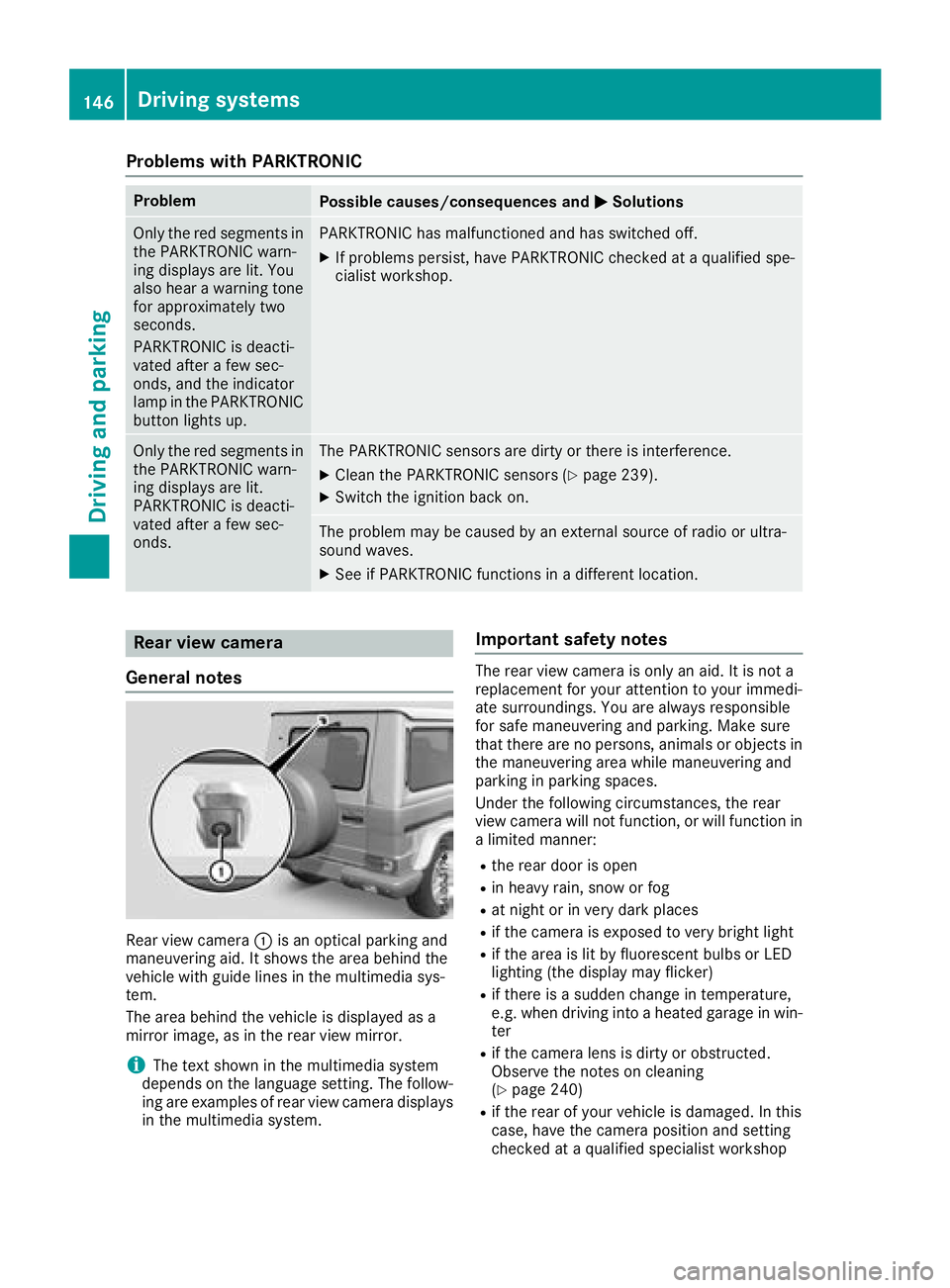
Rear view camera
General notes
Rear view camera :is an optical parking and
maneuvering aid. It shows the area behind the
vehicle with guide lines in the multimedia sys-
tem.
The area behind the vehicle is displayed as a
mirror image, as in the rear view mirror.
iThe text shown in the multimedia system
depends on the language setting. The follow-
ing are examples of rear view camera displays
in the multimedia system.
Important safety notes
The rear view camera is only an aid. It is not a
replacement for your attention to your immedi-
ate surroundings. You are always responsible
for safe maneuvering and parking. Make sure
that there are no persons, animals or objects in
the maneuvering area while maneuvering and
parking in parking spaces.
Under the following circumstances, the rear
view camera will not function, or will function in
a limited manner:
Rthe rear door is open
Rin heavy rain, snow or fog
Rat night or in very dark places
Rif the camera is exposed to very bright light
Rif the area is lit by fluorescent bulbs or LED
lighting (the display may flicker)
Rif there is a sudden change in temperature,
e.g. when driving into a heated garage in win- ter
Rif the camera lens is dirty or obstructed.
Observe the notes on cleaning
(
Ypage 240)
Rif the rear of your vehicle is damaged. In this
case, have the camera position and setting
checked at a qualified specialist workshop
146Driving systems
Driving and parking
Page 152 of 294
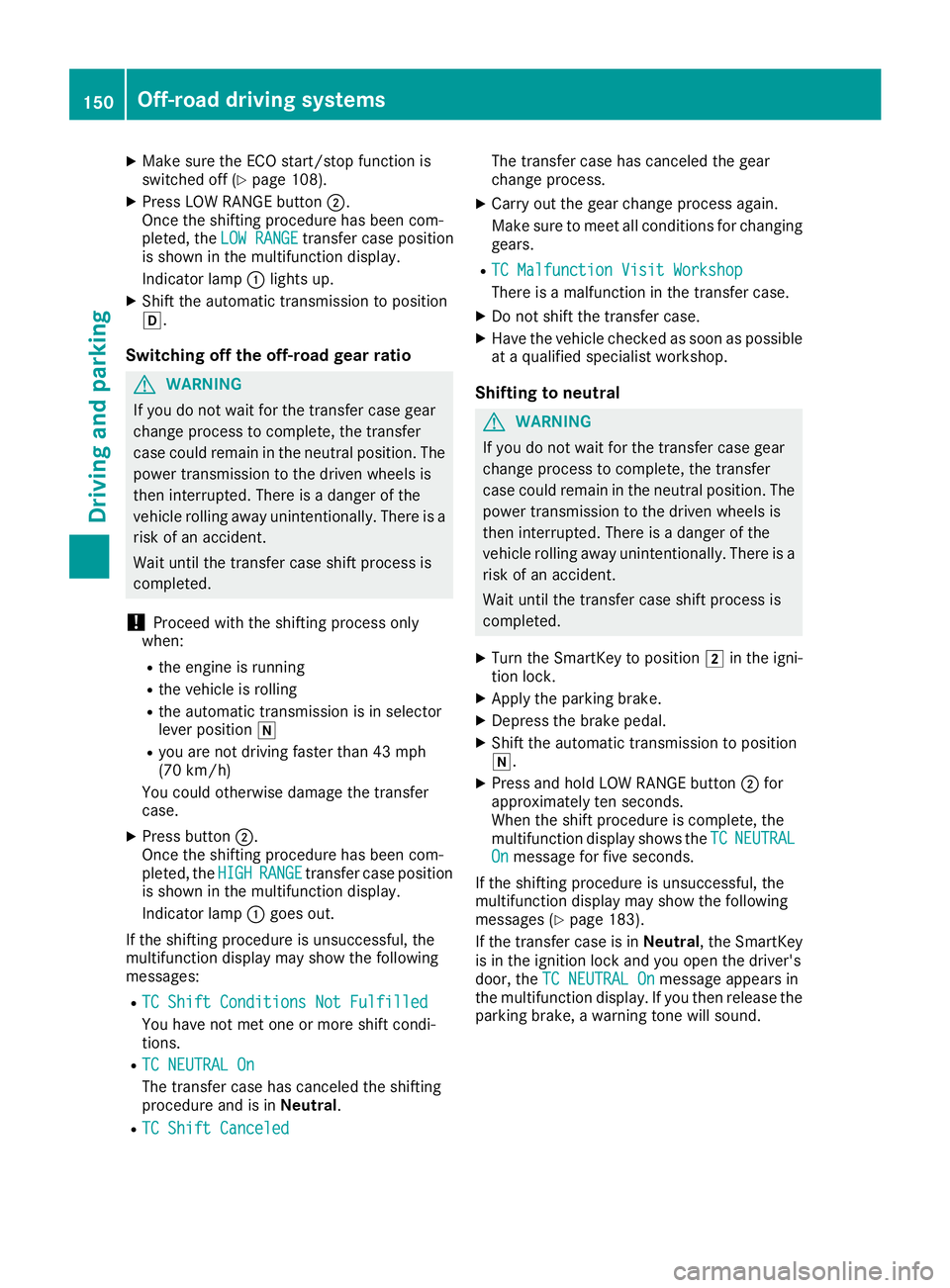
XMake sure the ECO start/stop function is
switched off (Ypage 108).
XPress LOW RANGE button;.
Once the shifting procedure has been com-
pleted, the LOW RANGE
transfer case position
is shown in the multifunction display.
Indicator lamp :lights up.
XShift the automatic transmission to position
h.
Switching off the off-road gear ratio
GWARNING
If you do not wait for the transfer case gear
change process to complete, the transfer
case could remain in the neutral position. The power transmission to the driven wheels is
then interrupted. There is a danger of the
vehicle rolling away unintentionally. There is a
risk of an accident.
Wait until the transfer case shift process is
completed.
!Proceed with the shifting process only
when:
Rthe engine is running
Rthe vehicle is rolling
Rthe automatic transmission is in selector
lever position i
Ryou are not driving faster than 43 mph
(70 km/h)
You could otherwise damage the transfer
case.
XPress button ;.
Once the shifting procedure has been com-
pleted, the HIGH
RANGEtransfer case position
is shown in the multifunction display.
Indicator lamp :goes out.
If the shifting procedure is unsuccessful, the
multifunction display may show the following
messages:
RTC Shift Conditions Not Fulfilled
You have not met one or more shift condi-
tions.
RTC NEUTRAL On
The transfer case has canceled the shifting
procedure and is in Neutral.
RTC Shift Canceled
The transfer case has canceled the gear
change process.
XCarry out the gear change process again.
Make sure to meet all conditions for changing
gears.
RTC Malfunction Visit Workshop
There is a malfunction in the transfer case.
XDo not shift the transfer case.
XHave the vehicle checked as soon as possible
at a qualified specialist workshop.
Shifting to neutral
GWARNING
If you do not wait for the transfer case gear
change process to complete, the transfer
case could remain in the neutral position. The power transmission to the driven wheels is
then interrupted. There is a danger of the
vehicle rolling away unintentionally. There is a
risk of an accident.
Wait until the transfer case shift process is
completed.
XTurn the SmartKey to position 2in the igni-
tion lock.
XApply the parking brake.
XDepress the brake pedal.
XShift the automatic transmission to position
i.
XPress and hold LOW RANGE button ;for
approximately ten seconds.
When the shift procedure is complete, the
multifunction display shows the TC
NEUTRALOnmessage for five seconds.
If the shifting procedure is unsuccessful, the
multifunction display may show the following
messages (
Ypage 183).
If the transfer case is in Neutral, the SmartKey
is in the ignition lock and you open the driver's
door, the TC NEUTRAL On
message appears in
the multifunction display. If you then release the
parking brake, a warning tone will sound.
150Off-road driving systems
Driving and parking
Page 154 of 294
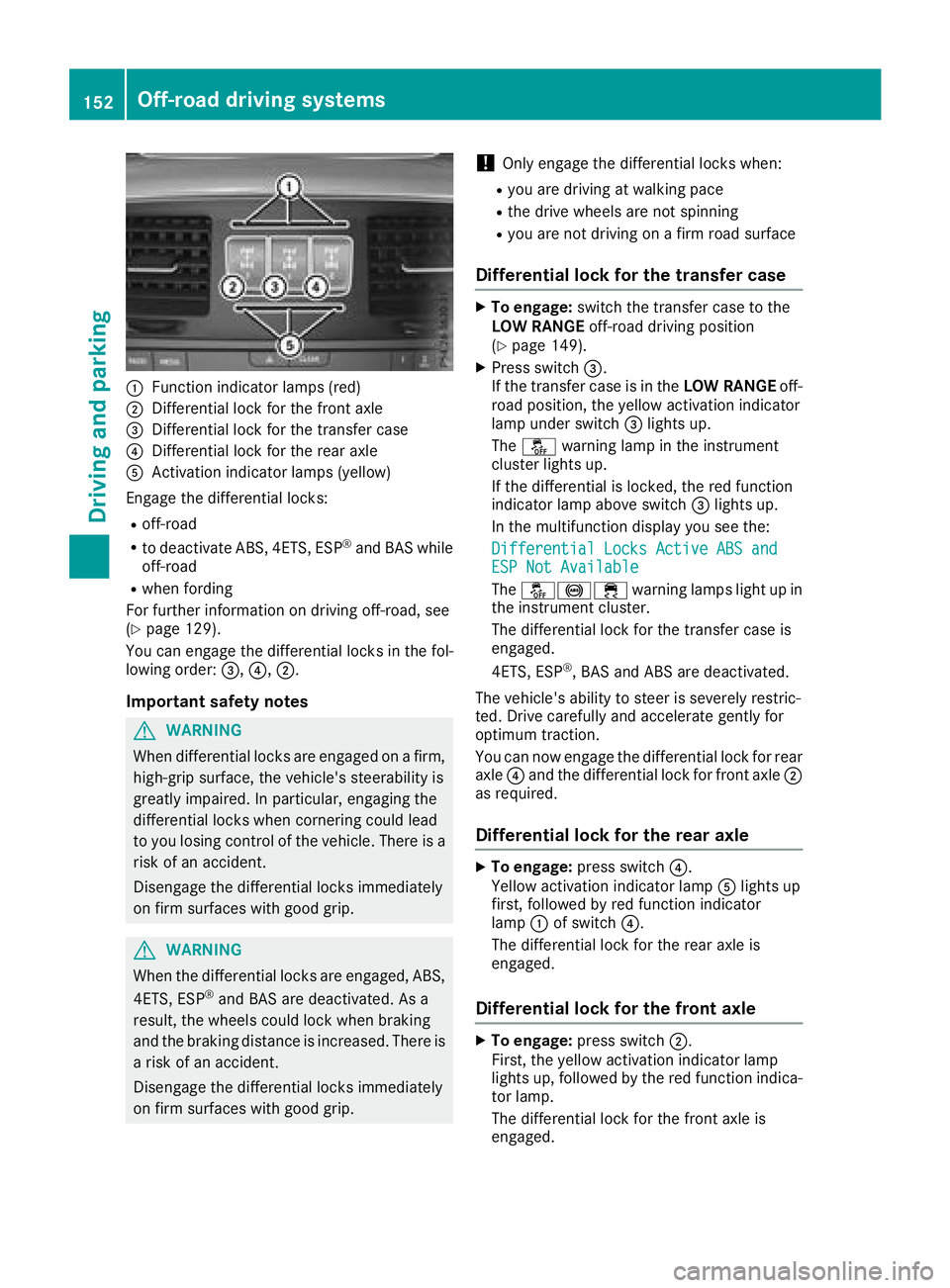
:Function indicator lamps (red)
;Differential lock for the front axle
=Differential lock for the transfer case
?Differential lock for the rear axle
AActivation indicator lamps (yellow)
Engage the differential locks:
Roff-road
Rto deactivate ABS, 4ETS, ESP®and BAS while
off-road
Rwhen fording
For further information on driving off-road, see
(
Ypage 129).
You can engage the differential locks in the fol-
lowing order: =,?,;.
Important safety notes
GWARNING
When differential locks are engaged on a firm,
high-grip surface, the vehicle's steerability is
greatly impaired. In particular, engaging the
differential locks when cornering could lead
to you losing control of the vehicle. There is a risk of an accident.
Disengage the differential locks immediately
on firm surfaces with good grip.
GWARNING
When the differential locks are engaged, ABS, 4ETS, ESP
®and BAS are deactivated. As a
result, the wheels could lock when braking
and the braking distance is increased. There is
a risk of an accident.
Disengage the differential locks immediately
on firm surfaces with good grip.
!Only engage the differential locks when:
Ryou are driving at walking pace
Rthe drive wheels are not spinning
Ryou are not driving on a firm road surface
Differential lock for the transfer case
XTo engage: switch the transfer case to the
LOW RANGE off-road driving position
(
Ypage 149).
XPress switch =.
If the transfer case is in the LOW RANGEoff-
road position, the yellow activation indicator
lamp under switch =lights up.
The å warning lamp in the instrument
cluster lights up.
If the differential is locked, the red function
indicator lamp above switch =lights up.
In the multifunction display you see the:
Differential Locks Active ABS and
ESP Not Available
The å!÷ warning lamps light up in
the instrument cluster.
The differential lock for the transfer case is
engaged.
4ETS, ESP
®, BAS and ABS are deactivated.
The vehicle's ability to steer is severely restric-
ted. Drive carefully and accelerate gently for
optimum traction.
You can now engage the differential lock for rear
axle ?and the differential lock for front axle ;
as required.
Differential lock for the rear axle
XTo engage: press switch ?.
Yellow activation indicator lamp Alights up
first, followed by red function indicator
lamp :of switch ?.
The differential lock for the rear axle is
engaged.
Differential lock for the front axle
XTo engage: press switch ;.
First, the yellow activation indicator lamp
lights up, followed by the red function indica-
tor lamp.
The differential lock for the front axle is
engaged.
152Off-road driving systems
Driving and parking
Page 171 of 294
Setting the time
XPress the=or; button on the steering
wheel to select the Settingsmenu.
XPress:or9 to select the Time/Datesubmenu.
XPressato confirm.
XPress :or9 to select the Time:func-
tion.
You will see the current setting.
XTo set the time: pressaagain.
XPress =or; to switch between hours
and minutes.
XPress :or9 to set the hours or
minutes.
XPress ato store the entry.
The display shows the selected time.
Lights
Setting the daytime running lamps
iThis function is not available in Canada.
XPress the =or; button on the steering
wheel to select the Sett.menu.
XPress the:or9 button to select the
Lightssubmenu.
XPress ato confirm.
XPress the :or9 button to select the
Daytime Running Lightsfunction.
If the DaytimeRunningLightsfunction has
been switched on, the cone of light and the
W symbol are shown in red in the multi-
function display.
XPress the abutton to save the setting.
Further information on daytime running lamps
(
Ypage 86).
Surround lighting and exterior lighting
delayed switch-off
XPress the =or; button on the steering
wheel to select the Sett.menu.
XPress the:or9 button to select the
Lightsubmenu.
XPress ato confirm.
XPress the :or9 button to select the
Surround Lightingfunction.
When the Surround Lightingfunction has
been activated, the cone of light is shown in
red in the multifunction display.
XPress the abutton to save the setting. To deactivate exterior lighting delayed switch-
off temporarily:
XBefore leaving the vehicle, turn the SmartKey
to position
gin the ignition lock
(
Ypage 105).
XTurn the SmartKey to position 2in the igni-
tion lock (Ypage 105).
Exterior lighting delayed switch-off is deacti-
vated.
Exterior lighting delayed switch-off is reactiva-
ted the next time you start the engine.
If you have activated the Surround Lighting
function and the light switch is set to Ã, the
following functions are switched on when it is
dark:
Rsurround lighting: the exterior lighting
remains lit for 40 seconds after unlocking
with the SmartKey. If you start the engine, the
surround lighting is switched off and auto-
matic headlamp mode is activated
(
Ypage 87).
Rexterior lighting delayed switch-off: the
exterior lighting remains lit for 60 seconds
after the engine is switched off. If you close all
the doors and the trunk lid, the exterior light-
ing goes off after five seconds.
iDepending on your vehicle's equipment,
when the surround lighting and exterior light-
ing delayed switch-off are on, the following
light up:
RParking lamps
RLow-beam headlamps
RDaytime running lamps
RSide marker lamps
RSurround lighting in the exterior mirrors
Switching the interior lighting delayed
switch-off on/off
If you activate the Interior Lighting Delayfunction, the interior lighting remains on for
20 seconds after you remove the SmartKey from
the ignition lock.
XPress the=or; button on the steering
wheel to select the Sett.menu.
XPress the:or9 button to select the
Lightssubmenu.
XPress ato confirm.
Menus and submenus169
On-board computer and displays
Z