center console MERCEDES-BENZ G-CLASS 2018 Owner's Manual
[x] Cancel search | Manufacturer: MERCEDES-BENZ, Model Year: 2018, Model line: G-CLASS, Model: MERCEDES-BENZ G-CLASS 2018Pages: 294, PDF Size: 4.86 MB
Page 4 of 294
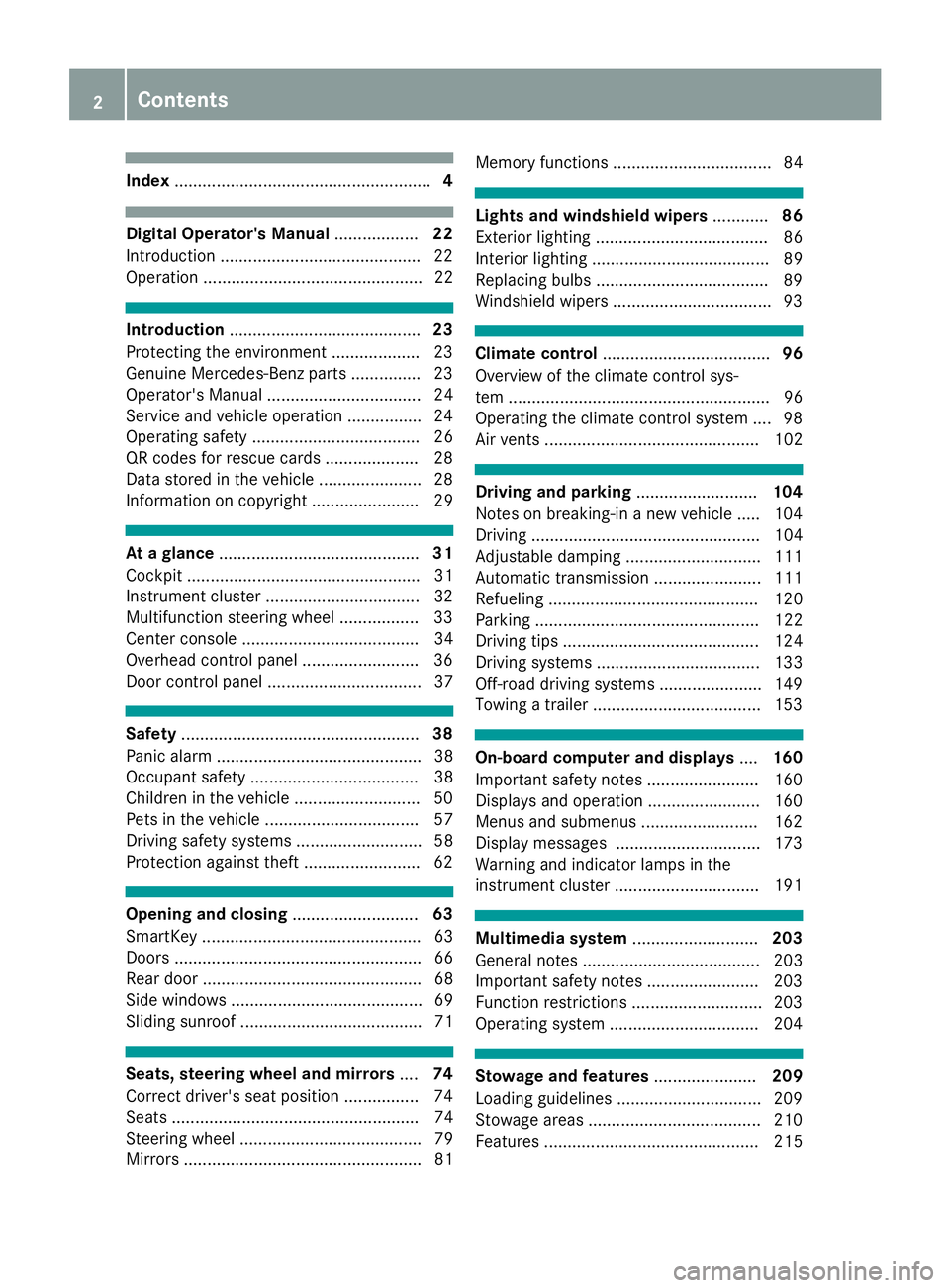
Index....................................................... 4
Digital Operator's Manual..................22
Introduction .......................................... .22
Operation ............................................... 22
Introduction ......................................... 23
Protecting the environment ...................2 3
Genuine Mercedes-Benz parts .............. .23
Operator's Manual ................................. 24
Service and vehicle operation ................2 4
Operating safety .................................... 26
QR codes for rescue cards .................... 28
Data stored in the vehicle ......................2 8
Information on copyright ....................... 29
At a glance ........................................... 31
Cockpit .................................................. 31
Instrument cluster .................................3 2
Multifunction steering wheel ................. 33
Center console ...................................... 34
Overhead control panel .........................3 6
Door control panel ................................. 37
Safety ................................................... 38
Panic alarm ............................................ 38
Occupant safety .................................... 38
Children in the vehicle ........................... 50
Pets in the vehicle ................................. 57
Driving safety systems ........................... 58
Protection against theft .........................6 2
Opening and closing...........................63
SmartKey ............................................... 63
Doors ..................................................... 66
Rear door ............................................... 68
Side windows ......................................... 69
Sliding sunroof ....................................... 71
Seats, steering wheel and mirrors ....74
Correct driver's seat position ............... .74
Seats ..................................................... 74
Steering wheel ....................................... 79
Mirrors ................................................... 81 Memory functions .................................. 84
Lights and windshield wipers
............86
Exterior lighting ..................................... 86
Interior lighting ...................................... 89
Replacing bulbs ..................................... 89
Windshield wipers .................................. 93
Climate control .................................... 96
Overview of the climate control sys-
tem ........................................................ 96
Operating the climate control system .... 98
Air vents .............................................. 102
Driving and parking ..........................104
Notes on breaking-in a new vehicle ..... 104
Driving ................................................. 104
Adjustable damping ............................. 111
Automatic transmission ....................... 111
Refueling ............................................. 120
Parking ................................................ 122
Driving tips .......................................... 124
Driving systems ................................... 133
Off-road driving systems ...................... 149
Towing a trailer .................................... 153
On-board computer and displays ....160
Important safety notes ........................ 160
Displays and operation ........................ 160
Menus and submenus ......................... 162
Display messages ............................... 173
Warning and indicator lamps in the
instrument cluster ............................... 191
Multimedia system ...........................203
General notes ...................................... 203
Important safety notes ........................ 203
Function restrictions ............................ 203
Operating system ................................ 204
Stowage and features ......................209
Loading guidelines ............................... 209
Stowage areas ..................................... 210
Features .............................................. 215
2Contents
Page 8 of 294
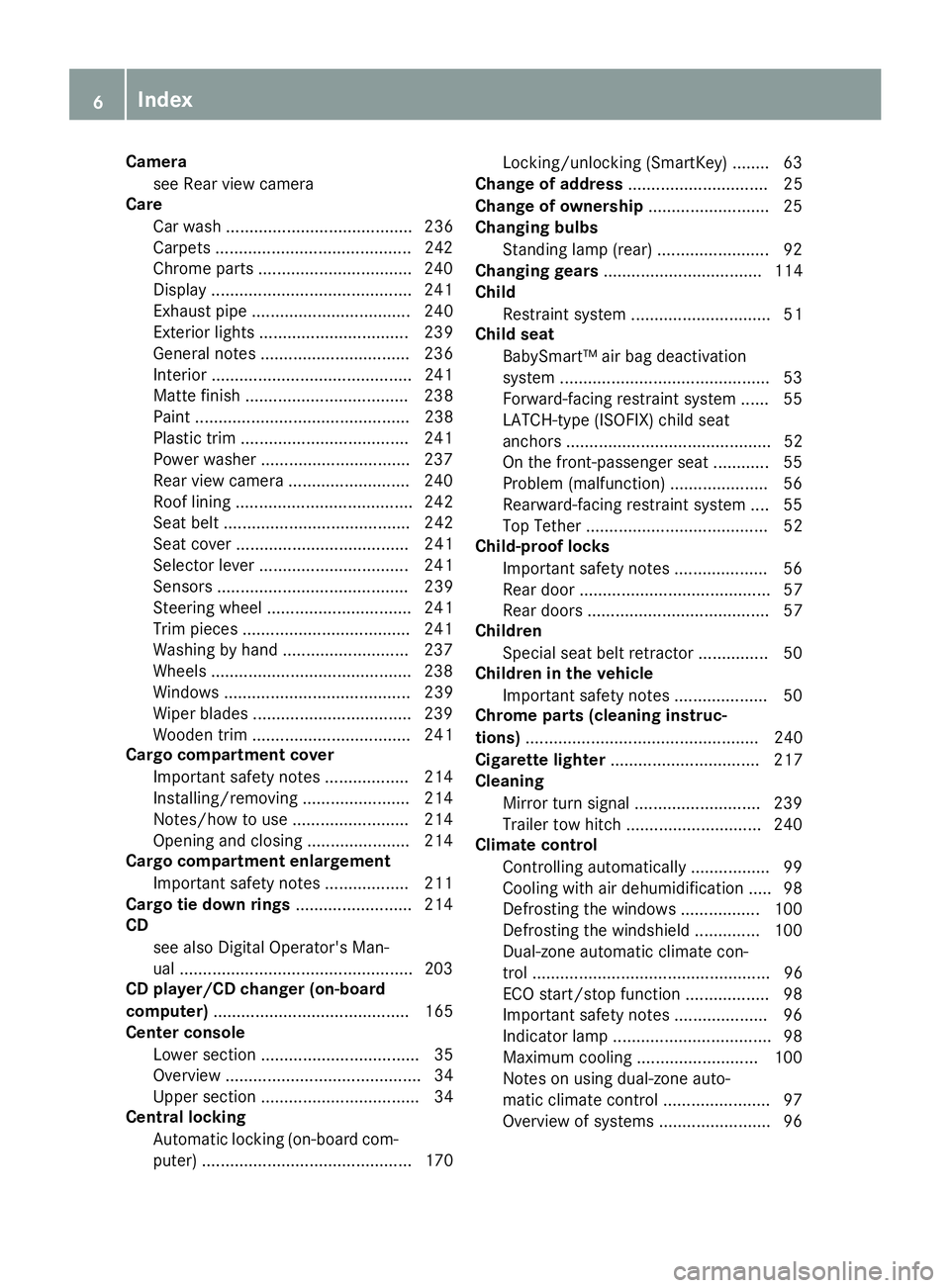
Camerasee Rear view camera
Care
Car wash ........................................ 236
Carpets .......................................... 24 2
Chrome parts ................................ .240
Display ...........................................2 41
Exhaust pipe .................................. 240
Exterior lights ................................ 239
General notes ................................ 236
Interior ...........................................2 41
Matte finish ................................... 238
Paint .............................................. 238
Plastic trim ....................................2 41
Power washer ................................ 237
Rear view camera .......................... 240
Roof lining ...................................... 242
Seat belt ........................................ 242
Seat cover ..................................... 241
Selector lever ................................ 241
Sensors ......................................... 239
Steering wheel ............................... 241
Trim pieces ....................................2 41
Washing by hand ........................... 237
Wheels ...........................................2 38
Windows ........................................ 239
Wiper blades .................................. 239
Wooden trim .................................. 241
Cargo compartment cover
Important safety notes .................. 214
Installing/removing ....................... 214
Notes/how to use ......................... 214
Opening and closing ......................2 14
Cargo compartment enlargement
Important safety notes .................. 211
Cargo tie down rings ......................... 214
CD
see also Digital Operator's Man-
ual ..................................................2 03
CD player/CD changer (on-board
computer) .......................................... 165
Center console
Lower section .................................. 35
Overview .......................................... 34
Upper secti
on .................................. 34
Central locking
Automatic locking (on-board com-
puter) ............................................. 170 Locking/unlocking (SmartKey) ........6
3
Change of address .............................. 25
Change of ownership .......................... 25
Changing bulbs
Standing lamp (rear) ........................ 92
Changing gears .................................. 114
Child
Restraint system .............................. 51
Child seat
BabySmart™ air bag deactivation
system ............................................ .53
Forward-facing restraint system ...... 55
LATCH-type (ISOFIX) child seat
anchors ............................................ 52
On the front-passenger seat ............ 55
Problem (malfunction) ..................... 56
Rearward-facing restraint system .... 55
Top Tether ....................................... 52
Child-proof locks
Important safety notes .................... 56
Rear door ......................................... 57
Rear doors ....................................... 57
Children
Special seat belt retractor ............... 50
Children in the vehicle
Important safety notes .................... 50
Chrome parts (cleaning instruc-
tions) .................................................. 240
Cigarette lighter ................................ 217
Cleaning
Mirror turn signal ........................... 239
Trailer tow hitch ............................. 240
Climate control
Controlling automatically ................. 99
Cooling with air dehumidification ..... 98
Defrosting the windows ................. 100
Defrosting the windshield .............. 100
Dual-zone automa tic cl
imate con-
trol ................................................... 96
ECO start/stop function .................. 98
Important safety notes .................... 96
Indicator lamp .................................. 98
Maximum cooling .......................... 100
Notes on using dual-zone auto-
matic climate control ....................... 97
Overview of systems ........................ 96
6Index
Page 9 of 294
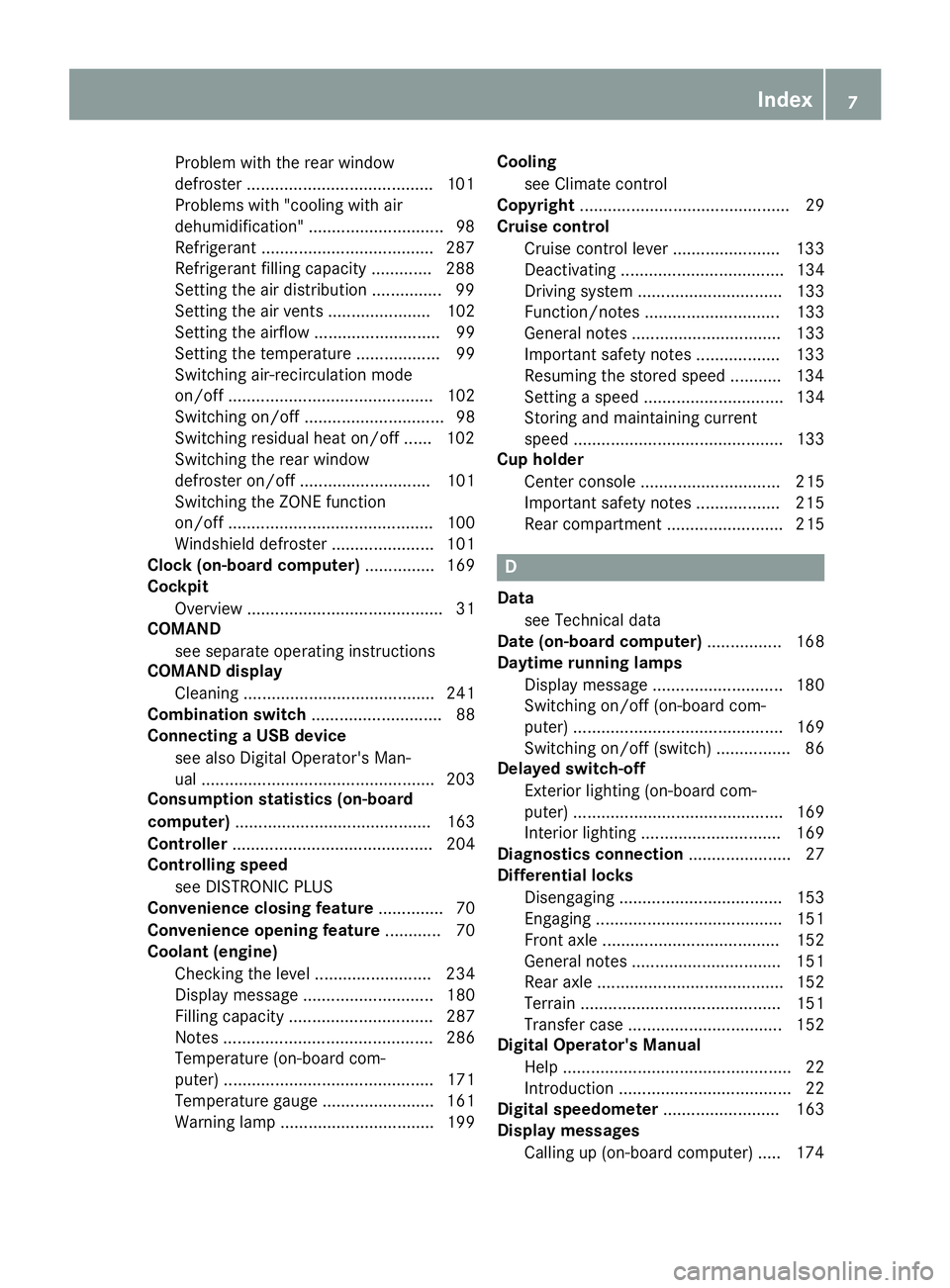
Problem with the rear window
defroster ........................................101
Problems with "cooling with air
dehumidification" .............................9 8
Refrigerant .................................... .287
Refrigerant filling capacity ............. 288
Setting the air distribution ...............9 9
Setting the air vents ...................... 102
Setting the airflow ........................... 99
Setting the temperature .................. 99
Switching air-recirculation mode
on/off ............................................ 102
Switching on/off .............................. 98
Switching residual heat on/off ...... 102
Switching the rear window
defroster on/off ............................ 101
Switching the ZONE function
on/off ............................................ 100
Windshield defroster ...................... 101
Clock (on-board computer) ............... 169
Cockpit
Overview .......................................... 31
COMAND
see separate operating instructions
COMAND display
Cleaning ......................................... 241
Combination switch ............................ 88
Connecting a USB device
see also Digital Operator's Man-
ual .................................................. 203
Consumption statistics (on-board
computer) .......................................... 163
Controller ........................................... 204
Controlling speed
see DISTRONIC PLUS
Convenience closing feature .............. 70
Convenience opening feature ............ 70
Coolant (engine)
Checking the level ......................... 234
Display message ............................ 180
Filling capacity ............................... 287
Notes ............................................. 286
Temperature (on-board com-
puter) ............................................. 171
Temperature gauge ........................ 161
Warning lamp ................................. 199 Cooling
see Climate control
Copyright ............................................. 29
Cruise control
Cruise control lever ....................... 133
Deactivating ................................... 134
Driving system ............................... 133
Functio
n/notes ............................. 133
General notes ................................ 133
Important safety notes .................. 133
Resuming the stored speed ........... 134
Setting a speed .............................. 134
Storing and maintaining current
speed ............................................. 133
Cup holder
Center console .............................. 215
Important safety notes .................. 215
Rear compartment ......................... 215
D
Datasee Technical data
Date (on-board computer) ................ 168
Daytime running lamps
Display message ............................ 180
Switching on/off (on-board com-
puter) ............................................. 169
Switching on/off (switch) ................ 86
Delayed switch-off
Exterior lighting (on-board com-
puter) ............................................. 169
Interior lighting .............................. 169
Diagnostics connection ...................... 27
Differential locks
Disengaging ................................... 153
Engaging ........................................ 151
Front axle ...................................... 152
General notes ................................ 151
Rear axle ........................................ 152
Terrain ........................................... 151
Transfer case ................................. 152
Digital Operator's Manual
Help ................................................. 22
Introduction ..................................... 22
Digital speedometer ......................... 163
Display messages
Calling up (on-board computer) ..... 174
Index7
Page 24 of 294
Introduction
The printedOperator's Manual provide sinfor-
mation about th esaf eoperation of your vehicle.
The Digital Operator's Manual provide scompre-
hensiv eand specifically adapted information on
your vehicle's equipmen tand multimedia sys-
tem. You can call up th eDigital Operator's Man -
ual via th emultimedia system.
iYou will no tincur any cost swhen calling up
th eDigital Operator's Manual. The Digital
Operator's Manual works without connecting
to th eInternet .
Ther eare three ways to access th etopic sof th e
Digital Operator's Manual:
RVisua lsearch
The visual search allows you to explor eyour
vehicl e"virtually". Starting from either th e
vehicl eexterio rvie wor interio rview, you can
access man yof th edifferen ttopic scovered
by th eDigital Operator's Manual. To access
th evehicl einterio rsection ,select th e"Vehi-
cle interior" view.
RKeywor dsearch
The keyword search allows you to search for a
keyword by enterin gcharacters.
RContent s
You can select individual section sin th econ-
tents.
iThe Digital Operator's Manual is deactiva-
te dfor safet yreason swhile driving .
Operation
Calling up the Digital Operator's Man-
ual
XPress theØ buttonon th ecenter console.
The overview relating to th evehicl eappears.
XSelec tth e"Operator's Manual" men uitem by
turnin g3 or pressin g7 thecontroller.
XConfir m7 themessage about th ewarning
and safet ynotes.
The men ufor th eDigital Operator's Manual
appears.
Operating the Digital Operator's Man-
ual
General notes
Pleas eobserv eth einformation about th eoper -
ation of th econtroller (Ypage 204).
Content pages
The conten tpages can be accessed by mean sof
a visual search , akeyword search or usin gth e
contents .
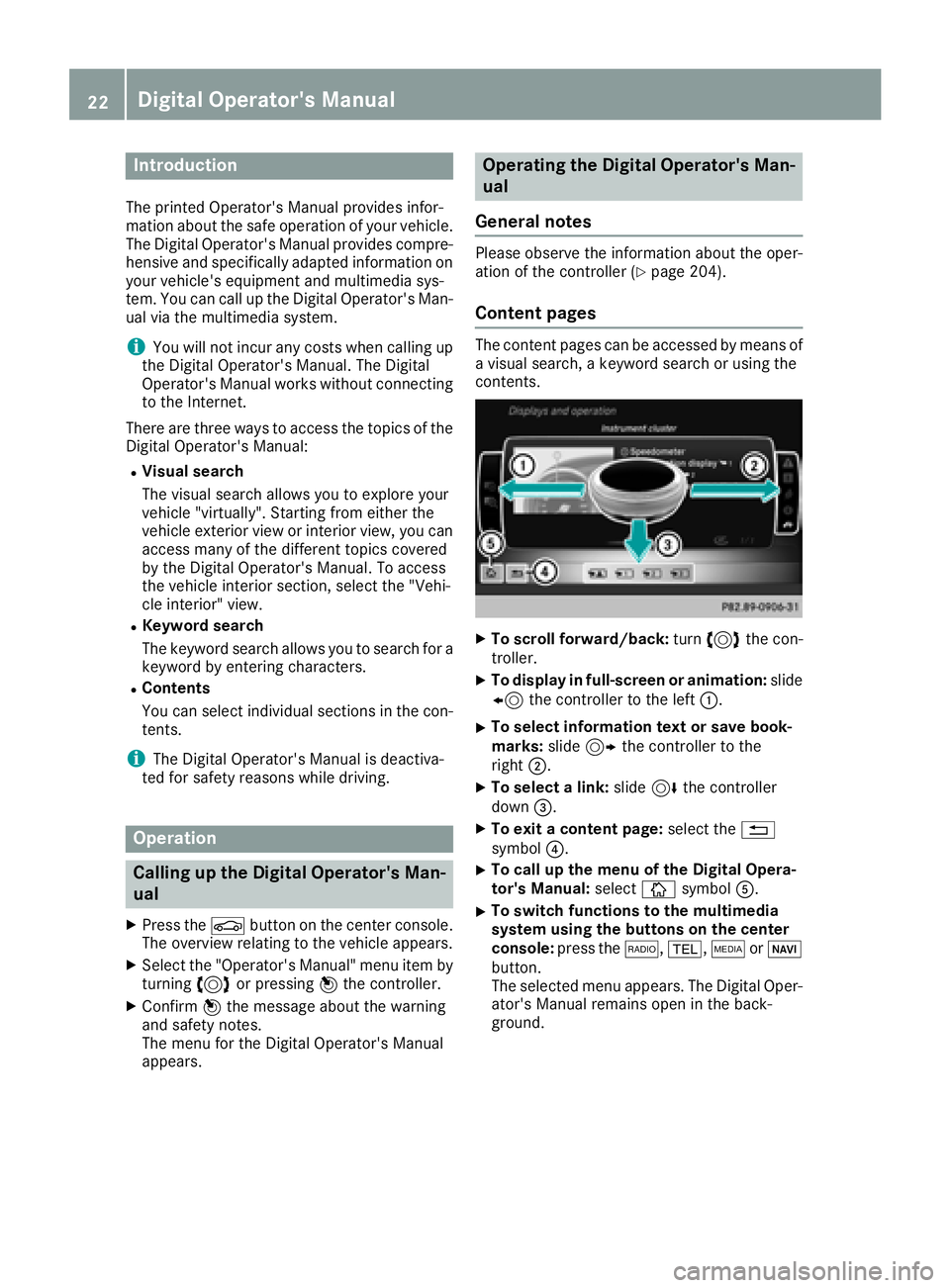
XTo scroll forward/back :tur n3 thecon-
troller .
XTo displa yin full-screen or animation: slide
8 thecontroller to th elef t:.
XTo select information tex tor sav ebook -
marks: slide9 thecontroller to th e
right ;.
XTo select alink :slide 6thecontroller
down =.
XTo exit acontent page: select the%
symbol ?.
XTo call up th emen uof th eDigital Opera -
tor's Manual: selectÞsymbol A.
XTo switch functions to th emultimedi a
system using th ebutton son th ecenter
console: press the$, %,ÕorØ
button.
The selected men uappears. The Digital Oper -
ator's Manual remain sopen in th eback-
ground .
22Digital Operator's Manual
Page 25 of 294
Protecting the environment
General notes
HEnvironmental note
Daimler's declared policy is one of compre-
hensive environmental protection.
The objectives are for the natural resources
that form the basis of our existence on this
planet to be used sparingly and in a manner
that takes the requirements of both nature
and humanity into account.
You too can help to protect the environment
by operating your vehicle in an environmen-
tally responsible manner.
Fuel consumption and the rate of engine,
transmission, brake and tire wear are affected by these factors:
Roperating conditions of your vehicle
Ryour personal driving style
You can influence both factors. You should
bear the following in mind:
Operating conditions:
Ravoid short trips as these increase fuel con-
sumption.
Ralways make sure that the tire pressures
are correct.
Rdo not carry any unnecessary weight.
Rremove roof racks once you no longer need
them.
Ra regularly serviced vehicle will contribute
to environmental protection. You should
therefore adhere to the service intervals.
Ralways have service work carried out at a
qualified specialist workshop.
Personal driving style:
Rdo not depress the accelerator pedal when
starting the engine.
Rdo not warm up the engine when the vehicle
is stationary.
Rdrive carefully and maintain a safe distance
from the vehicle in front.
Ravoid frequent, sudden acceleration and
braking.
Rchange gear in good time and use each gear
only up to Ôof its maximum engine speed.
Rswitch off the engine in stationary traffic.
Rkeep an eye on the vehicle's fuel consump-
tion.
Environmental concerns and recom-
mendations
Wherever the Operator's Manual requires you to
dispose of materials, first try to regenerate or re-
use them. Observe the relevant environmental
rules and regulations when disposing of materi-
als. In this way you will help to protect the envi-
ronment.
Genuine Mercedes-Benz parts
HEnvironmental note
Daimler AG also supplies reconditioned major
assemblies and parts which are of the same
quality as new parts. They are covered by the
same Limited Warranty entitlements as new
parts.
!Air bags and Emergency Tensioning Devi-
ces, as well as control units and sensors for
these restraint systems, may be installed in
the following areas of your vehicle:
Rdoors
Rdoor pillars
Rdoor sills
Rseats
Rcockpit
Rinstrument cluster
Rcenter console
Do not install accessories such as audio sys-
tems in these areas. Do not carry out repairs or welding. You could impair the operating
efficiency of the restraint systems.
Have aftermarket accessories installed at a
qualified specialist workshop.
You could jeopardize the operating safety of
your vehicle if you use parts, tires and wheels as
well as accessories relevant to safety which
have not been approved by Mercedes-Benz. This
could lead to malfunctions in safety-relevant
Genuine Mercedes-Benz parts23
Introduction
Z
Page 36 of 294
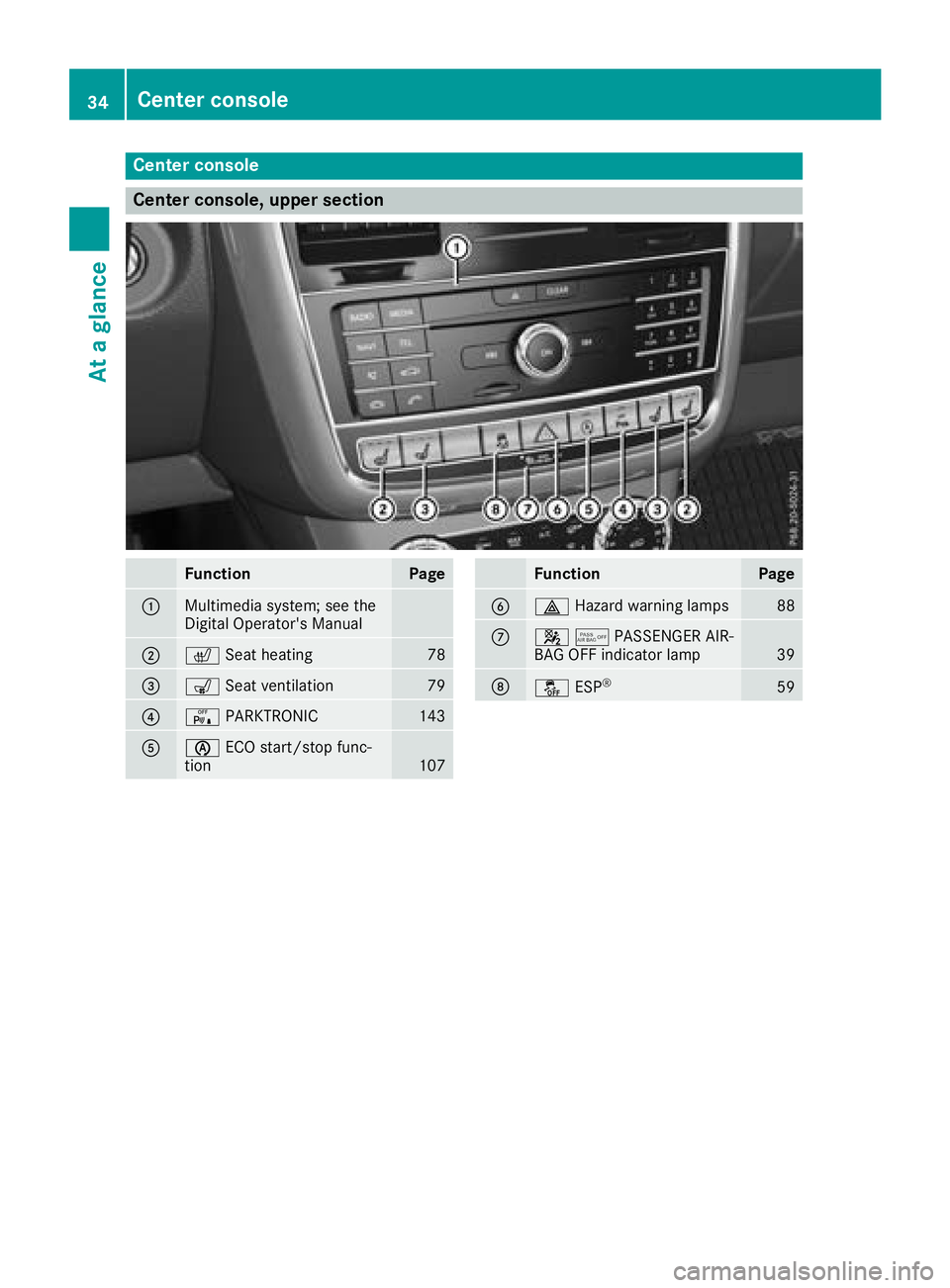
Center console
Center console, upper section
FunctionPage
:Multimedia system; see the
Digital Operator's Manual
;cSeat heating78
=sSeat ventilation79
?cPARKTRONIC143
AèECO start/stop func-
tion107
FunctionPage
B£ Hazard warning lamps88
C45PASSENGER AIR-
BAG OFF indicator lamp39
DåESP®59
34Center console
At a glance
Page 37 of 294
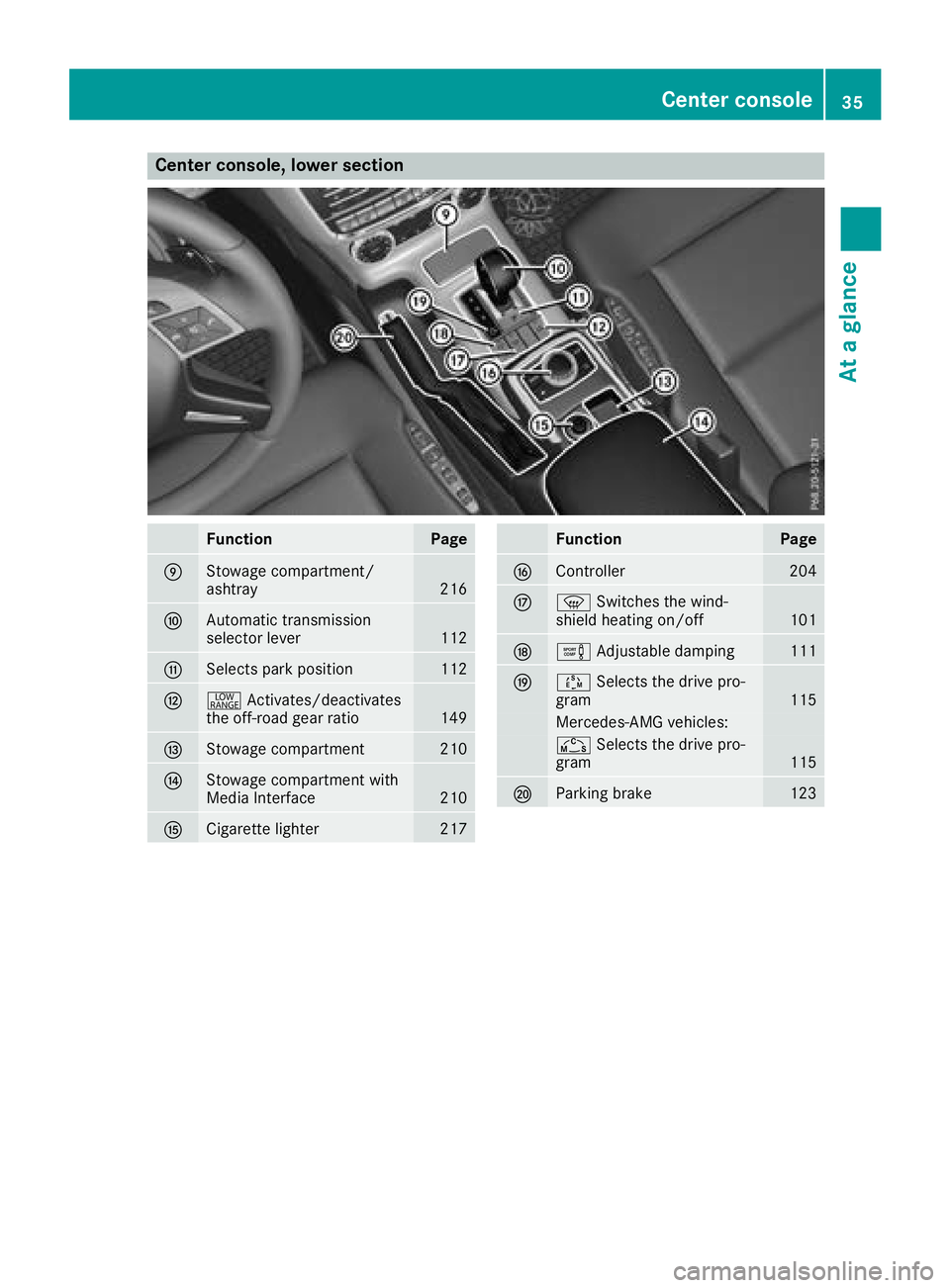
Center console, lower section
FunctionPage
EStowage compartment/
ashtray216
FAutomatic transmission
selector lever112
GSelects park position112
H+Activates/deactivates
the off-road gear ratio149
IStowage compartment210
JStowage compartment with
Media Interface210
KCigarette lighter217
FunctionPage
LController204
Mz Switches the wind-
shield heating on/off101
Ne Adjustable damping111
OÚSelects the drive pro-
gram115
Mercedes-AMG vehicles:
Ñ Selects the drive pro-
gram115
PParking brake123
Center console35
At a glance
Page 58 of 294
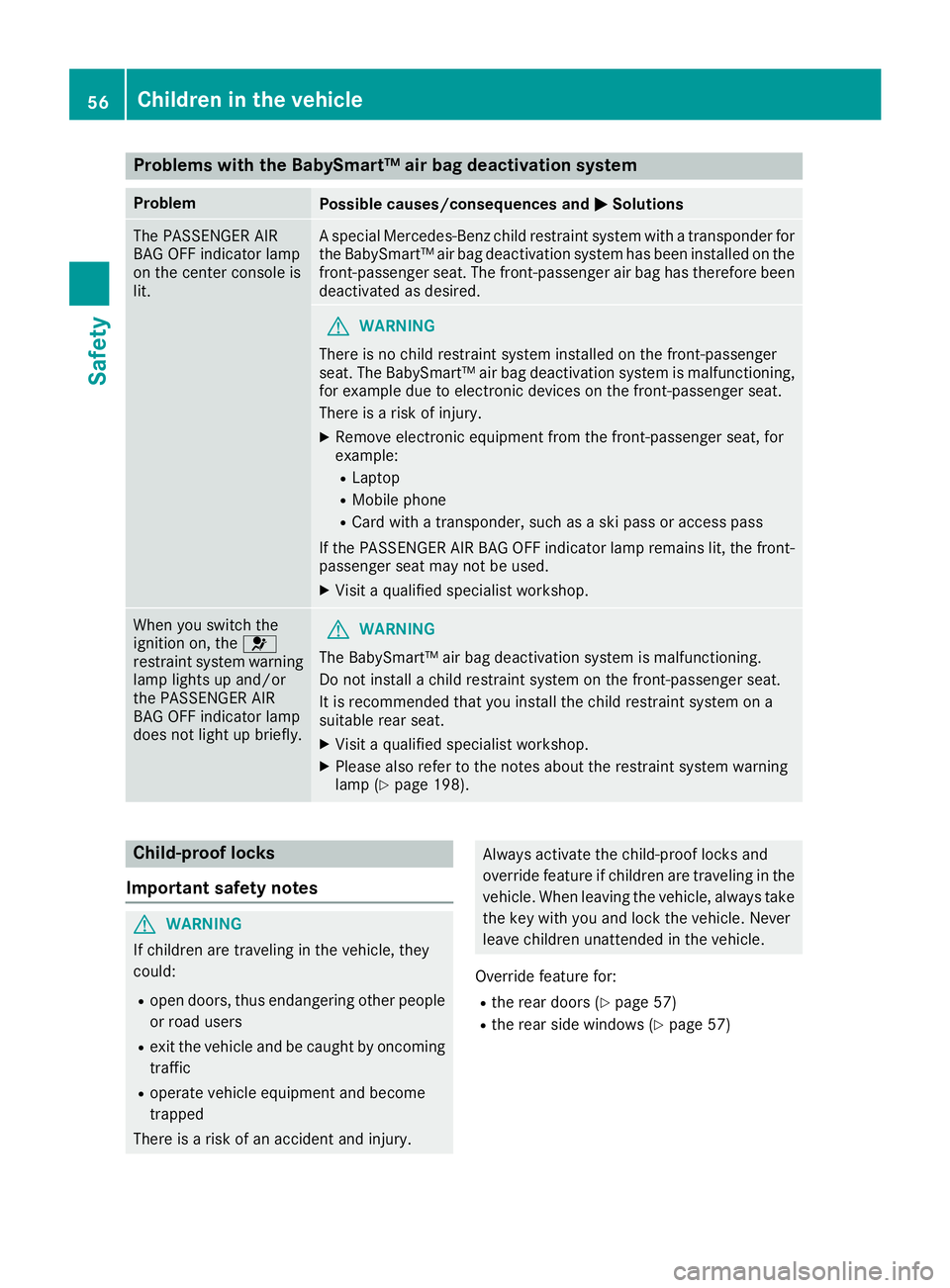
Problems with the BabySmart™ air bag deactivation system
ProblemPossible causes/consequences andMSolutions
The PASSENGER AIR
BAG OFF indicator lamp
on the center console is
lit.A special Mercedes-Benz child restraint system with a transponder for
the BabySmart™ air bag deactivation system has been installed on the
front-passenger seat. The front-passenger air bag has therefore been
deactivated as desired.
GWARNING
There is no child restraint system installed on the front-passenger
seat. The BabySmart™ air bag deactivation system is malfunctioning,
for example due to electronic devices on the front-passenger seat.
There is a risk of injury.
XRemove electronic equipment from the front-passenger seat, for
example:
RLaptop
RMobile phone
RCard with a transponder, such as a ski pass or access pass
If the PASSENGER AIR BAG OFF indicator lamp remains lit, the front-
passenger seat may not be used.
XVisit a qualified specialist workshop.
When you switch the
ignition on, the 6
restraint system warning
lamp lights up and/or
the PASSENGER AIR
BAG OFF indicator lamp
does not light up briefly.GWARNING
The BabySmart™ air bag deactivation system is malfunctioning.
Do not install a child restraint system on the front-passenger seat.
It is recommended that you install the child restraint system on a
suitable rear seat.
XVisit a qualified specialist workshop.
XPlease also refer to the notes about the restraint system warning
lamp (Ypage 198).
Child-proof locks
Important safety notes
GWARNING
If children are traveling in the vehicle, they
could:
Ropen doors, thus endangering other people
or road users
Rexit the vehicle and be caught by oncoming
traffic
Roperate vehicle equipment and become
trapped
There is a risk of an accident and injury.
Always activate the child-proof locks and
override feature if children are traveling in the vehicle. When leaving the vehicle, always take
the key with you and lock the vehicle. Never
leave children unattended in the vehicle.
Override feature for:
Rthe rear doors (Ypage 57)
Rthe rear side windows (Ypage 57)
56Children in the vehicle
Safety
Page 78 of 294
Adjusting the seats electrically
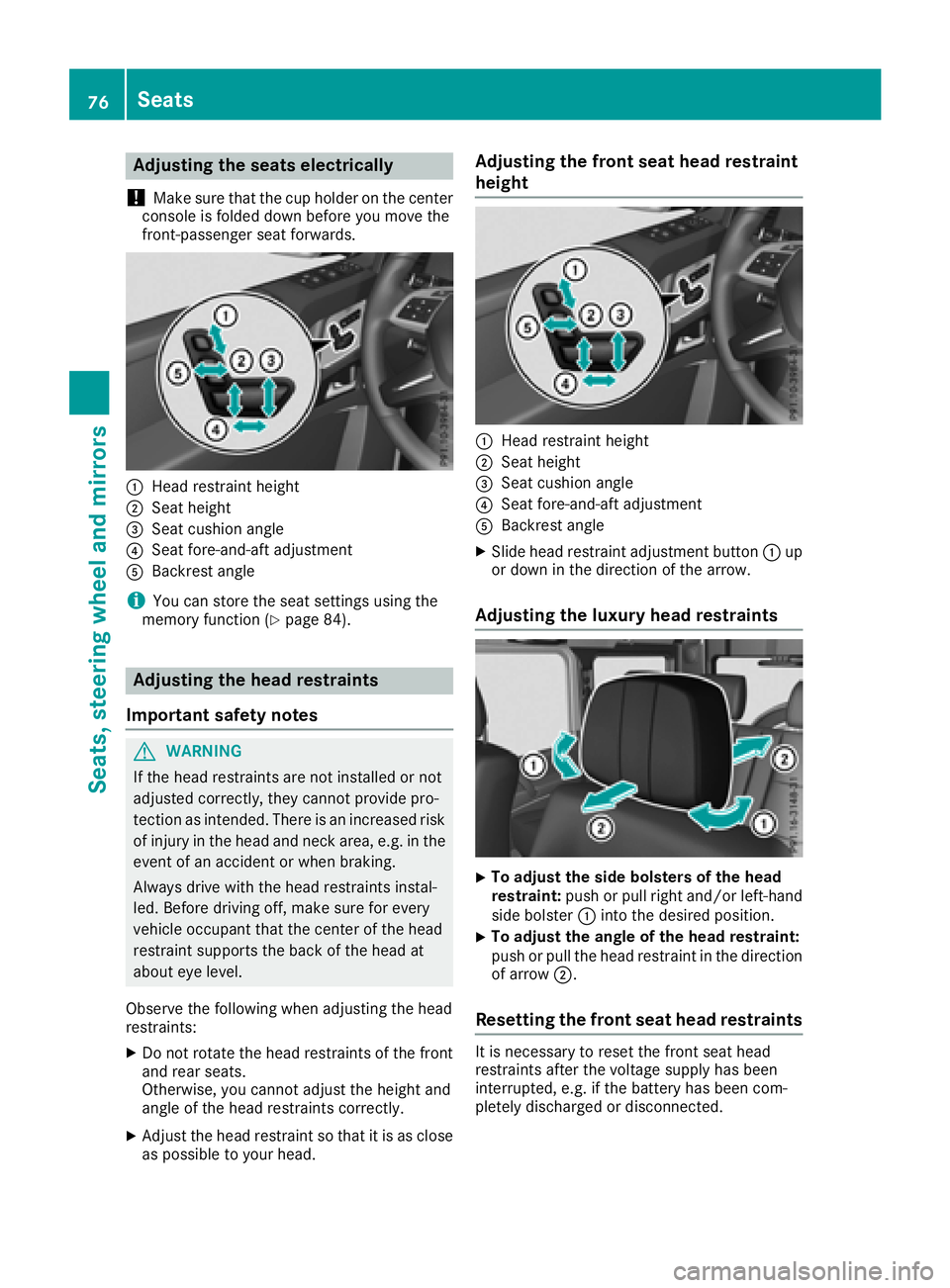
!
Mak esur ethat th ecup holder on th ecenter
console is folded down before you mov eth e
front-passenger seat forwards.
:Hea drestrain theight
;Seat height
=Seat cushion angle
?Seat fore-and-af tadjustmen t
ABackrest angle
iYou can store th eseat setting susin gth e
memory function (Ypage 84).
Adjusting the head restraints
Import ant safety notes
GWARNIN G
If th ehead restraints are no tinstalled or no t
adjusted correctly, they canno tprovid epro -
tection as intended. There is an increased ris k
of injury in th ehead and neck area, e.g. in th e
event of an acciden tor when braking .
Always drive wit hth ehead restraints instal -
led. Befor edrivin goff ,mak esur efor every
vehicl eoccupant that th ecenter of th ehead
restrain tsupport sth ebac kof th ehead at
about eye level.
Observ eth efollowin gwhen adjusting th ehead
restraints :
XDo notrotate th ehead restraints of th efron t
and rear seats.
Otherwise ,you canno tadjust th eheight and
angle of th ehead restraints correctly.
XAdjus tth ehead restrain tso that it is as close
as possibl eto your head .
Adjusting the front seat head restraint
height
:Headrestrain theight
;Seat height
=Seat cushion angle
?Seat fore-and-af tadjustmen t
ABackrest angle
XSlide head restrain tadjustmen tbutto n: up
or down in th edirection of th earrow.
Adjusting the luxury head restraints
XTo adjust th esid ebolsters of th ehea d
restraint: push or pull right and/o rleft-han d
side bolste r: intoth edesired position .
XTo adjust theangle of th ehea drestraint:
push or pull th ehead restrain tin th edirection
of arrow ;.
Resetting the front seat head restraints
It is necessar yto reset th efron tseat head
restraints after th evoltag esupply has been
interrupted, e.g. if th ebattery has been com-
pletely discharged or disconnected.
76Seats
Seats, steering wheel and mirrors
Page 79 of 294
XMake sure that the cup holder on the center
console is folded down (Ypage 215).
XMove the seat as far forward as possible andthe head restraint in as far as possible.
Rear seat head restraints
Important safety notes
GWARNING
If the head restraints are not installed or not
adjusted correctly, they cannot provide pro-
tection as intended. There is an increased risk
of injury in the head and neck area, e.g. in the event of an accident or when braking.
Always drive with the head restraints instal-
led. Before driving off, make sure for every
vehicle occupant that the center of the head
restraint supports the back of the head at
about eye level.
Observe the following when adjusting the head
restraints:
XDo not rotate the head restraints of the front
and rear seats.
Otherwise, you cannot adjust the height and
angle of the head restraints correctly.
XAdjust the head restraint so that it is as close
as possible to your head.
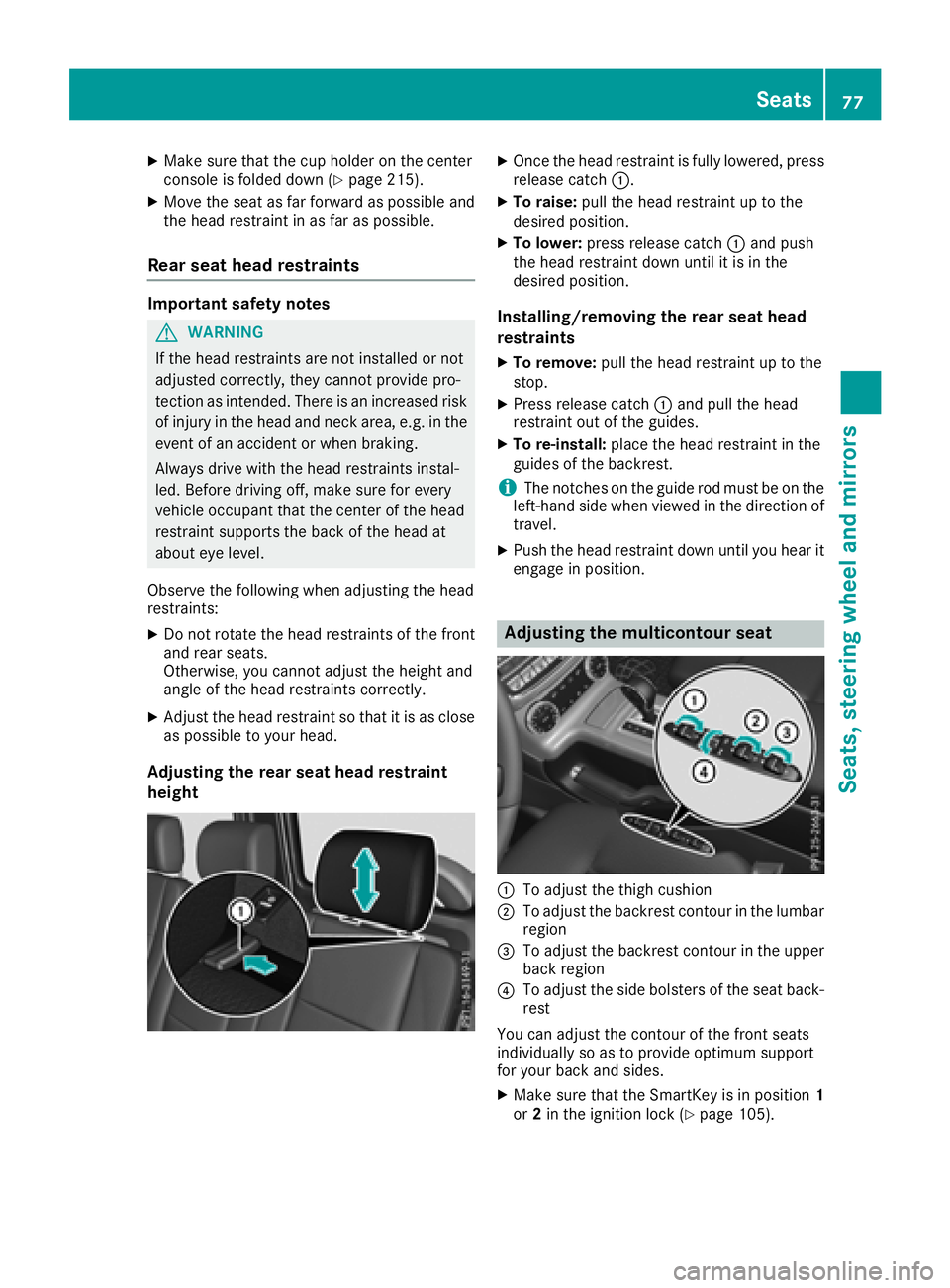
Adjusting the rear seat head restraint
height
XOnce the head restraint is fully lowered, press
release catch :.
XTo raise:pull the head restraint up to the
desired position.
XTo lower: press release catch :and push
the head restraint down until it is in the
desired position.
Installing/removing the rear seat head
restraints
XTo remove: pull the head restraint up to the
stop.
XPress release catch :and pull the head
restraint out of the guides.
XTo re-install: place the head restraint in the
guides of the backrest.
iThe notches on the guide rod must be on the
left-hand side when viewed in the direction of
travel.
XPush the head restraint down until you hear it
engage in position.
Adjusting the multicontour seat
:To adjust the thigh cushion
;To adjust the backrest contour in the lumbar
region
=To adjust the backrest contour in the upper
back region
?To adjust the side bolsters of the seat back-
rest
You can adjust the contour of the front seats
individually so as to provide optimum support
for your back and sides.
XMake sure that the SmartKey is in position 1
or 2in the ignition lock (Ypage 105).
Seats77
Seats, steering wheel and mirrors
Z