cooling MERCEDES-BENZ G-CLASS 2018 Owner's Manual
[x] Cancel search | Manufacturer: MERCEDES-BENZ, Model Year: 2018, Model line: G-CLASS, Model: MERCEDES-BENZ G-CLASS 2018Pages: 294, PDF Size: 4.86 MB
Page 8 of 294
Camerasee Rear view camera
Care
Car wash ........................................ 236
Carpets .......................................... 24 2
Chrome parts ................................ .240
Display ...........................................2 41
Exhaust pipe .................................. 240
Exterior lights ................................ 239
General notes ................................ 236
Interior ...........................................2 41
Matte finish ................................... 238
Paint .............................................. 238
Plastic trim ....................................2 41
Power washer ................................ 237
Rear view camera .......................... 240
Roof lining ...................................... 242
Seat belt ........................................ 242
Seat cover ..................................... 241
Selector lever ................................ 241
Sensors ......................................... 239
Steering wheel ............................... 241
Trim pieces ....................................2 41
Washing by hand ........................... 237
Wheels ...........................................2 38
Windows ........................................ 239
Wiper blades .................................. 239
Wooden trim .................................. 241
Cargo compartment cover
Important safety notes .................. 214
Installing/removing ....................... 214
Notes/how to use ......................... 214
Opening and closing ......................2 14
Cargo compartment enlargement
Important safety notes .................. 211
Cargo tie down rings ......................... 214
CD
see also Digital Operator's Man-
ual ..................................................2 03
CD player/CD changer (on-board
computer) .......................................... 165
Center console
Lower section .................................. 35
Overview .......................................... 34
Upper secti
on .................................. 34
Central locking
Automatic locking (on-board com-
puter) ............................................. 170 Locking/unlocking (SmartKey) ........6
3
Change of address .............................. 25
Change of ownership .......................... 25
Changing bulbs
Standing lamp (rear) ........................ 92
Changing gears .................................. 114
Child
Restraint system .............................. 51
Child seat
BabySmart™ air bag deactivation
system ............................................ .53
Forward-facing restraint system ...... 55
LATCH-type (ISOFIX) child seat
anchors ............................................ 52
On the front-passenger seat ............ 55
Problem (malfunction) ..................... 56
Rearward-facing restraint system .... 55
Top Tether ....................................... 52
Child-proof locks
Important safety notes .................... 56
Rear door ......................................... 57
Rear doors ....................................... 57
Children
Special seat belt retractor ............... 50
Children in the vehicle
Important safety notes .................... 50
Chrome parts (cleaning instruc-
tions) .................................................. 240
Cigarette lighter ................................ 217
Cleaning
Mirror turn signal ........................... 239
Trailer tow hitch ............................. 240
Climate control
Controlling automatically ................. 99
Cooling with air dehumidification ..... 98
Defrosting the windows ................. 100
Defrosting the windshield .............. 100
Dual-zone automa tic cl
imate con-
trol ................................................... 96
ECO start/stop function .................. 98
Important safety notes .................... 96
Indicator lamp .................................. 98
Maximum cooling .......................... 100
Notes on using dual-zone auto-
matic climate control ....................... 97
Overview of systems ........................ 96
6Index
Page 9 of 294
Problem with the rear window
defroster ........................................101
Problems with "cooling with air
dehumidification" .............................9 8
Refrigerant .................................... .287
Refrigerant filling capacity ............. 288
Setting the air distribution ...............9 9
Setting the air vents ...................... 102
Setting the airflow ........................... 99
Setting the temperature .................. 99
Switching air-recirculation mode
on/off ............................................ 102
Switching on/off .............................. 98
Switching residual heat on/off ...... 102
Switching the rear window
defroster on/off ............................ 101
Switching the ZONE function
on/off ............................................ 100
Windshield defroster ...................... 101
Clock (on-board computer) ............... 169
Cockpit
Overview .......................................... 31
COMAND
see separate operating instructions
COMAND display
Cleaning ......................................... 241
Combination switch ............................ 88
Connecting a USB device
see also Digital Operator's Man-
ual .................................................. 203
Consumption statistics (on-board
computer) .......................................... 163
Controller ........................................... 204
Controlling speed
see DISTRONIC PLUS
Convenience closing feature .............. 70
Convenience opening feature ............ 70
Coolant (engine)
Checking the level ......................... 234
Display message ............................ 180
Filling capacity ............................... 287
Notes ............................................. 286
Temperature (on-board com-
puter) ............................................. 171
Temperature gauge ........................ 161
Warning lamp ................................. 199 Cooling
see Climate control
Copyright ............................................. 29
Cruise control
Cruise control lever ....................... 133
Deactivating ................................... 134
Driving system ............................... 133
Functio
n/notes ............................. 133
General notes ................................ 133
Important safety notes .................. 133
Resuming the stored speed ........... 134
Setting a speed .............................. 134
Storing and maintaining current
speed ............................................. 133
Cup holder
Center console .............................. 215
Important safety notes .................. 215
Rear compartment ......................... 215
D
Datasee Technical data
Date (on-board computer) ................ 168
Daytime running lamps
Display message ............................ 180
Switching on/off (on-board com-
puter) ............................................. 169
Switching on/off (switch) ................ 86
Delayed switch-off
Exterior lighting (on-board com-
puter) ............................................. 169
Interior lighting .............................. 169
Diagnostics connection ...................... 27
Differential locks
Disengaging ................................... 153
Engaging ........................................ 151
Front axle ...................................... 152
General notes ................................ 151
Rear axle ........................................ 152
Terrain ........................................... 151
Transfer case ................................. 152
Digital Operator's Manual
Help ................................................. 22
Introduction ..................................... 22
Digital speedometer ......................... 163
Display messages
Calling up (on-board computer) ..... 174
Index7
Page 98 of 294
Overview of the climate control sys-
tem
General notes
Observe the settings recommended on the fol-
lowing pages. The windows could otherwise fog
up.
To prevent the windows from fogging up:
Rswitch off climate control only briefly
Rswitch on air-recirculation mode only briefly
Rswitch on the cooling with air dehumidifica-
tion function
Ractivate the "Windshield defrosting" function
briefly, if required
Climate control regulates the temperature and
the humidity in the vehicle interior and filters
undesirable substances out of the air.
The "Cooling with air dehumidification" function
is only available when the engine is running.
Optimum operation is only achieved when the
side windows and the sliding sunroof are closed. The climatic comfort deteriorates whilst the slid-
ing sunroof is open. Set the temperature man-
ually if the sliding sunroof is open.
The residual heat function can only be activated
or deactivated with the ignition switched off
(
Ypage 102).
The integrated filter can filter out most particles
of dust and completely filters out pollen. A clog-
ged filter reduces the amount of air supplied to
the vehicle interior. Depending on the operating
conditions and environmental influences, the
interval for replacing the filter may be shorter
than specified.
iVentilate the vehicle for a brief period during
warm weather, e.g. using the convenience
opening feature (
Ypage 70). This will speed
up the cooling process and the desired vehi-
cle interior temperature will be reached more
quickly.
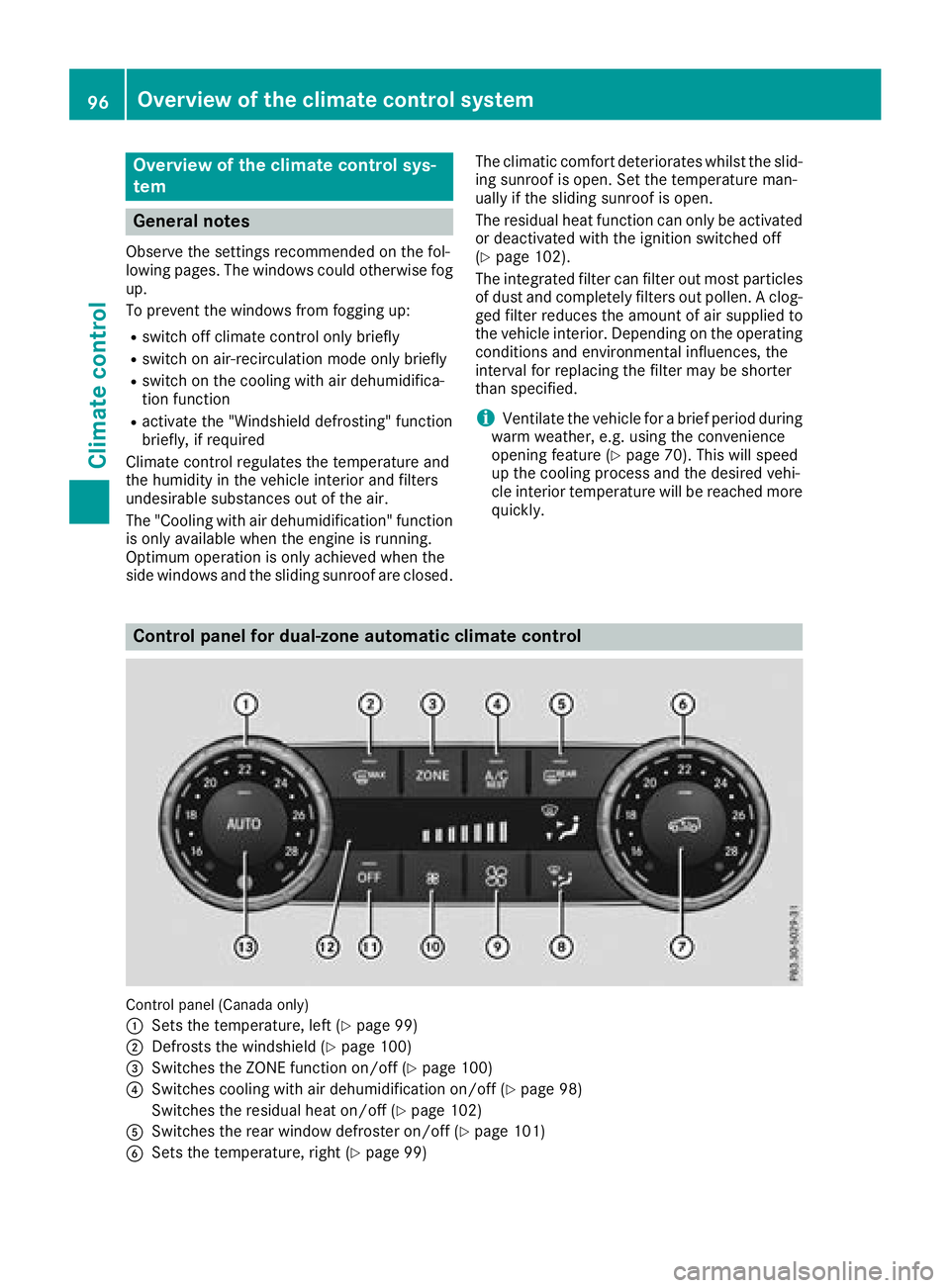
Control panel for dual-zone automatic climate control
Control panel (Canada only)
:
Sets the temperature, left (Ypage 99)
;Defrosts the windshield (Ypage 100)
=Switches the ZONE function on/off (Ypage 100)
?Switches cooling with air dehumidification on/off (Ypage 98)
Switches the residual heat on/off (
Ypage 102)
ASwitches the rear window defroster on/off (Ypage 101)
BSets the temperature, right (Ypage 99)
96Overview of the climate control system
Climate control
Page 99 of 294
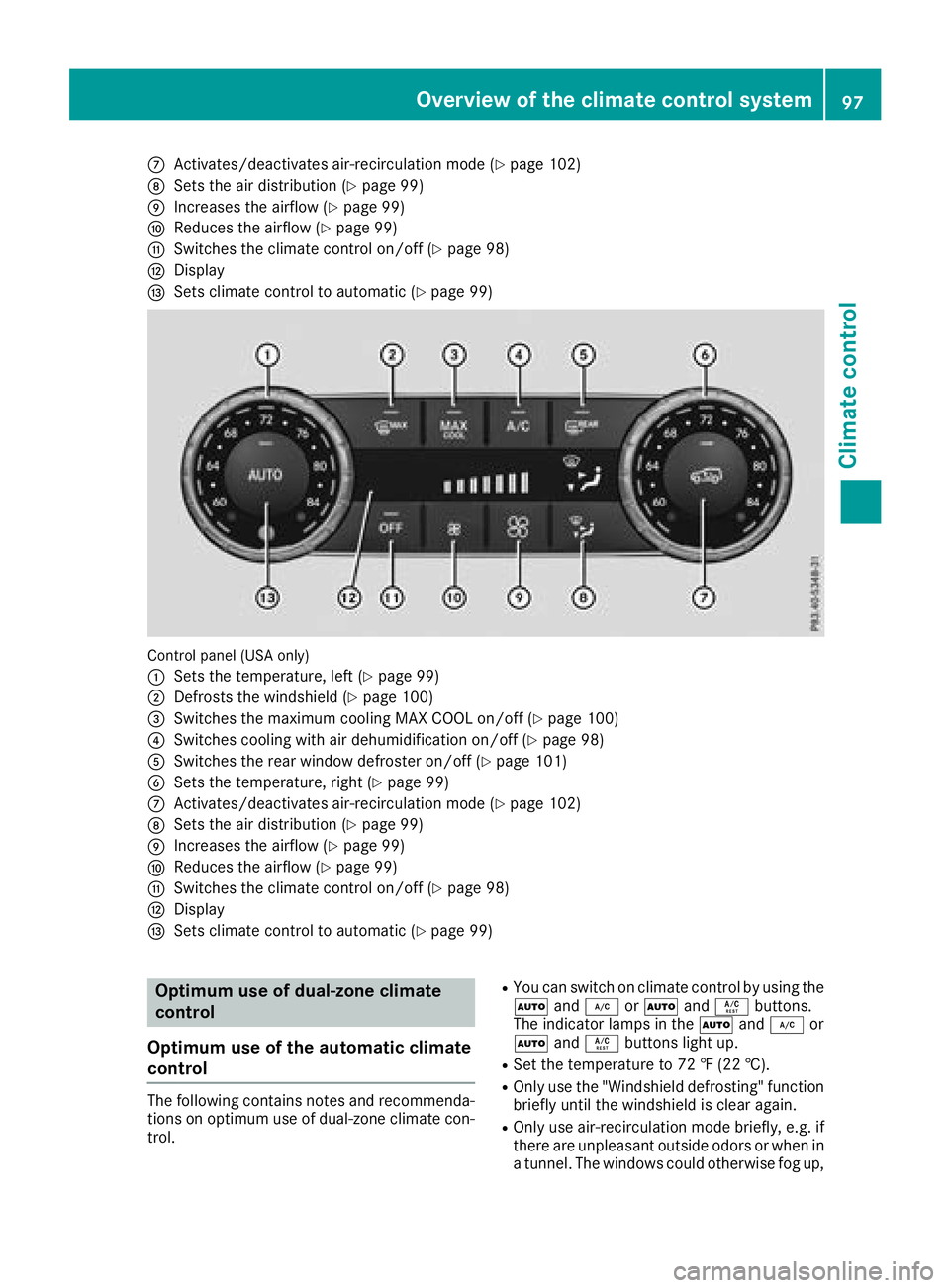
CActivates/deactivates air-recirculation mode (Ypage 102)
DSets the air distribution (Ypage 99)
EIncreases the airflow (Ypage 99)
FReduces the airflow (Ypage 99)
GSwitches the climate control on/off (Ypage 98)
HDisplay
ISets climate control to automatic (Ypage 99)
Control panel (USA only)
:
Sets the temperature, left (Ypage 99)
;Defrosts the windshield (Ypage 100)
=Switches the maximum cooling MAX COOL on/off (Ypage 100)
?Switches cooling with air dehumidification on/off (Ypage 98)
ASwitches the rear window defroster on/off (Ypage 101)
BSets the temperature, right (Ypage 99)
CActivates/deactivates air-recirculation mode (Ypage 102)
DSets the air distribution (Ypage 99)
EIncreases the airflow (Ypage 99)
FReduces the airflow (Ypage 99)
GSwitches the climate control on/off (Ypage 98)
HDisplay
ISets climate control to automatic (Ypage 99)
Optimum use of dual-zone climate
control
Optimum use of the automatic climate
control
The following contains notes and recommenda-
tions on optimum use of dual-zone climate con-
trol.
RYou can switch on climate control by using the
à and¿ orà andÁ buttons.
The indicator lamps in the Ãand¿ or
à andÁ buttons light up.
RSet the temperature to 72 ‡ (22 †).
ROnly use the "Windshield defrosting" function
briefly until the windshield is clear again.
ROnly use air-recirculation mode briefly, e.g. if
there are unpleasant outside odors or when in
a tunnel. The windows could otherwise fog up,
Overview of the climate control system97
Climate control
Page 100 of 294
since no fresh air is drawn into the vehicle in
air-recirculation mode.
ECO start/stop function
During automatic engine switch-off, the climate
control system only operates at a reduced capa-
city. If you require the full climate control output,
you can switch off the ECO start/stop function
by pressing the ECO button (
Ypage 108).
Operating the climate control system
Activating/deactivating climate con-
trol
General notes
When the climate control is switched off, the air
supply and air circulation are also switched off. The windows could fog up. Therefore, switch off
climate control only briefly.
Activate climate control primarily using the
Ã
button (
Ypage 99).
Activating/deactivating
XTurn the SmartKey to position 2in the igni-
tion lock (Ypage 105).
XTo activate: press theÃbutton.
The indicator lamp in the Ãbutton lights
up. Airflow and air distribution are set to auto-
matic mode.
XTo deactivate: press the^button.
The indicator lamp in the ^button lights
up.
Switching cooling with air dehumidification on/off
General notes
If you deactivate the "Cooling with air-dehumidification" function, the air inside the vehicle will not
be cooled. The air inside the vehicle will also not be dehumidified. The windows can fog up more
quickly. Therefore, only deactivate the "Cooling with air-dehumidification" function briefly.
The "Cooling with air dehumidification" function is only available when the engine is running.
The air inside the vehicle is cooled and dehumidified according to the temperature selected.
Condensation may drip from the underside of the vehicle when it is in cooling mode. This is normal
and not a sign that there is a malfunction.
Activating/deactivating
XTo activate: press the¿orÁ button.
The indicator lamp in the ¿orÁ button lights up.
XTo deactivate: press the¿orÁ button.
The indicator lamp in the ¿orÁ button goes out. The "Cooling with air dehumidification"
function has a delayed switch-off feature.
Problems with the "Cooling with air dehumidification" function
!If the cooling with air dehumidification does not switch on, it is possible that the climate control
system has lost coolant.
Have the cooling with air dehumidification checked at a qualified specialist workshop.
98Operating the climate control system
Climate control
Page 101 of 294
ProblemPossible causes/consequences andMSolutions
The indicator lamp in the
¿orÁ button
flashes three times or
remains off. The "Cool-
ing with air dehumidifi-
cation" function cannot
be switched on.Cooling with air dehumidification has been deactivated due to a mal-
function.
XVisit a qualified specialist workshop.
Setting climate control to automatic
General notes
In automatic mode, the set temperature is main-
tained at a constant level. The system automat-
ically regulates the temperature of the dis-
pensed air, the airflow and the air distribution.
Automatic mode works best when cooling with
air dehumidification is also activated. If neces-
sary, cooling with air dehumidification can be
deactivated.
Automatic control
XTurn the SmartKey to position 2in the igni-
tion lock (Ypage 105).
XSet the desired temperature.
XTo activate: press theÃbutton.
The indicator lamp in the Ãbutton lights
up. Automatic air distribution and airflow are
activated.
XTo deactivate: press the_button.
or
XPress the IorK button.
The indicator lamp in the Ãbutton goes
out.
XTo switch to manual mode: press the_
button.
Setting the temperature
Different temperatures can be set for the driv-
er's and front-passenger sides.
XTurn the SmartKey to position 2in the igni-
tion lock (Ypage 105).
XAdjust control :orB (Ypage 96) to the
desired temperature.
Only change the temperature setting in small
increments. Start at 72 ‡ (22 †).
Setting the air distribution
Air distribution settings
P Directs air through the center and side air
vents
O Directs air through the footwell air vents
S Directs air through the center, side and
footwell vents
¯ Directs air through the defroster vents
b Canada only: directs the airflow through
the defroster, center and side air vents.
a Directs air through the defroster and
footwell vents
_ Canada only: directs the airflow through
the defroster, center and footwell air
vents.
Setting
XTurn the SmartKey to position 2in the igni-
tion lock (Ypage 105).
XPress the _button repeatedly until the
desired symbol appears in the display.
Setting the airflow
XTurn the SmartKey to position 2in the igni-
tion lock (Ypage 105).
XTo increase: press theKbutton.
XTo reduce: press theIbutton.
iThe airflow from the rear-compartment
vents and the center vents is the same.
Operating the climate control system99
Climate control
Page 102 of 294
Switching the ZONE function on/off
XTo switch on:press theábutton.
The indicator lamp in the ábutton lights
up.
The temperature setting for the driver's side
is not adopted for the front-passenger side
and the rear compartment. The temperature
for the front-passenger side and the rear com-
partment is set separately.
XTo switch off: press theábutton.
The indicator lamp in the ábutton goes
out.
The temperature setting for the driver's side
is adopted for the front-passenger side and
the rear compartment.
Defrosting the windshield
General notes
You can use this function to defrost the wind-
shield or to defrost the inside of the windshield
and the side windows.
Switch off the "Windshield defrosting" function
as soon as the windshield is clear again.
Activating/deactivating
XTurn the SmartKey to position 2in the igni-
tion lock (Ypage 105).
XTo activate: press the¬button.
The indicator lamp in the ¬button lights
up.
The climate control system switches to the
following functions:
Rcooling with air dehumidification on
Rhigh airflow
Rhigh temperature
Rair distribution to the windshield and front
side windows
Rair-recirculation mode off
XTo deactivate: press the¬button.
The indicator lamp in the ¬button goes
out. The previously selected settings are
restored. The cooling with air dehumidifica-
tion function remains on. Air-recirculation
mode remains deactivated.
Activating/deactivating MAX COOL
maximum cooling
The MAX COOL function is only available in vehi- cles for the USA.
MAX COOL is only operational when the engine
is running.
XTo activate: press theÙbutton.
The indicator lamp in the button lights up.
XTo deactivate: press theÙbutton.
The indicator lamp in the Ùbutton goes
out. The previously selected settings are
restored.
When you activate MAX COOL, the following
functions are also switched on:
Rmaximum cooling
Rmaximum airflow
Rair-recirculation mode
Defrosting the windows
Windows fogged up on the inside
XActivate the Ácooling with air dehumidi-
fication function.
XActivate the Ãautomatic mode.
XIf the windows continue to fog up, activate the
"Windshield defrosting" function
(
Ypage 100).
iYou should only select this setting until the
windshield is clear again.
Windows fogged up on the outside
XSwitch on the windshield wipers (Ypage 93).
XPress the _button repeatedly until the
P orO symbol appears in the display.
iYou should only select this setting until the
windshield is clear again.
iIf you clean the windows regularly, they do
not fog up so quickly.
100Operating the climate control system
Climate control
Page 104 of 294
Switching air-recirculation mode
on/off
General notes
If you switch on air-recirculation mode, the win-
dows can fog up more quickly, in particular at
low temperatures. Only use air-recirculation
mode briefly to prevent the windows from fog-
ging up.
Activating/deactivating
XTurn the SmartKey to position 2in the igni-
tion lock (Ypage 105).
XTo activate: press thedbutton.
The indicator lamp in the dbutton lights
up.
iAir-recirculation mode is automatically acti-
vated at high levels of pollution or at high out-
side temperatures. When air-recirculation
mode is activated automatically, the indicator
lamp in the dbutton is not lit.
Outside air is added after about 30 minutes.
XTo deactivate: press thedbutton.
The indicator lamp in the dbutton goes
out.
iAir-recirculation mode switches off auto-
matically:
Rafter approximately five minutes at outside
temperatures below approximately 41 ‡
Rafter approximately five minutes if cooling
with air dehumidification is deactivated
Rafter approximately 30 minutes at outside
temperatures above approximately 41 ‡
(5 †)
Switching the residual heat on or off
General notes
The residual heat function is only available on
vehicles for Canada.
It is possible to make use of the residual heat of
the engine to continue heating the stationary
vehicle for up to 30 minutes after the engine has
been switched off. The heating time depends on the set interior temperature.
Activating/deactivating
XTurn the SmartKey to position gin the igni-
tion lock (Ypage 105) or remove it.
XTo activate: press theÁbutton.
The indicator lamp in the Ábutton lights
up.
iThe blower will run at a low speed regardless
of the airflow setting.
iIf you activate the residual heat function at
high temperatures, only the ventilation will be
activated.
XTo deactivate: press theÁbutton.
The indicator lamp in the Ábutton goes
out.
Residual heat is deactivated automatically:
Rafter approximately 30 minutes
Rwhen the ignition is switched on
Rif the battery voltage drops
Rif the coolant temperature is too low
Air vents
Important safety notes
GWARNING
Very hot or very cold air can flow from the air
vents. This could result in burns or frostbite in
the immediate vicinity of the air vents. There
is a risk of injury.
Make sure that all vehicle occupants always
maintain a sufficient distance to the air out-
lets. If necessary, redirect the airflow to
another area of the vehicle interior.
In order to ensure the direct flow of fresh air
through the air vents into the vehicle interior,
please observe the following notes:
Rkeep the air inlet between the windshield and
the hood free of blockages, such as ice, snow or leaves.
Rnever cover the air vents or air intake grilles in
the vehicle interior.
iFor virtually draft-free ventilation, adjust the
sliders of the air vents to the center position.
iIf the automatic climate control constantly
differs from the set temperature or if unde-
102Air vents
Climate control
Page 155 of 294
Disengaging thedifferential lock s
You can disengage th edifferential locks in th e
followin gorder :; ,? ,= .
XTo simultaneously disengage all differen-
tial locks: press switch =.
Yellow activation indicator lamp sA and red
function indicator lamp s: go out .
Afte rapproximately three seconds of normal
driving, ABS, 4ETS ,ES P
®and BA Sare activa-
ted.
The Differential Locks Active ABS
and ESP Not Availablemessag edisap-
pear sin th emultifunction display and th e
å!÷warning lamps in the instru-
ment cluster go out.
XShift the transfer case to the HIGH RANGE
on-road position (Ypage 149).
If red function indicator lamps :do not go out
when disengaging the differential locks, stop
the vehicle safely in accordance with the traffic
conditions and then drive on. The load change
can disengage the differential locks.
Towing a trailer
Important safety notes
GWARNING
When the vehicle/trailer combination begins
to lurch, you could lose control of it. The vehi- cle/trailer combination could even rollover.
There is a risk of an accident.
On no account should you attempt to
straighten up the vehicle/trailer combination
by increasing the speed. Reduce vehicle
speed and do not countersteer. Apply the
brake as necessary.
GWARNING
If you install a ball coupling other than the one
delivered with the vehicle, the trailer tow hitch
and the rear axle may be overloaded. This
applies especially if the ball coupling in ques-
tion is longer or angled differently. This could
seriously impair the driving characteristics
and the trailer can come loose. There is a risk
of an accident.
Only install the ball coupling delivered with
the vehicle or a ball coupling that is designed to meet your trailer towing requirements. Do
not modify the ball coupling or the trailer tow
hitch.
GWARNING
If the ball coupling is not installed correctly or not secured with the bolt provided and the
corresponding spring cotter, the trailer may
come loose. There is a risk of an accident.
Always install and secure the ball coupling as
described. Before every journey, ensure that
the ball coupling is secured with the bolt and
the corresponding spring cotter.
!If you have a trailer tow hitch retrofitted,
changes to the engine cooling system may be
necessary, depending on the vehicle type.
If you have a trailer tow hitch retrofitted,
observe the anchorage points on the chassis
frame.
The installation of a trailer tow hitch is only per-
missible if a towing weight is specified in your
vehicle documents. If this is not the case, then
the vehicle is not approved for the towing of a
trailer.
For more information, please contact a qualified
specialist workshop.
Please observe the manufacturer's operating
instructions for the trailer coupling if a detach-
able trailer coupling is used.
Exceeding the maximum permissible nose-
weight of the trailer drawbar on the ball coupling may cause damage.
Damage may be caused to the following:
RTowing vehicle
RTrailer
RBall coupling
RTrailer tow hitch
The vehicle/trailer combination could become
unstable.
If the noseweight used is lower than the mini-
mum permissible noseweight, the vehicle/
trailer combination could also become unstable.
Towing a trailer153
Driving and parking
Z
Page 202 of 294
Warning/
indicator
lampNSignal type
Possible causes/consequences and M
Solutions
?NThe red coolant warning lamp comes on while the engine is running.
The coolant level is too low.
If the coolant level is correct, the airflow to the engine radiator may be blocked or
the electric engine radiator fan may be defective.
The coolant is too hot and the engine is no longer being cooled sufficiently.
XObserve the additional display messages in the multifunction display.
XPull over and stop the vehicle safely and switch off the engine, paying attention
to road and traffic conditions.
XSecure the vehicle against rolling away (Ypage 122).
XLeave the vehicle and keep a safe distance from the vehicle until the engine has cooled down.
XCheck the coolant level and add coolant, observing the warning notes
(Ypage 234).
XIf you have to add coolant frequently, have the engine cooling system checked.
XMake sure that the air supply to the engine radiator is not blocked, e.g. by snow,
slush or ice.
XDo not start the engine again until the coolant temperature gauge is below the H
marking (Ypage 161). Otherwise, the engine could be damaged.
XDrive to the nearest qualified specialist workshop.
XAvoid heavy loads on the engine as you do so, e.g. driving in mountainous terrain
and stop-and-go traffic.
?N The red coolant warning lamp comes on while the engine is running.
The coolant temperature gauge has exceeded the Hmarking (
Ypage 161). The
airflow to the engine radiator may be blocked or the coolant level may be too low.
GWARNING
The engine is not being cooled sufficiently and may be damaged.
Do not drive when your engine is overheated. This can cause some fluids which
may have leaked into the engine compartment to catch fire.
Steam from the overheated engine can also cause serious burns which can occur
just by opening the hood.
There is a risk of injury.
XObserve the additional display messages in the multifunction display.
XPull over and stop the vehicle safely and switch off the engine, paying attention
to road and traffic conditions.
XSecure the vehicle against rolling away (Ypage 122).
XLeave the vehicle and keep a safe distance from the vehicle until the engine has
cooled down.
XCheck the coolant level and add coolant, observing the warning notes
(Ypage 234).
XIf you have to add coolant frequently, have the engine cooling system checked.
XMake sure that the air supply to the engine radiator is not blocked, e.g. by snow,
slush or ice.
200Warning and indicator lamps in the instrument cluster
On-board computer and displays