display MERCEDES-BENZ G-CLASS 2019 Owner's Guide
[x] Cancel search | Manufacturer: MERCEDES-BENZ, Model Year: 2019, Model line: G-CLASS, Model: MERCEDES-BENZ G-CLASS 2019Pages: 514, PDF Size: 45.22 MB
Page 205 of 514
#
Onlyoper ateth is eq uipmen twhen the
tr af fic situ ation per mits. #
Ifyo ucan notbe sur eof this, stop the
ve hicle whilstpa ying attention toroad
and traffic condi tions andoperate the
eq uipment withth eve hicle statio nary. Obser
vetheleg alrequ iremen tsforth ecount ry
in whic hyo uar ecur rently drivi ng when you
oper ateth eon- boar dcom puter.
% The on-boar dcom puterdispla ysappear on
th emultifunc tiondispla y(/ page205). The
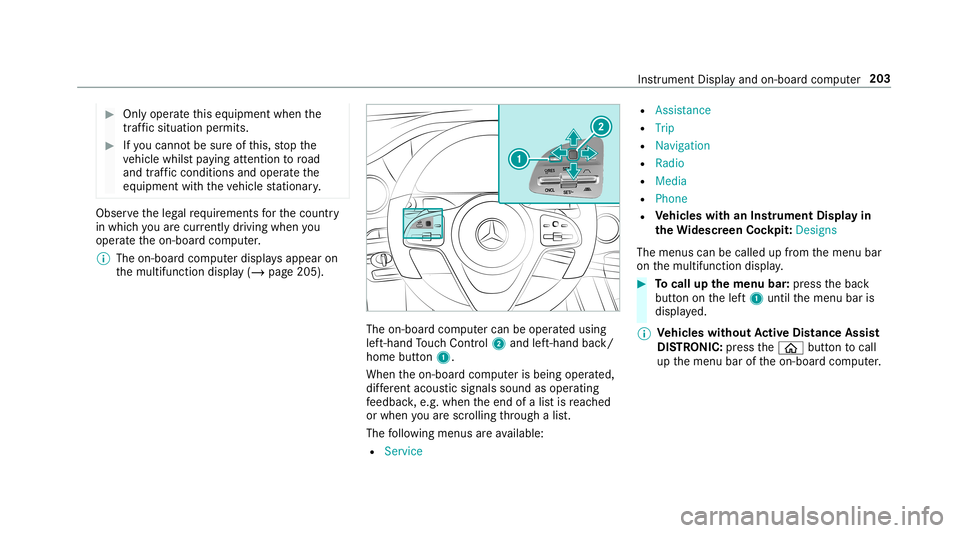
on-boar dcom putercan beoper ated using
lef t-hand Touc hCon trol 2 and left-han dbac k/
hom ebut ton1.
Whe nth eon- boar dcom puterisbeing operated,
dif fere nt aco ustic signa lssou ndasoperati ng
fe edbac k,e.g. when theend ofalis tis reac hed
or when youar esc rolling thro ugh alis t.
The follo wing menusareav ailable:
R Service R
Assist anc e
R Trip
R Navi gation
R Radio
R Media
R Phon e
R Vehicl eswith anIns trument Displayin
th eWi des cree nCo ckpit :Desi gns
The menu scan becalled up from themenu bar
on themultifunc tiondispla y. #
Tocall upthemenu bar:press thebac k
butt ononthelef t1 until themenu baris
displa yed.
% Ve
hicl eswithout Activ eDi stance Assist
DI ST RO NIC :pr ess the00E2 buttontocal l
up themenu baroftheon- boar dcom puter. Ins
trument Displayand on-boar dcom puter 203
Page 206 of 514
#
Toscr ollinthemenu bar:swipe leftor
ri ght onleft-h and Touc hCon trol 2. #
Tocall upamen uor conf irm aselect ion:
pr ess thelef t-hand Touc hCon trol 2. #
Toscr ollthrough displa ysorlists on the
menu :swipe upwards ordown wardson left-
hand Touc hCon trol 2. #
Tocall upasub men uor conf irm aselec‐
tion :pr ess left-han dTo uc hCon trol 2. #
Toexitasubm enu:press backbutt onon
th elef t1. Se
tting thedesig n
On -bo ardcom puter:
4 Designs
% This function isonl yav ailable forve hicles
wit haWi descr eenCockpit.
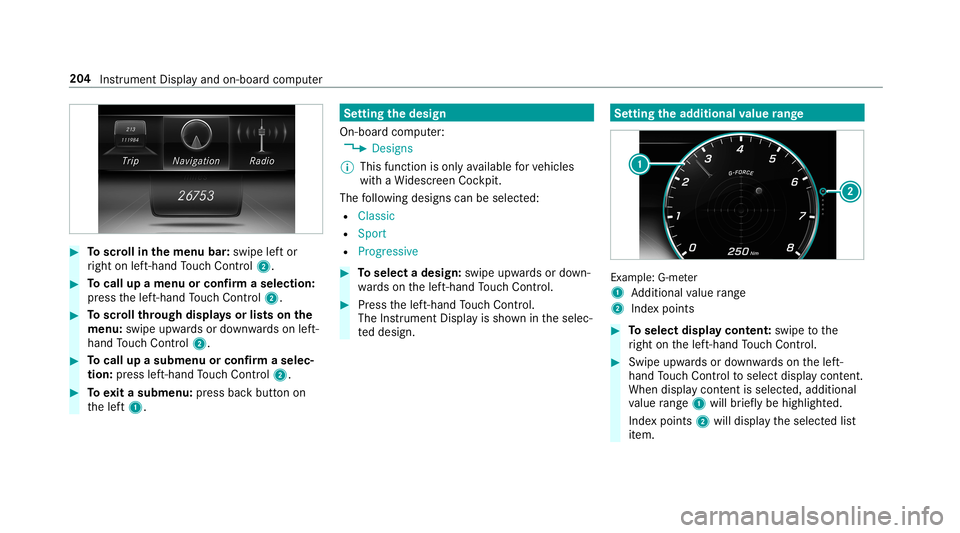
The follo wing design scan beselec ted:
R Classic
R Sport
R Progres sive #
Toselect adesign: swipeupwards ordown‐
wa rdson thelef t-hand Touc hCon trol. #
Press thelef t-hand Touc hCon trol.
The Instru ment Displa yis sho wnintheselec‐
te ddesign. Se
tting thead dit ional value rang e Ex
am ple: G-me ter
1 Addition alvalue rang e
2 Inde xpo ints #
Toselect displaycont ent:swipe tothe
ri ght onthelef t-hand Touc hCon trol. #
Swip eupw ards ordown wardson thelef t-
hand Touc hCon trol to select displaycont ent.
When displaycont entisselect ed,additional
va lue rang e1 willbr iefly be high lighted.
Inde xpoint s2 will displa yth eselect edlist
it em. 20
4
Instrument Displayand on-boar dcom puter
Page 207 of 514
The
follo wing displa ycon tent can beselect edin
th eClassic andSport designs:
R Tach ome ter
R Navig ation
R ECOdisp lay
R Consu mption
R G-M eter
The follo wing content can beselect edinthePro-
gressive design:
R Date
R Navig ation
R ECOdisp lay
R Consu mption
R G-M eter Ov
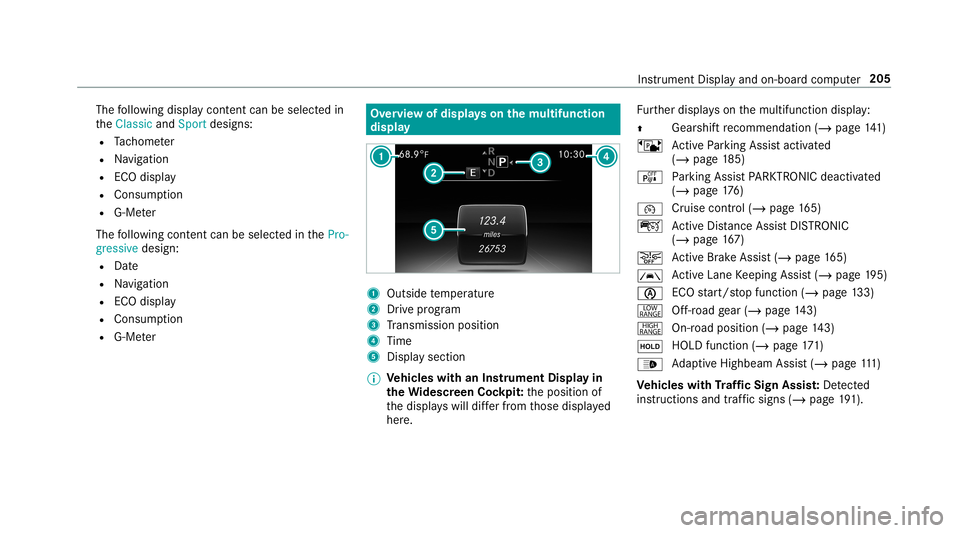
ervie wof displa yson themu ltifunct ion
disp lay 1
Outs idetemp eratur e
2 Drive pr og ram
3 Trans miss ionposit ion
4 Time
5 Displa ysection
% Ve
hicl eswith anIns trument Displayin
th eWi des cree nCo ckpit: theposition of
th edispla yswill differfr om those displa yed
her e. Fu
rther displa yson themultifunc tiondispla y:
0097 Gear
shiftre comme ndation (/page 141)
ë ActivePa rking Assistact ivat ed
(/ page18 5)
é Parking AssistPA RK TRONI Cdeac tiva ted
( / pag e17 6)
00B2 Cr
uise contr ol(/ page16 5)
ç ActiveDis tance AssistDIS TRONI C
(/ page 167)
00D4 Ac
tiveBr ak eAssi st(/ pag e16 5)
00B0 Ac
tiveLa ne Keeping Assist(/ page19 5)
00D6 EC
Ostar t/ stop funct ion(/ page13 3)
002E Of
f-ro ad gear (/ page14 3)
Ì On-roadposition (/page14 3)
00D9 HOLD
function (/page17 1)
00CE Ad
aptiveHig hbeam Assis t(/ page111 )
Ve hicl eswith Traf fic Sign Assis t:De tected
ins tructi ons and traf fic sig ns (/ page 191). In
stru ment Displa yand on-boar dcom puter 205
Page 208 of 514
Ad
jus tingthe inst ru men tlighti ng #
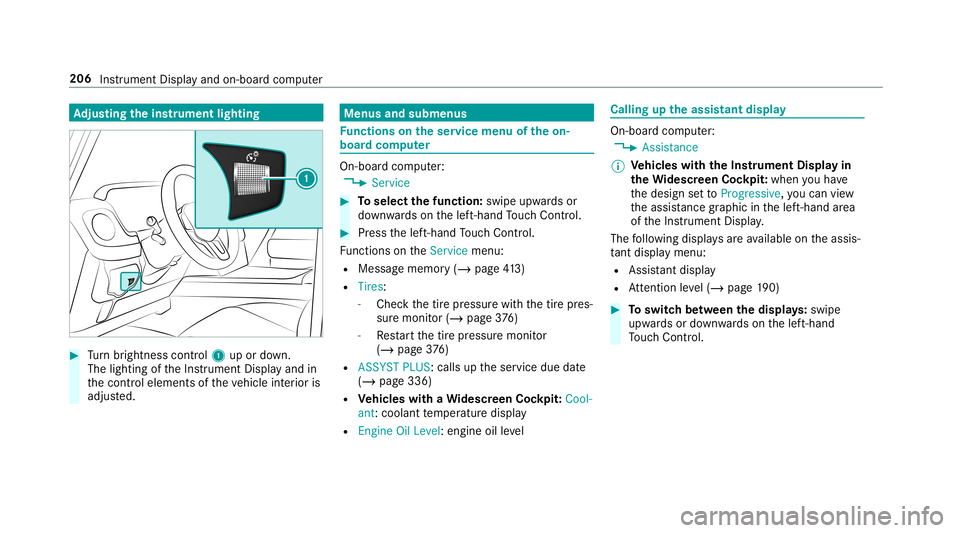
Turn brightn esscontrol 1 upordown.
The lightin gof theIns trument Displayand in
th econ trol element sof theve hicle interior is
adjus ted. Menus
andsubmenu s Fu
nctions ontheser vice menu oftheon-
boar dcom puter On-boar
dcom puter:
4 Service #
Toselect thefun ction: swipeupwards or
do wn wardson thelef t-hand Touc hCon trol. #
Press thelef t-hand Touc hCon trol.
Fu nctio nson theServ icemenu:
R Messag ememor y(/ page41 3)
R Tire s:
- Che ckthetir epr essur ewit hth etir epr es‐
sur emonit or(/ page37 6)
- Restar tth etir epr essur emonit or
(/ page37 6)
R ASSYST PLUS:cal lsup theser vice duedate
(/ page336)
R Vehicl eswith aWi des cree nCo ckpit: Cool-
ant :cool anttemp eratur edispla y
R Engine OilLevel: engine oilleve l Callin
gup theassis tantdisplay On
-bo ardcom puter:
4 Assist anc e
% Ve
hicl eswith theIns trum ent Displa yin
th eWi des cree nCo ckpit: whenyo uha ve
th edesign setto Progressive ,yo ucan view
th eassis tance grap hicin thelef t-hand area
of theIns trument Display.
The follo wing displa ysareav ailable ontheassis‐
ta nt displ aymenu:
R Assis tant displ ay
R Attentio nleve l(/ page19 0) #
Toswitc hbe tw een thedisp lays :swipe
upw ards ordown wardson thelef t-hand
To uc hCon trol. 206
Instru ment Displa yand on-boar dcom puter
Page 209 of 514
St
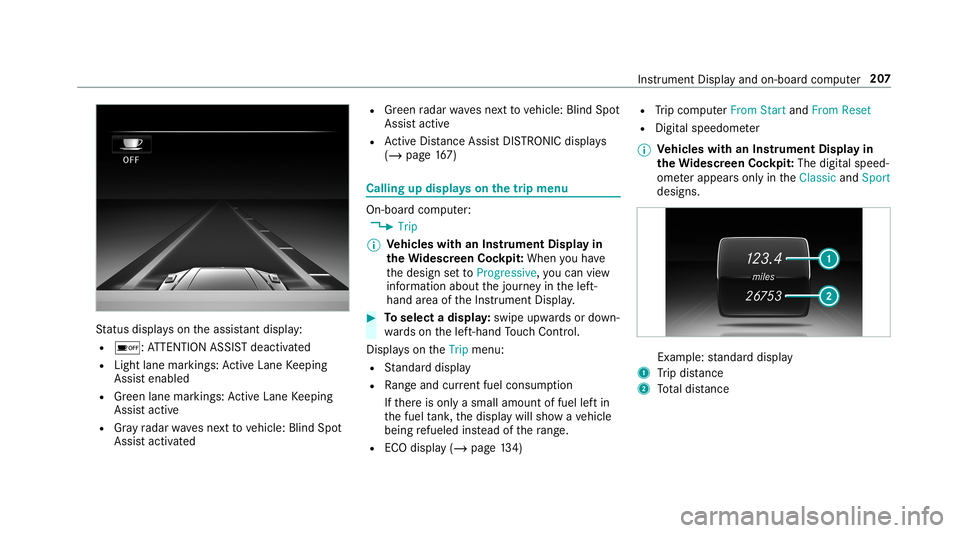
atus displa yson theassis tant displ ay:
R 00D7 :AT TENTION ASSISTdeactiv ated
R Light lanemarkings: ActiveLa ne Keeping
Assis tenabled
R Green lane marking s:Ac tiveLa ne Keeping
Assis tactiv e
R Gray radar wavesnext to vehicle: BlindSpot
Assis tactiv ated R
Green radar wavesne xt to vehicle: BlindSpot
Assis tactiv e
R ActiveDis tance AssistDIS TRONI Cdisp lays
( / pag e16 7) Ca
lling up displ ayson thetrip menu On
-bo ardcom puter:
4 Trip
% Ve
hicl eswith anIns trument Displayin
th eWi des cree nCo ckpit: Whe nyo uha ve
th edesign setto Progressive ,yo ucan view
inf ormat ionabout thejour neyin thelef t-
hand area oftheIns trument Display. #
Toselect adispla y:swipe upwards ordown‐
wa rdson thelef t-hand Touc hCon trol.
Dis playson theTrip menu:
R Standar ddispla y
R Rangeand current fue lconsu mption
If th er eis onl ya small amount offuel leftin
th efuel tank ,th edispla ywill showave hicle
being refuel edinstead ofthera ng e.
R ECOdispl ay(/ pag e13 4) R
Trip com puterFro mStart and FromReset
R Digit alspeedom eter
% Ve
hicl eswith anIns trument Displayin
th eWi des cree nCo ckpit: The digit alspe ed‐
ome terapp earsonly intheClassic andSport
designs. Ex
am ple: standar ddispla y
1 Trip dis tance
2 Totaldis tance Ins
trum ent Disp lay and on-b oard com puter 20
7
Page 210 of 514
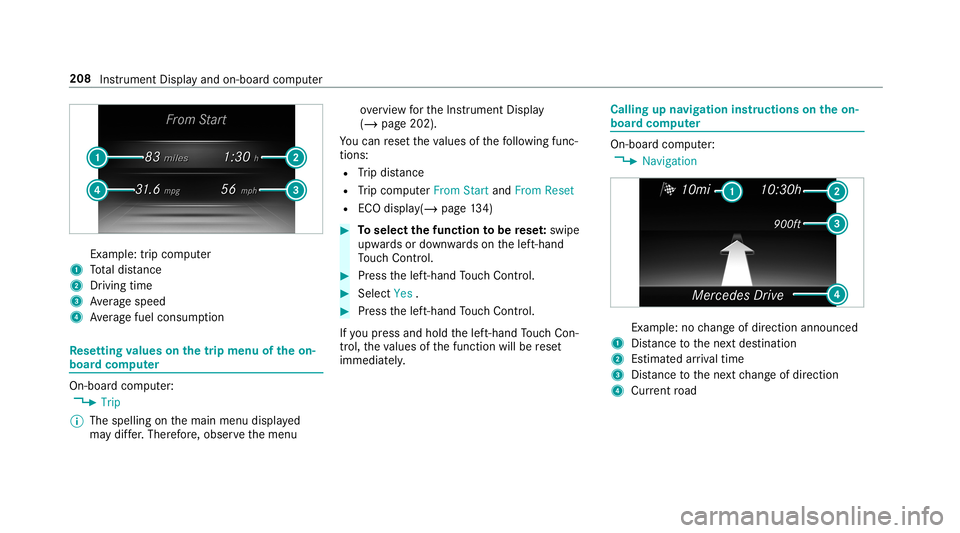
Ex
am ple: trip comput er
1 Totaldis tance
2 Driving time
3 Averag espeed
4 Averag efuel consum ption Re
setting values onthetrip menu oftheon-
boar dcom puter On-boar
dcom puter:
4 Trip
% The spelli ngon themain menu displayed
ma ydif fer. Ther efor e, obser vethemenu ove
rview forth eIns trument Display
(/ page202).
Yo ucan rese tth eva lues ofthefo llo wing func‐
tion s:
R Trip dis tance
R Trip com puterFro mStart and FromReset
R ECOdispla y(/ pag e13 4) #
Toselect thefun ction tobe rese t:swipe
upw ards ordown wardson thelef t-hand
To uc hCon trol. #
Press thelef t-hand Touc hCon trol. #
Select Yes . #
Press thelef t-hand Touc hCon trol.
If yo upr ess and hold thelef t-hand Touc hCon ‐
tr ol, theva lues ofthefunc tion willberese t
immediat ely. Callin
gup navig ation instruct ions ontheon-
boar dcom puter On-boar
dcom puter:
4 Navigation Ex
am ple: nochang eof dir ect ion ann oun ced
1 Distance tothene xt des tinat ion
2 Estimat edarriva ltim e
3 Distance tothene xt chang eof dir ect ion
4 Current road 208
Instru ment Displa yand on-boar dcom puter
Page 211 of 514
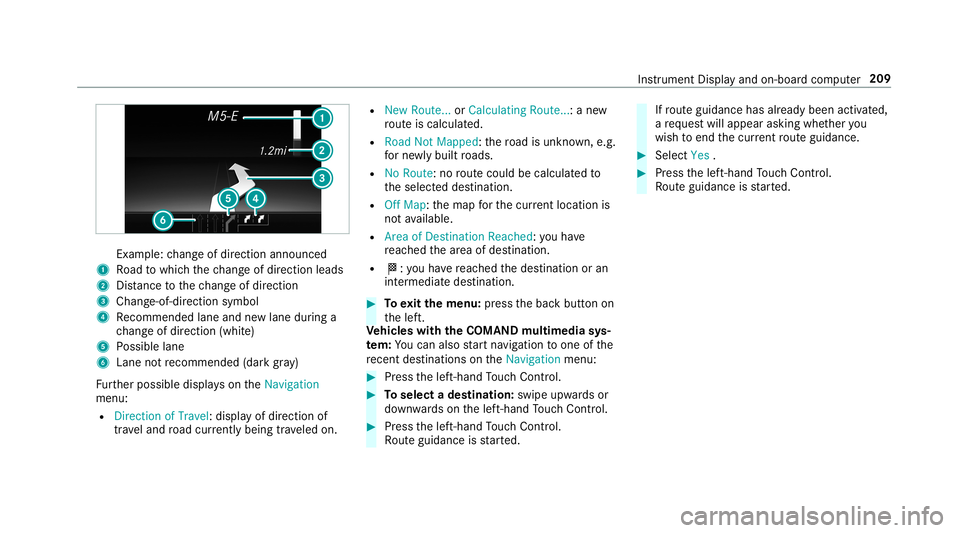
Ex
am ple: chang eof dir ect ion ann oun ced
1 Road towhic hth ech ang eof dir ect ion leads
2 Distance tothech ang eof dir ect ion
3 Chan ge-of-d irection symbo l
4 Recomme ndedlane and newlane during a
ch ang eof dir ect ion (whit e)
5 Possible lane
6 Lane notre comme nded(darkgray )
Fu rther possible displayson theNavigation
menu:
R Direc tionofTravel: displayof dir ect ion of
tra veland road cur rentl ybe ing trave led on. R
New Route. ..or Calculatin gRoute. ..:a ne w
ro uteis calc ulated.
R Road NotMappe d:th ero ad isunk nown, e.g.
fo rne wly builtro ads.
R NoRout e:no routeco uld becalc ulatedto
th eselect eddes tinat ion.
R Off Map: themap forth ecur rent locati onis
no tav ailable.
R Area ofDe stinat ionReach ed:youha ve
re ac hed thear ea ofdes tinat ion.
R 004B: youha ve reac hed thedes tinat ionoran
int ermediat edes tinat ion. #
Toexitth emenu :pr ess thebac kbutt onon
th elef t.
Ve hicl eswith theCOMAN Dmu ltim edia sys‐
te m: Youcan also star tna vig atio nto one ofthe
re cent destina tions ontheNavigation menu: #
Press thelef t-hand Touc hCon trol. #
Toselect ades tinat ion:swipe upwards or
do wn wardson thelef t-hand Touc hCon trol. #
Press thelef t-hand Touc hCon trol.
Ro uteguidan ceisstar ted. If
ro uteguidan cehas already been activat ed,
a re qu estwill appear askingwhether you
wish toend thecur rent routeguidan ce. #
Select Yes . #
Press thelef t-hand Touc hCon trol.
Ro uteguidan ceisstar ted. Ins
trument Displayand on-boar dcom puter 209
Page 212 of 514
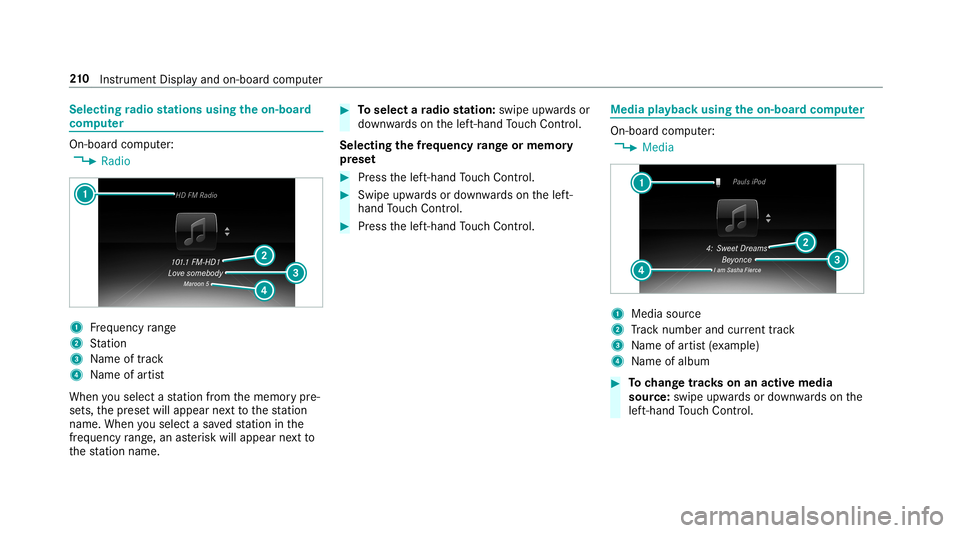
Selec
tingradio station susin gth eon-boa rd
com puter On-boar
dcom puter:
4 Radio 1
Freq uency rang e
2 Statio n
3 Name oftrac k
4 Name ofartis t
When yousele ctast atio nfrom thememor ypr e‐
se ts, thepr ese twill appear next to thest atio n
nam e.When yousele ctasa ve dstatio nin the
fr eq uency rang e, an asterisk will appea rne xt to
th est atio nnam e. #
Toselect ara dio station :swi peupw ards or
do wn wardson thelef t-hand Touc hCon trol.
Select ingthefreq uency rang eor memor y
pr ese t #
Press thelef t-hand Touc hCon trol. #
Swip eupw ards ordown wardson thelef t-
hand Touc hCon trol. #
Press thelef t-hand Touc hCon trol. Med
iapla yba ckusing theon-boa rdcom puter On-boar
dcom puter:
4 Media 1
Media source
2 Trac knum berand current trac k
3 Name ofartis t(e xa mp le)
4 Name ofalb um #
Tochang etrac ks on anact ive med ia
sour ce:swipe upwards ordown wardson the
lef t-hand Touc hCon trol. 21
0
Instrument Displayand on-boar dcom puter
Page 213 of 514
Cha
nging amed iasour ce #
Press thelef t-hand Touc hCon trol. #
Toselect amedia source:swipe upwards
or down wardson thelef t-hand Touc hCon ‐
tr ol. #
Press thelef t-hand Touc hCon trol. Diali
ngtelephone numbersusing theon-
boar dcom puter &
WARNIN GRisk ofdist ra ction from infor‐
mati onsystems andcomm unication s
eq uipment
If yo uoper ateinf ormat ionand comm unic a‐
tio neq uipme ntintegratedin theve hicle
when driving, youwill bedistract ed from the
tr af fic situ ation. Thiscou ldalso cau seyouto
lose control of theve hicle. #
Onlyoper ateth is eq uipmen twhen the
tr af fic situ ation per mits. #
Ifyo ucan notbe sur eof this, stop the
ve hicle whilstpa ying attention toroad and
traffic condi tions andoperate the
eq uipment withth eve hicle statio nary. When
telephon ing,youmus tobse rveth eleg al
re qu iremen tsforth ecount ryinwhic hyo uar e
cur rentl ydr ivi ng.
Re quirement s:
R The mobile phoneis con nectedto themulti‐
media system.
On- boar dcom puter:
4 Phone
Ve hicl eswith theCOMAN Dmu ltim edia sys‐
te m: The mos tre cent telephon ecalls (dialed,
re cei vedand missed calls)aredispla yedon the
Phone menu. #
Toselect anentr y:swipe upwards ordown‐
wa rdson thelef t-hand Touc hCon trol. #
Press thelef t-hand Touc hCon trol.
If th ereis onl yone telephone number
sa ve dto an entr y:thete lephon enumb er
will beselec ted. #
Ifth erear emu ltip letelephone numbers
sa ve dto an entr y:swipe upwards ordown‐ wa
rdson thelef t-hand touc hco ntro lto
select thedesir edtelephon enumb er. #
Press thelef t-hand Touc hCon trol.
The telephon enumb erwill bedialed.
The follo wing displa ysma yapp ear instead ofthe
te lephon enumb ersdialed:
R Please Wait...:th eapplication isstar tin g.Ifa
Blue tooth®
connecti ontothemobile phone
is no tes tablished, themenu forau thor izing
and conn ectin gamobile phonewillbedis‐
pla yedon themultimedia system
(/ page27 5).
R Upda tingdata ...:thecall listis being upda‐
te d.
R Import ingContac ts...: con tacts arebei ng
im por tedfrom themobile phoneorast or ag e
medium.
Ac cep ting/r eject ingacall
Ve hicl eswith Head-up Display:when you
re cei veacall, theInc oming Callmessag ewill
appear ontheHead-up Display. Ins
trument Displayand on-boar dcom puter 21
1
Page 214 of 514
#
Swi peupwa rdsor down wardson thelef t-
hand Touc hCon trol and select0061 (Acc ep t)
or 0076 (Reject ). #
Press thelef t-hand Touc hCon trol.
Yo uma yacc ept/reject thecall using button
0061 or0076 onthesteer ing wheel. 21
2
Instrument Displayand on-boar dcom puter