key MERCEDES-BENZ G-CLASS 2019 Owner's Guide
[x] Cancel search | Manufacturer: MERCEDES-BENZ, Model Year: 2019, Model line: G-CLASS, Model: MERCEDES-BENZ G-CLASS 2019Pages: 514, PDF Size: 45.22 MB
Page 140 of 514
Au
tomatic trans mis sion DI
REC TSE LECT leve r Fu
nction oftheDIRECT SELECT leve r &
WARNIN GRisk ofacci dent andinjury
due tochildr enleftunat tende din the
ve hicle
If ch ildr enarelef tunat tende din theve hicle,
th ey cou ld:
R ope ndoo rs,th er eb yendang ering other
per sons orroad user s.
R getou tof theve hicle andbehit by
oncom ingtraf fic.
R ope rate vehicle equipment andbecome
tr apped, forex am ple.
In addit ion,ch ildr encould alsosetth eve hi‐
cle inmo tion, forex am ple, by:
R releasing thepar king brak e.
R shif ting theaut omatic transmiss ionout of
par kposition 005D.
R star tin gth eengine #
Neverlea vechildr enand animals unat‐
te nde din theve hicle. #
When leaving theve hicle, alwaysta ke
th eSmar tKey wit hyo uand lockth e
ve hicle. #
Keep theSmar tKey out ofthere ac hof
ch ildr en. &
WARNIN GRisk ofacci dent dueto inc or‐
re ct gearshif ting
If th eengine speedishigher than theidle
speed andyouen gage thetransmission posi‐
tion 005Bor005E, theve hicle mayacceler ate
shar ply. #
Ifyo uen gage thetransmission position
005B or005E alwaysdepr essthebr ak e
pedal firm lyand donotacc eler ateat
th esame time. Use
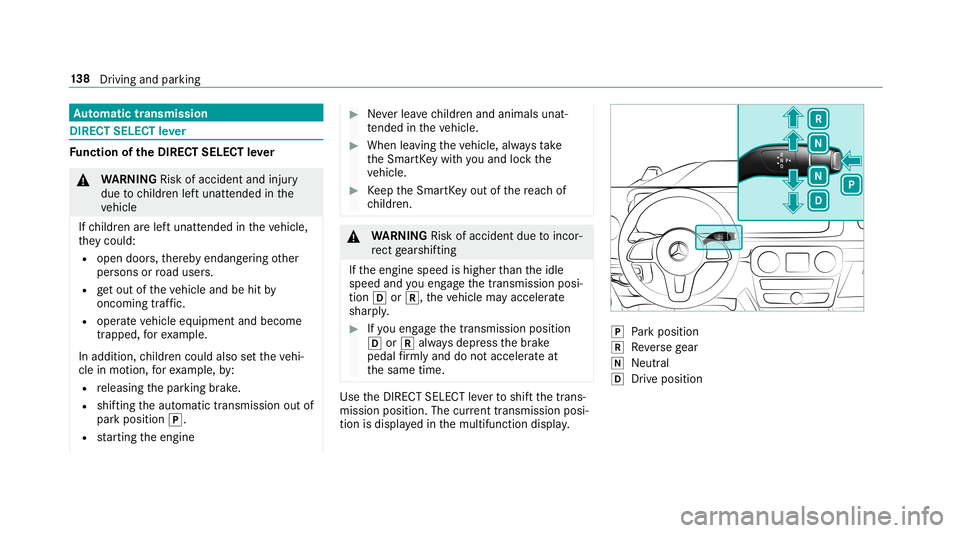
theDIRE CTSELECT leve rto shif tth etra ns‐
mission position.The current trans mis sion posi‐
tio nis displ ayed inthemultifunc tiondispla y. 005D
Park position
005E Reversege ar
005C Neut ral
005B Drive po sitio n 13
8
Driving and parking
Page 141 of 514
Eng
aging reve rsege ar R #
Depr essthebr ak epedal andpush the
DIR ECT SELEC Tleve rupw ards pas tth efirs t
point ofresis tance.
The trans mis sion positio ndispl aysho ws005E
in themultifunc tiondispla y.
% InLO WRAN GEoff-r oad gear,yo ucan shift
fr om 005Bto005E and from 005Cto005E without
ha vin gto depr essthebr ak epedal.
Eng aging neutralN #
Depr essthebr ak epedal andpush the
DIR ECT SELEC Tleve rup ordown tothefirs t
point ofresis tance.
The trans mis sion positio ndispl aysho ws005C
in themultifunc tiondispla y.
Sub sequently releasing thebr ak epedal will
allo wyo uto mo vetheve hicle freel y,e.g. topush
it or tow itaw ay.
Pr ocee das follo ws ifyo uwa nttheaut oma tic
tr ansm ission toremain inne utr al005C 005C
eve nif
th eignit ionisswitc hedoff: #
Startth eve hicle. #
Depr essthebr ak epedal andengageneutral
005C. #
Release thebr ak epedal. #
Switc hth eignition off.
The NPermanen tlyAct ive Risk ofRolling Away
messag eappear sin theins trument cluster.
% Ifyo uth en exitth eve hicle leaving the
Smar tKey intheve hicle, theaut omatic trans‐
mission remains inneutr al005C.
Eng aging parkpositio nP #
Obser vetheno teson par king theve hicle
(/ page14 9). #
Depr essthebr ak epedal untiltheve hicle is
st atio nary. #
When theve hicle isstatio nary,press butt on
005D.
Pa rk position isonl yeng aged when thetrans‐
mission position display005D issho wninthe
multifu nctiondisplay. Ifno transmissi onposi‐
tion displ ay005D appear s,sec ureth eve hicle
to preve ntitfrom rolling away.
% Dep endingonthesituation ,it ma yta ke
some timeuntil005Diseng aged. Ther efor e, alw
ayspa yatt ention tothetra nsmiss ion
position display.
Pa rk position 005Diseng aged aut omatic allyif one
of thefo llo wing condition sis me t:
R youswit choffth eignition whentheve hicle
is statio naryand thetransmission isin posi‐
tion 005Bor005E.
R youopen thedr iver's door when theve hicle
is statio naryor when drivin gat ave ry low
speed andthetra nsmiss ionisin position 005B
or 005E.
% Tomaneu verwit han open driver's door ,
open thedr iver's door while statio naryand
eng agetrans miss ionposit ion005Bor005E
ag ain.
Eng agin gdr ive posi tion D #
Depress thebr ak epedal andpush the
DIR ECT SELEC Tleve rdo wn pas tth efirs t
point ofresis tance.
The trans mis sion positio ndispl aysho ws005B
in themultifunc tiondispla y. Dr
iving and parking 13
9
Page 151 of 514
#
Press onthebac kar ea offuel filler flap 1. #
Turn thefuel filler cap coun ter-cloc kwiseand
re mo veit. #
Com pletely inse rtthepum pnoz zleintoth e
ta nk filler neck,hook inplace andrefuel . #
Onlyfill th eta nk unti lth epum pnoz zle
switc hesoff. #
Replace thecap onthefiller neckand turn
cloc kwise untilit eng ages audibl y. #
Close thefuel filler flap. Pa
rking Pa
rking theve hicl e &
WARNIN GRisk ofacci dent andinjury
cau sed byan insufficie ntlysecu redve hi‐
cle rolling away.
If th eve hicle isno tsecur elyparkedsuf fi‐
cie ntly ,it can rollaw ay inan unc ontrolled
wa yev en ataslight downhill gradient. #
Ensur eth at thepar kedve hicle isalw ays
pr oper lysecur edagains tro lling away as
fo llo ws :
R Onuphil lor downhill gradients, turn
th efront wheels sothat theve hicle
ro lls towa rdsth ecurb ifit star ts
mo ving.
R App lythepar king brak e.
R Switc hth etra nsmiss iontoposition
005D. &
WARNIN GRisk offire cau sed byhot
ex haus tsy stem parts
Flammable material suc has lea ves, grass or
twigs mayignit eif th ey come intocont act
wi th hotpar tsof theex haus tsy stem or
ex haus tga sflow . #
Park theve hicle sothat no flammab le
mat erial can com eint ocon tact with hot
ve hicle component s. #
Inpar ticular ,do notpar kon drygr ass‐
land orhar vested grain fields. &
WARNIN GRisk ofacci dent andinjury
due tochildr enand animals leftunat ten‐
de din theve hicle
If yo ulea vechildr enand animals unattende d
in theve hicle, they ma ybe ableto setth e
ve hicle inmo tion, forex am ple by:
R Releasing thepar king brak e.
R Shif ting theaut omatic transmission out
of par kposition 005D.
R Startin gth eengine.
In addition, they ma yoper ateve hicle equip‐
ment andbecome trapped. #
Neverlea vechildr enand animals unat‐
te nde din theve hicle. #
When leaving theve hicle, alwaysta ke
th eSmar tKey wit hyo uand lockth e
ve hicle. Dr
iving andparking 14
9
Page 157 of 514
Count
ryRadio equipme ntappr oval
number
Tu rkey Notre qu ired
Uni ted
Ar ab Emi‐
ra tes ER4
1849/1 5
Deal erNo: DA35176/1 4
Unit ed
St ates FCC
ID:NZLM UAHL5 Fu
rther information onthedeclar ationofcon ‐
fo rm ity forwir eles sve hicle component s
(/ page23). Elec
tric par king brak e Elec
tric par king brak efunction (applying
aut omaticall y) &
WARNIN GRisk ofacci dent andinjury
due tochildr enand animals leftunat ten‐
de din theve hicle
If yo ulea vechildr enand animals unattende d
in theve hicle, they ma ybe ableto setth e
ve hicle inmo tion, forex am ple by:
R Releasing thepar king brak e.
R Shif ting theaut omatic transmission out
of par kposition 005D.
R Startin gth eengine.
In addition, they ma yoper ateve hicle equip‐
ment andbecome trapped. #
Neverlea vechildr enand animals unat‐
te nde din theve hicle. #
When leaving theve hicle, alwaysta ke
th eSmar tKey wit hyo uand lockth e
ve hicle. The
electr icpar king brak eis appli edifth etra ns‐
mission isin position 005Dand one ofthefo llo w‐
ing con dition sis fulf illed:
R The engin eis switc hedoff.
R The seat belttongu eis no tins ertedin the
seat beltbuckleofthedr iver's seat andthe
dr iver's door isopened.
R The transf ercase isin theLOW RANGEpos i‐
tion.
% Toprev ent application: pullthehandle ofthe
electr icpar king brak e.
In thefo llo wing situat ions,th eelectr icpar king
br ak eis also applied:
R ActiveDis tance AssistDIS TRONI Cis bring ing
th eve hicle toast ands till.
R The HOL Dfun ction iske eping theve hicle sta‐
tio nar y.
R ActivePa rking Assistis ke eping theve hicle
st atio nary.
This isthecase ifone ofthefo llo wing condition s
is also fulfilled:
R The engin eis switc hedoff. Dr
ivin gand parking15
5
Page 241 of 514
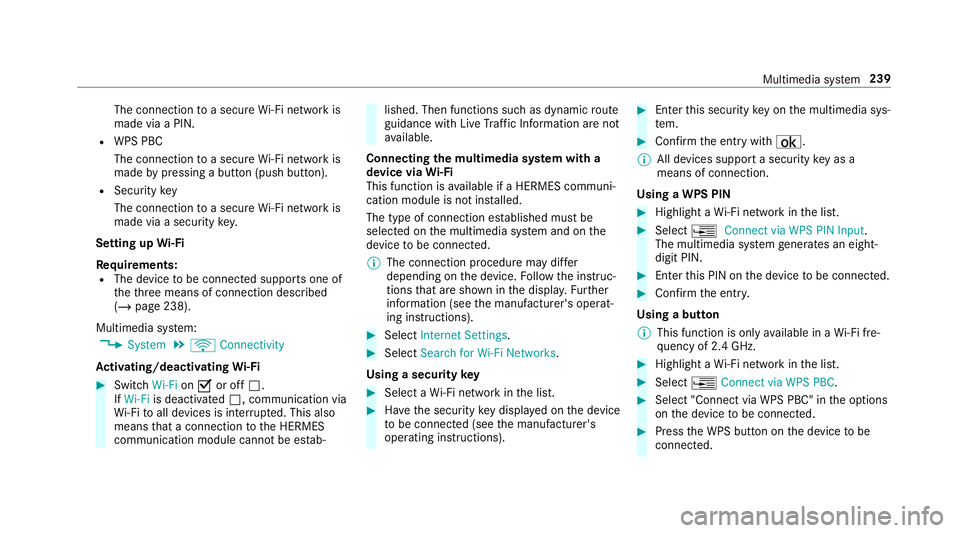
The
conn ection toasec ureWi -Fi networkis
mad evia aPIN .
R WPS PBC
The conne ctionto asec ureWi -Fi networkis
mad eby pressing abutt on(push button).
R Secur itykey
The conn ection toasec ureWi -Fi networkis
mad evia asecu rity key.
Se tting upWi-Fi
Re quirement s:
R The device tobe con nectedsuppor tsone of
th eth re emeans ofcon nect iondescr ibed
(/ page238).
Multimedia system:
4 System 5
ö Connec tivity
Ac tiv atin g/deac tivatin gWi -Fi #
Switc hWi-Fi on0073 oroff0053.
If Wi-Fi isdea ctivated 0053, communi cationvia
Wi -Fi toall devic es isint erru pte d.This also
means that acon nectionto theHERME S
comm unication modulecannotbe estab‐ lished.
Thenfunctionssuc has dynamic route
guidan cewithLiv eTr af fic Inf ormati onareno t
av ailable.
Connect ingthemu ltim edia system witha
de vice viaWi-Fi
Thi sfunction isavailable ifaHE RME Scom mun i‐
cat ion modul eis no tins talled.
The type ofcon nection established mustbe
select edon themultimedia system and onthe
de vice tobe con nected.
% The connection procedur ema ydif fer
dependin gon thede vice. Followtheins truc‐
tion sth at aresho wninthedispla y.Fu rther
inf ormation (seethemanuf acturer'soper at‐
ing instruction s). #
Select Internet Setting s. #
Select Search forWi-Fi Network s.
Using asecur itykey #
Select aWi -Fi networkin thelis t. #
Have thesecur itykeydisp laye don thede vice
to be con nected(see themanuf acturer's
oper ating instruction s). #
Enterth is secur itykeyon themultimedia sys‐
te m. #
Conf irm theent rywit h¡.
% Alldevic es suppor ta sec urity keyas a
mean sof conn ection .
Usin gaWPS PIN #
Highlig htaWi -Fi networkin thelis t. #
Select 0080Connec tvia WPS PINInput.
The multimedia system gener ates an eight-
di gitPIN . #
Enterthis PIN onthede vice tobe con nected. #
Conf irm theent ry.
Using abutt on
% This function isonl yav ailable inaWi -Fi fre‐
qu ency of2.4 GHz. #
Highlight aWi -Fi networkin thelis t. #
Select 0080Connec tvia WPS PBC. #
Select "Connec tvia WPS PBC" intheop tion s
on thede vice tobe con nected. #
Press theWPS buttononthede vice tobe
con nected. Multimedia
system 239
Page 242 of 514
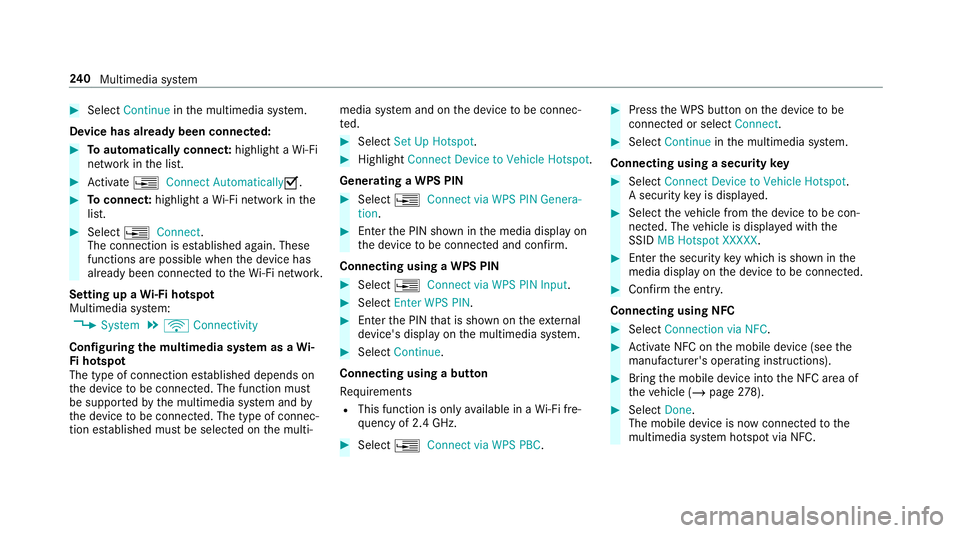
#
Select Continu ein themultimedia system.
De vice hasalready been connect ed: #
Toaut omatic allyco nne ct:high light aWi -Fi
ne tworkin thelis t. #
Activate0080 Connect Automatica lly0073 . #
Toconnect :high light aWi -Fi networkin the
lis t. #
Selec t0080 Connect.
The connection ises tablished again. These
func tionsar epossible whenthede vice has
alr eady been connect edtotheWi -Fi network.
Se tting upaWi -Fiho tspo t
Mul timed iasystem:
4 System 5
ö Connec tivity
Conf iguringthemu ltim edia system asaWi -
Fi ho tspo t
The type ofconnection established depends on
th ede vice tobe con nected. The func tion must
be suppor tedby themultimedia system and by
th ede vice tobe con nected. The type ofcon nec‐
tion established mustbe select edon themulti‐ media
system and onthede vice tobe con nec‐
te d. #
Select SetUpHot spot. #
Highlight ConnectDevic eto Vehicle Hotspot.
Gener atingaWPS PIN #
Select 0080Connec tvia WPS PINGenera-
tion . #
Enterth ePIN showninthemedia displayon
th ede vice tobe con nectedand confirm .
Connect ingusin gaWPS PIN #
Sele ct0080 ConnectviaWPS PINInput. #
Sele ctEnter WPS PIN. #
Enterth ePIN that issho wnontheex tern al
de vic e's displa yon themultimedia system. #
Select Continue.
Connecting usingabutt on
Re quiremen ts
R This function isonl yav ailable inaWi -Fi fre‐
qu ency of2.4 GHz. #
Select 0080Connec tvia WPS PBC. #
Press theWPS buttonon thede vice tobe
con nectedor select Connec t. #
Select Continueinthemultimedia system.
Connecting usingasecur itykey #
Select Connect DevicetoVeh icleHotsp ot.
A secu rity keyis disp laye d. #
Select theve hicle from thede vice tobe con ‐
nec ted. The vehicle isdispla yedwit hth e
SSID MBHotsp otXXX XX. #
Enterthesecur itykeywhic his sho wninthe
media display on thede vice tobe con nected. #
Conf irm theent ry.
Connect ingusin gNFC #
Sele ctConn ection viaNFC. #
ActivateNFC onthemobile device (see the
manuf acturer'soper ating instructions). #
Bring themobile device intoth eNFC area of
th eve hicle (/page27 8). #
Select Done.
The mobi lede vice isno wconnect edtothe
multime diasystem hotspo tvia NFC. 24
0
Multimedia system
Page 243 of 514
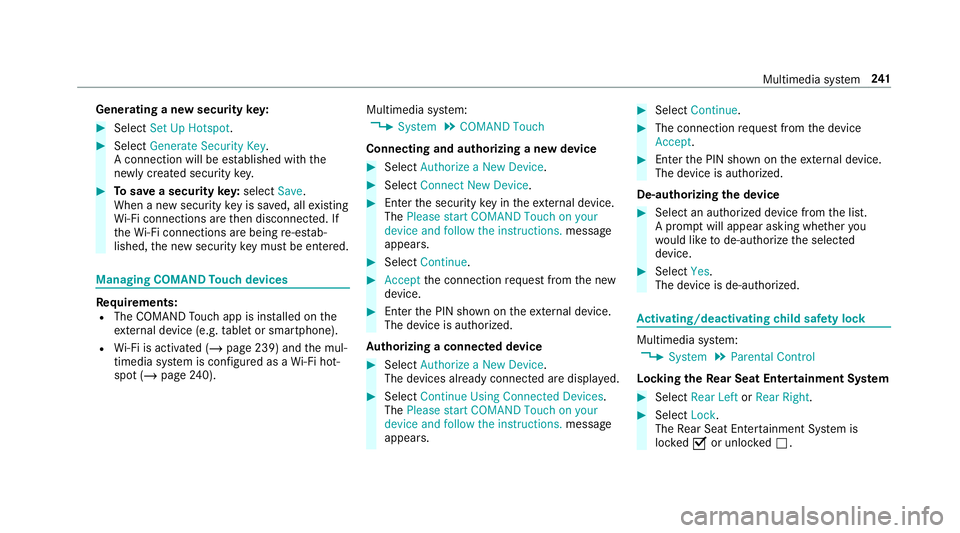
Gene
ratin gane wse cur itykey: #
Select Set UpHotsp ot. #
Select Genera teSecu rityKey.
A connecti onwillbe established withth e
ne wly crea tedsecur itykey. #
Tosave asec urity key:select Save.
When ane wsecur itykeyis save d, all existin g
Wi -Fi conne ctionsareth en discon nected.If
th eWi -Fi conne ctionsarebe ing re-es tab‐
lished, thene wsecur itykeymus tbe entere d. Mana
gingCOMAND Touc hde vic es Re
quirement s:
R The COMAND Touc happ isins talled onthe
ex tern al de vic e(e. g.table tor smar tphon e).
R Wi-Fi isacti vated(/ page239) andthemul‐
timedia system iscon figur edasaWi -Fi hot‐
spo t(/ page 240). Mul
timediasystem:
4 System 5
COMAND Touch
Connecting andauthor izing ane wde vice #
Select AuthorizeaNew Devic e. #
Select Connec tNew Devic e. #
Enterth esecur itykeyin theex tern al de vic e.
The Please start COMA NDTouc hon your
devi ceand follow theins truct ions.mes sage
appear s. #
Select Con tinue. #
Accep tth econ nect ionrequ estfr om thene w
de vice. #
Enterth ePIN shownontheex tern al de vic e.
The devic eis aut hor ized.
Au thorizing aconnect eddevice #
Sele ctAut hori zeaNew Device.
The devic es already connectedar edispla yed. #
Select Continue Using Connec tedDevic es.
The Please startCOMAND Touchonyour
device andfollow theinstruct ions. messag e
appear s. #
Select Continue. #
The connection requ estfr om thede vice
Acc ept. #
Enterth ePIN shownontheex tern al de vic e.
The devic eis aut hor ized.
De-a uthor izin gth ede vice #
Sele ctan aut hor ized devic efrom thelis t.
A pr om ptwill appear askingwhe ther you
wo uld liketo de-aut horize theselect ed
de vice. #
Select Yes.
The device isde-aut horized. Ac
tiv atin g/deac tivatin gch ild safetyloc k Multimedi
asy stem:
4 System 5
Parent alContr ol
Loc king theRe ar Seat Entertai nment System #
Sele ctRear Leftor Rear Right. #
Sele ctLoc k.
The Rear Seat Entertainm entSystem is
loc ked0073 orunloc ked0053. Multimedia
system 24
1
Page 281 of 514
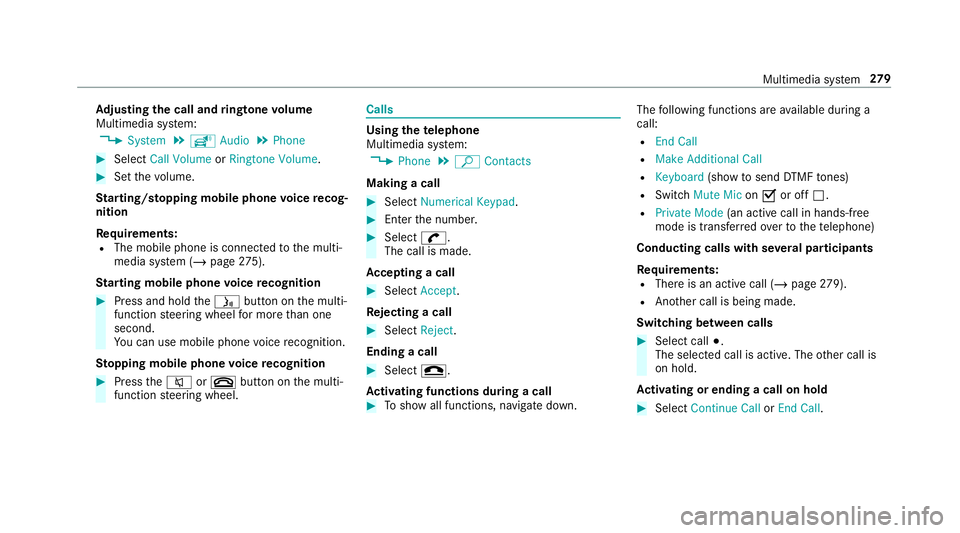
Ad
jus tingthe calland ringt one volum e
Multime diasystem:
4 System 5
õ Audio 5
Phone #
Select CallVolume orRington eVolume. #
Setth evo lume.
St arting/ stopping mobilephon evo ice recog‐
nit ion
Re quirement s:
R The mobile phoneis con nectedto themulti‐
media system (/ page27 5).
St arting mobi lephone voice recognit ion #
Press and hold the00E3 buttononthemulti‐
func tion steer ing wheel formor eth an one
sec ond.
Yo ucan usemob ilephon evo ice recogni tion.
St opp ingmobil eph one voice recognit ion #
Press the0063 or0076 buttononthemulti‐
func tion steer ing wheel. Calls
Using
thete lephone
Multime diasystem:
4 Phone 5
ª Contac ts
Making acall #
Select Numerical Keypad. #
Enterth enumber . #
Select 0097.
The callismade.
Ac cep tingacall #
Select Accep t.
Re jec tingaca ll #
Select Reject .
En din gaca ll #
Select 005A.
Ac tiv atin gfunc tions dur ingacal l #
Tosho wall functions, navig atedo wn. The
follo wing functionsar eav ailable during a
call:
R EndCall
R Mak eAdd ition alCall
R Keybo ard(sho wto send DTMF tones)
R Swi tchMu teMicon 0073 oroff0053.
R Private Mode(a nacti vecal lin ha nds-fr ee
mod eis transf erredove rto thete lephon e)
Conduct ingcalls withse ve ralpar ticip ants
Re quirement s:
R Ther eis an act ive call (/ page27 9).
R Ano ther call isbeing made.
Switc hingbetw een calls #
Select call003B.
The select edcall isactiv e.The other call is
on hold.
Ac tiv atin gor endin gacal lon hol d #
Select Continu eCa llor End Call. Mu
ltimed iasystem 27
9
Page 309 of 514
Ac
tiv atin g/deac tivatin gful l-scree nmode
Mu ltimed iasystem:
4 Media 5
à Media Sources #
Select adat ast or ag emedium.
Pla yable video files arepla yedbac k. #
Toactiv atefull-s cree nmode: select0008
Full Screen. #
Todeac tivatefull -screen mod e:press the
to uc hpad.
Cha nging videosettings
Mult imed iasystem:
4 Media 5
Z Option s
5 Picture Format
The follo wing picturefo rm ats areav ailable:
R Automat ic
R 16:9
R 4:3
R Zoom #
Select apict urefo rm at. Ad
jus tingthe brightne ssmanu ally
If th eAutom aticpictur efo rm atisswit ched off,
yo ucan adjustth ebr ightn essyourself . #
Select Bright ness. #
Adjus tth ebr ightn ess. Media
search St
arting themed iasear ch
Multimedia system:
4 Media 5
ª Search
Depen dingonthecon nect edmedia sourcesand
fi les, thefo llo wing categor iesarelis ted:
R Current TrackList
R Keyword Search
R Playlists
R Artists
R Albums
R Track s
R Folders
R Music Genres
R Year R
Composers
R Videos
R Podcast s(Apple ®
de vices)
R Audiobook s(Apple ®
de vices) #
Select acat egor y.
% The categor iesareav ailable assoon asthe
ent ire media content hasbe en read inand
anal yzed . Med
iaInt erface Inf
orma tion abou tth eMed iaInt erface
Media Inte rface isauniv ersal interface forth e
connecti onofmob ile au dio equipm ent.Themul‐
time diasy stem has twoUSB ports.The USB
por tsarelocat edinthestow agecom partment
unde rth ear mr est.
Supp ortedde vic es
The Med iaInt erface allo ws youto connect the
fo llo wing datast or ag emedia:
R iPod ®
R iPhone ® Multimedia
system 30
7
Page 345 of 514
Ke
eping theair -water duct free #
Keep thear ea between thehood andthe
winds hieldfree ofdepos its,e.g .ice, snow
and leaves. Cleani
ngand care Inf
ormat iononwashing theve hicl ein acar
wa sh &
WARNIN GRisk ofacci dent dueto
re duced braking effect afte rwa shing the
ve hicle
The braking effect isreduced afte rwa shing
th eve hicle. #
Afterth eve hicle hasbeen washed,
br ak ecar efully whilepaying attention to
th etraf fic condi tions untilth ebr aking
ef fect hasbee nful lyrestor ed. *
NO
TEDama gedue touns uitable car
wa sh #
Beforedr iving intoacar wash mak e
sur eth at thecar wash issuit able for
th eve hicle dimensions. #
Ensur eth er eis suf ficie ntgrou nd clear‐
ance between theunderbody andthe
guide rails ofthecar wash. #
Ensur eth at theclear ance widthof the
car wash, inpar ticular thewidt hof the
guide rails, issuf ficie nt. To
avo iddamag eto your vehicle when usinga
car wash, ensur eth efo llo wing beforehand:
R ActiveDis tance AssistDIS TRONI Cand the
HOLD functio nar edea ctivated.
R the360° Camer aor there ar vie wcam erais
swit ched off.
R theside windo wsand slidin gsun roof are
com pletely clos ed.
R theblo werfo rth eve ntil ation/he ating is
sw itched off.
R thewindshield wiperswitchis in position 005A.R
incar washes withacon veyo rsy stem: neu‐
tra l005C iseng aged.
% Ifyo uwo uld liketo lea vetheve hicle while it
is being washed, makesur eth eSmar tKey is
locat edintheve hicle. The0045 gear isoth‐
er wise automaticall yeng aged.
% If,afte rth ecar wash, youre mo vethewa x
fr om thewindshield andwiper rubber s,this
will preve ntsme aring and reduce wiper
noise. Inf
ormat iononusing apo we rwa sher &
WARNIN GRisk ofacci dent whenus ing
hig h-pr essurecle ani ng equipm entwith
ro und -spr ay nozzl es
The waterje tfr om aro und -spr ay nozzl e(d irt
gr ind er) maycau sedama getotires and sus‐
pe nsi on components that isno tvisi ble.
Com ponentsdamag edinthis wa yma yfa il
une xpec tedly. Maint
enance andcare34
3