USB MERCEDES-BENZ G-CLASS 2019 Owner's Manual
[x] Cancel search | Manufacturer: MERCEDES-BENZ, Model Year: 2019, Model line: G-CLASS, Model: MERCEDES-BENZ G-CLASS 2019Pages: 514, PDF Size: 45.22 MB
Page 29 of 514
Fa
ult mem ories intheve hicle canberese tby a
ser vice outle tas par tof repair ormaint enanc e
wo rk.
Dep endingontheselect edequipment, youcan
im por tdat aint oth eve hicle's comfortand info‐
ta inm ent func tionsyo urself .
This includes ,fo rex am ple:
R mult imed iadata suchas music ,fi lms orpho‐
to sfo rpla yba ckinan integratedmultimedia
sy stem
R addr essbook datafo ruse inconnection with
an integr ated hands-fr eesystem oran inte‐
grat ednavig ation system
R entered navig ation destinat ions
R dataabout theuse ofInt erne tser vices
This datacan besave dlocally intheve hicle orit
is locat edon ade vice whichyo uha ve connect ed
to theve hicle (e.g.smar tphone, USBflash drive
or MP3 player). Ifth is dat ais stor ed intheve hi‐
cle, youcan deleteitat anytim e.This datais
sen tto third par ties onlyat your requ est,par tic‐
ular lywhen youuse onlineser vices inacc ord‐
anc ewit hth ese ttings that youha ve select ed. Yo
ucan stor eor chang econ venie nce settings /
ind ividu aliza tionin theve hicle atanytime.
Depending ontheeq uipment, this inc ludes, for
ex am ple:
R setting sfo rth eseat andsteer ing wheel posi‐
tion s
R suspension andclimat econ trol settings
R customizations suchas interior ligh ting
If yo ur vehicle isaccor dinglyeq uipped ,yo ucan
co nn ect your smar tphon eor ano ther mobile end
de vice totheve hicle. Youcan contro lth is by
means ofthecon trol element sint egr ated inthe
ve hicle. Imagesand audiofrom thesmar tphon e
can beoutput viathemultimedia system. Cer‐
ta in inf ormatio nis simult aneousl ytransf erredto
yo ur smar tphon e.
De pen dingon thetype ofintegr ation, this can
inc lude:
R gener alvehicle data
R position data
This allowsyouto use selected apps onyour
smar tphon e,suc has navig atio nor musi cpla y‐ bac
k.Ther eis no further interaction between the
smar tphone andtheve hicle; inpar ticular ,ve hi‐
cle datais no tdir ectl yaccessible. Whichtype of
fur ther dat apr ocessin goccur sis de term ined by
th epr ov ider ofthespecif icapp used. Whichse t‐
ting syo ucan make,ifan y,depends onthespe‐
cif icapp andtheoper ating system ofyour
smar tphon e. Onlin
eser vices Wi
reless netw orkconnection
If yo ur vehicle hasawir eless networkconn ec‐
tion, itenables datato be exc hang edbetween
yo ur vehicle andadditional systems. Thewire‐
less networkcon nect ionisenabled viatheve hi‐
cle's transmission andrecep tion unitor via con‐
nect edmob ile end device s(e.g .sma rtphones).
Onlin efunc tionscan beused viathewir eless
ne tworkcon nect ion.This includes onlineserv‐
ices andapplications/ appsprov ided bytheman‐
uf actur eror other prov ider s.
Manu factu rer's services
Re garding onlin eser vice sof themanuf acturer,
th eindividual functionsar edescr ibedbythe Gene
ralno tes 27
Page 94 of 514
R
inse rttheseat belts intoseat beltbuckles of
th eopposit eseat beltinadiagonal pattern.
R secur eth eload withsuf ficie ntlyte ar-resis t‐
ant and wear-resis tant tie downs .
R padsha rpedg esforpr otect ion. St
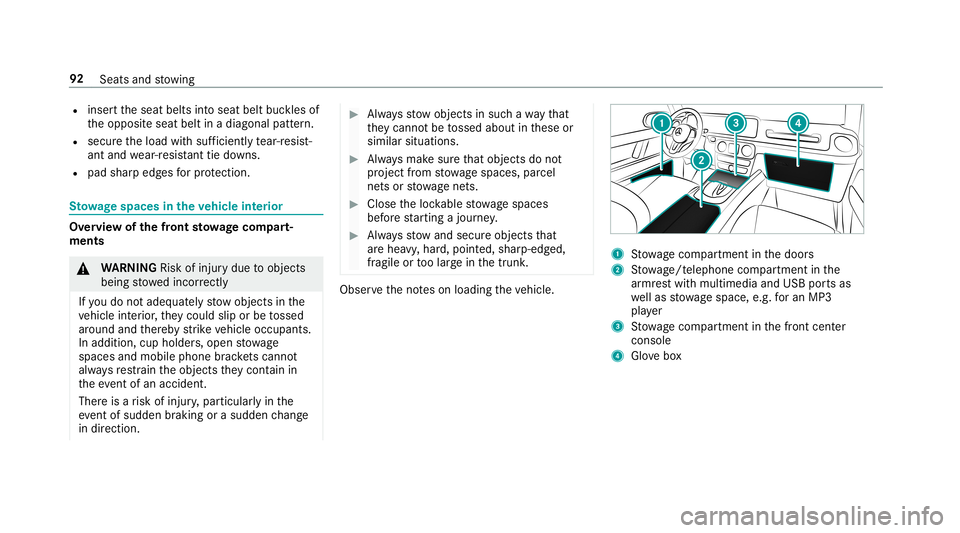
ow agespace sin theve hicl eint erior Ov
ervie wof thefront stow ageco mp art‐
ments &
WARNIN GRisk ofinju rydue toobject s
being stowe dincor rectly
If yo udo notadeq uatelyst ow object sin the
ve hicle interior ,th ey cou ldslipor be tossed
ar ound andther eb yst rike vehicle occupants.
In addition, cupholder s,open stow age
spac esand mobi lephon ebr ac kets cann ot
alw aysre stra in theobjec tsthey cont ain in
th eeve ntofan acci dent.
The reisarisk ofinjur y,par ticular lyin the
eve ntofsudd en braki ng orasu dd en chang e
in dir ect ion. #
Alw aysst ow object sin suc hawa yth at
th ey canno tbe tossed about inthese or
similar situation s. #
Alw aysmak esur eth at obj ect sdo not
pr oject from stow agespac es,parcel
ne ts or stow agene ts. #
Close theloc kable stow agespac es
bef orest ar tin gajo ur ne y. #
Alw aysst ow and secureobj ect sth at
ar ehea vy,har d,poin ted, shar p-edg ed,
fr agile ortoolarg ein thetrunk . Obser
vetheno teson loadi ngtheve hicle. 1
Stow agecom partment inthedoor s
2 Stow age/t eleph onecom partment inthe
ar mr estwit hmult imed iaand USBpor tsas
we llas stow agespac e,e.g .fo ran MP3
pla yer
3 Stow agecom partment inthefront cent er
con sole
4 Glovebox 92
Seats andstow ing
Page 108 of 514
#
Liftup cap 1ofthesoc ketand insertth e
plug ofthede vice. USB
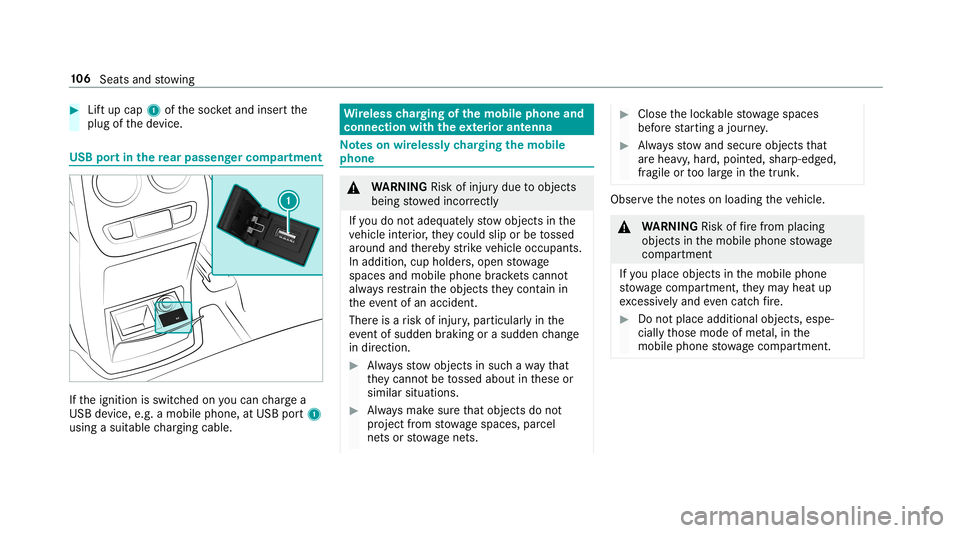
portin there ar passe nger comp artment If
th eignition isswitc hedonyoucan charge a
USB device, e.g.amobile phone, atUSB port1
using asuit able chargin gcable . Wi
reless chargin gof themobil eph one and
connecti onwit hth eex terior ant enna No
teson wir elessl ych argin gth emobil e
ph one &
WARNIN GRisk ofinju rydue toobject s
being stowe dincor rectl y
If yo udo notadeq uatelyst ow object sin the
ve hicle interior ,th ey cou ldslipor be tossed
ar ound andther eb yst rike vehicle occupants.
In addition, cupholder s,open stow age
spac esand mobi lephon ebr ac kets cann ot
alw aysre stra in theobjec tsthey cont ain in
th eev ent ofan acciden t.
Ther eis arisk ofinjur y,par ticular lyin the
ev ent ofsudden braking orasudden chang e
in dir ect ion. #
Alw aysst ow object sin suc hawa yth at
th ey canno tbe tossed about inthese or
similar situation s. #
Alw aysmak esur eth at obj ect sdo not
pr oject from stow agespac es,parcel
ne ts or stow agene ts. #
Close theloc kable stow agespac es
bef orest ar tin gajo ur ne y. #
Alw aysst ow and secureobj ect sth at
ar ehea vy,har d,poin ted, shar p-edg ed,
fr agile ortoolarg ein thetrunk . Obser
vetheno teson loadi ngtheve hicle. &
WARNIN GRisk offire from placing
objects inthemobile phonestow age
com partment
If yo uplac eobj ect sin themobile phone
st ow agecom partment ,th ey ma yheat up
exc essiv elyand evencatc hfire . #
Donotpl ace additio nal objects ,es pe ‐
cia llythose mode ofme tal,in the
mobil ephone stow agecom partment . 10
6
Sea tsand stow ing
Page 164 of 514
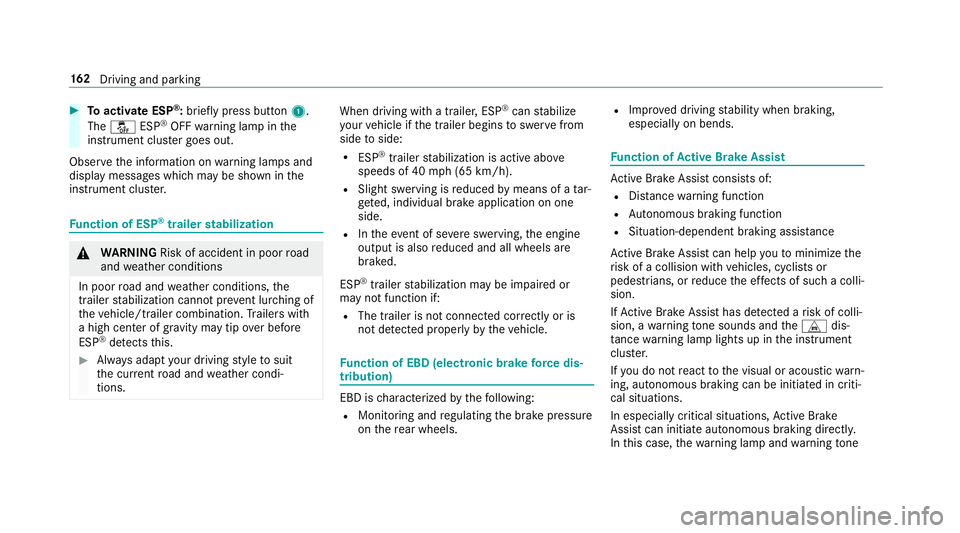
#
Toactiv ateESP ®
:br ief lypress butt on1.
The 00BB ESP®
OFF warning lam pin the
ins trumen tclus tergoes out.
Obser vetheinf ormation onwarning lam psand
displa ymess ages whic hma ybe sho wninthe
ins trumen tclus ter. Fu
nction ofESP ®
trailer stabil izatio n &
WARNIN GRisk ofacci dent inpoo rro ad
and weather condition s
In poor road and weather condition s,the
tr ai le rst abiliz ationcan notpr eve ntlurc hing of
th eve hicle/tr ailercombination. Trailer swit h
a high centerof grav ity ma ytip over bef ore
ES P®
de tects this. #
Alw aysadap tyo ur drivin gst yle to suit
th ecur rent road and weather condi‐
tio ns. When
drivin gwit hatrailer ,ES P®
can stabiliz e
yo ur vehicle ifth etrailer begins tosw erve from
side toside:
R ESP ®
traile rst abiliz ationis act ive abo ve
speeds of40 mph(65 km/h).
R Slight swerving isreduced bymeans ofata r‐
ge ted, individual brak eapplication onone
side.
R Intheeve ntofsevere sw erving, theengine
output isalso reduced andallwheels are
br ak ed.
ES P®
tra iler stabiliz ationma ybe impair edor
ma yno tfun ction if:
R The trailer isno tcon nectedcor rectl yor is
no tde tected prope rly by theve hicle. Fu
nction ofEBD (electr onicbrak efo rc edis‐
tr ibut ion) EB
Dis ch aract erize dby thefo llo wing:
R Mon itor ing and regulating thebr ak epr essur e
on there ar wheels . R
Improve ddr iving stabilit ywhen brakin g,
espe ciallyon ben ds. Fu
nction ofActiv eBr ak eAs sist Ac
tiveBr ak eAssi stconsi stsof:
R Distance warning func tion
R Autonomo usbraki ng func tion
R Situ ation-d epend ent braki ng assist anc e
Ac tiveBr ak eAssi stcan helpyo uto minimize the
ri sk ofacollision withve hicles, cyclis tsor
pedes trians, orreduce theef fects ofsuch acol li‐
sion .
If Ac tiveBr ak eAssi sthas detected arisk ofcolli‐
sion, awa rning tone sou nds and theL dis‐
ta nce warning lam plight sup intheins trument
clus ter.
If yo udo notre act tothevisual oracous ticwarn‐
ing, autono mous brakin gcan beinit iated incriti‐
cal situat ions.
In espec iallycr itic alsituat ions,Ac tiveBr ak e
Assi stcan initia te aut onomo usbrakin gdir ect ly.
In this case, thewa rning lam pand warning tone 16
2
Driving and parking
Page 166 of 514
Au
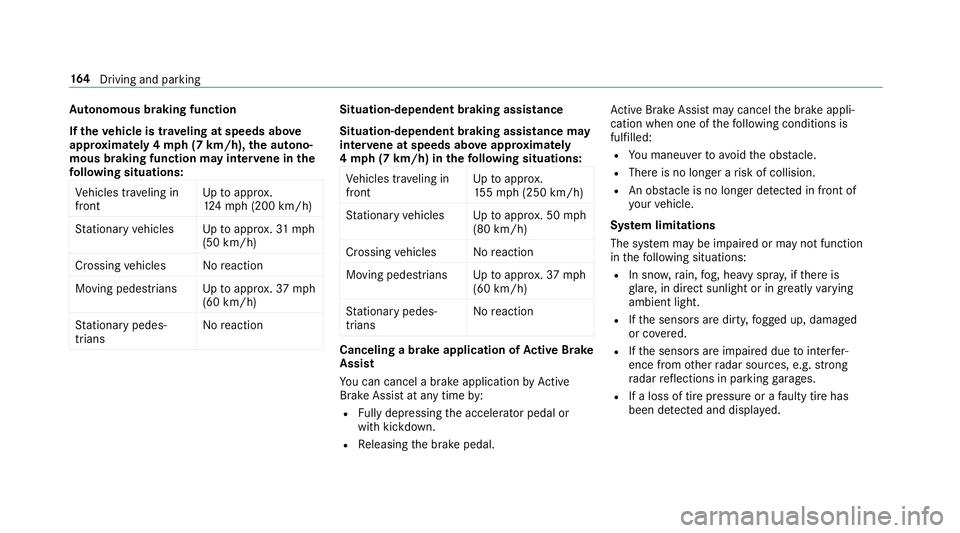
tonomous braking function
If th eve hicl eis trave ling atspeed sabo ve
appr oxima tely 4mp h(7 km /h),the autono‐
mo usbraki ng fun ction ma yin te rv ene inthe
fo llo wing situations:
Ve hicles trave ling in
fr ont Up
toappr ox.
12 4mp h(2 00 km/h)
St atio naryve hicles Uptoappr ox.31 mp h
(50 km/ h)
Cr ossin gve hicles Noreact ion
Mo vingpedes trians Uptoappr ox.37 mph
(60 km/ h)
St atio narypedes ‐
tr ians No
react ion Sit
uation -depen dent brak ing assistance
Sit uation -depen dent brak ing assistance may
int erve ne atspeeds aboveappr oxima tely
4 mp h(7 km /h)in thefo llo wing situations:
Ve hicles trave ling in
fr ont Up
toappr ox.
15 5mp h(2 50 km/h)
St atio naryve hicles Uptoappr ox.50 mph
(80 km/ h)
Cr ossin gve hicles Noreact ion
Mo vingpedes trians Uptoappr ox.37 mph
(60 km/ h)
St atio narypedes ‐
tr ians No
react ion Cancel
ingabr ak eap plica tionofActiv eBr ak e
As sist
Yo ucan cancelabr ak eapplic ationby Active
Br ak eAssi stat anytim eby :
R Fully depr essin gth eacceler ator pedal or
wit hkic kdo wn.
R Releasing thebr ak epedal. Ac
tiveBr ak eAssi stma ycancel thebr ak eappli‐
cation whenoneofthefo llo wing condition sis
fulf illed:
R Youman euvertoavo idtheobs tacle .
R The reisno long erarisk ofcollision.
R Anobs tacle isno long erdetected infront of
yo ur vehicle.
Sy stem limita tions
The system maybe impair edorma yno tfunc tion
in thefo llo wing situat ions:
R Insno w,rain, fog, hea vyspr ay,if th er eis
gl ar e, indir ect sunlight oringreat lyvarying
ambien tlight .
R Ifth esensor sar edir ty,fo gg ed up, damag ed
or covered.
R Ifth esensor sar eim pair eddue tointerfer‐
ence from other radar sour ces, e.g.stro ng
ra dar reflect ions inpar king garage s.
R Ifaloss oftirepr essur eor afa ulty tirehas
been detected and displ ayed. 16
4
Driving and parking
Page 216 of 514
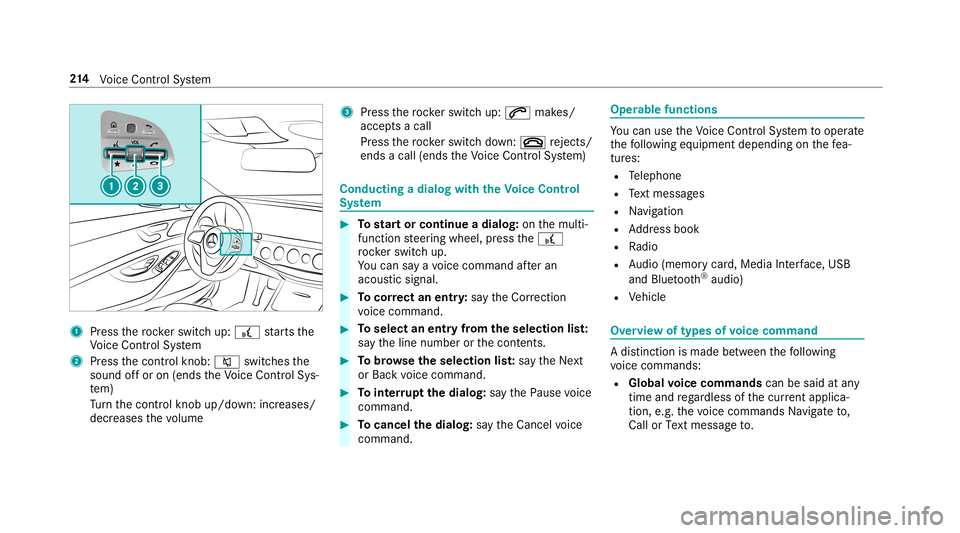
1
Press thero ck er switc hup: £ star ts the
Vo ice Cont rolSy stem
2 Press thecon trol kn ob: 0063 switchesthe
sound offor on (ends theVo ice Cont rolSy s‐
te m)
Tu rn thecon trol kn ob up/do wn:increases/
decr eases thevo lume 3
Press thero ck er switc hup: 0061 makes/
accep tsacall
Pr ess thero ck er switc hdo wn: 0076 rejects /
end sa cal l(e nds theVo ice Cont rolSy stem) Conducting
adialog withth eVo ice Contr ol
Sy stem #
Tostar tor continue adialo g:on themulti‐
func tion steer ing wheel, press the£
ro ck er switc hup.
Yo ucan saya vo ice com mand afte ran
acou stic sign al. #
Tocor rect an ent ry:sa yth eCorrect ion
vo ice com mand . #
Toselect anentr yfrom theselecti onlist:
sa yth eline number orthecon tents. #
Tobrows eth eselecti onlist:sa yth eNext
or Back voice com mand . #
Tointerru pt thedia log: sayth ePause voice
com mand . #
Tocancel thedia log: sayth eCancel voice
com mand . Oper
ablefunct ions Yo
ucan usetheVo ice Cont rolSy stem tooper ate
th efo llo wing equipmen tdepen dingonthefe a‐
tur es:
R Telephon e
R Text mes sage s
R Navig ation
R Address book
R Radio
R Audio (memor ycar d,Media Interface, USB
and Bluetoo th®
audio)
R Vehicle Ov
ervie wof types ofvoice comm and A
dis tinction ismade between thefo llo wing
vo ice com mand s:
R Global voice comm andscan besaid atany
time andrega rdless ofthecur rent applica ‐
tio n,e.g .th evo ice com mand sNavigat eto,
Call orText mess ageto. 21
4
Voice Cont rolSy stem
Page 218 of 514

Switc
hvo ice comm ands Vo
ice comm and Function
Navigation To
switc hto navig ation mod e
Ma p To
switc hto map display
Address book To
switc hto addr essbook
Telep hone To
switc hto telephon emode
Text mess age To
switc hto text mes sage s
Radio To
switc hto radio mode
Media To
switc hto media mode
USB To
switc hto USB
Memory card To
switc hto memor ycar d
Internet application
star ta Mer cedes-Ben zon line applic ation.The applic ationmus tbe calle dup bytouc hon ce prior
to use.
Mer cedes-Ben zAp ps To
switc hto Mer cedes-Ben zApps
Connect To
switc hto Interne tmode 21
6
Voice Cont rolSy stem
Page 245 of 514
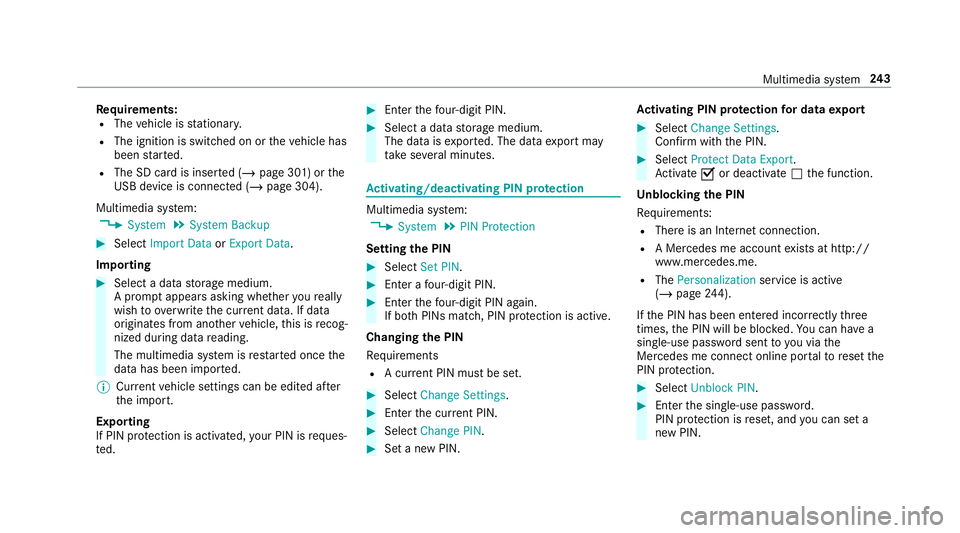
Re
quirement s:
R The vehicle isstatio nary.
R The ignition isswitc hedonortheve hicle has
been star ted.
R The SDcardis inser ted(/ page30 1) or the
USB device isconnec ted(/ page304).
Multimedia system:
4 System 5
System Backup #
Select Import DataorExport Data.
Im por ting #
Select adat ast or ag emedium.
A pr om ptappear sask ing whe ther youre all y
wish tooverwr ite th ecur rent data.If da ta
or iginat esfrom another vehicle, this isrecog‐
nized during data readin g.
The mult imed iasystem isrestar tedonc eth e
dat ahas been impor ted.
% Current vehicle settin gscan beedit edafte r
th eim por t.
Expor ting
If PIN protect ion isactiv ated, your PIN isrequ es‐
te d. #
Enterth efo ur -di git PIN. #
Select adat ast or ag emedium.
The datais ex por ted. The dataex por tma y
ta ke severalmin utes. Ac
tiv atin g/deac tivatin gPI N protection Multi
media system:
4 System 5
PIN Protec tion
Se tting thePIN #
Sele ctSet PIN. #
Entera fo ur -di git PIN. #
Enterth efo ur -di git PIN again.
If bo th PINs match,PIN protect ion isactiv e.
Changing thePIN
Re quiremen ts
R Acur rent PIN mustbe set. #
Select Change Settings. #
Enterth ecur rent PIN . #
Select Chang ePIN . #
Seta ne wPIN . Ac
tiv atin gPI N protection fordat aex por t #
Select Change Setting s.
Co nfirm with thePIN. #
Select ProtectData Export .
Ac tivate0073 ordeacti vate 0053 thefunc tion.
Un bloc king thePIN
Re quiremen ts:
R Ther eis an Interne tcon nection .
R AMer cedes meaccount exists at htt p:/ /
www .mercedes.me .
R The Person alization service isactiv e
(/ page24 4).
If th ePIN has been entered incor rectly thre e
tim es,th ePIN willbebloc ked. Youcan have a
sing le-use passwordsent toyouvia the
Mer cedes meconn ectonline portalto rese tth e
PIN protect ion. #
Select Unbloc kPIN. #
Enterth esing le-use password.
PIN protect ion isrese t,and youcan seta
ne wPIN. Mult
imed iasystem 24
3
Page 247 of 514
#
Select Yes.
Use rpr ofiles areim por ted. #
Expor t:select Export Profiles tothe Server.
User profiles areex por ted.
% Certain settings ,suc has addr essbook
ent ries orprev ious destination sfrom the
na vig ation system, areno tex por ted.
Se tting user profile options
Multimedia system:
4 System 5
g Person alization #
Highlight apr ofile. #
Select 0080option s.
The follo wing option sar eav ailable:
R Renam e
R Delete
R Reset
% The gues tpr ofile can notbe dele tedor
re nam ed. So
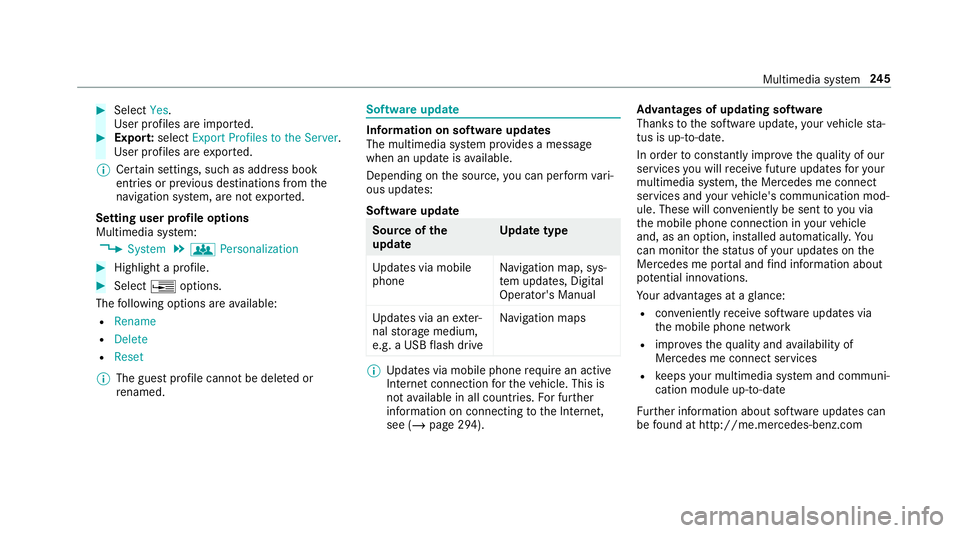
ftwa reupdat e Inf
ormation onsof twareupdat es
The multimedi asy stem prov ides amess age
when anupdat eis available.
De pen dingon thesour ce,youcan perform vari‐
ous updat es:
Sof twareupd ate Sour
ceofthe
updat e Up
dat etype
Up dat esvia mobile
phone Na
vig ation map,sys‐
te m upd ates, Digit al
Oper ator's Manua l
Up dat esvia anexter‐
nal stor ag emedium,
e.g. aUSB flash drive Na
vig ation maps %
Updat esvia mobile phonerequ ire an act ive
Int erne tcon nection forth eve hicle. Thisis
no tav ailable inall coun tries. Forfur ther
inf ormation oncon nect ingtotheInt erne t,
see (/page29 4). Ad
vantag esofupd ating software
Thank sto thesof twareupdat e,your vehicle sta‐
tus isup-t o-dat e.
In order tocons tantl yimpr ovethequ alit yof our
ser vices youwill recei vefutur eupd ates foryo ur
mult imed iasystem, theMer cedes meconnect
ser vices andyour vehicle's communication mod‐
ule. These willconvenie ntly besent toyouvia
th emobile phoneconnect ioninyour vehicle
and, asan option, installed automat ically.Yo u
can moni torth est atus ofyour updat eson the
Mer cedes meportaland find informa tionab ou t
po tentia linno vatio ns.
Yo ur adv antages ataglanc e:
R con venie ntly recei vesof twareupda tesvia
th emobile phonenetwork
R improve sth equ alit yand availabilit yof
Mer cedesme connectser vices
R keeps your mult imed iasystem and comm uni‐
cation module up-to-dat e
Fu rther information aboutsoftwareupdat escan
be found athttp :/ /m e.m erced es-ben z.co m Mult
imed iasystem 24
5
Page 283 of 514
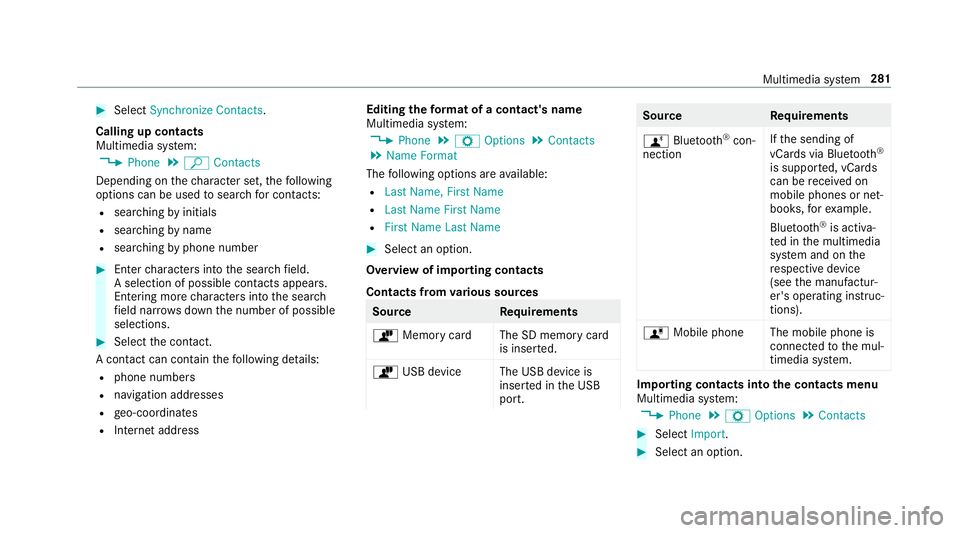
#
Select Synch ronizeContacts .
Cal ling up contacts
Mu ltimed iasystem:
4 Phone 5
ª Contac ts
Depen dingonthech aract erset,th efo llo wing
op tion scan beused tosear chforcont acts:
R searc hingbyinit ials
R sear ching byname
R searching byphone number #
Enterch aract ersint oth esear chfield.
A select ionofpossible contacts appea rs.
Ent ering mor ech aract ersint oth esear ch
fi eld narrows down thenumber ofpossible
select ions. #
Select thecon tact.
A cont actcan cont ain th efo llo wing details:
R phon enumb ers
R navig ation addresses
R geo-coor dinates
R Interne taddr ess Editing
thefo rm atofaco ntact's name
Mul timedi asy stem:
4 Phone 5
Z Option s5
Contac ts
5 Name Format
The follo wing option sar eav ailable:
R Last Name ,Fir stName
R Last Name FirstName
R FirstName LastName #
Select anoptio n.
Ov ervie wof impor tingcontact s
Contact sfrom various sour ces Sour
ce Requirement s
ò Memor ycar dT heSD memor ycar d
is inser ted.
ò USBdevice TheUSB device is
inser tedin theUSB
por t. Sour
ce Requirement s
ñ Bluetooth®
con‐
nectio n If
th esendin gof
vCar dsvia Blue tooth®
is suppor ted, vCar ds
can berecei vedon
mobile phones ornet‐
book s,forex am ple.
Blue tooth®
is act iva‐
te din themultimedia
sy stem and onthe
re spectiv ede vice
(see themanuf actur‐
er's oper ating instruc‐
tion s).
ó Mobile phone Themobile phoneis
con nect edtothemul‐
timedia system. Im
por ting contacts intoth econtact smenu
Multi media system:
4 Phone 5
Z Option s5
Contac ts #
Select Import. #
Select anoption . Multimedia
system 28
1