ECO mode MERCEDES-BENZ G-CLASS 2020 User Guide
[x] Cancel search | Manufacturer: MERCEDES-BENZ, Model Year: 2020, Model line: G-CLASS, Model: MERCEDES-BENZ G-CLASS 2020Pages: 530, PDF Size: 45.97 MB
Page 152 of 530

#
Press LOWRAN GE1 butt on.
Indicat orlam p2 flashes .The shiftre qu est
st ay sactiv efo ra maximu m30 seconds. Ifall
re qu iremen tsforshif toper ation areno tfulf il‐
led within this tim e,indic ator lam p2
switc hesoffag ain and theshif toper ation
mus tbe star tedag ain. #
Shif tth etra nsmiss iontoposition 005C.
If shif toper ation issucces sful,themessag e
LOW RANGE Onappear sin theins trument
clus ter,an audible signalsoun dsand indica‐
to rlam p2 lights upcontinuous ly.The vehi‐
cle chang esaut omat icallyto theG-Mod e
dr ive pr og ram. #
Shif tth etra nsmiss iontoposition 005B.
% The vehicle stay sin LO WRANGE ifyo upar k
th eve hicle inLO WRANGE, even afte rth e
engine hasbeen restar ted. The G-Mode drive
pr ogr am continues tobe activ e
(/ page14 3). In
theon-r oad posit ion,shiftto HIGH RANGE
Re quiremen ts:
R The engin eis running andyouar eno tdr ivin g
fa ster than 43 mph(70 km/h).
R The transmission isin position 005C. #
Press LOWRAN GE1 butt on.
The shiftre qu estst ay sactiv efo ra maximu m
30 seconds. Ifall requ iremen tsforshif toper‐
ation have notbe en fulfilled within this tim e,
shif topera tionmustbe star tedag ain. #
Shif tth etra nsmiss iontoposition 005C.
If shif toper ation issucces sful,theLOW
RANGE Offmessag eappear sin theins tru‐
ment cluster,an audible signalsoun dsand
ind icat orlam p2 goes out. #
Shift th etra nsmiss iontoposition 005B. Dif
fere ntial locks Fu
nction ofthedif fere ntial lock &
WARNIN GRisk ofacci dent whendiffer‐
ent ialloc kis diseng aged on afirm sur‐
fa ce
If yo uen gage differe ntia llo ck swhen driving
on afirm ,high-t raction surface, thesteer abil‐
ity oftheve hicle isse verely restrict ed. You
cou ldlos econtr olof theve hicle, especially
when engaging onabend. #
Alw aysdiseng ageth edif fere ntia llo ck s
immed iatelyon afirm ,high-t raction
su rface. &
WARNIN GRisk ofacci dent dueto deac‐
tiv ated driving safetysy stems
When thedif fere ntia llo ck sar eeng aged,
ABS ,4ET S,ESP ®
and BASar edea ctivated.
Beca useof this, thewheels canlockwhile
br aking andthebr aking distance is
incr eased . 15
0
Driving and parking
Page 166 of 530

St
andb ymode (ext ens ion ofthe star terbat‐
te ry 's per iod out ofuse) St
andb ymode function
% This function isno tav ailable forall model s.
If standb ymode isact ivat ed, energyloss willbe
min imiz eddur ing ex tende dpe riods ofnon- oper‐
ation.
St andb ymode isch aract erize dby thefo llo wing:
R thest ar terbatt eryis preser ved.
R themaximum non-opera tionaltime appear s
in themedia display.
R thecon nect iontoonline services isint erru p‐
te d.
R theAT A(anti-t heftal ar m system) isno tav ail‐
able.
R theint erior motion sensor andtow- aw ay
alar mfun ction sar eno tav ailable.
R thefunc tion forde tecting damag eon a
pa rked vehicle isno tav ailable. If
th efo llo wing condition sar efulf illed, standb y
mode canbeact ivat ed ordeac tivated usin gth e
multime diasystem:
R theengine isswitc hedoff.
R theignition isswitc hedon.
Ex ceeding theve hicle's displayednon -opera ‐
tion altime maycause inconvenie nce, i.e.it can‐
no tbe guarant eedth at thest ar terbatt erywil l
re liably star tth eengine.
The star terbatt erymus tbe charge dfirs tin the
fo llo wing situat ions:
R The vehicle's non-oper ational timemustbe
ex tende d.
R The Batte ryCh arg eInsu fficie ntfor Stand by
Mod emes sage appear sin themedia display.
% Standb ymode isaut omat icallydeac tivated
when theignition isswitc hedon.
Ac tiv atin g/deac tivatin gst andb ymode
Mul timedi asy stem:
4 Vehicle 5
î Vehicle Setting s
5 Standby Mode
% This function isno tav ailable forall model s. #
Activate0073 ordeacti vate 0053 thefunc tion.
When youact ivat eth efunc tion,a pr om pt
appear s. #
Select Yes.
St andb ymode isact ivat ed. Dr
iving anddriving safetysy stems Dr
iving systems andyour responsibility Yo
ur vehicle iseq uipped withdr iving systems
whic hassis tyo uin drivin g,par kingand man eu‐
ve ring theve hicle. Thedriving systems areaids
and donotre lie ve youof your responsibili typer‐
ta inin gto road traf fic law. Payatt ention tothe
tr af fic condi tions atalltime sand interve ne
wh en nece ssary.Be awareof thelimit ations
re ga rding thesaf euse ofthese systems. Inf
ormat iononradar and ultrasonic senso rs Some
drivi ng and drivi ng safety systems use
ra dar orultr asonic sensorsto monit orthear ea
in front of,behind ornext to theve hicle (depend‐
ing ontheve hicle's equipment). 16
4
Driving and parking
Page 182 of 530
R
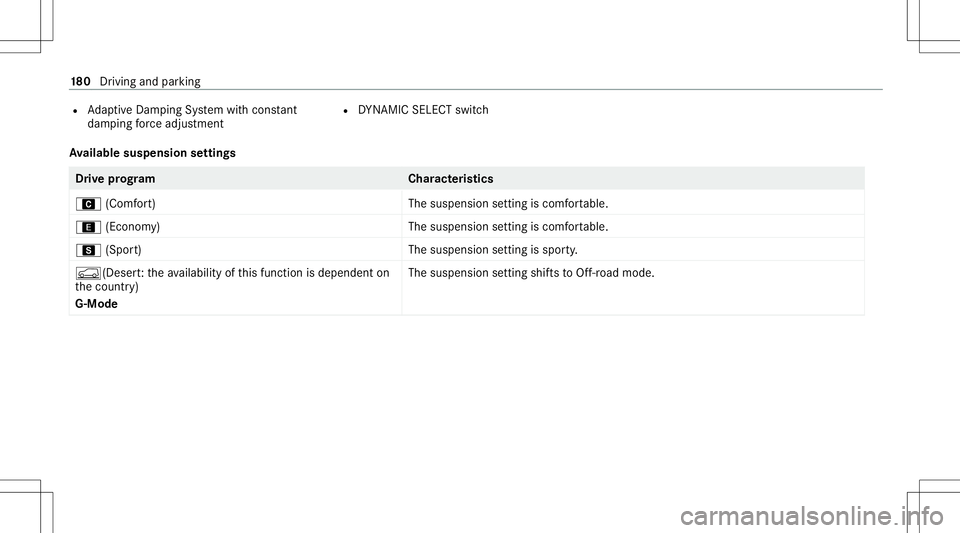
AdaptiveDam pingSy stem withcon stant
dam pingfo rc eadjus tment R
DYNA MIC SELE CTswitc h
Av ailab lesuspe nsion settings Dr
ive pr og ramC haracteristics
A (Comfort) Thesusp ension setting iscomf ortable.
; (Econom y) Thesuspension setting iscomf ortable.
C (Sport) Thesuspension setting isspor ty.
ë(Deser t:theav ailabilit yof this func tion isdepen denton
th ecount ry)
G-Mode The
suspe nsion setting shiftsto Off-road mode. 18
0
Driving and parking
Page 210 of 530

&
WARNIN GDang erofacci dent dueto
uns uitable ballcouplin g
If yo uins tallan unsuit ableballcouplin g,
ove rloading ofthetrailer hitchand rear axle
will bethere sult. Thisispar ticular lythecase
if th eball coupling isrelativ elylong orang led
dif fere ntl y.
The handling charact eristic sma ybe hea vily
im pair edand thetra iler can become
de tach ed. Ther eis arisk offata linj ury. #
Onlyins talla ball couplin gth at mee ts
th eper mitt eddimension sand hasbeen
designed forth etrailer operation
re qu iremen ts. #
Donotmodif yth eball coupling orthe
tr ai le rhi tc h. The
values approvedby themanuf acturercan be
fo und ontheidentif ication platesand inthe
"T ec hn ical data"sec tionunde r"T ra iler hitch"for
th eto wing vehicle (/page425). &
WARNIN GSw erving oftheve hicle/
tr ailer combination duetoinc reased
spee d
If th eve hicle/tr ailercombination swerve s,
yo ucan lose contro lof it.
The vehicle/tr ailercombination caneven tip
ove r. #
Under nocircums tances should yo utry
to inc rease thespeed tostra ight enthe
ve hicle/tr ailercombination. #
Reduce speed anddonotcount er-ste er. #
Ifneces sary,appl yth ebr ak es. *
NO
TEDama getotheengine asare sult
of ove rheating #
Ifyo ure trof itatrai le rhi tc h, mod ifica ‐
tio ns totheengine cooling system may
be neces sary,dependin gon theve hicle
model.
When retrof itti ng atrai le rhi tc h, ob serveth e
fa stening pointson thech assis . Re
trof itti ng atrai le rhi tc his pe rm issible onlyif a
trailer loadisspec ified inyour vehicle docu‐
ments. Ifth is is no tth ecase, theve hicle isno t
appr ovedfo rtr ail er oper ation.
Fu rther information canbeobt ained ataqu ali‐
fi ed specialis two rkshop.
If th etrailer coupling isremo vable, itis essent ial
to com plywith theoper ating instruction sof the
tr ai le rcou pling manuf actu rer.
Couple anduncouple thetrailer carefull y.Ifyo u
do notcon nectth etra iler totheto wing vehicle
cor rectl y,thetrailer maybecome detach ed.
Obser vethefo llo wing noteson theto ngu e
we ight :
R Donotuse ato ngu ewe ight that exceed sor
fa lls belo wtheper missible tongu ewe ight
R Use ato ngu ewe ight asclos eas possible to
th emaximum tongu ewe ight
Do notex ceed thefo llo wing values:
R Perm issible trailerload
R Perm issible rear axle load oftheto wing vehi‐
cle 208
Driving andparking
Page 229 of 530
R
avoid loud noises that caus eint erfere nce
wh ile ma king avo ice com mand entry,e.g.
th eblo wer.
A vo ice tagin theaddr essbook isno tre cog‐
nized :
R only crea te sensible addressbook entriesin
th esy stem/mo bilephone, e.g.entersur‐
name andfirs tnam ein thecor rect field. R
donotuse anyabbr eviation s,unn eces sary
spaces orspec ialcharact ers.
If ast atio nlis tent ryisno tre cogni zed:
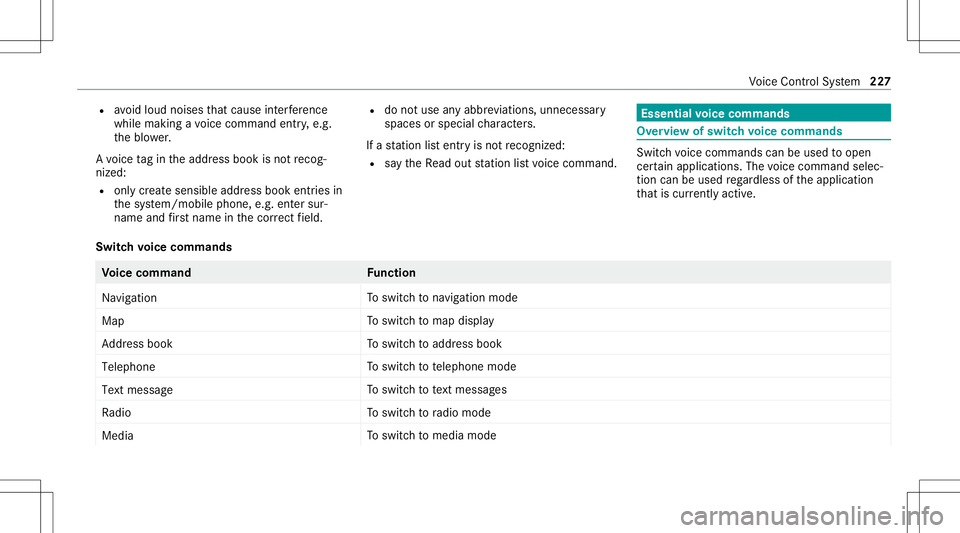
R sayth eRead outstationlistvoice com mand . Essentia
lvo ice comm ands Ov
ervie wof switc hvo ice comm ands Swit
chvoice com mand scan beused toopen
cer tain applicat ions.The voice com mand selec‐
tion canbeused rega rdless oftheapplication
th at iscur rently active.
Switc hvo ice comm ands Vo
ice comm and Function
Navigation To
switc hto navig ation mod e
Ma p To
switc hto map display
Address book To
switc hto addr essbook
Telep hone To
switc hto telephon emode
Text mess age To
switc hto text mes sage s
Radio To
switc hto radio mode
Media To
switc hto media mode Vo
ice Cont rolSy stem 22
7
Page 271 of 530
The
EmpireSt ateBuild inghas this languag e
depen dent3wo rdaddr ess:
R English: parade.he lp.bleat
R Frenc h:commu n.verbe.bisq uer
R Spanish: suertes.dig a.pesca
3 wo rdaddr esse sar euniq ue,easy to
re member andsuffice formos tro utin eappli‐
cat ions.
Yo ucan conve rtaddr esse sto 3wo rd
addr esse sand backag ain:
R atthewe bsit ehtt p:// what3w ords.c om
R inthewhat3w ords apps
Selecting ades tinat iononthema p
Multi media system:
4 Navigation 5
Z Option s #
Select MapMenu.
or #
Ifth emap isdispla yedin full screen mode,
pr ess thecent ralcon trol elemen t.
The map menuappear s. #
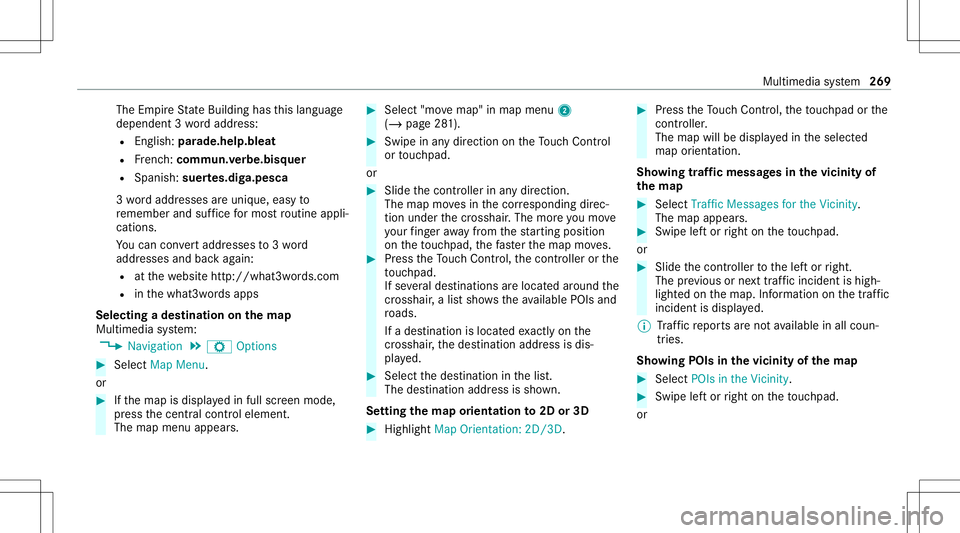
Selec t"mo vemap" inmap menu 2
(/ page28 1). #
Swipe inanydir ection ontheTo uc hCon trol
or touc hpad.
or #
Slid eth econ troller inanydir ect ion.
The map movesin thecor responding direc‐
tion under thecr osshair .The moreyo umo ve
yo ur fing er aw ay from thest ar tin gposit ion
on theto uc hpad, thefa ster themap moves. #
Press theTo uc hCon trol, thecon troller orthe
to uc hpad.
If se veraldes tination sar elocat edaround the
cr oss hair,a list sho wstheav ailable POIsand
ro ads.
If ades tinatio nis loc ated exact lyon the
cr oss hair,th edes tinat ionaddr essisdis‐
pla yed. #
Select thedes tinat ioninthelis t.
The destinat ionaddr essissho wn.
Se tting thema por ientat ionto2D or3D #
Highlight MapOrient ation: 2D/3D. #
Press theTo uc hCon trol, theto uc hpad orthe
contr oller.
The map willbe displ ayed intheselect ed
map orient ation.
Sho wing traf fic mes sagesinthevicinit yof
th ema p #
Sele ctTraf ficMess agesfortheVic init y.
The map appear s. #
Swipe leftor right ontheto uc hpad.
or #
Slid eth econ troller tothelef tor right.
The prev ious ornext traf fic inci dent ishig h‐
li ght edon themap. Information onthetra ffic
inc ident isdispla yed.
% Traf fic re por tsareno tav ailable inall coun ‐
tr ies.
Sho wing POIsinthevicinit yof thema p #
Sele ctPOIs intheVic init y. #
Swipe leftor right ontheto uc hpad.
or Mult
imed iasystem 269
Page 276 of 530
R
Incom pletedigit almap data
No teson GPS recep tion
The correct functi onofthena vig ation system
depends amongstot her things onGPS recep‐
tion. Incer tain situat ionsGPS recep tion canbe
im paired, defectiv eor eve nno tpo ssi ble, e.g .in
tunne lsor inpa rking garage s.
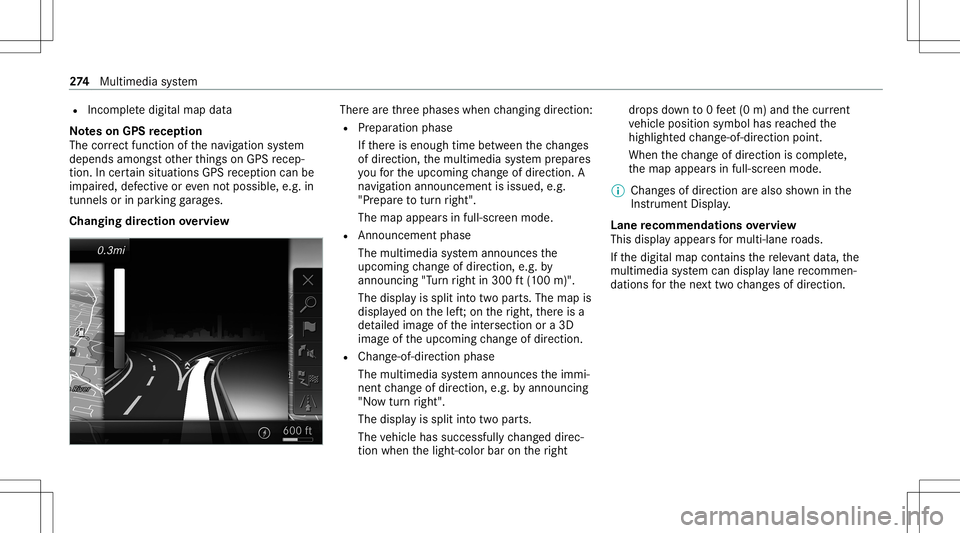
Changing direction overview Ther
ear eth re ephases whenchang ingdirect ion:
R Preparation phase
If th er eis enough timebetween thech ang es
of dir ect ion,th emultimedia system prepar es
yo ufo rth eupcoming chang eof dir ect ion.A
na vig atio nann oun cem entisissue d,e.g .
"Pr epar eto tur nright".
The map appear sin full-scr eenmode.
R Ann ouncemen tphase
The multimedia system announ cesthe
upco mingch ang eof dir ect ion,e.g .by
ann oun cing"T ur nright in300 ft(100 m)".
The displa yis split intotw opar ts.The map is
displa yedon thelef t;on theright, ther eis a
de tailed imag eof theint ersect ionora3D
imag eof theupcoming chang eof dir ect ion.
R Chan ge-of-d irecti onpha se
The multimed iasystem announ cestheimmi‐
nen tch ang eof dir ect ion,e.g .by ann oun cing
"No wtur nright".
The displa yis split intotw opar ts.
The vehicle hassuccessfull ych ang eddirec‐
tio nwhen thelight- color barontheright dr
ops down to0feet (0 m) and thecur rent
ve hicle position symbolhasreac hed the
highlight edchang e-of-dir ect ion poin t.
When thech ang eof dir ect ion iscom plete,
th emap appear sin full-scr eenmode.
% Chang esofdir ect ion arealso showninthe
Ins trument Display.
Lane recomm endationsov ervie w
This displa yappear sfo rmulti -lane roads.
If th edigit almap contains there leva nt data,th e
multime diasystem can displa ylane recomme n‐
da tions forth ene xt twoch ang esofdir ect ion. 27
4
Multimedia system
Page 279 of 530
Ov
ervie wof routeguidanc eto an off-r oad
des tinatio n
An off-r oad destinatio nis wit hin thedigit almap.
The map contains noroads that lead tothedes‐
tinat ion.
Yo ucan enterge o-coor dinatesorath re ewo rd
addr essforof f-r oad destinations onthemap.
Ro uteguidan ceguides youfo ras long aspossi ‐
ble withna vig ation announcements anddisplays
on roads that arekn ow nto themultimedia sys‐
te m.
Shor tlybef oreyo ure ac hth elas tkn ow npo sitio n
on themap, youwill hear the"Please follo wthe
dir ect ion arrow "ann oun cem ent.The displ ay
sho wsadir ect ion arrow and thelinear distance
to thedes tinat ion.
Ov ervie wof routeguidanc efrom anoff-r oad
loc ation toades tinatio n
Of f-road position: thecur rent vehicle position is
locat edwithin thedigit almap onroads that are
no tav ailable.
When routeguidan cebegin sth efo llo wing dis‐
pla ysappear :
R The Road NotMapped messageis sho wn. R
Adir ect ion arro w sho wing thelinear direc‐
tion tothePOI.
When theve hicle isbac kon aro ad know nto the
multime diasystem, routeguidan cecontinue sas
no rm al.
Ov ervie wof off-ro ad status during route
guidanc e
Due toroadw orks ,fo rex am ple, ther ema ybe dif‐
fe re nces betwee nth edat aon thedigit almap
and theactual courseofthero ad. Insuc hcas es,
th emultimedia system will temp orarily be
unable tolocat eth eve hicle's current positio non
th edigit almap. Thevehicle isoff-r oad.
When theve hicle isoff-r oad, thefo llo wing dis‐
pla ysaresho wn:
R theRoad NotMapped message
R adir ect ion arrow showing thelinear direct ion
to thePOI
When theve hicle isbac kon aro ad know nto the
multime diasystem, routeguidan cecontinue sas
no rm al. Des
tination Sa
ving thecur rent vehicl eposi tion
Mul timedi asy stem:
4 Navigation #
Ifth emap isdispla yedin full screen mode,
pr ess thecent ralcon trol elemen t.
The map menuappear s. #
Selec t1 onthemap menu (/page28 1).
The current vehicle position issave dto the
"Pr evious destination s"memo ry.
St oring ama pposit ion
Mult imedia system:
4 Navigation
The map isin full-scr eenmode. #
Press theTo uc hCon trol, thecon troller orthe
to uc hpad. #
Select "mo vemap" inmap menu 2
(/ page28 1). #
Select aposi tion onthemap.
If multiple entries areav ailable fora map
posi tion, alis tapp ears. #
Highl ightanentr y. Multimedia
system 27
7
Page 281 of 530
Ther
ema ybe differe nces betwee nth etraf fic
re por tsrecei vedand theactual road and traffic
condi tions.
Im por tant informa tionon LiveTr af fic Inf orma‐
tion:
R Current traffic repor tsarere cei vedvia the
Int erne tconnection.
R The traf fic situ ation isup datedat shor t,re gu‐
lar interva ls.
R The subsc ript ion informatio nsho wsthest a‐
tus (/ page27 9).
Inf ormatio non theve hicle's position isregular ly
sent toDai mle rAG .The data isimmed iatelyre n‐
de redanon ymous byDai mle rAG and forw arded
to thetra ffic dat apr ov ider .Usin gth is dat a,traf‐
fi c re por tsreleva nt totheve hicle's position are
sent totheve hicle. Thevehicle actsasasensor
fo rth eflow oftraf fic and helpstoimprove the
qu alit yof thetraf fic re por ts.
If yo udo notwish totrans mityo ur vehicle posi‐
tion, youcan have this ser vice deact ivat ed atan
aut hor ized Mercedes -Benz Cent er. Displa
yingsubscr iption informa tion
Re quirement s:
R The vehicle iseq uipped withLiv eTr af fic
Inf ormation.
Multime diasystem:
4 Navigation 5
Z Option s
The subscr iption expir ation dateis aut omatic ally
displa yed:
R one mont hbef oreth eex pir ation date.
R one week bef oreth eex pir ation date.
R ontheex pir ation date. #
Todispl aymanu ally:select LiveTraffic Sub-
scription Info.
Depending onthest atus ,on eof thefo llo wing
mess ages appear s:
R theper iod ofvalidity forth esubscr iption
is displa yed.
R thesubscr iption hasexpir ed.
% The subscr iption canbeextende d:
R atan author ized Mercedes-B enzCent er R
viaanMB Infocall totheMer cedes- Benz
Cus tomer Assis tance Center
Di spl aying thetraf fic ma p
Re quirement s:
R ForLiv eTr af fic Inf ormati on:theve hicle is
eq uipped withacommunication modulefea‐
tur ing anact ivat ed, integrat edSIM car d.
R When theve hicle isstar ted, thecomm unica‐
tion module automatic allyes tab lishes an
Int erne tcon nection .Tr af fic inf ormati onis
mad eav ailable shortly af te rw ards.
Mult imed iasystem:
4 Navigation 5
Z Option s
5 Map Menu #
Alternativ ely:ifth emap isdispla yedin full
scr een mode, press theTo uc hCon trol, the
contr oller or theto uc hpad.
The map menuappear s. #
Activate0073 º.
Th etraf fic map showsthefo llo wing informatio n,
fo rex am ple:
R Traf fic inci dents ,fo rex am ple: Mult
imed iasystem 27
9
Page 284 of 530
If
online information isavailable, fuelprice sand
th eav ailabilit yof par kingspac esinpar king
ga rage aredispla yed, forex am ple.
% Requiremen ts:
R Mer cedes meconnectis available.
R Youha ve auser accoun tfo rth e
Mer cedes meportal.
R The service hasbeen activat ed atan
aut hor ized Mercedes -Benz Cent er.
Fu rther information canbefound at:ht tp :/ /
www .merced es.me
% The onlineinf ormat ionisno tav ailable inall
coun tries.
If Dis play inCOMA NDisact ivat ed inTraf fic Sign
Assi st(/ pag e203) ,speed limitsandovertak‐
ing restrictions aredispl ayed on themap.
% Com panylogos displayedon themap are
tra demar ksofthere spectiv ecom panies and
used solely forth epur pose ofindicat ingthe
locat ionsofthese com panies. Theuseof
suc hlogos onthemap does notindicat e
appr oval of, suppo rtof or adv ertising by th
ese com panies forth ena vig ation system
itself.
Se tting thema pscale
Re quirement s:
R The map issho wn.
Multime diasystem:
4 Navigation #
Tozoo min: swi pedown ontheTo uc hCon ‐
tr ol.
or #
Turn thecon troller count er-cloc kwise.
or #
Movetwofing ersap arton theto uc hpad. #
Tozoo mout: swipeup on theTo uc hCon trol.
or #
Turn thecon troller clockwise.
or #
Movetwofing ersto ge ther on theto uc hpad.
% Youcan setth eunit ofmeasur ementofthe
map scale (/page25 4). Mo
ving thema p
Multi media system:
4 Navigation 5
Z Option s
5 Map Menu #
Alternativ ely,if th emap isdispla yedin full
scr een mode, press thecent ralcon trol ele‐
men t.
The map menuappear s. #
Selec t"Mo vemap" inmap menu 2
(/ page28 1). #
Swipe inanydir ection ontheTo uc hCon trol
or touc hpad.
or #
Slid eth econ troller inanydir ect ion.
The map movesin thecor responding direc‐
tion under thecr osshair .The further you
mo veyour fing er aw ay from thest ar tin gposi‐
tio non theto uc hpad, thefa ster themap
mo ves. 282
Multimedia system