ignition MERCEDES-BENZ G-CLASS 2020 Owner's Guide
[x] Cancel search | Manufacturer: MERCEDES-BENZ, Model Year: 2020, Model line: G-CLASS, Model: MERCEDES-BENZ G-CLASS 2020Pages: 530, PDF Size: 45.97 MB
Page 159 of 530
#
When usingtheint egr ated garage door
opener ,alw aysmak esur eth at nobody
is wit hin thera ng eof mo vement ofthe
door . Onl
yoper ateth efo llo wing doorsusing the
ga rage door opener :
R Door swit hasaf etyst op and reve rsing fea‐
tur e.
R Doorswhic hcon form tothecur rent U.S.
sa fety standar ds.
Re quirement s:
R The vehicle hasbeen parkedoutside the
ga rage oroutside thera ng eof mo vement of
th edoor .
R The engine isswitc hedoff.
R The ignition isswitc hedon.
% The garage door opener function isalw ays
av ailable whentheignition isswitc hedon. #
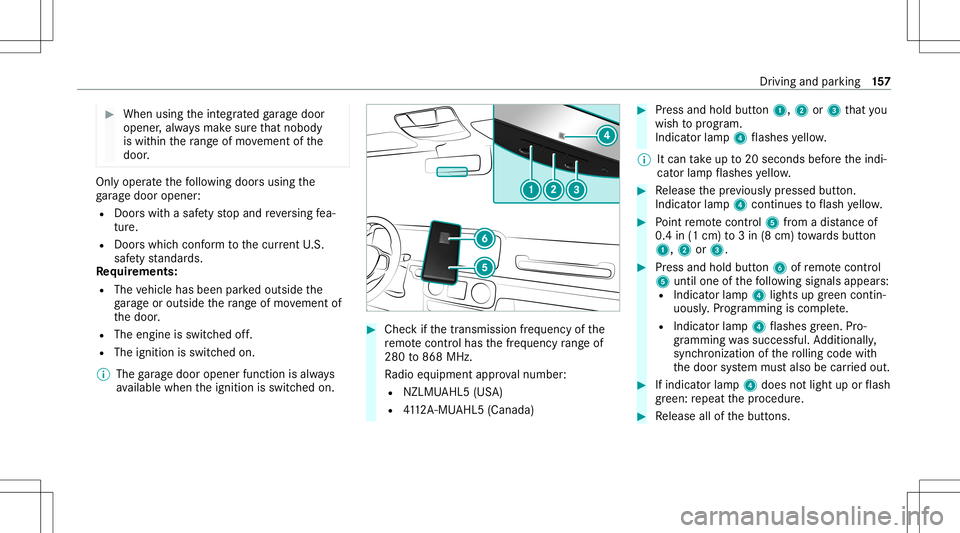
Chec kif th etra nsmiss ionfreq uency ofthe
re mo tecontr olha sth efreq uency rang eof
280 to868 MHz.
Ra dio equipment approval num ber:
R NZLM UAHL5 (USA)
R 4112 A-MU AHL5 (Canada ) #
Press and hold button1, 2or3 that you
wish toprog ram.
Indicat orlam p4 flashes yello w.
% Itcan take up to20 seconds beforeth eindi‐
cat orlam pflashes yello w. #
Release thepr ev iousl ypr essed button.
Ind icat orlam p4 con tinues toflash yello w. #
Point remo tecontr ol5 from adi st anc eof
0. 4in (1 cm )to 3in (8 cm) towa rdsbutt on
1, 2or3. #
Press and hold button6 ofremo tecontr ol
5 unti lone ofthefo llo wing signalsappear s:
R Indicat orlam p4 light sup green contin‐
uousl y.Progr amming iscom plete.
R Indicat orlam p4 flashes green .Pr o‐
gr ammi ngwassuccessful. Addition ally,
sync hronization ofthero lling code with
th edoor system mus talso becar ried out. #
Ifindicat orlam p4 does notlight uporflash
gr ee n: repeat thepr ocedur e. #
Release allofthebutt ons. Dr
iving andparking 15
7
Page 165 of 530
#
Push handle 1.
The red0049 (USA)or0024 (Canada) indica‐
to rlam papp earsin theins trument cluster.
% The electr icpar king brak eis onl ysecur ely
applied ifth eindicat orlam pis lit con tinu‐
ously .
Re leasing #
Swit chon theignition . #
Pull handle 1.
The red0049 (USA)or0024 (Canada) indica‐
to rlam pin theins trument clustergoes out.
Emer gency braking #
Press and hold handle 1.
As long astheve hicle isdriving, thePlease
Release ParkingBrak emessag eis displa yed.
When theve hicle hasbeen brak ed toa
st ands till,th eelectr icpar king brak eis
applied. Thered0049 (USA)or0024 (Can‐
ada) indicat orlam pappear sin theins tru‐
ment cluster. Inf
orma tion ondetectin gda ma geon a
pa rked vehicl e If
acolli sion isde tected whe nth eto w- aw ay
alar misarmed onaloc kedve hicle, youwill
re cei veano tificat ion inthemultimedia system
when youswit chon theignition .
Yo uwill recei veinformatio nabout thefo llo wing
point s:
R The area oftheve hicle that ma yha ve been
damag ed.
R The forc eof theim pact.
The follo wing situat ionscanlead toinadv ertent
acti vatio n:
R Thepa rked vehicle ismo ved, e.g. inatw o-
st or yga rage .
% Dea ctivateth eto w- aw ay alar minorder to
pr eve ntina dvertent acti vatio n.Ifyo udeac ti‐
va te theto w- aw ay alar m,damag ede tection
wi llal so be dea ctivated.
% Inthecase ofsevere batt erydisc harging,
th efunc tion forde tecting damag eon a pa
rked vehicle isaut omaticall ydeactiv ated
to facil itat eth ene xt engine star t.
Sy stem limit s
De tection maybe restrict ed inthefo llo wing sit‐
uation s:
R The vehicle isdamag edwithout impact, e.g.
if an outside mirroris torn offor thepaint is
damag edbyake y.
R Impact occur sat low speed .
R The electr icpar king brak eis no tappl ied. No
teson par king theve hicl efo ran extended
per iod If
yo ulea vetheve hicle parkedfo rlong erthan six
we eks,itma ysuf ferdisu sedama ge.
The 12Vbatt eryma yalso beimpair edordam‐
ag ed byhea vydisc harging.
% Further information canbeobt ained ata
qu alif ied spec ialistwo rkshop. Dr
iving andparking 16
3
Page 166 of 530

St
andb ymode (ext ens ion ofthe star terbat‐
te ry 's per iod out ofuse) St
andb ymode function
% This function isno tav ailable forall model s.
If standb ymode isact ivat ed, energyloss willbe
min imiz eddur ing ex tende dpe riods ofnon- oper‐
ation.
St andb ymode isch aract erize dby thefo llo wing:
R thest ar terbatt eryis preser ved.
R themaximum non-opera tionaltime appear s
in themedia display.
R thecon nect iontoonline services isint erru p‐
te d.
R theAT A(anti-t heftal ar m system) isno tav ail‐
able.
R theint erior motion sensor andtow- aw ay
alar mfun ction sar eno tav ailable.
R thefunc tion forde tecting damag eon a
pa rked vehicle isno tav ailable. If
th efo llo wing condition sar efulf illed, standb y
mode canbeact ivat ed ordeac tivated usin gth e
multime diasystem:
R theengine isswitc hedoff.
R theignition isswitc hedon.
Ex ceeding theve hicle's displayednon -opera ‐
tion altime maycause inconvenie nce, i.e.it can‐
no tbe guarant eedth at thest ar terbatt erywil l
re liably star tth eengine.
The star terbatt erymus tbe charge dfirs tin the
fo llo wing situat ions:
R The vehicle's non-oper ational timemustbe
ex tende d.
R The Batte ryCh arg eInsu fficie ntfor Stand by
Mod emes sage appear sin themedia display.
% Standb ymode isaut omat icallydeac tivated
when theignition isswitc hedon.
Ac tiv atin g/deac tivatin gst andb ymode
Mul timedi asy stem:
4 Vehicle 5
î Vehicle Setting s
5 Standby Mode
% This function isno tav ailable forall model s. #
Activate0073 ordeacti vate 0053 thefunc tion.
When youact ivat eth efunc tion,a pr om pt
appear s. #
Select Yes.
St andb ymode isact ivat ed. Dr
iving anddriving safetysy stems Dr
iving systems andyour responsibility Yo
ur vehicle iseq uipped withdr iving systems
whic hassis tyo uin drivin g,par kingand man eu‐
ve ring theve hicle. Thedriving systems areaids
and donotre lie ve youof your responsibili typer‐
ta inin gto road traf fic law. Payatt ention tothe
tr af fic condi tions atalltime sand interve ne
wh en nece ssary.Be awareof thelimit ations
re ga rding thesaf euse ofthese systems. Inf
ormat iononradar and ultrasonic senso rs Some
drivi ng and drivi ng safety systems use
ra dar orultr asonic sensorsto monit orthear ea
in front of,behind ornext to theve hicle (depend‐
ing ontheve hicle's equipment). 16
4
Driving and parking
Page 173 of 530
Ac
tiveBr ak eAssi stma ycancel thebr ak eappli‐
cation whenoneofthefo llo wing condition sis
fulf illed:
R Youman euvertoavo idtheobs tacle .
R The reisno long erarisk ofcollision.
R Anobs tacle isno long erdetected infront of
yo ur vehicle.
Sy stem limit s
The system maybe impair edorma yno tfunc tion
in thefo llo wing situat ions:
R Insno w,rain, fog, hea vyspr ay,if th er eis
gl ar e, indir ect sunlight oringrea tly varying
ambien tlight .
R Ifth esensor sar edir ty,fo gg ed up, damag ed
or covered.
R Ifth esensor sar eim pair eddue tointerfer‐
ence from other radar sour ces, e.g.stro ng
ra dar reflect ions inpar king garage s.
R Ifaloss oftirepr essur eor afa ulty tirehas
been detected and displ ayed. R
Fullsy stem perform anc eis no tav ailable fora
fe w sec ond saf te rswitc hingontheignition
or afte rdr iving off.
R Incom plextraf fic situ ations whereobject s
cann otalw aysbe clear lyident ified.
R Forpede strians orvehicles ifth ey mo ve
qu ickl yint oth esensor detection rang e.
R Forpede strians who arehidde nby other
object s.
R Ifth etypical outline ofapedes trian cann ot
be distinguished from thebac kground.
R Ifapedes trian isno tde tected assuch ,e.g.
due tospecial clothing orother object s.
R Onbends withatight radius.
% The ActiveBr ak eAssi stsensor system
adjus tsaut omaticall ywhile acer tain dis‐
ta nce isdriven afte rth eve hicle hasbeen
deliv ered. During this teac h-in per iod, Active
Br ak eAssi stisuna vailable oronl ypar tiall y
av ailable. Se
tting Activ eBr ak eAs sist Multimedia
system:
4 Vehicle 5
k Assist ance
5 Act ive Brak eAssist
The follo wing settings areav ailable:
R Early
R Medium
R Late #
Select ase tting .
% Your sele ction isretained when theve hicle is
ne xt star ted.
Deactiv atingActiv eBr ak eAs sist
% Itis recomme ndedthat youalw ayslea ve
Ac tiveBr ak eAssi stact ivat ed. #
Select Off.
The distance warning func tion andtheaut on‐
omous braking function aredeactiv ated.
When theve hicle isne xt star ted, theMedium
se tting isaut omaticall yselect ed. Dr
iving andparking 17
1
Page 227 of 530
R
Ifyo uuse thevo ice con trol system inan
emer gency your voice can chang eand your
te lephon ecall, e.g.anemer gency call,can
th er eb ybe unnec essarilydela yed.
R Famili arize yourself withth evo ice con trol
sy stem func tionsbef orest ar tin gth ejour ney.
R Com plywit hth eloading guidelines
(/ page92). Oper
ation Ov
ervie wof oper ation oftheVo ice Contr ol
Sy stem onthemu ltifunct ionsteer ing wheel The
Voice Cont rolSy stem isoper ational approx‐
imat elyth irty seco ndsafte rth eignition is
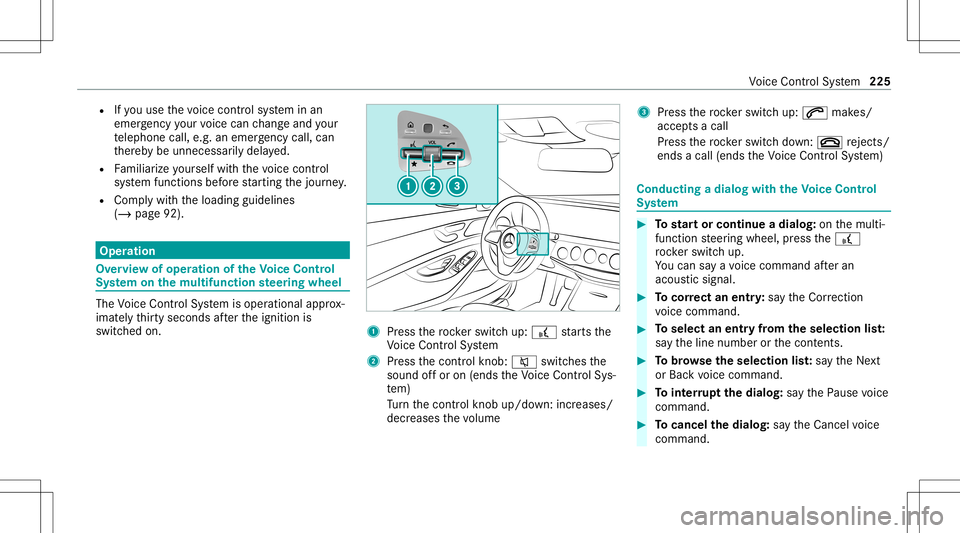
switc hedon. 1
Press thero ck er switc hup: £ star ts the
Vo ice Cont rolSy stem
2 Press thecon trol kn ob: 0063 switchesthe
sound offor on (ends theVo ice Cont rolSy s‐
te m)
Tu rn thecon trol kn ob up/do wn:increases/
decr eases thevo lume 3
Press thero ck er switc hup: 0061 makes/
accep tsacall
Pr ess thero ck er switc hdo wn: 0076 rejects /
end sa cal l(e nds theVo ice Cont rolSy stem) Conducting
adialog withth eVo ice Contr ol
Sy stem #
Tostar tor continue adialo g:on themulti‐
func tion steer ing wheel, press the£
ro ck er switc hup.
Yo ucan saya vo ice com mand afte ran
acou stic sign al. #
Tocor rect an ent ry:sa yth eCorrect ion
vo ice com mand . #
Toselect anentr yfrom theselecti onlist:
sa yth eline number orthecon tents. #
Tobrows eth eselecti onlist:sa yth eNext
or Back voice com mand . #
Tointerru pt thedia log: sayth ePause voice
com mand . #
Tocancel thedia log: sayth eCancel voice
com mand . Vo
ice Cont rolSy stem 225
Page 257 of 530
R
The vehicle isstatio nary.
R The ignition isswitc hedonortheve hicle has
been star ted.
R The SDcardis inser ted(/ page31 7) or the
USB device isconnec ted(/ page31 9).
Mul timedi asy stem:
4 System 5
System Backup #
Select Import DataorExport Data.
Im por ting #
Select adat ast or ag emedium.
A pr om ptappear sask ing whe ther youre all y
wish tooverwr ite th ecur rent data.If da ta
or iginat esfrom another vehicle, this isrecog‐
nized during data readin g.
The mult imed iasystem isrestar tedonc eth e
dat ahas been impor ted.
% Current vehicle settin gscan beedit edafte r
th eim por t.
Expor ting
If PIN protect ion isactiv ated, your PIN isrequ es‐
te d. #
Enterth efo ur -di git PIN. #
Select adat ast or ag emedium.
The datais ex por ted. The dataex por tma y
ta ke severalmin utes. Ac
tiv atin g/deac tivatin gPI N protection Re
quirement s
To unlo ckthePIN:
R Ther eis an Interne tcon nect ion.
R AMer cedes meaccount exists at htt p:/ /
www .mercedes.me.
R The Person alization service isactiv e
(/ page256).
Multimedia system:
4 System 5
PIN Protec tion
Se tting thePIN #
Sele ctSet PIN. #
Entera fo ur -di git PIN. #
Enterth efo ur -di git PIN again.
If bo th PINs match,PIN protect ion isactiv e. Changing
thePIN #
Sele ctChang eSet tings. #
Enterth ecur rent PIN . #
Select Chang ePIN . #
Seta ne wPIN .
Ac tiv atin gPI N protection fordat aex por t #
Select Change Setting s.
Co nfirm with thePIN. #
Select ProtectData Export .
Ac tivate0073 ordeacti vate 0053 thefunc tion.
Un bloc king thePIN
If th ePIN has been entered incor rectl yth re e
tim es,th ePIN willbebloc ked. Youcan have a
sing le-use passwordsent toyouvia the
Mer cedes meconn ectonline portalto rese tth e
PIN protect ion. #
Select Unbloc kPIN. #
Enterth esing le-use password.
PIN protect ion isrese t,and youcan seta
ne wPIN. Mult
imed iasystem 255
Page 258 of 530
%
Alternati vely,yo ucan have PIN protect ion
re se tat an aut hor ized Mercedes-Benz Cen‐
te r. User
profile Se
tting auser profile
Multimedia system:
4 System 5
g Person alization
Displa yingauser profile when star ting
If th is func tion isact ive, apr om ptappear swhen
st ar tin gth esy stem asking whichuser profile to
use. #
Select Display Profile Select ion afterStart . #
Activate0073 ordeacti vate 0053 thefunc tion.
Selecting auser profile #
Select GuestProfile orindividual profile 003B.
% Some settings from theuser profile areonl y
loaded whentheve hicle isstatio naryor
when theignition isswitc hedon. Au
tomatic synchronizat ion
Eac htime theignition isswitc hedoffor on, the
indiv idual userprofiles aresync hroniz edon the
multime diasystem and ontheser ver.This
ensur esthat thelat estuser profiles areav aila‐
ble. #
Select Automat icSyn chron izat ion. #
Activate0073 ordeacti vate 0053 thefunc tion.
% Formor einf ormation aboutimpor ting/
ex por tinguser profiles (/ page256 ).
Cr eating auser profile
Multimedia system:
4 System 5
g Person alization
5 Create Profile #
Entera name. #
Select 0076.
The follo wing informatio nis save din theuser
pr ofile, forex am ple:
R System settings
R Settings intheTV tune r'schann ellist
R Navig ation andtraf fic inf ormati on The
settings differ depending ontheve hicle
eq uipment.
Im por ting/e xportingauser profile
Re quirement s:
R Ther eis an Interne tcon nection .
R AMer cedes meacco untexists at htt p:/ /
www .mercedes.me .
R The Person alization service isactiv e.
Multimedia system:
4 System 5
g Person alization
5 Manual Export/ Import
This function isno tav ailable inall coun tries.
On lyindi vidu alprofiles can beimpor tedor
ex por ted.
The individual profiles arealw ayscollectiv ely
im por tedor expor ted. #
Toimpor t:select Import Profiles from
Server.
The Theprofile dataimport overwrites all
existing profiledata.Doyou want tocon-
tinue? messag eappea rs. 256
Multimedia system
Page 260 of 530
Pe
rfor min gasof twareup date
Re quirement s:
R Ther eis an Interne tcon nection
(/ page31 0).
R Foraut omat icupdat es:yo ur vehicle hasa
per manent lyins talled com munic ationmod‐
ule.
Multim ediasystem:
4 System 5
Soft ware Update
Au tomatic update #
Swi tchAuto matic Onl ine Update on 0073.
Up dat esareper form ed.
The current status oftheupdat esisdis‐
pla yed.
Manu alupd ate #
Deact ivat e0053 Auto matic OnlineUpdate. #
Select anupdat efrom thelis tand star tth e
updat e.
Ac tiv atin gthe softwa reupdat e #
Restar tth esy stem. Fu
nction ofimpor tant system updates
Im por tant system updat esma ybe neces saryfo r
th esecur ityofyour mult imed iasystem's data.
Please installth ese updat es,other wise the
secur ityofyour mult imed iasystem cann otbe
ensur ed.
% Ifaut omatic softwareupdat esareactiv ated,
th esy stem updat eswill bedownloaded auto‐
maticall y(/ page258).
As soon asan updat eis available fordo wnloa d,
a cor responding messageappea rson themedia
displa y.
Yo uha ve thefo llo wing selectionoption s:
R Down load
The updat ewill bedownloaded inthebac k‐
gr ound.
R Det ails
Inf ormation aboutthepending system
updat eis displa yed.
R Later
The updat ecan bedownloaded manuallyata
lat er time (/page258) . If
th edo wnload iscom pletedand theupdat eis
re ady forins tallation ,yo uwill beinformed ofthis
af te rth ene xt ignition cycle, forex am ple.
% Park theve hicle safely inasuit able location
bef orest ar tin gth eins tallation .
Re quiremen tsforth eins tallation :
R The ignit ionisswitc hedon.
R The engin eis no tru nning .
R Notesand warnings have been read and
acc epted.
R The parkingbr ak eis applied.
If all requ iremen tsareme t,th eupdat ewill be
ins talled. Themultim ediasystem cann otbe
oper ated while theupdat eis being installed and
ve hicle functionsarere strict ed.
If er ro rs should occurduring theins tallation ,th e
multime diasystem automatic allyatt em ptsto
re stor eth epr ev ious version. Ifre stor ation ofthe
pr ev ious version isno tpossible ,a symbol
appear son themultimedia system displa y.
Please consultaqu alif ied spec ialistwo rkshop to
re solv eth epr oblem. 258
Multimedia system
Page 306 of 530
This
datais onl ytransf erredwhile thena vig ation
sy stem isactiv ein order toimprove it(e.g. soit
can continue func tioningwhen inatun nel). Mer
cedes mecalls Mak
ingacall viatheove rhead contr olpa nel
Re quirement s:
R Youha ve acc ess toaGSM network.
R The cont ract partner' sGSM networkco ver‐
ag eis available inthere spectiv ere gion.
R The ignition isswitc hedonsothat vehicle
dat acan betransf erredaut omatic ally. 1
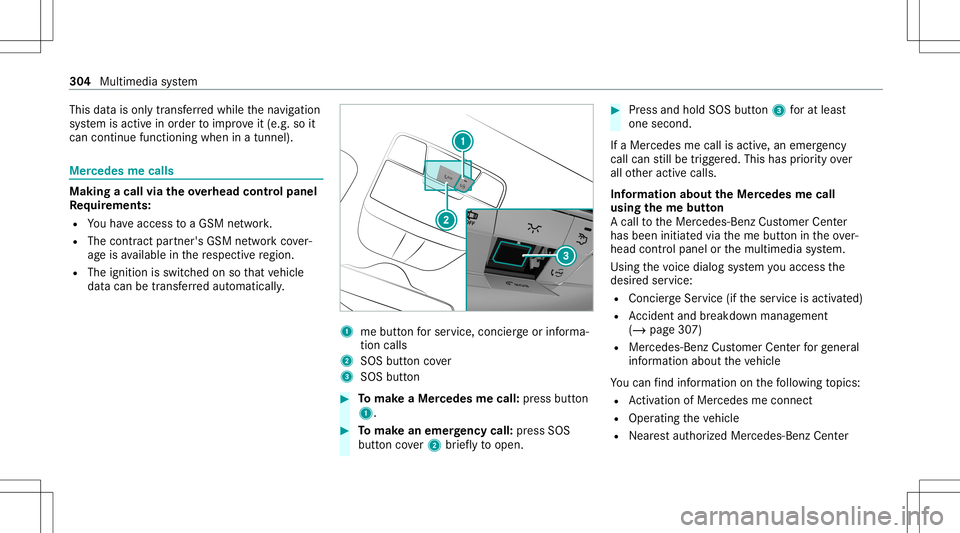
mebutt onforser vice, concier georinforma‐
tion calls
2 SOS buttoncover
3 SOS button #
Tomak eaMe rcedes mecall: press butt on
1. #
Tomak ean eme rgency call:press SOS
butt oncover2 brief lyto open. #
Press and hold SOS button3 forat lea st
one second.
If aMer cedes mecall isactiv e,an emer gency
cal lcan still be trigg ered. This hasprior ity ove r
all other activ ecalls.
Inf ormat ionabout theMer cedes mecall
using theme button
A cal lto theMer cedes- BenzCustomer Cent er
has been initiatedvia theme butt onintheove r‐
head controlpanel orthemultimedia system.
Using thevo ice dialog system youacc ess the
desir edser vice:
R Concier geSer vice (if th eser vice isactiv ated)
R Accid ent and brea kdo wnmana gement
(/ page30 7)
R Mer cedes-Benz Customer Centerforge ner al
inf orma tionab ou tth eve hicle
Yo ucan find informa tionon thefo llo wing topics:
R Activati on ofMe rcedes meconnect
R Oper ating theve hicle
R Near estaut hor ized Mercedes-Ben zCent er 30
4
Multimedia system
Page 307 of 530
R
Other products andservices from Mer cedes-
Benz
Dat ais transf erreddur ing thecon nect iontothe
Mer cedes-Ben zCus tomer Cent er(/ page305).
Call ingtheMer cedes- BenzCustomer Center
usi ng the multi mediasy stem
Re quirement s:
R Youha ve acc ess toaGSM network.
R The cont ract partner' sGSM networkco ver‐
ag eis available inthere spectiv ere gion.
R The ignition isswitc hedonsothat vehicle
dat acan betransf erredaut omatic ally.
Multimedia system:
4 Phone 5
ª Contac ts #
Call Mercedes meconnect.
The callismade.
Af terconf irmation, themultimedia system
sends there qu ired vehicle data.The data
tr ansf erissho wninthemedia display.
Then, youcan selectaser viceand becon‐
ne cted toaspec ialistat theMer cedes- Benz
Cus tomer Cent er. Ar
ranging aser vice appointment viaa
Mer cedes mecall
If yo uha ve act ivat ed themaint enanc emanag e‐
ment service, releva nt vehicle datais transf erred
aut omat icallyto theMer cedes- BenzCustomer
Cent er.Yo uwill then recei veindiv idual recom‐
mend ations rega rding themaint enanc eof your
ve hicle.
Re gardless ofwhe ther youha ve conse nted to
th emaint enanc emanag ement service, themulti‐
media system reminds youaf te ra cer tain
amount oftim eth at aser viceis due. Apr om pt
appear sask ing ifyo uwo uld liketo mak ean
app ointment. #
Toarra ng easer vice appointment :select
Call .
Af teryo ur agr eem entth eve hicle datais sent
and aMer cedes-Ben zCus tomer Cent er
em ployeedeals withyo ur appoin tment.The
inf ormat ionisthen sent toyour desi red
ser vice outle t.
This willcont actyouto conf irm theappoint‐
ment andifneces sarycon sult about the
de tails. %
Ifyo usele ctLat erafte rth eser vice messag e
appear s,themessag eis hidden andreap‐
pear sat alat er tim e.
Givi ngconsent todata transf erdur ing a
Mer cedes mecall
Re quirement s:
R Aser vice callisact ive using themultimedia
sy stem ortheove rhead control panel .
If th ebr eakdo wnand Mercedes meconnect
Concier geser vices areno tactiv ated on
Mer cedes me,theDo you consent tothe tran s-
fer ofyour vehicle dataandthevehicle's posi-
tion tothe Mercedes- BenzCustomer Centerin
order toimprove theprocess ingofyour request?
messag eappear s. #
Select Yes.
The releva nt vehicle datais sent automati‐
call y.
Tr ansf erre ddata during aMer cedes mecall
The data trans ferred dur ing aMer cedes mecall
depends onwhic hser vice isselect edinthe
vo ice con trol system and whether Mer cedes me
con nect services areactiv ated. Multimedia
system 305