light MERCEDES-BENZ G-CLASS 2020 Manual PDF
[x] Cancel search | Manufacturer: MERCEDES-BENZ, Model Year: 2020, Model line: G-CLASS, Model: MERCEDES-BENZ G-CLASS 2020Pages: 530, PDF Size: 45.97 MB
Page 208 of 530
The
system maybe impair edorma yno tfunc tion
in thefo llo wing situat ions:
R Ifth er eis poor visibility ,e.g. due toinsuf fi‐
cie ntillu mina tionofthero ad, ifth er ear e
highl yva riable shade condition sor inrain,
sno w,fogor hea vyspr ay.
R Ifth er eis glar e, e.g .fr om oncom ingtraf fic,
th esun orreflect ions.
R Ifth ewindshield inthear ea ofthemultifunc ‐
tion camer ais dir ty,or ifth ecamer ais fog‐
ge dup, damag edorcovered.
R Ifth er ear eno lane marking s,or several
unc lear lane markingsarepr esen tfo rone
lane, e.g.around roadw orks .
R Ifth elane marking sar ewo rn,dar kor cov‐
er ed.
R Ifth edis tance totheve hicle infront istoo
shor tand thus thelane marking scann otbe
de tected.
R Ifth elane marking sch ang equ ickl y, e.g.
lanes branc hof f,cr oss one another or
mer ge.
R Ifth ero adw ayisvery nar row and wind ing. Ac
tiv atin g/deac tivatin gAc tiv eLan eKe eping
Assis t(v ehicles withPa rking Assis t
PA RK TRONI C) &
WARNIN GRisk ofacci dent despite
Ac tiveLa ne Keeping Assistwa rning
A lane- correcting brak eap plica tion canno t
al wa ys bring theve hicle backint oth eor igi‐
nal lane. #
Alw aysst eer ,br ak eor accelera teyour‐
self ,espe ciallyif Ac tiveLa ne Keeping
Assis twa rnsyo uor mak esalane -cor‐
re cting brak eap plica tion. &
WARNIN GRisk ofacci dent despite inter‐
ve ntio nof ActiveLa ne Keeping Assist
Ac tiveLa ne Keeping Assistdoes notde tect
tr af fic condi tions orroad user s.In very rare
case s,thesy stem maymak ean inappr opri‐
at ebr ak eapplication, e.g.afte rint entional ly
dr iving overa soli dlane marking.
The brak eapp lication canbeinterru pte dat
an ytime ifyo usteer slightl yin theopposit e
dir ect ion. #
Alw aysmak esur eth at ther eis suf fi‐
cie ntdist anc eto theside forot her traf‐
fi c or obs tacle s. &
WARNIN GRisk ofacci dent despite Lane
Ke eping Assist
Lane Keeping Assistcann otalw aysclear ly
de tect lane mar kings .
In such case s,Lane Keeping Assistcan:
R givean unnec essarywa rning
R notgiv eawa rning #
Alw ayspa ypar ticular attention tothe
tr af fic situ ation and keep within the
lane, espec iallyif Ac tiveLa ne Keeping
Assis taler tsyou. Be
sureto obser vethesy stem limit ations of
Ac tiveLa ne Keeping Assist. 206
Driving andparking
Page 209 of 530
Ve
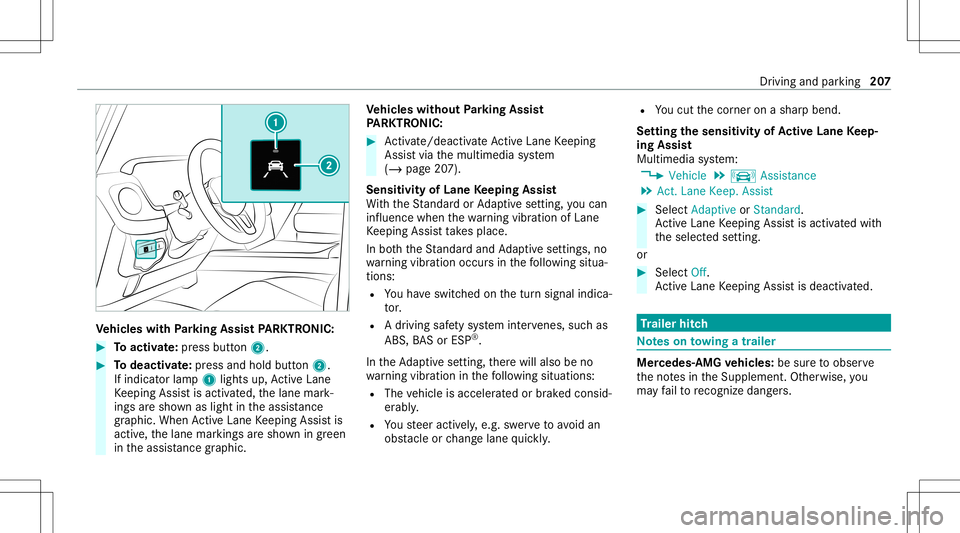
hicl eswith Parking Assis tPA RK TRONI C: #
Toactiv ate: press butt on2. #
Todeac tivate: press and holdbu tton 2.
If indi catorlamp 1light sup, ActiveLa ne
Ke eping Assistis activ ated, thelane mark‐
ings aresho wnaslight intheassis tance
gr ap hic. Whe nAc tiveLa ne Keeping Assistis
activ e,thelane marking sar esho wningreen
in theassis tance grap hic. Ve
hicl eswithout Parking Assis t
PA RK TRONI C: #
Activate/d eactiv ateAc tiveLa ne Keeping
Assis tvia themultimedia system
(/ page20 7).
Sensitivity ofLane Keeping Assist
Wi th theSt andar dor Adaptivese tting ,yo ucan
inf luen cewhen thewa rning vibration ofLane
Ke eping Assistta ke splace.
In both theSt andar dand Adaptivese tting s,no
wa rning vibration occursin thefo llo wing situa‐
tion s:
R Youha ve switc hedonthetur nsignal indica‐
to r.
R Adr ivi ng safety system interve nes, such as
AB S,BA Sor ESP ®
.
In theAd aptivese tting ,th er ewill also beno
wa rning vibration inthefo llo wing situat ions:
R The vehicle isacceler ated orbrak ed consid‐
er abl y.
R Yousteer activ ely, e.g. swerve toavo idan
obs tacle orchang elane quickl y. R
Youcut thecor ner onashar pbend.
Se tting thesensit ivityof Activ eLan eKe ep‐
ing Assis t
Multi media system:
4 Vehicle 5
k Assist ance
5 Act .Lane Keep. Assist #
Select Adaptive orStandard.
Ac tiveLa ne Keeping Assistis activ ated with
th eselect edsetting.
or #
Select Off.
Ac tiveLa ne Keeping Assistis deactiv ated. Tr
aile rhitc h No
teson towing atrail er Mer
cede s‑AMG vehicl es:besur eto obser ve
th eno tesin theSupplement .Ot her wise, you
ma yfa ilto recogni zedangers. Dr
iving and parking 20
7
Page 211 of 530
R
Perm issible gross weight oftheto wing vehi‐
cle
R Perm issible gross weight ofthetra iler
R Maximum permissible speedofthetrailer
En sur eth efo llo wing beforest ar tin gajo ur ne y:
R The tirepr essur eon there ar axle oftheto w‐
ing vehicle issetfo ra maximu mloa d
R The lighting ofthecon nect edtrailer isoper a‐
tion al
In theev ent ofincr eased rear axle load, theve hi‐
cle/tr ailercombination mayno tex ceed amaxi ‐
mum speedof62 mph(1 00 km/h) forre ason s
con cerningth eoper ating permit. This also
applies incount ries inwhic hth eper missible
maximum speedforve hicle/tr ailercombinations
is abo ve62 mph(1 00 km/h) . At
tac hin gth eball neck &
WARNIN GRisk ofacci dent andinjury
due toan incorrectl yins talled ballcou‐
pling
If th eball coupling isno tins talled and
eng aged cor rectly ,it ma ybeco medetach ed
dur ing trav el and endang erother road user s.
Ther eis arisk offata linj ury. #
Installand secur eth eball coupling as
descr ibedintheball coupling manufac‐
tur er's installation instruct ions . #
When theball coupling hasbeen instal‐
led, ensureth at itis cor rectly secu red
bef oreev erytrip. &
WARNIN GRisk ofacci dent dueto an
inc orrectl yins talled and secur edball
couplin g
If th eball coupling hasnotbeen correctly
ins talled and secur ed,thetra iler can become
de tach ed. #
Installand secur eth eball coupling as
descr ibedintheball coupling manufac‐
tur er's installation instruct ions . #
When theball coupling hasbeen instal‐
led, ensureth at itis cor rectly secu red
bef oreev erytrip. Re
quirement s:
R The vehicle issecur edagains tro lling away.
At tac hin gth eball neck #
Remo vecover1 from theball neckmount
in thedir ect ion ofthear row . Dr
iving and parking 209
Page 212 of 530
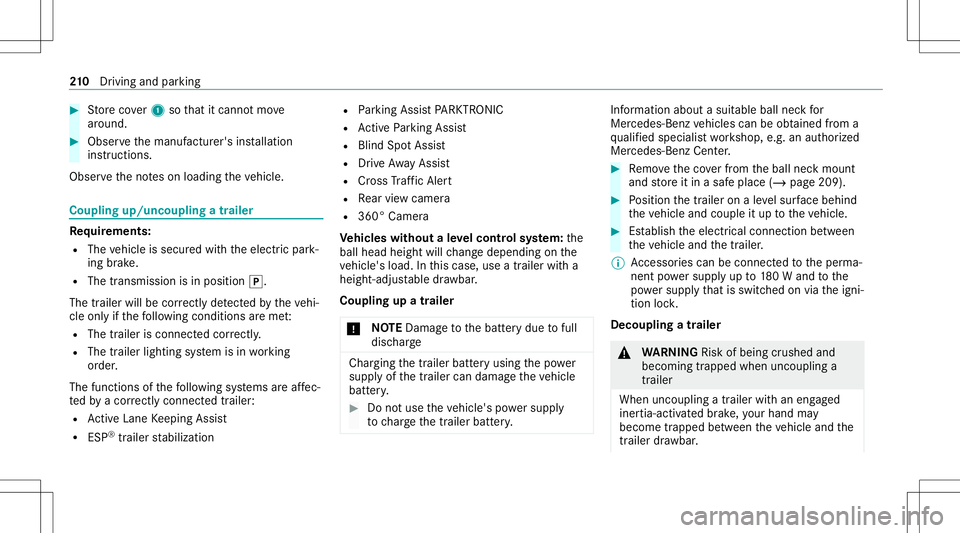
#
Storeco ver1 sothat itcan notmo ve
ar oun d. #
Obse rveth emanuf acturer'sinstallation
ins truct ions .
Obser vetheno teson loadi ngtheve hicle. Coupling
up/uncoupling atrailer Re
quirement s:
R The vehicle issecur edwithth eelectr icpar k‐
ing brak e.
R The transmission isin position 005D.
The trailer willbecor rectly detected bytheve hi‐
cle onlyif th efo llo wing condition sar eme t:
R The trailer isconn ectedcor rectl y.
R The trailer lighting system isin wo rking
or der .
The func tionsof thefo llo wing systems areaf fec‐
te dby acor rectly connect edtrai le r:
R ActiveLa ne Keeping Assist
R ESP®
trailer stabiliz ation R
Parking AssistPA RK TRONI C
R ActivePa rking Assist
R Blin dSpo tAss ist
R Drive Aw ayAssi st
R Cross Traf fic Aler t
R Rear vie wcam era
R 360° Camera
Ve hicl eswithout aleve lcontr olsystem: the
ball head height willchang edepen dingon the
ve hicle's load.Inthis case, useatrailer witha
height -adjustable draw bar .
Coupling upatrailer
* NO
TEDama getothebatt erydue tofull
disc harge Char
gingth etra iler batt eryusing thepo we r
supply ofthetra iler can damag eth eve hicle
batt ery. #
Donotus eth eve hicle's powe rsupp ly
to charge thetrailer battery. Inf
ormation abouta suit ablebal lnec kfo r
Mer cedes-Ben zve hicles canbeobt ained from a
qu alif ied spec ialistwo rkshop, e.g.anaut hor ized
Mer cedes-Benz Center. #
Remo vetheco verfr om theball neckmount
and stor eit in asaf eplace (/page209). #
Position thetra iler onaleve lsur face beh ind
th eve hicle andcouple itup totheve hicle. #
Establish theelectr icalconnect ionbetween
th eve hicle andthetra iler .
% Access oriescan beconnect edtotheper ma‐
nen tpo we rsupp lyup to180W and tothe
po we rsupp lythat isswit ched on via theigni‐
tion lock.
Decoup lingatrail er &
WARNIN GRisk ofbei ng crus hed and
beco ming trap ped whenunco upling a
tr ai le r
Whe nunco upling atrai le rwi th an eng aged
ine rtia-ac tivated brak e, your han dma y
bec ome trapped between theve hicle andthe
tr ai le rdr aw bar . 21
0
Driving and parking
Page 217 of 530
#
Toscr ollinthemenu bar:swipe leftor
ri ght onleft-h and Touc hCon trol 2. #
Tocall upamen uor conf irm aselect ion:
pr ess left-han dTo uc hCon trol 2. #
Toscr ollthrough displa ysorlists on the
menu :swipe upwards ordown wardson left-
hand Touc hCon trol 2. #
Tocall upasub men uor conf irm aselec‐
tion :pr ess left-han dTo uc hCon trol 2. #
Toexitasubm enu:press backbutt onon
th elef t1. Se
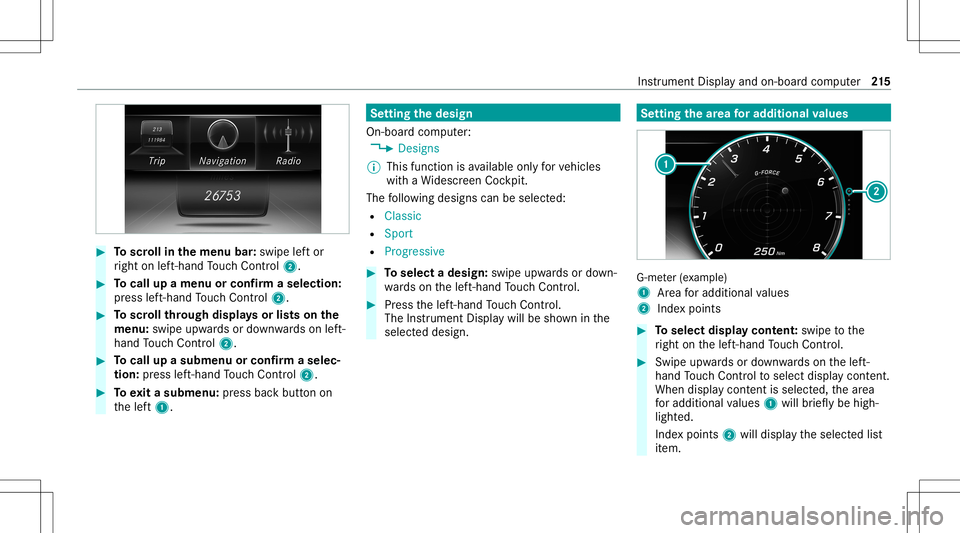
tting thedesig n
On -bo ardcom puter:
4 Designs
% This function isavailable onlyforve hicles
wit haWi descr eenCockpit.
The follo wing design scan beselec ted:
R Classic
R Sport
R Progres sive #
Toselect adesign: swipeupwards ordown‐
wa rdson thelef t-hand Touc hCon trol. #
Press thelef t-hand Touc hCon trol.
The Instru ment Displa ywil lbe sho wninthe
select eddesign. Se
tting thear ea foraddi tional values G-me
ter(e xa mp le)
1 Area foradd itional values
2 Indexpoint s #
Toselect displaycont ent:swipe tothe
ri ght onthelef t-hand Touc hCon trol. #
Swip eupw ards ordown wardson thelef t-
hand Touc hCon trol to select displaycont ent.
When displaycont entisselect ed,thear ea
fo radd itional values 1will brief lybe high‐
light ed.
Ind expoint s2 will displa yth eselect edlist
it em. Ins
trument Displayand on-boar dcom puter 21
5
Page 219 of 530
Ad
jus tingthe inst ru men tlighti ng #
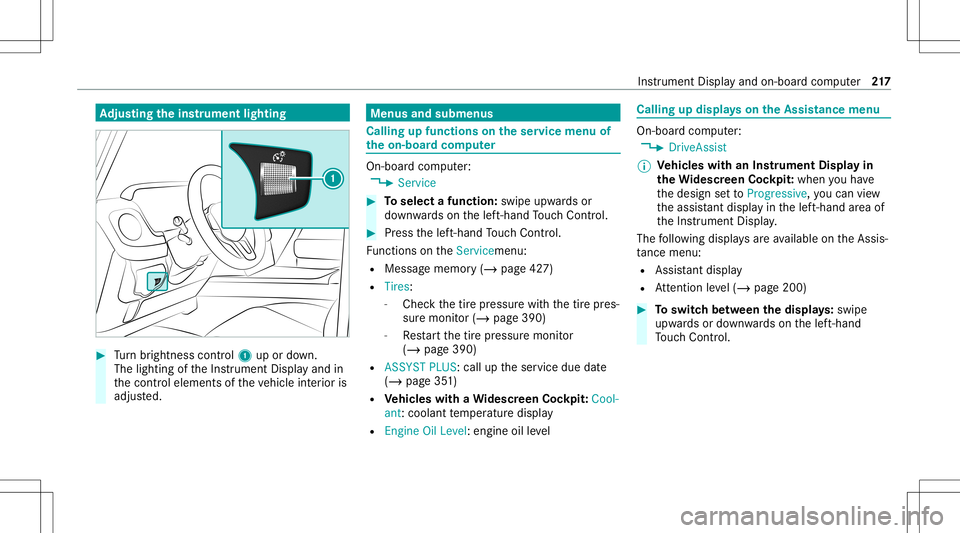
Turn brightn esscontrol 1 upordown.
The lightin gof theIns trument Displayand in
th econ trol element sof theve hicle interior is
adjus ted. Menus
andsubmenu s Calling
upfunctions ontheser vice menu of
th eon-boa rdcom puter On-boar
dcom puter:
4 Service #
Toselect afunction: swipeupwards or
do wn wardson thelef t-hand Touc hCon trol. #
Press thelef t-hand Touc hCon trol.
Fu nctio nson theServ icemen u:
R Messag ememor y(/ page42 7)
R Tires :
- Chec kth etir epr essur ewit hth etir epr es‐
sur emonit or(/ page390)
- Restar tth etir epr essur emonit or
(/ page390)
R ASSYST PLUS: calluptheser vice duedate
(/ page35 1)
R Vehicl eswith aWi des cree nCo ckpit: Cool-
ant :cool anttemp eratur edispla y
R Engine OilLevel: engine oilleve l Callin
gup displa yson theAssis tance menu On
-bo ardcom puter:
4 DriveA ssist
% Ve
hicl eswith anIns trument Displayin
th eWi des cree nCo ckpit: whenyo uha ve
th edesign setto Progressive ,yo ucan view
th eassis tant displ ayinthelef t-hand area of
th eIns trument Display.
The follo wing displa ysareav ailable ontheAssis‐
ta nce menu :
R Assi stant displa y
R Attentio nleve l(/ page200) #
Toswitc hbe tw een thedisp lays :sw ipe
up wa rdsor down wardson thelef t-hand
To uc hCon trol. In
stru ment Displa yand on-boar dcom puter 217
Page 220 of 530
St
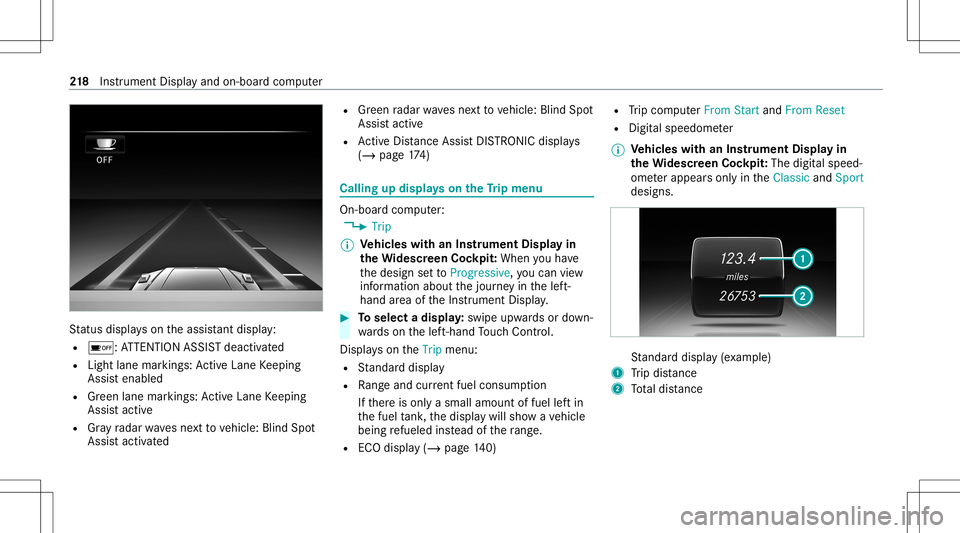
atus displa yson theassis tant displ ay:
R 00D7 :AT TENTION ASSISTdeactiv ated
R Light lanemarkings: ActiveLa ne Keeping
Assis tenabled
R Green lane marking s:Ac tiveLa ne Keeping
Assis tactiv e
R Gray radar wavesnext to vehicle: BlindSpot
Assis tactiv ated R
Green radar wavesne xt to vehicle: BlindSpot
Assis tactiv e
R ActiveDis tance AssistDIS TRONI Cdisp lays
( / pag e17 4) Ca
lling up displ ayson theTr ip menu On-
boar dcom puter:
4 Trip
% Ve
hicl eswith anIns trument Displayin
th eWi des cree nCo ckpit: Whe nyo uha ve
th edesign setto Progressive ,yo ucan view
inf ormat ionabout thejour neyin thelef t-
hand area oftheIns trument Display. #
Toselect adispla y:swipe upwards ordown‐
wa rdson thelef t-hand Touc hCon trol.
Dis playson theTrip menu:
R Standar ddispla y
R Rangeand current fue lconsu mption
If th er eis onl ya small amount offuel leftin
th efuel tank ,th edispla ywill showave hicle
being refuel edinstead ofthera ng e.
R ECOdispl ay(/ pag e14 0) R
Trip com puterFro mStart and FromReset
R Digit alspeedom eter
% Ve
hicl eswith anIns trument Displayin
th eWi des cree nCo ckpit: The digit alspe ed‐
ome terapp earsonly intheClassic andSport
designs. St
andar ddispla y(e xa mp le)
1 Trip dis tance
2 Totaldis tance 21
8
Instrument Displayand on-boar dcom puter
Page 239 of 530
Messag
evo ice comm ands Vo
ice comm and Function
Text message to
crea te ames sage.All addr essbook namesareav ailable.
Reply To
reply toames sage
For ward text mes sage To
forw ardames sage Ov
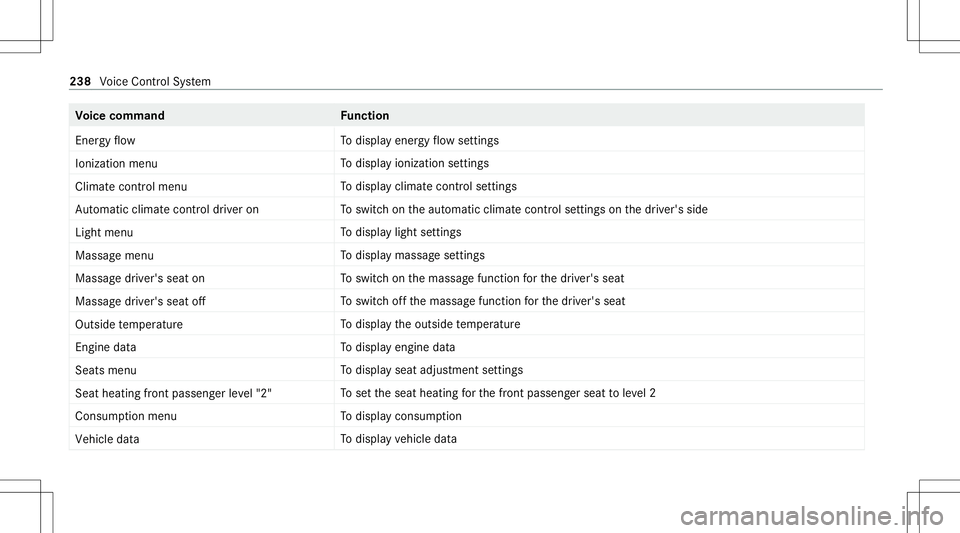
ervie wof vehicl evo ice comm ands Yo
ucan usetheve hicle voice com mand sto
dir ect lycall upthecor responding menusforth e
ve hicle settin gs.
Ve hicl evo ice comm ands Vo
ice comm and Function
Ambien tlight menu To
displa yambient lightsettings
Ambien tlight "blue" To
switc hambient lighttoblue
Display andstyles menu To
sho wdispla yse ttin gs
Assistance menu To
displa yassis tance settings Vo
ice Cont rolSy stem 23
7
Page 240 of 530
Vo
ice comm and Function
En ergy flow To
displa yener gyflow settin gs
Ionization menu To
displa yioniz ation settings
Climate control menu To
displa yclimat econ trol settings
Auto matic climate control driver on To
switc hon theaut omatic climatecon trol settings onthedr iver's side
Light menu To
displa ylight settings
Massage menu To
displa ymassag ese ttings
Massage driver'sseat on To
switc hon themassag efunc tion forth edr iver's seat
Massage driver'sseatoff To
switc hof fth emassag efunc tion forth edr iver's seat
Outside temperature To
displa yth eoutside temp eratur e
En gine data To
displa yengin edat a
Seats menu To
displa yseat adjus tmentse ttings
Seat heating frontpassenger level"2" To
setth eseat heating forth efront passeng erseat toleve l2
Consum ptionmenu To
displa ycon sum ption
Vehic ledata To
displa yve hicle data 238
Voice Cont rolSy stem
Page 250 of 530
Ex
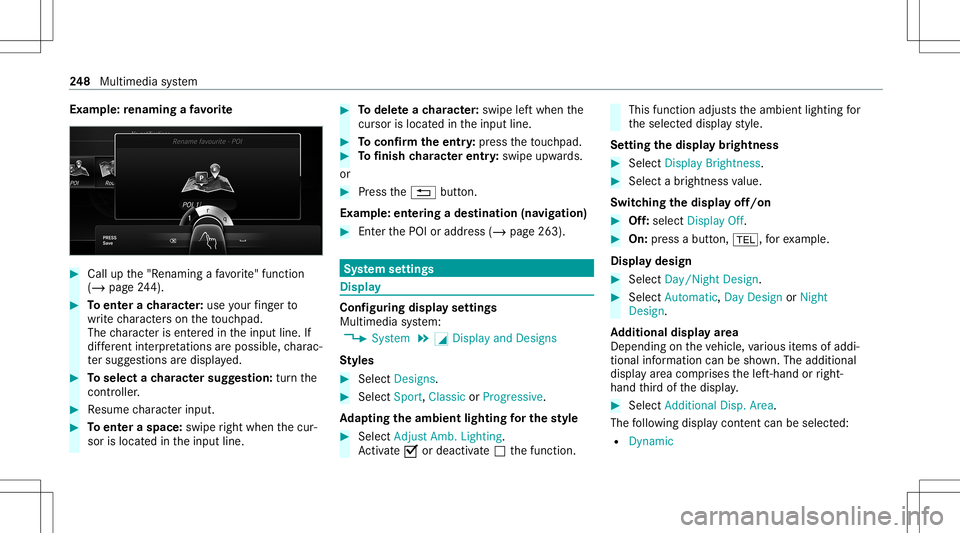
am ple: renaming afa vo rite #
Call upthe"R enaming afa vo rite "fun ction
(/ page24 4). #
Toent erach aract er:use your fing er to
wr ite ch aract erson theto uc hpad.
The charact erisent ered intheinput line. If
dif fere nt interpr etatio nsareposs ible, charac‐
te rsugg estions aredisp laye d. #
Toselect ach aract ersugg estion :tur nth e
contr oller. #
Resume charact erinput. #
Toent eraspa ce:swipe right when thecur‐
sor islocat edintheinput line. #
Todel eteach aract er:swi peleftwhe nth e
cur sor isloca tedin theinput line. #
Toconf irm theentr y:press theto uc hpad. #
Tofinish charact erentr y:swipe upwards.
or #
Press the0038 button.
Ex am ple: entering ades tinat ion(navigation) #
Enterth ePOI oraddr ess(/ page263). Sy
stem settings Displa
y Conf
iguringdisp layse ttings
Multi media system:
4 System 5
0043 Display andDesign s
St yles #
Sele ctDes igns. #
Sele ctSpo rt,Classic orProg ressive.
Ad apting theam bient lightingforthe style #
Select Adju stAmb. Lighting .
Ac tivate0073 ordeacti vate 0053 thefunc tion. This
function adjus tstheambient lightingfor
th eselect eddispla yst yle.
Se tting thedisp laybr ight ness #
Sele ctDis play Bright ness. #
Sele ctabr ight nessva lue.
Switc hingthedisp layof f/on #
Off:selec tDis play Off. #
On: press abutt on,002B, forex am ple.
Displ aydes ign #
Select Day /Nig htDesi gn. #
Select Autom atic,Day DesignorNig ht
Desi gn.
Ad diti onaldispl ayarea
Dependi ngon theve hicle, various items ofaddi‐
tional information canbesho wn. The additional
displa yar ea com prises thelef t-hand orright-
hand third of thedispla y. #
Select Addi tiona lDisp .Area .
The follo wing displa ycon tent can beselect ed:
R Dyna mic 24
8
Multimedia system