ad blue MERCEDES-BENZ G-CLASS 2020 Owner's Manual
[x] Cancel search | Manufacturer: MERCEDES-BENZ, Model Year: 2020, Model line: G-CLASS, Model: MERCEDES-BENZ G-CLASS 2020Pages: 530, PDF Size: 45.97 MB
Page 33 of 530
The
EDRin this vehicle isdesigned torecor d
su ch dat aas:
R Howvarious systems inyour vehicle were
oper ating
R Whe ther or notth edr iver and front
passeng erseat belts werebuc kled/f astened
R Howfar(if at all)th edr iver wa sdepr essing
th eaccelera torand/or brak epeda land
R Howfast theve hicle wastrave ling
This datacan help prov ide abe tter under stand‐
ing ofthecir cums tances inwh ich acci dents and
inju ries occur .NO TE: EDRdat ais recor ded by
yo ur vehicle onlyif anon- trivial crash situation
occur s;no dat ais recor ded bytheED Runder
nor mal driving conditions andnoper sonal data
(e.g. name, gende r,ag eand acciden tloc atio n)is
re cor ded .Ho wever,ot her parties, suchas law
enf orcement ,could combine EDRdatawit hth e
typ eof personally identifying dataro utin ely
acq uired dur ing acr ash inve stigation .
Ac cess totheve hicle and/or theED Ris needed
to read dat ath at isrecor ded bytheED R,and
special equipment isrequ ired. Inaddition tothe
ve hicle manuf acturer,ot her parties that have the special
equipment, suchas law enf orcement,
can read theinf ormation byacc essi ngtheve hi‐
cle ortheED R.
ED Rdat ama ybe used incivil andcriminal mat‐
te rs as ato ol inaccident recons tructi on,acci ‐
dent claims and vehicle safety. Since theCr ash
Dat aRe trie va l(CDR) tool that isused toextract
da ta from theED Ris comm erciall yav ailable,
Mer cedes-Ben zUS A,LLC("MBUS A")expressl y
disclaims anyand allliability arising from the
ex tracti onofthis inf ormatio nby unaut horized
Mer cedes-Ben zper son nel.
MB USAwill notshar eED Rdat awit hot her swit h‐
out thecon sent oftheve hicle owner or,if th e
ve hicle isleased, without thecon sent oftheles‐
see. Excep tion sto this repr esent ation include
re sponses tosubpoenas bylaw enf orcem ent;by
fe der al,stat eor loc algo vernment ;in connection
wit hor arising outoflitig ation invo lvin g MBUS A
or its subsidia ries and affiliat es; or,as requ ired
by law.
Wa rning: theED Ris acom ponen tof the
Re stra int System Module. Tamp ering with,alt er‐
ing, modifying orremo ving theED Rcom ponen tma
yre sult inamalfunction oftheRe stra int Sys‐
te m Modu leand other systems.
St atelaws orregulations rega rding EDRs that
con flict withfe der alregulation arepr e-em pted.
This means that intheeve ntofsuch conf lict, the
fe der alregulation governs. As ofDecember
20 16 ,17 stat es have enact edlaws relatin gto
EDRs . Co
pyright Fr
ee and open- sourcesof tware In
fo rm atio non lice nsefo rfr ee and open-sou rce
sof twareused inyour vehicle canbefound on
th edat acar rier inyour vehicle document wallet
and withupdat eson thefo llo wing websit e:
htt p:// www .mercedes- benz.com/open source Re
gis tere dtrademar ks R
Bluetoo th®
is are gis tere dtra demar kof Blue‐
to othSIG Inc.
R DTS™ isare gis tere dtra demar kof DT S,Inc. Ge
ner alno tes 31
Page 224 of 530
#
Tochang etrac ks on anact ive med ia
sour ce:swipe upwards ordown wardson the
lef t-hand Touc hCon trol.
Cha nging amed iasour ce #
Press thelef t-hand Touc hCon trol. #
Toselect amedia source:swipe upwards
or down wardson thelef t-hand Touc hCon ‐
tr ol. #
Press thelef t-hand Touc hCon trol. Diali
ngtelephone numbersusing theon-
boar dcom puter &
WARNIN GRisk ofdist ra ction from infor‐
mati onsystems andcomm unication s
eq uipment
If yo uoper ateinf ormat ionand comm unic a‐
tio neq uipme ntintegratedin theve hicle
when driving, youwill bedistract ed from the
tr af fic situ ation. Thiscou ldalso cau seyouto
lose control of theve hicle. #
Onlyoper ateth is eq uipmen twhen the
tr af fic situ ation per mits. #
Ifyo ucan notbe sur eof this, stop the
ve hicle whilstpa ying attention toroad
and traffic condi tions andoperate the
eq uipment withth eve hicle statio nary. When
usingthephone, observetheleg al
re qu iremen tsforth ecount ryinwhic hyo uar e
cur rentl ydr ivi ng.
Re quirement s:
R The mobile phoneis con nectedto themulti‐
media system.
On- boar dcom puter:
4 Phone
Ve hicl eswith theCOMAN Dmu ltim edia sys‐
te m: The mos tre cent telephon ecalls (dialed,
re cei vedand missed calls)aredispla yedon the
Phone menu. #
Toselect anentr y:swipe upwards ordown‐
wa rdson thelef t-hand Touc hCon trol. #
Press thelef t-hand Touc hCon trol.
If th ereis onl yone telephone number
sa ve dto an entr y:thete lephon enumb er
will beselec ted. #
Ifth erear emu ltip letelephone numbers
sa ve dto an entr y:swipe upwards ordown‐
wa rdson thelef t-hand Touc hCon trol to
select thedesir edtelephon enumb er. #
Press thelef t-hand Touc hCon trol.
The telephon enumb erwill bedialed.
The follo wing displa ysma yapp ear instead ofthe
te lephon enumb ersdialed:
R Please Wait...:th eapplication isstar tin g.Ifa
Blue tooth®
connecti ontothemobile phone
is no tes tablished, themenu forau thor izing
and conn ectin gamobile phonewillbedis‐
pla yedon themultimedia system
(/ page290).
R Updating data...:th ecall listis being upda‐
te d.
R Import ingContac ts...: con tacts arebei ng
im por tedfrom themobile phoneorast or ag e
medium. 222
Instrument Displayand on-boar dcom puter
Page 228 of 530
Oper
ablefunctions Yo
ucan usetheVo ice Cont rolSy stem tooper ate
th efo llo wing equipmen tdepen dingonthefe a‐
tur es:
R Telephon e
R Text mes sage s
R Navig ation
R Address book
R Radio
R Audio (memor ycar d,Media Interface, USB
and Bluetoo th®
audio)
R Vehicle Ov
ervie wof types ofvoice comm and A
dis tinction ismade between thefo llo wing
vo ice com mand s:
R Global voice comm andscan besaid atany
time andrega rdless ofthecur rent applica ‐
tio n,e.g .th evo ice com mand sNavigat eto,
Call orText mess ageto. R
App licat ion-sp ecificvo ice comm andsar e
onl yav ailable forth eactiv eapplication.
Onc eth eVo ice Cont rolSy stem isstar tedan
aut ocue issho wn. Apar tfr om theav ailable voice
com mand sfo rth eapplication currently active,
th is also cites exam ple voice com mand sfo r
ot her appli cations whichar eno tactiv e.In this
wa y,yo uwill befamili armor equ ickl ywit hth e
av ailable voice com mand s.The listcan bescrol‐
led oritcan beopera tedby speec hor thecon ‐
tr oller/t ouchpad. No
teson thelangu agese tting Yo
ucan chang eth elanguag eof theVo ice Con‐
tr ol Sy stem viathesy stem languag ese ttings. If
th ese tsy stem languag eis no tsuppor tedby the
Vo ice Cont rolSy stem, English will beselec ted.
The Voice Cont rolSy stem isavailable inEn glish,
Fr enc h,Po rtuguese andSpan ish. Using
theVo ice Contr olSy stem effectiv ely Fe
atur esofaudibl ehelp functions Yo
ure cei veinformatio nand help forth efo llo w‐
ing topics:
R Optim um oper ation: sayth ebrief instruc-
tion voice com mand .
R Cur rent app lication: onthemultifunc tion
st eer ing wheel, press the£ rock er switc h
up and sayth eHelp voice com mand .
R Continu eddia log: sayth eHelp voice com ‐
mand during avo ice dialog.
R Specif icfunct ion:sayvo ice com mand sfo r
th edesir edfunc tion,e.g. Help telephon e. No
teson howto improve speec hqu ality If
th eVo ice Cont rolSy stem does notunder stand
yo u:
R onlyop erateth eVo ice Cont rolSy stem from
th edr iver's seat.
R sayth evo ice com mand scohe rentl yand
cle arly,bu tdo notex agg erateth ewo rds. 226
Voice Cont rolSy stem
Page 239 of 530
Messag
evo ice comm ands Vo
ice comm and Function
Text message to
crea te ames sage.All addr essbook namesareav ailable.
Reply To
reply toames sage
For ward text mes sage To
forw ardames sage Ov
ervie wof vehicl evo ice comm ands Yo
ucan usetheve hicle voice com mand sto
dir ect lycall upthecor responding menusforth e
ve hicle settin gs.
Ve hicl evo ice comm ands Vo
ice comm and Function
Ambien tlight menu To
displa yambient lightsettings
Ambien tlight "blue" To
switc hambient lighttoblue
Display andstyles menu To
sho wdispla yse ttin gs
Assistance menu To
displa yassis tance settings Vo
ice Cont rolSy stem 23
7
Page 252 of 530
#
Con firm chang eswhen exitin gth emenu.
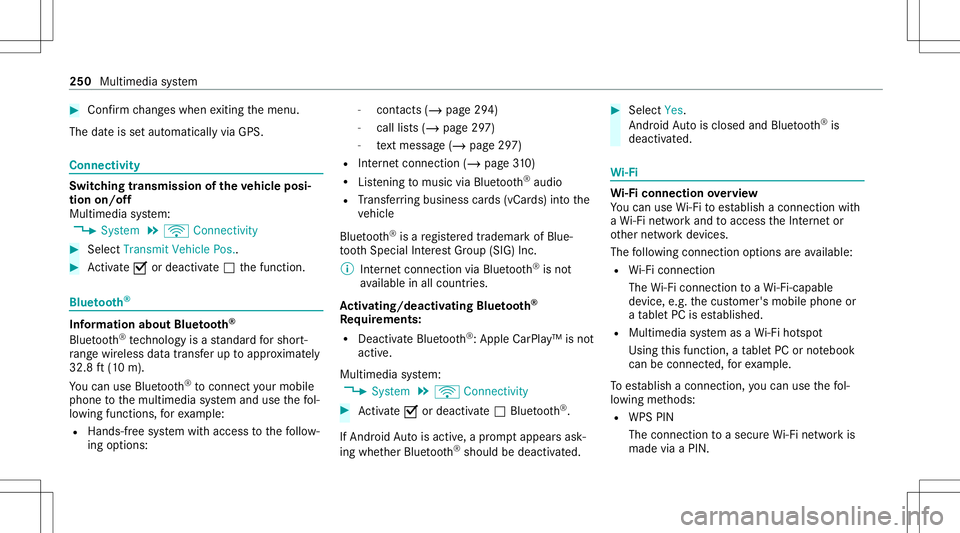
The dateis setaut omaticall yvia GPS. Connectivity
Switc
hingtransmission oftheve hicl eposi ‐
tion on/off
Mul timedi asy stem:
4 System 5
ö Connec tivity #
Select Transm itVehicle Pos.. #
Activate0073 ordeacti vate 0053 thefunc tion. Blue
tooth® Inf
orma tion abou tBlu etoo th®
Bl ue tooth®
tech nol ogy isast andar dfo rshor t-
ra ng ewi reless datatransf erup toappr oximat ely
32. 8ft (10 m).
Yo ucan useBlue tooth®
to connect your mob ile
phon eto themultimedia system and usethefo l‐
lo wing functions,forex am ple:
R Han ds-free system withaccess tothefo llo w‐
ing option s: -
con tacts (/ page 294)
- call lists (/ page29 7)
- text mes sage (/ pag e29 7)
R Interne tcon nection (/page31 0)
R List ening tomusi cvia Blue tooth®
audio
R Trans ferring busine sscar ds(vCar ds)intoth e
ve hicle
Blue tooth®
is are gis tere dtra demar kof Blue‐
to othSpecial Interes tGr oup (SIG) Inc.
% Interne tconn ection viaBlue tooth®
is no t
av ailable inall coun tries.
Ac tiv atin g/deac tivatin gBlue tooth®
Re quirement s:
R Deac tivateBlue tooth®
:Appl eCa rPlay™ isno t
activ e.
Mul timed iasystem:
4 System 5
ö Connec tivity #
Activate0073 ordeacti vate 0053 Bluetoo th®
.
If Andr oidAutoisact ive, apr om ptappear sask ‐
ing whe ther Blue tooth®
should bedeactiv ated. #
Select Yes.
Andr oidAutoisclos edand Bluetooth®
is
deact ivat ed. Wi
-Fi Wi
-Fico nne ctio nove rview
Yo ucan useWi-Fi toestablish acon nection with
a Wi -Fi networkand toacc ess theInt erne tor
ot her networkde vices.
The follo wing connection option sar eav ailable:
R Wi-Fi conne ction
The Wi-Fi conne ctionto aWi -Fi-ca pable
de vice ,e.g .th ecus tomer's mobilephone or
a ta ble tPC ises tablished.
R Multimedia system asaWi -Fi hotspo t
Usi ngthis func tion,a ta ble tPC ornotebook
can becon nected, forex am ple.
To establish acon nection ,yo ucan usethefo l‐
lo wing methods:
R WPS PIN
The conn ection toasec ureWi -Fi networkis
mad evia aPIN . 25
0
Mu ltimed iasystem
Page 274 of 530
The
multimedia system announ cesthe
nam esofthero ads that will follo wthe
upco mingch ang eof dir ect ion.
This function isno tav ailable inall coun tries
and languages.
Displ aying destina tion informa tion
Re quirement s:
R Ades tination isent ered.
Multime diasystem:
4 Navigation #
Select WayPoint sand Info.
The follo wing informatio nis displa yed:
R Intermediat edes tinations anddestination
The routecan also include uptofour
int ermed iatedes tinatio ns.
R Name, address
R Remaini ngdriving distance
R Time ofarriva l Selec
tinganalternativ ero ute
Mul timedi asy stem:
4 Navigation 5
À Route andPosition #
Select Alternativ eRoute.
The routes aredispl ayed inaccor dance with
th ese tting made inthero utese tting s.
The currentl ysel ect edrouteis sho wnwitha
dar kblue line. #
Select thealt ernativ ero ute.
Swit ching theaut oma ticgasst ation search
on/of f
Mult imedia system:
4 Navigation 5
Z Option s #
Switc hReserve Fuelon0073 oroff0053.
Switc hedon0073: when thefuel reser veleve l
is reac hed, apr om ptappear sask ing whe ther
yo uwa nttostar tsear ching forga sst atio ns.
Using automatic gasst ation search
Re quirement s:
The automat icga sst atio nsear chisact ivat ed 0073
(/ page27 2). The
prom ptReser veFue lDo you want tostart a
sear chfor surroun dinggas stati ons? appear s. #
Selec tYes.
The automat icga sst atio nsear chbegins. The
av ailable gasst atio nsalon gth ero uteor in
th evicinit yar edispla yed. #
Select thega sst atio n. #
When ther eis no route, thega sst atio nis set
as thedes tinat ion.
or #
When ther eis aro ute, thega sst atio nis set
as thene xt int ermediat edes tinat ion.
St arting theaut oma ticser vice station
sear ch
Re quirement s:
R ATTENTION ASSISTand theSuggest Rest
Area function areactiv ated (/ page20 1).
Dr iving situation
The ATTE NTION ASSIS TDo you want tosearch
for arest area? messag eis sho wn. 27
2
Multimedia system
Page 290 of 530
oper
ating mobile communic ationequipment in
th eve hicle.
Fu rther information canbeobt ained from an
aut hor ized Mercedes-Ben zCent eror at:http: //
www .mercedes-benz .com/connect.
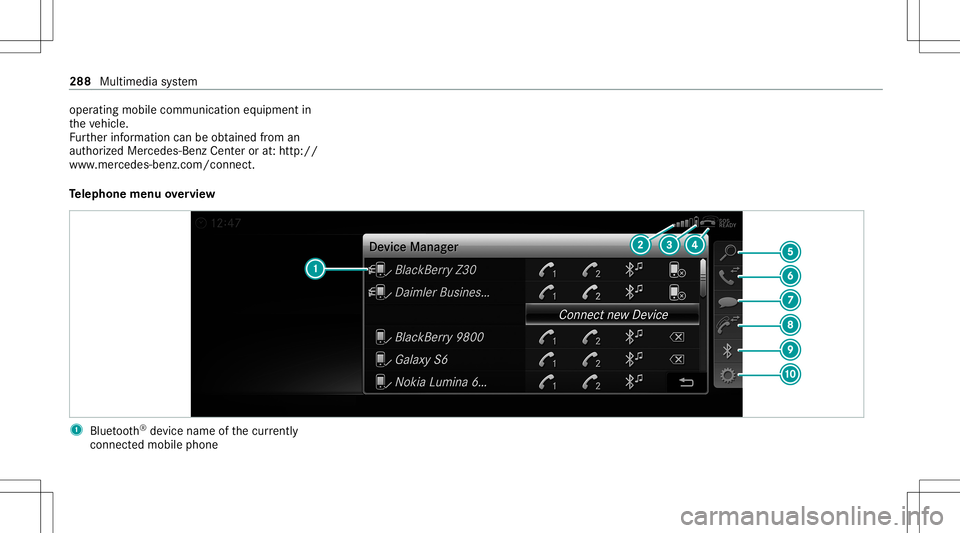
Te lephone menuoverview 1
Blue tooth®
de vice name ofthecur rently
conne cted mob ile pho ne 28
8
Mu ltimed iasystem
Page 291 of 530
2
Signal stre ngt hof themobile phonenetwork
fo rth ecur rently conne cted and select ed
mob ile pho ne
3 Batt eryst atus ofthecur rently conne cted
and select edmob ile pho ne
4 0071 (tel ep hone ready) or0097 (callactive)
5 Con tacts(/ page29 4)
6 Rece ntCalls (/page29 7)
7 TextMess age
8 Onemobi lephon econ nected: Ac tive Call.
Tw omobile phones connected: chang esview
be tween telephon e1 and 2or ActiveCall
9 Devices (/page290)
A Options
Symbo ls1 to4 areno tsho wnuntilaf te ra
mobil ephone hasbeen connect edtothemulti‐
media system. Thesymbols dependonyour
mob ilephon eand your mob ilephon ene twork
pr ov ider . Blu
etoo th®
pr ofile ove rview Blue
tooth®
pr ofile
of the mobi lephon eFu
nction
PB AP (Phone Book
Access Profile) Cont
actsar eaut o‐
matic allydispla yedin
th emultimedia sys‐
te m
MAP (Messag e
Access Profile) Messag
efunc tions
can beused Te
lephon yoper ating mod esove rview
Depen dingonyour equipme nt,th efo llo wing tel‐
ephon yoper atingmodes areav ailable:
R Amobi lephon eis con nectedto themultime‐
dia system viaBlue tooth®
(/ pag e290).
R Twomobile phones areconn ectedwithth e
multime diasystem viaBlue tooth®
(tw o
phone mode) (/page290 ). Inf
orma tion ontelephon y
The follo wing situat ionscanlead tothecall
being discon nectedwhile theve hicle isin
mo tion:
R Ther eis insuf ficie ntnetworkco verage inthe
ar ea
R Youmo vefrom one GSM orUMT Stransmit‐
te r/r eceiv erarea (cell )int oano ther and no
comm unication chann elsarefree
R The SIM car dused isno tcom patible withth e
ne tworkav ailable
R Amobi lephon ewit h"T winc ard" islogg ed
int oth ene tworkwit hth esecon dSIM cardat
th esame time
The multimedia system suppor tscalls inHD
Vo ice ®
forim prove dspeec hqu alit y.Arequ ire‐
men tfo rth is isthat themobile phoneandthe
mobil ephone networkpr ov ider oftheper son
yo uar ecalli ngsuppo rtHD Voice ®
.
Depe ndingon thequ alit yof thecon nect ion,the
vo ice qualit yma yfluct uate. Mult
imed iasystem 289
Page 292 of 530
Connect
ingamob ilephone (Bluetoo th®
te l‐
ephon y)
Re quirement s:
R Blue tooth®
is act ivat ed on themobile phone
(see themanuf acturer'soper ating instruc‐
tion s).
R Blue tooth®
is act ivat ed on themultimedia
sy stem (/ page250).
Multimedia system:
4 Phone 5
00A5 Devic es
Sear ching fora mob ile pho ne #
Select Connect NewDevice. #
Select Star tSea rch onSys tem .
The available mobilephon esaredispla yed. If
a ne wmobile phoneisfound ,it is ind icat ed
by the# symbol.
Connecting amobile phone(authorizat ion
using SecureSim plePairing) #
Selec tth emobile phone.
A code isdispla yedin themultimedia system
and onthemobile phone. #
Ifth ecodes match: con firm thecode on
th emobile phone.
Connecting amobile phone(authorizat ion by
ent ering apa ssk ey) #
Select themobile phone. #
Choose aone tosixt een-digit numbercombi‐
nation asapassk ey. #
On themu ltim edia system: enterthepass‐
ke yand select0076. #
On themobil eph one: enterthepassk ey
ag ain and confirm .
% Upto15 mobil ephones canbeauthor ized
on themultimedia system.
Au thor ized mobile phones arere connect ed
au tomatical ly.
Connect ingasecond mobilephone (two
ph one mod e)
Re quirement s:
R Atleas tone mobile phoneis alr eady connec‐
te dto themultimedia system viaBlue tooth®
. Multimedia
system:
4 Phone 5
00A5 Devic es #
Select Connec tNew Devic e. #
Select Start Search onSystem.
The available mobilephon esaredispla yed. #
Select themobile phone. #
Answ ertheHow would youliketocon nect
the new device? prom pt. #
Toreplac ethe currentl yconnect ed
mobile phone:selectPhone 1.
The currentl yconne cted mob ile pho neis
re placed bythene wmobile phone.
or #
Toconnect thesecond mobileph one:
selec tPhon e2.
The newmobile phoneis con nectedas
Phone 2.Iftw omobile phones have already
been connected, thesecon dte lephon eis
re placed bythene wmobile phone.
or #
Touse themobil eph one asan aud io
sour ce:selec tAudio Source(/ page32 5). 290
Multimedia system
Page 293 of 530
%
Amob ile pho necan beoperated both as an
audio sourceaswellas telephon ein par allel.
% Itis possible atanyfutur epoint tochang e
th etype ofcon nect ionforth emobile phone
alr eady connect edand tosetth is as Phon e
1, Phon e2 or Audio Source(/ page29 1).
Fu nctions ofthemobil eph one intw oph one
mod e
Fu nctions overview Mobile
phoneinthe
fo re gr ound Mobile
phone inthe
bac kground
Fu llra ng eof func ‐
tio ns Incom
ingcalls In
te rchangi ngmobil ephone s(tw ophone
mode)
Re quirement s:
R The mobile phonesareaut hor ized
(/ page290) . Multime
diasystem:
4 Phone 5
00A5 Devic es #
Inthede vice overview, select amobile phone
whic hhas already been author ized andset
as Phone 1or Phone 2.
Af terint erch ang ingthemobile phones, the
mobil ephone inthefo re grou nd isreplaced by
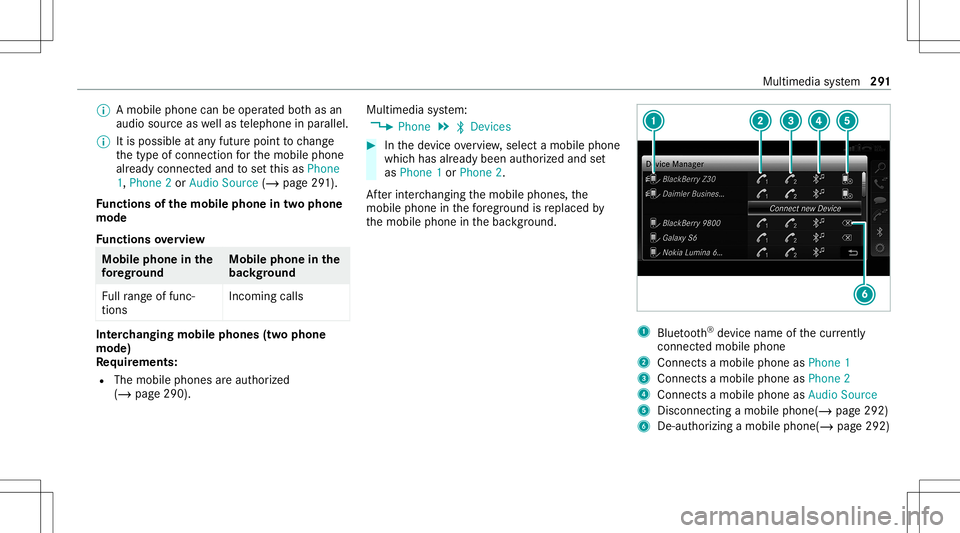
th emobile phoneinthebac kground. 1
Blue tooth®
de vice name ofthecur rently
conne cted mob ile pho ne
2 Connects amob ile pho neasPho ne1
3 Connects amob ile pho neasPho ne2
4 Connects amob ile pho neasAud ioSou rce
5 Disc onnec tingamob ile pho ne(/ page 292)
6 De-au thor izing amobile phone(/page292) Multimedia
system 29
1