remote control MERCEDES-BENZ G-CLASS SUV 2008 User Guide
[x] Cancel search | Manufacturer: MERCEDES-BENZ, Model Year: 2008, Model line: G-CLASS SUV, Model: MERCEDES-BENZ G-CLASS SUV 2008Pages: 293, PDF Size: 4.49 MB
Page 155 of 293
Features
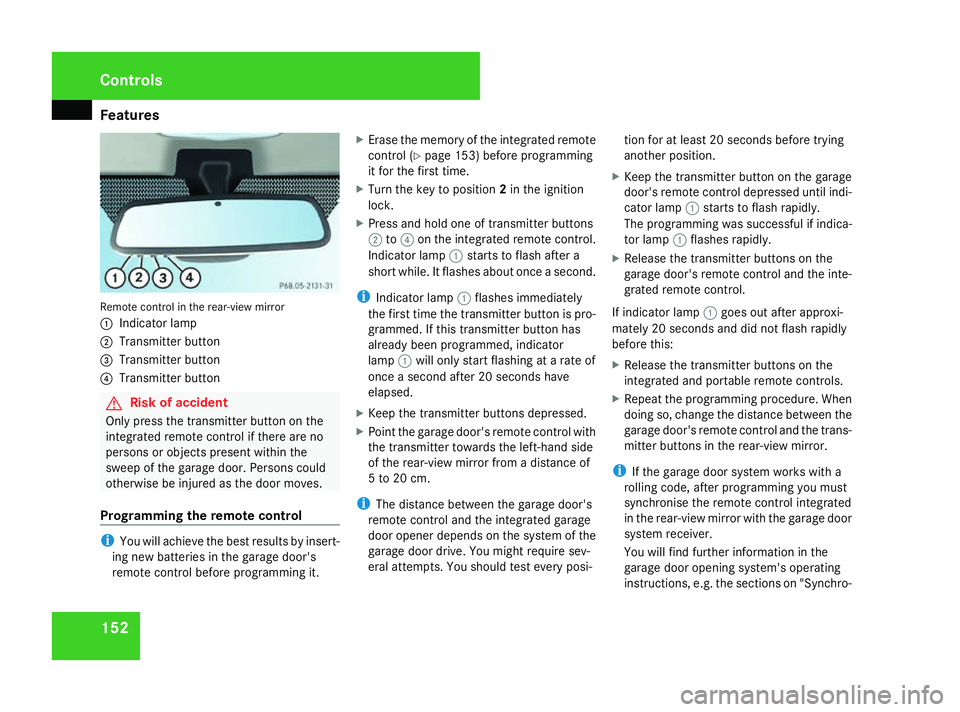
152Remote control in the rear-view mirror
1
Indicator lamp
2 Transmitter button
3 Transmitter button
4 Transmitter button G
Risk of accident
Only press the transmitter button on the
integrated remote control if there are no
persons or objects present within the
sweep of the garage door. Persons could
otherwise be injured as the door moves.
Programming the remote control i
You will achieve the best results by insert-
ing new batteries in the garage door's
remote control before programming it. X
Erase the memory of the integrated remote
control (Y page 153) before programming
it for the first time.
X Turn the key to position 2in the ignition
lock.
X Press and hold one of transmitter buttons
2 to4 on the integrated remote control.
Indicator lamp 1starts to flash after a
short while. It flashes about once a second.
i Indicator lamp 1flashes immediately
the first time the transmitter button is pro-
grammed. If this transmitter button has
already been programmed, indicator
lamp 1will only start flashing at a rate of
once a second after 20 seconds have
elapsed.
X Keep the transmitter buttons depressed.
X Point the garage door's remote control with
the transmitter towards the left-hand side
of the rear-view mirror from a distance of
5 to 20 cm.
i The distance between the garage door's
remote control and the integrated garage
door opener depends on the system of the
garage door drive. You might require sev-
eral attempts. You should test every posi- tion for at least 20 seconds before trying
another position.
X Keep the transmitter button on the garage
door's remote control depressed until indi-
cator lamp 1starts to flash rapidly.
The programming was successful if indica-
tor lamp 1flashes rapidly.
X Release the transmitter buttons on the
garage door's remote control and the inte-
grated remote control.
If indicator lamp 1goes out after approxi-
mately 20 seconds and did not flash rapidly
before this:
X Release the transmitter buttons on the
integrated and portable remote controls.
X Repeat the programming procedure. When
doing so, change the distance between the
garage door's remote control and the trans-
mitter buttons in the rear-view mirror.
i If the garage door system works with a
rolling code, after programming you must
synchronise the remote control integrated
in the rear-view mirror with the garage door
system receiver.
You will find further information in the
garage door opening system's operating
instructions, e.g. the sections on "Synchro- Cont
rols
463_AKB; 1; 8, en-GB
wobuchh,
Version: 2.10.6 2008-07-17T15:19:41+02:00 - Seite 152Dateiname: 6515_4091_02_buchblock.pdf; preflight
Page 156 of 293
Features
153
nising the transmitter" or "Registering a
new transmitter".
Opening or closing the garage door Once programmed, the integrated remote
control will assume the function of the garage
door system's remote control. Please read
the operating instructions for the garage door
system.
X Turn the key to position 2in the ignition
lock.
X Press the transmitter button on the rear-
view mirror that you have programmed to
operate the garage door.
i The transmitter will transmit a signal for
as long as the transmitter button is being
pressed. The transmission will be halted
after a maximum of 20 seconds and indi-
cator lamp 1will flash. Press the trans-
mitter button again if necessary. Clearing the remote control memory X
Turn the key to position 2in the ignition
lock.
X Press and hold transmitter buttons 2and
4 for approximately 20 seconds until indi-
cator lamp 1flashes rapidly.
The memory is cleared.
i You should clear the remote control mem-
ory before selling the vehicle. Floormat on the driver's side
G
Risk of accident
Make sure that there is sufficient clearance
around the pedals when floormats are
used, and that the floormats are properly
secured.
The floormats must be secured at all times
using retainers and studs.
Before you drive off, make sure that the
floormats are secure and rectify if neces-
sary. A floormat which is not properly
secured can slip and thereby interfere with
the movement of the pedals.
Do not place floormats on top of one
another. Cont
rols
463_AKB; 1; 8, en-GB
wobuchh,
Version: 2.10.6 2008-07-17T15:19:41+02:00 - Seite 153 ZDateiname: 6515_4091_02_buchblock.pdf; preflight
Page 231 of 293
Troubleshooting
228 Auxiliary heating/ventilation*
Problem Possible cause/consequence Suggested solutions
The indicator lamp in the auxiliary
heating remote control lights up
orange. The remote control batteries are
almost discharged. X
Replace the remote control batteries (Y page 235).The indicator lamp in the auxiliary
heating remote control flashes
orange. The remote control batteries are
discharged. X
Replace the remote control batteries (Y page 235).Parking up the vehicle
Problem Possible cause/consequence Suggested solutions
The vehicle is to be left parked up
for longer than six weeks. Damage resulting from non-use
ma
y occur if the vehicle is parked
up for long periods. X
Visit a qualified specialist workshop and seek advice.
X Disconnect the battery (Y page 248).Practical advice
* optional
463_AKB; 1; 8, en-GB
wobuchh,
Version: 2.10.6 2008-07-17T15:19:41+02:00 - Seite 228Dateiname: 6515_4091_02_buchblock.pdf; preflight
Page 238 of 293
Changing the bulbs
235
X
Push the battery tray back into the key
housing until the battery tray engages.
X Check the function of all key buttons on the
vehicle. Auxiliary heating* remote control
Checking the batteries X
Press the ONorOFF button.
The battery charge check lamp lights up
when you press the button:
R ON green
R OFF red
and then briefly orange.
If the batteries are discharged, the battery
check lamp only lights up in orange when
the buttons are pressed.
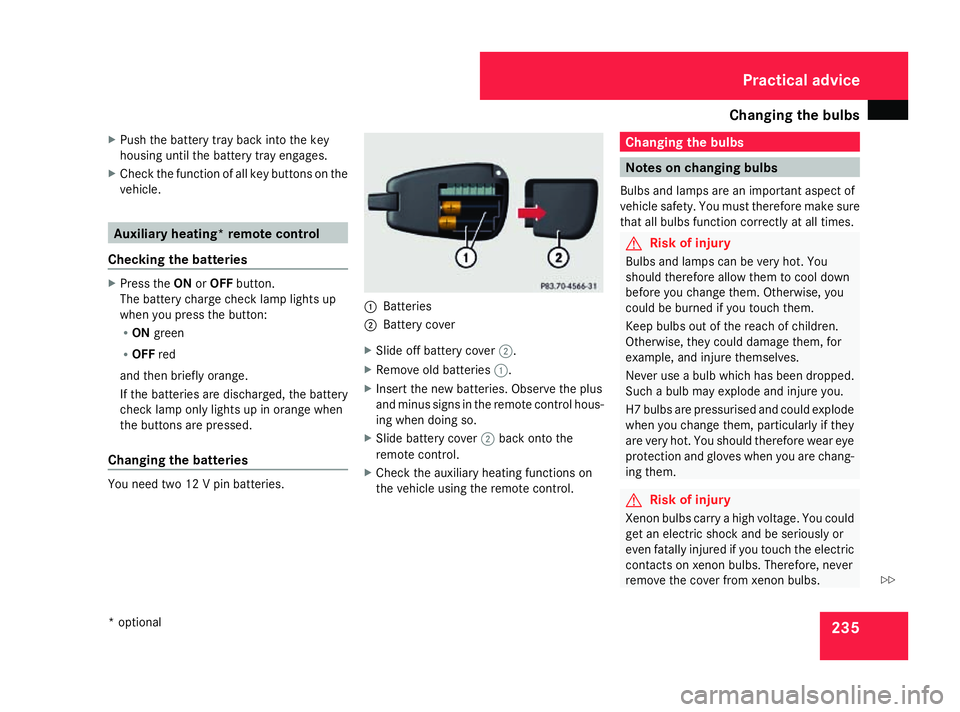
Changing the batteries You need two 12 V pin batteries. 1
Batteries
2 Battery cover
X Slide off battery cover 2.
X Remove old batteries 1.
X Insert the new batteries. Observe the plus
and minus signs in the remote control hous-
ing when doing so.
X Slide battery cover 2back onto the
remote control.
X Check the auxiliary heating functions on
the vehicle using the remote control. Changing the bulbs
Notes on changing bulbs
Bulbs and lamps are an important aspect of
vehicle safety. You must therefore make sure
that all bulbs function correctly at all times. G
Risk of injury
Bulbs and lamps can be very hot. You
should therefore allow them to cool down
before you change them. Otherwise, you
could be burned if you touch them.
Keep bulbs out of the reach of children.
Otherwise, they could damage them, for
example, and injure themselves.
Never use a bulb which has been dropped.
Such a bulb may explode and injure you.
H7 bulbs are pressurised and could explode
when you change them, particularly if they
are very hot. You should therefore wear eye
protection and gloves when you are chang-
ing them. G
Risk of injury
Xenon bulbs carry a high voltage. You could
get an electric shock and be seriously or
even fatally injured if you touch the electric
contacts on xenon bulbs. Therefore, never
remove the cover from xenon bulbs. Practical advice
* optional
463_AKB; 1; 8, en-GB
wobuchh, Version: 2.10.6 2008-07-17T15:19:41+02:00 - Seite 235 ZDateiname: 6515_4091_02_buchblock.pdf; preflight