change time MERCEDES-BENZ G-CLASS SUV 2008 Owners Manual
[x] Cancel search | Manufacturer: MERCEDES-BENZ, Model Year: 2008, Model line: G-CLASS SUV, Model: MERCEDES-BENZ G-CLASS SUV 2008Pages: 293, PDF Size: 4.49 MB
Page 4 of 293
Thank you for choosing Mercedes-Benz.
Before you drive off, familiarise yourself with
your vehicle and read this manual. This will
help you to obtain the maximum pleasure
from your vehicle and to avoid endangering
yourself and others.
Items of optional equipment are marked with
an asterisk *.
The standard equipment in your vehicle may
vary, depending on the model, the ordered
items, the country specifications and availa-
bility.
The illustrations in this manual show a left-
hand-drive vehicle. The arrangement of the
switches, levers, stowage compartments,
etc. will differ accordingly in a right-hand-
drive vehicle.
Mercedes-Benz is constantly updating its
vehicles to the state of the art and therefore
reserves the right to introduce changes in
design, equipment and technical features at
any time. You cannot, therefore, base any
claims on the data, illustrations or descrip-
tions in this manual.
Please consult a Mercedes-Benz Service
Centre if you have any questions.
The Owner’s Manual, Brief Instructions,
Service Booklet and supplements related to
vehicle equipment belong with the vehicle. You should always keep them in the vehicle
and pass them on to the new owner if you sell
the vehicle.
The technical documentation team at
Daimler AG wishes you safe and pleasant
motoring.
i
You can get to know the important fea-
tures of your vehicle in German and in Eng-
lish in the interactive Owner's Manual on
the Internet at:
www.mercedes-benz.de/betriebsanlei-
tung
463_AKB; 1; 8, en-GB
wobuchh
,V ersion: 2.10.6
2008-07-17T15:19:41+02:00 - Seite 1 Dateiname: 6515_4091_02_buchblock.pdf; preflight
Page 18 of 293
Protection of the environment
15Protection of the environment
H
Environmental note
Daimler's declared policy is one of integra-
ted environmental protection.
The objectives are for the natural resources
which form the basis of our existence on
this planet to be used sparingly and in a
manner which takes the requirements of
both nature and humanity into account.
You too can help to protect the environ-
ment by operating your vehicle in an envi-
ronmentally-responsible manner.
Fuel consumption and the rate of engine,
transmission, brake and tyre wear depend
on the following factors:
R Operating conditions of your vehicle
R Your personal driving style
You can influence both factors.
You should bear the following in mind:
Operating conditions
R Avoid short trips as these increase fuel
consumption.
R Make sure that the tyre pressures are
always correct. R
Do not carry any unnecessary weight.
R Keep an eye on the vehicle's fuel con-
sumption.
R Remove roof racks once you no longer
need them.
R A regularly serviced vehicle will contrib-
ute to environmental protection. You
should therefore adhere to the service
intervals.
R Always have maintenance work carried
out at a qualified specialist workshop,
e.g. a Mercedes-Benz Service Centre.
Personal driving style
R Do not depress the accelerator pedal
when starting the engine.
R Do not warm up the engine with the vehi-
cle stationary.
R Drive carefully and maintain a safe dis-
tance from the vehicle in front.
R Avoid frequent, sudden acceleration.
R Change gear in good time and use each
gear only up to 2
/ 3of its maximum engine
speed.
R Switch off the engine in stationary traffic. Returning used vehicles
Mercedes-Benz will take back your
Mercedes-Benz to dispose of it in an environ-
mentally-responsible manner, in accordance
with the European Union (EU) End of Life
Vehicles Directive.
The End of Life Vehicles Directive applies to
vehicles of up to 3.5 t gross vehicle weight, in
accordance with national regulations. For
several years, Mercedes-Benz has been
meeting all the legal requirements for a
design which allows for recycling and re-use.
There is a network of return points and dis-
assembly plants which can recycle your vehi-
cle in an environmentally-responsible man-
ner. The options for recycling vehicles and
parts are constantly being developed and
improved. This means that your Mercedes-
Benz will also continue to meet even the
increased recycling quotas in the future in
good time. You can obtain further information
from your national Mercedes-Benz homepage
or your national hotline number. Introduction
463_AKB; 1; 8, en-GB
wobuchh,
Version: 2.10.6 2008-07-17T15:19:41+02:00 - Seite 15 ZDateiname: 6515_4091_02_buchblock.pdf; preflight
Page 57 of 293
Opening and closing
54 Opening and closing
Key
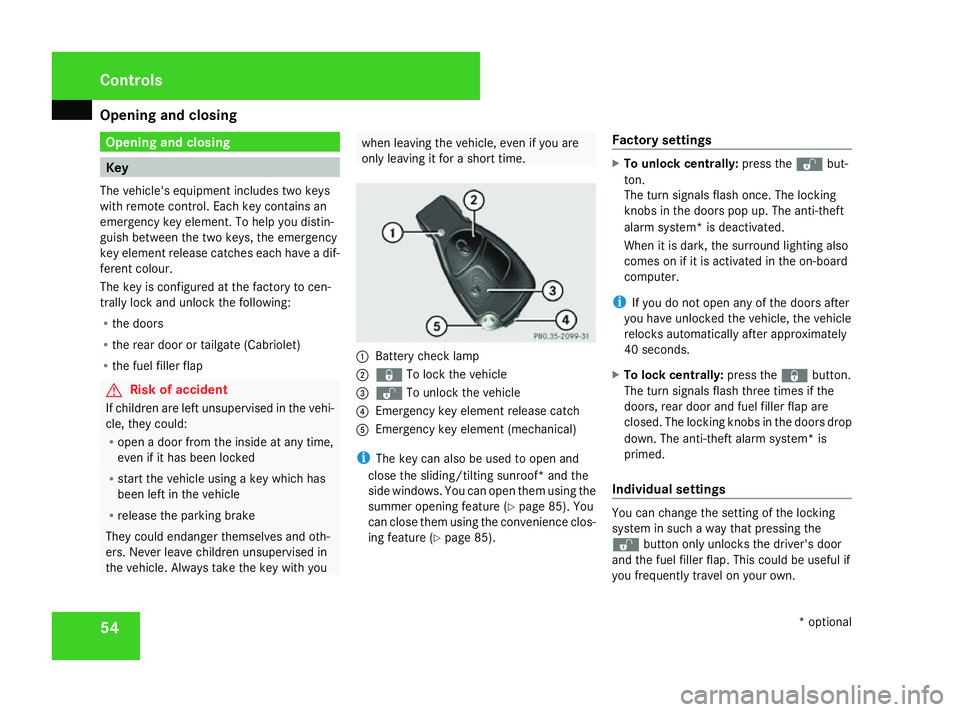
The vehicle's equipment includes two keys
with remote control. Each key contains an
emergency key element. To help you distin-
guish between the two keys, the emergency
key element release catches each have a dif-
ferent colour.
The key is configured at the factory to cen-
trally lock and unlock the following:
R the doors
R the rear door or tailgate (Cabriolet)
R the fuel filler flap G
Risk of accident
If children are left unsupervised in the vehi-
cle, they could:
R open a door from the inside at any time,
even if it has been locked
R start the vehicle using a key which has
been left in the vehicle
R release the parking brake
They could endanger themselves and oth-
ers. Never leave children unsupervised in
the vehicle. Always take the key with you when leaving the vehicle, even if you are
only leaving it for a short time. 1
Battery check lamp
2 j To lock the vehicle
3 k To unlock the vehicle
4 Emergency key element release catch
5 Emergency key element (mechanical)
i The key can also be used to open and
close the sliding/tilting sunroof* and the
side windows. You can open them using the
summer opening feature (Y page 85). You
can close them using the convenience clos-
ing feature (Y page 85). Factory settings X
To unlock centrally: press thekbut-
ton.
The turn signals flash once. The locking
knobs in the doors pop up. The anti-theft
alarm system* is deactivated.
When it is dark, the surround lighting also
comes on if it is activated in the on-board
computer.
i If you do not open any of the doors after
you have unlocked the vehicle, the vehicle
relocks automatically after approximately
40 seconds.
X To lock centrally: press thejbutton.
The turn signals flash three times if the
doors, rear door and fuel filler flap are
closed. The locking knobs in the doors drop
down. The anti-theft alarm system* is
primed.
Individual settings You can change the setting of the locking
system in such a way that pressing the
k button only unlocks the driver's door
and the fuel filler flap. This could be useful if
you frequently travel on your own. Controls
* optional
463_AKB; 1; 8, en-GB
wobuchh,
Version: 2.10.6
2008-07-17T15:19:41+02:00 - Seite 54 Dateiname: 6515_4091_02_buchblock.pdf; preflight
Page 58 of 293
Opening and closing
55
X
To change the setting: press and hold down
the k andj buttons simultaneously
for approximately six seconds until battery
check lamp 1flashes twice.
The key now functions as follows:
X To unlock the driver's door and fuel
filler flap: press thekbutton once.
X To unlock centrally: press thekbut-
ton twice.
X To lock centrally: press thejbutton.
Restoring the factory settings X
Press the kandj buttons simulta-
neously for approximately six seconds until
battery check lamp 1flashes twice. Opening the doors from the inside
You can open a door from the inside at any
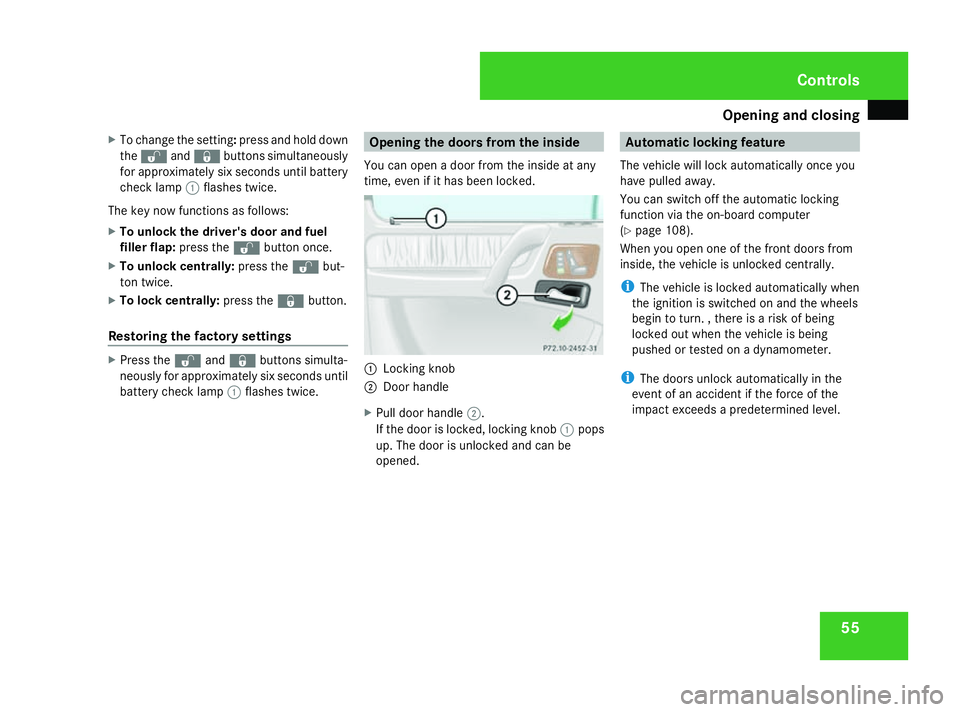
time, even if it has been locked. 1
Locking knob
2 Door handle
X Pull door handle 2.
If the door is locked, locking knob 1pops
up. The door is unlocked and can be
opened. Automatic locking feature
The vehicle will lock automatically once you
have pulled away.
You can switch off the automatic locking
function via the on-board computer
(Y page 108).
When you open one of the front doors from
inside, the vehicle is unlocked centrally.
i The vehicle is locked automatically when
the ignition is switched on and the wheels
begin to turn. , there is a risk of being
locked out when the vehicle is being
pushed or tested on a dynamometer.
i The doors unlock automatically in the
event of an accident if the force of the
impact exceeds a predetermined level. Controls
463_AKB; 1; 8, en-GB
wobuchh,
Version: 2.10.6 2008-07-17T15:19:41+02:00 - Seite 55 ZDateiname: 6515_4091_02_buchblock.pdf; preflight
Page 75 of 293

Seat belts
72 hip joints – not across your abdomen. If
necessary, push down the belt strap
slightly and then retighten it in the roll-up
direction.
R Do not route the belt strap across sharp
or fragile objects, especially if these are
located on or in your clothing, e.g. spec-
tacles, pencils, keys, etc. The seat belt
strap could be damaged and tear in an
accident and you or other vehicle occu-
pants could be injured.
R Only one person should use each seat
belt at any one time. Children must never
travel sitting on the lap of other occu-
pants. It would not be possible to restrain
the child in the event of a sudden change
in direction, braking or an accident. This
could result in severe or even fatal inju-
ries to the child and other occupants.
R Persons less than 1.50 m tall cannot
wear the seat belts correctly. For this
reason, secure persons less than 1.50 m
tall in specially designed, suitable
restraint systems.
R Children less than 1.50 m tall or under
12 years of age cannot wear the seat
belts properly. Therefore, always secure
these children in suitable child restraint systems on suitable vehicle seats. You
can find more information under "Chil-
dren in the vehicle" in the "Safety" sec-
tion of the Owner's Manual. Follow the
manufacturer's installation instructions
when fitting the child restraint system.
R Do not secure any objects with a seat belt
if the seat belt is also being used by one
of the vehicle's occupants. G
Risk of injury
The seat belt does not offer the intended
level of protection unless the backrest is
almost vertical. Under certain circumstan-
ces this could cause severe or even fatal
injuries.
Before starting a journey, make sure that
the seat is properly adjusted and that the
backrest is almost vertical. G
Risk of injury
A dirty or damaged seat belt or a seat belt
that has been subjected to a load in an
accident or modified no longer offers the
intended level of protection. Under certain
circumstances this could cause severe or
even fatal injuries. For this reason, check regularly that the
seat belts are not damaged or dirty.
Always have damaged seat belts or seat
belts that have been subjected to a load in
an accident replaced at a qualified special-
ist workshop. Choose a qualified specialist
workshop which has the necessary special-
ist knowledge and tools for the work
required. Mercedes-Benz recommends
that you use a Mercedes-Benz Service
Centre for this purpose.
For safety reasons, Mercedes-Benz recom-
mends that you only use seat belts which
have been approved by Mercedes-Benz for
your vehicle.Controls
463_AKB; 1; 8, en-GB
wobuchh,
Version: 2.10.6 2008-07-17T15:19:41+02:00 - Seite 72Dateiname: 6515_4091_02_buchblock.pdf; preflight
Page 78 of 293
Lights
75Correct driver's seat position
G
Risk of accident
Only adjust the driver's seat when the vehi-
cle is stationary. You will otherwise be dis-
tracted from the road and traffic conditions
and you could lose control of the vehicle as
a result of the seat moving. This could
cause an accident. G
Risk of accident
Only adjust the steering wheel when the
vehicle is stationary. Drive only when the
steering wheel is fixed.
X Check whether seat and the head restraint
are adjusted properly (Y page 60).
Make sure that:
R you are as far away from the driver's front
airbag as possible.
R you are sitting in a normal upright posi-
tion.
R you can fasten the seat belt properly.
R you have moved the backrest to an
almost vertical position.
R you have set the seat angle so that your
thighs are gently supported. R
you can depress the pedals properly.
R you have adjusted the head restraint so
that the back of your head is supported
at eye level by the central area of the
head restraint.
X Check whether steering wheel is adjusted
properly (Y page 66).
Make sure that:
R you can hold the steering wheel with your
arms slightly bent.
R you can move your legs freely.
R you can see all the displays in the instru-
ment cluster clearly.
X Check whether you have fastened seat belt
properly (Y page 71).
It should:
R fit snugly across your body
R be routed across the middle of your
shoulder
R routed in your pelvic area across the hip
joints Lights
Light switch
For safety reasons, Mercedes-Benz recom-
mends that you drive with the lights switched
on even during the daytime. In some coun-
tries, daytime operation of headlamps varies
due to legal and voluntary requirements. In
these countries, the dipped-beam headlamps
are automatically switched on when the
engine is started.
i If you drive in countries in which traffic
drives on the opposite side of the road to
the country where the vehicle is registered,
oncoming traffic may be dazzled by the
asymmetrical dipped-beam headlamps.
Have the headlamps changed to symmet-
rical dipped beam when driving in these
countries. You can obtain information
about this from any Mercedes-Benz Service
Centre.
The light switch is located on the dashboard
between the steering wheel and the driver's
door. Controls
463_AKB; 1; 8, en-GB
wobuchh,
Version: 2.10.6 2008-07-17T15:19:41+02:00 - Seite 75 ZDateiname: 6515_4091_02_buchblock.pdf; preflight
Page 80 of 293
Lights
77G
Risk of accident
When it is dark or foggy, turn the light
switch from UtoB in good time.
Otherwise, the headlamps could switch off
temporarily and you could cause an acci-
dent.
X To switch on: turn the light switch to
U.
The side lamps are switched on and off
automatically when the key is in position
1 in the ignition lock.
The dipped-beam headlamps, side lamps
and licence plate lamp are switched on
automatically when the engine is running.
When the dipped-beam headlamps are
switched on, the green dipped-beam indi-
cator lamp in the instrument cluster lights
up.
Front foglamps/rear foglamp G
Risk of accident
If you suspect that driving conditions will be
foggy, turn the light switch to Bbefore
you start your journey. Otherwise, your
vehicle may not be visible and you could
endanger yourself and others. G
Risk of accident
When it is dark or foggy, turn the light
switch from UtoB in good time.
Otherwise, the headlamps could switch off
temporarily and you could cause an acci-
dent.
When the light switch is set to Uyou can-
not switch on the front or rear foglamps.
X Make sure that the key is in position 2in
the ignition lock.
X To switch on the front foglamps: turn the
light switch to the Bposition.
X Pull the light switch out to the first stop.
The ¥ green indicator lamp next to the
light switch lights up.
X To switch on the rear foglamp: turn the
light switch to the Bposition.
X Pull the light switch out to the second
detent.
The † yellow indicator lamp next to the
light switch lights up.
X To switch off the front foglamps/rear
foglamp: push in the light switch to the
stop.
The corresponding indicator lamp goes out. Combination switch (turn signals,
main-beam headlamps and headlamp
flasher)
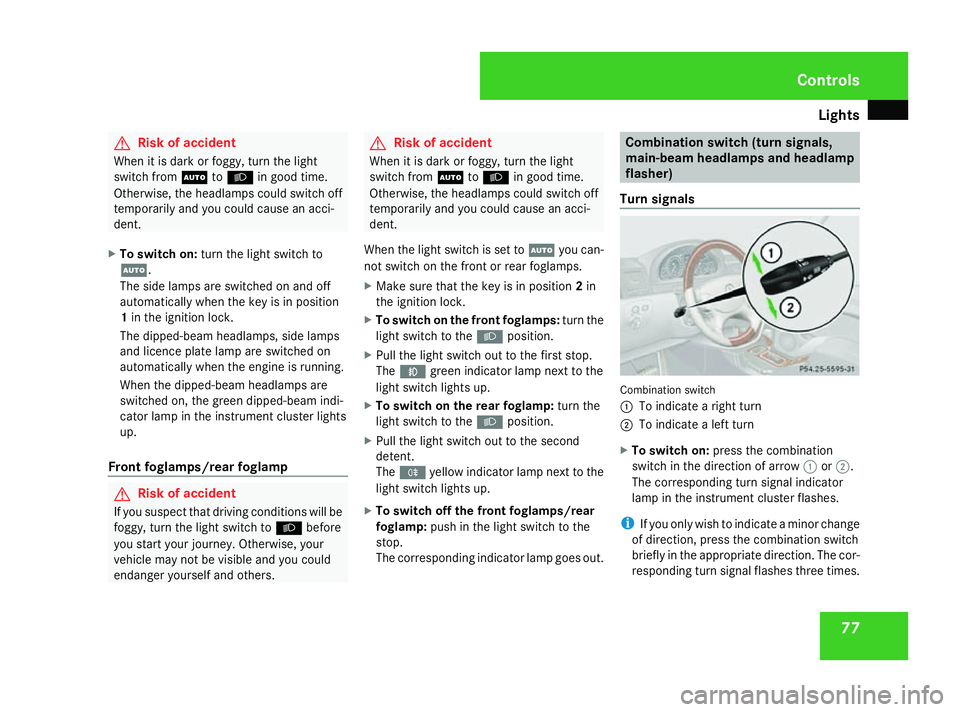
Turn signals Combination switch
1
To indicate a right turn
2 To indicate a left turn
X To switch on: press the combination
switch in the direction of arrow 1or2.
The corresponding turn signal indicator
lamp in the instrument cluster flashes.
i If you only wish to indicate a minor change
of direction, press the combination switch
briefly in the appropriate direction. The cor-
responding turn signal flashes three times. Controls
463_AKB; 1; 8, en-GB
wobuchh,
Version: 2.10.6 2008-07-17T15:19:41+02:00 - Seite 77 ZDateiname: 6515_4091_02_buchblock.pdf; preflight
Page 108 of 293
On-board computer
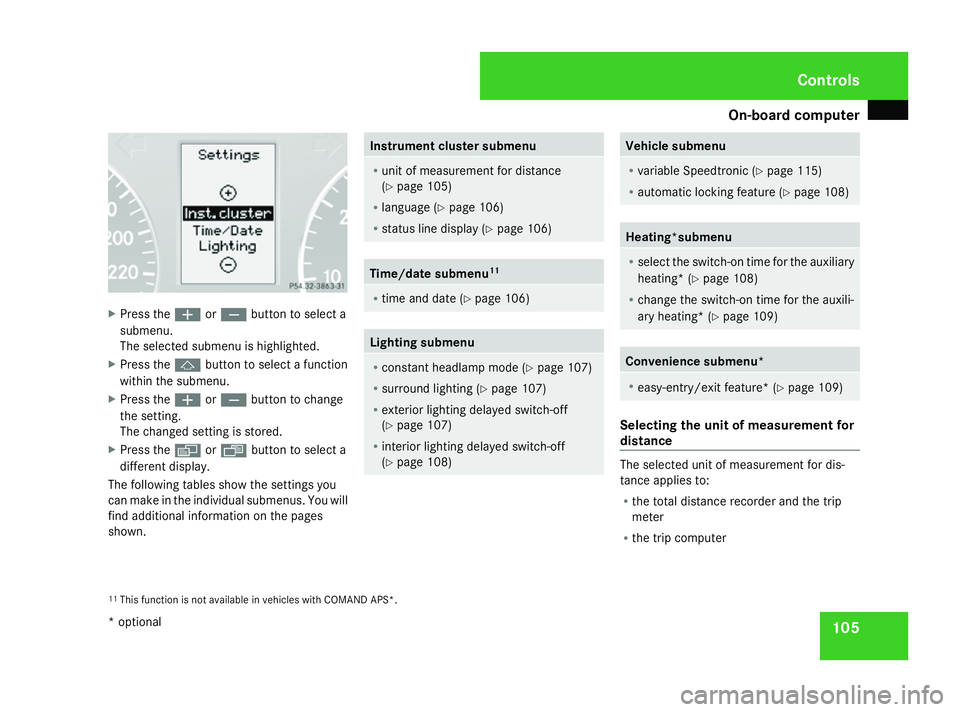
105X
Press the æorç button to select a
submenu.
The selected submenu is highlighted.
X Press the jbutton to select a function
within the submenu.
X Press the æorç button to change
the setting.
The changed setting is stored.
X Press the èorÿ button to select a
different display.
The following tables show the settings you
can make in the individual submenus. You will
find additional information on the pages
shown. Instrument cluster submenu
R
unit of measurement for distance
(Y page 105)
R language (Y page 106)
R status line display (Y page 106) Time/date submenu
11 R
time and date (Y page 106) Lighting submenu
R
constant headlamp mode (Y page 107)
R surround lighting (Y page 107)
R exterior lighting delayed switch-off
(Y page 107)
R interior lighting delayed switch-off
(Y page 108) Vehicle submenu
R
variable Speedtronic (Y page 115)
R automatic locking feature (Y page 108) Heating*submenu
R
select the switch-on time for the auxiliary
heating* (Y page 108)
R change the switch-on time for the auxili-
ary heating* (Y page 109) Convenience submenu*
R
easy-entry/exit feature* (Y page 109) Selecting the unit of measurement for
distance
The selected unit of measurement for dis-
tance applies to:
R
the total distance recorder and the trip
meter
R the trip computer
11 This function is not available in vehicles with COMAND APS*. Controls
* optional
463_AKB; 1; 8, en-GB
wobuchh, Version: 2.10.6
2008-07-17T15:19:41+02:00 - Seite 105 ZDateiname: 6515_4091_02_buchblock.pdf; preflight
Page 112 of 293
On-board computer
109
The auxiliary heating is switched off automat-
ically after 50 minutes. This time can be
changed. To do this, visit a qualified specialist
workshop, e.g. a Mercedes-Benz Service
Centre.
G
Risk of fire and poisoning
The operation of the auxiliary heating pro-
duces hot, toxic exhaust fumes. The fuel
vapours produced during refuelling could
ignite on the hot exhaust system.
Do not switch on the auxiliary heating at
filling stations or in enclosed spaces, for
instance, a garage, if there is no air extrac-
tion system.
You could otherwise endanger yourself and
others.
The Auxiliary heat. function can be called
up directly.
X Turn the key to position 1or 2in the ignition
lock.
X Press the button for the auxiliary heating on
the centre console (Y page 130).
or
X Press the èor· button to select the
Settings menu.
X Press the jbutton to select submenus. X
Press the æorç button to select the
Heater submenu.
X Press the jbutton to select Auxiliary
heat. .
X Press the æorç button to select
one of the three switch-on times or Timer
off (auxiliary heating switched off).
When a switch-on time is selected, the yel-
low indicator lamp lights up in the auxiliary
heating button.
X Press the j,èorÿ button to
select a different display.
Changing the switch-on time for the
auxiliary heating* This function is only displayed if you have
selected a switch-on time. Here you can enter
the time at which the auxiliary heating is to
be switched on.
X
Press the èor· button to select the
Settings menu.
X Press the jbutton to select submenus.
X Press the æorç button to select the
Heater submenu.
X Press the jbutton to select Sw.-on
time hour. X
Press the æorç button to set the
hour.
X Press the jbutton to select Sw.-on
time minute(s).
X Press the æorç button to set the
minutes.
After changing from one menu to another,
the new time setting is stored. The yellow
indicator lamp lights up on the button for
the auxiliary heating on the centre console.
X Press the j,èorÿ button to
select a different display.
Activating/deactivating the easy-
entry/exit feature i
For more information on the easy-entry/
exit feature, see (Y page 67). G
Risk of injury
The steering wheel moves when the easy-
entry/exit feature is active. There is a risk
of occupants becoming trapped. Before
activating the easy-entry/exit feature,
make sure that nobody can become trap-
ped.
Do not leave children unsupervised in the
vehicle, even if they are secured in a child
restraint system. The children could open Controls
* optional
463_AKB; 1; 8, en-GB
wobuchh
,V ersion: 2.10.6
2008-07-17T15:19:41+02:00 - Seite 109 ZDateiname: 6515_4091_02_buchblock.pdf; preflight
Page 116 of 293
Driving sys
tems 113
If the call is connected, the call duration
appears in the multi-function display. If it is
stored in the phone book, the name is also
displayed. Otherwise, the number dialled is
displayed.
or
X If you do not wish to make a call, press the
ì button.
Redialling The on-board computer stores the last phone
numbers which were dialled.
X
Press the èor· button to select the
Telephone menu.
X Press the íbutton to call up the most
recently dialled number in the redial mem-
ory.
X Press the jork button to select the
desired name or number.
X Press the íbutton to start dialling. Driving systems
Overview of driving systems
The vehicle's driving systems are described
on the following pages:
R Cruise control and variable Speedtronic
which you can use to control the speed of
the vehicle
R Ultrasonic reversing aid*, which helps you
park and manoeuvre
R Reversing camera *,which helps you when
parking and manoeuvring
You will find further information about driving
off-road in the "Operation" section
(Y page 172). Cruise control
Cruise control maintains a constant road
speed for you. On long and steep downhill
gradients, especially if the vehicle is laden or
towing a trailer, you must select shift range
1, 2or 3in good time. By doing so you will
make use of the braking effect of the engine,
which relieves the load on the brake system
and prevents the brakes from overheating
and wearing too quickly. G
Risk of accident
Do not change down for additional engine
braking on a slippery road surface. This
could cause the drive wheels to lose their
grip and the vehicle could skid.
Use cruise control only if road and traffic con-
ditions make it appropriate to maintain a
steady speed for a prolonged period. You can
store any road speed above 30 km/h. G
Risk of accident
Cruise control cannot take account of road
and traffic conditions.
Always pay attention to traffic conditions
even when cruise control is activated.
Cruise control is only an aid designed to
assist driving. You are responsible for the Cont
rols
* option al
463_AKB; 1; 8, en-GB
wobuchh,
Version: 2.10.6 2008-07-17T15:19:41+02:00 - Seite 113 ZDateiname: 6515_4091_02_buchblock.pdf; preflight