fog light MERCEDES-BENZ G-CLASS SUV 2013 User Guide
[x] Cancel search | Manufacturer: MERCEDES-BENZ, Model Year: 2013, Model line: G-CLASS SUV, Model: MERCEDES-BENZ G-CLASS SUV 2013Pages: 364, PDF Size: 9.62 MB
Page 111 of 364
Bulbs and lamps are an important aspect of
vehicle safety. You
must
therefore make sure
that these function correctly at all times.
Have the headlamp setting checked regularly.
Other bulbs G
WARNING
Bulbs and lamps can become very hot. For
this reason, allow them to cool down before
changing them. Otherwise, you could burn
yourself when you touch them.
Keep bulbs out of the reach of children.
Otherwise, they could, for example, damage
the bulbs and injure themselves.
Never use a bulb which has been dropped.
Such a bulb may explode and injure you.
Halogen bulbs are pressurized and could
explode when you change them, especially if
they are very hot. You should therefore wear
eye protection and gloves when you are
changing them.
There are bulbs other than the Xenon bulbs
that you cannot replace. Replace only the
bulbs listed ( Y
page 109). Have the bulbs that
you cannot replace yourself changed at a
qualified specialist workshop.
If you require assistance changing bulbs,
consult a qualified specialist workshop.
Do not touch the glass tube of new bulbs with
your bare hands. Even minor contamination
can burn into the glass surface and reduce
the service life of the bulbs. Always use a lint-
free cloth or only touch the base of the bulb
when installing.
Only use bulbs of the correct type.
If the new bulb still does not light up, consult
a qualified specialist workshop.
Bulbs and lamps are an important aspect of
vehicle safety. You must therefore make sure
that these function correctly at all times.
Have the headlamp setting checked regularly. Before changing bulbs Have the following bulbs changed at a
qualified specialist workshop:
R
Additional turn signals in the exterior
mirrors
R High-mounted brake lamp
R High-beam/low-beam headlamps (Xenon
bulbs)
R Daytime running lamps
R Parking lamp/standing lamp
R License plate lamp
i Individual segments of the license plate
lamp LEDs may fail without a display
message appearing in the multifunction
display. Regularly check the license plate
lamp. If necessary, visit a qualified
specialist workshop.
You can replace the following bulbs:
R Fog lamp/cornering light with fog lamp
function
R Turn signal lamp (front)
R Brake/tail lamp
R Turn signal lamp (rear)
R Tail lamp/standing lamp
R Backup lamp
R Rear fog lamp
R Side marker lamps Overview: changing bulbs/bulb types
Front lamps You can change the following bulbs. The bulb
type can be found in the legend. Replacing bulbs
109
Lights and windshield wipers Z
Page 112 of 364
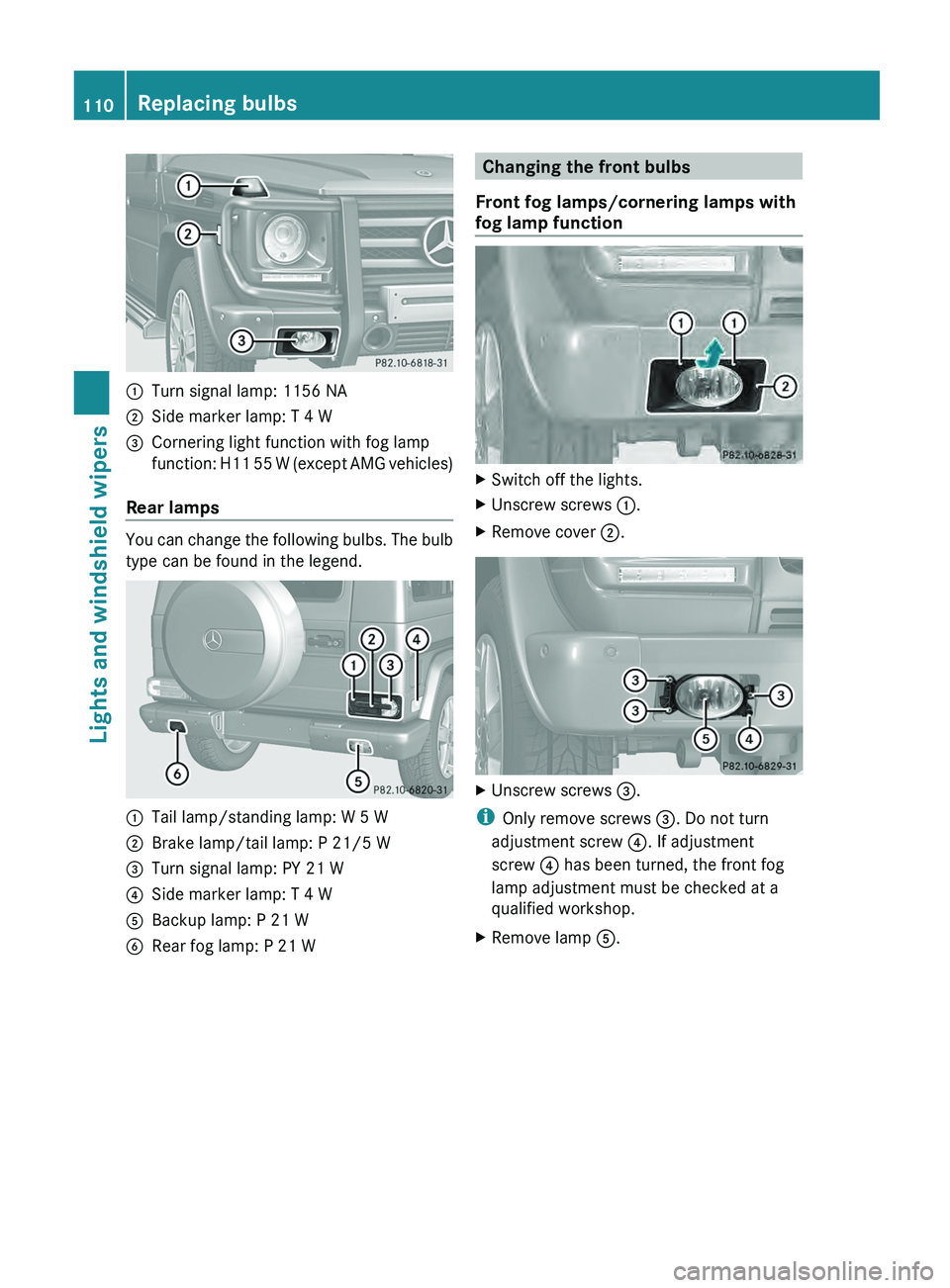
0043
Turn signal lamp: 1156 NA
0044 Side marker lamp: T 4 W
0087 Cornering light function with fog lamp
function: H11 55 W
(except AMG vehicles)
Rear lamps You can change the following bulbs. The bulb
type can be found in the legend.
0043
Tail lamp/standing lamp: W 5 W
0044 Brake lamp/tail lamp: P 21/5 W
0087 Turn signal lamp: PY 21 W
0085 Side marker lamp: T 4 W
0083 Backup lamp: P 21 W
0084 Rear fog lamp: P 21 W Changing the front bulbs
Front fog lamps/cornering lamps with
fog lamp function X
Switch off the lights.
X Unscrew screws 0043.
X Remove cover 0044. X
Unscrew screws 0087.
i Only remove screws 0087. Do not turn
adjustment screw 0085. If adjustment
screw 0085 has been turned, the front fog
lamp adjustment must be checked at a
qualified workshop.
X Remove lamp 0083.110
Replacing bulbs
Lights and windshield wipers
Page 115 of 364
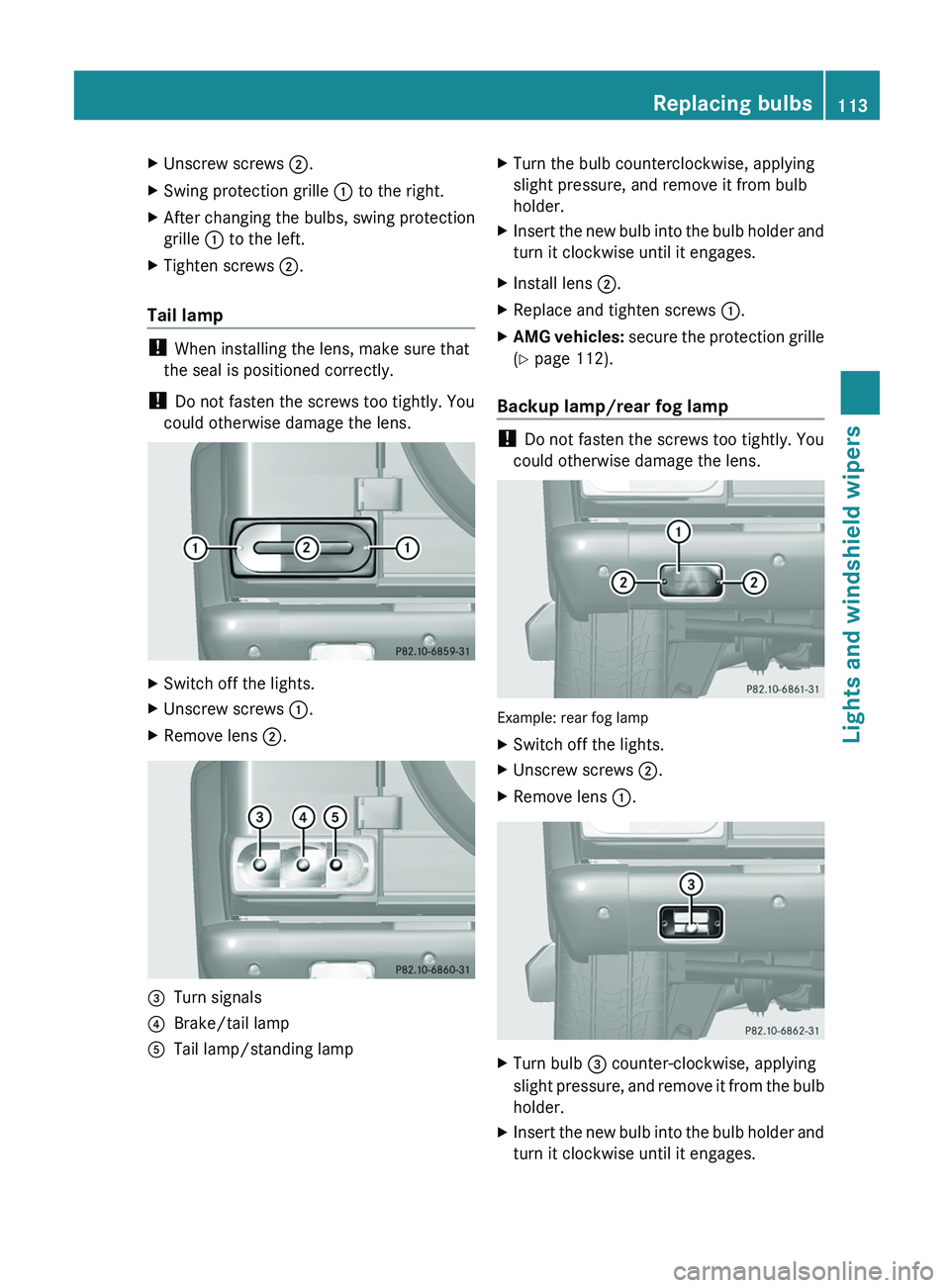
X
Unscrew screws 0044.
X Swing protection grille 0043 to the right.
X After changing the bulbs, swing protection
grille 0043 to the left.
X Tighten screws 0044.
Tail lamp !
When installing the lens, make sure that
the seal is positioned correctly.
! Do not fasten the screws too tightly. You
could otherwise damage the lens. X
Switch off the lights.
X Unscrew screws 0043.
X Remove lens 0044.0087
Turn signals
0085 Brake/tail lamp
0083 Tail lamp/standing lamp X
Turn the bulb counterclockwise, applying
slight pressure, and remove it from bulb
holder.
X Insert the new bulb into the bulb holder and
turn it clockwise until it engages.
X Install lens 0044.
X Replace and tighten screws 0043.
X AMG vehicles: secure
the protection
grille
(Y page 112).
Backup lamp/rear fog lamp !
Do not fasten the screws too tightly. You
could otherwise damage the lens. Example: rear fog lamp
X
Switch off the lights.
X Unscrew screws 0044.
X Remove lens 0043. X
Turn bulb 0087 counter-clockwise, applying
slight pressure, and remove
it from the bulb
holder.
X Insert the new bulb into the bulb holder and
turn it clockwise until it engages. Replacing bulbs
113
Lights and windshield wipers Z
Page 122 of 364
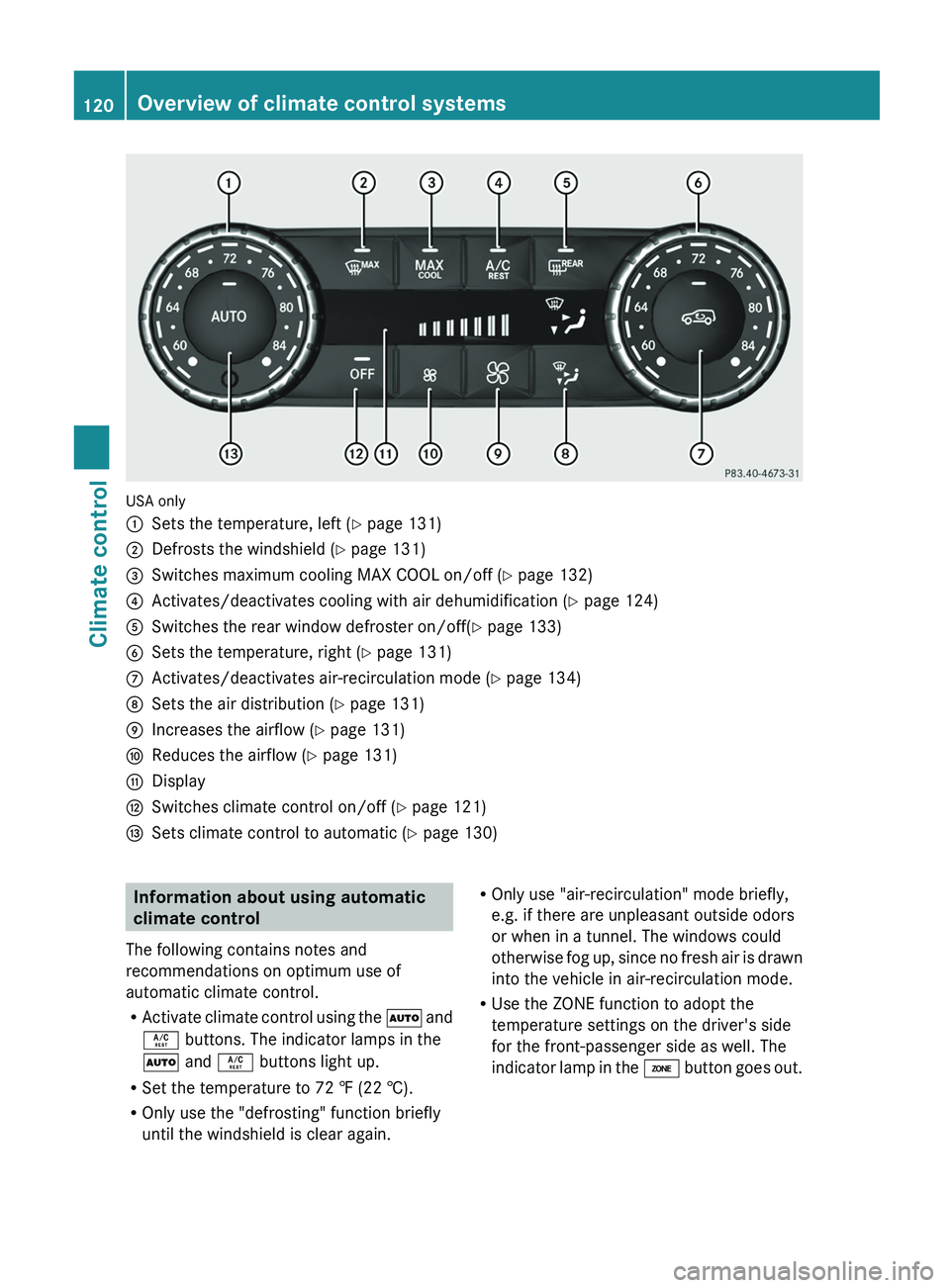
USA only
0043
Sets the temperature, left ( Y page 131)
0044 Defrosts the windshield ( Y page 131)
0087 Switches maximum cooling MAX COOL on/off ( Y page 132)
0085 Activates/deactivates cooling with air dehumidification ( Y page 124)
0083 Switches the rear window defroster on/off( Y page 133)
0084 Sets the temperature, right ( Y page 131)
006B Activates/deactivates air-recirculation mode (Y page 134)
006C Sets the air distribution (Y page 131)
006D Increases the airflow ( Y page 131)
006E Reduces the airflow ( Y page 131)
006F Display
0070 Switches climate control on/off ( Y page 121)
0071 Sets climate control to automatic (Y page 130) Information about using automatic
climate control
The following contains notes and
recommendations on optimum use of
automatic climate control.
R Activate climate control using
the 0058 and
0056 buttons. The indicator lamps in the
0058 and 0056 buttons light up.
R Set the temperature to 72 ‡ (22 †).
R Only use the "defrosting" function briefly
until the windshield is clear again. R
Only use "air-recirculation" mode briefly,
e.g. if there are unpleasant outside odors
or when in a tunnel. The windows could
otherwise fog up, since
no fresh air is drawn
into the vehicle in air-recirculation mode.
R Use the ZONE function to adopt the
temperature settings on the driver's side
for the front-passenger side as well. The
indicator lamp in the 00D6 button goes out.120
Overview of climate control systems
Climate control
Page 126 of 364
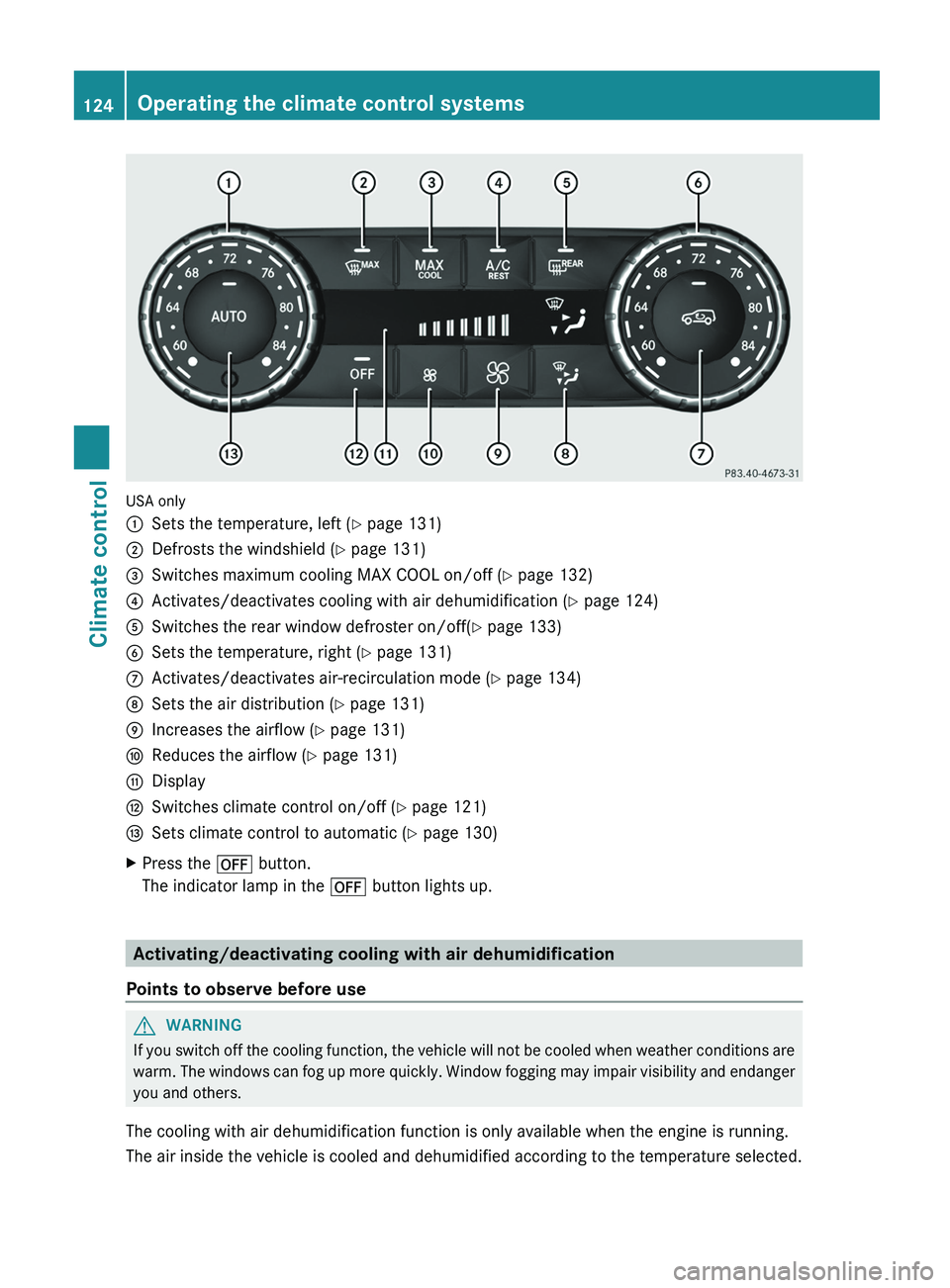
USA only
0043
Sets the temperature, left ( Y page 131)
0044 Defrosts the windshield ( Y page 131)
0087 Switches maximum cooling MAX COOL on/off ( Y page 132)
0085 Activates/deactivates cooling with air dehumidification ( Y page 124)
0083 Switches the rear window defroster on/off( Y page 133)
0084 Sets the temperature, right ( Y page 131)
006B Activates/deactivates air-recirculation mode (Y page 134)
006C Sets the air distribution (Y page 131)
006D Increases the airflow ( Y page 131)
006E Reduces the airflow ( Y page 131)
006F Display
0070 Switches climate control on/off ( Y page 121)
0071 Sets climate control to automatic (Y page 130)
X Press the 0078 button.
The indicator lamp in the 0078 button lights up.Activating/deactivating cooling with air dehumidification
Points to observe before use G
WARNING
If you switch off the cooling function, the vehicle will not be cooled when weather conditions are
warm. The windows can
fog up more quickly. Window fogging may impair visibility and endanger
you and others.
The cooling with air dehumidification function is only available when the engine is running.
The air inside the vehicle is cooled and dehumidified according to the temperature selected. 124
Operating the climate control systems
Climate control
Page 134 of 364
X
Turn the SmartKey to position
2 (Y page 139) in the ignition lock.
X To activate: press the 0064 button.
The indicator lamp in
the 0064 button lights
up.
The climate control system switches to the
following functions:
R cooling with air dehumidification (only
with engine running)
R high airflow (depending on the outside
temperature)
R high temperature (depending on the
outside temperature)
R air distribution to the windshield and
front side windows
R air-recirculation mode off
X To deactivate: press the 0064 button.
The indicator lamp in
the 0064 button goes
out. The previously selected settings are
restored. The cooling with air
dehumidification function remains on. Air-
recirculation mode remains deactivated.
or
X Press the 0058 button.
The indicator lamp in
the 0064 button goes
out. Airflow and air distribution are set to
automatic mode.
or
X Turn controls 0043 or 0084 clockwise or
counter-clockwise ( Y page 119).
or
X Press the 0097 or 0095 button. Activating/deactivating MAX COOL
maximum cooling
The MAX COOL function is only available in
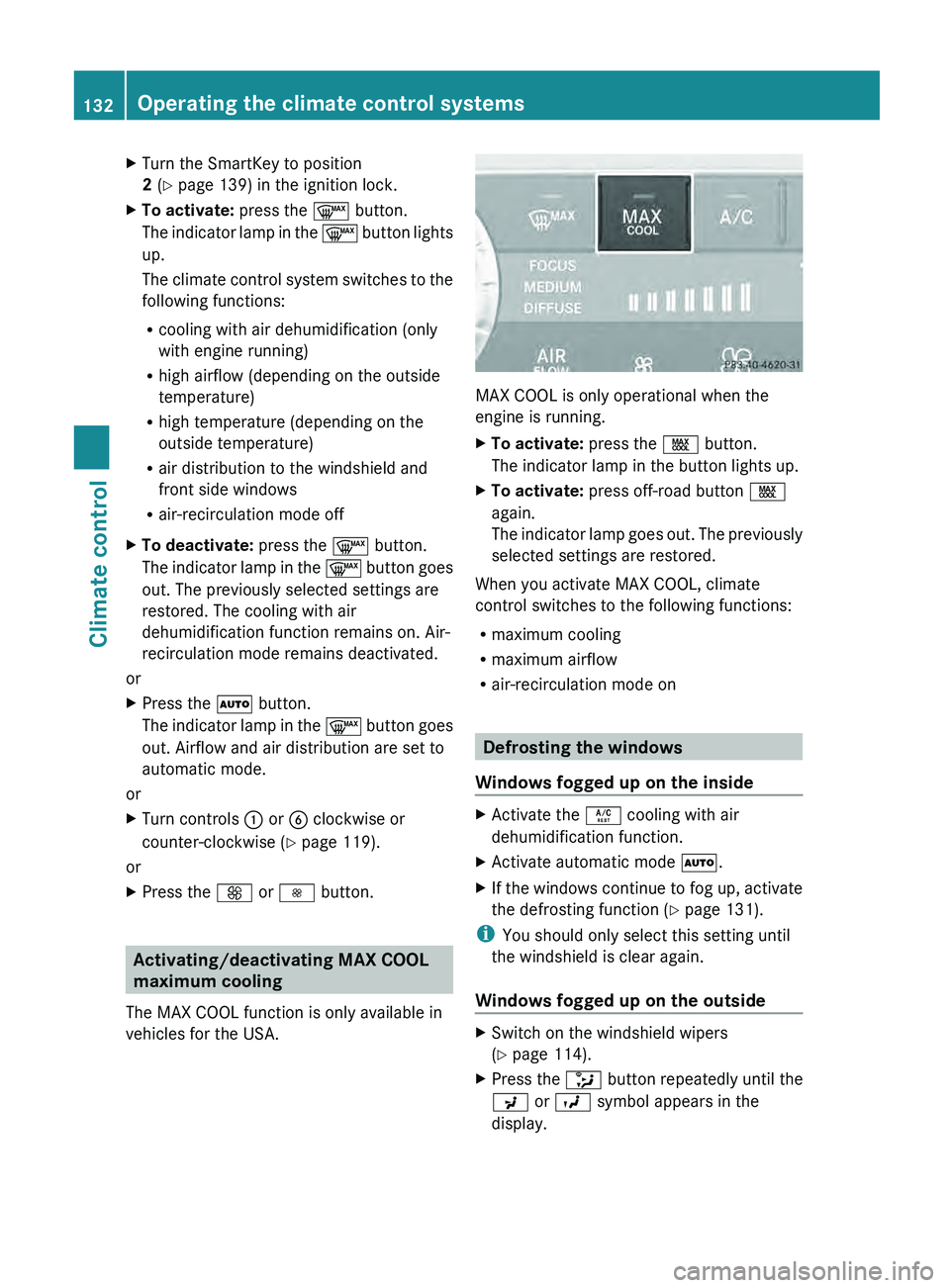
vehicles for the USA. MAX COOL is only operational when the
engine is running.
X
To activate: press the 00C9 button.
The indicator lamp in the button lights up.
X To activate: press off-road button 00C9
again.
The indicator lamp goes
out. The previously
selected settings are restored.
When you activate MAX COOL, climate
control switches to the following functions:
R maximum cooling
R maximum airflow
R air-recirculation mode on Defrosting the windows
Windows fogged up on the inside X
Activate the 0056 cooling with air
dehumidification function.
X Activate automatic mode 0058.
X If the windows continue to fog up, activate
the defrosting function (Y page 131).
i You should only select this setting until
the windshield is clear again.
Windows fogged up on the outside X
Switch on the windshield wipers
(Y page 114).
X Press the 008F button repeatedly until the
009C or 009B symbol appears in the
display. 132
Operating the climate control systems
Climate control
Page 136 of 364
Activating/deactivating air-
recirculation mode
G
WARNING
Fogged windows impair visibility,
endangering you and others. If the windows
begin to fog on the inside, switching off the
air recirculation mode immediately should
clear interior window fogging. If interior
window fogging persists, make sure the air
conditioning is activated, or press the 0064
button.
X Turn the SmartKey to position
2 (Y page 139) in the ignition lock.
X To switch on: press the 0089 button.
The indicator lamp
in
the 0089 button lights
up.
i Air-recirculation mode is automatically
activated at high levels of pollution or at
high outside temperatures. When air-
recirculation mode is activated
automatically, the indicator lamp in the
0089 button is not lit.
Outside air is added after approximately
30 minutes.
X To deactivate: press the 0089 button.
The indicator lamp in
the 0089 button goes
out.
i Air-recirculation mode switches off
automatically:
R after approximately five minutes at
outside temperatures below
approximately 41 ‡
R after approximately five minutes if
cooling with air dehumidification is
deactivated
R after approximately 30 minutes at
outside temperatures above
approximately 41 ‡ (5 †) Activating/deactivating the residual
heat function
The "residual heat" function is only available
in Canada.
It is possible to
make use of the residual heat
of the engine to continue heating the
stationary vehicle for up to 30 minutes after
the engine has been switched off. The heating
time depends on the coolant temperature and
on the interior temperature that has been set.
i The blower will run at a low speed
regardless of the airflow setting.
i If you activate the residual heat function
at high temperatures, only the ventilation
will be activated.
X Turn the SmartKey to position
0(Y page 139) in the ignition lock or
remove it.
X To activate: press the 0056 button.
The indicator lamp
in
the 0056 button lights
up.
X To deactivate: press the 0056 button.
The indicator lamp in
the 0056 button goes
out.
i Residual heat is deactivated
automatically:
R after approximately 30 minutes
R when the ignition is switched on
R if the battery voltage drops
R if the coolant temperature is too low Setting the air vents
Important safety notes
G
WARNING
When operating the climate control, the air
that enters the passenger compartment
through the air vents can be very hot or very
cold (depending on the
set temperature). This
could cause burns or frostbite to unprotected
skin in the immediate area of the air vents. 134
Setting the air vents
Climate control
Page 188 of 364
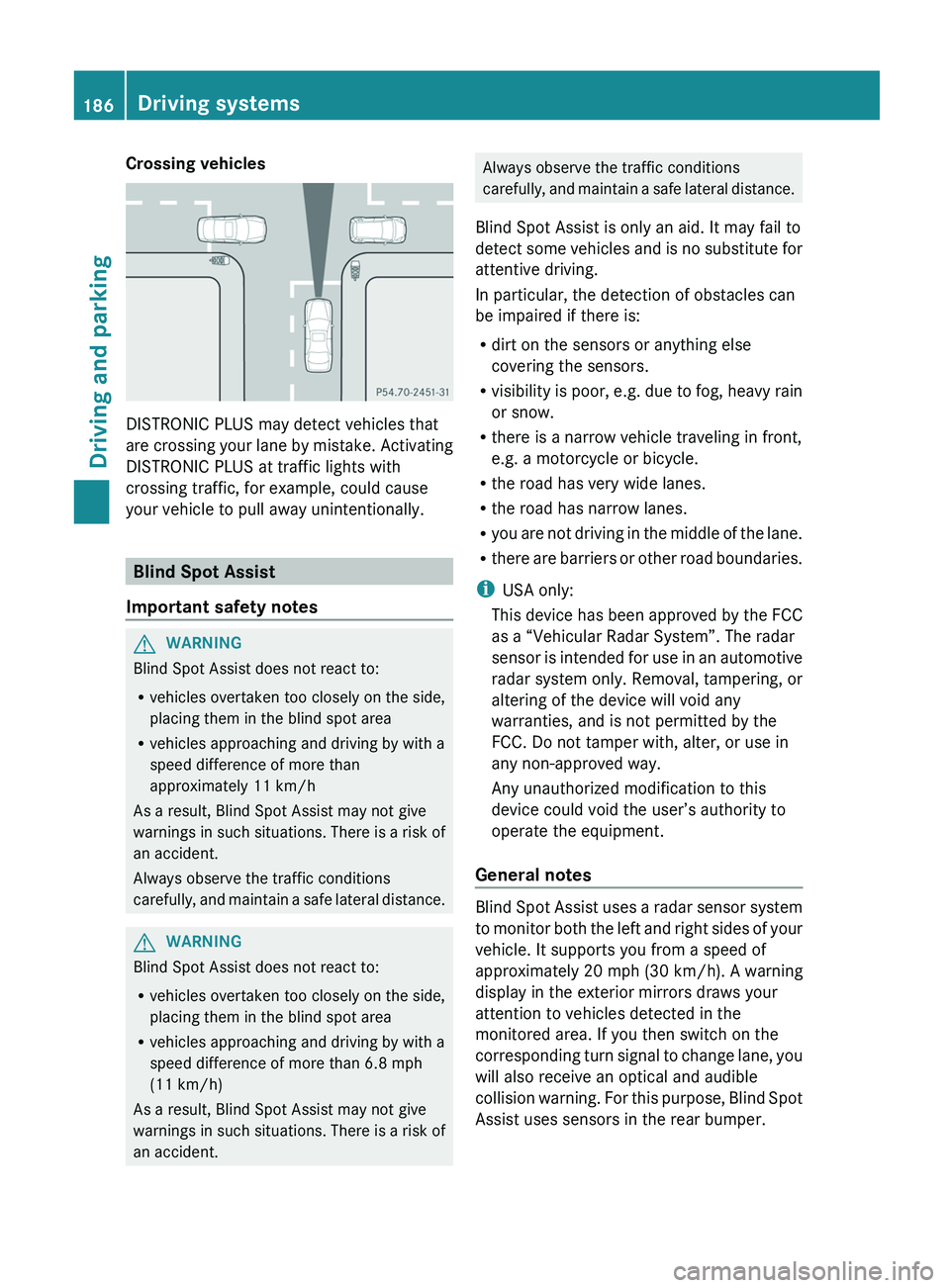
Crossing vehicles
DISTRONIC PLUS may detect vehicles that
are crossing your
lane
by mistake. Activating
DISTRONIC PLUS at traffic lights with
crossing traffic, for example, could cause
your vehicle to pull away unintentionally. Blind Spot Assist
Important safety notes G
WARNING
Blind Spot Assist does not react to:
R vehicles overtaken too closely on the side,
placing them in the blind spot area
R vehicles approaching and driving by with a
speed difference of more than
approximately 11 km/h
As a result, Blind Spot Assist may not give
warnings in such
situations. There is a risk of
an accident.
Always observe the traffic conditions
carefully, and maintain a safe lateral distance. G
WARNING
Blind Spot Assist does not react to:
R vehicles overtaken too closely on the side,
placing them in the blind spot area
R vehicles approaching and driving by with a
speed difference of more than 6.8 mph
(11 km/h)
As a result, Blind Spot Assist may not give
warnings in such
situations. There is a risk of
an accident. Always observe the traffic conditions
carefully, and maintain
a
safe lateral distance.
Blind Spot Assist is only an aid. It may fail to
detect some vehicles and is no substitute for
attentive driving.
In particular, the detection of obstacles can
be impaired if there is:
R dirt on the sensors or anything else
covering the sensors.
R visibility is poor, e.g. due to fog, heavy rain
or snow.
R there is a narrow vehicle traveling in front,
e.g. a motorcycle or bicycle.
R the road has very wide lanes.
R the road has narrow lanes.
R you are not driving in the middle of the lane.
R there are barriers or other road boundaries.
i USA only:
This device has been approved by the FCC
as a “Vehicular Radar System”. The radar
sensor is intended for use in an automotive
radar system only. Removal, tampering, or
altering of the device will void any
warranties, and is not permitted by the
FCC. Do not tamper with, alter, or use in
any non-approved way.
Any unauthorized modification to this
device could void the user’s authority to
operate the equipment.
General notes Blind Spot Assist uses a radar sensor system
to monitor both
the
left and right sides of your
vehicle. It supports you from a speed of
approximately 20 mph (30 km/h). A warning
display in the exterior mirrors draws your
attention to vehicles detected in the
monitored area. If you then switch on the
corresponding turn signal to change lane, you
will also receive an optical and audible
collision warning. For this purpose, Blind Spot
Assist uses sensors in the rear bumper. 186
Driving systems
Driving and parking
Page 199 of 364
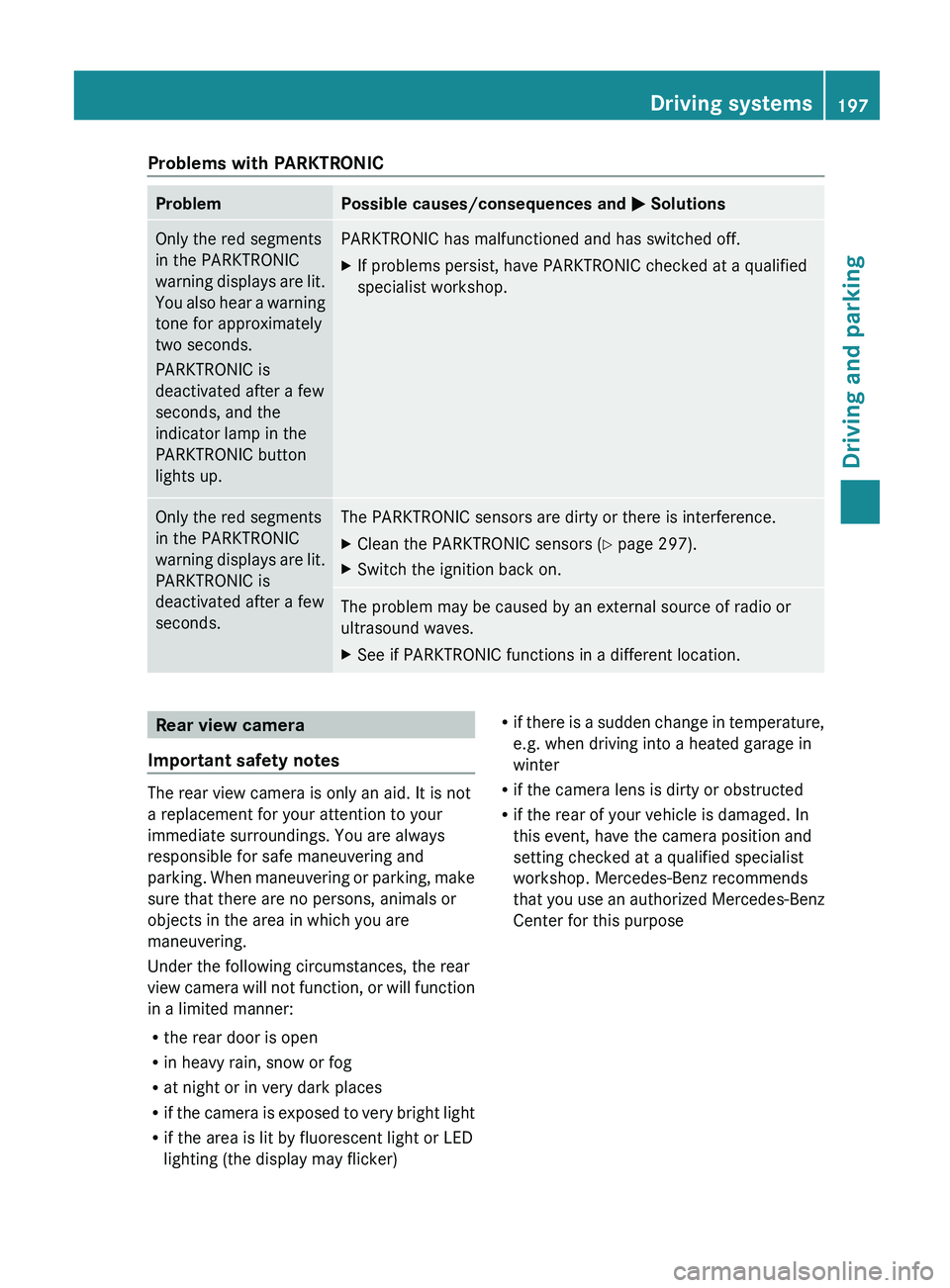
Problems with PARKTRONIC
Problem Possible causes/consequences and
0050 SolutionsOnly the red segments
in the PARKTRONIC
warning displays are
lit.
You
also hear a warning
tone for approximately
two seconds.
PARKTRONIC is
deactivated after a few
seconds, and the
indicator lamp in the
PARKTRONIC button
lights up. PARKTRONIC has malfunctioned and has switched off.
X
If problems persist, have PARKTRONIC checked at a qualified
specialist workshop. Only the red segments
in the PARKTRONIC
warning displays are
lit.
PARKTRONIC is
deactivated after a few
seconds. The PARKTRONIC sensors are dirty or there is interference.
X
Clean the PARKTRONIC sensors ( Y page 297).
X Switch the ignition back on. The problem may be caused by an external source of radio or
ultrasound waves.
X
See if PARKTRONIC functions in a different location. Rear view camera
Important safety notes The rear view camera is only an aid. It is not
a replacement for your attention to your
immediate surroundings. You are always
responsible for safe maneuvering and
parking. When maneuvering
or
parking, make
sure that there are no persons, animals or
objects in the area in which you are
maneuvering.
Under the following circumstances, the rear
view camera will not function, or will function
in a limited manner:
R the rear door is open
R in heavy rain, snow or fog
R at night or in very dark places
R if the camera is exposed to very bright light
R if the area is lit by fluorescent light or LED
lighting (the display may flicker) R
if there is a
sudden change in temperature,
e.g. when driving into a heated garage in
winter
R if the camera lens is dirty or obstructed
R if the rear of your vehicle is damaged. In
this event, have the camera position and
setting checked at a qualified specialist
workshop. Mercedes-Benz recommends
that you use an authorized Mercedes-Benz
Center for this purpose Driving systems
197
Driving and parking Z
Page 222 of 364
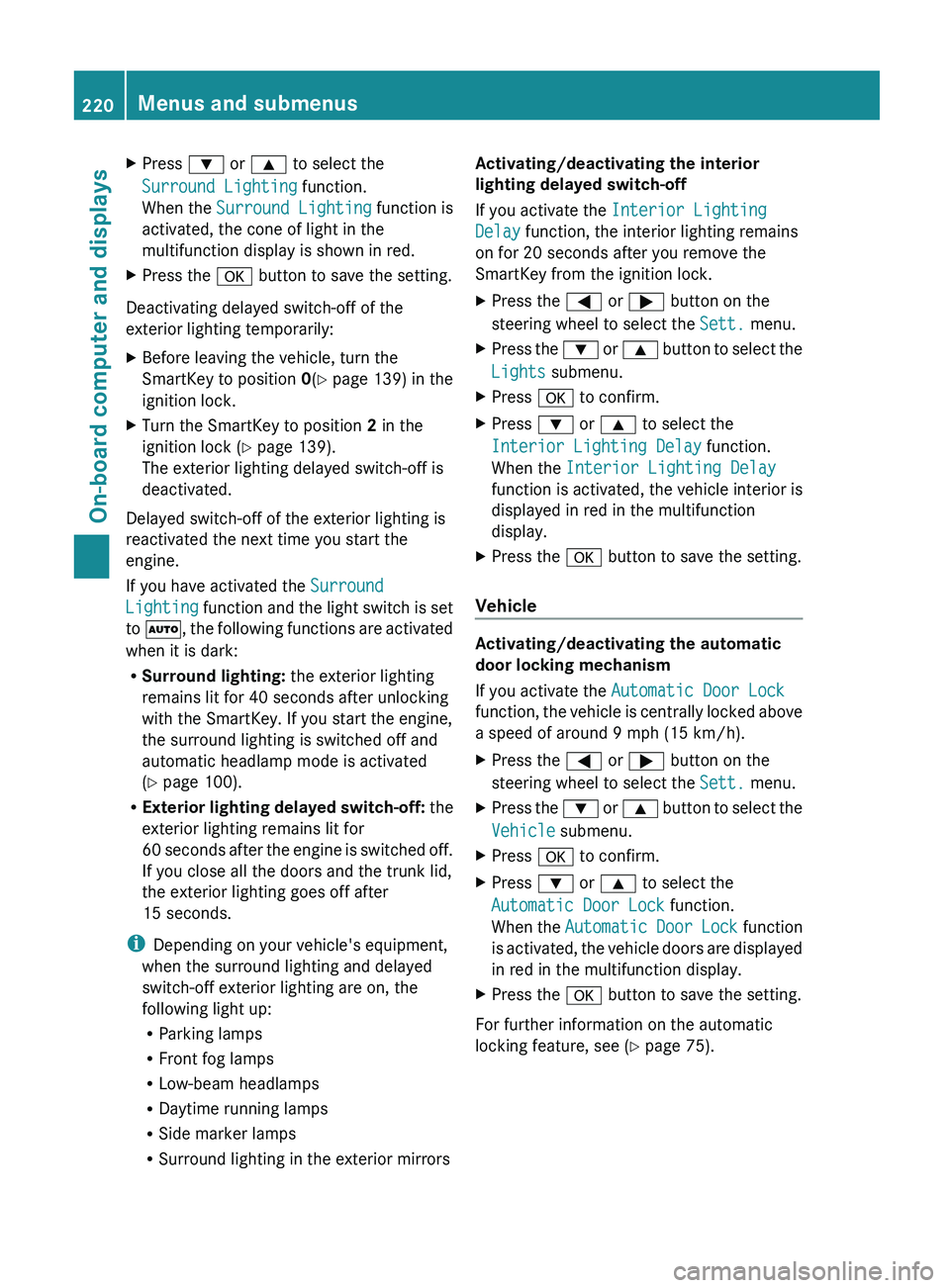
X
Press 0064 or 0063 to select the
Surround Lighting function.
When the Surround Lighting function is
activated, the cone of light in the
multifunction display is shown in red.
X Press the 0076 button to save the setting.
Deactivating delayed switch-off of the
exterior lighting temporarily:
X Before leaving the vehicle, turn the
SmartKey to position 0(Y page 139) in the
ignition lock.
X Turn the SmartKey to position 2 in the
ignition lock ( Y
page 139).
The exterior lighting delayed switch-off is
deactivated.
Delayed switch-off of the exterior lighting is
reactivated the next time you start the
engine.
If you have activated the Surround
Lighting function and
the
light switch is set
to 0058, the following functions are activated
when it is dark:
R Surround lighting: the exterior lighting
remains lit for 40 seconds after unlocking
with the SmartKey. If you start the engine,
the surround lighting is switched off and
automatic headlamp mode is activated
(Y page 100).
R Exterior lighting delayed switch-off: the
exterior lighting remains lit for
60 seconds after the engine is switched off.
If you close all the doors and the trunk lid,
the exterior lighting goes off after
15 seconds.
i Depending on your vehicle's equipment,
when the surround lighting and delayed
switch-off exterior lighting are on, the
following light up:
R Parking lamps
R Front fog lamps
R Low-beam headlamps
R Daytime running lamps
R Side marker lamps
R Surround lighting in the exterior mirrors Activating/deactivating the interior
lighting delayed switch-off
If you activate the Interior Lighting
Delay function, the interior lighting remains
on for 20 seconds
after you remove the
SmartKey from the ignition lock.
X Press the 0059 or
0065 button on the
steering wheel to select the Sett. menu.
X Press the 0064
or 0063
button
to select the
Lights submenu.
X Press 0076 to confirm.
X Press 0064 or 0063 to select the
Interior Lighting Delay function.
When the Interior Lighting Delay
function is activated,
the
vehicle interior is
displayed in red in the multifunction
display.
X Press the 0076 button to save the setting.
Vehicle Activating/deactivating the automatic
door locking mechanism
If you activate the Automatic Door Lock
function, the vehicle
is
centrally locked above
a speed of around 9 mph (15 km/h).
X Press the 0059 or 0065 button on the
steering wheel to select the Sett. menu.
X Press the 0064 or 0063 button
to select the
Vehicle submenu.
X Press 0076 to confirm.
X Press 0064 or 0063 to select the
Automatic Door Lock function.
When the Automatic Door
Lock function
is
activated, the vehicle doors are displayed
in red in the multifunction display.
X Press the 0076 button to save the setting.
For further information on the automatic
locking feature, see ( Y page 75).220
Menus and submenus
On-board computer and displays