heating MERCEDES-BENZ G-CLASS SUV 2013 User Guide
[x] Cancel search | Manufacturer: MERCEDES-BENZ, Model Year: 2013, Model line: G-CLASS SUV, Model: MERCEDES-BENZ G-CLASS SUV 2013Pages: 364, PDF Size: 9.62 MB
Page 93 of 364
Adjusting the steering wheel
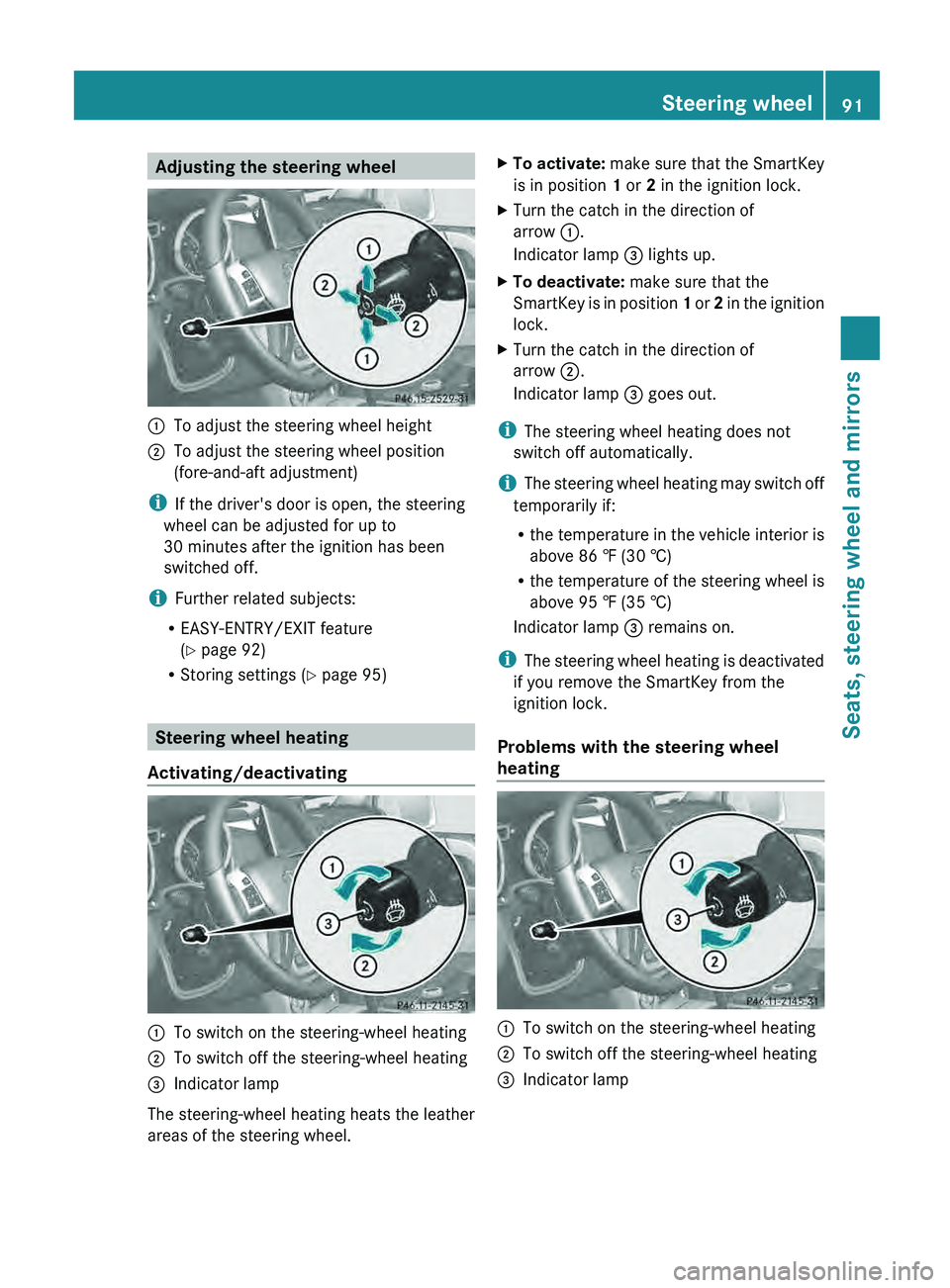
0043
To adjust the steering wheel height
0044 To adjust the steering wheel position
(fore-and-aft adjustment)
i If the driver's door is open, the steering
wheel can be adjusted for up to
30 minutes after the ignition has been
switched off.
i Further related subjects:
R EASY-ENTRY/EXIT feature
(Y page 92)
R Storing settings ( Y page 95)Steering wheel heating
Activating/deactivating 0043
To switch on the steering-wheel heating
0044 To switch off the steering-wheel heating
0087 Indicator lamp
The steering-wheel heating heats the leather
areas of the steering wheel. X
To activate: make sure
that the SmartKey
is in position 1 or 2 in the ignition lock.
X Turn the catch in the direction of
arrow 0043.
Indicator lamp 0087 lights up.
X To deactivate: make sure that the
SmartKey is
in position
1
or 2 in the ignition
lock.
X Turn the catch in the direction of
arrow 0044.
Indicator lamp 0087 goes out.
i The steering wheel heating does not
switch off automatically.
i The steering wheel
heating
may switch off
temporarily if:
R the temperature in the vehicle interior is
above 86 ‡ (30 †)
R the temperature of the steering wheel is
above 95 ‡ (35 †)
Indicator lamp 0087 remains on.
i The steering wheel heating is deactivated
if you remove the SmartKey from the
ignition lock.
Problems with the steering wheel
heating 0043
To switch on the steering-wheel heating
0044 To switch off the steering-wheel heating
0087 Indicator lamp Steering wheel
91
Seats, steering wheel and mirrors Z
Page 94 of 364
If steering wheel heating indicator lamp
0087 is
flashing, the steering wheel heating has
switched off automatically. The vehicle's
electrical system voltage is too low because
too many electrical consumers are switched
on.
X Switch off electrical
consumers that you do
not need, such as the rear window
defroster or interior lighting.
Once the battery is
sufficiently charged, the
steering wheel heating will switch back on
automatically. Steering wheel EASY-ENTRY/EXIT
feature
Important safety notes G
WARNING
Make sure that nobody can become trapped
when you activate the EASY-ENTRY/EXIT
feature.
If there is a risk of someone becoming
trapped, stop the adjustment procedure. To
halt the procedure:
R press the steering column adjustment
button.
R press one of the memory function position
buttons.
The steering column stops moving
immediately.
Do not keep the memory function position
button pressed as this will start the memory
function and set the steering wheel and seat
in motion.
Do not leave children unattended in the
vehicle. They could open
the driver's door and
thereby unintentionally activate the EASY-
ENTRY/EXIT feature and become trapped. G
WARNING
Let the system complete the adjustment
procedure before setting the vehicle in
motion. All steering wheel adjustment must
be completed before setting the vehicle in motion. Driving off with the steering wheel
still adjusting could cause the driver to lose
control of the vehicle.
! Do not activate the EASY-ENTRY/EXIT
feature, if the seat
backrest is reclined too
far backwards. This can damage the front
or rear seats. You must first move the
backrest to a vertical position.
The EASY-ENTRY/EXIT feature makes getting
in and out of your vehicle easier.
You can activate and deactivate the EASY-
ENTRY/EXIT feature in the on-board
computer (Y page 221).
Position of the steering wheel when the
EASY-ENTRY/EXIT feature is active The steering wheel moves upwards and
towards the dashboard if:
R
you remove the SmartKey
from the ignition
lock or
R you open the driver's door with the
SmartKey in position 0 or 1 in the ignition
lock.
i The steering wheel only moves upwards
and towards the dashboard if it has not
already reached the upper end stop.
Position of the steering wheel for
driving The steering wheel is moved to the last
selected position when:
R
the driver's door is closed.
R you insert the SmartKey into the ignition
lock.
The last position of the steering wheel is
stored when you switch off the ignition or
when you store the setting with the memory
function ( Y page 95).92
Steering wheel
Seats, steering wheel and mirrors
Page 120 of 364
Useful information
i This Operator's Manual describes all
models and all standard and optional
equipment of your vehicle available at the
time of publication of the Operator's
Manual. Country-specific differences are
possible. Please note that
your vehicle may
not be equipped with all features
described. This also applies to safety-
related systems and functions.
i Read the information on qualified
specialist workshops: ( Y page 23).Overview of climate control systems
Important safety notes
G
WARNING
Severe conditions (e.g. strong air pollution)
may require replacement of the filter before
its scheduled replacement interval.
A clogged
filter will reduce the air volume to the interior
and the windows could fog up, impairing
visibility and endangering you and others.
Have a blocked filter replaced at a Mercedes-
Benz Center as soon as possible. G
WARNING
Follow the recommended settings for heating
and cooling given on the following pages.
Otherwise, the windows could fog up,
impairing visibility and endangering you and
others.
Automatic climate control controls the
temperature and the humidity in the vehicle
interior and filters undesirable substances
from the air.
Automatic climate control is
only operational
when the engine is running. Optimum
operation is only achieved if you drive with the
side windows and sliding sunroof closed.
The climatic comfort deteriorates whilst the
sliding sunroof is open. The automatic climate
control cannot maintain the set temperature with the sliding sunroof open. You have to
adjust the climate control manually.
i
The "residual heat" function can only be
activated or deactivated with the ignition
switched off.
i The residual heat function can only be
activated or deactivated with the ignition
switched off (Y page 134).
i Ventilate the vehicle for a brief period
during warm weather, e.g. using the
convenience opening feature ( Y page 78).
This will speed up the cooling process and
the desired vehicle interior temperature
will be reached more quickly.
i The integrated filter can filter out most
particles of dust, and
completely filters out
pollen. A clogged filter reduces the amount
of air supplied to the vehicle interior. For
this reason, you should always observe the
interval for replacing the filter, which is
specified in the Maintenance Booklet.
Since the replacement interval depends on
environmental conditions, e.g. heavy air
pollution, the interval may be shorter than
stated in the Maintenance Booklet. 118
Overview of climate control systems
Climate control
Page 135 of 364
i
You should only select this setting until
the windshield is clear again. Switching the windshield defroster
on/off
G
WARNING
Any accumulation of snow and ice should be
removed from the windshield before driving.
Otherwise, your vision may be impaired,
which could endanger you or others. X
Turn the SmartKey to position
2 (Y page 139) in the ignition lock.
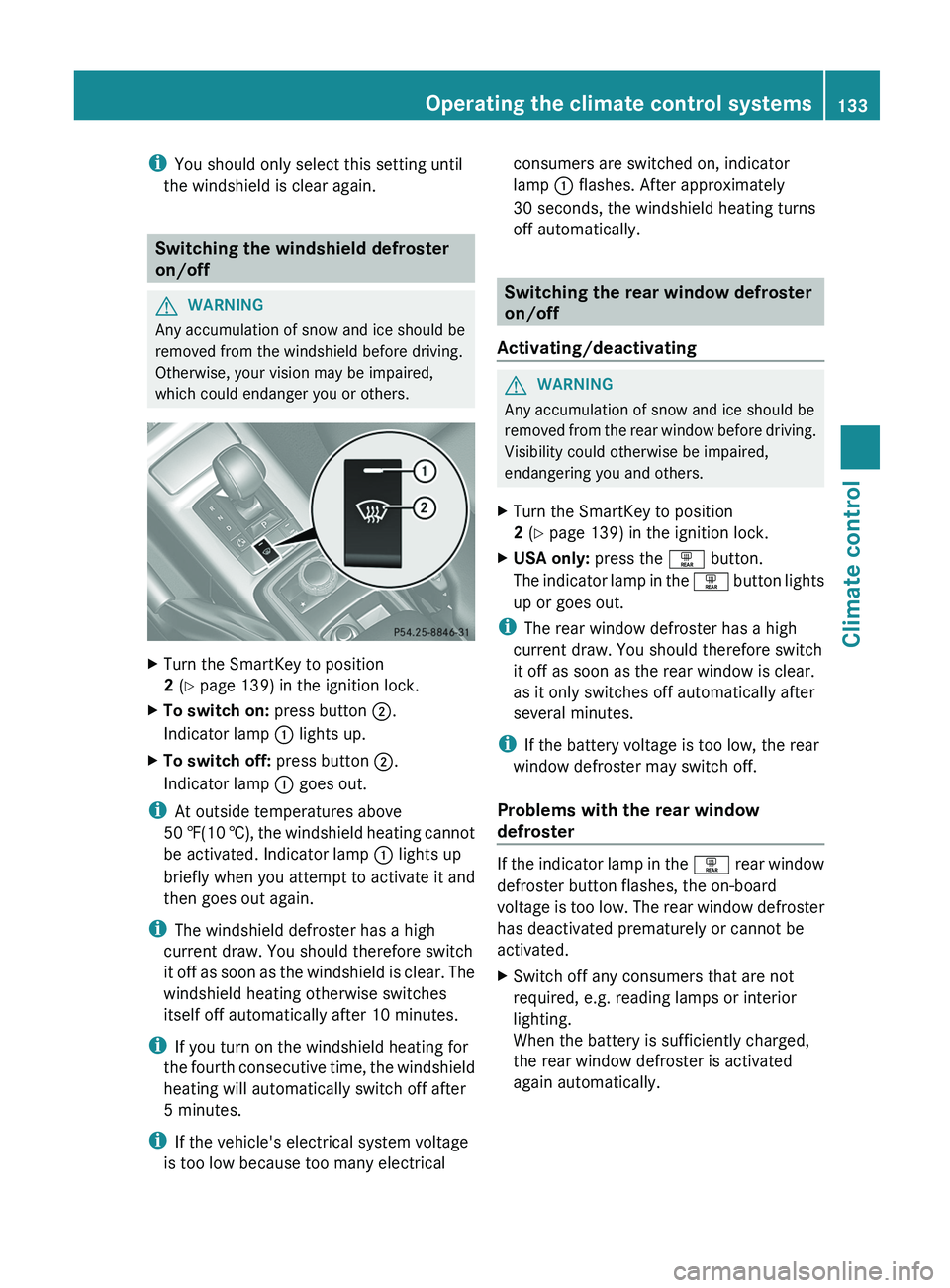
X To switch on: press button 0044.
Indicator lamp 0043 lights up.
X To switch off: press button 0044.
Indicator lamp 0043 goes out.
i At outside temperatures above
50 ‡(10 †), the windshield
heating
cannot
be activated. Indicator lamp 0043 lights up
briefly when you attempt to activate it and
then goes out again.
i The windshield defroster has a high
current draw. You should therefore switch
it off as soon as the windshield is clear. The
windshield heating otherwise switches
itself off automatically after 10 minutes.
i If you turn on the windshield heating for
the fourth consecutive time, the windshield
heating will automatically switch off after
5 minutes.
i If the vehicle's electrical system voltage
is too low because too many electrical consumers are switched on, indicator
lamp
0043 flashes. After approximately
30 seconds, the windshield heating turns
off automatically. Switching the rear window defroster
on/off
Activating/deactivating G
WARNING
Any accumulation of snow and ice should be
removed from the rear
window before driving.
Visibility could otherwise be impaired,
endangering you and others.
X Turn the SmartKey to position
2 (Y page 139) in the ignition lock.
X USA only: press the 0065 button.
The indicator lamp
in
the 0065 button lights
up or goes out.
i The rear window defroster has a high
current draw. You should therefore switch
it off as soon as the rear window is clear.
as it only switches off automatically after
several minutes.
i If the battery voltage is too low, the rear
window defroster may switch off.
Problems with the rear window
defroster If the indicator lamp in the
0065 rear window
defroster button flashes, the on-board
voltage is
too low. The rear window defroster
has deactivated prematurely or cannot be
activated.
X Switch off any consumers that are not
required, e.g. reading lamps or interior
lighting.
When the battery is sufficiently charged,
the rear window defroster is activated
again automatically. Operating the climate control systems
133
Climate control Z
Page 136 of 364
Activating/deactivating air-
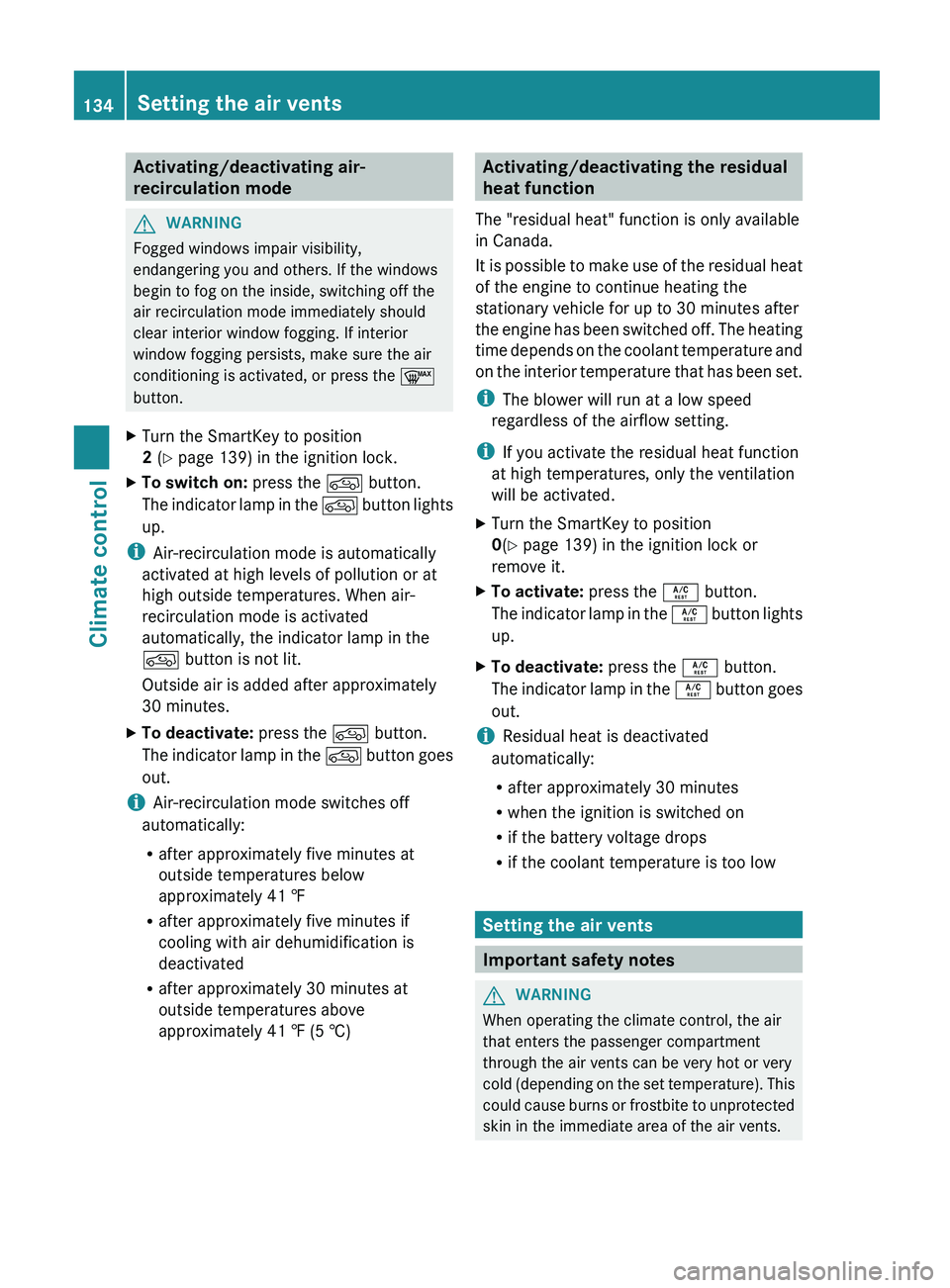
recirculation mode
G
WARNING
Fogged windows impair visibility,
endangering you and others. If the windows
begin to fog on the inside, switching off the
air recirculation mode immediately should
clear interior window fogging. If interior
window fogging persists, make sure the air
conditioning is activated, or press the 0064
button.
X Turn the SmartKey to position
2 (Y page 139) in the ignition lock.
X To switch on: press the 0089 button.
The indicator lamp
in
the 0089 button lights
up.
i Air-recirculation mode is automatically
activated at high levels of pollution or at
high outside temperatures. When air-
recirculation mode is activated
automatically, the indicator lamp in the
0089 button is not lit.
Outside air is added after approximately
30 minutes.
X To deactivate: press the 0089 button.
The indicator lamp in
the 0089 button goes
out.
i Air-recirculation mode switches off
automatically:
R after approximately five minutes at
outside temperatures below
approximately 41 ‡
R after approximately five minutes if
cooling with air dehumidification is
deactivated
R after approximately 30 minutes at
outside temperatures above
approximately 41 ‡ (5 †) Activating/deactivating the residual
heat function
The "residual heat" function is only available
in Canada.
It is possible to
make use of the residual heat
of the engine to continue heating the
stationary vehicle for up to 30 minutes after
the engine has been switched off. The heating
time depends on the coolant temperature and
on the interior temperature that has been set.
i The blower will run at a low speed
regardless of the airflow setting.
i If you activate the residual heat function
at high temperatures, only the ventilation
will be activated.
X Turn the SmartKey to position
0(Y page 139) in the ignition lock or
remove it.
X To activate: press the 0056 button.
The indicator lamp
in
the 0056 button lights
up.
X To deactivate: press the 0056 button.
The indicator lamp in
the 0056 button goes
out.
i Residual heat is deactivated
automatically:
R after approximately 30 minutes
R when the ignition is switched on
R if the battery voltage drops
R if the coolant temperature is too low Setting the air vents
Important safety notes
G
WARNING
When operating the climate control, the air
that enters the passenger compartment
through the air vents can be very hot or very
cold (depending on the
set temperature). This
could cause burns or frostbite to unprotected
skin in the immediate area of the air vents. 134
Setting the air vents
Climate control
Page 162 of 364
Never activate the LOW off-road gear while
driving on a slippery road surface.
Downhill gradients !
On long and steep gradients, you must
reduce the load on the brakes by shifting
early to a lower
gear. This allows you to take
advantage of the engine braking effect and
helps avoid overheating and excessive
wear of the brakes.
When you take advantage of the engine
braking effect, a drive wheel may not turn
for some time, e.g. on a slippery road
surface. This could cause damage to the
drive train. This type of damage is not
covered by the Mercedes-Benz warranty.
Heavy and light loads G
WARNING
If you rest your foot on the brake pedal while
driving, the braking system
can overheat. This
increases the stopping distance and can even
cause the braking system to fail. There is a
risk of an accident.
Never use the brake pedal as a footrest. Never
depress the brake pedal and the accelerator
pedal at the same time.
! Depressing the brake pedal constantly
results in excessive and premature wear to
the brake pads.
If the brakes have been subjected to a heavy
load, do not stop the vehicle immediately, but
drive on for a short while. This allows the
airflow to cool the brakes more quickly.
Wet roads If driving in heavy rain for a prolonged period
of time without braking, there may be a
delayed reaction from the brakes when
braking for the
first
time. This may also occur
after the vehicle has been washed. You have to depress the brake pedal more
firmly. Maintain a greater distance from the
vehicle in front.
After driving on a wet road or having the
vehicle washed, brake firmly while paying
attention to the traffic conditions. This will
warm up the brake
discs, thereby drying them
more quickly and protecting them against
corrosion.
Limited braking performance on salt-
treated roads If you drive on salted roads, a layer of salt
residue may form on the brake discs and
brake pads. This can result in a significantly
longer braking distance.
R
Brake occasionally to remove
any possible
salt residue. Make sure that you do not
endanger other road users when doing so.
R Carefully depress the brake pedal and the
beginning and end of a journey.
R Maintain a greater distance to the vehicle
ahead.
Servicing the brakes !
If the brake warning
lamp lights up in the
instrument cluster and you hear a warning
tone even though the parking brake has
been released, the brake fluid level may be
too low. Observe additional warning
messages in the multifunction display.
The brake fluid level may be too low due to
brake pad wear or leaking brake lines.
Have the brake system checked
immediately. This work should be carried
out at a qualified specialist workshop.
! A function or performance test should
only be carried out on a 2-axle
dynamometer. If you are planning to have
the vehicle tested on such a dynamometer,
contact an authorized Mercedes-Benz
Center to obtain further information first.
Otherwise, you could damage the drive
train or the brake system. 160
Driving tips
Driving and parking
Page 165 of 364
R
Switch off the air-conditioning system.
R
R Shift the transfer case to LOW
RANGE(Y page 198).
R Engage the differential locks, if necessary
(Y page 201).
R Restrict the shift range to 1 or
2(Y page 150).
R Avoid high engine speeds.
R Enter and exit the
water at a flat place and
at a steady walking pace.
R Drive slowly and at an even speed through
the water.
R Do not stop and do not switch off the
engine.
R Water offers a high degree of resistance,
and the ground is slippery and in some
cases unstable. Therefore, it is difficult and
dangerous to pull away in the water.
R Ensure that a bow wave does not form as
you drive.
R Clean any mud from the tire tread after
fording.
R Apply the brakes to dry them after fording.
R Water offers a high degree of resistance,
and the ground is slippery and in some
cases unstable. Therefore, it is difficult and
dangerous to pull away in the water.
R Ensure that a bow wave does not form as
you drive.
R Clean any mud from the tire tread after
fording.
R Apply the brakes to dry them after fording. Winter driving
General notes G
DANGER
If the exhaust pipe is blocked or adequate
ventilation is not possible, poisonous gases
such as carbon monoxide
(CO) may enter the
vehicle. This is the case, e.g. if the vehicle becomes trapped in snow. There is a risk of
fatal injury.
If you leave
the
engine or the auxiliary heating
running, make sure the exhaust pipe and area
around the vehicle are clear of snow. To
ensure an adequate supply of fresh air, open
a window on the side of the vehicle that is not
facing into the wind. G
WARNING
If snow chains are installed to the front
wheels, they may drag against the vehicle
body or chassis components. This could
cause damage to the vehicle or the tires.
There is a risk of an accident.
To avoid hazardous situations:
R never install snow chains to the front
wheels
R always install snow chains in pairs to the
rear wheels.
Have your vehicle winterproofed
at a qualified
specialist workshop at the onset of winter.
Observe the notes in the "Winter operation"
section ( Y page 320).
Driving with summer tires Observe the notes in the "Winter operation"
section (
Y page 320).
Slippery road surfaces G
WARNING
If you shift down on a slippery road surface in
an attempt to increase the engine's braking
effect, the drive wheels could lose their grip.
There is an increased danger of skidding and
accidents.
Do not shift down for additional engine
braking on a slippery road surface. G
WARNING
The outside temperature indicator is not
designed to serve as an ice-warning device
and is therefore unsuitable for that purpose. Driving tips
163
Driving and parking
Z
Page 171 of 364
Driving downhill
R
Before tackling steep downhill gradients,
select shift range 1(Y page 150).
This way you use the engine's braking
effect to reduce the speed. If this is not
sufficient, brake gently. When doing so,
make sure that the vehicle is facing in the
direction of the line of fall.
R Observe the notes on driving in
mountainous terrain (Y page 168).
R Drive slowly.
R Do not drive at an angle down steep
inclines. Steer into the
line of fall and drive
with the front wheels aligned straight.
Otherwise, the vehicle could slip sideways,
tip and roll over.
R Check that the brakes are working normally
after a long downhill stretch.
i The special off-road ABS setting
(Y page 61) enables repeated, brief,
precise locking of the front wheels, which
leads to the wheels digging into the loose
ground. Note that when the front wheels
are fully braked, they slide easily over the
surface of the ground, making it difficult to
steer. Driving systems
Cruise control
Important safety notes G
WARNING
The brake pedal moves when cruise control
brakes the vehicle. A foot in the area under
the brake pedal could become trapped. The
movement of the pedal, and therefore the
vehicle's ability to brake,
may be restricted by
objects in the area under the brake. There is
a risk of an accident and injury.
Do not place your foot under the brake pedal.
Keep the area under the brake pedal free from
obstructions. If you fail to adapt your driving style, cruise
control can neither reduce the risk of
accident nor override the laws of physics.
Cruise control cannot take account of road,
weather and traffic conditions.
Cruise control
is only an aid. You are responsible for the
distance to the vehicle in front, for vehicle
speed and for braking in good time. Adjust
your driving style to the traffic conditions.
Only engage cruise control when the current
road, weather and traffic conditions permit it
to be done safely. Drive carefully and
maintain a suitable distance to the vehicle in
front.
Do not use cruise control:
R in traffic conditions that do not allow you
to drive at a constant speed, e.g. heavy
traffic, on winding roads or off-road
R on slippery road surfaces. Braking or
accelerating could cause the drive wheels
to lose traction and the vehicle could then
skid
R when there is poor visibility, e.g. due to fog,
heavy rain or snow
General notes Cruise control maintains a constant road
speed for you. On long and steep downhill
gradients, especially if the vehicle is laden,
you must select shift range 1, 2 or 3 in good
time. By doing so, you will make use of the
braking effect of the engine, which relieves
the load on the brake system and prevents
the brakes from
overheating
and wearing too
quickly.
Use cruise control only if road and traffic
conditions make it appropriate to maintain a
steady speed for a prolonged period. You can
store any road speed above 20 mph
(30 km/h).
i Cruise control should not be activated
during off-road driving. Driving systems
169
Driving and parking Z
Page 177 of 364
done safely. Drive carefully and maintain a
suitable distance to the vehicle in front.
General notes
SPEEDTRONIC brakes automatically so that
you do not
exceed
the set speed. On long and
steep downhill gradients, especially if the
vehicle is laden or towing a trailer, you must
select shift range 1, 2 or 3 in good time. By
doing so, you will make use of the braking
effect of the engine, which relieves the load
on the brake system and prevents the brakes
from overheating and wearing too quickly. If
you need additional braking, depress the
brake pedal repeatedly rather than
continuously.
i The speed indicated in the speedometer
may differ slightly from the limit speed
stored.
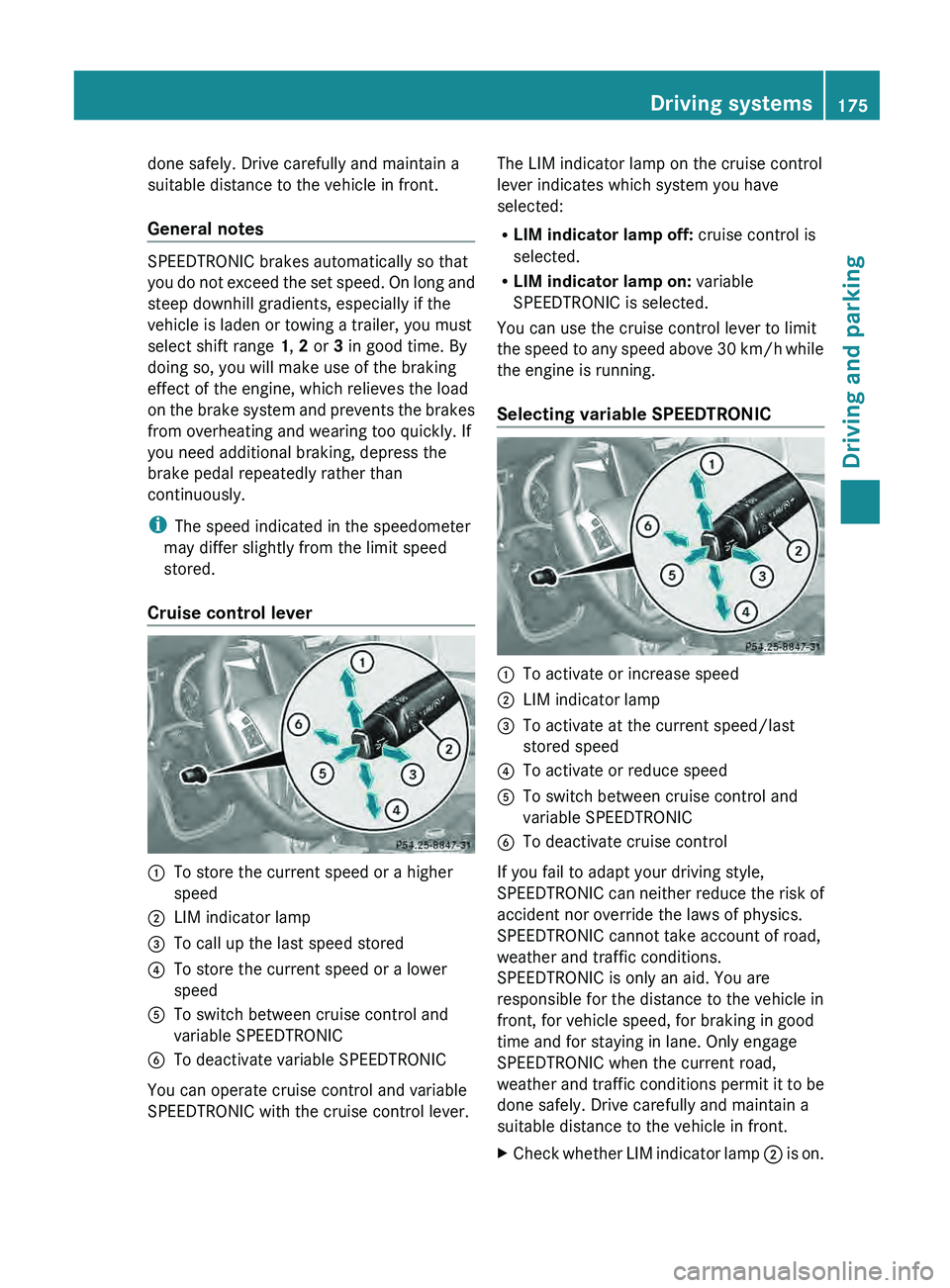
Cruise control lever 0043
To store the current speed or a higher
speed
0044 LIM indicator lamp
0087 To call up the last speed stored
0085 To store the current speed or a lower
speed
0083 To switch between cruise control and
variable SPEEDTRONIC
0084 To deactivate variable SPEEDTRONIC
You can operate cruise control and variable
SPEEDTRONIC with the cruise control lever. The LIM indicator lamp on the cruise control
lever indicates which system you have
selected:
R
LIM indicator lamp off: cruise control is
selected.
R LIM indicator lamp on: variable
SPEEDTRONIC is selected.
You can use the cruise control lever to limit
the speed to
any
speed above 30 km/h while
the engine is running.
Selecting variable SPEEDTRONIC 0043
To activate or increase speed
0044 LIM indicator lamp
0087 To activate at the current speed/last
stored speed
0085 To activate or reduce speed
0083 To switch between cruise control and
variable SPEEDTRONIC
0084 To deactivate cruise control
If you fail to adapt your driving style,
SPEEDTRONIC can neither
reduce
the risk of
accident nor override the laws of physics.
SPEEDTRONIC cannot take account of road,
weather and traffic conditions.
SPEEDTRONIC is only an aid. You are
responsible for the distance to the vehicle in
front, for vehicle speed, for braking in good
time and for staying in lane. Only engage
SPEEDTRONIC when the current road,
weather and traffic conditions permit it to be
done safely. Drive carefully and maintain a
suitable distance to the vehicle in front.
X Check whether LIM indicator lamp 0044 is on. Driving systems
175
Driving and parking Z
Page 180 of 364
road, weather and traffic conditions.
DISTRONIC PLUS is only an aid. You are
responsible for the distance to the vehicle in
front, for vehicle speed, for braking in good
time and for staying in lane. Only engage
DISTRONIC PLUS when the current road,
weather and traffic
conditions
permit it to be
done safely, and adapt your driving style
accordingly. Drive carefully and maintain a
suitable distance to the vehicle in front.
If DISTRONIC PLUS detects a risk of collision
but cannot sufficiently decelerate the vehicle
in order to maintain the set distance, you will
be warned visually and acoustically.
DISTRONIC PLUS cannot prevent a collision
without your intervention. An intermittent
warning tone will then sound and the distance
warning lamp will light up in the instrument
cluster. Brake immediately in order to
increase the distance from the vehicle in
front, or take evasive action, provided it is
safe to do so.
DISTRONIC PLUS may not detect narrow
vehicles driving in front, e.g. motorcycles, or
vehicles driving on a different line. Therefore,
always pay attention to traffic conditions
even when DISTRONIC PLUS is activated.
Otherwise, you may fail to recognize dangers
in time, cause an accident and injure yourself
and others.
In particular, the detection of obstacles can
be impaired if there is:
R the sensor is dirty or covered
R snow or heavy rain
R interference by other radar sources
R there is the possibility of strong radar
reflections, for example, in parking
garages.
If DISTRONIC PLUS is activated, the vehicle
brakes automatically in certain situations.
This can happen unexpectedly, especially
when towing or in a car wash. There is a risk
of an accident. In these or similar situations,
deactivate DISTRONIC PLUS.
If you want DISTRONIC PLUS to assist you,
the following activation conditions must be fulfilled (
Y page 179) and the radar sensor
system must be operational.
General notes DISTRONIC PLUS regulates the speed and
automatically helps you maintain the
distance to the vehicle detected in front.
DISTRONIC PLUS brakes automatically so
that the set speed is not exceeded.
On long and steep downhill gradients,
especially if the vehicle is laden or towing a
trailer, you must select shift range
1, 2 or 3
in good time. By doing so, you will make use
of the braking effect of the engine, which
relieves the load on the brake system and
prevents the brakes from overheating and
wearing too quickly.
If DISTRONIC PLUS detects a slower-moving
vehicle in front, your
vehicle is braked in order
to maintain the preset distance to the vehicle
in front.
If there is no vehicle in front, DISTRONIC
PLUS operates in the same way as cruise
control in the speed range between 20 mph
(Canada: 30 km/h) and120 mph (Canada:
200 km/h). If a vehicle is driving in front of
you, it operates in the speed range between
0 mph (0 km/h) and 120 mph (Canada:
200 km/h).
Do not use DISTRONIC PLUS while driving on
roads with steep gradients.
As DISTRONIC PLUS transmits radar waves,
it can resemble the radar detectors of the
responsible authorities. You can refer to the
relevant chapter in the Operator's Manual if
questions are asked about this.
i USA only:
This device has been approved by the FCC
as a “Vehicular Radar System”. The radar
sensor is intended for use in an automotive
radar system only. Removal, tampering, or
altering of the device will void any
warranties, and is not permitted by the
FCC. Do not tamper with, alter, or use in
any non-approved way. 178
Driving systems
Driving and parking