door lock MERCEDES-BENZ G-CLASS SUV 2013 Service Manual
[x] Cancel search | Manufacturer: MERCEDES-BENZ, Model Year: 2013, Model line: G-CLASS SUV, Model: MERCEDES-BENZ G-CLASS SUV 2013Pages: 364, PDF Size: 9.62 MB
Page 223 of 364
Activating/deactivating the acoustic
locking verification signal
If you switch
on
the Acoustic Lock function,
an acoustic signal sounds when you lock the
vehicle.
X Press the 0059 or 0065 button on the
steering wheel to select the Sett. menu.
X Press 0064 or 0063 to select the Vehicle
submenu.
X Press 0076 to confirm.
X Press the 0064 or 0063 button
to select the
Acoustic Lock function.
If the Acoustic Lock function is activated,
the 0037 symbol in the multifunction
display lights up red.
X Press the 0076 button to save the setting.
Convenience Activating/deactivating the EASY-
ENTRY/EXIT feature
G
WARNING
You must make sure no one can become
trapped or injured by the moving steering
wheel when the easy-entry/exit feature is
activated.
To stop steering wheel movement, move
steering wheel adjustment lever
or press one
of the memory position buttons.
Do not leave children unattended in the
vehicle, or with access to an unlocked vehicle.
Children could open the driver's door and
unintentionally activate the easy-entry/exit
feature, which could result in an accident
and/or serious personal injury.
X Press the 0059 or 0065 button on the
steering wheel to select the Sett. menu.
X Press the 0064
or 0063
button
to select the
Convenience submenu.
X Press 0076 to confirm. X
Press 0064 or 0063 to select the Easy
Entry/Exit: function.
If the Easy Entry/Exit function is
activated, the vehicle steering wheel is
displayed in red in the multifunction
display.
X Press the 0076 button to save the setting.
Further information on the EASY-ENTRY/EXIT
feature ( Y page 92).
Switching the fold-in mirrors when
locking feature on/off
When you activate the Auto. Mirror
Folding function, the exterior mirrors are
folded in when the vehicle is locked. If you
unlock the vehicle and then open a door, the
exterior mirrors fold out again.
X Press the 0059 or 0065 button on the
steering wheel to select the Sett. menu.
X Press the 0064 or
0063 button
to select the
Convenience submenu.
X Press 0076 to confirm.
X Press 0064 or 0063 to select the Auto.
Mirror Folding function.
If the Auto. Mirror Folding function is
activated, the vehicle's exterior mirror is
displayed in red in the multifunction
display.
X Press the 0076 button to save the setting. 0043
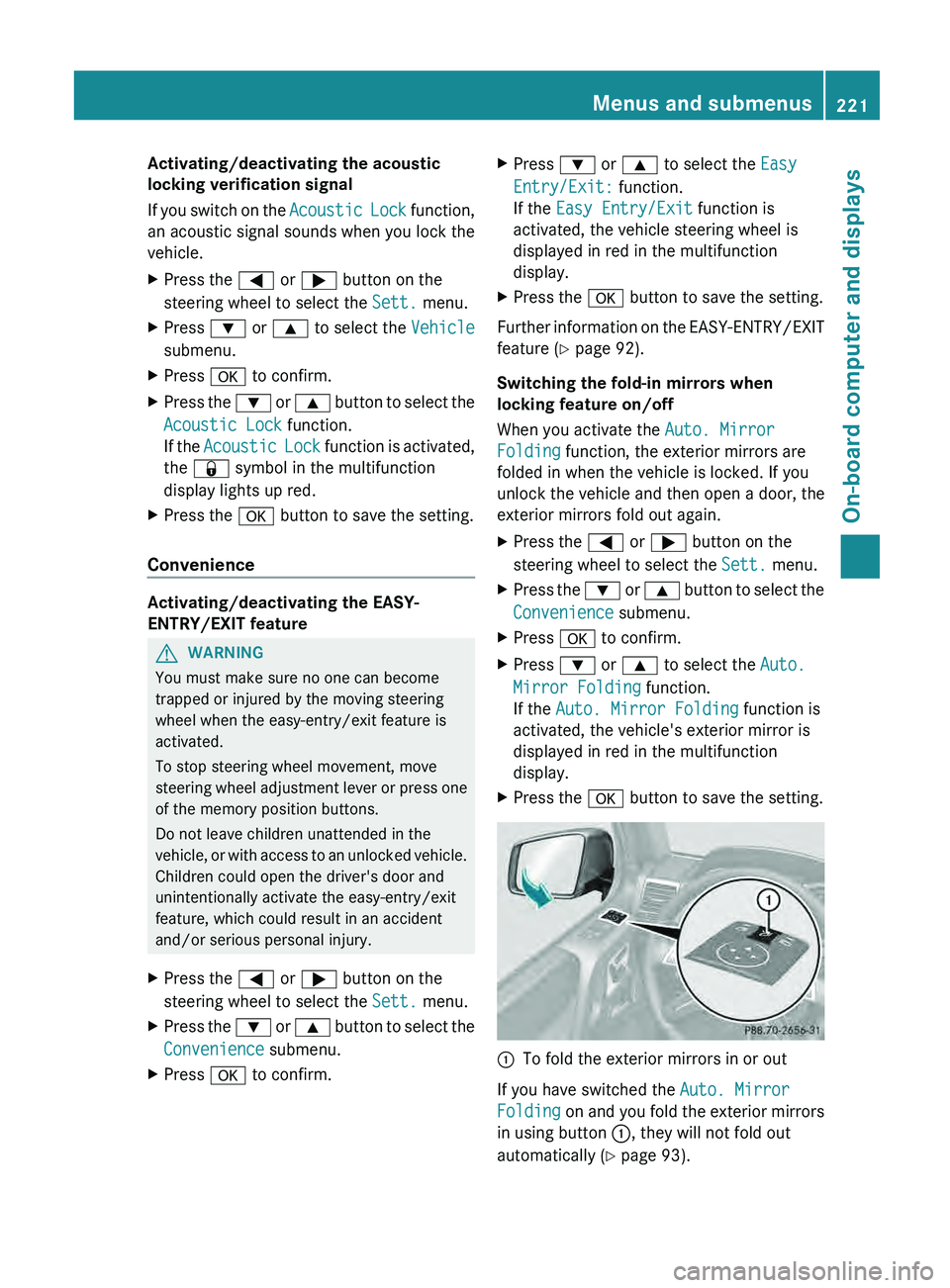
To fold the exterior mirrors in or out
If you have switched the Auto. Mirror
Folding on and you
fold the exterior mirrors
in using button 0043, they will not fold out
automatically ( Y page 93). Menus and submenus
221
On-board computer and displays Z
Page 241 of 364
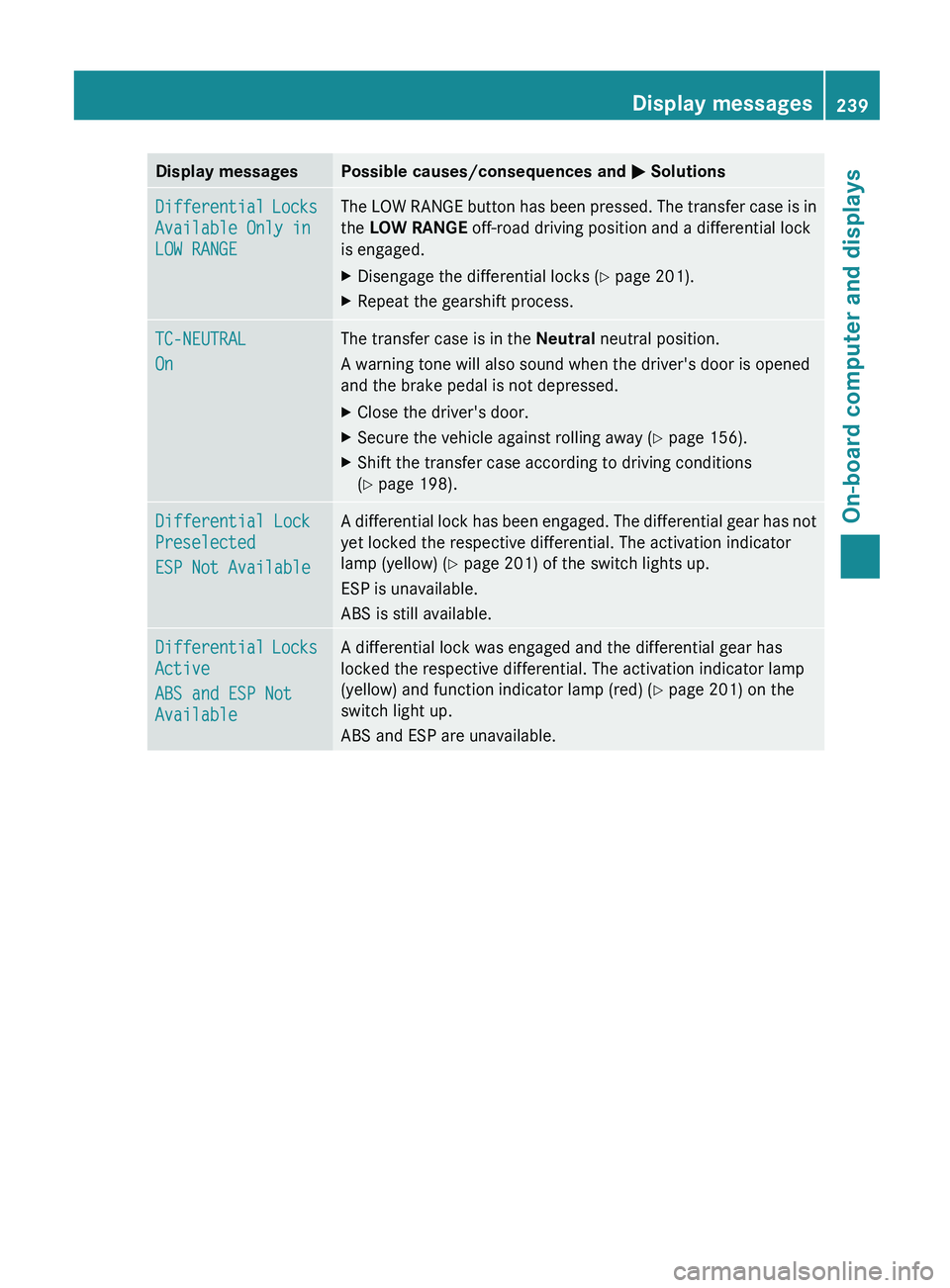
Display messages Possible causes/consequences and
0050 SolutionsDifferential Locks
Available Only in
LOW RANGE The LOW RANGE button has been pressed. The transfer case is in
the LOW RANGE off-road driving position and a differential lock
is engaged.
X
Disengage the differential locks (Y page 201).
X Repeat the gearshift process. TC-NEUTRAL
On The transfer case is in the Neutral
neutral position.
A warning tone will also sound when the driver's door is opened
and the brake pedal is not depressed.
X Close the driver's door.
X Secure the vehicle against rolling away ( Y page 156).
X Shift the transfer case according to driving conditions
(Y page 198). Differential Lock
Preselected
ESP Not Available A differential lock has been engaged. The differential gear has not
yet locked the respective differential. The activation indicator
lamp (yellow) (
Y page 201) of the switch lights up.
ESP is unavailable.
ABS is still available. Differential Locks
Active
ABS and ESP Not
Available A differential lock was engaged and the differential gear has
locked the respective differential. The activation indicator lamp
(yellow) and function indicator lamp (red) (
Y page 201) on the
switch light up.
ABS and ESP are unavailable. Display messages
239On-board computer and displays Z
Page 248 of 364
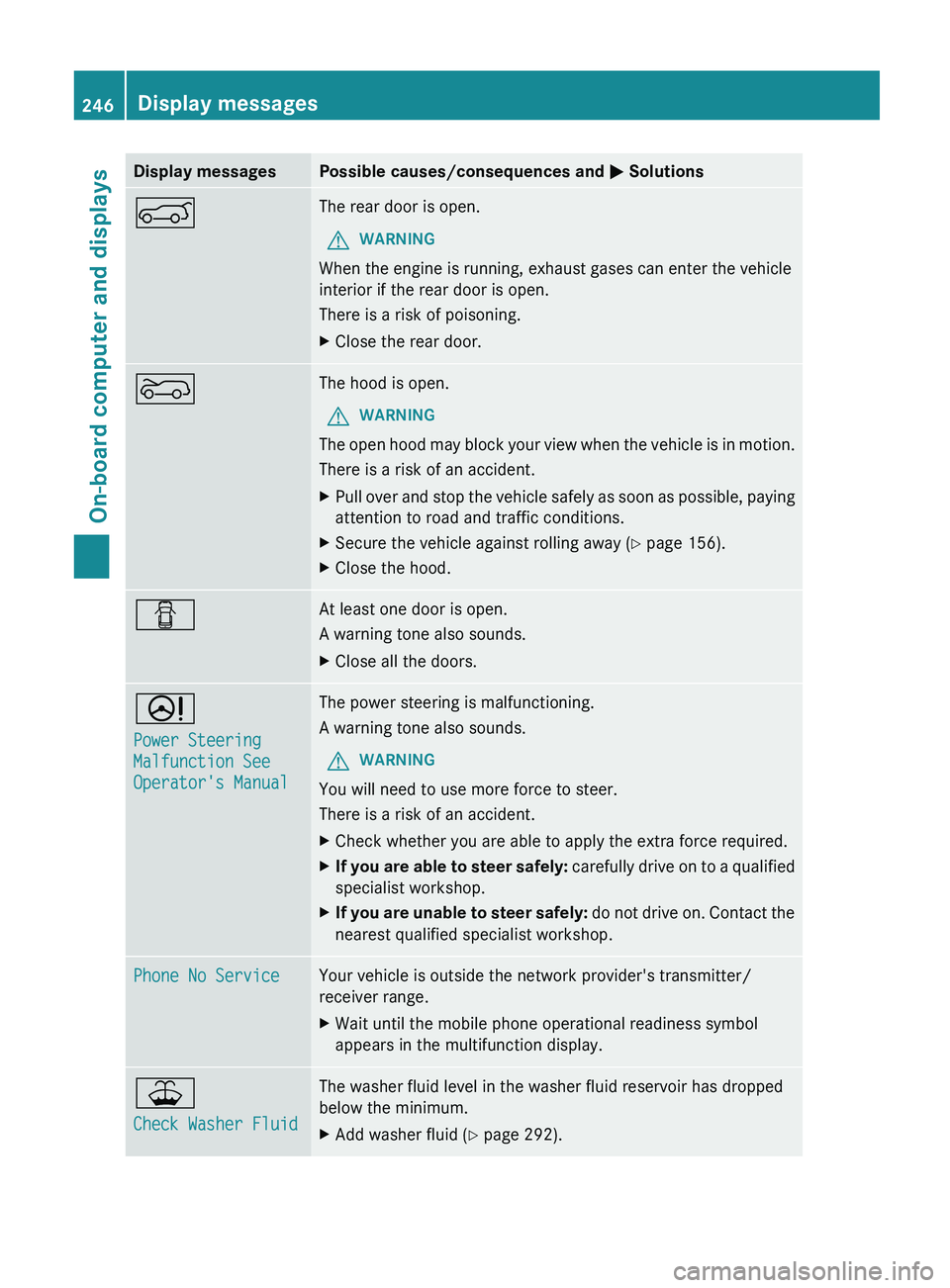
Display messages Possible causes/consequences and
0050 Solutions0065 The rear door is open.
G WARNING
When the engine is running, exhaust gases can enter the vehicle
interior if the rear door is open.
There is a risk of poisoning.
X Close the rear door. 0066 The hood is open.
G WARNING
The open hood may block your view when the vehicle is in motion.
There is a risk of an accident.
X Pull over and stop the vehicle safely as soon as possible, paying
attention to road and traffic conditions.
X Secure the vehicle against rolling away ( Y page 156).
X Close the hood. 0051 At least one door is open.
A warning tone also sounds.
X
Close all the doors. 0052
Power Steering
Malfunction See
Operator's Manual The power steering is malfunctioning.
A warning tone also sounds.
G WARNING
You will need to use more force to steer.
There is a risk of an accident.
X Check whether you are able to apply the extra force required.
X If you are able to steer safely:
carefully drive
on to a qualified
specialist workshop.
X If you are unable to steer safely: do not drive
on. Contact the
nearest qualified specialist workshop. Phone No Service Your vehicle is outside the network provider's transmitter/
receiver range.
X
Wait until the mobile phone operational readiness symbol
appears in the multifunction display. 00B2
Check Washer Fluid The washer fluid level in the washer fluid reservoir has dropped
below the minimum.
X
Add washer fluid ( Y page 292).246
Display messages
On-board computer and displays
Page 272 of 364
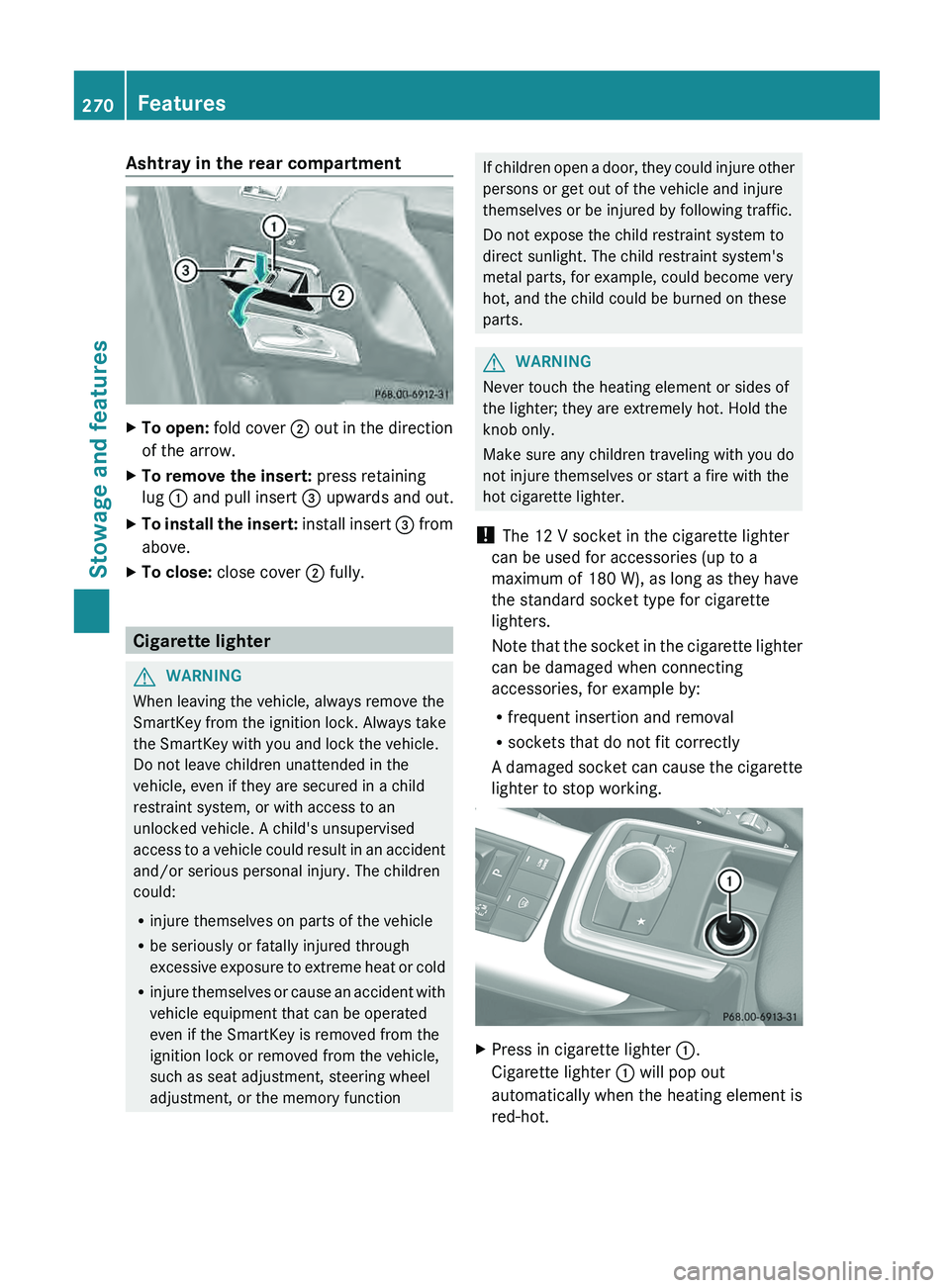
Ashtray in the rear compartment
X
To open: fold cover 0044 out in the direction
of the arrow.
X To remove the insert: press retaining
lug 0043 and pull insert 0087
upwards and out.
X To install the insert:
install insert 0087
from
above.
X To close: close cover 0044 fully.Cigarette lighter
G
WARNING
When leaving the vehicle, always remove the
SmartKey from the ignition lock. Always take
the SmartKey with you and lock the vehicle.
Do not leave children unattended in the
vehicle, even if they are secured in a child
restraint system, or with access to an
unlocked vehicle. A child's unsupervised
access to a vehicle
could result in an accident
and/or serious personal injury. The children
could:
R injure themselves on parts of the vehicle
R be seriously or fatally injured through
excessive exposure to extreme heat or cold
R injure themselves or cause an accident with
vehicle equipment that can be operated
even if the SmartKey is removed from the
ignition lock or removed from the vehicle,
such as seat adjustment, steering wheel
adjustment, or the memory function If children open a door, they could injure other
persons or get out of the vehicle and injure
themselves or be injured by following traffic.
Do not expose the child restraint system to
direct sunlight. The child restraint system's
metal parts, for example, could become very
hot, and the child could be burned on these
parts.
G
WARNING
Never touch the heating element or sides of
the lighter; they are extremely hot. Hold the
knob only.
Make sure any children traveling with you do
not injure themselves or start a fire with the
hot cigarette lighter.
! The 12 V socket in the cigarette lighter
can be used for accessories (up to a
maximum of 180 W), as long as they have
the standard socket type for cigarette
lighters.
Note that the socket
in the cigarette lighter
can be damaged when connecting
accessories, for example by:
R frequent insertion and removal
R sockets that do not fit correctly
A damaged socket can cause the cigarette
lighter to stop working. X
Press in cigarette lighter 0043.
Cigarette lighter 0043 will pop out
automatically when the heating element is
red-hot. 270
Features
Stowage and features
Page 273 of 364
12 V sockets
General notes !
If you are simultaneously using all three
sockets in the vehicle, make sure that you
do not exceed the maximum current draw
of 45 A. Otherwise, you will overload the
fuses.
The sockets can be
used for accessories with
a maximum current draw of 180 W (15 A), e.g.
lamps or chargers for mobile phones.
If you use the sockets for long periods when
the engine is switched off, the battery may
discharge.
X Turn the SmartKey to position 2 in the
ignition lock.
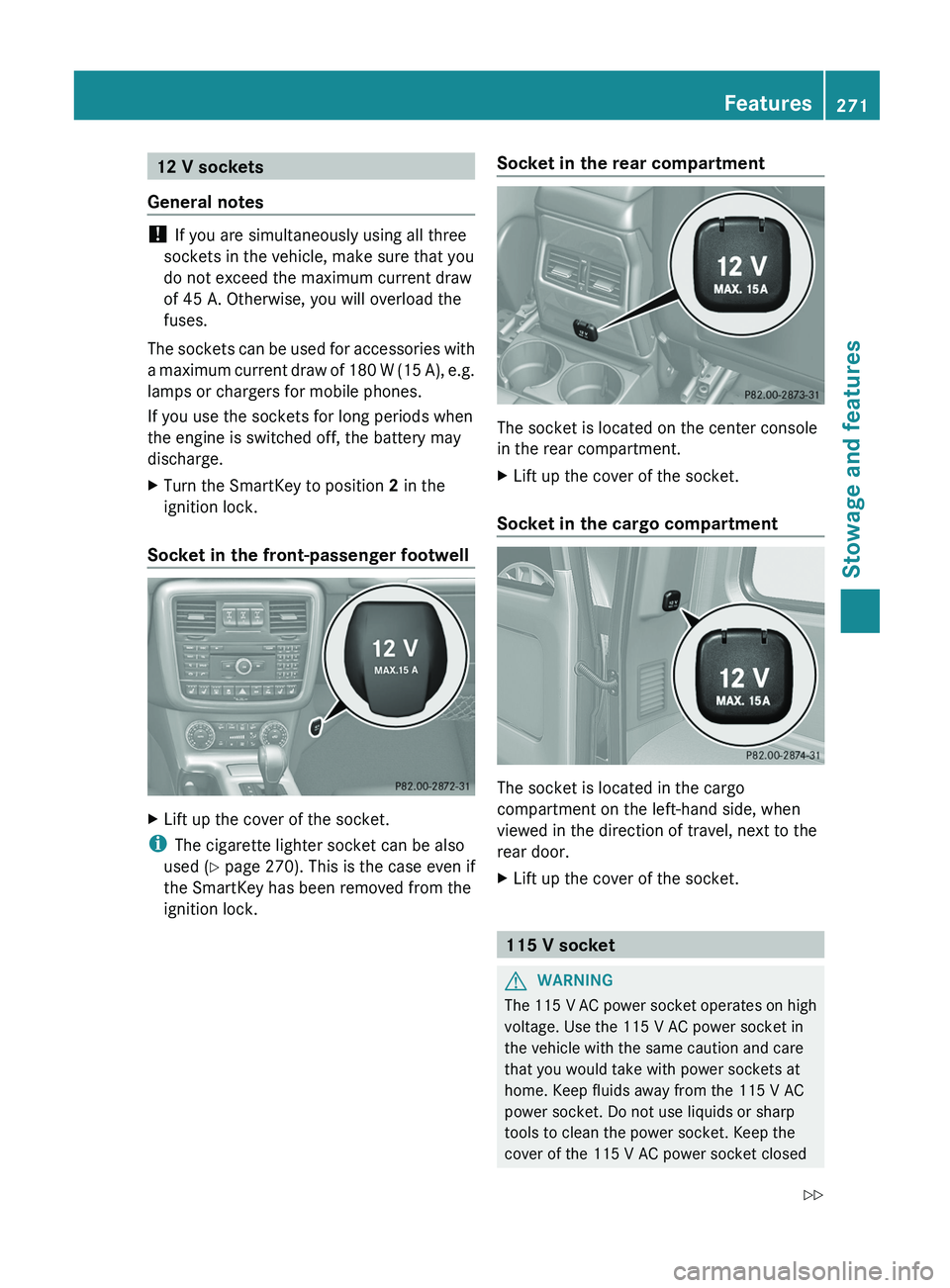
Socket in the front-passenger footwell X
Lift up the cover of the socket.
i The cigarette lighter socket can be also
used ( Y page 270). This is the case even if
the SmartKey has been removed from the
ignition lock. Socket in the rear compartment The socket is located on the center console
in the rear compartment.
X
Lift up the cover of the socket.
Socket in the cargo compartment The socket is located in the cargo
compartment on the left-hand side, when
viewed in the direction of travel, next to the
rear door.
X
Lift up the cover of the socket. 115 V socket
G
WARNING
The 115 V AC power socket operates on high
voltage. Use the 115 V AC power socket in
the vehicle with the same caution and care
that you would take with power sockets at
home. Keep fluids away from the 115 V AC
power socket. Do not use liquids or sharp
tools to clean the power socket. Keep the
cover of the 115 V AC power socket closed Features
271
Stowage and features
Z
Page 279 of 364
Downloading destinations in COMAND
Destination Download gives you access to a
database with over ten million points of
interest (POIs) which
can
be downloaded onto
the navigation system of your vehicle. If you
know the destination, you can download the
address or obtain the location of points of
interest (POIs) or important destinations in
the surrounding area.
You are prompted to confirm route guidance
to the address entered.
i Information on the components and
operating principles of the COMAND
system can be found in the separate
COMAND operating instructions.
X Select Yes with the 0059 or 0065 button
on COMAND.
X Confirm with the 008B button on COMAND.
The system calculates the route and
subsequently starts the route guidance with
the address entered.
i If you select No,
the address can be stored
in the address book.
i The Destination Download function is
available if the corresponding mobile
phone network is available and data
transfer is possible.
Search & Send "Search & Send" is a destination entry
service. You can find further information on
"Search & Send" in the separate COMAND
operating instructions.
Vehicle remote opening
If you have unintentionally locked your
vehicle (e.g. the SmartKey is inside the
vehicle) and a replacement key is not
available:
X
Contact the following service hotlines: R
USA: Response Center at
1-888-990-9007
R Canada: Customer Service at
1-888-923-8367
You will be asked for your password.
X Return to your vehicle at the time arranged
with the Response Center.
X Press the release button on the door handle
of the rear door
for at least 20 seconds until
the indicator lamp in the SOS button
(Y page 274) flashes.
The Connecting Call message appears
on the multifunction display.
Alternatively, the vehicle can be opened via
the Internet in the "Owner's Online" section
using your identification number and
password 3
.
i Vehicle remote opening is
only possible if
the corresponding mobile phone network
is accessible.
The SOS button flashes and the
Connecting Call message appears in the
multifunction display to confirm that the
command for vehicle remote unlocking has
been received.
If the lock cylinder on the rear door is
pressed for longer than 20 seconds before
receiving authorization for remote
unlocking from the Response center, you
must wait 15 minutes before you can press
the lock cylinder on the rear door again.
Vehicle remote closing The remote closing feature can be used when
you have forgotten
to
lock the vehicle and you
are no longer nearby. The vehicle can then be
locked by the Mercedes-Benz Customer
Assistance Center.
The vehicle can be remotely locked within
four days of the ignition being turned off.
X Contact the following service hotlines:
3 USA only. Features
277
Stowage and features Z
Page 280 of 364
R
USA: Mercedes-Benz Customer
Assistance Center at 1-800-FOR-
MERCedes (1-800-367-6372) or
1-888-990-9007
R Canada: Customer Service at
1-888-923-8367
You will be asked for your PIN.
The next time you are inside the vehicle and
you switch on the ignition, the Tele Aid
Doors Locked Remotely message appears
in the multifunction display.
USA only: alternatively, the vehicle can be
locked via:
R the Internet, under the "Owners Online"
section
R the telephone application (e.g. iPhone ®
,
Blackberry)
To do this, you will need your identification
number and password.
i The vehicle remote closing feature is
available when the relevant mobile phone
network is available
and
data connection is
possible.
Stolen vehicle recovery service If your vehicle has been stolen:
X
Contact the police.
The police will issue
an incident report. This
report has a number.
X Forward this number to the Response
Center together with your PIN.
The Response Center will then attempt to
covertly contact the mbrace system. The
Response Center contacts you and the
local law enforcement authority if the
vehicle is located. However, only the law
enforcement agency is informed of the
location of the vehicle.
i If the anti-theft alarm
system is active for
longer than 30 seconds, mbrace is
automatically connected with the
Customer Assistance center. Vehicle remote malfunction diagnosis With the vehicle remote malfunction
diagnosis (Vehicle Health Check), the
Customer Assistance center can provide
improved support for problems with your
vehicle. During an existing call, vehicle data
is transferred to the Customer Assistance
center. The customer service representative
can use the
received
data to decide what kind
of assistance is required. You are then, for
example, guided to the nearest Mercedes-
Benz Service center or a recovery vehicle is
called.
If vehicle data needs to be transferred during
an MB Info call or a Roadside Assistance call,
this is initiated by the Customer Assistance
center. You will see the Roadside
Assistance Connected message in the
COMAND display. If the vehicle remote
malfunction diagnosis is able to be started,
the Request for vehicle diagnosis
received. Start vehicle diagnosis?
message appears in the display.
X Press Yes to confirm the message.
X If the Vehicle Diagnosis: Please
start ignition message appears: turn
the SmartKey to position 2 in the ignition
lock.
X If the Please follow the
instructions received by
phone
and
move your vehicle into a safe
position message appears: follow the
instructions of the customer service
representative.
The message in the display disappears.
If you select Cancel, the vehicle remote
malfunction diagnosis is canceled
completely.
The vehicle operating state check begins.
Meanwhile, the Vehicle diagnosis
activated message appears.
When the check is finished, the Sending
vehicle diagnosis data... (Voice
connection may be interrupted
during data transfer)
message
appears.278
Features
Stowage and features
Page 283 of 364
i
Certain garage door drives are
incompatible with the integrated garage
door opener. If you have difficulty
programming the integrated garage door
opener, contact an authorized Mercedes-
Benz Center. You can also contact the
following service hotlines:
R USA: Mercedes-Benz Customer
Assistance Center at
1-800-FOR-MERCedes
R Canada: Customer Service at
1-800-387-0100
i USA only:
This device complies with Part 15 of the
FCC Rules. Operation is subject to the
following two conditions:
1. This device may not cause harmful
interference, and
2. this device
must accept any interference
received, including interference that may
cause undesired operation.
Any unauthorized modification to this
device could void the user's authority to
operate the equipment.
i Canada only:
This device complies with the RSS-210
Rules of Industry Canada. Operation is
subject to the following two conditions:
1. This device may not cause harmful
interference, and
2. this device must accept any interference
received, including interference that may
cause undesired operation of the device.
Any unauthorized modification to this
device could void the user's authority to
operate the equipment.
Programming the remote control Programming
G
WARNING
Only press the button on the integrated
garage door opener if
there are no persons or
objects present within the sweep of the garage door. Persons could otherwise be
injured as the door moves.
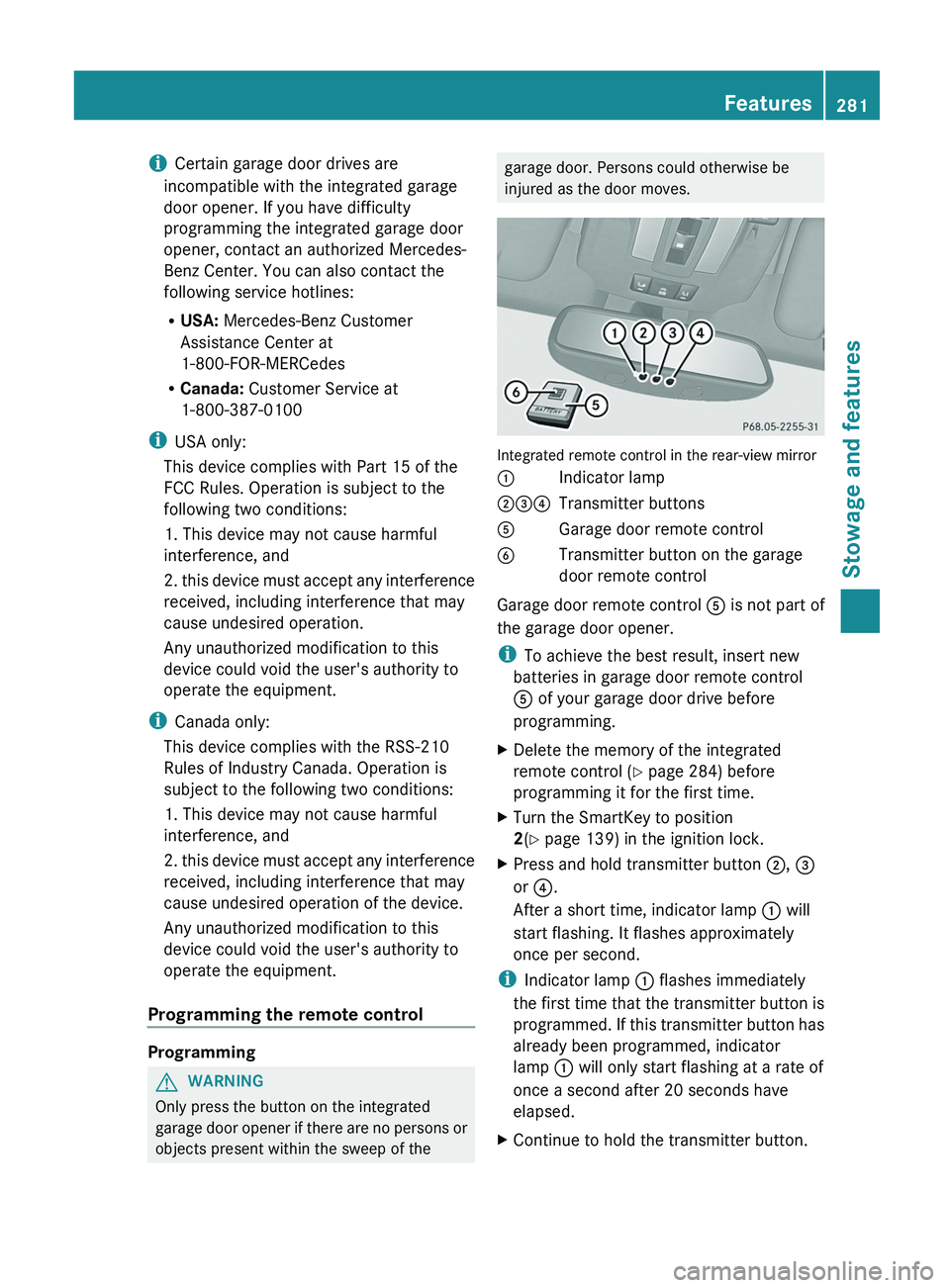
Integrated remote control in the rear-view mirror
0043
Indicator lamp
004400870085 Transmitter buttons
0083 Garage door remote control
0084 Transmitter button on the garage
door remote control
Garage door remote control 0083 is not part of
the garage door opener.
i To achieve the best result, insert new
batteries in garage door remote control
0083 of your garage door drive before
programming.
X Delete the memory of the integrated
remote control (Y
page 284) before
programming it for the first time.
X Turn the SmartKey to position
2
(Y page 139) in the ignition lock.
X Press and hold transmitter button 0044, 0087
or 0085.
After a short time, indicator lamp 0043 will
start flashing. It flashes approximately
once per second.
i Indicator lamp 0043 flashes immediately
the first time
that
the transmitter button is
programmed. If this transmitter button has
already been programmed, indicator
lamp 0043 will only start flashing at a rate of
once a second after 20 seconds have
elapsed.
X Continue to hold the transmitter button. Features
281
Stowage and features Z
Page 284 of 364
X
Point transmitter button 0083 of garage door
remote control 0084
towards the transmitter
buttons on the rear-view mirror at a
distance of 2 to 12 inches (5 to 30 cm).
i The distance between garage door
remote control 0083 and the integrated
garage door opener
depends
on the system
of the garage door drive. Several attempts
might be necessary. You should test every
position for at least 20 seconds before
trying another position.
X Keep transmitter button 0084 on garage door
remote control 0083
pressed until indicator
lamp 0043 starts to flash rapidly.
The programming has been successful if
indicator lamp 0043 flashes rapidly.
X Release transmitter buttons 0044, 0087 or 0085
on the integrated remote control and
transmitter button 0084 on the garage door
remote control.
If indicator lamp 0043 goes out after
approximately 20 seconds and has not
flashed rapidly:
X Release transmitter buttons 0044 ,
0087 or 0085
on the integrated remote control and
transmitter button 0084 on the garage door
remote control.
X Repeat the procedure for the other
transmitter buttons. When doing so, vary
the distance between the garage door's
remote control and
the
transmitter buttons
in the rear-view mirror.
i If the garage door system works with a
rolling code, you must synchronize the
remote control integrated in the rear-view
mirror with the garage door system
receiver after programming.
You will find further information in the
garage door opening system's operating
instructions, e.g. the sections on
"Synchronizing the transmitter" or
"Registering a new transmitter". You can
also call the hotline mentioned above. Synchronizing the rolling code
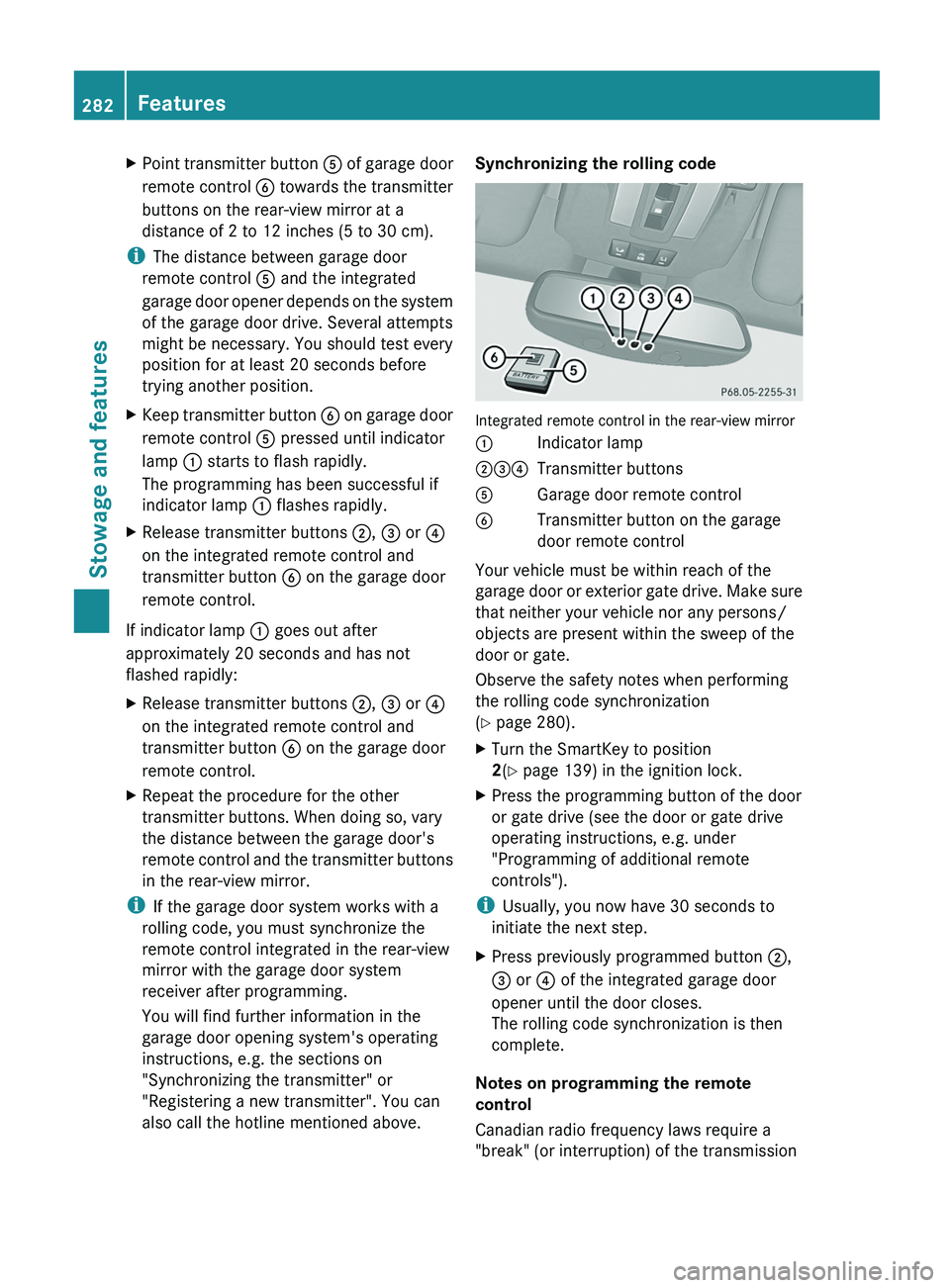
Integrated remote control in the rear-view mirror
0043
Indicator lamp
004400870085 Transmitter buttons
0083 Garage door remote control
0084 Transmitter button on the garage
door remote control
Your vehicle must be within reach of the
garage door or
exterior
gate drive. Make sure
that neither your vehicle nor any persons/
objects are present within the sweep of the
door or gate.
Observe the safety notes when performing
the rolling code synchronization
(Y page 280).
X Turn the SmartKey to position
2(Y page 139) in the ignition lock.
X Press the programming button of the door
or gate drive (see the door or gate drive
operating instructions, e.g. under
"Programming of additional remote
controls").
i Usually, you now have 30 seconds to
initiate the next step.
X Press previously programmed button 0044,
0087 or
0085 of the integrated garage door
opener until the door closes.
The rolling code synchronization is then
complete.
Notes on programming the remote
control
Canadian radio frequency laws require a
"break" (or interruption) of the transmission 282
Features
Stowage and features
Page 286 of 364
door opener. Before performing these
steps, make sure that new batteries have
been inserted in the garage door remote
control.
R Align the antenna cable
of the garage door
opener unit. This can improve signal
reception/transmission.
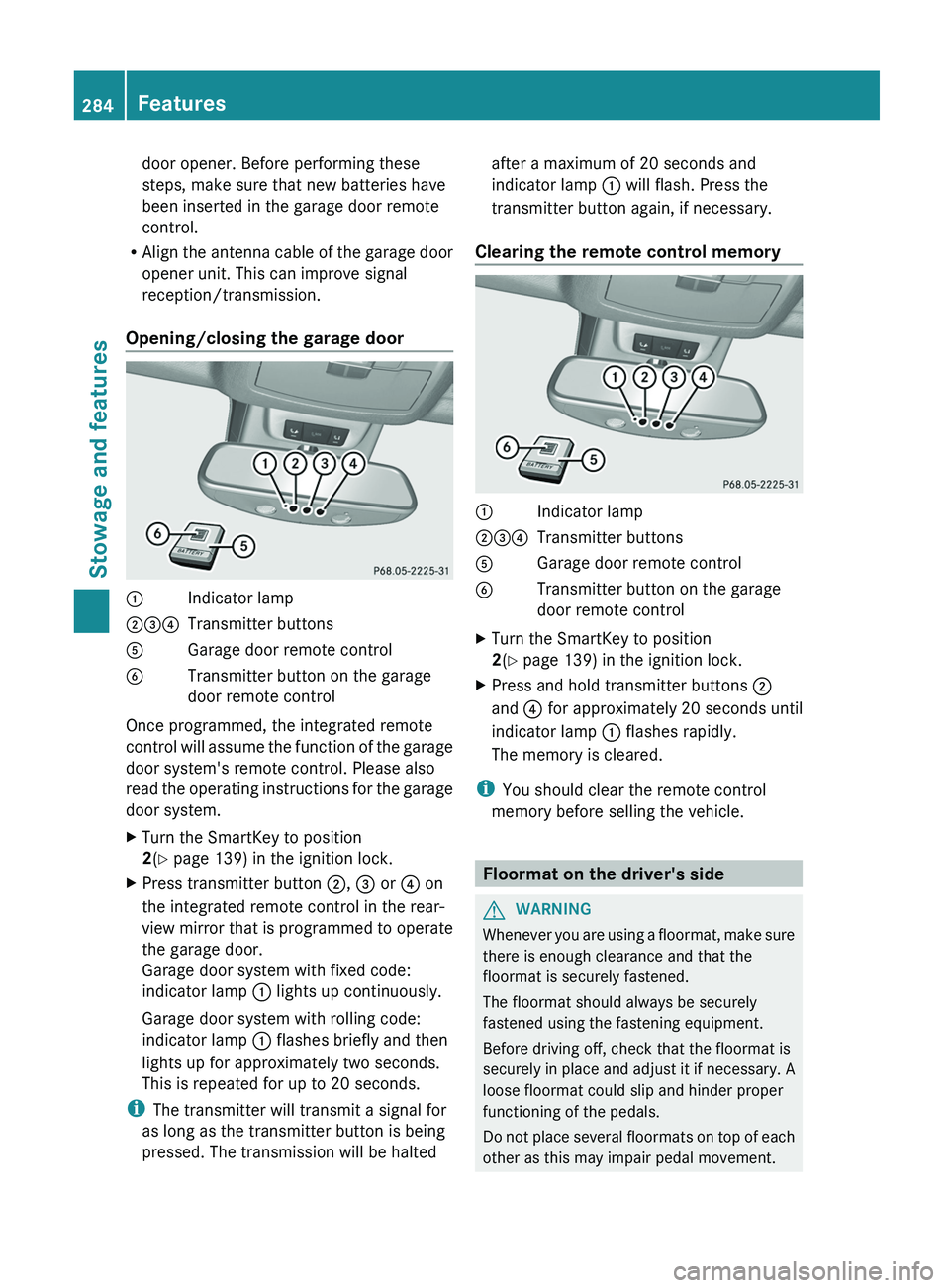
Opening/closing the garage door 0043
Indicator lamp
004400870085 Transmitter buttons
0083 Garage door remote control
0084 Transmitter button on the garage
door remote control
Once programmed, the integrated remote
control will assume
the
function of the garage
door system's remote control. Please also
read the operating instructions for the garage
door system.
X Turn the SmartKey to position
2(Y page 139) in the ignition lock.
X Press transmitter button 0044, 0087 or 0085 on
the integrated remote control in the rear-
view mirror that is
programmed to operate
the garage door.
Garage door system with fixed code:
indicator lamp 0043 lights up continuously.
Garage door system with rolling code:
indicator lamp 0043 flashes briefly and then
lights up for approximately two seconds.
This is repeated for up to 20 seconds.
i The transmitter will transmit a signal for
as long as the transmitter button is being
pressed. The transmission will be halted after a maximum of 20 seconds and
indicator lamp
0043 will flash. Press the
transmitter button again, if necessary.
Clearing the remote control memory 0043
Indicator lamp
004400870085 Transmitter buttons
0083 Garage door remote control
0084 Transmitter button on the garage
door remote control
X Turn the SmartKey to position
2(Y page 139) in the ignition lock.
X Press and hold transmitter buttons 0044
and 0085 for approximately 20 seconds until
indicator lamp 0043 flashes rapidly.
The memory is cleared.
i You should clear the remote control
memory before selling the vehicle. Floormat on the driver's side
G
WARNING
Whenever you are using a floormat, make sure
there is enough clearance and that the
floormat is securely fastened.
The floormat should always be securely
fastened using the fastening equipment.
Before driving off, check that the floormat is
securely in place and
adjust it if necessary. A
loose floormat could slip and hinder proper
functioning of the pedals.
Do not place several floormats on top of each
other as this may impair pedal movement. 284
Features
Stowage and features