key MERCEDES-BENZ G-CLASS SUV 2013 Workshop Manual
[x] Cancel search | Manufacturer: MERCEDES-BENZ, Model Year: 2013, Model line: G-CLASS SUV, Model: MERCEDES-BENZ G-CLASS SUV 2013Pages: 364, PDF Size: 9.62 MB
Page 117 of 364
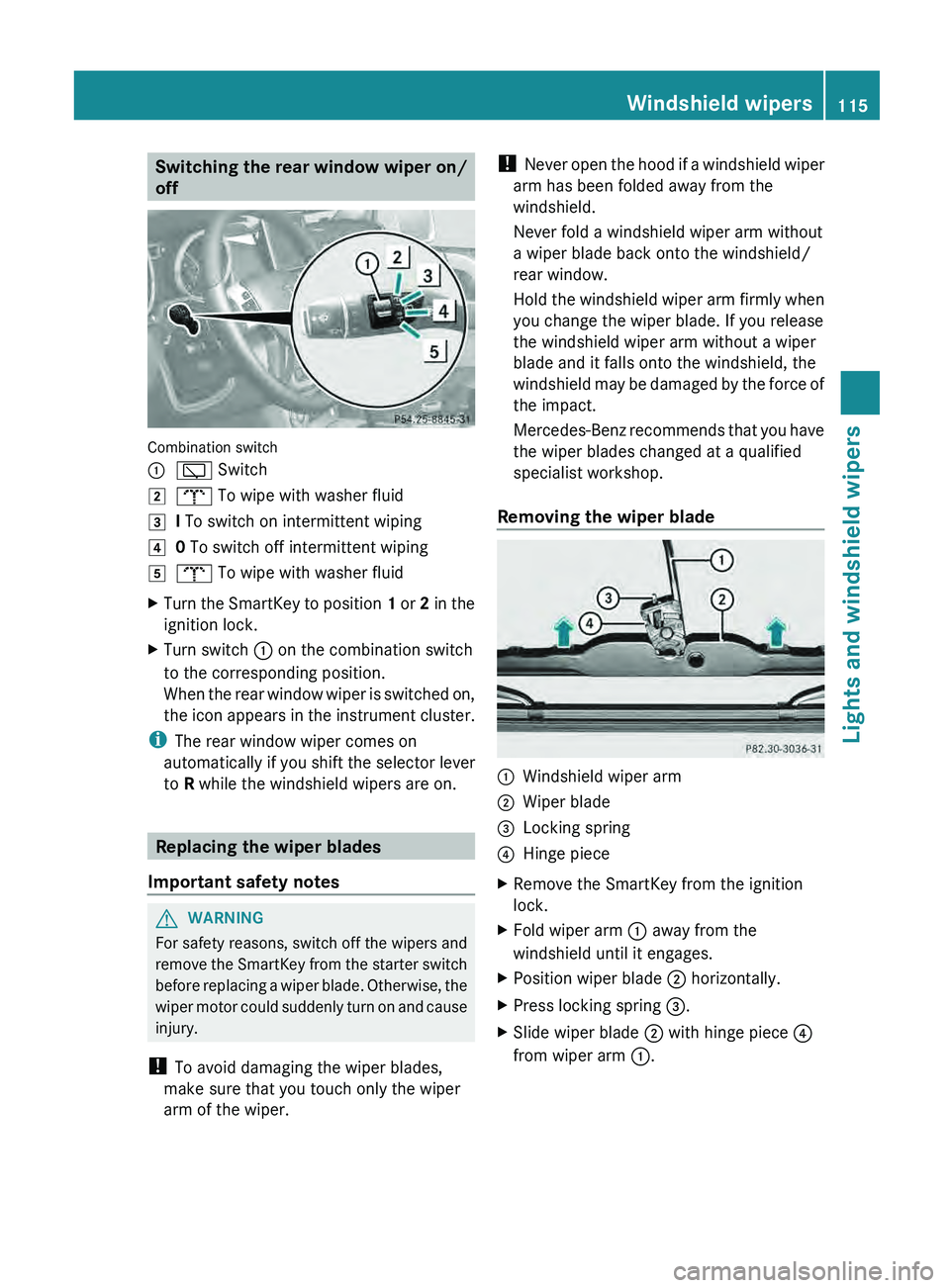
Switching the rear window wiper on/
off
Combination switch
0043
00C5 Switch
0048 008E To wipe with washer fluid
0049 I To switch on intermittent wiping
004A 0 To switch off intermittent wiping
004B 008E To wipe with washer fluid
X Turn the SmartKey to position 1 or
2 in the
ignition lock.
X Turn switch 0043 on the combination switch
to the corresponding position.
When the rear window
wiper is switched on,
the icon appears in the instrument cluster.
i The rear window wiper comes on
automatically if
you shift
the selector lever
to R while the windshield wipers are on. Replacing the wiper blades
Important safety notes G
WARNING
For safety reasons, switch off the wipers and
remove the SmartKey from
the starter switch
before replacing a wiper blade. Otherwise, the
wiper motor could suddenly turn on and cause
injury.
! To avoid damaging the wiper blades,
make sure that you touch only the wiper
arm of the wiper. !
Never open the hood
if a windshield wiper
arm has been folded away from the
windshield.
Never fold a windshield wiper arm without
a wiper blade back onto the windshield/
rear window.
Hold the windshield wiper arm firmly when
you change the wiper blade. If you release
the windshield wiper arm without a wiper
blade and it falls onto the windshield, the
windshield may be damaged by the force of
the impact.
Mercedes-Benz recommends that you have
the wiper blades changed at a qualified
specialist workshop.
Removing the wiper blade 0043
Windshield wiper arm
0044 Wiper blade
0087 Locking spring
0085 Hinge piece
X Remove the SmartKey from the ignition
lock.
X Fold wiper arm 0043 away from the
windshield until it engages.
X Position wiper blade 0044 horizontally.
X Press locking spring 0087.
X Slide wiper blade 0044 with hinge piece 0085
from wiper arm 0043. Windshield wipers
115
Lights and windshield wipers Z
Page 118 of 364
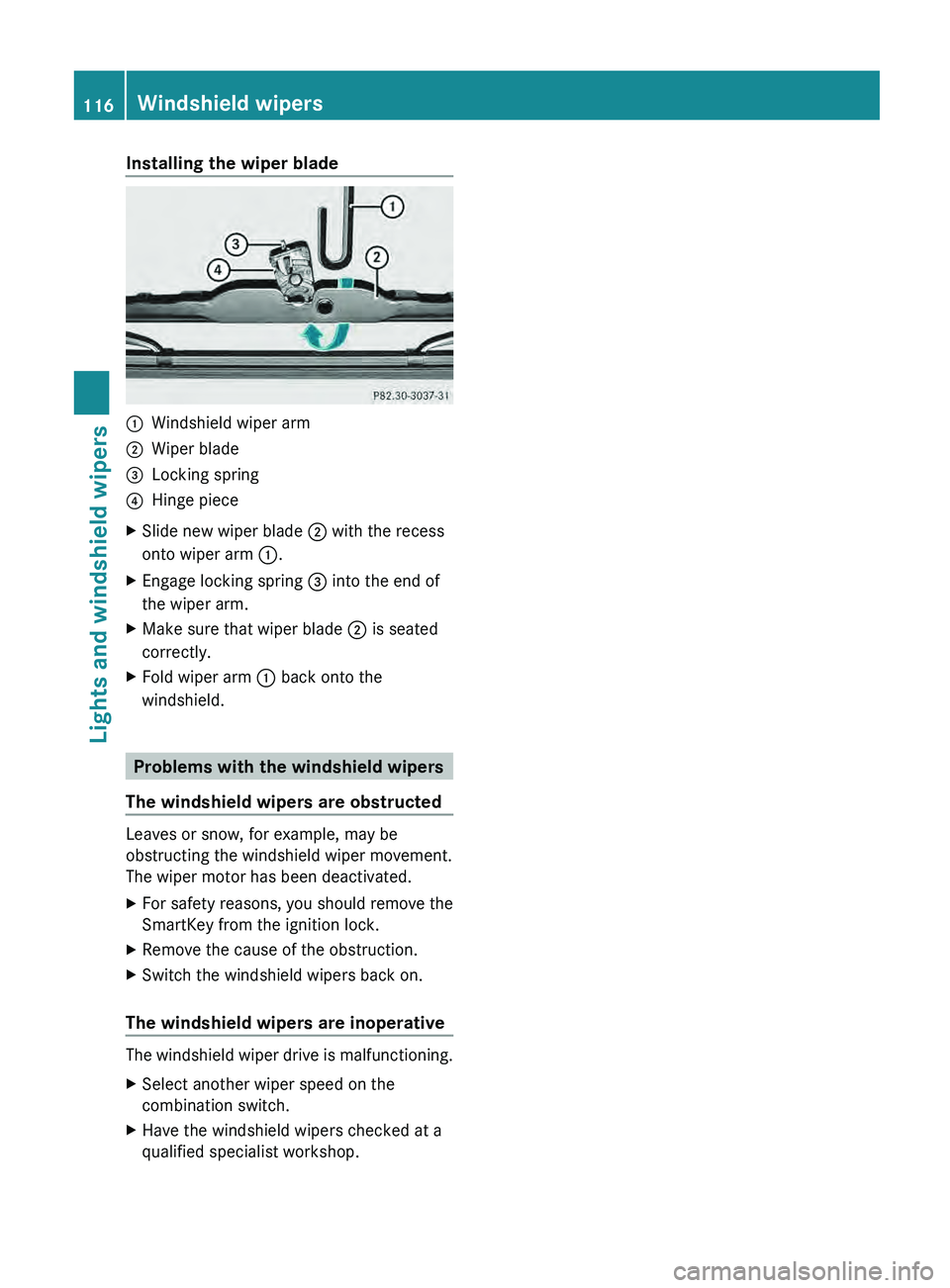
Installing the wiper blade
0043
Windshield wiper arm
0044 Wiper blade
0087 Locking spring
0085 Hinge piece
X Slide new wiper blade 0044 with the recess
onto wiper arm 0043.
X Engage locking spring 0087 into the end of
the wiper arm.
X Make sure that wiper blade 0044 is seated
correctly.
X Fold wiper arm 0043 back onto the
windshield. Problems with the windshield wipers
The windshield wipers are obstructed Leaves or snow, for example, may be
obstructing the windshield wiper movement.
The wiper motor has been deactivated.
X
For safety reasons, you should remove the
SmartKey from the ignition lock.
X Remove the cause of the obstruction.
X Switch the windshield wipers back on.
The windshield wipers are inoperative The windshield wiper drive is malfunctioning.
X
Select another wiper speed on the
combination switch.
X Have the windshield wipers checked at a
qualified specialist workshop.116
Windshield wipersLights and windshield wipers
Page 124 of 364
X
Turn the SmartKey to position 2 (Y page 139) in the ignition lock.
X Press the 0058 button.
The indicator lamp in the 0058 button lights up. Airflow and air distribution are set to
automatic mode.
or
X Press the 0078 button.
The indicator lamp in the 0078 button goes out. The previously selected settings are
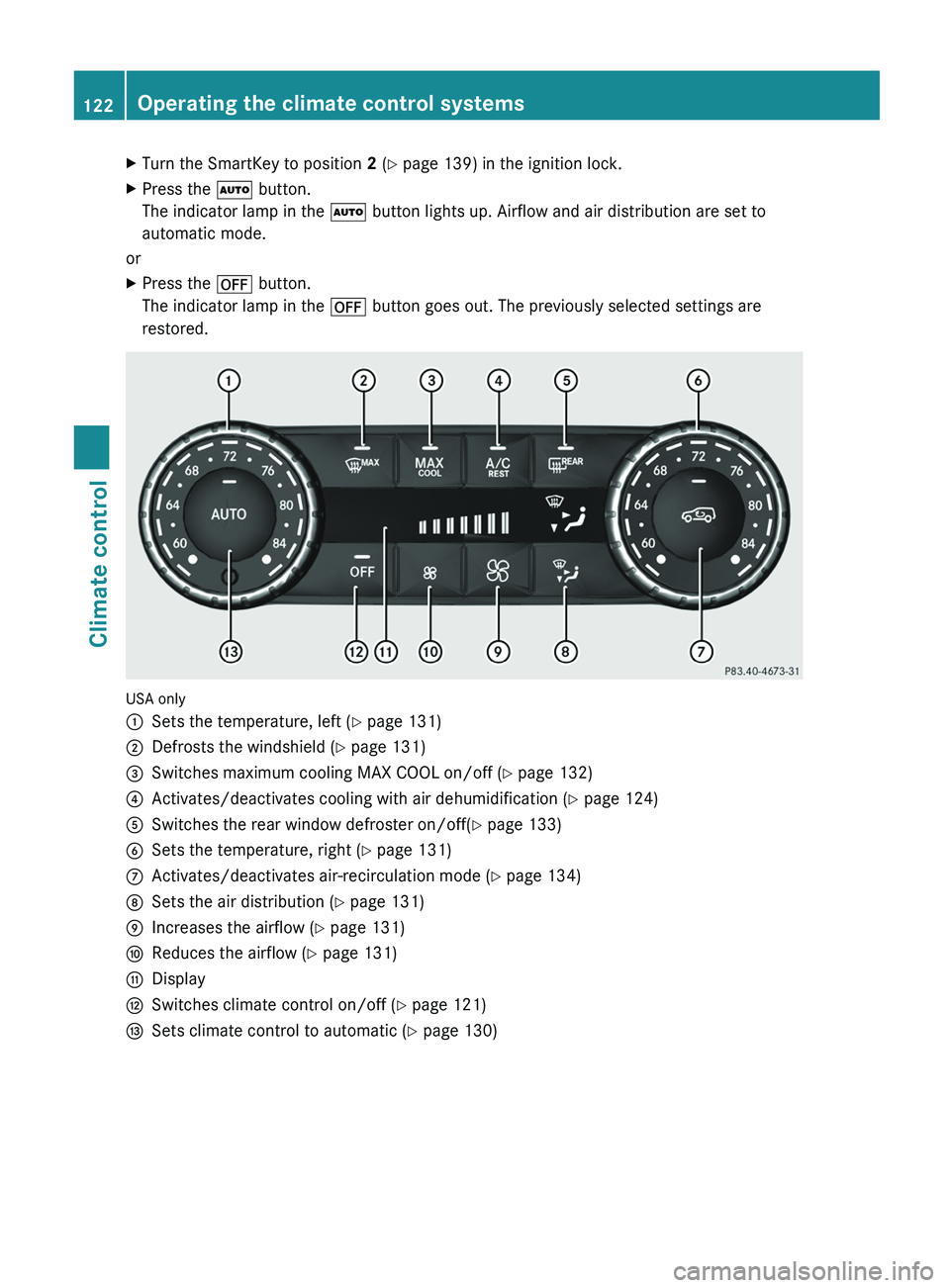
restored. USA only
0043
Sets the temperature, left ( Y page 131)
0044 Defrosts the windshield ( Y page 131)
0087 Switches maximum cooling MAX COOL on/off ( Y page 132)
0085 Activates/deactivates cooling with air dehumidification ( Y page 124)
0083 Switches the rear window defroster on/off( Y page 133)
0084 Sets the temperature, right ( Y page 131)
006B Activates/deactivates air-recirculation mode (Y page 134)
006C Sets the air distribution (Y page 131)
006D Increases the airflow ( Y page 131)
006E Reduces the airflow ( Y page 131)
006F Display
0070 Switches climate control on/off ( Y page 121)
0071 Sets climate control to automatic (Y page 130)122
Operating the climate control systemsClimate control
Page 125 of 364
X
Turn the SmartKey to position 2 (Y page 139) in the ignition lock.
X Press the 0058 button.
The indicator lamp in the 0058 button lights up. Airflow and air distribution are set to
automatic mode.
or
X Press the 0078 button.
The indicator lamp in the 0078 button goes out. The previously selected settings are
restored.
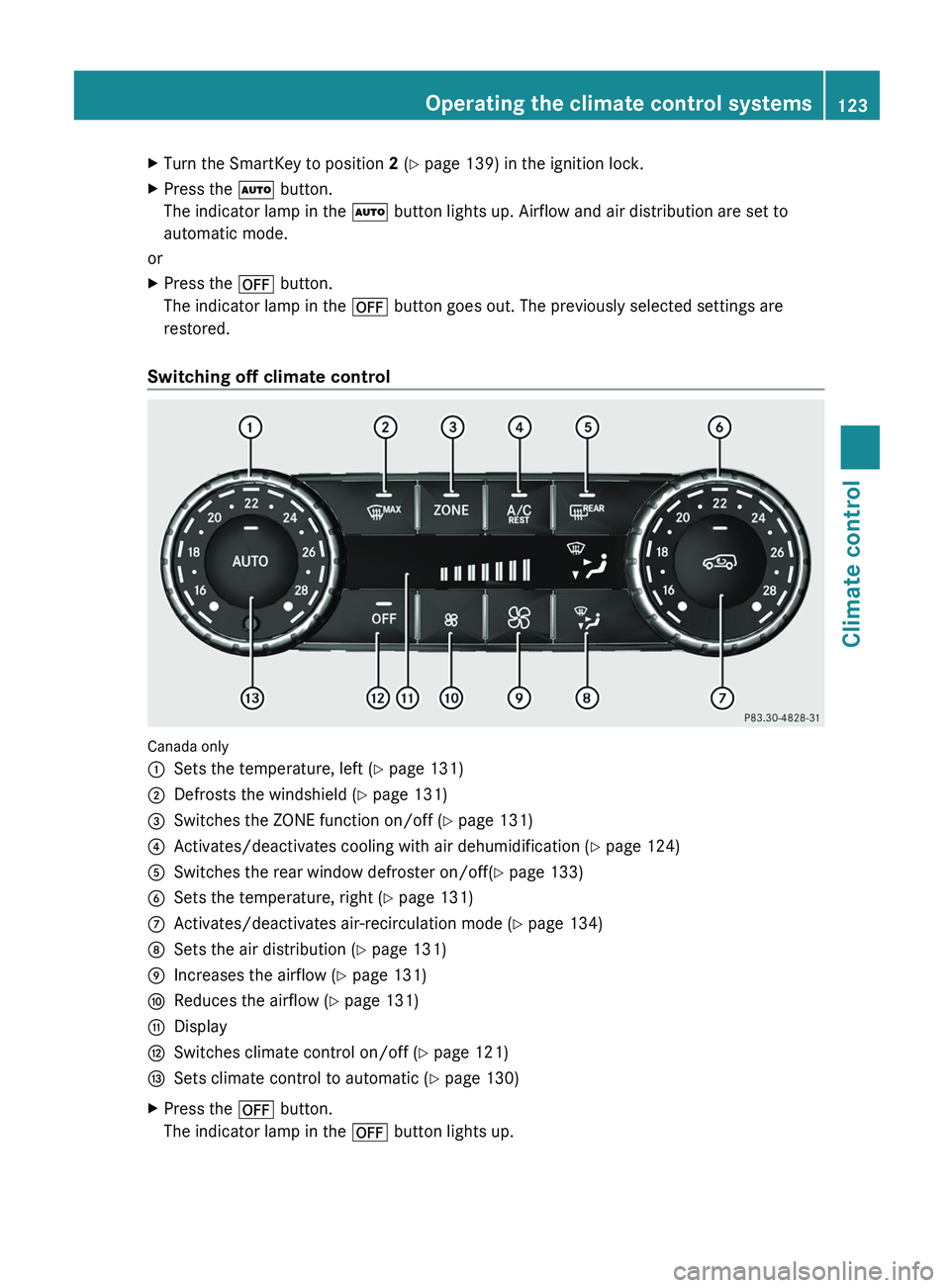
Switching off climate control Canada only
0043
Sets the temperature, left ( Y page 131)
0044 Defrosts the windshield ( Y page 131)
0087 Switches the ZONE function on/off ( Y page 131)
0085 Activates/deactivates cooling with air dehumidification ( Y page 124)
0083 Switches the rear window defroster on/off( Y page 133)
0084 Sets the temperature, right ( Y page 131)
006B Activates/deactivates air-recirculation mode (Y page 134)
006C Sets the air distribution (Y page 131)
006D Increases the airflow ( Y page 131)
006E Reduces the airflow ( Y page 131)
006F Display
0070 Switches climate control on/off ( Y page 121)
0071 Sets climate control to automatic (Y page 130)
X Press the 0078 button.
The indicator lamp in the 0078 button lights up. Operating the climate control systems
123Climate control Z
Page 133 of 364
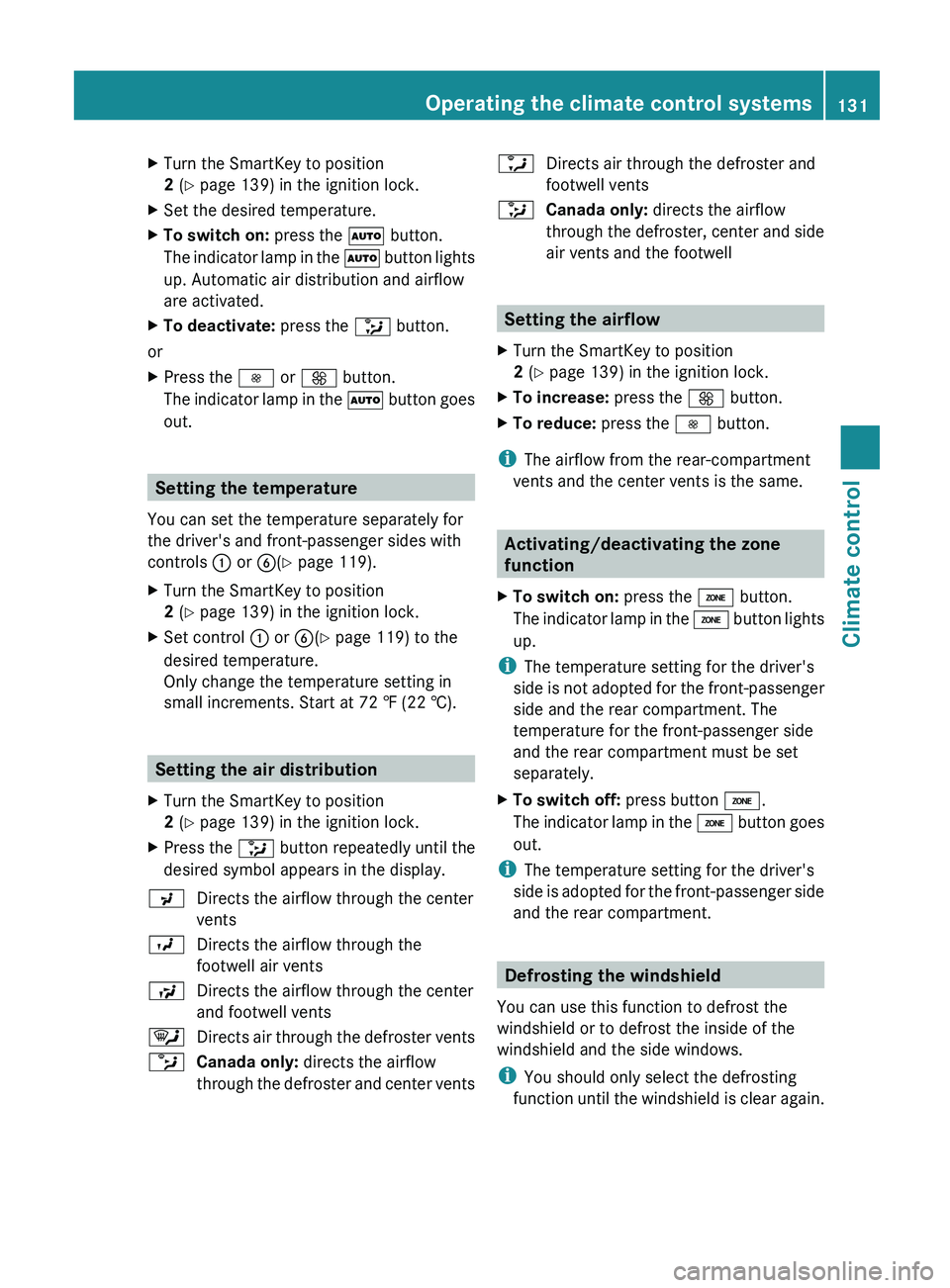
X
Turn the SmartKey to position
2 (Y page 139) in the ignition lock.
X Set the desired temperature.
X To switch on: press the 0058 button.
The indicator lamp in
the 0058 button lights
up. Automatic air distribution and airflow
are activated.
X To deactivate: press the 008F button.
or
X Press the 0095 or 0097 button.
The indicator lamp in
the 0058 button goes
out. Setting the temperature
You can set the temperature separately for
the driver's and front-passenger sides with
controls 0043 or 0084(Y page 119).
X Turn the SmartKey to position
2 (Y page 139) in the ignition lock.
X Set control 0043 or 0084(Y page 119) to the
desired temperature.
Only change the temperature setting in
small increments. Start at 72 ‡ (22 †).Setting the air distribution
X Turn the SmartKey to position
2 (Y page 139) in the ignition lock.
X Press the 008F button repeatedly until the
desired symbol appears in the display.
009C Directs the airflow through the center
vents
009B Directs the airflow through the
footwell air vents
009F Directs the airflow through the center
and footwell vents
0061 Directs air through the defroster vents
0087 Canada only: directs the airflow
through the defroster and
center vents0086
Directs air through the defroster and
footwell vents
008F Canada only: directs the airflow
through the defroster, center
and side
air vents and the footwell Setting the airflow
X Turn the SmartKey to position
2 (Y page 139) in the ignition lock.
X To increase: press the 0097 button.
X To reduce: press the 0095 button.
i The airflow from the rear-compartment
vents and the center vents is the same. Activating/deactivating the zone
function
X To switch on: press the 00D6 button.
The indicator lamp in
the 00D6 button lights
up.
i The temperature setting for the driver's
side is not adopted
for the front-passenger
side and the rear compartment. The
temperature for the front-passenger side
and the rear compartment must be set
separately.
X To switch off: press button 00D6.
The indicator lamp in
the 00D6 button goes
out.
i The temperature setting for the driver's
side is adopted for
the front-passenger side
and the rear compartment. Defrosting the windshield
You can use this function to defrost the
windshield or to defrost the inside of the
windshield and the side windows.
i You should only select the defrosting
function until the windshield
is clear again. Operating the climate control systems
131
Climate control Z
Page 134 of 364
X
Turn the SmartKey to position
2 (Y page 139) in the ignition lock.
X To activate: press the 0064 button.
The indicator lamp in
the 0064 button lights
up.
The climate control system switches to the
following functions:
R cooling with air dehumidification (only
with engine running)
R high airflow (depending on the outside
temperature)
R high temperature (depending on the
outside temperature)
R air distribution to the windshield and
front side windows
R air-recirculation mode off
X To deactivate: press the 0064 button.
The indicator lamp in
the 0064 button goes
out. The previously selected settings are
restored. The cooling with air
dehumidification function remains on. Air-
recirculation mode remains deactivated.
or
X Press the 0058 button.
The indicator lamp in
the 0064 button goes
out. Airflow and air distribution are set to
automatic mode.
or
X Turn controls 0043 or 0084 clockwise or
counter-clockwise ( Y page 119).
or
X Press the 0097 or 0095 button. Activating/deactivating MAX COOL
maximum cooling
The MAX COOL function is only available in
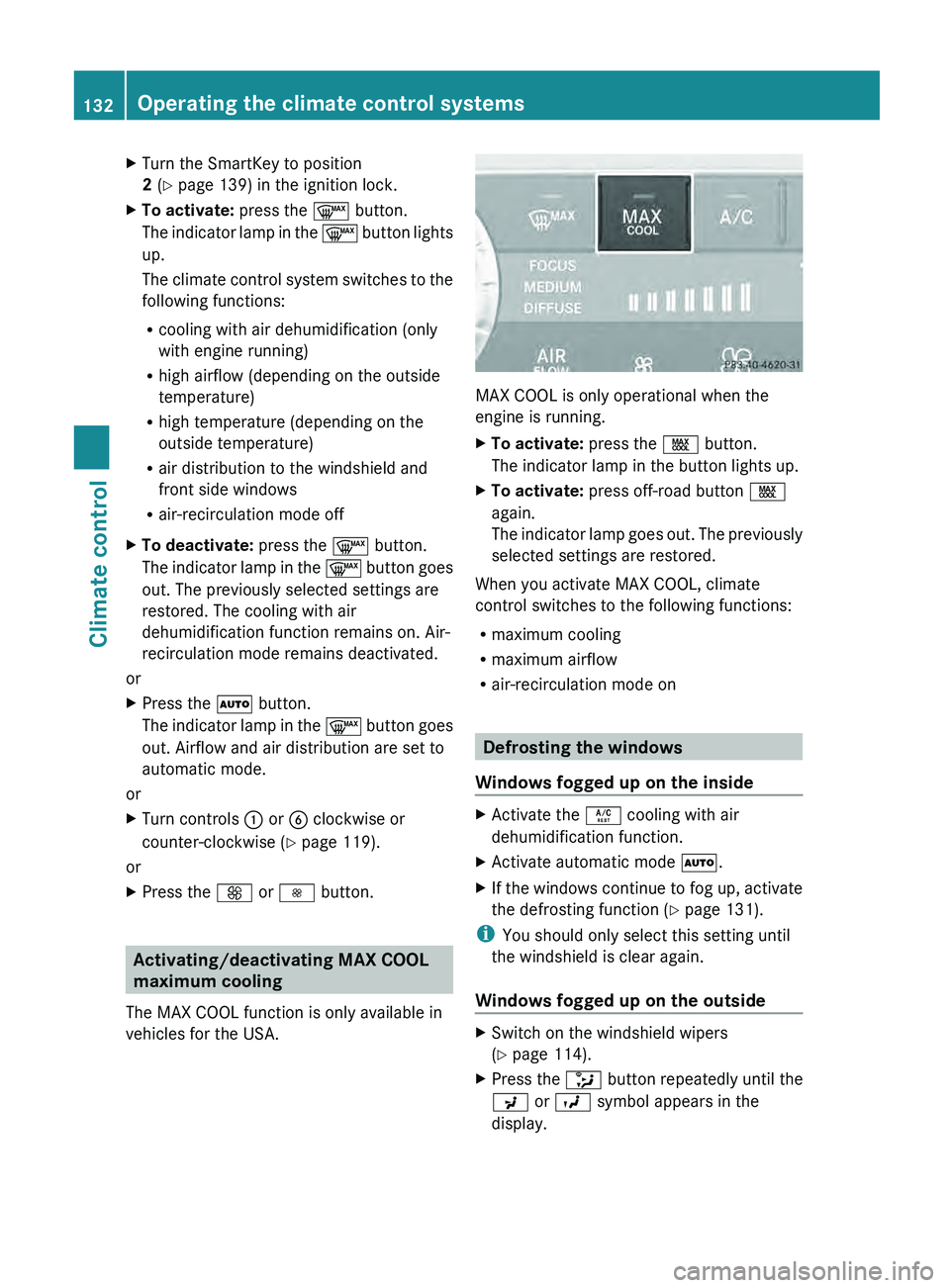
vehicles for the USA. MAX COOL is only operational when the
engine is running.
X
To activate: press the 00C9 button.
The indicator lamp in the button lights up.
X To activate: press off-road button 00C9
again.
The indicator lamp goes
out. The previously
selected settings are restored.
When you activate MAX COOL, climate
control switches to the following functions:
R maximum cooling
R maximum airflow
R air-recirculation mode on Defrosting the windows
Windows fogged up on the inside X
Activate the 0056 cooling with air
dehumidification function.
X Activate automatic mode 0058.
X If the windows continue to fog up, activate
the defrosting function (Y page 131).
i You should only select this setting until
the windshield is clear again.
Windows fogged up on the outside X
Switch on the windshield wipers
(Y page 114).
X Press the 008F button repeatedly until the
009C or 009B symbol appears in the
display. 132
Operating the climate control systems
Climate control
Page 135 of 364
i
You should only select this setting until
the windshield is clear again. Switching the windshield defroster
on/off
G
WARNING
Any accumulation of snow and ice should be
removed from the windshield before driving.
Otherwise, your vision may be impaired,
which could endanger you or others. X
Turn the SmartKey to position
2 (Y page 139) in the ignition lock.
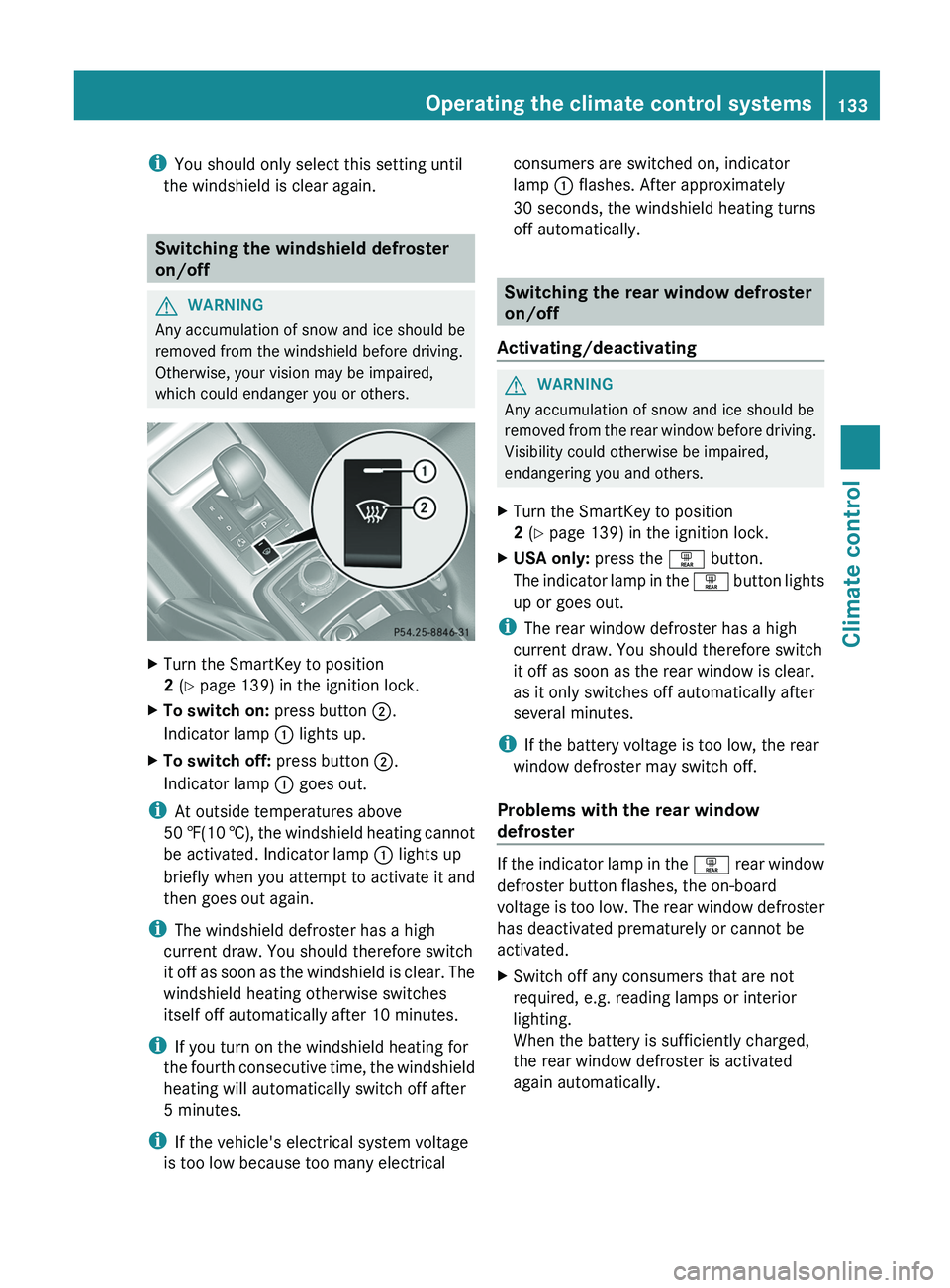
X To switch on: press button 0044.
Indicator lamp 0043 lights up.
X To switch off: press button 0044.
Indicator lamp 0043 goes out.
i At outside temperatures above
50 ‡(10 †), the windshield
heating
cannot
be activated. Indicator lamp 0043 lights up
briefly when you attempt to activate it and
then goes out again.
i The windshield defroster has a high
current draw. You should therefore switch
it off as soon as the windshield is clear. The
windshield heating otherwise switches
itself off automatically after 10 minutes.
i If you turn on the windshield heating for
the fourth consecutive time, the windshield
heating will automatically switch off after
5 minutes.
i If the vehicle's electrical system voltage
is too low because too many electrical consumers are switched on, indicator
lamp
0043 flashes. After approximately
30 seconds, the windshield heating turns
off automatically. Switching the rear window defroster
on/off
Activating/deactivating G
WARNING
Any accumulation of snow and ice should be
removed from the rear
window before driving.
Visibility could otherwise be impaired,
endangering you and others.
X Turn the SmartKey to position
2 (Y page 139) in the ignition lock.
X USA only: press the 0065 button.
The indicator lamp
in
the 0065 button lights
up or goes out.
i The rear window defroster has a high
current draw. You should therefore switch
it off as soon as the rear window is clear.
as it only switches off automatically after
several minutes.
i If the battery voltage is too low, the rear
window defroster may switch off.
Problems with the rear window
defroster If the indicator lamp in the
0065 rear window
defroster button flashes, the on-board
voltage is
too low. The rear window defroster
has deactivated prematurely or cannot be
activated.
X Switch off any consumers that are not
required, e.g. reading lamps or interior
lighting.
When the battery is sufficiently charged,
the rear window defroster is activated
again automatically. Operating the climate control systems
133
Climate control Z
Page 136 of 364
Activating/deactivating air-
recirculation mode
G
WARNING
Fogged windows impair visibility,
endangering you and others. If the windows
begin to fog on the inside, switching off the
air recirculation mode immediately should
clear interior window fogging. If interior
window fogging persists, make sure the air
conditioning is activated, or press the 0064
button.
X Turn the SmartKey to position
2 (Y page 139) in the ignition lock.
X To switch on: press the 0089 button.
The indicator lamp
in
the 0089 button lights
up.
i Air-recirculation mode is automatically
activated at high levels of pollution or at
high outside temperatures. When air-
recirculation mode is activated
automatically, the indicator lamp in the
0089 button is not lit.
Outside air is added after approximately
30 minutes.
X To deactivate: press the 0089 button.
The indicator lamp in
the 0089 button goes
out.
i Air-recirculation mode switches off
automatically:
R after approximately five minutes at
outside temperatures below
approximately 41 ‡
R after approximately five minutes if
cooling with air dehumidification is
deactivated
R after approximately 30 minutes at
outside temperatures above
approximately 41 ‡ (5 †) Activating/deactivating the residual
heat function
The "residual heat" function is only available
in Canada.
It is possible to
make use of the residual heat
of the engine to continue heating the
stationary vehicle for up to 30 minutes after
the engine has been switched off. The heating
time depends on the coolant temperature and
on the interior temperature that has been set.
i The blower will run at a low speed
regardless of the airflow setting.
i If you activate the residual heat function
at high temperatures, only the ventilation
will be activated.
X Turn the SmartKey to position
0(Y page 139) in the ignition lock or
remove it.
X To activate: press the 0056 button.
The indicator lamp
in
the 0056 button lights
up.
X To deactivate: press the 0056 button.
The indicator lamp in
the 0056 button goes
out.
i Residual heat is deactivated
automatically:
R after approximately 30 minutes
R when the ignition is switched on
R if the battery voltage drops
R if the coolant temperature is too low Setting the air vents
Important safety notes
G
WARNING
When operating the climate control, the air
that enters the passenger compartment
through the air vents can be very hot or very
cold (depending on the
set temperature). This
could cause burns or frostbite to unprotected
skin in the immediate area of the air vents. 134
Setting the air vents
Climate control
Page 141 of 364
Make sure that all objects in the vehicle are
stowed correctly, and that they cannot enter
the driver's footwell. Install the floormats
securely and as specified in order to ensure
sufficient clearance for
the
pedals. Do not use
loose floormats. G
WARNING
Unsuitable footwear can hinder correct usage
of the pedals, e.g.:
R shoes with thick soles
R shoes with high heels
R slippers
There is a risk of an accident.
Wear suitable footwear to ensure correct
usage of the pedals. G
WARNING
If you switch off the ignition while driving,
safety-relevant functions are only available
with limitations, or not
at all. This could affect,
for example, the power steering and the brake
boosting effect. You will require considerably
more effort to steer and brake. There is a risk
of an accident.
Do not switch off the ignition while driving. G
WARNING
If the parking brake has not been fully
released when driving, the
parking brake can:
R overheat and cause a fire
R lose its hold function.
There is a risk of fire and an accident. Release
the parking brake fully before driving off.
! Warm up the engine quickly. Do not use
the engine's full performance until it has
reached operating temperature.
Only shift the automatic transmission to
the desired drive position when the vehicle
is stationary.
Where possible, avoid spinning the drive
wheels when pulling away on slippery
roads. You could otherwise damage the
drive train. !
Avoid high engine speeds when the
engine is cold. The engine's service life
could otherwise be significantly
shortened.
Do not use the engine's full performance
until it has reached operating temperature.
! AMG vehicles: at low engine oil
temperatures below 68 ‡ (+20 †), the
maximum engine speed is restricted in
order to protect the engine. To protect the
engine and maintain smooth engine
operation, avoid driving at full throttle when
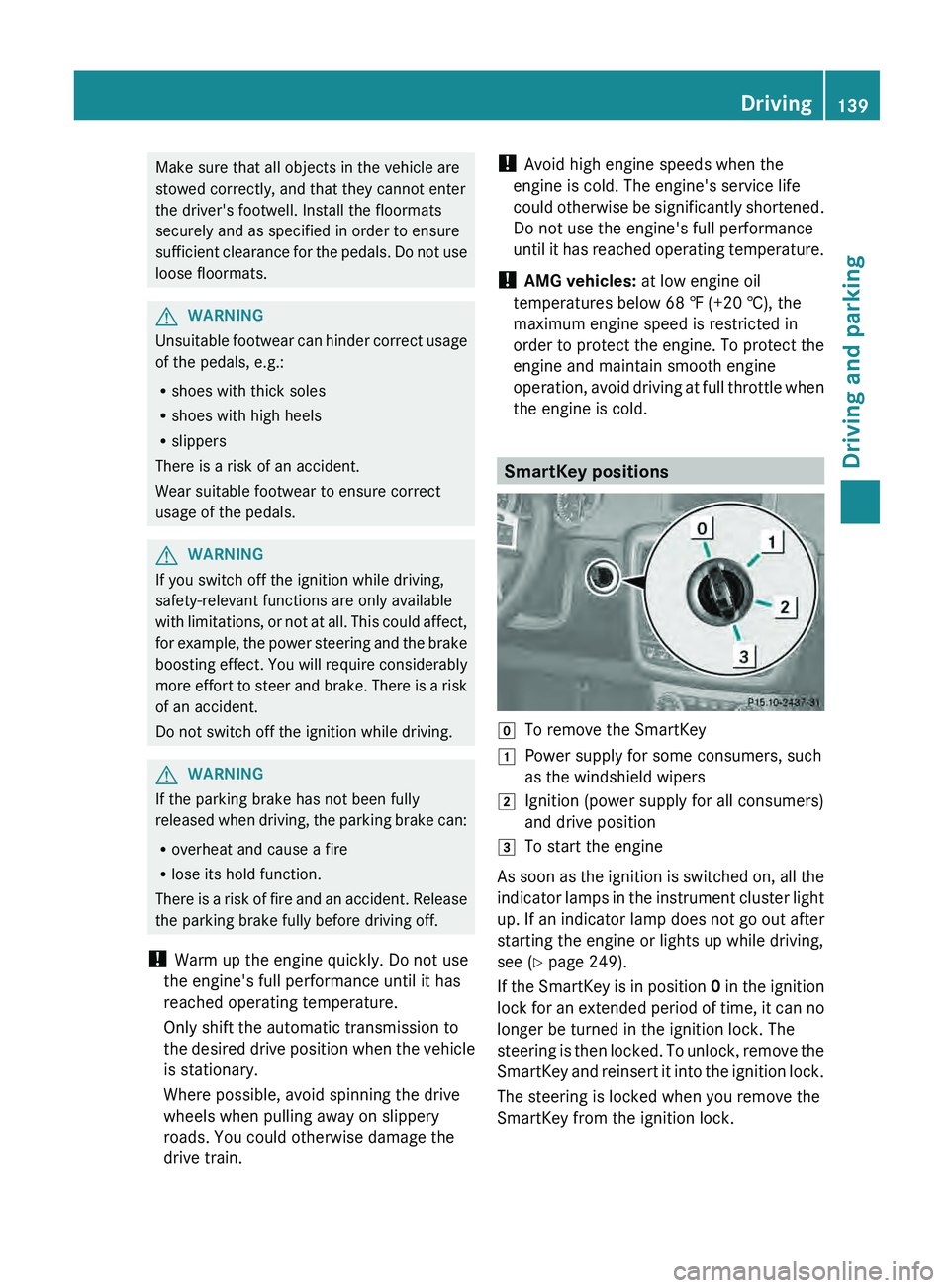
the engine is cold. SmartKey positions
005A
To remove the SmartKey
0047 Power supply for some consumers, such
as the windshield wipers
0048 Ignition (power supply for all consumers)
and drive position
0049 To start the engine
As soon as the ignition is switched on, all the
indicator lamps in the
instrument cluster light
up. If an indicator lamp does not go out after
starting the engine or lights up while driving,
see ( Y page 249).
If the SmartKey is in position 0 in the ignition
lock for an extended period of time, it can no
longer be turned in the ignition lock. The
steering is then locked. To unlock, remove the
SmartKey and reinsert it into the ignition lock.
The steering is locked when you remove the
SmartKey from the ignition lock. Driving
139
Driving and parking Z
Page 142 of 364
X
Remove the SmartKey when the engine is
switched off.
The starter battery could otherwise be
discharged.
If you cannot turn the SmartKey in the ignition
lock, the starter battery may not be charged
sufficiently.
X Check the starter battery and charge it if
necessary ( Y page 307).
or
X Jump-start the vehicle (Y page 308).
i You can only remove the SmartKey if:
R the SmartKey is in position 0 in the
ignition lock.
R the automatic transmission selector
lever is in P.Starting the engine
Important safety notes G
WARNING
Combustion engines emit poisonous exhaust
gases such as carbon monoxide. Inhaling
these exhaust gases leads
to poisoning. There
is a risk of fatal injury. Therefore never leave
the engine running in enclosed spaces
without sufficient ventilation. G
WARNING
Inhalation of exhaust gas is hazardous to your
health. All exhaust gas contains carbon
monoxide (CO), and inhaling it can cause
unconsciousness and possible death.
Do not run the
engine in confined areas (such
as a garage) which are not properly ventilated.
If you think that exhaust gas fumes are
entering the vehicle while driving, have the
cause determined and corrected
immediately. If you must drive under these
conditions, drive only with at least one
window fully open at all times.
! Do not depress the accelerator pedal
when starting the engine. Starting procedure X
Shift the automatic transmission to
position P.
The transmission position display in the
multifunction display shows P.
i For further information about the
automatic transmission, see
(Y page 145).
i If you depress the
brake when starting the
engine, pedal travel is unusually long and
there is less pedal resistance.
X Make sure that the parking brake is
applied.
X Turn the SmartKey in the ignition lock to
position 3 (Y page 139) and release it as
soon as the engine is running.
i You can also use
the touch-start function.
To do this, turn the SmartKey to position 3
(Y page 139) and release it immediately.
The engine then starts automatically. Pulling away
Automatic transmission G
WARNING
If the engine speed is above the idling speed
and you engage transmission position D or
R, the vehicle could
pull away suddenly. There
is a risk of an accident.
When engaging transmission position D or R,
always firmly depress the brake pedal and do
not simultaneously accelerate.
! Only shift the automatic transmission to
reverse gear R or park position P when the
vehicle is stationary. Otherwise, the
automatic transmission could be damaged.
! Do not depress the accelerator pedal
while depressing the brake pedal. This
impairs engine performance and results in
premature wear on the brake system and
drivetrain. 140
Driving
Driving and parking