warning light MERCEDES-BENZ G-CLASS SUV 2013 Repair Manual
[x] Cancel search | Manufacturer: MERCEDES-BENZ, Model Year: 2013, Model line: G-CLASS SUV, Model: MERCEDES-BENZ G-CLASS SUV 2013Pages: 364, PDF Size: 9.62 MB
Page 199 of 364
Problems with PARKTRONIC
Problem Possible causes/consequences and
0050 SolutionsOnly the red segments
in the PARKTRONIC
warning displays are
lit.
You
also hear a warning
tone for approximately
two seconds.
PARKTRONIC is
deactivated after a few
seconds, and the
indicator lamp in the
PARKTRONIC button
lights up. PARKTRONIC has malfunctioned and has switched off.
X
If problems persist, have PARKTRONIC checked at a qualified
specialist workshop. Only the red segments
in the PARKTRONIC
warning displays are
lit.
PARKTRONIC is
deactivated after a few
seconds. The PARKTRONIC sensors are dirty or there is interference.
X
Clean the PARKTRONIC sensors ( Y page 297).
X Switch the ignition back on. The problem may be caused by an external source of radio or
ultrasound waves.
X
See if PARKTRONIC functions in a different location. Rear view camera
Important safety notes The rear view camera is only an aid. It is not
a replacement for your attention to your
immediate surroundings. You are always
responsible for safe maneuvering and
parking. When maneuvering
or
parking, make
sure that there are no persons, animals or
objects in the area in which you are
maneuvering.
Under the following circumstances, the rear
view camera will not function, or will function
in a limited manner:
R the rear door is open
R in heavy rain, snow or fog
R at night or in very dark places
R if the camera is exposed to very bright light
R if the area is lit by fluorescent light or LED
lighting (the display may flicker) R
if there is a
sudden change in temperature,
e.g. when driving into a heated garage in
winter
R if the camera lens is dirty or obstructed
R if the rear of your vehicle is damaged. In
this event, have the camera position and
setting checked at a qualified specialist
workshop. Mercedes-Benz recommends
that you use an authorized Mercedes-Benz
Center for this purpose Driving systems
197
Driving and parking Z
Page 200 of 364
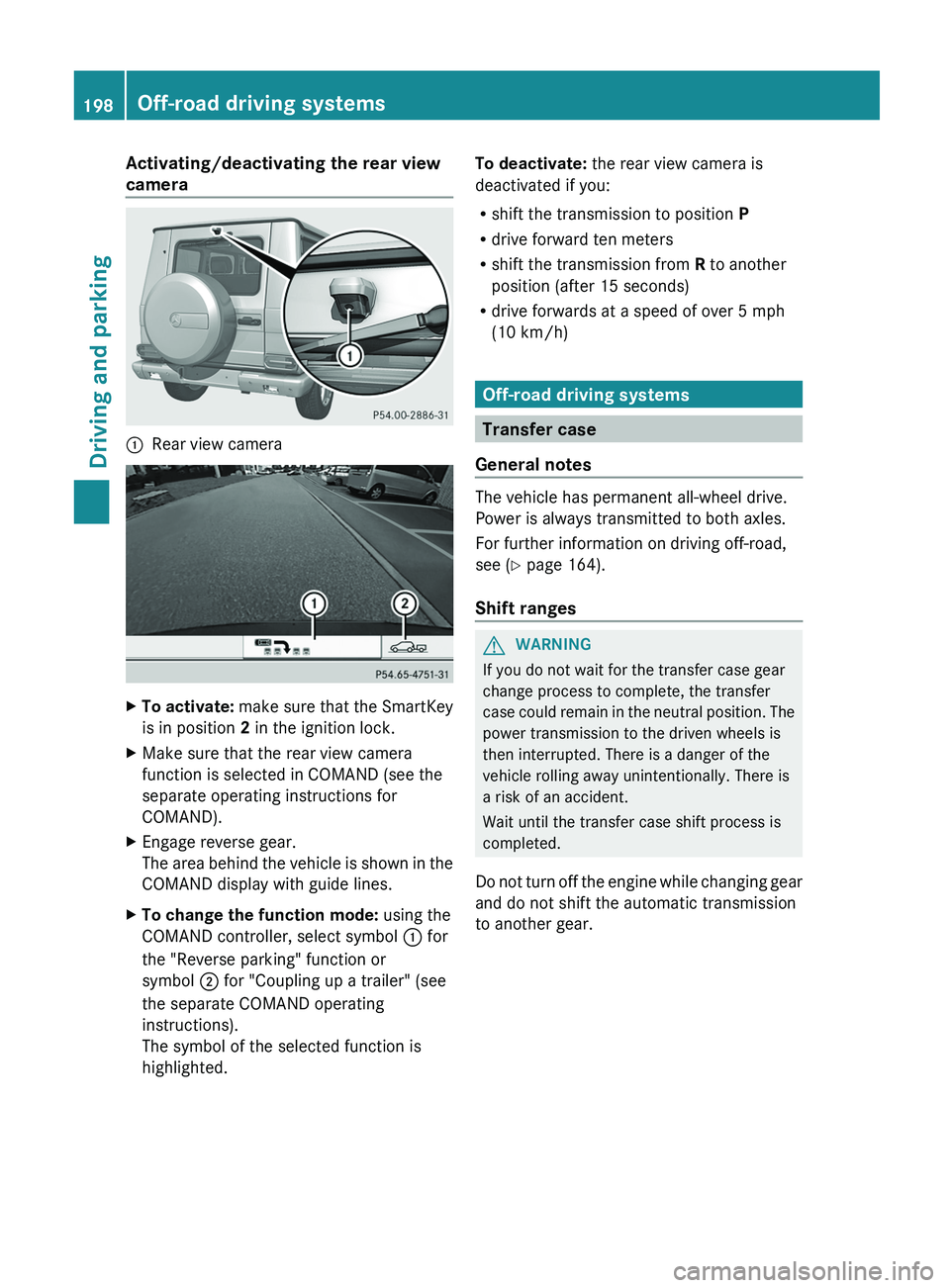
Activating/deactivating the rear view
camera
0043
Rear view camera X
To activate: make sure that the SmartKey
is in position 2 in the ignition lock.
X Make sure that the rear view camera
function is selected in COMAND (see the
separate operating instructions for
COMAND).
X Engage reverse gear.
The area behind the
vehicle is shown in the
COMAND display with guide lines.
X To change the function mode: using the
COMAND controller, select symbol 0043 for
the "Reverse parking" function or
symbol 0044 for "Coupling up a trailer" (see
the separate COMAND operating
instructions).
The symbol of the selected function is
highlighted. To deactivate:
the rear view camera is
deactivated if you:
R shift the transmission to position P
R drive forward ten meters
R shift the transmission from R to another
position (after 15 seconds)
R drive forwards at a speed of over 5 mph
(10 km/h) Off-road driving systems
Transfer case
General notes The vehicle has permanent all-wheel drive.
Power is always transmitted to both axles.
For further information on driving off-road,
see (
Y page 164).
Shift ranges G
WARNING
If you do not wait for the transfer case gear
change process to complete, the transfer
case could remain
in
the neutral position. The
power transmission to the driven wheels is
then interrupted. There is a danger of the
vehicle rolling away unintentionally. There is
a risk of an accident.
Wait until the transfer case shift process is
completed.
Do not turn off the engine while changing gear
and do not shift the automatic transmission
to another gear. 198
Off-road driving systems
Driving and parking
Page 202 of 364
i
AMG vehicles: to shift the transfer case
to LOW RANGE, deactivate the
ECO start/
stop function (Y page 142).
X Press LOW RANGE button 0044.
When the shift procedure is complete, the
LOW RANGE transfer case position appears
in the multifunction display.
Indicator lamp 0043 lights up.
X Shift the transmission to position D.
Switching off the off-road gear ratio G
WARNING
When the transfer case is in the neutral
position, power transmission to the driven
wheels is interrupted. As
a result, the vehicle
could roll away. There is a risk of an accident.
Secure the vehicle with the parking brake, and
on uphill or downhill gradients, also secure it
with a device such as a wheel chock.
! Only carry out the gear selection if:
R the engine is running.
R the vehicle is rolling.
R the automatic transmission is in selector
lever position N.
R you are driving no faster than 43 mph
(70 km/h).
You could otherwise damage the transfer
case.
X Press button 0044.
When the shift procedure is complete, the
HIGH RANGE
transfer
case position appears
in the multifunction display.
Indicator lamp 0043 goes out.
If the gear change is not completed, the
following messages could appear in the
display:
R TC Shift Conditions Not Fulfilled
You have not met one or more shift
conditions.
R TC NEUTRAL On
The transfer case has canceled the gear
change process and is in N. The N transfer case position appears in the multifunction
display.
R TC Shift Canceled
The transfer case has not performed the
gear change process.
X Carry out the gear change process again.
Make sure to meet all conditions for
changing gears.
R TC Malfunction Visit Workshop
There is
a malfunction
in the transfer case.
X Do not shift the transfer case.
X Have the vehicle checked as soon as
possible at a qualified
specialist workshop.
Shifting to neutral G
WARNING
When the transfer case is in the neutral
position, power transmission to the driven
wheels is interrupted. As
a result, the vehicle
could roll away. There is a risk of an accident.
Secure the vehicle with the parking brake, and
on uphill or downhill gradients, also secure it
with a device such as a wheel chock.
X Turn the SmartKey to position
2 (Y page 139) in the ignition lock.
X Apply the parking brake.
X Depress the brake pedal.
X Move the selector lever to position
N(Y page 145).
X Press and hold LOW RANGE button 0044 for
approximately 10 seconds.
Once the gear change procedure is
complete, TC Neutral On message
appears in the multifunction display for
approximately
5 seconds.
If the gear change is not completed, the
following messages could appear in the
display (
Y page 238).
i If the transfer case is in Neutral, the
SmartKey is in the ignition lock and you
open the driver's door, the TC Neutral
On
message appears in the multifunction200
Off-road driving systems
Driving and parking
Page 203 of 364
display. If you then release the parking
brake, a warning tone will sound.
Differential locks
General notes G
WARNING
When differential locks are engaged on a firm,
high-grip surface, the vehicle's steerability is
greatly impaired. In particular, engaging the
differential locks when cornering could lead
to you losing control
of the vehicle. There is a
risk of an accident.
Disengage the differential locks immediately
on firm, high-grip surfaces. G
WARNING
ABS, 4ETS, ESP ®
and BAS are deactivated
while the differential locks are engaged. As a
result, the wheels could lock when braking
and the braking distance is increased. There
is a risk of an accident.
Disengage the differential locks immediately
on firm, high-grip surfaces.
! In order to avoid damage to the transfer
case, you must operate the vehicle on a
dynamometer (1-axle dynamometer) only
if:
R the axle not driven on is jacked up
or
R the corresponding propeller shaft is
disconnected and the transfer case
differential lock is activated.
Otherwise, the transfer case can be
damaged.
Differential locks improve the traction of the
vehicle. Your vehicle is equipped with a differential
lock for:
R
the transfer case: this
controls the balance
between the front and rear axles.
R the rear axle: this controls the balance
between the wheels on the rear axle.
R the front axle: this controls the balance
between the wheels on the front axle.
Information on differential and
differential locks When the vehicle drives around a curve, the
wheels on the
outside
of the curve must cover
a greater distance. Therefore, the wheels turn
more rapidly than on the inside. The
differential, a transmission in the drive train,
compensates for these different rotational
speeds, making cornering possible.
The disadvantage of a differential is that more
power is transferred to the wheels that have
the least grip. An example: a wheel of a driven
axle is on a snow-covered surface and
therefore does not have any traction. The
differential causes this wheel to be subjected
to the strongest driving force, as the flow of
force takes the path of least resistance. The
opposite wheel on this axle, however, which
stands on firm ground and could therefore
allow propulsion, receives no driving power.
4ETS compensates for this disadvantage.
4ETS provides good steerability by
automatically braking the spinning wheel.
4ETS provides the wheel on the firm surface
with more drive force, which in turn provides
propulsion.
ESP® and 4ETS are traction systems that are
ideal for road driving and suitable for light off-
road driving. The LOW RANGE off-road gear
also improves off-road capability.
Moreover, the more difficult conditions in off-
road driving require further measures such as
locking one or several differentials. Your
vehicle is equipped with three differential
locks: Off-road driving systems
201
Driving and parking Z
Page 205 of 364
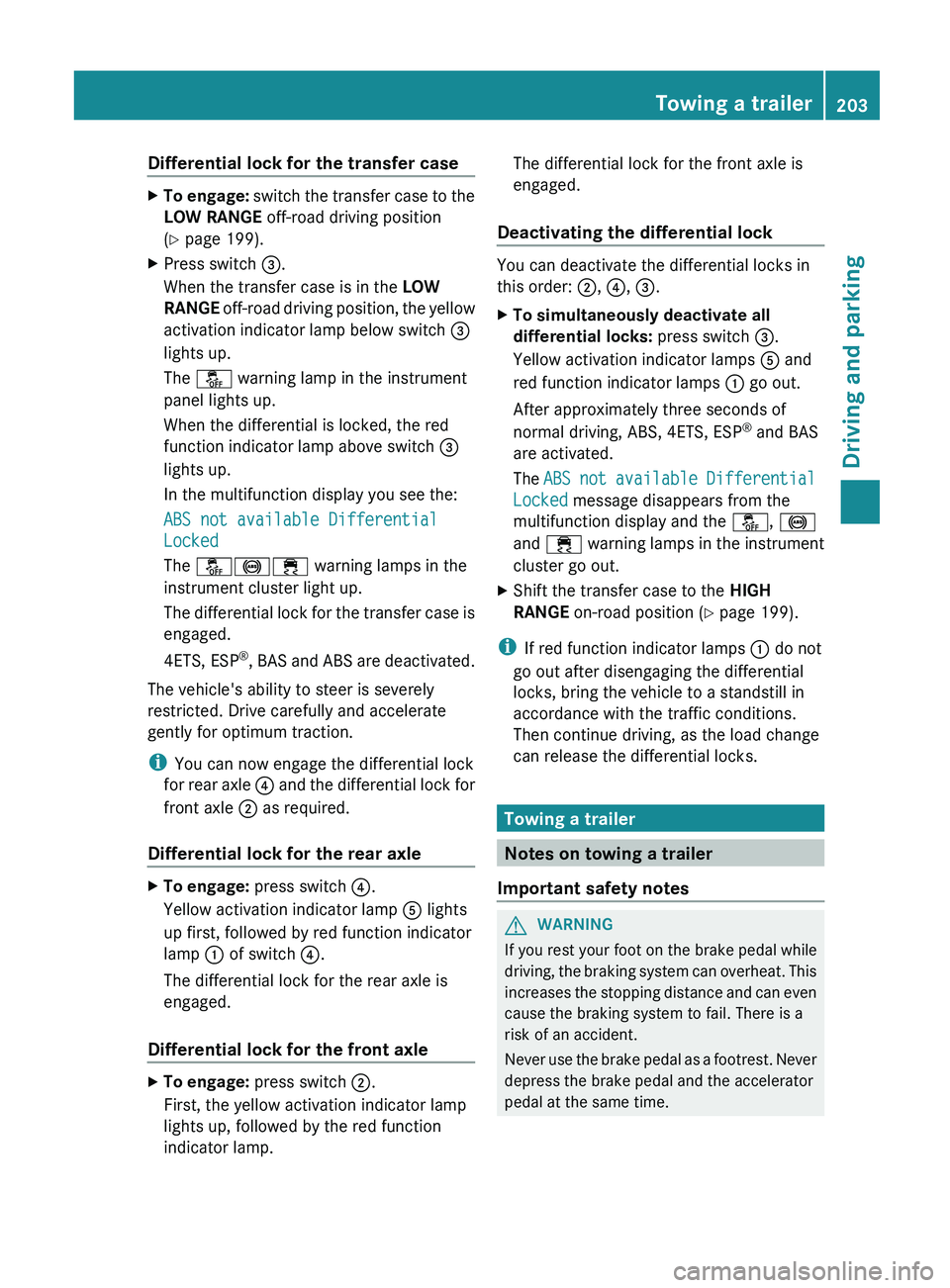
Differential lock for the transfer case
X
To engage: switch the transfer case to the
LOW RANGE off-road driving position ( Y
page 199).
X Press switch 0087.
When the transfer case is in the LOW
RANGE off-road driving position,
the yellow
activation indicator lamp below switch 0087
lights up.
The 00BB warning lamp in the instrument
panel lights up.
When the differential is locked, the red
function indicator lamp above switch 0087
lights up.
In the multifunction display you see the:
ABS not available Differential
Locked
The 00BB002500E5 warning lamps in the
instrument cluster light up.
The differential lock for the transfer case is
engaged.
4ETS, ESP ®
, BAS and ABS are deactivated.
The vehicle's ability to steer is severely
restricted. Drive carefully and accelerate
gently for optimum traction.
i You can now engage the differential lock
for rear axle 0085
and the differential lock for
front axle 0044 as required.
Differential lock for the rear axle X
To engage: press switch 0085.
Yellow activation indicator lamp 0083 lights
up first, followed by red function indicator
lamp 0043 of switch 0085.
The differential lock for the rear axle is
engaged.
Differential lock for the front axle X
To engage: press switch 0044.
First, the yellow activation indicator lamp
lights up, followed by the red function
indicator lamp. The differential lock for the front axle is
engaged.
Deactivating the differential lock You can deactivate the differential locks in
this order: 0044, 0085, 0087.
X
To simultaneously deactivate all
differential locks: press switch 0087.
Yellow activation indicator lamps 0083 and
red function indicator lamps 0043 go out.
After approximately three seconds of
normal driving, ABS, 4ETS, ESP ®
and BAS
are activated.
The ABS not available
Differential
Locked
message disappears from the
multifunction display and the 00BB, 0025
and 00E5 warning lamps in the instrument
cluster go out.
X Shift the transfer case to the HIGH
RANGE on-road position (Y page 199).
i If red function indicator lamps 0043 do not
go out after disengaging the differential
locks, bring the vehicle to a standstill in
accordance with the traffic conditions.
Then continue driving, as the load change
can release the differential locks. Towing a trailer
Notes on towing a trailer
Important safety notes G
WARNING
If you rest your foot on the brake pedal while
driving, the braking system
can overheat. This
increases the stopping distance and can even
cause the braking system to fail. There is a
risk of an accident.
Never use the brake pedal as a footrest. Never
depress the brake pedal and the accelerator
pedal at the same time. Towing a trailer
203
Driving and parking Z
Page 211 of 364
Displays and operation
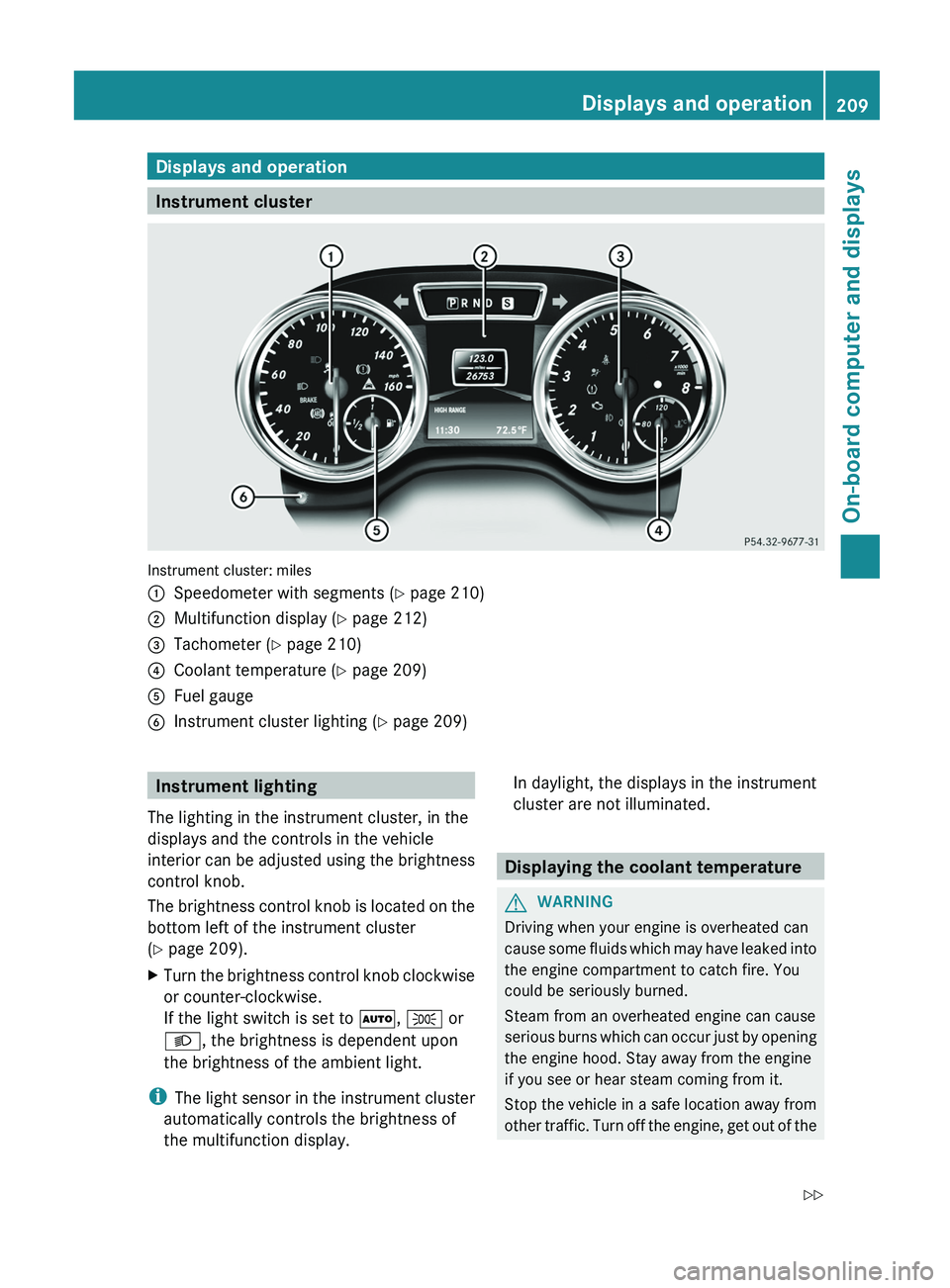
Instrument cluster
Instrument cluster: miles
0043
Speedometer with segments (Y page 210)
0044 Multifunction display ( Y page 212)
0087 Tachometer (Y page 210)
0085 Coolant temperature ( Y page 209)
0083 Fuel gauge
0084 Instrument cluster lighting (Y page 209) Instrument lighting
The lighting in the instrument cluster, in the
displays and the controls in the vehicle
interior can be adjusted
using the brightness
control knob.
The brightness control knob is located on the
bottom left of the instrument cluster
(Y page 209).
X Turn the brightness control knob clockwise
or counter-clockwise.
If the light switch is set to 0058, 0060 or
0058, the brightness is dependent upon
the brightness of the ambient light.
i The light sensor
in
the instrument cluster
automatically controls the brightness of
the multifunction display. In daylight, the displays in the instrument
cluster are not illuminated.
Displaying the coolant temperature
G
WARNING
Driving when your engine is overheated can
cause some fluids which
may have leaked into
the engine compartment to catch fire. You
could be seriously burned.
Steam from an overheated engine can cause
serious burns which can occur just by opening
the engine hood. Stay away from the engine
if you see or hear steam coming from it.
Stop the vehicle in a safe location away from
other traffic. Turn off the engine, get out of the Displays and operation
209
On-board computer and displays
Z
Page 212 of 364
vehicle and do not stand near the vehicle until
the engine has cooled down.
! A display message is
shown if the coolant
temperature is too high.
If the coolant temperature is over
248 ‡(120 †), do not continue driving. The
engine will otherwise be damaged.
The coolant temperature gauge is in the
instrument cluster on the right-hand side
(Y page 209).
Under normal operating conditions and with
the specified coolant level, the coolant
temperature may rise to 248 ‡ (120 †). Tachometer
! Do not drive in the overrevving range, as
this could damage the engine.
The red band in
the tachometer indicates the
engine's overrevving range.
The fuel supply is interrupted to protect the
engine when the red band is reached. Outside temperature display
G
WARNING
The outside temperature indicator is not
designed to serve as an ice-warning device
and is therefore unsuitable for that purpose.
Indicated temperatures just above the
freezing point do not
guarantee that the road
surface is free of ice. The road may still be icy,
especially in wooded areas or on bridges.
The outside temperature display is in the
multifunction display ( Y page 212).
Changes in the outside temperature are
displayed after a short delay. Speedometer with segments
The segments in the speedometer indicate
which speed range is available.
R Cruise control activated ( Y page 169):
The segments light up from the stored
speed to the maximum speed.
R Variable SPEEDTRONIC activated
(Y page 174):
The segments light up
from the start of the
scale to the selected limit speed.
R DISTRONIC PLUS activated (Y page 179):
One or two segments in the set speed
range light up.
R DISTRONIC PLUS detects a vehicle in front:
The segments between the speed of the
vehicle in front and the stored speed light
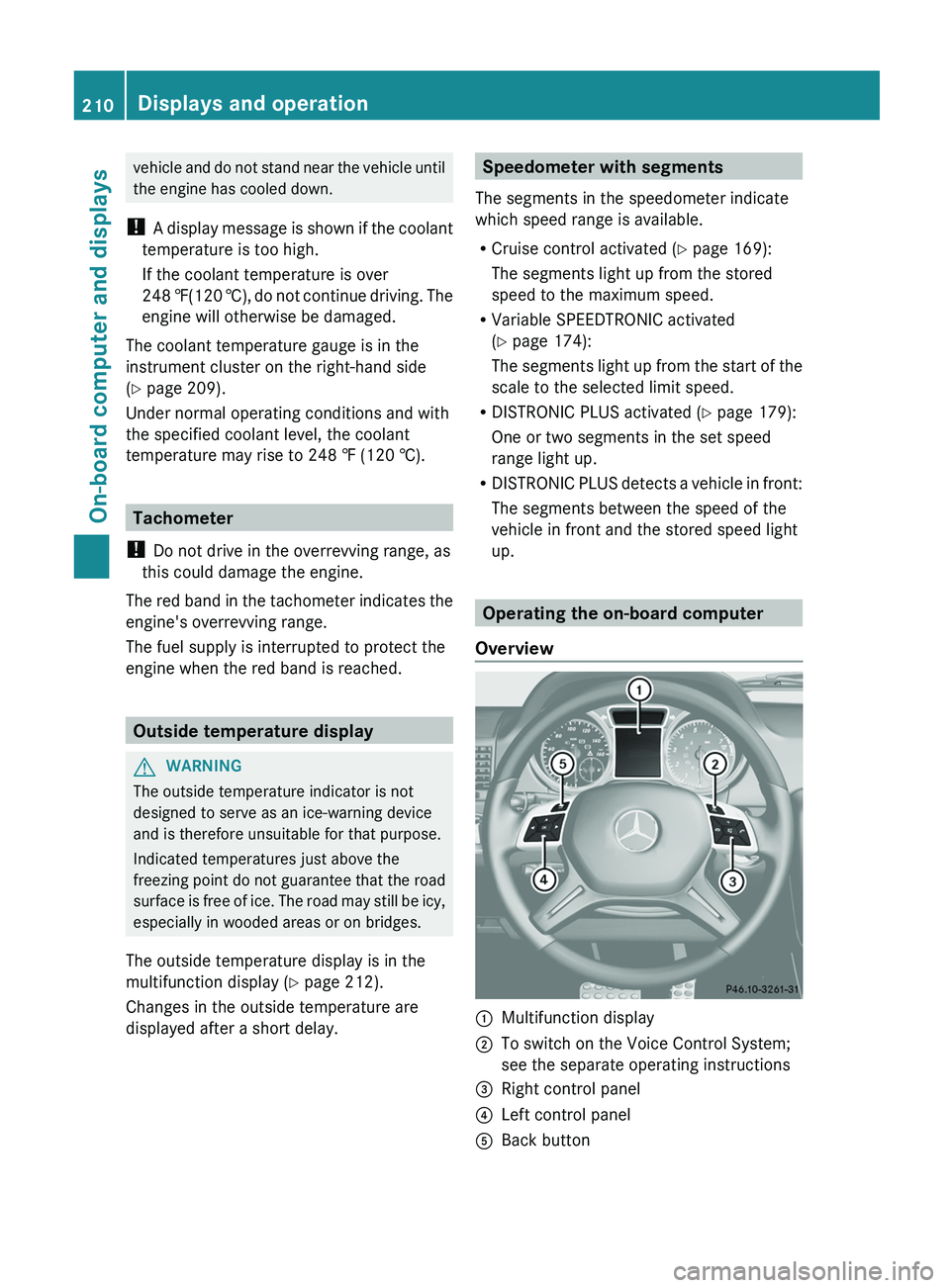
up. Operating the on-board computer
Overview 0043
Multifunction display
0044 To switch on the Voice Control System;
see the separate operating instructions
0087 Right control panel
0085 Left control panel
0083 Back button210
Displays and operation
On-board computer and displays
Page 223 of 364
Activating/deactivating the acoustic
locking verification signal
If you switch
on
the Acoustic Lock function,
an acoustic signal sounds when you lock the
vehicle.
X Press the 0059 or 0065 button on the
steering wheel to select the Sett. menu.
X Press 0064 or 0063 to select the Vehicle
submenu.
X Press 0076 to confirm.
X Press the 0064 or 0063 button
to select the
Acoustic Lock function.
If the Acoustic Lock function is activated,
the 0037 symbol in the multifunction
display lights up red.
X Press the 0076 button to save the setting.
Convenience Activating/deactivating the EASY-
ENTRY/EXIT feature
G
WARNING
You must make sure no one can become
trapped or injured by the moving steering
wheel when the easy-entry/exit feature is
activated.
To stop steering wheel movement, move
steering wheel adjustment lever
or press one
of the memory position buttons.
Do not leave children unattended in the
vehicle, or with access to an unlocked vehicle.
Children could open the driver's door and
unintentionally activate the easy-entry/exit
feature, which could result in an accident
and/or serious personal injury.
X Press the 0059 or 0065 button on the
steering wheel to select the Sett. menu.
X Press the 0064
or 0063
button
to select the
Convenience submenu.
X Press 0076 to confirm. X
Press 0064 or 0063 to select the Easy
Entry/Exit: function.
If the Easy Entry/Exit function is
activated, the vehicle steering wheel is
displayed in red in the multifunction
display.
X Press the 0076 button to save the setting.
Further information on the EASY-ENTRY/EXIT
feature ( Y page 92).
Switching the fold-in mirrors when
locking feature on/off
When you activate the Auto. Mirror
Folding function, the exterior mirrors are
folded in when the vehicle is locked. If you
unlock the vehicle and then open a door, the
exterior mirrors fold out again.
X Press the 0059 or 0065 button on the
steering wheel to select the Sett. menu.
X Press the 0064 or
0063 button
to select the
Convenience submenu.
X Press 0076 to confirm.
X Press 0064 or 0063 to select the Auto.
Mirror Folding function.
If the Auto. Mirror Folding function is
activated, the vehicle's exterior mirror is
displayed in red in the multifunction
display.
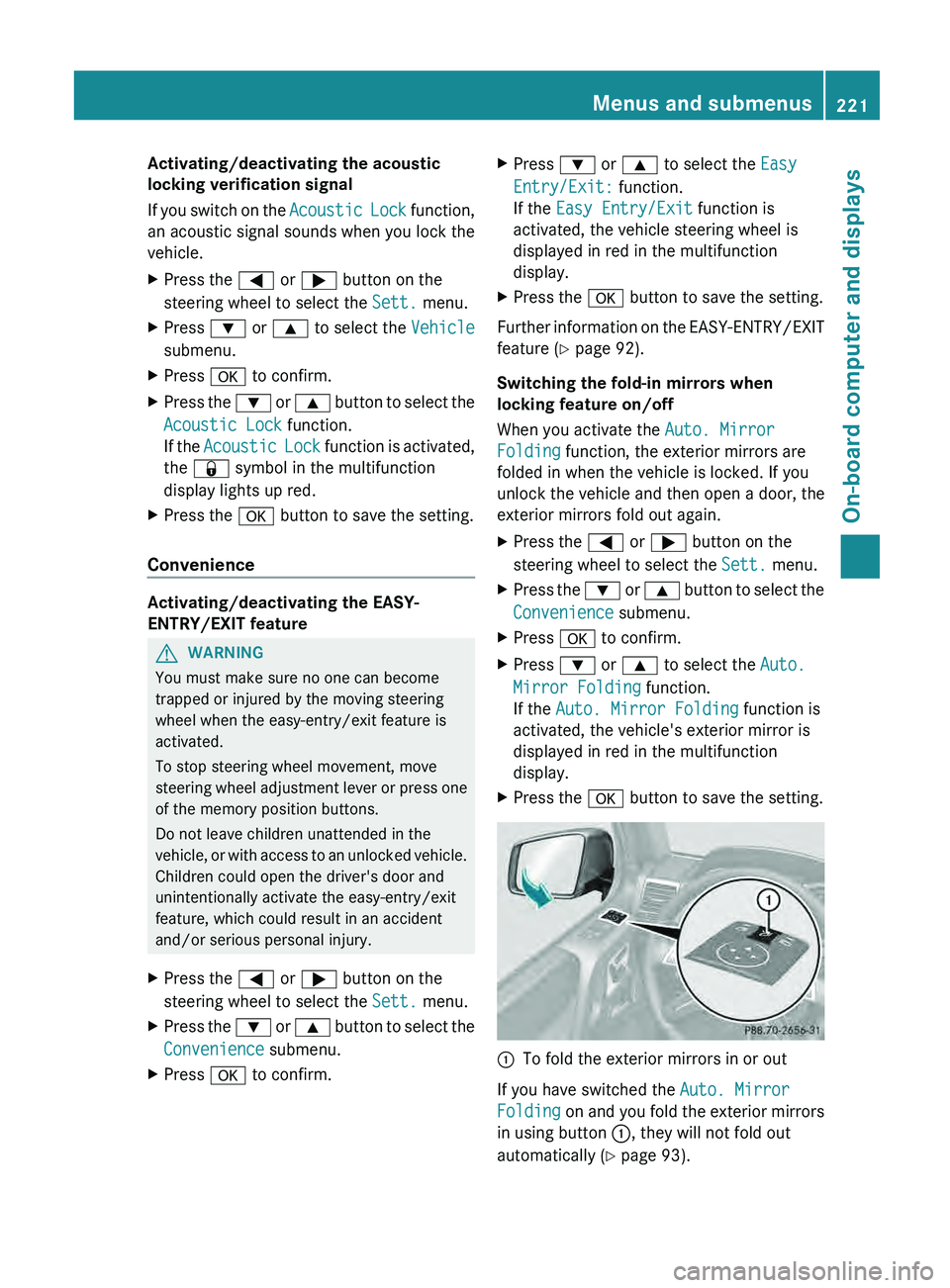
X Press the 0076 button to save the setting. 0043
To fold the exterior mirrors in or out
If you have switched the Auto. Mirror
Folding on and you
fold the exterior mirrors
in using button 0043, they will not fold out
automatically ( Y page 93). Menus and submenus
221
On-board computer and displays Z
Page 224 of 364
You can then only fold out the exterior mirrors
using button 0043.
Restoring the factory settings
X Press the 0059 or 0065 button on the
steering wheel to select the Sett. menu.
X Press the 0064
or 0063 button to select the
Factory Setting submenu.
X Press 0076 to confirm.
The Reset All Settings? message
appears.
X Press the 0064 or 0063 button to select
No or Yes.
X Press 0076 to confirm the selection.
If you select Yes, the multifunction display
shows a confirmation message.
For safety reasons, the Daytime Running
Lights function in the Lights submenu is
only reset if the vehicle is stationary. AMG menu in AMG vehicles
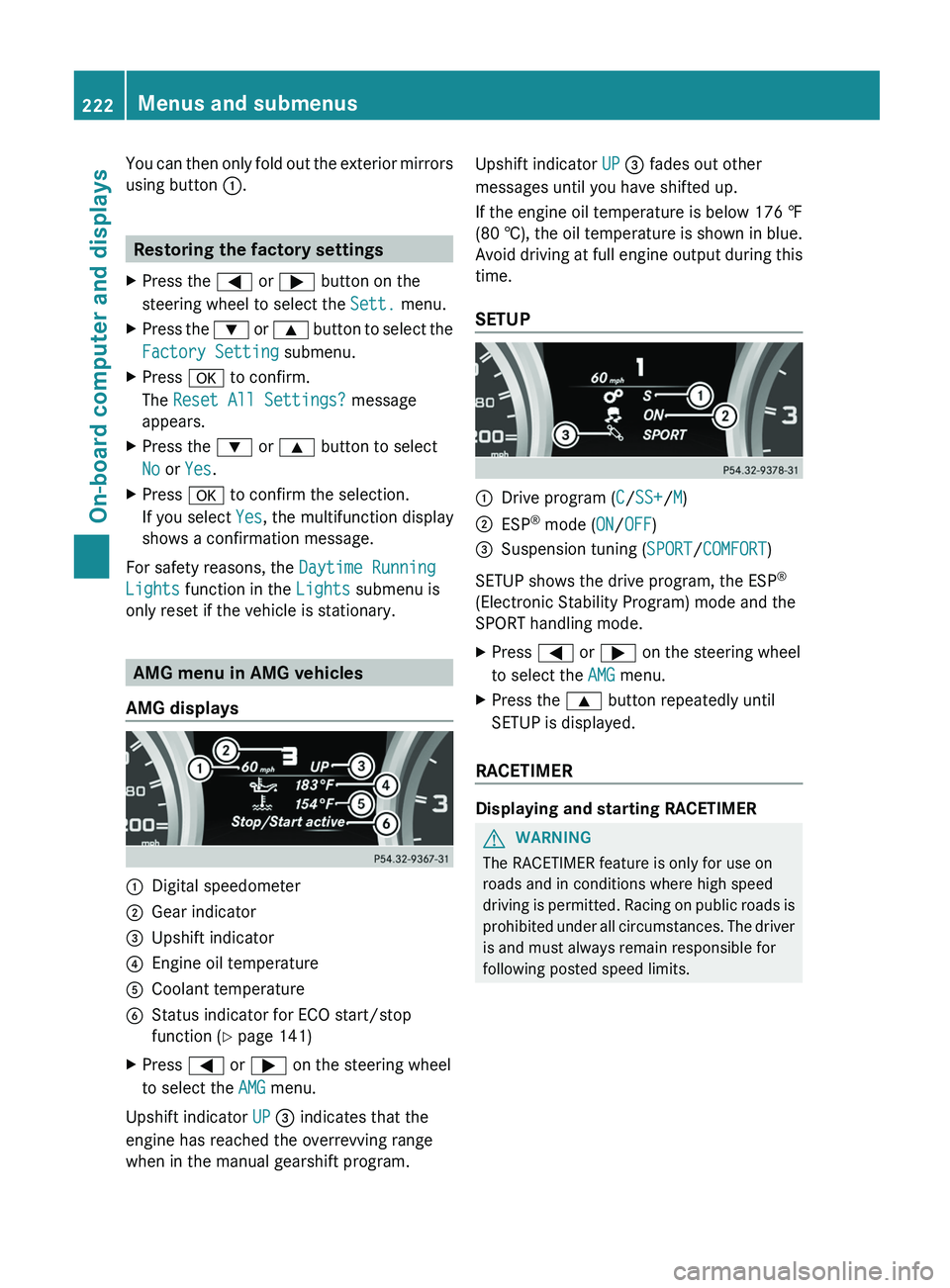
AMG displays 0043
Digital speedometer
0044 Gear indicator
0087 Upshift indicator
0085 Engine oil temperature
0083 Coolant temperature
0084 Status indicator for ECO start/stop
function ( Y page 141)
X Press 0059 or 0065 on the steering wheel
to select the AMG menu.
Upshift indicator UP 0087 indicates that the
engine has reached the overrevving range
when in the manual gearshift program. Upshift indicator UP 0087 fades out other
messages until you have shifted up.
If the engine oil temperature is below
176 ‡
(80 † ),
the oil temperature is shown in blue.
Avoid driving at full engine output during this
time.
SETUP 0043
Drive program (C/SS+/M)
0044 ESP ®
mode ( ON/OFF)
0087 Suspension tuning (SPORT/COMFORT)
SETUP shows the drive program, the ESP ®
(Electronic Stability Program) mode and the
SPORT handling mode.
X Press 0059 or 0065 on the steering wheel
to select the AMG menu.
X Press the 0063 button repeatedly until
SETUP is displayed.
RACETIMER Displaying and starting RACETIMER
G
WARNING
The RACETIMER feature is only for use on
roads and in conditions where high speed
driving is permitted.
Racing
on public roads is
prohibited under all circumstances. The driver
is and must always remain responsible for
following posted speed limits. 222
Menus and submenus
On-board computer and displays
Page 228 of 364
Safety systems
Display messages Possible causes/consequences and
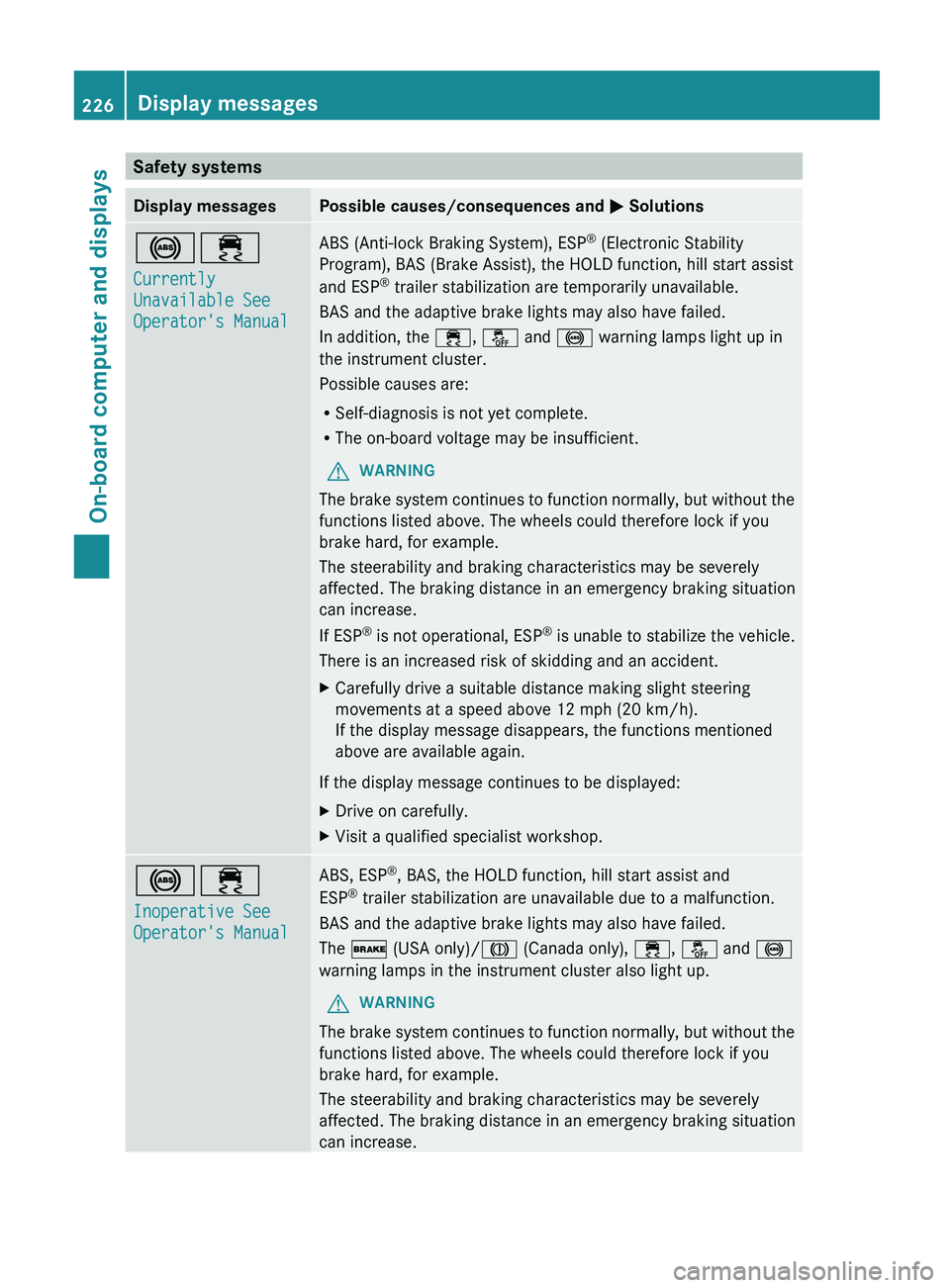
0050 Solutions002500E5
Currently
Unavailable See
Operator's Manual ABS (Anti-lock Braking System), ESP
®
(Electronic Stability
Program), BAS (Brake Assist), the HOLD function, hill start assist
and ESP ®
trailer stabilization are temporarily unavailable.
BAS and the adaptive brake lights may also have failed.
In addition, the 00E5, 00BB and 0025 warning lamps light up in
the instrument cluster.
Possible causes are:
R Self-diagnosis is not yet complete.
R The on-board voltage may be insufficient.
G WARNING
The brake system continues to function normally, but without the
functions listed above. The wheels could therefore lock if you
brake hard, for example.
The steerability and braking characteristics may be severely
affected. The braking distance in an emergency braking situation
can increase.
If ESP ®
is not operational,
ESP®
is unable to stabilize the vehicle.
There is an increased risk of skidding and an accident.
X Carefully drive a suitable distance making slight steering
movements at a speed above 12 mph (20 km/h).
If the display message disappears, the functions mentioned
above are available again.
If the display message continues to be displayed:
X Drive on carefully.
X Visit a qualified specialist workshop. 002500E5
Inoperative See
Operator's Manual ABS, ESP
®
, BAS, the HOLD function, hill start assist and
ESP ®
trailer stabilization are unavailable due to a malfunction.
BAS and the adaptive brake lights may also have failed.
The 0027 (USA only)/004D (Canada only), 00E5, 00BB and 0025
warning lamps in the instrument cluster also light up.
G WARNING
The brake system continues to function normally, but without the
functions listed above. The wheels could therefore lock if you
brake hard, for example.
The steerability and braking characteristics may be severely
affected. The braking distance in an emergency braking situation
can increase. 226
Display messagesOn-board computer and displays