display MERCEDES-BENZ G-CLASS SUV 2014 Manual Online
[x] Cancel search | Manufacturer: MERCEDES-BENZ, Model Year: 2014, Model line: G-CLASS SUV, Model: MERCEDES-BENZ G-CLASS SUV 2014Pages: 272, PDF Size: 39.13 MB
Page 177 of 272
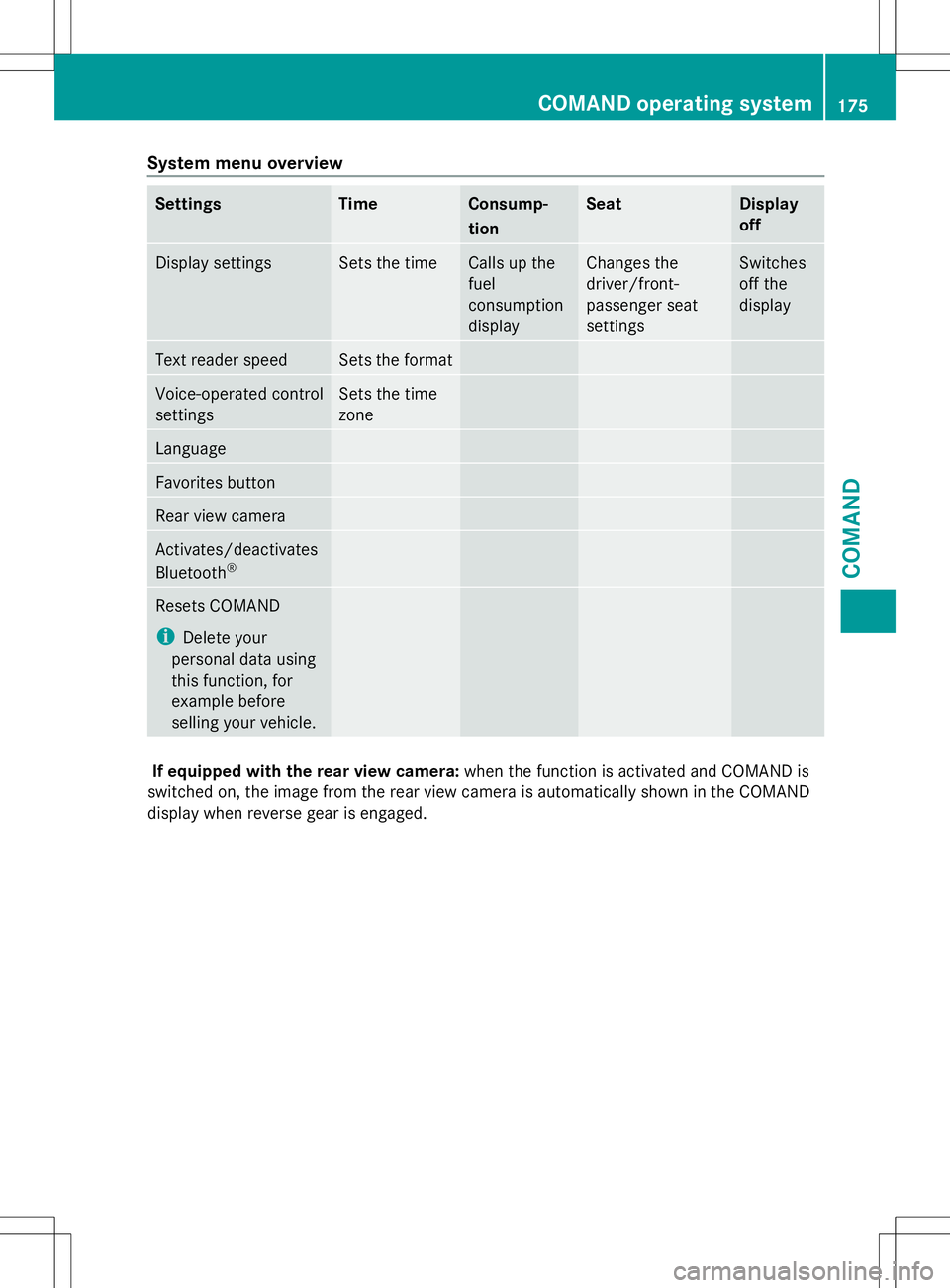
System menu overview
Settings Time Consump-
tion Seat Display
off
Display settings Sets the time Calls up the
fuel
consumption
display Changes the
driver/front-
passenger seat
settings Switches
off the
display
Text reader speed Sets the format
Voice-operated control
settings Sets the time
zone
Language
Favorites button
Rear view camera
Activates/deactivates
Bluetooth
® Resets COMAND
i
Delete your
personal data using
this function, for
example before
selling your vehicle. If equipped with the rear view camera:
when the function is activated and COMAND is
switched on, the image from the rear view camera is automatically shown in the COMAND
display when reverse gear is engaged. COMAND operating system
175COMAND Z
Page 179 of 272
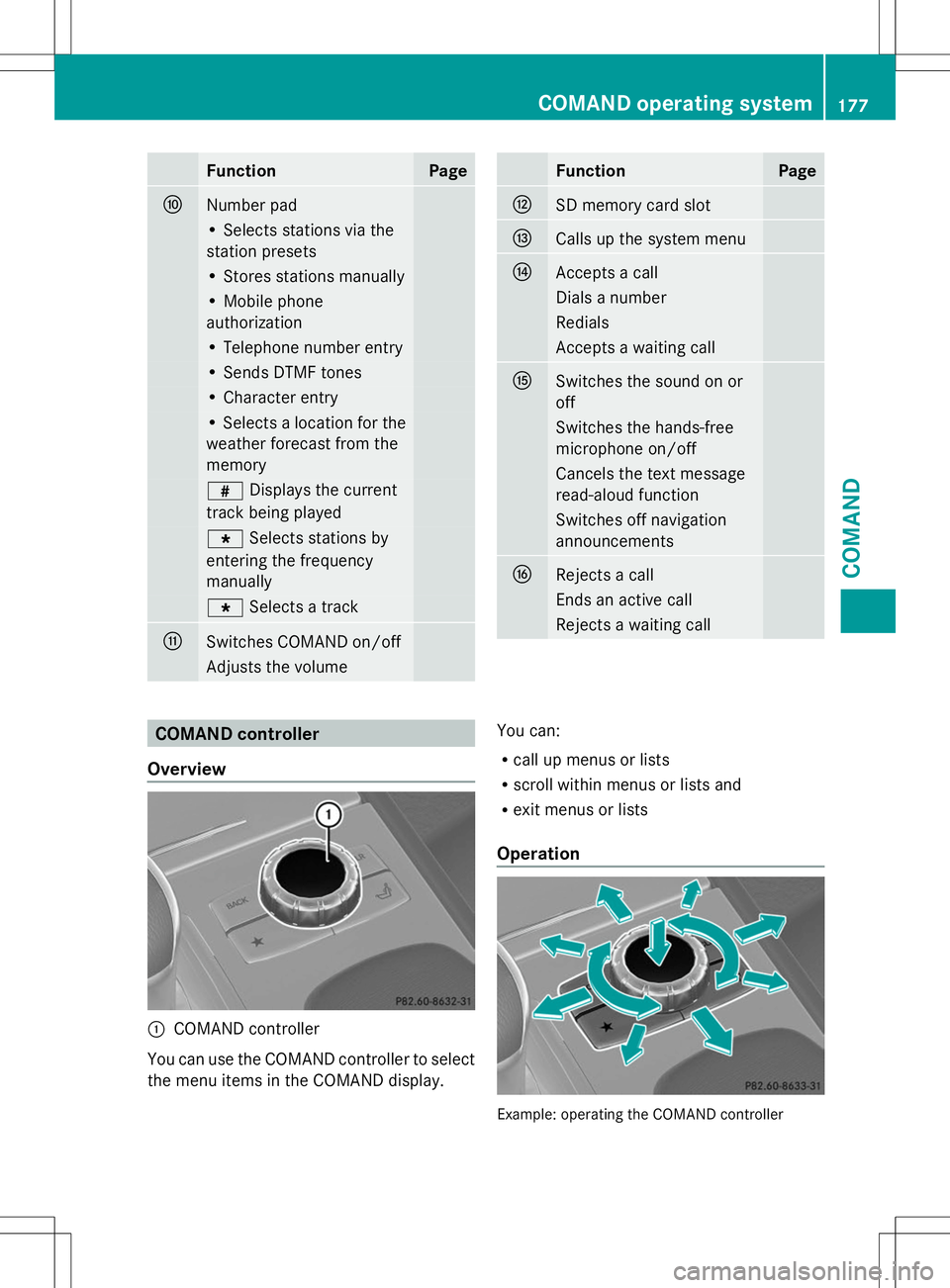
Function Page
F
Number pad
• Selects stations via the
station presets • Stores stations manually
• Mobile phone
authorization
• Telephone number entry
• Sends DTMF tones
• Character entry
• Selects a location for the
weather forecast from the
memory
z
Displays the current
track being played g
Selects stations by
entering the frequency
manually g
Selects a track G
Switches COMAND on/off
Adjusts the volume Function Page
H
SD memory card slot
I
Calls up the system menu
J
Accepts a call
Dials a number
Redials
Accepts a waiting call
K
Switches the sound on or
off
Switches the hands-free
microphone on/off
Cancels the text message
read-aloud function
Switches off navigation
announcements
L
Rejects a call
Ends an active call
Rejects a waiting call
COMAND controller
Overview :
COMAND controller
You can use the COMAND controller to select
the menu items in the COMAND display. You can:
R
call up menus or lists
R scroll within menus or lists and
R exit menus or lists
Operation Example: operating the COMAND controller COMAND operating system
177COMAND Z
Page 180 of 272
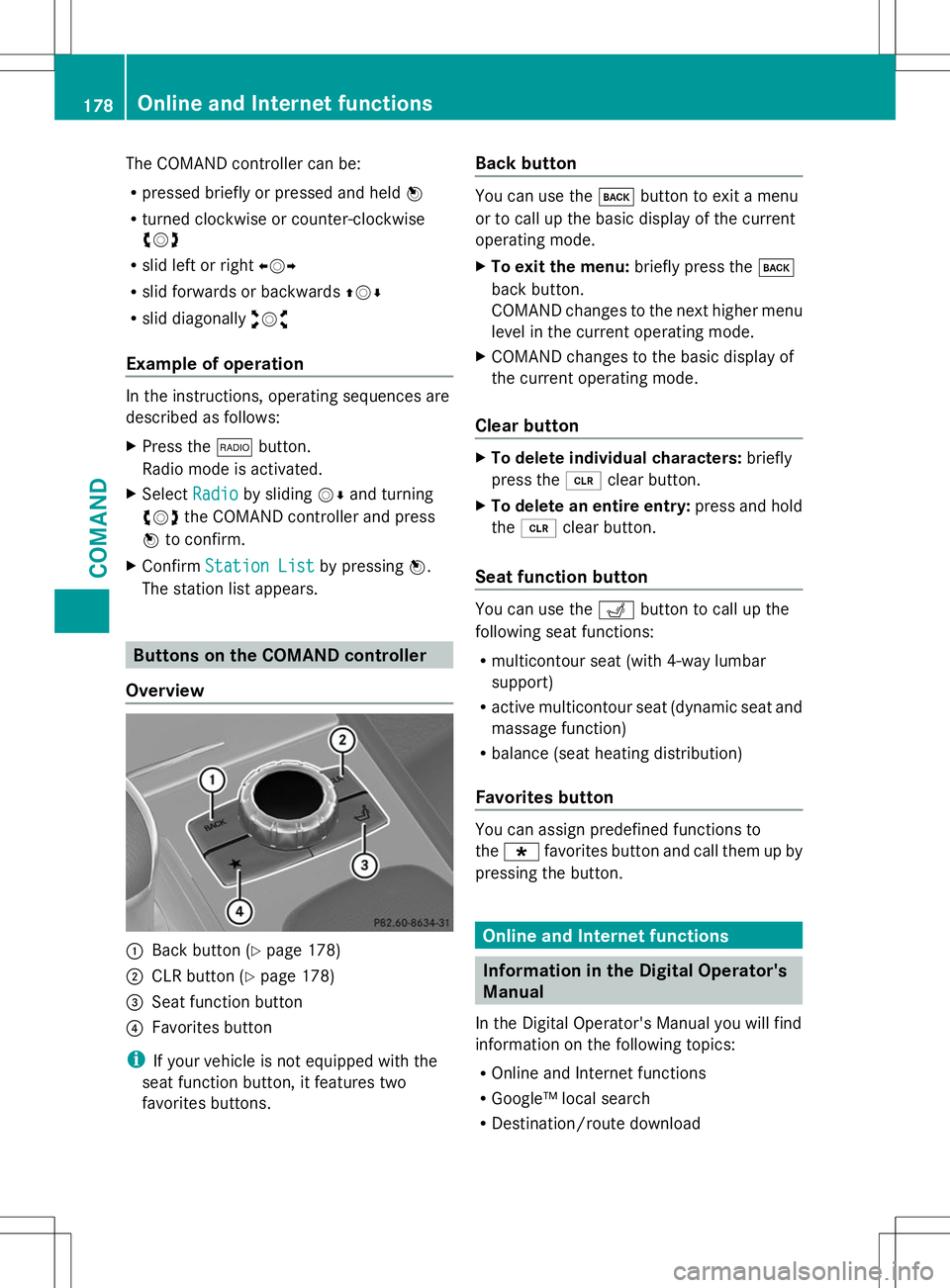
The COMAND controller can be:
R
pressed briefly or pressed and held W
R turned clockwise or counter-clockwise
cVd
R slid left or right XVY
R slid forwards or backwards ZVÆ
R slid diagonally aVb
Example of operation In the instructions, operating sequences are
described as follows:
X Press the $button.
Radio mode is activated.
X Select Radio
Radio by sliding VÆand turning
cVd the COMAND controller and press
W to confirm.
X Confirm Station List Station List by pressingW.
The station list appears. Buttons on the COMAND controller
Overview :
Back button (Y page 178)
; CLR button (Y page 178)
= Seat function button
? Favorites button
i If your vehicle is not equipped with the
seat function button, it features two
favorites buttons. Back button You can use the
kbutton to exit a menu
or to call up the basic display of the current
operating mode.
X To exit the menu: briefly press thek
back button.
COMAND changes to the next higher menu
level in the current operating mode.
X COMAND changes to the basic display of
the current operating mode.
Clear button X
To delete individual characters: briefly
press the 2clear button.
X To delete an entire entry: press and hold
the 2 clear button.
Seat function button You can use the
Tbutton to call up the
following seat functions:
R multicontour seat (with 4-way lumbar
support)
R active multicontour seat (dynamic seat and
massage function)
R balance (seat heating distribution)
Favorites button You can assign predefined functions to
the
; favorites button and call them up by
pressing the button. Online and Internet functions
Information in the Digital Operator's
Manual
In the Digital Operator's Manual you will find
information on the following topics:
R Online and Internet functions
R Google™ local search
R Destination/route download 178
Online and Internet functionsCOMAND
Page 181 of 272
R
Weather display
R Internet General notes
Conditions for access To use COMAND Online Mercedes-Benz Apps
and Internet access, the following conditions
must be fulfilled:
R mbrace is activated and operational
R mbrace is activated for COMAND Online
Mercedes-Benz Apps and Internet access
Priority of connections: an emergency call
has the highest priority. When a service call,
e.g. a breakdown service call or the MB Info
Call, is active, an emergency call can still be
initiated.
A service call, on the other hand, has priority
over a current Internet connection. For this
reason, you cannot connect to the Internet
during a service call.
i The availability of individual COMAND
Online Mercedes-Benz Apps may vary
depending on the country.
i The terms of use are shown when
COMAND Online is used for the first time
and then once a year thereafter. Only read
and accept the terms of use when the
vehicle is stationary.
i Internet pages cannot be shown while the
vehicle is in motion. Establishing/ending the connection
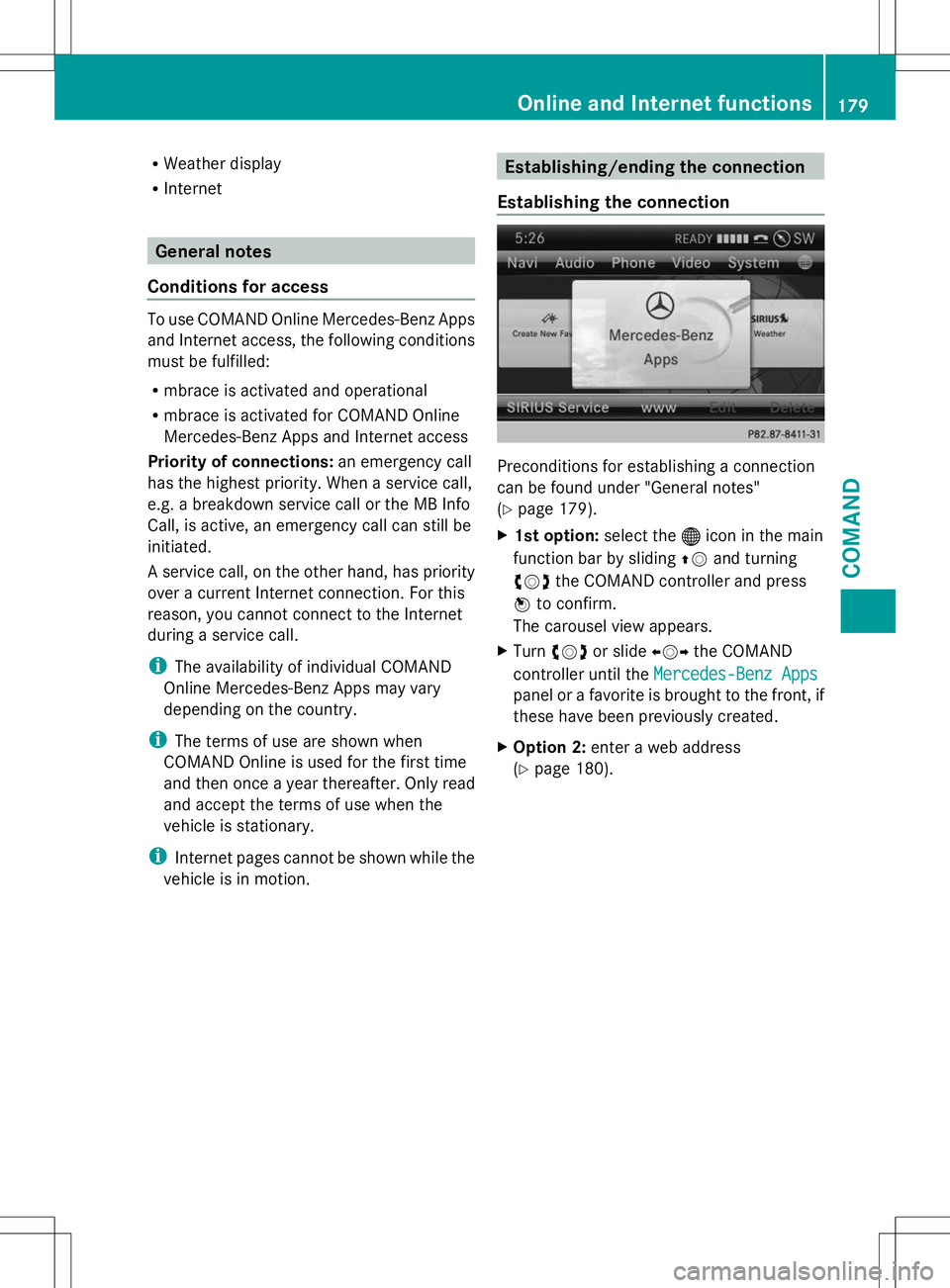
Establishing the connection Preconditions for establishing a connection
can be found under "General notes"
(Y
page 179).
X 1st option: select the®icon in the main
function bar by sliding ZVand turning
cVd the COMAND controller and press
W to confirm.
The carousel view appears.
X Turn cVd or slide XVYthe COMAND
controller until the Mercedes-Benz Apps Mercedes-Benz Apps
panel or a favorite is brought to the front, if
these have been previously created.
X Option 2: enter a web address
(Y page 180). Online and Internet functions
179COMAND Z
Page 182 of 272
X
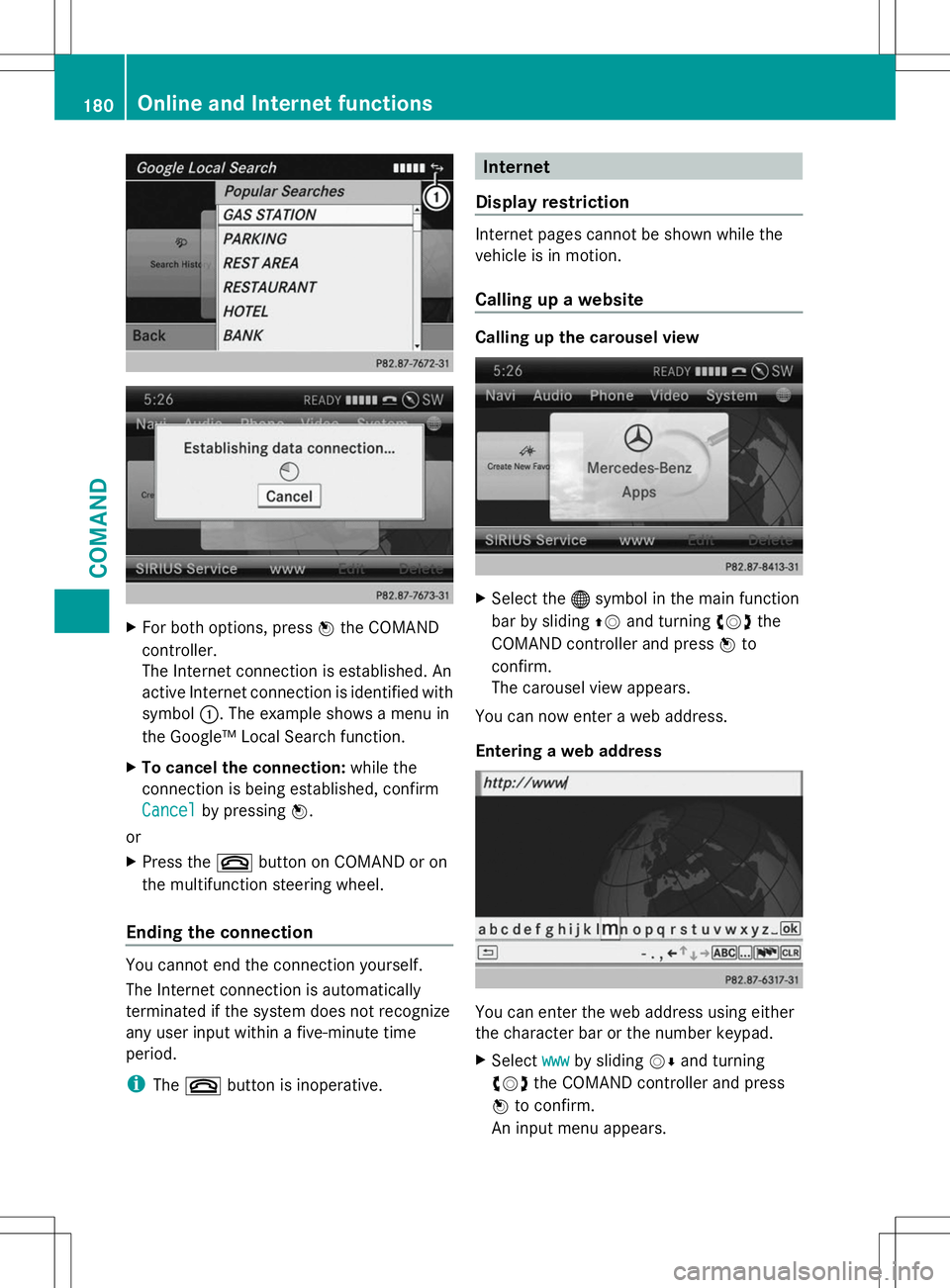
For both options, press Wthe COMAND
controller.
The Internet connection is established. An
active Internet connection is identified with
symbol :. The example shows a menu in
the Google™ Local Search function.
X To cancel the connection: while the
connection is being established, confirm
Cancel
Cancel by pressing W.
or
X Press the ~button on COMAND or on
the multifunction steering wheel.
Ending the connection You cannot end the connection yourself.
The Internet connection is automatically
terminated if the system does not recognize
any user input within a five-minute time
period.
i The ~ button is inoperative. Internet
Display restriction Internet pages cannot be shown while the
vehicle is in motion.
Calling up a website
Calling up the carousel view
X
Select the ®symbol in the main function
bar by sliding ZVand turning cVdthe
COMAND controller and press Wto
confirm.
The carousel view appears.
You can now enter a web address.
Entering a web address You can enter the web address using either
the character bar or the number keypad.
X
Select www wwwby sliding VÆand turning
cVd the COMAND controller and press
W to confirm.
An input menu appears. 180
Online and Internet functionsCOMAND
Page 192 of 272
The mbrace system
To adjust the volume during an mbrace call,
proceed as follows:
X Press the WorX button on the
multifunction steering wheel.
or
X Use the COMAND volume control.
The mbrace system provides three different
services:
R automatic and manual emergency call
R Roadside Assistance call
R MB Info call
USA only: you can find further information
and a description of all available features
under "Owners Online" at http://
www.mbusa.com.
System self-test G
WARNING
A malfunction in the system has been
detected if one of the following conditions
occurs:
R the indicator lamp in the SOS button does
not light up during the system self-
diagnosis.
R the indicator lamp in the ºRoadside
Assistance button does not light up during
the system self-diagnosis.
R the indicator lamp in the Einformation
button does not light up during the system
self-diagnosis.
R the indicator lamp in the SOS button,
º Roadside Assistance button or E
information button continues to be lit red
after the system self-diagnosis.
R the Tele
Tele Aid Aidinoperative
inoperative orTele
Tele Aid
Aid
not activated
not activated message appears on the
multifunction display after the system self-
diagnosis.
If a malfunction is indicated as outlined above,
the system may not operate as expected. In the event of an emergency, assistance must
be summoned by other means.
Have the system checked at the nearest
authorized Mercedes-Benz Center or contact
the following service hotlines:
R
USA: Response Center at
1-888-990-9007
R Canada: Customer Service at
1-888-923-8367
After you have switched on the ignition, the
system carries out a self-diagnosis.
Emergency call Important safety notes
G
WARNING
If the indicator lamp in the SOS button is
flashing continuously and there was no voice
connection to the Response Center
established, then the mbrace system could
not initiate an emergency call (e.g. the
relevant cellular phone network is not
available).
The message Call Failed Call Failed appears in the
multifunction display for approximately
10 seconds.
Should this occur, assistance must be
summoned by other means.
! You must have a license agreement to
activate the mbrace service. Ensure that
your system is activated and ready for use,
and press the EMB Info call button to
register. If one of these steps is not carried
out, it may not be possible to activate the
system.
If you have questions about the activation,
contact one of the following telephone
hotlines:
R USA: Response Center at
1-888-990-9007
R Canada: Customer Service at
1-888-923-8367 190
FeaturesSto
wage an d features
Page 193 of 272
An emergency call is dialed automatically if
an air bag or Emergency Tensioning Device is
triggered.
i An automatically dialed mbrace
emergency call cannot be canceled.
An emergency call can also be initiated
manually.
As soon as the emergency call has been
initiated, the indicator lamp in the SOS button
flashes. The Connecting Call
Connecting Call message
appears on the multifunction display.
COMAND is muted.
Once the connection has been made, the
Call Connected
Call Connected message appears in the
multifunction display.
All important information on the emergency
is provided, for example:
R Current location of the vehicle (as
determined by the GPS system)
R Vehicle model
R Vehicle color
R Vehicle identification number
A short time after the emergency call is
initiated, a voice connection is automatically
established between the Response Center
and the vehicle occupants. If the vehicle
occupants are able to respond, the Response
Center will attempt to obtain more detailed
information on the emergency.
i If there is no response from the vehicle
occupants, an ambulance is immediately
sent to the vehicle.
Making an emergency call G
WARNING
If you feel at any way in jeopardy when in the
vehicle (e.g. smoke or fire in the vehicle,
vehicle in a dangerous road location), please
do not wait for voice contact after you have
pressed the SOS button. Carefully leave the
vehicle and move to a safe location. The
Response Center will automatically contact
local emergency officials with the vehicle's
approximate location if they receive an automatic SOS signal and cannot make voice
contact with the vehicle occupants.
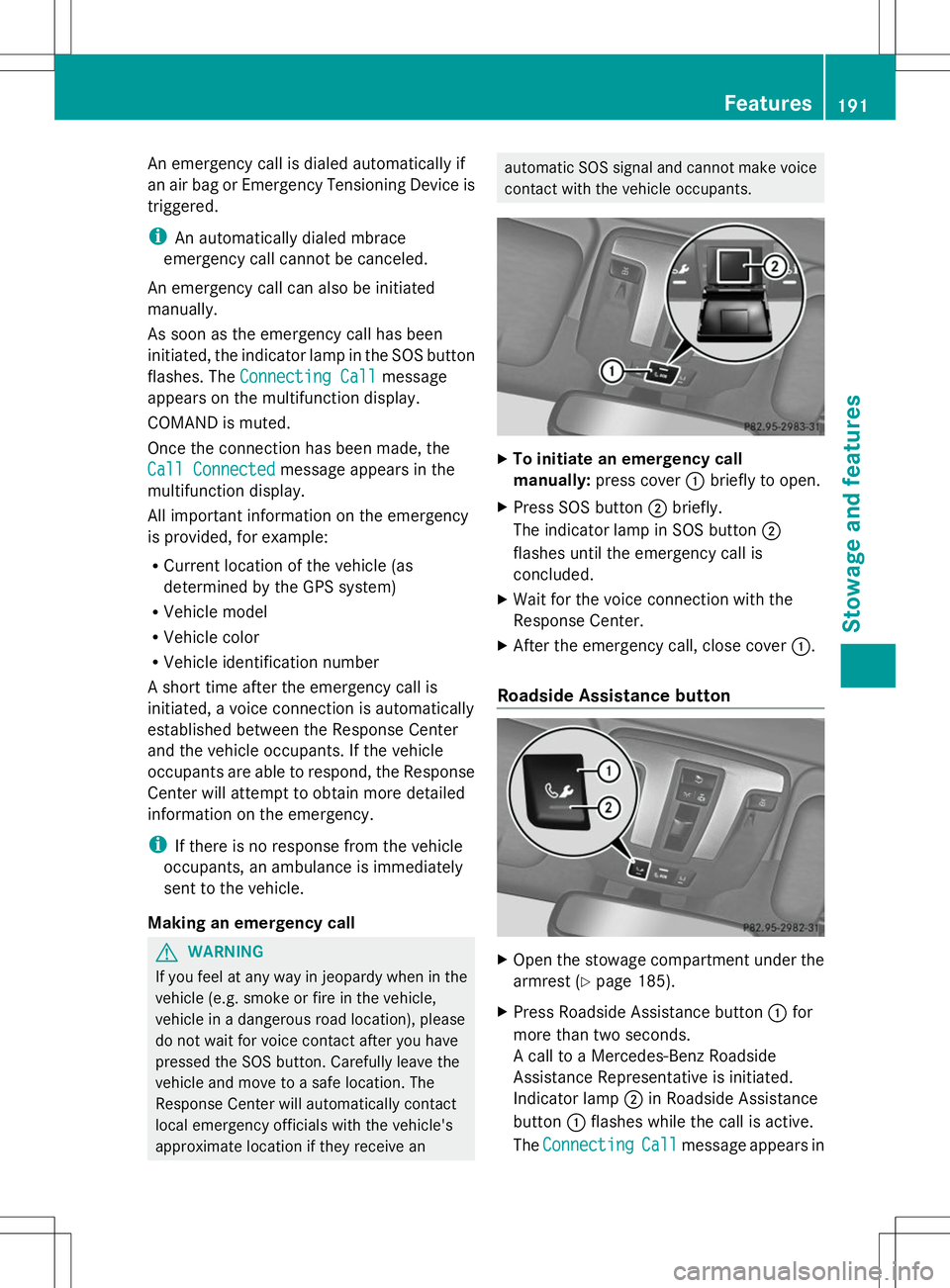
X
To initiate an emergency call
manually: press cover :briefly to open.
X Press SOS button ;briefly.
The indicator lamp in SOS button ;
flashes until the emergency call is
concluded.
X Wait for the voice connection with the
Response Center.
X After the emergency call, close cover :.
Roadside Assistance button X
Open the stowage compartment under the
armrest (Y page 185).
X Press Roadside Assistance button :for
more than two seconds.
A call to a Mercedes-Benz Roadside
Assistance Representative is initiated.
Indicator lamp ;in Roadside Assistance
button :flashes while the call is active.
The Connecting
Connecting Call Callmessage appears in Features
191Stowage an d features Z
Page 194 of 272
the multifunction display and the COMAND
system is muted.
If a connection can be made, the Call
Call
Connected
Connected message appears in the
multifunction display.
If a mobile phone network is available and
there is sufficient GPS reception, the mbrace
system transmits data to the Response
Center, for example:
R Current location of the vehicle
R Vehicle identification number
R Vehicle model
R Vehicle color
i The COMAND display shows that an
mbrace call is active. You can switch to the
navigation menu during the call by pressing
the NAVI button on COMAND. Voice output
is not available.
A voice connection is established between
the Mercedes-Benz Roadside Assistance
Representative and the vehicle occupants.
The Mercedes-Benz Roadside Assistance
Representative either sends a qualified
Mercedes-Benz technician or makes
arrangements for your vehicle to be
transported to the nearest authorized
Mercedes-Benz Center. You may be charged
for services such as repair work and/or
towing. Further details are available in your
mbrace manual.
X Describe the type of assistance needed.
i If the indicator lamp in Roadside
Assistance button :is flashing
continuously and no voice connection with
the Response center has been established,
then the mbrace system has not been able
to initiate a Roadside Assistance call (e.g.
the relevant mobile phone network is not
available). The Call Failed
Call Failed message
appears in the multifunction display. X
To end a call: press the~button on the
multifunction steering wheel.
or
X Press the corresponding button for ending
a phone call on COMAND.
i Sign and drive services 2
: you are not
charged for services such as jump-starting,
providing a few gallons of fuel for a fuel tank
that has been run dry or changing a faulty
tire with the vehicle's own spare wheel.
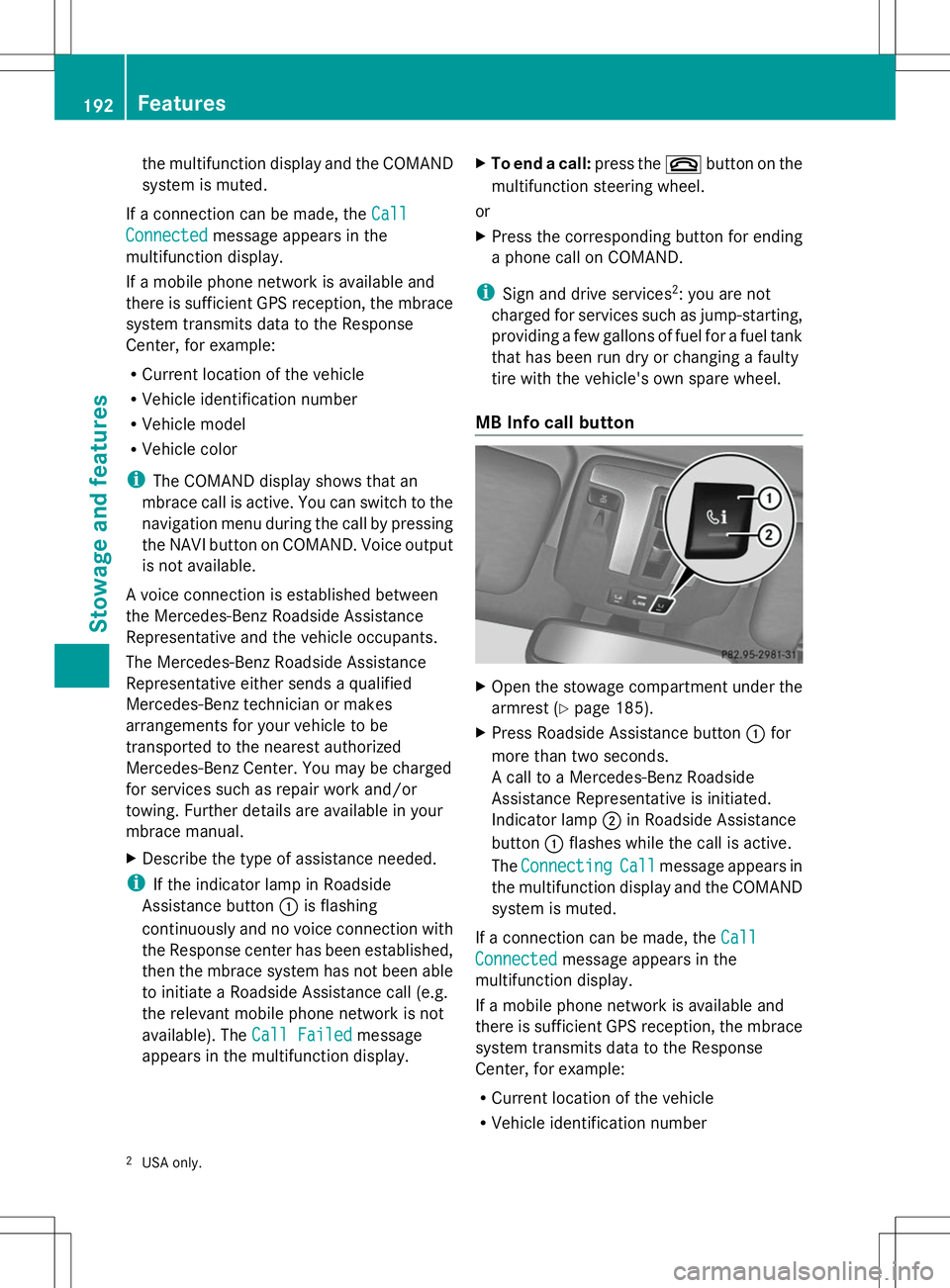
MB Info call button X
Open the stowage compartment under the
armrest (Y page 185).
X Press Roadside Assistance button :for
more than two seconds.
A call to a Mercedes-Benz Roadside
Assistance Representative is initiated.
Indicator lamp ;in Roadside Assistance
button :flashes while the call is active.
The Connecting Connecting Call
Callmessage appears in
the multifunction display and the COMAND
system is muted.
If a connection can be made, the Call Call
Connected
Connected message appears in the
multifunction display.
If a mobile phone network is available and
there is sufficient GPS reception, the mbrace
system transmits data to the Response
Center, for example:
R Current location of the vehicle
R Vehicle identification number
2 USA only. 192
FeaturesSto
wage an d features
Page 195 of 272
R
Vehicle model
R Vehicle color
i The COMAND display shows that an
mbrace call is active. You can switch to the
navigation menu during the call by pressing
the NAVI button on COMAND. Voice output
is not available.
A voice connection between the Response
Center and the vehicle occupants is
established. You can obtain information on
how to operate your vehicle's systems, on the
location of the nearest authorized Mercedes-
Benz Center, and on further products and
services offered by Mercedes-Benz USA.
You can find further information on the
mbrace system at http://
www.mbusa.com 3
Log in under "Owners
Online".
i If the indicator lamp in MB Info call
button :is flashing continuously and no
voice connection with the Response center
has been established, then the mbrace
system has not been able to initiate an MB
Info call (e.g. the relevant mobile phone
network is not available). The Call Call
Failed
Failed message appears in the
multifunction display.
X To end a call: press the~button on the
multifunction steering wheel.
or
X Press the corresponding button for ending
a phone call on COMAND.
Call priority When service calls are active, e.g. Roadside
Assistance or MB Info calls, an emergency
call can still be initiated. In this case, an
emergency call has the highest priority and
takes precedence over all other active calls.
The indicator lamp of the respective button
flashes until the call is ended. An emergency
call can only be terminated by the Response
Center. All other calls can be ended by pressing the
~button on the
multifunction steering wheel or the
corresponding COMAND button for ending a
telephone call.
i When an mbrace call has been initiated,
COMAND is muted. The mobile phone is no
longer connected to COMAND. However, if
you want to use your mobile phone, we
recommend that you do this only when the
vehicle is stationary and in a safe location. Brush guard (USA only)
G
WARNING
The brush guard is designed solely to enhance
the appearance of the vehicle and help
protect grille and headlamps from minor
mishaps, either on or off road.
Since the safety characteristics are limited in
the event of an accident, brush guard are not
intended to prevent injury or damage in the
event of an accident. Also observe state and
local regulations on installation and use.
Raise and lower the brush guard in an open
space with plenty of room.
i If you wish to remove the brush guard,
contact a qualified specialist workshop. Garage door opener
Important safety notes G
WARNING
Before programming the integrated remote
control to a garage door opener or gate
operator, make sure people and objects are
out of the way of the device to prevent
potential harm or damage. When
programming a garage door opener, the door
moves up or down. When programming a gate
operator, the gate opens or closes.
Do not use the integrated remote control with
any garage door opener that lacks safety stop
3 USA only. Features
193Stowage and features
Z
Page 204 of 272
X
Slowly slide oil dipstick :into the guide
tube to the stop, and take it out again.
If the level is between MIN mark =and
MAX mark ;, the oil level is correct.
X Add oil if necessary.
Checking the oil level using the on-
board computer !
Do not add too much oil. adding too much
engine oil can result in damage to the
engine or to the catalytic converter. Have
excess engine oil siphoned off.
G 65 AMG: the oil level can be checked using
the on-board computer only.
On all other models, the oil dipstick must be
used to check the engine oil level.
When checking the oil level:
R park the vehicle on a level surface.
R the engine should be switched off for
approximately five minutes if the engine is
at normal operating temperature.
X Make sure that the SmartKey is in position
2in the ignition lock.
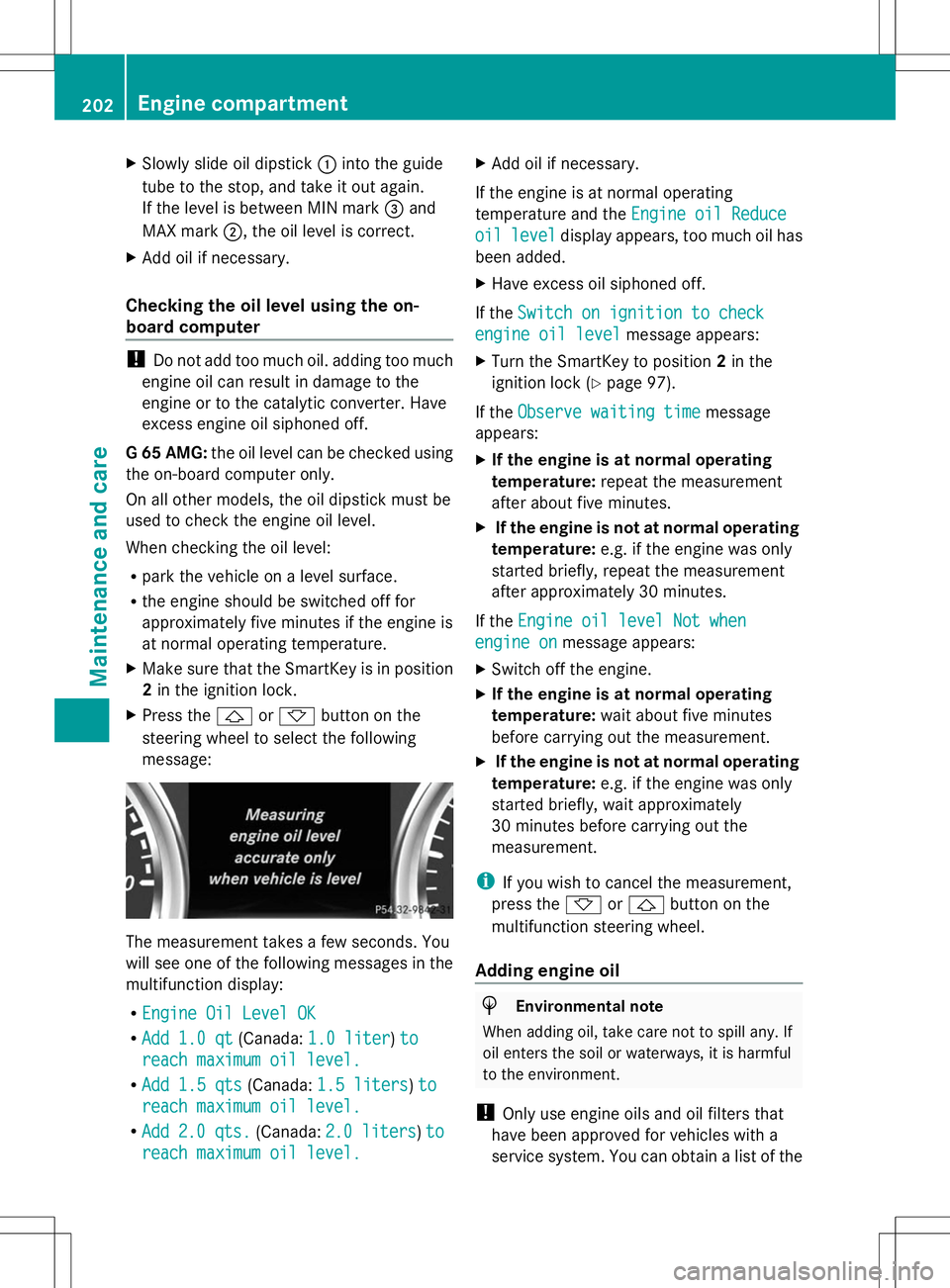
X Press the &or* button on the
steering wheel to select the following
message: The measurement takes a few seconds. You
will see one of the following messages in the
multifunction display:
R Engine Oil Level OK Engine Oil Level OK
R Add 1.0 qt
Add 1.0 qt (Canada:1.0 liter
1.0 liter) to
to
reach maximum oil level.
reach maximum oil level.
R Add 1.5 qts
Add 1.5 qts (Canada:1.5 liters
1.5 liters )to
to
reach maximum oil level.
reach maximum oil level.
R Add
Add 2.0 qts.
2.0 qts. (Canada:2.0 liters
2.0 liters )to
to
reach maximum oil level.
reach maximum oil level. X
Add oil if necessary.
If the engine is at normal operating
temperature and the Engine oil Reduce
Engine oil Reduce
oil oil level
level display appears, too much oil has
been added.
X Have excess oil siphoned off.
If the Switch on ignition to check
Switch on ignition to check
engine oil level engine oil level message appears:
X Turn the SmartKey to position 2in the
ignition lock (Y page 97).
If the Observe waiting time
Observe waiting time message
appears:
X If the engine is at normal operating
temperature: repeat the measurement
after about five minutes.
X If the engine is not at normal operating
temperature: e.g. if the engine was only
started briefly, repeat the measurement
after approximately 30 minutes.
If the Engine oil level Not when
Engine oil level Not when
engine on engine on message appears:
X Switch off the engine.
X If the engine is at normal operating
temperature: wait about five minutes
before carrying out the measurement.
X If the engine is not at normal operating
temperature: e.g. if the engine was only
started briefly, wait approximately
30 minutes before carrying out the
measurement.
i If you wish to cancel the measurement,
press the *or& button on the
multifunction steering wheel.
Adding engine oil H
Environmental note
When adding oil, take care not to spill any. If
oil enters the soil or waterways, it is harmful
to the environment.
! Only use engine oils and oil filters that
have been approved for vehicles with a
service system. You can obtain a list of the 202
Engine compartmentMaintenance and care