AUX MERCEDES-BENZ G-CLASS SUV 2014 Owners Manual
[x] Cancel search | Manufacturer: MERCEDES-BENZ, Model Year: 2014, Model line: G-CLASS SUV, Model: MERCEDES-BENZ G-CLASS SUV 2014Pages: 272, PDF Size: 39.13 MB
Page 7 of 272
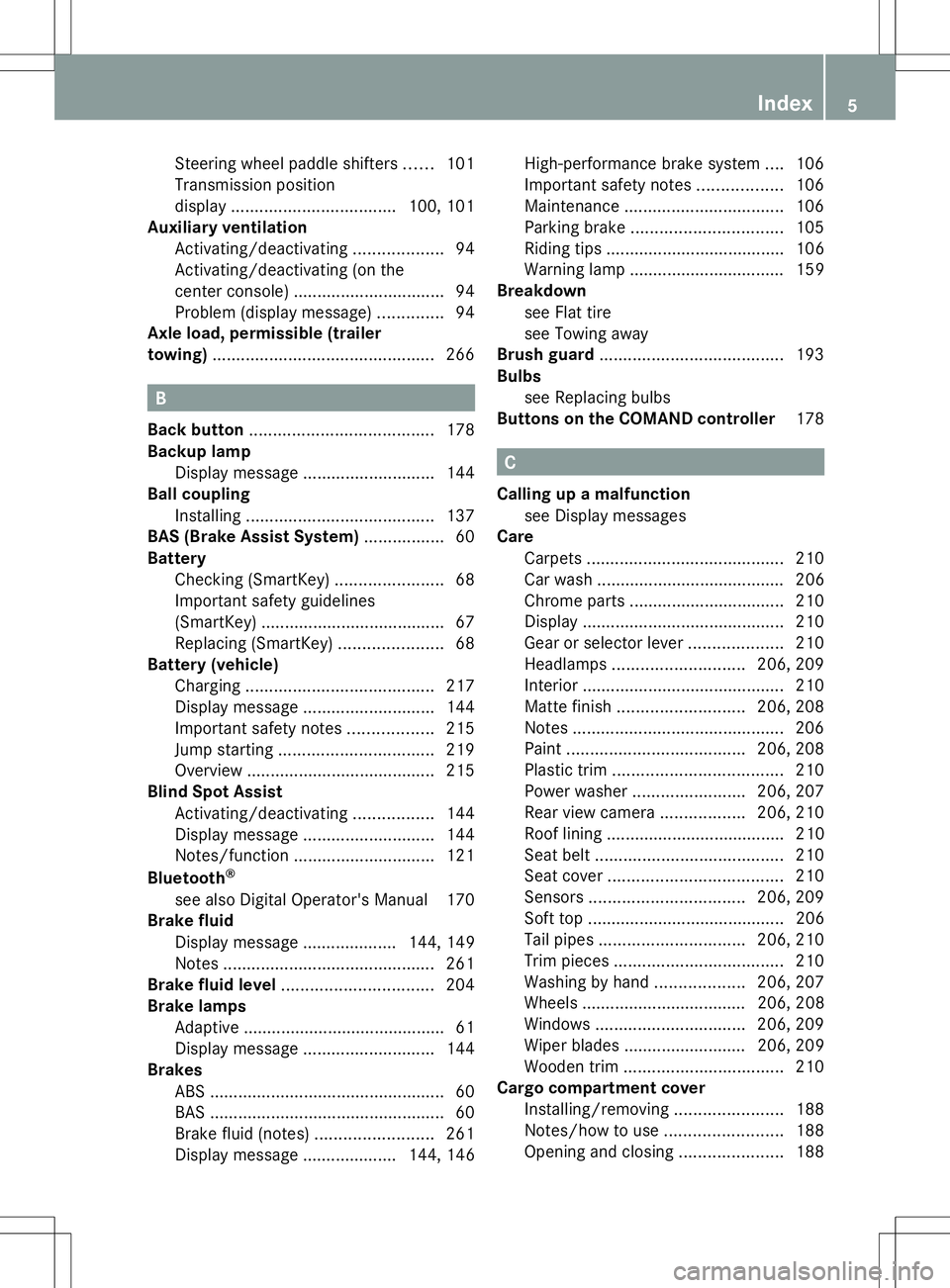
Steering wheel paddle shifters
......101
Transmission position
displa y................................... 100, 101
Auxiliary ventilation
Activating/deactivating ...................94
Activating/deactivating (on the
center console) ................................ 94
Problem (display message) ..............94
Axle load, permissible (trailer
towing) ............................................... 266B
Back button ....................................... 178
Backup lamp Display message ............................ 144
Ball coupling
Installing ........................................ 137
BAS (Brake Assist System) .................60
Battery Checking (SmartKey) .......................68
Important safety guidelines
(SmartKey) ....................................... 67
Replacing (SmartKey) ......................68
Battery (vehicle)
Charging ........................................ 217
Display message ............................ 144
Important safety notes ..................215
Jump starting ................................. 219
Overview ........................................ 215
Blind Spot Assist
Activating/deactivating .................144
Display message ............................ 144
Notes/function .............................. 121
Bluetooth ®
see also Digital Operator's Manual 170
Brake fluid
Display message .................... 144, 149
Notes ............................................. 261
Brake fluid level ................................ 204
Brake lamps Adaptive .......................................... .61
Display message ............................ 144
Brakes
ABS .................................................. 60
BAS .................................................. 60
Brake fluid (notes) .........................261
Display message .................... 144, 146 High-performance brake system
....106
Important safety notes ..................106
Maintenance .................................. 106
Parking brake ................................ 105
Riding tips ...................................... 106
Warning lamp ................................. 159
Breakdown
see Flat tire
see Towing away
Brush guard ....................................... 193
Bulbs see Replacing bulbs
Buttons on the COMAND controller 178 C
Calling up a malfunction see Display messages
Care
Carpets .......................................... 210
Car wash ........................................ 206
Chrome parts ................................. 210
Display ........................................... 210
Gear or selector lever ....................210
Headlamps ............................ 206, 209
Interior ........................................... 210
Matte finish ........................... 206, 208
Notes ............................................. 206
Paint ...................................... 206, 208
Plastic trim .................................... 210
Power washer ........................ 206, 207
Rear view camera ..................206, 210
Roof lining ...................................... 210
Seat belt ........................................ 210
Seat cover ..................................... 210
Sensors ................................. 206, 209
Soft top .......................................... 206
Tail pipes ............................... 206, 210
Trim pieces .................................... 210
Washing by hand ...................206, 207
Wheels ................................... 206, 208
Windows ................................ 206, 209
Wiper blades .......................... 206, 209
Wooden trim .................................. 210
Cargo compartment cover
Installing/removing .......................188
Notes/how to use .........................188
Opening and closing ......................188 Index
5
Page 176 of 272
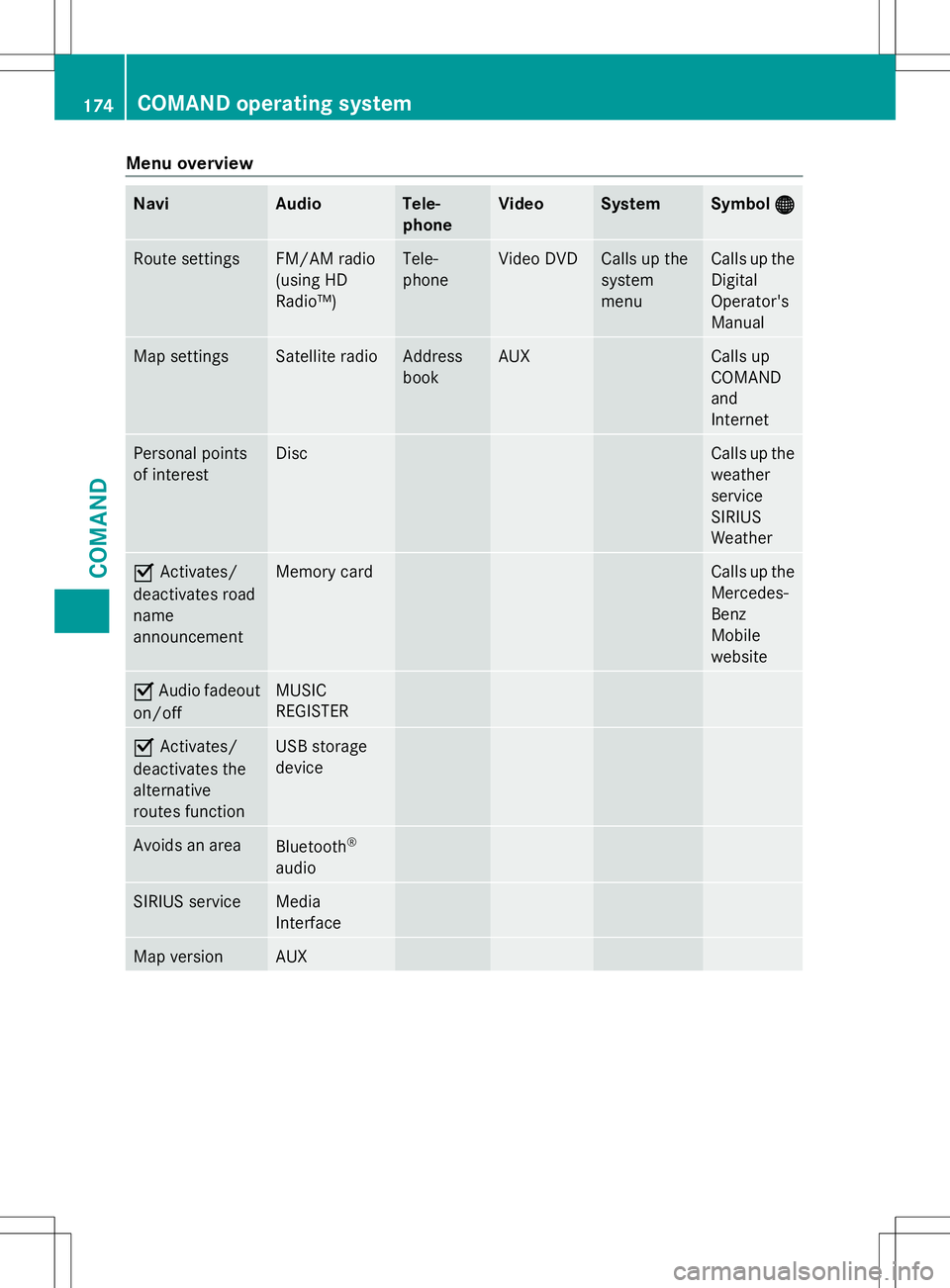
Menu overview
Navi Audio Tele-
phone Video System Symbol
® ® Route settings FM/AM radio
(using HD
Radio™) Tele-
phone Video DVD Calls up the
system
menu Calls up the
Digital
Operator's
Manual
Map settings Satellite radio Address
book AUX Calls up
COMAND
and
Internet
Personal points
of interest Disc Calls up the
weather
service
SIRIUS
Weather
O
Activates/
deactivates road
name
announcement Memory card Calls up the
Mercedes-
Benz
Mobile
website
O
Audio fadeout
on/off MUSIC
REGISTER
O
Activates/
deactivates the
alternative
routes function USB storage
device
Avoids an area
Bluetooth
®
audio SIRIUS service Media
Interface
Map version AUX174
COMAND operating systemCOMAND
Page 178 of 272
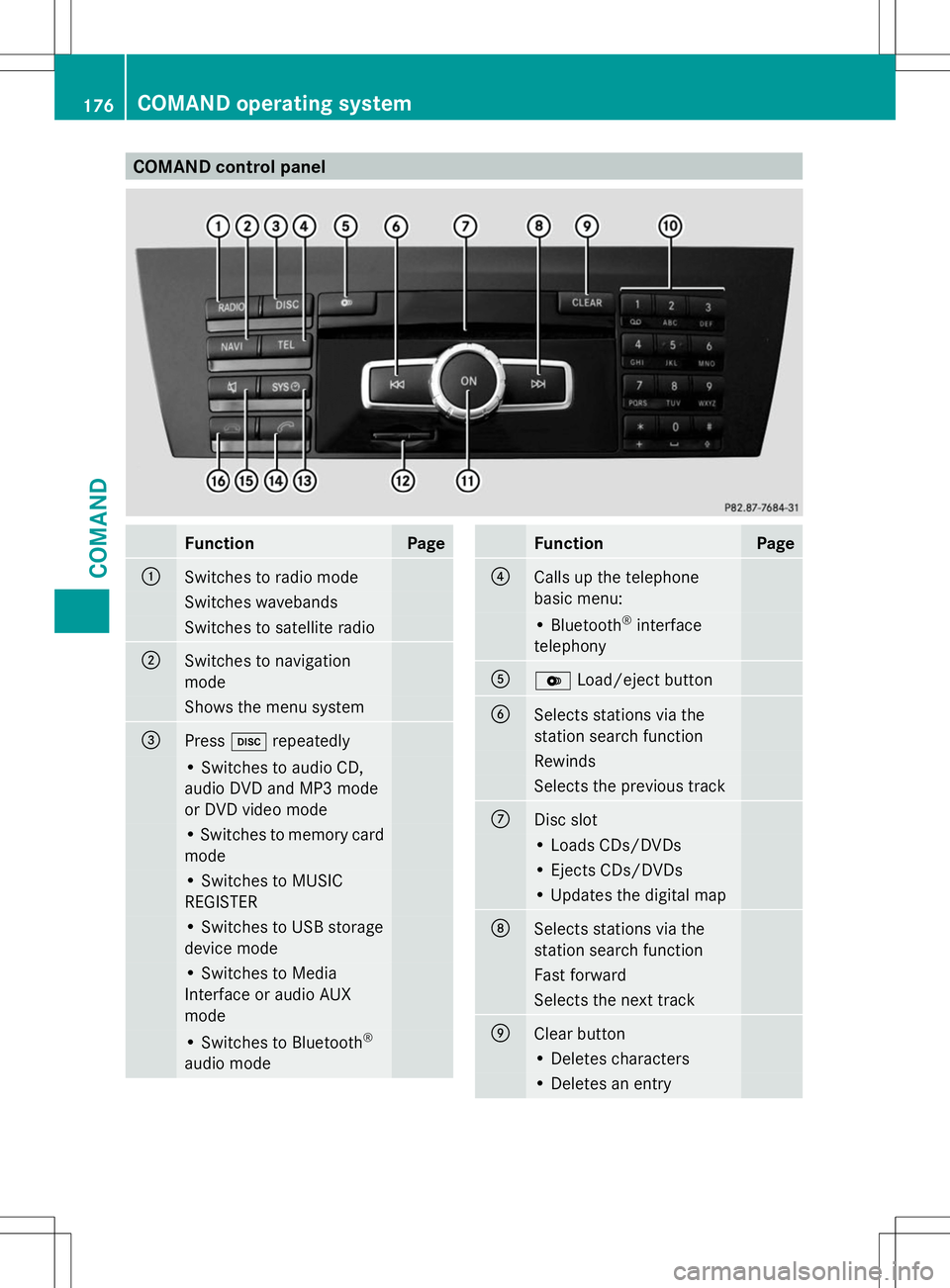
COMAND control panel
Function Page
:
Switches to radio mode
Switches wavebands
Switches to satellite radio
;
Switches to navigation
mode
Shows the menu system
=
Press
hrepeatedly • Switches to audio CD,
audio DVD and MP3 mode
or DVD video mode
• Switches to memory card
mode
• Switches to MUSIC
REGISTER
• Switches to USB storage
device mode
• Switches to Media
Interface or audio AUX
mode
• Switches to Bluetooth
®
audio mode Function Page
?
Calls up the telephone
basic menu:
• Bluetooth
®
interface
telephony A
V
Load/eject button B
Selects stations via the
station search function
Rewinds
Selects the previous track
C
Disc slot
• Loads CDs/DVDs
• Ejects CDs/DVDs
• Updates the digital map
D
Selects stations via the
station search function
Fast forward
Selects the next track
E
Clear button
• Deletes characters
• Deletes an entry176
COMAND operating systemCOMAND
Page 261 of 272
Fuel
Important safety notes G
WARNING
Fuel is highly flammable. If you handle fuel
incorrectly, there is a risk of fire and
explosion.
You must avoid fire, open flames, creating
sparks and smoking. Switch off the engine
and, if applicable, the auxiliary heating before
refueling. G
WARNING
Fuel is poisonous and hazardous to health.
There is a risk of injury.
You must make sure that fuel does not come
into contact with your skin, eyes or clothing
and that it is not swallowed. Do not inhale fuel
vapors. Keep fuel away from children.
If you or others come into contact with fuel,
observe the following:
R Wash away fuel from skin immediately
using soap and water.
R If fuel comes into contact with your eyes,
immediately rinse them thoroughly with
clean water. Seek medical assistance
without delay.
R If fuel is swallowed, seek medical
assistance without delay. Do not induce
vomiting.
R Immediately change out of clothing which
has come into contact with fuel.
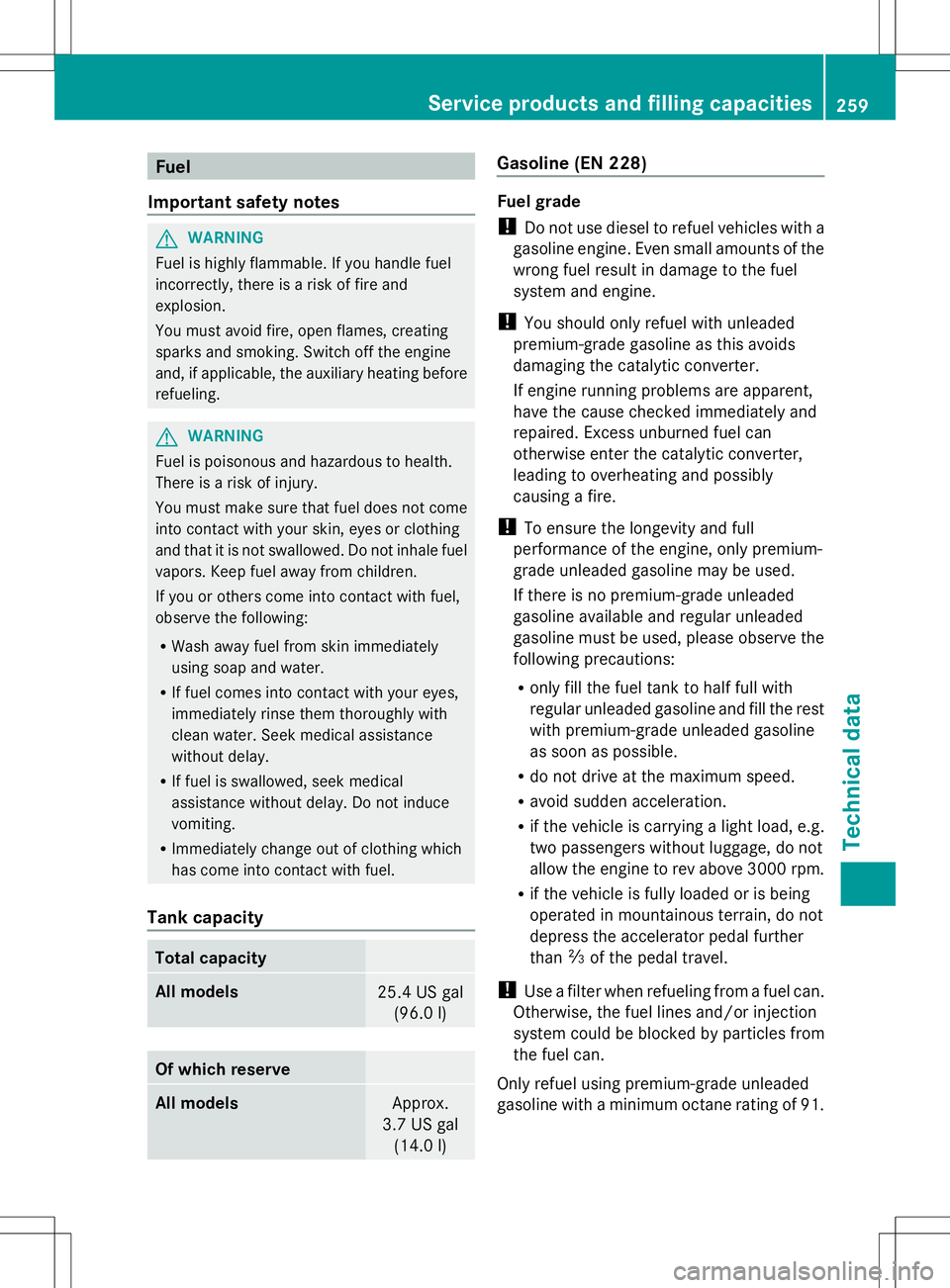
Tank capacity Total capacity
All models
25.4 US gal
(96.0 l) Of which reserve
All models
Approx.
3.7 US gal (14.0 l) Gasoline (EN 228)
Fuel grade
!
Do not use diesel to refuel vehicles with a
gasoline engine. Even small amounts of the
wrong fuel result in damage to the fuel
system and engine.
! You should only refuel with unleaded
premium-grade gasoline as this avoids
damaging the catalytic converter.
If engine running problems are apparent,
have the cause checked immediately and
repaired. Excess unburned fuel can
otherwise enter the catalytic converter,
leading to overheating and possibly
causing a fire.
! To ensure the longevity and full
performance of the engine, only premium-
grade unleaded gasoline may be used.
If there is no premium-grade unleaded
gasoline available and regular unleaded
gasoline must be used, please observe the
following precautions:
R only fill the fuel tank to half full with
regular unleaded gasoline and fill the rest
with premium-grade unleaded gasoline
as soon as possible.
R do not drive at the maximum speed.
R avoid sudden acceleration.
R if the vehicle is carrying a light load, e.g.
two passengers without luggage, do not
allow the engine to rev above 3000 rpm.
R if the vehicle is fully loaded or is being
operated in mountainous terrain, do not
depress the accelerator pedal further
than Ôof the pedal travel.
! Use a filter when refueling from a fuel can.
Otherwise, the fuel lines and/or injection
system could be blocked by particles from
the fuel can.
Only refuel using premium-grade unleaded
gasoline with a minimum octane rating of 91. Service products and filling capacities
259Technical data Z