center console MERCEDES-BENZ G-CLASS SUV 2014 Owners Manual
[x] Cancel search | Manufacturer: MERCEDES-BENZ, Model Year: 2014, Model line: G-CLASS SUV, Model: MERCEDES-BENZ G-CLASS SUV 2014Pages: 272, PDF Size: 39.13 MB
Page 7 of 272
Steering wheel paddle shifters
......101
Transmission position
displa y................................... 100, 101
Auxiliary ventilation
Activating/deactivating ...................94
Activating/deactivating (on the
center console) ................................ 94
Problem (display message) ..............94
Axle load, permissible (trailer
towing) ............................................... 266B
Back button ....................................... 178
Backup lamp Display message ............................ 144
Ball coupling
Installing ........................................ 137
BAS (Brake Assist System) .................60
Battery Checking (SmartKey) .......................68
Important safety guidelines
(SmartKey) ....................................... 67
Replacing (SmartKey) ......................68
Battery (vehicle)
Charging ........................................ 217
Display message ............................ 144
Important safety notes ..................215
Jump starting ................................. 219
Overview ........................................ 215
Blind Spot Assist
Activating/deactivating .................144
Display message ............................ 144
Notes/function .............................. 121
Bluetooth ®
see also Digital Operator's Manual 170
Brake fluid
Display message .................... 144, 149
Notes ............................................. 261
Brake fluid level ................................ 204
Brake lamps Adaptive .......................................... .61
Display message ............................ 144
Brakes
ABS .................................................. 60
BAS .................................................. 60
Brake fluid (notes) .........................261
Display message .................... 144, 146 High-performance brake system
....106
Important safety notes ..................106
Maintenance .................................. 106
Parking brake ................................ 105
Riding tips ...................................... 106
Warning lamp ................................. 159
Breakdown
see Flat tire
see Towing away
Brush guard ....................................... 193
Bulbs see Replacing bulbs
Buttons on the COMAND controller 178 C
Calling up a malfunction see Display messages
Care
Carpets .......................................... 210
Car wash ........................................ 206
Chrome parts ................................. 210
Display ........................................... 210
Gear or selector lever ....................210
Headlamps ............................ 206, 209
Interior ........................................... 210
Matte finish ........................... 206, 208
Notes ............................................. 206
Paint ...................................... 206, 208
Plastic trim .................................... 210
Power washer ........................ 206, 207
Rear view camera ..................206, 210
Roof lining ...................................... 210
Seat belt ........................................ 210
Seat cover ..................................... 210
Sensors ................................. 206, 209
Soft top .......................................... 206
Tail pipes ............................... 206, 210
Trim pieces .................................... 210
Washing by hand ...................206, 207
Wheels ................................... 206, 208
Windows ................................ 206, 209
Wiper blades .......................... 206, 209
Wooden trim .................................. 210
Cargo compartment cover
Installing/removing .......................188
Notes/how to use .........................188
Opening and closing ......................188 Index
5
Page 8 of 272
Cargo compartment enlargement
Important safety note s.................. 185
Cargo tie down rings .........................188
CD see also Digital Operator's Manual 170
CD player/CD changer (on-board
computer) .......................................... 144
Center console Overview .......................................... 34
Upper section .................................. 34
Central locking
Automatic locking (on-board
computer) ...................................... 144
Locking/unlocking (SmartKey) ........66
Changing bulbs
Side marker lamps ...........................86
Changing gears .................................. 101
Checklist After driving off-roa d...................... 108
Before driving off-road ...................108
Child-proof locks
Important safety notes ....................58
Rear doors ....................................... 58
Children
In the vehicle ................................... 53
Restraint systems ............................ 53
Child seat
Automatic recognition .....................44
Automatic recognition/air bag
deactivation, self-test ......................46
LATCH-type (ISOFIX) child seat
anchors ............................................ 56
Special seat belt retractor ...............55
Top Tether ....................................... 57
Troubleshooting ............................... 47
Chrome parts (cleaning
instructions) ...................................... 210
Cigarette lighter ................................ 189
Cleaning Trailer tow hitch ............................. 206
Clear button ....................................... 178
Climate control Controlling automatically .................94
Cooling with air dehumidification ..... 94
Defrosting the windows ...................94
Defrosting the windshield ................94Dual-zone automatic climate
control
....................................... 93, 94
Important safety notes ..............92, 94
Indicator lamp .................................. 94
Maximum cooling ............................ .94
Notes on using dual-zone
automatic climate control ................94
Overview of systems ........................92
Problems with "cooling with air
dehumidification" ............................. 94
Problem with the rear window
defroster .......................................... 94
Refrigerant ..................................... 261
Setting the air distribution ...............94
Setting the airflow ........................... 94
Setting the temperature ..................94
Switching air-recirculation mode
on/off .............................................. 94
Switching on/off .............................. 94
Switching residual heat on/off ........94
Switching the rear window
defroster on/off ............................... 94
Switching the ZONE function on/
off .................................................... 94
Windshield defroster ........................94
Cockpit
Overview .......................................... 30
see Instrument cluster
COMAND
Display ........................................... 173
Examples of operation ...................178
Menu overview .............................. 174
COMAND controller ...........................177
COMAND control panel .....................176
Combination switch ............................83
Compass Display messages ..........................144
Connecting a USB device
see also Digital Operator's Manual 170
Consumption statistics (on-board
computer) .......................................... 144
Convenience opening feature ............94
Convenience telephony see also Digital Operator's Manual 170
Coolant (engine)
Checking the level .........................203
Display message .................... 144, 152
Filling capacity ............................... 2636
Index
Page 9 of 272
Notes
............................................. 262
Temperature (on-board computer) .144
Temperature gauge ........................ 142
Warning lamp ................................. 165
Cooling
see Climate control
Cornering light function
Display message ............................ 144
Function/notes ................................ 84
Courtesy lights .................................... 84
Cruise control Cruise control lever .......................110
Display message ............................ 144
Driving system ............................... 109
Function/notes ............................. 109
Selecting ........................................ 110
Cup holder
Center console .............................. 189
Important safety notes ..................189 D
Data see Technical data
Daytime running lamps
Display message ............................ 144
Switching on/off (on-board
computer) ...................................... 144
Declarations of conformity ................. 26
DEF Display message ............................ 144
Delayed switch-off
Exterior lighting (on-board
computer) ...................................... 144
Interior lighting .............................. 144
Differential lock
Disengaging ................................... 134
Front axle ...................................... 133
Rear axle ........................................ 133
Transfer case ................................. 133
Differential locks
Engaging ........................................ 132
General notes ................................ 131
Terrain ........................................... 131
Differential locks (display message) 144
Digital Operator's Manual Contents .......................................... 23
Installation ....................................... 21Introduction
..................................... 21
Keyword search ............................... 23
Operating notes ............................... 22
Visual search ................................... 22
Digital speedometer .........................144
Display (cleaning instructions) ........210
Display messages Calling up (on-board
computer) .............................. 144, 145
Driving systems .....................144, 153
Engine ................................... 144, 152
General notes ................................ 144
Hiding (on-board computer) ...........144
Lights ............................................ .144
Safety systems ...................... 144, 146
Service interval displa y.................. 204
SmartKey ....................................... 144
Tires ...................................... 144, 155
Vehicle .................................. 144, 157
Distance display (on-board
computer) .......................................... 144
Distance recorder ............................. 144
see Odometer
see Trip odometer
Distance warning (warning lamp) ....166
DISTRONIC Display message ............................ 144
DISTRONIC PLUS
Activating ....................................... 116
Activation conditions .....................116
Cruise control lever .......................116
Deactivating ................................... 119
Display message ............................ 144
Displays in the multifunction
displa y........................................... 116
Driving tips .................................... 119
Function/notes ............................. 114
Important safety notes ..................114
Selecting ........................................ 116
Setting the specified minimum
distance ......................................... 116
Warning lamp ................................. 166
Door control panel
Overview .......................................... 37
Doors
Automatic locking (on-board
computer) ...................................... 144
Automatic locking (switch) .............. .69 Index
7
Page 18 of 272
Sockets
Front-passenger footwell ...............189
Points to observe before use .........189
Trunk ............................................. 189
Soft top
Cleaning ......................................... 206
SOS
see mbrace
Spare fuses ........................................ 225
Spare wheel Mounting ....................................... 249
Notes/data .................................... 255
Spare wheel bracket at the rear ....213
Stainless-steel spare hub cap ........213
Specialist workshop ............................ 27
Special seat belt retractor .................. 51
Speed, controlling see Cruise control
Speedometer
In the Instrument cluster ...............142
Segments ...................................... 142
Selecting the unit of measurement 144
see Instrument cluster
SPEEDTRONIC
Display message ............................ 144
Selecting ........................................ 113
Variabl e......................................... 112
SRS
see SRS (Supplemental Restraint
System)
SRS (Supplemental Restraint
System)
Display message .................... 144, 149
Introduction ..................................... 40
Warning lamp ................................. 164
Warning lamp (function) ................... 40
Standing lamps
Display message ............................ 144
Switching on/off .............................. 83
Starting the engine
Important safety notes ....................98
Steering (display message) ......144, 157
Steering wheel Adjusting (electrically) .....................79
Buttons (on-board computer) ......... 143
Important safety notes ....................79
Paddle shifters ............................... 101Steering wheel heating
....................79
Storing settings (memory function) .. 79
Steering wheel (cleaning
instructions) ...................................... 210
Steering wheel paddle shifters ........101
Stopwatch (RACETIMER) ................... 144
Stowage areas ................................... 185
Stowage compartments Armrest (under) ............................. 185
Center console .............................. 185
Cup holders ................................... 189
Display message) ........................... 144
Door stowage compartment ..........185
Glove box ...................................... .185
Important safety information .........185
Summer tires ..................................... 230
Supplemental Restraint System see SRS (Supplemental Restraint
System)
Surround lighting (on-board
computer) .......................................... 144
Suspension tuning SETUP (on-board computer) ..........144
Switching air-recirculation mode
on/off ................................................... 94
Switching off the alarm (ATA) ............64
Systems settings (COMAND) see also Digital Operator's Manual 170 T
Tachometer ........................................ 142
Tailgate Display message ............................ 144
Opening dimensions ......................264
Tail lamps
Display message ............................ 144
see Lights
Tank content
Fuel gauge ..................................... 142
Technical data
Capacities ...................................... 258
Tires ............................................... 253
Tires/wheels ................................. 253
Trailer loads ................................... 266
Vehicle data ................................... 264
Wheels ........................................... 25316
Index
Page 27 of 272
Protection of the environment
General notes
H
Environmental note
Daimler's declared policy is one of
comprehensive environmental protection.
The objectives are for the natural resources
that form the basis of our existence on this
planet to be used sparingly and in a manner
that takes the requirements of both nature
and humanity into account.
You too can help to protect the environment
by operating your vehicle in an
environmentally responsible manner.
Fuel consumption and the rate of engine,
transmission, brake and tire wear are affected
by these factors:
R operating conditions of your vehicle
R your personal driving style
You can influence both factors. You should
bear the following in mind:
Operating conditions:
R avoid short trips as these increase fuel
consumption.
R always make sure that the tire pressures
are correct.
R do not carry any unnecessary weight.
R remove roof racks once you no longer need
them.
R a regularly serviced vehicle will contribute
to environmental protection. You should
therefore adhere to the service intervals.
R always have service work carried out at a
qualified specialist workshop.
Personal driving style:
R do not depress the accelerator pedal when
starting the engine.
R do not warm up the engine when the vehicle
is stationary.
R drive carefully and maintain a safe distance
from the vehicle in front.
R avoid frequent, sudden acceleration and
braking. R
change gear in good time and use each gear
only up to Ôof its maximum engine speed.
R switch off the engine in stationary traffic.
R keep an eye on the vehicle's fuel
consumption. Genuine Mercedes-Benz parts
H
Environmental note
Daimler AG also supplies reconditioned major
assemblies and parts which are of the same
quality as new parts. They are covered by the
same Limited Warranty entitlements as new
parts.
! Air bags and Emergency Tensioning
Devices, as well as control units and
sensors for these restraint systems, may be
installed in the following areas of your
vehicle:
R doors
R door pillars
R door sills
R seats
R cockpit
R instrument cluster
R center console
Do not install accessories such as audio
systems in these areas. Do not carry out
repairs or welding. You could impair the
operating efficiency of the restraint
systems.
Have aftermarket accessories installed at
a qualified specialist workshop.
You could jeopardize the operating safety of
your vehicle if you use parts, tires and wheels
as well as accessories relevant to safety
which have not been approved by Mercedes.
This could lead to malfunctions in safety-
relevant systems, e.g. the brake system. Use
only genuine Mercedes-Benz parts or parts of
equal quality. Only use tires, wheels and Introduction
25 Z
Page 31 of 272
Dashboard
........................................... 30
Instrument cluster ..............................31
Multifunction steering wheel .............33
Center console .................................... 34
Overhead control panel ......................36
Door control panel .............................. 37 29At a glance
Page 36 of 272
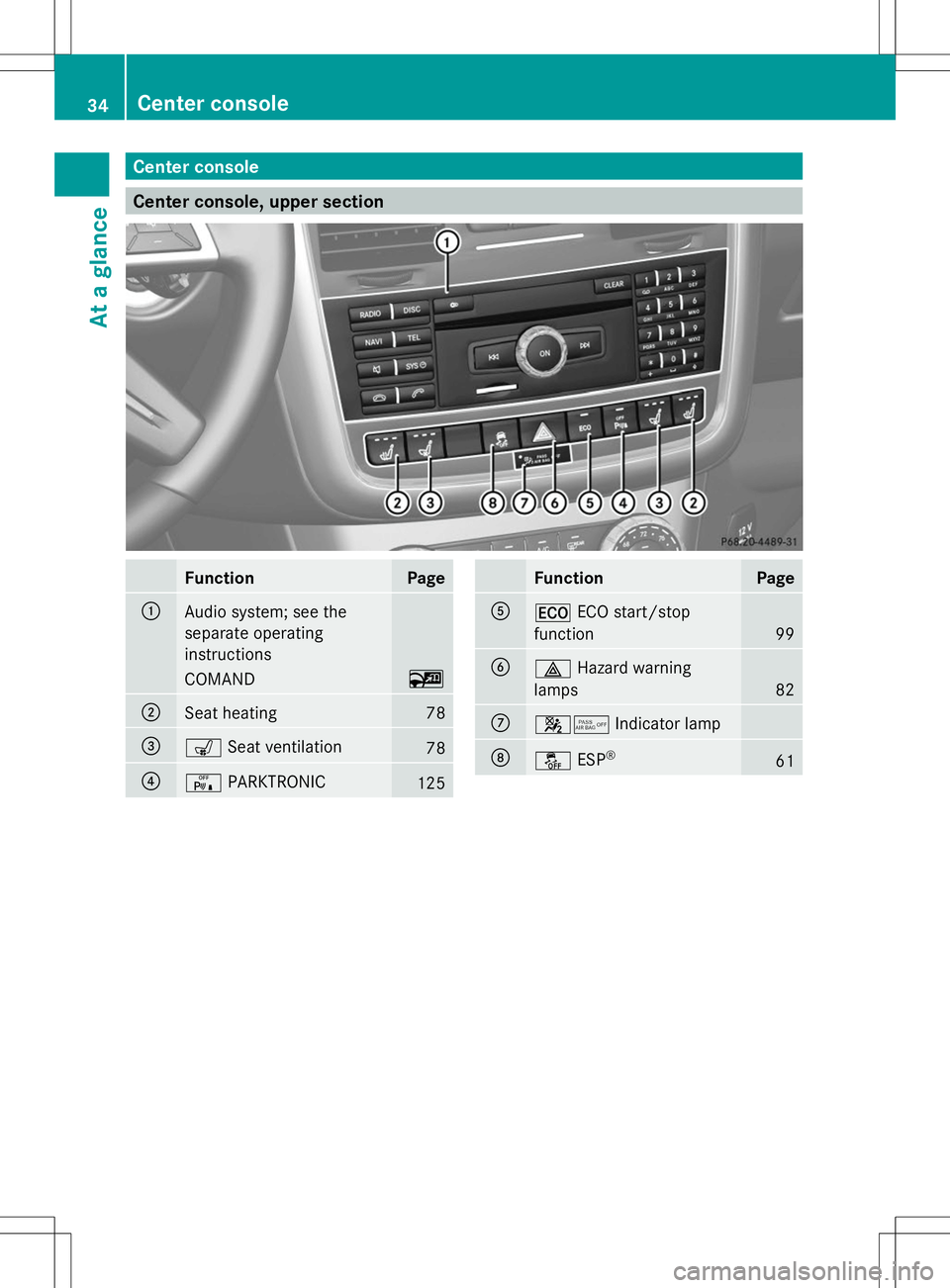
Center console
Center console, upper section
Function Page
:
Audio system; see the
separate operating
instructions
COMAND ~
;
Seat heating 78
=
s
Seat ventilation 78
?
c
PARKTRONIC 125 Function Page
A
¤
ECO start/stop
function 99
B
£
Hazard warning
lamps 82
C
45
Indicator lamp D
å
ESP® 6134
Center consoleAt a glance
Page 37 of 272
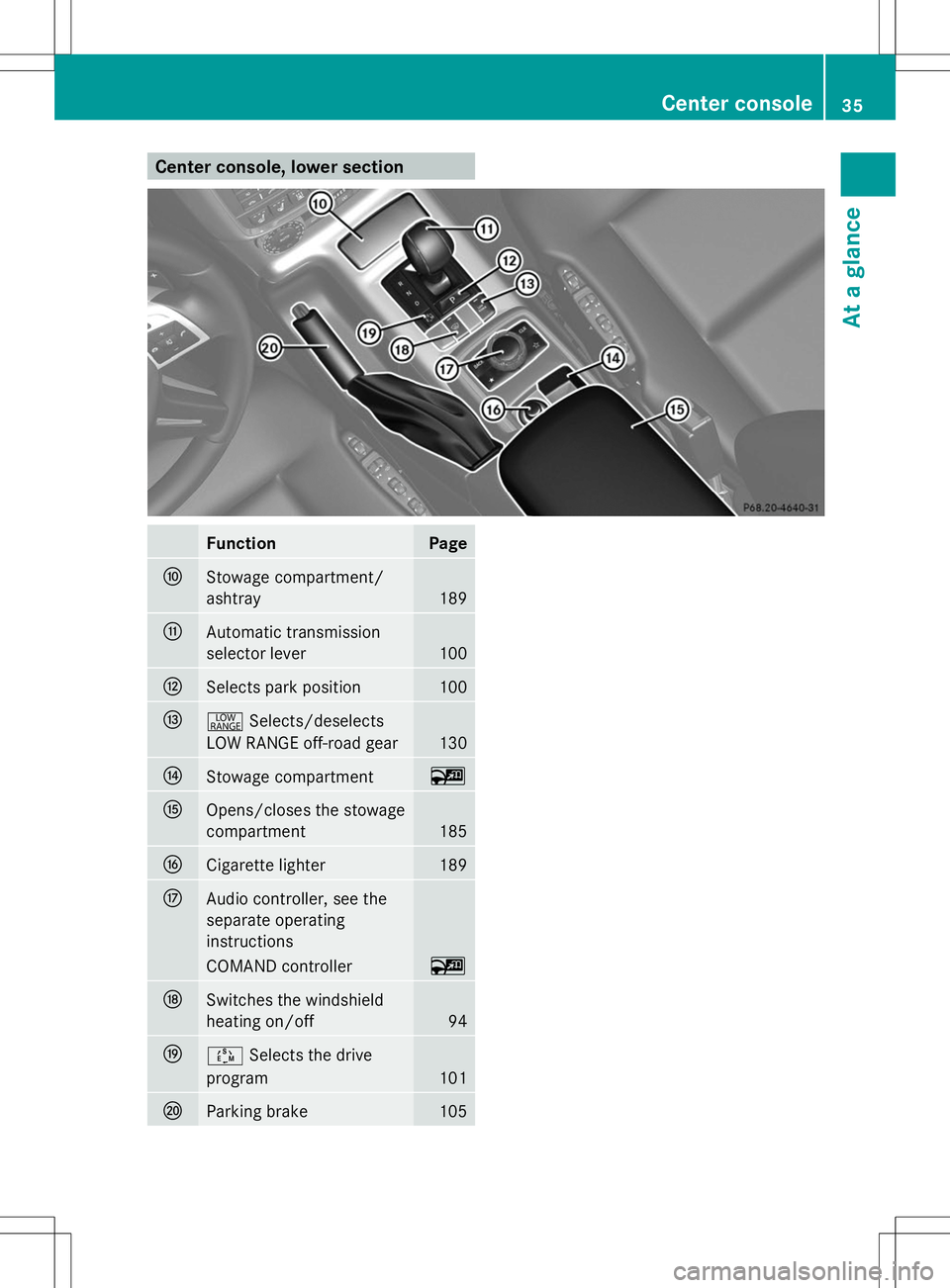
Center console, lower section
Function Page
F
Stowage compartment/
ashtray
189
G
Automatic transmission
selector lever 100
H
Selects park position 100
I
+
Selects/deselects
LOW RANGE off-road gear 130
J
Stowage compartment ~
K
Opens/closes the stowage
compartment 185
L
Cigarette lighter 189
M
Audio controller, see the
separate operating
instructions
COMAND controller ~
N
Switches the windshield
heating on/off
94
O
Ú
Selects the drive
program 101
P
Parking brake 105 Center console
35At a glance
Page 45 of 272
bag is disabled. If the front-passenger seat is
recognized as empty, the air bag control unit
will not deploy the front-passenger air bag in
the event of a collision.
Ask your passenger to sit correctly on the
front-passenger seat in an upright position
until the 4/ indicator lamp goes out.
If the 4/ indicator lamp does not go
out, please consult an authorized Mercedes-
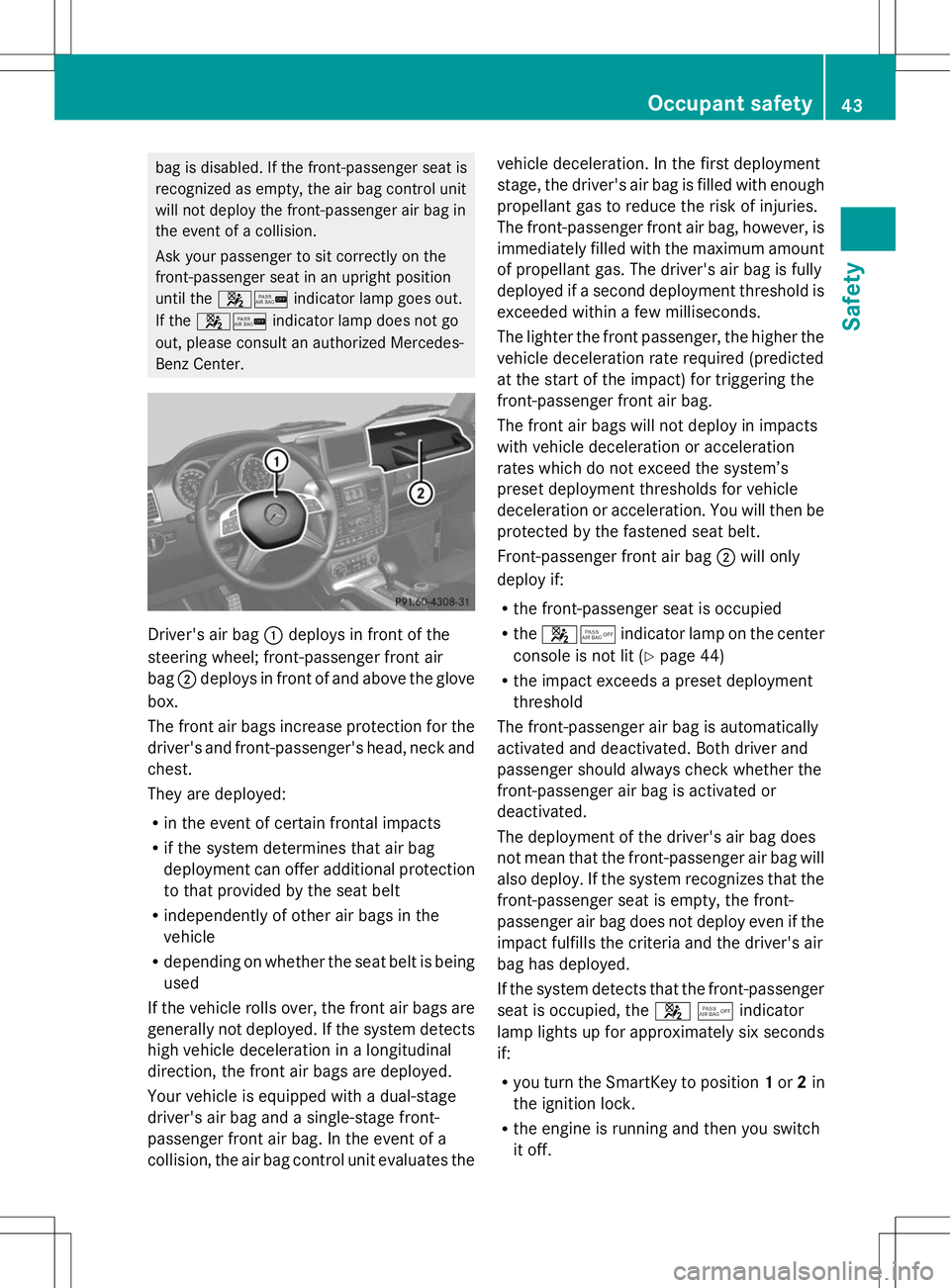
Benz Center. Driver's air bag
:deploys in front of the
steering wheel; front-passenger front air
bag ;deploys in front of and above the glove
box.
The front air bags increase protection for the
driver's and front-passenger's head, neck and
chest.
They are deployed:
R in the event of certain frontal impacts
R if the system determines that air bag
deployment can offer additional protection
to that provided by the seat belt
R independently of other air bags in the
vehicle
R depending on whether the seat belt is being
used
If the vehicle rolls over, the front air bags are
generally not deployed. If the system detects
high vehicle deceleration in a longitudinal
direction, the front air bags are deployed.
Your vehicle is equipped with a dual-stage
driver's air bag and a single-stage front-
passenger front air bag. In the event of a
collision, the air bag control unit evaluates the vehicle deceleration. In the first deployment
stage, the driver's air bag is filled with enough
propellant gas to reduce the risk of injuries.
The front-passenger front air bag, however, is
immediately filled with the maximum amount
of propellant gas. The driver's air bag is fully
deployed if a second deployment threshold is
exceeded within a few milliseconds.
The lighter the front passenger, the higher the
vehicle deceleration rate required (predicted
at the start of the impact) for triggering the
front-passenger front air bag.
The front air bags will not deploy in impacts
with vehicle deceleration or acceleration
rates which do not exceed the system’s
preset deployment thresholds for vehicle
deceleration or acceleration. You will then be
protected by the fastened seat belt.
Front-passenger front air bag ;will only
deploy if:
R the front-passenger seat is occupied
R the 45 indicator lamp on the center
console is not lit (Y page 44)
R the impact exceeds a preset deployment
threshold
The front-passenger air bag is automatically
activated and deactivated. Both driver and
passenger should always check whether the
front-passenger air bag is activated or
deactivated.
The deployment of the driver's air bag does
not mean that the front-passenger air bag will
also deploy. If the system recognizes that the
front-passenger seat is empty, the front-
passenger air bag does not deploy even if the
impact fulfills the criteria and the driver's air
bag has deployed.
If the system detects that the front-passenger
seat is occupied, the 45indicator
lamp lights up for approximately six seconds
if:
R you turn the SmartKey to position 1or 2in
the ignition lock.
R the engine is running and then you switch
it off. Occupant safety
43Safety Z
Page 134 of 272
Your vehicle is equipped with a differential
lock each for:
R the transfer case: this controls the balance
between the front and rear axles.
R the rear axle: this controls the balance
between the wheels on the rear axle.
R the front axle: this controls the balance
between the wheels on the front axle.
Information on differential and
differential locks When the vehicle drives around a curve, the
wheels on the outside of the curve must cover
a greater distance. Therefore, the wheels turn
more rapidly than on the inside. The
differential, a transmission in the drive train,
compensates for these different rotational
speeds, making cornering possible.
The disadvantage of a differential is that more
power is transferred to the wheels that have
the least grip. An example: a wheel of a driven
axle is on a snow-covered surface and
therefore does not have any traction. The
differential causes this wheel to be subjected
to the strongest driving force, as the flow of
force takes the path of least resistance. The
opposite wheel on this axle, however, which
stands on firm ground and could therefore
allow propulsion, receives no driving power.
4ETS compensates for this disadvantage.
4ETS provides good steerability by
automatically braking the spinning wheel.
4ETS provides the wheel on the firm surface
with more drive force, which in turn provides
propulsion.
ESP® and 4ETS are traction systems that are
ideal for road driving and suitable for light off-
road driving. The LOW RANGEoff-road gear
also improves off-road capability.
Moreover, the more difficult conditions in off-
road driving require further measures such as
locking one or several differentials. Your
vehicle is equipped with three differential
locks: R
a central differential lock for the transfer
case,
R a differential lock for the front axle and
R a differential lock for the rear axle.
Each differential lock can be engaged with the
respective switch on the center console. If
the transfer case differential is disabled, the
front and rear wheels turn at the same speed.
If the differential for the rear axle is locked,
both rear wheels turn at the same speed,
regardless of their individual torques. Please
note that activating the differential locks
severely restricts the vehicle's steerability.
Please note that the functions of the
differential are absolutely necessary for
driving on paved roads. The differential locks
must never be engaged when driving on
paved roads. Otherwise, the vehicle may not
be steerable and you could lose control of the
vehicle. The differential locks must therefore
only be engaged when driving off-road. You
may only engage the differential locks if the
functions of the 4ETS and ESP ®
driving
systems and the LOW RANGEoff-road gear
are insufficient.
i The differential locks are only available in
the LOW RANGE off-road gear.
Engaging the differential locks Important safety notes
G
WARNING
When differential locks are engaged on a firm,
high-grip surface, the vehicle's steerability is
greatly impaired. In particular, engaging the
differential locks when cornering could lead
to you losing control of the vehicle. There is a
risk of an accident.
Disengage the differential locks immediately
on firm surfaces with good grip. G
WARNING
When the differential locks are engaged, ABS,
4ETS, ESP ®
and BAS are deactivated. As a
result, the wheels could lock when braking 132
Off-road driving systemsDriving and parking