display MERCEDES-BENZ G-CLASS SUV 2015 Owners Manual
[x] Cancel search | Manufacturer: MERCEDES-BENZ, Model Year: 2015, Model line: G-CLASS SUV, Model: MERCEDES-BENZ G-CLASS SUV 2015Pages: 274, PDF Size: 31.95 MB
Page 208 of 274
When checking the oil level:
R park the vehicle on a level surface.
R the engine should be switched off for
approximately five minutes if the engine is
at normal operating temperature.
R the engine should be switched off for at
least 30 minutes if the engine is not at
operating temperature, e.g. if you only start
the engine briefly.
X Pull oil dipstick :out of the dipstick guide
tube.
X Wipe off oil dipstick :.
X Slowly slide oil dipstick :into the guide
tube to the stop, and take it out again.
If the level is between MIN mark =and
MAX mark ;, the oil level is correct.
X Add oil if necessary.
Checking the oil level using the on-
board computer
!Do not add too much oil. adding too much
engine oil can result in damage to the
engine or to the catalytic converter. Have
excess engine oil siphoned off.
G 65 AMG: the oil level can be checked using
the on-board computer only.
On all other models, the oil dipstick must be
used to check the engine oil level.
When checking the oil level:
R park the vehicle on a level surface.
R the engine should be switched off for
approximately five minutes if the engine is
at normal operating temperature.
X Make sure that the SmartKey is in posi-tion 2in the ignition lock.
X Press the 9or: button on the steer-
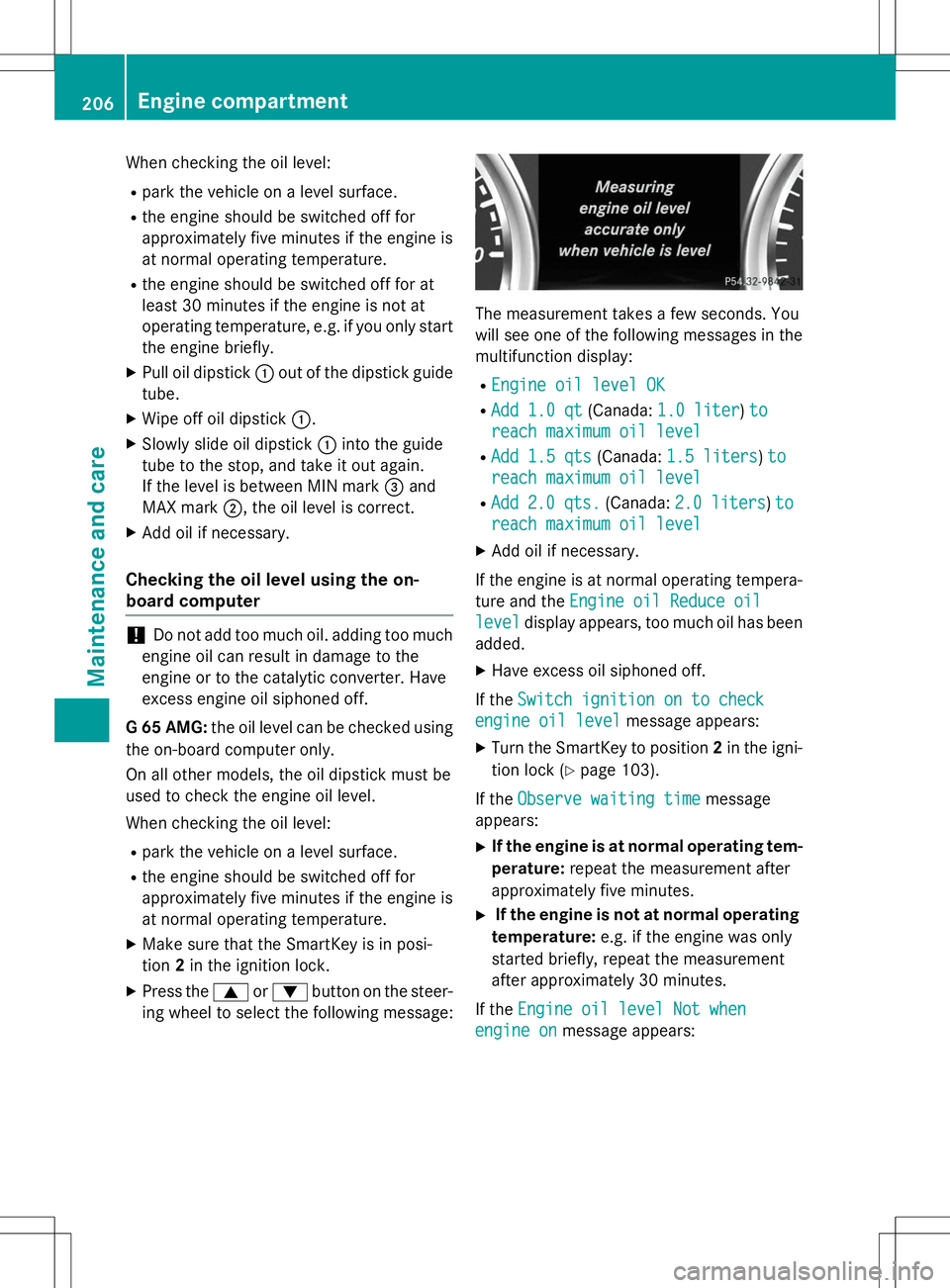
ing wheel to select the following message:
The measurement takes a few seconds. You
will see one of the following messages in the multifunction display: R
Engine oil level OK
RAdd 1.0 qt(Canada:1.0 liter)to
reach maximum oil level
RAdd 1.5 qts(Canada:1.5 liters)to
reach maximum oil level
RAdd2.0 qts.(Canada:2.0 liters)to
reach maximum oil level
X Add oil if necessary.
If the engine is at normal operating tempera- ture and the
Engine oil Reduce oil
leveldisplay appears, too much oil has been
added.
X Have excess oil siphoned off.
If the
Switch ignition on to check
engine oil levelmessage appears:
X Turn the SmartKey to position 2in the igni-
tion lock ( Ypage 103).
If the
Observe waiting timemessage
appears:
X If the engine is at normal operating tem-
perature: repeat the measurement after
approximately five minutes.
X If the engine is not at normal operating
temperature: e.g. if the engine was only
started briefly, repeat the measurement
after approximately 30 minutes.
If the
Engine oil level Not when
engine onmessage appears:
206Engine compartment
Maintenance and care
Page 210 of 274
Additional service products
Checking coolant level
GWARNING
Certain components in the engine compart-
ment, such as the engine, radiator and parts
of the exhaust system, can become very hot.
Working in the engine compartment poses a
risk of injury.
Where possible, let the engine cool down and touch only the components described in the
following.
GWARNING
The engine cooling system is pressurized, par-ticularly when the engine is warm. When
opening the cap, you could be scalded by hotcoolant spraying out. There is a risk of injury.
Let the engine cool down before opening the
cap. Wear eye and hand protection when
opening the cap. Open the cap slowly half a
turn to allow pressure to escape.
X Park the vehicle on a level surface.
Only check the coolant level when the vehi-
cle is on a level surface and the engine has
cooled down.
X Turn the SmartKey to position 2
( Y page 103) in the ignition lock.
X Check the coolant temperature display in
the instrument cluster.
The coolant temperature must be below
158 ‡ (70 †). X
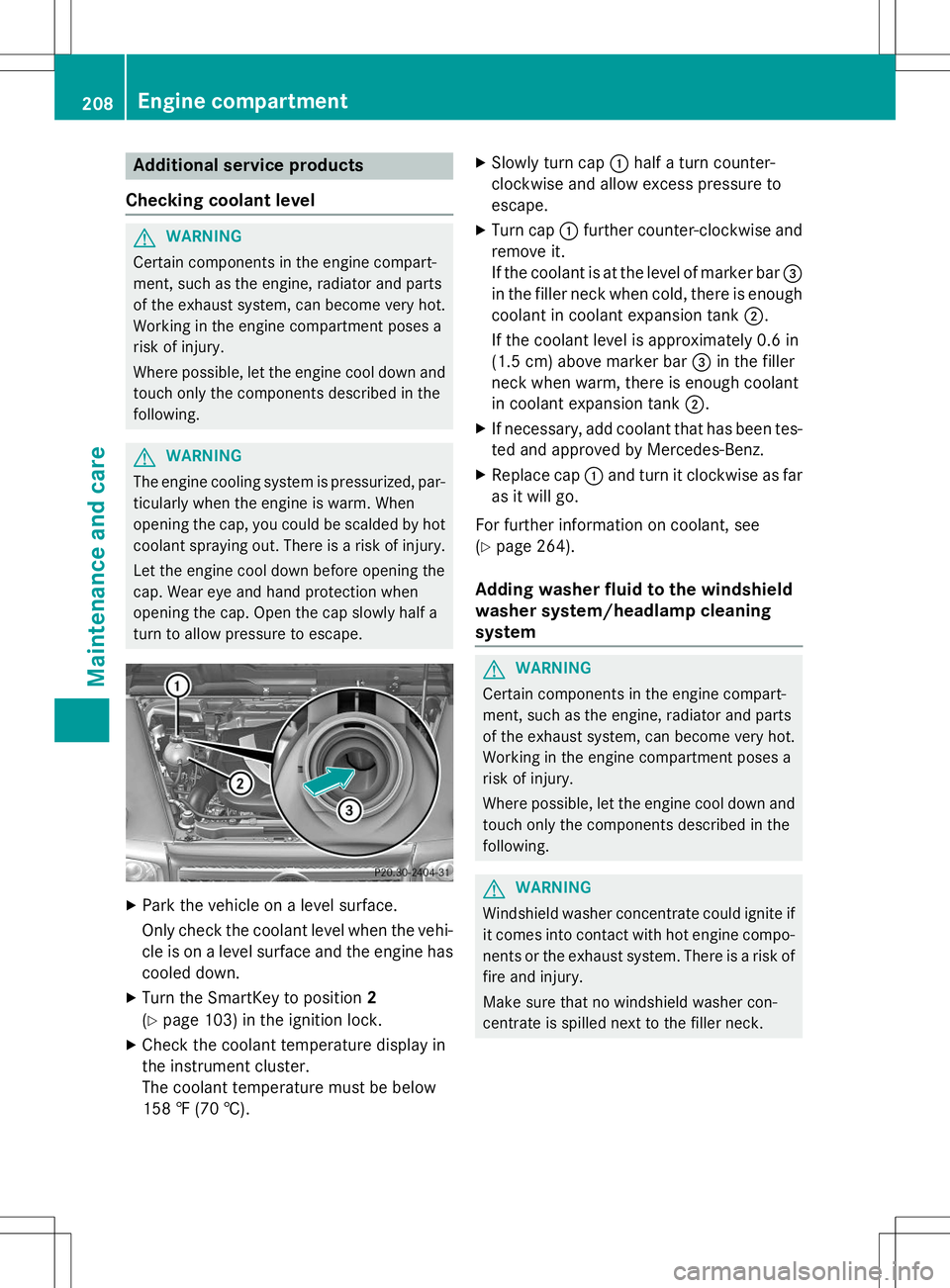
Slow ly turn cap :half a turn counter-
clockwise and allow excess pressure to
escape.
X Turn cap :further counter-clockwise and
remove it.
If the coolant is at the level of marker bar =
in the filler neck when cold, there is enough coolant in coolant expansion tank ;.
If the coolant level is approximately 0.6 in
(1.5 cm) above marker bar =in the filler
neck when warm, there is enough coolant
in coolant expansion tank ;.
X If necessary, add coolant that has been tes-
ted and approved by Mercedes-Benz.
X Replace cap :and turn it clockwise as far
as it will go.
For further information on coolant, see( Y page 264).
Adding washer fluid to the windshield
washer system/headlamp cleaning
system
GWARNING
Certain components in the engine compart-
ment, such as the engine, radiator and parts
of the exhaust system, can become very hot.
Working in the engine compartment poses a
risk of injury.
Where possible, let the engine cool down and
touch only the components described in the
following.
GWARNING
Windshield washer concentrate could ignite if it comes into contact with hot engine compo-
nents or the exhaust system. There is a risk of
fire and injury.
Make sure that no windshield washer con-
centrate is spilled next to the filler neck.
208Engine compartment
Maintenance and care
Page 211 of 274
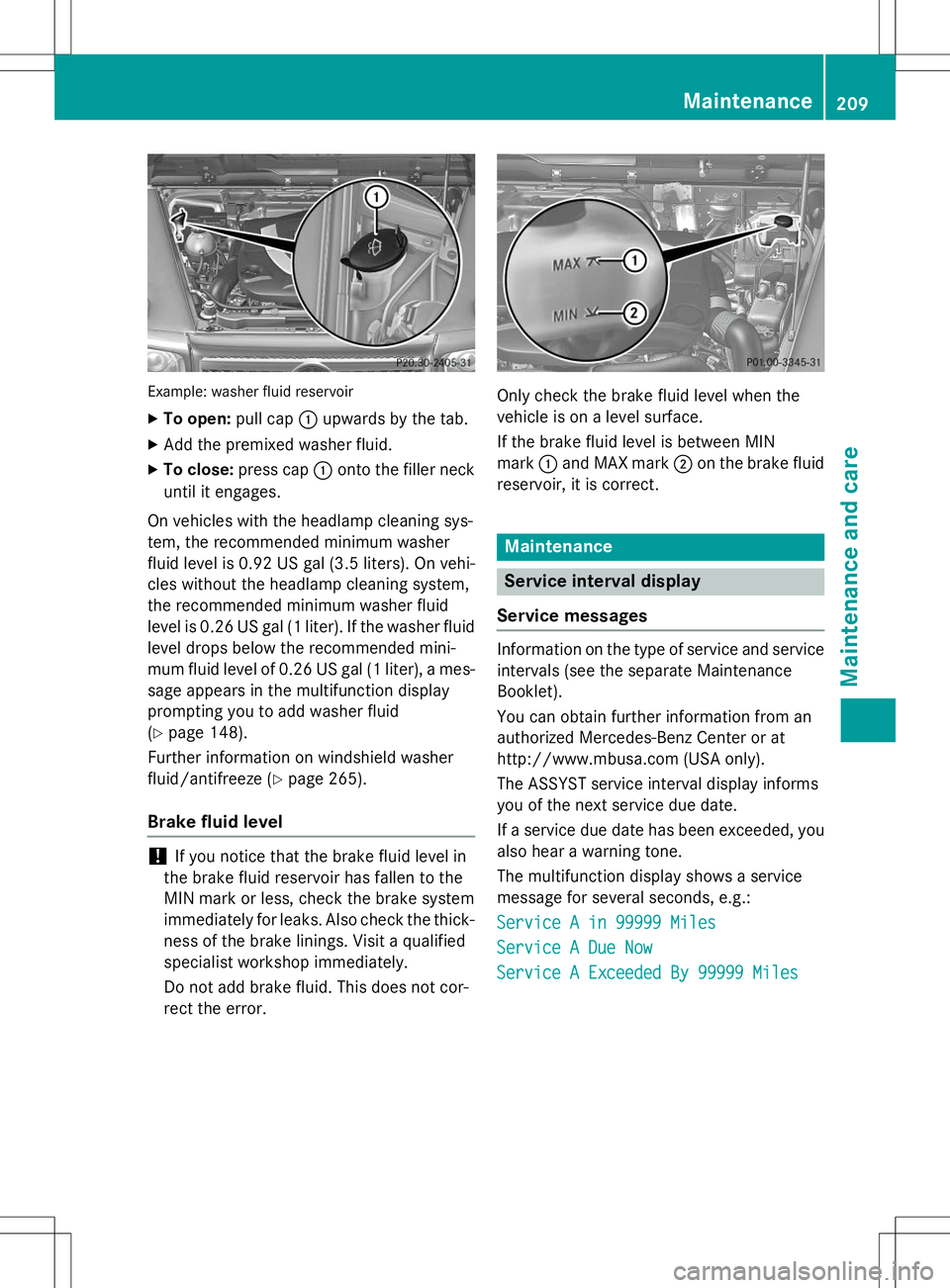
Example: washer fluid reservoir
XTo open: pull cap:upwards by the tab.
X Add the premixed washer fluid.
X To close: press cap :onto the filler neck
until it engages.
On vehicles with the headlamp cleaning sys-
tem, the recommended minimum washer
fluid level is 0.92 US ga l(3.5 liters). On vehi-
cles without the headlamp cleaning system,
the recommended minimum washer fluid
level is 0.26 US gal (1liter). If the washer fluid
level drops below the recommended mini-
mum fluid level of 0.26 US gal (1 liter), a mes-
sage appears in the multifunction display
prompting you to add washer fluid( Y page 148).
Further information on windshield washer
fluid/antifreeze ( Ypage 265).
Brake fluid level
!If you notice that the brake fluid level in
the brake fluid reservoir has fallen to the
MIN mark or less, check the brake system
immediately for leaks. Also check the thick-
ness of the brake linings. Visit a qualified
specialist workshop immediately.
Do not add brake fluid. This does not cor-
rect the error.
Only check the brake fluid level when the
vehicle is on a level surface.
If the brake fluid level is between MIN mark :and MAX mark ;on the brake fluid
reservoir, it is correct.
Maintenance
Service interval display
Service messages
Information on the type of service and service
intervals (see the separate Maintenance
Booklet).
You can obtain further information from an
authorized Mercedes-Benz Center or at
http://www.mbusa.com (USA only).
The ASSYST service interval display informs
you of the next service due date.
If a service due date has been exceeded, you also hear a warning tone.
The multifunction display shows a service
message for several seconds, e.g.:
Service A in 99999 Miles
Service A Due Now
Service A Exceeded By 99999 Miles
Maintenance209
Maintenance and care
Z
Page 212 of 274
Maintaining the time-dependent service schedule:X Before disconnecting the battery, note
down the service due date displayed.
or X After reconnecting the battery, subtract
the battery disconnection periods from the
service date shown on the display.
iThe service interval display should not be
confused with the 4engine oil level dis-
play.
The symbol and the letter indicate which type
of service is due: ¯ Minor service
A
±Major serviceB
The ASSYST service interval display does not
take into account any periods of time during
which the battery is disconnected.
Hiding a service message
X To hide the service message, press the % back button on the multifunction
steering wheel ( Ypage 35).
Displaying service messages
Use the buttons on the multifunction steering
wheel.
X Switch on the ignition.
X Press =or; to select the standard
display menu on the steering wheel
( Y page 147).
X Press 9or: to select the service
interval display. The ¯ or± service symbol and the
service due date are displayed.
Points to remember
The specified maintenance interval takes only the normal operation of the vehicle into
account. Under arduous operating conditions
or increased load on the vehicle, mainte-
nance work must be carried out more fre-
quently, for example: R regular city driving with frequent intermedi-
ate stops
R if the vehicle is primarily used to travel
short distances
R use in mountainous terrain or on poor road
surfaces
R if the engine is often left idling for long peri-
ods
Under these or similar conditions, have, for
example, the air filter, engine oil and oil filter
replaced or changed more frequently. Under
arduous operating conditions, the tires must
be checked more often. Further information
can be obtained at a qualified specialist work- shop, e.g. an authorized Mercedes-Benz Cen-
ter.
Fuel/water separator
HEnvironmental note
Dispose of service products in an environ-
mentally responsible manner.
!If you continue driving without having the
fuel/water separator serviced, this could
cause damage to the engine. Any resulting
damage is not covered by the warranty.
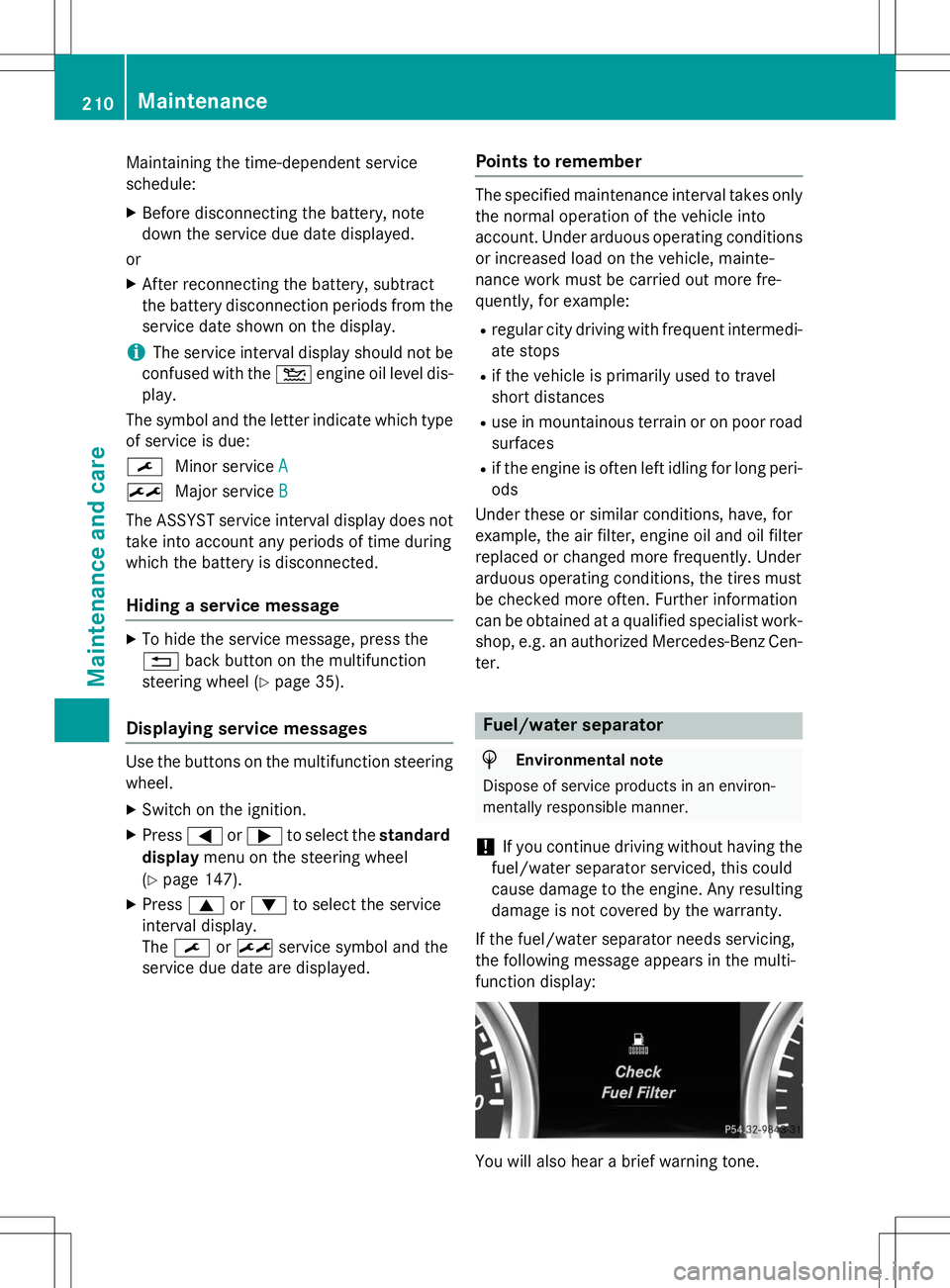
If the fuel/water separator needs servicing,
the following message appears in the multi-
function display:
You will also hear a brief warning tone.
210Maintenance
Maintenance and care
Page 214 of 274
!Make sure that the automatic transmis-
sion is in position Nwhen washing your
vehicle in a tow-through car wash. The vehi-
cle could be damaged if the transmission is
in another position.
!Make sure that:
R the side windows and sliding sunroof are
closed completely.
R the blower for the ventilation/heating is
switched off (airflow control is turned toposition 0/the à andÁ buttons
are switched off).
R the windshield wiper switch is at position0.
The vehicle could otherwise be damaged.
You can wash the vehicle in an automatic car wash from the very start.
If the vehicle is very dirty, pre-wash it before
cleaning it in an automatic car wash.
After using an automatic car wash, wipe off
wax from the windshield and the wiper
blades. This will prevent smears and reduce
wiping noises caused by residue on the wind-shield.
Interior care
Information in the Digital Operator's Manual
In the Digital Operator's Manual you will find
information on the following topics: R Cleaning the display
R Cleaning the plastic trim
R Cleaning the steering wheel and gear or
selector lever
R Cleaning wooden trim and trim strips
R Cleaning the seat covers
R Cleaning the seat belts
R Cleaning the headliner and carpets
212Care
Maintenance and care
Page 238 of 274
Please note that the TPMS is not a substitutefor proper tire maintenance, and it is the driv-
er's responsibility to maintain correct tire
pressure, even if underinflation has not
reached the level to trigger illumination of the
TPMS low tire pressure telltale.
USA only:
Your vehicle has also been equipped with a
TPMS malfunction indicator to indicate if the
system is not operating properly. The TPMS
malfunction indicator is combined with the
low tire pressure telltale. When the system
detects a malfunction, the warning lamp will
flash for approximately a minute and then
remain continuously illuminated. This
sequence will be repeated every time the vehi- cle is started as long as the malfunction
exists.
When the malfunction indicator is illuminated,
the system may not be able to detect or signal low tire pressure as intended. TPMS malfunc-
tions may occur for a variety of reasons,
including the mounting of incompatible
replacement or alternate tires or wheels on
the vehicle that prevent the TPMS from func-
tioning properly. Always check the TPMS mal-
function telltale after replacing one or more
tires or wheels on your vehicle to ensure that
the replacement or alternate tires and wheels allow the TPMS to continue to function prop-erly.
It is the driver's responsibility to set the tire
pressure to the recommended cold tire pres-
sure suitable for the operating situation( Y page 232). Note that the correct tire pres-
sure for the current operating situation must
first be taught-in to the tire pressure monitor. If there is a substantial loss of pressure, the
warning threshold for the warning message isaligned to the reference values taught-in.
Restart the tire pressure monitor after adjust-
ing to the cold tire pressure ( Ypage 238).
The current pressures are saved as new ref-
erence values. As a result, a warning message
will appear if the tire pressure drops signifi-
cantly. The tire pressure monitor does not warn you
of an incorrectly set tire pressure. Observe
the notes on the recommended tire pressure
( Y page 232).
The tire pressure monitor is not able to warn
you of a sudden loss of pressure, e.g. if the
tire is penetrated by a foreign object. In the
event of a sudden loss of pressure, bring the
vehicle to a halt by braking carefully. Avoid
sudden steering movements.
In order to check the tire pressure, the vehi-
cle's wheels are installed with sensors that
monitor the tire pressure in all four tires. The
tire pressure monitor warns you if the pres-
sure drops in one or more of the tires. The tire pressure monitor only functions if the correct
sensors are installed on all wheels.
The tire pressure monitor has a yellow warn-
ing lamp in the instrument cluster for indicat- ing pressure loss/malfunctions (USA) or
pressure loss (Canada). Whether the warning
lamp flashes or lights up indicates whether a
tire pressure is too low or the tire pressure
monitor is malfunctioning:
R if the warning lamp is lit continuously, the
tire pressure on one or more tires is signif-
icantly too low. The tire pressure monitor is not malfunctioning.
R USA only: if the warning lamp flashes for
around a minute and then remains lit con-
stantly, the tire pressure monitor is mal-
functioning.
Information on tire pressures is displayed in
the multifunction display. After a few minutes of driving, the current tire pressure of each
tire is shown in the multifunction display.
USA only: the tire pressure warning lamp will
inform you of a malfunction in the tire pres-
sure monitor by flashing for approximately
one minute and then remaining lit. It may take
more than ten minutes before the data menu
is displayed. When the malfunction has been
rectified, the tire pressure warning lamp goes out after a few minutes of driving.
The tire pressure values indicated by the on-
board computer may differ from those meas-
236Tire pressure
Wheels and tires
Page 239 of 274
ured at a gas station with a pressure gauge.
The tire pressures shown by the on-board
computer refer to those measured at sea
level. At high altitudes, the tire pressure val-
ues indicated by a pressure gauge are higher
than those shown by the on-board computer. In this case, do not reduce the tire pressures.
The operation of the tire pressure monitor can
be affected by interference from radio trans-
mitting equipment (e.g. radio headphones,
two-way radios) that may be being operated
in or near the vehicle.
iUSA only:
This device complies with part 15 of the
FCC Rules. Operation is subject to the fol-
lowing two conditions:
1. This device may not cause harmful inter- ference, and
2. This device must accept any interference
received, including interference that may
cause undesired operation of the device.
Any unauthorized modification to this
device could void the user's authority to
operate the equipment.
iCanada only:
This device complies with RSS-210 of
Industry Canada. Operation is subject to
the following two conditions:
1. This device may not cause harmful inter- ference, and
2. this device must accept any interference
received, including interference that may
cause undesired operation of the device.
Any unauthorized modification to this
device could void the user's authority to
operate the equipment.
Checking the tire pressure electroni-cally
X Make sure that the SmartKey is in posi-
tion 2in the ignition lock ( Ypage 103).
X Press the =or; button on the steer-
ing wheel to select the
Serv.menu. X
Press the 9or: button to select
Tire Pressure.
X Press the abutton.
The current tire pressure of each tire is
shown in the multifunction display.
If the vehicle has been parked for over
20 minutes, the
Tire pressure will be
displayed after driving a few
minutesmessage appears.
After a teach-in process, the tire pressure
monitor automatically detects new wheels or
new sensors. As long as a clear allocation of
the tire pressure value to the individual
wheels is not possible, the
Tire Pressure
Monitor Activedisplay message is shown
instead of the tire pressure display. The tire
pressures are already being monitored.
iIf a spare wheel is mounted, the system
may continue to show the tire pressure of
the wheel that has been removed for a few minutes. Observe that the displayed value
is not the same as the current tire pressure
of the emergency spare wheel.
Tire pressure monitor warning mes-
sages
If the tire pressure monitor detects a signifi-
cant pressure loss on one or more tires, a
warning message is shown in the multifunc-
tion display. A warning tone also sounds and
the tire pressure warning lamp lights up in the
instrument cluster.
Each tire that is affected by a significant loss of pressure is highlighted in the pressure dis-
play.
X If the
Correct Tire Pressuremessage
appears in the multifunction display, check the tire pressure on all four wheels and cor-
rect it if necessary.
X If the
CheckTiresmessage appears in the
multifunction display, the tire pressure in
one or more tires has dropped significantly and the tires must be checked.
X If the
Tire Press. Warning Caution
Tire Malfunctionmessage appears in
Tire pressure237
Wheels and ti res
Z
Page 240 of 274
the multifunction display, the tire pressurein one or more tires has dropped suddenly
and the tires must be checked.
iIf the wheel positions on the vehicle are
rotated, the tire pressures may be dis-
played for the wrong positions for a short
time. This is rectified after a few minutes of driving, and the tire pressures are displayed
for the correct positions.
Restarting the tire pressure monitor
When you restart the tire pressure monitor, all existing warning messages are deleted and
the warning lamps go out. The monitor uses
the currently set tire pressures as the refer-
ence values for monitoring. In most cases, the
tire pressure monitor will automatically
detect the new reference values after you
have changed the tire pressure. However, you
can also define reference values manually as described here.
X Set the tire pressure to the value recom-
mended for the corresponding driving sit-
uation on the Tire and Loading Information
placard on the driver's side
B-pillar ( Ypage 232).
Additional tire pressure values for different loads can also be found on the tire pressure table on the inside of the fuel filler flap( Y page 232).
X Make sure that the tire pressure is correct
on all four wheels.
X Make sure that the SmartKey is in position
2 in the ignition lock ( Ypage 103).
X Press the =or; button on the steer-
ing wheel to select the
Serv.menu.
X Press the 9or: button to select
Tire Pressure.
X Press the abutton.
The multifunction display shows the cur-
rent tire pressure for the individual tires or
the
Tirepressurewillbedisplayed
after driving a few minutesmes-
sage.
X Press the :button.
The
Use Current Pressures as New
Reference Valuesmessage appears in
the multifunction display.
If you wish to confirm the restart:
X Press the abutton.
The
Tire Press. Monitor Restarted
message appears in the multifunction dis-
play.
After driving for a few minutes, the system
checks whether the current tire pressures
are within the specified range. The new tire
pressures are then accepted as reference
values and monitored.
If you wish to cancel the restart: X Press the %button.
The tire pressure values stored at the last
restart will continue to be monitored.
Loading the vehicle
Instruction labels for tires and loads
GWARNING
Overloaded tires can overheat, causing a
blowout. Overloaded tires can also impair the steering and driving characteristics and lead
to brake failure. There is a risk of accident.
Observe the load rating of the tires. The load
rating must be at least half of the GAWR of
your vehicle. Never overload the tires by
exceeding the maximum load.
238Loading the vehicle
Wheels and tires
Page 264 of 274
Fuel consumption information
HEnvironmental note
CO 2(carbon dioxide) is the gas which scien-
tists believe to be principally responsible for
global warming (the greenhouse effect). Your
vehicle's CO 2emissions are directly related to
fuel consumption and therefore depend on:
R efficient use of the fuel by the engine
R driving style
R other non-technical factors, such as envi-
ronmental influences, road conditions or
traffic flow
You can minimize your vehicle's CO 2emis-
sions by driving carefully and having it serv-
iced regularly.
The vehicle will use more fuel than usual in the following situations:
R at very low outside temperatures
R in city traffic
R on short journeys
R in mountainous terrain
R when towing a trailer
Engine oil
General notes
!Never use engine oil or an oil filter of a
specification other than is necessary to ful-
fill the prescribed service intervals. Do not
change the engine oil or oil filter in order to achieve longer replacement intervals than
those prescribed. You could otherwise
cause engine damage or damage to the
exhaust gas aftertreatment.
Follow the instructions in the service inter-
val display regarding the oil change. Other-
wise, you may damage the engine and the
exhaust gas aftertreatment.
When handling engine oil, observe the impor-
tant safety notes on service products( Y page 259). The engine oils are matched to the perform-
ance of Mercedes-Benz engines and service
intervals. For this reason, only use engine oils
and oil filters that are approved for vehicles
with a service system.
For a list of approved engine oils and oil filters,
consult an authorized Mercedes-Benz Center
or go to the Internet site
http://bevo.mercedes-benz.com (USA
only).
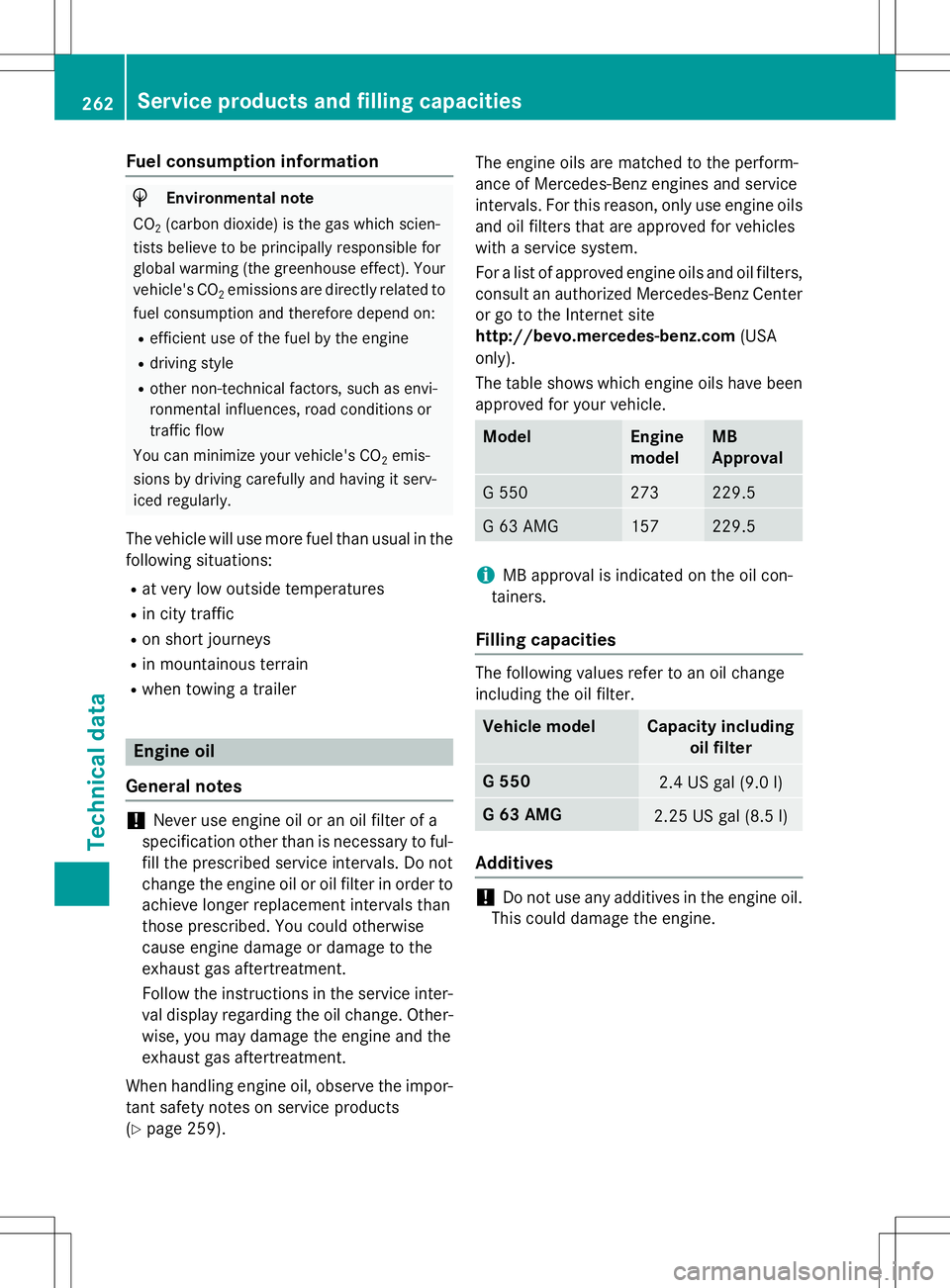
The table shows which engine oils have been
approved for your vehicle.
ModelEngine
modelMB
Approval
G 550273229.5
G 63 AMG157229.5
iMB approval is indicated on the oil con-
tainers.
Filling capacities
The following values refer to an oil change
including the oil filter.
Vehicle modelCapacity including oil filter
G 5502.4 US gal (9.0 l)
G 63 AMG2.25 US gal (8.5 l)
Additives
!Do not use any additives in the engine oil.
This could damage the engine.
262Service products and filling capacities
Technical data