light MERCEDES-BENZ G-CLASS SUV 2015 User Guide
[x] Cancel search | Manufacturer: MERCEDES-BENZ, Model Year: 2015, Model line: G-CLASS SUV, Model: MERCEDES-BENZ G-CLASS SUV 2015Pages: 274, PDF Size: 31.95 MB
Page 17 of 274

Opening ...........................................76
Rear fog lamp
Display messag e............................ 148
Switching on/of f.............................. 91
Rear lamps
see Lights
Rear seat bench
Folding into an upright position ..... 195
Rear seats
Display message ............................ 148
Rear view camera
Cleaning instructions ..................... 211
Function/note s............................. 131
Rear window defroster ..................... 100
Problem (malfunction) ................... 100
Switching on/of f........................... 100
Rear window wiper
Switching on/of f.............................. 95
Rear-view mirror
Anti-glare (manual) .......................... 87
Dipping (automatic) ......................... 87
Refrigerant (air-conditioning sys-tem)
Important safety notes .................. 263
Refueling
Fuel gaug e..................................... 146
Important safety notes .................. 107
Refueling process .......................... 108
see Fuel
Remote control
Programming (garage door
opener) .......................................... 197
Replacing bulbs
Important safety notes .................... 92
Overview of bulb types .................... 94
Rescue card ......................................... 29
Reserve (fuel tank)
see Fuel
Reserve fuel
Display message ............................ 148
Residual heat
Switching on/of f........................... 100
Restraint system
Display message ............................ 152
Introduction ..................................... 42
Warning lamp ................................. 167
Warning lamp (function) ................... 42 Reversing lamps (display mes-
sage)
................................................... 148
Roof
Display message ............................ 148
Roof lining and carpets (cleaning
guidelines) ......................................... 212
Route (navigation)
see Route guidance (navigation)
Route guidance
see also Digital Operator's Man-
ual .................................................. 172
Route guidance (navigation) ............ 147
S
Safety
Children in the vehicle ..................... 55
Safety system
see Driving safety systems
SD memory card
see also Digital Operator's Man-
ual .................................................. 172
Search & Send
see also Digital Operator's Man-
ual .................................................. 172
Seat backrest
Folding back .................................. 194
Seat belts
Adjusting the height ......................... 46
center rear-compartment sea t......... 46
Cleaning ......................................... 212
Correct usage .................................. 45
Display message ............................ 148
Fastening ......................................... 46
Important safety guidelines ............. 44
Introduction ..................................... 43
Releasing ......................................... 47
Switching belt adjustment on/off
(on-board computer) ...................... 147
Warning lamp ................................. 161
Warning lamp (function) ................... 48
Seat heating
Indicator lamp (malfunction) ............ 86
Seats
Adjusting (electrically) ..................... 84
Adjusting the 4-way lumbar sup-
port .................................................. 84
Adjusting the head restraint ............ 84
Index15
Page 19 of 274
Stainless-steel spare hub cap ........ 215
Special seat belt retractor .................. 56
Specialist workshop ............................ 28
Speed, controlling
see Cruise control
Speedometer
In the Instrument cluster ............... 146
Segments ...................................... 146
Selecting the unit of measure-
ment .............................................. 147
see Instrument cluster
SPEEDTRONIC
Display message ............................ 148
Selecting ........................................ 116
Variabl e......................................... 115
Standing lamps
Display message ............................ 148
Switching on/of f.............................. 91
Starting the engine
Important safety notes .................. 104
Steering (display message) ...... 148, 160
Steering wheel
Adjusting (electrically) ..................... 87
Buttons (on-board computer) ......... 146
Important safety notes .................... 86
Paddle shifters ............................... 107
Steering wheel heating .................... 87
Storing settings (memory func-
tion) ................................................. 87
Steering wheel (cleaning instruc-
tions) .................................................. 212
Steering wheel paddle shifters ........ 107
Stopwatch (RACETIMER) ................... 147
Stowage areas ................................... 193
Stowage compartments
Armrest (under) ............................. 193
Center console .............................. 193
Cup holders ................................... 197
Display message) ........................... 148
Door stowage compartment .......... 193
Glove box ....................................... 193
Important safety information ......... 193
Summer tires ..................................... 232
Surround lighting (on-board com- puter) .................................................. 147
Switching air-recirculation mode
on/off ................................................. 100 Switching off the alarm (ATA)
............ 69
T
Tachometer........................................ 146
Tail lamps
Display message ............................ 148
see Lights
Tank content
Fuel gaug e..................................... 146
Technical data
Capacities ...................................... 259
Tires ............................................... 254
Tires/wheels ................................. 254
Trailer load s................................... 269
Vehicle data ................................... 266
Wheels ........................................... 254
TELEAID
Call priority .................................... 201
Emergency call .............................. 198
Important safety notes .................. 197
MB info call button ........................ 200
Roadside Assistance button .......... 200
Self-test ......................................... 198
System .......................................... 198
Telephone
Accepting a call ............................. 147
Display message ............................ 148
Number from the phone book ........ 147
Redialing ........................................ 147
Rejecting/ending a call ................. 147
see also Digital Operator's Man-ual.................................................. 172
Telephone compartment .................. 193
Temperature
Coolant .......................................... 146
Coolant (on-board computer) ......... 147
Engine oil (on-board computer) ...... 147
Outside temperature ...................... 146
Theft deterrent systems
ATA (Anti-Theft Alarm system )......... 69
Immobilizer ...................................... 68
Tilt/sliding sunroof
see Sliding sunroof
Time
see separate operating instructions
Timing (RACETIMER) ......................... 147
Index17
Page 21 of 274
Tow-startingEmergency engine starting ............ 225
Important safety notes .................. 222
Towing a trailer
7-pin connector ............................. 143
Axle load, permissibl e.................... 269
Bulb failure indicator for LED
lamps ............................................. 143
Cleaning the trailer tow hitch ......... 211
Coupling up a traile r...................... 141
Decoupling a trailer ....................... 142
Driving tips .................................... 137
Installing the ball coupling ............. 140
Lights display message .................. 148
Mounting dimensions .................... 268
Power supply ................................. 143
Trailer load s................................... 269
Trailer tow hitch ............................. 268
Towing away
Important safety guidelines ........... 222
In the event of malfunctions .......... 224
With both axles on the ground ....... 223
Towing eye
Front .............................................. 223
Rear ............................................... 223
Traffic reports
see also Digital Operator's Man-
ual .................................................. 172
Trailer
Display message ............................ 148
Trailer coupling
see Towing a trailer
Trailer loads
Technical data ............................... 269
Trailer loads and drawbar nose-
weights ............................................... 142
Trailer tow hitch
Ball position ................................... 270
Trailer towing
ESP ®
................................................ 68
PARKTRONIC ................................. 130
Permissible trailer loads and
drawbar noseweights ..................... 142
Transfer case
General notes ................................ 132
Shift rang e..................................... 132
Shifting .......................................... 132
Shifting (general notes) .................. 133 Shifting (important safety notes
)... 132
Shifting to neutral .......................... 134
Switching off the off-road gear
ratio ............................................... 133
Switching on the off-road gear
ratio ............................................... 133
Transmission
see Automatic transmission
Transmission positions .................... 107
Transporting the vehicle .................. 224
Traveling uphill
Brow of hill ..................................... 112
Driving downhill ............................. 112
Maximum gradient-climbing capa-
bility ............................................... 112
Trim pieces (cleaning instruc-
tions) .................................................. 212
Trip computer (on-board com-puter) .................................................. 147
Trip odometer
Calling up ....................................... 147
Turn signals
Display message ............................ 148
Switching on/of f.............................. 92
TWR (Tongue Weight Rating) (defi-
nition) ................................................. 250
Type identification plate
see Vehicle identification plate
U
UnlockingEmergency unlocking ....................... 75
From inside the vehicle (central
unlocking button) ............................. 75
V
Variable SPEEDTRONICFunction/note s............................. 115
Vehicle
Correct use ...................................... 28
Data acquisition ............................... 29
Display message .................... 148, 160
Equipment ....................................... 27
Limited Warranty ............................. 29
Loading .......................................... 238
Locking (in an emergency) ............... 75
Index19
Page 26 of 274
XTurn cVd the COMAND controller to select
individual vehicle components.
Individual vehicle elements are highlighted in red. Just one vehicle component per view is highlighted.
X To confirm the currently selected section,press Wthe COMAND controller.
After you have selected a section, one of the following happens:
R you go straight to the corresponding sec-
tion in the Digital Operator's Manual.
R a list opens up with further, in-depth head-
ings that you can select using the COMAND controller.
R you go down a level to the visual search.
You can refine your search here by turning
the COMAND controller and selecting indi- vidual vehicle elements which are highligh-
ted in red =.
Keyword search
The keyword search allows you to perform a
keyword search using character entry. A
detailed description of character entry can be
found in the section "COMAND" under the
heading "Phone book - entering characters".
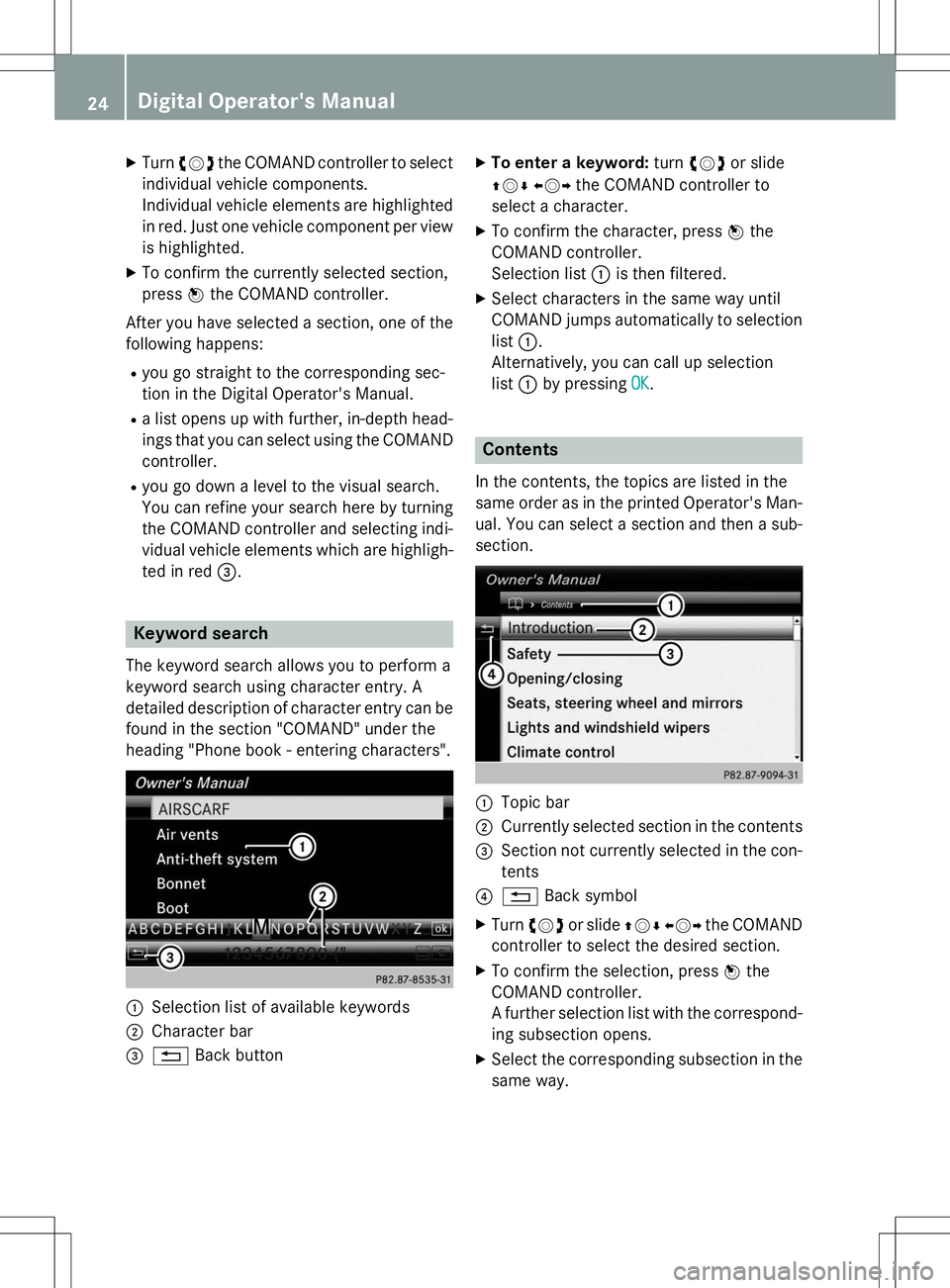
:Selection list of available keywords
;Character bar
=% Back button X
To enter a keyword: turncVd or slide
ZV ÆXVY the COMAND controller to
select a character.
X To confirm the character, press Wthe
COMAND controller.
Selection list :is then filtered.
X Select characters in the same way until
COMAND jumps automatically to selection
list :.
Alternatively, you can call up selection list :by pressing
OK.
Contents
In the contents, the topics are listed in the
same order as in the printed Operator's Man-
ual. You can select a section and then a sub-
section.
:Topic bar
;Currently selected section in the contents
=Section not currently selected in the con-
tents
?% Back symbol
X Turn cVd or slide ZVÆXVY the COMAND
controller to select the desired section.
X To confirm the selection, press Wthe
COMAND controller.
A further selection list with the correspond- ing subsection opens.
X Select the corresponding subsection in the
same way.
24Digital Operator's Manual
Page 34 of 274
Cockpit
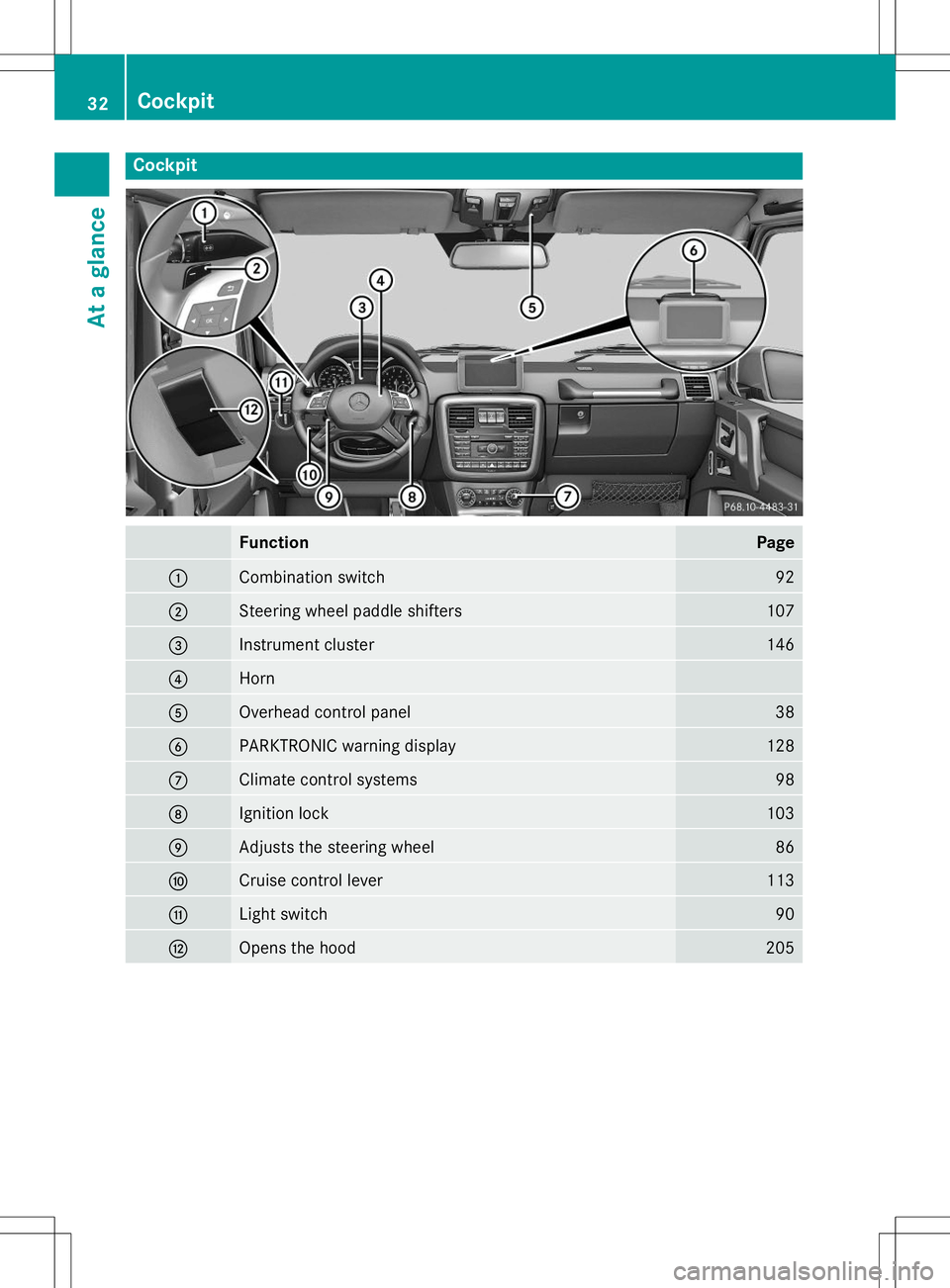
FunctionPage
:Combination switch92
;Steering wheel paddle shifters107
=Instrument cluster146
?Horn
AOverhead control panel38
BPARKTRONIC warning display128
CClimate control systems98
DIgnition lock103
EAdjusts the steering wheel86
FCruise control lever113
GLight switch90
HOpens the hood205
32Cockpit
At a glance
Page 35 of 274
Instrument cluster
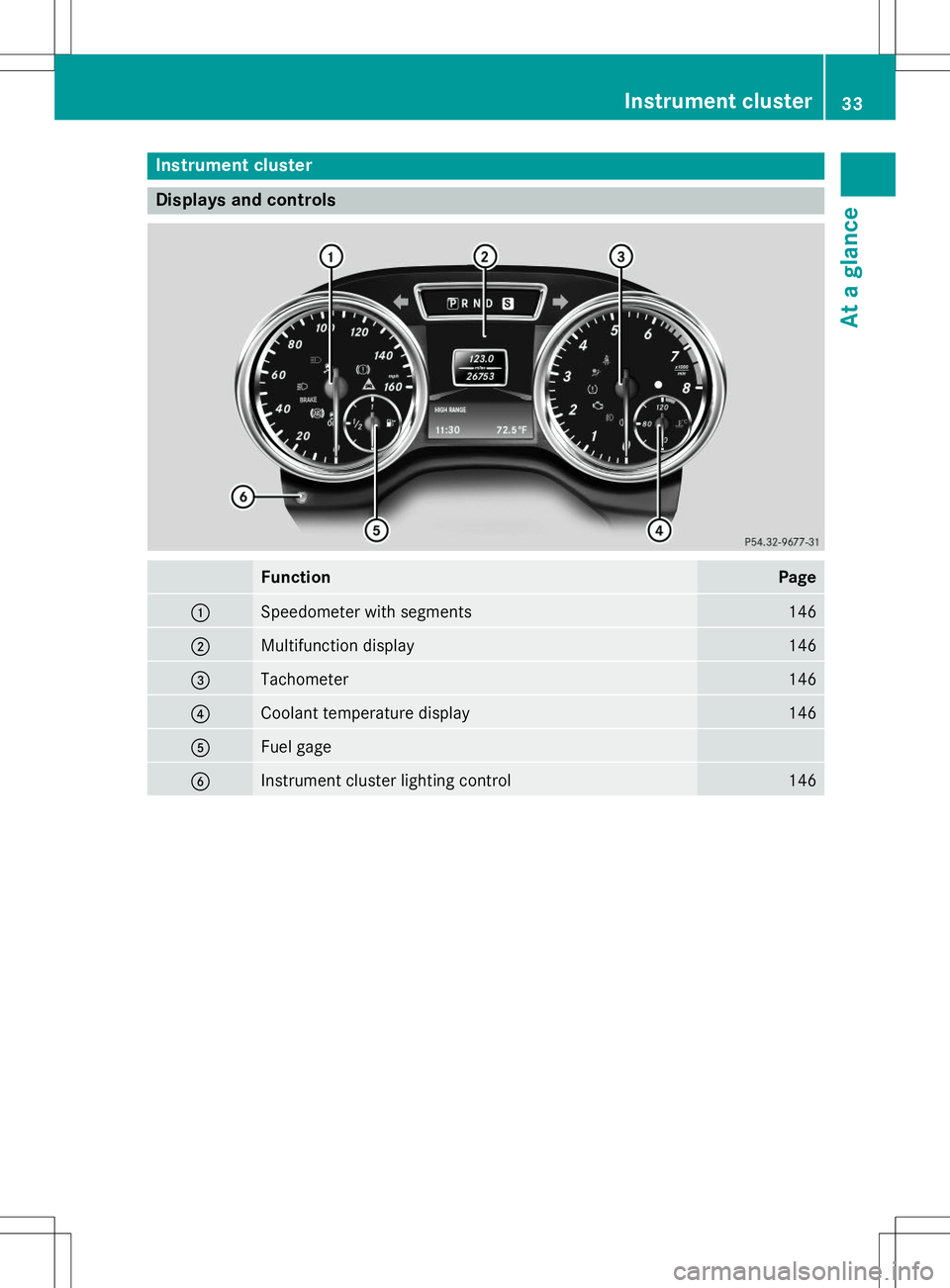
Displays and controls
FunctionPage
:Speedometer with segments146
;Multifunction display146
=Tachometer146
?Coolant temperature display146
AFuel gage
BInstrument cluster lighting control146
Instrument cluster33
At a glance
Page 39 of 274
Center console, lower section
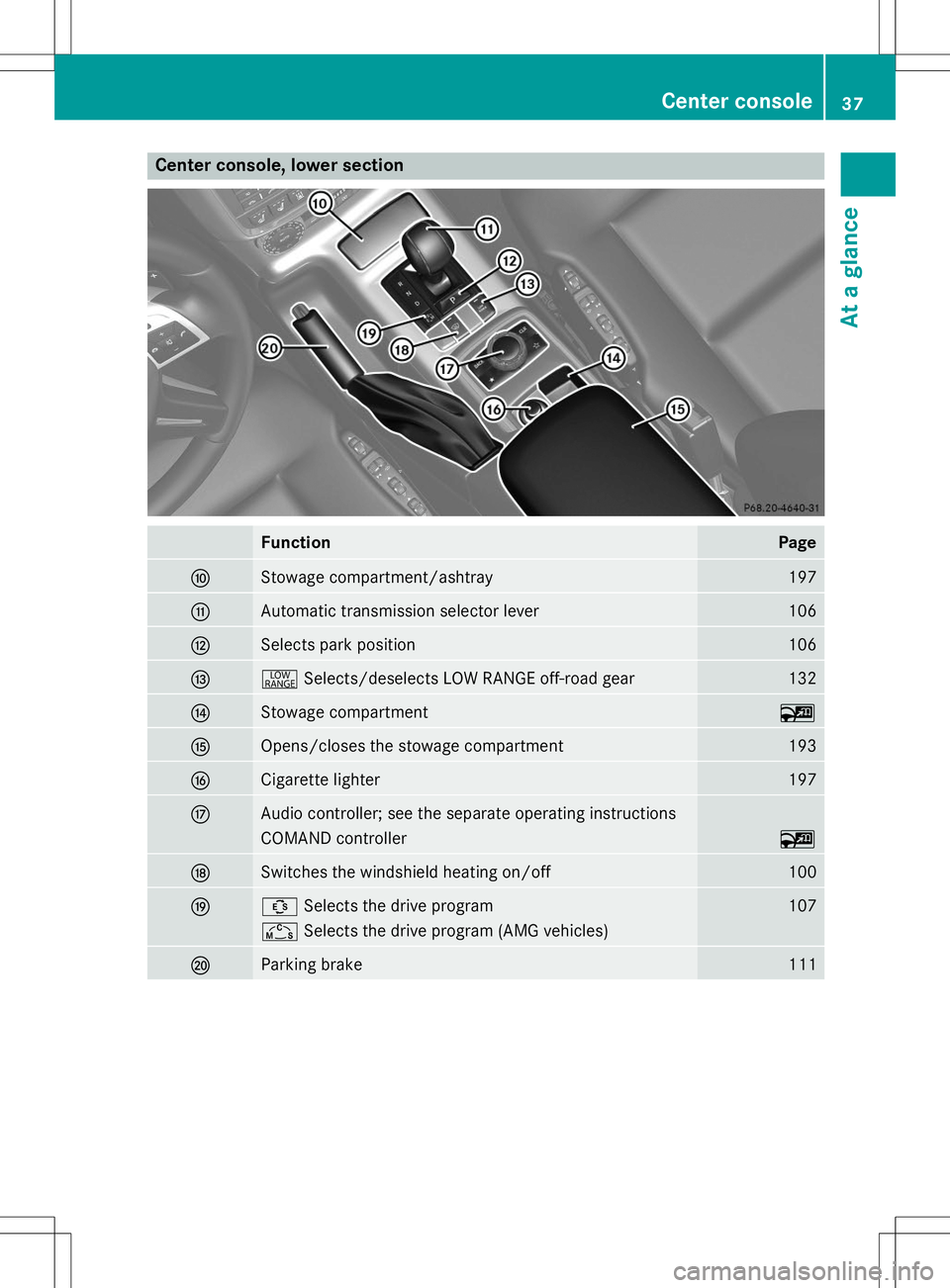
FunctionPage
FStowage compartment/ashtray197
GAutomatic transmission selector lever106
HSelects park position106
I+Selects/deselects LOW RANGE off-road gear132
JStowage compartment~
KOpens/closes the stowage compartment193
LCigarette lighter197
MAudio controller; see the separate operating instructions
COMAND controller~
NSwitches the windshield heating on/off100
OÛSelects the drive program107
ÑSelects the drive program (AMG vehicles)
PParking brake111
Center console37
At a glance
Page 40 of 274
Overhead control panel
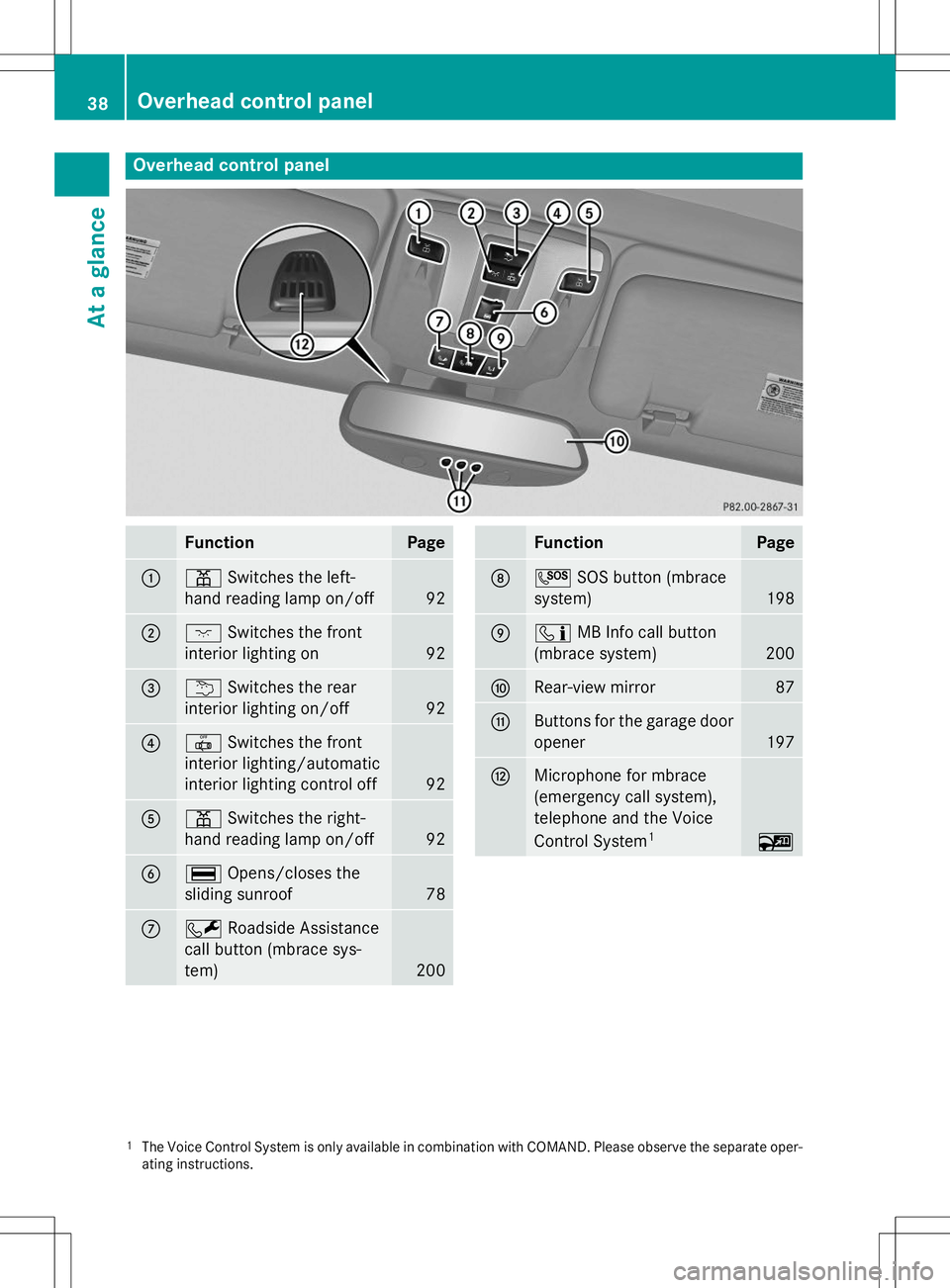
FunctionPage
:pSwitches the left-
hand reading lamp on/off
92
;c Switches the front
interior lighting on
92
=u Switches the rear
interior lighting on/off
92
?| Switches the front
interior lighting/automatic
interior lighting control off
92
Ap Switches the right-
hand reading lamp on/off
92
B¡ Opens/closes the
sliding sunroof
78
CF Roadside Assistance
call button (mbrace sys- tem)
200
FunctionPage
DG SOS button (mbrace
system)
198
Eï MB Info call button
(mbrace system)
200
FRear-view mirror87
GButtons for the garage door opener
197
HMicrophone for mbrace
(emergency call system),
telephone and the Voice
Control System 1
~
1
The Voice Control System is only available in combination with COMAND. Please observe the separate oper-
ating instructions.
38Overhead control panel
At a glance
Page 45 of 274
ning. Therefore, malfunctions can be detec-
ted in good time. The6 restraint system warning lamp in
the instrument cluster lights up when the igni- tion is switched on. It goes out no later than afew seconds after the vehicle is started. The
components of the restraint system are in
operational readiness.
A malfunction has occurred if the 6
restraint system warning lamp:
R does not light up after the ignition is
switched on
R does not go out after a few seconds with
the engine running
R lights up again while the engine is running
GWARNING
If restraint system is malfunctioning, restraint
system components may be triggered unin-
tentionally or might not be triggered at all in
the event of an accident with a high rate of
vehicle deceleration. This can affect the Emer- gency Tensioning Device or air bag, for exam-
ple. This poses an increased risk of injury or
even fatal injury.
Have the restraint system checked and
repaired in a qualified specialist workshop as
soon as possible.
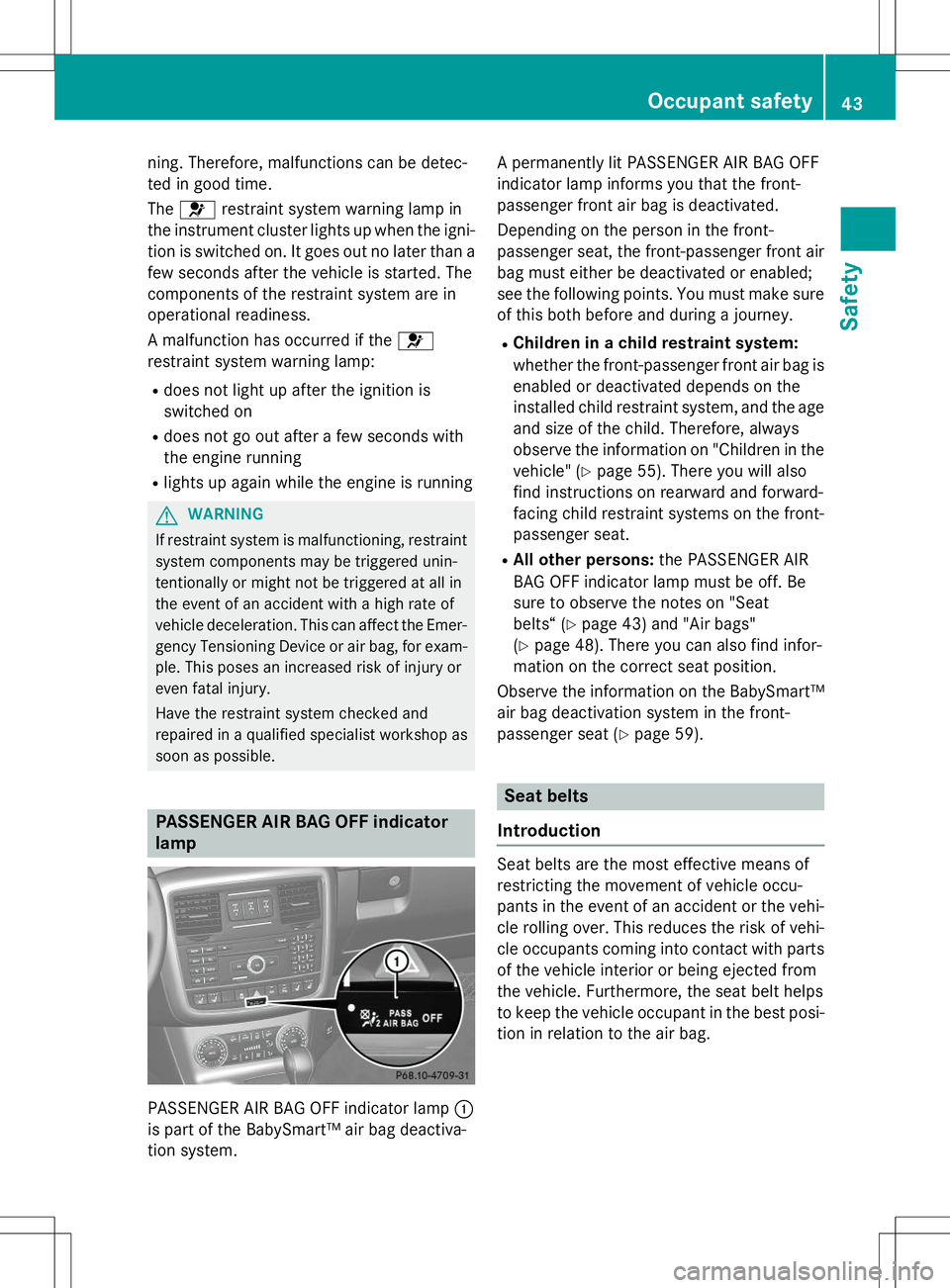
PASSENGER AIR BAG OFF indicator lamp
PASSENGER AIR BAG OFF indicator lamp :
is part of the BabySmart™ air bag deactiva-
tion system. A permanently lit PASSENGER AIR BAG OFF
indicator lamp informs you that the front-
passenger front air bag is deactivated.
Depending on the person in the front-
passenger seat, the front-passenger front air
bag must either be deactivated or enabled;
see the following points. You must make sure
of this both before and during a journey.
R Children in a child restraint system:
whether the front-passenger front air bag is
enabled or deactivated depends on the
installed child restraint system, and the age and size of the child. Therefore, always
observe the information on "Children in the
vehicle" ( Ypage 55). There you will also
find instructions on rearward and forward-
facing child restraint systems on the front-
passenger seat.
R All other persons: the PASSENGER AIR
BAG OFF indicator lamp must be off. Be
sure to observe the notes on "Seat
belts“ ( Ypage 43) and "Air bags"
( Y page 48). There you can also find infor-
mation on the correct seat position.
Observe the information on the BabySmart™
air bag deactivation system in the front-
passenger seat ( Ypage 59).
Seat belts
Introduction
Seat belts are the most effective means of
restricting the movement of vehicle occu-
pants in the event of an accident or the vehi-
cle rolling over. This reduces the risk of vehi- cle occupants coming into contact with parts
of the vehicle interior or being ejected from
the vehicle. Furthermore, the seat belt helps
to keep the vehicle occupant in the best posi- tion in relation to the air bag.
Occupant safety43
Safety
Z
Page 50 of 274
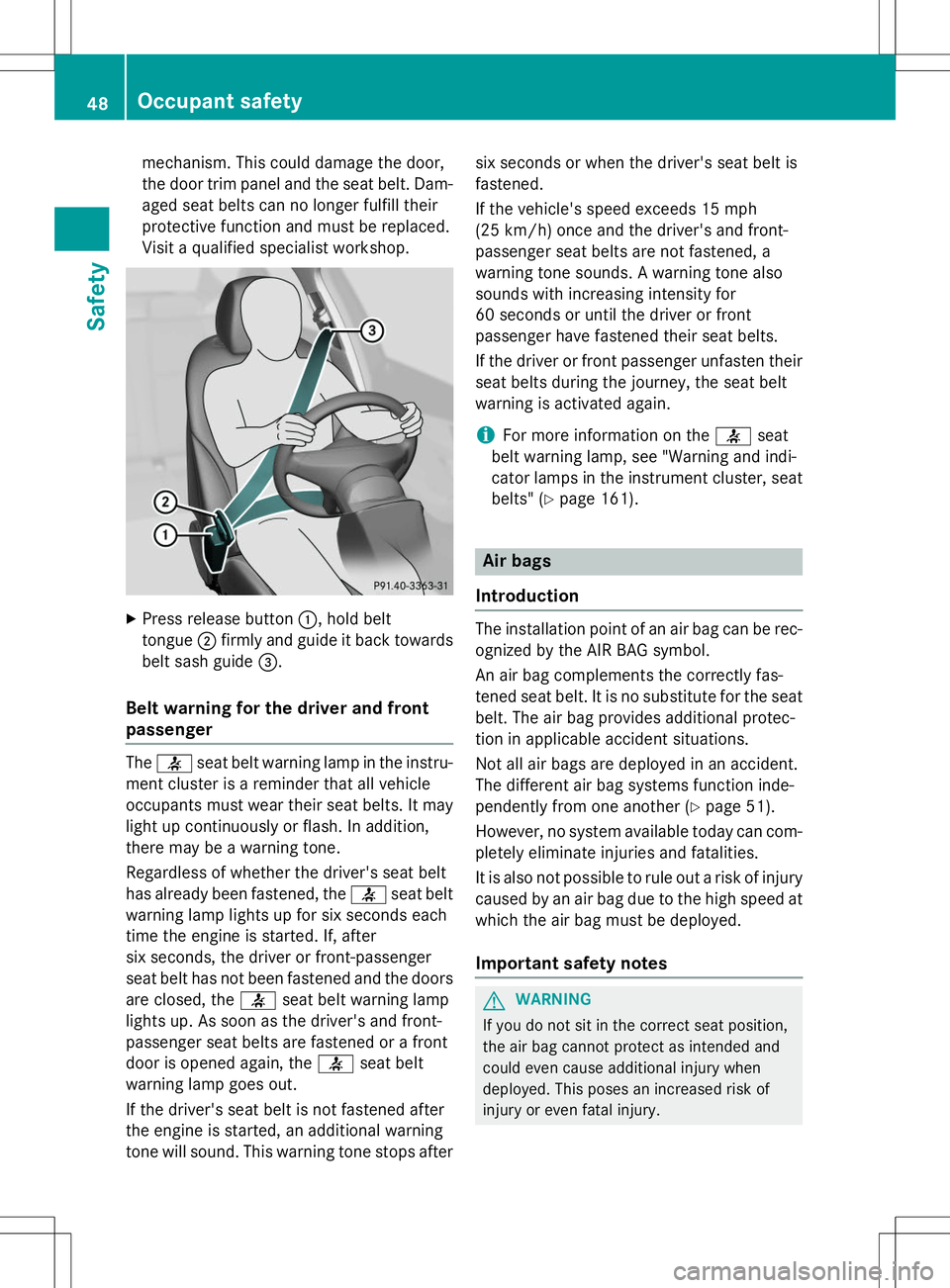
mechanism. This could damage the door,
the door trim panel and the seat belt. Dam-aged seat belts can no longer fulfill their
protective function and must be replaced.
Visit a qualified specialist workshop.
X Press release button :, hold belt
tongue ;firmly and guide it back towards
belt sash guide =.
Belt warning for the driver and front
passenger
The 7 seat belt warning lamp in the instru-
ment cluster is a reminder that all vehicle
occupants must wear their seat belts. It may
light up continuously or flash. In addition,
there may be a warning tone.
Regardless of whether the driver's seat belt
has already been fastened, the 7seat belt
warning lamp lights up for six seconds each
time the engine is started. If, after
six seconds, the driver or front-passenger
seat belt has not been fastened and the doors
are closed, the 7seat belt warning lamp
lights up. As soon as the driver's and front-
passenger seat belts are fastened or a front
door is opened again, the 7seat belt
warning lamp goes out.
If the driver's seat belt is not fastened after
the engine is started, an additional warning
tone will sound. This warning tone stops after six seconds or when the driver's seat belt isfastened.
If the vehicle's speed exceeds 15 mph
(25 km/h) once and the driver's and front-
passenger seat belts are not fastened, a
warning tone sounds. A warning tone also
sounds with increasing intensity for
60 seconds or until the driver or front
passenger have fastened their seat belts.
If the driver or front passenger unfasten their
seat belts during the journey, the seat belt
warning is activated again.
iFor more information on the 7seat
belt warning lamp, see "Warning and indi-
cator lamps in the instrument cluster, seat
belts" ( Ypage 161).
Air bags
Introduction
The installation point of an air bag can be rec-
ognized by the AIR BAG symbol.
An air bag complements the correctly fas-
tened seat belt. It is no substitute for the seat
belt. The air bag provides additional protec-
tion in applicable accident situations.
Not all air bags are deployed in an accident.
The different air bag systems function inde-
pendently from one another ( Ypage 51).
However, no system available today can com- pletely eliminate injuries and fatalities.
It is also not possible to rule out a risk of injury
caused by an air bag due to the high speed at which the air bag must be deployed.
Important safety notes
GWARNING
If you do not sit in the correct seat position,
the air bag cannot protect as intended and
could even cause additional injury when
deployed. This poses an increased risk of
injury or even fatal injury.
48Occupant safety
Safety