sensor MERCEDES-BENZ G-CLASS SUV 2015 User Guide
[x] Cancel search | Manufacturer: MERCEDES-BENZ, Model Year: 2015, Model line: G-CLASS SUV, Model: MERCEDES-BENZ G-CLASS SUV 2015Pages: 274, PDF Size: 31.95 MB
Page 120 of 274
time and for staying in your lane. Only engage
DISTRONIC PLUS when the current road,
weather and traffic conditions permit it to bedone safely, and adapt your driving style
accordingly. Drive carefully and maintain a
suitable distance to the vehicle in front.
When DISTRONIC PLUS detects a risk of col-
lision with the vehicle in front but is unable to
sufficiently decelerate the vehicle in order to
maintain the set distance from the vehicle in
front, you will be warned visually and acous-
tically. DISTRONIC PLUS cannot prevent a
collision without your intervention. An inter-
mittent warning tone will then sound and the distance warning lamp will light up in the
instrument cluster. Brake immediately in
order to increase the distance from the vehi-
cle in front, or take evasive action, provided it
is safe to do so.
DISTRONIC PLUS may not detect narrow
vehicles driving in front, e.g. motorcycles, or
vehicles driving on a different line. Therefore,
always pay attention to traffic conditions
even when DISTRONIC PLUS is activated.
Otherwise, you may fail to recognize dangers
in time, cause an accident and injure yourself and others.
In particular, the detection of obstacles can
be impaired if:
R the sensor is dirty or covered
R there is snow or heavy rain
R there is interference by other radar sources
R there is the possibility of strong radar
reflections, for example, in parking
garages.
If DISTRONIC PLUS is activated, the vehicle
brakes automatically in certain situations.
This can happen unexpectedly, especially
when towing or in a car wash. There is a risk of an accident. In these or similar situations,
deactivate DISTRONIC PLUS.
If you want DISTRONIC PLUS to assist you,
the following activation conditions must be
fulfilled ( Ypage 119) and the radar sensor
system must be operational.General notes
DISTRONIC PLUS regulates the speed and
automatically helps you maintain the dis-
tance to the vehicle detected in front.
DISTRONIC PLUS brakes automatically so
that the set speed is not exceeded.
On long and steep downhill gradients, espe-
cially if the vehicle is laden or towing a trailer,
you must select shift range 1,2 or 3in good
time. By doing so, you will make use of the
braking effect of the engine. This relieves the load on the brake system and prevents the
brakes from overheating and wearing too
quickly.
If DISTRONIC PLUS detects a slower-moving
vehicle in front, your vehicle is braked in order
to maintain the preset distance to the vehicle in front.
If there is no vehicle in front, DISTRONIC
PLUS operates in the same way as cruise
control in the speed range between 20 mph
(Canada: 30 km/h) and 120 mph (Canada:
200 km/h). If a vehicle is driving in front of
you, it operates in the speed range between
0 mph (0 km/h) and 120 mph (Canada:
200 km/h).
Do not use DISTRONIC PLUS while driving on
roads with steep gradients.
As DISTRONIC PLUS transmits radar waves, it
can resemble the radar detectors of the
responsible authorities. You can refer to the
relevant chapter in the Operator's Manual if
questions are asked about this.
iUSA only:
This device has been approved by the FCC as a "Vehicular Radar System". The radar
sensor is intended for use in an automotive
radar system only. Removing, tampering
with, or altering the device will void any
warranties, and is not permitted by the
FCC. Do not tamper with, alter, or use in
any non-approved way.
Any unauthorized modification to this
device could void the user’s authority to
operate the equipment.
118Driving systems
Driving an d parking
Page 126 of 274
Blind Spot Assist
Important safety notes
GWARNING
Blind Spot Assist does not react to: R vehicles overtaken too closely on the side,
placing them in the blind spot area
R vehicles which approach with a large speed
differential and overtake your vehicle
As a result, Blind Spot Assist may not give
warnings in such situations. There is a risk of an accident.
Always observe the traffic conditions care-
fully, and maintain a safe lateral distance.
GWARNING
Blind Spot Assist does not react to:
R vehicles overtaken too closely on the side,
placing them in the blind spot area
R vehicles being overtaken at a speed differ-
ence of more than 7.5 mph (12 km/h)
R vehicles which approach with a large speed
differential and overtake your vehicle
As a result, Blind Spot Assist may not give
warnings in such situations. There is a risk of
an accident.
Always observe the traffic conditions care-
fully, and maintain a safe lateral distance.
Blind Spot Assist is only an aid. It may fail to
detect some vehicles and is no substitute for
attentive driving.
In particular, the detection of obstacles can
be impaired if:
R there is dirt on the sensors or anything else
covering the sensors
R visibility is poor, e.g. due to fog, heavy rain
or snow
R there is a narrow vehicle traveling in front,
e.g. a motorcycle or bicycle
R the road has very wide lanes
R the road has narrow lanes R
you are not driving in the middle of the lane
R there are barriers or other road boundaries
iUSA only:
This device has been approved by the FCC as a "Vehicular Radar System". The radar
sensor is intended for use in an automotive
radar system only. Removing, tampering
with, or altering the device will void any
warranties, and is not permitted by the
FCC. Do not tamper with, alter, or use in
any non-approved way.
Any unauthorized modification to this
device could void the user’s authority to
operate the equipment.
General notes
Blind Spot Assist uses a radar sensor system
to monitor both the left and right sides of your
vehicle. It supports you from a speed of
approximately 20 mph (30 km/h). A warning
display in the exterior mirrors draws your
attention to vehicles detected in the moni-
tored area. If you then switch on the corre-
sponding turn signal to change lanes, you will also receive a visual and audible collision
warning. For this purpose, Blind Spot Assist
uses sensors in the rear bumper.
Monitoring range of the sensors
124Driving systems
Driving an d parking
Page 127 of 274
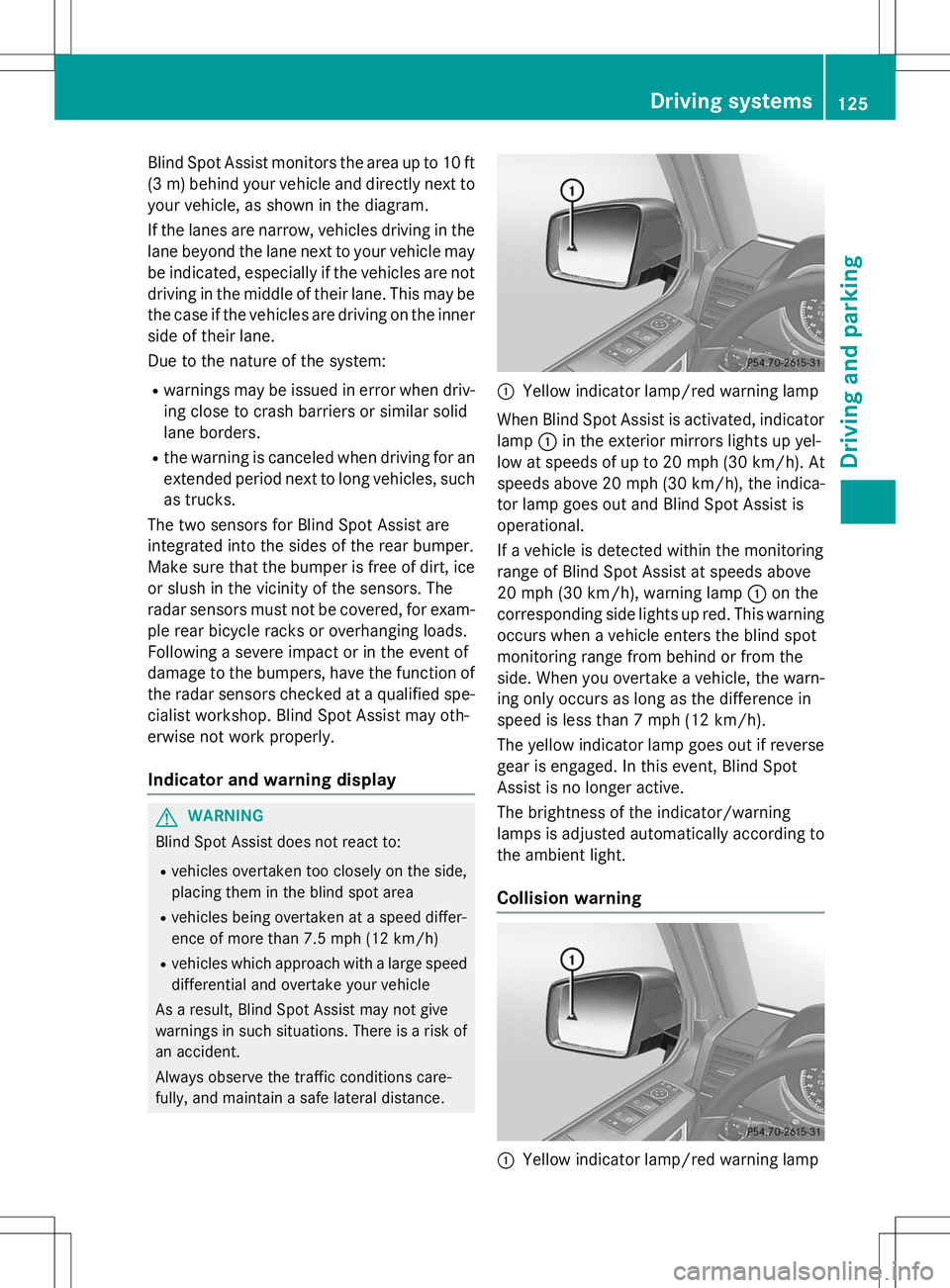
Blind Spot Assist monitors the area up to 10 ft
(3 m) behind your vehicle and directly next toyour vehicle, as shown in the diagram.
If the lanes are narrow, vehicles driving in the
lane beyond the lane next to your vehicle may
be indicated, especially if the vehicles are not
driving in the middle of their lane. This may be the case if the vehicles are driving on the inner
side of their lane.
Due to the nature of the system:
R warnings may be issued in error when driv-
ing close to crash barriers or similar solid
lane borders.
R the warning is canceled when driving for an
extended period next to long vehicles, such
as trucks.
The two sensors for Blind Spot Assist are
integrated into the sides of the rear bumper.
Make sure that the bumper is free of dirt, ice
or slush in the vicinity of the sensors. The
radar sensors must not be covered, for exam- ple rear bicycle racks or overhanging loads.
Following a severe impact or in the event of
damage to the bumpers, have the function of
the radar sensors checked at a qualified spe-
cialist workshop. Blind Spot Assist may oth-
erwise not work properly.
Indicator and warning display
GWARNING
Blind Spot Assist does not react to:
R vehicles overtaken too closely on the side,
placing them in the blind spot area
R vehicles being overtaken at a speed differ-
ence of more than 7.5 mph (12 km/h)
R vehicles which approach with a large speed
differential and overtake your vehicle
As a result, Blind Spot Assist may not give
warnings in such situations. There is a risk of
an accident.
Always observe the traffic conditions care-
fully, and maintain a safe lateral distance.
:Yellow indicator lamp/red warning lamp
When Blind Spot Assist is activated, indicator
lamp :in the exterior mirrors lights up yel-
low at speeds of up to 20 mph (30 km/h). At speeds above 20 mph (30 km/h), the indica-
tor lamp goes out and Blind Spot Assist is
operational.
If a vehicle is detected within the monitoring
range of Blind Spot Assist at speeds above
20 mph (30 km/h), warning lamp :on the
corresponding side lights up red. This warning
occurs when a vehicle enters the blind spot
monitoring range from behind or from the
side. When you overtake a vehicle, the warn- ing only occurs as long as the difference in
speed is less than 7 mph (12 km/h).
The yellow indicator lamp goes out if reversegear is engaged. In this event, Blind Spot
Assist is no longer active.
The brightness of the indicator/warning
lamps is adjusted automatically according to
the ambient light.
Collision warning
:Yellow indicator lamp/red warning lamp
Driving systems125
Driving and parking
Z
Page 130 of 274
PARKTRONIC
Important safety notes
!When parking, pay particular attention to
objects above or below the sensors, such
as flower pots or trailer drawbars.
PARKTRONIC does not detect such objects
when they are in the immediate vicinity of
the vehicle. You could damage the vehicle
or the objects.
The sensors may not detect snow and other
objects that absorb ultrasonic waves.
Ultrasonic sources such as an automatic
car wash, the compressed-air brakes on a
truck or a pneumatic drill could cause
PARKTRONIC to malfunction.
PARKTRONIC may not function correctly on uneven terrain.
PARKTRONIC is an electronic parking aid with ultrasonic sensors. It indicates visually and
audibly the distance between your vehicle
and an object.
PARKTRONIC is only an aid. It is not a replace-
ment for your attention to your immediate
surroundings. You are always responsible for
safe maneuvering, parking and exiting a park-
ing space. Ensure that the areas in front,
behind and to the side of the vehicle are safe
before maneuvering, parking or pulling away. There must not be any persons, animals or
objects in the area in which you are maneu-vering.
PARKTRONIC does not take into account any persons or objects located below or above
the detection range. As a result,
PARKTRONIC cannot warn you about objects
in this area.
PARKTRONIC is activated automatically when
you:
R switch on the ignition
R shift the transmission to position D,R or N
R release the parking brake
PARKTRONIC is deactivated at speeds above
11 mph (18 km/h). It is reactivated at lowerspeeds. PARKTRONIC monitors the area around your
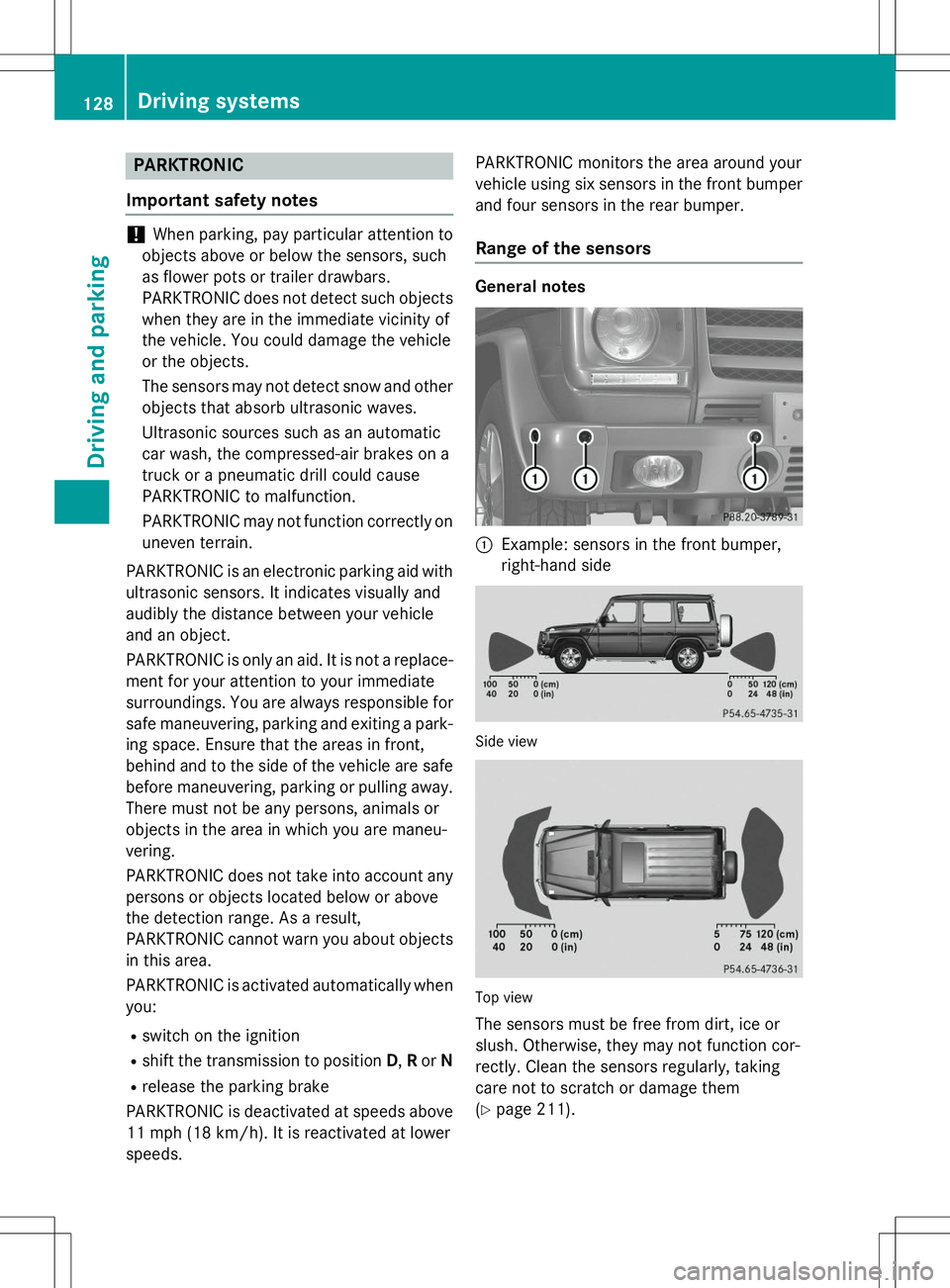
vehicle using six sensors in the front bumper
and four sensors in the rear bumper.Range of the sensors
General notes
:Example: sensors in the front bumper,
right-hand side
Side view
Top view
The sensors must be free from dirt, ice or
slush. Otherwise, they may not function cor-
rectly. Clean the sensors regularly, taking
care not to scratch or damage them( Y page 211).
128Driving systems
Driving and parking
Page 131 of 274
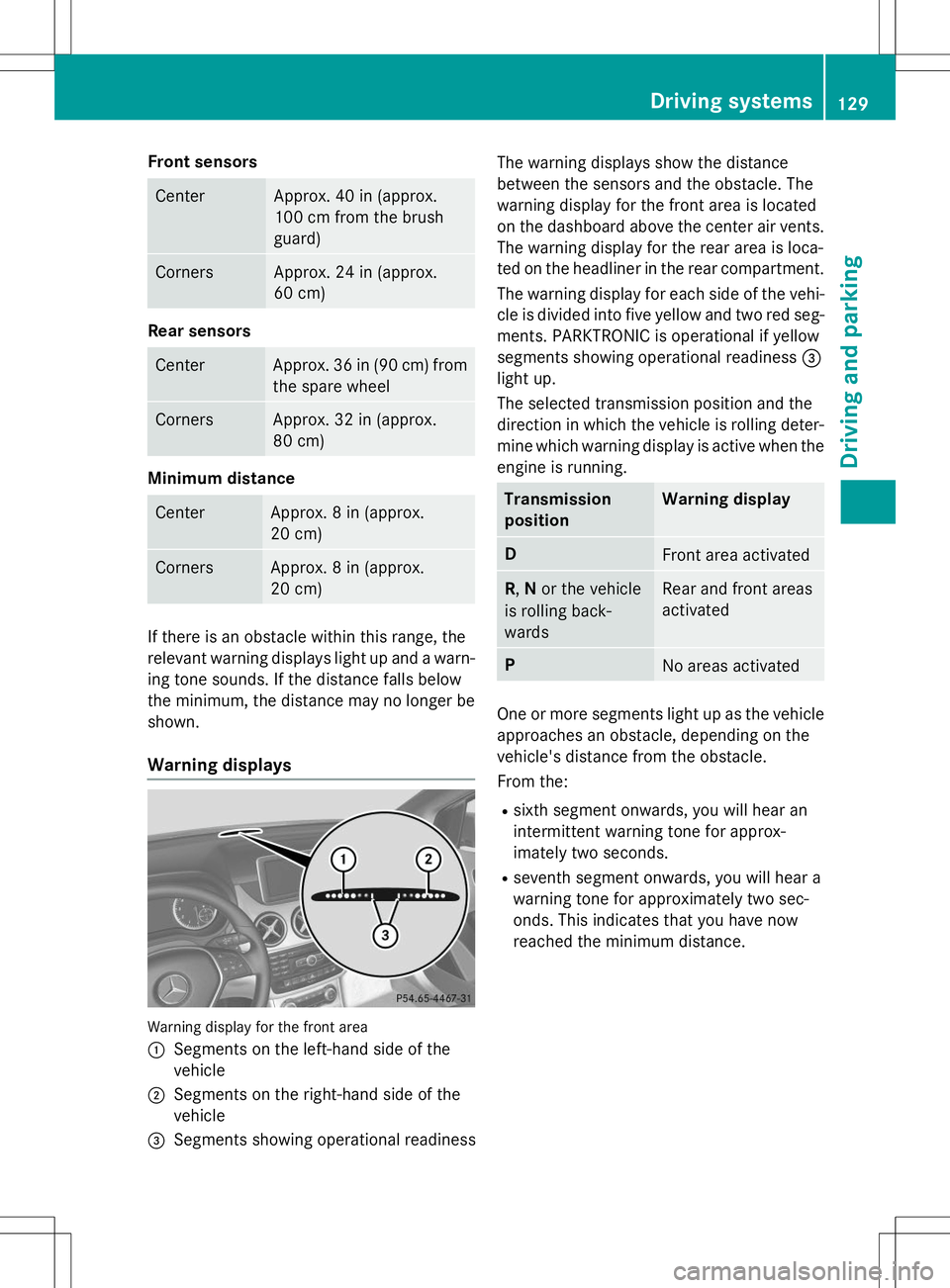
Front sensors
CenterApprox. 40 in (approx.
100 cm from the brush
guard)
CornersApprox. 24 in (approx.
60 cm)
Rear sensors
CenterApprox. 36 in (90 cm) from
the spare wheel
CornersApprox. 32 in (approx.
80 cm)
Minimum distance
CenterApprox. 8 in (approx.
20 cm)
CornersApprox. 8 in (approx.
20 cm)
If there is an obstacle within this range, the
relevant warning displays light up and a warn- ing tone sounds. If the distance falls below
the minimum, the distance may no longer be
shown.
Warning displays
Warning display for the front area :
Segments on the left-hand side of the
vehicle
;Segments on the right-hand side of the
vehicle
=Segments showing operational readiness The warning displays show the distance
between the sensors and the obstacle. The
warning display for the front area is located
on the dashboard above the center air vents.
The warning display for the rear area is loca-
ted on the headliner in the rear compartment.
The warning display for each side of the vehi-
cle is divided into five yellow and two red seg- ments. PARKTRONIC is operational if yellow
segments showing operational readiness =
light up.
The selected transmission position and the
direction in which the vehicle is rolling deter-
mine which warning display is active when the engine is running.
Transmission
positionWarning display
DFront area activated
R ,N or the vehicle
is rolling back- wardsRear and front areas
activated
PNo areas activated
One or more segments light up as the vehicle
approaches an obstacle, depending on the
vehicle's distance from the obstacle.
From the:
R sixth segment onwards, you will hear an
intermittent warning tone for approx-
imately two seconds.
R seventh segment onwards, you will hear a
warning tone for approximately two sec-
onds. This indicates that you have now
reached the minimum distance.
Driving systems129
Driving and pa rking
Z
Page 133 of 274
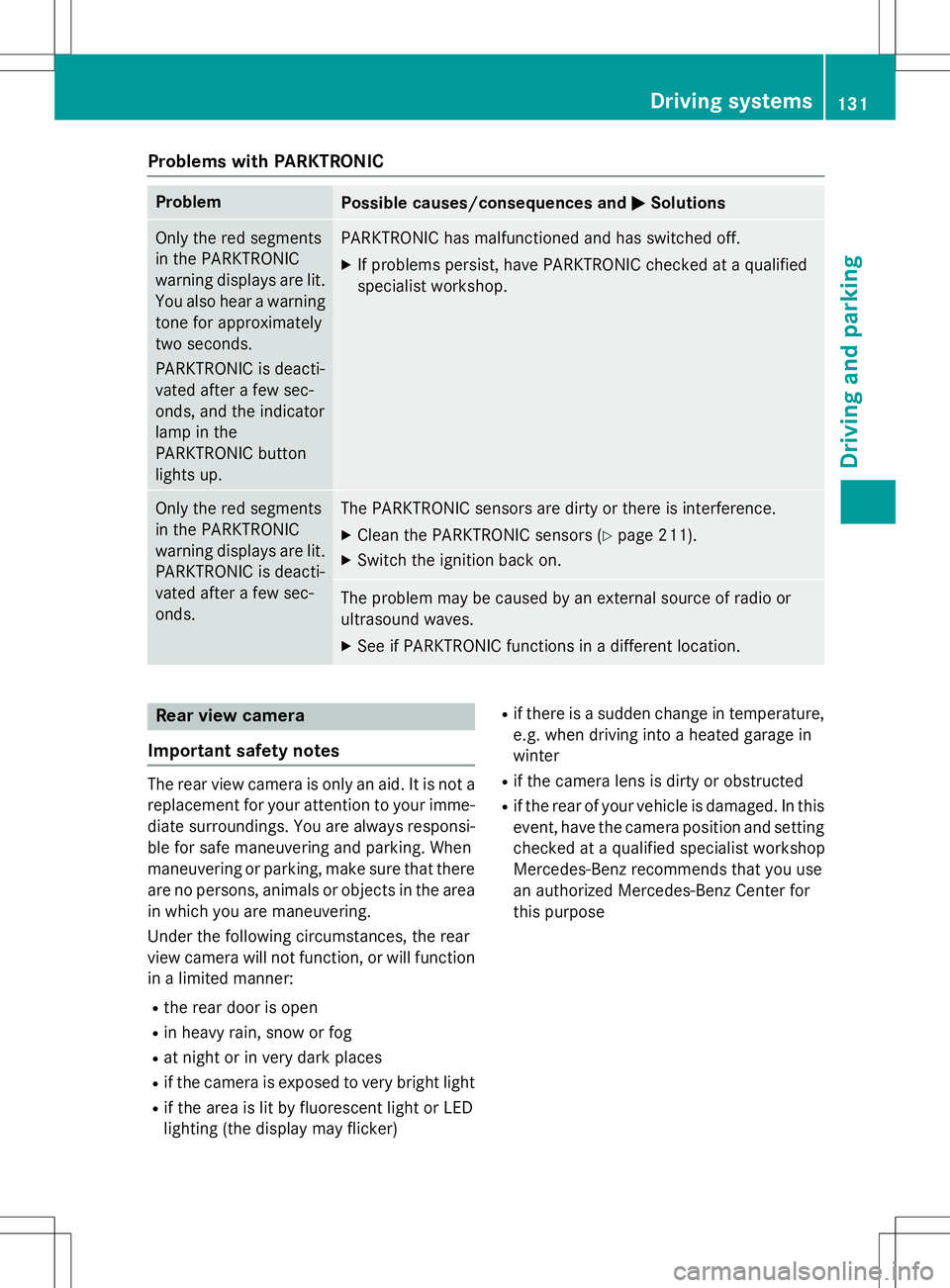
Problems with PARKTRONIC
ProblemPossible causes/consequences andMSolutions
Only the red segments
in the PARKTRONIC
warning displays are lit.
You also hear a warning
tone for approximately
two seconds.
PARKTRONIC is deacti-
vated after a few sec-
onds, and the indicator
lamp in the
PARKTRONIC button
lights up.PARKTRONIC has malfunctioned and has switched off.
X If problems persist, have PARKTRONIC checked at a qualified
specialist workshop.
Only the red segments
in the PARKTRONIC
warning displays are lit.
PARKTRONIC is deacti-
vated after a few sec-onds.The PARKTRONIC sensors are dirty or there is interference. X Clean the PARKTRONIC sensors ( Ypage 211).
X Switch the ignition back on.
The problem may be caused by an external source of radio or
ultrasound waves. XSee if PARKTRONIC functions in a different location.
Rear view camera
Important safety notes
The rear view camera is only an aid. It is not a replacement for your attention to your imme-
diate surroundings. You are always responsi-
ble for safe maneuvering and parking. When
maneuvering or parking, make sure that there are no persons, animals or objects in the area in which you are maneuvering.
Under the following circumstances, the rear
view camera will not function, or will function
in a limited manner:
R the rear door is open
R in heavy rain, snow or fog
R at night or in very dark places
R if the camera is exposed to very bright light
R if the area is lit by fluorescent light or LED
lighting (the display may flicker) R
if there is a sudden change in temperature,
e.g. when driving into a heated garage inwinter
R if the camera lens is dirty or obstructed
R if the rear of your vehicle is damaged. In this
event, have the camera position and setting checked at a qualified specialist workshop
Mercedes-Benz recommends that you use
an authorized Mercedes-Benz Center for
this purpose
Driving systems131
Driving and parking
Z
Page 213 of 274
XVisit a qualified specialist workshop as
soon as possible.
Care
General notes
GWARNING
Many cleaning products can be hazardous.
Some are poisonous, others are flammable.
Always follow the instructions on the particu-
lar container. Always open your vehicle's
doors or windows when cleaning the inside.
Never use fluids or solvents that are not
designed for cleaning your vehicle.
Always lock away cleaning products and keep
them out of reach of children.
!For cleaning your vehicle, do not use any
of the following:
R dry, rough or hard cloths
R abrasive cleaning agents
R solvents
R cleaning agents containing solvents
Do not scrub.
Do not touch the surfaces or protective
films with hard objects, e.g. a ring or ice
scraper. You could otherwise scratch or
damage the surfaces and protective film.
!Do not park the vehicle for an extended
period straight after cleaning it, particularly
after having cleaned the wheels with wheel
cleaner. Wheel cleaners could cause
increased corrosion of the brake discs and
brake pads/linings. For this reason, you
should drive for a few minutes after clean-
ing. Braking heats the brake discs and the
brake pads/linings, thus drying them. The
vehicle can then be parked.
HEnvironmental note
Dispose of empty packaging and cleaning
cloths in an environmentally responsible man-
ner. Regular care of your vehicle is a condition for
retaining the quality in the long term.
Use care products and cleaning agents rec-
ommended and approved by Mercedes-Benz.
Exterior care
Information in the Digital Operator's Manual
In the Digital Operator's Manual you will find
information on the following topics: R Washing by hand
R Power washers
R Cleaning the wheels
R Cleaning the paintwork
R Matte finish care
R Cleaning the windows
R Cleaning wiper blades
R Cleaning the headlamps
R Cleaning the sensors
R Cleaning the rear view camera
R Cleaning the exhaust pipes
R Cleaning chrome parts
R Cleaning the trailer tow hitch
Automatic car wash
GWARNING
Braking efficiency is reduced after washing
the vehicle. There is a risk of an accident.
After the vehicle has been washed, brake
carefully while paying attention to the traffic
conditions until full braking power is restored.
!Never clean your vehicle in a Touchless
Automatic Car Wash as these use special
cleaning agents. These cleaning agents can damage the paintwork or plastic parts.
!Make sure that the automatic car wash is
suitable for the size of the vehicle. Fold in
the exterior mirrors before the vehicle is
washed. The exterior mirrors could other-
wise be damaged.
Care211
Maintenance and care
Z
Page 238 of 274
Please note that the TPMS is not a substitutefor proper tire maintenance, and it is the driv-
er's responsibility to maintain correct tire
pressure, even if underinflation has not
reached the level to trigger illumination of the
TPMS low tire pressure telltale.
USA only:
Your vehicle has also been equipped with a
TPMS malfunction indicator to indicate if the
system is not operating properly. The TPMS
malfunction indicator is combined with the
low tire pressure telltale. When the system
detects a malfunction, the warning lamp will
flash for approximately a minute and then
remain continuously illuminated. This
sequence will be repeated every time the vehi- cle is started as long as the malfunction
exists.
When the malfunction indicator is illuminated,
the system may not be able to detect or signal low tire pressure as intended. TPMS malfunc-
tions may occur for a variety of reasons,
including the mounting of incompatible
replacement or alternate tires or wheels on
the vehicle that prevent the TPMS from func-
tioning properly. Always check the TPMS mal-
function telltale after replacing one or more
tires or wheels on your vehicle to ensure that
the replacement or alternate tires and wheels allow the TPMS to continue to function prop-erly.
It is the driver's responsibility to set the tire
pressure to the recommended cold tire pres-
sure suitable for the operating situation( Y page 232). Note that the correct tire pres-
sure for the current operating situation must
first be taught-in to the tire pressure monitor. If there is a substantial loss of pressure, the
warning threshold for the warning message isaligned to the reference values taught-in.
Restart the tire pressure monitor after adjust-
ing to the cold tire pressure ( Ypage 238).
The current pressures are saved as new ref-
erence values. As a result, a warning message
will appear if the tire pressure drops signifi-
cantly. The tire pressure monitor does not warn you
of an incorrectly set tire pressure. Observe
the notes on the recommended tire pressure
( Y page 232).
The tire pressure monitor is not able to warn
you of a sudden loss of pressure, e.g. if the
tire is penetrated by a foreign object. In the
event of a sudden loss of pressure, bring the
vehicle to a halt by braking carefully. Avoid
sudden steering movements.
In order to check the tire pressure, the vehi-
cle's wheels are installed with sensors that
monitor the tire pressure in all four tires. The
tire pressure monitor warns you if the pres-
sure drops in one or more of the tires. The tire pressure monitor only functions if the correct
sensors are installed on all wheels.
The tire pressure monitor has a yellow warn-
ing lamp in the instrument cluster for indicat- ing pressure loss/malfunctions (USA) or
pressure loss (Canada). Whether the warning
lamp flashes or lights up indicates whether a
tire pressure is too low or the tire pressure
monitor is malfunctioning:
R if the warning lamp is lit continuously, the
tire pressure on one or more tires is signif-
icantly too low. The tire pressure monitor is not malfunctioning.
R USA only: if the warning lamp flashes for
around a minute and then remains lit con-
stantly, the tire pressure monitor is mal-
functioning.
Information on tire pressures is displayed in
the multifunction display. After a few minutes of driving, the current tire pressure of each
tire is shown in the multifunction display.
USA only: the tire pressure warning lamp will
inform you of a malfunction in the tire pres-
sure monitor by flashing for approximately
one minute and then remaining lit. It may take
more than ten minutes before the data menu
is displayed. When the malfunction has been
rectified, the tire pressure warning lamp goes out after a few minutes of driving.
The tire pressure values indicated by the on-
board computer may differ from those meas-
236Tire pressure
Wheels and tires
Page 239 of 274
ured at a gas station with a pressure gauge.
The tire pressures shown by the on-board
computer refer to those measured at sea
level. At high altitudes, the tire pressure val-
ues indicated by a pressure gauge are higher
than those shown by the on-board computer. In this case, do not reduce the tire pressures.
The operation of the tire pressure monitor can
be affected by interference from radio trans-
mitting equipment (e.g. radio headphones,
two-way radios) that may be being operated
in or near the vehicle.
iUSA only:
This device complies with part 15 of the
FCC Rules. Operation is subject to the fol-
lowing two conditions:
1. This device may not cause harmful inter- ference, and
2. This device must accept any interference
received, including interference that may
cause undesired operation of the device.
Any unauthorized modification to this
device could void the user's authority to
operate the equipment.
iCanada only:
This device complies with RSS-210 of
Industry Canada. Operation is subject to
the following two conditions:
1. This device may not cause harmful inter- ference, and
2. this device must accept any interference
received, including interference that may
cause undesired operation of the device.
Any unauthorized modification to this
device could void the user's authority to
operate the equipment.
Checking the tire pressure electroni-cally
X Make sure that the SmartKey is in posi-
tion 2in the ignition lock ( Ypage 103).
X Press the =or; button on the steer-
ing wheel to select the
Serv.menu. X
Press the 9or: button to select
Tire Pressure.
X Press the abutton.
The current tire pressure of each tire is
shown in the multifunction display.
If the vehicle has been parked for over
20 minutes, the
Tire pressure will be
displayed after driving a few
minutesmessage appears.
After a teach-in process, the tire pressure
monitor automatically detects new wheels or
new sensors. As long as a clear allocation of
the tire pressure value to the individual
wheels is not possible, the
Tire Pressure
Monitor Activedisplay message is shown
instead of the tire pressure display. The tire
pressures are already being monitored.
iIf a spare wheel is mounted, the system
may continue to show the tire pressure of
the wheel that has been removed for a few minutes. Observe that the displayed value
is not the same as the current tire pressure
of the emergency spare wheel.
Tire pressure monitor warning mes-
sages
If the tire pressure monitor detects a signifi-
cant pressure loss on one or more tires, a
warning message is shown in the multifunc-
tion display. A warning tone also sounds and
the tire pressure warning lamp lights up in the
instrument cluster.
Each tire that is affected by a significant loss of pressure is highlighted in the pressure dis-
play.
X If the
Correct Tire Pressuremessage
appears in the multifunction display, check the tire pressure on all four wheels and cor-
rect it if necessary.
X If the
CheckTiresmessage appears in the
multifunction display, the tire pressure in
one or more tires has dropped significantly and the tires must be checked.
X If the
Tire Press. Warning Caution
Tire Malfunctionmessage appears in
Tire pressure237
Wheels and ti res
Z
Page 267 of 274
iThe coolant is checked with every main-
tenance interval at a qualified specialist workshop.
The engine cooling system is filled with cool-
ant at the factory which contains antifreeze/
corrosion inhibitor that ensures protection
down to approximately -35 ‡ (-37 †).
Your vehicle has a range of aluminum com-
ponents. Aluminum components in the
engine make it necessary to use antifreeze/
corrosion inhibitor that has been specifically
formulated to protect the aluminum parts.
Failure to use such anticorrosion/antifreeze
coolant will result in a significantly shortened service life.
The coolant must be used throughout the year
in order to maintain the necessary corrosion
protection and to provide protection from
overheating. In the Maintenance Booklet, you
can find information on the intervals forrenewal.
The renewal interval is determined by the
coolant type and the engine cooling system
design. The renewal interval in the Mainte-
nance Booklet is only valid if the coolant is
renewed or added to with Mercedes-Benz
approved products. Therefore, only use MB
326.0 antifreeze/corrosion inhibitor or
another Mercedes-Benz approved product of the same specification.
Information on other products with the same
specifications that are approved by
Mercedes-Benz can be obtained at an author- ized Mercedes-Benz Center or on the Internet
at http://bevo.mercedes-benz.com .
If the coolant level is too low, MB 325.0 anti-
freeze/corrosion inhibitor should be added.
Have the engine cooling system checked for
possible leaks.Capacity
ModelCapacity
G 550Approx. 11.1 US qt
(10.5 l)
G 63 AMGApprox. 14.6 US qt
(13.8 l)
Low-temperature
circuit: approx-
imately 3.1 US qt
(2.9 l)
iUse MB 325.0 or MB 326.0 antifreeze/
corrosion inhibitor.
Windshield/headlamp cleaning sys- tem
Important safety notes
GWARNING
Windshield washer concentrate could ignite if it comes into contact with hot engine compo-
nents or the exhaust system. There is a risk of
fire and injury.
Make sure that no windshield washer con-
centrate is spilled next to the filler neck.
!Only use washer fluid that is suitable for
plastic lamp lenses, e.g. MB SummerFit or
MB WinterFit. Unsuitable washer fluid
could damage the plastic lenses of theheadlamps.
!Do not add distilled or de-ionized water to
the washer fluid container. Otherwise, the
level sensor may be damaged.
!Only MB SummerFit and MB WinterFit
washer fluid should be mixed together. The spray nozzles may otherwise becomeblocked.
Service products and filling capacities265
Technical data
Z