warning MERCEDES-BENZ G-CLASS SUV 2015 User Guide
[x] Cancel search | Manufacturer: MERCEDES-BENZ, Model Year: 2015, Model line: G-CLASS SUV, Model: MERCEDES-BENZ G-CLASS SUV 2015Pages: 274, PDF Size: 31.95 MB
Page 16 of 274
Online and Internet functionsEnding the connection .................. .187
Establishing/ending the connec-
tion ................................................ 186
Manually setting the access data
of the mobile phone network pro-
vider .............................................. 185
Selecting the access data of the
mobile phone network provider ..... 184
Operating safety
Declaration of conformity ................ 28
Important safety notes .................... 27
Operating system
see On-board computer
Outside temperature display ........... 146
Overhead control panel ......................38
Override feature
Rear side windows ........................... 63
P
Paint code number ............................258
Paintwork (cleaning instructions) ... 211
Parcel net .......................................... .193
Parking
Engaging park position .................. 106
Important safety notes .................. 110
Position of exterior mirror, front-
passenger side ................................. 87
see PARKTRONIC
Parking aid
see Exterior mirrors
see PARKTRONIC
Parking brake
Applying ......................................... 111
Display mes-
sage ....................................... 148, 151
Parking lamps
Switching on/off .............................. 91
PARKTRONIC
Deactivating/activating ................. 130
Driving system ............................... 128
Function/notes ............................ .128
Important safety notes .................. 128
Problem (malfunction) ................... 131
Range of the sensors ..................... 128
Trailer towing ................................. 130
Warning displa y............................. 129 PASSENGER AIR BAG OFF
Indicator lamp .................................. 43
Problems (malfunctions) .................. 62
Permanent all-wheel drive
Off-road system ............................. 127
Pets in the vehicle ............................... 64
Phone book
see also Digital Operator's Man-
ual .................................................. 172
Plastic trim (cleaning instruc-
tions) .................................................. 212
Power washers .................................. 211
Program selector button .................. 107
Programming
SmartKey ......................................... 73
Pulling away
Automatic transmission ................. 104
Q
QR codeRescue card ..................................... 29
Qualified specialist workshop ........... 28
R
RACETIMER (on-board computer) .... 147
Radar sensor system
Activating/deactivating ................. 147
Display message ............................ 148
Radio
Selecting a station ......................... 147
see separate operating instructions
Radio mode
see also Digital Operator's Man-
ual .................................................. 172
Radio-wave reception/transmis-
sion in the vehicle
Declaration of conformity ................ 28
Reading lamp ....................................... 92
Rear bench seat
Folding forward .............................. 195
Rear compartment
Setting the air vents ...................... 100
Rear door
Closing ............................................. 76
Display message ............................ 160
Important safety notes .................... 76
14Index
Page 17 of 274

Opening ...........................................76
Rear fog lamp
Display messag e............................ 148
Switching on/of f.............................. 91
Rear lamps
see Lights
Rear seat bench
Folding into an upright position ..... 195
Rear seats
Display message ............................ 148
Rear view camera
Cleaning instructions ..................... 211
Function/note s............................. 131
Rear window defroster ..................... 100
Problem (malfunction) ................... 100
Switching on/of f........................... 100
Rear window wiper
Switching on/of f.............................. 95
Rear-view mirror
Anti-glare (manual) .......................... 87
Dipping (automatic) ......................... 87
Refrigerant (air-conditioning sys-tem)
Important safety notes .................. 263
Refueling
Fuel gaug e..................................... 146
Important safety notes .................. 107
Refueling process .......................... 108
see Fuel
Remote control
Programming (garage door
opener) .......................................... 197
Replacing bulbs
Important safety notes .................... 92
Overview of bulb types .................... 94
Rescue card ......................................... 29
Reserve (fuel tank)
see Fuel
Reserve fuel
Display message ............................ 148
Residual heat
Switching on/of f........................... 100
Restraint system
Display message ............................ 152
Introduction ..................................... 42
Warning lamp ................................. 167
Warning lamp (function) ................... 42 Reversing lamps (display mes-
sage)
................................................... 148
Roof
Display message ............................ 148
Roof lining and carpets (cleaning
guidelines) ......................................... 212
Route (navigation)
see Route guidance (navigation)
Route guidance
see also Digital Operator's Man-
ual .................................................. 172
Route guidance (navigation) ............ 147
S
Safety
Children in the vehicle ..................... 55
Safety system
see Driving safety systems
SD memory card
see also Digital Operator's Man-
ual .................................................. 172
Search & Send
see also Digital Operator's Man-
ual .................................................. 172
Seat backrest
Folding back .................................. 194
Seat belts
Adjusting the height ......................... 46
center rear-compartment sea t......... 46
Cleaning ......................................... 212
Correct usage .................................. 45
Display message ............................ 148
Fastening ......................................... 46
Important safety guidelines ............. 44
Introduction ..................................... 43
Releasing ......................................... 47
Switching belt adjustment on/off
(on-board computer) ...................... 147
Warning lamp ................................. 161
Warning lamp (function) ................... 48
Seat heating
Indicator lamp (malfunction) ............ 86
Seats
Adjusting (electrically) ..................... 84
Adjusting the 4-way lumbar sup-
port .................................................. 84
Adjusting the head restraint ............ 84
Index15
Page 20 of 274
Tire pressureCalling up (on-board computer) ..... 235
Checking manuall y........................ 235
Display message .................... 148, 158
Maximum ....................................... 235
Notes ............................................. 233
Recommended ............................... 232
Table (single tires) ......................... 233
Tire pressure monitor
Checking the tire pressure elec-
tronically ........................................ 237
Function/note s............................. 235
Restarting ...................................... 238
Warning lamp ................................. 170
Warning message .......................... 237
Tires
Aspect ratio (definition) ................. 249
Average weight of the vehicle
occupants (definition) .................... 248
Bar (definition) ............................... 248
Changing a whee l.......................... 250
Characteristics .............................. 247
Checking ........................................ 231
Curb weight (definition) ................. 249
Definition of terms ......................... 247
Direction of rotation ...................... 251
Display message .................... 148, 158
Distribution of the vehicle occu-
pants (definition) ............................ 250
DOT (Department of Transporta-
tion) (definition) ............................. 248
DOT, Tire Identification Number
(TIN) ............................................... 247
GAWR (Gross Axle Weight Rating)
(definition) ..................................... 248
GTW (Gross Trailer Weight) (defi-
nition) ............................................ 248
GVW (Gross Vehicle Weight) (def-
inition) ........................................... 248
GVWR (Gross Vehicle Weight Rat-
ing) (definition) .............................. 248
Important safety notes .................. 230
Increased vehicle weight due to
optional equipment (definition) ...... 248
Kilopascal (kPa) (definition) ........... 249
Labeling (overview) ........................ 244
Load bearing index (definition) ...... 250
Load index ..................................... 246 Load index (definition) ................... 249
M+S tire
s....................................... 232
Maximum load on a tire (defini-
tion) ............................................... 249
Maximum loaded vehicle weight
(definition) ..................................... 249
Maximum permissible tire pres-
sure (definition) ............................. 249
Maximum tire load ......................... 246
Maximum tire load (definition) ....... 249
Optional equipment weight (defi-
nition) ............................................ 249
PSI (pounds per square inch) (def-
inition) ........................................... 249
Replacing ....................................... 250
Service life ..................................... 232
Sidewall (definition) ....................... 249
Speed rating (definition) ................ 248
Storing ........................................... 251
Structure and characteristics
(definition) ..................................... 247
Technical data ............................... 254
Temperature .................................. 243
TIN (Tire Identification Number)
(definition) ..................................... 250
Tire bead (definition) ...................... 249
Tire pressure (definition) ................ 249
Tire pressures (recommended) ...... 248
Tire size (data) ............................... 254
Tire size designation, load-bearing capacity, speed rating .................... 244
Tire tread ....................................... 231
Tire tread (definition) ..................... 249
Total load limit (definition) ............. 250
Traction ......................................... 243
Traction (definition) ....................... 250
Tread wear ..................................... 243
TWR (permissible trailer drawbar
noseweight) (definition) ................. 250
Uniform Tire Quality Grading
Standards ...................................... 242
Uniform Tire Quality Grading
Standards (definition) .................... 248
Wear indicator (definition) ............. 250
Wheel rim (definition) .................... 248
see Flat tire
Top Tether ............................................ 58
18Index
Page 22 of 274
Locking (SmartKey) .......................... 72
Lowering ........................................ 253
Parking for a long period ................ 112
Pulling away................................... 104
Raising ........................................... 251
Securing from rolling away ............ 251
Tow-starting ................................... 222
Towing away .................................. 222
Transporting .................................. 224
Unlocking (in an emergency) ........... 75
Unlocking (SmartKey) ...................... 72
Vehicle data ................................... 266
Vehicle data ....................................... 266
Vehicle data (off-road driving)
Approach/departure angle ............ 267
Fording depth ................................ 267
Maximum gradient climbing abil-
ity .................................................. 268
Vehicle dimensions ........................... 266
Vehicle emergency locking ................ 75
Vehicle identification number
see VIN
Vehicle identification plate .............. 258
Vehicle tool kit .................................. 214
Ventilation
Setting the airflow ......................... 100
Video
see also Digital Operator's Man-
ual .................................................. 172
Video (DVD) ........................................ 147
VIN ...................................................... 258
Voice Control System
see Separate operating instructions
W
Warning and indicator lampsABS ................................................ 163
Brakes ........................................... 162
Coolant .......................................... 168
Cruise control ................................ 113
Distance warning ........................... 169
DISTRONIC PLUS ........................... 169 ESP ®
.............................................. 165
ESP ®
OFF ....................................... 166
LIM (DISTRONIC PLUS) .................. 119
LIM (variable SPEEDTRONIC) ......... 116
Overview .......................................... 34 PASSENGER AIR BAG OFF ............... 43
Restraint system ............................ 167
Seat belt ........................................ 161
Tire pressure monitor .................... 170
Warning triangle ................................ 214
Washer fluid
Display message ............................ 148
Wheel bolt tightening torque ........... 253
Wheels
Changing a whee l.......................... 250
Checking ........................................ 231
Cleaning ......................................... 211
Important safety notes .................. 230
Interchanging/changing ................ 250
Mounting a new whee l................... 253
Mounting a whee l.......................... 251
Overview ........................................ 230
Removing a whee l.......................... 253
Storing ........................................... 251
Technical data ............................... 254
Tightening torque ........................... 253
Wheel size/tire size ....................... 254
Window curtain air bag
Display message ............................ 153
Operation ......................................... 51
Windows
see Side windows
Windshield
Defrosting ...................................... 100
Windshield heating ........................... 100
Windshield washer fluid
see Windshield washer system
Windshield washer system
Adding washer fluid ....................... 208
Notes ............................................. 265
Windshield wipers
Problem (malfunction) ..................... 96
Rear window wipe r.......................... 95
Replacing the wiper blades .............. 96
Switching on/of f.............................. 95
Winter driving
Slippery road surfaces ................... 112
Snow chains .................................. 232
Winter operation
General notes ................................ 232
Winter tires
M+S tires ....................................... 232
20Index
Page 25 of 274
XInsert the installation CD into the CD/DVD
drive.
X Follow the installation steps on the
COMAND display.
iIf the check is not successful, a message
appears, e.g.
The Operator's Manual
is not supported by the system.
Ejecting disc.Please contact your
authorized Mercedes-Benz Center.
X When the installation has been comple-
ted: confirm ejection of the installation CD
using the COMAND controller.
iCanceling the installation: you can can-
cel the installation of the Digital Operator's Manual during the installation process. The installation can be continued at a later
date. To do this, simply insert the installa-
tion CD into the CD/DVD drive again and
follow the installation instructions, as
described above.
Operation
Calling up the Digital Operator's Man-
ual
X Press the qcontrol knob on COMAND.
COMAND switches on. The previously
selected menu appears after a warning
message.
X Using the COMAND controller, select the® symbol in the menu bar and confirm
with W.
X Choose the "Operator's Manual" selection
card and confirm with W.
The basic menu for the Digital Operator's
Manual opens.
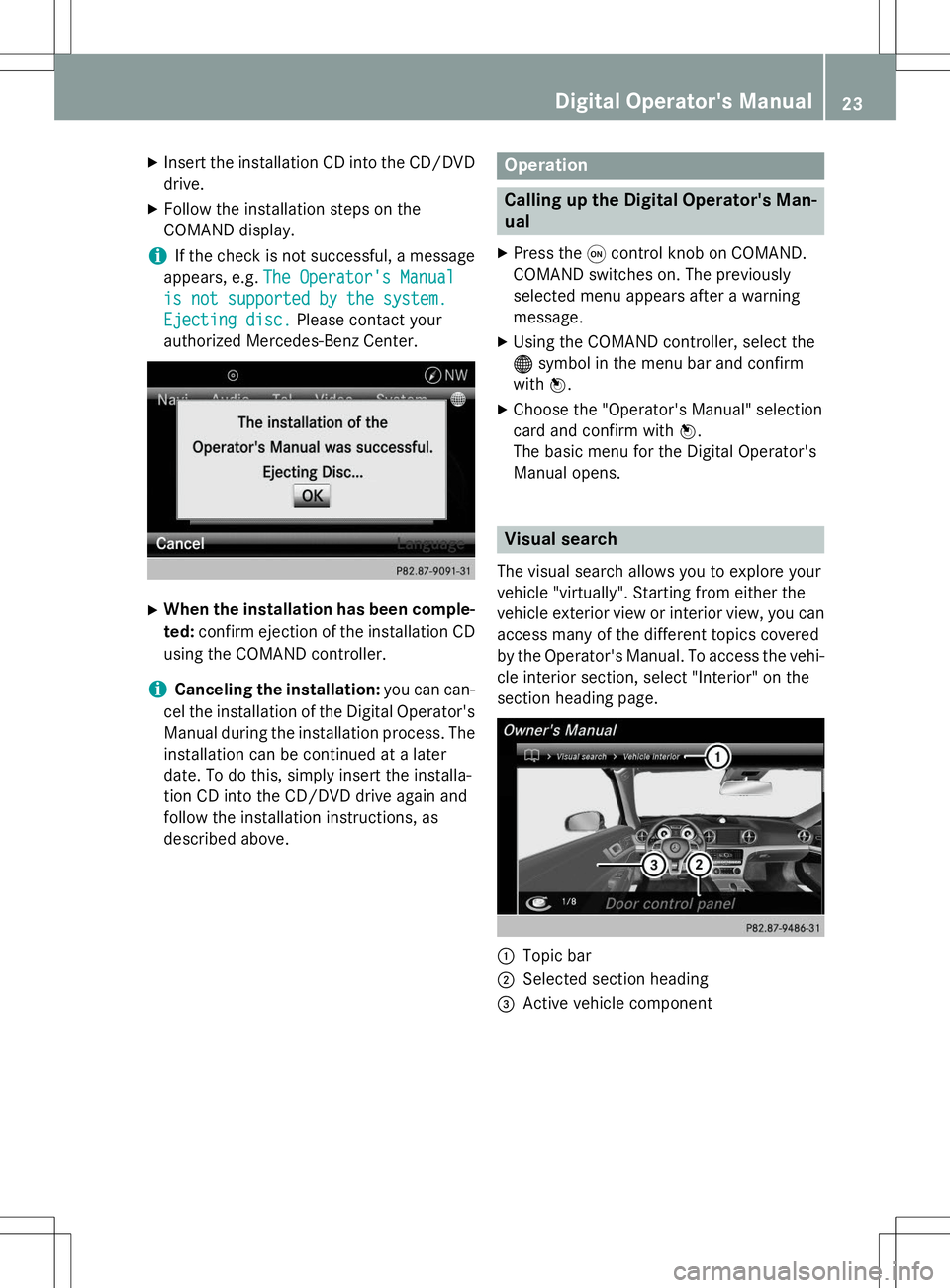
Visual search
The visual search allows you to explore your
vehicle "virtually". Starting from either the
vehicle exterior view or interior view, you can
access many of the different topics covered
by the Operator's Manual. To access the vehi- cle interior section, select "Interior" on the
section heading page.
:Topic bar
;Selected section heading
=Active vehicle component
Digital Operator's Manual23
Page 27 of 274
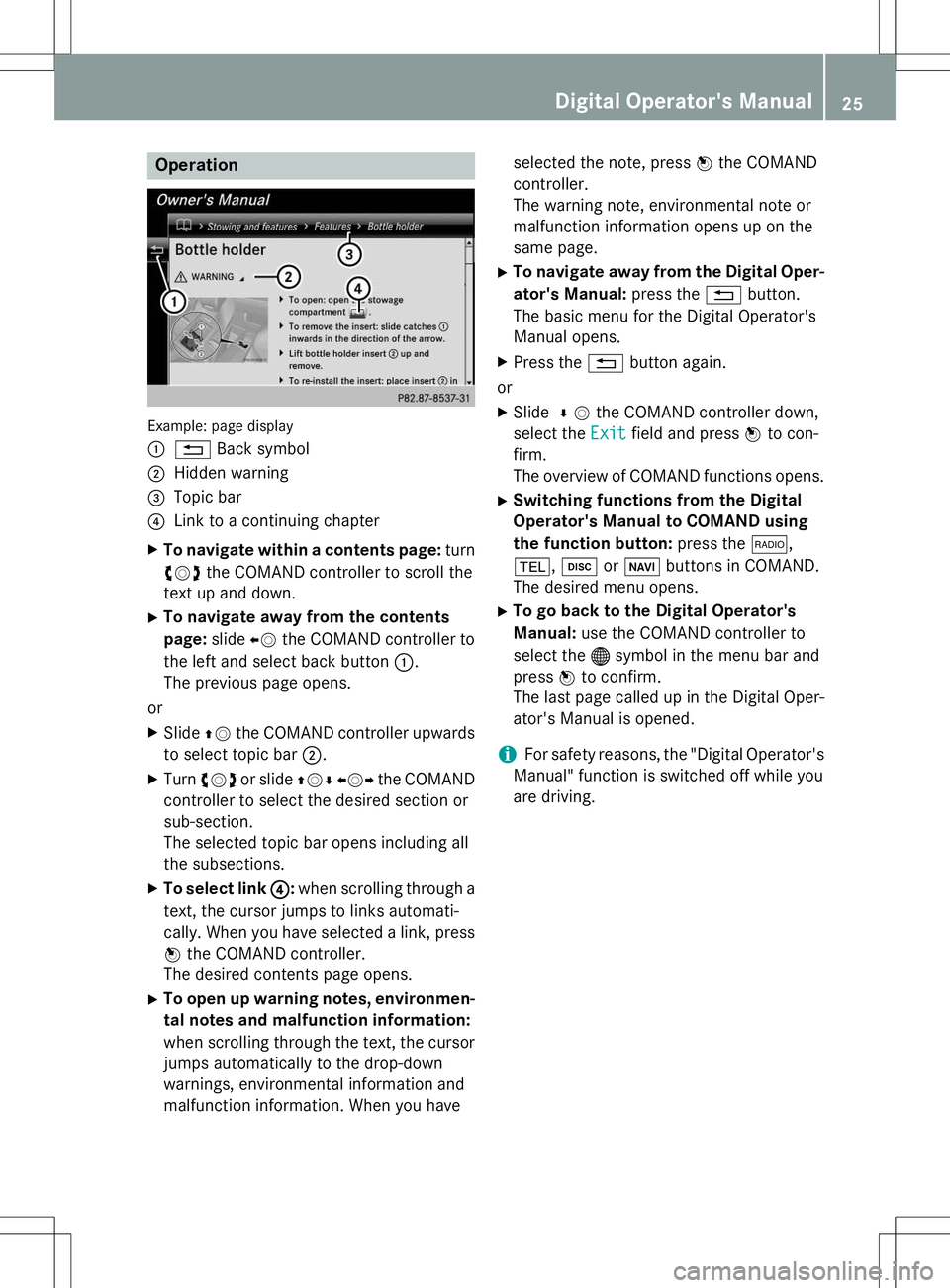
Operation
Example: page display :
%Back symbol
;Hidden warning
=Topic bar
?Link to a continuing chapter
X To navigate within a contents page: turn
cVd the COMAND controller to scroll the
text up and down.
X To navigate away from the contents page: slideXVthe COMAND controller to
the left and select back button :.
The previous page opens.
or X Slide ZVthe COMAND controller upwards
to select topic bar ;.
X Turn cVd or slide ZVÆXVY the COMAND
controller to select the desired section or
sub-section.
The selected topic bar opens including all
the subsections.
X To select link ?
:when scrolling through a
text, the cursor jumps to links automati-
cally. When you have selected a link, press
W the COMAND controller.
The desired contents page opens.
X To open up warning notes, environmen-
tal notes and malfunction information:
when scrolling through the text, the cursor
jumps automatically to the drop-down
warnings, environmental information and
malfunction information. When you have selected the note, press
Wthe COMAND
controller.
The warning note, environmental note or
malfunction information opens up on the
same page.
X To navigate away from the Digital Oper-
ator's Manual: press the%button.
The basic menu for the Digital Operator's
Manual opens.
X Press the %button again.
or
X Slide ¬V the COMAND controller down,
select the
Exitfield and press Wto con-
firm.
The overview of COMAND functions opens.
X Switching functions from the Digital
Operator's Manual to COMAND using
the function button: press the$,
% ,h orØ buttons in COMAND.
The desired menu opens.
X To go back to the Digital Operator's
Manual: use the COMAND controller to
select the ®symbol in the menu bar and
press Wto confirm.
The last page called up in the Digital Oper-
ator's Manual is opened.
iFor safety reasons, the "Digital Operator's
Manual" function is switched off while you
are driving.
Digital Operator's Manual25
Page 29 of 274
You could jeopardize the operating safety of
your vehicle if you use parts, tires and wheelsas well as accessories relevant to safety
which have not been approved by Mercedes.
This could lead to malfunctions in safety-rel-
evant systems, e.g. the brake system. Use
only genuine Mercedes-Benz parts or parts of
equal quality. Only use tires, wheels and
accessories that have been specifically
approved for your vehicle.
Genuine Mercedes-Benz parts are subject to
strict quality control. Every part has been spe- cifically developed, manufactured or selected
for and adapted to Mercedes-Benz vehicles.
Only genuine Mercedes-Benz parts should
therefore be used.
More than 300,000 different genuine
Mercedes-Benz parts are available for
Mercedes-Benz models.
All authorized Mercedes-Benz Centers main-
tain a supply of genuine Mercedes-Benz parts for necessary service and repair work. In addi-
tion, strategically located parts delivery cen-
ters provide quick and reliable parts service.
Always specify the vehicle identification num- ber (VIN) when ordering genuine Mercedes-
Benz parts ( Ypage 258).
Operator's Manual
Vehicle equipment
This Operator's Manual describes all models
and all standard and optional equipment of
your vehicle available at the time of going to
print. Country-specific differences are possi-
ble. Bear in mind that your vehicle may not
feature all functions described here. This also
applies to safety-relevant systems and func-
tions. The equipment in your vehicle may
therefore differ from that shown in the
descriptions and illustrations.
The original purchase agreement lists all sys-tems installed in your vehicle.
Should you have any questions concerning
equipment and operation, please consult an
authorized Mercedes-Benz Center. The Operator's Manual and the Maintenance
Booklet are important documents and should
be kept in the vehicle.
Operating safety
Important safety notes
GWARNING
If you do not have the prescribed service/
maintenance work or any required repairs
carried out, this can result in malfunctions or
system failures. There is a risk of an accident.
Always have the prescribed service/mainte-
nance work as well as any required repairs
carried out at a qualified specialist workshop.
GWARNING
Flammable material such as leaves, grass or
twigs may ignite if they come into contact with hot parts of the exhaust system. There is a risk of fire.
When driving off road or on unpaved roads,
check the vehicle's underside regularly. In
particular, remove parts of plants or other
flammable materials which have become
trapped. In the case of damage, contact a
qualified specialist workshop.
GWARNING
Modifications to electronic components, their software as well as wiring can impair their
function and/or the function of other net-
worked components. In particular, systems
relevant to safety could also be affected. As a
result, these may no longer function as inten-
ded and/or jeopardize the operating safety of
the vehicle. There is an increased risk of an
accident and injury.
Never tamper with the wiring as well as elec-
tronic components or their software. You
should have all work to electrical and elec-
tronic equipment carried out at a qualified
specialist workshop.
Introduction27
Z
Page 30 of 274
If you make any changes to the vehicle elec-
tronics, the general operating permit is ren-
dered invalid.
!There is a risk of damage to the vehicle if:
R the vehicle becomes stuck, e.g. on a high
curb or an unpaved road
R you drive too fast over an obstacle, e.g. a
curb or a hole in the road
R a heavy object strikes the undercarriage
or parts of the chassis
In situations like this, the body, the under-
carriage, chassis parts, wheels or tires
could be damaged without the damage
being visible. Components damaged in this way can unexpectedly fail or, in the case of
an accident, no longer withstand the strain
they are designed to.
If the underbody paneling is damaged,
combustible materials such as leaves,
grass or twigs can gather between the
underbody and the underbody paneling. If
these materials come in contact with hot
parts of the exhaust system, they can catch fire.
In such situations, have the vehicle
checked and repaired immediately at a
qualified specialist workshop. If on con-
tinuing your journey you notice that driving
safety is impaired, pull over and stop the
vehicle immediately, paying attention to
road and traffic conditions. In such cases,
consult a qualified specialist workshop.
Declarations of conformity
Vehicle components which receive
and/or transmit radio waves
USA: "The wireless devices of this vehicle
comply with Part 15 of the FCC Rules. Oper-
ation is subject to the following two condi-
tions: 1) These devices may not cause harm-
ful interference, and 2) These devices must
accept any interference received, including
interference that may cause undesired oper-
ation. Changes or modifications not expressly approved by the party responsible for com-
pliance could void the user’s authority to
operate the equipment." Canada:
"The wireless devices of this vehicle
comply with Industry Canada license-exempt
RSS standard(s). Operation is subject to the
following two conditions: (1) These devices
may not cause interference, and (2) These
devices must accept any interference, includ- ing interference that may cause undesired
operation of the device."
Qualified specialist workshop
An authorized Mercedes-Benz Center is a
qualified specialist workshop. It has the nec-
essary specialist knowledge, tools and quali-
fications to correctly carry out the work
required on your vehicle. This is especially the
case for work relevant to safety.
Observe the notes in the Maintenance Book- let.
Always have the following work carried out at an authorized Mercedes-Benz Center:
R work relevant to safety
R service and maintenance work
R repair work
R alterations, installation work and modifica-
tions
R work on electronic components
Correct use
If you remove any warning stickers, you or
others could fail to recognize certain dangers.
Leave warning stickers in position.
Observe the following information when driv- ing your vehicle: R the safety notes in this manual
R the technical data section in this manual
R traffic rules and regulations
R laws and safety standards pertaining to
motor vehicles
28Introduction
Page 32 of 274
To read data recorded by an EDR, special
equipment is required, and access to the vehi-
cle or the EDR is needed. In addition to the
vehicle manufacturer, other parties that have the special equipment, such as law enforce-
ment, can read the information by accessing
the vehicle or the EDR.
EDR data may be used in civil and criminal
matters as a tool in accident reconstruction,
accident claims, and vehicle safety. Since theCrash Data Retrieval CDR tool that is used to
extract data from the EDR is commercially
available, Mercedes-Benz USA, LLC
("MBUSA") expressly disclaims any and all lia- bility arising from the extraction of this infor-
mation by unauthorized Mercedes-Benz per-
sonnel.
MBUSA will not share EDR data with others
without the consent of the vehicle owners or,
if the vehicle is leased, without the consent of
the lessee. Exceptions to this representation
include responses to subpoenas by law
enforcement; by federal, state or local gov-
ernment; in connection with or arising out of
litigation involving MBUSA or its subsidiaries
and affiliates; or, as required by law.
Warning: The EDR is a component of the Sup- plemental Restraint System ("SRS") Module.
Tampering with, altering, modifying or remov-
ing the EDR component may result in a mal-
function of the SRS Module and other sys-tems.
State laws or regulations regarding EDRs that conflict with federal regulation are pre-emp-
ted. This means that in the event of such con-
flict, the federal regulation governs. As of
February 2013, 13 states have enacted laws
relating to EDRs.
30Introduction
Page 34 of 274
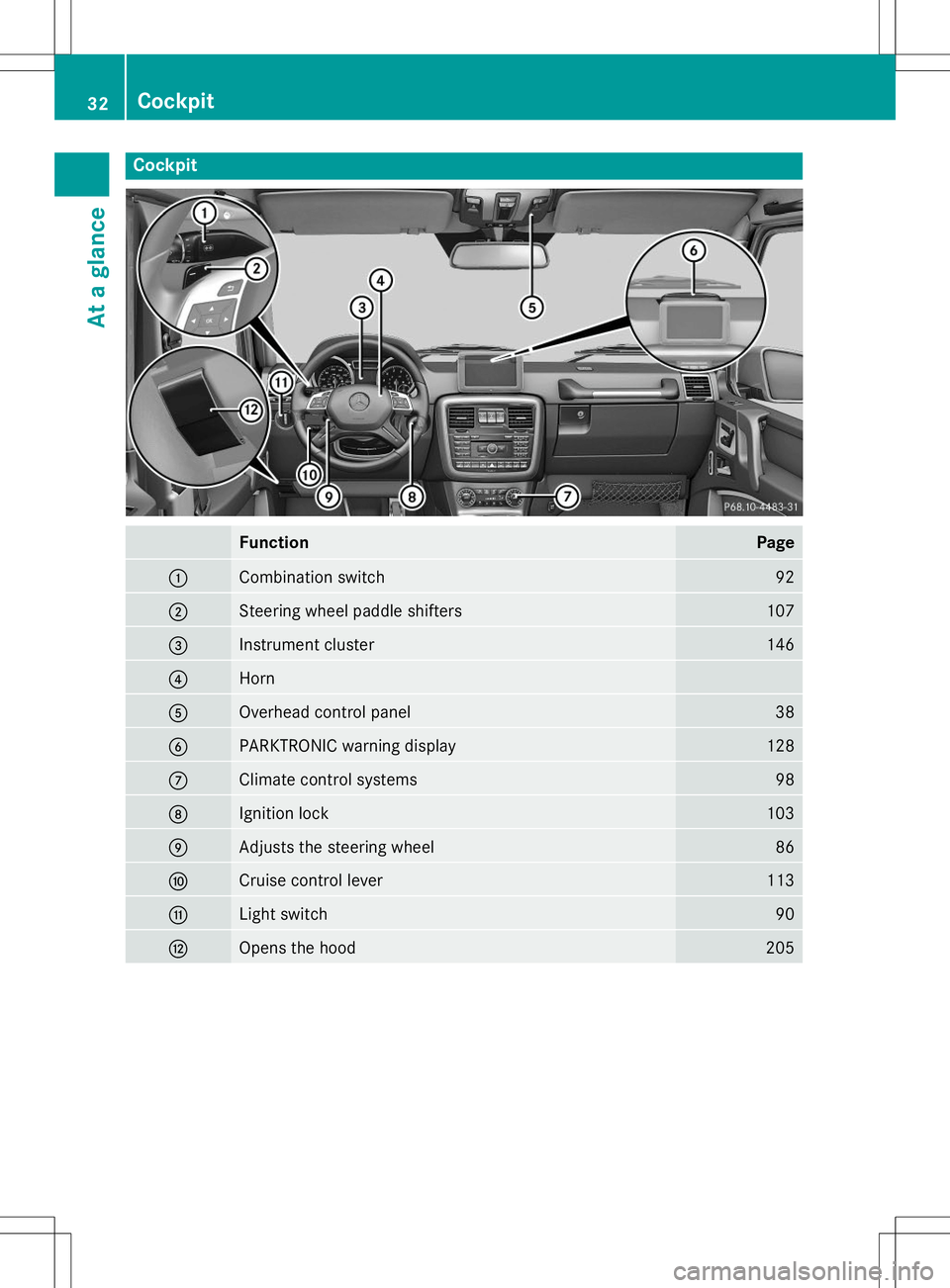
Cockpit
FunctionPage
:Combination switch92
;Steering wheel paddle shifters107
=Instrument cluster146
?Horn
AOverhead control panel38
BPARKTRONIC warning display128
CClimate control systems98
DIgnition lock103
EAdjusts the steering wheel86
FCruise control lever113
GLight switch90
HOpens the hood205
32Cockpit
At a glance