check engine MERCEDES-BENZ G-CLASS SUV 2016 Owner's Manual
[x] Cancel search | Manufacturer: MERCEDES-BENZ, Model Year: 2016, Model line: G-CLASS SUV, Model: MERCEDES-BENZ G-CLASS SUV 2016Pages: 261, PDF Size: 6.01 MB
Page 132 of 261
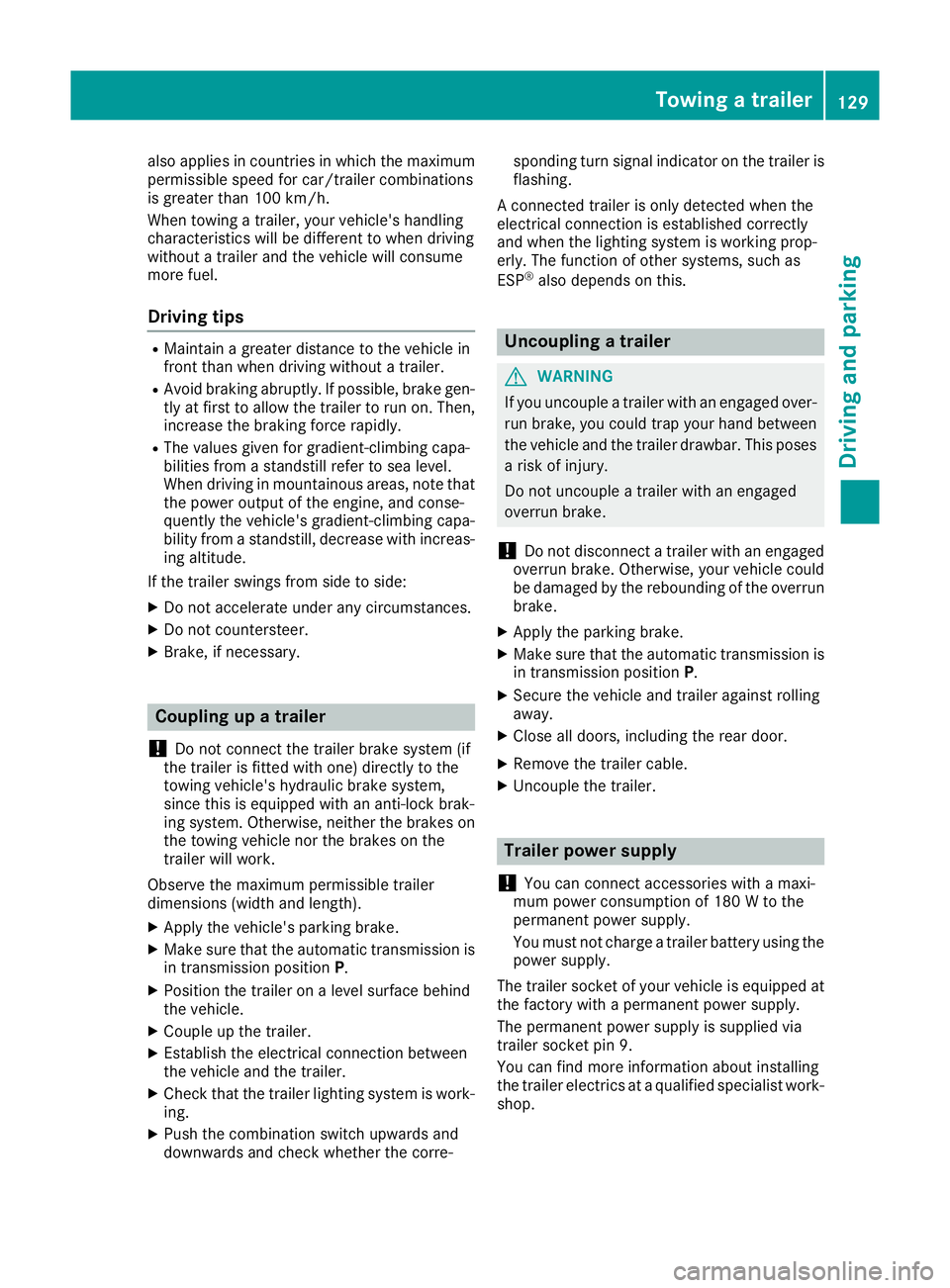
also applies in countries in whic
hthe maximum
permissible spee dfor car/trailer combinations
is greate rtha n1 00 km/h.
When towing atrailer, your vehicle's handling
characteristics will be differen ttowhen driving
without atrailer and th evehicle will consume
mor efuel.
Driving tips R
Maintain agreater distance to the vehicle in
front than when driving without atrailer.
R Avoid braking abruptly. If possible, brake gen-
tly at first to allow the trailer to run on. Then,
increase the braking force rapidly.
R The values given for gradient-climbing capa-
bilities from astandstill refer to sea level.
When driving in mountainous areas, note that
the power output of the engine, and conse-
quently the vehicle's gradient-climbing capa-
bility from astandstill, decrease with increas-
ing altitude.
If the trailer swings from side to side:
X Do not accelerate under any circumstances.
X Do not countersteer.
X Brake, if necessary. Coupling up
atrailer
! Do no
tconnect th etrailer brak esystem (if
th et railer is fitte dwitho ne)d irectly to the
towing vehicle's hydraulic brak esystem,
since this is equipped wit hananti-lock brak-
ing system. Otherwise, neither th ebrakes on
th et ow ing vehicle no rthe brakes on the
trailer will work.
Observ ethe maximum permissible trailer
dimension s(widt hand length).
X Apply th evehicle's parking brake.
X Mak esure that th eautomatic transmission is
in transmission position P.
X Positio nthe trailer on aleve lsurface behind
th ev ehicle.
X Couple up th etrailer.
X Establish th eelectrical connection between
th ev ehicle and th etrailer.
X Chec kthatthe trailer lighting system is work-
ing.
X Push th ecombinatio nswitch upward sand
downwards and check whether th ecorre- sponding tur
nsignal indicator on the trailer is
flashing.
Ac onnected trailer is only detected when the
electrical connection is established correctly
and when the lighting system is working prop-
erly. The function of other systems, such as
ESP ®
also depends on this. Uncoupling
atrailer G
WARNING
If you uncouple atrailer with an engaged over-
run brake, you coul dtrap yourh and between
the vehicl eand the trailer drawbar. This poses
ar isk of injury.
Do not uncouple atrailer with an engaged
overru nbrake.
! Do not disconnect
atrailer with an engaged
overru nbrake. Otherwise, yourv ehiclecould
be damaged by the rebounding of the overrun brake.
X Apply the parking brake.
X Make sure that the automatic transmission is
in transmission position P.
X Secure the vehicl eand trailer against rolling
away.
X Close all doors, including the rear door.
X Remove the trailer cable.
X Uncoupl ethe trailer. Traile
rpower supply
! Yo
uc an connect accessories with amaxi-
mu mp ower consumption of 180 Wtothe
permanent powe rsupply.
Yo um ustn ot charge atrailer battery using the
powe rsupply.
The trailer socket of your vehicl eisequippe dat
the factory with apermanent powe rsupply.
The permanent powe rsuppl yiss upplie dvia
trailer socket pi n9.
Yo uc an find mor einformatio nabout installing
the trailer electrics at aquali fied specialis twork-
shop. Towin
gatrailer
129Driving an dparking Z
Page 134 of 261

Important safety notes
G
WARNING
Operating th eintegrated information systems
and communications equipment in the vehicle
while driving willd istract you from traffic con-
ditions. You coul dthen lose control of the
vehicle. There is arisk of an accident.
Only operate these devices if road traffic con-
ditions permit. If you are unsure about the
surrounding conditions, pullo ver toasafe
location and make entries only while the vehi-
cle is stationary.
You must observe the lega lrequirements for the
country in which you are currently driving when operating the on-board computer. G
WARNING
If the instrument cluster has failed or mal-
functioned, you may not recognise function
restrictions relevant to safety .The operating
safety of yourv ehiclemay be impaired .There
is ar isk of an accident.
Drive on carefully.H ave the vehiclechecked
at aq ualified specialist worksho pimmedi-
ately.
If the operating safety of yourv ehicleis
impaired ,park the vehicl esafel yass oon as pos-
sible. Contact aqualified specialist workshop.
! If
ab lackout lighting setting has been selec-
ted, the instrument cluster lighting is
switched off.
The instrument cluster and the display do not show any information.
The on-board computer show sonly display mes-
sage sorw arnings from certain systems on the
multifunction display.Y ou should therefore
make sure yourv ehicleiso perating safel yatall
times.
For an overview, see the instrument cluster illus-
tration (Y page26). Displays and operation
Instrument cluste
rlighting
The brightness control knob is locate donthe
botto mleftoft heinstrumen tcluster
(Y page 26).
X Turn th ebrightness control knob clockwise or
anti-clockwise.
i The ligh
tsensor on th einstrumen tcluster
automatically control sthe brightness of the
multifunction display.
In daylight, th edisplays in th einstrument
cluste rare no tlit. Re
vc ounter
! Do not drive in the overrevving range. Doing
so will damag ethe engine.
The red band in the rev counter indicates the
engine's overrevving range.
The fue lsuppl yisi nterrupted to protect the
engine when the red band is reached. Outside temperature display
You should pay specia lattention to road condi-
tion swhen temperatures are around freezing
point.
Bear in mind that the outside temperature dis-
play indicates the measured air temperature
and not the road surface temperature.
The outside temperature display is in the multi-
function display (Y page 133).
Changes in the outside temperature are dis-
played after ashort delay. Coolant temperatur
edisplay G
WARNING
If yo uopen the bonnet while the engine is
overheating or while there is afire in the
engine compartment, you coul dcome into
contact with hot gase sorother leaking ser-
vice products. There is adange rofinjury.
Allow an overheating engine to cool down
before opening the bonnet. If there is afire in Displays and operation
131On-boardcomputer and displays
Z
Page 140 of 261
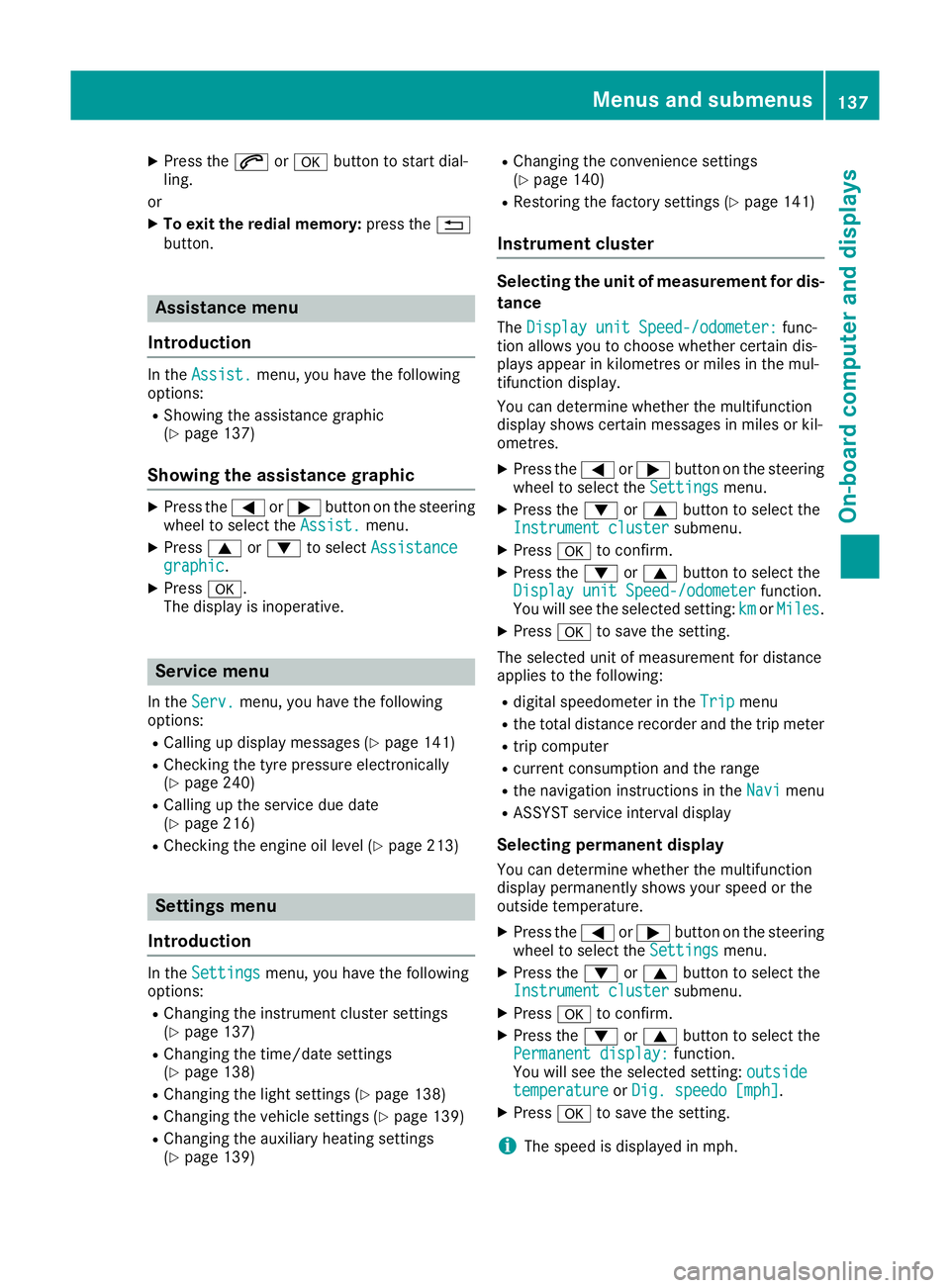
X
Press the 6ora button to start dial-
ling.
or X To exit the redial memory: press the%
button. Assistance menu
Introduction In the
Assist.
Assist. menu, you have the following
options:
R Showin gthe assistance graphic
(Y page 137)
Showing the assistanc egraphic X
Press the =or; button on the steering
wheel to select the Assist.
Assist. menu.
X Press 9or: to select Assistance
Assistance
graphic
graphic.
X Press a.
The displa yisinoperative. Service menu
In the Serv.
Serv. menu, you have the following
options:
R Calling up display messages (Y page 141)
R Checking the tyre pressure electronically
(Y page 240)
R Calling up the service due date
(Y page 216)
R Checking the engine oil level (Y page 213)Settings menu
Introduction In the
Settings
Settings menu, you have the following
options:
R Changing the instrument cluster settings
(Y page 137)
R Changing the time/date settings
(Y page 138)
R Changing the light settings (Y page 138)
R Changing the vehicle settings (Y page 139)
R Changing the auxiliary heating settings
(Y page 139) R
Changing the convenience settings
(Y pag e140)
R Restorin gthe factory settings (Y page 141)
Instrumen tcluster Selecting the uni
tofmeasurement for dis-
tance
The Display unit Speed-/odometer: Display unit Speed-/odometer: func-
tion allowsy ou to choose whether certain dis-
playsa ppear in kilometres or miles in the mul-
tifunction display.
You can determine whether the multifunction
display shows certain messages in miles or kil-
ometres.
X Press the =or; button on the steering
wheel to select the Settings Settingsmenu.
X Press the :or9 button to select the
Instrument cluster
Instrument cluster submenu.
X Press ato confirm.
X Press the :or9 button to select the
Display unit Speed-/odometer
Display unit Speed-/odometer function.
You will see the selected setting: km
kmorMiles
Miles.
X Press ato save the setting.
The selected unit of measurement for distance
applies to the following:
R digital speedometer in the Trip Tripmenu
R the total distance recorder and the trip meter
R trip computer
R current consumption and the range
R the navigation instruction sintheNavi
Navi menu
R ASSYST service interval display
Selecting permanent display You can determine whether the multifunction
displayp ermanently shows your speed or the
outside temperature.
X Press the =or; button on the steering
wheel to select the Settings
Settingsmenu.
X Press the :or9 button to select the
Instrument cluster
Instrument cluster submenu.
X Press ato confirm.
X Press the :or9 button to select the
Permanent display:
Permanent display: function.
You will see the selected setting: outside
outside
temperature
temperature orDig. speedo [mph]
Dig. speedo [mph].
X Press ato save the setting.
i The speed is displayed in mph. Menus and submenus
137On-boardcomputer and displays Z
Page 149 of 261
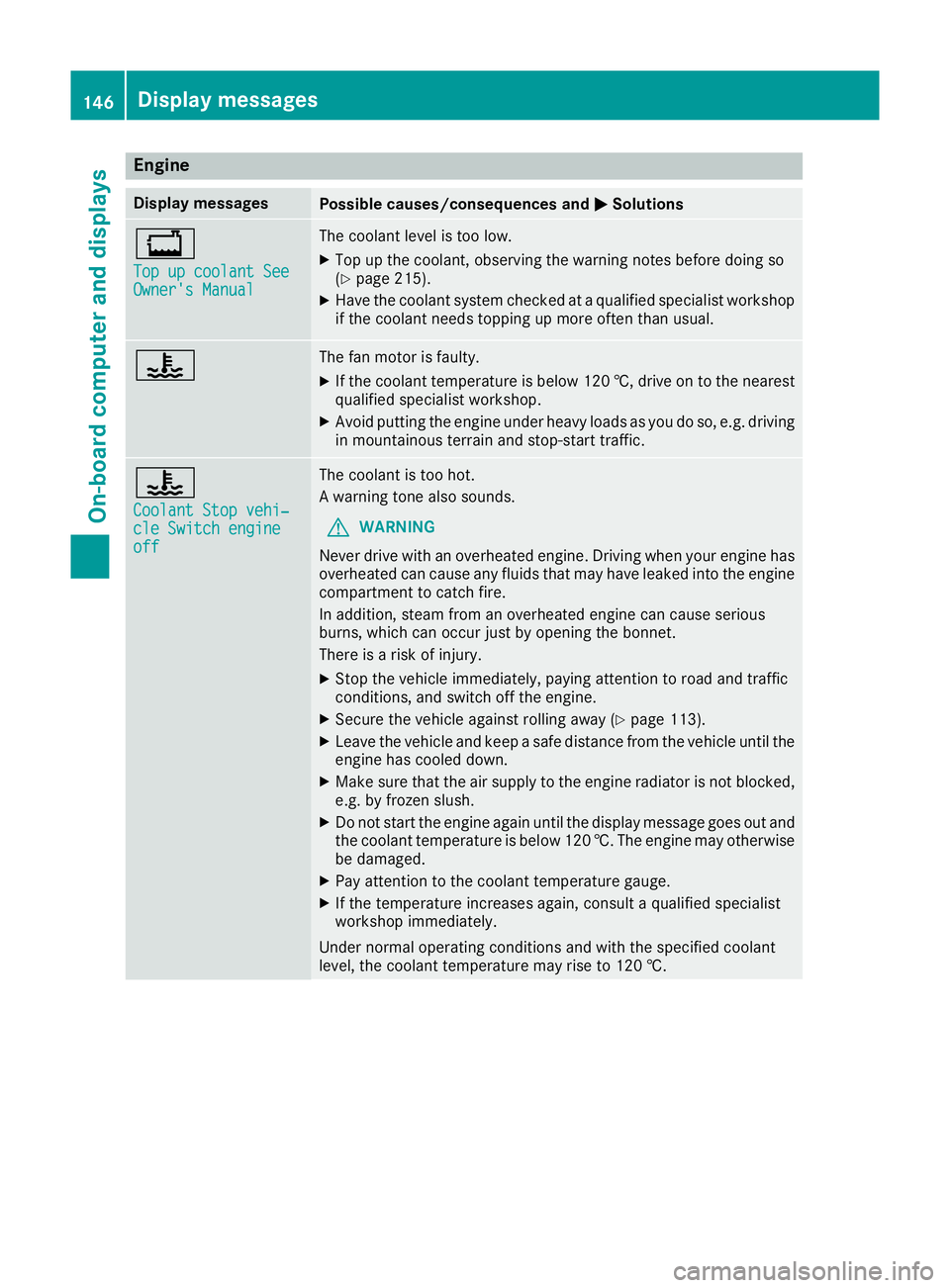
Engine
Display messages
Possible causes/consequences and
M
MSolutions +
Top up coolan
tSee
Top up coolant See
Owner's Manual Owner's Manual The coolant level is too low.
X Top up the coolant, observing the warning notes before doing so
(Y page 215).
X Have the coolant system checked at aqualified specialist workshop
if the coolant needs topping up more often than usual. ? The fan motor is faulty.
X If the coolant temperature is below 120 †, drive on to the nearest
qualified specialist workshop.
X Avoid putting the engine under heavy loads as you do so, e.g. driving
in mountainous terrain and stop-start traffic. ?
Coolant Stop vehi‐ Coolant Stop vehi‐
cle Switch engine cle Switch engine
off off The coolant is too hot.
Aw
arning tonea lso sounds.
G WARNING
Never drive with an overheated engine. Drivin gwhen your engine has
overheated can cause any fluids that may have leaked into the engine compartment to catchf ire.
In addition, steam from an overheated engine can cause serious
burns, which can occur just by opening the bonnet.
There is arisk of injury.
X Stop the vehicle immediately, paying attention to road and traffic
conditions, and switch off the engine.
X Secure the vehicle against rolling away (Y page 113).
X Leave the vehicle and keep asafe distance from the vehicle until the
engine has cooled down.
X Make sure that the air supply to the engine radiator is not blocked,
e.g. by frozen slush.
X Do not start the engine again until the display message goes out and
the coolant temperature is below 120 †. The engine may otherwisebe damaged.
X Pay attention to the coolant temperature gauge.
X If the temperature increases again, consult aqualified specialist
workshop immediately.
Under normal operating conditions and with the specified coolant
level, the coolant temperature may rise to 120 †. 146
Display messagesOn-board computer and displays
Page 150 of 261
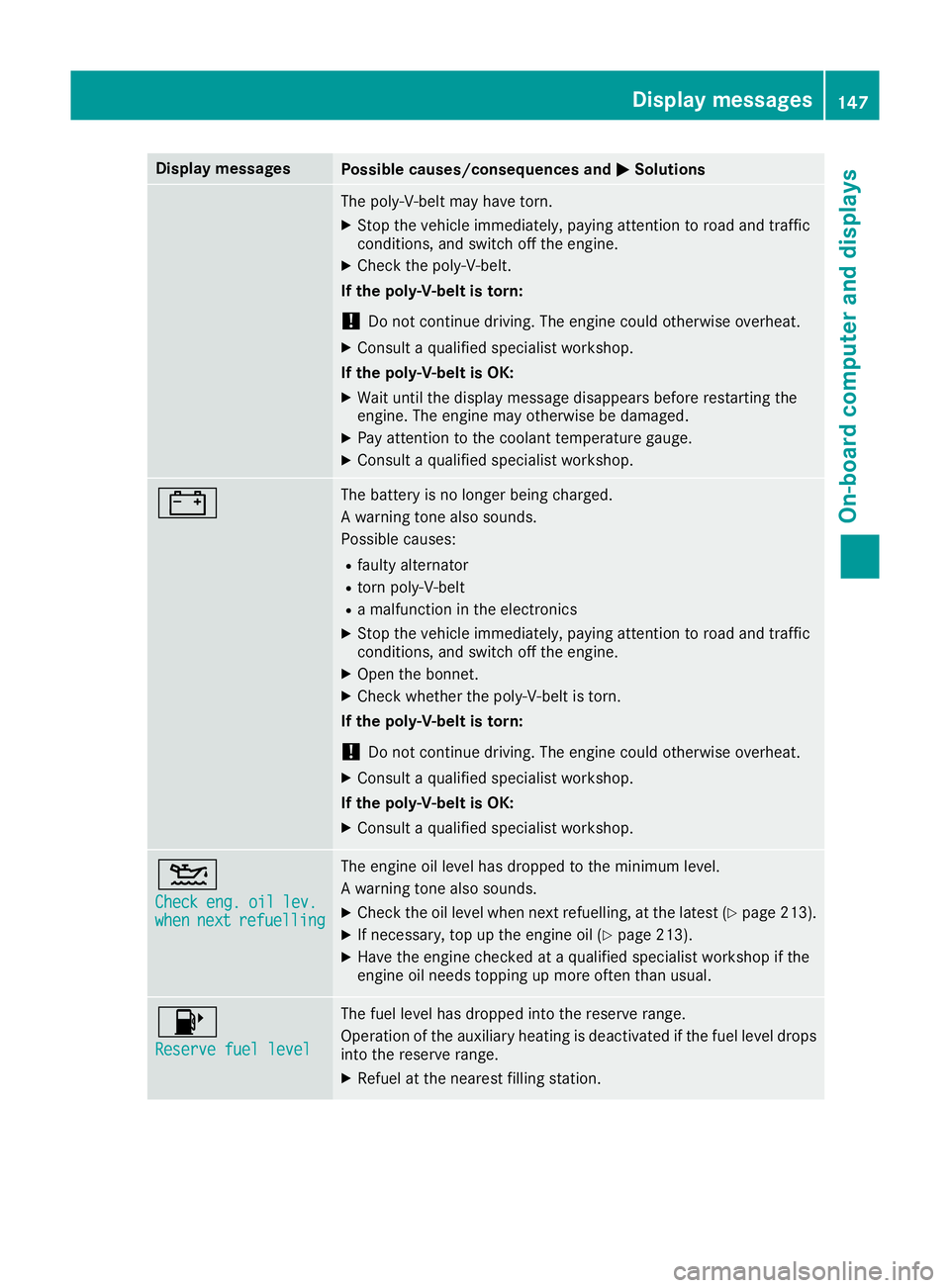
Display messages
Possible causes/consequence
sand M
MSolutions The poly-V-belt may have torn.
X Stop the vehicle immediately, paying attention to road and traffic
conditions, and switch off the engine.
X Check the poly-V-belt.
If the poly-V-belt is torn:
! Do not continue driving. The engine could otherwise overheat.
X Consult aqualified specialist workshop.
If the poly-V-belt is OK:
X Wait until the display message disappears before restarting the
engine. The engine may otherwise be damaged.
X Pay attention to the coolant temperature gauge.
X Consult aqualified specialist workshop. # The battery is no longer being charged.
Aw
arning tonea lso sounds.
Possible causes:
R faulty alternator
R torn poly-V-belt
R am alfunction in the electronics
X Stop the vehicle immediately, paying attention to road and traffic
conditions, and switch off the engine.
X Open the bonnet.
X Check whether the poly-V-belt is torn.
If the poly-V-belt is torn:
! Do not continue driving. The engine could otherwise overheat.
X Consult aqualified specialist workshop.
If the poly-V-belt is OK: X Consult aqualified specialist workshop. 4
Check Check
eng.
eng.oil
oillev.
lev.
when
when next
nextrefuelling
refuelling The engine oil level has dropped to the minimum level.
Aw
arning tonea lso sounds.
X Check the oil level when next refuelling, at the latest (Y page 213).
X If necessary, top up the engine oil (Y page 213).
X Have the engine checked at aqualified specialist workshop if the
engine oil needs topping up more often than usual. 8
Reserve fuel level Reserve fuel level The fuel level has dropped into the reserve range.
Operation of the auxiliary heating is deactivated if the fuel level drops
into the reserve range.
X Refuel at the nearest filling station. Display me
ssages
147On-board compute rand displays Z
Page 151 of 261
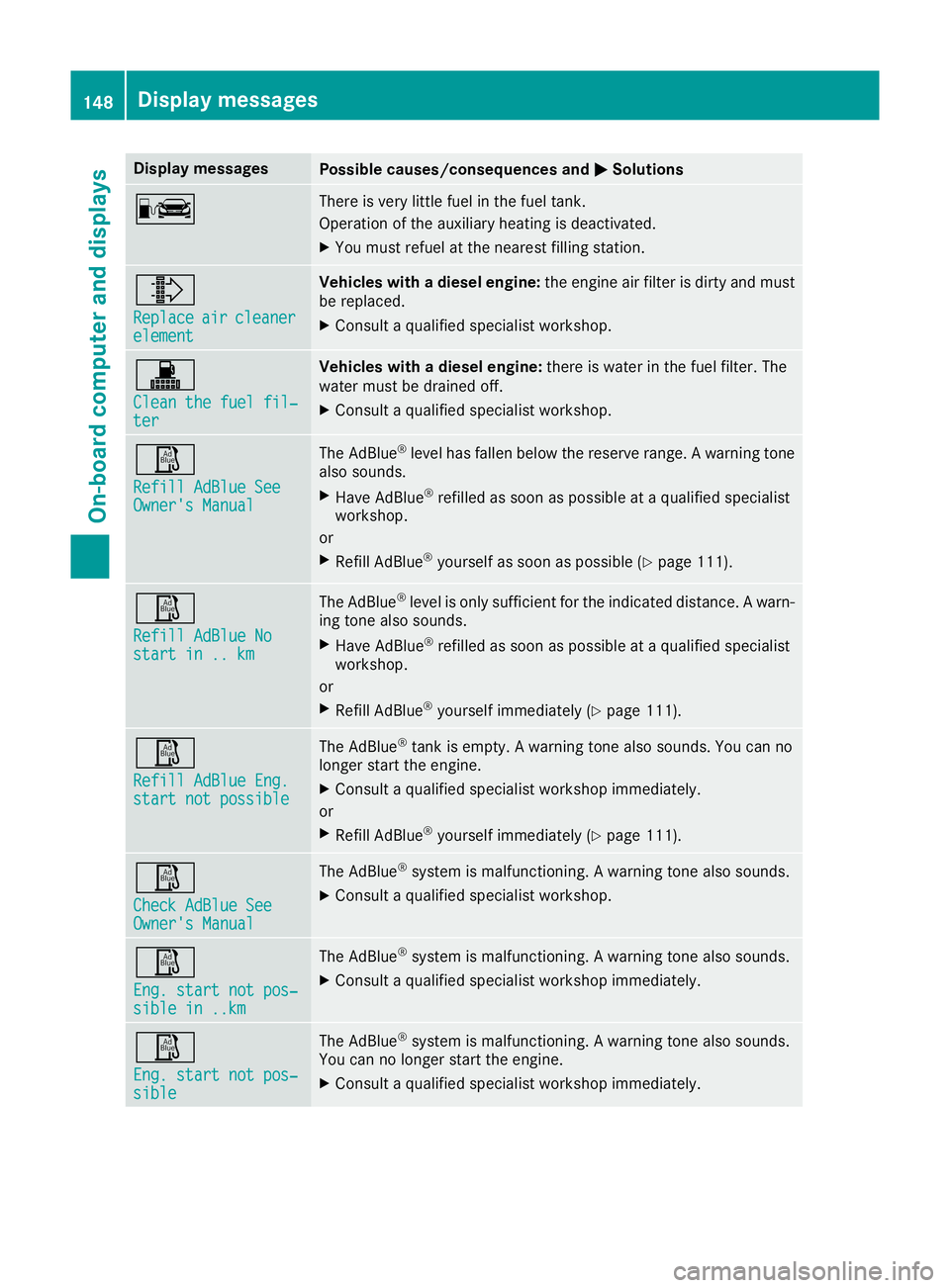
Display messages
Possible causes/consequence
sand M
MSolutions C There is very little fuel in the fuel tank.
Operation of the auxiliary heating is deactivated.
X You must refuel at the nearest filling station. ¸
Replace Replace
air
aircleaner
cleaner
element
element Veh
icleswithad ieselengine: the engine ai rfilter is dirty and must
be replaced.
X Consult aquali fied specialist workshop. !
Clean the fue
lfil‐
Clean the fuel fil‐
ter ter Veh
icleswithad ieselengine: there is water in the fue lfilter. The
water mus tbed raine doff.
X Consult aquali fied specialist workshop. Ø
Refill AdBlue See Refill AdBlue See
Owner'
sManual
Owner's Manual The AdBlue
®
level has fallen below the reserve range. Awarning tone
also sounds.
X Have AdBlue ®
refilled as soon as possible at aqualified specialist
workshop.
or X Refill AdBlue ®
yourself as soon as possible (Y page 111).Ø
Refill AdBlue No Refill AdBlue No
start in .. km start in .. km The AdBlue
®
level is only sufficient for the indicated distance. Awarn-
ing tonea lso sounds.
X Have AdBlue ®
refilled as soon as possible at aqualified specialist
workshop.
or
X Refill AdBlue ®
yourself immediately (Y page 111).Ø
Refill AdBlue Eng. Refill AdBlue Eng.
start not possible start not possible The AdBlue
®
tank is empty. Awarning tonea lso sounds. You can no
longer start the engine.
X Consult aqualified specialist workshop immediately.
or X Refill AdBlue ®
yourself immediately (Y page 111).Ø
Check AdBlue See Check AdBlue See
Owner's Manual Owner's Manual The AdBlue
®
system is malfunctioning. Awarning tonea lso sounds.
X Consult aqualified specialist workshop. Ø
Eng. start not pos‐ Eng. start not pos‐
sible in ..km sible in ..km The AdBlue
®
system is malfunctioning. Awarning tonea lso sounds.
X Consult aqualified specialist workshop immediately. Ø
Eng. start not pos‐ Eng. start not pos‐
sible sible The AdBlue
®
system is malfunctioning. Awarning tonea lso sounds.
You can no longer start the engine.
X Consult aqualified specialist workshop immediately. 148
Display messagesOn-board computer and displays
Page 152 of 261
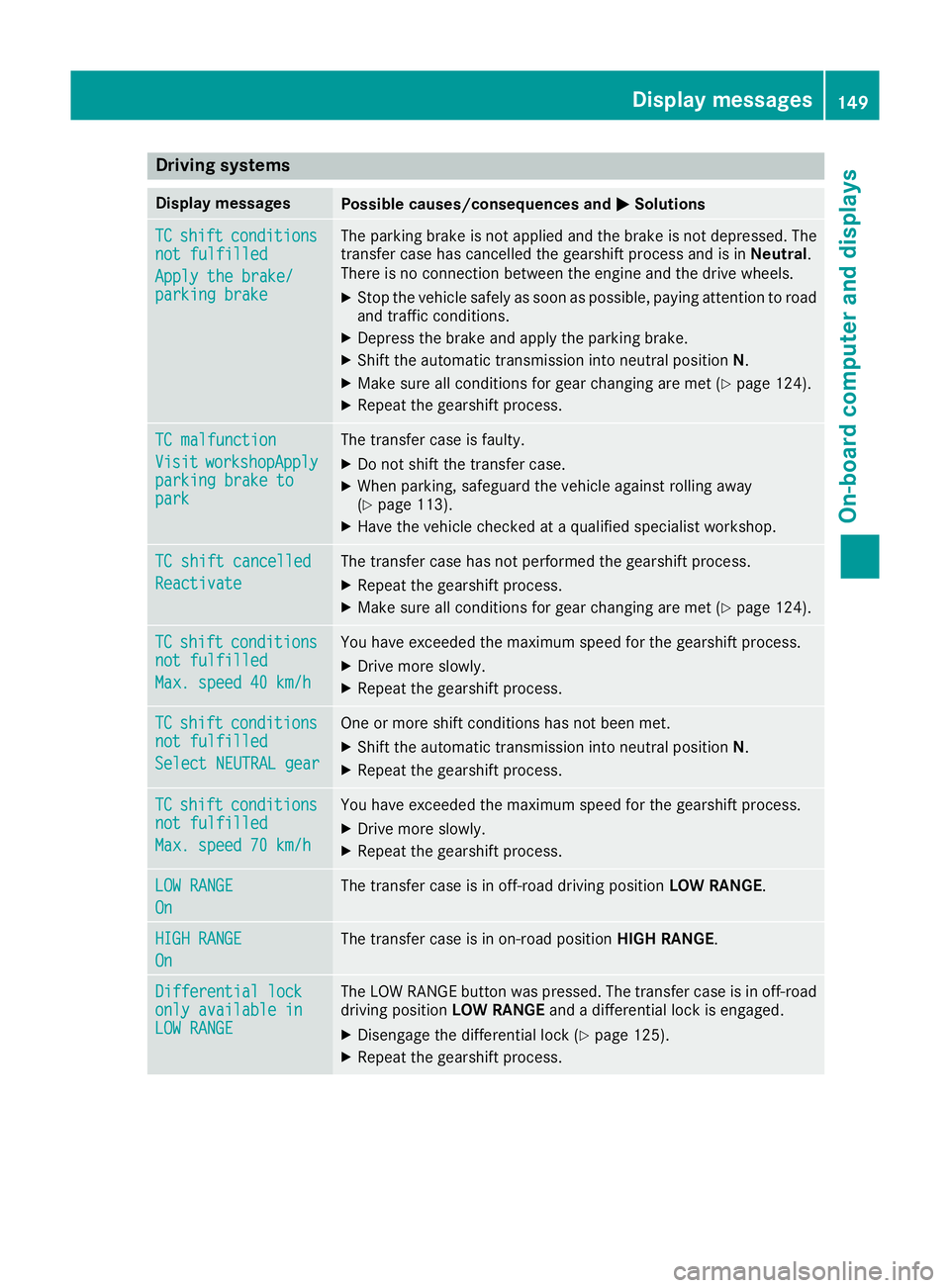
Drivin
gsystems Display messages
Possible causes/consequences and
M
MSolutions TC
TC
shift
shift conditions
conditions
not fulfilled
not fulfilled
Apply the brake/ Apply the brake/
parkin gbrake
parking brake The parking brake is not applied and the brake is not depressed. The
transfer case has cancelled the gearshift process and is in Neutral.
There is no connection between the engine and the drive wheels.
X Stop the vehicle safely as soon as possible, paying attention to road
and traffic conditions.
X Depress the brake and apply the parking brake.
X Shift the automatic transmission into neutral position N.
X Make sure all conditions for gear changing are met (Y page 124).
X Repeat the gearshift process. TC malfunction TC malfunction
Visit Visit
workshopApply
workshopApply
parking brake to
parking brake to
park park The transfer case is faulty.
X Do not shift the transfer case.
X When parking, safeguard the vehicle against rolling away
(Y page 113).
X Have the vehicle checked at aqualified specialist workshop. TC shift cancelled
TC shift cancelled
Reactivate Reactivate The transfer case has not performed the gearshift process.
X
Repeat the gearshift process.
X Make sure all conditions for gear changing are met (Y page 124).TC TC
shift
shift conditions
conditions
not fulfilled
not fulfilled
Max. speed 40 km/h Max. speed 40 km/h You have exceeded the maximum speed for the gearshift process.
X Drive more slowly.
X Repeat the gearshift process. TC
TC
shift
shift conditions
conditions
not fulfilled
not fulfilled
Select NEUTRAL gear Select NEUTRAL gear One or more shift conditions has not been met.
X Shift the automatic transmissio ninto neutral position N.
X Repeatt he gearshift process. TC
TC
shift
shift conditions
conditions
not fulfilled
not fulfilled
Max. speed 70 km/h Max. speed 70 km/h You have exceeded the maximum spee
dfor the gearshift process.
X Drive more slowly.
X Repeat the gearshift process. LOW RANGE
LOW RANGE
On On The transfer case is in off-road driving position
LOW RANGE.HIGH RANGE
HIGH RANGE
On On The transfer case is in on-road position
HIGH RANGE.Differential lock
Differential lock
only availabl
ein
only available in
LOW RANGE LOW RANGE The LOW RANGE button was pressed. The transfer case is in off-road
driving position LOW RANGEandadifferential lock is engaged.
X Disengage the differential lock (Y page 125).
X Repeat the gearshift process. Display me
ssages
149On-board compute rand displays Z
Page 157 of 261
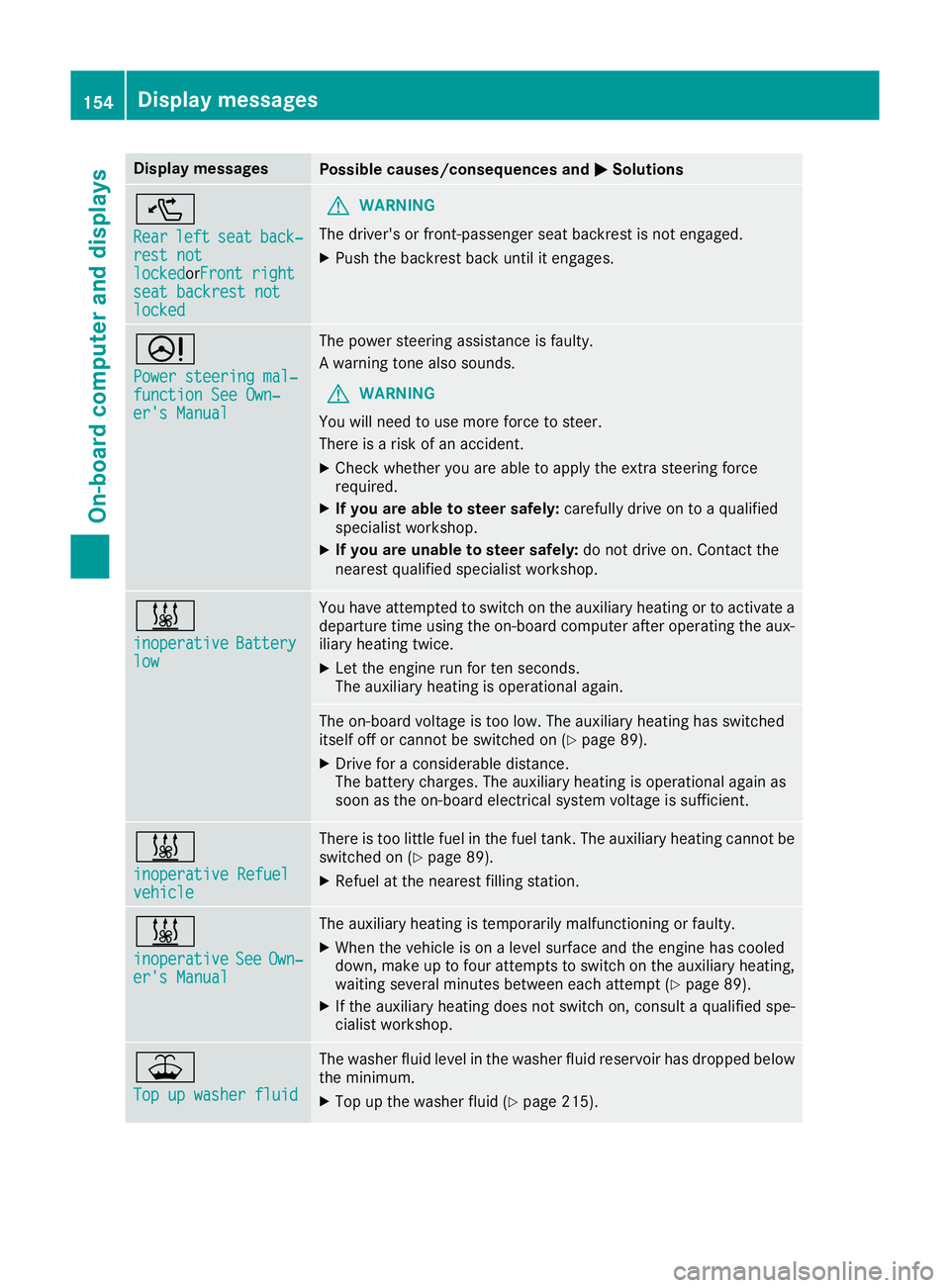
Display messages
Possible causes/consequence
sand M
MSolutions ^
Rear Rear
left
leftseat
seatback‐
back‐
rest not
rest not
locked lockedorFront right Front right
seat backrest not
seat backrest not
locked locked G
WARNING
The driver's or front-passenger seat backrest is not engaged.
X Push the backrest back until it engages. D
Power steering mal‐ Power steering mal‐
function See Own‐ function See Own‐
er's Manual er's Manual The power steering assistance is faulty.
Aw
arning tonea lso sounds.
G WARNING
You will need to use more force to steer.
There is arisk of an accident.
X Check whether you are able to apply the extras teeringforce
required.
X If you are able to steer safely: carefully drive on toaqualified
specialist workshop.
X If you are unable to steer safely: do not drive on. Contact the
nearest qualified specialist workshop. &
inoperative inoperative
Battery
Battery
low
low You have attempted to switch on the auxiliary heating or to activate a
departure time using the on-board computer after operating the aux-
iliary heating twice.
X Let the engine run for ten seconds.
The auxiliary heating is operational again. The on-board voltage is too low. The auxiliary heating has switched
itself off or cannot be switched on (Y page 89).
X Drive for aconsiderable distance.
The battery charges. The auxiliary heating is operational again as
soon as the on-board electrical system voltage is sufficient. &
inoperative Refuel inoperative Refuel
vehicle vehicle There is too little fuel in the fuel tank.T
he auxiliary heating cannot be
switched on (Y page 89).
X Refuel at the nearest filling station. &
inoperative inoperative
See
SeeOwn‐
Own‐
er's Manual
er's Manual The auxiliary heating is temporarily malfunctioning or faulty.
X When the vehicle is on alevel surface and the engine has cooled
down, make up to four attempt stoswitch on the auxiliary heating,
waiting several minutes between each attempt (Y page 89).
X If the auxiliary heating does not switch on, consult aqualified spe-
cialist workshop. ¥
Top up washer fluid Top up washer fluid The washer fluid level in the washer fluid reservoir has dropped below
the minimum.
X Top up the washer fluid (Y page 215).154
Display messagesOn-board computer and displays
Page 163 of 261
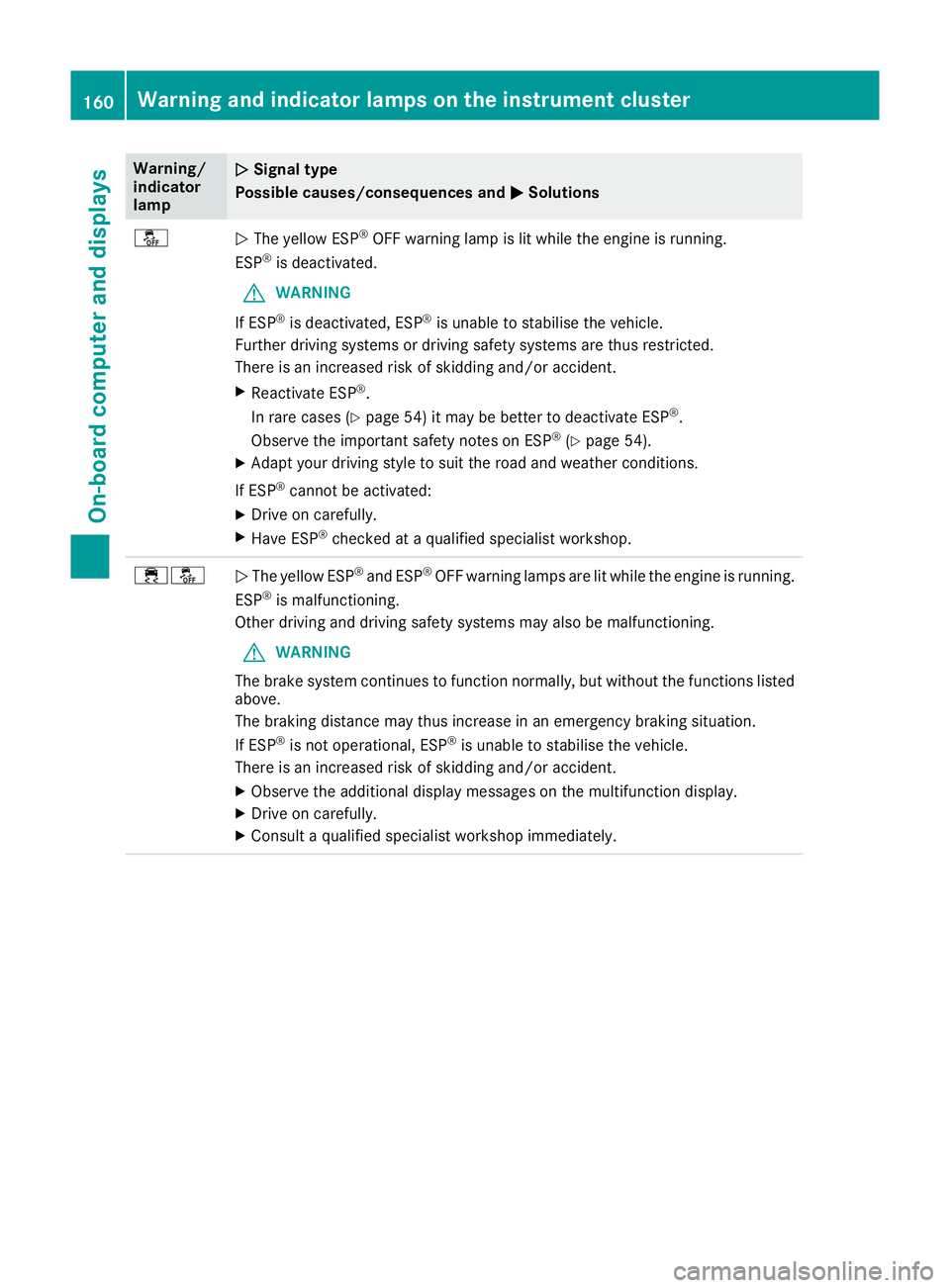
Warning/
indicator
lamp
N N
Signa ltype
Possible causes/consequences and M
MSolutions å
N
The yellow ESP ®
OFF warning lamp is lit while the engine is running.
ESP ®
is deactivated.
G WARNING
If ESP ®
is deactivated, ESP ®
is unable to stabilise the vehicle.
Further driving systems or driving safety systems are thus restricted.
There is an increased risk of skidding and/or accident.
X Reactivate ESP ®
.
In rare cases (Y page 54) it may be better to deactivate ESP ®
.
Observe the important safety notes on ESP ®
(Y page 54).
X Adapt your driving style to suit the road and weather conditions.
If ESP ®
cannot be activated:
X Drive on carefully.
X Have ESP ®
checked at aqualified specialist workshop. ֌
N
The yellow ESP ®
and ESP ®
OFF warning lamps are lit while the engine is running.
ESP ®
is malfunctioning.
Other driving and driving safety systems may also be malfunctioning.
G WARNING
The brake system continues to function normally, but without the functions listed above.
The braking distance may thus increase in an emergenc ybraking situation.
If ESP ®
is not operational, ESP ®
is unable to stabilise the vehicle.
There is an increased risk of skidding and/or accident.
X Observe the additional display messages on the multifunction display.
X Drive on carefully.
X Consult aqualified specialist workshop immediately. 160
Warning and indicator lamps on the instrument clusterOn-board computer and displays
Page 164 of 261
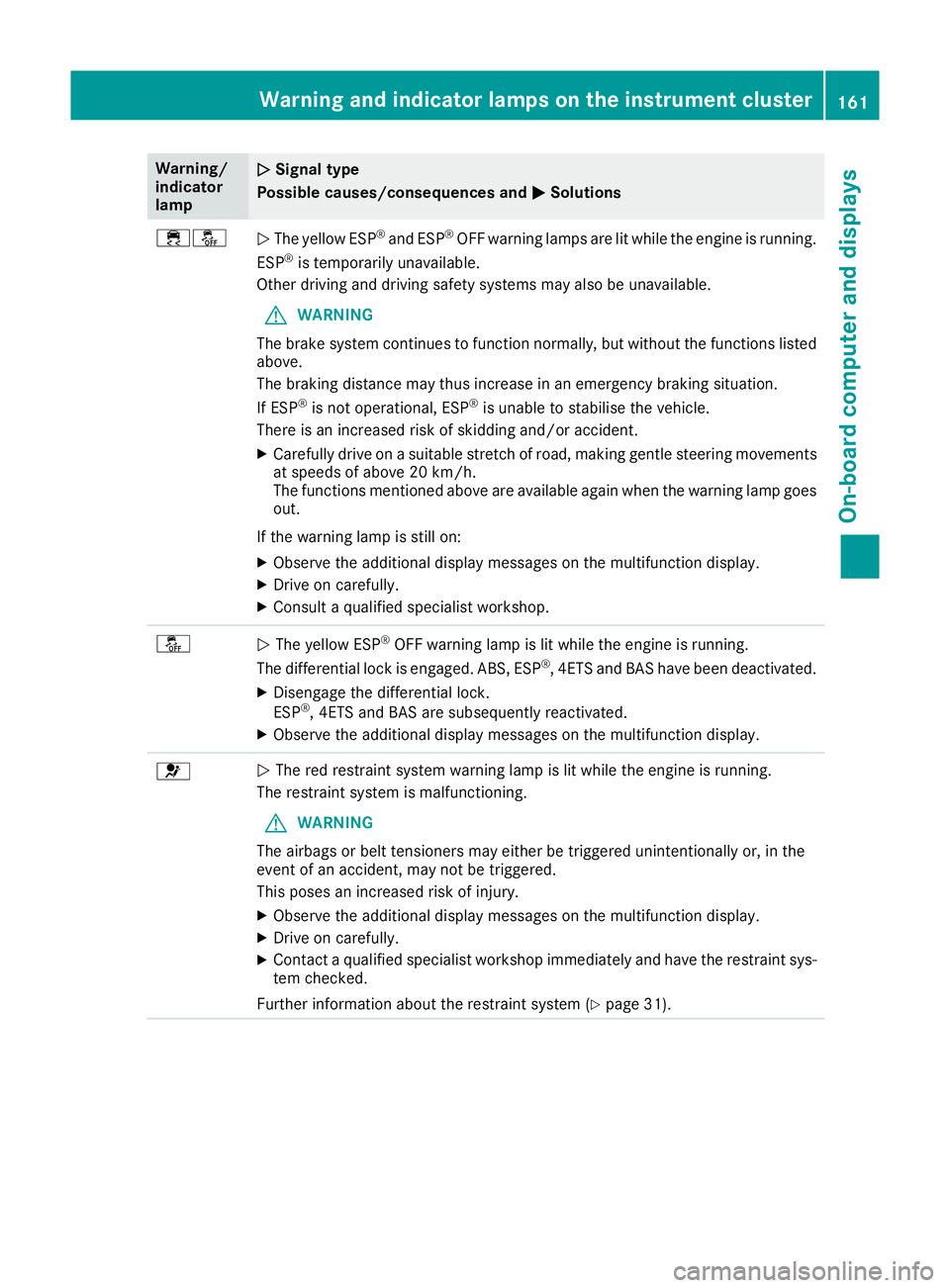
Warning/
indicator
lamp
N N
Signa ltype
Possible causes/consequences and M
MSolutions ֌
N
The yellow ESP ®
and ESP ®
OFF warning lamps are lit while the engine is running.
ESP ®
is temporarily unavailable.
Other driving and driving safety systems may also be unavailable.
G WARNING
The brake system continues to function normally, but without the functions listed above.
The braking distance may thus increase in an emergency braking situation.
If ESP ®
is not operational, ESP ®
is unable to stabilise the vehicle.
There is an increased risk of skidding and/or accident.
X Carefully drive on asuitable stretch of road, making gentle steerin gmovements
at speeds of above 20 km/h.
The functions mentioned above are available again when the warning lamp goes
out.
If the warning lamp is still on: X Observe the additional display messages on the multifunction display.
X Drive on carefully.
X Consult aqualified specialist workshop. å
N
The yellow ESP ®
OFF warning lamp is lit while the engine is running.
The differential lock is engaged. ABS,E SP®
,4 ETS and BAS have been deactivated.
X Disengage the differential lock.
ESP ®
,4 ETS and BAS are subsequently reactivated.
X Observe the additional display messages on the multifunction display. 6
N
The red restraint system warning lamp is lit while the engine is running.
The restraint system is malfunctioning.
G WARNING
The airbags or belt tensioners may either be triggered unintentionally or, in the
event of an accident ,may not be triggered.
This poses an increased risk of injury.
X Observe the additional display messages on the multifunction display.
X Drive on carefully.
X Contact aqualified specialist workshop immediately and have the restraint sys-
tem checked.
Further information about the restraint system (Y page 31).Warning and indicato
rlamps on the instrument cluster
161On-boardcomputer and displays Z