warning light MERCEDES-BENZ G-CLASS SUV 2016 Workshop Manual
[x] Cancel search | Manufacturer: MERCEDES-BENZ, Model Year: 2016, Model line: G-CLASS SUV, Model: MERCEDES-BENZ G-CLASS SUV 2016Pages: 261, PDF Size: 6.01 MB
Page 159 of 261
Warning/
indicator
lamp
N N
Signa ltype
Possible causes/consequences and M
MSolutions ü
N
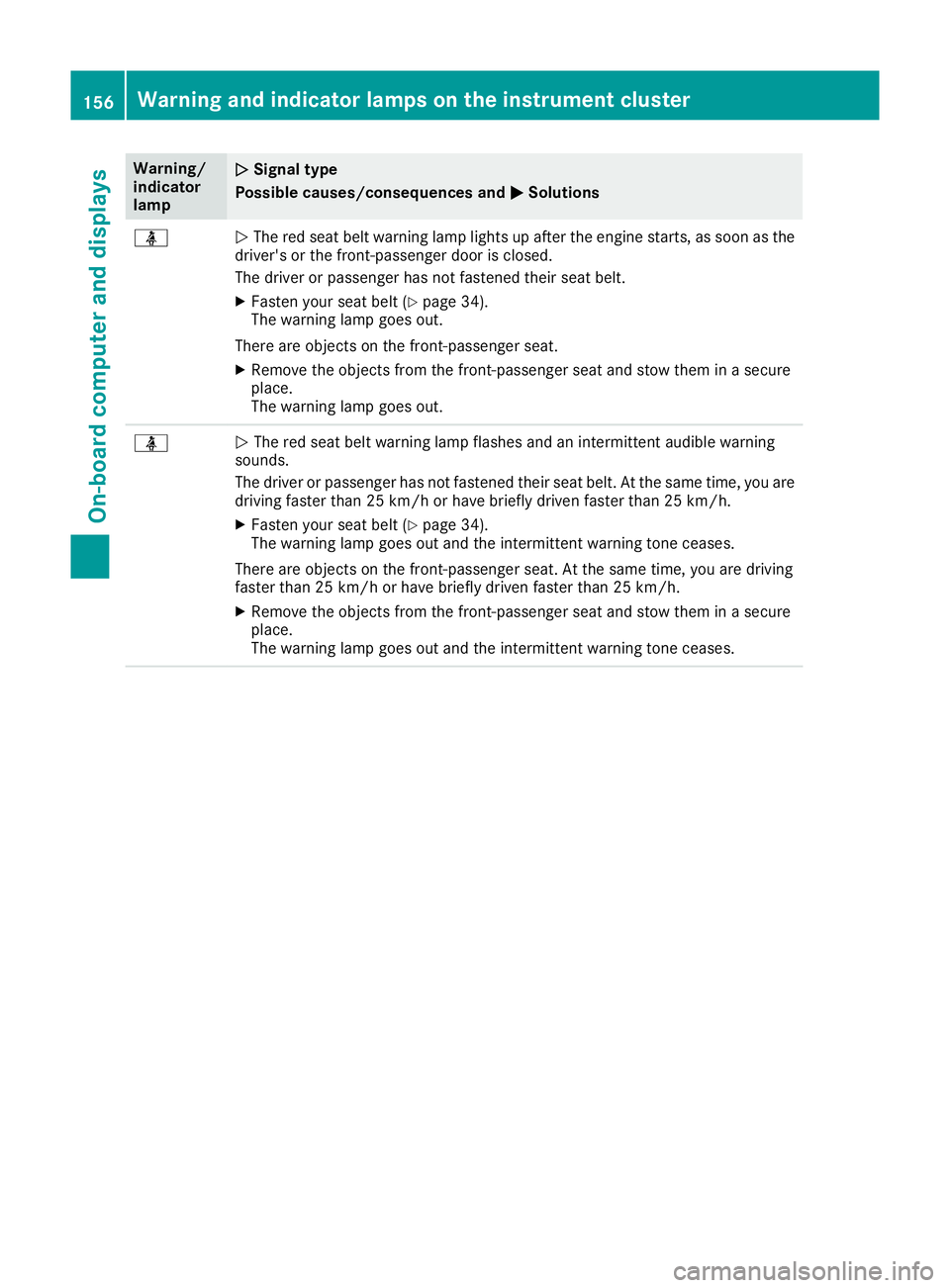
The red seat belt warning lamp lights up after the engine starts, as soon as the
driver's or the front-passenger door is closed.
The driver or passenger has not fastened their seat belt.
X Fasten your seat belt (Y page 34).
The warning lamp goes out.
There are objectsont he front-passenger seat.
X Remove the object sfrom the front-passenger seat and stow them in asecure
place.
The warning lamp goes out. ü
N
The red seat belt warning lamp flashes and an intermittent audibl ewarning
sounds.
The driver or passenger has not fastened their seat belt. At the same time, you are
driving faster than 25 km/ho rhave briefly driven faster than 25 km/h.
X Fasten your seat belt (Y page 34).
The warning lamp goes out and the intermittentw arning tone ceases.
There are object sonthe front-passenger seat. At the same time, you are driving
faster than 25 km/ho rhave briefly driven faster than 25 km/h.
X Remove th eobjects from th efront-pa ssenger seat and stow them in asecure
place.
The warning lamp goes out and th eintermittent warning tone ceases. 156
Warning and indicator lamps on th
einstrument clusterOn-boar dcomputer and displays
Page 165 of 261
Engine
Warning/
indicator
lamp
N N
Signal type
Possible causes/consequences and M
MSolutions ;
N
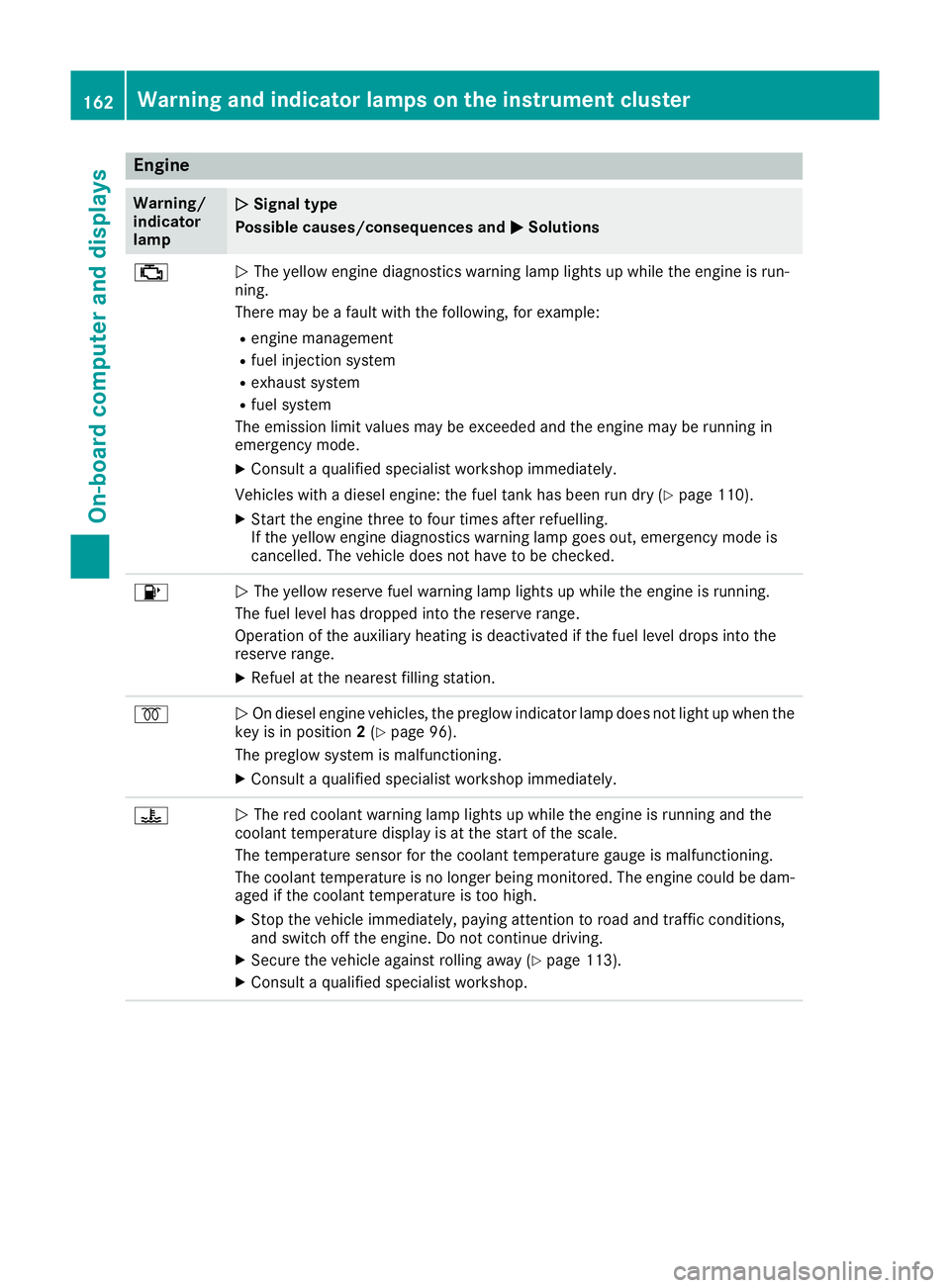
The yellow engine diagnostics warning lamp lights up whil ethe engine is run-
ning.
There may be afault with the following, for example:
R engine management
R fuel injection system
R exhaust system
R fuel system
The emission limit values may be exceeded and the engine may be runnin gin
emergenc ymode.
X Consult aqualified specialist workshop immediately.
Vehicles with adiesel engine: the fuel tank has been run dry (Y page 110).
X Start the engine three to four times after refuelling.
If the yellow engine diagnostics warning lamp goes out, emergenc ymode is
cancelled. The vehicle does not have to be checked. 8
N
The yellow reserve fuel warning lamp lights up while the engine is running.
The fuel level has dropped into the reserve range.
Operation of the auxiliary heating is deactivated if the fuel level drops into the
reserve range.
X Refuel at the nearest filling station. %
N
On diesel engine vehicles, the preglow indicator lamp does not light up when the
key is in position 2(Y page 96).
The preglow system is malfunctioning.
X Consult aqualified specialist workshop immediately. ?
N
The red coolant warning lamp lights up while the engine is running and the
coolant temperature display is at the start of the scale.
The temperature sensor for the coolant temperature gauge is malfunctioning.
The coolant temperature is no longer being monitored. The engine could be dam-
aged if the coolant temperature is too high.
X Stop the vehicle immediately,p aying attention to road and traffic conditions,
and switch off the engine. Do not continue driving.
X Secure the vehicle against rolling away (Y page 113).
X Consult aqualified specialist workshop. 162
Warning and indicator lamps on the instrument clusterOn-board computer and displays
Page 166 of 261
Warning/
indicator
lamp
N N
Signa ltype
Possible causes/consequences and M
MSolutions ?
N
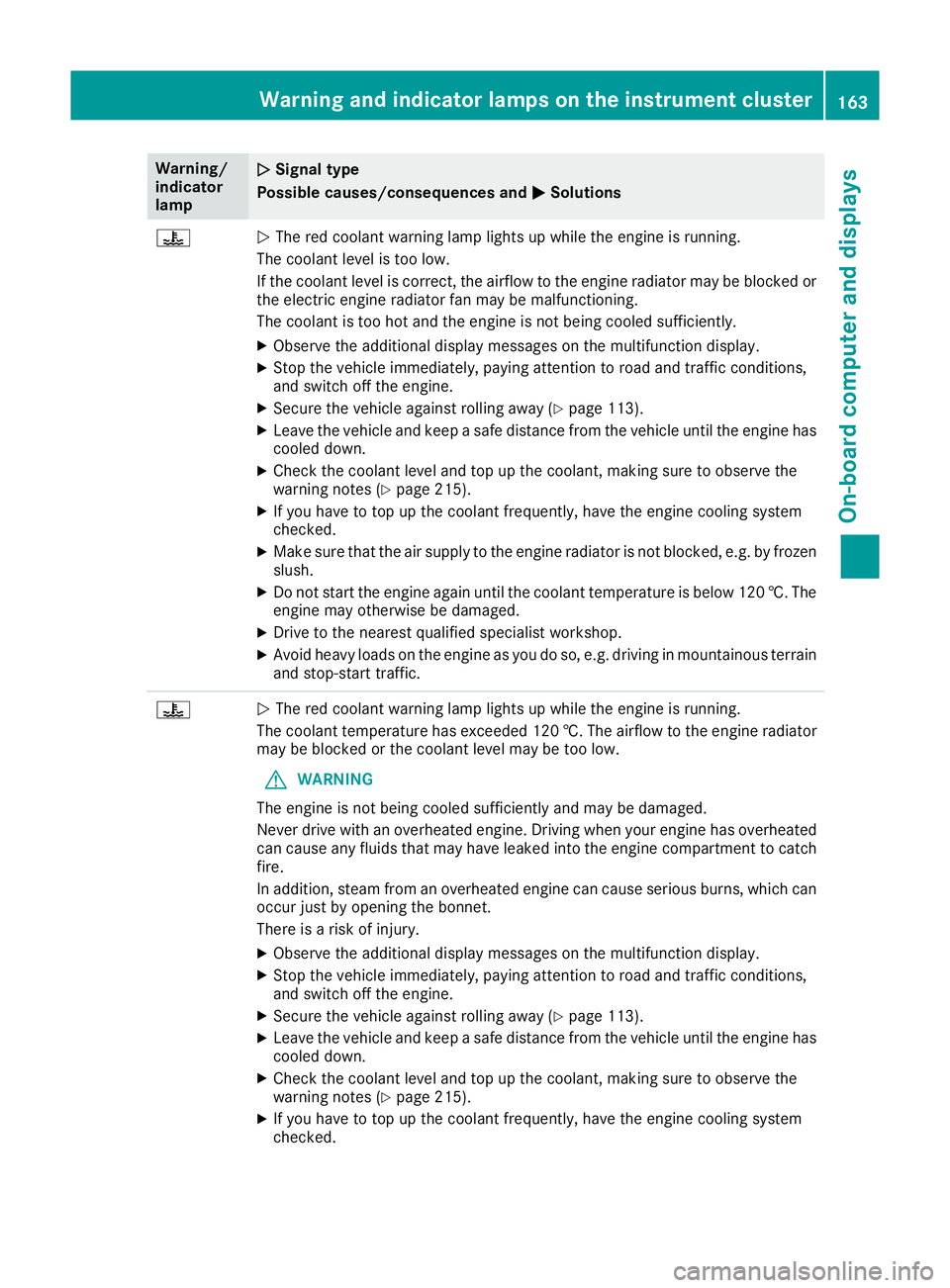
The red coolant warning lamp lights up while the engine is running.
The coolant level is too low.
If the coolant level is correct, the airflow to the engine radiator may be blocked or the electric engine radiator fan may be malfunctioning.
The coolant is too hot and the engine is not being cooled sufficiently.
X Observe the additional display messages on the multifunction display.
X Stop the vehicle immediately, paying attention to road and traffic conditions,
and switch off the engine.
X Secure the vehicle against rolling away (Y page 113).
X Leave the vehicle and keep asafe distance from the vehicle until the engine has
cooled down.
X Check the coolant level and top up the coolant, making sure to observe the
warning notes (Y page 215).
X If you have to top up the coolant frequently, have the engine cooling system
checked.
X Make sure that the air supply to the engine radiator is not blocked, e.g. by frozen
slush.
X Do not start the engine again until the coolant temperature is below 120 †. The
engine may otherwise be damaged.
X Drive to the nearest qualified specialist workshop.
X Avoid heavy loads on the engine as you do so, e.g. driving in mountainous terrain
and stop-start traffic. ?
N
The red coolant warning lamp lights up while the engine is running.
The coolant temperature has exceeded 120 †. The airflow to the engine radiator may be blocked or the coolant level may be too low.
G WARNING
The engine is not being cooled sufficiently and may be damaged.
Never drive with an overheated engine. Drivin gwhen your engine has overheated
can cause any fluids that may have leaked into the engine compartment to catch fire.
In addition, steam from an overheated engine can cause serious burns, which can
occur just by opening the bonnet.
There is arisk of injury.
X Observe the additional display messages on the multifunction display.
X Stop the vehicle immediately, paying attention to road and traffic conditions,
and switch off the engine.
X Secure the vehicle against rolling away (Y page 113).
X Leave the vehicle and keep asafe distance from the vehicle until the engine has
cooled down.
X Check the coolant level and top up the coolant, making sure to observe the
warning notes (Y page 215).
X If you have to top up the coolant frequently, have the engine cooling system
checked. Warning and indicato
rlamps on the instrument cluster
163On-boardcomputer and displays Z
Page 168 of 261
Introduction
Oper
ating safety
Important safet ynotes G
WARNING
Operating the integrated information systems and communications equipment in the vehicle
while driving will distract you from traffic con-
ditions. You could then lose control of the
vehicle. Ther eisarisk of an accident.
Only operate these devices if road traffic con-
ditions permit. If you are unsure about the
surrounding conditions, pullo ver toasafe
location and make entries only while the vehi-
cle is stationary.
Observe the lega lrequirements for the country
you are in.
The navigation system calculates the route to
the destination without taking account of the
following, for example:
R traffic lights
R stop and give way signs
R parking or stopping restrictions
R road narrowing
R other road and traffic rule sand regulations
The multimedi asystem may provid eincorrect
navigation announcements if the surroundings
do not correspond to the data on the digital map (for example, aroute may have been diverted or
the direction of aone-wa ystreet may have
changed).
For this reason, you must alwayso bserve road
and traffic rule sand regulations during your
journey .Roada nd traffic rule sand regulations
alwaysh ave priority over the system' sdriving
recommendations.
Remember that even at aspee dof50k m/h,
yourv ehiclecovers adistance of 14 mper sec-
ond.
When using the device please follow:
R the safety notes in this manual
R traffic rules and regulations
R laws and safety standards pertainin gtomotor
vehicles G
WARNING
Modifications to electronic components, their software as well as wiring could affect their
function and/or the oper ation of other net-
worked components. This coul dinparticular
alsobet he case for systems relevant to
safety .They might not function properly any-
more and/or jeopardise the operational
safety of the vehicle. There is an increased
risk of an accident and injury.
Do not attempt to modify the wiring as wellas
electronic components or their software.
Always have work on electrica land electronic
components carrie dout at aqualified special-
ist workshop. Correct use
Th em ultimedia system can be used for th efol-
lowing:
R to receive radio stations
R to play back audio file sonmemory cards and
other dat acarriers
R to mak ecalls via th eBluetooth ®
function
R for navigation Declaration of conformity
Radio type approval Introduction
165Multimedia system Z
Page 180 of 261
Switching alternative frequencies
on/off
If this function is switched on, the multimedia
system tries to ensure the best possible recep-
tion, using alternative frequencies where nec-
essary. In doing so, regional programmes are
taken into account. In addition, the switching
behaviour is affected by environmental condi-
tions and reception condition sand may, there-
fore, change. Poor reception condition scould
lead to undesired and disruptive frequency
changes. In this case, switch off AF AFstation
tracking.
This function is available in the FM waveband.
X Select Oin radio mode.
X Select AF (Alternative Frequency) AF (Alternative Frequency).
The #dot indicates that the function is
switched on. Switching traffic announcements on/
off
When the function is activated, the multimedia
system switches to astation broadcasting traf-
fic reports for the duration of atraffic report:
R ifas tation without traffic reports is switched
on
R if another audio source is switched on
X Select Oin radio mode.
X Select TA (Traffic Announcement)
TA (Traffic Announcement).
The #dot indicates that the function is
switched on.
This function is available in the FM waveband. Media
Activating media mode
X Press the MEDIAb utton.
The list of audio source sappears. Available
audio source sare highlighted.
X Selec tthe desired audio source. USB devic
eand memory card
Important safet ynotes G
WARNING
SD cards are small parts. The ycan be swal-
lowed and caus echoking. This poses an
increased risk of injury or even fatal injury.
Keep the SD card out of the reach of children. If aSDc ard is swallowed,s eek medical atten-
tion immediately.
Connecting aUSB device X
Connect the USB device to the USB port with
the contacts facing down.
Inserting an dremoving an SD card Insertin
ganSDc ard
X Inser tthe SD car dintot he SD car dslot with
th ec ontacts at thefront and facing down-
wards.
Removing an SD card X Press th eSDc ard.
X Remove th eSDc ard.
Activating audio playback from an SD
car dorU SB device i
The multimedia system supports USB devi-
ces and microS Dcards up to amaximum
capacity of 32 GB.
X Press the MEDIA button.
X Select USB Stick USB Stick orSD card
SD card.
The folder structure of the selected audio
source appears.
X Select the required folder.
X Select the required track.
Playback of the audio file starts. The audio
files are played in the order in which they were
saved to the data medium. Media
177Multimedia system Z
Page 184 of 261

X
Select è.
X Select the contact.
X If several phone numbers are store dfor one
contact, select the desire dnumber.
The number is dialled.
Deleting aphon ebook X
Pres sthe PHONE button.
X Select O.
X Select Delete phone book
Delete phone book.
Ap rompt appears asking whether the phone
book should be deleted.
X Select YES
YES.
The phone book is deleted. Call lists
Transferrin gcall lists If your mobile phone supports the Bluetooth
®
profile PBA P(Phone Book Access Profile), the
call lists of the mobilep hone appear in the mul-
timedia system. When connecting the mobile
phone, you may have to confirm the request for
the PBAP Bluetooth ®
profile.
Displaying call lists X
Press the PHONE button.
X Select Last dialed numbers Last dialed numbers, Received
Received
calls
calls orMissed calls
Missed calls.
Depending on your selection, alist appears
with your most recently dialled phone num-
bers, received calls or missed calls.
Dialling phone numbers from acall list X
Press the PHONE button.
X Select Last dialed numbers Last dialed numbers, Received
Received
calls
calls orMissed calls
Missed calls.
X Select the desired entry.
The number is dialled. Navigation
Important safety notes
G
WARNING
Operating the integrated information systems and communications equipment in the vehicle
while driving will distract you from traffic con-
ditions. You could then lose control of the
vehicle. There is arisk of an accident.
Only operate these devices if road traffic con-
ditions permit. If you are unsure about the
surrounding conditions, pullo ver toasafe
location and make entries only while the vehi-
cle is stationary.
You must observe the lega lrequirements for the
country in which you are driving when operating
the system.
The multimedi asystem calculates the route to
the destination without taking account of the
following, for example:
R traffic lights
R stop and give way signs
R parking or stopping restrictions
R road narrowing
R other road and traffic rule sand regulations
The multimedi asystem may provid eincorrect
driving recommendations if the surroundings do
not correspond to the data on the digital map
(for example, aroute may have been diverted or
the direction of aone-wa ystreet may have
changed).
For this reason, you must alwayso bserve road
and traffic rule sand regulations during your
journey .Roada nd traffic rule sand regulations
alwaysh ave priority over the system' sdriving
recommendations. GPS reception
Positio nfinding and route guidance take place
using GPS ( GlobalPositioning System). Correct
functioning of the navigation system depends,
amongst other things, on GPS reception. In cer-
tain situations, GPS reception may be impaired, there may be interference or there may be no
reception at all,e .g. in tunnels or multi-storey
car parks. Navigat
ion
181Multimedi asystem Z
Page 195 of 261
Setting warnings on the map
When the function is activated, warnings appear on the map.
X Press the NAVI button.
The main menu appears.
X Select Settings
Settings.
X Select Warnings
Warnings.
X Select Road Signs
Road Signs.
The function is activated or deactivated.
X Select the desired alert point.
X To set awarning: selectWarning Type Warning Type.
Am enu appears.
X Select the desired function.
The Ytick indicates the activated function.
X To set the distance: selectDistance
Distance.
Am enu appears.
X Set the desired distance from the alert point.
Defining the settings the navigation
view Setting the map display
Setting zoom and degree of inclination X Press the NAVI button.
The main menu appears.
X Select Settings
Settings.
X Select Navigation View
Navigation View.
X Select Map Appearance
Map Appearance.
X Select Viewpoint
Viewpoint.
Am enu appears.
X Select the desired setting.
The Ytick indicates the active function.
Setting the display colours
The multimedia system includes an optimised
display design for day and night mode.
X Press the NAVI button.
The main menu appears.
X Select Settings
Settings.
X Select Navigation View
Navigation View.
X Select Map Appearance
Map Appearance.
X Select Colour mode Colour mode.
X Select the desired setting.
The Ytick indicates the activated function.
With the Auto Autosetting, the display design is
automatically adapted to the brightness of
the ambient light. Setting the map colours
X Press the NAVI button.
The main menu appears.
X Select Settings Settings.
X Select Navigation View
Navigation View.
X Select Map Appearance
Map Appearance.
X Select Day Map Colours
Day Map Colours orNight Map
Night Map
Colours
Colours.
X Select the desired map colour using the
arrows.
Activating or deactivating 3D display of
objects on the map
The following types of 3D objects are available:
R Landmarks Landmarks:3Dd isplayofprominent or
known objects
R Buildings
Buildings:3Dd isplayofthe buildings in a
town
R 3D Terrain
3D Terrain:3Dd isplayofthe surrounding
area
X Press the NAVI button.
The main menu appears.
X Select Settings Settings.
X Select Navigation View Navigation View.
X Select Map Appearance Map Appearance.
X Select Landmarks
Landmarks, Buildings
Buildingsor3D Ter‐
3D Ter‐
rain
rain.
The function is activated or deactivated.
Activating or deactivating route recording
If this function is activated, the towns through
which the vehicle is driven are recorded.
X Press the NAVI button.
The main menu appears.
X Select Settings Settings.
X Select Navigation View
Navigation View.
X Select Map Appearance
Map Appearance.
X Select Track logs
Track logs.
The function is activated or deactivated.
Activating or deactivating the display of
POI symbols on the map
X Press the NAVI button.
The main menu appears.
X Select Settings Settings.
X Select Navigation View Navigation View.
X Select Map Appearance
Map Appearance. 192
NavigationMultimedia system
Page 205 of 261
Rear benc
hseat Folding th
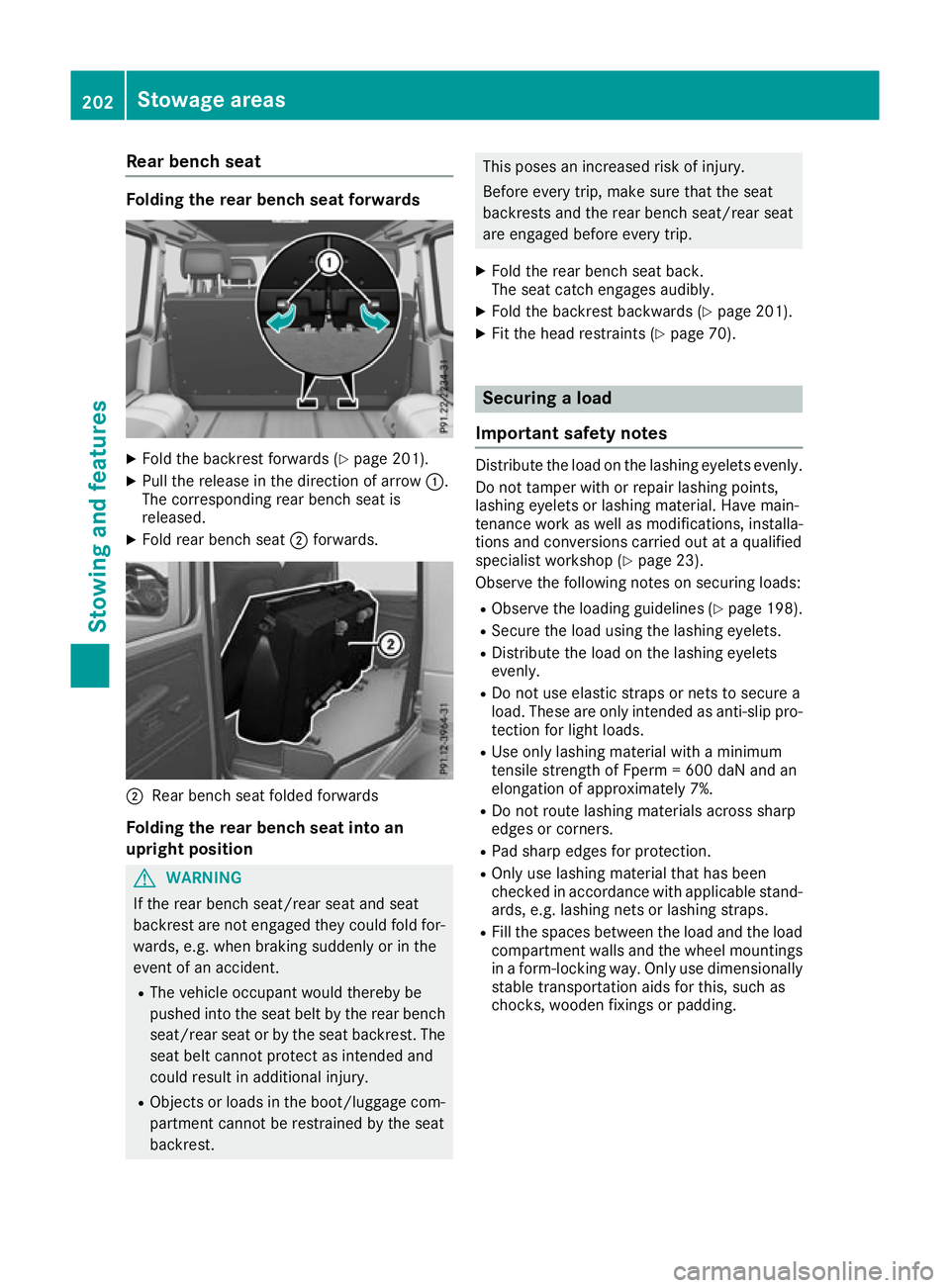
erearb ench seat forwards X
Fold th ebackrest forward s(Ypage 201).
X Pull the release in the directio nofarrow:.
The corresponding rea rbench sea tis
released.
X Fold rea rbench seat ;forwards. ;
Rear bench seat foldedf orwards
Folding th erearb ench sea tint oan
upright position G
WARNING
If th erear bench seat/rea rseat and seat
backrest are not engaged they coul dfold for-
wards, e.g. when braking suddenly or in the
event of an accident.
R The vehicl eoccupant would thereby be
pushed into the seat beltb ythe rear bench
seat/rea rseat or by the seat backrest. The
seat beltc annot protect as intended and
coul dresult in additiona linjury.
R Objects or loads in the boot/luggag ecom-
partment cannot be restrained by the seat
backrest. This poses an increased risk of injury.
Befor
eevery trip, make sure that the seat
backrest sand the rear bench seat/rear seat
are engaged before every trip.
X Fold the rear bench seat back.
The seat catche ngages audibly.
X Fold the backrest backwards (Y page 201).
X Fit the head restraints (Y page 70). Securing
aload
Important safety notes Distribute the load on the lashing eyelets evenly.
Do not tamper with or repair lashing points,
lashing eyelets or lashing mater ial.Hav emain-
tenance work as well as modifications, installa-
tions and conversions carrie doutataq uali fied
specialis tworkshop (Y page 23).
Observe the following note sonsecuring loads:
R Observe the loading guideline s(Ypage 198).
R Secure the load using the lashing eyelets.
R Distribute the load on the lashing eyelets
evenly.
R Do not us eelast ic straps or nets to secur ea
load .These ar eonlyi ntende dasanti-slip pro-
tection for light loads.
R Use onl ylas hing material with aminimum
tensil estrength of Fperm =600 da Nand an
elongation of approximately 7%.
R Do not route lashing material sacross sharp
edge sorc orners.
R Pa ds harp edge sfor protection.
R Onl yuselashing material tha thas been
checked in accordance with applicabl estand-
ards ,e.g.las hing nets or lashing straps.
R Fillthe space sbetween the load and the load
compartment wall sand the whee lmountings
in af orm-locking way. Onl yusedimensionally
stabl etransportatio naidsf or this, such as
chocks, wooden fixings or padding. 202
Stowag
eareasStowing and features
Page 210 of 261
could sli
porbef lung around and thereby
strike vehicle occupants. In addition, cup
holders, ope nstowag espaces and mobile
phone brackets may not always be able to
hol dthe objects place dinthem in the event of
an accident. There is ariskofi njury, particu-
larly in the event of sharp braking or sudden
changes of direction.
R Alway sstow objects in such awaythat they
cannot be tosse dabout in these or similar
situations.
R Alway smake sure that objects do not proj-
ect from stowag espaces, luggage nets or
stowag enets.
R Ensure that closable stowag espaces are
shu tbefore beginning your journey.
R Alway sstow and secure heavy, hard, poin-
ted, sharp-edged, fragil eoroutsize objects
in the loa dcompartment. G
WARNING
The cup holder cannot secure adrinks con-
tainer in place during ajourney .Ifyou use a
cup holder during ajourney ,the drinks con-
tainer coul dbeflung around and liquid could
be spilt. Vehicle occupants coul dcome into
contact with the liquid and, in particular, be
scalded by hot liquid.Y ou couldbedistracted
from the traffic situation and lose control of
the vehicle. There is arisk of an accident and
injury.
Only use the cup holder when the vehicl eis
stationary. Only place containers of asuitable
size in the cup holder. Seal the container, in
particular when it contains hot liquid.
! Only use the cup holders for containers of
the right size and which have lids. The drinks
coul dotherwise spill.
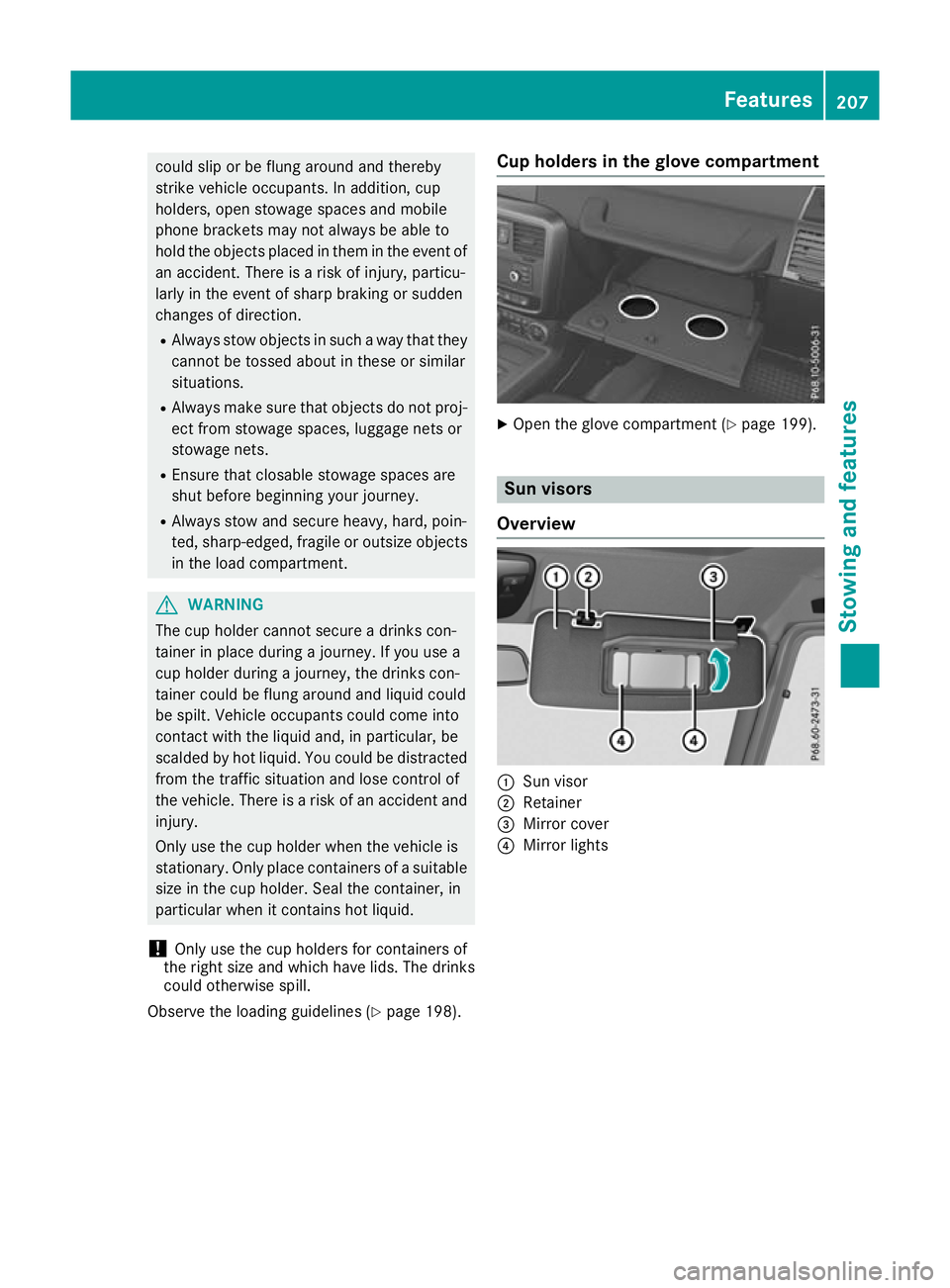
Observe the loading guidelines (Y page198). Cu
ph olders in th eglove compartment X
Ope nthe glove compartment (Y page 199). Sun visors
Overview :
Sun visor
; Retainer
= Mirror cover
? Mirror lights Features
207Stowing and features Z
Page 211 of 261
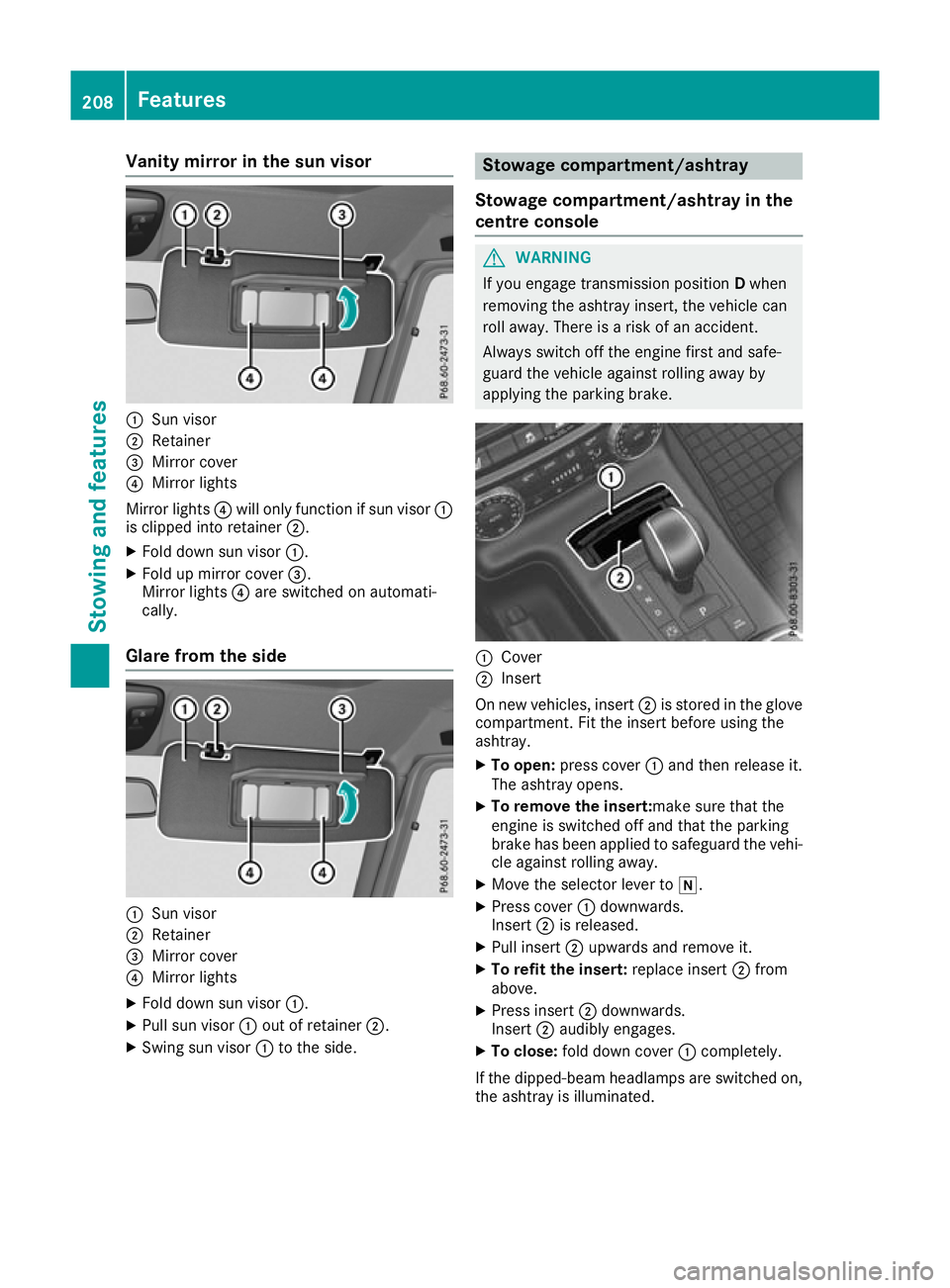
Vanity mirro
rint he sun visor :
Sun visor
; Retainer
= Mirror cover
? Mirror lights
Mirror lights ?will only function if su nvisor :
is clippe dinto retainer ;.
X Fol dd owns un visor :.
X Fol dupm irror cover =.
Mirror lights ?are switched on automati-
cally.
Glare from the side :
Sun visor
; Retainer
= Mirror cover
? Mirror lights
X Fol dd owns un visor :.
X Pull su nvisor :outofr etainer ;.
X Swing su nvisor :to the side. Stowag
ecompartment/ashtray
Stowage compartment/ashtray in the
centre console G
WARNING
If you engage transmission position Dwhen
removing the ashtray insert, the vehicle can
roll away. There is arisk of an accident.
Always switch off the engine first and safe-
guard the vehicl eagainst rolling awayby
applying the parking brake. :
Cover
; Insert
On new vehicles, insert ;is stored in the glove
compartment. Fi tthe insert before usin gthe
ashtray.
X To open: press cover :and then release it.
The ashtray opens.
X To remove th einsert:ma ke sure that the
engin eisswitched off and that th eparking
brak ehas been applied to safeguard th evehi-
cle against rolling away.
X Mov ethe selector leve rtoi.
X Press cover :downwards.
Insert ;is released.
X Pull insert ;upward sand remove it.
X To refit th einsert: replace insert ;from
above.
X Press insert ;downwards.
Insert ;audibly engages.
X To close: fold down cover :completely.
If th edipped-beam headlamps are switched on,
th ea shtray is illuminated. 208
Featu
resStowing and features