light MERCEDES-BENZ G-CLASS SUV 2016 Manual Online
[x] Cancel search | Manufacturer: MERCEDES-BENZ, Model Year: 2016, Model line: G-CLASS SUV, Model: MERCEDES-BENZ G-CLASS SUV 2016Pages: 261, PDF Size: 6.01 MB
Page 168 of 261
Introduction
Oper
ating safety
Important safet ynotes G
WARNING
Operating the integrated information systems and communications equipment in the vehicle
while driving will distract you from traffic con-
ditions. You could then lose control of the
vehicle. Ther eisarisk of an accident.
Only operate these devices if road traffic con-
ditions permit. If you are unsure about the
surrounding conditions, pullo ver toasafe
location and make entries only while the vehi-
cle is stationary.
Observe the lega lrequirements for the country
you are in.
The navigation system calculates the route to
the destination without taking account of the
following, for example:
R traffic lights
R stop and give way signs
R parking or stopping restrictions
R road narrowing
R other road and traffic rule sand regulations
The multimedi asystem may provid eincorrect
navigation announcements if the surroundings
do not correspond to the data on the digital map (for example, aroute may have been diverted or
the direction of aone-wa ystreet may have
changed).
For this reason, you must alwayso bserve road
and traffic rule sand regulations during your
journey .Roada nd traffic rule sand regulations
alwaysh ave priority over the system' sdriving
recommendations.
Remember that even at aspee dof50k m/h,
yourv ehiclecovers adistance of 14 mper sec-
ond.
When using the device please follow:
R the safety notes in this manual
R traffic rules and regulations
R laws and safety standards pertainin gtomotor
vehicles G
WARNING
Modifications to electronic components, their software as well as wiring could affect their
function and/or the oper ation of other net-
worked components. This coul dinparticular
alsobet he case for systems relevant to
safety .They might not function properly any-
more and/or jeopardise the operational
safety of the vehicle. There is an increased
risk of an accident and injury.
Do not attempt to modify the wiring as wellas
electronic components or their software.
Always have work on electrica land electronic
components carrie dout at aqualified special-
ist workshop. Correct use
Th em ultimedia system can be used for th efol-
lowing:
R to receive radio stations
R to play back audio file sonmemory cards and
other dat acarriers
R to mak ecalls via th eBluetooth ®
function
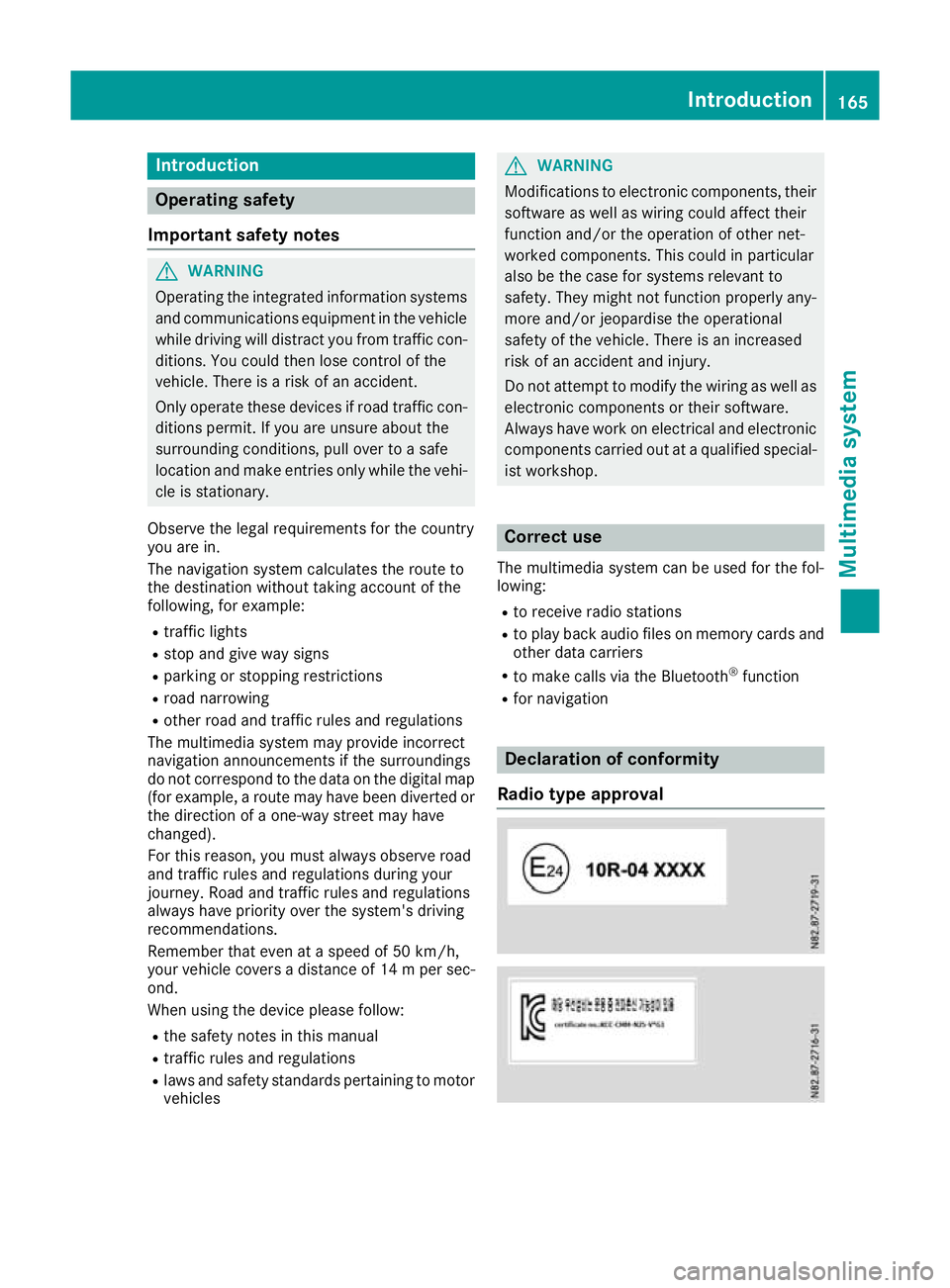
R for navigation Declaration of conformity
Radio type approval Introduction
165Multimedia system Z
Page 169 of 261
Copyright information
Registered trademarks Bluetooth
®
technolog yisastandard for short-
rang ewireless data transmissions up to approx-
imatel y10m etres.
Bluetooth ®
is ar egistered trademark of Blue-
tooth Specia lInterest Group (SIG )Inc. An SD card is
adigit al storag emedium.
SD cards carry the logo displayed above .This
logo is aregistere dtrademark of SanDisk Cor-
poration. Cleaning
To clean ,use aslightly damp cloth .The cloth
must be sof tand lint-free. For stubbor ndirt,y ou
can use amild cleanin gagent. In particular ,do
no tc lean th edisplay wit halcohol, acid or an
abrasive cleanin gagent. 166
IntroductionMultimedia system
Page 170 of 261
At
ag lance Oper
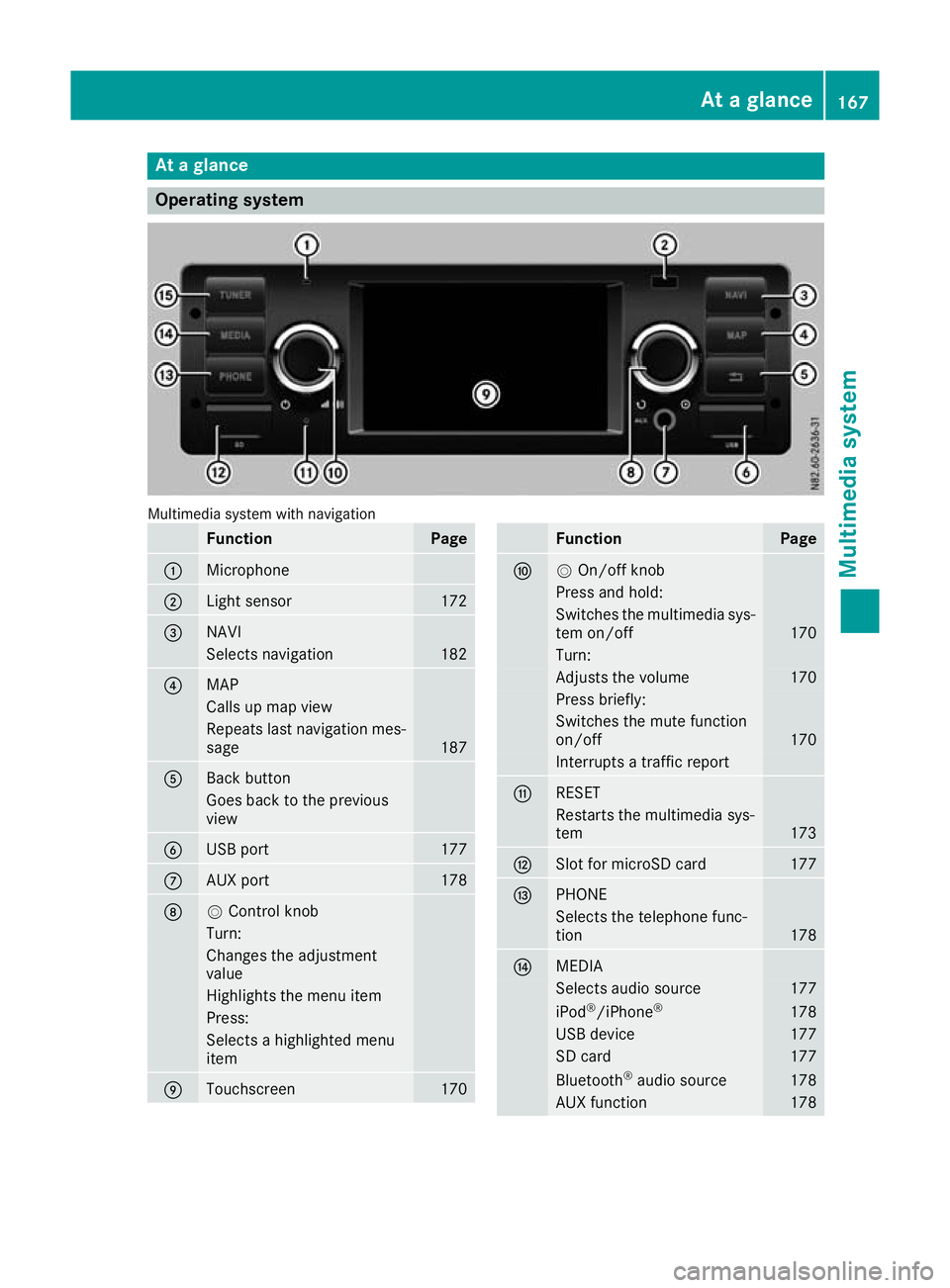
ating system Multimedia system with navigation
Function Page
:
Microphone
;
Light sensor 172
=
NAVI
Selects navigation 182
?
MAP
Calls up map view
Repeat
slast navigation mes-
sage 187
A
Back button
Goes back to th
eprevious
view B
USB port 177
C
AU
Xp ort 178
D
V
Control knob Turn:
Changes th
eadjustment
value Highlight
sthe menu item Press:
Selects
ahighlighte dmenu
item E
Touchscreen 170 Function Page
F
V
On/off knob Press and hold:
Switches the multimedi
asys-
tem on/off 170
Turn:
Adjusts the volume 170
Press briefly:
Switches the mute function
on/off
170
Interrupts
atraffic report G
RE
SET Restart
sthe multimedia sys-
tem 173
H
Slot fo
rmicroSD card 177
I
PHONE
Selects the telephone func-
tion
178
J
MEDIA
Selects audi
osource 177
iPod
®
/iPhone ® 178
USB device 177
SD card 177
Bluetooth
®
audi osource 178
AUX function 178At
ag lance
167Multimedia system Z
Page 172 of 261
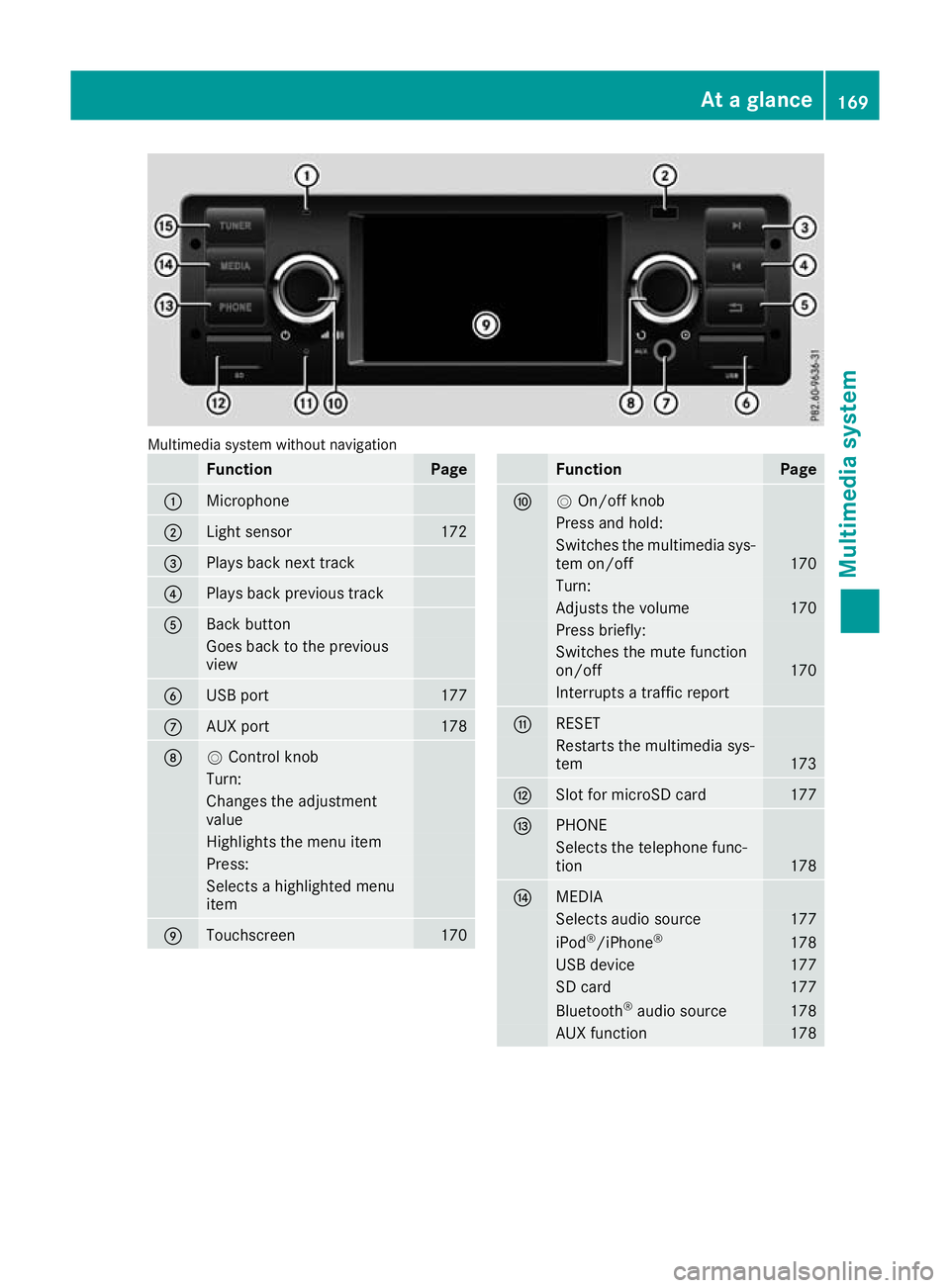
Multimedia system without navigation
Function Page
:
Microphone
;
Light sensor 172
=
Plays back next track
?
Plays back previous track
A
Back button
Goesb
ack to th eprevious
view B
USB port 177
C
AU
Xp ort 178
D
V
Control knob Turn:
Changes th
eadjustment
value Highlight
sthe menu item Press:
Selects
ahighlighte dmenu
item E
Touchscreen 170 Function Page
F
V
On/off knob Press and hold:
Switches the multimedi
asys-
tem on/off 170
Turn:
Adjusts the volume 170
Press briefly:
Switches the mute function
on/off
170
Interrupts
atraffic report G
RE
SET Restart
sthe multimedia sys-
tem 173
H
Slot fo
rmicroSD card 177
I
PHONE
Selects the telephone func-
tion
178
J
MEDIA
Selects audi
osource 177
iPod
®
/iPhone ® 178
USB device 177
SD card 177
Bluetooth
®
audi osource 178
AUX function 178At
ag lance
169Multimedia system Z
Page 175 of 261
Setting the date
X
Select ¯.
X Select Date/Time
Date/Time.
X Select the date.
An input men uappears.
X Set the date using the arrows.
Setting the time X
Select ¯.
X Select Date/Time
Date/Time.
X Select the time.
An input menu appears.
X Set the time using the arrows. Synchronisin
gthe time
The following functions are available:
R RDS RDS:ift his function is activated, the time will
be regularly compared with the RDS 5
time
signal and adjusted if necessary
R GPS
GPS:ift his function is activated, the time will
be regularly compared with the GPS 6
time
signal and adjusted if necessary
R Manually
Manually:ift his function is activated, the
time set manually is maintained
X Select ¯.
X Select Time synchronizing
Time synchronizing.
X Select the desired setting.
The #dot indicates the current setting. Adjusting the standby time
If this function is activated, the mul timedia sys-
te mr emain sinstandby mod efor th eset time
after th eignition has been switched off .Ifthe
ignition is switched on again during this set time,
th en avigation system, for example, is available
again immediately.
X Select ¯.
X Select Standby
Standby.
X Selec tthe desired setting, 5minutes
5m inutes, 15 15
minutes
minutes, 30 minutes
30 minutes orOff
Off .
The #dot indicates the curren tsetting. Switching the button tone on/off
X Select ¯.
X Select Key tone
Key tone.
X The #dot indicates that the function is acti-
vated. Switching the AM waveband on/off
In order to select the AM waveband in radio
operation, the AM-Tuner AM-Tunermust be activated in
the system settings.
X To switch the AM waveband on/off: select
¯.
X Select AM-Tuner
AM-Tuner.
The #dot indicates that the function is acti-
vated. Display settings
The mul timedia system includes an optimised
display design fo rday and night mode.
X Select ¯.
X Select Day/night mode
Day/night mode.
X Selec tthe desire dsetting.
The #dot indicates th ecurren tsetting.
Wit hthe Auto
Auto setting ,the display design is
automatically adapted to th ebrightness of
th ea mbien tlight.
Afte rselecting Custom
Custom,aday mode bright-
ness scale appears.
X Se tthe desire dbrightness usin gthe arrows.
X Selec tSave ý.
An ight mode brightness scale appears.
X Se tthe desire dbrightness usin gthe arrows.
X Selec tSave ý. Control settings
The function of th econtrol knob in navigation
mod ecan be set in amultimedia system with
navigation.
The control knob can be set so that turning:
R zooms in or out of th emap
R jumps to th enextorp revious statio nortrack
5 Radio Dat aSystem.
6 Global Positionin gSystem. 172
System settingsMultimedia system
Page 180 of 261
Switching alternative frequencies
on/off
If this function is switched on, the multimedia
system tries to ensure the best possible recep-
tion, using alternative frequencies where nec-
essary. In doing so, regional programmes are
taken into account. In addition, the switching
behaviour is affected by environmental condi-
tions and reception condition sand may, there-
fore, change. Poor reception condition scould
lead to undesired and disruptive frequency
changes. In this case, switch off AF AFstation
tracking.
This function is available in the FM waveband.
X Select Oin radio mode.
X Select AF (Alternative Frequency) AF (Alternative Frequency).
The #dot indicates that the function is
switched on. Switching traffic announcements on/
off
When the function is activated, the multimedia
system switches to astation broadcasting traf-
fic reports for the duration of atraffic report:
R ifas tation without traffic reports is switched
on
R if another audio source is switched on
X Select Oin radio mode.
X Select TA (Traffic Announcement)
TA (Traffic Announcement).
The #dot indicates that the function is
switched on.
This function is available in the FM waveband. Media
Activating media mode
X Press the MEDIAb utton.
The list of audio source sappears. Available
audio source sare highlighted.
X Selec tthe desired audio source. USB devic
eand memory card
Important safet ynotes G
WARNING
SD cards are small parts. The ycan be swal-
lowed and caus echoking. This poses an
increased risk of injury or even fatal injury.
Keep the SD card out of the reach of children. If aSDc ard is swallowed,s eek medical atten-
tion immediately.
Connecting aUSB device X
Connect the USB device to the USB port with
the contacts facing down.
Inserting an dremoving an SD card Insertin
ganSDc ard
X Inser tthe SD car dintot he SD car dslot with
th ec ontacts at thefront and facing down-
wards.
Removing an SD card X Press th eSDc ard.
X Remove th eSDc ard.
Activating audio playback from an SD
car dorU SB device i
The multimedia system supports USB devi-
ces and microS Dcards up to amaximum
capacity of 32 GB.
X Press the MEDIA button.
X Select USB Stick USB Stick orSD card
SD card.
The folder structure of the selected audio
source appears.
X Select the required folder.
X Select the required track.
Playback of the audio file starts. The audio
files are played in the order in which they were
saved to the data medium. Media
177Multimedia system Z
Page 184 of 261

X
Select è.
X Select the contact.
X If several phone numbers are store dfor one
contact, select the desire dnumber.
The number is dialled.
Deleting aphon ebook X
Pres sthe PHONE button.
X Select O.
X Select Delete phone book
Delete phone book.
Ap rompt appears asking whether the phone
book should be deleted.
X Select YES
YES.
The phone book is deleted. Call lists
Transferrin gcall lists If your mobile phone supports the Bluetooth
®
profile PBA P(Phone Book Access Profile), the
call lists of the mobilep hone appear in the mul-
timedia system. When connecting the mobile
phone, you may have to confirm the request for
the PBAP Bluetooth ®
profile.
Displaying call lists X
Press the PHONE button.
X Select Last dialed numbers Last dialed numbers, Received
Received
calls
calls orMissed calls
Missed calls.
Depending on your selection, alist appears
with your most recently dialled phone num-
bers, received calls or missed calls.
Dialling phone numbers from acall list X
Press the PHONE button.
X Select Last dialed numbers Last dialed numbers, Received
Received
calls
calls orMissed calls
Missed calls.
X Select the desired entry.
The number is dialled. Navigation
Important safety notes
G
WARNING
Operating the integrated information systems and communications equipment in the vehicle
while driving will distract you from traffic con-
ditions. You could then lose control of the
vehicle. There is arisk of an accident.
Only operate these devices if road traffic con-
ditions permit. If you are unsure about the
surrounding conditions, pullo ver toasafe
location and make entries only while the vehi-
cle is stationary.
You must observe the lega lrequirements for the
country in which you are driving when operating
the system.
The multimedi asystem calculates the route to
the destination without taking account of the
following, for example:
R traffic lights
R stop and give way signs
R parking or stopping restrictions
R road narrowing
R other road and traffic rule sand regulations
The multimedi asystem may provid eincorrect
driving recommendations if the surroundings do
not correspond to the data on the digital map
(for example, aroute may have been diverted or
the direction of aone-wa ystreet may have
changed).
For this reason, you must alwayso bserve road
and traffic rule sand regulations during your
journey .Roada nd traffic rule sand regulations
alwaysh ave priority over the system' sdriving
recommendations. GPS reception
Positio nfinding and route guidance take place
using GPS ( GlobalPositioning System). Correct
functioning of the navigation system depends,
amongst other things, on GPS reception. In cer-
tain situations, GPS reception may be impaired, there may be interference or there may be no
reception at all,e .g. in tunnels or multi-storey
car parks. Navigat
ion
181Multimedi asystem Z
Page 188 of 261
X
Select Edit Edit.
X Select the desire droute.
Am enu appears.
X Select Rename Rename.
X Enter the desire dname.
X Select Y.
Changing the save droute X
Press the NAV Ibutton.
The main menu appears.
X Select New Route
New Route.
X Select Saved Routes
Saved Routes.
The list of saved routes appears.
X Select the desired route.
The route list appears.
X To change the order of the destinations:
select the desired route.
Am
enu appears.
X Select Move Up Move Up orMove Down
Move Down.
The destination is moved one position up or
down the route list.
X To delete single destinations: select the
desired destination.
Am enu appears.
X Select Delete
Delete.
The destination is deleted from the route list.
X To add an intermediate destination: select
add waypoint add waypoint where you inten dtoadd the
intermediate destination.
X Enter the desired destination.
The location is shown on the map.
X Select select as waypoint select as waypoint.
The route list appears.
X To enter anew final destination: select
Final Destination
Final Destination.
X Enter the desired destination.
The location is shown on the map.
X Select Select as Destination
Select as Destination.
The route list appears.
X To startr outecalculation:select Calcu‐
Calcu‐
late Route
late Route.
X To startr outeguidance: selectStart
Start Nav‐
Nav‐
igation
igation. Changing the active route Adding an intermediate destination
X Select S.
The main menu appears.
X Select add waypoint
add waypoint.
X Enter the desired destination.
The location is shown on the map.
X Select select as waypoint
select as waypoint.
Avoidi ng special sections on th eroute
X Select S.
The main men uappears.
X Select Detour s&Alternatives
Detour s&Alternatives .
X Select Avoid Specia lSections
Avoid Specia lSections.
Al ist of special sections appears.
X Selec tthe desired special section.
The multimedia system calculates an alterna-
tiv er out eexcluding th eselected special sec-
tion.
X To select an alternative route: select
accept accept .
Avoiding specific roads on th eroute
X Select S.
The main men uappears.
X Select Detour s&Alternatives
Detour s&Alternatives .
X Select Avoid Specific Road
Avoid Specific Road.
Al ist of th eroad sont herout eappears.
X Selec tthe desired road.
The multimedia system calculates an alterna- tiv er out eexcluding th eselected road.
X To select an alternative route: select
accept
accept .
Avoiding th eroute ahead
X Select S.
The main men uappears.
X Select Detour s&Alternatives
Detour s&Alternatives .
X Select Avoid route ahead
Avoid route ahead.
The map appears. The rout eahead is high-
lighted.
X Use W orX to select th elengt hoft he
rout etobea voided.
The ne wrout eappears.
X To select an alternative route: select
Avoid
Avoid. Navigation
185Multimedia system Z
Page 191 of 261
The symbol indicatin
gthe change of direction
also indicates the type of change of direction,
e.g. aleft turn. If another change of direction will
be required immediately after you have changed direction ,the change of direction after the next
is indicated by asmaller symbol.
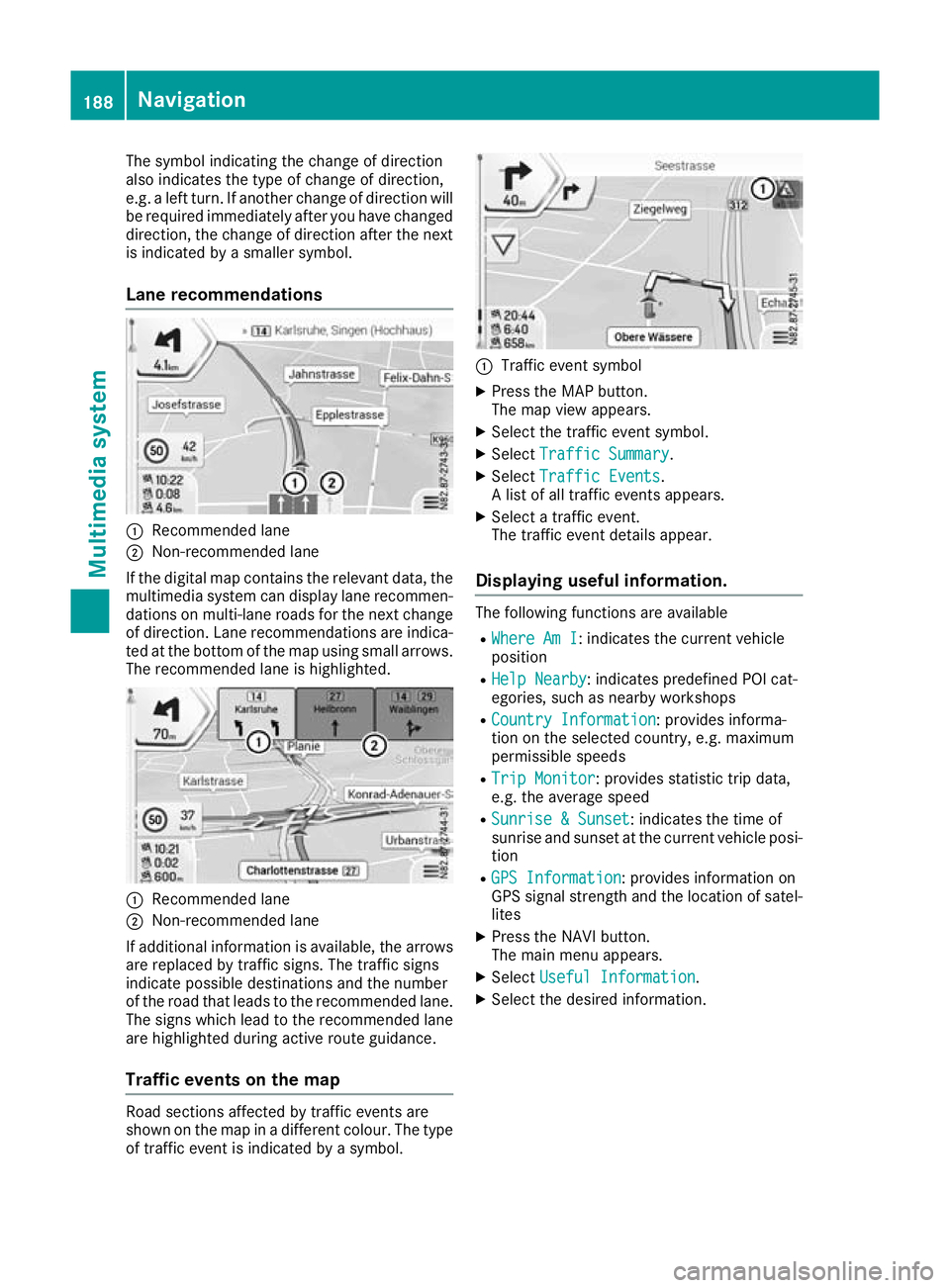
Lane recommendations :
Recommended lane
; Non-recommended lane
If the digi talm ap contain sthe relevan tdata, the
multimedia system can display lan erecommen-
dation sonm ulti-lane road sfor th enextc hange
of direction .Lan er ecommendation sare indica-
te datt hebotto moft hemap usin gsmall arrows.
The recommended lan eishighlighted. :
Recommended lane
; Non-recommended lane
If additional information is available, th earrows
are replace dbytraffic signs. The traffic signs
indicat epossibl edestination sand th enumber
of th eroad that leads to th erecommended lane.
The sign swhichlead to th erecommended lane
are highlighte dduring active rout eguidance.
Traffic event sonthemap Road section
saffecte dbytraffic event sare
shown on th emap in adifferen tcolour .The type
of traffic event is indicated by asymbol. :
Traffic even tsymbol
X Press the MAP button.
The map view appears.
X Select the traffic event symbol.
X Select Traffic Summary Traffic Summary.
X Select Traffic Events
Traffic Events.
Al ist of all traffic event sappears.
X Select atraffic event.
The traffic event details appear.
Displaying useful information. The following functions are available
R Where Am I
Where Am I:i ndicates the current vehicle
position
R Help Nearby
Help Nearby:i ndicates predefined POI cat-
egories, such as nearby workshops
R Country Information
Country Information :provides informa-
tion on the selected country, e.g. maximum
permissible speeds
R Trip Monitor Trip Monitor:p rovides statistic trip data,
e.g. the average speed
R Sunrise &Sunset
Sunrise &Sunset:i ndicates the time of
sunrise and sunset at the current vehicle posi- tion
R GPS Information
GPS Information :provides information on
GPS signal strength and the location of satel-
lites
X Press the NAVI button.
The main menu appears.
X Select Useful Information Useful Information .
X Select the desired information. 188
NavigationMultimedia system
Page 195 of 261
Setting warnings on the map
When the function is activated, warnings appear on the map.
X Press the NAVI button.
The main menu appears.
X Select Settings
Settings.
X Select Warnings
Warnings.
X Select Road Signs
Road Signs.
The function is activated or deactivated.
X Select the desired alert point.
X To set awarning: selectWarning Type Warning Type.
Am enu appears.
X Select the desired function.
The Ytick indicates the activated function.
X To set the distance: selectDistance
Distance.
Am enu appears.
X Set the desired distance from the alert point.
Defining the settings the navigation
view Setting the map display
Setting zoom and degree of inclination X Press the NAVI button.
The main menu appears.
X Select Settings
Settings.
X Select Navigation View
Navigation View.
X Select Map Appearance
Map Appearance.
X Select Viewpoint
Viewpoint.
Am enu appears.
X Select the desired setting.
The Ytick indicates the active function.
Setting the display colours
The multimedia system includes an optimised
display design for day and night mode.
X Press the NAVI button.
The main menu appears.
X Select Settings
Settings.
X Select Navigation View
Navigation View.
X Select Map Appearance
Map Appearance.
X Select Colour mode Colour mode.
X Select the desired setting.
The Ytick indicates the activated function.
With the Auto Autosetting, the display design is
automatically adapted to the brightness of
the ambient light. Setting the map colours
X Press the NAVI button.
The main menu appears.
X Select Settings Settings.
X Select Navigation View
Navigation View.
X Select Map Appearance
Map Appearance.
X Select Day Map Colours
Day Map Colours orNight Map
Night Map
Colours
Colours.
X Select the desired map colour using the
arrows.
Activating or deactivating 3D display of
objects on the map
The following types of 3D objects are available:
R Landmarks Landmarks:3Dd isplayofprominent or
known objects
R Buildings
Buildings:3Dd isplayofthe buildings in a
town
R 3D Terrain
3D Terrain:3Dd isplayofthe surrounding
area
X Press the NAVI button.
The main menu appears.
X Select Settings Settings.
X Select Navigation View Navigation View.
X Select Map Appearance Map Appearance.
X Select Landmarks
Landmarks, Buildings
Buildingsor3D Ter‐
3D Ter‐
rain
rain.
The function is activated or deactivated.
Activating or deactivating route recording
If this function is activated, the towns through
which the vehicle is driven are recorded.
X Press the NAVI button.
The main menu appears.
X Select Settings Settings.
X Select Navigation View
Navigation View.
X Select Map Appearance
Map Appearance.
X Select Track logs
Track logs.
The function is activated or deactivated.
Activating or deactivating the display of
POI symbols on the map
X Press the NAVI button.
The main menu appears.
X Select Settings Settings.
X Select Navigation View Navigation View.
X Select Map Appearance
Map Appearance. 192
NavigationMultimedia system