open bonnet MERCEDES-BENZ G-CLASS SUV 2016 Owners Manual
[x] Cancel search | Manufacturer: MERCEDES-BENZ, Model Year: 2016, Model line: G-CLASS SUV, Model: MERCEDES-BENZ G-CLASS SUV 2016Pages: 261, PDF Size: 6.01 MB
Page 8 of 261
Neutral (ECO start/stop func-
tion) ............................................... 102
Overview ........................................ 101
Problem( fault) ............................... 108
Program selector button ................ 104
Pulling away. .................................... 97
Selector lever ................................ 101
Shift ranges ................................... 105
Steering whee lgearshift paddle s... 104
Trailer towing ................................. 104
Transmission position display ........ 101
Automatic transmission emer-
genc yrunnin gmode ......................... 108
Auxiliary heating
Activating/deactivating ................... 90
Activating/deactivating (o nthe
centre console )................................ 90
Displa ymessage ............................ 154
Important safety notes .................... 89
Malfunction ...................................... 93
Problem (displa ymessage) .............. 93
Remote control ................................ 90
Setting ........................................... 139
Auxiliary heating/ventilation
Setting the departur etime ............... 92
Auxiliary ventilation
Activating/deactivating ................... 90
Activating/deactivating (o nthe
centre console )................................ 90
Problem (displa ymessage) .............. 93
Remote control ................................ 90
Axle load, permissibl e(traile rtow-
ing) ...................................................... 256 B
Backres t(display message) ............. 154
BAS (Brake Assist System) ................. 53
Battery
Changing (auxiliary heating
remote control) ................................ 92
Battery (key)
Checking .......................................... 59
Important safety notes .................... 59
Replacing ......................................... 59
Battery (vehicle)
Charging ........................................ 226
Displa ymessage ............................ 147 Importan
tsafety notes .................. 224
Jump starting .................................2 27
Overview ........................................ 224
Belt tensioner
Activatio n......................................... 37
Belt warning ......................................... 36
BlueTEC
see AdBlue ®
BlueTE C(AdBlue ®
) ............................ .251
Bluetooth ®
Activating audio mode ................... 178
Activating/deactivating ................. 174
Connecting automatically .............. 175
Connecting devices ....................... 175
Connectio nrequirements .............. 174
Pairing code ................................... 175
Pairing devices ............................... 174
Unpairing adevice ......................... 175
Bonnet
Closing .......................................... .212
Display message ............................ 153
Important safety notes .................. 211
Opening ......................................... 211
Brake
EBD ................................................. .55
Brake fluid
Displa ymessage ............................ 144
Note s............................................. 253
Brake forc edistribution
see EBD (electroni cbrake force
distribution)
Brake lamp
Replacing bulb s............................... 80
Brake lamps
Adaptive ........................................... 53
Displa ymessage ............................ 145
Brakes
ABS .................................................. 52
BAS .................................................. 53
Brake fluid (notes) ......................... 253
Displa ymessage ............................ 142
Driving tip s.................................... 115
HOLD function ............................... 122
Important safety notes .................. 115
Parking brake ................................ 114
Warning lamp ................................. 157 Index
5
Page 28 of 261
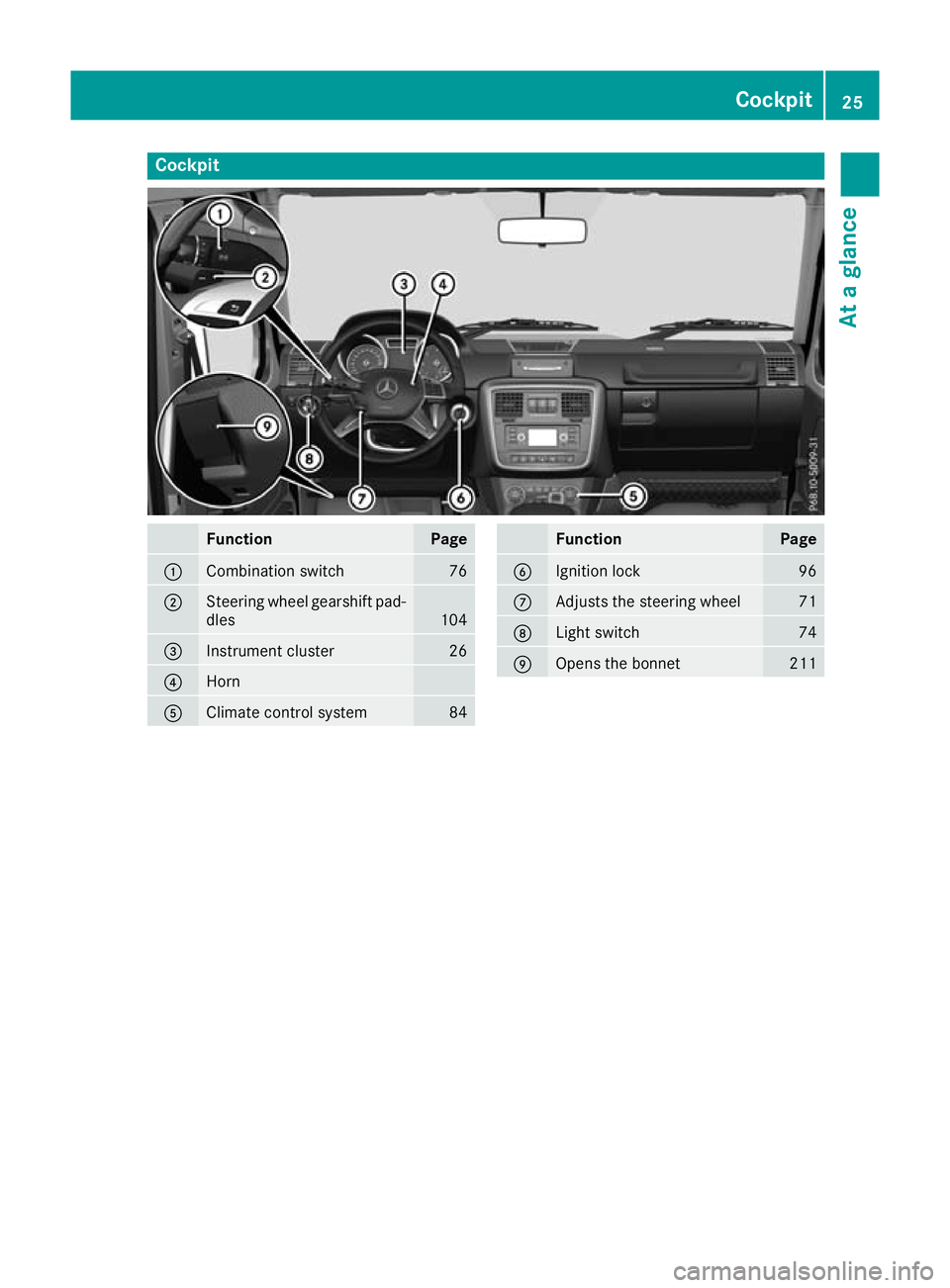
Cockpit
Function Page
:
Combination switch 76
;
Steerin
gwheel gearshift pad-
dles 104
=
Instrument cluster 26
?
Horn
A
Climate control system 84 Function Page
B
Ignition lock 96
C
Adjusts the steering wheel 71
D
Light switch 74
E
Open
sthe bonnet 211Cockpit
25Atag lance
Page 59 of 261
the brake syste
mchecked at aquali fied spe-
cialist workshop.
Observe information regarding indicator and
warning lamps (Y page 158)asw ellasd isplay
message s(Ypage 143). ADAPTIV
EBRAKE
ADAPTIV EBRAKE provides increased braking
safety. In addition to th ebraking function,
ADAPTIV EBRAKE also features th eHOLDF unc-
tion (Y page 122). Protectio
nagainst theft Immobiliser
The immobiliser prevents yourv ehiclefrom
bein gstarted without th ecorrect key.
X To activate: remove thekeyfrom th eignition
lock.
X To deactivate: switch on theignition.
When leaving th evehicle, always tak ethe key
wit hyou and loc kthe vehicle. The engin ecan be
started by anyone wit havalid ke ythatisl eft
inside th evehicle.
i The immobiliser is always deactivated when
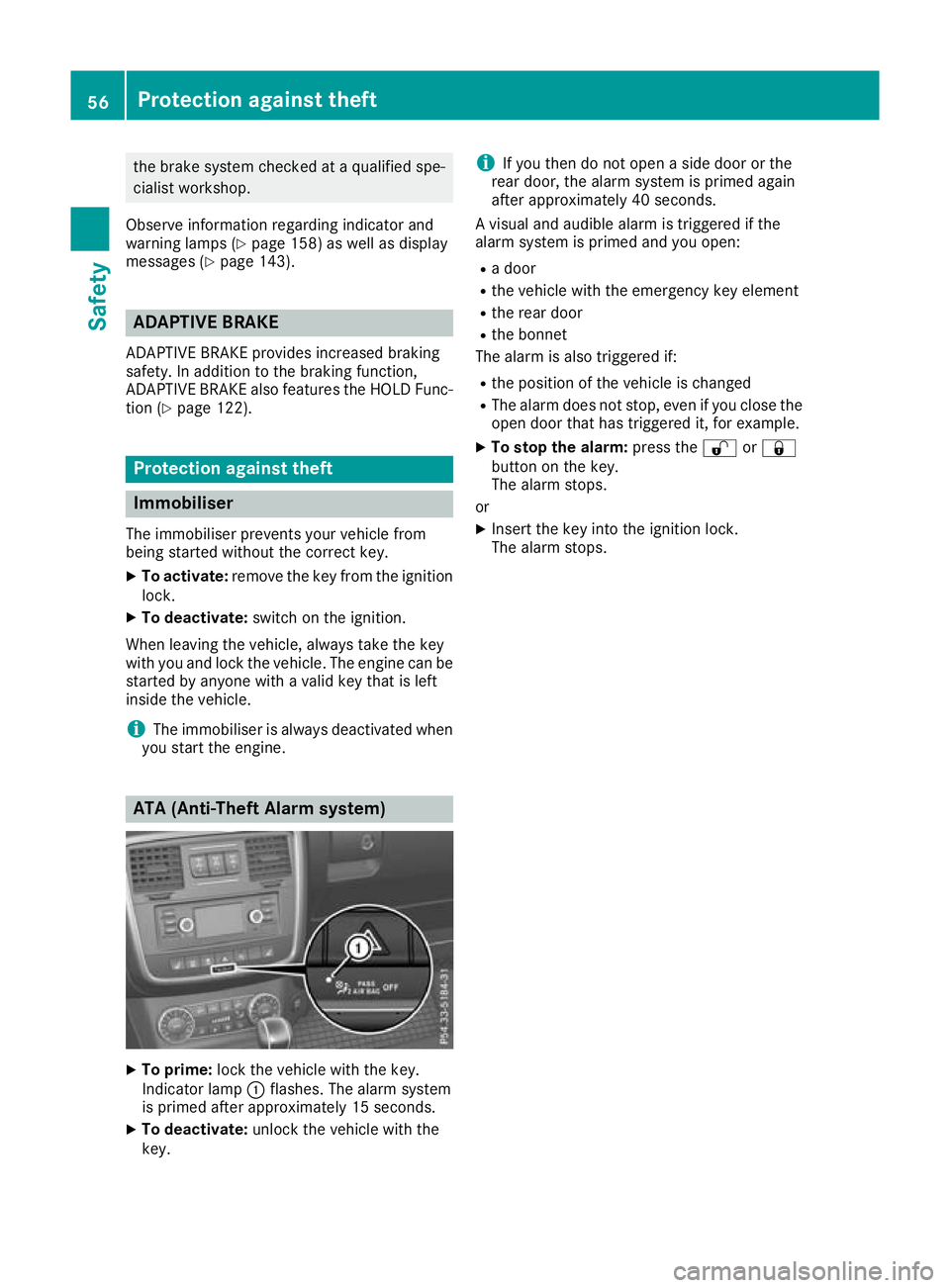
you start th eengine. ATA (Anti-Thef
tAlarms ystem) X
To prime: lockthe vehicl ewitht he key.
Indicato rlamp :flashes. The alarm system
is primed afte rapproximatel y15s econds.
X To deactivate: unlock the vehicl ewitht he
key. i
If you then do not open
aside door or the
rear door, the alarm system is primed again
after approximately 40 seconds.
Av isuala nd audible alarm is triggered if the
alarm system is primed and you open:
R ad oor
R the vehicle with the emergency key element
R the rear door
R the bonnet
The alarm is also triggered if:
R the positio nofthe vehicle is changed
R The alarm does not stop, even if you close the
open door that has triggered it, for example.
X To stop the alarm: press the%or&
button on the key.
The alarm stops.
or X Insert the key into the ignition lock.
The alarm stops. 56
Protectiona
gainst theftSafety
Page 85 of 261
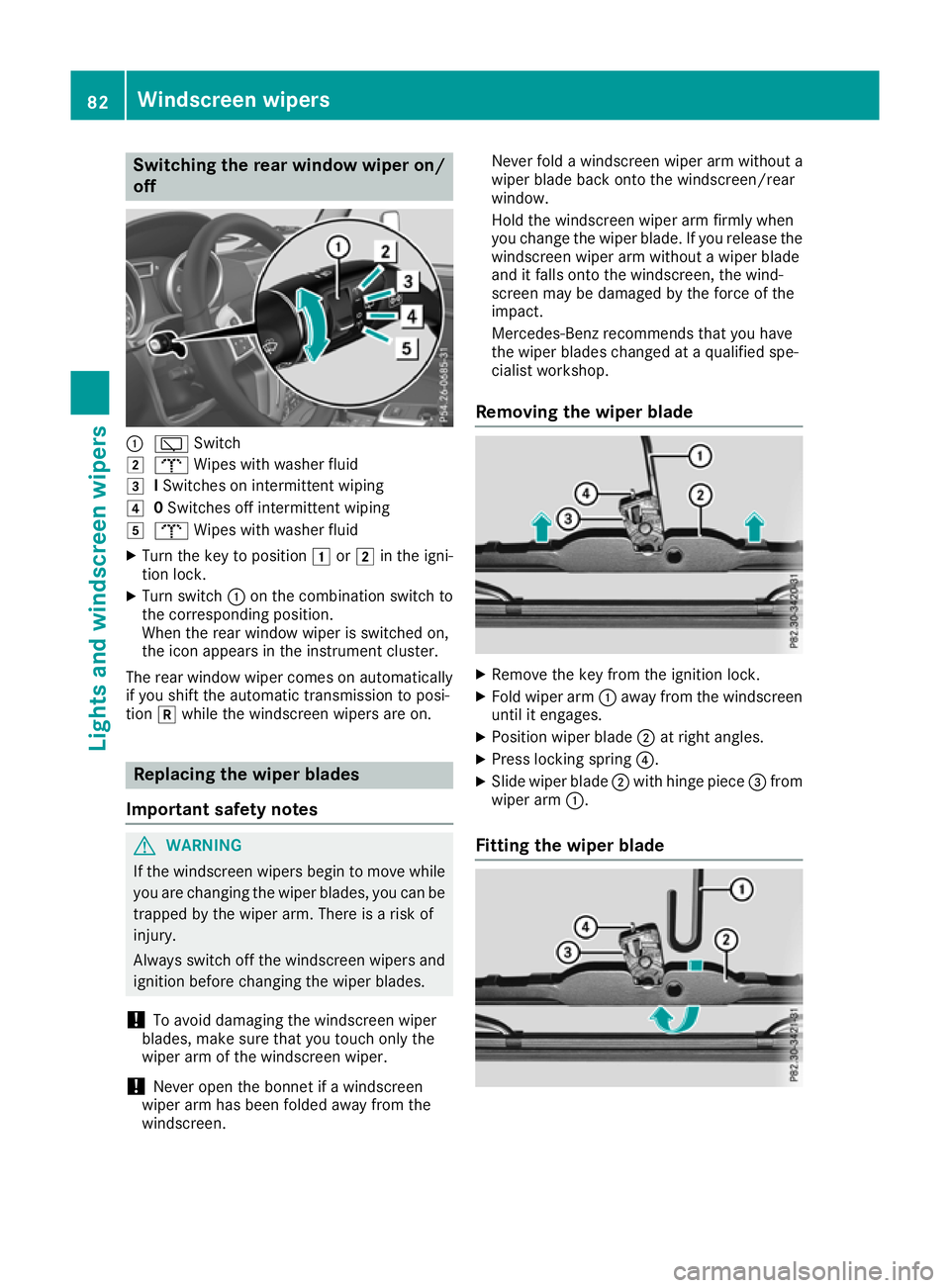
Switching the rear window wiper on/
off :
è Switch
2 b Wipes with washer fluid
3 ISwitches on intermittent wiping
4 0Switches off intermittent wiping
5 b Wipes with washer fluid
X Turn the key to position 1or2 in the igni-
tio nlock.
X Turn switch :on the combination switch to
the corresponding position.
Whe nthe rea rwindow wiper is switched on,
the ico nappears in the instrument cluster.
The rea rwindow wiper come sonautomatically
if yo ushift the automatic transmissio ntoposi-
tion kwhil ethe windscreen wiper sare on. Replacing the wiper blades
Important safety notes G
WARNING
If the windscreen wipers begi ntomove while
you are changing the wiper blades, you can be trappe dbythe wiper arm. There is arisk of
injury.
Always switch off the windscreen wipers and
ignitio nbefore changing the wiper blades.
! To avoi
ddamaging the windscreen wiper
blades, make sure that you touch only the
wiper arm of the windscreen wiper.
! Never open the bonnet if
awindscreen
wiper arm has been folde dawayfrom the
windscreen. Never fold
awindscreen wipera rm withouta
wiperb ladeback onto the windscreen/rear
window.
Hold the windscreen wipera rm firmly when
you change the wiperb lade. If you release the
windscreen wipera rm withoutawiperblade
and it falls onto the windscreen, the wind-
screen may be damaged by the force of the
impact.
Mercedes-Benz recommends that you have
the wiperb lades changed at aqualifieds pe-
cialist workshop.
Removing the wiper blade X
Remove the key from the ignitio nlock.
X Fold wiper arm :away from th ewindscreen
until it engages.
X Position wiper blade ;at right angles.
X Press lockin gspring ?.
X Slide wiper blade ;withhinge piece =from
wiper arm :.
Fitting th ewiper blade 82
Windscreen wipersLight
sand windscreen wipers
Page 134 of 261

Important safety notes
G
WARNING
Operating th eintegrated information systems
and communications equipment in the vehicle
while driving willd istract you from traffic con-
ditions. You coul dthen lose control of the
vehicle. There is arisk of an accident.
Only operate these devices if road traffic con-
ditions permit. If you are unsure about the
surrounding conditions, pullo ver toasafe
location and make entries only while the vehi-
cle is stationary.
You must observe the lega lrequirements for the
country in which you are currently driving when operating the on-board computer. G
WARNING
If the instrument cluster has failed or mal-
functioned, you may not recognise function
restrictions relevant to safety .The operating
safety of yourv ehiclemay be impaired .There
is ar isk of an accident.
Drive on carefully.H ave the vehiclechecked
at aq ualified specialist worksho pimmedi-
ately.
If the operating safety of yourv ehicleis
impaired ,park the vehicl esafel yass oon as pos-
sible. Contact aqualified specialist workshop.
! If
ab lackout lighting setting has been selec-
ted, the instrument cluster lighting is
switched off.
The instrument cluster and the display do not show any information.
The on-board computer show sonly display mes-
sage sorw arnings from certain systems on the
multifunction display.Y ou should therefore
make sure yourv ehicleiso perating safel yatall
times.
For an overview, see the instrument cluster illus-
tration (Y page26). Displays and operation
Instrument cluste
rlighting
The brightness control knob is locate donthe
botto mleftoft heinstrumen tcluster
(Y page 26).
X Turn th ebrightness control knob clockwise or
anti-clockwise.
i The ligh
tsensor on th einstrumen tcluster
automatically control sthe brightness of the
multifunction display.
In daylight, th edisplays in th einstrument
cluste rare no tlit. Re
vc ounter
! Do not drive in the overrevving range. Doing
so will damag ethe engine.
The red band in the rev counter indicates the
engine's overrevving range.
The fue lsuppl yisi nterrupted to protect the
engine when the red band is reached. Outside temperature display
You should pay specia lattention to road condi-
tion swhen temperatures are around freezing
point.
Bear in mind that the outside temperature dis-
play indicates the measured air temperature
and not the road surface temperature.
The outside temperature display is in the multi-
function display (Y page 133).
Changes in the outside temperature are dis-
played after ashort delay. Coolant temperatur
edisplay G
WARNING
If yo uopen the bonnet while the engine is
overheating or while there is afire in the
engine compartment, you coul dcome into
contact with hot gase sorother leaking ser-
vice products. There is adange rofinjury.
Allow an overheating engine to cool down
before opening the bonnet. If there is afire in Displays and operation
131On-boardcomputer and displays
Z
Page 149 of 261
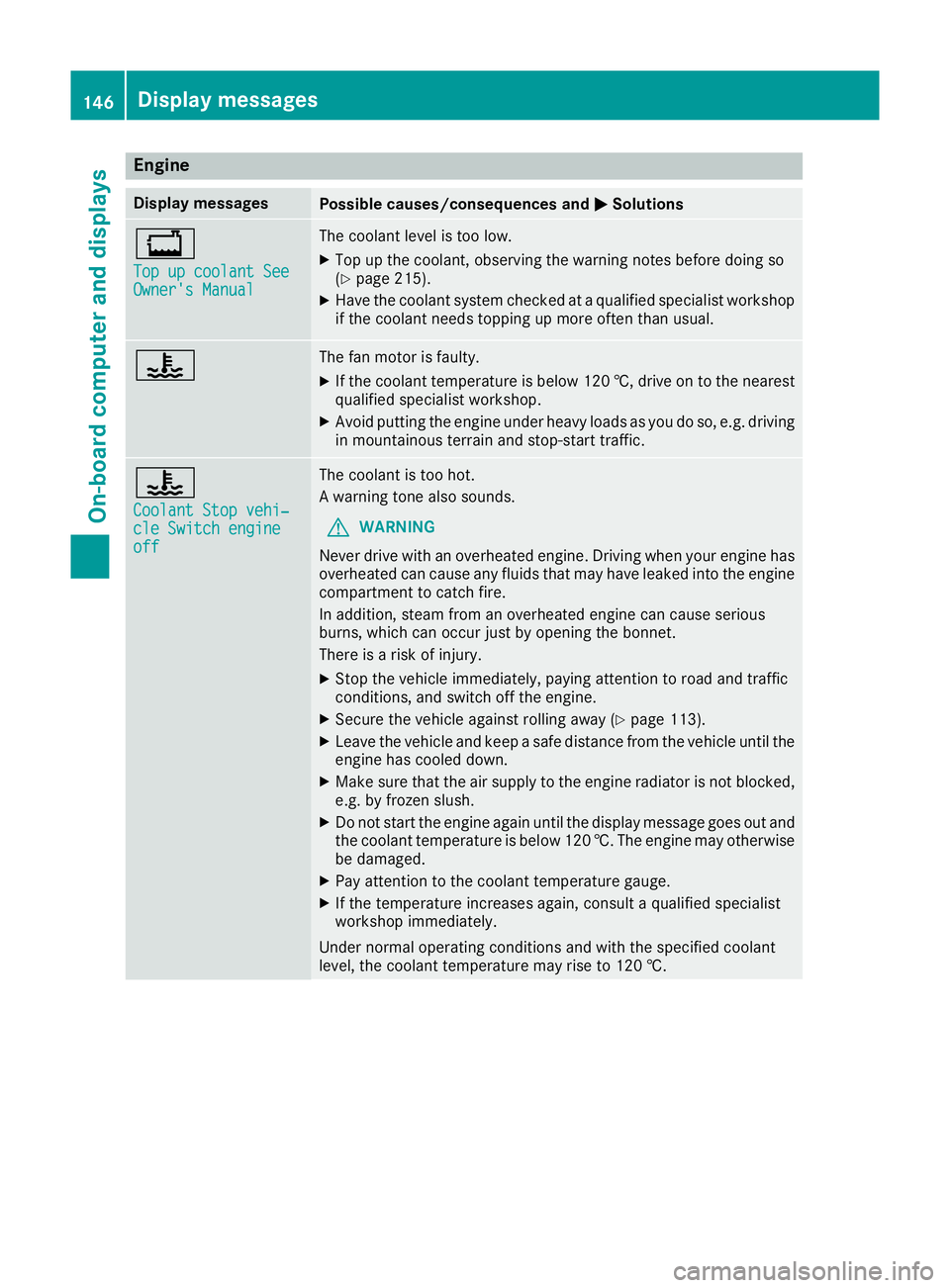
Engine
Display messages
Possible causes/consequences and
M
MSolutions +
Top up coolan
tSee
Top up coolant See
Owner's Manual Owner's Manual The coolant level is too low.
X Top up the coolant, observing the warning notes before doing so
(Y page 215).
X Have the coolant system checked at aqualified specialist workshop
if the coolant needs topping up more often than usual. ? The fan motor is faulty.
X If the coolant temperature is below 120 †, drive on to the nearest
qualified specialist workshop.
X Avoid putting the engine under heavy loads as you do so, e.g. driving
in mountainous terrain and stop-start traffic. ?
Coolant Stop vehi‐ Coolant Stop vehi‐
cle Switch engine cle Switch engine
off off The coolant is too hot.
Aw
arning tonea lso sounds.
G WARNING
Never drive with an overheated engine. Drivin gwhen your engine has
overheated can cause any fluids that may have leaked into the engine compartment to catchf ire.
In addition, steam from an overheated engine can cause serious
burns, which can occur just by opening the bonnet.
There is arisk of injury.
X Stop the vehicle immediately, paying attention to road and traffic
conditions, and switch off the engine.
X Secure the vehicle against rolling away (Y page 113).
X Leave the vehicle and keep asafe distance from the vehicle until the
engine has cooled down.
X Make sure that the air supply to the engine radiator is not blocked,
e.g. by frozen slush.
X Do not start the engine again until the display message goes out and
the coolant temperature is below 120 †. The engine may otherwisebe damaged.
X Pay attention to the coolant temperature gauge.
X If the temperature increases again, consult aqualified specialist
workshop immediately.
Under normal operating conditions and with the specified coolant
level, the coolant temperature may rise to 120 †. 146
Display messagesOn-board computer and displays
Page 150 of 261
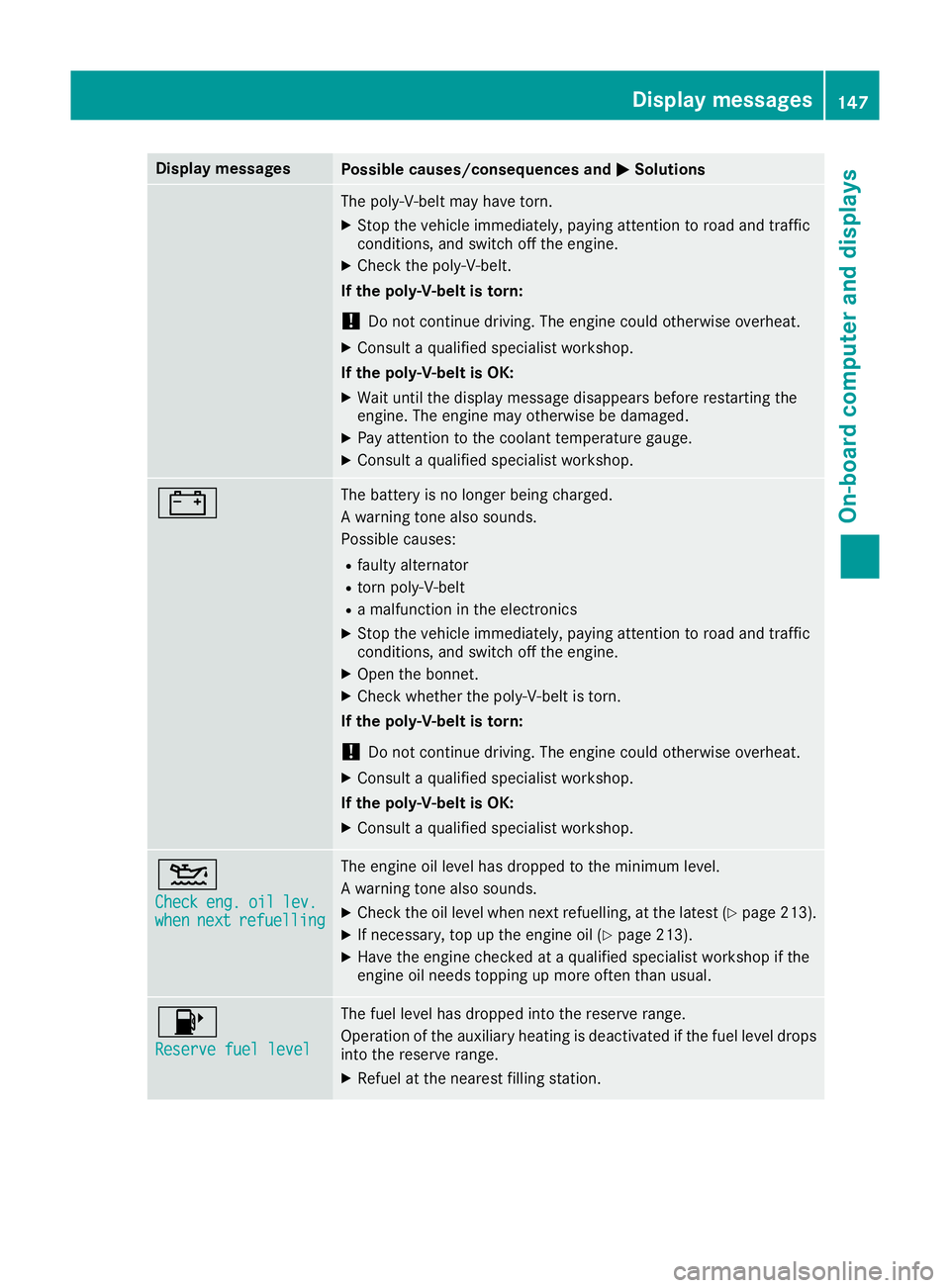
Display messages
Possible causes/consequence
sand M
MSolutions The poly-V-belt may have torn.
X Stop the vehicle immediately, paying attention to road and traffic
conditions, and switch off the engine.
X Check the poly-V-belt.
If the poly-V-belt is torn:
! Do not continue driving. The engine could otherwise overheat.
X Consult aqualified specialist workshop.
If the poly-V-belt is OK:
X Wait until the display message disappears before restarting the
engine. The engine may otherwise be damaged.
X Pay attention to the coolant temperature gauge.
X Consult aqualified specialist workshop. # The battery is no longer being charged.
Aw
arning tonea lso sounds.
Possible causes:
R faulty alternator
R torn poly-V-belt
R am alfunction in the electronics
X Stop the vehicle immediately, paying attention to road and traffic
conditions, and switch off the engine.
X Open the bonnet.
X Check whether the poly-V-belt is torn.
If the poly-V-belt is torn:
! Do not continue driving. The engine could otherwise overheat.
X Consult aqualified specialist workshop.
If the poly-V-belt is OK: X Consult aqualified specialist workshop. 4
Check Check
eng.
eng.oil
oillev.
lev.
when
when next
nextrefuelling
refuelling The engine oil level has dropped to the minimum level.
Aw
arning tonea lso sounds.
X Check the oil level when next refuelling, at the latest (Y page 213).
X If necessary, top up the engine oil (Y page 213).
X Have the engine checked at aqualified specialist workshop if the
engine oil needs topping up more often than usual. 8
Reserve fuel level Reserve fuel level The fuel level has dropped into the reserve range.
Operation of the auxiliary heating is deactivated if the fuel level drops
into the reserve range.
X Refuel at the nearest filling station. Display me
ssages
147On-board compute rand displays Z
Page 156 of 261
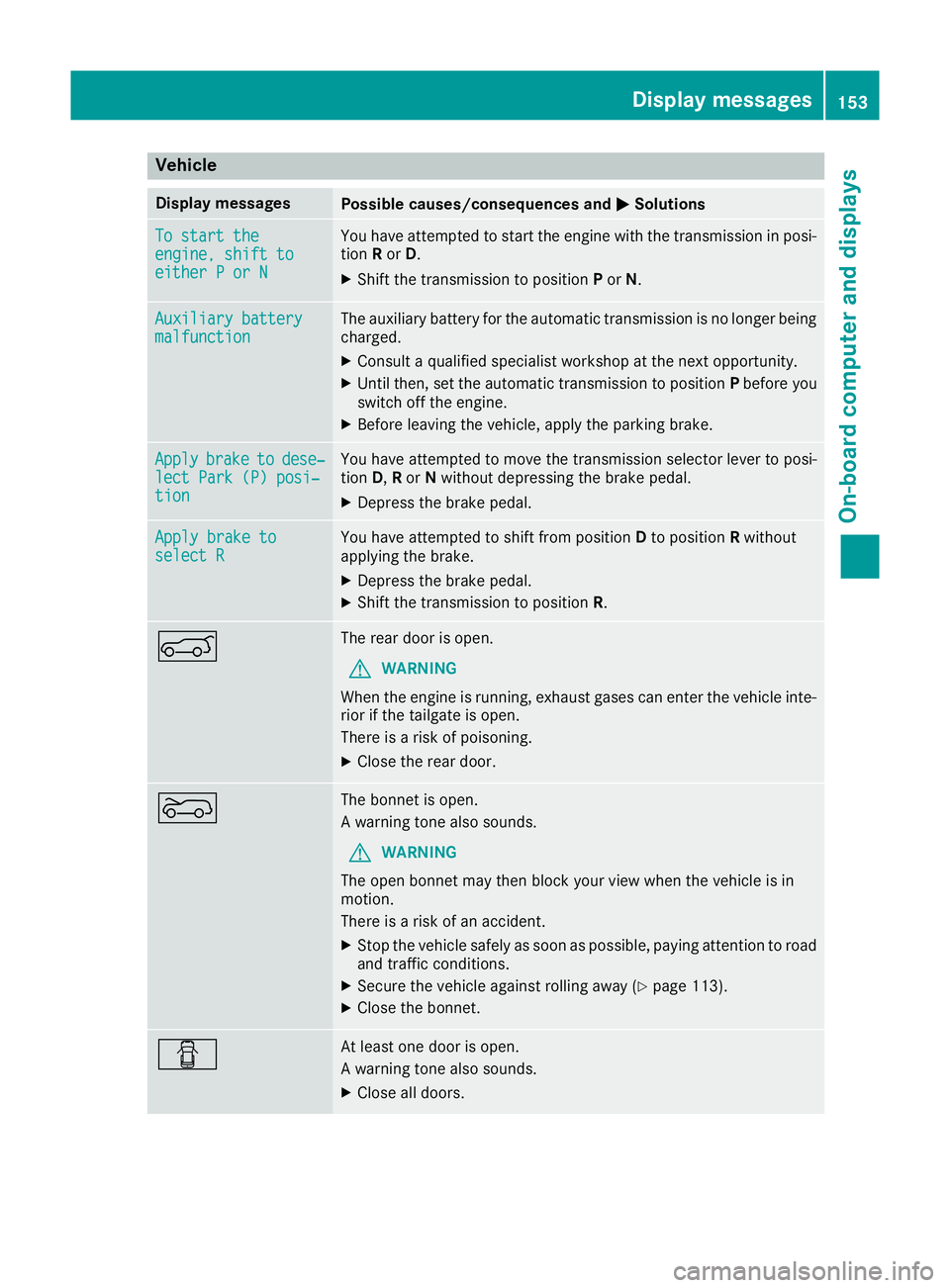
Vehicle
Display messages
Possible causes/consequence
sand M
MSolutions To start the
To start the
engine, shift to engine, shift to
either
PorN
either PorN You have attempted to star
tthe engin ewith the transmission in posi-
tion Ror D.
X Shif tthe transmission to position Por N. Auxiliar
ybattery
Auxiliary battery
malfunction malfunction The auxiliary battery for the automatic transmission is no longer being
charged.
X Consult aqualified specialist workshop at the next opportunity.
X Until then,s et the automatic transmission to position Pbefore you
switch off the engine.
X Before leaving the vehicle, apply the parking brake. Apply
Apply
brake
braketo
todese‐
dese‐
lect Park (P) posi‐
lect Park (P) posi‐
tion tion You have attempted to move the transmission selector lever to posi-
tion
D,Ror Nwithout depressing the brake pedal.
X Depress the brake pedal. Apply brake to Apply brake to
select R select R You have attempted to shift from position
Dto position Rwithout
applyingt he brake.
X Depress the brak epedal.
X Shif tthe transmission to position R.A The rear door is open.
G WARNING
When the engine is running, exhaust gases can enter the vehicle inte- rior if the tailgat eisopen.
There is arisk of poisoning.
X Close the rear door. ? The bonnet is open.
Aw
arning tonea lso sounds.
G WARNING
The open bonnet may then block your view when the vehicle is in
motion.
There is arisk of an accident.
X Stop the vehicle safely as soon as possible, paying attention to road
and traffic conditions.
X Secure the vehicle against rolling away (Y page 113).
X Close the bonnet. C At least one door is open.
Aw
arning tone also sounds.
X Close al ldoo rs. Display messages
153On-board computer an ddisplays Z
Page 166 of 261
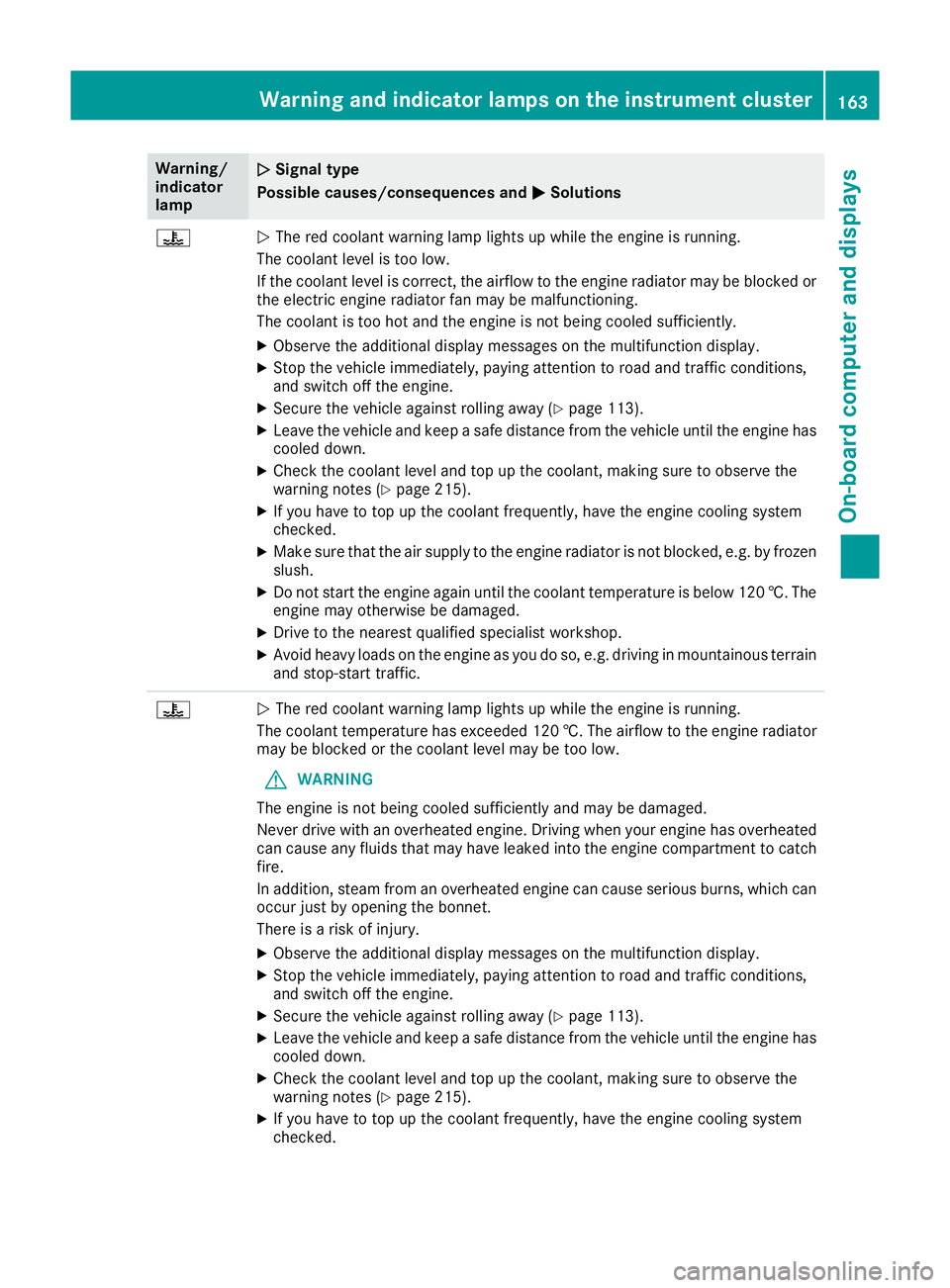
Warning/
indicator
lamp
N N
Signa ltype
Possible causes/consequences and M
MSolutions ?
N
The red coolant warning lamp lights up while the engine is running.
The coolant level is too low.
If the coolant level is correct, the airflow to the engine radiator may be blocked or the electric engine radiator fan may be malfunctioning.
The coolant is too hot and the engine is not being cooled sufficiently.
X Observe the additional display messages on the multifunction display.
X Stop the vehicle immediately, paying attention to road and traffic conditions,
and switch off the engine.
X Secure the vehicle against rolling away (Y page 113).
X Leave the vehicle and keep asafe distance from the vehicle until the engine has
cooled down.
X Check the coolant level and top up the coolant, making sure to observe the
warning notes (Y page 215).
X If you have to top up the coolant frequently, have the engine cooling system
checked.
X Make sure that the air supply to the engine radiator is not blocked, e.g. by frozen
slush.
X Do not start the engine again until the coolant temperature is below 120 †. The
engine may otherwise be damaged.
X Drive to the nearest qualified specialist workshop.
X Avoid heavy loads on the engine as you do so, e.g. driving in mountainous terrain
and stop-start traffic. ?
N
The red coolant warning lamp lights up while the engine is running.
The coolant temperature has exceeded 120 †. The airflow to the engine radiator may be blocked or the coolant level may be too low.
G WARNING
The engine is not being cooled sufficiently and may be damaged.
Never drive with an overheated engine. Drivin gwhen your engine has overheated
can cause any fluids that may have leaked into the engine compartment to catch fire.
In addition, steam from an overheated engine can cause serious burns, which can
occur just by opening the bonnet.
There is arisk of injury.
X Observe the additional display messages on the multifunction display.
X Stop the vehicle immediately, paying attention to road and traffic conditions,
and switch off the engine.
X Secure the vehicle against rolling away (Y page 113).
X Leave the vehicle and keep asafe distance from the vehicle until the engine has
cooled down.
X Check the coolant level and top up the coolant, making sure to observe the
warning notes (Y page 215).
X If you have to top up the coolant frequently, have the engine cooling system
checked. Warning and indicato
rlamps on the instrument cluster
163On-boardcomputer and displays Z
Page 214 of 261
Engine compartment
Bonnet
Importan tsafety notes G
WARNING
An unlocked bonne tmay open up when the
vehicl eisinm otion and block yourv iew.There
is ar isk of an accident.
Never unlock the bonnet when driving. Before
every trip, ensure that the bonnet is locked. G
WARNING
When being opened and closed ,the bonnet
may suddenly fall into the closed position.
There is arisk of injury to persons in the range
of movement of the bonnet.
Open and close the bonnet only when nobody
is in the range of movement. G
WARNING
If you open the bonnet while the engine is
overheating or while there is afire in the
engine compartment, you coul dcome into
contact with hot gase sorother leaking ser-
vice products. There is adange rofinjury.
Allow an overheating engine to cool down
before opening the bonnet. If there is afire in
the engine compartment, leave the bonnet
closed and notify the fire brigade. G
WARNING
The ignitio nsystem and the fuel injection sys-
tem operate with ahigh voltage. If you touch
the live components, you coul dreceive an
electric shock. There is adange rofinjury.
Never touch components of the ignitio nsys-
tem or the fuel injection system when the
ignitio nisswitched on. G
WARNING
There are moving components in the engine
compartment. Certain components may con-
tinue to move or suddenly move again even
after the ignitio nhas been switched off, e.g.
the radiator fan. There is arisk of injury. If you have to carry out work in the engine
compartment:
R switch off the ignition
R never touch the dangerou sarea ssurround-
ing moving components, e.g. the rotation
area of the fan
R remove jewellery and watches
R keep items of clothing and hair, for exam-
ple, awayf rom moving parts.
Do not touch the diagnostics socket when the
ignition is switched on.
Openin gthe bonnet G
WARNING
Certain components in the engine compart-
ment could be very hot, e.g. the engine, the
radiator and parts of the exhaust system.
There is arisk of injury when accessing the
engine compartment.
As far as possible,a llow the engine to cool
downa nd only touch the components descri-
bed in the following. G
WARNING
When the bonnet is open, and the windscreen wipers are set in motion, you can be injured by
the wiper linkage. There is arisk of injury.
Always switch off the windscreen wipers and
the ignitio nbefore opening the bonnet.
! Make sure that the windscreen wipers are
not folde dawayfrom the windscreen. Other-
wise, you coul ddamage the windscreen wip-
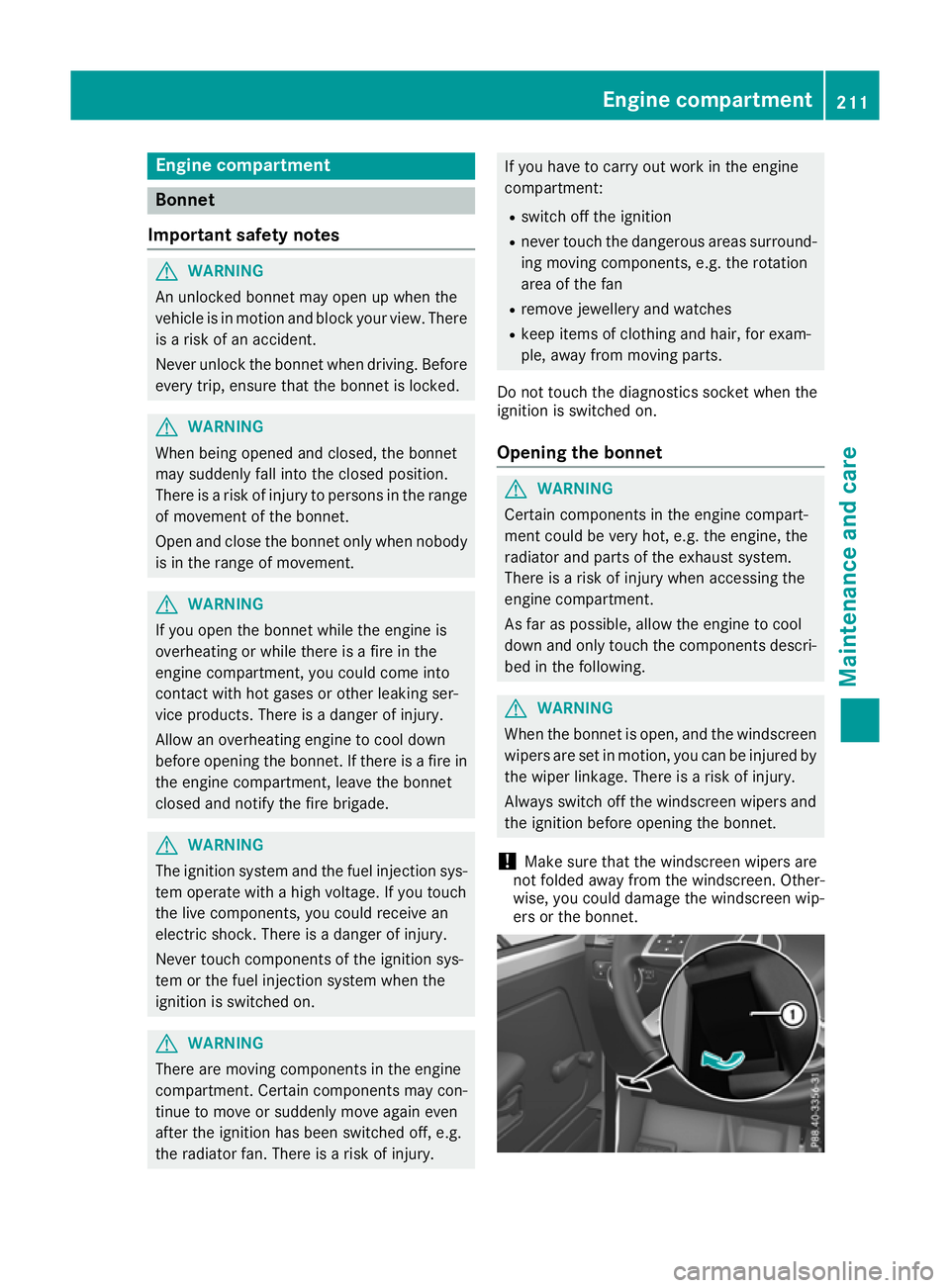
ers or the bonnet. Engine compartment
211Maintenanceand care Z