buttons MERCEDES-BENZ G-CLASS SUV 2018 User Guide
[x] Cancel search | Manufacturer: MERCEDES-BENZ, Model Year: 2018, Model line: G-CLASS SUV, Model: MERCEDES-BENZ G-CLASS SUV 2018Pages: 549, PDF Size: 10.22 MB
Page 164 of 549
#
Alw ays disengage the dif fere ntial lo cks
immediately on a firm , high-t raction
su rface. Dif
fere ntial lo cks impr ovethe traction of the
ve hicle when driving off-road and ford ing. The
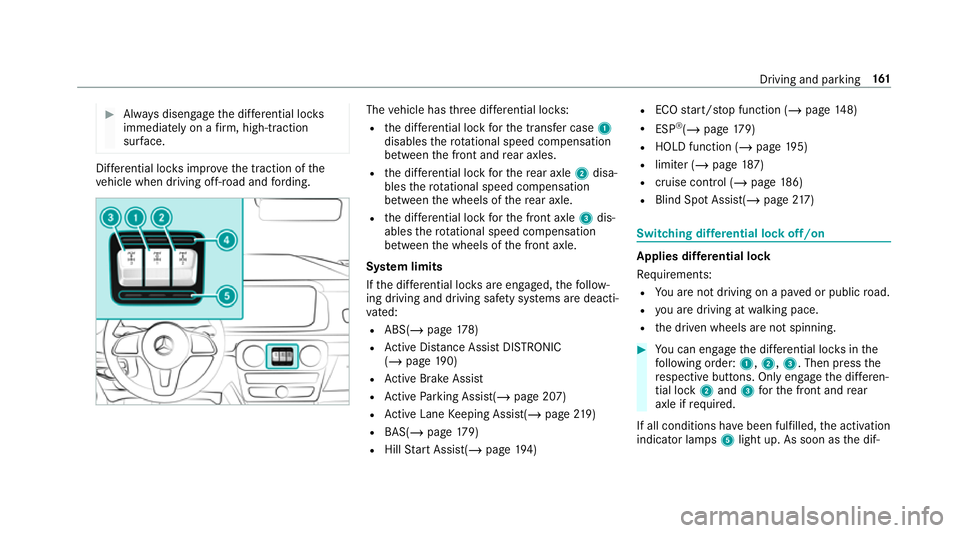
vehicle has thre e dif fere ntial lo cks:
R the dif fere ntial lo ckforth e transfer case 1
disables thero tational speed compensation
between the front and rear axles.
R the dif fere ntial lo ckforth ere ar axle 2disa‐
bles thero tational speed compensation
between the wheels of there ar axle.
R the dif fere ntial lo ckforth e front axle 3dis‐
ables thero tational speed compensation
between the wheels of the front axle.
Sy stem limits
If th e dif fere ntial lo cks are engaged, thefo llow‐
ing driving and driving saf ety sy stems are deacti‐
va ted:
R ABS( /page 178)
R Active Dis tance Assi stDISTRONIC
(/ page 190)
R Active Brake Assi st
R Active Parking Assist(/ page 207)
R Active Lane Keeping Assist(/ page219)
R BAS(/ page179)
R Hill Start Assist(/ page194) R
ECO start/ stop function (/ page148)
R ESP ®
(/ page 179)
R HOLD fu nction (/ page 195)
R limi ter (/ page187)
R cruise control (/ page 186)
R Blind Spot Assi st(/ page 217) Swi
tching dif fere ntial lock off/on Applies dif
fere ntial lock
Re quirements:
R You are not driving on a pa ved or public road.
R you are driving at walking pace.
R the driven wheels are not spinning. #
You can en gage the dif fere ntial lo cks in the
fo llowing order: 1,2, 3. Then press the
re spective buttons. Only engage the dif fere n‐
tial lo ck2 and 3forth e front and rear
axle if requ ired.
If all conditions ha vebeen fulfilled, the activation
indicator lamps 5light up. As soon as the dif‐ Driving and parking
161
Page 165 of 549
fe
re ntial lo cks are active, the function indicator
lamps 4light up.
The message Differential lock active ABS and
ESP not available andthewa rning and indicator
lamps å÷!on the instrument clus‐
te r appear.
% If one or more requ irements ha venot been
ful filled, the message Switch-on conditions
Differential lock not fulfilled appears.
The gear change must be restar ted.
Disengaging the dif fere ntial loc ks #
Press the buttons in thefo llowing order 3,
2, 1.
or #
Tosimultaneously disengage all dif fere ntial
lo ck s: press button 1.
or #
Todisengage the dif fere ntial lo cksfo rthe
re ar and front axles: press button 2.
The dif fere ntial lo cks are only disengaged when
th e function indicator lamps are gone out again
4. If
yo u park theve hicle with the dif fere ntial lo cks
engaged, they will be deactivated automatically
when theve hicle is star ted again. In some cases,
yo u ha vetodrive a few metres before the dif fer‐
ential loc ksare proper ly disengaged. Therefore,
ch eck if the function indicator lamps ha vegone
out when youre start theve hicle 4.
Obser veany information which may be displa yed
in the instrument clus ter:
R Warning and indicator lamps
R Display messages Fu
nction of the 4MATIC
4MATIC ensures that all four wheels are driven
when needed. Toge ther with ESP ®
and 4ETS,
4MATIC impr ovesth e traction of your vehicle
whene ver a driven wheel spins due toinsuf fi‐
cient traction.
If yo ufa ilto adapt your driving style, 4MATIC can
neither reduce therisk of an accident nor over‐
ri de the la wsof ph ysics. 4MATIC cannot take
account of road, weather and traf fic conditions.
4MATIC is only an aid. You are responsible espe‐ cially
for maintaining a safe dis tance from the
ve hicle in front, forve hicle speed, for braking in
good time and forst ay ing in lane.
% In wint ryroad conditions, the maximum
ef fect of 4MATIC can be achie ved only if you
use winter tyres (M+S tyres), with sn ow
ch ains if necessar y. Re
fuelling Re
fuelling theve hicle &
WARNING Risk offire or explosion from
fuel
Fu els are highly flammable. #
Fire, naked flames, smoking and crea‐
tion of spar ksmust be avoided. #
Swit choff the ignition and, if available,
th est ationary heater, before and while
re fuelling theve hicle. 16 2
Driving and pa rking
Page 173 of 549
Garage door opener
Prog
ramming buttons for the garage door
opener &
DANG ER Risk of fata l injuries due to
ex haust gases
Combustion engines emit poisonous exhaust
ga ses such as carbon monoxide. Inhaling
th ese exhaust gases is hazardous tohealth
and can lead topoisoning. #
Never lea vethe engine running in an
enclosed space wi thout suf ficient venti‐
lation. &
WARNING Risk of inju rywhen opening
or closing a door with thega rage door
opener
When you operate or program the door with
th e integrated garage door opener, people in
th era nge of mo vement of the door may
become trapped or stru ck bythe door. #
When using the integrated garage door
opener, alw ays make sure that nobody is within
thera nge of mo vement of the
door. Re
quirements:
R The vehicle has been par ked outside the
ga rage or outside thera nge of mo vement of
th e door.
R The engine is switched off.
R the ignition is switched on.
% The garage door opener function is alw ays
av ailable when the ignition is switched on. #
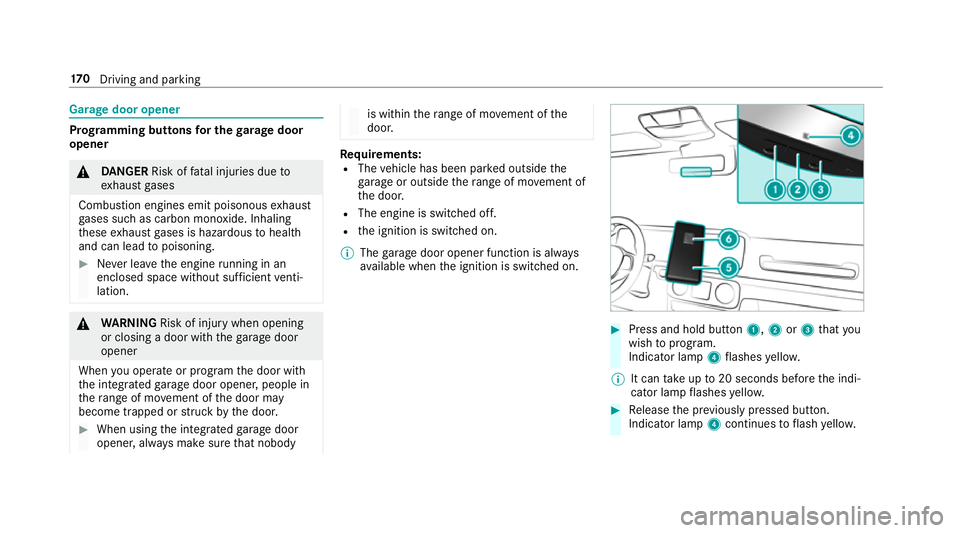
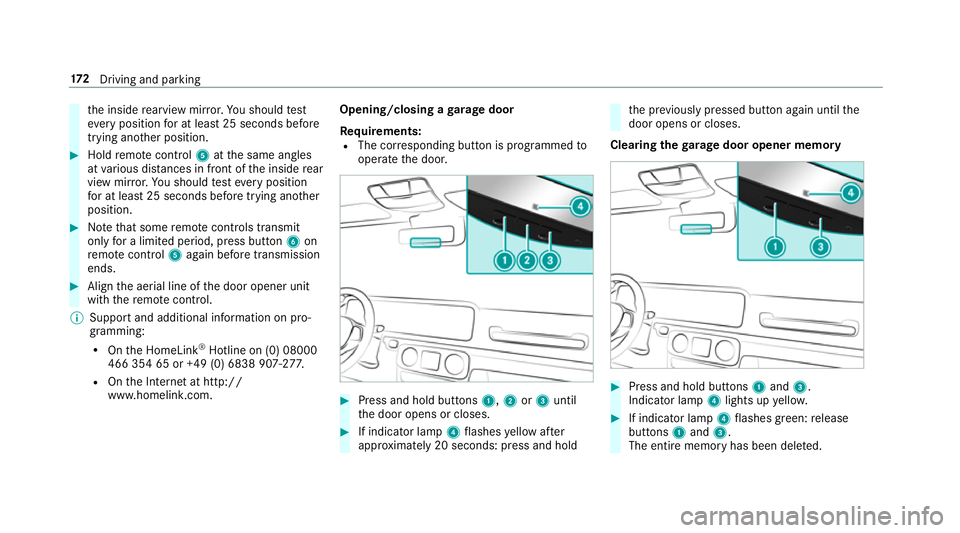
Press and hold button 1,2or3 that you
wish toprog ram.
Indicator lamp 4flashes yello w.
% It can take up to20 seconds before the indi‐
cator lamp flashes yello w. #
Release the pr eviously pressed button.
Indicator lamp 4continues toflash yello w. 17 0
Driving and pa rking
Page 174 of 549
#
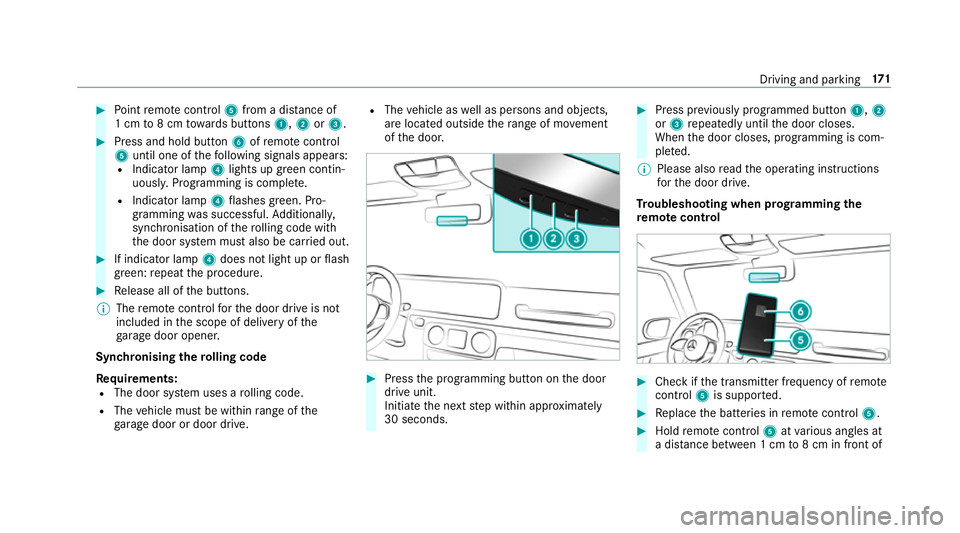
Point remo tecontrol 5from a di stance of
1 cm to8 cm towa rds buttons 1,2or3. #
Press and hold button 6ofremo tecontrol
5 until one of thefo llowing signals appears:
R Indicator lamp 4lights up green contin‐
uousl y.Programming is comple te.
R Indicator lamp 4flashes green. Pro‐
gramming was successful. Additionall y,
synchronisation of thero lling code with
th e door sy stem must also be car ried out. #
If indicator lamp 4does not light up or flash
green: repeat the procedure. #
Release all of the buttons.
% The remo tecontrol forth e door drive is not
included in the scope of delivery of the
ga rage door opener.
Synchronising thero lling code
Re quirements:
R The door sy stem uses a rolling code.
R The vehicle must be within range of the
ga rage door or door drive. R
The vehicle as well as persons and objects,
are located outside thera nge of mo vement
of the door. #
Press the programming button on the door
drive unit.
Initiate the next step within appr oximately
30 seconds. #
Press pr eviously prog rammed button 1,2
or 3 repeatedly until the door closes.
When the door closes, programming is com‐
ple ted.
% Please also read the operating instructions
fo rth e door drive.
Tr oubleshooting when prog ramming the
re mo tecont rol #
Check if the transmit ter frequency of remo te
control 5is suppo rted. #
Replace the batteries in remo tecontrol 5. #
Hold remo tecontrol 5atvarious angles at
a dis tance between 1 cm to8 cm in front of Driving and parking
171
Page 175 of 549
th
e inside rearview mir ror.Yo u should test
eve ryposition for at least 25 seconds before
trying ano ther position. #
Hold remo tecontrol 5atthe same angles
at various dis tances in front of the inside rear
view mir ror.Yo u should test eve ryposition
fo r at least 25 seconds before trying ano ther
position. #
Notethat some remo tecontrols transmit
only for a limi ted period, press button 6on
re mo tecontrol 5again before transmission
ends. #
Align the aerial line of the door opener unit
with there mo tecontrol.
% Support and additional information on pro‐
gramming:
R Onthe HomeLink ®
Hotline on (0) 08000
466 354 65 or +49 (0) 6838 907-2 77.
R Onthe Internet at http://
www.homelin k.com. Opening/closing a
garage door
Requ irements:
R The cor responding button is programmed to
operate the door. #
Press and hold buttons 1,2or3 until
th e door opens or closes. #
If indicator lamp 4flashes yellow af ter
appr oximately 20 seconds: press and hold th
e pr eviously pressed button again until the
door opens or closes.
Clearing thega rage door opener memo ry #
Press and hold buttons 1and 3.
Indicator lamp 4lights up yello w. #
If indicator lamp 4flashes green: release
buttons 1and 3.
The entire memo ryhas been dele ted. 17 2
Driving and pa rking
Page 189 of 549
R
Late #
Select a setting.
% Your selection is retained when theve hicle is
next star ted.
Deactivating Active Brake Assi st
% It is recommended that you alw ays lea ve
Ac tive Brake Assi stactivated. #
Select Off.
The dis tance warning function and the auton‐
omous braking function are deactivated.
When theve hicle is next star ted, theMedium
setting is automatically selected.
% IfAc tive Brake Assi stis deactivated, the
æ symbol appears inthest atus bar of the
multifunction displa y.Fu
nction of Adaptive Brake Lights Ad
aptive Brake Lights warnfollowing traf fic in an
emergency braking situation wi th thefo llowing
actions:
R Byflashing the brake lamps R
By activating the hazard warning lights
If th eve hicle is braked sharply from speeds
abo ve50 km/h, the brake lamps flash rapidl y.
This pr ovides traf fic tr avelling behind you with an
ev en more noticeable warning.
If th eve hicle is tr avelling at speeds of more than
70 km/h at the beginning of the brake applica‐
tion, the hazard warning lights switch on once
th eve hicle is stationar y.When you pull away
again, the hazard warning lights will switch off
automatically at appr oximately 10km/h. Yo u
can also switch off the hazard warning lights
using the hazard warning button. Cruise control and limiter
Fu
nction of cruise control
Cruise cont rolre gulates the speed totheva lue
selec tedby the driver.
If yo u accelerate toove rtake, forex ample, the
st ored speed is not dele ted. If youre mo veyour
fo ot from the accelera tor pedal af terov ertak ing,
cruise control will resume speed regulation back
to thestored speed. Cruise contro
l is operated using the cor respond‐
ing steering wheel buttons. You can store any
speed abo ve20 km/h up tothe maximum speed
or up tothe set winter tyre limit.
If yo ufa ilto adapt your driving style, cruise con‐
trol can neither reduce therisk of an accident
nor override the la wsof ph ysics. It cannot take
into account road, weather or traf fic conditions.
Cruise control is only an aid. You are responsible
fo r maintaining a safe dis tance totheve hicle in
front, forve hicle speed, for braking in good time
and forst ay ing in lane.
Displa yson the multifunction display
The status of cruise control and thestored
speed are shown in the multifunction displa y.18 6
Driving and pa rking
Page 190 of 549
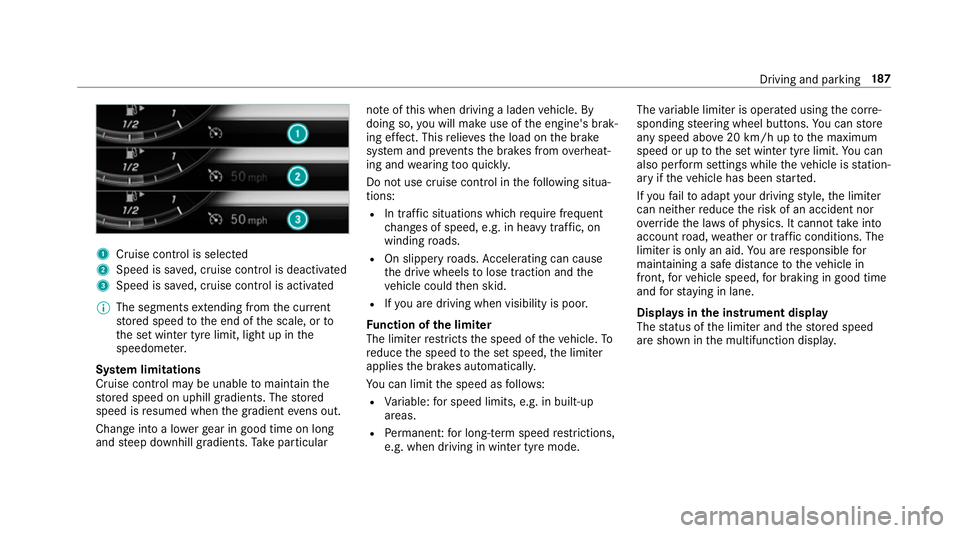
1
Cruise cont rol is selec ted
2 Speed is sa ved, cruise control is deactivated
3 Speed is sa ved, cruise control is activated
% The segments extending from the cur rent
st ored speed tothe end of the scale, or to
th e set winter tyre limit, light up in the
speedome ter.
Sy stem limitations
Cruise control may be unable tomaintain the
st ored speed on uphill gradients. The stored
speed is resumed when the gradient evens out.
Change into a lo werge ar in good time on long
and steep downhill gradients. Take particular no
te ofthis when driving a laden vehicle. By
doing so, you will make use of the engine's brak‐
ing ef fect. This relie vesth e load on the brake
sy stem and pr events the brakes from overheat‐
ing and wearing tooqu ickl y.
Do not use cruise control in thefo llowing situa‐
tions:
R In traf fic situations whi chrequ ire frequent
ch anges of speed, e.g. in heavy traf fic, on
winding roads.
R On slippe ryroads. Accelerating can cause
th e drive wheels tolose traction and the
ve hicle could then skid.
R Ifyo u are driving when visibility is poor.
Fu nction of the limi ter
The limiter restricts the speed of theve hicle. To
re duce the speed tothe set speed, the limiter
applies the brakes automaticall y.
Yo u can limit the speed as follo ws:
R Variable: for speed limits, e.g. in built-up
areas.
R Perm anen t:for long-term speed restrictions,
e.g. when driving in winter tyre mode. The
variable limiter is operated using the cor re‐
sponding steering wheel buttons. You can store
any speed abo ve20 km/h up tothe maximum
speed or up tothe set winter tyre limit. You can
also per form settings while theve hicle is station‐
ary if theve hicle has been star ted.
If yo ufa ilto adapt your driving style, the limiter
can neither reduce therisk of an accident nor
ov erride the la wsof ph ysics. It cannot take into
account road, weather or traf fic conditions. The
limiter is only an aid. You are responsible for
maintaining a safe dis tance totheve hicle in
front, forve hicle speed, for braking in good time
and forst ay ing in lane.
Displa ysinthe instrument display
The status of the limiter and thestored speed
are shown in the multifunction displa y. Driving and pa
rking 187
Page 375 of 549
#
Switch on one Rear Seat En tertainment Sys‐
te m screen.
The homescreen appears. #
Select a data source. #
Select theMusic ,Videos orPhotos categor y.
All files in the desired category are shown in
alphabetical order.
% The Rear Seat En tertainment Sy stem can be
operated with the buttons on the
screen(/ page 362) or with the
to uchsc reen.
Media playback via HDMI devices can only
be controlled using the buttons on the
screen as well as on the end device connec‐
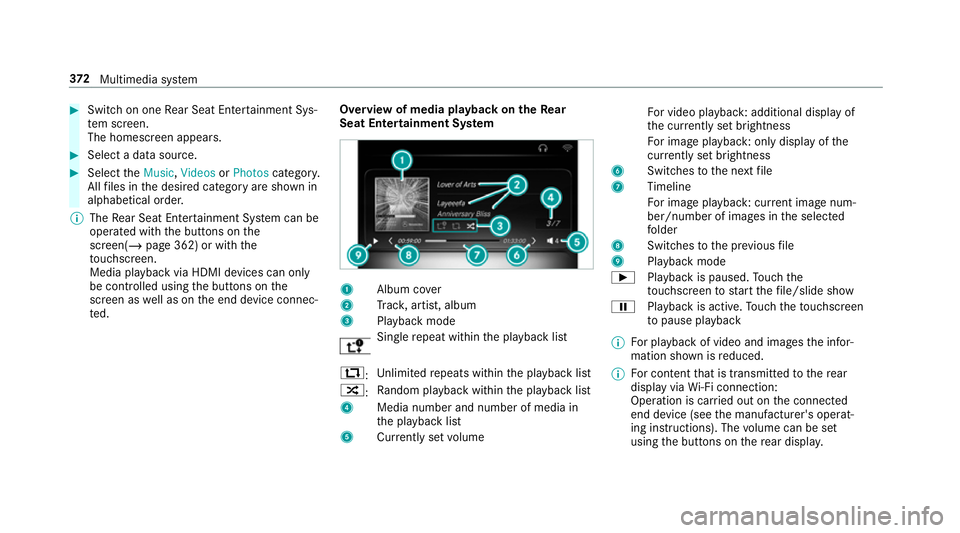
te d. Overview of media playback on
theRe ar
Seat Entertainment Sy stem 1
Album co ver
2 Trac k, artist, album
3 Playback mode Sin
gle re peat within the playback list
:: Un
limited repeats within the playback list
9: Ra
ndom pl ayback within the playback list
4 Media number and number of media in
the playback list
5 Currently set volume Fo
r video playback : additional displ ayof
th e cur rently set brightness
Fo r image playback : only displayofthe
cur rently set brightness
6 Switches tothe next file
7 Timeline
Fo r image playback : current ima genum‐
ber/number of ima ges in the selected
fo lder
8 Switches tothe pr evious file
9 Playback mode
Ì Playback is paused. Touch the
to uchsc reen tostart thefile/slide show
Ë Playback is active. Touch theto uchsc reen
to pause playback
% For playback of video and images the infor‐
mation shown is reduced.
% For content that is transmitted tothere ar
display via Wi-Fi connection:
Ope ration is car ried out on the connected
end device (see the manufacturer's operat‐
ing instructions). The volume can be set
using the buttons on there ar displa y. 372
Multimedia sy stem
Page 508 of 549
1,
2, 3 ...
4MATIC ..................................................... 16 2
Fu nction .............................................. 16 2
12 V battery
see Battery (vehicle)
12 V so cket
see Soc ket (12 V)
360° Camera ........................................... 203
Fu nction .............................................. 203
Opening the camera co ver (r eve rsing
camera) .............................................. .207
Selecting a view .................................. 206
Setting favo urites ................................ 207
Swit ching automatic operation
on/off (r eversing camera) .................. .207 A
A/C function Activating/deactivating (multimedia
sy stem) ................................................ 13 3
Switching on/off (control panel) ......... 13 3
ABS (Anti-lock Braking Sy stem) ............ .178 Ac
celeration
see Kickdown
Ac cess data
Editing (Blue tooth®
) .............................3 28
Setting (Blu etoo th®
) ............................ 327
Setting up (business telephony) .......... 326
Ac cident and breakdown manage‐
ment
Mercedes me connect ........................ .320
Ac oustic locking verification signal
Ac tivating/deactivating ......................... 72
Ac tivating/deactivating automatic
vo lume adjustment
Burmes ter®
sur round sound sy stem ... 360
Ac tive Brake Assi st
Fu nction/no tes ................................... 183
Setting ................................................. 185
Ac tive Di stance Assist DISTRO NIC........ 19 0
Calling up a speed .............................. .191
Displ ays in the instrument display .......1 94
Fu nction .............................................. 19 0
Increasing/decreasing speed .............. 191
Re quirements: .................................... .191 Selecting ..............................................
191
St eering wheel buttons ........................ 191
St oring a speed .................................... 191
Switching off/deacti vating .................. 191
Switching on/activating ....................... 191
Sy stem limitations ...............................1 90
Ac tive headlamps .................................... 12 0
Ac tive Lane Keeping Assist .....................219
Ac tivating/deactivating ...................... .220
Ac tivating/deactivating (multimedia
sy stem) ............................................... 222
Ac tivating/deactivating thewa rning .. .222
Fu nction ............................................... 219
Sensitivity (function/no tes) ................. 221
Setting the sensitivity .......................... 222
Sy stem limitations ...............................2 19
Tr ailer operation .................................. .219
Ac tive Parking Assist .............................. 207
Cross Traf fic Alert ................................ 213
Drive AwayAssi st................................ 212
Exiting a pa rking space ........................ 210
Fu nction .............................................. 207
Manoeuvring assi stance ...................... 213
Pa rking ................................................ 209
Sy stem limitations ...............................2 07 Index
505
Page 513 of 549
Switching
the sur round sound on/off
............................................................ .360
Business telephony
Setting up an Internet connection ...... .326
Buttons Steering wheel .................................... 226 C
Call list Making a call ........................................3 11
Overview ..............................................3 11
Calling up the sound menu
Burmes ter®
sur round sound sy stem ... 359
Calls ..........................................................3 07
Ac cepting ............................................ 307
Ac tivating functions du ring a call ........ 308
Calls wi thseveral participants ............ .308
Declining ............................................. 307
Ending a call ........................................ 307
Incoming call during an existing call .... 308
Making ................................................ 307
Vi ath eov erhead control panel
(Mercedes me connect) ....................... 319Camera
see 360° Camera
see Reversing camera
Car key
see Key
Car wash
see Care
Car wash (care) ........................................3 81
Care .......................................................... 388
Air-water duct ...................................... 381
Car wash ............................................. 381
Carpet .................................................3 88
Decorative foil .................................... .384
Displ ay................................................ 388
Exterior lighting ................................... 386
High-pressure cleaner ......................... 382
Matt finish ........................................... 383
Pa int wo rk ............................................ 383
Plastic trim .......................................... 388
Re alwo od/trim elements ...................3 88
Re versing camera ................................ 386
Ro of lining ...........................................3 88
Seat belt .............................................. 388
Seat co ver ........................................... 388 Sensors ............................................... 386
Ta
ilpipes .............................................. 386
Tr ailer hit ch......................................... 386
Wa shing byhand ................................. 382
Wheels/rims ....................................... 386
Wi ndo ws .............................................. 386
Wi per blades .......................................3 86
Carpet (Care) .......................................... .388
Changing gears ........................................ 15 5
Manually ..............................................1 55
Changing hub caps .................................. 419
Changing the lights
Driving abroad (symm etrical dipped
beam) ................................................... 11 7
Cha rging
Bat tery (vehicle) .................................. 399
Mobile phone (wireless) .......................1 14
USB port ..............................................1 14
Child saf ety lock
Ac tivating/deactivating (multimedia
sy stem) ................................................ 267
Re ar door .............................................. 68
Re ar side wind ows................................. 69 51 0
Index