lock MERCEDES-BENZ G-CLASS SUV 2018 Owner's Manual
[x] Cancel search | Manufacturer: MERCEDES-BENZ, Model Year: 2018, Model line: G-CLASS SUV, Model: MERCEDES-BENZ G-CLASS SUV 2018Pages: 549, PDF Size: 10.22 MB
Page 100 of 549
#
Only use the memory function on the
driver's side when theve hicle is station‐
ar y. &
WARNING Risk of entrapment when set‐
ting the seat with the memory function
When the memory function adjusts the seat
or steering wheel, you and other vehicle
occupants – particularly children – could
become trapped. #
During the setting procedure of the
memory function, ensure that no body
parts are in the sweep of the seat or
th esteering wheel. #
If somebody becomes trapped, immedi‐
ately release the memory function posi‐
tion button.
The adjustment process is stopped. &
WARNING Risk of entrapment if the
memory function is activated bychildren
Children could become trapped if they acti‐
va te the memory function, particularly when
unattended. #
Never lea vechildren unat tended in the
ve hicle. #
When leaving theve hicle, alw aysta ke
th eke y with you and lock theve hicle. The memory function can be used when
the igni‐
tion is switched off.
St oring
Seat adjustments for up tothre e people can be
st ored and called up using the memory function.
The following sy stems can be selected:
R Seat, backrest and head restra int
R Steering wheel
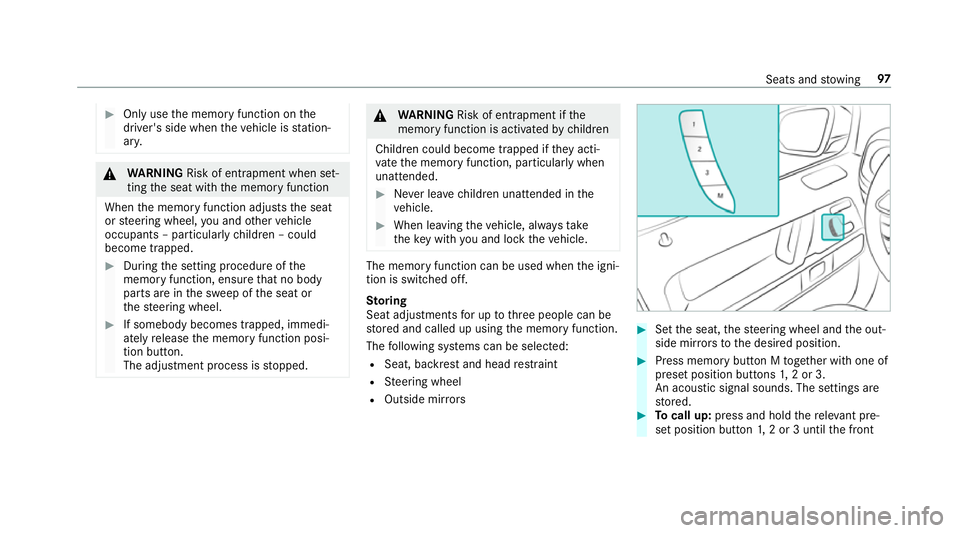
R Outside mir rors #
Set the seat, thesteering wheel and the out‐
side mir rors to the desired position. #
Press memory button M toge ther with one of
preset position buttons 1,2 or 3.
An acou stic signal sounds. The settings are
st ored. #
Tocall up: press and hold there leva nt pre‐
set position button 1,2 or 3 until the front Seats and
stowing 97
Page 103 of 549
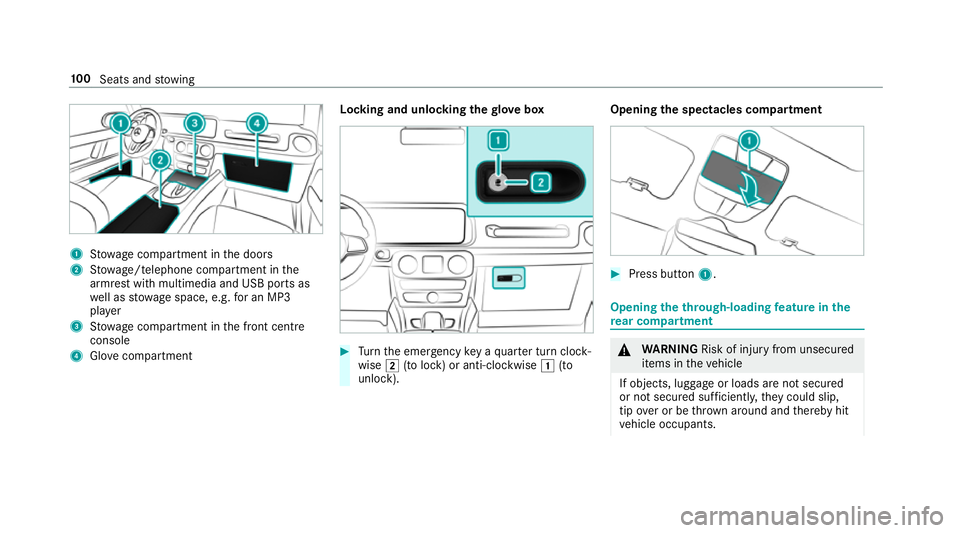
1
Stow age compartment in the doors
2 Stow age/telephone compartment in the
armrest with multimedia and USB ports as
we ll as stow age space, e.g. for an MP3
pla yer
3 Stow age compartment in the front cent re
console
4 Glove compa rtment Locking and unlo
cking thegl ove box #
Turn the emer gency key a quarter turn clock‐
wise 2(to lock) or anti-clockwise 1(to
unlock). Opening
the spectacles compa rtment #
Press button 1. Opening the through-loading
feature in the
re ar comp artment &
WARNING Risk of inju ryfrom unsecu red
items in theve hicle
If objects, luggage or loads are not secured
or not secured suf ficientl y,they could slip,
tip ove r or be throw n around and thereby hit
ve hicle occupants. 100
Seats and stowing
Page 119 of 549
fa
cing up wards and secure it with rubber
st ra p2.
When thech arging symbol is shown in the
multimedia sy stem, the mobile phone is
being charge d.
Malfunctions de tected du ring thech arging
process are shown in the multimedia sy stem
displa y.
% The mat can be remo vedfo r cleaning, e.g.
using clean, luk ewarmwate r,by unclipping
it. Fi
tting/ removing the floormats &
WARNING Risk of accident due to
objects in the driver's foot we ll
Objects in the driver's foot we ll may impede
pedal tr avel or block a depressed pedal.
This jeopardises the operating and road
saf ety of theve hicle. #
Stow all objects in theve hicle securely
so that they cannot getinto the driver's
fo ot we ll. #
Alw aysfit th efloor mats securely and
as prescribed in order toensure that
th ere is alw ays suf ficient room forthe
pedals. #
Do not use loose floor mats and do not
place floor mats on top of one ano ther. #
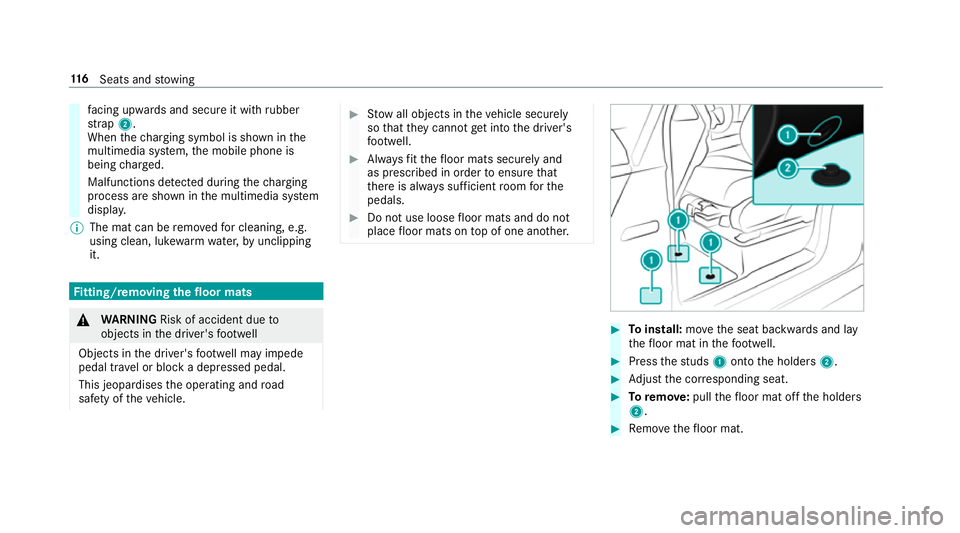
Toinstall: movethe seat backwards and lay
th efloor mat in thefo ot we ll. #
Press thest uds 1onto the holders 2. #
Adjust the cor responding seat. #
Toremo ve: pull thefloor mat off the holders
2. #
Remo vethefloor mat. 11 6
Seats and stowing
Page 129 of 549
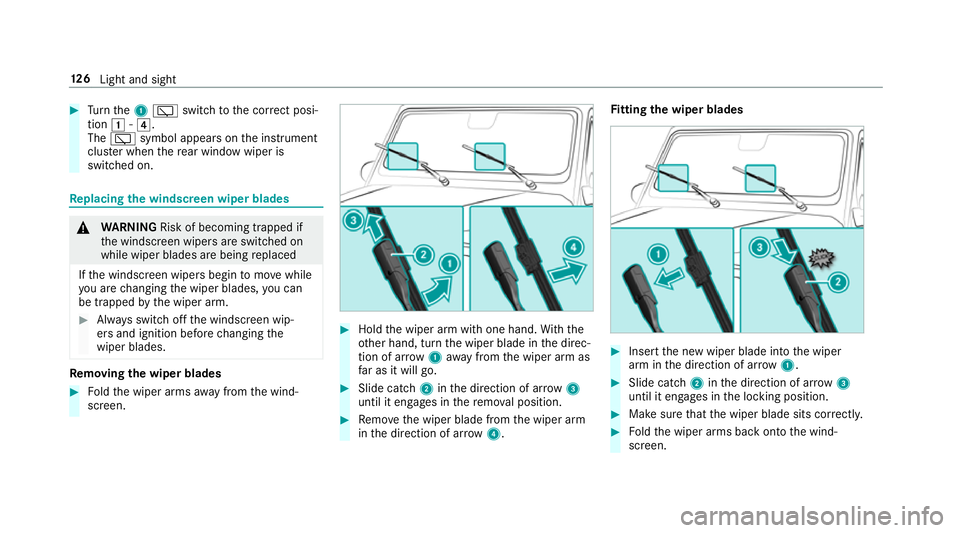
#
Turn the1 è switch tothe cor rect posi‐
tion 1-4.
The è symbol appea rson the instrument
clus ter when there ar wind owwiper is
swit ched on. Re
placing the windsc reen wiper blades &
WARNING Risk of becoming trapped if
th e windscreen wipers are switched on
while wiper blades are being replaced
If th e windscreen wipers begin tomo vewhile
yo u are changing the wiper blades, you can
be trapped bythe wiper arm. #
Alw ays switch off the windscreen wip‐
ers and ignition before changing the
wiper blades. Re
moving the wiper blades #
Foldthe wiper arms away from the wind‐
screen. #
Hold the wiper arm with one hand. With the
ot her hand, turn the wiper blade in the direc‐
tion of ar row1away from the wiper arm as
fa r as it will go. #
Slide catch 2inthe direction of ar row 3
until it engages in there mo val position. #
Remo vethe wiper blade from the wiper arm
in the direction of ar row4. Fi
tting the wiper blades #
Inse rtthe new wiper blade into the wiper
arm in the direction of ar row1. #
Slide catch 2inthe direction of ar row 3
until it engages in the locking position. #
Make sure that the wiper blade sits cor rectly. #
Foldthe wiper arms back onto the wind‐
screen. 12 6
Light and sight
Page 144 of 549
Driving
Note
s on Mercedes-AMG vehicles Obser
vethe no tes on thefo llowing topics in the
Supplement. Otherwise, you may failto recog‐
nise dangers.
R AMG Performance exhaust sy stem
R AMG high-per form ance brake sy stem
R AMG RIDE CONTROL
R (DYNAMIC SELECT switch) drive programs Switching on
the po wer supp lyor ignition
using thest art/s top button &
WARNING Risk of accident and inju ry
due tochildren left unat tended in the
ve hicle
If ch ildren are left unat tended in theve hicle,
th ey could:
R open doo rs,th ereby endangering other
persons or road users. R
get out of theve hicle and be hit by
oncoming traf fic.
R ope rate ve hicle equipment and become
trapped, forex ample.
In addition, children could also set theve hi‐
cle in motion, forex ample, by:
R releasing the parking brake.
R shifting the automatic transmission out of
park position j.
R starting the engine. #
Never lea vechildren and animals unat‐
te nded in theve hicle. #
When leaving theve hicle, alw aysta ke
th eke y with you and lock theve hicle. #
Keep theke y out of there ach of chil‐
dren. Re
quirements:
R theke y is located in theve hicle and thekey
battery is not dischar ged.
R the brake pedal is not depressed. #
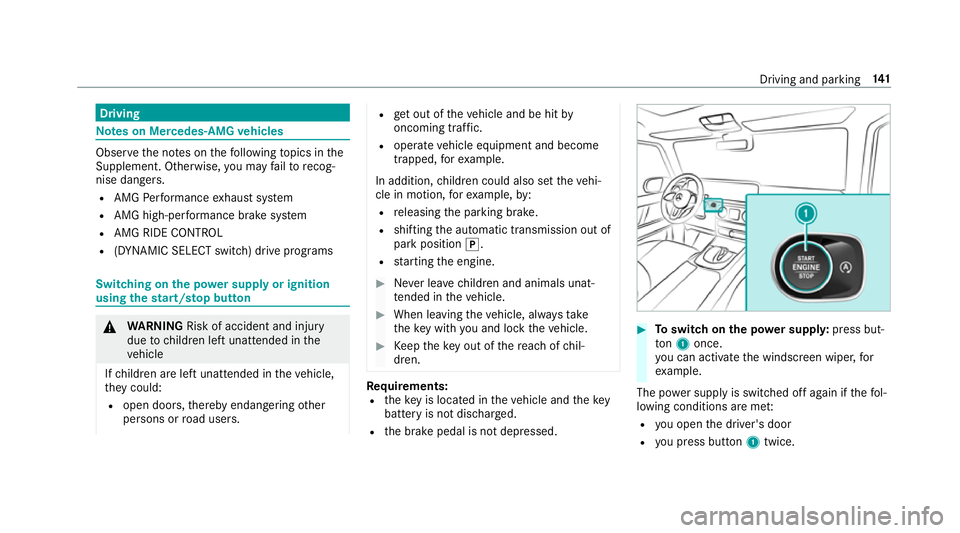
Toswitch on the po wer supp ly:press but‐
to n1 once.
yo u can activate the windscreen wiper, for
ex ample.
The po wer supp lyis switched off again if thefo l‐
lowing conditions are me t:
R you open the driver's door
R you press but ton1 twice. Driving and pa
rking 141
Page 146 of 549
If
th eve hicle does not star t: #
place key3 in mar ked space 1and lea ve
it th ere. #
Depress the brake pedal. #
start theve hicle using thest art/ stop button.
% You can also swit chon the po wer supp lyor
th e ignition with thest art/ stop button. Ru
nning-in no tes Mercedes-AMG
vehicles: observeth e no tes in
th e Supplement. Otherwise, you may failto rec‐
ognise dangers.
To preser vethe engine during thefirs t1, 500 km:
R drive at varying road speeds and engine
speeds.
R drive theve hicle in drive program A
or ;.
R change gear before there v counter needle is
Ô ofthewa yto there d area of there v coun‐
te r.
R do not shift down a gear manually in order to
brake. R
avoidoverstra ining theve hicle, e.g. driving at
full thro ttle.
R do not depress the accelera tor pedal past
th e pressure point (kickdown).
R only increase the engine speed gradually and
accelerate theve hicle tofull speed af ter
1, 500 km.
This also applies when the engine or parts of the
driv etra in ha vebeen replaced.
Please also obser vethefo llowing running-in
no tes:
R in cer tain driving and driving saf ety sy stems,
th e sensors adjust automatically while a cer‐
tai n di stance is being driven af terth eve hicle
has been delivered or af terre pairs. Full sys‐
te m ef fectiveness is not reached until the
end of this teach-in process.
R brakepads, brake discs and tyres that are
either new or ha vebeen replaced only ach‐
ie ve optimum braking ef fect and grip af ter
se veral hundred kilom etre s of driving. Com‐
pensate forth ere duced braking ef fect by
applying greaterfo rc eto the brake pedal. Note
s on driving &
WARNING Risk of accident due to
objects in the driver's foot we ll
Objects in the driver's foot we ll may impede
pedal tr avel or block a depressed pedal.
This jeopardises the operating and road
saf ety of theve hicle. #
Stow all objects in theve hicle securely
so that they cannot getinto the driver's
fo ot we ll. #
Alw aysfit th efloor mats securely and
as prescribed in order toensure that
th ere is alw ays suf ficient room forthe
pedals. #
Do not use loose floor mats and do not
place floor mats on top of one ano ther. Driving and parking
14 3
Page 153 of 549
R
2 Gentle deceleration and rolling
R 3 Consis tent speed
The inner segment is gr eyand the outer seg‐
ment em pties:
R 1 Sporty acceleration
R 2 Heavy braking
R 3 Fluctuations in speed
Yo u ha vedriven economically when:
R theth re e outer segments are comple tely fil‐
led simultaneously
R the ECO display border lights up
The additional range achi eved as a result of your
driving style in comparison with a driver with a
ve ry sporty driving style is shown under Bonus
from start . Therange displ ayed does not indi‐
cate a fixe dre duction in consum ption. DY
NA MIC SELECT switch Fu
nction of theDY NA MIC SELECT switch Mercedes-AMG
vehicles: observeth e no tes in
th e Supplement. Otherwise, you may failto rec‐
ognise dangers.
Use theDY NA MIC SELECT switch tochange
between thefo llowing drive programs:
R I (Individual): individual settings
R S (Sport): sporty driving style
R C(Comfort): comfortable and economical
driving style
R E (Eco): particular lyeconomical driving style
R Deser t:driving prog ram optimised for driving
on sand
Only change totheDesert driving program on
sand and not on public roads. The availability of
th is function is dependent on the count ry.
The drive program C (Comfort)is automatically
active af terst arting theve hicle. Depending on
the drive program selected, the
fo llowing vehicle characteristics will change:
R drive
-
engine and transmission management
- Active Dis tance Assi stDISTRONIC
R ECO start/ stop function
R ESP ®
R steering
R Vehicles with adjustable damping: sus‐
pension
Properties of the Desert drive prog ram: &
WARNING Risk of accident in drive pro‐
gram Dese rtdue torestricted function of
th e ESP ®
Not all functions of the ESP ®
are available in
th e Desert drive program, e.g. thest abilisa‐
tion function is deactivated, among others.
The wheels can lock while braking and the
braking dis tance is increased. 15 0
Driving and pa rking
Page 155 of 549
%
The drive program C (Comfort)is automati‐
cally active af terst arting theve hicle. Configuring drive prog
ram I Multimedia sy
stem:
4 Vehicle 5
e DYNAMIC SELECT
5 Individual #
Select the individual setting. Switching
the operation feedba ckfor drive
prog rammes on/o ff Multimedia sy
stem:
4 Vehicle 5
e DYNAMIC SELECT #
Switch User notification onO or off ª.
When this function is active, a cor responding
message is shown in the media display when
a drive prog ramme is selected with the
DY NA MIC SELECT switch. Displaying
vehicle data Multimedia sy
stem:
4 Vehicle 5
e DYNAMIC SELECT #
Select Vehicle data.
The following information is displa yed:
R Compass
R Wheel angle
R Incline
R Gradient
R Altitude
R LOW RANGE (/page 159)
R Locking (/ page160) Displaying engine data
Multimedia sy
stem:
4 Vehicle 5
e DYNAMIC SELECT #
Select Engine data.
% The values for engine output and engine tor‐
qu e may deviate from the nominal values. Items
that can influence this are, forex am‐
ple:
R Sea le vel
R Fuel grade
R Outside temp erature G-Mode
G-Mode is an additional drive prog ram for off-
ro ad journe ysand is not suitable for use on firm
ro ad sur faces. G-Mode is automatical lyactiva‐
te d, if one of thefo llowing conditions is me t:
R you shift the transfer case totheLO W
RANGE off-road gear (/ page159).
R you en gage at least one dif fere ntial lo ck
( / page 161).
The Gindicator appears in the instrument clus‐
te r.
G-Mode is automatically deactivated again, if the
fo llowing conditions are me t:
R you shift the transfer case tothe on-ro ad
position HIGH RANGE. 15 2
Driving and pa rking
Page 156 of 549
R
you disen gage all dif fere ntial lo cks.
Not all driving and driving saf ety sy stems are
av ailable in G-Modeunder cer tain circums tan‐
ces. Obser vethe sy stem limits of the transfer
case (/ page159) and the dif fere ntial lo cks
( / page 160).
It is not possible tochange the drive prog ram
with theDY NA MIC SELECT switch in G-Mode.
The DYNA MIC SELECT switch only works again
when G-Mode has been deactivated. Au
tomatic transmission DIRECT SELECT le
ver Fu
nction of the DIRECT SELECT le ver &
WARNING Risk of accident and inju ry
due tochildren left unat tended in the
ve hicle
If ch ildren are left unat tended in theve hicle,
th ey could:
R open doo rs,th ereby endangering other
persons or road users.
R get out of theve hicle and be hit by
oncoming traf fic.
R ope rate ve hicle equipment and become
trapped, forex ample.
In addition, children could also set theve hi‐
cle in motion, forex ample, by:
R releasing the parking brake.
R shifting the automatic transmission out of
park position j.
R starting the engine. #
Never lea vechildren and animals unat‐
te nded in theve hicle. #
When leaving theve hicle, alw aysta ke
th eke y with you and lock theve hicle. #
Keep theke y out of there ach of chil‐
dren. &
WARNING Risk of accident due toincor‐
re ct gearshifting
If th e engine speed is higher than the idle
speed and you en gage the transmission posi‐
tion hork, theve hicle may accelerate
sharply. #
Ifyo u en gage the transmission position
h ork always depress the brake
pedal firm lyand do not accelerate at
th e same time. Use
the DIRECT SELECT le verto shift the trans‐
mission position. The cur rent transmission posi‐
tion is displ ayed in the multifunction displa y. Driving and pa
rking 15 3
Page 163 of 549
#
Press LOW RANGE 1button.
Indicator lamp 2flashes. The shift request
st ay s active for a maximum 30 seconds. If all
re qu irements for shift operation are not fulfil‐
led within this time, the indicator lamp 2
switches off again and the shift operation
must be star ted again. #
Switch the transmission toposition i.
If shift operation is successful, the message
LOW RANGE on appears inthe instrument
clus ter,an audible signal sounds and the
indicator lamp 2lights up continuousl y.The
ve hicle changes automatically totheG-Mode
drive prog ram. #
Shift the transmission toposition h.
% The vehicle stay s in LOW RANGE if you park
th eve hicle in LOW RANGE, even af terthe
engine has been restar ted. The G-Mode drive
program continues tobe active
(/ page 152). In
the on-road position, shift toHIGH RANGE
Re quirements:
R the engine is running and you are not driving
fast erthan 70 km/h.
R
R the transmission is in position i. #
Press LOW RANGE 1button.
The shift requeststay s active for a maximum
30 seconds. If all requ irements for shift oper‐
ation ha venot been ful filled within this time,
shift operation must be star ted again. #
Shift the transmission toposition i.
If shift operation is successful, the message
LOW RANGE off appears inthe instrument
clus ter,an audible signal sounds and the
indicator lamp 2goes out. #
Shift the transmission toposition h. Dif
fere ntial loc ks Fu
nction of the dif fere ntial lock &
WARNING Risk of accident when di ffer‐
ential lock is disengaged on a firm sur‐
fa ce
If yo u en gage differe ntial lo cks when driving
on a firm , high-t raction su rface, thesteerabil‐
ity of theve hicle is se verely restricted. Yo u
could lose control of theve hicle, especially
when engaging on a bend. #
Alw ays disengage the dif fere ntial lo cks
immediately on a firm , high-t raction
su rface. &
WARNING Risk of accident due todeac‐
tivated driving saf ety sy stems
When the dif fere ntial lo cks are engaged,
ABS, 4ETS, ESP ®
and BAS are deactivated.
Because of this, the wheels can lock while
braking and the braking dis tance is
increased. 16 0
Driving and pa rking