dimensions MERCEDES-BENZ G-CLASS SUV 2018 Owners Manual
[x] Cancel search | Manufacturer: MERCEDES-BENZ, Model Year: 2018, Model line: G-CLASS SUV, Model: MERCEDES-BENZ G-CLASS SUV 2018Pages: 549, PDF Size: 10.22 MB
Page 209 of 549
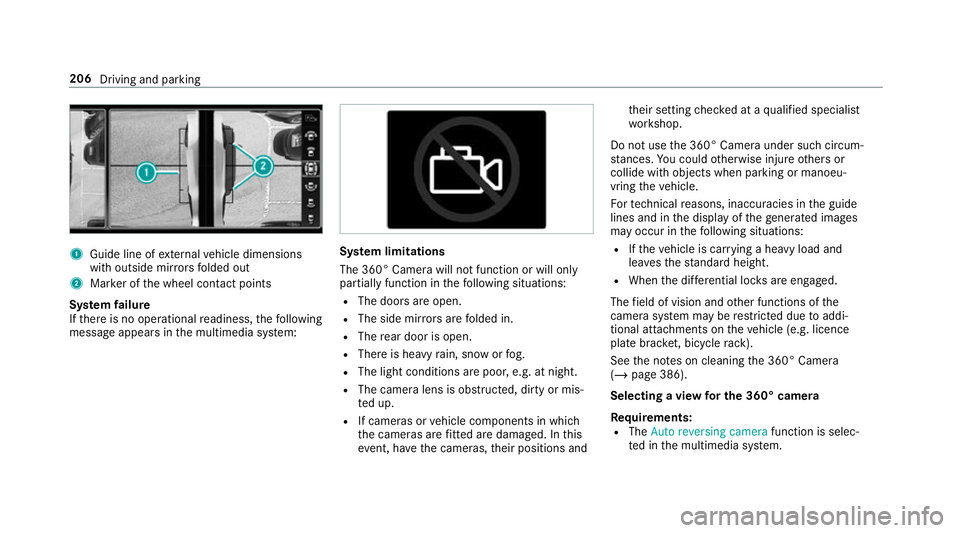
1
Guide line of extern al vehicle dimensions
with outside mir rors folded out
2 Marker of the wheel conta ct points
Sy stem failure
If th ere is no operational readiness, thefo llowing
message appears in the multimedia sy stem: Sy
stem limitations
The 360° Camera will not function or will only
partially function in thefo llowing situations:
R The doors are open.
R The side mir rors are folded in.
R The rear door is open.
R There is heavy rain, snow or fog.
R The light conditions are poor, e.g. at night.
R The camera lens is obstructed, dirty or mis‐
ted up.
R If cameras or vehicle components in which
th e cameras are fitted are dama ged. In this
eve nt, ha vethe cameras, their positions and th
eir setting checked at a qualified specialist
wo rkshop.
Do not use the 360° Camera under such circum‐
st ances. You could otherwise injure others or
collide with objects when parking or manoeu‐
vring theve hicle.
Fo rte ch nical reasons, inaccuracies in the guide
lines and in the display of thege nerated ima ges
may occur in thefo llowing situations:
R Ifth eve hicle is car rying a heavy load and
lea vesth est andard height.
R When the dif fere ntial lo cks are engaged.
The field of vision and other functions of the
came rasystem may be restricted due toaddi‐
tional attachments on theve hicle (e.g. licence
plate brac ket, bicycle rack ).
See the no tes on cleaning the 360° Camera
(/ page 386).
Selecting a view for the 360° camera
Re quirements:
R The Auto reversing camera function is selec‐
te d in the multimedia sy stem. 206
Driving and parking
Page 384 of 549
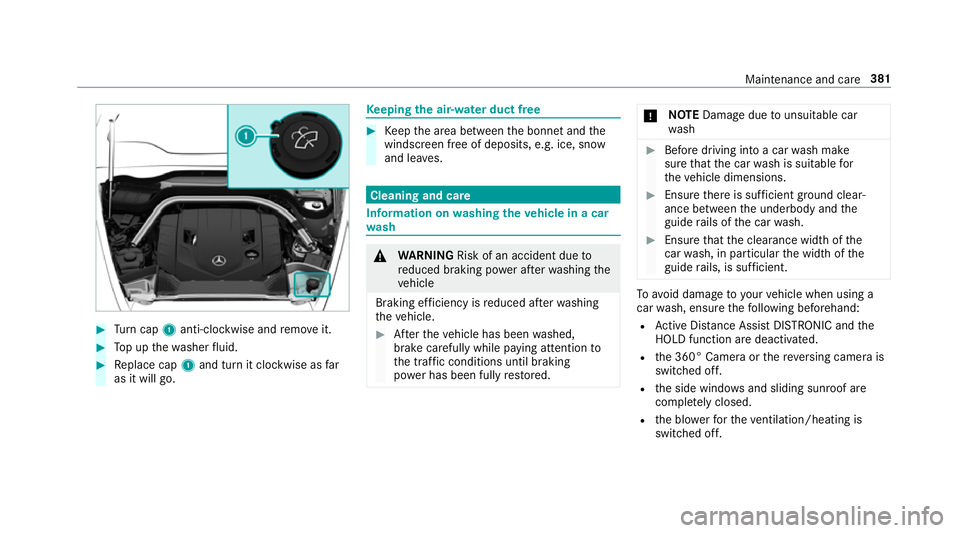
#
Turn cap 1anti-clockwise and remo veit. #
Top up thewa sher fluid. #
Replace cap 1and turn it clockwise as far
as it will go. Ke
eping the air-water duct free #
Keep the area between the bonn etand the
windscreen free of deposits, e.g. ice, sn ow
and lea ves. Cleaning and care
Information on
washing theve hicle in a car
wa sh &
WARNING Risk of an accident due to
re duced braking po wer af terwa shing the
ve hicle
Braking ef ficiency is reduced af terwa shing
th eve hicle. #
Afterth eve hicle has been washed,
brake carefully while paying attention to
th e traf fic conditions until braking
po we r has been fully restored. *
NO
TEDama gedue tounsuitable car
wa sh #
Before driving into a car wash make
sure that the car wash is suitable for
th eve hicle dimensions. #
Ensure there is suf ficient ground clear‐
ance between the underbody and the
guide rails of the car wash. #
Ensure that the clearance width of the
car wash, in particular the width of the
guide rails, is suf ficient. To
avo id damage to yourvehicle when using a
car wash, ensure thefo llowing beforehand:
R Active Dis tance Assi stDISTRONIC and the
HOLD function are deactivated.
R the 360° Camera or there ve rsing camera is
switched off.
R the side windo wsand sliding sun roof are
comple tely closed.
R the blo werfo rth eve ntilation/heating is
switched off. Maintenance and care
381
Page 418 of 549
Count
ryRadio equipment appr oval
number
United
Arab Emi‐
ra tes TRA
REGISTERED NO: ER3
7156/15.
DEALER NO: DA00470 74/10
Vi etnam Schrader Electronics Ltd.
Model:
AG5SP4
No: B0 1281702 17AF04A2 Wheel
change Note
s on selecting, fitting and replacing
tyres Mercedes
-AMG vehicles: observeth e no tes in
th e Supplement. Otherwise, you may failto rec‐
ognise dangers. Yo
u can ask for information rega rding permit ted
wheel/tyre combinations at a Mercedes-Benz
Service Cent re. &
WARNING Risk of accident due toincor‐
re ct dimensions of wheels and tyres
If wheels and tyres of the wrong size are
used, the wheel brakes or wheel suspension
components may become damaged. #
Alw aysre place wheels and tyres with
th ose that fulfil the specifications of the
original part.
When replacing wheels, make sure tofit the
cor rect:
R Designation
R Type
When replacing tyres, make sure tofit the
cor rect:
R Designation
R Manufactu rer
R Type &
WARNING Risk of inju rythro ugh exceed‐
ing the specified tyre load-bearing capa‐
city or the permissible speed rating
Exceeding the specified tyre load-bearing
capacity or the permissible speed rating may
lead totyre dama geand tothe tyres bur st‐
ing. #
Therefore, only use tyre types and sizes
appr ovedfo ryo ur vehicle model. #
Obser vethe tyre load-bearing capacity
ra ting and speed rating requ iredfor
yo ur vehicle. *
NO
TEVehicle and tyre damage thro ugh
tyre types and sizes that ha venot been
appr oved Fo
r saf etyre asons, on lyuse tyres, wheels
and accessories which ha vebeen specially
appr ovedby Mercedes-Benz foryo ur vehicle. Wheels and tyres
415
Page 421 of 549
Fo
r more information on wheels and tyres, con‐
ta ct a qualified specialist workshop.
Be sure toalso obse rveth efo llowing fur ther
re lated subjects:
R Notes on tyre pressure (/ page 409)
R Tyre pressure table (/ page410)
R Notes on the emer gency spa rewheel
(/ page 424) Note
s on inter changing wheels &
WARNING Risk of inju rythro ugh dif fer‐
ent wheel sizes
Inter changing the front and rear wheels if the
wheels or tyres ha vediffere nt dimensions
may se verely impair the driving characteris‐
tics.
The disk brakes or wheel suspension compo‐
nents may also be damaged. #
Rotate front and rear wheels on lyifthe
wheels and tyres are of the same
dimensions. Inter
changing the front and rear wheels if the
wheels or tyres ha vediffere nt dimensions can
re nder thege neral operating pe rmit in valid.
The wear pat tern s on the front and rear wheels
dif fer:
R Front wheels wear more on the shoulder of
th e tyre
R Rear wheels wear more in the cent reofthe
tyre
On vehicles with the same front and rear wheel
size, you can inter change the wheels every
5,000 to10,000 km, depending on thewe ar.
Ensure the direction of rotation is maintained for
th e wheels.
It is imperative toobser vethe instructions and
saf ety no tes on "Changing a wheel" when doing
so Preparing theve hicle for a wheel
ch ange( /page 419). Note
s onstoring wheels When
storing wheels, obser vethefo llowing
no tes:
R Afterre moving wheels, store them in a cool,
dry and preferably dark place.
R Protect the tyres from conta ct withoil,
grease or fuel. Ve
hicle tool kit overview The
vehicle tool kit contains:
R vehicle tool bag with:
- pump le verfo r jack
- wheel spanner with T-piece
- screwdriver (inser ted in a pump le ver)
- dismantling tool forro of rack (inser ted in
a pump le ver)
R jack with adapter 41 8
Wheels and tyres
Page 427 of 549
Emer
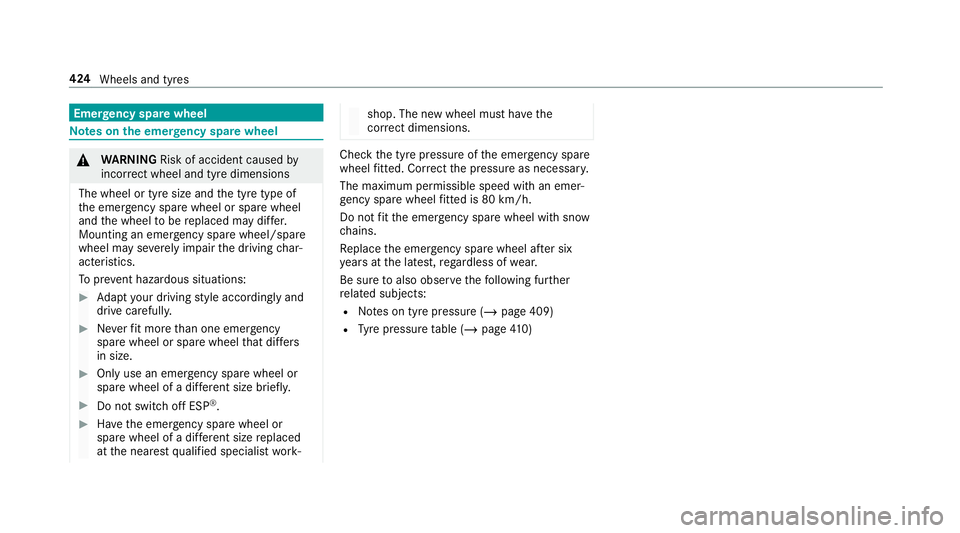
gency spare wheel Note
s onthe emer gency spare wheel &
WARNING Risk of accident caused by
incor rect wheel and tyre dimensions
The wheel or tyre size and the tyre type of
th e emer gency spa rewheel or spare wheel
and the wheel tobe replaced may dif fer.
Mounting an emer gency spa rewheel/spare
wheel may se verely impair the driving char‐
acteristics.
To preve nt hazardous situations: #
Adapt your driving style according lyand
drive carefull y. #
Neverfit more than one emer gency
spa rewheel or spare wheel that dif fers
in size. #
Only use an emer gency spa rewheel or
spare wheel of a dif fere nt size brie fly. #
Do not switch off ESP ®
. #
Have the emer gency spa rewheel or
spare wheel of a dif fere nt size replaced
at the nearest qualified specialist work‐ shop. The new wheel must ha
vethe
cor rect dimensions. Check
the tyre pressure of the emer gency spa re
wheel fitted. Co rrect the pressure as necessar y.
The maximum permissible speed with an emer‐
ge ncy spa rewheel fitted is 80 km/h.
Do not fit th e emer gency spa rewheel with sn ow
ch ains.
Re place the emer gency spa rewheel af ter six
ye ars at the latest, rega rdless of wear.
Be sure toalso obse rveth efo llowing fur ther
re lated subjects:
R Notes on tyre pressure (/ page 409)
R Tyre pressure table (/ page410) 424
Wheels and tyres
Page 440 of 549
tic su
rfaces, e.g. MB SummerFit or MB
Wi nterFit. *
NO
TEBlocked spr aynozzles caused by
mixing windscreen washer fluids #
Do not mix MB SummerFit and MB Win‐
te rFit with other windscreen washer flu‐
ids. Do not use distilled or de-ionised
water asthefill
le ve l sensor may be triggered er roneously.
Re commended windscreen washer fluid:
R Abo vefreezing point: e.g. MB SummerFit
R Below freezing point: e.g. MB WinterFit
Fo rth e cor rect mixing ratio, referto the informa‐
tion on the antif reeze contai ner.
Mix thewa sher fluid with the windscreen washer
fl uid all year round. Ve
hicle data Ve
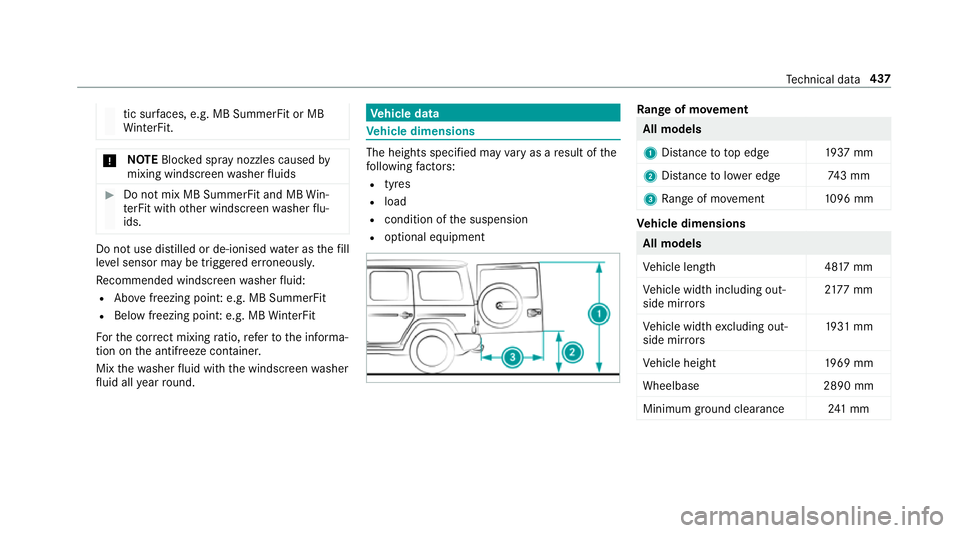
hicle dimensions The heights speci
fied may vary as a result of the
fo llowing factors:
R tyres
R load
R condition of the suspension
R optional equipment Ra
nge of mo vement All models
1
Distance to to p edg e1 937 mm
2 Distance tolowe r edg e7 43 mm
3 Range of mo vement 1096 mm Ve
hicle dimensions All models
Ve
hicle lengt h4 817 mm
Ve hicle width including out‐
side mir rors 21
77 mm
Ve hicle width excluding out‐
side mir rors 19
31 mm
Ve hicle height 1969 mm
Wheelbase 2890 mm
Minimum ground clea rance 241 mm Te
ch nical da ta437
Page 443 of 549
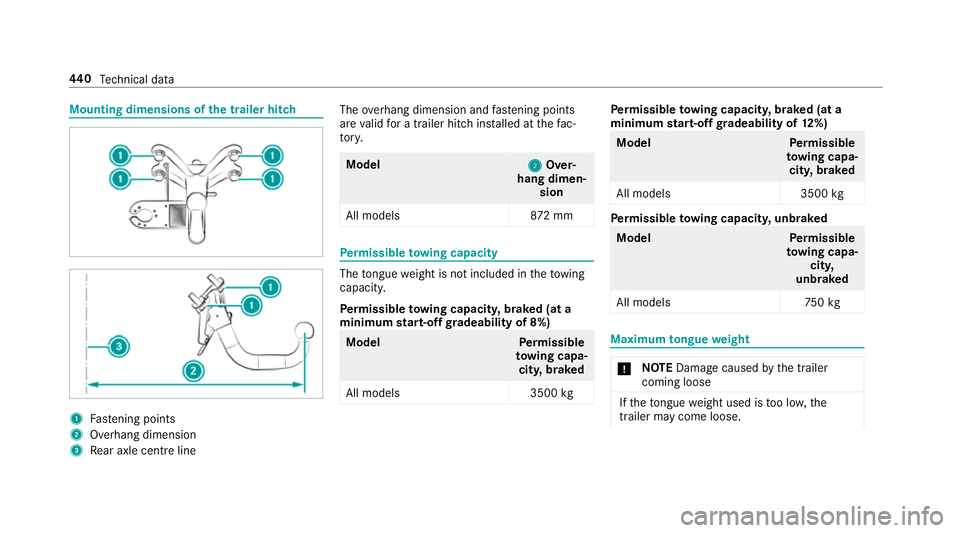
Mounting dimensions of
the trailer hit ch 1
Fastening points
2 Overhang dimension
3 Rear axle centre line The
overhang dimension and fastening points
are valid for a trailer hitch ins talled at thefa c‐
to ry. Model
2 2Over‐
hang dimen‐ sion
All model s8 72mm Pe
rm issible towing capacity The
tongue weight is not included in theto wing
capacity.
Pe rm issible towing capacit y,braked (at a
minimum start-off gradeability of 8%) Model
Perm issible
to wing capa‐
cit y,braked
All models 3500kg Pe
rm issible towing capacit y,braked (at a
minimum start-off gradeability of 12%) Model
Perm issible
to wing capa‐
cit y,braked
All models 3500kg Pe
rm issible towing capacit y,unbraked Model
Perm issible
to wing capa‐
cit y,
unbraked
All model s7 50kg Maximum
tongue weight *
NO
TEDama gecaused bythe trailer
coming loose If
th eto ngue weight used is too lo w,the
trailer may come loose. 440
Tech nical da ta
Page 534 of 549
Ra
dio stations
Dialling (on-boa rdcompu ter) ............... 234
Ra in closing function
Sliding sunroof ...................................... 83
Ra nge
Ad Blue ®
............................................... 230
Displaying ............................................ 231
REACH regulation ...................................... 25
Re ading light
see Interior lighting
Re alwo od (Care) .................................... .388
Re ar ben chseat
Fo lding down ...................................... .102
Fo lding forw ards .................................. 102
Re ar comp artment display
Locking (child saf ety lock) .................. .267
Switching on/off ................................. 267
Re ar display
Cleaning .............................................. 365
Inserting in the console ....................... 363
Operating ............................................ 365
Overview ............................................. 362
Re moving from the console ................. 364 Switching on/off ................................. 364
Re ar door (child saf ety lock) .................... 68
Re ar fog light
Switching on/off .................................. 11 8
Re ar seat belt
St atus display ........................................ 35
Re ar seat belt status display .................... 35
Re ar Seat Entertainment Sy stem
Cont rolling playback .................... 372, 373
Headphones overview .........................3 67
Homescreen overview .........................3 66
Information about media mode ........... 370
Operating saf ety .................................. 360
Overview ............................................ .362
Overview of there ar displa ys.............. 362
Switching on media mode ................... 371
Re ar window
Changing the wiper blade .................... 127
Re ar window wipers
Ac tivating/deactivating ...................... .125
Re ar-end door
Closing ................................................. .77
Opening .................................................77 Opening dimensions ............................4
37
Re ar-view mir ror
see Outside mir rors
Re covering ............................................... 403
Re cycling
see Take -ba ckof end-of-life vehicles
Re ducing agent
see AdBlue ®
Re fuelling
Re fuelling theve hicle .......................... 16 2
To pping up AdBlue ®
............................. 16 6
Re gistration
Ve hicle ................................................... 24
Re mo tecont rol (stationa ryheater/
ve ntilation)
Displa ys............................................... 13 8
Problems ............................................. 13 9
Re placing the battery .......................... 13 8
Setting ................................................. 137
Re scue card ............................................... 25
Re ser ve
Fu el ..................................................... 433 Index
531
Page 539 of 549
Setting
the time zone .......................... 262
Setting the time/date form at .............. 262
Swit ching transmission of theve hicle
position on/off .................................... 263
Sy stem settings
see Blue tooth®
see Data import/export
see Language
see Software update
see Wi-Fi T
Ta ilpipes (Care) ........................................ 386
Ta ke -back of end-of-life vehicles .............. 19
Pr otection of the environment ............... 19
Ta nk content
Ad Blue ®
............................................... 434
Fu el ..................................................... 433
Re ser ve(fuel) ...................................... 433
Te ch nical data
Axle load (trailer operation) ................. 441
Fa stening points (trailer hitch) ............ 440
Information .......................................... 425
Mounting dimensions (trailer hitch) .....4 40No
tes (trailer hitch) ............................. 439
Overhang dimension (trailer hitch) ...... 440
To ngue weight .................................... .440
To wing capacity (trailer operation) ...... 440
Ty re pressure monitoring sy stem ......... 413
Ve hicle identification plate .................. 427
Te lephone ........................................ 235, 300
Ac tivating functions du ring a call ........ 308
Business telephony settings ................ 305
Call and ringtone volume .................... .307
Calls with se veral participants ............ .308
Connecting a mobile phone (busi‐
ness telephony) .................................. .303
Connecting a mobile phone (Near
Field Communication (NFC)) .............. .306
Connecting a mobile phone (Pass‐
ke y) ...................................................... 301
Connecting a mobile phone (Secure Simple Pairing) .................................... 301
De-authorising a mobile phone ............ 306
Disconnecting a mobile phone ............ 306
Importing con tacts .............................. 310
Importing contacts (o verview) ............ .309
Incoming call during an existing call .... 308
Information .......................................... 301 Inter
changing mobile phones .............. 305
Menu (on-board computer) .................. 235
Mobile phone voice recognition ........... 307
No tes .................................................. 299
Operating modes ................................. 301
Re ception and transmission volume .... 307
Swit ching mobile phones (Near Field
Communication (NFC)) ........................ 306
Symbols for business telephony .......... 304
Te lephone menu overview .................. .300
Te lephone operation ............................ 307
Using a SIM card for business tel‐
ephony ................................................ 303
Using Near Field Communication
(NFC) .................................................. .306
Vo ice commands (LINGU ATRO NIC) .....2 45
Wi reless charging (mobile phone) ........ 11 5
Te lephone
see Second telephone
Te lephone number
Dialling (on-board computer) .............. .235
Te lephone operation
see Calls 536
Index
Page 541 of 549

To
wing away intheev ent of malfunc‐
tions (no tes) ............................................ 403
To wing away intheev ent of rear axle
damage .................................................... 404
To wing eye
Po sition ............................................... 405
To wing me thods ...................................... 401
Tr ack
Selecting (audio mode) ........................ 337
Tr af fic announcements
Ac tivating/deactivating ...................... .350
Tr af fic information .................................. 290
Displaying the tra ffic map .................... 291
Displaying traf fic incidents .................. 292
Extending a Live Traf fic Information
subscription ........................................ 290
Issuing hazard warnings ...................... 292
Live Traf fic Information ....................... 290
Overview ............................................. 290
Re gis tering Live Traf fic Information ..... 290
Tr af fic information service volume
increase
Setting ................................................ .350 Tr
af fic map
see Map
Tr af fic Sign Assist .................................... 215
Fu nction/no tes .................................... 215
Sy stem limitations ...............................2 15
Tr ailer hitch
Axle load .............................................. 441
Care .................................................... 386
Coupling up/uncoupling a trailer ........ 222
Fa stening points ..................................4 40
Gene ral no tes ...................................... 439
Mounting dimensions .......................... 440
No tes .................................................. 222
Overhang dimension ........................... 440
Soc ket ................................................. 222
To ngue weight .................................... .440
To wing capacity .................................. .440
Tr ailer operation
Ac tive Lane Keeping Assist .................. 219
Coupling up/uncoupling a trailer ........ 222
No tes .................................................. 222
Soc ket ................................................. 222
Tr ailer stabilisation
Fu nction/no tes ................................... 182Tr
ansfer case
HIGH RANGE ....................................... 15 9
LO W RANGE ........................................1 59
Shifting ................................................ 15 9
Tr ansfer redve hicle data
Android Auto ........................................ 318
Apple CarPl ay™ ................................... 318
Tr ansmission (problem) ..........................157
Tr ansmission position display ................15 3
Tr anspo rting
Ve hicle ................................................ 404
Tr im element (Care) ................................ 388
Tr ip
Menu (on-board computer) .................. 231
Tr ip computer
Displaying ............................................ 231
Re setting ............................................. 232
Tr ip distance ............................................ 231
Displaying ............................................ 231
Re setting ............................................. 232
Tr ip me ter
see Trip dis tance 538
Index