tailgate MERCEDES-BENZ GL 2010 Owners Manual
[x] Cancel search | Manufacturer: MERCEDES-BENZ, Model Year: 2010, Model line: GL, Model: MERCEDES-BENZ GL 2010Pages: 380, PDF Size: 9.81 MB
Page 15 of 380
Brake pads ..................................... 299
Coolant .......................................... 306
Cruise control ................................ 294
Differential locks ...................123, 302
Distronic ........................................ 294
Doors ............................................. 304
Downhill Speed Regulation (DSR) ..303
EBP ................................................ 300
Engine oil ....................................... 308
ESP ®
...................................... 289, 300
Fog lamps .............................. 310, 312
Front passenger front air bag ........291
Gas cap .......................................... 309
High-beam lamps ........................... 311
Hood .............................................. 304
License plate lamps .......................311
Light sensor ................................... 311
Low-beam lamps ............................ 312
LOW RANGE mode ......................... 303
Parking brake ................................ 300
Parking lamps ................................ 311
PRE-SAFE ®
.................................... 290
Reserve fuel ................................... 309
Reverse lamp ................................. 310
Side marker lamps .........................311
SmartKey ....................................... 304
SmartKey with KEYLESS-GO ..........304
SRS ................................................ 301
Tailgate .......................................... 304
Tail lamps ...................................... 312
Tele Aid .......................................... 301
Tire inflation pressure ............297, 313
Tire pressure monitor ....................297
Tires ...................................... 297, 313
Trailer brake lamps ........................312
Trailer tail lamps ............................ 312
Trailer turn signal lamps ................312
Turn signals ................................... 313
Washer fluid ................................... 305
Multifunction steering wheel
Adjustment ...................................... 91
Buttons .......................................... 125
Cleaning ......................................... 280
Easy-entry/exit feature ...........92, 139
Gearshift control ............................ 118
Heating ............................................ 93
Memory function .............................. 96
Overview .......................................... 30N
Navigation menu ............................... 130
Navigation system see Separate operating instructions
NECK-PRO active front head
restraints ............................................. 53
Resetting ....................................... 325
Nets, parcel ....................................... 200
Night security illumination .............. 137
Normal occupant weight .................. 256
Number, vehicle identification
(VIN) ................................................... 361
O
Occupant Classification System see OCS (Occupant Classification
System)
Occupant distribution ....................... 256
Occupant safety
Air bags ........................................... 37
BabySmart™ .................................... 46
Children and air bags .......................37
Children in the vehicle .....................55
Child seat anchors – LATCH-type ....59
Fastening the seat belts ................... 50
Front passenger front air bag off
indicator lamp (Canada
only) ........................................ 46, 322
Front passenger front air bag off
indicator lamp (USA only) ........42, 322
Infant and child restraint systems .... 56
Introduction ..................................... 36
OCS (Occupant Classification
System) ........................................... 42
PRE-SAFE ®
....................................... 52
Seat belts .................................. 39, 48
OCS (Occupant Classification
System) ................................................ 42
Self-test ........................................... 45
Odometer ........................................... 127
Off-road driving ................................. 262
Checklist ............................... 264, 268
Crossing obstacles ........................267
Driving instructions ........................ 262
Driving on sand .............................. 267
Driving through water ....................266
Index13X164_AKB; 5; 31, en-USd2ureepe,Version: 2.11.8.12009-09-11T12:30:16+02:00 - Seite 13
Page 16 of 380
Returning ....................................... 268
Ruts ............................................... 267
Steep terrain .................................. 264
Off-road driving program .................. 158
Off-road menu ................................... 131
Oil, oil level see Engine oil
On-board computer
see Control system
One-touch gearshifting ..................... 118
Operating safety .................................. 23
Ornamental moldings, cleaning ....... 277
Outside temperature see Displays
Overhead control panel ...................... 33
P
Paintwork, cleaning .......................... 276
Paintwork code ................................. 361
Panic alarm .......................................... 61
Panorama roof
Sunshade ....................................... 211
Parcel nets ......................................... 200
Parking ............................................... 112
Parktronic system ..........................166
Parking brake ............................ 112, 261
Messages in the multifunction
display ........................................... 300
Parking position
Exterior rear view mirrors ................95
Transmission position ....................116
Parktronic system
Cleaning system sensors ...............278
Malfunction .................................... 169
Minimum distance .........................167
Sensor range ................................. 167
Switching on/off ........................... 168
System sensors ............................. 167
Warning indicators ...................27, 168
Parts service ...................................... 360
PASS AIR BAG OFF indicator lamp
(Canada only) see Front passenger front air bag
off indicator lamp (Canada only)
PASS AIR BAG OFF indicator lamp
(USA only) see Front passenger front air bag
off indicator lamp (USA only)
Passenger safety
see Occupant safety
Pedals ................................................. 259
Phone see Telephone
Plastic parts, cleaning ...................... 279
Power assistance .............................. 259
Power outlets .................................... 212
Power seats see Seats
Power tailgate
Closing ............................................. 76
Messages in the multifunction
display ........................................... 304
Opening ........................................... 76
Power tilt/sliding sunroof
Operation ....................................... 192
Synchronizing ................................ 194
Power washer .................................... 276
Power windows ................................. 105
Cleaning ......................................... 278
Door windows ................................ 106
Hinged quarter windows ................106
Operation ....................................... 105
Rear door window, override
switch .............................................. 60
Synchronizing ................................ 107
Practical hints ................................... 284
Preglow indicator lamp .............. 29, 109
PRE-SAFE ®
............................................ 52
Messages in the multifunction
display ........................................... 290
Problems
While driving .................................. 111
With vehicle ..................................... 23
With wipers .................................... 105
Product information ............................ 20
Production options weight ............... 256
Proximity key see Key, SmartKey
PSI (air pressure unit) ....................... 25614IndexX164_AKB; 5; 31, en-USd2ureepe,Version: 2.11.8.12009-09-11T12:30:16+02:00 - Seite 14
Page 18 of 380
Self-test
BabySmart™ .................................... 47
OCS (Occupant Classification
System) ........................................... 45
Tele Aid .......................................... 215
Service
see Maintenance
Service, parts .................................... 360
Service and warranty information ..... 20
Service intervals see Maintenance System, Service
indicator message
Service life (tires) .............................. 247
Settings
Factory setting (KEYLESS-GO) .........72
Factory setting (SmartKey) ..............71
Memory function .............................. 96
Menu ............................................. 132
Selective setting (KEYLESS-GO) .......73
Selective setting (SmartKey) ............71
Side impact air bags ........................... 41
Side marker lamps
Cleaning lenses ............................. 277
Messages in the multifunction
display ........................................... 311
Sidewall (tires) .................................. 256
Side windows see Power windows
SmartKey
see Key, SmartKey
SmartKey with KEYLESS-GO
see Key, SmartKey
Snow chains ...................................... 258
Snow tires see Winter tires
Spare wheel ....................................... 365
Mounting ....................................... 340
Storage location ............................ 286
Speedometer ............................... 28, 149
Speed settings
Cruise control ................................ 145
Distronic ........................................ 151
Resume function ...................147, 152
Sport Utility Vehicle
see SUV SRS
Indicator lamp ...................29, 36, 318
Messages in the multifunction
display ........................................... 301
Standing water, driving through ...... 262
Starter switch positions
KEYLESS-GO .................................... 80
SmartKey ......................................... 80
Starting difficulties (engine) ............ 110
Starting the engine ........................... 108
Steering column see Multifunction steering wheel,
Adjustment
Steering wheel
see Multifunction steering wheel
Steering wheel gearshift control ..... 118
Stolen Vehicle Recovery Services ... 219
Storage compartments ..................... 207
Storing tires ....................................... 248
Stranded vehicle ............................... 355
Sunroof see Power tilt/sliding sunroof
Sunshade
Rear panorama roof .......................211
Sun visors .......................................... 210
Suspension tuning see Air suspension program
SUV (Sport Utility Vehicle) ................. 22
T
Tachometer .................................. 29, 125
Overspeed range ........................... 125
Tailgate
Closing ............................................. 75
Messages in the multifunction
display ........................................... 304
Opening ........................................... 75
Power tailgate .................................. 76
Tail lamps ........................................... 329
Cleaning lenses ............................. 277
Messages in the multifunction
display ........................................... 312
Tar stains ........................................... 276
Technical data
Air conditioning refrigerant ............371
Brake fluid ..................................... 371
16IndexX164_AKB; 5; 31, en-USd2ureepe,Version: 2.11.8.12009-09-11T12:30:16+02:00 - Seite 16
Page 28 of 380
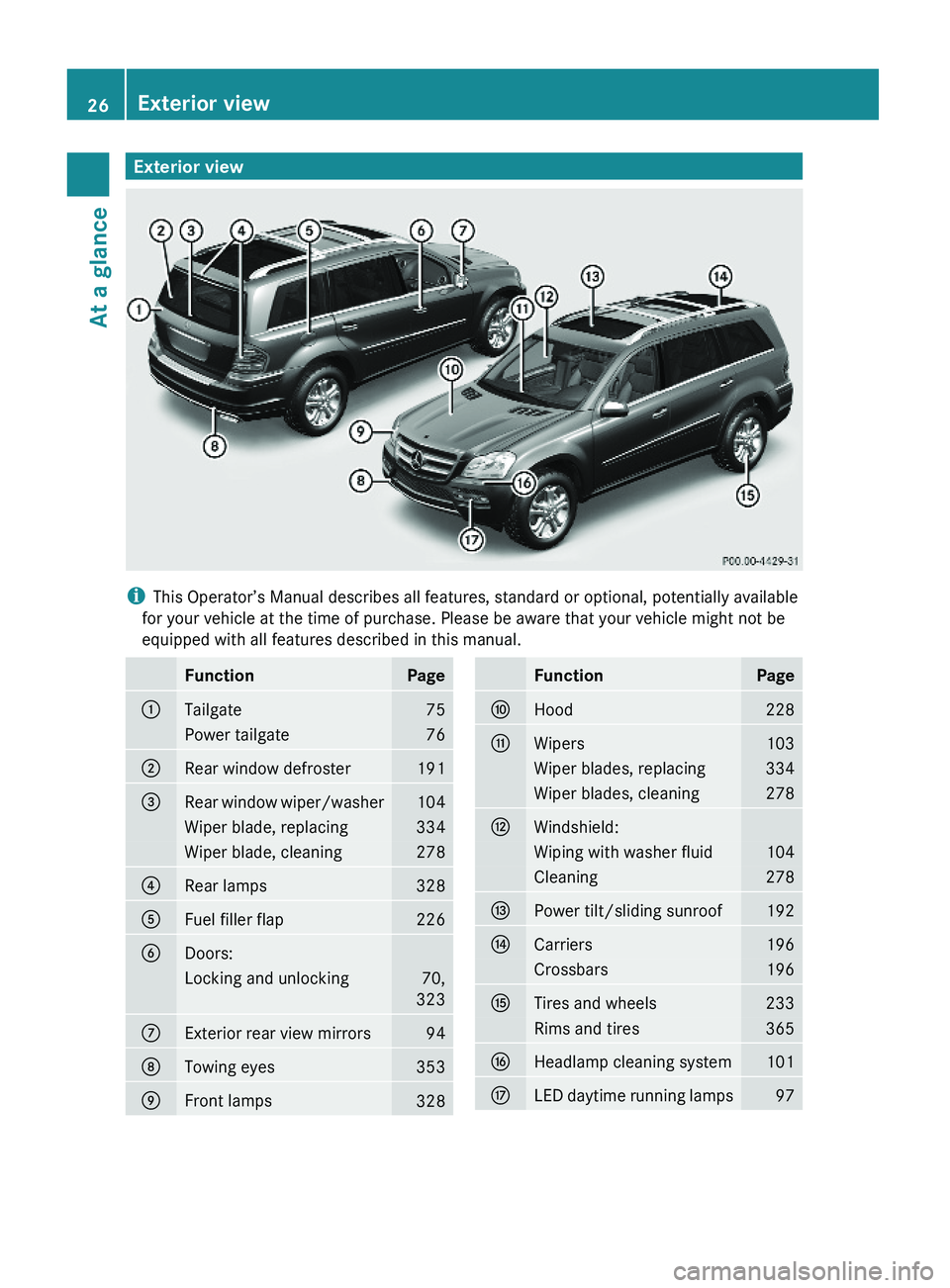
Exterior view
iThis Operator’s Manual describes all features, standard or optional, potentially available
for your vehicle at the time of purchase. Please be aware that your vehicle might not be
equipped with all features described in this manual.
FunctionPage:Tailgate75Power tailgate76;Rear window defroster191=Rear window wiper/washer104Wiper blade, replacing334Wiper blade, cleaning278?Rear lamps328AFuel filler flap226BDoors:Locking and unlocking70,
323
CExterior rear view mirrors94DTowing eyes353EFront lamps328FunctionPageFHood228GWipers103Wiper blades, replacing334Wiper blades, cleaning278HWindshield:Wiping with washer fluid104Cleaning278IPower tilt/sliding sunroof192JCarriers196Crossbars196KTires and wheels233Rims and tires365LHeadlamp cleaning system101MLED daytime running lamps9726Exterior viewAt a glance
X164_AKB; 5; 31, en-USd2ureepe,Version: 2.11.8.12009-09-11T12:30:16+02:00 - Seite 26
Page 36 of 380
FunctionPageHHands-free microphone for
Tele Aid (emergency call
system), telephone and
Voice Control System, see
separate operating
instructions
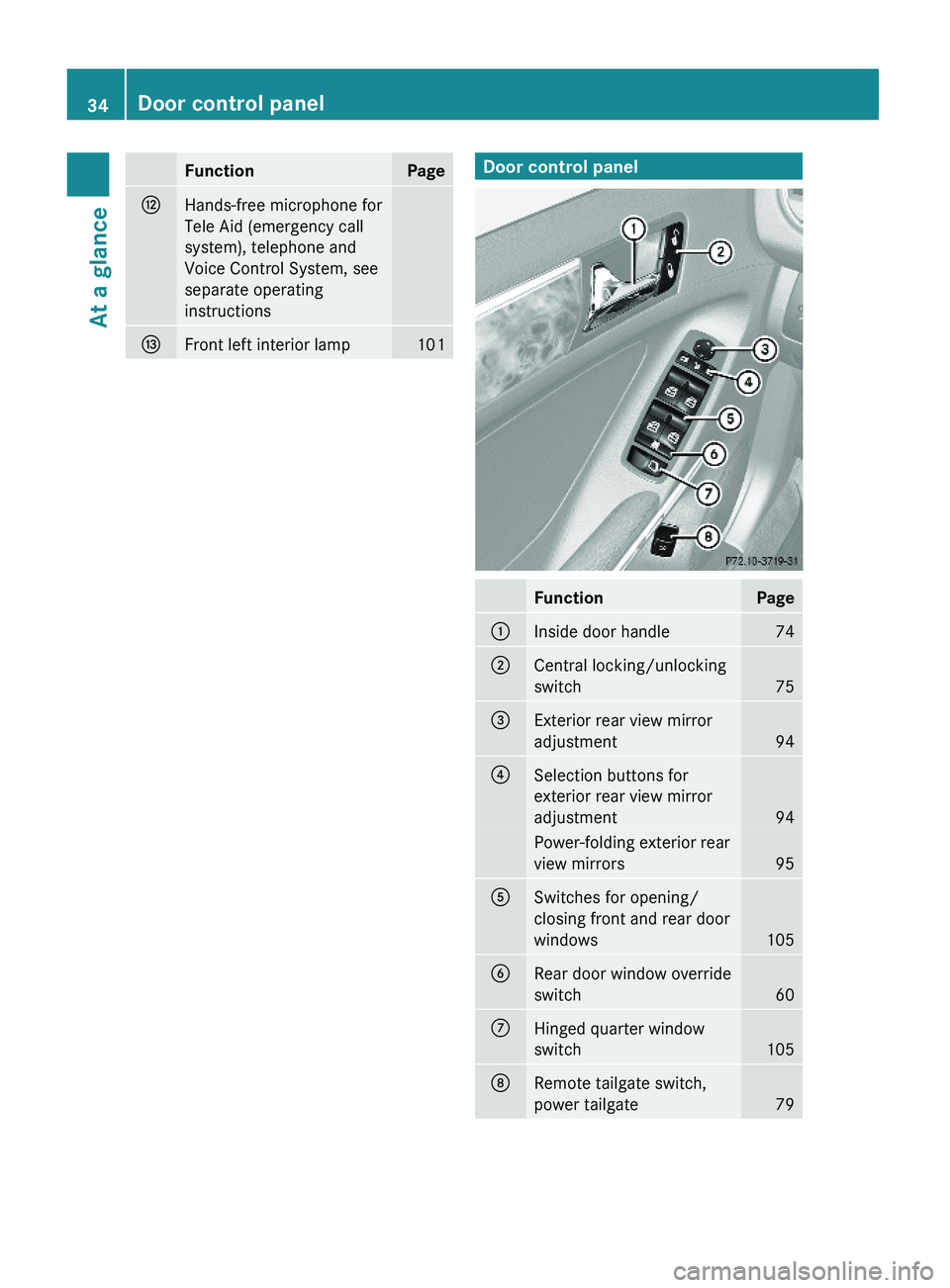
IFront left interior lamp101Door control panelFunctionPage:Inside door handle 74;Central locking/unlocking
switch75
=Exterior rear view mirror
adjustment94
?Selection buttons for
exterior rear view mirror
adjustment94
Power-folding exterior rear
view mirrors95
ASwitches for opening/
closing front and rear door
windows105
BRear door window override
switch60
CHinged quarter window
switch105
DRemote tailgate switch,
power tailgate79
34Door control panelAt a glance
X164_AKB; 5; 31, en-USd2ureepe,Version: 2.11.8.12009-09-11T12:30:16+02:00 - Seite 34
Page 68 of 380
allows the vehicle-trailer combination to
stabilize.
The ESP ®
trailer stabilization is functional at
vehicle speeds above approximately 40 mph
(65 km/h) when the ESP ®
is switched on.GWarning!
The system will not be able to assist when the
trailer jackknifes
R if the ESP ®
has switched off due to a
malfunction
R on wet or icy roads
R on roads with slippery surface
R in sand or gravel
Trailers with a high center of gravity may tip
over before the system recognizes swaying of
the trailer.
Anti-theft systems
Immobilizer
The immobilizer prevents unauthorized
persons from starting your vehicle.
When leaving the vehicle, always take the
SmartKey with you and lock the vehicle. The
engine can be started by anyone with a valid
SmartKey that is left inside the vehicle.
Activating
XWith SmartKey: Remove the SmartKey
from the starter switch.XWith KEYLESS-GO: Turn off the engine and
open the driver’s door.
Deactivating
XSwitch on the ignition.
i Starting the engine will also deactivate
the immobilizer.
In the event that the engine cannot be
started (yet the vehicle’s battery is
charged), the system is not operational.
Contact an authorized Mercedes-Benz
Center or call 1-800-FOR-MERCedes (in the
USA) or 1-800-387-0100 (in Canada).
Anti-theft alarm system
Once the alarm system has been armed, a
visual and audible alarm is triggered when
someone opens
R a door
R the tailgate
R the hood
The alarm will stay on even if the activating
element, a door, for example, is closed
immediately.
The alarm system will also be triggered when
R the vehicle is opened with the mechanical
key
R a door is opened from the inside
To cancel the alarm after it has been
triggered, see “Canceling the alarm”
( Y page 67).
i If the alarm stays on for more than
30 seconds, the Tele Aid system initiates a
call to the Response Center automatically.
The Tele Aid system will initiate the call
provided that
R you have subscribed to the Tele Aid
service
R the Tele Aid service has been activated
properly
R the necessary mobile phone, power
supply and GPS coverage are available
66Anti-theft systemsSafety and security
X164_AKB; 5; 31, en-USd2ureepe,Version: 2.11.8.12009-09-11T12:30:16+02:00 - Seite 66
Page 69 of 380
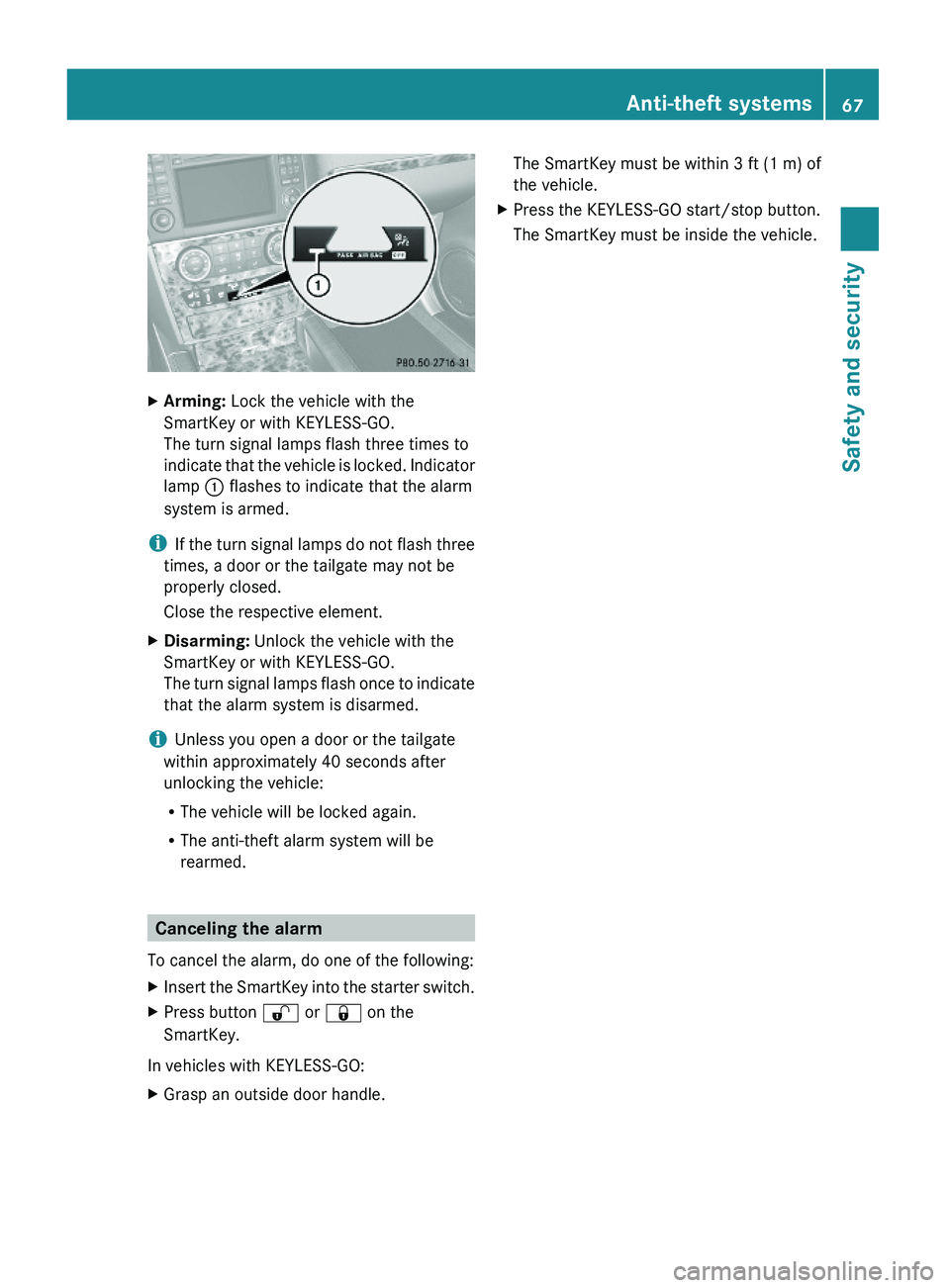
XArming: Lock the vehicle with the
SmartKey or with KEYLESS-GO.
The turn signal lamps flash three times to
indicate that the vehicle is locked. Indicator
lamp : flashes to indicate that the alarm
system is armed.
iIf the turn signal lamps do not flash three
times, a door or the tailgate may not be
properly closed.
Close the respective element.
XDisarming: Unlock the vehicle with the
SmartKey or with KEYLESS-GO.
The turn signal lamps flash once to indicate
that the alarm system is disarmed.
iUnless you open a door or the tailgate
within approximately 40 seconds after
unlocking the vehicle:
RThe vehicle will be locked again.
RThe anti-theft alarm system will be
rearmed.
Canceling the alarm
To cancel the alarm, do one of the following:
XInsert the SmartKey into the starter switch.XPress button % or & on the
SmartKey.
In vehicles with KEYLESS-GO:
XGrasp an outside door handle.The SmartKey must be within 3 ft (1 m) of
the vehicle.
XPress the KEYLESS-GO start/stop button.
The SmartKey must be inside the vehicle.
Anti-theft systems67Safety and securityX164_AKB; 5; 31, en-USd2ureepe,Version: 2.11.8.12009-09-11T12:30:16+02:00 - Seite 67Z
Page 72 of 380
Vehicle equipment
iThis Operator’s Manual describes all
features, standard or optional, potentially
available for your vehicle at the time of
purchase. Please be aware that your
vehicle might not be equipped with all
features described in this manual.
Locking and unlocking
Notes
GObserve Safety notes, see page 55.
When unlocking the vehicle, all turn signal
lamps flash once. The locking knobs in the
doors move up. The anti-theft alarm system
is disarmed.
When locking the vehicle, all turn signal lamps
flash three times. The locking knobs in the
doors move down. The anti-theft alarm
system is armed.
All doors and the tailgate must be closed.
If you cannot lock or unlock the vehicle with
the SmartKey, the batteries in the SmartKey
are discharged, the SmartKey is
malfunctioning, or the vehicle battery is
drained.
XCheck the batteries in the SmartKey
(Y page 73) and replace them if
necessary.
XUse the mechanical key to unlock the
driver’s door (Y page 323).
XUse the mechanical key to lock the vehicle
(Y page 324).
XHave the vehicle battery and the vehicle
battery connections checked at an
authorized Mercedes-Benz Center.
If the SmartKey is malfunctioning, contact
Roadside Assistance or an authorized
Mercedes-Benz Center.
SmartKey
Your vehicle comes supplied with two
SmartKeys, each with remote control and a
removable mechanical key.
The SmartKey centrally locks and unlocks:
Rthe doors
Rthe tailgate
Rthe fuel filler flap
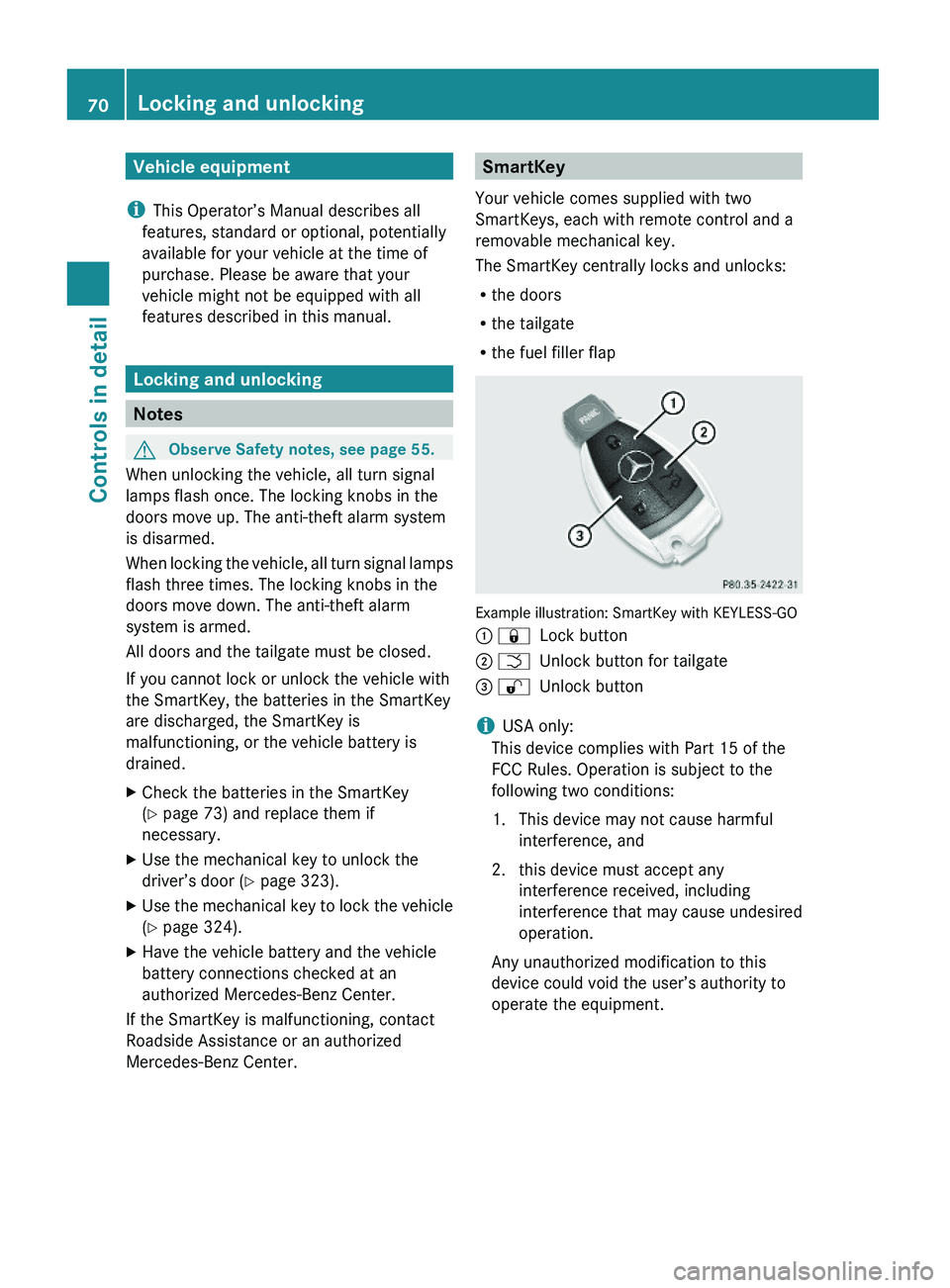
Example illustration: SmartKey with KEYLESS-GO
: &Lock button; FUnlock button for tailgate= %Unlock button
iUSA only:
This device complies with Part 15 of the
FCC Rules. Operation is subject to the
following two conditions:
1. This device may not cause harmful
interference, and
2. this device must accept any
interference received, including
interference that may cause undesired
operation.
Any unauthorized modification to this
device could void the user’s authority to
operate the equipment.
70Locking and unlockingControls in detail
X164_AKB; 5; 31, en-USd2ureepe,Version: 2.11.8.12009-09-11T12:30:16+02:00 - Seite 70
Page 73 of 380
iCanada only:
This device complies with RSS-210 of
Industry Canada. Operation is subject to
the following two conditions:
1. This device may not cause interference,
and
2. this device must accept any interference received, including
interference that may cause undesired
operation of the device.
Any unauthorized modification to this
device could void the user’s authority to
operate the equipment.
Factory setting XGlobal unlocking: Press button %.
Unless you open a door or the tailgate within
approximately 40 seconds after unlocking
the vehicle:
R The vehicle will be locked again.
R The antitheft alarm system will be rearmed.
XGlobal locking: Press button &.
Selective setting
If you frequently travel alone, you may wish
to reprogramm the SmartKey. Pressing
button % will then only unlock the driver’s
door and the fuel filler flap.
XSwitching on/off: Press and hold buttons
% and & simultaneously for
approximately 6 seconds until the battery
check lamp ( Y page 73) flashes twice.
The SmartKey will then function as follows:
XUnlocking driver’s door and fuel filler
flap: Press button % once.XGlobal unlocking: Press button %
twice.XGlobal locking: Press button &.KEYLESS-GO
Vehicles equipped with KEYLESS-GO come
with two SmartKeys with KEYLESS-GO, each
with remote control and a removable
mechanical key.
The KEYLESS-GO function is integrated into
the SmartKey. The validity of the SmartKey is
checked every time you grasp an outside door
handle.
When the SmartKey is valid, your vehicle
unlocks
R the doors
R the fuel filler flap
R the tailgate
i USA only:
This device complies with Part 15 of the
FCC Rules. Operation is subject to the
following two conditions:
1. This device may not cause harmful interference, and
2. this device must accept any interference received, including
interference that may cause undesired
operation.
Any unauthorized modification to this
device could void the user’s authority to
operate the equipment.
i Canada only:
This device complies with RSS-210 of
Industry Canada. Operation is subject to
the following two conditions:
1. This device may not cause interference,
and
2. this device must accept any interference received, including
interference that may cause undesired
operation of the device.
Any unauthorized modification to this
device could void the user’s authority to
operate the equipment.Locking and unlocking71Controls in detailX164_AKB; 5; 31, en-USd2ureepe,Version: 2.11.8.12009-09-11T12:30:16+02:00 - Seite 71Z
Page 74 of 380

Important notes on using KEYLESS-GO
RYou can also use the SmartKey with
KEYLESS-GO like a normal SmartKey
( Y page 70).
R You can combine KEYLESS-GO functions
with normal SmartKey functions (e.g.
unlocking with KEYLESS-GO and locking
with button &).
R Always carry the SmartKey with you.
R Never store the SmartKey together with:
- Electronic items such as a mobile phone
or another SmartKey
- Metallic objects such as coins or metal
foil
Doing so could impair the function of the
KEYLESS-GO system.
R To lock or unlock the vehicle, the SmartKey
must be located outside the vehicle within
approximately 3 ft (1 m) of a door or the
tailgate.
R When the vehicle has been parked for more
than 72 hours, the KEYLESS-GO function is
deactivated. Pull an outside door handle
and switch on the ignition once to activate
the KEYLESS-GO function.
R If the SmartKey is positioned farther away
from the vehicle, the system may no longer
recognize the SmartKey. The vehicle
cannot be locked or the engine started via
the KEYLESS-GO system.
R If the SmartKey is removed from the vehicle
(e.g. if a passenger exits the vehicle with
the SmartKey)
- when pressing the KEYLESS-GO start/
stop button or trying to lock the vehicle
with the lock button on an outside door
handle the message Key Not
Detected appears in the multifunction
display
- with the engine running, the red message
Key Not Detected appears in the
multifunction display while driving off
Find the SmartKey or change its present
location immediately (e.g. place it on the
front passenger seat or insert it in shirt
pocket).
R If you have started the engine with the
KEYLESS-GO start/stop button, you can
turn it off again by
- pressing the KEYLESS-GO start/stop
button
- inserting the SmartKey into the starter
switch when the vehicle is at a standstill
and the automatic transmission is in park
position P
R The vehicle could be inadvertently
unlocked if the SmartKey is within 3 ft (1 m)
of the vehicle and
- an outside door handle is splashed with
water
or
- you attempt to clean an outside door
handle
R Remember that the engine can be started
by anyone with a SmartKey that is left
inside the vehicle.
Possibility 1 (One SmartKey in the vehicle,
one SmartKey outside the vehicle):
If you leave the SmartKey behind when
exiting and locking the vehicle, no message
appears in the multifunction display.
Possibility 2 (One SmartKey in the vehicle,
no SmartKey outside the vehicle):
When exiting and trying to lock the vehicle,
the message Key Detected In Vehicle
appears in the multifunction display. The
vehicle will not be locked.
Factory setting XGlobal unlocking: Grasp an outside door
handle.72Locking and unlockingControls in detail
X164_AKB; 5; 31, en-USd2ureepe,Version: 2.11.8.12009-09-11T12:30:16+02:00 - Seite 72