display MERCEDES-BENZ GL 2011 Workshop Manual
[x] Cancel search | Manufacturer: MERCEDES-BENZ, Model Year: 2011, Model line: GL, Model: MERCEDES-BENZ GL 2011Pages: 376, PDF Size: 17.39 MB
Page 183 of 376
Deactivating cruise control
There are several ways to deactivate cruise
control:
XBriefly press the cruise control lever
forwards =.
or
XBrake.
Cruise control is automatically deactivated if:
R you depress the parking brake.
R you are driving below 20 mph (30 km/h).
R ESP ®
intervenes or you deactivate ESP ®
.
R you shift the transmission to position N
while driving.
If cruise control is deactivated, you will hear
a warning tone. You will see the Cruise
control Off message in the multifunction
display for approximately five seconds.
i The last speed stored is cleared when you
switch off the engine.
DISTRONIC
Important safety notes
DISTRONIC regulates the speed and
automatically helps you maintain the
distance to the vehicle detected in front. It
brakes automatically in order to avoid
exceeding the set speed.
On long and steep downhill gradients,
especially if the vehicle is laden or towing a
trailer, you must select shift range 1, 2 or 3
in good time. By doing so, you will make use
of the braking effect of the engine, which
relieves the load on the brake system and
prevents the brakes from overheating and
wearing too quickly.
If a slower-moving vehicle is detected in front,
DISTRONIC causes your vehicle to brake and
maintain the preset distance to the vehicle in
front.
GWarning!
The Distronic requires familiarity with its
operational characteristics. We strongly
recommend that you review the following
information carefully before operating the
system.
GWarning
When DISTRONIC brakes, the brake pedal is
pulled back (i.e. operated automatically). The
area around the pedal must not be blocked by
obstacles:
R do not place any objects in the footwell.
R ensure that floormats and carpets are fixed
securely. In particular, do not place several
floormats on top of one another.
R do not place your foot under the brake
pedal, as it could become trapped.
Non-compliance could lead you to cause an
accident in which you and/or others could be
seriously injured.
GWarning!
The Distronic is a convenience system. Its
speed adjustment reduction capability is
intended to make cruise control more
effective and usable when traffic speeds vary.
It is not however, intended to, nor does it,
replace the need for extreme care.
The responsibility for the vehicle’s speed,
distance to the preceding vehicle and, most
importantly, brake operation to ensure a safe
stopping distance, always remains with the
driver.
The Distronic cannot take street and traffic
conditions into account. Complex driving
situations are not always fully recognized by
the Distronic. This could result in wrong or
missing distance warnings.
If there is no vehicle in front, DISTRONIC
operates in the same way as cruise control in
the speed range between 20 mph
( 30 km/h) and 120 mph (200 km/h). If there
is a vehicle in front, DISTRONIC operates in
Driving systems181Driving and parkingBA 164.8 USA, CA Edition B 2011; 1; 2, en-USd2sboikeVersion: 3.0.3.52010-04-21T15:08:44+02:00 - Seite 181Z
Page 185 of 376
iUSA only:
This device has been approved by the FCC
as a "Vehicular Radar System". The radar
sensor is intended for use in an automotive
radar system only. Removing, tampering
with, or altering the device will void any
warranties, and is forbidden by the FCC. Do
not tamper with, alter or use in any non-
approved way.
Any unauthorized modification to this
device may invalidate the vehicle's general
operating permit.
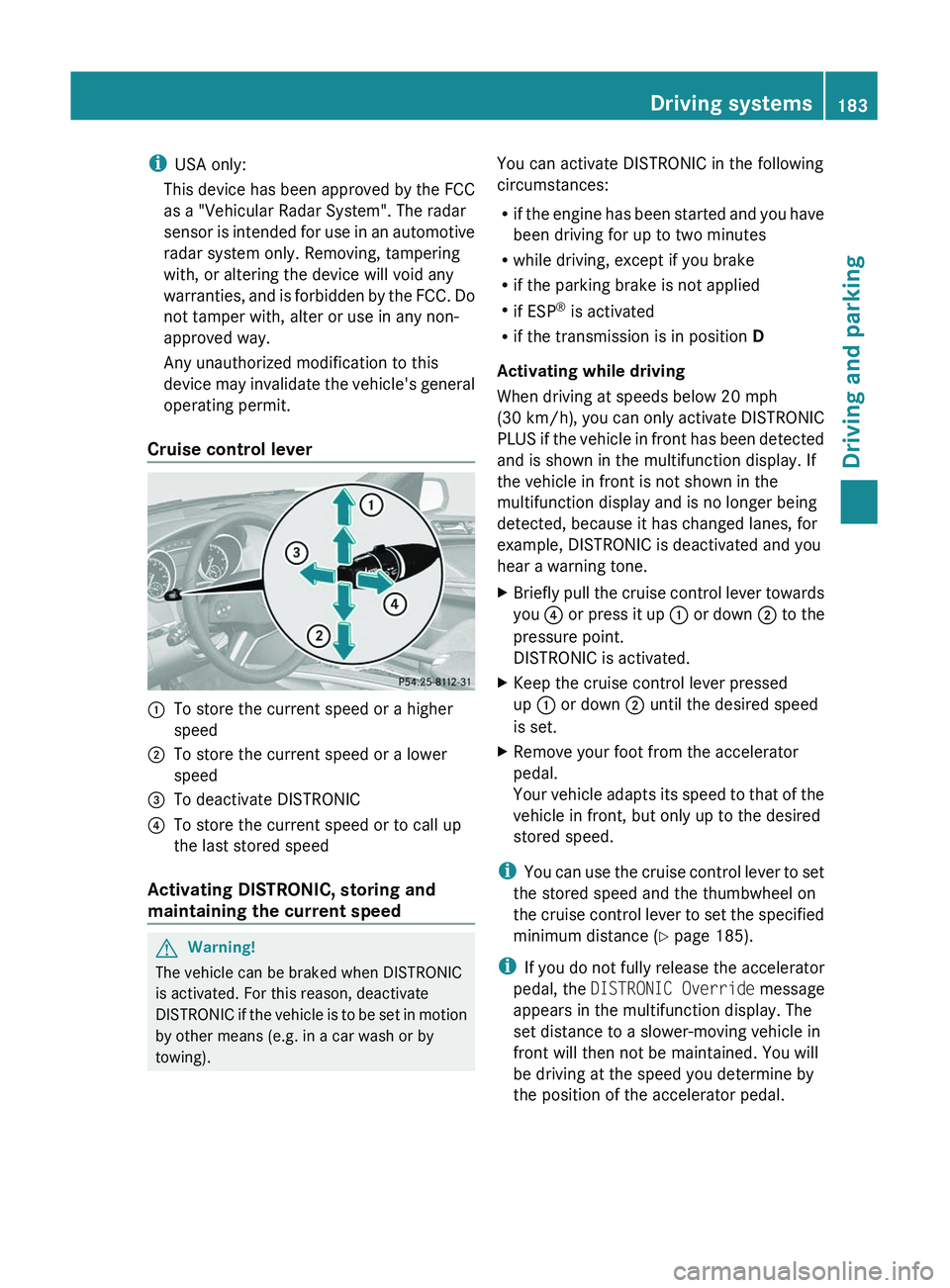
Cruise control lever:To store the current speed or a higher
speed;To store the current speed or a lower
speed=To deactivate DISTRONIC?To store the current speed or to call up
the last stored speed
Activating DISTRONIC, storing and
maintaining the current speed
GWarning!
The vehicle can be braked when DISTRONIC
is activated. For this reason, deactivate
DISTRONIC if the vehicle is to be set in motion
by other means (e.g. in a car wash or by
towing).
You can activate DISTRONIC in the following
circumstances:
R if the engine has been started and you have
been driving for up to two minutes
R while driving, except if you brake
R if the parking brake is not applied
R if ESP ®
is activated
R if the transmission is in position D
Activating while driving
When driving at speeds below 20 mph
(30 km/h) , you can only activate DISTRONIC
PLUS if the vehicle in front has been detected
and is shown in the multifunction display. If
the vehicle in front is not shown in the
multifunction display and is no longer being
detected, because it has changed lanes, for
example, DISTRONIC is deactivated and you
hear a warning tone.XBriefly pull the cruise control lever towards
you ? or press it up : or down ; to the
pressure point.
DISTRONIC is activated.XKeep the cruise control lever pressed
up : or down ; until the desired speed
is set.XRemove your foot from the accelerator
pedal.
Your vehicle adapts its speed to that of the
vehicle in front, but only up to the desired
stored speed.
i You can use the cruise control lever to set
the stored speed and the thumbwheel on
the cruise control lever to set the specified
minimum distance ( Y page 185).
i If you do not fully release the accelerator
pedal, the DISTRONIC Override message
appears in the multifunction display. The
set distance to a slower-moving vehicle in
front will then not be maintained. You will
be driving at the speed you determine by
the position of the accelerator pedal.
Driving systems183Driving and parkingBA 164.8 USA, CA Edition B 2011; 1; 2, en-USd2sboikeVersion: 3.0.3.52010-04-21T15:08:44+02:00 - Seite 183Z
Page 187 of 376
Storing the current speed or calling up
the last speed storedGWarning
The set speed stored in memory should only
be set again if prevailing road conditions and
legal speed limits permit. Possible
acceleration or deceleration differences
arising from returning to the preset speed
could cause an accident and/or serious injury
to you and others.
XBriefly pull the cruise control lever towards
you ?.XRemove your foot from the accelerator
pedal.
DISTRONIC is activated and accepts the
current speed if it is activated for the first
time, or adjusts the vehicle's speed to the
last speed stored.
Setting the specified minimum distance
You can set the specified minimum distance
for DISTRONIC by varying the time span
between one and two seconds. This time span
determines the distance that DISTRONIC
should maintain from the vehicle in front,
depending on the road speed. You can see
this distance in the multifunction display
( Y page 186).
GWarning!
It is up to the driver to exercise discretion to
select the appropriate setting given road
conditions, traffic, driver's preferred driving
style and applicable laws and driving
recommendations for safe following distance.
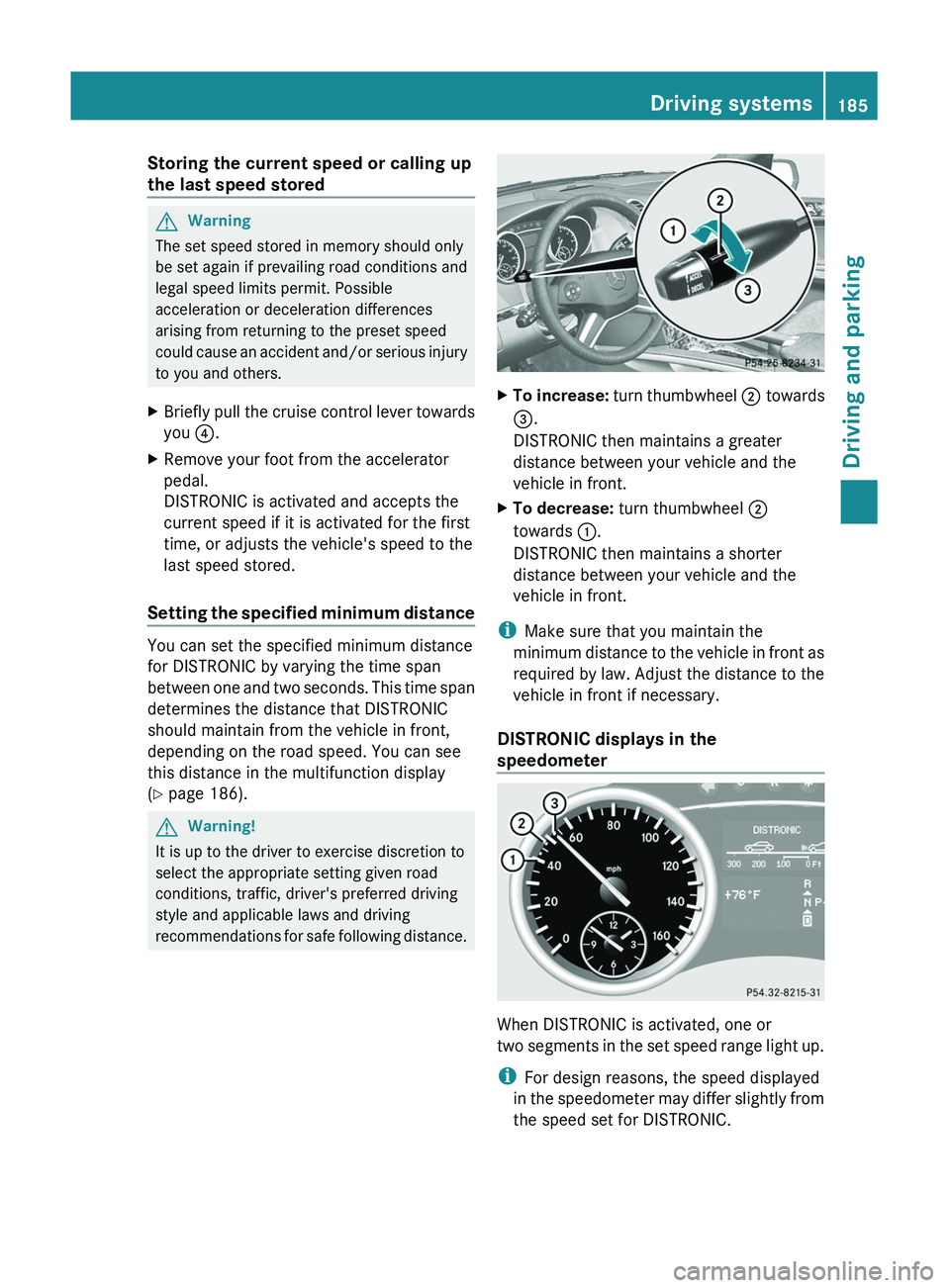
XTo increase: turn thumbwheel ; towards
= .
DISTRONIC then maintains a greater
distance between your vehicle and the
vehicle in front.XTo decrease: turn thumbwheel ;
towards :.
DISTRONIC then maintains a shorter
distance between your vehicle and the
vehicle in front.
i Make sure that you maintain the
minimum distance to the vehicle in front as
required by law. Adjust the distance to the
vehicle in front if necessary.
DISTRONIC displays in the
speedometer
When DISTRONIC is activated, one or
two segments in the set speed range light up.
i For design reasons, the speed displayed
in the speedometer may differ slightly from
the speed set for DISTRONIC.
Driving systems185Driving and parkingBA 164.8 USA, CA Edition B 2011; 1; 2, en-USd2sboikeVersion: 3.0.3.52010-04-21T15:08:44+02:00 - Seite 185Z
Page 188 of 376
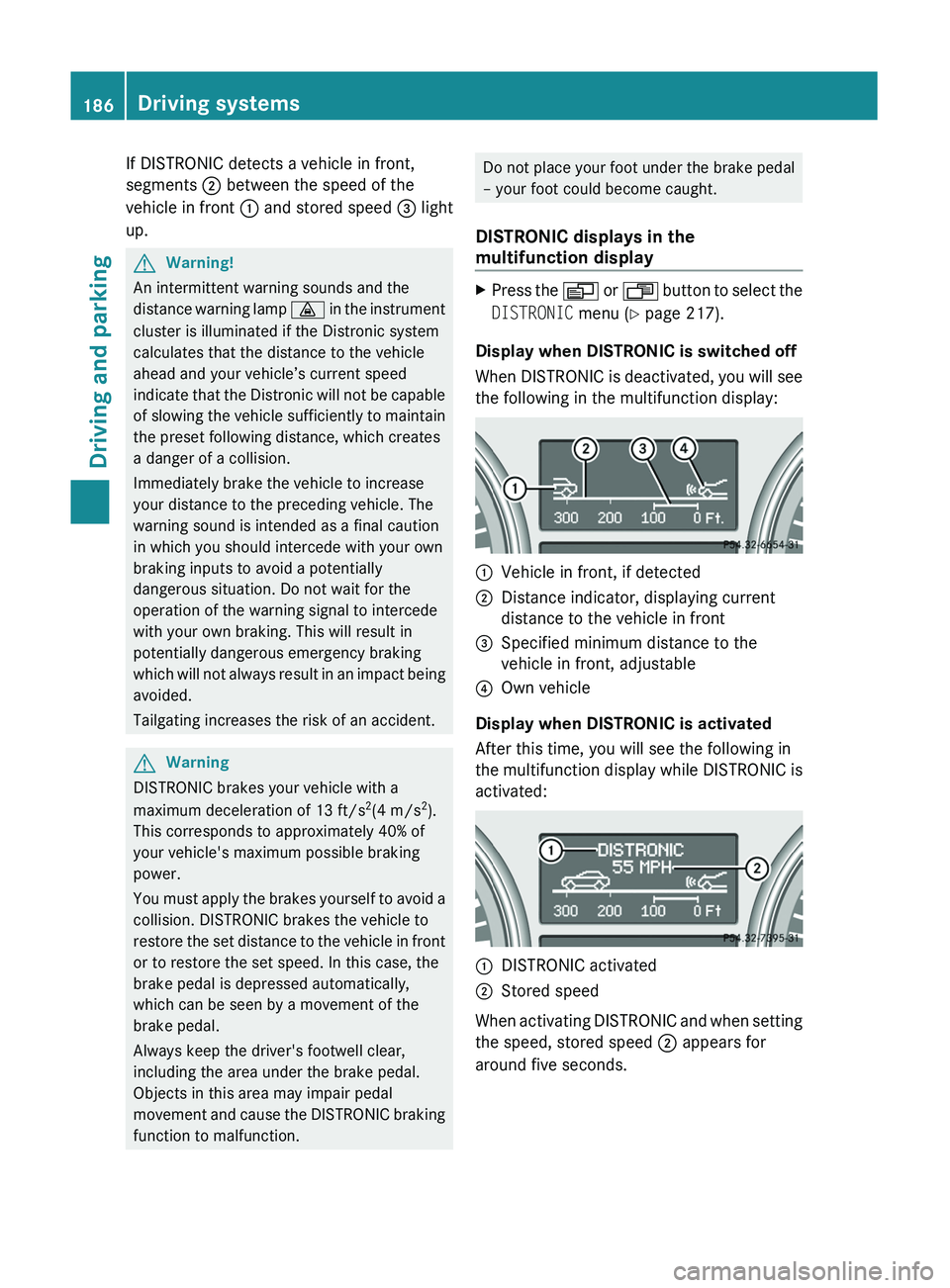
If DISTRONIC detects a vehicle in front,
segments ; between the speed of the
vehicle in front : and stored speed = light
up.GWarning!
An intermittent warning sounds and the
distance warning lamp · in the instrument
cluster is illuminated if the Distronic system
calculates that the distance to the vehicle
ahead and your vehicle’s current speed
indicate that the Distronic will not be capable
of slowing the vehicle sufficiently to maintain
the preset following distance, which creates
a danger of a collision.
Immediately brake the vehicle to increase
your distance to the preceding vehicle. The
warning sound is intended as a final caution
in which you should intercede with your own
braking inputs to avoid a potentially
dangerous situation. Do not wait for the
operation of the warning signal to intercede
with your own braking. This will result in
potentially dangerous emergency braking
which will not always result in an impact being
avoided.
Tailgating increases the risk of an accident.
GWarning
DISTRONIC brakes your vehicle with a
maximum deceleration of 13 ft/s 2
(4 m/s 2
).
This corresponds to approximately 40% of
your vehicle's maximum possible braking
power.
You must apply the brakes yourself to avoid a
collision. DISTRONIC brakes the vehicle to
restore the set distance to the vehicle in front
or to restore the set speed. In this case, the
brake pedal is depressed automatically,
which can be seen by a movement of the
brake pedal.
Always keep the driver's footwell clear,
including the area under the brake pedal.
Objects in this area may impair pedal
movement and cause the DISTRONIC braking
function to malfunction.
Do not place your foot under the brake pedal
– your foot could become caught.
DISTRONIC displays in the
multifunction displayXPress the V or U button to select the
DISTRONIC menu (Y page 217).
Display when DISTRONIC is switched off
When DISTRONIC is deactivated, you will see
the following in the multifunction display:
:Vehicle in front, if detected;Distance indicator, displaying current
distance to the vehicle in front=Specified minimum distance to the
vehicle in front, adjustable?Own vehicle
Display when DISTRONIC is activated
After this time, you will see the following in
the multifunction display while DISTRONIC is
activated:
:DISTRONIC activated;Stored speed
When activating DISTRONIC and when setting
the speed, stored speed ; appears for
around five seconds.
186Driving systemsDriving and parking
BA 164.8 USA, CA Edition B 2011; 1; 2, en-USd2sboikeVersion: 3.0.3.52010-04-21T15:08:44+02:00 - Seite 186
Page 189 of 376
After approximately five seconds, current
saved speed ; is displayed in the status
indicator in the multifunction display:
R USA only: DTR XXX Miles
R Canada only: DTR XXX km/h
Deactivating DISTRONIC
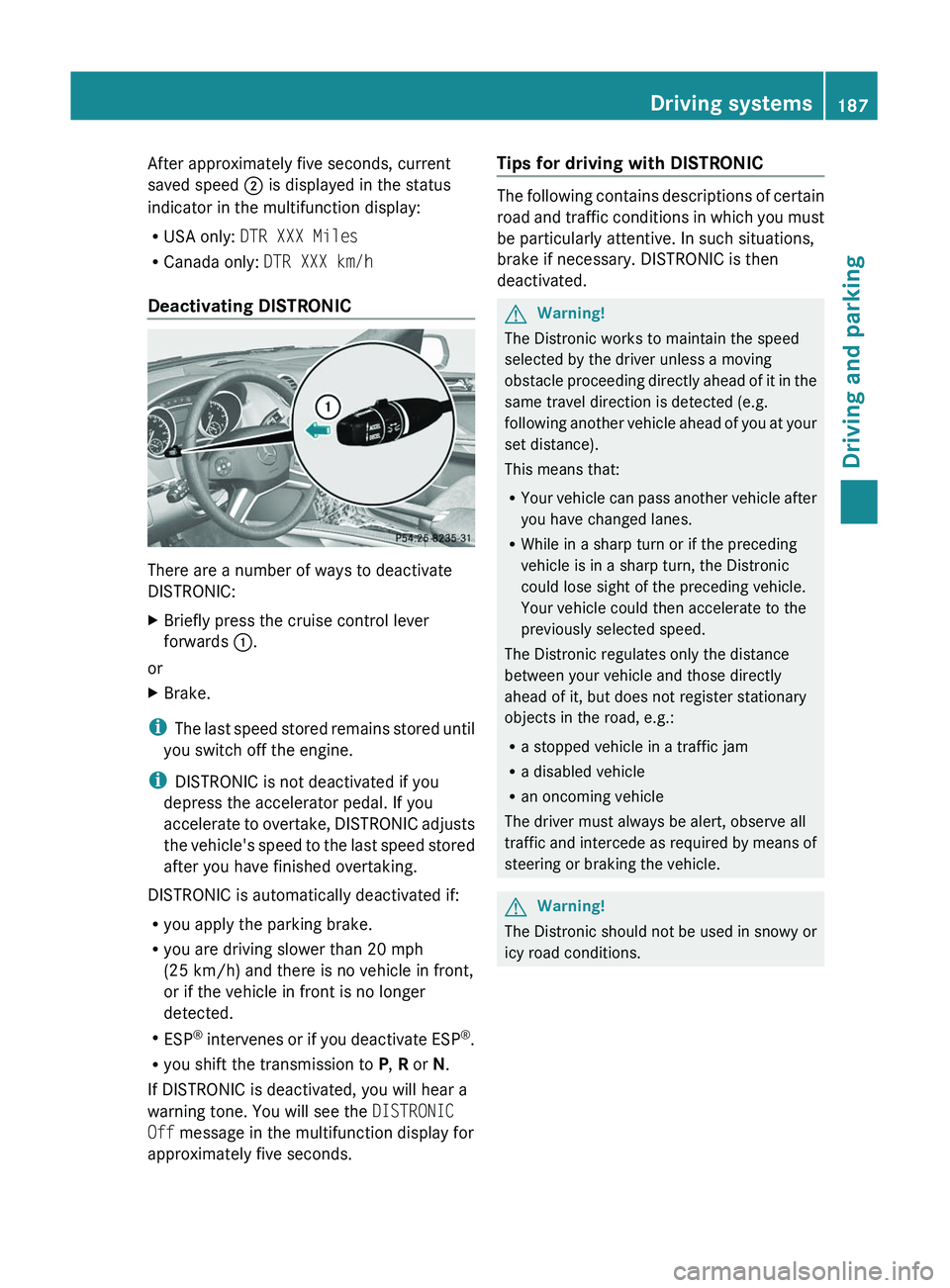
There are a number of ways to deactivate
DISTRONIC:
XBriefly press the cruise control lever
forwards :.
or
XBrake.
i
The last speed stored remains stored until
you switch off the engine.
i DISTRONIC is not deactivated if you
depress the accelerator pedal. If you
accelerate to overtake, DISTRONIC adjusts
the vehicle's speed to the last speed stored
after you have finished overtaking.
DISTRONIC is automatically deactivated if:
R you apply the parking brake.
R you are driving slower than 20 mph
(25 km/h) and there is no vehicle in front,
or if the vehicle in front is no longer
detected.
R ESP ®
intervenes or if you deactivate ESP ®
.
R you shift the transmission to P, R or N.
If DISTRONIC is deactivated, you will hear a
warning tone. You will see the DISTRONIC
Off message in the multifunction display for
approximately five seconds.
Tips for driving with DISTRONIC
The following contains descriptions of certain
road and traffic conditions in which you must
be particularly attentive. In such situations,
brake if necessary. DISTRONIC is then
deactivated.
GWarning!
The Distronic works to maintain the speed
selected by the driver unless a moving
obstacle proceeding directly ahead of it in the
same travel direction is detected (e.g.
following another vehicle ahead of you at your
set distance).
This means that:
R Your vehicle can pass another vehicle after
you have changed lanes.
R While in a sharp turn or if the preceding
vehicle is in a sharp turn, the Distronic
could lose sight of the preceding vehicle.
Your vehicle could then accelerate to the
previously selected speed.
The Distronic regulates only the distance
between your vehicle and those directly
ahead of it, but does not register stationary
objects in the road, e.g.:
R a stopped vehicle in a traffic jam
R a disabled vehicle
R an oncoming vehicle
The driver must always be alert, observe all
traffic and intercede as required by means of
steering or braking the vehicle.
GWarning!
The Distronic should not be used in snowy or
icy road conditions.
Driving systems187Driving and parkingBA 164.8 USA, CA Edition B 2011; 1; 2, en-USd2sboikeVersion: 3.0.3.52010-04-21T15:08:44+02:00 - Seite 187Z
Page 192 of 376
The individual vehicle levels differ from
highway level as follows:
R +2.3 in (+ 60 mm) in raised level
R +/–0 in (+/–0 mm) in highway level 26
R –0.6 in (–15 mm) in high-speed level
Raised level
Only select raised level if this is appropriate
for the road conditions. Otherwise, fuel
consumption increases and handling may be
affected.
Your selection remains stored even if you
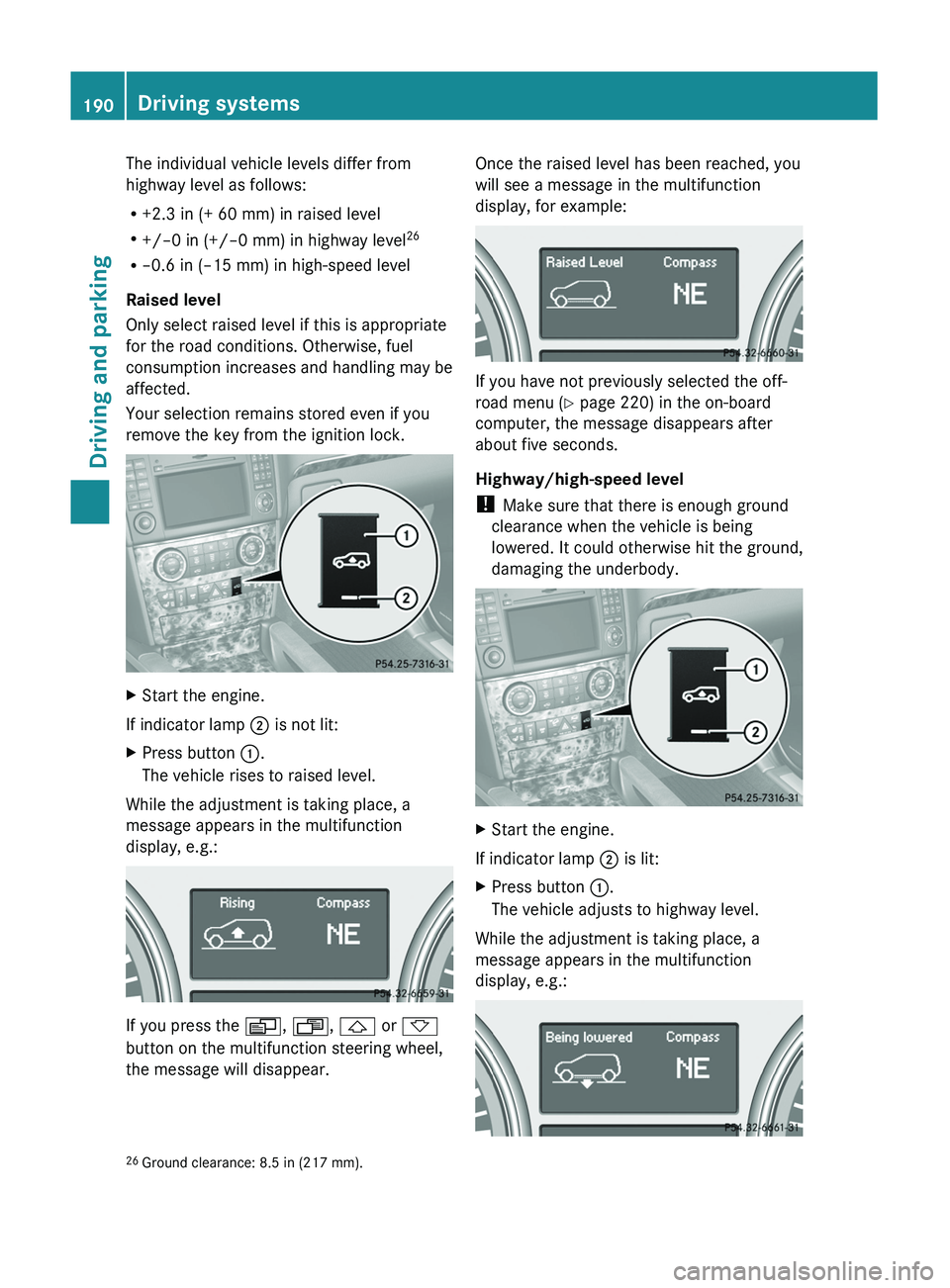
remove the key from the ignition lock.XStart the engine.
If indicator lamp ; is not lit:
XPress button :.
The vehicle rises to raised level.
While the adjustment is taking place, a
message appears in the multifunction
display, e.g.:
If you press the V, U , & or *
button on the multifunction steering wheel,
the message will disappear.
Once the raised level has been reached, you
will see a message in the multifunction
display, for example:
If you have not previously selected the off-
road menu ( Y page 220) in the on-board
computer, the message disappears after
about five seconds.
Highway/high-speed level
! Make sure that there is enough ground
clearance when the vehicle is being
lowered. It could otherwise hit the ground,
damaging the underbody.
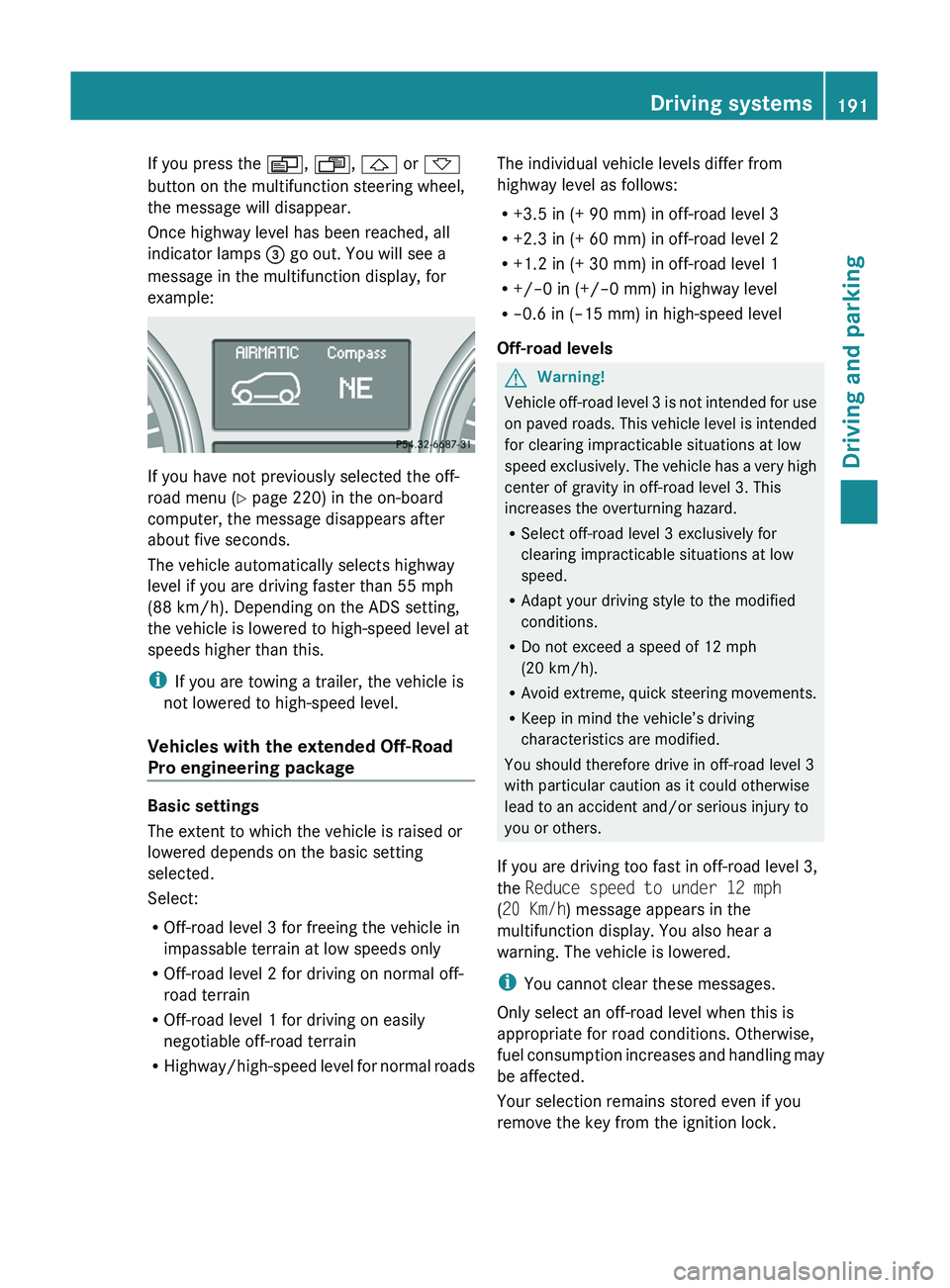
XStart the engine.
If indicator lamp ; is lit:
XPress button :.
The vehicle adjusts to highway level.
While the adjustment is taking place, a
message appears in the multifunction
display, e.g.:
26 Ground clearance: 8.5 in (217 mm).190Driving systemsDriving and parking
BA 164.8 USA, CA Edition B 2011; 1; 2, en-USd2sboikeVersion: 3.0.3.52010-04-21T15:08:44+02:00 - Seite 190
Page 193 of 376
If you press the V, U , & or *
button on the multifunction steering wheel,
the message will disappear.
Once highway level has been reached, all
indicator lamps = go out. You will see a
message in the multifunction display, for
example:
If you have not previously selected the off-
road menu ( Y page 220) in the on-board
computer, the message disappears after
about five seconds.
The vehicle automatically selects highway
level if you are driving faster than 55 mph
(88 km/h). Depending on the ADS setting,
the vehicle is lowered to high-speed level at
speeds higher than this.
i If you are towing a trailer, the vehicle is
not lowered to high-speed level.
Vehicles with the extended Off-Road
Pro engineering package
Basic settings
The extent to which the vehicle is raised or
lowered depends on the basic setting
selected.
Select:
R Off-road level 3 for freeing the vehicle in
impassable terrain at low speeds only
R Off-road level 2 for driving on normal off-
road terrain
R Off-road level 1 for driving on easily
negotiable off-road terrain
R Highway/high-speed level for normal roads
The individual vehicle levels differ from
highway level as follows:
R +3.5 in (+ 90 mm) in off-road level 3
R +2.3 in (+ 60 mm) in off-road level 2
R +1.2 in (+ 30 mm) in off-road level 1
R +/–0 in (+/–0 mm) in highway level
R –0.6 in (–15 mm) in high-speed level
Off-road levelsGWarning!
Vehicle off-road level 3 is not intended for use
on paved roads. This vehicle level is intended
for clearing impracticable situations at low
speed exclusively. The vehicle has a very high
center of gravity in off-road level 3. This
increases the overturning hazard.
R Select off-road level 3 exclusively for
clearing impracticable situations at low
speed.
R Adapt your driving style to the modified
conditions.
R Do not exceed a speed of 12 mph
(20 km/h).
R Avoid extreme, quick steering movements.
R Keep in mind the vehicle’s driving
characteristics are modified.
You should therefore drive in off-road level 3
with particular caution as it could otherwise
lead to an accident and/or serious injury to
you or others.
If you are driving too fast in off-road level 3,
the Reduce speed to under 12 mph
( 20 Km/h ) message appears in the
multifunction display. You also hear a
warning. The vehicle is lowered.
i You cannot clear these messages.
Only select an off-road level when this is
appropriate for road conditions. Otherwise,
fuel consumption increases and handling may
be affected.
Your selection remains stored even if you
remove the key from the ignition lock.
Driving systems191Driving and parkingBA 164.8 USA, CA Edition B 2011; 1; 2, en-USd2sboikeVersion: 3.0.3.52010-04-21T15:08:44+02:00 - Seite 191Z
Page 194 of 376
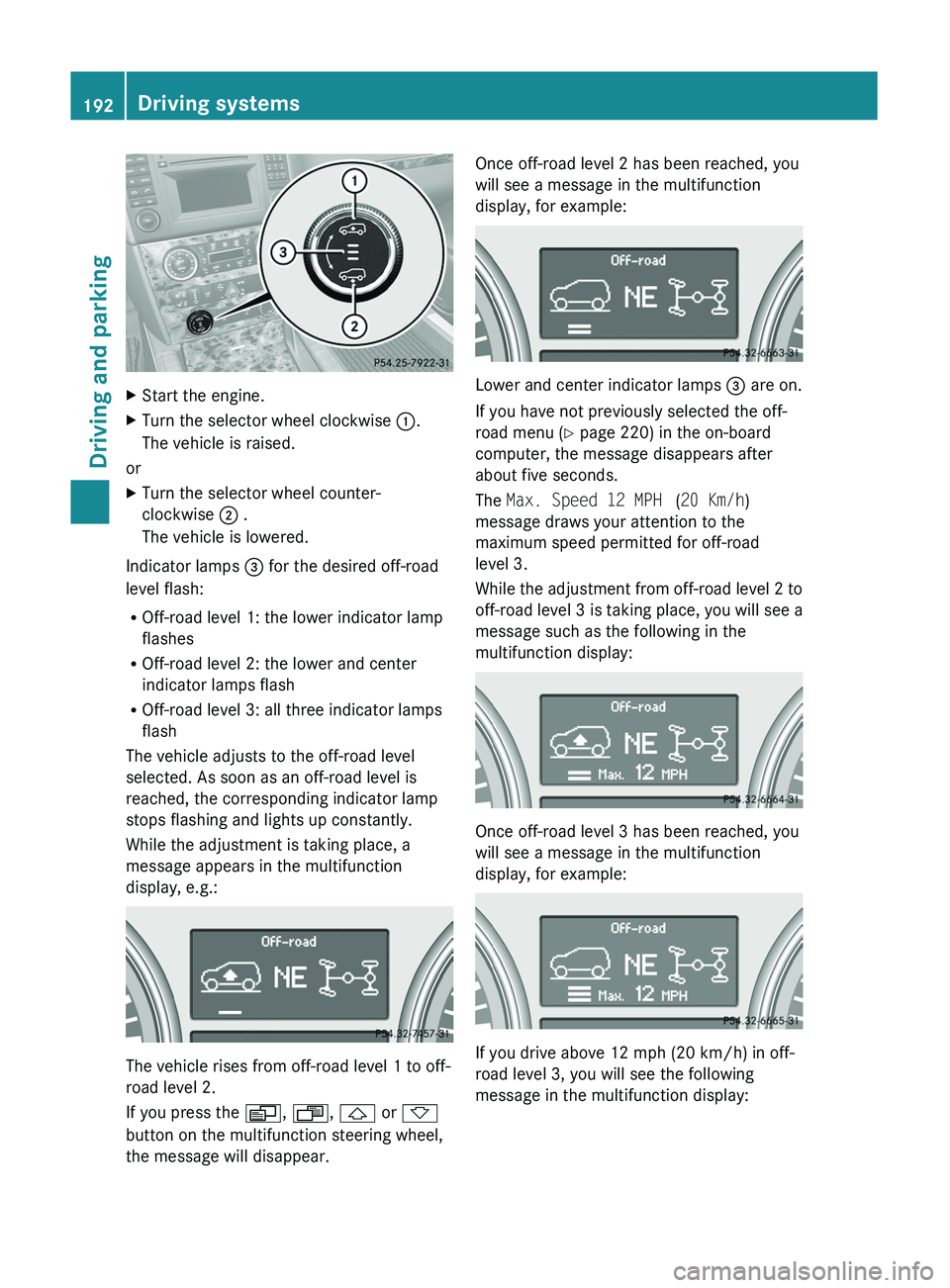
XStart the engine.XTurn the selector wheel clockwise :.
The vehicle is raised.
or
XTurn the selector wheel counter-
clockwise ; .
The vehicle is lowered.
Indicator lamps = for the desired off-road
level flash:
R Off-road level 1: the lower indicator lamp
flashes
R Off-road level 2: the lower and center
indicator lamps flash
R Off-road level 3: all three indicator lamps
flash
The vehicle adjusts to the off-road level
selected. As soon as an off-road level is
reached, the corresponding indicator lamp
stops flashing and lights up constantly.
While the adjustment is taking place, a
message appears in the multifunction
display, e.g.:
The vehicle rises from off-road level 1 to off-
road level 2.
If you press the V, U , & or *
button on the multifunction steering wheel,
the message will disappear.
Once off-road level 2 has been reached, you
will see a message in the multifunction
display, for example:
Lower and center indicator lamps = are on.
If you have not previously selected the off-
road menu ( Y page 220) in the on-board
computer, the message disappears after
about five seconds.
The Max. Speed 12 MPH (20 Km/h )
message draws your attention to the
maximum speed permitted for off-road
level 3.
While the adjustment from off-road level 2 to
off-road level 3 is taking place, you will see a
message such as the following in the
multifunction display:
Once off-road level 3 has been reached, you
will see a message in the multifunction
display, for example:
If you drive above 12 mph (20 km/h) in off-
road level 3, you will see the following
message in the multifunction display:
192Driving systemsDriving and parking
BA 164.8 USA, CA Edition B 2011; 1; 2, en-USd2sboikeVersion: 3.0.3.52010-04-21T15:08:44+02:00 - Seite 192
Page 195 of 376
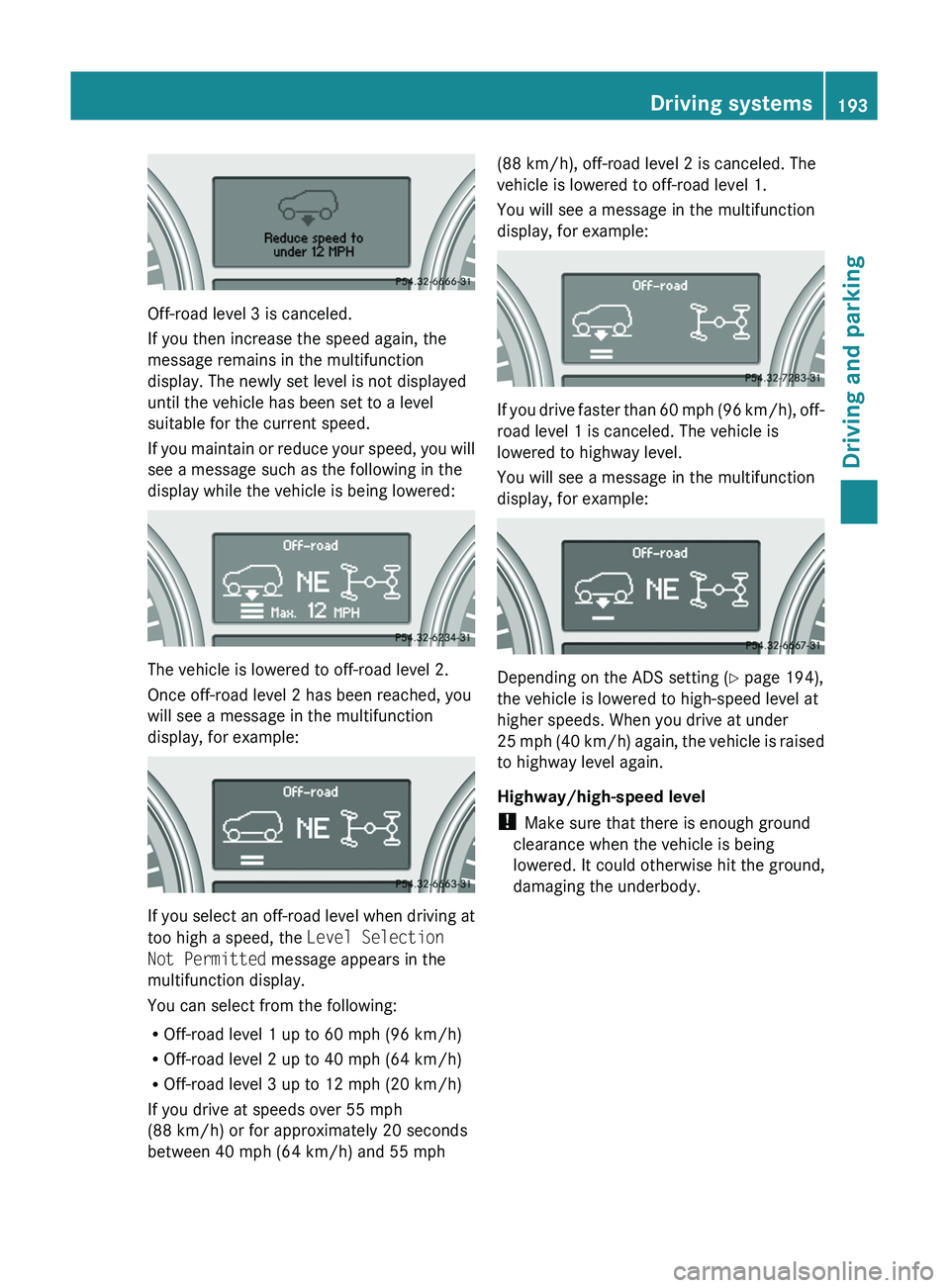
Off-road level 3 is canceled.
If you then increase the speed again, the
message remains in the multifunction
display. The newly set level is not displayed
until the vehicle has been set to a level
suitable for the current speed.
If you maintain or reduce your speed, you will
see a message such as the following in the
display while the vehicle is being lowered:
The vehicle is lowered to off-road level 2.
Once off-road level 2 has been reached, you
will see a message in the multifunction
display, for example:
If you select an off-road level when driving at
too high a speed, the Level Selection
Not Permitted message appears in the
multifunction display.
You can select from the following:
R Off-road level 1 up to 60 mph (96 km/h)
R Off-road level 2 up to 40 mph (64 km/h)
R Off-road level 3 up to 12 mph (20 km/h)
If you drive at speeds over 55 mph
(88 km/h) or for approximately 20 seconds
between 40 mph (64 km/h) and 55 mph
(88 km/h), off-road level 2 is canceled. The
vehicle is lowered to off-road level 1.
You will see a message in the multifunction
display, for example:
If you drive faster than 60 mph (96 km/h), off-
road level 1 is canceled. The vehicle is
lowered to highway level.
You will see a message in the multifunction
display, for example:
Depending on the ADS setting ( Y page 194),
the vehicle is lowered to high-speed level at
higher speeds. When you drive at under
25 mph (40 km/h) again, the vehicle is raised
to highway level again.
Highway/high-speed level
! Make sure that there is enough ground
clearance when the vehicle is being
lowered. It could otherwise hit the ground,
damaging the underbody.
Driving systems193Driving and parkingBA 164.8 USA, CA Edition B 2011; 1; 2, en-USd2sboikeVersion: 3.0.3.52010-04-21T15:08:44+02:00 - Seite 193Z
Page 196 of 376
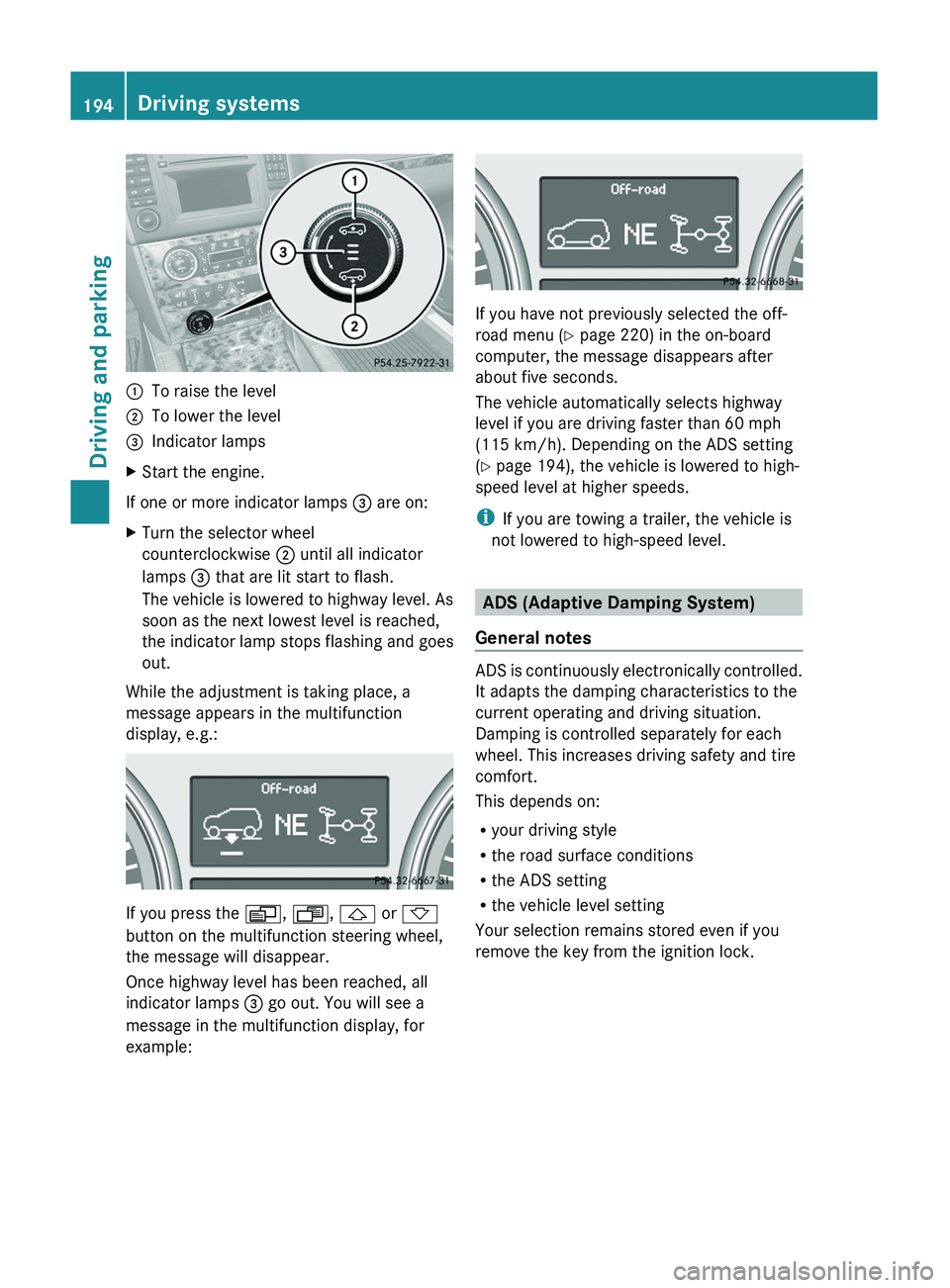
:To raise the level;To lower the level=Indicator lampsXStart the engine.
If one or more indicator lamps = are on:
XTurn the selector wheel
counterclockwise ; until all indicator
lamps = that are lit start to flash.
The vehicle is lowered to highway level. As
soon as the next lowest level is reached,
the indicator lamp stops flashing and goes
out.
While the adjustment is taking place, a
message appears in the multifunction
display, e.g.:
If you press the V, U , & or *
button on the multifunction steering wheel,
the message will disappear.
Once highway level has been reached, all
indicator lamps = go out. You will see a
message in the multifunction display, for
example:
If you have not previously selected the off-
road menu ( Y page 220) in the on-board
computer, the message disappears after
about five seconds.
The vehicle automatically selects highway
level if you are driving faster than 60 mph
(115 km/h). Depending on the ADS setting
( Y page 194), the vehicle is lowered to high-
speed level at higher speeds.
i If you are towing a trailer, the vehicle is
not lowered to high-speed level.
ADS (Adaptive Damping System)
General notes
ADS is continuously electronically controlled.
It adapts the damping characteristics to the
current operating and driving situation.
Damping is controlled separately for each
wheel. This increases driving safety and tire
comfort.
This depends on:
R your driving style
R the road surface conditions
R the ADS setting
R the vehicle level setting
Your selection remains stored even if you
remove the key from the ignition lock.
194Driving systemsDriving and parking
BA 164.8 USA, CA Edition B 2011; 1; 2, en-USd2sboikeVersion: 3.0.3.52010-04-21T15:08:44+02:00 - Seite 194