navigation system MERCEDES-BENZ GL 2011 Owners Manual
[x] Cancel search | Manufacturer: MERCEDES-BENZ, Model Year: 2011, Model line: GL, Model: MERCEDES-BENZ GL 2011Pages: 376, PDF Size: 17.39 MB
Page 13 of 376
Loading guidelines ............................ 264
Locking Automatic ........................................ 79
Emergency locking ........................... 80
From inside the vehicle (central
locking button) ................................. 79
Low-beam headlamp (display
message) ............................................ 237
LOW RANGE Display message ............................ 245
Off-road gear ......................... 157, 205
LOW RANGE off-road gear ........ 157, 205
Luggage net ....................................... 266
Lumbar support 4-way lumbar support ....................104
Luxury head restraints ....................... 97
M
Main-beam headlamps (display
message) ............................................ 238
Malfunction message see Display messages
Malfunctions relevant to safety
Reporting ......................................... 23
mbrace
Call priority .................................... 287
Display message ............................ 231
Downloading destinations
(COMAND) ..................................... 287
Emergency call .............................. 284
Important safety notes ..................283
Locating a stolen vehicle ...............288
MB info call button ........................286
Roadside Assistance button ..........285
Self-test ......................................... 283
System .......................................... 283
Vehicle remote unlocking ..............287
Mechanical key
Function/notes ................................ 75
Memory card (on-board computer) . 219
Memory function ............................... 110
Menu (on-board computer) Additional functions .......................226
Audio ............................................. 219
DISTRONIC .................................... 186
DVD ............................................... 220
Message memory .......................... 229
Navigation ..................................... 220
Off-road ......................................... 220
Overview of menus ........................217
Resetting to factory settings ..........221
Settings ......................................... 221
Standard display ............................ 218
Telephone ...................................... 227
Trip computer ................................ 227
Messages
see Display messages
Mirrors
Sun visor ........................................ 278
see Exterior mirrors or Rear-view mirror
MOExtended run-flat system ........... 321
MP3 Operating (on-board computer) .....219
see separate operating instructions
Multicontour seat .............................. 103
Multifunction display ........................ 215
Multifunction steering wheel Operating the on-board computer . 215
Overview .......................................... 30
N
Navigation On-board computer .......................220
see separate operating instructions
NECK-PRO head restraints
Operation ......................................... 52
Resetting triggered ..........................52
NECK-PRO luxury head restraints
Resetting triggered ..........................52
Notes on breaking-in a new
vehicle ................................................ 146
O
Occupant Classification System
(OCS) Faults ............................................... 47
Operation ......................................... 42
System self-test ............................... 46
Occupant safety
Children in the vehicle .....................59
System overview .............................. 36
Index11BA 164.8 USA, CA Edition B 2011; 1; 2, en-USd2sboikeVersion: 3.0.3.52010-04-21T15:08:44+02:00 - Seite 11
Page 14 of 376
OCSFaults ............................................... 47
Operation ......................................... 42
System self-test ............................... 46
Octane number (fuel) ........................ 366
Odometer ........................................... 218
Off-road 4MATIC .......................................... 202
Differential locks ............................ 207
DSR ............................................... 203
LOW RANGE off-road gear .....158, 205
Off-road 4ETS .................................. 67
Off-road ABS .................................... 66
Off-road drive program ..................204
Off-road drive program ..................... 204
Off-road driving ................................. 174
Important safety instructions ......... 173
Off-road fording ................................. 171
Off-road terrain Off-road ESP .................................... 68
Oil
see Engine oil
On-board computer
Additional functions menu .............226
Audio menu ................................... 219
Convenience submenu ..................225
Displaying a service message ........299
Displaying the coolant
temperature ................................... 218
Displaying the outside
temperature ................................... 218
Display messages ..........................229
DISTRONIC menu .......................... 186
Factory settings ............................. 221
Important safety notes ..................214
Instrument cluster submenu ..........221
Lighting submenu .......................... 223
Message memory menu ................. 229
Navigation menu ............................ 220
Off-road menu ............................... 220
Operating video DVD .....................220
Operation ....................................... 215
Overview of menus ........................217
Selecting the language ..................222
Settings menu ............................... 221
Standard display menu ..................218
Telephone menu ............................ 227
Time/Date submenu .....................222Trip computer menu ......................227
Vehicle submenu ........................... 224
Opening and closing the side trim
panels ................................................. 123
Operating system see On-board computer
Outside temperature
Calling up (on-board computer) .....218
Display ........................................... 214
Overhead control panel
Overview .......................................... 33
Override feature
Rear side windows ...........................64
P
Paint code number ............................ 363
Paintwork (cleaning instructions) ... 301
Panel Removing (third row of seats) ........101
Panic alarm .......................................... 64
Parking ............................................... 165
Parking aid PARKTRONIC ................................. 195
Rear view camera .......................... 198
Parking brake .................................... 166
Parking lamp (display message) ...... 239
Parking position Exterior mirror on the front-
passenger side ............................... 109
PARKTRONIC ...................................... 195
Activating/deactivating .................197
Malfunction .................................... 198
Problem ......................................... 198
Range of the sensors .....................195
Trailer towing ................................. 197
Warning display ............................. 196
PASSENGER AIRBAG OFF indicator
lamp (only Canada) ............................. 48
PASSENGER AIRBAG OFF indicator
lamp (only USA) ................................... 42
Pedals ................................................. 167
Permanent four-wheel drive see 4MATIC
Plastic trim (cleaning instructions) . 304
Power supply (trailer) ....................... 212
Power washers .................................. 301
12IndexBA 164.8 USA, CA Edition B 2011; 1; 2, en-USd2sboikeVersion: 3.0.3.52010-04-21T15:08:44+02:00 - Seite 12
Page 219 of 376
Menus and submenus
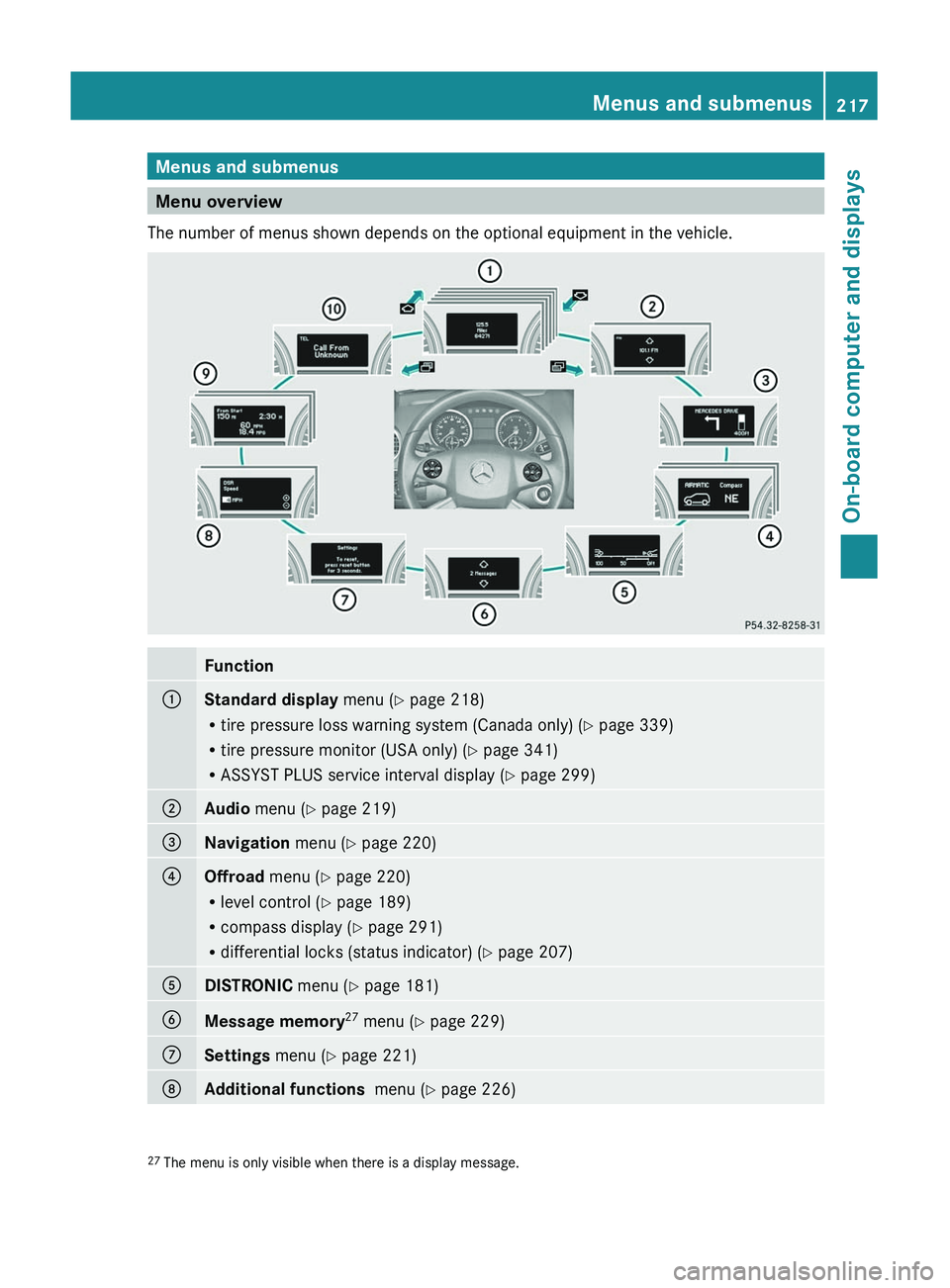
Menu overview
The number of menus shown depends on the optional equipment in the vehicle.
Function:Standard display menu (Y page 218)
R tire pressure loss warning system (Canada only) ( Y page 339)
R tire pressure monitor (USA only) ( Y page 341)
R ASSYST PLUS service interval display ( Y page 299);Audio menu ( Y page 219)=Navigation menu (Y page 220)?Offroad menu (Y page 220)
R level control ( Y page 189)
R compass display ( Y page 291)
R differential locks (status indicator) ( Y page 207)ADISTRONIC menu (Y page 181)BMessage memory 27
menu ( Y page 229)CSettings menu (Y page 221)DAdditional functions menu (Y page 226)27
The menu is only visible when there is a display message.Menus and submenus217On-board computer and displaysBA 164.8 USA, CA Edition B 2011; 1; 2, en-USd2sboikeVersion: 3.0.3.52010-04-21T15:08:44+02:00 - Seite 217Z
Page 222 of 376
XTo select the next/previous track:
briefly press the & or * button.XTo select a track from the track list
(rapid scrolling): press and briefly hold the
& or * button.
The current track will not be displayed in
audio AUX mode ( Auxiliary audio mode:
external audio source connected).
Video DVD operation
XSwitch on COMAND APS and select video
DVD (see the separate operating
instructions).XPress V or U on the steering wheel
to select the Audio menu.
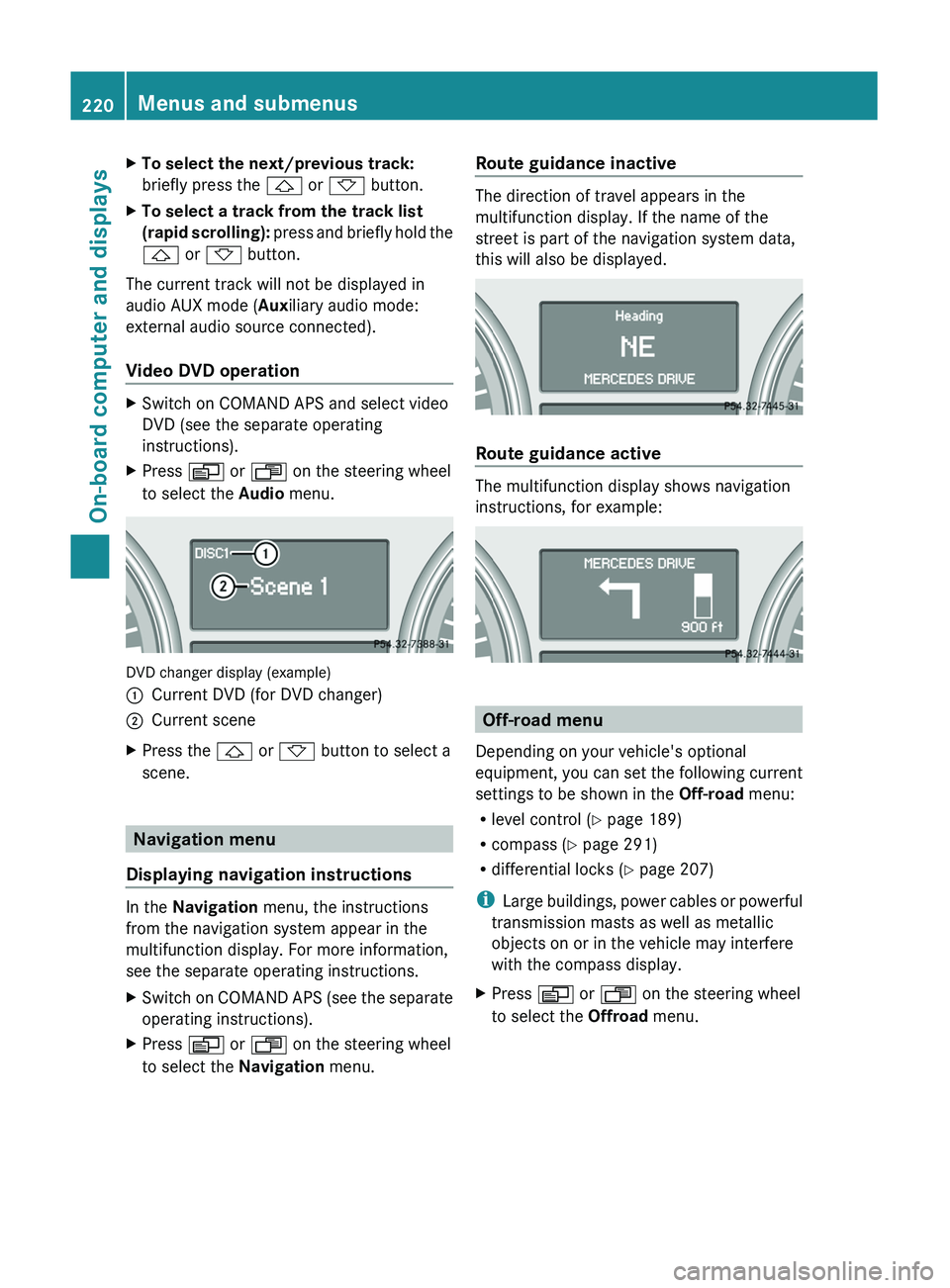
DVD changer display (example)
:Current DVD (for DVD changer);Current sceneXPress the & or * button to select a
scene.
Navigation menu
Displaying navigation instructions
In the Navigation menu, the instructions
from the navigation system appear in the
multifunction display. For more information,
see the separate operating instructions.
XSwitch on COMAND APS (see the separate
operating instructions).XPress V or U on the steering wheel
to select the Navigation menu.Route guidance inactive
The direction of travel appears in the
multifunction display. If the name of the
street is part of the navigation system data,
this will also be displayed.
Route guidance active
The multifunction display shows navigation
instructions, for example:
Off-road menu
Depending on your vehicle's optional
equipment, you can set the following current
settings to be shown in the Off-road menu:
R level control ( Y page 189)
R compass ( Y page 291)
R differential locks ( Y page 207)
i Large buildings, power cables or powerful
transmission masts as well as metallic
objects on or in the vehicle may interfere
with the compass display.
XPress V or U on the steering wheel
to select the Offroad menu.220Menus and submenusOn-board computer and displays
BA 164.8 USA, CA Edition B 2011; 1; 2, en-USd2sboikeVersion: 3.0.3.52010-04-21T15:08:44+02:00 - Seite 220
Page 258 of 376
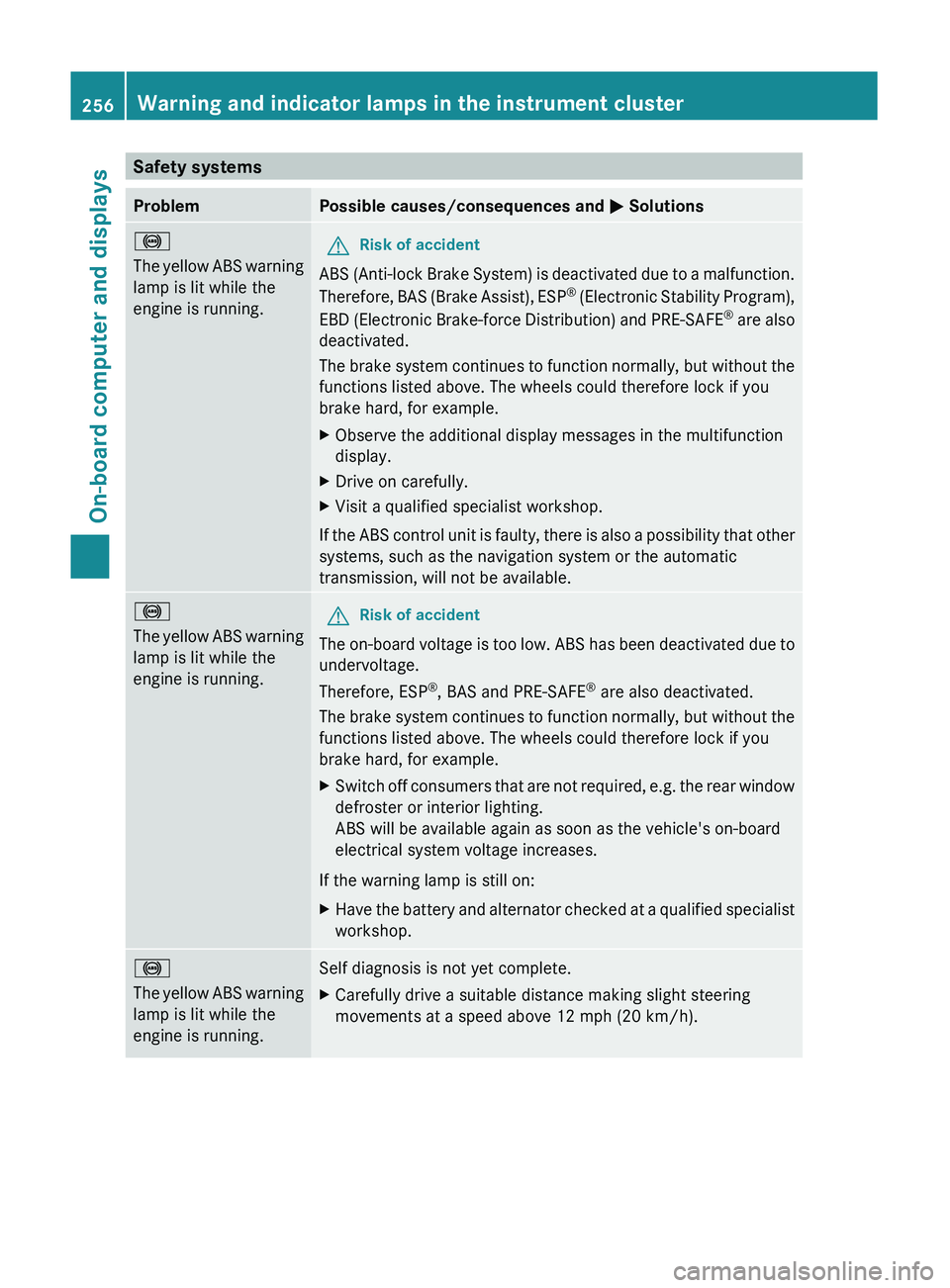
Safety systemsProblemPossible causes/consequences and M Solutions!
The yellow ABS warning
lamp is lit while the
engine is running. GRisk of accident
ABS (Anti-lock Brake System) is deactivated due to a malfunction.
Therefore, BAS (Brake Assist), ESP ®
(Electronic Stability Program),
EBD (Electronic Brake-force Distribution) and PRE-SAFE ®
are also
deactivated.
The brake system continues to function normally, but without the
functions listed above. The wheels could therefore lock if you
brake hard, for example.
XObserve the additional display messages in the multifunction
display.XDrive on carefully.XVisit a qualified specialist workshop.
If the ABS control unit is faulty, there is also a possibility that other
systems, such as the navigation system or the automatic
transmission, will not be available.
!
The yellow ABS warning
lamp is lit while the
engine is running.GRisk of accident
The on-board voltage is too low. ABS has been deactivated due to
undervoltage.
Therefore, ESP ®
, BAS and PRE-SAFE ®
are also deactivated.
The brake system continues to function normally, but without the
functions listed above. The wheels could therefore lock if you
brake hard, for example.
XSwitch off consumers that are not required, e.g. the rear window
defroster or interior lighting.
ABS will be available again as soon as the vehicle's on-board
electrical system voltage increases.
If the warning lamp is still on:
XHave the battery and alternator checked at a qualified specialist
workshop.!
The yellow ABS warning
lamp is lit while the
engine is running.Self diagnosis is not yet complete.XCarefully drive a suitable distance making slight steering
movements at a speed above 12 mph (20 km/h).256Warning and indicator lamps in the instrument clusterOn-board computer and displays
BA 164.8 USA, CA Edition B 2011; 1; 2, en-USd2sboikeVersion: 3.0.3.52010-04-21T15:08:44+02:00 - Seite 256
Page 287 of 376
established, then the mbrace system could
not initiate an emergency call (e.g. the
relevant cellular phone network is not
available).
The message Call Failed appears in the
multifunction display for approximately
10 seconds.
Should this occur, assistance must be
summoned by other means.
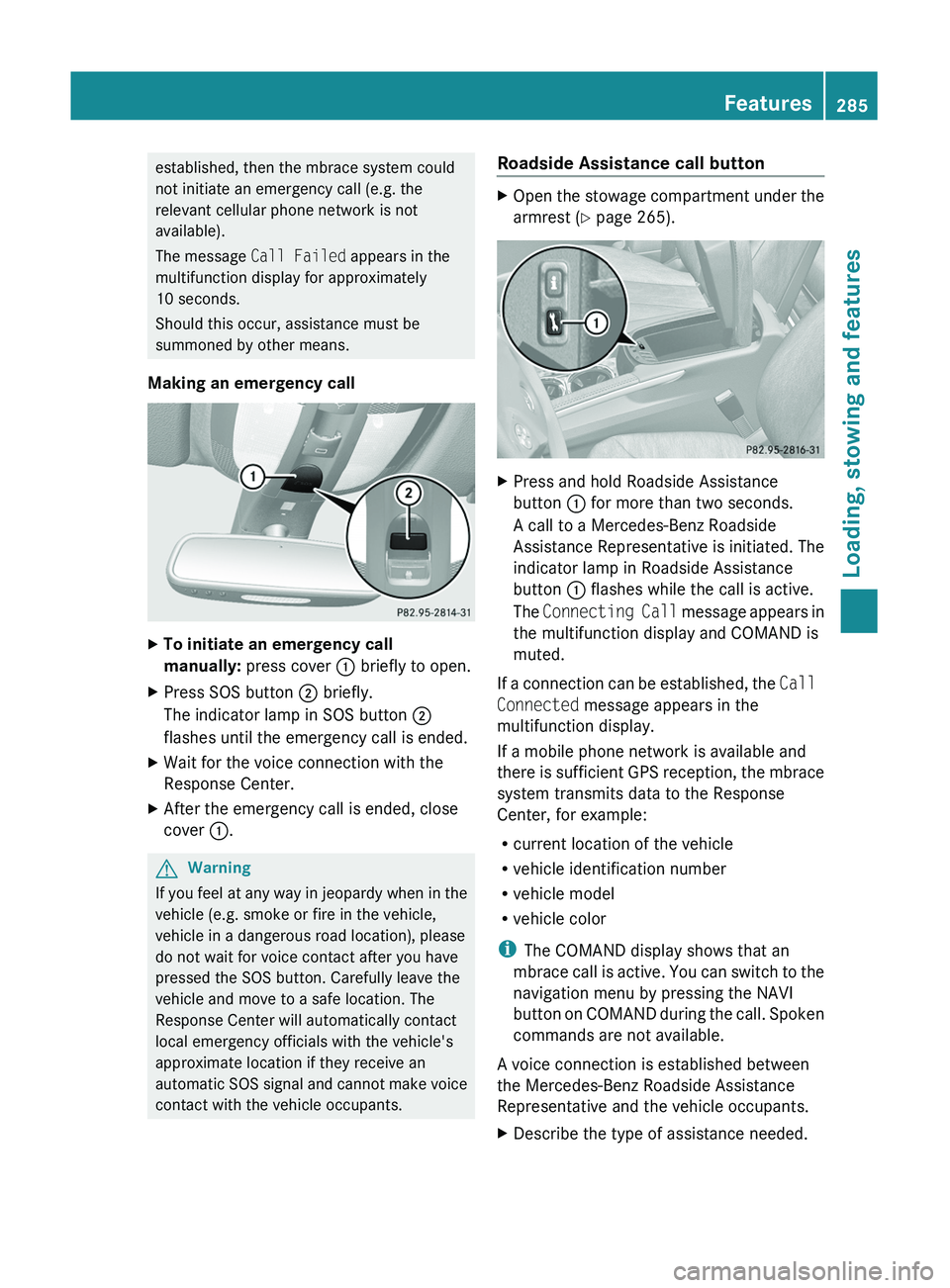
Making an emergency callXTo initiate an emergency call
manually: press cover : briefly to open.XPress SOS button ; briefly.
The indicator lamp in SOS button ;
flashes until the emergency call is ended.XWait for the voice connection with the
Response Center.XAfter the emergency call is ended, close
cover :.GWarning
If you feel at any way in jeopardy when in the
vehicle (e.g. smoke or fire in the vehicle,
vehicle in a dangerous road location), please
do not wait for voice contact after you have
pressed the SOS button. Carefully leave the
vehicle and move to a safe location. The
Response Center will automatically contact
local emergency officials with the vehicle's
approximate location if they receive an
automatic SOS signal and cannot make voice
contact with the vehicle occupants.
Roadside Assistance call buttonXOpen the stowage compartment under the
armrest ( Y page 265).XPress and hold Roadside Assistance
button : for more than two seconds.
A call to a Mercedes-Benz Roadside
Assistance Representative is initiated. The
indicator lamp in Roadside Assistance
button : flashes while the call is active.
The Connecting Call message appears in
the multifunction display and COMAND is
muted.
If a connection can be established, the Call
Connected message appears in the
multifunction display.
If a mobile phone network is available and
there is sufficient GPS reception, the mbrace
system transmits data to the Response
Center, for example:
R current location of the vehicle
R vehicle identification number
R vehicle model
R vehicle color
i The COMAND display shows that an
mbrace call is active. You can switch to the
navigation menu by pressing the NAVI
button on COMAND during the call. Spoken
commands are not available.
A voice connection is established between
the Mercedes-Benz Roadside Assistance
Representative and the vehicle occupants.
XDescribe the type of assistance needed.Features285Loading, stowing and featuresBA 164.8 USA, CA Edition B 2011; 1; 2, en-USd2sboikeVersion: 3.0.3.52010-04-21T15:08:44+02:00 - Seite 285Z
Page 288 of 376
The Mercedes-Benz Roadside Assistance
Representative either sends a qualified
Mercedes-Benz technician or organizes for
your vehicle to be transported to the nearest
authorized Mercedes-Benz Center. You may
be charged for services such as repair work
and/or towing. Further details are available
in your mbrace manual.
i If the indicator lamp in MB info call
button : flashes continuously and it was
not possible to establish a voice
connection to the Response Center, then
the mbrace system has failed to initiate a
Roadside Assistance call (e.g. the
corresponding cellular phone network is
not available). The Call Failed message
appears in the multifunction display.XTo end a call: press the ~ button on the
multifunction steering wheel.
or
XPress the corresponding button for ending
a phone call on COMAND.
i Sign and Drive services 38
: you are not
charged for services such as jump-starting,
providing a few gallons of fuel for a fuel tank
that has been run dry or changing a flat tire
with the vehicle's own spare tire.
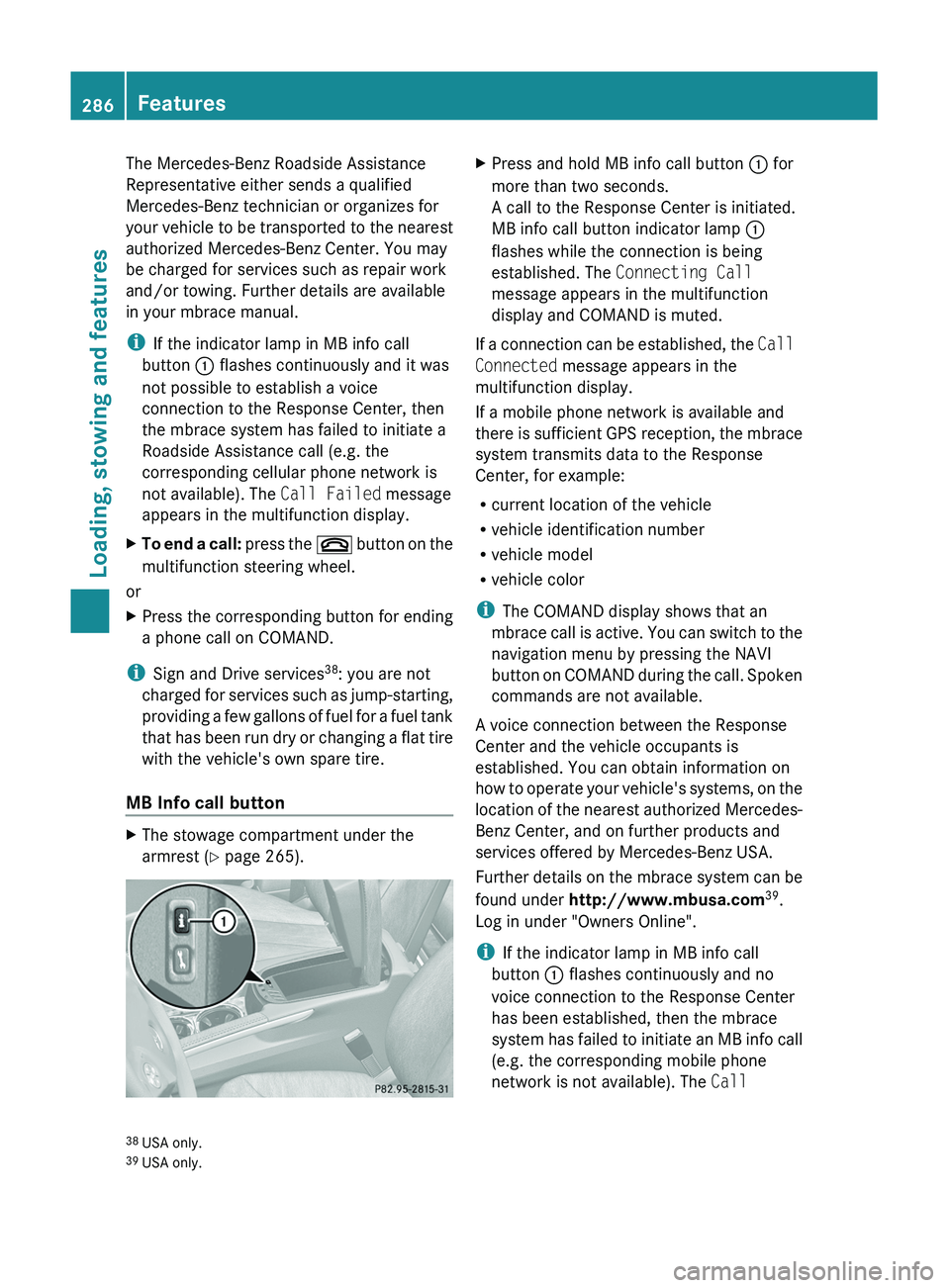
MB Info call button
XThe stowage compartment under the
armrest ( Y page 265).XPress and hold MB info call button : for
more than two seconds.
A call to the Response Center is initiated.
MB info call button indicator lamp :
flashes while the connection is being
established. The Connecting Call
message appears in the multifunction
display and COMAND is muted.
If a connection can be established, the Call
Connected message appears in the
multifunction display.
If a mobile phone network is available and
there is sufficient GPS reception, the mbrace
system transmits data to the Response
Center, for example:
R current location of the vehicle
R vehicle identification number
R vehicle model
R vehicle color
i The COMAND display shows that an
mbrace call is active. You can switch to the
navigation menu by pressing the NAVI
button on COMAND during the call. Spoken
commands are not available.
A voice connection between the Response
Center and the vehicle occupants is
established. You can obtain information on
how to operate your vehicle's systems, on the
location of the nearest authorized Mercedes-
Benz Center, and on further products and
services offered by Mercedes-Benz USA.
Further details on the mbrace system can be
found under http://www.mbusa.com 39
.
Log in under "Owners Online".
i If the indicator lamp in MB info call
button : flashes continuously and no
voice connection to the Response Center
has been established, then the mbrace
system has failed to initiate an MB info call
(e.g. the corresponding mobile phone
network is not available). The Call
38
USA only.
39 USA only.286FeaturesLoading, stowing and features
BA 164.8 USA, CA Edition B 2011; 1; 2, en-USd2sboikeVersion: 3.0.3.52010-04-21T15:08:44+02:00 - Seite 286
Page 289 of 376
Failed message appears in the
multifunction display.XTo end a call: press the ~ button on the
multifunction steering wheel.
or
XPress the corresponding button for ending
a phone call on COMAND.
Call priority
An emergency call can still be initiated even
if a service call is currently active, e.g. a
Roadside Assistance call or an MB info call.
In this case, an emergency call will take
priority and override all other active calls.
The indicator lamp of the respective button
flashes until the call is ended. An emergency
call can only be terminated by the Response
Center. All other calls can be ended by
pressing the ~ button on the
multifunction steering wheel or the
corresponding button for ending a telephone
call on COMAND.
i When an mbrace call has been initiated,
COMAND is muted. The mobile phone is no
longer connected to COMAND. If you must
use your mobile phone, we recommend
that you do this only when the vehicle is
stationary and in a safe location.
Downloading destinations in COMAND
i Information on the components and
operating principles of COMAND can be
found in the separate COMAND operating
instructions.
Destination Download gives you access to a
database with over 10 million points of
interest (POIs) which can be downloaded onto
the navigation system of your vehicle. If you
know the destination, you can download the
address or obtain the location of points of
interest (POIs) or important destinations in
the surrounding area.
You are prompted to confirm route guidance
to the entered address.XSelect Yes using the = button or
select ; on COMAND.XPress the 9 button on COMAND to
confirm.
The system calculates the route and
subsequently starts the route guidance with
the address entered.
i If you select No, the address can be stored
in the address book.
i The Destination Download function is
available if the corresponding cellular
phone network is available and data
transfer is possible.
Search & Send
"Search & Send" is a destination entry
service. You can find further information on
"Search & Send" in the separate COMAND
operating instructions.
Vehicle remote opening
If you have unintentionally locked your
vehicle (e.g. the SmartKey is inside the
vehicle) and a replacement key is not
available:
XContact the following service hotlines:
R USA: Response Center under the
number 866-990-9007
R Canada: Customer Service under
1-888-923-8367
You will be asked for your password.XReturn to your vehicle at the time arranged
with the Response Center.XPull the tailgate handle for at least 20
seconds until the indicator lamp in the SOS
button ( Y page 284) flashes.
The Connecting Call message appears in
the multifunction display.
Alternatively, the vehicle can also be opened
via the Internet in the "Owners Online"
Features287Loading, stowing and featuresBA 164.8 USA, CA Edition B 2011; 1; 2, en-USd2sboikeVersion: 3.0.3.52010-04-21T15:08:44+02:00 - Seite 287Z
Page 325 of 376
GWarning
Do not place any metal objects on the battery
as this could result in a short circuit.
Use leak-proof batteries only to avoid the risk
of acid burns in the event of an accident.
Take care that you do not become statically
charged, e.g. by wearing synthetic clothing or
rubbing against textiles. For this reason, you
also should not pull or push the battery over
carpets or other synthetic materials.
Never touch the battery first. First, touch the
outside body of the vehicle in order to release
any possible electrostatic charges.
Do not rub the battery with rags or cloths. The
battery could explode if touched due to
electrostatic charge or due to spark
formation.
! Switch off the engine and remove the
SmartKey before disconnecting the
terminal clamps from the battery. On
vehicles with KEYLESS-GO, make sure that
the ignition is switched off. Check that all
the indicator lamps in the instrument
cluster are off. You may otherwise destroy
electronic components, such as the
alternator.
! Like other batteries, the vehicle battery
may discharge over time if you do not use
the vehicle. In this case, have the battery
disconnected at a qualified specialist
workshop, e.g. an authorized Mercedes-
Benz Center. You can also charge the
battery with a charger recommended by
Mercedes-Benz. Contact an authorized
Mercedes-Benz Center for further
information.
The battery, breather hose and cover of the
positive terminal clamp must be installed
securely during operation.
i Remove the SmartKey if you park the
vehicle and do not require any electrical
consumers. The vehicle will then use very
little energy, thus conserving battery
power.
Mercedes-Benz recommends that you do not
carry out work on batteries yourself, e.g.
removing, charging or replacing. Always have
this work performed at a qualified specialist
workshop, e.g. an authorized Mercedes-Benz
Center.
i If the power supply has been interrupted,
e.g. if the battery has been reconnected,
you must carry out the following tasks:
R set the clock ( Y page 222)
On vehicles with COMAND and a
navigation system, the clock is set
automatically.
R reset the sliding sunroof ( Y page 90)
R reset the function for folding the exterior
mirrors in/out automatically by folding
the mirrors out once ( Y page 108)
R reset the side windows ( Y page 87)
Charging the battery
GWarning
Never charge a battery while still installed in
the vehicle unless the accessory battery
charge unit approved by Mercedes-Benz is
being used. Gases may escape during
charging and cause explosions that may
result in paint damage, corrosion or personal
injury.
An accessory battery charge unit specially
adapted for Mercedes-Benz vehicles and
tested and approved by Mercedes-Benz is
available. It permits the charging of the
battery in its installed position. Contact an
authorized Mercedes-Benz Center for
information and availability.
Charge the battery in accordance with the
separate instructions for the accessory
battery charger.
GWarning!
There is a risk of acid burns during the
charging process due to the gases which
escape from the battery. Do not lean over the
battery during the charging process.
Battery323Roadside assistanceBA 164.8 USA, CA Edition B 2011; 1; 2, en-USd2sboikeVersion: 3.0.3.52010-04-21T15:08:44+02:00 - Seite 323Z